FOCUS Step 2: Finding the Y-DNA and Mitochondrial DNA of Your Ancestors

This is the third article in our FOCUS series, providing step-by-step instructions for identifying brick-walled ancestors.

These two articles detail the initial steps:

By now, you will have selected the ancestor you want to focus on identifying, and you have tools in your toolkit for working with DNA matches who have no trees.

You may have ordered DNA tests from multiple vendors and are waiting on results, so while you wait, we’ll start with finding the Y-DNA and mitochondrial DNA of your ancestors and identifying DNA testing candidates.

While it may sound counterintuitive, we’re going to be working with all of the major vendors, including FamilyTreeDNA, who actually tests for Y-DNA and mitochondrial DNA, plus WikiTree, 23andMe, MyHeritage, Ancestry, GEDmatch and FamilySearch. They are all quite useful in different ways.

This Type of Searching Is Different

Normally, when we search for brick-walled ancestors, we are searching backward in time. In other words, we begin with the last person we know and work back from there, hoping to identify the previous generation.

If we don’t know Lucy’s birth surname and she was born about 1750, and married William Moore in the late 1770s, we begin with what we do know in that timeframe.

Searching for our ancestor’s Y-DNA or mitochondrial DNA, and testers who carry that DNA, is fundamentally different because we begin with that ancestor and work forward in time.

In other words, if we want to find Lucy’s mitochondrial DNA, we begin with her daughters and track forward in time to the present. Hopefully, someone has already tested, and we can locate that result, but if not, we need to find people who descend through a specific path that carry Lucy’s mitochondrial DNA.

If we were searching for the Y-DNA of William Moore, we would look for his direct paternal descendant males who would carry the Moore surname.

Chicken or Egg?

I’ve been debating whether I should show you:

  1. How to locate and identify the Y-DNA and mitochondrial DNA of your ancestors first, or
  2. How to use Y-DNA and mitochondrial DNA (mtDNA) to help break through your brick wall first

I decided to write the “how to locate” article first because I don’t want you to skim over and ignore the ‘how to use’ article, thinking it’s irrelevant to your research because you don’t carry the Y-DNA and/or mtDNA of your brick-walled ancestor.

There are lots of avenues to locate the Y-DNA or mitochondrial DNA of your ancestors, something you definitely want to do. You’ll soon see that Y-DNA and mtDNA information can also assist with autosomal DNA results.

These are all pieces of your ancestor’s puzzle, and you never know which one will be the one to topple that wall.

Plus, you don’t know what you don’t know about that ancestor.

Let’s jump right in!

Who Carries the Y-DNA and Mitochondrial DNA of Your Ancestor?

As a quick refresher, only men can test for Y-DNA because only men have a Y chromosome which is inherited from their father. It’s passed in a direct paternal line from father to son, never mixed with DNA from the mother. Because it’s never divided during recombination like autosomal DNA, it’s uniquely useful for connecting lineages both recently and back in time hundreds and thousands of years.

Both Y-DNA and mitochondrial DNA incur occasional mutations that function as genetic breadcrumbs, making them incredibly useful for reassembling those specific family lines where genealogy paper trails have broken or been interrupted.

Mitochondrial DNA is passed from mothers to their children of both sexes, but only daughters pass it on. This means that in the current generation, males and females can both test for the mtDNA of their direct, mother-to-mother, matrilineal line.

Anyone, including males, who descends from an ancestor through all females can test for that ancestor’s mitochondrial DNA.

If you’re lucky, you’ll carry the Y-DNA or mitochondrial DNA of the ancestor you are seeking. If not, you’ll need to do one of two things:

  1. Determine if someone has already tested for that ancestor
  2. If not, find candidates to test

Y-DNA is generally easier because you at least (hopefully) have a surname to work with that has been passed from father to son, along with their Y chromosome.

Mitochondrial DNA is more challenging since surnames change each generation, so I’ve included several mitochondrial examples. Don’t skip over them, because the same research techniques apply to Y-DNA too, especially difficult cases.

If you’re a male, I strongly recommend that you order:

If you’re a female, you can only order the mtFull test, but you may be able to ask your father or brother or a male relative (with the surname in the lineage you seek) to take the Big Y-700 to represent your father’s family line. In other words, if you’re looking for a male Estes, you can ask your 2C Estes male who descends in a direct paternal line of all Estes men from your common ancestor.

Complete Versus Partial Tests

Haplogroup-only results derived from autosomal tests are fine as far as they go – but they don’t go very far. Most are what I would call midrange, providing testers with a haplogroup from maybe 2000 years ago, and some are much more distant than that. That isn’t to say they can’t be useful in a limited capacity, but Y-DNA and mtDNA have so much more potential.

You need comprehensive Y-DNA and mtDNA test results that identify all your haplogroup-defining mutations and can be refined as more people test and match family-level mutations.

Haplogroups are important, but you also need to match with other testers. Additionally, you’ll want the most complete haplogroup possible, because it will help you genealogically by providing a complete breadcrumb trail with the ability to identify your most recent common ancestor (MRCA).

FamilyTreeDNA is the only vendor that offers these complete tests that include matching with other testers, plus additional genealogy tools.

The Big Y-700 test scans for mutations in the stable portion of the Y chromosome and is the only way to obtain that personal-level information. It’s those recent mutations that will help place you within a biological family – or eliminate you from other lines, which prevents barking up the wrong tree.

The benefit of taking the test yourself, or sponsoring a test for someone willing to share their results with you, is that you have ready access to information through FamilyTreeDNA’s tools such as:

  • Matches with other Y-DNA and mtDNA testers
  • Matches Map (ancestor locations)
  • Advanced Matching, which provides a filtered list of people who match you on BOTH your Y-DNA or mitochondrial DNA AND your Family Finder autosomal test
  • Haplotype clusters (for mtDNA)
  • Your mutations
  • Block Tree (for Y-DNA)
  • Customized Discover tools

Click any image to enlarge

  • Discover’s Advanced Tools like the Match Time Tree, shown above, which displays your matches with their earliest known ancestors (EKA) together on the Time Tree
  • Globetrekker™ (for Y-DNA with mtDNA coming soon)
  • Up to 30 Ancient Connections
  • Up to 20 Notable Connections

FamilyTreeDNA’s free Discover tool, here, provides public information for everyone about haplogroups, but if you haven’t taken the test, you won’t receive matching and customized information described above, which is essential to genealogy.

Upgrades for Partial Tests

You may have previously tested at a lower level at FamilyTreeDNA.

For mtDNA, the early mtPlus test examined a portion of the mitochondria and provided matching at lower levels, as do the 12-111 marker Y-DNA tests. Both provide a predicted high-level basic or midrange haplogroup based on the mutation information available in those limited tests.

If you took an earlier, partial test, you can sign on to your account to upgrade by clicking on the “Big Y,” even though it’s greyed out. Grey simply indicates that you don’t currently have that level of test.

Click on “Full” to upgrade to the mtFull test.

Test Features at Various Levels

Depending on the type of test you take, and at which vendor, you may have a fully refined or partial haplogroup.

Discover provides a substantial amount of information if you receive a partial haplogroup:

A partial haplogroup is better than no haplogroup, but it’s also like working with one hand tied behind your back. If at all possible, you need to work with a full haplogroup and matches.

Testers who click through to Discover from their own test, or a test they manage, can view additional features not available in the free version.

The table below shows the four different ways you can access and view your ancestor’s haplogroup. Based on the testing level and/or how they tested, the haplogroup level will vary.

Clearly, the best scenario is when you either take the Big Y-700 or mtFull test yourself, or you have access to the test results of someone who takes that test to represent your ancestor’s DNA. Primary access confers the greatest amount of information, but you can still glean information in other ways.

Feature Introductory Level Test at FamilyTreeDNA* Tester’s Big Y-700 or mtFull Test – Full Access Partial Haplogroup from Autosomal Test Your Ancestor’s Haplogroup but without Full Access
Matching Yes, at that lower level Best – at all levels No No
Matches Map Yes, at lower level Yes No No
Mutation Values Yes, STR markers at lower Y-DNA level Yes, STRs (Y-DNA) and SNPs Not directly but through Discover Not directly but through Discover
Haplotree & SNPs with surnames (Y-DNA only) Yes, at lower level Yes No No
Block Tree (Big Y test only) No Yes No No


Advanced Matching (multiple types of tests) Yes, at that level Yes No No
Ability to Join Group Projects Yes Yes Only test owner or manager can join Only test owner or manager can join
Discover Reports Yes, same information as the free version due to lower coverage Yes, when clicking through from your FamilyTreeDNA account Free version Free version
Haplogroup Story Yes, at lower haplogroup level Yes – best and highest level Yes, at lower haplogroup level Yes, at lower haplogroup level
Country Frequency Map and Table views Yes, at lower haplogroup level Yes, at most refined haplogroup level Yes, at lower haplogroup level Yes, at most refined haplogroup level
Notable Connections Same as free version About 20 for Y-DNA, 11 for mtDNA About 10 for Y-DNA, 3 for mtDNA About 10 for Y-DNA, 3 for mtDNA
Migration Map Yes, at lower level Yes, at advanced level Yes, at lower level Yes, at advanced level
Globetrekker (Y-DNA only, mtDNA coming soon) No Yes No No
Ancient Connections Same as free version About 30 About 10 for Y-DNA, 3 for mtDNA About 10 for Y-DNA, 3 for mtDNA
Time Tree Yes, at lower haplogroup level – generally 2,000 years or older Yes, at most refined haplogroup level, often within genealogical timeframe Yes, at lower haplogroup level – generally 2,000 years or older Yes, at most refined level
Match Time Tree No Yes – your matches & their EKA on the Time Tree including WikiTree Connections and Ancient DNA No No
Ancestral Path Yes, at lower haplogroup level Yes Yes, at lower haplogroup level Yes
Suggested Projects Yes Yes, at more refined level Yes, but must test with FamilyTreeDNA to join Yes, but must test with FamilyTreeDNA to join
Scientific Details, ages and variants Yes, at lower level Yes Yes, at lower level Yes
Compare Haplogroups Yes Yes Yes Yes

*Note that often your ancestor’s haplogroup as reported by the Family Finder (autosomal) test is more refined, meaning closer in time, than the Y-DNA haplogroups predicted by STR tests, but both are always substantially less specific than the Big Y-700 test. As of the publication date of this article, Family Finder does not yet report a mitochondrial DNA haplogroup, but that is planned for the future.

This chart only includes features you would specifically use to identify an ancestor or ancestral lineage. There are other reports provided with your test that will be of interest. Discover provides about 14 reports that include various options.

Now we can envision:

  • The benefits of finding our ancestors’ Y-DNA and mtDNA
  • The benefits of obtaining the most refined haplogroup possible
  • The benefits of being able to view the results directly

You may not be able to achieve all of these, but even a partial haplogroup is better than no haplogroup at all, and a fully refined haplogroup, even if you can’t see everything in another tester’s account, is better than a partial haplogroup.

So, let’s see how to find your ancestors’ haplogroups. I collect them all, not just for brick-walled ancestors, but because they tell a part of our story not available through any other means.

Finding Your Ancestor’s Mitochondrial and Y-DNA

If you are the DNA tester for your brick-wall ancestor, then you’re golden, but chances are that you’re not.

If you’re searching for Y-DNA, and you don’t carry that Y-DNA yourself, you’ll need a male relative who carries that Y chromosome to test.

Males carry the Y-DNA of their direct patrilineal ancestors, shown in the image below on the left side in blue, plus the mitochondrial DNA (mtDNA) of their mother, shown with yellow hearts at far right.

At the 4th generation level, we have 4 Y-DNA lineages to collect (light blue, dark green, medium green, and teal), and a total of 8 mtDNA lineages.

Let’s say you’re searching for your father’s mother’s mother as your brick-wall ancestor.

Your father (and his siblings) carry the mtDNA of his mother, shown above in fuchsia, as do her grandchildren through her daughters. That’s why your father has a fuchsia heart. If close family members test, chances are you can arrange to manage their test or view their results. (Be sure they take the autosomal Family Finder test too. You’ll need that later.

If you don’t manage their test for them, you’ll need to ask to see their results to view matches and work with trees.

I have a family project at FamilyTreeDNA that I manage. I ask people who have tested for a particular ancestor to join that project so I can easily view their results while they continue to manage their test, and can select how much they want me to see or do.

FamilyTreeDNA is currently working on a multi-kit management feature that will address the challenge of sharing results.

But I Don’t Know of Any Cousins…

Let’s say you don’t know of and can’t readily identify anyone who descends from your ancestor appropriately.

If the ancestor you seek is a male, mitochondrial DNA is probably not going to help you because men don’t pass their mitochondrial DNA on to their descendants. In order to obtain a male ancestor’s mitochondrial DNA, you’d need to be able to identify a sister or someone known to descend from his mother (or sisters) through all females to the current generation. Needless to say, if you know who his mother is, you probably already know who he is.

If your brick wall is a female ancestor, your first order of business is to find someone who descends from her through all females to the current generation, where the tester can be male or female.

Why is this so important?

Mitochondrial DNA isn’t admixed with the father’s DNA, so it’s not divided in each generation. This means that mitochondrial DNA is the only direct line-of-sight we have that bypasses both changing surnames and genetic recombination for females.

Who Has Tested for Your Ancestor?

If you’re NOT the tester for your brick-walled ancestor or aren’t the curator of the test, your first step is to see if someone else has already tested.

This can sometimes be challenging.

It’s impossible to obtain mitochondrial DNA for an unknown ancestor if there are no known daughters, and for Y-DNA if there are no known sons. You may need to review genealogical resources to make sure you’ve identified all of that ancestor’s children.

Barring those scenarios, there are a surprising number of resources available to find descendants.

WikiTree

The first place I check to see if someone has already tested for a particular ancestor is WikiTree.

WikiTree is the one place where you find the ancestor along with the people who have taken DNA tests who descend from that ancestor. It’s invaluable.

Normally, you have to work with matches to identify your common ancestor. WikiTree works the other way around. Your starting place is with the ancestor.

You can’t Google your mystery ancestor’s name because if you knew their name, they wouldn’t be a mystery ancestor – but you can Google their spouse or a child.

I’m using an example from my own line because my mitochondrial DNA results are connected to her.

I’m Googling:

Barbara Mehlheimer born 1822 died 1906 in Indiana at WikiTree

Google was slightly confused but the results got me to where I needed to go.
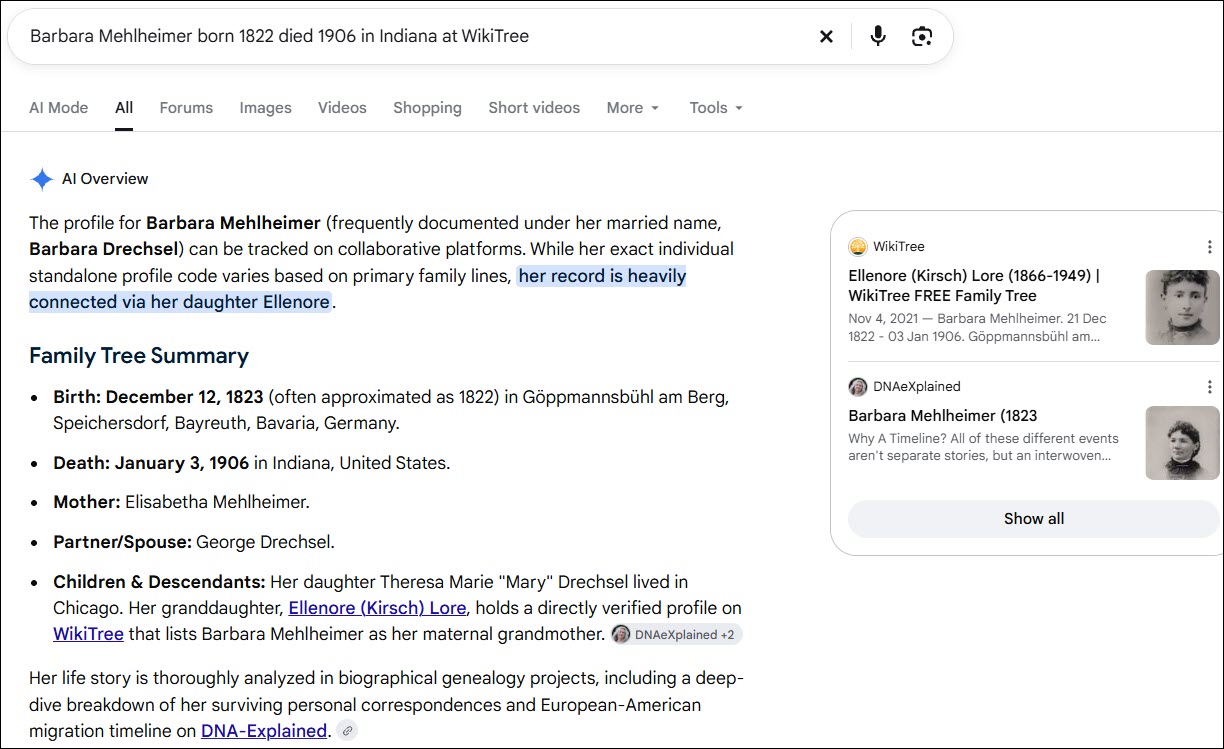
Barbara Mehlheimer married George Drechsel and her daughter was Barbara Drechsel who married Jacob Kirsch.

First, check Barbara’s WikiTree profile card to confirm you’ve found the correct person.

Next, click on the DNA tab beneath her profile information (or just scroll down). She has four DNA Connections.

You can see that one person, me, who carries Barbara’s mitochondrial DNA has connected their DNA to Barbara’s profile. I did this by entering my DNA information on my WikiTree profile, then WikiTree connects my DNA haplogroup information from mother to mother to mother to Barbara and propagates my DNA haplogroup to her, her matrilineal ancestors, and their female descendants. If you click on the haplogroup, it takes you directly to that haplogroup in Discover.

Three people have connected their autosomal results to Barbara. This information can be very important, and not just for mitochondrial DNA. It allows us to identify autosomal testers we may match at different testing companies who descend from Barbara.

In your research journal, make notes of these names, testing companies, and kit numbers. Remember that this doesn’t mean the company noted is the only place someone has taken an autosomal DNA test. I’ve tested at all of the major companies, but only GEDmatch and FamilyTreeDNA are listed here.

For Y-DNA and mitochondrial DNA, the haplogroup is shown, although when testers receive a new Y-DNA or Mitotree haplogroup, they seldom think to revise it in WikiTree. This means their current haplogroup may be more specific and improved since the WikiTree information was entered.
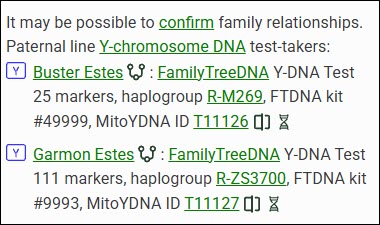
Some people may have tested at different levels too. In this case, Buster Estes, who is now deceased, was one of the earliest testers, long before the Big Y tests were available. He only took a 25-marker test, so his haplogroup was predicted as R-M269. Garmon, on the other hand, was able to upgrade his Y-DNA test to the Big Y-700, and his haplogroup is much more refined at R-ZS3700. Their haplogroups don’t match exactly due to the levels at which they tested, but they also don’t preclude the two testers from belonging to the same genetic line.
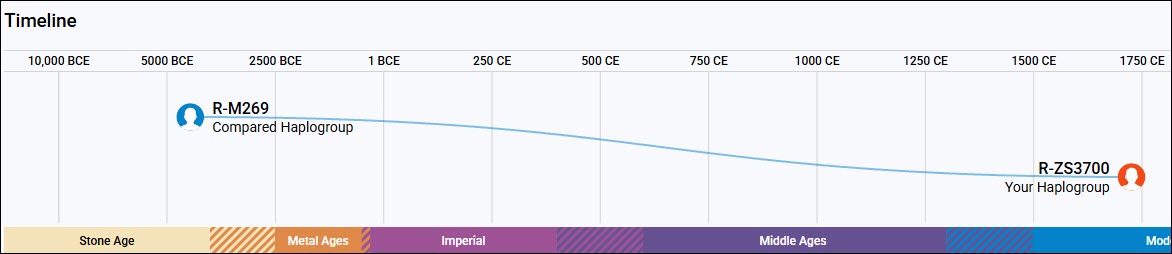
This screenshot of Discover’s Compare function illustrates how important the Big Y-700 test is when compared to the STR test’s predicted haplogroups. The man who developed the mutation that defines R-ZS3700 lived about 1750 CE, and the man who developed R-M269 lived about 4450 BCE, or 6,450 years ago. That’s a big difference.

Using a combination of multiple testers and genealogy, we’ve identified the man who developed R-ZS3700 and passed it on to his sons. Moses Estes was born in 1711 in Virginia and all of his descendant testers carry R-ZS3700.

Now that’s extremely useful information, because we know that any man with haplogroup R-ZS3700 descends from Moses Estes in a direct paternal line, and any man whose haplogroup is not R-ZS3700 or doesn’t include R-ZS3700 upstream of his haplogroup does not descend from Moses Estes in that way.

Please add your DNA tests, including haplogroups and your kit number, to your profile at WikiTree so that the haplogroup information can be populated appropriately to your ancestors.

Searching for a Test Candidate Using Autosomal Descendants

When you’re searching for a testing candidate at WikiTree, you can click through to the tester’s profile and view exactly how they descend from the ancestor shown.

Let’s say that no one has linked a mitochondrial DNA test to the ancestor you’re searching for, but several people have linked autosomal tests to that ancestor’s profile card.

Click on the tester’s name and then on the DNA Ancestors tab to see how they descend from that ancestor. If you’re lucky, you’ll find someone in the autosomal list who is a mitochondrial DNA testing candidate.

If you’re looking for a Y-DNA tester, begin by looking for a male with the same surname as that ancestor. If you’re looking for a mitochondrial DNA tester, you’ll need to view each tester’s ancestors.
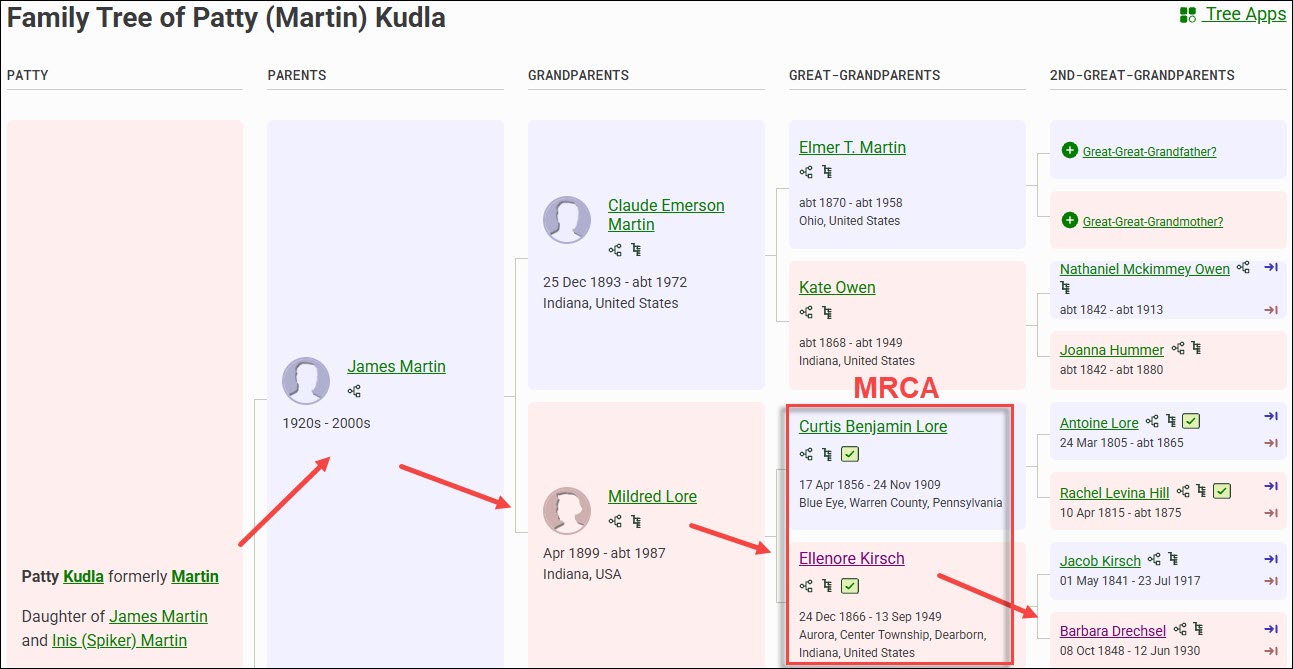
Regardless of whether they are a mitochondrial or Y-DNA testing candidate, you’ll identify your most recent common ancestor (MRCA) for each person, information that will become essential for the autosomal tools that we’ll be discussing in future articles.

In your research journal, I suggest that you record all of their descent information now, including their names, where they tested, your MRCA, kit numbers and any other relevant notes.
If you’d like to ask them to take a specific test, or if they already have and you’d like to know more, you can message WikiTree users by clicking on their profile, and then on the little envelope beside the profile manager’s name.

Finding Your Ancestor’s DNA Descendants at WikiTree

Let’s say that no one in the DNA list of people who have already taken tests descends from your ancestor matrilineally. Don’t worry, there are still more options!
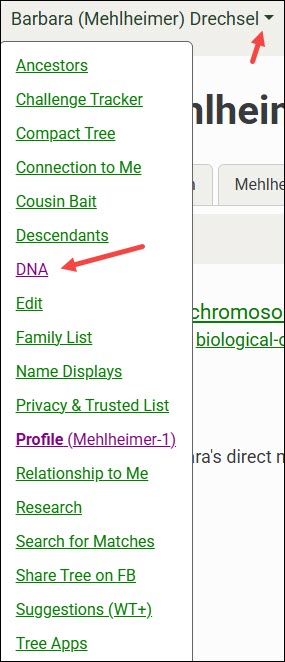
At the top of the WikiTree page for that ancestor, click the down arrow, then on DNA.

The default tab shows the DNA Ancestors of the profile you’re viewing. You’ll see Y-DNA for males, and both mitochondrial and X-chromosome ancestors for everyone.

You may notice that there’s an ancestor listed for your brick wall ancestor. That’s wonderful, but don’t jump for joy quite yet. Remember, WikiTree is a one-world tree, and you need to verify the underlying genealogy in every tree here, and at every vendor.

Always confirm using multiple sources, meaning resources other than trees. The great thing about WikiTree is that there are often several sources listed in each person’s profile, and other resources that can help immensely. I love WikiTree, but I’m always skeptical of information in any tree, and I prove everything to my own satisfaction. I wrote several articles about that topic in the Genealogy Proof Series, here.

To find testers, you’ll need to view your ancestor’s DNA Descendants.

Click on the DNA Descendants tab.

The Mitochondrial DNA Descendants view shows potential candidates for mtDNA testing. Remember, in the current generation, males and females can both test so long as they descend from that ancestor through all females.

In the case of Barbara Mehlheimer Drechsel and her descendants, there are several males who are immediately eliminated because they’ve been deceased for more than a century, and several daughters who didn’t have children.

Not every person’s line on WikiTree has been added or developed. You can see that three daughters’ lines that might hold candidates don’t list all their children, and I still need to research two additional people. That means I still have five candidate lines to extend that have potential mtDNA testers.

So, in summary, if Barbara was the ancestor I was seeking:

  • One person has already tested
  • Three daughters don’t have their families extended.
  • Two have daughters that I need to research.

For both Y-DNA and mitochondrial DNA, I like to have at least two people who descend from different children of the ancestor, and whose tests match at a level that does not preclude that lineage. This helps confirm both the genetic line and the genealogy of both testers.

With male ancestors, having more than one tester for each line through different siblings is essential.

Kit Numbers, Earliest Known Ancestors and Google

When DNA kit numbers are included at WikiTree, you’ll want to Google to see if that kit number is shown in a public Group Project at FamilyTreeDNA where you may find more information.

The exact search string to use to find a specific kit at FamilyTreeDNA within projects is:

“9993” site:familytreedna.com

Replace 9993 with the kit number you’re interested in. You can also add the word “projects”, without quotes, to the end of that string to omit forums and limit the search to within projects. This string both focuses and limits the search, filtering out most noise.

By clicking on “read more,” you’re taken directly to the Estes Family Surname Project Y-DNA page.

The green haplogroups are SNP-confirmed, unlike the red predicted haplogroups from the lower-level 12, 25, 37, 67 or 111-marker tests. The R-ZS3700 haplogroup was obtained from the Big Y-700 test, so it is the most granular and specific. If this is your line, you’ve just found your ancestor’s haplogroup. It’s also possible that, by testing, you could receive an even more specific haplogroup.

Please note that haplogroup R-M269 is the most common haplogroup in Europe, and isn’t specific enough to use for anything other than very basic information. It can rule out two people with different base haplogroups, like haplogroup I or J, for example, as descending from a common patrilineal ancestor.

Project administrators are all volunteers, and each administrator groups their Group Project members differently, so take a few minutes to review the project pages. You may find additional testers who have joined this project who descend from your ancestors or your ancestral line.

You may also find other lines with the same surname and a substantially different haplogroup, which tells you that there are multiple genetic lines with the same surname. I have one example of this in the same county, at the same time, found in men by the same exact name – think John Smith. So frustrating. Without DNA testing, we would NEVER have sorted through those two same-name but completely different lines.

However, finding people who match your ancestor’s DNA but don’t have your earliest known ancestor (EKA) may be just the clue you need to knock down that brick wall. How are your ancestor and that other person’s EKA connected, and in what timeframe? Do they share a surname? A location? Are there other clues?

It’s unlikely that you’ll be able to use a kit number to Google unless you find one at WikiTree, but you can still search using the oldest name in that line that you know.

nicholas ewstas site:familytreedna.com

Replace the kit number with your EKA, in this case, “Nicholas Ewstas” in the search string, either with or without quotes. This takes you to the same page and any other projects that someone may have joined using exactly that earliest known ancestor’s name. Keep in mind that you’re only looking at their oldest ancestor, not every ancestor between them and their EKA. Your brick wall may lie someplace in there, which is why you need to check matches and view their trees.

Since women’s surnames change in every generation, they generally won’t be found in specific ancestral surname projects like men. This makes Googling using the ancestor’s name even more important.

catherine lejeune site:familytreedna.com

We don’t know who Catherine LeJeune’s mother is, so finding that someone has entered Catherine as their EKA may be critically important.

This is especially important for female brick-walled ancestors, since using this Google string with their daughters’ names may reveal someone else’s EKA in that genetic line within a project.

After clicking through to the project page, be sure to enlarge the page to display the full project, and use your browser search since partial results with predicted haplogroups may not be grouped with full mitochondrial sequence results.

Multiple people who descend from Catherine LeJeune have tested. The first six only took the partial test years ago. The bottom two testers took the full sequence test and have a new Mitotree haplogroup – U6a7a1a. We know that Catherine was born about 1633, in France, and we can see that other people have also tested and list different EKAs. Next, it’s time to research the other ancestors shown, or check WikiTree to see if any of these testers are listed there so you can contact them.

Now that you have found your ancestor’s haplogroup, you can use the free version of Discover to learn more. I wrote about using mitochondrial DNA and Discover in the article Mitochondrial DNA A-Z: A Step-by-Step Guide to Matches, Mitotree, and mtDNA Discover.

Now, let’s move to the DNA testing companies to see how we can find our ancestors’ Y-DNA, mitochondrial DNA, or testers, at 23andMe, FamilyTreeDNA, Ancestry, and MyHeritage.

At 23andMe

23andMe is not a genealogy company. That said, if you can figure out how people are related to you, you might be able to obtain a partial haplogroup for an ancestor. 23andMe shows both Y-DNA and mitochondrial DNA haplogroups to autosomal matches, but there is no Y-DNA or mitochondrial DNA matching, or associated tools.

23andMe caps matches without a subscription at only 1,500, and they don’t support trees, so I struggle to find useful haplogroups without an associated surname.

Browsing or searching your 1,500 allowed matches (you can have around 5,000 with a subscription) for a particular surname may provide you with an abbreviated haplogroup for both male and female ancestors.

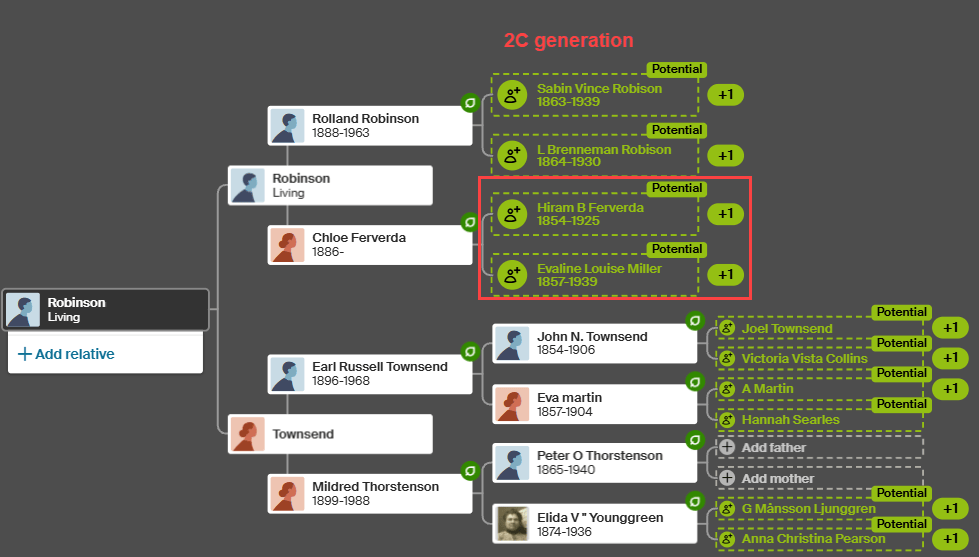
Despite my best efforts, while my maternal grandfather’s mother is not unknown, nor are her ancestors for several generations reaching back into Germany, I’ve been unable to find her mitochondrial haplogroup. Evaline Miller (1857-1939) was born and died in Kosciusko County, Indiana, where she married Hiram Bauke Ferverda, an immigrant from the Netherlands.

Ferverda is an unusual surname, so let’s use it for our example. Thankfully, I’m not dealing with something like Smith.

I entered Ferverda in the 23andMe search bar and it shows four results, two of which are in the 2C-3C range, and one that’s further distant.

I already have the Ferverda Y-DNA, so I don’t need that, but I do need the mitochondrial DNA of Eva Miller Ferverda, and I really don’t want to sift through Miller surnames.

I know who Mr. Ferverda is on my match list, and which ancestor we share. His mitochondrial DNA is not Eva Miller’s.

Fortunately, I know who Eva’s parents were, as shown above on my MyHeritage tree, so I can search for Ferverda, Miller, Lentz, Ruhle, Wolflin, and Heubach, several of which are unusual. Reaching back into Germany is difficult.

It’s likely I match all four of those people at 23andMe through a common lineage that descends from either Hiram Ferverda, Eva Miller, or both. Let’s see what I can put together.

Emily is estimated to be a 2C2R. She is younger than I am based on the birth year she provided in her profile which I am not showing for privacy reasons. Emily also stated that her maternal grandmother was born in Warsaw, Kosciusko County, Indiana, and provided family surnames that include Ferverda, Miller, Glant, Zimmermann, and others.

Kosciusko County is where Evaline Miller lived with Hiram Ferverda, and their daughter, Margaret, married Chester Glant. Margaret Ferverda Glant’s daughter, Joyce, was born in Kosciusko County and married a Zimmerman.

But now, I was stuck. That’s all I had in my desktop genealogy software.

I shifted to Ancestry, where I discovered a death certificate and other information that provided what I needed to close the gap.

This information confirmed Emily’s statement that her maternal grandmother was born in Warsaw, Kosciusko County, Indiana.

Therefore, drum roll…Emily carries Eva’s mitochondrial DNA haplogroup, which is T2b.

Let’s move on to the other two matches, both of whom carry haplogroup T2b.

Ian’s maternal grandmother’s birthplace is Leesburg, Kosciusko County, Indiana, and his surnames include both Ferverda and Robison.

Eva Miller Ferverda’s daughter, Chloe Ferverda, married Rolland Robison and had a daughter, Charlotte, whose daughter married a man with Ian’s surname. Their information allowed me to connect the dots appropriately. Ian’s mitochondrial haplogroup is also T2b, which confirms Eva Miller’s mtDNA haplogroup through a second child.

Shirley, the third match who carries haplogroup T2b, also shows the surnames of Ferverda and Robison, and tracks back matrilineally to Eva Miller.

In spite of the many challenges at 23andMe, and thanks to the rare surname of Ferverda, I’ve identified Eva Miller’s partial haplogroup, but not her full haplogroup. A partial haplogroup is much better than nothing and gives me something to work with.

I checked at Ancestry, MyHeritage and FamilyTreeDNA to see if any of those three people have tested there and have trees. Indeed, Ian tested at FamilyTreeDNA and I had corresponded with him and made a note that he is a matrilineal descendant of Eva Miller Ferverda, but he has not taken a mitochondrial DNA test there.

We know that if Emily, Ian, Shirley, or another appropriately descended person were to take a full-sequence mitochondrial DNA test, we would learn a LOT more about Eva’s mitochondrial DNA. If I can’t locate someone who has already tested, I’ll reach out to these people at 23andMe and offer a scholarship for a full-sequence mtDNA test.

It’s ironic that at the most restricted and least likely testing company, I found three people descended from Eva Miller. Hope springs eternal.

Unfortunately, T2b was formed about 8450 years ago and is a very broad haplogroup made up of many subclades, but at least I have something now – and this partial haplogroup may be just the seed I need to lead to more.

Now, let’s move to FamilyTreeDNA and hope that someone there has already taken the mtFull test.

At FamilyTreeDNA

There are multiple ways to find the Y-DNA or mitochondrial DNA of your ancestors at FamilyTreeDNA.

Project Search

You can search for surname projects along with other types of projects.

On FamilyTreeDNA’s main page, without signing in, scroll all the way to the very bottom footer where you will see the Group Projects link.

If you’re searching for a surname, enter that surname in the search box.

The next screen shows projects that people with the Estes surname, including females, have joined. This includes all types of projects and does NOT mean that these projects are relevant to your line, but it does include two surname projects you may find useful.

Scrolling down shows you how many people with the surname of Estes have tested. Keep in mind that some will be females, some use married names, and sometimes people use an alias, so they aren’t included in this count.

Surname projects for females aren’t terribly helpful since the surname typically changes in each generation, at least in Western cultures.

You can also search for keywords, such as Acadian. If you know that ancestral line is Acadian, you may find clues there, including descendants of your brick-wall ancestor.

Group Project Time Tree

Many Group Projects at FamilyTreeDNA have enabled the Y-DNA Group Time Tree feature. When visiting the project, if the administrator has the Group Time Tree enabled, click on that link under the DNA results tab.

The Group Time Tree is a genetic tree of Y-DNA testers within that project based on the groups created by the project administrator.

The groups constructed by the administrator are shown at left, the Time Tree in the middle, and the testers with their EKAs and country of origin flags at right. I’ve added the red text to reflect the Estes genealogical lineage.
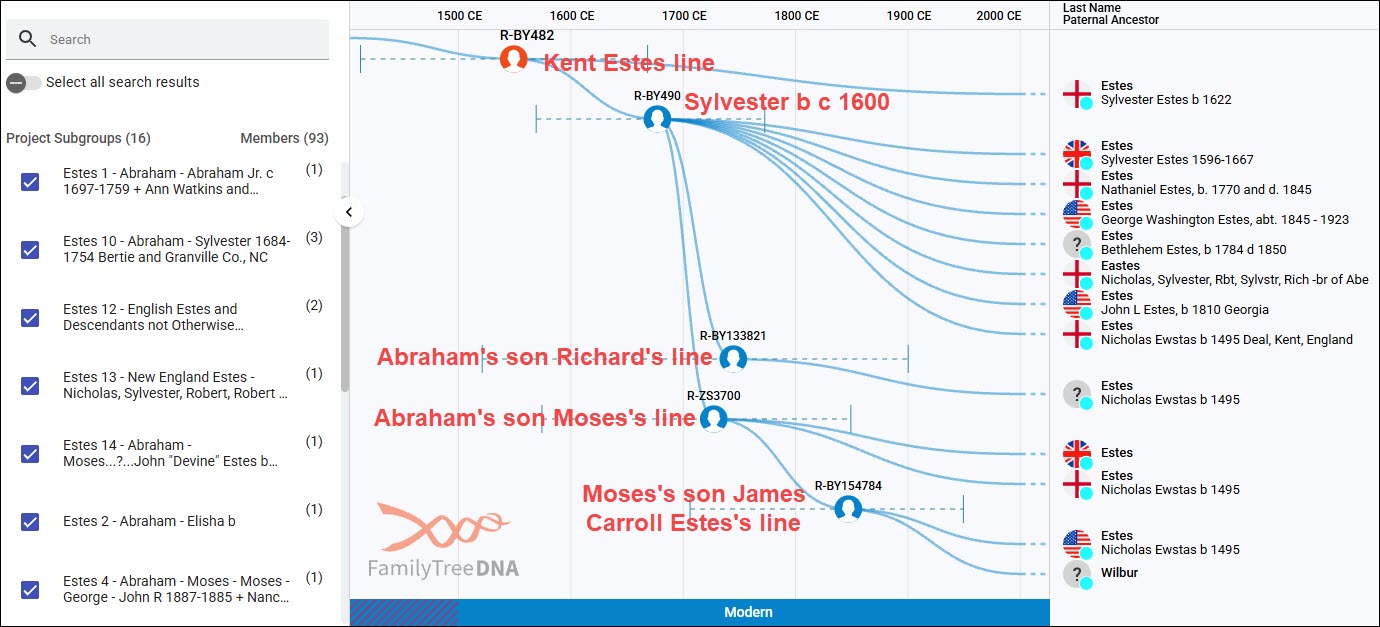
Based on the timeline at the top, you can see how closely these Y-DNA testers are related in time. Each haplogroup shown represents a different branching genetic lineage – breadcrumbs at work. If you are a genetic Estes male who descends from the Estes family that originated in Kent, England, and you take the Big Y-700 test, you’ll be a member of R-BY482 or its descendant haplogroups.

Keep in mind that not all testers join group projects, so it’s likely that there will be matches on your match list that aren’t here. Furthermore, only Big Y testers appear on any Time Tree.

The Group Time Tree is public, but when you sign in to your account and click on the Match Time Tree from your account, you’ll be able to view more, including testers’ trees and WikiTree connections if your matches have connected themselves to WikiTree.

Click to enlarge

I’ve converted the Estes genetic tree into a genealogical tree in a spreadsheet based on the trees of DNA matches. I’ve also included STR testers, because they are good candidates to upgrade to Big Y tests, and they are shown in the Estes Group Project. They can’t be included in the Time Trees because they don’t have the SNPs discovered with the Big Y tests. Please note that not all testers were included in this spreadsheet.

You can follow the paths of the various haplogroups. All of the red-background, black-outlined cells are Big Y-500 or Big Y-700 testers. The Big Y-500 was obsoleted several years ago in favor of the much more informative Big Y-700 test, which reveals additional haplogroups because it tests more of the Y chromosome. I’m still hoping that people will upgrade, although some testers are deceased and can’t.

The Big Y-500 tests with red stars are candidates to be upgraded to the Big Y-700 to potentially receive a more specific haplogroup. The balance of the tests in red cells are Big Y-700 tests, which identify several additional Estes haplogroup paths.

Let’s look at an example.

Beginning at the top, we know that R-BY482 is present in Nicholas Ewstas, born in 1496 in Kent, England, because all of his descendant testers carry that haplogroup too. Additionally, three generations later, in Silvester’s generation, he developed the additional mutation named R-BY490. We know it developed in Silvester’s generation for two reasons:

  • The descendants of Silvester’s brother, Robert, born in 1603, do NOT carry R-BY490. Robert’s son Matthew’s descendants only carry R-BY482.
  • The descendants of both of Silvester’s sons, Richard (pink column) and Abraham (the entire green row), all carry R-BY490.

All of the descendants of Silvester’s son, Abraham, born about 1647, the Virginia settler, who have taken the Big Y test carry R-BY490. Additionally, descendants of several of Abraham’s sons, color-coded columns beneath the green row, have developed additional haplogroups. Several more testers would likely have new haplogroups if they took the Big Y-700 test. A new haplogroup requires at least two men with the same unique mutation (breadcrumb), in addition to R-BY490 (in this case), to identify a specific lineage and assign it a new haplogroup name.

Abraham’s son, Moses Estes, born in 1711, is a good example. We know that Moses developed the mutation R-ZS3700 because four of his descendants have taken the Big Y-700 test and have that mutation that is not found in Moses’s brothers’ lines. All four Moses descendants carry R-ZS3700, and two, in the James Carroll Estes line, have developed an additional mutation, haplogroup R-BY154784.

Until Big Y testing became available, descendants of the R-BY154784 lineage didn’t know where they fit in the Estes tree, because the connecting genealogical records between Missouri, where their ancestors are found, and Virginia, where they came from, were missing.

Therefore, if you don’t carry the Estes Y-DNA, but you can find your ancestral line in projects, you can potentially do two things:

  1. Identify the specific lineage to which you belong, especially if you have access to your relative’s test results, including matches and trees.
  2. Without matches, you may still be able to identify at least some haplogroup levels, such as R-BY482 or R-BY490, which opens the door to:
    • Using autosomal results to find matches with Estes-specific haplogroups
    • Using Discover to utilize the dozen+ public reports available for everyone
    • Asking people to upgrade

While I’ve been using the Estes DNA results because it’s a project I administer and the one with which I’m the most familiar, this same approach works for mitochondrial DNA as well, especially if you can identify your ancestor’s DNA in a project.

Finding Projects in Discover

The public version of Discover provides surname and project searches as well, but works a little differently.

Select Group Project and enter the term you wish to search for.

Clicking on the project takes you directly to that project’s Group Time Tree where you can identify your ancestral line.

People who have tested at FamilyTreeDNA can join projects. Many projects accept autosomal testers who descend from that family line.

To join projects, sign in, then from your home page, click on “Group Projects” in the header, and make your selection.

Search for Surnames in Family Finder Autosomal Matches

Now that you’ve identified your ancestor’s haplogroup, you can use that information to find, rule in, or rule out various people in your Family Finder match list as your ancestors’ haplogroup carriers.

FamilyTreeDNA displays the haplogroups of your autosomal matches who have taken the:

The Family Finder test doesn’t test either the Y chromosome or mitochondria fully, but it target-tests a selected number of non-autosomal haplogroup-defining locations. The haplogroups that Family Finder identifies are typically midrange, meaning they are from roughly 2,000 to 5,000 years old. Furthermore, different tests on different chips at different times didn’t always test the same locations. This relatively new Family Finder haplogroup feature is free.

Uploaded DNA tests from other vendors may or may not receive a haplogroup, but regardless, it will NOT be displayed to their matches. Not all other vendors test or include Y-DNA or mtDNA SNP locations in their upload files, and your mileage may vary widely.

My cousin David has taken the mtFull test, so his mitochondrial haplogroup is the most refined possible, but his Y-DNA haplogroup of R-L151 was derived from his Family Finder test. Haplogroup R-L151 is about 5,000 years old. If I needed his haplogroup, it’s useful to rule out other major haplogroup branches that might be found in other men by the same surname. Plus, I can learn quite a bit from Discover.

Haplogroups are displayed in your Family Finder match list for everyone who has taken a Y-DNA or mtDNA test, but currently, only Y-DNA haplogroups are provided for Family Finder results. Midrange mtDNA haplogroups are planned for sometime in the future.

There are several methods to search for either a specific surname or haplogroup within Family Finder matches.

Let’s use my Ferverda/Miller/Lentz haplogroup T2b revealed at 23andMe. That haplogroup would almost assuredly be broken down further with full-sequence testing, and it might have been renamed as a different subgroup of haplogroup T in the new Mitotree.

Let’s begin with searching for haplogroup T2b.

The search bar allows users to select Name, Ancestral Surname, mtDNA Haplogroup or Y-DNA Haplogroup.

You’ll notice that there are a total of 59 results that include T2b as a part of the haplogroup. The mitochondrial lineage I’m seeking is my mother’s paternal grandmother, so the matches should be on my mother’s side, although there is no guarantee I don’t match someone autosomally on my father’s side too.

I checked the trees of all 59 people in the T2b category, and unfortunately, none descended from the line I need.

If you change search terms or categories, be sure to clear your filters.

Under the Filter option, you can filter for several options in addition to searching.

For our next example, I’ve selected both the Big Y-500 and Big Y-700 tests, and searched for Ferverda.

I already have the Ferverda Big Y-700 haplogroup, but if I didn’t, I would now!

Don’t forget that you can sort by any number of fields, and you can download your entire match list into a csv file. I find that easier because I can search, sort and filter at will.

Don’t forget to check back from time to time as more matches are added.

Utilizing Haplogroup Projects

Under the Group Projects header, or by Googling for a haplogroup T2 (or T, or T2b, etc.) at FamilyTreeDNA, you can view the haplogroup T2 project, and filter for haplogroup T2b or any subclade.

Be sure to expand the project’s page size to display the entire project. It defaults to displaying 25 rows at a time, but you can see the number of pages at the bottom of the page. I expanded the page size to 5000 so that I can use my browser search for known surnames in the mitochondrial line.

By using my browser search and searching for each known surname by generation, I searched for Ferverda, Miller, Lentz, Ruhle, Wolflin and Heubach.

I was VERY excited for a minute when I found a Lydia Lentz listed as a tester’s EKA.

Because the female’s surname changes in every generation, there’s only one family in this lineage that Lydia Lentz could have been a member of to represent the mitochondrial DNA of Eva Miller whose mother was Margaret Elizabeth Lentz.

So, the question is whether or not Lydia Lentz is the sister of Margaret Elizabeth Lentz.

Shifting to my desktop software, it’s easy to see that Jacob Lentz and Johanna Frederica Ruhle had four Lentz daughters who lived to marry and have children. None of those daughters were named Lydia, so the Lydia Lentz EKA in the haplogroup T2 project is not representative of Eva Miller’s mother and grandmother.

Margaret Elizabeth Lentz is Eva Miller’s mother, and I had already searched within the project for Miller. I added Yost, Gallagher, and Overlease to the browser search in the haplogroup T2 project with the hope that someone might have listed a woman with one of those surnames as their EKA, but no such luck.

Not everyone joins projects, or provides their earliest known ancestors, but I didn’t find the surnames of any of the females in my known line here.

Let’s see if Ancestry can help.

At Ancestry

Ancestry doesn’t do Y-DNA or mitochondrial DNA testing, so you won’t find your ancestors’ Y-DNA or mtDNA at Ancestry, but their trees can help you find testers.

Let’s shift to Louisa Drechsel, one of the daughters in the Mehlheimer/Drechsel line we were working with earlier that needed more research.

I looked at the hints for Emma Louisa Drechsel, who was always called Louise or Aunt Lou in my family, and discovered another Ancestry member with Emma in their tree.

I clicked through to the tree to discover that the tree’s home person does not descend from Barbara matrilineally, which means they are not a candidate for Barbara’s mitochondrial DNA.

I then clicked on the tree owner’s name to see whether they happen to be an autosomal DNA match to me. They are not. Without messaging them, there’s no way to know whether they have taken a DNA test, and there’s really no point since they are not a mitochondrial DNA candidate.

While I’m at Ancestry, I’m going to check ThruLines to see if anyone who is an autosomal DNA match to me also descends matrilineally from Barbara. There are no autosomal matches shown who have our common ancestor in their tree, and who are mitochondrial candidates.

Remember, a male between the ancestor and the testing candidate always blocks the mitochondrial DNA path.

These people are all autosomal DNA matches.

There may be descendants who either aren’t DNA matches or who haven’t tested who might be mitochondrial candidates. They can be located by checking Ancestry’s trees for our common ancestors and determining how the tree owner relates to that ancestor, if they do.

Compare Trees is New

Ancestry recently introduced “Compare trees”, a new beta feature. It may not be fully rolled out to everyone yet, and because it’s in beta, the feature may change.

To access this feature, go to your tree, not their profile card.
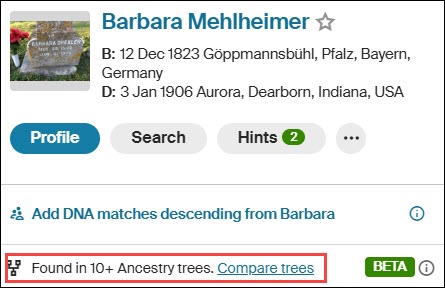
I clicked on Barbara Mehlheimer’s link in my tree, which displays this little mini-profile. Then click on “Compare trees” at the bottom.

Ancestry displays your tree, at right, and the other tree, at left. You can select another tree to compare at top right.
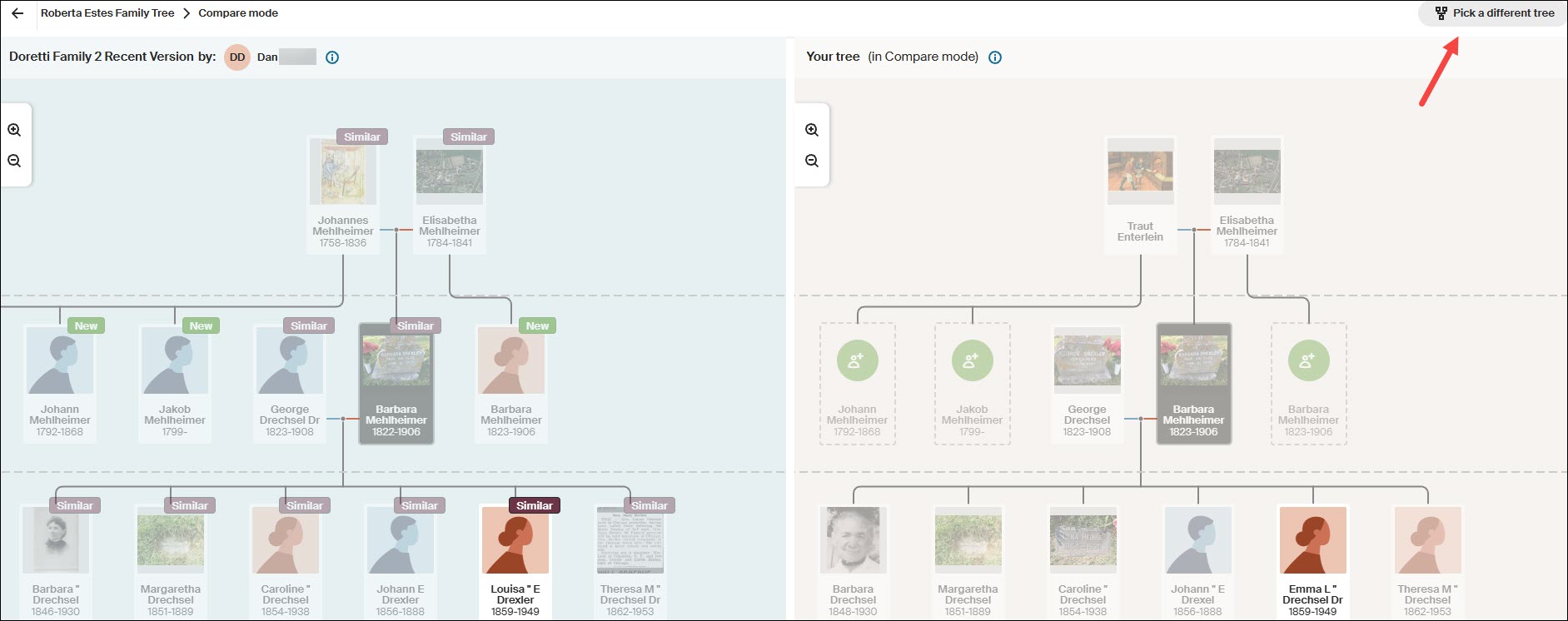
Ancestry’s comparison only shows a total of three generations – the selected person, their parents, and their children.

The person I actually want to follow is Louisa, but if you click on Louisa’s card here, it simply compares the two Louisas – it doesn’t shift down a generation.

This means that to follow more recent generations, you have to go back to your tree, select someone further down in the tree and repeat the process.

This process is cumbersome, but doable thanks to the new Compare Tree function. I’ll come back to this after checking the rest of the “easier to harvest” fruit from other resources. Remember to make notes in your research journal so you don’t forget where you left off – although trees are always changing.

MyHeritage has one of my favorite tools.

At MyHeritage

Recently, MyHeritage has begun providing midrange Y-DNA haplogroups for some of their DNA testers. If you’re one of the lucky testers, you can use the free Discover tool to learn about your haplogroup, but a haplogroup alone won’t help you much with genealogy. You need matching and advanced tools for that.

Unfortunately, you can’t see the haplogroups of your matches, so you can’t search or filter using that criterion. You can, however, ask any men with the surname you’re seeking if their haplogroup is displayed.

Cousin Finder

MyHeritage has an ingenious tool called Cousin Finder that I wrote about here. Cousin Finder helps you find cousins who share common ancestors with you, regardless of whether or not you are a DNA match.

MyHeritage found 531 people in their database that share ancestors according to both their and my trees.

This list of matches doesn’t page; it scrolls, so I made a spreadsheet of the people who are relevant to my search for my brick-walled ancestor. Scrolling becomes difficult and very slow as you proceed down the list. I didn’t want to have to do this twice.

You can improve performance by using the relationship side filter. Because your ancestors match, MyHeritage knows on which “side” of your tree your common ancestor is found.

At this point, I’m interested primarily in identifying Y-DNA or mitochondrial DNA candidates for a specific ancestor.

Using the Drechsel/Mehlheimer line as our example, I’ll search on my mother’s mother’s side.

We already met Patty at WikiTree, but let’s pretend we don’t know Patty. I can click on “View her tree” to see Patty’s whole tree, or I can click on “View Relationship,” which shows how we are both related to our common ancestor.

As we know, for mitochondrial DNA, any male in the line between the ancestor and the testing candidate blocks the mitochondrial DNA path. Patty inherited her mother’s mtDNA, not her father’s.

I didn’t forget about Eva Miller Ferverda either.

I searched for cousins who descended from my mother’s father’s side to find mtDNA candidates for Eva Miller and didn’t find any. But I did find an entirely unexpected bonus.

My mother’s father’s line shows all the connections on that side. While clicking through each one, I quite serendipitously discovered a mitochondrial DNA candidate for Eva Miller’s husband’s great-grandmother, Anna Elizabeth Jonker, AND, separately, a potential Camstra Y-DNA tester too. Oh, happy day!

It was only later, while working on my genealogy for Frederica Ruhle and hoping to discover where she actually lived in Pennsylvania, that I discovered that MyHeritage has put a Cousin Finder link in each ancestor’s profile.

Who doesn’t love a pleasant surprise?!

You no longer need to sift through all of your cousins on a particular side, but remember, had I not done that, I wouldn’t have found either the mitochondrial descendant of Anna Elizabeth Jonker nor the Camstra Y-DNA candidate.

At FamilySearch

FamilySearch is more challenging and is best for fleshing out trees where not much research has been done. Remember that FamilySearch has access to records that are not available at either Ancestry or MyHeritage.

FamilySearch is a one-world tree. Like all trees, it’s subject to errors, so caution is always advised.

At FamilySearch, from your profile card in the tree, locate the ancestor whose Y-DNA or mtDNA you seek.

Then click on that person. Their profile card will pop up. Click on “Tree,” then, at the top right, select Portrait.

Now you can expand their children downward. Note that the little “two people” in the top left corner of the profile card means there are multiple spouses. The only way to view all of the children is to click on that person’s placard, then select the alternate spouse.

Living people have no placeholders on this tree.

You can contact contributors who provided information on a profile in the tree.
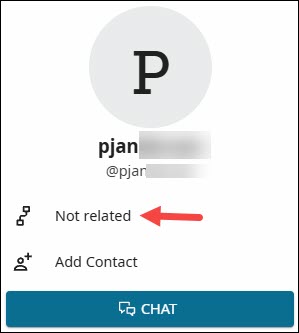
Click on the source provider’s name to see if they are related, and click on the little tree icon to see how.

However, once a year, there’s a great way to contact interested descendants.

Relatives at RootsTech

RootsTech is the largest genealogy conference in the world, and it’s sponsored by FamilySearch.

About six weeks before RootsTech takes place each year, and for about a month after, you can participate in Relatives at RootsTech.

During that time, you can select an ancestor and see which other people who have signed up for RootsTech also descend from that ancestor. I wrote about how to do that in the article, Relatives at RootsTech Reveals Cousins and Provides DNA Candidates. I almost always find someone who descends from an ancestor whose Y-DNA or mtDNA I need for my tree.

It’s a wonderful opportunity to meet new cousins and collaborate.

At GEDmatch

GEDmatch is an autosomal DNA upload site that offers a variety of matching and display options. While they don’t attempt to calculate a haplogroup, uploaders can enter their mtDNA and Y-DNA haplogroups, if known.

GEDmatch isn’t normally a resource we think of for either Y-DNA or mtDNA, but it can be useful under some circumstances.

In the One-To-Many limited free version and the Tier 1 subscription model, you can view haplogroups if someone has entered their haplogroup name, but you can’t filter without the Tier 1 version.

I filtered for haplogroup T2b and found one person in the match list with haplogroup T2b4. I then viewed the GEDCOM that this person has also uploaded, but they do not descend from Eva Miller Ferverda’s line.

GEDmatch isn’t built for haplogroups, but sometimes, if you have a known haplogroup that isn’t terribly common, you can catch a lucky break there.

Where AM I?

OK, so where am I in all of this?

I feel like I’ve searched the corners of the earth!

I’ve primarily used two examples.

  • My own mtDNA line which is the Drechsel/Mehlheimer line that I chose because it’s a great example that I knew well.

If I had actually been searching for a testing candidate, we would easily have eliminated several possibilities. Five female lines remained as possibilities that need additional research, plus my own test if someone were actually searching.

  • Then there was Eva Miller Ferverda (1857-1939), whose partial haplogroup, T2b, was discovered at 23andMe in three matches. I was able to reconstruct their trees, confirming that this was her line, but I was unable to find any testing candidates elsewhere.

Each of the DNA testing and genealogy vendors provides a way to communicate with other users of their platform.

  • At both 23andMe and MyHeritage, you can message through their platform.
  • At FamilyTreeDNA and GEDmatch, you can email your matches.
  • At WikiTree, you send an email through their platform to the profile card manager.
  • At FamilySearch, you cannot see placeholder cards for living people, so you need to check to see if people making changes to that ancestor’s profile are related. Then check their children closest to the present day for the same information. You can message through the FamilySearch platform.
  • During Relatives at RootsTech, you can message your cousins through their platform. The great thing about these folks is that you know they are interested and engaged, because they’ve just signed up for RootsTech.

Communicating With Testing Candidates

I’m fortunate that there are three mitochondrial descendants of Eva Miller Ferverda at 23andMe, one of whom is also at FamilyTreeDNA. I will message or email all three of them individually with a short, customized message that contains:

  • How I am related to our common ancestor.
  • A question about whether they have taken the mtFull test, or any test, at FamilyTreeDNA. If they have taken any test there, it’s easy to upgrade.
  • A sentence about how FamilyTreeDNA was the original genetic genealogy founder of this industry and the only company to offer the full mtDNA and Y-DNA tests.
  • Why they can benefit from taking the mtFull test and how it can help us learn more about our common ancestor.
  • An offer for a full-sequence mitochondrial DNA testing scholarship if they have not already taken that test.
  • I ask if they are interested and provide my email in case they have questions or want to discuss further.

Depending on how much space I have for the message, there are two articles I often provide links to in case they are unfamiliar with either Y-DNA or mtDNA testing.

  1. 4 Kinds of DNA for Genetic Genealogy is a very basic article for people who might be unaware that there is any type of DNA testing other than autosomal. This is often the case with Ancestry.
  2. The article Mitochondrial DNA A-Z: A Step-by-Step Guide to Matches, Mitotree, and mtDNA Discover is an in-depth article about using mtDNA. This is a wonderfully educational how-to article, but I always hesitate before sending this one because I don’t want their eyes to glaze over.

Scholarships

I gladly and eagerly offer scholarships for both Y-DNA and mtDNA testers from lines I need to represent my ancestors.

I equate scholarships to finding a rare out-of-print book about that exact family line, with only one or two copies still in existence, and only one accessible in a rare book shop in Podunk, Idaho. I would book a flight tomorrow at 5 AM to go and pick it up in person even if I had to eat beans and hot dogs for the next six months to pay for it. If you know me, you know I’m not kidding! I’ve gone on many wonderful road trips to meet with and collect DNA samples from cousins.

A Y-DNA or mtDNA test doesn’t cost nearly as much as that excursion and is even more reliable, because we know the DNA results are accurate – assuming the tester’s genealogy is accurate, which you should verify, and no undocumented adoptions or broken lineages have occurred.

Good luck on your treasure hunt!

____________________________________________________________

Share the Love!

You’re always welcome to forward articles or links to friends and share on social media.

Subscribe!

If you haven’t already subscribed, it’s free. You’ll receive an e-mail whenever I publish by clicking the “follow” button at the top of the main blog page, here.

Help Keep This Blog Free

I receive a small commission when you click a vendor link in my articles and purchase that item. This does NOT increase your price but helps me keep the lights on and this informational blog free for everyone. Please click on the affiliate links in the articles or to the vendors below if you are purchasing products or DNA testing.

Thank you so much.

DNA Purchases and Free Uploads

Genealogy Products and Services

My Books

Genealogy Books

Genealogy Research

What is a Quick-and-Dirty Tree, and When Might I Need One?

You may have heard genealogists talk about creating a quick-and-dirty tree.

What is that, exactly? When and why would you want one?

Good questions.

Matches and Trees

DNA matches don’t always have useful trees.

They might have:

  • No tree
  • A partial tree with only a few people in the closest generation or two
  • A tree with some lines built out, but others not so much

What’s a genealogist to do? After all, it’s your match’s tree, not your tree, and you have no way to expand their tree.

Except, you do.

It’s called a quick-and-dirty tree.

Quick-and-Dirty Trees

A quick-and-dirty tree is essentially a “throw-away” tree that you construct at Ancestry with the express purpose of obtaining hints, including potential parents, in order to quickly build your matches tree backwards in time until you (hopefully) reach a common ancestor.

And yes, of course trees, hints and suggestions of any kind can be wrong – but that doesn’t mean they’re always wrong, and you’re not adding anything from your quick-and-dirty tree to your tree – or even displaying it publicly.

You’re simply trying to find a common ancestor by using what your match has provided in their tree. Think of a quick-and-dirty tree as a scratch pad of sorts.

Let’s work through an example.

Initial Analysis

In this example, Ancestry has already told me that this match is most probably my half-second-cousin (half 2C) or second-cousin-once-removed (2C1R) based on the amount of DNA that we share, although the full relationship range includes several more options.

Ancestry also tells me that this match is on my maternal side. There’s no information provided about whether this match is on their maternal or paternal side, or even both.

A second-cousin (2C) relationship means that we share great-grandparents, and once removed means that one of us is one step further down the tree than the other person.

In other words, I’m 2C with my match’s parents, or my match is 2C with my mother. I wrote about this in the article, Concepts: What Does a Cousin “Once Removed” Mean?

I see that my match has a public linked tree with 7 people, which probably isn’t going to be terribly helpful.

Of course, the first thing to do is to review my match’s tree and see if I recognize either their surname or the names in their tree.

This tree only reaches back two generations, and our common ancestor, based on the relationships predicted by shared DNA, would be another generation, or two, further removed.

I don’t recognize any of these names, although I’ll review each person for a location to see if I can narrow the scope to the couple most likely to lead to our common ancestor.

On my mother’s side, one of her parents is from northern Indiana, and one is from southern Indiana, but not everyone enters locations in their trees, and they aren’t necessarily accurate.

The list of “all people” in my match’s tree, under “Find in tree”, at far right, provides additional information. Unfortunately, this tree shows Earl Townsend’s wife’s name as Mildred Ideal Thorstenson Townsend Smith here and in her profile, but the name order differs. To begin, I’ll enter Thorstenson Smith, not her married name of Townsend, in the quick-and-dirty tree I’m building. You can refine this shortly.

In this case, it looks like the Townsend line is most promising to find a common ancestor, given that Fulton County is in northern Indiana, but we’ll find out that this isn’t the case when we construct our quick-and-dirty tree.

Building the Quick-and-Dirty Tree

You need to build a new tree, NOT add to your “real” tree.

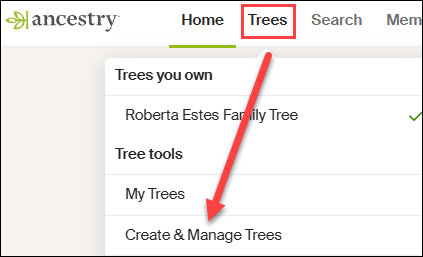
At Ancestry, go to Trees in the top banner, then click on “Create and Manage Trees.”

You’ll see the list of trees that you own. This is where all of the trees that you create live.

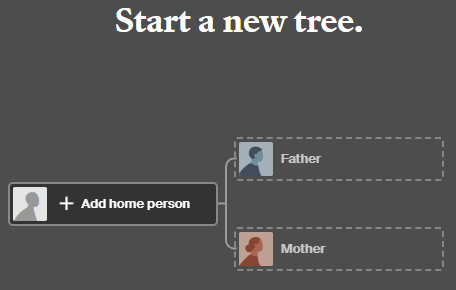
At the far bottom, you’ll see the prompt to create a new tree. Click there.

Next, you’ll see a blank tree.

For the home person, you can enter your match’s name, but be sure to list them as living so you’re not revealing private information.

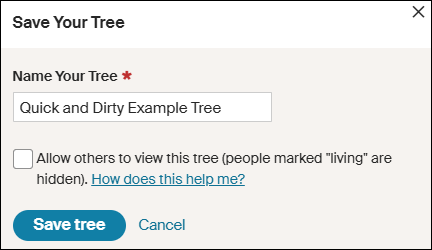
After adding one parent, you’ll be prompted to save and name the tree. Both the tester, who is designated as male by the Ancestry icon, and his father are either both living, or private, so I’m simply entering the surname of Robinson based on the grandfather’s surname. That could be incorrect of course, but it’s all I have to go on – yet.

Ironically, their grandfather’s surname was spelled Robison, without the “n”, not Robinson, but I accidentally entered Robinson and still got where I needed to go.

Clearly, I’m not going to allow this tree to be viewed by others, aka public, so I’m not checking that box. If it’s checked by default, uncheck it.

I don’t make my quick-and-dirty trees public because they are entirely unproven and unverified. I’m literally quickly searching for hints with every intention of abandoning the tree when I’m finished. If you want to clean the tree up later, you have the option to change the tree’s privacy settings.

Information in Your Match’s Tree Might Be Wrong

Complete the tree to be the same as your match’s tree. After saving your tree, click on the individuals you’ve added to view their hints.

Let’s start with Earl Townsend who appears to be our best candidate based on location.

Earl Russell Townsend has 13 hints, including a marriage license that confirms his birth date and location and provides the names of his parents, plus his wife’s name as Mildred Thorstenson. Based on what we know already, this is probably the correct Earl Townsend.

Of course, the wife’s surname could be incorrect. It could be her first or second marriage, or she could have been a widow when they married, so this surname might not be her birth surname.

Look for additional records in Earl’s hints.

Russell’s death certificate confirms that information, as do the birth and death certificates of their children.

Accept those hints.

If you determine that the original information in your match’s tree is incorrect, you’ll want to correct it in your quick-and-dirty tree. Remember, this is a scratch pad – you can’t hurt this tree.

Let’s change Mildred’s name to reflect her birth surname.

I refined Earl’s wife’s name to Mildred Thorstenson, which then produced 12 hints for her, including her marriage and Social Security record, with her birth and death dates, and her parents’ names. Her name in my match’s tree of Mildred Ideal Thorstenson Townsend Smith had produced zero hints.

Additionally, census records showed Mildred with her parents.

These seem to align, so accept those hints.

Looking at the pedigree view of my quick-and-dirty tree, we now see that both Russell and Mildred’s parents identified in the records are suggested as their potential parents.

Review each suggestion. If they look accurate based on the records identified, accept those potential parents in order to view the next generation.

Based on these names and census information, I can eliminate the Thorstenson line. It’s Swedish, not German or Dutch, which comprise my mother’s northern Indiana lines, My mother has no known Swedish ancestors, and we have proven her Indiana lineage in this timeframe.

Accepting the hints for the parents of both Earl Townsend and Mildred Thorstenson, parent hints appear for John Townsend and Eva Martin.

Now we’re viewing the next group of hints, which would be the great-great-grandparent generation. If these are our common ancestor, that would mean that I’m third cousins with my match, which is beyond the predicted relationship range. Third cousins is not impossible, but it’s beyond the probable match level based on the amount of shared DNA. furthermore, I don’t recognize any surnames.

So, let’s move to the Robison (incorrectly spelled Robinson) line and step through the same process. We can always come back and work with more parental hints on the Townsend/Martin line if we need to.

Rolland Robison only has a death year in my match’s tree, and that combined with the misspelled surname meant he had no hints on Ancestry, so I clicked on “Search” in my quick-and-dirty tree.

I’m searching for a man by this name, with a wife whose first name is Chloe.

AHA!

There it is! Note that Ancestry found Rolland Robison, not Robinson, married to Chloe.

Chloe was a Ferverda. My mother’s father was John Ferverda, and the location is correct for this family.

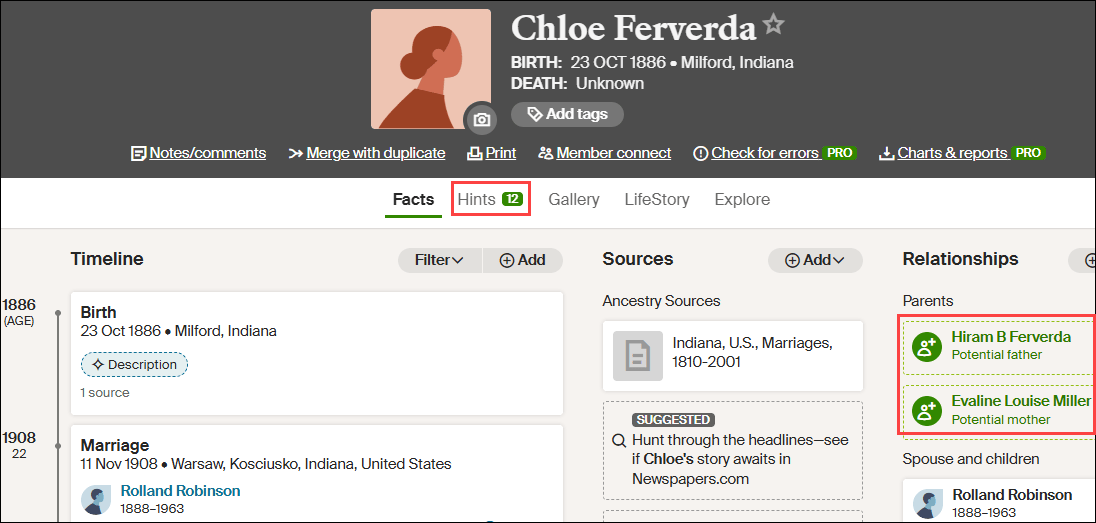
I saved this record to Rolland Robinson and added Ferverda as Chloe’s surname in our quick-and-dirty tree. This provided Rolland with 12 hints.

Adding Ferverda as Chloe’s surname provides her with a dozen hints too, including potential parents, Hiram B. Ferverda and Evaline Louise Miller – my great-great-grandparents who are indeed the 2C generation.

These common ancestors fall within the expected amount of shared DNA for second cousins, so this aligns well.

My quick-and-dirty tree has revealed at least one pair of common ancestors. Could there be more common lineages? Yes. I would continue building out this quick-and-dirty tree for (at least) another couple of generations on the other lines just to be sure.

What Next?

That depends on what you want to accomplish and your genealogy goals.

I used a DNA match at Ancestry in this example, but your match might be at a different vendor. Regardless, you’ll still want to use Ancestry to build your quick-and-dirty tree based on how they present hints and potential ancestors.

Now that you know how your DNA match connects:

  • Minimally, make a note on the match that indicates the most recent common ancestor(s) identified. I include a link to the quick-and-dirty tree I’ve created.
  • You can add your match and their ancestral path to your common ancestor into your own tree at whichever vendor where the match occurs.
  • If you match at either FamilyTreeDNA or MyHeritage, both of whom provide segment information, I suggest painting your matching segments to DNAPainter.

Painting your segments identifies your matching segments as descending from those ancestors and makes it easier to identify the shared ancestral lineage of anyone else who shares that segment on the same side of your tree (maternal or paternal).

Word of caution here: You can potentially share multiple ancestral paths with any match, so different segments with one match can descend from different ancestors.

  • If your match is at FamilyTreeDNA, you’ll want to link your match to their place in your tree.

Using triangulation, FamilyTreeDNA utilizes linked matches to assign matches who share the same segments to the maternal or paternal side of your tree (or both) using triangulation.

  • You may be trying to break through a brick wall by identifying common ancestors BETWEEN your shared matches that aren’t in your own tree.

This approach is obviously easier the closer your brick wall is in time to the present. Great-grandparents, at the second-cousin level, and great-great-grandparents at the third-cousin level are much easier than 5th- or 6th-generation ancestors who lived before birth and death certificates and detailed census records existed.

Furthermore, the further back in time, the more likely that you may encounter:

  • Pedigree collapse, where the same ancestors appear more than once in your tree
  • Or you share multiple common ancestors with your matches

Of course, there’s always the possibility of endogamy too, where you descend from a historically heavily-intermarried population, such as Ashkenazi Jews or the Amish, for example, which means you may share segments passed down within the population from distant common ancestors you won’t be able to identify. While endogamy in your lineages may increase the amount of shared DNA, which in turn can skew relationship estimates, it won’t prevent you from using quick-and-dirty trees to locate common ancestors.

And finally, unexpected parentage or issues like record destruction may impede your progress, but you’ll never know if you don’t try, which brings us back to the purpose of quick-and-dirty trees.

Building a quick-and-dirty tree is the easiest way to grow your matches’ trees to reveal your common ancestors.

_____________________________________________________________

Share the Love!

You’re always welcome to forward articles or links to friends and share on social media.

Subscribe!

If you haven’t already subscribed, it’s free. You’ll receive an e-mail whenever I publish by clicking the “follow” button at the top of the main blog page, here.

Help Keep This Blog Free

I receive a small commission when you click a vendor link in my articles and purchase that item. This does NOT increase your price but helps me keep the lights on and this informational blog free for everyone. Please click on the affiliate links in the articles or to the vendors below if you are purchasing products or DNA testing.

Thank you so much.

DNA Purchases and Free Uploads

Genealogy Products and Services

My Books

Genealogy Books

Genealogy Research

MyHeritage Whole Genome Sequencing (WGS) Results and Comparison

I’m excited to receive my low-pass whole-genome sequencing test results from MyHeritage. When MyHeritage initially introduced their new test, I wrote about what that means in the article, MyHeritage Introduces a Low-Pass Whole Genome Autosomal DNA Test and Why It Matters.

In that article, I said I was ordering a WGS test and would publish a comparison of the new test with the two tests I’ve previously taken with MyHeritage, plus a test I uploaded to MyHeritage from FamilyTreeDNA in 2016.

Before I review these comparative results with you, I want to properly set expectations.

What To Expect from the MyHeritage Whole Genome Sequence (WGS) Test

From Ran Snir, Vice President of Product Management for MyHeritage DNA:

  1. Those who take a MyHeritage DNA test now are all sequenced with WGS and will receive the same access to features and results as those who have taken a MyHeritage DNA test and were genotyped with an old chip in the past. In fact, all samples processed by the lab in December were already processed with WGS.
  2. The transition to WGS does not introduce new features and capabilities immediately.
  3. The new WGS technology has minor implications when it comes to the ethnicity estimate results and DNA Matches, but people should not expect to get “something completely different”.
  4. The transition to WGS and having more people processed with it opens the door for deeper research and more insights. It will allow MyHeritage to drastically improve its phasing, imputation and matching algorithms. This will take time as MyHeritage needs to amass a lot of data first. In the long run, MyHeritage plans to improve the product, build new features and introduce new capabilities which will be based on learnings from WGS.

Thank you, Ran.

In this article, I am not focusing on ethnicity, but on DNA matches, which I depend on to help me unravel those pesky genealogy puzzles.

Also, please note, some features I’m discussing here are free with the purchase of a DNA test, and others require a subscription at some level. I have a subscription, and I use it nearly every day.

Coupon Code for a $20 DNA Test

That said, if you already know you want to order the WGS test, or you’re a new tester, use this special coupon code at checkout to reduce the test to $20 through the end of February 2026. That’s a great value!

Coupon Code: RobertaFeb26

Now, let’s look at my results when comparing the WGS test to the results of my other three tests at MyHeritage.

How does the new WGS test fare?

My Results

Before ordering my WGS test from MyHeritage, I already had three tests at MyHeritage to choose from.

MyHeritage allows you to select between different tests, including uploads and tests you’ve taken at MyHeritage at different times. There’s absolutely no need to delete older tests there, and in fact, I recommend that you don’t. This article illustrates why.

My four tests include:

  • FamilyTreeDNA (FTDNA) test uploaded to MyHeritage in 2016
  • MyHeritage health test taken in 2019
  • MyHeritage test taken in June 2024
  • MyHeritage low-pass whole genome test (WGS) taken in December 2025
FTDNA 2016 MH Health 2019 MH 2024 MH WGS
Total Matches 19,722 17,179 17,767 17,676
TOFR 128 111 108 Not ready

This chart shows the total number of matches and Theories of Family Relativity for each test in January 2026.

What Are Theories of Family Relativity (TOFR)?

I have several very useful Theories of Family Relativity (TOFR) where MyHeritage uses trees and other documentation, such as census records, to connect you and your DNA matches to common ancestors. TOFR is one of MyHeritage’s most beneficial tools.

In this example, my match only provided their father’s name, but that name was linked to our common ancestors by connecting through a FamilySearch tree. Often, multiple potential relationships and paths are shown. Like with any other tool, each theory needs to be reviewed for accuracy.

Please note that TOFR is only run periodically and has not yet been calculated for the WGS test results. I’m sure that will happen soon.

Evaluating Matches

I wanted to know if (and how) the same people matched me on the different tests, including the new low-pass whole genome (WGS).

  • Are there differences?
  • Are the differences slight or pronounced?
  • Do some people match me on some tests, and not others?
  • Do some people match me on earlier tests, but not the WGS?
  • Do some people match me on the WGS, but not earlier tests?
  • What is the takeaway from all of this?

To compare the results of all four tests, I created a side-by-side comparison spreadsheet.

The Spreadsheet

I created a spreadsheet where I recorded 434 individual matches by entering information in the following columns:

  • A – Match number that I assigned
  • B – Match source (more about this in a minute)
  • C – FTDNA 2016 test matching number of cMs
  • D – MH 2019 matching number of cMs
  • E – MH 2024 Health matching number of cMs
  • F – MH Low Pass Whole Genome Sequencing (WGS) matching number of cMs
  • G – Relationship if known
  • H – Common Ancestor if known

I included several other columns in my spreadsheet for my own genealogical research purposes that show my matches’ tree size, and the actual lineage from them to our common ancestor couple. However, for comparing matches and accuracy, I’ve utilized the columns indicated above.

Match Sources

I wanted to compare different types of matches, meaning not just the closest or the most distant, or only the matches I can identify. These are the sources of the matches I compared.

  • Cousin Finder – I actually started a spreadsheet back in October 2025 when I was using Cousin Finder to find cousins, meaning people with common ancestors identified by MyHeritage. Twenty-eight of the 378 people that MyHeritage identified as cousins are DNA matches, so those were the first matches I entered into this comparison spreadsheet, along with our most recent common ancestors.
  • TOFR – All Theories of Family Relativity begin with DNA matches, then connect you and your matches together using trees and/or documents, when possible. Because matches vary with each of the tests, so do the TOFRs. WGS theories aren’t yet calculated, but the matches are, so I’ve included TOFR matches here.
  • Family Kits – These 15 matches are family members’ tests that I manage and match, so I clearly know how we’re related.
  • Top 100/150 – The first group of matches, other than the above categories, were the top 100 matches using the FamilyTreeDNA 2016 kit, which was my first test at MyHeritage. All tests continue to accumulate matches over time, so it just made sense to start here.

However, after I finished transcribing each of those 100 matches into the spreadsheet and started transcribing the top 100 matches for the MyHeritage 2019 test, I quickly realized that the top 100 matches were not the same between tests. Therefore, I used the top 100 matches from all 4 tests. For every name included from any test in the top 100, I included the matching cM amount from all four tests. This means that in total, there are more than 100 in the “Top 100”, so now it’s called the Top 100/150, but all of the top 100 matches from each of the four tests are included in the spreadsheet. In total, there are about 220 in that category.

  • Bottom 100 – Last, I included the bottom 100 matches on the FTDNA 2016 kit, meaning I listed those and searched for them on the other tests. If I had included the bottom 100 from all four tests, it would have been more like the bottom 350.

When I finished listing all of these matches, I had 434 to work with for this comparison. .

Minimum Matching

The minimum MyHeritage reported match is 8 cM, and at that level, a surprising number of tests don’t match either parent, although some clearly match with close relatives on that parent’s side, which means that either:

  • Those tests (either mine or the match’s, or both) were uploaded and imputed
  • Some portion of the parents’ test did not read
  • These are not valid matches, meaning they are identical by chance, not by descent.

About Imputation

Imputation is a widely used technology among vendors to bridge small sections of unread DNA. This is useful when comparing files from different vendors for matching.

Vendors use imputation internally too.

For example, vendors often use different DNA chips in the lab. They sometimes change chips internally, as well, for a variety of reasons. Regardless of why, the same locations aren’t always read, or aren’t read successfully. Imputation levels the playing field, allowing backwards compatibility, and compatibility for matching across platforms. Imputation fills in the blanks to equalize those files, allowing them to be compared for matching.

Let me give you an example. Let’s say you have the letters c_t, where the middle letter between c and t is missing. In English, there are a limited number of letters that can be. To begin with, it must be a vowel. In this case, it has to be either a, o or u. Next, looking at context, if the surrounding words are “the c_t chased a mouse,” the missing word is not cut or cot. It’s almost certainly cat, so the “a” is filled in using imputation.

Imputation usually works well, but occasionally it can extend matching areas improperly. This has always been true, and it’s still true with the new low-pass WGS test. The new WGS test only scans the genome twice to keep the test affordable. Any “no read” area must be imputed. I wrote about imputation here.

Ok, back to the MyHeritage comparison!

Test Comparison Methodology

If you’re recreating this process with your own results:

  • Color-code the column headers for the various tests
  • Label them clearly so you can easily differentiate between tests
  • Freeze your top row

Select the test you want to search for matches, and record the people you want to cross-check. I began the process with my FTDNA test that I uploaded to MyHeritage in 2016.

I entered the matches on my spreadsheet, recording the matching cM amount. Then I selected the other tests, one by one, and searched for the same match name.

In this case, I started with the FTDNA 2016 test. Jane Jones (not her real name) matched me at 744 cM.

Then I selected the MyHeritage 2019 test, searched for Jane’s name, and recorded the match amount – 739 cM. I did the same with the 2024 test, and last, the WGS test.

When searching by surname at MyHeritage, don’t always expect the person to be at the top of the list where you might expect. Be sure to scroll down a bit, even to page two, especially with common names. MyHeritage also displays people with the same surname in their trees.

Match Analysis

As we work through these match results, keep in mind that the comparison percentage numbers only pertain to the 434 people that I’ve selected to compare across all four tests. This is NOT the total amount in any category for all of my matches. There’s no way to make that determination without manually comparing every single match for all four tests – which is why I selected what I felt was a representative sample.

You’ll quickly discover that many people DON’T MATCH you on all the DNA tests. You’ll notice as I give examples that I’ve colored coded some cells for my own use in both interpreting matches as well as sorting them. For example, People who don’t match on that test were labeled “none” and colored bright blue. Eventually, I simply entered “0” instead of the word “none” so I could perform math functions on those cells. I retained the blue so I could filter by cell color. You get the idea.

Using the new WGS test, 16 people (3.7% of 434) match me ONLY on the WGS test, but do NOT match me on any of the other tests.

Interestingly enough, they are all in the Top 100/150 category for the WGS test. Those match results range from 45 cMs to 53 cMs.

That’s NOT a trivial amount of DNA. It’s rather confusing how someone could match at that level on the WGS test, but not at all on the others.

Equally as interesting is that two of those 16 WGS matches don’t match either of my parents.

So, let’s say this another way to be clear – I only see these matches on the WGS test, and none of the other tests.

How Many People Match Me on Only One Test?

Ok, so how many people match me on ONLY one test?

FTDNA 2016 Only Matches MH 2019 Only Matches MH 2024 Only Matches MH WGS Only Matches
44 (10.1%) 3 (0.7%) 3 (0.7%) 16 (3.7%)
  • 44 people match me ONLY on the FamilyTreeDNA 2016 uploaded test.
  • 3 people match me ONLY on the MyHeritage 2019 and 2024 tests, respectively, but not the same three people
  • 16 people match me ONLY on the MyHeritage WGS test

Extrapolating these percentages to the rest of my matches suggests the following number of people would match ONLY on this test in the entire match list for each test.

FTDNA 2016 MH Health 2019 MH 2024 MH WGS
Total Matches 19,722 17,179 17,767 17,676
Extrapolated Matches on Only This Test 10.1% or 1992 matches 0.7% or 120 matches 0.7% or 124 matches 3.7% or 654 matches

 How Many People DON’T Match Me on a Specific Test?

Now, how many people DON’T match me on a specific test?

No FTDNA Match No MH 2019 Match No MH 2024 Match No MH WGS Match
36 (8.3%) 117 (27%) 126 (30%) 96 (22%)
  • 36 people don’t match me on the FamilyTreeDNA test, but do match me on at least one other test at MyHeritage
  • 117 people don’t match on the 2019 MyHeritage test, but do match on at least one other test at MyHeritage
  • 126 people don’t match on the 2024 MyHeritage test, but do match on at least one other test at MyHeritage
  • 96 people don’t match me on the WGS test, but do match me on at least one other test at MyHeritage

Extrapolating these percentages provides an extrapolated number of matches that I don’t match on any specific test, but that I do match on at least one other test.

FTDNA 2016 MH Health 2019 MH 2024 MH WGS
Total Matches 19,722 17,179 17,767 17,676
Extrapolated # That Don’t Match on This Test 8.3% or 1637 matches 27% or 4638 matches 39% or 5330 matches 22% or 3,889 matches

How Many Match Me On All Tests

  • 195 matches, or 44.9%, nearly half of my matches, match on all four tests at some level.
  • Out of those, 68, or 15.7% of the total number of matches match me at exactly the same cM level across all 4 tests. That’s pretty remarkable.

The Largest Differences Between Tests

Another question might be how large the difference is between the various matches.

I calculated the largest differences between the highest and lowest match values between the four tests, and placed that value in column G. This means that I subtracted the lowest value of the four tests on this particular match, from the highest value.

In the first row, that means I subtracted 0, the MH 2019 test value, from 75, the WGS test value. The difference between the lowest and highest values is 75 cMs.

Next, I sorted, highest to lowest in column G, so the largest difference is displayed at the top.

I was VERY surprised to see a difference as high as 75 cM, so let’s evaluate the results where the difference is 50 cM or greater. Thirteen matches fall into this category.

  • Entry 168 – The largest difference at 75 cM. This person matches me at 70, 74 and 75 cM, but not at all on the 2019 test, which caused me to go back and check again. Did I spell the name correctly? Yes, I did. We don’t know why I don’t match this person on the 2019 test, but the other matching cM values are very close so they look to be correct.
  • Entry 183 – I match this person on both the FamilyTreeDNA uploaded test at 71 cMs, and the WGS test at 35 cMs, around half as much on the WGS test as the FamilyTreeDNA test. I don’t match them at all on either the MyHeritage 2019 or 2024 kits. I have no explanation.
  • Entry 186 – Like entry 168, we match on three of four tests at 62, 63 and 67 cMs, with the non-matching test being the 2019 test. I would presume that this match is accurate as well.
  • Entry 191 – This one is interesting because I match this person on the FamilyTreeDNA uploaded test at 64 cMs, but none of the other tests.
  • Entry 192 – We match at 57 cMs on both the WGS and the 2024 tests, but not the 2019 test, where we don’t match at all. The match on the FamilyTreeDNA test is 11 cMs lower, at 46 cMs.
  • Entry 228 – This person is my half 1C1R, and I match them on all the tests, of course. However, there’s a 53 cM difference between the WGS and the FamilyTreeDNA uploaded test. In a relationship this close, 53 cM is a small percentage and won’t affect matching, but it’s not an insignificant amount of DNA.
  • Entries 233, 247, 248 and 283 – I match these people ONLY on the WGS test at 50, 52 and 53 cMs, so if I hadn’t taken the WGS test, I wouldn’t match them at all. Without additional research, we can’t tell if this is a legitimate match or not, but 50-53 cM would be a lot to be imputed or to be identical by chance. These people also match one of my parents’ tests, which eliminates the identical by chance possibility, meaning some of the DNA matches my mother and some matches my father – at least on my end. We can’t determine if this match is identical by chance on their side. I’ve never seen a 50+ cM segment (or even close) that is identical by chance, though.
  • Entry 249 – Matches on the FamilyTreeDNA test at 15 cM, and the MyHeritage 2024 test at 52 cM, but not the others.
  • Entry 250 – Matches at 51 cM on the FamilyTreeDNA test, but not on any of the MyHeritage tests.
  • Entry 279 – Matches only on the MyHeritage 2019 test at 50 cM.

Difference Range

Next, let’s review the entire range of differences, meaning the largest matching difference for any one person across all four tests, by group. I’m including all 434 here so you can judge for yourself.

  • 50-75 cM difference – 13 matches analyzed above

  • 45-49 cM difference – 22 matches

  • 40-44 cM difference – 11 matches

  • 35-39 cM difference – 9 matches

  • 30-34 cM difference – 10 matches

  • 25-29 cM difference – 12 matches

  • 20-24 cM difference – 26 matches

  • 16-19 cM difference – 28 matches

  • 13-15 cM difference – 29 matches

  • 9-12 cM difference – 29 matches

  • 8 cM difference – 78 matches

The 8 cM difference has the most of any value or category because this is the lowest level of matching at MyHeritage. Many tests have a minimum level match on a test or tests, and no others.

  • 6-7 cM match difference – 41 matches

The match differences at 5 cM and below are inconsequential. 57 matches fall into this category.

Commentary

One of the indicators of a valid match is if a parent has tested and also matches,

Of these 434 matches, 35 match neither parent, and most of those are at the smallest match level, meaning 8 cM. Of all the match amounts, that would be the least reliable, and most likely to be a false positive match, or identical by chance.

However, that’s not universally the case. Some WGS results match people at significantly higher levels, but don’t match parents. Two WGS matches match people at 47 and 49 cMs, respectively, and not on any of the other tests. Those two WGS matches don’t match either parent.

After reviewing all 434 selected matches, it appears that both the FamilyTreeDNA 2016 test, and the WGS test produce the most consistent and reliable results of the four tests.

44 people, or 10%, match on BOTH the WGS and the FTDNA tests, but neither of the other two tests. A total of 13.8% match EITHER the FTDNA test OR the WGS test, but not the others.

Conclusions

I think we can draw several conclusions from this comparison.

First, let’s evaluate the number of matches. Looking at the differences between the total number of matches between the various tests, especially the three MyHeritage tests, over time, isn’t that great. That’s exactly why you can’t depend on these numbers as an accurate comparison.

FTDNA 2016 MH Health 2019 MH 2024 MH WGS
Total Matches 19,722 17,179 17,767 17,676

There are only a few hundred differences between the three MyHeritage tests, and about 2000 between the FamilyTreeDNA test uploaded in 2016 and the various MyHeritage tests. That’s a substantial difference.

The difference number of matches between tests may seem irrelevant, especially the MyHeritage tests, until you realize that those who match AREN’T ALL THE SAME PEOPLE. In other words, comparing the MyHeritage 2024 test with the WGS test only shows a difference of 91 matches. This DOES NOT mean that the MyHeritage 2024 test and the WGS test have 17,676 of the same people who match both tests, and that the 2024 test simply has 91 more matches than the WGS test.

As we’ve seen, many people who appear on any one match list don’t appear on other match lists.

Our analysis showed that 44.9% of my 434 matches compared appear on all match lists, which means that more than half of my matches appear on one or more match lists, and not the others. Therefore, just comparing the number of matches isn’t really relevant. You need to compare the people included on all the different tests, which is why I created my spreadsheet and included people from a wide variety of sources.

3.7% of my matches on the WGS test were not on any other test, which extrapolates to approximately 654 of my total WGS matches that I wouldn’t receive any other way.

I care a great deal about those matches, especially since at least some appear to be high value.

Yes, I absolutely, positively want those matches, especially when you consider that some of the matching differences are as high as 75 cM. A 75 cM match can be in the second, third or fourth cousin range.

Realistically, they may or may not be valid or useful matches – but if I don’t have the opportunity to compare them, I’ll never know.

Should You Purchase the WGS Test If You’ve Already Tested?

So, now for the question you’re surely asking yourself.

Truthfully, when I ordered my test back in December, I was ambivalent. I only ordered it to do this comparison for my blog readers – and I really dislike spending money on something that I don’t think will benefit me.

Note the words “don’t think.”

I’ve changed my mind, for several reasons, and I’m glad I ordered the test.

The thing that changed my mind was that I received a nontrivial amount of matches on the WGS test that I didn’t receive on any of the others – even if some of them turn out to be identical by chance.

Since we can’t go back in time and take the earlier tests, and MyHeritage no longer accepts uploads from other vendors, our decision now is whether or not we should take the new WGS test, or not, especially if we already have a DNA test at MyHeritage.

If you’re a new tester, by all means, test at all four of the main vendors. DNA matching is the best thing since sliced bread.

However, the people I’m really speaking to here are those who already have a test of some sort at MyHeritage.

Here’s the bottom line:

  • You will receive WGS matches that you didn’t receive on your other test – and vice versa, so don’t delete your older test at MyHeritage
  • Some of those new WGS matches may well be high-value matches – as was illustrated in the “differences” I discovered.
  • Given the differences in who is included in the match list, your TOFR will be different too – perhaps leading to a brick wall breakthrough. I have two that I’m just itching to solve.
  • Use matches, shared matches and TOFR from ALL of your tests at MyHeritage.

My Biggest Regret

As Ran Snir said, new features and developments at MyHeritage will be based on the WGS test. We don’t know what those developments might be, or when they will become available. But it’s very clear that while testers on the older testing platforms will receive as much as MyHeritage can give them, the MyHeritage DNA future is being build on the WGS platform. I want to be there and benefit from new discoveries.

My biggest regret is that my parents aren’t around to take the new WGS test – and neither are several other family members.

Of the 15 family members whose tests I manage at MyHeritage, 9 are deceased, and I think that four more are as well. Two others are now quite elderly and are no longer able to consent or retest.

Your closest family members are your DNA anchors, identifying lineages and pointing you in specific directions, guiding your research.

The very best thing you can do for your genetic genealogy is to test your grandparents if they are living, and your parents. If they aren’t available, test your closest relatives such as grandparents, siblings, aunts, uncles and first cousins.

Preparing for the Future

So, here’s my advice:

  • Take the WGS test yourself in order to glean as much information as possible and to benefit from future developments.
  • Retest any relatives whose tests you manage on the WGS platform, if possible.
  • Test your close family members and anyone you know whose DNA test could help you identify ancestral lineages.

Why is testing your relatives important?

Close relatives will carry some of the DNA from your mutual ancestors that you don’t.

Having the known DNA of your ancestors means that you can evaluate and analyze the trees of the entire group of people who match those identified DNA segments to see if you can break down an upstream brick wall.

I’ve been successful doing this for some time – and am in the process again by combining DNA matches and traditional records research.

Coupon Code for $20 DNA Test

MyHeritage has been kind enough to provide a limited-time coupon code (RobertaFeb26) for my readers which DROPS YOUR PRICE for the DNA test to $20 through February 28th at midnight.

This is the absolute lowest price I’ve ever seen for a DNA test.

You’ll receive the following features that are included with every test:

  • Ethnicity and ethnicity map
  • DNA matches and the ability to contact them
  • Shared ancestral surnames
  • Chromosome browser
  • cM Explainer

In addition, with this code you’ll receive both Shared DNA Matches and Shared Ancestral Places that usually require a subscription.

Normally, a subscription is required to access:

  • Trees of DNA matches
  • Shared DNA Matches (free now with the coupon code)
  • Shared ancestral places (free now with the coupon code)
  • AutoClusters
  • Theory of Family Relativity (TOFR)

If you’re interested in trying a subscription, click here to purchase a MyHeritage subscription with a free trial.

Here’s the link to purchase the DNA test, and here’s the coupon code to enter at checkout: RobertaFeb26

And yes, absolutely feel free to share the coupon code with your family, friends, and anyone else who might benefit.

Let me know how your results compare when you receive them.

_____________________________________________________________

Share the Love!

You’re always welcome to forward articles or links to friends and share on social media.

Subscribe!

If you haven’t already subscribed, it’s free. You’ll receive an e-mail whenever I publish by clicking the “follow” button at the top of the main blog page, here.

Help Keep This Blog Free

I receive a small commission when you click a vendor link in my articles and purchase that item. This does NOT increase your price but helps me keep the lights on and this informational blog free for everyone. Please click on the affiliate links in the articles or to the vendors below if you are purchasing products or DNA testing.

Thank you so much.

DNA Purchases and Free Uploads

Genealogy Products and Services

My Books

Genealogy Books

Genealogy Research

2025 Genetic Genealogy Retrospective: Wow – What a Year!

2025 has been quite a year in genetic genealogy. Genetic genealogy, per se, really isn’t a separate “thing” anymore. DNA testing is now an integral part of genealogy, with the potential to answer questions that nothing else can!

The 76 articles I wrote in 2025 fall into multiple categories and focus on different topics based on what was happening in the industry.

From my perspective, here are the most notable announcements and trends in genetic genealogy, and genealogy more broadly.

#1 for 2025 – Mitochondrial DNA: The Million Mito Project Released the New Mitotree, Updates, and mtDNA Discover

The biggest genealogy news items this year, both industry-wide and genealogy-changing are definitely the release of the new Mitotree, plus two tree updates. But that’s not all.

In addition, full sequence mitochondrial DNA testers received new Mitotree haplogroups, if appropriate, and everyone received a haplotype – a new feature. Along with Mitotree, FamilyTreeDNA introduced mtDNA Discover which provides 13 individual reports based on your haplogroup and matches.

It’s no wonder that mitochondrial DNA articles led the pack with the most views based on the eleven articles about that topic. If you haven’t yet tested your mitochondrial DNA at FamilyTreeDNA, there’s no better time! You never know what you’re going to discover and the more testers, the more matches for everyone.

You don’t know what you don’t know, and you’ll never know if you don’t test. Remember, mitochondrial DNA is for both males and females and tests your mother’s direct matrilineal line (mother to mother to mother, etc.) – reaching beyond known surnames.  Click here to order or upgrade.

#2 – MyHeritage Low Pass Whole Genome Sequence Test Charges into the Future

Another big hitter is the new MyHeritage low-pass whole genome test (WGS) test. It’s new and innovative, but we haven’t seen comparative results yet.

My results from the new low-pass whole genome test just came back, and I haven’t had the opportunity to review them yet, as compared to the earlier tests. That said, I do have roughly the same number of matches, but I need to determine if they are the same matches, and how well they track. I’ll be working on that review soon.

The new whole genome test may be more about future proofing and preparedness than additional current benefit – but we will see. I definately wanted to take the whole genome test so I can receive and benefit from whatever new is coming down the pike.

MyHeritage allows you to maintain multiple DNA tests on your account, so the new whole genome won’t “replace” your older or uploaded test. That way, you can easily compare the results of the whole genome against any DNA test that you curently have at MyHeritage.

Click here to order the new test.

#3 – 23andMe Experiences Problems

On a less positive note, but still quite newsworthy is the bankruptcy of 23andMe and subsequent repurchase of 23andMe by the original founder after setting up a new nonprofit. I have real mixed feelings about this topic. However, 23andMe was really never about genealogy, and now, matching segment information is no longer available. Those searching for unknown parents or family may want to test there if they are unsuccessful elsewhere.

Best Genealogy Tool

The FamilySearch full text search continues to have a HUGE impact for genealogists. This tool is not one-and-done, but provides increasing amounts of rich information as more records are added to the “fully scanned” collection. If you haven’t tried it, please do. It’s a game-changer and continues to improve.

A Cautionary Word About AI – Artificial Intelligence

AI is such a hot topic right now that I feel it needs to be included.

The FamilySearch full text search uses a form of AI. However, you’ll quickly notice that it can’t read everything, gets words and names wrong, and if you actually need to fully depend on it for accuracy, you cannot. (That said, it’s still an amazing tool, and I’m not picking on FamilySearch.)

Aside from FamilySearch, AI in its current form is both wonderful and terrible. I’ll be writing about AI in the new year, but for now, don’t ever rely on AI for anything that you can’t verity. It’s your assistant, not an expert, no matter how insistent it is. Never trust and always verify.

This is ESPECIALLY TRUE WHEN RELATED TO GENETICS and genetic related topics. I can’t even begin to tell you how very wrong it has been, and how much people fall in love with inaccurate results. No, just no – at least for now.

You need to know your AI tool, your skill set, your understanding of AI broadly, the tool’s limitations, and yours, and that’s all before verifying the actual AI results. If you want to educate yourself, and everyone should, treat yourself to anything, anyplace by either Mark Thompson or Steve Little, the dynamic AI duo. They offer YouTube videos and classes in a wide variety of places – but keep in mind that AI tools and technology literally change every few weeks.

AI is, indeed, a specialty all unto itself, much like genetic genealogy. And right now, it’s not soup yet, but it is cooking.

Tried and True Genetic Genealogy Staples – DNAPrint and Genetic Affairs

I haven’t written about either one this year, but I use both DNAPainter and Genetic Affairs regularly.

I consistently paint segments from matches at both MyHeritage, FamilyTreeDNA, and GEDmatch that are newly identified to an ancestor or ancestral couple at DNAPainter.

Unfortunately, neither Ancestry nor 23andMe provide matching cM location information for your matches (chromosome browser), but you may find some people who have tested at those companies at both FamilyTreeDNA and GEDmatch if they have uploaded to either of those vendors. Both vendors provide segment information and a Chromosome Browser, enabling you to paint that information to DNAPainter when you can identify your common ancestor.

MyHeritage also provides a Chromosome Browser, but unfortunately, no longer accepts uploads from any other vendor. You can paint segments from MyHeritage, but no longer upload DNA files to MyHeritage.

Thanks to DNAPainter, I have 90% of my segments identified to specific ancestors – which is actually rather remarkable given that my mother’s grandfather was a Dutch immigrant, and her great-grandparents on her other side were German immigrants, meaning we don’t have many matches on either of those lines.

Genetic Affairs continues to develop new, advanced clustering tools, one of which I’ll be reviewing soon.

Major Vendor Releases

Aside from what’s listed above, most of the major vendors released new features.

MyHeritage released a VERY COOL new tool called Cousin Finder that finds your relatives in the MyHeritage database, whether they match you on a DNA test, or not. They may not have even taken a DNA test. Cousin Finder identifies your common ancestor and shows your relationships. It’s a wonderful way to initiate communications, discuss your common ancestors, and ask about DNA testing.

Of my 378 Cousin Finder matches, only 23 (about 6%) are on my DNA match list, so that leaves 355 people to message, several of whom represent Y-DNA and mtDNA lines I don’t have. You can bet I’ll be offering testing scholarships.

Additionally, MyHeritage released a new ethnicity version.

FamilyTreeDNA, in addition to the new Mitotree, Discover, and associated features, released a new match matrix so you can see if and how selected matches are related to each other in a grid format. In other words, you can create your own cluster.

A new built-in “Share” feature blurs private information to make sharing easier both on the website and in Discover.

Discover improvements include thousands of new Y-DNA and mtDNA tree branches, plus thousands of new Ancient DNA samples. Discover is evergreen, so once you’ve taken that Big Y-700 test or the mitochondrial DNA test, your learning never stops as more content is added.

Tree integration with WikiTree is super-easy and means you don’t have to choose between trees. You can choose to retain your archived tree at FamilyTreeDNA, or move your tree to MyHeritage, PLUS link yourself to your family at WikiTree.

Ancestry released match clustering and a new beta pedigree view of ThruLines, but that’s back in the shop for more work. I’d expect to see it rereleased in 2026.

Conferences

RootsTech is the granddaddy of genealogy conferences, and it’s always fun to attend and write about the experience. Many vendors release new tools or products during the conference.

The ECGGC (East Coast Genetic Genealogy Conference), held in the fall, is the only conference that focuses entirely on genetic genealogy, new tools, how to use existing tools, and more. The 2025 conference was virtual and provided a great deal of focused content. Attendees particularly appreciate the deep dive in a particular topic presented in DNA Academy.

I’ll be at RootsTech in 2026, will write about that soon, and hope to see you there.

Concepts, Techniques and Plain Old Genealogy

In the past, my Concepts series and genealogy “how to” articles have been very popular, so, in 2025, I penned a half-dozen articles focusing on frequently asked questions about relationships and DNA.

For example, how does one go about finding DNA testing candidates? The number of options may surprise you and includes both Cousin Finder and Relatives at RootsTech.

By testing ONE PERSON for either Y-DNA or mitochondrial DNA that represents an ancestor, you actually receive information about that entire lineage of ancestors. So, on my Estes line, by locating an Estes male from my line to test, I received relevant information for every Estes male in my line, back to and beyond the progenitor.

Eventually, we hit a brick wall in every line, and those tools are the perfect way to break through those brick walls.

Other articles discuss things like how to use Discover’s Ancient Connections, and the difference between half and full relationships, both in your tree and genetically. Plus, what does a cousin “once removed” mean anyway? And why do I care?

Another question I receive is how far back, based on the shared amount of DNA, should I look in my matches’ trees for our common ancestor? In other words, how many generations back should I click? That article was fun and produced some unexpected results.

Memorial Articles

Because we are part of a community, I write memorial articles when one of our friends passes on. This year, sadly, Schelly Talalay Dardashti, well-known Jewish genealogist, and another very close friend joined the ancestors, so I’ve recognized the best in both of their lives which constitutes their legacy.

Be the Storyteller

Last, but not least, I wrote about my ancestors in the “52 Ancestors” series, which launched several years ago with Amy Johnson Crow’s challenge to write about one ancestor per week. She hosts this every year, and you can join (free) now.

I’m now on ancestor #467, so yes, it’s addictive, but it’s also AMAZING how many wonderful cousins I’ve met who have information that I did not. Not only that, but after publishing about an ancestor, I’ve discovered that I’m related to people I’ve known for years. We were SOOOooo excited!

I’ve been writing about the lives of my ancestors for several years now, and the articles include attempts to identify Y-DNA and mtDNA testers for each ancestor, where appropriate. There’s so much to learn that can’t be revealed any other way.

Plus, people seem to like the “mystery” and “short story” aspect, and I salt each story with the history of the region and relevant historical events of the timeframe. You might find your ancestors here too, or other helpful information.

Find a way to share about your ancestors!

Do You Have Suggestions for 2026 Topics?

Do you have suggestions or requests for article topics in 2026? If so, please comment on this article and let me know.

Check Out the 2025 List

Here’s the list of the 2025 articles. Did you miss something fun? Enjoy!

  Title Category Date Link
1 Welcome to 2025 – Opportunities and New Genetic Genealogy Articles Welcome, general 1-2-2025 https://dna-explained.com/2025/01/02/welcome-to-2025-opportunities-and-new-genetic-genealogy-articles/
2 Anne Doucet (1713-1791), Oceans, Rivers, and Perseverance – 52 Ancestors #438 52 Ancestors 1-4-2025 https://dna-explained.com/2025/01/04/anne-doucet-1713-1791-oceans-rivers-and-perseverance-52-ancestors-438/
3 Register for RootsTech 2025 Now RootsTech 1-16-2025 https://dna-explained.com/2025/01/16/register-for-rootstech-2025-now/
4 What IS the McNeil Family History, by George Franklin McNeil – 52 Ancestors #439 52 Ancestors 1-19-2025 https://dna-explained.com/2025/01/20/what-is-the-mcneil-family-history-by-george-franklin-mcneil-52-ancestors-439/
5 Jean Garceau dit Tranchemontagne (c1785-1711), Soldier from Saint Marseault – 52 Ancestors #440 52 Ancestors 1-29-2025 https://dna-explained.com/2025/01/29/jean-garceau-dit-tranchemontagne-c1785-1711-soldier-from-saint-marseault-52-ancestors-440/
6 Memories Resurface When the Old Family Home Gets a Facelift Genealogy 2-3-2025 https://dna-explained.com/2025/02/03/memories-resurface-when-the-old-family-home-gets-a-facelift/
7 MyHeritage Introduces Ethnicity v2.5 MyHeritage 2-6-2025 https://dna-explained.com/2025/02/06/myheritage-introduces-ethnicity-v2-5/
8 Relatives at RootsTech Reveals Cousins and Provides DNA Candidates RootsTech, techniques 2-8-2025 https://dna-explained.com/2025/02/08/relatives-at-rootstech-reveals-cousins-and-provides-dna-candidates/
9 FamilyTreeDNA’s New Matrix Shows How Your Matches Are Related to Each Other FamilyTreeDNA 2-12-2025 https://dna-explained.com/2025/02/12/familytreednas-new-matrix-shows-how-your-matches-are-related-to-each-other/
10 René Doucet (c1680-c1731), Lifetime of Incessant Upheaval – 52 Ancestors #441 52 Ancestors 2-15-2024 https://dna-explained.com/2025/02/16/rene-doucet-c1680-c1731-lifetime-of-incessant-upheaval-52-ancestors-441/
11 Lineages Versus Ancestors – How to Find and Leverage Yours Techniques 2-23-2025 https://dna-explained.com/2025/02/23/lineages-versus-ancestors-how-to-find-and-leverage-yours/
12 Mitotree is Born Mitochondrial DNA 2-25-2025 https://dna-explained.com/2025/02/25/mitotree-is-born/
13 RootsTech 2025 – The Year of Discover and the New Mitotree RootsTech, Mitochondrial DNA 3-14-2025 https://dna-explained.com/2025/03/15/rootstech-2025-the-year-of-discover-and-the-new-mitotree/
14 Pierre Doucet (c1621-1713), Walking History Book Lived to Nearly 100 – 52 Ancestors #442 3-16-2025 https://dna-explained.com/2025/03/16/pierre-doucet-c1621-1713-walking-history-book-lived-to-nearly-!100-52-ancestors-442/
15 Welcome to the New FamilyTreeDNA mtDNA Group Mitochondrial DNA 3-17-2025 https://dna-explained.com/2025/03/17/welcome-to-the-new-familytreedna-mtdna-group/
16 23andMe Files for Bankruptcy – What You Need to Know! 23andMe 3-24-2025 https://dna-explained.com/2025/03/25/23andme-files-for-bankruptcy-what-you-need-to-know/
17 New “Share” Features at FamilyTreeDNA Blur Match Information and Make Sharing Easy FamilyTreeDNA 4-1-2025 https://dna-explained.com/2025/04/01/new-share-features-at-familytreedna-blur-match-information-and-make-sharing-easy/
18 The Chauvet Cave: Trip Back in Time with Prehistoric European Humans – Are We Related? History, DNA 4-6-2025 https://dna-explained.com/2025/04/06/the-chauvet-cave-trip-back-in-time-with-prehistoric-european-humans-are-we-related/
19 DNA for Native American Genealogy Webinar & Companion Book Native American 4-8-2025 https://dna-explained.com/2025/04/08/dna-for-native-american-genealogy-webinar-companion-book/
20 Marie Levron (c1686-1727), Tragedy from Cradle to Grave – 52 Ancestors #443 52 Ancestors 4-14-2025 https://dna-explained.com/2025/04/14/marie-levron-c1686-1727-tragedy-from-cradle-to-grave-52-ancestors-443/
21 Mitochondrial DNA: What is a Haplotype Cluster and How Do I Find and Use Mine Mitochondrial DNA 4-14-2025 https://dna-explained.com/2025/04/14/mitochondrial-dna-what-is-a-haplotype-cluster-and-how-do-i-find-and-use-mine/
22 New Mitotree Haplogroups and How to Utilize Them for Genealogy Mitochondrial DNA 4-23-2025 https://dna-explained.com/2025/04/23/new-mitotree-haplogroups-and-how-to-utilize-them-for-genealogy/
23 Sir Francois Levron dit Nantois(c1651-1714), and Acadia’s Pirate – 52 Ancestors #444 52 Ancestors 4-26-2025 https://dna-explained.com/2025/04/27/sir-francois-levron-dit-nantois-c1651-1714-and-acadias-pirate-52-ancestors-444/
24 Catherine Savoie (c1661-c1722/25), Whispered Threads Weave a Tapestry of Life – 52 Ancestors #445 52 Ancestors 5-4-2025 https://dna-explained.com/2025/05/04/catherine-savoie-c1661-c1722-5-whispered-threads-weave-a-tapestry-of-life-52-ancestors-445/
25 Discover’s Ancient Connections – How Are You Related? Discover, Ancient DNA 5-8-2025 https://dna-explained.com/2025/05/08/discovers-ancient-connections-how-are-you-related/
26 Mother’s Day and Legacies 52 Ancestors, Genealogy 5-10-2025 https://dna-explained.com/2025/05/11/mothers-day-and-legacies/
27 The Mystery of the Blue Fugates and Smiths: A Study in Blue Genes and Pedigree Collapse Genetics, Genealogy 5-18-1015 https://dna-explained.com/2025/05/19/the-mystery-of-the-blue-fugates-and-smiths-a-study-in-blue-genes-and-pedigree-collapse/
28 Regeneron Wins Bid for Bankrupt 23andMe – Wedding Planned 23andMe 5-19-2023 https://dna-explained.com/2025/05/19/regeneron-wins-bid-for-bankrupt-23andme-wedding-planned/
29 Francois Savoie’s Homestead Rediscovered – 52 Ancestors #446 52 Ancestors 5-24-2025 https://dna-explained.com/2025/05/24/francois-savoies-homestead-rediscovered-52-ancestors-446/
30 Memorial Day – Some Gave All Memorial 5-25-2025 https://dna-explained.com/2025/05/25/memorial-day-some-gave-all/
31 Mitotree Webinar – What It Is, How We Did It, and What Mitotree Means to You Mitochondrial DNA 6-4-2025 https://dna-explained.com/2025/06/04/mitotree-webinar-what-it-is-how-we-did-it-and-what-mitotree-means-to-you/
32 Catherine LeJeune (c1633-1671/1686), Meet Your Grandchildren – 52 Ancestors #447 52 Ancestors 6-7-2025 https://dna-explained.com/2025/06/07/catherine-lejeune-c1633-1671-1686-meet-your-grandchildren-52-ancestors-447/
33 Mitotree Q&A for Everyone Mitochondrial DNA 6-11-2025 https://dna-explained.com/2025/06/11/mitotree-qa-for-everyone/
34 Father’s Day: Bravery and Love 52 Ancestors, Genealogy 6-14-2025 https://dna-explained.com/2025/06/14/fathers-day-bravery-and-love/
35 Francoise Bourgeois (c1659-1693/1697), High Drama in Beaubassin and Terror at Port Royal – 52 Ancestors #448 52 Ancestors 6-16-2025 https://dna-explained.com/2025/06/16/francoise-bourgeois-c1659-1693-97-high-drama-in-beaubassin-and-terror-at-port-royal-52-ancestors-448/
36 Requesting Suggestions for RootsTech 2026 Topics RootsTech 6-18-2025 https://dna-explained.com/2025/06/18/requesting-suggestions-for-rootstech-2026-topics/
37 FamilyTreeDNA and WikiTree Collaboration – In Two Easy Steps!! FamilyTreeDNA, WikiTree 6-25-2025 https://dna-explained.com/2025/06/25/familytreedna-and-wikitree-collaboration-in-two-easy-steps/
38 Jacques Bourgeois (c1620-c1700), Surgeon of Port Royal – 52 Ancestors #449 52 Ancestors 7-1-2025 https://dna-explained.com/2025/07/01/jacques-bourgeois-c1620-c1700-surgeon-of-port-royal-52-ancestors-449/
39 TTAM, a Nonprofit Formed by 23andMe’s Founder Now Plans to Buy 23andMe 23andMe 7-1-2025 https://dna-explained.com/2025/07/01/ttam-a-nonprofit-formed-by-23andmes-founder-now-plans-to-buy-23andme/
40 Jacques Bourgeois: Complex Acadian, Founder of Beaubassin – 52 Ancestors #450 52 Ancestors 7-6-2025 https://dna-explained.com/2025/07/06/jacques-bourgeois-complex-acadian-founder-of-beaubassin-52-ancestors-450/
41 How to Use Ancestry’s New Match Clusters and What They Mean Ancestry 7-10-2025 https://dna-explained.com/2025/07/10/how-to-use-ancestrys-new-match-clusters-and-what-they-mean/
42 Walk with Your Ancestors: Peace, Light and Healing in an Abandoned Medieval Village History 7-21-2025 https://dna-explained.com/2025/07/21/walk-with-your-ancestors-peace-light-and-healing-in-an-abandoned-medieval-village/
43 Jeanne Trahan (c1629-c1699), Life in Chinon, La Heve, Port Royal, and Beaubassin – 52 Ancestors #451 52 Ancestors 8-2-2025 https://dna-explained.com/2025/07/28/jeanne-trahan-c1629-c1699-life-in-chinon-la-heve-port-royal-and-beaubassin-52-ancestors-451/
44 Wherefore Art Thou, Oh Ancestor – New Generation Tree Chart Suggests Where to Look in Your Matches’ Trees Techniques, Genetics, Genealogy 8-2-2025 https://dna-explained.com/2025/08/02/wherefore-art-thou-oh-ancestor-new-generation-tree-chart-suggests-where-to-look-in-your-matches-trees/
45 Guillaume Trahan (c1601-1625), More Than Meets the Eye – 52 Ancestors #452 52 Ancestors 8-13-2025 https://dna-explained.com/2025/08/13/guillaume-trahan-c1601-c1684-more-than-meets-the-eye-52-ancestor-452/ 
46 The East Coast Genetic Genealogy Conference – ECGGC – Register Now for the Best of the Best ECGGC Conference 8-14-2025 https://dna-explained.com/2025/08/14/the-east-coast-genetic-genealogy-conference-ecggc-register-now-for-the-best-of-the-best/
47 Schelly Talalay Dardashti – May Her Memory Be a Blessing Memorial 8-17-2025 https://dna-explained.com/2025/08/17/schelly-talalay-dardashti-may-her-memory-be-a-blessing/
48 Francoise Corbineau (c1609-c1665), Bride in Chinon, Founder of Acadia – 52 Ancestors #453 52 Ancestors 8-25-2025 https://dna-explained.com/2025/08/23/francoise-corbineau-c1609-c1665-bride-in-chinon-founder-of-acadia-52-ancestors-453/
49 Nicolas Trahan (c1570->1632), Life in the Heart of French Wine Country – 52 Ancestors #454 52 Ancestors 8-31-2015 https://dna-explained.com/2025/08/31/nicolas-trahan-c1570-1632-life-in-the-heart-of-french-wine-country-52-ancestors-454/
50 Mitochondrial DNA A-Z: A Step-by-Step Guide to Matches, Mitotree, and mtDNA Discover Mitochondrial DNA, Discover, Genealogy, Techniques 10-2-2025 https://dna-explained.com/2025/09/02/mitochondrial-dna-a-z-a-step-by-step-guide-to-matches-mitotree-and-mtdna-discover/
51 Renée Desloges (c1570-1627/1632), Fragments of Life in Montreuil-Bellay – 52 Ancestors #454 (this is actually 455) 52 Ancestors 9-6-2025 https://dna-explained.com/2025/09/06/renee-desloges-c1570-1627-1632-fragments-of-life-in-montreuil-bellay-52-ancestors-454/
52 Best Mitochondrial DNA Presentation EVER – You’re Invited to DNA Academy!! Mitochondrial DNA 9-9-2025 https://dna-explained.com/2025/09/09/best-mitochondrial-dna-presentation-ever-youre-invited-to-dna-academy/
53 Unfillable Shoes Memorial – Douglas Rhodenbaugh 9-14-2025 https://dna-explained.com/2025/09/14/unfillable-shoes/
54 Concepts: What Does a Cousin “Once Removed” Mean? Concepts, Genealogy 9-24-2025 https://dna-explained.com/2025/09/24/concepts-what-does-a-cousin-once-removed-mean/
55 Daniel Vannoy (1752-after 1820), “Lived in the Boundary of the Cherokee Indians” – Say What??? 52 Ancestors 9-29-2025 https://dna-explained.com/2025/09/29/daniel-vannoy-1752-after-1820-lived-in-the-boundary-of-the-cherokee-indians-say-what/
56 Daniel Vannoy and the Strange Case of the Two Sarahs – 52 Ancestors #457 52 Ancestors 10-5-2025 https://dna-explained.com/2025/10/06/daniel-vannoy-and-the-strange-case-of-the-two-sarahs-52-ancestors-457/
57 Cousin Finder – MyHeritage’s Innovative New Tool Finds Your Relatives MyHeritage 10-9-2025 https://dna-explained.com/2025/10/09/cousin-finder-myheritages-innovative-new-tool-finds-your-relatives/
58 Sarah Hickerson Vannoy (c1761 – after 1826), Threw More than Shade – 52 Ancestors #458 52 Ancestors https://dna-explained.com/2025/10/13/sarah-hickerson-vannoy-c1761-after-1826-threw-more-than-shade-52-ancestors-458/
59 MyHeritage Introduces a Low-Pass Whole Genome Autosomal DNA Test & Why It Matters MyHeritage 10-14-2025 https://dna-explained.com/2025/10/14/myheritage-introduces-a-low-pass-whole-genome-autosomal-dna-test-why-it-matters/
60 Henriette Pelletret (c1640 – before 1694), Life Death in the Shadow of the Fort – 52 Ancestors #459 52 Ancestors 10-21-2025 https://dna-explained.com/2025/10/21/henriette-pelletret-c1640-before-1694-life-and-death-in-the-shadow-of-the-fort-52-ancestor-459/
61 Cheat Sheet: Mitochondrial Matches, Haplotype Clusters, and Haplogroups Mitochondrial DNA 10-22-2025 https://dna-explained.com/2025/10/22/cheat-sheet-mitochondrial-matches-haplotype-clusters-and-haplogroups/
62 Simon Pelletret (1610-1642/1645): A Walk Through Port Royal – 52 Ancestors #460 52 Ancestors 10-27-2025 https://dna-explained.com/2025/10/27/simon-pelletret-c1610-1642-1645-a-walk-through-port-royal-52-ancestors-460/
63 Perrine Bourg (c1626-1693/1698): Phoenix Rising from the Ashes – 52 Ancestors #461 52 Ancestors 11-2-2025 https://dna-explained.com/2025/11/02/perrine-bourg-c1626-1693-1698-phoenix-rising-from-the-ashes-52-ancestors-461/
64 Concepts: What is a Half Relationships, Life Half First Cousins, Anyway? Concepts, Genealogy 11-4-2025 https://dna-explained.com/2025/11/04/concepts-what-is-a-half-relationship-like-half-first-cousins-anyway/
65 Marie Broussard (1686-after 1752), Life Across the River from Port Royal – 52 Ancestors #462 52 Ancestors 11-10-2025 https://dna-explained.com/2025/11/10/marie-broussard-1686-after-1752-life-across-the-river-from-port-royal-52-ancestors-462/
66 Francois Broussard (1653-1716), Intractable Acadian – 52 Ancestors #463 52 Ancestors 11-22-2025 https://dna-explained.com/2025/11/22/francois-broussard-1653-1716-intractable-acadian-52-ancestors-463/
67 Mitotree Sprouts 12,773 New Branches and Includes Ancient DNA Mitochondrial DNA 11-24-2025 https://dna-explained.com/2025/11/24/mitotree-sprouts-12773-new-branches-and-includes-ancient-dna/
68 Catherine Richard (c1663 – after 1714), Mother of Beausoleil, Acadian Freedom Fighters – 52 Ancestors #464 52 Ancestors 11-29-2025 https://dna-explained.com/2025/11/29/catherine-richard-c1663-after-1714-mother-of-beausoleil-acadian-freedom-fighters-52-ancestors-464/
69 Ancestry’s ThruLines Has a New Pedigree View Ancestry 12-2-2025 https://dna-explained.com/2025/12/03/ancestrys-thrulines-has-a-new-pedigree-view/
70 Ancestry Reverts ThruLines to the Original View Ancestry 12-6-2025 https://dna-explained.com/2025/12/06/ancestry-reverts-thrulines-to-the-original-view/
71 Michel Richard (c1630-1686/1689), Carefree Acadian – 52 Ancestors #465 52 Ancestors 12-7-2025 https://dna-explained.com/2025/12/08/michel-richard-dit-sansoucy-c1630-1686-1689-carefree-acadian-52-ancestors-465/ 
72 Mitochondrial DNA: How Do I Know if I’m a Candidate to Receive a New Haplogroup? Mitochondrial DNA 12-9-2025 https://dna-explained.com/2025/12/09/mitochondrial-dna-how-do-i-know-if-im-a-candidate-to-receive-a-new-haplogroup/
73 Heavens Ablaze: the 1833 Leonid Meteor Storm and Your Ancestors History, Genealogy 12-15-2025 https://dna-explained.com/2025/12/15/heavens-ablaze-the-1833-leonid-meteor-storm-and-your-ancestors/
74 Madelaine Blanchard (c1643 – 1678/1683), Gone Too Soon – 52 Ancestors #466 52 Ancestors 12-20-2025 https://dna-explained.com/2025/12/20/madelaine-blanchard-c1643-1678-1683-gone-too-soon-52-ancestors-466/
75 Soar Inspiration 12-24-2025 https://dna-explained.com/2025/12/24/soar/

_____________________________________________________________

Share the Love!

You’re always welcome to forward articles or links to friends and share on social media.

Subscribe!

If you haven’t already subscribed, it’s free. You’ll receive an e-mail whenever I publish by clicking the “follow” button at the top of the main blog page, here.

Help Keep This Blog Free

I receive a small commission when you click a vendor link in my articles and purchase that item. This does NOT increase your price but helps me keep the lights on and this informational blog free for everyone. Please click on the affiliate links in the articles or to the vendors below if you are purchasing products or DNA testing.

Thank you so much.

DNA Purchases and Free Uploads

Genealogy Products and Services

My Books

Genealogy Books

Genealogy Research

Wherefore Art Thou, Oh Ancestor? – New Generation Tree Chart Suggests Where to Look in Your Matches’ Trees

When you see a DNA match, do you wonder how far back in your trees your common ancestors live? How do you know where to search?

I’ve been working through my DNA match list person by person, reviewing the information and trees for each match, searching for common ancestors.

Whether you’re looking at individual matches, shared matches, clusters or triangulation groups, trees are essential for finding common ancestors.

My favorite vendor-provided tree is my MyHeritage tree. They’ve done a great job, so I’m using their tree for my examples today.

Here’s the question I’m trying to answer – based on how much DNA I share with someone, how far up that person’s tree, roughly, do I need to look for our most recent common ancestor? And, is there something else I can tell?

Tree Size Matters aka How Far Up the Tree Do I Need to Look?

So, if you click on your matches’ trees, how far up their tree do you need to look for a common ancestor? How many times will you need to click to expand their tree beyond the 4 (Ancestry) or 5 (MyHeritage) generations initially displayed, assuming your match has a tree that size? How far out, meaning how many generations do you need to hope and pray they have extended their tree?

Conversely, how many generations do YOU need to include for your tree to be useful for:

  • Other testers to find common ancestors with you
  • Theories of Family Relativity provided by MyHeritage, suggesting common ancestors with other testers
  • ThruLines at Ancestry
  • Family Matching (bucketing) at FamilyTreeDNA which assigns your matches either maternally or paternally. (Note – FamilyTreeDNA is transitioning their trees to the MyHeritage platform.)

If you’re thinking that the size of YOUR tree doesn’t matter, think again.

Not only can the vendors not help you effectively without a tree – genealogy is a collaborative sport. Other people NEED the generations in your tree to locate your common ancestors, just like you NEED to see as many generations in their tree as possible. The vendors NEED as complete a tree as you can provide to help you further.

DNA+Trees Bulldoze Brick Walls

But maybe the most important aspect is that you NEED trees to break through brick walls – especially in conjunction with DNA and tools like clustering that show you visual images of genetic commonality.

We all need to be team players when we have that option – meaning we know who are ancestors are. Our brick walls can be solved, and you can be a puzzle piece of solving brick walls for others too.

Some of my closest friends and cousins are a direct result of DNA matches and genealogy collaboration over the years. (You know who you are!) I’ve even discovered that several friends are cousins too – which I would never have happened without DNA and trees.

Guidelines for What’s Reasonable

What is a reasonable number of generations to peruse for common ancestors?

The answer is – it depends! (I’m sorry…)

Let’s sort through this.

Given that, on AVERAGE, inherited autosomal DNA from a particular ancestor is halved in each successive generation during recombination between the parents, we can calculate the expected average. However, in reality – DNA isn’t always halved. Sometimes segments are passed intact, divided but not in half, or not inherited at all. That’s why you may not match some third cousins, but match some 7th cousins. Random recombination is, in fact, random.

Every segment has its own individual history.

That’s part of the reason we use triangulation, to confirm that a specific segment originated with a particular couple or ancestral line.

Here are a few rules of thumb, with links to articles that explain the various terms and concepts:

  • There are no known instances of second cousins or closer NOT matching.
  • Some (but not all) people find their common ancestor in the first 5 or 6 generations.
  • Many people have proven, triangulated matches to the 10th generation, but those are more difficult to prove, often due to incomplete trees (brick walls) at that distance on either your side, your match’s side, or both. I have no brick walls at 5 generations, counting my parents as generation 1, but I have 6 female brick walls in the 6th generation.
  • If you’re lucky, you can spot your common ancestral surname on the first page of your match’s tree – and follow that line back. Note that there may be additional common ancestors, so view each of their lines to the end. The MyHeritage tree makes this super easy!
  • Pedigree collapse, where you, and/or the other person share multiple lines, known or unknown, is a complicating factor. Pedigree collapse often means you share more DNA than would be expected for a specific relationship.
  • Endogamy, which is pedigree collapse on steroids, is real and will cause many smaller matches.
  • Based on the number of distant versus close cousins you have, you will have MANY more smaller matches than larger ones.
  • And last, but not least, some matches, especially smaller ones, are identical by chance (IBC), not identical by descent (IBD).

All of that said, we can estimate the number of generations back in our matches’ trees where we might need to look for that common ancestor.

As I’ve been reviewing all of my matches, I realized that I can look at the match cM size and mentally size up just about where in their tree I will find our common ancestor. In essence, I’ve “bottled that” for you, here.

Using Trees Effectively

One of the reasons I love the MyHeritage tree is that as you need to click further back in trees beyond the generations initially displayed, which occurs often – the next generations open to the right, the earlier generations just shift left and they all remain visible.

I know that might not sound important, but it is – incredibly – especially when you’re evaluating several matches. Otherwise, it’s easy to lose track of where you are in someone’s tree. I have 9 generations open, above, and I can just keep going – with the more recent generations just shifting left.

But there’s more!

When viewing matches’ trees, I can also click on anyone in their tree, and a profile box opens to the left with additional information about that person, leaving the tree open so I don’t lose my place and have to click around to find it again. I can’t even begin to tell you how wonderful this is, and it’s unique to MyHeritage. You can tell the MyHeritage tree was designed by actual genealogists.

This feature is incredibly useful because many, if not most, of the common ancestors with your matches will be beyond the first page displayed.

Thank you, thank you, MyHeritage!!!

Estimating the Number of Generations by the Amount of Shared DNA

How far up the tree you’ll need to look can be estimated by the amount of DNA that you share with a particular match.

Vendors estimate the relationship of DNA matches by either the percentage of shared DNA or the number of shared centimorgans (cMs), but there’s no quick reference to show you, generationally, where to focus in you and your matches’ trees for your common ancestor.

That’s the handy reference Generation Tree Chart that I’ve created here.

In the article, Shared cM Project 2020 Analysis, Comparison and Handy Reference Charts, I compiled information from multiple sources into one chart detailing HOW MUCH DNA can be expected to be shared at various relationship levels. Shared cM Project information is also visualized at DNAPainter

What I need to know now, though, isn’t an estimate of how closely we are related, but how many generations back to look for our common ancestor in my and their trees.

As I’m clicking through my matches, the majority, by far, are smaller than larger. That makes sense, of course, because we have many more distant relatives than close relatives.

At FamilyTreeDNA, I have 8758 matches who are not immediate or close family.

Number of Matches Relationship Range cM Range
10 Half-1C and 1C1R 318-637 cM
4 2C and equivalent 159-318 cM
7 Between 2C-3C, such as half-2C 80-159 cM
79 3C and equivalent 40-80 cM
814 3C-4C and equivalent 20-40 cM
7548 4C and equivalent 9-20 cM
293 Below 4C and equivalent 7-9 cM

I know the people in the first two categories and some of the people in the third category, but the genetic/ancestral scavenger hunt begins there.

All Cousins Are Not Equivalent

You’re probably wondering about the word “equivalent.” Genetically, people of different relationships carry the same amount of expected DNA. We not only have 5th cousins (5C), for example, we have:

  • Half-fifth-cousins
  • Fifth-cousins-once-removed (5C1R)
  • Fifth-cousins-twice-removed (5C2R)
  • And so forth

I wrote about determining cousin relationships, meaning halves and removed,here.

Genetically speaking, a 5C2R carries the same expected amount of shared DNA as a 6C, so they are functional equivalents. How do we resolve this and where do we look in our trees for our common ancestors?

I’m so glad you asked!

Where Do Various Cousin Levels Fall in My Tree?

We know that first cousins share grandparents, but as we get further back in our tree, it’s difficult to remember or calculate how many generations back a 6th cousin is in our tree.

I’ve used my MyHeritage tree to display 1st through 10th cousins, labeled in red, and the generation number they represent, in black. So, my common ancestors with my second cousins are found 3 generations out in my tree.

Making things more challenging, however, is that unless we know the match already, we’re trying to figure out how closely the match is actually related to us based on their DNA. Not all cousins of any level share the same amount of DNA, so the best vendors can do is provide an estimate or relationship range.

To determine our actual relationship, we need to find our most recent common ancestor.

Where, approximately, in my tree would I look for each category of match, especially that huge group of 7548 people?

Good question!

The Generation Tree Chart is Born

I needed a quick reference for approximately how many generations back in time our common ancestors existed by how much DNA we share, so I know how far back in someone’s tree I need to look.

I’ve reorganized the data from my earlier articles and created a new resource.

The Generation Tree Chart

The Generation Tree Chart:

  • Is not meant to identify parents or close relatives.
  • Does not include parents or grandparents.
  • Counts your parents as generation 1. Some people count themselves as generation 1. If you’re discussing this table, keep in mind that you may be one generation “off” in your discussions with someone who counts differently.
  • This chart clusters the relationships according to color, based on how much DNA people of that relationship are expected to share. For example, a first-cousin-twice-removed (1C2R) shares the same expected amount of DNA with you as a second-cousin (2C).
  • All cousin relationships that are expected to share the same amount of DNA are in the same color band.
  • If you’re using this chart with Ancestry’s numbers, use the unweighted (pre-Timber) amount of DNA.

The colored bands correlate to shared DNA, but the shared ancestor isn’t necessarily the same generation back in time.

This is my “show your work” chart. You’ll notice a few things.

  • The “Avg % Shared” column is the amount of shared DNA expected based on a 50% division (recombination) in each generation, which almost never happens exactly.
  • The “Expected cM” column is the expected cM amount based a 50% division in each generation.
  • I’ve incorporated the DNAPainter mean, low and high range for each relationship.
  • The expected number of shared cMs, in the “Expected cM” column is almost always smaller than the “cM Mean” from DNAPainter. The mean is the midpoint reported in the Shared cM Project for all respondents of that relationship who reported their shared DNA – minus the outliers.

This fact that reported is often significantly higher than expected is particularly interesting. In the closer generations, it doesn’t really matter, but beginning about the 6th blue band and the 7th red band in the chart, the mean is often twice the expected amount.

Remember that DNAPainter numbers are based on the Shared cM Project which relies on user-reported relationships and their associated cM match amounts. You can view Blaine Bettinger’s paper about the most recent Shared cM Project version (2020) and his methodologies here.

My theory is that the more distantly people match, the less likely they are to report the relationship accurately. They may be reporting the relationship they believe to be accurate, life a full versus a half cousin, but that’s not actually the case. It’s also possible that there are multiple unknown relationships or pedigree collapse, or both.

Furthermore, from the red band to the end of the chart, the reported amounts are significantly higher than expected, which is probably a function, in part, of “all or nothing” segment transmission. In other words, if someone’s parent carries a 10 cM segment, you’re probably going to inherit all of it or none of it. If it’s actually divided to 5 and 5 cM, you’re not going to see it on any match list.

In my case, I have several 8 cM triangulated matches who descend from common Dodson ancestors whose descendants intermarried a couple of generations later. Therefore, these matches are, respectively, both my 6C2R and 7C3R from the same line (20 cM total match), two matches at 6C1R (66 cM and 19 cM), and one 6C (51 cM). These people also triangulate on multiple segments. Given the high amount of shared DNA for this relationship level, I suspect additional pedigree collapse someplace. At least one person also matches on an unrelated line that I never realized before doing this match-by-match analysis, which opens up new possibilities.

Next, the meat of this chart.

  • The “Generations Back in Tree” column shows where your common ancestor with someone in that cousin generation would be expected. For example, in the first three bands, all of the first cousin variants are found two generations back, and your grandparents are your common ancestors.

All of the 2C variants descend through great-grandparents, which are 3 generations back in your tree.

Plase note that you can easily find the amount of DNA that you share with a match in the “Expected cM” and “Mean” Columns, and look to the right to see the Generations Back in Tree. 

For example, if I have a match where I share 20 cM of DNA, I’m going to be looking between the red band and the second white band. The generations back in tree range from 4-6, or the common ancestor could potentially be further back. In other words, if I’m lucky, I’ll spot common ancestors on the first tree page displayed, but I may well need to display additional generations.

  • The “Common Ancestors” column displays the common ancestor with anyone in that cousin generation. So, anyone in any variation of 3C shares great-great-grandparents with you.
  • “How Many” shows how many great-great-grandparents you have – 8.

Color Bands and Generations

Color bands represent the same amount of expected DNA, but the various relationships that are included in those bands represent at least two different “Generations Back in Tree.”

For example, looking at the green band, the half 1C3R will be found in the grandparents generation, or generation 2, the 2C2R and half 2C1R are in the great-grandparents, or generation 3, and the 3C is found in the great-great-grandparents, or generation 4.

Where I really needed this chart, though, was in the more distant generations. While we are clearly dealing with a range, if I see a match with 11 or 12 cM, our common ancestor is nearly always at least 6 generations out, and often more.

The Net-Net of This Exercise

The majority of my matches, 7548, fall into the red band of 9-20 cM, which should be the 4th or 5th generation, either great-great or GGG-grandparents, but in reality, common ancestors will often be found more distantly in matches’ trees.

Most of your matches will be 20 cM or below, meaning they are at least 4/5 generations distant, or further – which translates to NOT the first tree page displayed. This why using the MyHeritage tree is so convenient, because when you click to the next generations, they just open and it’s VERY easy to quickly click and expand every generation with no back-clicking needed. Tip – when viewing profile cards for their ancestors, be sure to note locations which are important hints too. You can also click to “research this person.”

If your match doesn’t have a tree developed to at least 5 generations, it’s unlikely that you will be able to find a common ancestor for someone with less than a 20 cM match. However, all is not lost because you may recognize a surname, and if you build out the tree for your match, you may find your common ancestor. I build out my matches’ trees often! (Yes, it’s painful and irritating, but just do it! After all, we’re genealogists. We got this.)

For people with smaller cM matches, you may be looking even further out. I have some solid triangulated matches with multiple people at 6 and 7 generations..

The further out in time, the more triangulated people you need to be confident that your common ancestor who contributed that segment is identified correctly. At that distance, most people will have dead end lines and brick walls, probably yourself included.

However, my research methodology has the potential to break through brick walls.

Brick Walls Breakers

When I’m working on match and triangulation clusters, not only am I looking for MY known ancestors, I’m also looking for common surnames, or more specifically, common ancestors between my matches trees.

In some cases, common ancestors only mean that I’m viewing first cousins to each other, but in other cases, those common ancestors between my matches, but not me, MAY POINT DIRECTLY TO A MISSING BRICK WALL ancestor of mine.

Another hint that this might be the case is when the shared cMs seem high relative to how far back your common identified ancestor is in your tree – which is the case with my Dodson cluster. There may be a second relationship obscured there, especially if they match each other more “normally” and it’s only my matches that are higher than expected with multiple people in this cluster.

Research Methodology

If you’re wondering how I approach this process, I use a spreadsheet organized by triangulation cluster because everyone in a triangulation cluster matches each other on a particular segment. This means that the triangulated segment comes from a common ancestor (or is idencal by chance.) Each match has it’s own row in the cluster on my spreadsheet.

This spreadsheet could also be organized by shared match or matrix cluster, but I prefer smaller triangulation clusters where everyone matches each other and me on the same segment – because it points to ONE shared souce of the DNA – meaning one ancestor or ancestral couple.

I downloaded my match list at FamilyTreeDNA where I can see which matches are assigned either maternally or paternally based on identified, linked relationships, and who matches on the same segments. I used that spreadsheet as the foundation of this spreadsheet, but I could also add people who match on that segment and triangulate from other vendors who provide matching segment information, such as MyHeritage.

Using my Dodson example group, this group of people above, on my father’s side, hence the blue color, also triangulates on other segments. Other clusters are significantly larger, with around 50 cluster members.

One person, JA, descends from Dodson cousins who intermarried, which is pedigree collapse, so they may carry more Dodson/Durham DNA than they would otherwise.

If someone has a small tree, I often use traditional genealogy resources to expand their tree if I recognize a surname.

I track my other ancestors’ surnames that I notice in their trees, which provides a clue for additional ancestors. Of course, common surnames sometimes aren’t useful. However, one match, JC, found in this group is a proven Crumley line cousin who has colonial Virginia ancestors, but no prior knowledge of a Dodson/Durham line – so this could be a HUGE hint for one of JC’s brick walls.

This example cluster from my mother’s side includes my mother, who I haven’t listed, and also RM, a known second cousin who I tested. Based on his known common ancestors with me, I know immediately that these segment matches all track to John David Miller and Margaret Elizabeth Lentz, or beyond. Sure enough DW has a tree where our common ancestor is David Miller, father of John David Miller, and TK is related to DW based on an obituary. So far, we know this segment originated with David Miller and his wife, Catherine Schaeffer, but we don’t know if the segment originated with the Miller or Schaeffer parent.

One additional cluster member shows a Cyrus Miller out of Pennsylvania and my initial attempt at extending their tree using WikiTree, MyHeritage and Ancestry to find a common ancestor was not fruitful, but a deep dive might well produce more, or the common ancestor could reach back into Europe.

As new people test and match, I can add them to the spreadsheet in the clusters where they fit.

Summary Generation Tree Chart

Here’s a summary version of the Generation Tree Chart for you to use, without the cM high and low ranges, and without the red boxes. This is the one I use the most.

Here’s the full chart, including the ranges, but with no red boxes.

The Bottom Line

To derive the most benefit, we all need to develop our trees as far as possible, and share with others. A rising tide lifts all ships!

It’s impossible to identify common ancestors without trees, which means it’s also impossible to use genetic genealogy to break through brick walls.

Please check your trees at the various vendors, if you have multiple trees, and at WikiTree, to be sure you’ve added your most distant known ancestor in each line.

Link your known relatives to their position in your tree at FamilyTreeDNA, which allows them to triangulate behind the scenes and assign (bucket) your matches either maternally or paternally on your match list.

What new information is waiting for you in your matches? Do you have brick walls that need to fall?

_____________________________________________________________

Share the Love!

You’re always welcome to forward articles or links to friends and share on social media.

If you haven’t already subscribed (it’s free,) you can receive an e-mail whenever I publish by clicking the “follow” button on the main blog page, here.

You Can Help Keep This Blog Free

I receive a small contribution when you click on some of the links to vendors in my articles. This does NOT increase your price but helps me keep the lights on and this informational blog free for everyone. Please click on the affiliate links in the articles or to the vendors below if you are purchasing products or DNA testing.

Thank you so much.

DNA Purchases and Free Uploads

Genealogy Products and Services

My Books

Genealogy Books

Genealogy Research

FamilyTreeDNA’s New Matrix Shows How Your Matches Are Related to Each Other

Click on any image to enlarge

FamilyTreeDNA’s new reworked Matrix includes relationships, in other words, how your matches are related to each other. But there’s more. It also includes the number of shared segments and the number of cMs shared between your matches.

You can then push those matches through to the chromosome browser to see exactly which segments overlap between you and your matches.

This is a game-changer!!

Why Are These Features Important?

For genealogists, knowing how your matches are related to each other, or not, is a HUGE clue about your common ancestor. Clusters of people who match each other are an important road sign directing you to a specific ancestor who contributed the same DNA segment or segments to all of you.

FamilyTreeDNA just released several VERY cool updates for their Matrix comparison tool. Plus, you get to select a group of 10 people to compare.

The purpose of the Matrix tool is to select Family Finder autosomal matches who are then displayed in a grid matrix for comparison, showing if and how those matches match each other.

Specifically:

  • Do your matches match each other?
  • What is their estimated relationship to each other?
  • How many segments of DNA do they share with each other?
  • How many cMs (centiMorgans) of DNA do they share with each other?

You can then push 7 matches through to the chromosome browser to see if they match on any of the same segments.

Automated Triangulation

If you are comparing bucketed (maternal or paternal) matches, or matches known to belong to the same side of your tree, the shared segments are automatically triangulated.

How cool is this?!!!

Keep in mind, though, that you may be related to someone through multiple ancestors, and they could be from both parent’s sides, so pay attention to the ancestral segment history.

Remember, every segment has its own unique history.

Let’s step through the new Matrix features and see how they work.

Select the Matrix

Navigate to the Matrix tool under “See More” under Autosomal DNA Results and Tools.

Under “Select Matches” you can select “All Matches” to choose from all of your matches, or you can select a grouping of matches to be displayed in the menu, below.

These groupings are shortcuts for you so you don’t have to pick everyone individually. You can also search for a name.

Click on the individuals you want to compare in the Matrix. The people you’ve selected from the group, at left, will appear in the box, at right. That’s who will be compared to each other.

Next, select which type of data will be compared.

I’m selecting “Close Relatives” for this example and “Relationship range.” First, I added my mother so I could see who matches with her.

Then I added the rest of the people I want to compare. In this case, I’ve added my closest matches, even though they are from both sides of my tree.

Relationship Range

I’ve selected “Relationship range,” which will show me how my matches estimated relationships to each other.

Based on the identity of these matches, and how they match each other, I can now determine their ancestral connection.

If I didn’t know who was related maternally and paternally, this grid would remove all doubt became I’m comparing to one of my parents.

If you don’t have a parent, adding close, known relatives on one or both sides will help immensely.

Be sure to make notes about what you’ve discovered on your matches page, and paint to DNAPainter if that’s how you’re tracking your segments to ancestors.

Number of Segments Shared

Now, I’ve selected “Number of segments shared” to compare the same group of people.

You can see the number of shared segments between Mom’s matches. Donald and Cheryl are full siblings.

The display shows how these people match Mom, and each other.

Melissa is Mom’s paternal second cousin. I was able to piece this together with the help of how she matches Mom and Mom’s known paternal first cousins, Cheryl and Donald.

Total cMs Shared

Next, I’m selecting “Total cMs shared” for comparison.

Looking at the number of shared cMs, even if I didn’t know that Donald and Cheryl were full siblings, I would now.

You can also push these through to the chromosome browser. I’ll illustrate in a minute.

Bucketed or Parental Side Matching

My favorite groupings for the new Matrix are the bucketed, meaning parental or maternal “side” matching.”

When your matches are already bucketed, thanks to having linked known matches to their profile card in your tree, the system does a lot of the “side” work for you behind the scenes.

When you select “Maternal, “Paternal” or “Paternal and Maternal” matches, the people who have been bucket to either side, or those related to you on both sides, are listed in the selection box.

I’m selecting 7 of my maternal bucketed matches because I’m going to push them through to the chromosome browser for additional evaluation. I’m not including my mother because I already know these people are related to both me and her, because they are bucketed maternally.

They’re compared in the various matrix configurations.

From the Shared cM comparison table, I can easily click to display matches in the chromosome browser.

If you’re comparing more than 7 people, you’ll need to reduce it to 7. I excluded my Mom because I already know she matches all of them.

Click on the Compare Chromosome Browser at the bottom for the 7 people selected.

I know that cousin Charles descends from Mom’s paternal Lentz line, and has no other connection, so I know that these other cousins who also match me on that same segment are also from Mom’s Lentz line.

I can also tell that the shared segments on chromosome 1 are from Mom’s maternal Lore line.

Shown here are the common ancestors in Mom’s pedigree chart. They are 4 and 5 generations back in time for me.

Look how easy that was!

I love this new Matrix tool.

Triangulation

Because three or more people, including me, match on the same segments, this means they also triangulate.

In the example above, we have two distinct triangulation groups. I’m only showing chromosomes 1-3 for illustration purposes, but there are also more triangulation groups on the other chromosomes. If I add other people, new triangulation groups will form!

Of course, these are my maternal bucketed matches, so I’m safe to reach that conclusion. If my father’s matches were also loaded here, I would have to check the matrix and see if these people also matched each other before I could determine that they triangulate.

Check Your Matches and Upload

Be sure to upload any tests to FamilyTreeDNA that you manage at other vendors, and encourage your cousins to upload too.

This combination of features is unique to FamilyTreeDNA. The more relatives you have available to match, especially when you already know the common ancestor, the better. Be sure to link your matches to their placard in your tree so that FamilyTreeDNA can do the bucketing for you.

Even if you don’t link people, you can still benefit greatly from the new matrix tool by just having your DNA available for matching. The matrix will help you sort out matches and identify who is related to whom, and how.

Take a look! What are you discovering?

_____________________________________________________________

Share the Love!

You’re always welcome to forward articles or links to friends and share on social media.

If you haven’t already subscribed (it’s free,) you can receive an e-mail whenever I publish by clicking the “follow” button on the main blog page, here.

You Can Help Keep This Blog Free

I receive a small contribution when you click on some of the links to vendors in my articles. This does NOT increase your price but helps me keep the lights on and this informational blog free for everyone. Please click on the links in the articles or to the vendors below if you are purchasing products or DNA testing.

Thank you so much.

DNA Purchases and Free Uploads

Genealogy Products and Services

My Books

Genealogy Books

Genealogy Research

23andMe Trouble – Step-by-Step Instructions to Preserve Your Data and Matches

I don’t know what the future holds for 23andMe, but the financial floodwaters are rising. I’ve been torn about whether I should risk alarming people, perhaps unnecessarily, by writing about this, and if so, exactly what to say.

I’ve decided that the responsible action is to share my concerns with you and suggest that you act proactively – just in case.

Contrary to linking within this article which is what I normally do, I’m placing a list of relevant articles about what’s happening at 23andMe at the end for your reference. There are quite a few. I’ve located reputable articles without paywalls. There are even more publications today.

What’s Going On?

If you’re following the saga of 23andMe, you’ll know that they have been in financial trouble for some time, worsened by their data breach in October 2023. Not only was customer information accessed and downloaded, but 23andMe reacted extremely slowly, which made the situation worse. Lawsuits followed. I’ve written about the deteriorating situation several times.

Their financial situation has continued its decline ever since.

Recent developments, including the inability of Anne Wojcicki to raise funding to take the company private again, the $30 million data breach settlement this week, a further drop in their stock price, and just yesterday, the resignation of the board of directors in its entirety (except for Wojcicki), makes their future increasingly uncertain if not outright bleak.

Concerns

I am very concerned about the future of 23andMe. Never having experienced anything like this in our industry, I have no prediction about exactly what will happen, or when. That’s unknowable. I do know that I’m quite worried as are other professionals in this field.

I am strongly considering deleting my 23andme accounts. My personal hesitation is that I author this blog and I can’t write about 23andMe if I don’t have an account there.

Were it not for that, I would strongly consider deleting my account after recording my matches and downloading my data. 23andMe has ceased to be useful for me and has increasingly become a liability.

Please do NOT panic and run over there and delete your account without thoughtful consideration and taking these preservation measures first. Truly, I will tell you if I think you need to act on something immediately, as I have in the past.

I am NOT specifically recommending deleting your account. Everyone’s circumstances and goals are different.

For example, if you’re an adoptee fishing in all the ponds, you may want to wait. If your focus is health, you’re probably not reading this article, but that might be justification for people to wait. Or, if you’re a genealogist who wants as many matches as possible, you may want to wait and see how things shake out.

Regardless, the following recommendations ARE for everyone. Being prepared is better than being surprised.

Recommendations

Whether you choose to delete your account at 23andMe in the near future, wait, or maybe never, I have the following recommendations, just in case.

  1. Download your raw DNA data file.
  2. Preserve your matches in some fashion.
  3. Save your ethnicity segments file.

Here are step-by-step instructions for each item, plus several tips and hints.

Download Your Raw DNA File

Download your raw DNA file so that you can upload it elsewhere if you wish.

To download your raw DNA file, click on Resources, then “Browse Data.”

Select “Download” at the top of the next page where you will be prompted for your birth date.

You will then see a full page of “Important Warnings to Consider.”

Scroll to the bottom

Check the “I understand” box and then click on “Submit Request.”

You will receive an email when your file is ready to be downloaded.

If your email is not current, you will need to call or contact 23andMe support for assistance.

You can upload your 23andMe DNA file to MyHeritage, here, to GEDmatch, and to FamilyTreeDNA again soon. I’ve written instructions for uploading and downloading data to/from each vendor in the article DNA File Upload-Download and Transfer Instructions to and from DNA Testing Companies, here.

Preserve Your 23andMe Matches

Next, review and preserve your matches shown under DNA Relatives. You may want to use screenshots or create a spreadsheet, which is my recommendation. You’ll be able to retain and preserve a LOT more information using a spreadsheet, including how your matches are related to each other.

The good news, or bad news, depending on your perspective, is that unless you have paid for a subscription, you’ll only have 1500 matches to deal with. With a subscription, you’ll have up to about 5,000.

Match Information Spreadsheet

I suggest working with your closest matches first.

You’ll find your matches under “Ancestry,” then “DNA Relatives.” Matches are listed in the closest match order.

For each match you can view information, including:

  • Birth year and location
  • Your predicted relationship
  • If they are in the genetic tree that 23andMe has created for you
  • Their ancestors’ birthplaces, if they have provided that information.
  • Their family surnames
  • An important link to their family tree if they have provided that link
  • Their ethnicity which may be important if you share a common ethnicity that suggests or precludes lineages
  • High level Y-DNA and mitochondrial DNA haplogroups
  • Relatives in Common which are shared matches – and how much DNA your two matches share with each other
  • Any notes you’ve made

Other features previously available at 23andMe were discontinued after the breach.

If you downloaded your matches file before the October 2023 breach, you’re in luck because you can simply update that file with your new matches except for segment information. That’s what I’m doing. Your download file will be a CSV file styled “roberta_estes_relatives_download” where your name replaces mine.

If you didn’t download your matches before the breach, you can’t today, as that’s one of the features they removed after the breach.

Recording your matches’ information is the first step, but there’s an important second step too that will help you piece all of this information together.

Relatives in Common Relationship Grid

I strongly suggest creating a relationship grid detailing who matches whom for your shared matches. Yes, I know that’s a LOT of work, but it may well be worth it to wring every ounce out of your DNA matches. Plus, you can then keep it current as new matches arrive. Right now, I’ve set a goal for myself to complete 100 per day. That’s do able.

The “Relatives in Common” feature is extremely useful and facilitates constructing your tree and fitting your matches into their relative places in your tree. Relatives in Common tells you not only how much DNA you share with your matches but also their estimated relationship to each other and how much DNA they share.

To begin the process, you really only need to be able to identify “someone” and then chain people together based on shared matches and estimated relationships. I’ll show you.

To find Relatives in Common information and how much DNA they share with each other, click on a specific match, preferably one that you know, under DNA Relatives, then scroll down to “Find Relatives in Common.”

Here’s the list of matches shared between DH and me.

Here’s the beginning of the relationship spreadsheet I created.

This example shows the amount of DNA I share with my matches in the left column, then how much they share with each other. I’ve color-coded the results. Blue is my father’s paternal line. His mother’s line is not represented in these matches. Purple is my mother’s maternal line, and apricot is her paternal line.

DH is estimated by 23andMe to be my second cousin and shares 7.13% of my paternal DNA across 17 segments. DH also shares DNA with James, George, Daniel, RA, and Joyce.

You can see how much DNA any match shares with me, as well as with any other match, which I’ve entered into the chart.

Unfortunately, only one person, Patricia, has included a link to a tree, but our common ancestor was shown there. In two other cases, surnames provided information, as did previous communications. I can fit almost every one of these people into my tree, at least tentatively, using this information. Sometimes I match them at other vendors too, providing additional information.

If you used Genetic Affairs to cluster your 23andMe matches before the breach, you may already have at least part of your match and shared match information. I save everything to my computer, and I hope you did too.

I happen to know how two of these people are related to me, so I can begin my “shared tree” there, adding other people as I figure out their shared relationships. For example, if a match is my second cousin and also a second cousin to another match, chances are really good that we all share great-grandparents. Remember that 23andMe has taken a stab at genetic tree construction on their genetically created (now nearly unreadable) Family Tree, found under “Family and Friends.”

This tree may or may not help you.

Please note – if you wish to message any of your matches, you need to do that through the 23andMe internal platform, so don’t wait, do it now by clicking on your match, then “Message.”

Download Your Ethnicity Results and Segments

Download your ethnicity results and segment information so that you can use your segment location information to compare to matches from other companies that provide matching segment information.

Your ethnicity information is available under Ancestry, then Ancestry Composition, then Select Scientific Details.

Scroll all the way to the bottom – which is a LONG way.

Select the confidence level and then click on Download Raw Data.” I use 50%, but you can download each one if you want.

The resulting file holds the locations on your chromosomes of your various estimated ethnicities. You can upload that file to DNAPainter to correlate with your matches from any testing company, and with ancestors whose DNA you’ve identified.

I wrote about that, here, and have discussed how to “walk ethnicity segments back in time” using DNAPainter in several presentations. This technique is how I identified my Native American ancestor on my mother’s side, which was then confirmed by mitochondrial DNA testing on an appropriately descended individual.

Prognosis

If 23andMe remains viable, you’ll be ahead of the game. You’ll have preserved your information and may have identified some new matches and their ancestors.

However, if 23andMe doesn’t survive or is sold, you’ll have protected your investment and won’t be caught by surprise.

If you’re thinking about deleting your account, take the steps set forth above, first. The reason I’m providing this information now is so that, in case something happens, you have time to complete these tasks to protect your important information and matches.

If you choose to delete your 23andMe account, you’ll have preserved as much of your investment as possible. Remember, think before deleting because once you’ve deleted your account, you can’t undo it without testing again. This is especially important if you’re managing the DNA of someone who is now deceased. In that case, delete is irrecoverable.

Let’s just hope this all blows over, and you’ll have benefitted by finding new genealogy information.

Recent News Articles

https://www.cnbc.com/2024/07/31/23andme-ceo-anne-wojcicki-files-proposal-to-take-company-private-.html

https://investors.23andme.com/news-releases/news-release-details/23andme-special-committee-responds-ceos-take-private-proposal

https://www.reuters.com/technology/cybersecurity/23andme-settles-data-breach-lawsuit-30-million-2024-09-13/

https://www.cnbc.com/2024/09/17/23andme-independent-directors-resign-from-board-read-the-ceo-memo.html

https://www.washingtonpost.com/business/2024/09/18/23andme-board-turmoil-dna-test/

https://www.axios.com/2024/09/18/23andme-resignations-anne-wojcicki

https://investors.23andme.com/news-releases/news-release-details/independent-directors-23andme-resign-board

https://investors.23andme.com/node/9531/pdf

My Articles

https://dna-explained.com/2023/08/17/23andme-and-glaksosmithkline-partnership-ends-sparking-additional-layoffs/

https://dna-explained.com/2023/10/07/23andme-user-accounts-exposed-change-your-password-now/

https://dna-explained.com/2023/10/24/the-23andme-data-exposure-new-info-considerations-and-a-pause-strategy/

https://dna-explained.com/2023/10/29/23andme-dna-relatives-connections-event-history-report-and-other-security-tools/

https://dna-explained.com/2023/12/07/23andme-concludes-their-investigation-6-9-million-customers-data-exposed/

Six Ways to Figure Out How We’re Related

In my latest Webinar, Six Ways to Figure Out How We’re Related, I discuss the various tools from Ancestry, FamilyTreeDNA, MyHeritage, and 23andMe – plus clusters from Genetic Affairs and the amazing DNAPainter.

This webinar lives in the Legacy Family Tree Webinar library, but as part of the “webtember” lineup, you can view it for free through the end of September.

It’s always exciting to discover a new match at one of the DNA testing companies, which, of course, begs the question of how you’re related.

So, what are the six ways to figure out how you’re related, and how do you use them?

Come along for a step-by-step guide!

Shared Matches

We begin with how each vendor handles shared matches, what that feature is called, where to find the information, and how to interpret what they are telling you.

23andMe goes a step further and creates a genetic tree, of sorts, although that functionality has changed since their breach last October.

Bucketing and Sides

Two vendors go a step further and provide unique tools to divide your matches maternally and paternally.

FamilyTreeDNA buckets your matches maternally and paternally (or both) based on matches you link to their profile cards in your tree. FamilyTreeDNA then uses your linked matches to triangulate with other matches and assign your matches accordingly, providing a maternal and paternal match list. Bucketing, also known as Family Matching, is one of my favorite tools.

Note that linking matches at FamilyTreeDNA requires that you have transferred your tree to MyHeritage. I wrote about that and provided instructions here and here, and produced a complimentary webinar, too.

Ancestry also divides your matches by parent, but they use a different technique based on their Sideview technology and either ethnicity or shared matches.

Surnames and Locations

Surnames and locations, either separately or together, provide HUGE hints!

MyHeritage provides a nice summary for each of your matches that includes ancestral surnames, a map of locations in common, and “Smart Matches” which shows you people in common in both of your trees. There are several ways to use these tools.

FamilyTreeDNA also provides a list of surnames. You can view either the surnames in common with a match, or all of their ancestral surnames, with locations if provided. The tester enters these surnames, and we review how to complete that step.

Ancestry also provides shared surnames, with clickable links to the number of people in your matches tree with that surname, plus common locations.

X-DNA

X-DNA is probably the most underutilized DNA matching tool. While each of the vendors actually test the X chromosome, only one, FamilyTreeDNA, provides X-matching. You can obtain X-matching results by uploading your DNA file to FamilyTreeDNA. I’ve provided upload/download instructions for all companies, here.

X-DNA has a very unique inheritance pattern because males only inherit an X chromosome from their mother which limits the number of potential common ancestors for any two testers. In other words, X-DNA matching does half your work for you!

Clustering Technology – AutoClusters, the Matrix and DNAPainter

In the past few years, match clustering has become a very useful tool. Clustering shows which of your matches match you and each other.

Genetic Affairs offers several flavors of these clusters, and both MyHeritage and GEDmatch have incorporated Genetic Affairs clusters into their product offerings.

If you haven’t used AutoClusters yet, by all means, try them out.

FamilyTreeDNA offers the Matrix, a slightly different version of clustering. You can select 10 people from your match list to see if they also match each other. Shared matches don’t automatically mean triangulation between you and those two people, or even that all three people descend from the same line. However, if the people are bucketed to your same side (parent) and they share common segments with you in the chromosome browser, they triangulate.

You’ll want to paint those matches to DNAPainter to determine which ancestor you share, especially if they haven’t provided a tree.

DNAPainter provides your chromosomes as the “canvas” upon which to paint your matches in order to correlate segments with ancestors and identify common ancestral lines with mystery matches.

Three vendors, FamilyTreeDNA, MyHeritage, and GEDmatch provide segment information with matches for you to paint. I illustrate how I walk segments back in time, identifying our most distant common ancestor possible.

Theories of Family Relativity and ThruLines

Both MyHeritage and Ancestry provide a combination of DNA matching and tree triangulation, where they search the trees of your DNA matches to find common ancestors with you – although their implementation is different.

MyHeritage’s Theories of Family Relativity provides varying theories about common ancestors for you and a specific match using both trees and historical documents. You can review the various pathways and confirm or reject theories. I love this tool.

Ancestry’s Thrulines functions a bit differently, showing you all of your matches that descend from a common ancestor in all your matches’ trees. Sometimes, the trees are incorrect, but Theories of Family Relativity and ThruLines should still be used as hints.

I showed how ThruLines helped me discover what happened to one of my ancestor’s grandchildren who was lost to the family at his mother’s death – and to all of us since. Not anymore.

Bonus – Y-DNA and Mitochondrial DNA at FamilyTreeDNA

Only FamilyTreeDNA offers both Y-DNA and Mitochondrial DNA testing and matching. All of the tools above pertain to autosomal DNA testing, which is named Family Finder at FamilyTreeDNA. Illustrated by the green arrow below, autosomal DNA testing measures and compares the DNA you inherited from each ancestral line, but that’s not the only game in town.

Y-DNA, in blue, for males, tracks the direct paternal line, which is the surname line in Western cultures. Mitochondrial DNA, in red, is passed from mothers to all of their children. Therefore, everyone can test, revealing matches and information about their mother’s direct matrilineal lineage.

Y-DNA testing includes the amazing Discover tool with a baker’s dozen different reports, including ancient DNA. Mitochondrial DNA will soon have its own MitoDiscover after the rollout of the new Mitotree.

Both tests include “Matches Maps” to help you determine how you are related to your matches, as well as where your ancestors came from before the advent of surnames.

The Advanced Matching feature allows you to select multiple tests to see if your matches match you on combined types of tests.

Tune In

Now that you know what we cover in the webinar, please tune in to see how to use these awesome tools. Be sure to fish in all four “ponds” plus GEDmatch, where you may find people who didn’t test at a company that provides a chromosome browser or matching segment information.

Tools provided by the DNA testing vendors facilitate multiple ways to determine how we match and which ancestor(s) we have in common.

You can watch the webinar, here.

Additionally, subscribers to Legacy Family Tree Webinars have access to the 25-page syllabus with even more information!

A Legacy Family Tree Webinar subscription normally costs $49.95 per year, but through the end of September, there’s a coupon code good for 20% off. Just click here, then enter webtember24 at the checkout.

Enjoy!

_____________________________________________________________

Follow DNAexplain on Facebook, here.

Share the Love!

You’re always welcome to forward articles or links to friends and share on social media.

If you haven’t already subscribed (it’s free,) you can receive an e-mail whenever I publish by clicking the “follow” button on the main blog page, here.

You Can Help Keep This Blog Free

I receive a small contribution when you click on some of the links to vendors in my articles. This does NOT increase your price but helps me keep the lights on and this informational blog free for everyone. Please click on the links in the articles or to the vendors below if you are purchasing products or DNA testing.

Thank you so much.

DNA Purchases and Free Uploads

Genealogy Products and Services

My Books

Genealogy Books

Genealogy Research

Pedigree Collapse and DNA – Plus an Easy-Peasy Shortcut

Pedigree collapse can be responsible for you sharing more DNA than expected with another person.

What is pedigree collapse?

Pedigree collapse occurs when you descend from the same ancestor(s) through more than one path. In other words, you descend from those ancestors through two different children. Therefore, when matching with someone else who descends through those ancestors, you may share more DNA than would be expected from that level of relationship on the surface, meaning without pedigree collapse.

Endogamy is different and means that you descend from a community of ancestors who descend from the same group of ancestors. Often out-marriage is discouraged or otherwise impossible, so all of the group of people share common ancestors, which means they often match on segments without sharing close ancestors. Examples of descent from endogamous populations are Jewish, Amish, Brethren, Acadian, Native Hawaiian, Māori, and Native American people, among others.

I wrote about the difference between pedigree collapse and endogamy in the article, What’s the Difference Between Pedigree Collapse and Endogamy?

I’ve also written about endogamy in the following articles:

Degrees of Consanguinity

If you’re a genealogist, and especially if you’ve worked with Catholic church records, you’ve probably heard of “degrees of sanguinity,” which are prohibited blood relationships in marriage. For example, siblings are prohibited from marrying because they are too closely related, according to church doctrine.

By SVG remake by WClarke based on original by User:Sg647112c – Own work, CC BY-SA 4.0, https://commons.wikimedia.org/w/index.php?curid=54804980

Today, we think of the genetic results of inbreeding, but originally, relationships (and consanguinity) also had to do with inheritance.

Essentially, marriages are prohibited by degree of sanguinity, and that degree is calculated based on this relationship chart. Prohibited degrees of consanguinity changed over time. Sometimes, a priest granted dispensation for a couple to wed who was of a prohibited degree of sanguinity. That’s a genealogy goldmine because it tells you where to look for common ancestors. It also tells you something else – that you may share more DNA with other descendants of that couple than one would otherwise expect.

More Than You Ever Expected

Recently, I’ve been working with an academic research team on a very interesting ancient DNA case that involves pedigree collapse. Doing the genealogy and genetic work on how much DNA was expected in a match without pedigree collapse, and how much was expected with pedigree collapse, was very interesting.

The team was working to confirm relationships between people in a cemetery. The burials shared more DNA than anticipated for who the people were believed to be. Enter pedigree collapse.

I can’t disclose the circumstances just yet – but I will as soon as possible. It’s an extremely interesting story.

We needed to ensure that readers, both academic and more generally understood pedigree collapse and our calculations. Why did burials share higher than expected DNA than indicated by the expected relationships? This puzzle becomes much more interesting when you add in pedigree collapse.

Academic researchers and scientists have access to models and mathematical algorithms that normal air-breathing humans don’t have easy access to.
So, what do you do if you and a match have a known pedigree collapse in your tree? How much DNA can you expect to share, and how do you calculate that?

These are all great questions, so let’s take a look.

I’m sharing the PowerPoint slides I prepared for our team on this topic. I’ve removed anything that would identify or even hint at the project and modified the slides slightly for easier consumption.

This presentation has never been given publicly, so you’re first! It seemed a waste to do this work and not share it!

Pedigree Collapse and DNA

Pedigree collapse occurs when you share an ancestor or ancestors through different pathways. In this case, the person at the bottom is the child of parents who were third cousins, but the father’s grandparents were also first cousins.

First cousin marriages were common in the not-too-distant past. Today, you could easily marry your third or fourth cousin and not even realize it unless someone in your family just happened to be a genealogist.

Genealogists use various tools to calculate the expected amount of shared DNA in relationships – first cousins, siblings, or half-siblings, for example. Both the Shared cM Project at DNAPainter and SegcM at DNA-Sci Tools provide tools.

Take a look at the article, DNA: In Search of…Full and Half-Siblings, for some great examples.

First cousins share common grandparents. Their child inherits DNA from two paths that lead back to the same ancestors. Some of that DNA will be the same, meaning the child will or can inherit the same ancestral segment from both parents, and some will be different segments from those ancestors that the parents do not share with each other.

Inheritance – How It Works

Let’s look at inheritance to see how this happens.

Let’s start with full and half-siblings.

Each child inherits half of their DNA from each parent, but not entirely the same half (unless they are identical twins.)

Therefore, full siblings will match on about 50% of their DNA, which is illustrated by the segments on the chromosome browser. However, and this will be important in a minute, about 25% of their DNA is exactly the same, when compared to each other, on the chromosome inherited from their father and mother at the same location.

On the chromosome browser, you can see that three siblings do match. One sibling (the grey background chromosomes) is the person both other full siblings are being compared to, in the example above.

What you can’t determine is whether they share the exact same DNA on both their mother and father’s Chromosome 1, where the matches overlap, for example. We know they both match their sibling, but the top person could match the sibling due to a match from their paternal chromosome in that location, and the bottom person could match due to their maternal chromosome. There’s no way to know, at least not from that view.

The areas where the siblings share exactly the same DNA on both their maternal and paternal chromosome, both, with each other are called Fully Identical REgions (FIR), as compared to Half Identical Regions (HIR) where the siblings match on either their maternal or paternal copy of the chromosome, but not both.

23andMe used to provide a tool that displayed both types of matches.

Since the data exposure incident at 23andMe, they no longer provide this lovely tool, and since that help page is now gone as well, I doubt this view will ever be returned. Fortunately, I grabbed a screenshot previously.

The dark purple segments are fully identical, meaning that these two full siblings match on both their maternal and paternal chromosomes in that location. The magenta are half identical, which means they match on EITHER the maternal or paternal chromosome in that location but not on both chromosomes. Of course, no color (light grey) means there is no match at that location.

Please note that because 23andMe counts fully identical regions (FIR) twice, their total matching cMs are elevated. The other companies do NOT count those regions twice.
GEDmatch also shows both full and half-identical regions as described more fully, here.

In this full-sibling example from GEDmatch, the green segments are fully identical regions across both the maternal and paternal chromosomes.

The definition of FIR is that two people match on both their mother’s and father’s DNA on the same chromosome. Therefore, in following generations, there technically should not be FIR matches, but in some instances we do find FIR matches outside of full siblings.

Moving down another generation, first cousins may share SOME fully identical DNA, especially if they are from an endogamous population or their mothers are related, but less, and it’s generally scattered.

Here’s my Mom’s GEDmatch comparison to her first cousin. The purple-legend segment shows a match, and the green within that match shows fully identical locations.

You can easily see that these are very scattered, probably representing “chance” or population-based fully identical matching locations within a segment. Comparatively, the green FIR segments for full siblings are dense and compact, indicating a segment that is fully identical.

Evaluating matches for dense FIR segments (known as runs of homozygosity – ROH) is a good indicator of parental relatedness.

Double Cousins

Of course, if these people were double first cousins, where the wives of the siblings were sisters to each other – the first cousins would have large patches of dense green FIR segments.

First cousins share grandparents.

Double first cousins occur when two people share both sets of grandparents, meaning that brothers marry sisters. Normal first cousins share about 12.5% of their DNA, but double first cousins share about 25% of their DNA.

In this case, Sharon and Donna descend from two brothers, James and Henry, who were sons of Joseph and Jane. In this scenario, James and Henry married unrelated women, so Sharon and Donna are first cousins to each other.

Double first cousins share both sets of grandparents so they would inherit FIR from both sets of siblings.

You need to be aware of this, but for now, let’s stick with non-double relationships. You’re welcome!

DNA Inheritance

Here’s a different example of DNA inheritance between two siblings.

  1. You can see that in the first 50 cM segment, both siblings inherited the same DNA from both parents, so they match on both their mother’s and father’s chromosomes. They match on both the 50 cM green and 50 cM pink segments. 23andMe would count that as 100 cMs, but other vendors only count a segment IF it matches, NOT if it matches twice. So, other vendors count this as a 50 cM match.
  2. In column two, these two people don’t match at all because they inherited different DNA from each parent. In this example, Person 1 inherited their maternal grandmother’s segment, and Person 2 inherited their maternal grandfather’s segment.
  3. In column three, our siblings match on their paternal grandmother’s segment.
  4. In column four, no match again.

How much can we expect to inherit at different levels – on average?

Different tools differ slightly, and all tools provide ranges. In our example, I’ve labeled the generations and how much shared DNA we would expect – WITHOUT pedigree collapse.

Ancestral couple Inherited cM Inherited %
Gen 1 – Their children 3500 cM 50
Gen 2 – Grandchildren 1750 cM 25
Gen 3 – Great-Grandchildren 875 cM 12.5
Gen 4 – GG-Grandchildren 437.5 6.25
Gen 5 – GGG-Grandchildren 218.75 3.125
Gen 6 – GGGG-Grandchildren 109.375 1.5625
Gen 7 – GGGG-Grandchildren 54.6875 .078125

Please note that this is inherited DNA, not shared (matching) DNA with another person.

Adding in pedigree collapse, you can see that we have three Gen 1 people involved, three Gen 2 descendants, and two Gen 3 and Gen 4 people.

Each of those people inherit and pass on segments from our original couple at the top.
We have three distinct inheritance paths leading from our original couple to Gen 5.
We have a first cousin marriage at Gen 2, at left, which means that their child, Gen 3, will have an elevated amount of the DNA of their common ancestors.

In Gen 4, two people marry who both descend from a common couple, meaning their child, Gen 5, descends from that couple in three different ways.

Did your eyes just glaze over? Well, mine did, too, which is why I had to draw all of this out on paper before putting it into PowerPoint.

The Gen 5 child inherits DNA from the ancestral couple via three pathways.
The next thing to keep in mind is that just because you inherit the DNA from an ancestor does not mean you match another descendant. Inheritance is not matching.

You must inherit before you can match, but just because you and someone else have inherited a DNA segment from a common ancestor does not guarantee a match. Those segments could be in different locations.

Categories of DNA

When dealing with inheritance and descent, we discuss four categories of DNA.

  • In the first generation, full siblings will, in about 25% of their locations, share the same DNA that has been inherited from both parents on the same chromosome. In other words, they match each other both maternally and paternally at that location. Those are FIR.
  • The DNA you inherit from an ancestor.
  • The DNA that both you and your cousin(s) inherit from a common ancestor and match on the same location. This is shared DNA.
  • The DNA that both you and your cousin(s) inherit from a common ancestor, but it’s not in the same location, so you do not match each other on that segment. Just because you inherit DNA from that ancestor does not necessarily mean that your cousin has the same DNA from that ancestor. This is inherited but not shared.

Inheritance is Not The Same as Matching

Inheritance is not the same thing as matching.

Inheriting our ancestor’s DNA isn’t enough. We need to match someone else who inherited that same segment in order to attribute the segment to that specific ancestor.

Depending on how close or distant the relationship, two people may share a lot of DNA (like full siblings), or one segment in more distant matches, or sometimes none at all. As we reach further back in time, we inherit less and less of our increasingly distant ancestors’ DNA, which means we match increasingly fewer of their descendants. I wrote about determining ancestral percentages in the article,  Ancestral Percentages – How Much of Them is in You?

Based on how much DNA we share with other known relatives, we can estimate relationships.

Pedigree collapse, where one descends from common ancestors more than once, increases the expected amount of inherited DNA, which in turn increases the probability of a shared match with other descendants.

Ancestral Couple Matching Between Shared DNA ~cM Shared DNA ~% Range (Shared cM Project) FIR – Identical DNA
Generation 1 Full Siblings 2600 50 1613-3488 25%
Generation 2 First Cousins 866 12.5 396-1397 0
Generation 3 Second Cousins 229 3.125 41-592 0
Generation 4 Third Cousins 73 0.78125 0-234 0

Here’s an example through third cousins, including expected FIR, fully identical regions where full siblings match each other on both their maternal and paternal chromosomes in the same location.

I provided a larger summary chart incorporating the information from public sources, here, minus FIR.

Of course, double cousins, where two pairs of siblings marry each other, represent another separate level of complexity. DNA-Sci’s Double Cousin Orogen explains this here and also provides a tool.

Double cousins, meaning when two pairs of siblings marry each other, are different from doubly related.

Doubly related means that two people descend from common ancestors through multiple paths, meaning multiple lines of descent. Doubly related is pedigree collapse. Double cousins is pedigree collapse on steroids.

Pedigree Collapse, aka Doubly Related

Calculating expected inherited DNA from multiple lines of descent is a bit more challenging.

A handy-dandy chart isn’t going to help with multiple relationships because the amount of expected shared DNA is based on the number of and distance of relationships.

Please note that this discussion excludes X-DNA matching which has its own inheritance path.

It’s time for math – but I promise I’ll make this relatively easy – pardon the pun.

What’s Behind the Math?

So, here’s the deal. I want you to understand why and how this works. You may not need this information today, but eventually, you probably will. This is one of those “refer back to it” articles for your personal library. Read this once as a conceptual overview, then read it again if you need to work through the relationships.

This is easy if you take it one step at a time.

First, we calculate each path separately.

In the first generation, full siblings inherit identical (FIR) DNA on both their mother’s and father’s chromosomes.

In the second generation, the male inherits the maternal segment, and the female inherits the paternal segment.

In the third generation, their child inherits those segments intact from both of their parents. The child inherits from the ancestral couple twice – once through each parent.

In generation 1, those two segments were FIR, fully identical regions. Both of those men married unrelated wives. When their children, Gen 2, were born, they had either the maternal or paternal segment from their father because they had an entirely different segment in that location from their mother.

However, the child in Gen 3 inherited the original green segment from their father and the original pink segment from their mother – reuniting those FIR segments in later generations.

First Cousin’s Child

Let’s calculate the inheritance for the child of those two first cousins who married.

Ancestral couple Inherited cM Inherited %
Gen 3 – Great-Grandchildren 875 cM 12.5
Total 1750 cM 25

Normally, a Gen 3 person inherits roughly 875 cM, or 12.5% of their great-grandparent’s DNA. However, since their grandparents were first cousins, they inherit about twice that amount, or 1750 cM.

While a Gen 3 person inherits as much as a grandchild (25%) normally would from the original couple, they won’t match on all of that DNA. When matching, we need to subtract some of that DNA out of the equation for two reasons:

  • In the first generation, between siblings, some of their DNA was fully identical and cannot be identified as such.
  • In the second generation, they will each have some parts of the ancestral couple’s DNA that will not match the other person. So, they inherit the same amounts from their common ancestors, but they can only be expected to match on about 25% of that amount two generations later.

However, the child of first cousins who marry inherits more DNA of the common ancestors than they would if their parents weren’t related. It’s just that some of that DNA is the same, potentially on the maternal and paternal chromosomes again, and some won’t match at all.

While matching DNA is the whole point of autosomal DNA testing, fully identical DNA matching regions (FIR) cannot be identified that way. For the most part, other than identifying full and half-siblings, sometimes pedigree collapse, and parent-relatedness, fully identical DNA isn’t terribly useful for genealogy. However, we still need to understand how this works.

It’s OK if you just want to say, “I know we’ll share more DNA due to pedigree collapse,” but if you want to know how much more to expect, keep reading. I’d really like for you to understand use cases and be able to track those segments.

Remember, we will learn a super-easy shortcut at the end, so for now, just read. It’s important to understand why the shortcut works.

Sibling Inheritance Versus Matching

In order to compare apples to apples, sometimes we need to remove some portion of DNA in our calculations.

Remember story problems where you had to “show your work”?

Calculating Expected DNA

Here’s the step-by-step logic.

Ancestral couple Inherited Non-Identical cM Inherited %
Gen 1 first son 3500 50
Gen 1 second son 3500 50
Less identical segments (FIR) -1750 (subtracted from one child for illustration) 25
Gen 2 son 1750 25
Gen 2 daughter married Gen 2 son 875 12.5
Gen 3 – Their child path through Gen 2 son 875 cM 12.5
Gen 3 – Their child path through Gen 2 mother 437.5 cM 6.25
Their child total without removing identical segments 1750 cM 25
Their child total after removing identical segments 1312.5 18.75

Category cMs Most Probable Degree Relationship
No Pedigree Collapse 875 98% Great grandparent or great-grandchild, great or half aunt/uncle, great or half niece/nephew, 1C 3
Pedigree Collapse without identical segment removal 1750 100% Grandparent, grandchild, aunt/uncle, half-sibling, niece/nephew 2
Pedigree Collapse after identical segment removal 1312.5 56% grandparent, grandchild, aunt/uncle, niece/nephew, half-sibling 2

Just because you HAVE this much shared (and/or identical) DNA doesn’t mean you’ll match on that DNA.

Next, let’s look at Gen 5 child who inherited three ways from the ancestors.

If you think, “This will never happen,” remember that it did, which is why I was working through this story problem. It’s not uncommon for families to live in the same area for generations. You married who you saw – generally, your family and neighbors, who were likely also family.

Let’s take a look at that 5th generation child.

The more distantly related, the less pedigree collapse affects matching DNA. That’s not to say we can ignore it.

Here’s our work product. See, this isn’t difficult when you take it step by step, one at a time.

Ancestral couple Inherited Non-Identical cM Inherited %
Gen 3 Child total after removing identical segments 1312.5 18.75
Gen 4 father – half of Gen 3 father 656.25 9.375
Gen 5 child – half of Gen 4 father 328.125 4.6875
Gen 5 child – mother’s side calculated from ancestral couple normally 218.75 3.125
Total for Gen 5 Child 546.875 7.8125

Inheritance Ranges

Lots of factors can affect how much DNA a person in any given generation inherits from an ancestor. The same is true with multiple paths from that same ancestor. How do we calculate multiple path inheritance ranges?

As with any relationship, we find a range, or combined set of ranges for Gen 5 Child based on the multiple pathways back to the common ancestors.

Gen 5 Child Inherited Non-Identical cM Inherited %
Without removing either paternal or maternal identical cMs 656.25 9.375
After removing paternal identical cMs only 546.875 7.8125


After removing maternal cMs only 546.875 7.8125


After removing both paternal and maternal identical cMs 362.50 6.25
Normal Gen 5 no pedigree collapse 218 3.125

What About Matching?

Inheritance and matching are different. Most of the time, two people are unlikely to share all of the DNA they inherited from a particular ancestor. Of course, inheriting through multiple paths increases the likelihood that at least some DNA from that ancestor is preserved and that it’s shared with other descendants.

Two people aren’t expected to match on all of the segments of DNA that they inherit from a particular ancestor. The closer in time the relationship, the more segments they will inherit from that ancestor, which increases the chances of matching on at least one or some segments.

Clearly, pedigree collapse affects matching. It’s most pronounced in closer relationships, but it may also be the only thing that has preserved that ONE matching segment in a more distant relationship.

So, how does pedigree collapse actually affect the likelihood of matching? What can we actually expect to see? Is there a name for this and a mathematical model to assist with calculations?

I’m so glad you asked! It’s called Coefficient of Relationship.

Coefficent of Relationship

My colleague, Diahan Southard, a scientist who writes at YourDNAGuide has authored two wonderful articles about calculating the statistical effects of pedigree collapse.

You can also read another article about the methodology of calculating coefficient of relationship, here, on WaybackMachine.

Diahan is a math whiz. I’m not, so I needed to devise something “quick and dirty” for my own personal use. I promised you a “cheat sheet,” so here’s the methodology.

Two Inheritance Paths – First and Third Cousins

Let’s look at an example where two people are both first cousins and third cousins because their grandparents were also first cousins.

Let’s calculate how these two people are related. They are first cousins and also third cousins.

When calculating the effects of pedigree collapse, we calculate the first relationship normally, then calculate the second relationship and add a portion of the result.

Here’s the math.

Using the Shared cM Project for the expected amount of shared DNA for both relationships, we’ve calculated the expected range for this pedigree collapse relationship.

Tying this back to degrees of relatedness.

Let’s look at ways to do Quick Calculations using the publicly available Shared cM charts and my composite tables, here.

Using Average Shared DNA

This first methodology uses average expected amount of shared, meaning matching, DNA. Please note, I’m not necessarily expecting you to DO this now, just read to follow.

Using Average Inherited DNA

Here’s a second method using average inherited DNA, meaning people wouldn’t be expected to match on all of the inherited DNA – just a portion.

You can’t always use the shared cM charts because all relationships aren’t represented, so you may need to use the amount of expected inherited DNA instead of shared DNA amounts.

Methodology Differences

Remember, none of these methodologies are foolproof because DNA inheritance is random. You may also have additional relationships that you’re aware of.

So, what’s the easiest method? Neither, actually. I’ve found an even easier method based on these proven methodologies.

Easy-Peasy Pedigree Collapse Shortcut Range Calculation in 4 Steps

Now that you understand the science and reasoning behind all of this, you can choose from multiple calculation methodologies after drawing a picture of the relevant tree.

You’re probably wondering, “What’s the easiest way to do this?”

  • These quick calculation methods are the easiest to work with for non-scientists and non-math whizzes. These are the calculations I use because, taking into account random recombination, you can’t do any better than get close.
  • Also, remember, if you’re dealing with double relationships, meaning double first cousins, you’ll need to take that into consideration, too.
  • If endogamy is involved, your matches will be higher yet, and you should use the highest calculations below because you need to be on the highest end of the range – and that may still not be high enough.

In these Easy-Peasy calculations, you calculate for the lowest, then the highest, and that’s your range. Please note that these are options, and truly, one size does not fit all.

  1. For the lowest end of the range, simply use the average of the highest relationship. In this case, that would be 1C, which is 866 cM. Remember that you may not share DNA with third cousins. 10% of third cousins don’t share any DNA, and 50% of fourth cousins don’t.
  2. For the highest end of the range, find the second relationship in the Shared cM chart, divide the average by half, and add to the value from the closest relationship. In this case, half of the 3C value of 76 is 38.
  3. Add 38 to 866 for the highest end of the range of 904.
  4. If there’s yet another path to ANY shared ancestor, add half that amount too to calculate the high end of the range – unless it’s 4C or more distant, then don’t add anything.

You can see that this easy-peasy range calculation for pedigree collapse compares very well to the more complex but still easy calculations.

  • Easy-peasy calculation: 866-904
  • Other calculation methods: 850-903
  • For this same relationship combination, Diahan’s statistical calculation was 850 cM.

Back to Genealogy

What’s the short story about how pedigree collapse affects genealogy?

Essentially, in close generations, meaning within a few generations of two first cousins marrying, descendants can expect to inherit and share significantly more DNA of the common ancestors, but not double the amount. As we move further away from those marriages in time, the effect becomes less pronounced and more difficult to detect. You can see that effect when calculating multiple paths where at the fourth cousin level, or more distant, those cousins have a 50% or greater possibility of not sharing DNA segments.

Of course, with multiple paths to the same ancestor, your chances of inheriting at least some segments from the common ancestor are increased because their DNA descends through multiple paths.

Today, close marriages are much less common and have been for several generations in many cultures, so we see fewer instances where pedigree collapse makes a significant difference.

Within a population or group of people, if pedigree collapse becomes common, meaning that there are multiple paths leading back to common ancestors, like our three-path example, DNA segments from the common ancestors are found among many people. Significant pedigree collapse becomes endogamy, especially if marriage outside of the group is difficult, impossible, or discouraged.

Normally, pedigree collapse is not recorded in actual records. It’s left to genealogists to discover those connections.

The exception, of course, is those wonderful Catholic parish records where the priest granted dispensations. Sometimes, that’s our only hint to earlier genealogy. In the case of the marriage of Marie-Josesphe LePrince to Jacques Forest, the priest wrote “dispense 3-3 consanguinity,” which tells us that they shared great-grandparents. It also tells us that their grandparents were siblings, that the bride and groom were second cousins, and that their children and descendants inherited an extra dose of DNA from their common great-grandparents.

How does that affect me today? Given that I’m their seventh-generation descendant – probably not at all. Of course, they are Acadian, and the Acadians are highly endogamous, which means I match many Acadians because all Acadians share the DNA of just a few founders, making it almost impossible to track segments to any particular ancestor. If it weren’t for endogamy, I would probably match few, if any, of their descendants.

Now, when you see those Catholic church dispensations or otherwise discover pedigree collapse, you can be really excited, because you understand the effects of pedigree collapse and how to calculate resulting matches! You might, just might, have retained a DNA segment from those ancestors because you inherited segments through multiple paths – increasing the probability that one survived.

_____________________________________________________________

Follow DNAexplain on Facebook, here.

Share the Love!

You’re always welcome to forward articles or links to friends and share on social media.

If you haven’t already subscribed (it’s free,) you can receive an email whenever I publish by clicking the “follow” button on the main blog page, here.

You Can Help Keep This Blog Free

I receive a small contribution when you click on some of the links to vendors in my articles. This does NOT increase your price but helps me keep the lights on and this informational blog free for everyone. Please click on the links in the articles or to the vendors below if you are purchasing products or DNA testing.

Thank you so much.

DNA Purchases and Free Uploads

Genealogy Products and Services

My Book

Genealogy Books

Genealogy Research

23andMe: DNA Relatives, Connections, Event History Report and Other Security Tools

A few days ago, I suggested a pause strategy while you ponder whether or not you wanted to delete your DNA file in light of the recent data exposure at 23andMe. I need to revise this with additional information today.

First and foremost, disabling DNA Relatives does NOT remove all matching. You need to remove Connections separately.

Secondarily, there’s a report at 23andMe for you to order to determine whether your account may have been individually compromised. I’ve described how to find it and use the information in the report.

This article includes several sections with important information about how these intertwined features at 23andMe work and instructions to protect yourself.

  • An update on the breach situation with informational links
  • Customer notifications
  • Confusion regarding types of sharing – DNA Relatives vs Connections
  • Explaining the difference between DNA Relatives and Connections
  • Step-by-step instructions for removing Connections – disabling DNA Relatives doesn’t accomplish this or stop matching/linkage to Connections
  • Who sees what, when?
  • DNA Relatives and Connections comparison chart
  • Account Event History – how to determine when your account was signed into, from where, what they (or you) did, and when
  • Deletion instructions and caveats
  • Summary

Update on Breach Information

I’m not going to post anything from the hacker(s) – but please, in an abundance of caution, presume your data is now available publicly or will be when the hacker sells the balance of the accounts they have and act accordingly.

The hacker has posted millions of accounts already, and I know people who have found themselves in the “sample” download provided by the hacker to convince people that the breach and resulting data is for real. If you really want to see this for yourself, the hacker, Golem, is very active at BreachForums, under Leaks, 23andMe – but I DO NOT recommend hanging out there. I reached out to colleagues who work with security and breach monitoring services. I am not poking around myself.

This 23andMe customer information first appeared in August, not October, when a hacker by a different name on Hydra posted images of the accounts of both Sergey Brin and Anne Wojcicki, CEO of 23andMe and her former husband, CEO of Google. The hacker said that the information was obtained through an API provided by 23andMe to pharmaceutical companies. Additionally, the hacker said they had already sold all of that initial data to “an individual in Iran.” You can read about this here.

Furthermore, if what the hacker or hackers say is accurate, this situation is far more serious than a password recycling issue. I don’t want to speculate because I can’t verify, although many people have written to me to say two things:

  • They were seeing leaked customer information weeks earlier
  • They did use a unique password at 23andMe

Here are four additional articles that I suggest reading to understand the scope of the situation and why there’s so much uncertainty:

One of my blog readers asked why anyone would want to do this. Of course, there can be many or even multiple motivations, but based on some of the commentary, it appears that Jewish people were targeted and compiled identifying data sold to Iran who backs Hamas. If you’re a Jewish person, anyplace in the world, you have to be extremely concerned especially since this test identifies your closest relatives and (if provided) the location where you live.

Both 23andMe and Ancestry display your current location if provided and selected. I NEVER recommend doing that under any circumstances. Of course, if the hacker gained access to individual accounts as reported and you entered that information, even if you didn’t choose to share it, they have it anyway.

Customer Notification

Please note that so far, the only notifications received by 23andMe customers say that their information was revealed through DNA relatives, meaning that at least one of their matches’ accounts was compromised. No one, to my knowledge, has received a notification that their own account has been directly compromised. Perhaps 23andMe doesn’t know whose accounts were compromised yet.

Near the end of this article, I’ll show you how to obtain a list of all the activity that has taken place on your 23andMe account so you can see if there are logins from locations not your own or other suspicious activity.

According to the original announcements from 23andMe and others, the data exposure was a result of two things:

  • Direct access to accounts due to reused passwords allowing the hacker to aggregate data and sign in as the user. You can see if your email address has been found in a data breach at the site, haveibeen pwned.com. I know this list is incomplete, though, because I’ve been notified by letter by other companies not listed here.
  • DNA Relatives information shows DNA matches, segments, and your matches’ potential relationships to each other along with their shared data, permitting triangulation.

The more I read about this from credible sources, combined with how 23andMe has handled this situation, the more “uncomfortable” I become.

Before 23andMe even straightened this mess out, this week, they introduced a new “Total Health” subscription for the low price of $99 PER MONTH. Seriously. Billed as one payment of $1,188 per year. To me, this smacks of a company desperate for money.

How do we even begin to place any confidence in this service, given what has already been exposed and the unanswered questions? Especially given that for weeks, 23andMe dismissively replied to customers who informed them of the issue that their systems had not been accessed in an unauthorized manner. Not to mention, this announcement is entirely tone-deaf as we struggle to deal with what has already been exposed one way or another.

In response to this, if you still want to maintain your existing account at 23andMe, I have help for you. If you want to delete it, I’ve provided instructions for that too.

Questions and Challenges

I discovered that DNA Relatives and Connections don’t work in exactly the way I believed they did, and it’s very confusing. Nothing, not one thing that 23andme has provided has addressed exactly what information has been exposed or what customers can do other than change their password and add 2FA.

  • Was the breach only DNA Relatives, or was it Connections, too?
  • Connections is essentially a subset of DNA Relatives plus potentially some unrelated people.
  • Not everyone has DNA Relatives enabled, but if not, Connections still exposes/exposed you if your account was individually breached.
  • 23andMe only mentioned DNA Relatives, so you may think you’re in the clear if you don’t have DNA Relatives enabled. That’s inaccurate if you have any Connections and your account was individually breached.
  • If the hacker did sign on to your account, Connections are equally vulnerable.
  • The hacker could enable DNA Relatives without your knowledge to create a more lucrative fishing environment. I’ve provided instructions for how to determine if this might have happened.

Disabling DNA Relatives is not enough.

23andMe Sharing Options Are Confusing

I first reported the breach here and said in my article, here, that a pause strategy would be to stop sharing in DNA Relatives, which would effectively provide you with time to make a decision.

I knew that DNA Relatives did not unilaterally disable Connections, but I did NOT realize how much information your Connections can see.

Over the years, 23andMe has revised how their sharing works. I remember when DNA Relatives opt-in and opt-out was added in 2014. It was extremely confusing then and still is.

DNA Relatives and Connections are confusing individually and together. I could not find any feature comparison or side-by-side table for each tool, either individually,  compared to each other, or with both enabled.

Because of this confusion, what we need right now is a one-button invisibility cloak that we can click to JUST STOP being visible to everyone until we reverse the invisibility cloak by opting in again – without losing anything or being penalized.

That’s what most people think happens when you stop sharing through DNA Relatives, but it’s not.

There is no invisibility cloak at 23andMe like there is at other vendors.

No Invisibility Cloak

I spent a considerable amount of time over the past few days trying to figure out the differences between DNA Relatives and Connections.

Believe it or not, that information was almost impossible to find, as it was scattered piecemeal across several places.

Let me step you through where to find it, and then compile an easy reference.

If you sign on to your account, you can see on the left-hand side that you have several selections under DNA Relatives.

Under Connections, you have the statuses of Connected, Pending, and Not Connected.

If you mouse over Connections, you see a general description.

I have two separate tests at 23andMe, and I have DNA Relatives enabled on one of the tests and disabled on the other, so I can see the differences when compared to the same people.

I have 1803 DNA Relatives, meaning matches, but the connections option told me that 348 were also Connections.

Why Do I Have 348 Connections?

Remember that 23andMe limits your matches to 1500, and the lowest matches roll off your match list without a subscription, which was only introduced in the last year or so. The subscription only allows 5,000 matches before the matches roll off your match list.

The only way to prevent matches from rolling off your list was/is to “Connect” with them, either through DNA relatives or initiating messaging. So, for years, genealogists sent a connection request to every match they had, beginning with the smallest first, in order to preserve matches that would otherwise be gone. That’s why I have 1803 matches and not just 1500 like I do on the second account where I have not established “Connections.”

Given my number of matches at the other DNA testing companies, I would likely have well over 20,000 matches, so preserving as much as possible was important to genealogists.

Understanding Connections

I switched to a different account that I manage that opted out of DNA matching a decade ago, but has more Connections than I do with many of the same people that I match.

You can view your DNA Connections by clicking on Family & Friends and then on Your Connections.

As you can see on the left, you can either share “Ancestry” with these Connections, which means typical genealogy info, or “Health + Ancestry.” Relevant to the breach, your Ancestry Composition (ethnicity) results as compared to your Connections (and DNA Relatives) are shown.

You can invite anyone to connect with you, including people on your match list or anyone else you know who has tested. In other words, your spouse or a cousin whom you DON’T MATCH.

Here’s an example of a cousin by marriage who I’ve known for years. We connected even though we don’t match and are only related by marriage.

Some Connection invitations that you receive or send are for Ancestry only, and other invitations are for BOTH Ancestry and Health.

Melissa sent me a combined request for both Ancestry and Health.

Remember that the focus of 23andMe has always been medicine, big pharma and health. Unfortunately, 23andMe PRECHECKS to accept the Health sharing option when you’ve been invited to share Health. It’s easy to miss, so UNCHECK Health if you don’t want to share YOUR HEALTH INFORMATION. The only people I’ve ever shared Health with are my immediate family members.

What’s Different?

I wanted to know what information was different about someone you’re NOT connected with and someone you’re connected with.

One of my DNA matches, Gwen, requested a Connection. Here’s the information I can see with Gwen before her Connection request.

I verified that this information is accurate by comparing Connections requests with a family member who is opted into DNA Relatives, one who is not, and also with my research-buddy cousin who is a Connection but not a match.

Any one person can potentially be:

  • A DNA Relative and not a Connection
  • A Connection and not a DNA Relative
  • A Connection but not participating in DNA Relatives even though they are a match

Today, the information a Connection and a DNA Relative can see since 23andMe disabled some DNA Relatives features seems identical.

Gwen’s profile card shows her name, location where she lives, and year of birth, if provided and selected for display. She obviously did not allow her birth year to be displayed, but she did allow the city/state where she lives.

23andMe estimates how I may be related to Gwen and how much DNA we share..

Gwen’s family background, which I’ve blurred. I have removed my information as I ponder whether to delete my account or not.

Ancestry Composition (ethnicity) of both people. Note that even if DNA Relatives is not enabled, either person’s account can view the shared ethnicity of both accounts.

Amounts of Neanderthal Ancestry.

How Sharing Works

23andMe discussed sharing, but differentiating between DNA Relatives and Connections is unclear.

Based on my comparison and their descriptions, I think I’ve figured out the differences. Let’s begin with their description of how sharing works.

Here, they describe part of what Connections shows.

At this point, the features of DNA Relatives that were available IN ADDITION to what could be viewed in Connections have been disabled due to the breach.

The next image is part of the Connections section, followed by DNA Relatives,

I was surprised that Shared DNA was displayed using Connections alone, before 23andMe (possibly temporarily) disabled this functionality in response to the breach. I would have presumed that if you disabled DNA Relatives, your DNA would NOT have been shown to your DNA relatives.

DNA Relatives was necessary for advanced features, including viewing relationships between your matches, meaning you and two other people, and also between your matches and each other. That means you could compare them to each other.

That feature selection is now gone as well. For the record, this graphic was out of date anyway, but now it doesn’t matter.

Connections DOES have access to the tree calculated by 23andMe but (apparently) only for people you are connected with unless you have DNA Relatives enabled. Please note that all accounts managed by one person appear to be connected to each other, although that might not be universal. I manage four kits, and all of them are shown as connections to each other.

Considerations provided by 23andMe

Here’s what they don’t say.

Disabling Your DNA Relatives Option does NOT Change Connections

This is very important considering how much information Connections can view:

  • Disabling DNA Relatives does NOT disable sharing. You can disable DNA Relatives across the board with one setting, but you CANNOT do that with Connections.
  • Each Connection must be deleted individually.

After you disable DNA Relatives, as I described in this article, under the heading, “Opting Out of DNA Relatives” you need to additionally remove each Connection if you genuinely don’t want to be seen by other people as a match. If you DO want to be seen as a match, then don’t disable DNA Relatives.

DNA Relatives will eliminate new matches from automatically occurring but won’t remove anyone you’ve previously added as a Connection.

To view and edit your connections, select “Your Connections” under “Family and Friends.”

For each Connection, click on the gear, then select which type of sharing to remove.

Please note that you may have to refresh the page to reload Connections, as there is no “load more” button, until you see the message, “You aren’t connected with anyone yet.”

Connections Versus DNA Relatives Chart

If you’ve had a hard time keeping this straight, me too. I created a chart that lists each feature and if it’s present in DNA Relatives, Connections, or both.

Feature Connections Only DNA Relatives Comment
Profile Yes Yes
Current Location, Year of Birth, Genetic Sex Yes Yes If provided and selected for display
Additional info about yourself Yes Yes If provided
Prevents Rolling Off Match List at Threshold Yes No Only Connections or people you’ve initiated contact with are retained
Matches Yes, only Connections Yes
Non-Relatives Can send an invitation to people you’re not biologically related to meaning not on your match list No, only DNA matches
Ancestry Yes Yes, plus shared matches and additional information If selected
Health If selected If selected
Genetic Relationship Yes Yes Estimated
Shared DNA Percent Yes Yes
Genetic Constructed Family Tree Connections only Yes all To about 4th generation shared ancestors
Family Background – birth places of grandparents Yes Yes
Other ancestors’ birthplace Yes Yes
External Family Tree Link Yes Yes If provided
Ancestry Composition (ethnicity) Yes Yes
Shared ethnicity Yes Yes
Maternal, Paternal Haplogroups Yes Yes Base to mid-level
Neanderthal Ancestry Yes Yes
Matching segments Shown in 23andMe documentation, currently disabled Yes, currently disabled Disabled due to breach
Chromosome browser Not shown in 23andMe documentation Yes, currently disabled Disabled due to breach
Shared matches No Yes, currently disabled Disabled due to breach
Triangulation No Was changed recently to be more difficult, now disabled Disabled due to breach
Shared Matches compared to each other’s tests No Yes, currently disabled Disabled due to breach
Shared Matches relationships to each other No Yes, currently disabled Disabled due to breach
Download Matches I don’t think so, but I can’t positively confirm Yes, currently disabled Disabled due to breach
Download Segment information No Yes, currently disabled Disabled due to breach
Download Raw data file (Your own) Yes Yes

Now that you know what can be seen and done and by whom, let’s take a look at how your account has been accessed.

Account Event History – Who Signed In To Your Account?

There’s a little-known feature at 23andMe that you can utilize to view the locations of sign-ins to your account and what was done, including changes and file download requests.

Navigate to settings.

Scroll down to “23andMe Data,” then click on View.

Scroll to profile data, click on “Account Event History,” then “Request Download.” 23andMe says it may take several days, but mine was ready the following day. You’ll receive a link to sign in and download a spreadsheet. Click on the blue “Account Event History” to download the report.

At the top, you’ll see column names. Please note that I added the Location column to record the results of the “Client IP Addr” lookup.

The “Client IP Addr” field is a record of where the login was initiated from. It’s your electronic address, or more specifically, the address of your internet provider, and it may not be the exact town where you live, but someplace close. I’ve blurred mine, but not where failed logins originated.

I use this site or this site to identify IP address sources.

As you can see, on May 1, 7, and 10, someone tried to sign in with my email address. It wasn’t me or the region where I live, and I was not traveling.

I was able to track these IP addresses to cities but not to individuals, of course. One tracked to a specific Internet Service Provider in that city, but nothing more.

However, that tells me that someone tried three times to use what was probably a compromised password. Thank goodness I don’t reuse passwords.

I also need to mention that you can find legitimate differences in location. For example, if you are traveling or use tools like Genetic Affairs that sign on on your behalf from their location, the IP address will reflect connection services from those locations.

You will also see interesting IP addresses, like that 127 address. That means the host computer made the change. In essence, that means that another 23andMe user removed sharing with me. That’s clearly legitimate.

I did not see any successful sign-ins from unauthorized locations. If you see a successful sign-in from an unknown location that’s not close to your home sometime in 2022 or 2023, and you weren’t traveling, nor using a location masking tool like TOR, then please notify 23andMe immediately.

The notification email I received from 23andMe was that my information had been exposed through DNA Relatives. Based on their notification in addition to the information in my report, my personal account does not appear to be individually breached.

23andMe clearly has access to this IP address information for all users, so I’m really surprised that they have not notified anyone, at least not that I know of, that their accounts have been DIRECTLY compromised – meaning NOT through DNA Relatives. Even if someone signed on using the correct password, there could/should be some pattern of sign-ons through not-normal locations for a group of customers during this time.

Of course, if the hacker was telling the truth and the breach was NOT through password reuse (stuffing,) and was through an API, neither users nor 23andMe may see unauthorized account accesses. I hope 23andMe and the professionals they have retained are able to sniff out the difference and will update their customers soon.

Regardless, I recommend requesting and reviewing this report and implementing 2FA everyplace that you can.

Deleting Your Profile

Based on your comfort level, you may decide to delete your test at 23andMe. It’s a personal decision that everyone has to make for themselves. There is no universally right or wrong decision, and I’m not recommending either way.

Before I show how to delete your data, be aware that IF YOU MANAGE MULTIPLE PROFILES, YOU NEED TO CONTACT CUSTOMER CARE UNLESS YOU WANT TO DELETE ALL THE PROFILES.

  • If you want to delete only your profile, you can transfer other profiles under your care to someone else.
  • If you manage multiple profiles and click delete, all of the profiles you manage will be deleted.

To find the delete function, click on the down arrow by your initials at top right, then on Settings.

Scroll to the very bottom.

Click on “View,” then scroll to the bottom to the Delete Data section.

23andMe provides links in this section to review, so please do. This includes information about how to transfer profiles and things to consider.

If you want to download your raw DNA file to use as an upload to other vendors, be sure to do it before you delete, because it won’t be available after. You can find instructions, here.

Remember, delete is permanent, and you’ll need to pay to retest if you change your mind.

In Summary

I hope this information has helped organize and explain things in a logical manner.

To recap, to become totally invisible, meaning no other tester can see you:

  • Disable DNA Relatives
  • Delete Connections individually and selectively

If you delete connections and those matches are lower than your 1,500th match, they will roll off your match list unless you have a subscription, and then it’s 5,000.

Additional Tasks

  • Request your Account Event History and review for anomalies.
  • For security purposes, change your password to one you have not used elsewhere, if you have not already, and enable 2FA.

I hope that 23andMe has or will take care of whatever issues they have, post haste, and will be transparent about what actually happened. I also hope they will find a way to re-enable the tools that have been disabled. That functionality is critically important to genealogists, and without those tools and the lack of trees, there’s little reason for genealogists to test at 23andMe.

We can’t change what has already happened. Each one of us has to decide whether we want our test to remain at 23andMe and, if so, what steps we want to take to move forward successfully.

I hope this information helps you decide how to handle the situation and perhaps relieve some anxiety. Now you know how to check your activity report, understand who sees what in DNA Relatives and Connections, associated options, what needs to be done, and how to take appropriate action.

Other Vendors

You probably have observed and will continue to see other vendors implementing additional security measures, such as required 2FA, precautions against account scraping, and not accepting uploads from 23andMe in case the hacker downloaded DNA files.

These revisions may be temporary or permanent, or some of each. I’m grateful for each vendor taking steps to protect our information from unauthorized access. I’ll write more after things settle down and we better understand the new landscape.

_____________________________________________________________

Follow DNAexplain on Facebook, here.

Share the Love!

You’re always welcome to forward articles or links to friends and share on social media.

If you haven’t already subscribed (it’s free,) you can receive an email whenever I publish by clicking the “follow” button on the main blog page, here.

You Can Help Keep This Blog Free

I receive a small contribution when you click on some of the links to vendors in my articles. This does NOT increase the price you pay but helps me to keep the lights on and this informational blog free for everyone. Please click on the links in the articles or to the vendors below if you are purchasing products or DNA testing.

Thank you so much.

DNA Purchases and Free Uploads

Genealogy Products and Services

My Book

Genealogy Books

  • com – Lots of wonderful genealogy research books
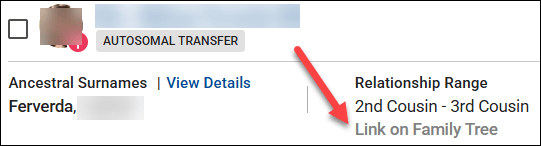
  • American Ancestors – Wonderful selection of genealogy books

Genealogy Research