All About AI – What It Is, What It Isn’t, and Why It Matters

This is the second article in the AI series. The first, Your Wonderful AI Assistant – Sometimes Wrong, Never Unsure, Always Convincing, explains why I’m writing this series and what to expect. I suggest that you read these articles in publication order, as they build on each other.

AI is neither inherently good nor bad. The outcome depends on:

  • How it is used
  • By whom
  • Capabilities of the (ever-changing) tools themselves
  • The understanding level of the “requester” and the “consumer”, both
  • Safeguards applied or neglected

About AI

Let me start by saying that I don’t love AI, and I don’t hate it. I’m neither an evangelist nor a doomsayer. I’m a realist. AI is a powerful tool, capable of remarkable things and spectacular failures. Understanding the difference and interacting appropriately are the keys to success or failure.

AI is simply a tool, and like all tools, it can be used for good or evil. AI has the potential to, and does, in some cases, make our lives easier. However, the bad guys and miscreants saw that potential early and have perfected it.

AI is all around us, whether you realize it or not, so don’t think you can just avoid it, because you can’t. AI exists in many forms and is here to stay. We need to educate ourselves so we can reap some of the benefits and avoid the pitfalls.

Education and increased vigilance are the only ways to protect yourself, and I mean vigilance incorporated into the very fiber of your being. No more, “that looks interesting” and clicking without thinking. It’s so easy to do.

When I talk about AI safety, I’m referring to two types of safety.

  1. Using AI tools for reliable results, and how to determine when you’re receiving or consuming something questionable. AI failures occur often and are both irritating and misleading, but not always obvious.
  2. Literally protecting yourself from danger. This includes recognizing when AI is being used without your knowledge and how to protect yourself in the new threat landscape. I am not overexaggerating.

Unfortunately, AI safety is a sliding scale, progressing from one end of the spectrum to the other. There’s not always a clear delineation between correct and incorrect, safe and unsafe, or between different types of AI. As I am wont to say, “It depends.”

Learning about AI, both in general and in specific contexts, is critical. Not yesterday’s AI – but AI right now, because both the AI tools and AI’s capabilities are changing at lightning speed.

We all need to up our game and retrain ourselves to always stop and think first.

AI and You

There are essentially three ways people encounter or interact with AI.

  1. You’re actively using AI as a tool, such as ChatGPT, Claude, Gemini, or others. This is generally safe from an actual danger or “threat” perspective, particularly because you are in the driver’s seat. However, there are aspects you need to be aware of – especially if you’re a novice. I’ll explain methodologies to use AI to (hopefully) increase your productivity and save you from following AI into the underbrush of falsehoods, inaccuracies, and misplaced confidence. In other words, so you don’t have to say, “Wow, I was ever an idiot,” too often.
  2. You’re unknowingly interacting with AI. Sometimes this is fine, but it can open the door to inadvertent reliance on incorrect information and therefore various forms of harm. Sometimes, harm rises to the level of actual danger. Understanding when you’re interacting with AI, understanding its limitations, and recognizing danger signs are important aspects of staying safe.
  3. The AI threat landscape. AI can be dangerous and used against you. I mean screaming-red-neon-flashing-sign hair-on-fire dangerous, and I’m going to explain this new threat landscape and how to improve your chances of being safe, primarily in the final article of this series.

I Use AI, But There Are Limits

I hold a graduate degree in Computer Science and have years of experience in the technology industry where security is both essential and critical. That background, while preparing me generally, cannot prepare one for the situations and well-hidden threats we now encounter every day. Being overconfident and overreliant on prior experience is foolhardy and a sure way to get burned.

The one thing that’s constant in the computer industry is change. The underlying fundamentals remain the same, but everything else changes – and AI is morphing rapidly.

I’ve been using AI since the beginning in a very restricted, measured way. I use AI regularly, tactically, and cautiously, with huge guardrails. I started out by taking classes from Mark Thompson and Steve Little, AI experts in the genealogy space, to learn how to use AI productively. That was a couple of years ago, and the entire landscape has changed since then. I make it a priority to stay current.

In the next article about using AI safely, I’ll share recommendations for training and education from Mark and Steve.

AI tools are trying to emerge from their terrible toddler stage and morph into early teens, but they relapse a lot! Sometimes AI is very helpful, sometimes wrong, and often frustrating – interspersed with amazing victories where AI helps us immensely.

Unfortunately, often it’s almost impossible to tell which is which.
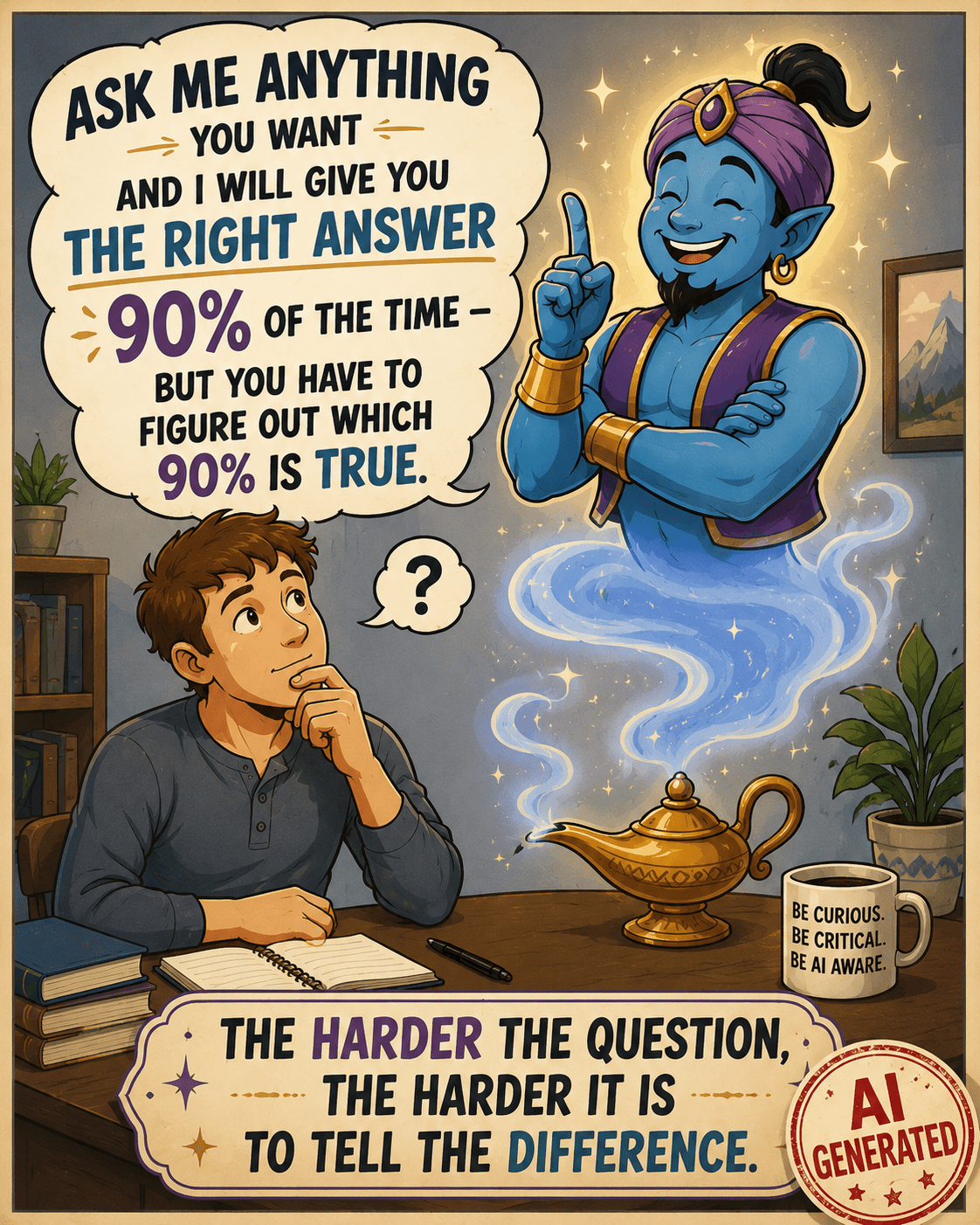
Inspired by a posting in the Facebook group, Genealogy and Artificial Intelligence. Image is AI generated and appropriately labeled as such.

Here’s the caveat – I know I’m using AI. I’m not accidentally interfacing with a Chatbot, thinking it’s a human. I’m not reading something someone else posted and believing I’m reading about an experience that’s true – when it’s AI-created fiction. The question, of course, at that point, is WHY someone created it and posted it in a way that conceals its true origins.

My AI usage is intentional. I know how to be vigilant, generally what AI can and can’t do, and that I absolutely positively MUST fact-check everything. Often, I inadvertently push the limits of AI, thinking it can perform more than it can accurately, which is another reason everything must be checked. As genealogists, verifying sources should be second nature.

If you’re going to use AI, it’s essential that you do the same thing.

So, what, exactly, is AI?

What is Artificial Intelligence?

This is really a difficult question to answer, because AI has been more of a slow evolution, followed by a rapid acceleration of technology – not a specific “thing.” That acceleration occurred when standalone AI tools like ChatGPT, which we know are AI because they are specifically called that, were introduced and made available to the consuming public.

We’ve been using computers for decades now, assisting us on platforms from mainframes to PCs to tablets. Today, our phones are more powerful and useful than early mainframes.

AI is the latest in the cadre of applications, a type of tool that can either stand alone or be embedded in other software tools for specific tasks. Think Chatbots for business websites.

While AI is beginning to be “everywhere,” it’s not a universal scapegoat.

Two years in, AI is being blamed for everything. While AI does make a lot of mistakes, many issues aren’t a result of AI, and it’s not fair to presume they are. Let me give you two examples of what is and is not AI.

  • Not AI – Someone tried to enter text, meaning alphabet, in a field meant exclusively for numbers, like a month field that’s supposed to be a number and not the month name. The person was angry because “AI was wrong” and prevented the erroneous entry. First, it wasn’t wrong, and second, it wasn’t AI.

One of the earliest computer uses was to parse date fields and ensure that the “right thing” was being entered in the correct place. In this case, a numerical month, not the month name. That’s not AI. That’s just plain old-fashioned programming error-checking that’s been a part of software for decades. The program was performing exactly as it was intended.

  • AI – I submitted a spreadsheet to ChatGPT and instructed it to move all of the data in cells in column A that are entirely numeric to the same row in Column B, and to leave everything that contains any alphabetic characters where it is in column A. That’s AI, both because I’m using a known AI tool, and it’s processing my instructions to produce output that did not exist before.
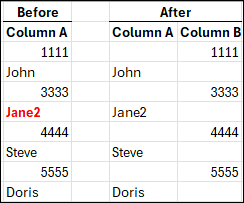
The above image is what I wanted. I completed this by hand to show you what I had in mind. Working by hand is fine with 8 rows of data, but it wouldn’t be fine with 1000 rows, or more. That’s when you need a tool.

What could go wrong? Plenty.

Let’s say that I didn’t provide specific instructions and a cell contained mixed alpha and numeric, like Jane2. Or, if the tool just plain messed up because of some other unknown reason – such as the file being too long, or it misinterpreted an instruction. That’s why you have to verify everything.

With AI, it’s always some variant of the wild west frontier.

Next, I submitted my Before and After spreadsheet, above, and instructed ChatGPT to “Please put this in a chart and make it pretty.”

This is exactly what I received.

I didn’t receive what I wanted, because I didn’t tell the AI tool specifically what I wanted (spacing, color, font, size), and what I didn’t want. This isn’t a problem with the AI tool, it’s a problem with the instructions provided by the “driver.” AI is not a mind-reader, at least not yet.

Hint: When I don’t receive what I wanted, I tell ChatGPT what I wanted and ask it why I didn’t receive that, and what instructions I could provide differently. In this case, I learned that it can’t “discern colored text” (red) and only sometimes can “see” bolding.

This was a very simple comparison of AI versus non-AI. Of course there are endless variations, but in general, AI does something that produces something new or different or in another format – based on conversational instructions.

Examples of what AI can do well:

  • Take notes and summarize online meetings
  • Organize information into outline format
  • Suggest structure
  • Proofread and sometimes provide editing suggestions
  • Suggest places to look for additional information
  • Translate, transcribe and summarize both typewritten and handwritten documents, in multiple languages

Every one of these comes with a caveat. AI can always be wrong. Like any helper or intern, it’s up to us, as the responsible party, to be, well, responsible by monitoring and verifying everything.

Being wrong in places does not mean the tool isn’t useful. AI can transcribe an entire document in seconds, but I need to proofread it against the original. That’s a significant time savings for me. AI can then assist with the logic of how people are related to each other. That doesn’t mean it’s accurate, but it’s a place to start.

We have to learn how to communicate with our intern in a way it can understand to (hopefully) receive the output we want, and we have to confirm that it is.

The more difficult and complex the task, the more difficult the verification.

GIGO

The overarching theme for all computer data is GIGO – garbage in, garbage out. I know everyone can think of hundreds of examples that have absolutely nothing to do with AI. It’s the same now, but on steroids because we add the layers of:

  • Our instructions to AI, which may or may not be as thorough as we thought
  • AI interpreting what it thought we said, according to its internal rules and limitations that we don’t understand
  • AI manipulating data and producing output on our behalf

Additionally, when we ask AI to gather information about something, it can only gather what it can see. For example, some AI tools cannot reliably open weblinks, while others can. Some, like Google have internal routines to rank sites that are more reliable and accurate, and other tools do not.

Asking your AI tool for it’s sources so you can evaluate the GIGO factor is essential too.

Drinking From the Firehose

You might think AI is completely new, but it really isn’t. What’s new is the label of AI and consumer-based products where you get to be the driver.

Think of AI as the big umbrella.

In the past decade or so, artificial intelligence models have been slowly being developed, often for specific use cases. Machine learning models that are self-teaching are good examples. Genetic imputation to equalize autosomal DNA files produced by different vendors before matching is a specific use case.

Traditional programming is very specific and instructs, “If X, then Y.” Imputation, within a limited range of options, says, “Based on X, I think Y is most likely next character.” Machine learning learns by example. AI is the next generation where answers to questions are not hard-coded or self-learned in the same way.

With AI, one could interact and say, “Based on X, what do you think is next, and why?” The answer would be conversational, and would explain how the AI tool got to the result of Y. That doesn’t mean Y is accurate.

Before AI, consumers had never been in the driver’s seat, with the ability to query computers easily about anything with no programming needed – receiving conversational answers in their language of choice. Answers that are hopefully accurate.

Back in 2011, Siri became available, Amazon Alexa in 2014, and Google Assistant in 2016, but these were all command driven with a restricted vocabulary and could only perform limited actions.

In October 2022, ChatGPT introduced us to a new world, triggering the AI boom. By late 2023 and early 2024, suddenly the term AI, artificial intelligence, snowballed and was everywhere. The early versions of AI tools could only do a fraction of what they can in 2026, and could not perform tasks on your behalf.

ChatGPT prompt: “Make me a fun goofy picture with a cat that illustrates the ability of AI to make a fun goofy picture.”

Today that has all changed and it seems like everyone is making goofy pictures for fun.

Artificial Intelligence is NOT Intelligent

Let me say this loudly – artificial intelligence is not intelligent!

AI is a computer – electronic pulses in a data center somewhere. AI is trained to gather massive amounts of data, distill it in specific ways, and then, using various types of skills, interact with humans in a helpful manner. “Helpful” depends on perspective.

This field, as a whole, is really still in its infancy. That’s both the bad news and the good news.

AI tools are “new,” exciting, and frightening all at once. AI has enormous potential, but it also creates opportunities for misuse, deception, and unintended consequences.

I’m not referring to water and electricity consumption and the impact of building thousands of data centers on the environment. I’ll let you decide for yourself on that one.

Risks include:

  • Frequent errors
  • GIGO
  • Results being presented overconfidently by the AI agent
  • Faulty results being believed by the consumer (that’s you and me) with the same level of overconfidence, and without verification
  • Social engineering – meaning the manipulation and influence of people by bad actors
  • Extremely dangerous, highly malicious manipulation and applications in ways not possible before

The entire AI landscape is complicated by a lack of public understanding and made even more challenging by the extraordinary pace of this technology’s evolution.

Multiple Types of AI

There are multiple types of AI, ranging from Machine Learning models to full-blown Generative AI that creates goofy cat images for you. For the most part, today, we’re talking about LLMs and Generative AI.

Large Language Models, called LLMs, are artificial intelligence tools, like ChatGPT or Claude, that are designed to process human-like text or speech and generate output in the same way. AI doesn’t just give you a list of resources that you evaluate yourself, like a search engine; it gives you an “answer” (such as it is), writes text, and has an interactive “conversation” with you.

How does that happen?

The AI tool at the data center aggregates and amalgamates data based on your input and its training, then predicts the words most likely to come next, in what context, and how those words relate to each other.

That’s how AI forms an “answer.”

This is how and why AI, specifically LLMs, can write essays on a topic, create entirely fictitious but highly engaging social media postings and stories that aren’t presented as “stories,” but as someone’s personal experiences, meaning as “truth.”

AI, or the people who generated that AI script, or both, present fictional results with great confidence, often beautifully, and far more convincingly than humans.

This is where it’s important to differentiate between the tool itself, and the “driver,” meaning the human that’s prompting the AI tool.

  • The driver needs to prompt AI correctly and verify the output.
  • AI, the tool itself, sometimes generates incorrect information, often regardless of the prompts provided by the driver.
  • Sometimes the AI tool performs exactly as instructed, but the driver requested something “improper.” By improper, I don’t mean inadvertently or by accident.
  • Sometimes the human is unethical.
  • AI isn’t a sentient being and doesn’t understand the difference.

The human decides what to do with AI-generated results. Many times, AI-generated text, recognizable by word patterns or other characteristics (today), is posted to social media as “original” or factual, and contains incorrect information.

This is often referred to as “AI slop,” as one of the nicer terms, especially by those of us who increasingly find incorrect but convincing AI slop posted as “helpful information” and positioned as “expert,” even though it contains substantial inaccuracies.

Worse yet, very convincing AI slop can easily be generated to part you and your money.

And do I EVER have an example for you that combines AI slop and ethics.

AI SLOP and Ethics

Just two days after our new paper, on which I’m a co-author, Mitotree: The Universal Human Mitochondrial Reference Phylogeny at 10x the Resolution, was published, a company, whose name I’m not including because I don’t want to give it any oxygen or get it indexed with this article, posted a “beautiful” AI poster based on our paper – without our knowledge.

Looks nice, right?

To begin with, it appears for all the world like the authors provided this infographic, which we ABSOLUTELY DID NOT DO. Our names are right at the top. However, our names, as the paper’s authors, lend this “thing” credibility, thereby leveraging our work BOTH unethically and inaccurately.

This AI-generated infographic, although it’s not labeled as such, was created by a third party shortly after the publication of the Mitotree paper. While visually impressive, it contains several scientific inaccuracies, illustrating how quickly and easily authoritative-looking but incorrect content can be created and disseminated.

That’s one of the issues with AI – the beauty and professional appearance of AI-generated “things” encourages unwarranted confidence in the output, when the information is very wrong.

That’s why humans bear the responsibility of BOTH using AI ethically, AND verifying its accuracy. It’s also why, as consumers, we need to question everything.

My biggest issue with this situation isn’t with AI, other than the fact that it generated incorrect output – the issue is with the humans who intentionally created this, using AI. In other words, the drivers.

The infographic doesn’t say they created this incorrect rubbish, and I assure you, they never asked for permission. Then, they published the infographic on their own blog. In case you’re wondering, the company encourages uploads and charges people to get “new results.”

Now for the AI part.

The information IS WRONG and NOT a synthesis of what we published!!!! This infographic shows that all non-L haplogroups descend from haplogroup L4, which is absolutely FALSE.

Haplogroups M and N descend from haplogroup L3, and haplogroup R descends from a subclade of N. You can trust me because I’m one of the paper’s authors, or better yet, you can look for yourself, here, on Discover, or here, here, and here.

That isn’t the only thing that’s wrong, either, but how would normal air-breathing humans, meaning consumers, ever know?

Doesn’t that infographic look professional and convincing, especially if you, as a consumer, didn’t actually check everything on the document – AND its authenticity?

You’d assume legitimacy, right?

If you didn’t know, wouldn’t you be impressed with the expertise of the company that posted this infographic on their blog? And, as a normal consumer, how would you know?

You’d be impressed because you didn’t realize they hijacked someone else’s work, created this “beautiful” infographic, included the authors’ names on something inaccurate that the authors knew nothing about and didn’t endorse, and then published it. All without saying one word indicating that the infographic isn’t the authors’ work, was AI generated, or by whom.

In the past, before generating AI slop was this easy, consumers often presumed that a business was ethical and accurate. Of course that wasn’t always true, but being convincing at first glance is much easier today. Also, presume is related to assume…and we all know the rest of that story.

This is one of the dangerous sides of AI – illustrating how easy it is to deceive people now. It’s increasingly difficult to distinguish between legitimate expertise and fabricated authority. AI has removed that barrier.

You can no longer accept that anything is what it appears to be unless you’re working directly with known, trustworthy entities. The offending company completed that infographic in the click of a button and the blink of an eye, while I hadn’t even finished writing my own article about the paper’s release.

That company wants you to upload your DNA to them so that they can tell you “things” about your DNA. The intention is clear.

Of course, the consuming public, unless they were extremely vigilant, would never figure out either issue – ethics or accuracy.

I had to delete the next paragraph or two that I wrote on the topics of ethics, trust and confidence because I’m still so furious. Hot under the collar doesn’t even begin to describe how I feel about the ethics of misrepresenting something that we authors just spent six years of our lives on. Trust me when I tell you that my internal monologue was both very salty and rather spicy!😊

However, there’s good news. This infographic provides a perfect illustration of both AI slop, how deceptively great it looks, the ethics surrounding AI usage, and how difficult AI is to discern.

In fact, I couldn’t have come up with a better “bad example.”

A six-fingered hand, misspelled words or three arms in an image are obvious, and are yesterday’s AI tipoffs.

A misrepresented phylogenetic relationship or an incorrect founder-clade example is not obvious. Only subject-matter experts would or could notice if they were focused and paying attention.

That’s the problem in a nutshell.

The infographic wasn’t obviously wrong. It was convincingly wrong.

And convincing wrongness is far more dangerous than ridiculous wrongness, like six fingers, because most readers never realize they’ve been misled. Or why.

This single example demonstrates several AI themes in one fell swoop:

  • AI-generated content
  • Ease of creating complex and convincing output
  • Apparent authority
  • Misplaced trust
  • Lack of topic expertise
  • Overconfidence
  • AI slop
  • Difficulty of discerning truth
  • Yesterday’s “AI clues” are gone now – like misspelled words
  • Marketing vs. science
  • The necessity of human review
  • The fact that human review is only effective when the reviewer actually understands the subject, and cares.
  • Ethics

Like with this example, often AI slop is interspersed with accurate information, and it’s impossible to tell the difference unless you actually DO DUE DILIGENCE AND VERIFY ALL OUTPUT.

Yes, all of it.

Don’t shoot the messenger!

Hallucinations

Next, let’s discuss genetic genealogy, particularly haplogroup information. Hallucination or hallucinating is the term used for when AI simply makes things up, which often sound extremely convincing.

There’s nothing AI can tell you about your haplogroup that reputable sources cannot – and AI can’t see behind paywalls or logins, into your matches.

FamilyTreeDNA has an article in their help center titled, Why AI Models Struggle with Haplogroup Analysis.

Unfortunately, I encounter more and more instances where someone uploads their DNA to a third-party site, or “asks AI”. They receive a (sometimes substantially) incorrect haplogroup in a completely different part of the tree, complete with convincing language, posts it publicly, and then decides to argue that the third-party site, (who probably uses AI), or their AI tool, is correct.

Let’s look at an example. The mitochondrial DNA haplogroup for the Native American Anzick-1 burial in Montana that dates from roughly 12,500 years ago is mitochondrial haplogroup D4h3a. There’s no dispute about that.

A tester uploaded their mitochondrial DNA to “AI” and was very confidently told that, based on their mutations, their results belonged to haplogroup A2ex. They don’t.

ChatGPT misinformation about Anzick-1 haplogroup

They were then informed that it was also Anzick’s haplogroup. Wrong again.

FamilyTreeDNA's Discover tool information comparing haplogroups D4h3a and A2ex

FamilyTreeDNA’s Discover tool comparing mitochondrial DNA haplogroups D4h3a and A2ex. Their common ancestor lived about 66,000 years ago.

Not only did AI report Anzick’s haplogroup incorrectly on a grandiose scale, those two haplogroups don’t share a common ancestor for roughly 66,000 years – specifically haplogroup L3 who lived in Africa. AI made a massive mistake.

But it gets worse.

ChatGPT incorrect information about haplogroup A2ex.

The AI “answer” continued for four pages, containing completely erroneous information. To begin with, A2ex is a haplogroup, and “ex” has never meant excluding.

That’s bizarre, and an example of AI making something up that is patently false, but sounds wonderful and very authoritative.

The term for this AI behavior is hallucinating. I’m not publishing the rest of this exchange because I don’t want anyone (or any AI bot), for one minute, to think any of it is accurate. AI even made up mutations, along with four pages of “fairy tale.”

The individual who received this information was so excited and proudly posted it, which in turn provided incorrect information for other consumers, and encouraged them to use a badly flawed tool. Then they proceeded to argue with the experts.

They were absolutely convinced because it “felt” true to them, and because they wanted to believe they had discovered something special, and were related to Anzick. Their comment was, “You’re wrong, because AI told me it was true, and I’ve learned a lot from AI.” I was quite exasperated, but also feel sorry for them and can’t help but wonder how much else of what they “learned” from AI is wrong too, but I digress.

Most AI errors aren’t obviously wrong to the consumer. If AI said that you were descended from Tyrannosaurus Rex, you’d laugh. But if it tells you something more plausible and sounds confident, it’s very easy to be convinced. The reason these errors are so dangerous isn’t because the experts are fooled, it’s because non-experts either can’t, don’t, won’t or don’t think they need to invest the time to discern the difference.

I find it a bit baffling why anyone would use AI, or worse yet, a pay site for haplogroup misinformation, especially since FamilyTreeDNA provides the Discover website with free reports for every haplogroup. They are the unquestioned industry phylogenetic experts for both Y-DNA and mitochondrial DNA, and literally created the reference model for all haplogroups with the Mitotree.

Everyone can use Discover to access both the Y-DNA tree and Mitotree – for free – here. Discover isn’t even behind a paywall, and every customer can click through from their results page.

As far as haplogroups are concerned, there’s really no reason to rely on AI-generated answers without verifying them, because the authoritative resources are freely available and incredibly easy to access.

FamilyTreeDNA’s Discover Ancient Connection for Anzick-1.

Regarding Anzick’s haplogroup, all I had to do was enter haplogroup D4h3a in Discover and under Ancient Connections, right there is Anzick’s information.

I may start posting a link to this article on every single post where someone starts out with, “I submitted my DNA (or haplogroup) to AI, and it said…”

Let me be very direct. Don’t believe AI when it has to do with genetic information, especially Y-DNA, mitochondrial DNA, and haplogroups. AI does not have the capability of understanding topology and nuances of phylogenetic trees, and can only parrot back what others have said – correctly or incorrectly.

Incorrect information that’s publicly posted is then fed back into the AI algorithm, further reinforcing incorrect results.

You can find the free Discover tool for both Y and mtDNA, here, and you can join FamilyTreeDNA’s Mitochondrial DNA Group, here, and the Big Y Group, here.

AI Training and AI at Work

AI is trained on massive datasets of mostly unknown origin, including all public postings such as Reddit and Facebook public groups, pages and postings.

In other words, AI is always accruing additional information, including data uploaded by users.

As genealogists, we are already aware of the dangers of unsourced trees and and information that is repeated and copy/pasted without verification.

AI’s training provides more than just data points for you to evaluate, like trees.

AI bots are trained to interact in a humanlike manner. So instead of trees with hints, think hypothetically of an AI bot that reads the trees, then “creates” a wonderful story or infographic about your ancestor – that may or may not be either fully or partially accurate. But it’s beautiful, heartwarming and you love it! Plus, you don’t have to sort through all those trees, hints, and do the work yourself. AI did it for you! Win – win, right? Wrong.

AI knows how to very effectively manipulate language, images, and with them, emotion. Yours, to be specific. That’s both the bad news and the good news.

AI also has the ability to sift through large amounts of data and summarize succinctly –  sometimes even correctly. Sometimes it takes several refinements to obtain something that’s both correct and what you want. AI can discern patterns in massive amounts of data that we cannot, at least not readily.

Think of AI as your not-so-trusty but very confident and friendly intern – and I don’t necessarily mean a college intern.

Remember when you see AI published by others, their intern has been at work too.

AI itself is not a sentient being. It’s not inherently ethical or unethical. However, it has been trained to interact with you in a human way. It’s easy after tens of thousands of years of human conditioning for us to interpret AI as human.

Let me give you an example.

I use ChatGPT regularly and was having an interactive conversation after asking it a question. ChatGPT replied that it didn’t know, which is a substantial and startling improvement over earlier versions. I replied, “I’m one of the team members, and even I don’t know.” Really, there was no reason for me to say that, except we interact with our GPTs as human, sometimes even naming them. Then, ChatGPT said, “That made me laugh.”

I was a bit startled.

That made ME laugh, because AI is a machine. It can’t laugh, but it has been trained how to interact with us in a humanlike manner – often sycophantically. Remember how LLMs are trained. It knows what to say next. The smiley face was probably its “humor” clue. Making your interactions both useful and enjoyable keeps you paying your monthly subscription fee.

Remember that AI has no morals, because it’s a machine, and no ethics, for the same reason. That falls to the humans driving. If someone intentionally drives their car into a crowd, it’s not the car’s fault.

AI currently doesn’t have the ability to self-check or self-regulate, though this has improved somewhat in recent months and will, hopefully, continue to improve over time.

People who use AI can use the results for good, for nefarious purposes, or simply as a “time-saving” assistant. There are no guardrails. I could give you very ugly examples, but I’ll simply say that, if prompted, AI will generate the worst things you can imagine, including nonconsensual adult images of people that never happened. These are generally called deepfakes, although deepfakes aren’t always generated in a negative context. I’ll discuss this phenomenon as part of Generative AI in the final article where we’ll cover the dark side of AI.

Conversely, AI can be intended for good by its human “driver” but still be inaccurate and, consequently, unintentionally inflict damage or spread misinformation.

The Bottom Line

Here’s the bottom line.

Your personal threat level warning flag now needs to be permanently set to red.

You need to be increasingly vigilant, meaning actively suspicious, of absolutely everything, even exchanges that used to be safe. In other words, if you receive an email from an organization or government agency that you’ve interacted with in the past – don’t click on an embedded link because you always have in the past and it was safe then.

Hint: Go to the website directly. E-mails are very easy to spoof and your SS account password, for example, is invaluable to a hacker.

The bad guys have gotten really good at being horrible. AI is becoming more difficult to detect every day – even for those of us with a significant amount of experience.

I realize that I sound paranoid, but I just completed security update training, and the threat landscape worse than I ever imagined. I’ll be sharing that information throughout these articles. Better paranoid and safe than trusting and sorry. What I’m striving for is an appropriate amount of alarm and a safe level of balance. I don’t want you to learn the hard way.

Today’s tip-offs that something is AI-generated will be gone tomorrow.

To use AI tools is to learn what AI output looks and feels like, so you can recognize when you encounter AI that you didn’t generate.

Now that we know what AI is, and isn’t, the next article will focus on AI Assistants, using AI successfully, and how to avoid pitfalls. You don’t want to be the president of the AI Fan Club, nor do you want to feel like you’re in an AI Escape Room.

_____________________________________________________________

Share the Love!

You’re always welcome to forward articles or links to friends and share on social media.

Subscribe!

If you haven’t already subscribed, it’s free. You’ll receive an e-mail whenever I publish by clicking the “follow” button at the top of the main blog page, here.

Help Keep This Blog Free

I receive a small commission when you click a vendor link in my articles and purchase that item. This does NOT increase your price but helps me keep the lights on and this informational blog free for everyone. Please click on the affiliate links in the articles or to the vendors below if you are purchasing products or DNA testing.

Thank you so much.

DNA Purchases and Free Uploads

Genealogy Products and Services

My Books

Genealogy Books

Genealogy Research

Sixteen Unique Trees at FamilyTreeDNA: How and When to Use Each

I love all the various trees at FamilyTreeDNA – and I’m not referring just to traditional genealogy trees with people, names, and dates. I’m talking about phylogenetic or haplogroup trees – the ones you use to understand your Y-DNA and mitochondrial DNA haplogroups, origins – and more. These trees tell you ABOUT your ancestors, those people in the more traditional genealogy tree, and the combination of both is powerful.

This article introduces the various trees available at FamilyTreeDNA, when and where you’ll find them, and what they can do for you.

Haplogroup Trees

Phylogenetic, or haplogroup trees, provide a genetic path from you, or the tester, today, back in time to Y-Line Adam, or Mitochondrial Eve – the first two humans who lived AND have descendants today.

Let’s start by explaining about Y-DNA and mitochondrial DNA (mtDNA), their inheritance path, and what they mean to you.

Y-DNA

Only men have a Y-chromosome, so only biological males can test their Y-DNA.

Y-Line Adam, Y-DNA haplogroup A-PR2921, lived about 232,000 BCE, or 234,000 years ago.

Is it possible that one day someone will test whose results push that date back somewhat? Yes, of course, as we are always learning, and many testers split branches.

Today, all 711,000+ modern descendants who have tested carry the mutation named A-PR2921 as their oldest SNP (single nucleotide polymorphism), or haplogroup-defining mutation in their Y-DNA. That’s because we all descend from that one man.

If you’re a male, Y-DNA testing tells you about your direct paternal line by matching with other men who have also taken a Y-DNA test, and by revealing valuable information from before the adoption of surnames. There’s no other way to reach that far back in time.

If you’re a female, you can recruit males in your family to test.

The Big Y-700 test provides the deepest-reaching and most refined Y-DNA test available, which is essential for both genealogy and tree-building.

Mitochondrial DNA

All people have mitochondrial DNA, inherited from their mother directly through her matrilineal line – meaning her mother, her mother, her mother, and so forth – directly up your tree through all mothers.

Everyone inherits their mitochondrial DNA (mtDNA) from their mother, but only females pass it on. Both males and females in the current generation, meaning you, can (and should) test their mitochondrial DNA.

Mitochondrial Eve, mitochondrial DNA haplogroup L, lived about 141,000 BCE, or about 143,000 years ago. All 315,000 testers descend from this one woman.

Like with Y-Line Adam, one day the results of future testers may push this date further back in time. A full sequence mitochondrial DNA test, mtFull, is necessary to test all 16,569 mitochondrial locations.

Test Types

FamilyTreeDNA has been in business for more than 25 years. Technology has advanced dramatically during that time. While they continue to offer new tests and products, they strive to maintain value for their original testers.

Even though some early testers may have joined their ancestors, matching with their test results is still beneficial to us.

Present-day DNA testers can still derive value by matching the earlier, lower-level, lower-resolution tests. Not as much value as if the original tester had taken a higher-level test, but those tests may not have been available at that time.

Matches, surnames, genealogy, locations, and haplogroups provide us with valuable information. The more people who test, the larger the pool becomes, and the better our chances of discovering something that refines our understanding of our ancestors – and identifies who they are.

Before we look at the trees available, let’s take a look at where haplogroups come from. Different level tests assign different levels of haplogroups, based on how much is tested.

Let’s answer two common questions:

  1. Where can you find your haplogroup, and what does it mean?
  2. How can haplogroups be different for people who descend from the same ancestor?

Where Do Haplogroups Come From?

Since the beginning, FamilyTreeDNA has always provided their customers with haplogroup information. Haplogroups are very genealogically useful today, but initially, 25 years ago, they were only able to provide essentially continental-level origin information for your particular line. That too was useful, and helped to identify and eliminate common lineages – just not as useful as today.

Science and testing have both come a long way. Present-day testers still match with people who only tested at a lower level. You never know what you might find at that level – a match to someone who has not taken the current tests, but is still very relevant because they share your ancestor. In fact, they may be the only tester who does.

For Y-DNA testers, you’ll notice several match categories that reflect different testing levels – along with the number of matches at each level. At one time, you could purchase each one of these tests individually, then later upgrade to higher-level tests. Today, only the 37 and 111 marker tests, and the Big Y-700, which scans the entire gold-standard region of the Y chromosome, are available. Higher level tests include the lower-level tests.

Click any image to enlarge

Different types of tests provide either a predicted or a confirmed haplogroup which shows on your match list.

Without getting all sciency on you – the 12-111 marker tests test targeted STRs, or short tandem repeats, which can’t be used for haplogroup assignment and confirmation. They can and are used to compare to other testers for matching because the number of repeats, or stutters, are inherited on the Y chromosome. The Big Y test scans the Y chromosome for SNPs, single nucleotide polymorphisms, which are stable mutations that define haplogroups. I wrote about this in the article, STRs vs SNPs, Multiple DNA Personalities.

Some haplogroups are much further down the tree, or more current, than others. Your most current haplogroup, only available with the Big Y-700 test, is the best because it brings you the closest to current in time, often placing you within family branches. The Big Y-700 scans about 23 million locations on the Y chromosome, revealing both known and unknown mutations, not just a few markers, making it the most refined and relevant test genealogically.

Each higher-level test includes the lower-level tests. You can see what tests your matches have taken by looking beneath their names on your match list. In this case, these Estes men who match my cousin have taken the Family Finder (or uploaded an autosomal transfer), and taken the mtFull test. One match initially took the Big Y-500 but has since upgraded to the Big Y-700, and the other originally tested at the 111 marker level, and has since upgraded as well.

The Big Y-700 includes all lower-level tests, such as the Big Y-500 (now obsolete), the 111, 67, 37, 25, and 12 marker STR tests. You still match with people who only tested at those levels, plus everyone else who ordered a more refined test.

The haplogroup you receive is more or less refined, based on the test level you take.

Y-DNA Test Type Haplogroup Provided Relevance Upgradable
Y-DNA STR 12-111 marker tests (only 37 and 111 are available today – the rest are obsolete) Predicted based on STRs – very reliable at the level predicted Predicted (not confirmed) haplogroup that was generally formed a couple thousand years ago, or earlier Yes, if enough quality DNA remains. Only 37, 111, and the Big Y-700 tests are available today. Recommend the upgrade to Big Y-700.
Individual SNP test (now obsolete) Confirms a predicted haplogroup or tests a single SNP to confirm a closer haplogroup Relevant at the level tested – either positive or negative result was reported Individual SNP tests have now been replaced by Big Y-700, which covers all individual SNPs that were available to test, plus much more.
Big Y-500 test (now obsolete) Confirmed haplogroup within range of that test’s ability, replaced by much more granular Big Y-700 Big Y-700 is more refined and moves the tester towards more current haplogroups, so more genealogically significant Yes, upgrade to Big Y-700 if enough DNA remains, or tester can re-swab
Big Y-700 – scans the entire gold-standard region of the Y chromosome – approximately 23 million base pairs Top-of-the-line SNP-confirmed test, most granular and refined. Scans for known and previously unknown mutations. Extremely accurate. Generally advances the tester into a genealogical timeframe, and often divides testers into multiple lineages descended from a known common ancestor No more advanced test is available.
Family Finder autosomal test or transfer Confirmed to mid-range level if possible. Not all transfer files have Y-DNA or mtDNA SNPs so you get what you get. Useful in autosomal matching for locating people you may be related to you with that surname. Ask the match if they are willing to take a Y-DNA test, if relevant, or sponsor a testing scholarship for them.

Family Finder haplogroups are relatively new at FamilyTreeDNA. Each chip level that FamilyTreeDNA has used for testing over the years, and the chips that other vendors have used, contain different SNPs (or none at all on the Ancestry test) that can be measured for some level of haplogroup. Other vendors generally don’t quality-control for either Y-DNA or mtDNA SNPs because they don’t use them. This is a “you get what you get” freebie.

That said, most Family Finder haplogroups are closer in time, or “better” than the predicted R-M269, the most common haplogroup in Europe, often reported with STR testing.

Not everyone with a transfer kit receives a haplogroup. Due to quality and reliability issues, you cannot see haplogroups on your autosomal match list for those who only have a haplogroup through an autosomal transfer.

Using our male Estes testers as an example, we find the following haplogroup results at the various testing levels:

Haplogroup Haplogroup Formation Date Ancestor or Haplogroup Formation Location Haplogroup Source
R-M269 4450 BCE (6450 years ago) Between Ukraine and Kazakhstan, north of the Black and Caspian Seas Predicted from 12-111 STR marker tests
R-BY487 700 CE (1300 years ago) UK, Scotland/England Family Finder DNA SNP Confirmed
R-BY482 1550 CE Robert Eastye b 1555 Ringwould, Kent, England Big Y-700
R-BY490 1700 CE Silvester Eastye b 1596 Kent, England Big Y-700
R-ZS3700 1750 CE Moses Estes 1711 VA Big Y-700
R-BY154784 1850 CE Joseph Estes b c 1790 VA or TN Big Y-700

All of these are valid and accurate haplogroups – some are just closer in time and much more useful than others. All of these men have R-M269, because it is a parent haplogroup of all of those downstream haplogroups. The Big-Y tested men beginning with R-BY482 don’t share the haplogroups below them, because they don’t have those mutations that are downstream on the tree. However, the men at the bottom with R-BY154784 have all of the SNPs above them.

Note that all haplogroup formation dates are ranges. I’m showing the midpoint here.

When upgrading, if the original tester is deceased, select the highest-level test available, as there may not be enough DNA to run more than one test. When I offer scholarships now, I always just offer the Big Y-700 test to avoid future issues.

If the tester you need is no longer available, consider the possibility that other people, family members perhaps, might be available to test to represent this same line.

Next, let’s look at mitochondrial test levels and haplogroups.

Mitochondrial DNA Test Type Haplogroup Provided Relevance Upgradable
HVR1 & HVR2 tests (no longer available) Predicted based on around 1000 markers – very reliable at the level predicted Predicted haplogroup, not confirmed, generally formed a couple thousand years ago or earlier Yes, if enough quality DNA remains. Only the mtFull test is available today.
mtFull, full sequence test Tests all 16,569 SNP locations in the entire mitochondria. Most granular and refined. Extremely accurate. Often brings tester into genealogical timeframe, especially with the new Mitotree. Divides testers into multiple haplotype lineages, sometimes descended from known common ancestor. No upgrade needed to receive new Mitotree and mtDNA Discover benefits.
Family Finder autosomal test or transfer Coming soon. Will be the same criteria and caveats as Y-DNA SNPs. May be able to find a similar or upstream haplogroup that might point to a common ancestor. Ask autosomal match if they are willing to take a mtFull test, if relevant, or sponsor a scholarship for them.

Ok, now that we understand more about haplogroups, how they are determined, and where yours came from, let’s look at all of the trees at FamilyTreeDNA.

Trees Within Your Y-DNA and Mitochondrial DNA Account

Let’s start with trees found within your personal account, so sign in.

Each tree has a different purpose and unique benefits.

Tree #1 – Your Matches Genealogy Trees

Each of your matches may have provided links to genealogical trees. They may show trees in multiple places too; at MyHeritage, an archived tree at FamilyTreeDNA, and a WikiTree link. I makes notes about their trees in the comments field, and I also keep a spreadsheet to look for commonalities.

Tree #2 – Haplogroups and SNPs for Y-DNA Testers

Next, for Y-DNA testers, click on the Y-DNA Results and Tools.

You’ll see the Haplotree & SNPs tile on the dashboard.

The Haplotree and SNPs link takes you to a phylogenetic tree that defaults to your haplogroup, where you can view:

  • Variants – SNP mutations that define your haplogroup
  • Surnames with this haplogroup – so long as there are multiple public testers
  • Countries – self-reported for earliest known ancestors (EKA)
  • Recommended Projects – haplogroup projects only – others such as surname projects are found in Discover under Suggested Projects

Tree #3 – The Block Tree for Big Y Testers

People who have taken the Big Y-700 test have a separate section that includes tools for the Big-Y test that aren’t relevant for the 12-111 STR marker tests.

Big Y testers will see the Block Tree tile on their dashboard.

The block tree is an alternative way of displaying matches on a phylogenetic tree. While the Discover Time Tree is viewed left to right, this tree is displayed top to bottom, with each mutation being represented by one grey bar on the scale at left. Each mutation corresponds to approximately 100 years, which is a rough average for the frequency of Y-chromosomal mutations.

People with 30 mutations or fewer are shown as matches, with the goal of reaching back about 1500 years.

Each large block shows the mutation for which the haplogroup is named, such as R-BY482, at the top. The mutations, known as variants, shown below that haplogroup name, are found in the results of each person in that haplogroup, but in the future, people without those mutations, or with additional mutations, will form a new branching haplogroup.

The green “Private Variants” at the bottom of the branches display the average number of mutations of people within that group awaiting another tester to have the same mutations, so a new branch can be formed. I view Private Mutations as “haplogroups in waiting.”

Discover

In addition to the haplogroup trees shown in your account at FamilyTreeDNA, there are several additional trees in Discover for both Y-DNA and mitochondrial DNA. Discover, updated weekly, is a suite of tools for both Y-DNA and mitochondrial DNA that, cumulatively, provides a book about your haplogroup results.

Discover comes in two flavors:

  • The publicly available free version with limited functionality
  • Your private version with expanded functionality available from within your account

You can access Discover, here if you’d like to follow along.

Discover is a publicly available free tool introduced in the fall of 2023 that provides more than a dozen reports, enabling a deeper understanding of all haplogroups.

Just select Y-DNA or mtDNA and enter your haplogroup of choice.

Think of these menu choices, in the sidebar, as chapters in your personal book. Every chapter has something interesting to tell you. Please read them – don’t just scan.

In addition to the free version, if you have taken a Big-Y or mitochondrial DNA full sequence test at FamilyTreeDNA, you’ll have additional information available.

For mitochondrial DNA results, just click on the pink Discover tile.

For Y-DNA results, click on the blue Discover tile.

Within Discover, you’ll find three distinct trees.

Trees #4 and #5 – Y-DNA and Mitochondrial DNA Time Trees

The Time Tree shows your Y-DNA or mitochondrial DNA haplogroup displayed on a timeline, along with:

  • A self-reported ancestral country indicator for every person’s DNA in that haplogroup
  • Haplotype groupings indicating exact matches between everyone in that haplotype.

A haplotype is a grouping of people whose DNA matches exactly, including unstable or hypervariable locations too unreliable to use for haplogroup formation. However, those mutations may be relevant for genealogical matching.

I wrote about haplogroups and haplotypes here and here.

Tree #6 and #7 – Y-DNA and Mitochondrial DNA Class Tree View

The Classic Tree is available for both Y-DNA and mitochondrial DNA.

On the Classic Mitotree View, you can display and filter the tree, including haplotypes, in seven ways, as shown in the dropdown “Display Options.”

Tree #8 and #9 – Y-DNA and Mitochondrial DNA Tree Branch Comparison

Have you ever seen two haplogroups and wondered how closely they are related? Compare provides that answer.

Here, I’m comparing my haplogroup to that of a family member. Everyone is related, but how long ago are we related on our matrilineal lines?

Haplogroup J1c2f compared with haplogroup V216a shows that our common ancestor lived a VERY long time ago – about 55,000 years in the past, someplace in the fertile crescent.

For either Y-DNA or mitochondrial DNA, you can compare two haplogroups. This provides specific information about those two branches of the tree, and where they intersect. To view more about the common ancestor, just pop R+10398 into Discover and learn more about when and where that ancestor lived.

Trees #10 and #11 – Match Time Trees

Match Time Trees are one of the most useful Discover features.

In addition to the Time Trees and Classic Trees provided for everyone in Discover, test takers will also have a Match Time Tree that shows all of your matches, organized genetically.

For mtFull testers, your matches are organized by haplotype cluster. People in your haplotype cluster are your exact matches.

I have over 100 full sequence matches, so I’m only showing the first few in this screenshot. In addition to the match’s name, their EKA (earliest known ancestor) is shown, if provided.

On the Y-DNA Match Time Tree, links are provided to genealogical trees of the tester, which could be an archived FamilyTreeDNA tree, a MyHeritage tree, WikiTree, or some combination.

You can actually see your matches’ WikiTree tree on your Match Time Tree by enabling another feature.

Trees #12 and #13 – WikiTree Tree Integration

While you’re still on the Match Time Tree page for either Y-DNA or mitochondrial DNA, click on Display Options, above the Time Tree, and enable WikiTree Connections. Unfortunately, the default for this great feature is “off.”

I’ve enabled “Share Mode” at the top to obfuscate the names of the testers, and I’ve adjusted the vertical spacing so you can see more in my examples. You’ll notice the grey lines with dots inside circles. I think of these as beads or maybe knots on a rope, but they actually represent a line of ancestors.

Each tester with one of those grey dot bars has connected themselves to their ancestors at WikiTree, a public one-world tree. Living people are not shown, hence the dash marks to the immediate left of the tester’s name.

By mousing over any of the dots, aka ancestors, you can view information about this ancestor of this Estes tester at WikiTree. Ancestors appear in genealogical order in their relevant place on the Time Tree. How cool is that!!!

WikiTree, like any tree, public or private, can have errors. Always verify any tree using original source documents.

As far as I’m concerned, the Match Time Tree is one of the very best features of both Y-DNA and mitochondrial DNA testing and matching. There are so many options to select from, so take some time to look around.

Your Personal Version of Discover is Best

Y-DNA Discover and mtDNA Discover can both be useful for any level of haplogroup, but the best results are obtained when clicking through from the tester’s FamilyTreeDNA account. Big Y and full sequence mitochondrial DNA customers receive additional information, not available in the free, public version of Discover, including

  • The Match Time Tree
    • Including WikiTree integration
  • Globetrekker™ (Y-DNA, mtDNA coming eventually)
  • Up to 30 Ancient Connections, as compared to 3 in the free version
  • Up to 30 Notable Connections, as compared to 3 in the free version


Tree #14 – Group Time Trees

I absolutely love Group Time Trees. They are similar to Match Time Trees, but unlike Match Time Trees, are publicly viewable for Group Projects if the volunteer project administrators have enabled this feature for the project.

There are two ways to access Group Time Trees – through publicly accessible Discover or directly through any project.

In Discover, select Group Project in the dropdown.

Then type the name of the surname project you’re seeking. You’ll be presented with a menu if the surname you’ve entered is found in multiple projects, or administrators have listed it as “of interest” in their project.

I clicked on the Estes project.

Viewing the Estes DNA Project, under DNA Results, you can see the various options.

Selecting Y-DNA Results Overview displays the project results by administrator-defined group. The teal groups all descend through Abraham Estes through various sons.

However, by clicking the Group Time Tree instead, you can view all these testers and their results in a Match Time Tree format, arranged genetically.

Clicking on the Group Time Tree link takes you to the Group Time Tree for this project. A menu is displayed at left, based on how the administrator has grouped the project.

I’ve selected several groups that I know descend from the original Estes ancestor from Kent, England. Testers who have joined the Estes project and granted permission for their results to be displayed publicly are automatically grouped genetically, at right, with their surname and EKA (earliest known ancestor), assuming they have entered that information.

Earliest Known Ancestors (EKA)

You’ve probably noticed that earliest known ancestors, along with their locations, are used in many places.

Please enter both your direct paternal (father, father, to father’s line) and direct matrilineal (mother, mother, to mother’s line) earliest known ancestors, along with their locations. I wrote about how to do that in “Earliest Known Ancestors” at FamilyTreeDNA in 3 Easy Steps, here.

Trees #15 and #16 – Public Trees

In addition to trees within testers’ accounts, Discover trees, Group Time Trees, and WikiTree tree integration, FamilyTreeDNA provides two additional public trees.

FamilyTreeDNA made the Y-DNA and mitochondrial DNA haplogroup trees freely available years ago, at the bottom of their main company public page – without signing in.

These trees are still actively maintained today and are free for everyone to use.

To find these trees, scroll all the way to the very bottom of the page, in the footer, to the Community section. Yes, I know, it’s a bit like a scavenger hunt!

You can select to view either the Y-DNA or mtDNA tree. I love this tree, because it shows how many SNP-confirmed people have been tested. That number does not include the thousands of academic and public samples that may be utilized to help define haplogroups, and that you’ll sometimes see in your Ancient and Notable Connections.

So, if you receive a new haplogroup, but you don’t see a new match on your list or on the Block Tree, it’s probably because you match a high-quality academic sample.

The trees display from the root, meaning the oldest haplogroup is shown at the top. In the Y-DNA tree, above, haplogroup A-PR2921 is “Y-Adam”.

You can select any haplogroup on the bar across the top, search by country, or select a specific branch name to view.

The tree itself is viewable by country, as shown above, or by variant, meaning the haplogroup-defining mutations, shown below.

Additionally, for the Y-DNA tree, you can choose to display by surname, so long as there are two or more testers with that identically spelled surname who share this haplogroup and who have given permission for public display.

Please note that these people are all SNP-tested and confirmed at the level reported, but they are NOT all Big-Y testers.

This feature alone can be genealogy-changing because they may be surnames associated with your ancestors in records, or they may just be neighbors. Or maybe you thought they were “just neighbors,” but they are actually related.

At one time, customers could order an individual SNP test for R-M269 to confirm their predicted haplogroup. That test is no longer available, but anyone who took that test to confirm R-M269 and never tested or received results (like Family Finder) at a more granular level will be reported at R-M269. Note that 687 is the number of distinct surnames shown, not the total number of testers.

The three “hamburger dots” on the right side provide options for a user-reported Country Report based on the location of their earliest known ancestor, and a Surname Report. The surname report for R-M269 shows a total of 2448 testers who share those 687 surnames.

It’s a Whole Forest

Who knew there were 16 unique trees available at FamilyTreeDNA!

Each tree has a unique purpose and provides information not available elsewhere.

Take a look and see what kind of information is waiting for you – and don’t forget to check back often.

_____________________________________________________________

Share the Love!

You’re always welcome to forward articles or links to friends and share on social media.

Subscribe!

If you haven’t already subscribed, it’s free. You’ll receive an e-mail whenever I publish by clicking the “follow” button at the top of the main blog page, here.

Help Keep This Blog Free

I receive a small commission when you click a vendor link in my articles and purchase that item. This does NOT increase your price but helps me keep the lights on and this informational blog free for everyone. Please click on the affiliate links in the articles or to the vendors below if you are purchasing products or DNA testing.

Thank you so much.

DNA Purchases and Free Uploads

Genealogy Products and Services

My Books

Genealogy Books

Genealogy Research

RootsTech 2026 – The Wind Beneath Our Wings

I started writing this article on Sunday evening, the day after RootsTech ended, and I’m basking in the afterglow. Also, my back and feet may never forgive me.

As a tongue-in-cheek comment, I think someone coined the word “exhausterwhelmulated” and defined it as being exhausted, overwhelmed, and overstimulated all at once. Yep, that’s me.

However, I need to add another couple of words to this – gratitude and joy.

Gratitude and Joy

I’m going to try to express this without sounding too sappy.

Do you recall the joy you used to feel when you spotted a relative you loved dearly but didn’t get to see often? Think of the unbridled joy as you piled out of your parents’ car and spotted your grandmother coming out of the door because she saw the car pull up. You ran as fast as your little legs could carry you directly into her arms, and got hugged so tightly it nearly squeezed the breath out of you.

I don’t know what the word for that would be, but it’s similar to how RootsTech feels.

Let me explain. Continue reading

Getting Ready for RootsTech 2026

RootsTech, March 5-7, 2026, will be here before you know it. Behind the scenes, people are scurrying around like crazy!

Let’s take a peek!

You’d Think January Would Be Quiet…

January seems like it would be a quiet, “down” time, after the holidays, but for many of us, it’s not. It would seem like the holidays would be a time to relax and catch up, but I always get further behind and face a ton of emails in January. (I’m still very behind with those.)

No small part of my January issue is self-imposed, though not all of it.

Let me explain.

  • I’ve always strived for one industry or technical blog article each week. Something about a tool, a product, a how-to article, industry news, something useful and educational. I can’t write an article without using and understanding the tools, so these articles take a substantial amount of time to prepare.
  • I also strive for one “52 Ancestors” article each week, typically published on the weekend. While these articles reconstruct the lives of my ancestors, they include a great deal of genealogy research, instructional content, and a substantial amount of history that affected the lives of anyone who lived in that location or during that time. While the topic is my ancestor, these articles are useful far beyond my own genealogy.

As an aside, many people read these articles as a short-story series. Working on each article draws me close to each ancestor individually. I literally walk through their life beside them – joys, sorrows, deaths, where they lived, what was happening around them – birth to burial.

  • Of course, then there’s “everything else.” Other articles, interviews, my contractual work, collaborating with others, and of course, some smidgen of personal time.

January is Different

But the reason January is different, on steroids, is threefold:

  • It’s the month that speakers begin planning and preparing for sessions they will be giving during the rest of the year.
  • For US business owners, it’s when we begin gathering the information for business taxes, which are due March 15th, a week after RootsTech, which means that we have to get the information to our preparer long before RootsTech. I’m not exaggerating to say this is one of my LEAST favorite activities ever.
  • However, the third challenge is RootsTech itself.

RootsTech 2026

RootsTech, held March 5-7 this year in Salt Lake City, is the granddaddy of all genealogy conferences. I’m fortunate to be able to attend and present – and I’m grateful for that opportunity. But there’s a huge amount of prep, and while some of it happens in December, most of it falls in January.

I’m often asked about what it takes to create a presentation, or put more bluntly, “Why does it take so long? All you have to do is throw together a few Powerpoints.” So, here’s the backstory.

I can’t speak for other presenters, but every 45-minute presentation that I create takes about a week.

If you’re stunned, every one of my slides includes images and often graphics that I create. The slide content needs to be balanced, readable, and not distracting form the point I’m trying to make. It needs to flow smoothly from the prior slide, and to the next one.

It goes without saying that I have to verify everything, sometimes with a vendor, sometimes making sure features still work the way I think they do, or did, the logic is accurate, and that any math maths.

Many screenshots used for articles and presentations need to be blurred, and I need to be sure I don’t accidentally compromise someone’s privacy.

It seems there are 1000 little things. Ok, so maybe only 100!

Syllabus: Oh, you want a syllabus too? Well, that’s another document which often has to be formatted in a specific way, and must be between x and y pages long. Some requirements for different conferences are very specific, down to the font.

The presentation must “fit” into its allocated time, say, generally 45 or 50 minutes, without me talking at 150 MPH with the audience feeling rushed, and provide enough information to be both useful and entertaining. This means that presenters must practice, refine, practice. You get the drift.

Additionally, when working in a tech field, like DNA, vendors change things, often, and you need to review your presentation just before the conference to be sure the screenshots and information are still current. Speakers watch every announcement between presentation creation and the conference with an eye to changes. I swear, it never fails that the night before, I’m always trying to update my presentation because a vendor updated their website. One time it was literally at the podium. That was way too close for comfort.

RootsTech must manage and coordinate hundreds of presenters, their presentations and syllabi, lots of technology, and massive logistics. In order to do so:

  • Pre-recorded sessions are due to RootsTech at the end of December.
  • For other speakers, copies of their PowerPoint presentations and syllabi are due by January 25th so RootsTech can review, check for any issues, and make any last-minute changes. (Hint – you may not see another blog article for the next 10 days.)

All things considered, RootsTech does a great job, but last-minute schedule changes do occur, so be sure to check your planned schedule closer to and daily during RootsTech.

My 2026 RootsTech Sessions

Pre-Recorded Session:

  • X-DNA Basics for Genealogists, a recorded session that will be available in the FamilyTreeDNA virtual booth, which means that everyone will be able to watch. The great news is that the vendor booths and their contents will be visible in the Expo Hall, both in person and virtually, entirely free. You don’t need to register to attend RootsTech to view the vendor booths, but there’s no reason not to, because online registration is free.

Live-Streamed Session:

  • I’ll be presenting Mapping Maternal Connections: Where Science Meets Genealogy on the Updated mtDNA Tree of Humankind for FamilyTreeDNA as a member of the R&D team that developed the new Mitotree. This will be a fun session that explains why mitochondrial DNA matters, covers the latest update, and how the new Mitotree, along with Discover, provides genealogists with new tools to break through brick walls.

The date and time for this session have not yet been confirmed, so check the schedule moving forward.

You must register for RootsTech Online to access live-streamed sessions remotely. They are added to the RootsTech on-demand library for later viewing.

In-Person Sessions

I’m fortunate to have two in-person sessions this year. Neither are being live-streamed or recorded, so I hope to see you in person.

  • Mitochondrial DNA to Z: My Results Are Back, Now What? Everyone is excited when their DNA test results are back, but what do you do next? How do you use them most effectively? What do those numbers means and why are they important? If these questions sound familiar, this is just the class for you. We will take results, step-by-step through all of the reports and tools and help you interpret what they mean and how to use them for genealogy using a case study.

This session is currently scheduled on March 5th, at 4:30 PM, Mountain Time. Please see the Schedule Warning section below.

  • Y-DNA to Z: My Results Are Back, Now What? Would you like to understand how to use your Y-DNA results for genealogy? What do those numbers mean and why are they important? This is just the class for you. We will take Y-DNA results, including the Big Y-700, step-by-step through all of the reports and tools and help you interpret what they mean and how to use them for genealogy. We’ll close with “next steps”, so you have a plan to understand your own Y-DNA message, PLUS how to create a genetic tree to reveal the messages from your other ancestors too. Females don’t have a Y chromosome, but we have fathers, brothers and male family members to test.

This session is currently scheduled on March 6th, at 3 PM, Mountain Time. Please see the Schedule Warning below.

Schedule Warning!!

When viewing sessions on the RootsTech website, the date and time displayed on your computer is the date and time that the event occurs USING YOUR LOCAL TIME!! The RootsTech website uses the time on your computer and adjusts the RootsTech session time displayed to your local time.

That’s fine if you’re attending online, but it’s NOT fine if you’re trying to plan an in-person schedule around travel time and other commitments.

For example, here’s the time displayed for my Y-DNA session. You can see that it says 5 PM, which is GMT-5, and that’s the time where I live, not in Salt Lake City which, during RootsTech, is GMT-7.

This session is NOT available virtually, so anyone who wants to attend will need to do so in person in Salt Lake City. However, the local time, in Salt Lake City, that this session will be taking place is 3 PM, not 5 PM.

In prior years, when I’ve scheduled these sessions in my phone, I wound up having to go back and change the time of every session after arriving in SLC – so that just adds to the confusion. Check your phone after arriving to be sure your sessions are shown in their correct time slot.

One more possible glitch this year is that Salt Lake City time changes at 2 AM on the day following RootsTech. Be sure to factor this time difference into your schedule if you’re planning to fly on Sunday, March 8, the day after RootsTech.

Bottom line – when planning your RootsTech events, be sure to calculate the local time and not your system time, unless you’ll be attending virtually. Also, be sure to check your schedule often in case either schedule or room changes have been made.

Register

Be sure to register for RootsTech. Online is free, and in-person only costs $129 for a 3-day pass, which is a great value for everything that’s offered.

When you register for RootsTech, you’ll be able to use their complimentary conference schedule planning feature which is infinitely helpful. If you’re planning to attend any session, adding it to your RootsTech calendar helps RootsTech with room size planning – getting the right speakers in the right rooms to properly accommodate the audience size.

If you have more questions, here’s the RootsTech FAQ.

Personal Note

On a personal note, RootsTech isn’t just a conference, it’s a clan gathering, a homecoming for genealogists where we meet and mingle with other genealogists. Where we find cousins, both new and old. It’s a place to bask in the genealogy glow with our peeps and discuss historical events, new technology, old maps and common ancestors. It’s a reunion, a place of excited greetings and infinite hugs.

Me with Mags Gaulden in 2018

I know this sounds sappy, but it’s absolutely true. It’s the only place many of us see each other. We have a great deal of fun and cherish every minute!

Come make some priceless memories.

I hope to see you there!

_____________________________________________________________

Share the Love!

You’re always welcome to forward articles or links to friends and share on social media.

Subscribe!

If you haven’t already subscribed, it’s free. You’ll receive an e-mail whenever I publish by clicking the “follow” button at the top of the main blog page, here.

Help Keep This Blog Free

I receive a small commission when you click a vendor link in my articles and purchase that item. This does NOT increase your price but helps me keep the lights on and this informational blog free for everyone. Please click on the affiliate links in the articles or to the vendors below if you are purchasing products or DNA testing.

Thank you so much.

DNA Purchases and Free Uploads

Genealogy Products and Services

My Books

Genealogy Books

Genealogy Research

Mitotree is Born

Mitotree is born and I can hardly contain my excitement.

The Million Mito R&D team members, along with many others at FamilyTreeDNA, are proud to introduce the new Mitotree and mtDNA Discover, which were brought to life thanks to one pivotal entrepreneurial figure, Bennett Greenspan, whose support and vision set the ball in motion and made Mitotree possible.

Left to right, the Million Mito science team is:

  • Goran Runfeldt, Head of R&D at FamilyTreeDNA
  • Dr. Paul Maier, Senior Population Geneticist at FamilyTreeDNA
  • Roberta Estes, DNAexplain, scientist, blogger, author, genetic genealogist, and Genographic Affiliate Researcher
  • Dr. Miguel Vilar, Genetic Anthropologist, Lead Scientist with the Genographic Project, and Professor at the University of Maryland
  • Bennett Greenspan, President Emeritus of FamilyTreeDNA, and avid genealogist
  • John Detsikas, Front End Developer who is responsible for the user interface for both Y-DNA Discover and now mtDNA Discover

The Million Mito Project Inception

The Million Mito Project was launched at RootsTech 2020 and encouraged people to test their mitochondrial DNA, both for their genealogy and to help build the database. More than a million samples were candidates, but only high-quality, full sequence results were used. In the process of building the tree, additional samples were incorporated from other public sources for tree construction.

Drum Roll – The Mitotree

A beta version of the Mitotree is being released today, and boy, is this a big deal.

Before we discuss the rest of what’s coming, I need to mention that the Mitotree is now evergreen, meaning that the tree will be updated periodically, as will mtDNA Discover. This lifetime value is included with the cost of your test, so there’s nothing more to purchase.

Haplogroups will change from time to time, as the tree does, so don’t fall in love with yours, and definitely, no tattoos😊

I’m going to be speaking in terms of “we,” meaning the Million Mito team who built the Mitotree and mtDNA Discover, plus an amazing team of FamilyTreeDNA folks who were absolutely essential in getting this out the door and to you.

The Mitotree is new from the ground up, and yes, haplogroup naming consistency with PhyloTree has been maintained where possible.

One of the unanticipated challenges we encountered was that the 2016 PhyloTree had to be recreated, essentially reverse engineered, to determine the rules they used regarding mutations for haplogroup creation. In other words, which mutations were valid and reliable, which weren’t, determining their relative importance, and so forth.

After the existing 2016 tree was recreated, the next hurdle to overcome was that none of the existing phylogenetic software used in academia would scale from 24,000 samples and 5500 subclades to more than a quarter million samples and 40,000 haplogroups, so that software had to be designed and written by R&D team members.

More information about this process will be forthcoming shortly, and a paper will be published with our methodology, but for right now, let’s look at the user experience and what’s being released now.

Here’s what’s coming today and over the next few days.

The beta Mitotree includes:

  • Over 40,000 branches
  • Over 250,000 mtFull Sequences from FTDNA
  • Over 10,000 third-party full sequences from GenBank, 1000 Genomes, etc.
  • Over 1000 Ancient Connections
  • Over 100 Notable Connections

More is on the way.

The new Mitotree is the tree provided in several formats within mtDNA Discover. You can view the public version of the tree, here, or sign on to your FamilyTreeDNA account and click through from your dashboard to see more.

Today’s Releases

The Mitotree doesn’t exist in a vacuum, so several updates and new features will be rolling out today.

  • mtDNA Discover, which includes the new Mitotree
  • New customer haplogroups for those who have taken mtFull sequence tests
  • New mtDNA matches page

New Haplogroups

New haplogroups have been calculated for FamilyTreeDNA customers who have taken the full sequence test. Those who have taken only the HVR1 or HVR1/HVR2 tests are encouraged to upgrade to the full sequence test.

Not everyone will receive a new Mitotree haplogroup that is different from their classic haplogroup, but most people will. Your original haplogroup is displayed with the classic tag, and the new Mitotree haplogroup with the beta tag.

If your classic and Mitotree haplogroups are the same, it means that either you have no more private variants (mutations) available to form a new haplogroup, or no one else from your lineage has tested yet.

New mtDNA Matches Page

If you click on your mtDNA matches, you’ll notice that the page has been redesigned to look and function like the other FamilyTreeDNA match pages.

If you click to view your matches, you’ll be able to view both the “old” classic haplogroup, and your matches’ new Mitotree haplogroup, plus a new haplotype if they have one. We will talk about haplotypes in a minute.

The people you match are the same as before, but matches may be recalculated in the future.

If you click through to the new mtDNA Discover from your dashboard, you’ll be able to view the public portion of mtDNA Discover, plus the additional customized information provided to FamilyTreeDNA mtFull sequence customers.

mtDNA Discover

If you have taken a full sequence test, sign on to your account to view your new haplogroup, then click on the new mtDNA Discover icon on your dashboard.

If you haven’t taken the mtFull sequence test, but the partial HVR1 or HVR2 versions, you can still view mtDNA Discover on your dashboard, but without the mtFull customization.

Customization that occurs exclusively for FamilyTreeDNA mtFull sequence customers includes:

  • Most detailed placement of your branch on Mitotree
  • Haplotype clusters
  • Additional Ancient Connections
  • Additional Notable Connections
  • The Match Time Tree
  • Globetrekker™ (coming soon)
  • The Group Time Tree (coming soon)

mtDNA Discover is similar to Y-DNA Discover.

You’ll be able to view a dozen new reports about your haplogroup in addition to the tools provided on your dashboard.

The new Mitotree can be viewed in several formats, each with its unique benefit.

  1. Time Tree – a genetic tree that shows when each haplogroup was formed, plus a country flag for where present-day testers report as the location of their earliest known ancestor (EKA)
  2. Classic Tree – a more traditional view of a phylogenetic tree, including the number of testers on each branch, the variants, or mutations that define the haplogroup, the era and approximate date of formation, and other details about the tree topology
  3. Scientific Details Variants Tab – shows the variants that differ in each haplogroup as you reach back in time
  4. Ancestral Path for the selected haplogroup – outlines your path back to early humans, including Denisovans.
  5. Match Time Tree for you and your matches (must be signed in to your account and click on mtDNA Discover icon)
  6. Group Time Tree (coming soon) for those who have joined projects

Match Time Tree

The Match Time Tree is extremely useful because it overlays your matches, plus their earliest known ancestors (EKA), on a genetic Time Tree, by haplogroup and haplotype, so you can see how you may be related, and when.

You can also see your matches that have now fallen into neighboring haplogroups, which suggests that they probably aren’t as genealogically close as people in your haplogroup. However, that’s not always the case, because mutations can occur at any time.

Haplotype Clusters

A haplotype cluster is a new concept introduced specifically for genealogists with the new Mitotree. Haplotypes are identified by numbered “F” groups. Three are shown, below.

There may be groups of people within a haplogroup that have exactly the same mutations, or genetic signature, and no additional mutations. Still, they may not form a new haplogroup. There could be several reasons for not forming a new haplogroup, including known SNP locations where mutations occur that are known to be unstable, such as location  315, which tends to accumulate random insertions and is ignored because of its known instability.

When multiple people share an exactly identical signature, meaning all of the same mutations, they are shown within a haplotype “F” cluster to provide additional specificity to the tree.

The haplotype has been designed to provide additional granularity to the tree and genealogically relevant information. The haplotype “Fxxxxxx” numbers are randomly generated and have no special meaning.

A word of caution here. While the haplotype sequences are identical, it is still possible that another tester from outside the cluster could be a closer relative. For example, they could have accumulated a fast mutating SNP in the last few generations, which would give them a different signature.

Someone who is actually genealogically close to you may be in a different haplotype, or no haplotype at all because no one matches them exactly. For example, if your aunt or sister has a heteroplasmy, they are a close relative and will be in your haplogroup, but won’t be in your haplotype cluster because of the heteroplasmy. So don’t ignore matches who aren’t in your haplotype.

In the above example, under haplogroup V71b, there is one group of three people of unknown origin, meaning they didn’t enter any location for their earliest known ancestor, plus haplotype F9712482 – all of whom are identical matches to each other, but don’t form a new haplogroup.

Beneath V71b is haplogroup V71b1 with nine people, plus two haplotype clusters. F1965416 consists of two people, and F8189900 consists of 16 people.

You can also see haplotype clusters bracketed on any of the Time Trees in mtDNA Discover as well.

More to Come

There’s more information to come in the next few days and weeks, and at RootsTech. I’ll be writing articles when I get back.

For now, take a look to see if you have a new haplogroup. The new haplogroup rollout is being staggered, and you should receive an email when yours has been posted. But there’s no need to wait. Go ahead, sign in and check now, check out mtDNA Discover, and have fun.

Guaranteed, you’ll learn something new, and you may discover the key to a new ancestor!

Resources

Here are additional resources about the new Mitotree, mtDNA Discover, and the associated updates:

_____________________________________________________________

Share the Love!

You’re always welcome to forward articles or links to friends and share on social media.

If you haven’t already subscribed (it’s free,) you can receive an e-mail whenever I publish by clicking the “follow” button on the main blog page, here.

You Can Help Keep This Blog Free

I receive a small contribution when you click on some of the links to vendors in my articles. This does NOT increase your price but helps me keep the lights on and this informational blog free for everyone. Please click on the links in the articles or to the vendors below if you are purchasing products or DNA testing.

Thank you so much.

DNA Purchases and Free Uploads

Genealogy Products and Services

My Books

Genealogy Books

Genealogy Research

2024 Retrospective – Plus New Color Version of Complete Guide to FamilyTreeDNA

I hope 2024 was a great year for you.

2024 was an amazing year that included the release of my new book, Complete Guide to FamilyTreeDNA, and two genealogy-focused trips. I was also able to use Y-DNA to extend multiple paternal lines and break down a mitochondrial brick wall. It hardly gets better than this, but I have a focus list for 2025 already – and I hope you do, too.

But before we move on to 2025, let’s take a look at what was popular in 2024. Did you miss anything? Now is a great time to review, and I’ve assembled a list of this year’s top ten articles for you.

2024 in Review

Each year, I look back at my blog’s end-of-year statistics to see which articles were the most popular. I published 75 articles in 2024, which is an article about every four and a half days.

The Top 10 List isn’t just compiled from this year’s new articles, but the top 10 articles read this year from all 1738 articles that I’ve published over the past 12.5 years. I’ve noted the publication year by the article name.

Four of this year’s top 10 also fall in the all-time top 10. Of course, articles that have been published longer have more time to accrue views.

Article 2024 All Time
Concepts – Calculating Ethnicity Percentages (2017) 1 2
442 Ancient Viking Skeletons Hold DNA Surprised – Does Your Y or Mitochondrial DNA Match? (2020) 2
Ancestral DNA Percentages – How Much of Them is in You? (2017) 3 5
Proving Native American Ancestry Using DNA (2012) 4 1
23andMe Trouble – Step-by-Step Instructions to Preserve Your Data and Matches (2024) 5
DNA Inherited from Grandparents and Great-Grandparents (2020) 6
Ancestry’s ThruLines and Shared Matches Now Require a Subscription (2024) 7
Native American Mitochondrial Haplogroups (2013) 8 10
FamilyTreeDNA Tree Integration with MyHeritage – Step-by-Step Instructions (2024) 9
Y-DNA: Step-by-Step Analysis (2020) 10

Consistently, Native American DNA, ethnicity, and inheritance prove to be overwhelmingly popular topics. This probably explains the success of my book, DNA for Native American Genealogy. It’s timeless, and there are always new people searching! Thank you to everyone who has purchased it.

Of course, articles about this year’s announcements in the genetic genealogy world are always popular. The articles that didn’t make the Top 10 List but are in the 11-20 category include articles from RootsTech, two more Native American articles,  determining full or half-siblingspedigree collapse, the Washington family burial article, plus one about my Acadian ancestors and their DNA.

Thank you to everyone who subscribes, reads, and comments. Please share this article or site link with another genealogist who you think might benefit. As you know, it’s easy to subscribe and completely free.

You can also search for keywords in articles throughout the year to answer questions when you see them on social media or elsewhere. It’s easy and educational to post or send an article link.

Complete Guide to FamilyTreeDNA – Now Available in Color

Are you ready for a good laugh?

As I was reviewing these articles, I thought to myself, “where’s the announcement of the new color version of my book, “The Complete Guide to FamilyTreeDNA”?

I literally forgot to publish that article. How could I?? I mean…seriously. (My excuse is that I was traveling, plus conferences and back-to-back hurricanes.)

So, here’s the (slightly late) mini-announcement.

Initially, in May, The Complete Guide to FamilyTreeDNA was released in a full-color e-pub version, which is available from the publisher here. You can take a look at the table of contents here.

That was followed shortly by the release of the black and white print version, available in the US from the publisher, here, and worldwide from your country’s Amazon. Selling outside the US through Amazon removes the issues of expensive international shipping, VAT tax, and customs, which significantly increases the cost of the book and delays its delivery.

The decision was made to publish initially in black and white due to printing costs, but lots of people requested a color book.

For those who have already purchased the black-and-white version, the publisher has provided a free downloadable PDF with 26 of the most critical pages in color. We really had no idea that people would be eager to purchase a color version, but that has proven to be the case, and we didn’t want earlier purchasers to be disappointed.

Drum Roll

You spoke, and we listened.

In the fall, we released a full-color print-on-demand version of The Complete Guide to FamilyTreeDNA. Again, in the US, the book is available from the publisher, here, and at Amazon elsewhere.

This book truly is comprehensive and includes both DNA education, along with how to use the FamilyTreeDNA tools, many of which are unique in the industry. For example, no other vendor offers either Y-DNA or mitochondrial DNA testing and matching.

You don’t know what you don’t know, and I encourage you to find out!

Thank You!

Thank you so much for your ongoing support. Twelve years strong, going on 13.

Be thinking about what you’d like to see in 2025, because I’m going to be asking you tomorrow!

_____________________________________________________________

Sign Up Now – It’s Free!

If you appreciate this article, subscribe to DNAeXplain for free, to automatically receive new articles by e-mail each week.

Here’s the link. Just look for the black “follow” button on the right-hand side on your computer screen below the black title bar, enter your e-mail address, and you’re good to go!

In case you were wondering, I never have nor ever will share or use your e-mail outside of the intended purpose.

_____________________________________________________________

Follow DNAexplain on Facebook, here.

Share the Love!

You’re always welcome to forward articles or links to friends and share on social media.

If you haven’t already subscribed (it’s free,) you can receive an e-mail whenever I publish by clicking the “follow” button on the main blog page, here.

You Can Help Keep This Blog Free

I receive a small contribution when you click on some of the links to vendors in my articles. This does NOT increase your price but helps me keep the lights on and this informational blog free for everyone. Please click on the links in the articles or to the vendors below if you are purchasing products or DNA testing.

Thank you so much.

DNA Purchases and Free Uploads

Genealogy Products and Services

My Books

Genealogy Books

Genealogy Research

Just Walking Each Other Home

I wasn’t going to write a Christmas or holiday article this year, but here we are. I couldn’t NOT write this, although, trust me, I tried.

This one is quite different, however. It’s about making a difference and, well…meet my new family.

The holidays are difficult for many people for a variety of reasons. Layers upon layers of loss and grief of all different descriptions.

Sometimes, as we lose people in our lives and there aren’t any in the “next generation” to fill new seats at the table. Then, there are none left.

Sometimes, we have recently lost a dear pet. Often, we’re closer to our pets than other humans, and their death is devastating. Our fur-family loves us unconditionally.

Sometimes, family is far away, or drifts away, or worse.

Sometimes, a run of bad luck, bad choices, or poor health leaves people in dire straights.

Sometimes, it’s the dark, cold, and grey of unrelenting winter – or maybe all of the above.

So, in a moment of insanity about 10 days ago, I decided to stop by a local Medicare/Medicaid facility to see if they had someone who needed something. Something as in something physical, such as clothes, or a visitor.

In particular, I had a hand-made cover to donate, with a few more in reserve.

I spoke with the aids a week ago Sunday, and they were talking about three people who didn’t have enough clothes. One woman only had one change. That’s all she owned.

I returned on Monday to speak with the administrator about how best to proceed.

This is a small facility with about 45 residents. It’s clean but rather threadbare. There’s no urine smell, which is always a good sign, and also no bleach smell or other “coverup” scents. The staff is very nice, welcoming, and caring.

The residents all appear to be clean and they don’t smell. It’s both an assisted living and memory care facility, but I’ve come to learn that even the people on the assisted living side are very close to needing the memory care side.

Why am I telling you this?

Because, as difficult as this is for me, there’s a huge blessing here for others. They really need us. Plus, it’s my holiday story for you.

Maybe I should subtitle this: The 10 Days of Holiday Insanity, because we’ve visited every day, and every day has held surprises of one sort or another.

I’ve disguised names. They have all given permission to take and publish their pictures, but all things considered, I’m not sure they have the agency to understand that, so all photos are disguised, too.

I discovered that they like to have their pictures taken with whatever they received and then be shown the photo. I always ask them to smile and tell them how wonderful they look – and they light right up. And everyone of them likes the photo when I show them. They also like to look at photos on my phone.

I’m borrowing liberally from my Facebook page where I’ve written about this adventure day by day. I’ll pause here to thank others. I never asked for donations of anything, but many of my friends reached out with offers and goods. Thank you to those who have helped and contributed in any way, including moral support. This hasn’t been exactly easy for me.

To be VERY clear, I’m NOT asking you for anything except to perhaps look around your community to see where you can make a difference.

Meet my three adopted family members this holiday season.

Steve

Steve has no family, at all. Translated, that means he has the barest necessities.

He’s a veteran, and after he got out of the service, he was a metal fabricator, a “tin man,” as he puts it.

He likes cars and trucks. But mostly, he likes snacks. Not healthy snacks like the facility provides, but the kind of bad-for-you snacks that all of us like.

He doesn’t feel well often, so we sometimes just have to leave his gift by the side of his bed in the gift bag and talk to him for a few minutes.

The other thing he likes to do is sit outside on the patio, so we got him a blue denim shirt, some sweatpants, a couple of t-shirts, and a patriotic throw for his bed.

Plus snacks, lots of snacks.

Ellen

Ellen is such a lovely lady. She knows that she’s forgetting things, and it worries her. She asked for puzzle books so that she can keep her mind sharp.

She doesn’t remember me from day to day unless I give her memory queues.

For example, one afternoon, she was sitting in the activity room, and outside, a fox wandered through the backyard. The building backs up against the woods.

Ellen was up and out the door like a shot. Past the patio like a sprinter. Immediately, the staff was off to retrieve her – but Ellen was thrilled to see that fox and quickly rounded the building.

Now, every day when I visit, I ask if she remembers the fox, and every day, you can see the light bulb come on, and she says she thought she was dreaming. She does sleep a lot. She’s always thrilled to know the fox was real.

Ellen has received several pieces of clothing, a throw for her bed for napping, which she does liberally, plus puzzle books.

Her favorite thing, though, is to visit and look at pictures on my phone. We look at dogs and cats and quilts and my daughter and whatever else she wants to look at. Sometimes, she tells me stories.

I just love Ellen. She’s a beautiful soul, concerned for all animals and people, and just lovely.

Bear

Bear, bless his heart.

Bear is someplace in his 80s, although he doesn’t remember how old he is. I can’t help but think about my ancestors who didn’t either.

Bear was a Navy Seal and then a farmer. He loves Harley Davidson motorcycles and thinks he still owns one or some. I don’t know that he ever did, but that doesn’t matter. He does in his mind and it makes him happy.

I’ve confirmed his military service, plus I’ve seen his literal physical scars.

His picture from when he graduated from boot camp is on his dresser. He served in Vietnam and was shot 6 times in his knees and once in the back.

You may recall that I lost my brother to the long-term effects of being shot down in Vietnam. I told him my brother served and was shot down. He asked if Dave lived. I teared up. He hugged me. We both cried. He told me that he was sorry.

I went to the local Harley dealer hoping to score some free Harley gear for Bear, but that didn’t work. A helpful employee showed me the closeout clothing rack, though, and gave me a 25% discount – plus, my friends began to donate.

We went back that same day with a Harley cap for Bear and the next day with a Harley t-shirt. He showed me his boot from when he was a little boy and told me that he was one of 10 children. How hard his mother had it raising them on the farm.

People love it when you ask them about their lives and show interest in their stories.

He’s incredibly proud of his military service.

The next day, I found him a flag and Constitution shirt. He had trouble reading it, so I read it aloud to him as he cried.

OMG!

I cried too.

We hugged each other.

God bless this man.

He does have moments of clarity. I saw him smile with a glint of recognition when he first saw me and cheerily said, “Hello.”

I’ve gone every day, but yesterday…well…Bear was having a rough day.

He told me his mother died, and they wouldn’t let him leave to go to her funeral.

He had her picture on his table and was truly distressed.

I gave him a hug and distracted him with his gifts.

We gave him a patriotic throw for his bed, which he loved, and two Harley wall decorations. His room is so very bare. He wanted to find his Harley hat, so we did and put it on him.

Then he told me about his mother again and that her funeral is today.

I have way too much experience with this from prior family members, so I told him the funeral is over now. I told him I thought he went on his Harley. I asked him if he didn’t remember the funeral, and he said he did. I could tell he felt better.

Whew!

Then he told me he was going to be in a parade. Told me he was getting ready to go out to eat before the parade.

I asked him where, and we had a nice conversation about who-knows-what.

Another resident came in and tried to flirt with him. That was so cute. She asked if I was his wife, and I had to explain to both of them that I’m married to someone else.

He said, “but you’re my family, right, because you come to see me.” I told him that I had adopted him and yes, I’m family.

My heart just aches.

Then he asked if I wanted to go for a ride on his Harley with him. I told him I had to go back to work, so we’d have to do that some other time, and he was fine with that. I told him I’d be back tomorrow, which made him happy.

I know he won’t remember 10 minutes later, but he’s happy right now and he’s happy for a little bit every day that I show up.

He wants to visit with Jim again. He told Jim earlier in the week that he has a good handshake. He’s so happy when anyone comes to visit. You can see all the residents look hopefully when someone walks by.

Bear asked if he could kiss my cheek goodbye. I gave him a hug, too, and a kiss on the cheek.

I was walking out the door to his room when he turned in his wheelchair, looked at me, smiled, and said, “Love you,” just like my brother Dave used to do. That was the last thing Dave ever said to me. I smiled and said, “Love you,” and quickly escaped down the hallway past the lady who is always screaming and the people who wander aimlessly all day, tears streaming down my face for their loneliness.

I am not good at this. I would much rather die than be abandoned and confused.

I hope someday someone is kind enough to tell me that I attended my mother’s funeral, and listen to my stories about a cowboy boot. Or maybe my stories will be about my ancestors.

The Shelter

I didn’t mean to go to the shelter. Truly, I didn’t.

On Friday, the administrator of the assisted living home where our three adopted people live declined 8 or 9 personal-size quilts or lap robes, whatever you would call them. She said they already have “so many blankets.” Needless to say, I was stunned. They were for the residents, not the “facility.” However, we had little choice except to take them back home.

Then, CASA wasn’t taking donations either. Seriously??? I began to question if people really do like the quilts I make them, or if they are just being nice. Now I see how quilts wind up at Goodwill.

A third place said they like soft, plushy blankets, not cotton. WHATEVER.

On the way home, I was really struggling with where to donate those small quilts where they would actually be appreciated. It was depressing. I already struggle with the holidays, and this didn’t help at all.

Then, two things happened. First, I got a notice on my phone that the local warming shelter would be open tonight for homeless people who sleep on the ground in various places. Just so you know, this includes children.

These people are in dire need. Some from their own poor choices, some from mental illness, some from whatever. It doesn’t matter. Many here got flooded out in two back-to-back hurricanes. One woman lives in her car. Once you’re in that situation, it’s extremely difficult to get out of it.

This clicked with what my friend had posted that morning about having lost her son several years ago today.

I immediately knew what we needed to do.

We went home and gathered more things. Warm felt booties and socks, plus another blanket. When the church that offers their building as the warming center opened for donations at 5:30, we were waiting.

They were grateful. So very grateful.

They said the people would love that their little quilt came in a gift bag. I wondered how long it had been since they had a gift, as such.

When we left, their clients were waiting patiently in line for a warm place, a hot meal, often the only hot meal since they were last there, and some shred of dignity. Many of the donations are things like underwear and socks. They can also safely shower there. There is no homeless shelter in this county.

The entire warming center is volunteer staffed and solely run on donations from the community, including food.

They said they accommodate from 20-35 people per night when it drops below 39 degrees, and so far this season, they have helped 88 people. Many people are repeat clients. Yes, they call them clients.

I couldn’t help but think how this was actually fulfilling Christ’s mission. How he said to care for the least of us. He didn’t say except for those most in need or the ones with very serious problems, or the ones that are inconvenient or can’t remember your name. If I recall, he said something about not being judgmental, too.

So, we remembered and honored my friend’s son today with our contributions. I knew that they would be going into the woods tomorrow when the shelter closed after breakfast, but they would at least be in the possession of someone who truly needs them.

Then Jim and I got Chinese on the way home, and my fortune was truly eerie.

This is your fortune, too, and really, the fortune for all of humanity.

So I ask you…

Look around.

Who needs their hand held, a hug, or some time?

Maybe a hot meal or some snacks.

A helping hand of some type.

Just someone to listen.

Who needs walking home?

Great News – Both e-Pub and Print Version of “The Complete Guide to FamilyTreeDNA” Now Available Worldwide  

  • Anyone, anyplace, can order the full-color, searchable, e-pub version of The Complete Guide to FamilyTreeDNA – Y-DNA, Mitochondrial, Autosomal and X-DNA from the publisher, Genealogical.com, here.
  • Customers within the US can order the black and white print book from the publisher, here.
  • Customers outside the US can order the print book from their country’s Amazon website. The publisher does not ship print books outside the US due to customs, shipping costs, and associated delays. They arranged to have the book printed by an international printer so that it can be shipped directly to Amazon for order fulfillment without international customers incurring additional expenses and delays. If you ordered the book previously from Amazon and a long delivery time was projected, that should be resolved now and your book should be arriving soon.

Comprehensive

This book is truly comprehensive and includes:

  • 247 pages
  • More than 267 images
  • 288 footnotes
  • 12 charts
  • 68 tips
  • Plus, an 18-page glossary

To view the table of contents, click here. To order, click here.

Thank you, everyone, for your patience and your support.

_____________________________________________________________

Follow DNAexplain on Facebook, here.

Share the Love!

You’re always welcome to forward articles or links to friends and share on social media.

If you haven’t already subscribed (it’s free,) you can receive an e-mail whenever I publish by clicking the “follow” button on the main blog page, here.

You Can Help Keep This Blog Free

I receive a small contribution when you click on some of the links to vendors in my articles. This does NOT increase your price but helps me keep the lights on and this informational blog free for everyone. Please click on the links in the articles or to the vendors below if you are purchasing products or DNA testing.

Thank you so much.

DNA Purchases and Free Uploads

Genealogy Products and Services

My Books

Genealogy Books

Genealogy Research

Complete Guide to FamilyTreeDNA Released in Hardcopy

Just what many of you have been waiting for! The hardcopy print version of the Complete Guide to FamilyTreeDNA has just been released.

As shown in the table of contents below, The Complete Guide to FamilyTreeDNA contains lots of logically organized information! It includes basic education about genetic genealogy and how it works, instructions on using the FamilyTreeDNA tests and tools, plus an extensive glossary.

Enjoy!

_____________________________________________________________

Follow DNAexplain on Facebook, here.

Share the Love!

You’re always welcome to forward articles or links to friends and share on social media.

If you haven’t already subscribed (it’s free,) you can receive an e-mail whenever I publish by clicking the “follow” button on the main blog page, here.

You Can Help Keep This Blog Free

I receive a small contribution when you click on some of the links to vendors in my articles. This does NOT increase your price but helps me keep the lights on and this informational blog free for everyone. Please click on the links in the articles or to the vendors below if you are purchasing products or DNA testing.

Thank you so much.

DNA Purchases and Free Uploads

Genealogy Products and Services

My Books

Genealogy Books

Genealogy Research

Genealogy Proof Series: Gathering Location Resources

This is the first article in the Genealogy Proof Series.

Most genealogists, even if they don’t realize they are genealogists yet, begin by creating a small tree of their known ancestors. Most people know who their grandparents are, and by asking a few questions, can probably complete another generation or two.

If your parents were born in 1950, your grandparents would have been born about 1920, and your great-grandparents may have been born around 1890. You probably have concrete facts about your parents. Their birthdates, birth location, marriage location, and so forth. They probably have the same information about their parents. However, with each generation reaching back in time, the information becomes less precise and less reliable. Memories fail people, and the information they were provided may not have been accurate in the first place.

For example, my mother told me what she knew about her maternal grandfather, which wasn’t much. He died when my grandmother was 20, several years before my mother was born.

As the information becomes thinner, the need for additional information and confirmation of facts becomes crucial. Furthermore, when utilizing new resources, you may discover information not previously known about close generations. One of the best resources for that is old newspapers.

Our ancestors are more than birth and death dates. I like to piece their life together, complete with historical events, both national and local, and how they influenced and affected their lives.

This first article explains how I gather and utilize location resources for each ancestor.

Before we start, let’s talk for a minute about where we are going and how this series will be organized.

The Genealogy Proof Series Roadmap

It’s difficult to put the steps in a specific order because often, I get very distracted and go right down a rabbit hole.

In other words, I’ll be working on gathering resources for a specific county, but then I find a listing for what I think is my ancestor, and before you know it, I’m off on the chase. I really, really try NOT to do that because it’s actually very distracting to the process as a whole.

It’s also difficult for me to select an order to write these articles. For example, do I write about Leveling Up, determining what you need for each ancestor, first or last?

I’ve chosen to write about that topic last because I want to step through how to gather and use the resources before we get distracted by what you need to do with individuals in your tree. It’s way too easy to go after that bright, shiny object:)

Gathering and Organizing Location Resources: This article is about how to find location resources for the area where your ancestor(s) lived. I suggest starting at the beginning, meaning your closest ancestors. You know where your parents and grandparents lived, so start there.

If you think there’s nothing there that matters because you know everything about your family – I guarantee you surprises are waiting. They may surprise you, touch your heart, or even shock you, and they are just waiting to be discovered. But before you can logically extract everything to do with your family and surname, you need a comprehensive list of what is available for your county and region.

You’ll also need to keep a record of what you looked for in that county, and when, because you may very well need to go back and access those records again in the future.

Recording Your Data: After you have a list of what’s available for your specific counties, in the next article, we’re going to talk about extracting information and recording it in a spreadsheet. If you don’t like spreadsheets, you can do the same thing in a table. But it’s critical that you record it someplace.

You’ll also index and transcribe it as you go so you can reasonably retrieve it. This is why I utilize spreadsheets – they are made for filtering and sorting.

Surname Searching: You’ve found location resources, but where do you find surname resources? For example, what about books written about the Estes surname, or internet resources? Some will be in books or webpages about the location, but certainly not everything.

How do you find additional resources?

Proof Table: Now that you HAVE data about all the people in a region or regions where your ancestors lived, how do you prove that the Moses Estes or George Estes in Halifax County, Virginia is YOUR Moses or George Estes? What about men with the same name? What if there is no definitive proof in ONE document?

We will discuss the Genealogy Proof Standard and create a proof table for every single generation because you need proof for every single generation.

Including DNA.

(If you’re beginning to think you might dislike me by the time this series is finished – I fully understand. If it helps any, some days I’m tired and mad at myself.)

DNA: How and when can you use DNA as part of your proof argument? What about the different types of DNA? When are they useful? Are they conclusive? How do they bolster or refute other evidence?

Can you resolve conflicts between DNA and a paper trail, and if so, how?

Leveling Up: Leveling up is a methodology of determining where you are in the process of evaluating EVERY PIECE OF EVIDENCE available about each ancestor.

You don’t know what you don’t know.

For those of us who have been working on genealogy for a long time, it’s easy not to think about using new resources when they become available. For example, the 1940 and 1950 census, new full-text AI from FamilySearch, and new newspaper resources like OldNews.

What do you need to do yet for each ancestor to bring them to current?

Writing It Up: Now that you HAVE this information assembled, what will you do with it? I fervently hope you’re going to write or record it for posterity. I’ve chosen the 52 Ancestors series that I’ve been writing weekly for several years, but there are other ways, too. Genealogy is about resurrecting and honoring the lives of our ancestors. The more factual information you can saturate the airwaves and internet with, the less “bad information” can take hold. Genealogy is a team sport.

Gathering and Organizing Location Resources

This article is focused on gathering and organizing resources for where your ancestor lived, NOT on retrieving the records in those resources for your ancestor and their surname. The next article will cover retrieving and recording the data using a consistent methodology.

If you’ve followed my blog for some time, you’ll know that I’m a spreadsheet person, but I also use MSWord documents to organize and utilize resources from time to time, especially if the text is long. I have one Word document for every ancestor.

I’m going to use a chart as an example, understanding that you will create your own resource-tracking tool that you’re most comfortable with.

The first consideration is that you probably have at least three ancestors in any specific location. By that, I mean at least two parents and one child. You may have significantly more ancestors and family members from that location.

Conversely, those same ancestors may have moved from location to location – even state to state or cross-country, so you may have multiple locations for the same ancestor(s).

In my family, I have clusters of ancestors in the same county. For example, my early Estes line, along with their wives’ lines including Combs, Younger and Moore, resided in Halifax County, Virginia for about 4 generations or more than 50 years. The first generation, Moses Estes (1711-1787) who moved to Halifax County by 1771 came from someplace else, and the last generation, John R. Estes (1787-1885), moved to Claiborne County, TN about 1820, not long after his marriage.

I searched Halifax County records for at least four surnames and multiple generations.

This means I needed to compile the various resources for Halifax County across a significant amount of time.

Resources for Resources

There are multiple places to find available resources for a specific county and state.

We will use these to complete our own research list by county. In the next article, we’ll be checking each one of these resources for surnames.

FamilySearch Wiki

The first thing I do when beginning to compile resources is check the FamilySearch wiki.

Googling “Halifax County, Virginia FamilySearch wiki” brings up a lovely compilation of resources.

You’ll find general information by category, followed by very specific information and multiple resources for each category.

Click on any image to enlarge

Also note that the county website link is given, along with the county formation history further down the page. Don’t neglect to check each county’s individual resources and parent county, if relevant.

If you’ve checked the wiki, or any resource list before, check back often because things change.

I enter each of the resources into a spreadsheet for that county. This is NOT the same thing as making a list of information discovered for an individual ancestor or surname. We’ll get to that later.

Don’t limit yourself to just the years that you know your ancestor was living in that county because records pertaining to that family may exist before your ancestor arrived and long after they left. Other family members may have preceded them, while lawsuits, deeds, and other records may refer to them decades after they left or died.

Here’s the beginning of a list for Halifax County,

Resource State County Link Year Range Surnames Findings
Virginia Bible Records Virginia Halifax http://usgwarchives.net/va/halifax.htm Estes, Younger, Combs, Moore One was donated by the Tune family.
Halifax Biographies Virginia Halifax http://usgwarchives.net/va/halifax.htm Estes, Younger, Combs, Moore
1782 tax list Virginia Halifax http://usgwarchives.net/va/halifax.htm, http://files.usgwarchives.net/va/halifax/census/1782/1782tax.txt 1782 Estes, Younger, Combs, Moore 5 Estes, 1 Combs, 2 Younger 6 Moore
Slave Draft for Defense of Richmond Virginia Halifax http://usgwarchives.net/va/halifax.htm

http://files.usgwarchives.net/va/halifax/court/1862slavedraft.txt

1862 Estes, Younger, Combs, Moore 2 Younger, 2 Moore

I enter the county and state in two fields, so it’s sortable. If I’m checking multiple counties using the same resource, I enter the resource twice, one for each county and the surnames in that county that I searched for.

For example, this link for Virginia Bible records takes you to a link for Halifax County Bible records on the USGenWeb site. I listed the surnames I checked for. I also noted the Tune donation because I know from prior research that the Tune home is on the old Marcus Younger land and the families intermarried. When you search any county for another surname, be sure to add it to the list so you don’t have to wonder later if you checked for that surname.

For county histories and biographies, check to see if they are available digitally. In the next article, you’ll want to search for and record all instances of your surname, even if it’s NOT your ancestor, because of the FAN club, Friends and Neighbors (thank you ,Elizabeth Shown Mills). Those people may or will help you identify which ancestors are yours. Not to mention fleshing out their lives.

Tax lists are often used to replace or supplement the census. You should be able to determine if the lists are recorded in procession order or alphabetical order. Clearly, procession order is much more relevant because it shows who lives nearby or are neighbors. This may help you identify specific individuals, especially when there are multiple people with the same name. In the case of John Estes in Halifax County, Virginia, the tax list placed “my” John by his father, George, which was a huge clue. Eventually, on a tax list that was stuffed in the back of a deed book in the Clerk’s Office, I found another tax list with the note, “S. G.” by my John’s name, and another note on the “other” John that lived in the north end of the county. “S.G.” meant son of George, as that designation had been used and spelled out for other people elsewhere in the same tax list. I’ve never been so grateful to the taxman in my life!

The Slave Draft for the Defense of Richmond is a fascinating document transcribed by a volunteer from the court minute book.

From Minute Book 20 page 169 Halifax County, Va

At a Court Held for Halifax County on Monday the 4th day of April 1862. Present Beverly Sydnor, Howell Chastain, John M. Craddock, William Moorewell, James Kent, Henry C. Logan, James Richardson, E. A. Coleman, Archer A. Farmer

The court in consideration of the Draft from the Governor of the Commonwealth for laborers on the Public Defense near Richmond do order and direct that the Sheriff of this County do proceed for ___ to require the following named persons to deliver to him the said Sheriff at News Ferry Depot, Boston Depot, Clover Depot and as may be convenient to the parties on ___ the day of ___ at such see hours as he may designate the Slaves between the ages of eighteen and fifty five years directed to be furnished by each person in the said following list and proceed with them to the City of Richmond and deliver them to the Agent of the Confederate Government and take receipt for the Slaves furnished by each person.

Then, by district, the name of the owner, and the number of enslaved persons sent.

This information may provide insight into who enslaved others at that time, which may provide insight into families that were slaveholders historically. Additionally, it may provide important hints and clues for African American researchers who seek their family and may have adopted the surname of their former enslaver after the war.

Also, please note that these records may not be entirely accurate. For example, there’s a list of ministers who performed marriages, and my Rev. William Moore is not listed, but I actually have the list of his marriages, returns made in his own handwriting obtained in the courthouse in Halifax County.

If you remember, I found my way to GenWeb through the FamilySearch Wiki. When I finish listing the GenWeb resources, I need to return to the FamilySearch wiki to list any further resources.

You may find lists of out-of-print books for land and property records and other record types. I sometimes find out-of-print books for sale at www.bookfinder.com.

If you own the book, note that it’s in your own library.

To locate books, check the WorldCat entry, but also check both the FamilySearch Catalog by county, the Fort Wayne Public Library and other book resources as well.

Surnames

While the goal of this exercise is to document and record location resources, if you stumble across surname resources, certainly don’t ignore them and think you’ll find them later – you might not.

I suggest starting either a second spreadsheet, or new tab on this spreadsheet for each surname.

I maintain a separate spreadsheet for each location and one for each surname or group of surnames on the same migration path. For example, my Combs, Estes, Moore, and Younger families are migrating from the Virginia Colony into the new frontiers, so I track them together from Amelia and Prince Edward Counties, where they are first found through Halifax County.

Ok, back to searching for our county resources.

FamilySearch Catalog

To search the FamilySearch Catalog by county, sign in and then click on Search, Catalog, and Place.

I was given the choice of British Colonial America or the United States. I’ll check both to be sure I have all available resources.

Selecting “Land and Property,” one of the items displayed is the Antrim Parish Vestry book. By clicking on that entry, you can see that it’s available in the FamilySearch Library in Salt Lake City. Maybe it’s available elsewhere too. I’ll check in a bit.

I build research lists from these resources routinely.

The entry for deed books shows that some are available online only at either the FamilySearch Library or a Family History Center (camera with key), which may be located near you. Other images are available online with no location requirement, indicated by the camera without a key, just by clicking.

These may or may not be indexed, and an index may be available elsewhere or by using the new FamilySearch Labs AI full text transcription tool. AI is not available for all records yet.

FamilySearch Labs

Next, try FamilySearch labs for additional assistance. I wrote about this new AI full text transcription tool, here.

You’ll see two features which may help you.

Using the “Find Help with AI Search” feature, type in what you’re searching for. I find the Full Text Search” to be much more helpful.

Click on “Go to Experiment.”

Typing “Halifax County, VA” into the search box returns resources from unexpected places. For example, county histories from elsewhere that reference Halifax County, or a Divorce degree, or a deed book from another county.

These are unexpected gold mines that you’d never find otherwise.

Note that this search is literally an exact match, so Halifax County, VA, is NOT the same as Halifax County, Virginia.

However, adding a surname to the location narrows the results substantially.

While normal deed and other books are indexed by the grantor and grantee, the FamilySearch full text search reveals EVERY instance of that name, including when referenced in another document. This feature is an absolute game-changer!

I can hardly wait to revisit my earlier work to see what’s new, but that’s part of the Level Up process.

It’s important to note that FamilySearch is adding new types of records to the AI collection almost daily, so check back often. Not everything uses the full-text transcription feature today, and while it’s quite accurate, it’s not 100%, so read carefully for yourself.

FamilySearch Book Search

You can also search for books by location or surname.

Allen County Public Library

The Allen County Public Library in Fort Wayne, Indiana is one of the largest genealogy libraries in the US. You can search their site for locations, keywords, or surnames, here.

While these resources are generally not available online at this library, they alert you that they exist, and you may be able to find them elsewhere.

The one HUGE exception is the one-of-a-kind PERSI index.

PERSI

The PERSI, or Periodical Source Index is maintained by the Allen County Public Library as well, here.

You can search by location.

Click on a category that displays the results.

At the bottom of each page, you can open a form to request a copy of the article.

Ancestry.com Card Catalog

At Ancestry.com, you can search their Card Catalog by title or location.

Be sure to try different spellings and abbreviations, like VA for Virginia, or remove the word county, etc.

The results display a list of records for Halifax County in their collection.

You can click on the link to this book to search by surname or keyword.

These local histories are wonderful tools for fleshing out your ancestor’s stories because they tell us what was happening in their community during different time periods that would have affected and influenced their lives.

For example, in one of these histories, I discovered that one of the Revolutionary War generals and his troops marched right down the road in front of my ancestor’s home. It’s no wonder that he “contributed” brandy, food, and fodder for their horses.

Newspaper Sites

At Newspapers.com, you can see which papers were available and when.

You can also add a surname or first and last name.

Unless there’s a story about someone’s ancestors, there’s no point in looking for people who lived there in the 1700s and early 1800s. These are the publication dates, so an earlier ancestor could have been included in a 25 or 50-year history column in the local paper.

This same technique works with other genealogy Newspaper sites, too, including MyHeritage with a subscription and separately, their new OldNews site which contains newspapers not included in the MyHeritage subscription.

Also check out the Library of Congress digitized newspaper collection, here.

Newspaper Archive is available with an NGS membership, here.

Fulton County (not limited to Fulton County) and GenealogyBank are two additional newspaper resources.

MyHeritage

At MyHeritage, you can search by location or Newspapers as well.

MyHeritage has one book about Halifax County.

By clicking on the book, you can add additional search criteria.

Estes is mentioned 16 times in this book.

Library of Congress

Don’t forget about the Library of Congress, which has its own Historical Newspapers section, here.

You can also search by county or surname in the search box at the top. The images are all copyright-free.

State Archives

Don’t forget about your state archives.

Most have wonderful search capabilities and specific collections.

For example, the Library of Virginia has been indexing individual county chancery records dating back to the county’s formation. Chancery suits are where you find all the juicy stuff because people are asking for remediation and explaining why.

The index is here, and you can search by a combination of county and surname.

There are 59 records in Halifax County fitting this description, mentioning Estes in any capacity, reaching back as far as 1795.

Don’t neglect later cases because many times later cases tend to be lawsuits filed about much earlier estates and property divisions. They also tend to provide relationships in their narrative.

You’ll also notice that often, the plaintiff and defendant aren’t Estes, but they are clearly mentioned somewhere in that case, perhaps in a deposition.

Clicking on “View Details” displays the entire case file.

The resources at each state library are different and vast, so take a look and check back for new offerings and features.

Google is Your Friend

Google can turn up amazing resources, but it can also lead to some unsafe sites, so be careful and don’t just click without thinking.

Google “Halifax County Virginia genealogy society.” You’ll receive eight results that may have databases, members, or donated materials, but these resources may not be complete. For example, I wrote and donated a Moore genealogy to the local museum, which doubled as a genealogy society, and that “book” isn’t listed anywhere in any resource list.

You’ll often find multiple groups focused on the county of interest. These groups will likely have dedicated and interested volunteers and other researchers.

RootsWeb

Ancestry shut down the RootsWeb mailing lists, but they are still out there even though you can no longer add information.

If you Google “Halifax County, Virginia Rootsweb,” you’ll be shown several pages and entries, some of which may or may not be useful to you.

One link provides a list of the 1860 slaveholders compared to the 1870 African Americans on the census. This could be extremely useful!

Google Books

Another underutilized tool is Google books, found here.

Some of these resources you’ll not find elsewhere.

Also, check out the other Google features, such as Images, Maps, and more, which may lead you to other resources.

I love old maps where sometimes you’ll find old stream names, landmarks, or even settlers’ homes with their name.

Project Gutenberg

Project Gutenberg is an initiative found at the Internet Archive to digitize out-of-copyright books for public consumption.

You can read more here.

Genealogical.com and American Ancestors

Don’t forget about book publishers that specialize in genealogy books like Genealogical.com and American Ancestors. Both are searchable, offer both hardcopy and e-books, and American Ancestors sells used books too.

Facebook

Last but not least, Facebook has many groups, including county-focused genealogy groups.

Sign in to Facebook and then use the Facebook search for the county you want.

Some groups maintain a list of resources.

Be sure to check both “Files” and “Features,” then use the Facebook search function to search for your surname(s) or other relevant locations or keywords in the Discussions.

In Summary

As you step through this process, it’s easiest if you include links to the various sites so that you can extract names in the next step. Links make it easy to return in the future and quickly review to see if anything has been added.

Even if you don’t find anything relevant at the site, be sure to NOTE THAT. That way, you never have to wonder and replow that same infertile ground. For example, if you determine that none of your four surnames are in a book written in 1937, they will never be in that book. If you don’t record that you looked, you’ll be left to wonder a few years from now and you’ll find yourself looking again.

However, a new book about that county might be written in the future, so it’s important to continue to look for new resources.

It’s also important to know that you searched for Estes, Moore, Younger, and Combs in Halifax County because you might, someday in the future, need to search for a new surname, like Hart. This way, you know what you did and did not search for in the past.

Why might you need to search for a new surname? Brick walls fall. Sometimes, the FAN Club turns out to be an important key to unlocking relationships that may extend back in time to earlier locations. People did not live or move in a vacuum.

I’ve made every one of these mistakes and nothing makes me unhappier than having to look something up, AGAIN, because I failed to record what I did.

The same advice holds for hard-copy books in research libraries. If nothing else, I take a picture of the front or inside cover and the index so I know what to record and that nothing was found. I wish I had done that from the beginning. Live and learn.

The biggest lie I’ve ever told myself is, “Of course I’ll remember that!”

Your Turn

It’s your turn now. Happy hunting!

Our next articles in this series will discuss how to record data from these resources so that it is both useful and findable again.

_____________________________________________________________

Follow DNAexplain on Facebook, here.

Share the Love!

You’re always welcome to forward articles or links to friends and share on social media.

If you haven’t already subscribed (it’s free,) you can receive an e-mail whenever I publish by clicking the “follow” button on the main blog page, here.

You Can Help Keep This Blog Free

I receive a small contribution when you click on some of the links to vendors in my articles. This does NOT increase your price but helps me keep the lights on and this informational blog free for everyone. Please click on the links in the articles or to the vendors below if you are purchasing products or DNA testing.

Thank you so much.

DNA Purchases and Free Uploads

Genealogy Products and Services

My Books

Genealogy Books

Genealogy Research
