FOCUS: Step 1 – Seven Solutions for DNA Matches with Absent or Shrunken Trees

This is the second article in the FOCUS series.

You can read the first article, FOCUS – A New Series Focused on Breaking Down Brick Walls, here.

DNA matches without trees, or bare-bones shrunken trees, can be a significant roadblock whether you’re looking at autosomal, Y-DNA, or mitochondrial DNA matches. To help resolve that issue, I’ve listed seven ways you can create or expand those trees. Not every methodology works every time, but none will work if you don’t invest the effort to try them.

I’ll probably say this in every article because it bears repeating. Everything we are working with is a hint. Breadcrumbs along the way. Sometimes they lead to the next wonderful breadcrumb. Sometimes to a dead end. Sometimes they look like useful breadcrumbs, but they are red herrings and not relevant. And sometimes they are simply wrong. Do not throw the baby out with the bathwater. Also, do not think every hint is accurate, because they aren’t, and many rely upon other people.

Our goal in the FOCUS series is to accrue evidence from multiple sources, tools and methodologies that leads us to our ancestor. So let’s start with trees.

Trees, Trees, But Not Everywhere

DNA testing relies on trees to identify our common ancestors, at least with matches beyond the closest generation or two.

This is true at all vendors, which is why all of the main vendors, except 23andMe, integrate with or provide trees as part of their platform.

Because we need to work with trees for all types of DNA testing and matching, I’m going to share various ways to overcome partial trees or even no tree at all. I’m intentionally using examples from multiple vendors throughout this series.

23andMe is omitted in this article because they don’t support trees, although testers can include a link to a tree elsewhere.

GEDmatch is omitted in this article because they are not a testing company. They are a DNA upload and matching site, so everyone at GEDmatch has tested elsewhere and probably has a tree there. You can upload a GEDCOM file to GEDmatch, though, so it never hurts to check and see if your match is there too.

Some of these techniques are vendor specific, and others can be applied broadly.

What Is a Shrunken Tree?

A shrunken tree is a small tree in which your DNA match has included only a few people. Small or missing trees tend to frustrate genealogists – a lot. I remind myself that these folks maybe seeking their family or new genealogists, trying to piece their tree together themselves.

This is a tree provided by one of my matches. Their mother is deceased, but it’s recent enough that I’ve chosen to obfuscate her name as well, and it’s not relevant to the next steps.

There’s not a lot to work with here, but as it turns out, there’s enough.

Based on this tree, we have no idea where in their tree our Most Recent Common Ancestor (MRCA) is found, so let’s look at a few ways to indirectly expand their tree in order to find our common ancestor.

Step 1 – Check Your Own Tree

I know this sounds like a “duh” moment, but always remember to check your own tree to see if you’ve expanded that branch to include your match’a ancestors and completely forgotten about it. I maintain my primary tree on my computer with lots of notes and information that I’m not comfortable uploading to a public space. I maintain smaller public trees with a couple thousand people at both Ancestry and MyHeritage, along with a link to my ancestors at WikiTree.

If your match is a female, they may be using a married surname, so always keep that in mind. I try their complete name first. Then I search for their surname to see if it’s a “married-in” name – and cross my fingers that it’s not Smith. If they have any ancestors in their tree, I try their oldest generation next.

Step 2 – Reach Out to Your Match

Every vendor provides some way of communicating with your matches. You can either message or email, depending on the vendor, and your match may be very willing to share more about their genealogy. They may have a better tree elsewhere that they will share with you, or may know more than is in their tree.

An Ancestry survey showed that about 53% of Americans can’t name all four grandparents, and only 47% can correctly name all four. Only 4% can name all eight great-grandparents. In the Rolland tree, the tester knew more about their mother’s side, and only knew the first name of their paternal grandmother.

So while shrunken trees are exasperating, they are probably more normal that we think, and we all have to start someplace. Your match might well appreciate some help.

Step 3 – Check Other DNA Testing Sites

If your match has a real name (meaning not just initials or something indecipherable), such as Heather Jacobs (made-up name), who is predicted to be your third cousin and shares 100 cM of (unweighted) DNA at one vendor, sign on to your accounts at the other vendors and see if Heather is a match there.

You’re looking for a Heather, or maybe HJacobs or something similar, who’s approximately a 3C with roughly the same amount of shared DNA. The exact relationship prediction may not match, but it should be close, and the amount of shared DNA may not be identical either. If it varies substantially, it may not be the same person, so exercise care.

Every vendor provides the ability to search for matches by name, and if you can’t find them by name, begin paging until you reach matches at the approximate predicted relationship level. In Heather’s case, that’s third cousins. Beyond third cousins, this paging technique quickly becomes too laborious.

At Ancestry

Only one vendor, Ancestry, “downweights” your DNA with your matches, meaning that they may remove some amount of DNA that they consider “too matchy.” In my case, this is often DNA from my Acadian lines, which collectively forms pileup regions. This does NOT mean those aren’t useful, but that’s not relevant for this discussion other than to alert you that you need to check both the assigned amount of DNA and your unweighted shared DNA with a match when you’re trying to verify that the match is the same person at two vendors.

Assuming you find “HeatherJ” at Ancestry, you’ll want to verify that it’s the same person as Heather Jacobs at the other vendor.

Is your amount of shared DNA roughly the same?

Click on the relationship link to view the amount of unweighted DNA. In this case, weighted and unweighted is the same, and Heather Jacobs matches you with 100 cM at the other vendor.

Heather has a public tree here, and it’s the same size. It’s probably the same person, but check anyway.

Heather’s tree at Ancestry is exactly the same as it was at the other vendor, so this confirms it’s the same person.

There’s an important hint here, and let me emphasize the word HINT.

While Heather’s actual 15-person tree does NOT extend to our common ancestor, Ancestry has pieced together other trees that include and extend beyond her ancestors to show my (purported) common ancestor with Heather. Click on Common Ancestor, which takes you to ThruLines.

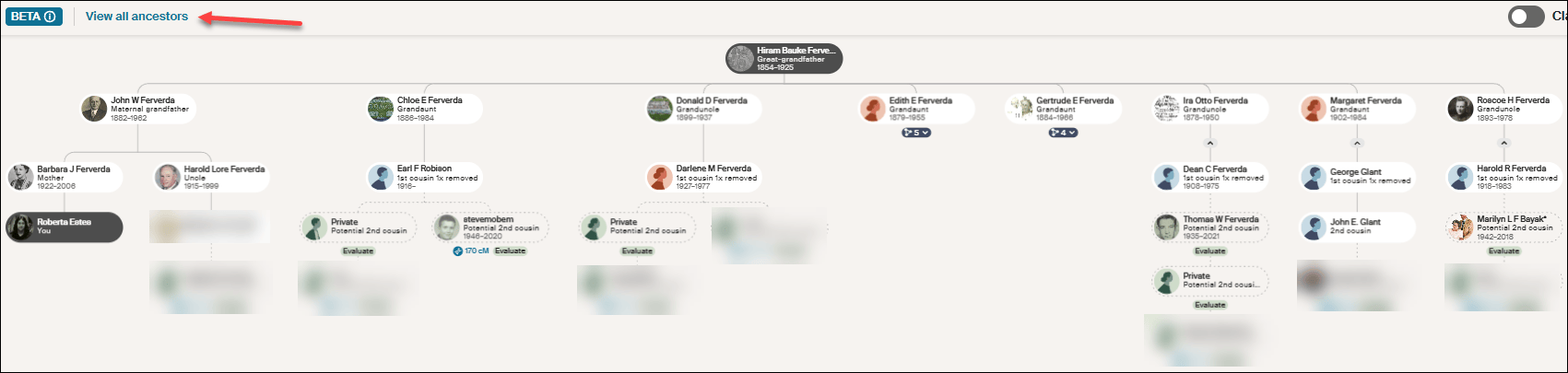
This new version of ThruLines has now replaced the older version. Unfortunately it does not show Heather’s path back to our common ancestor, Hiram Bauke Ferverda.

Click on “View all ancestors” in the upper left-hand corner.

Click on any image to enlarge

After clicking on “View all ancestors,” click on Hiram Bauke Ferverda to see the DNA matches who descend from him. Despite what Ancestry provided under my “Common ancestor” with Heather, she isn’t shown anyplace here. This could be a bug, given that I later confirmed this common ancestor using other techniques.

Regardless of the problem, this IS a hint, so don’t disregard it entirely. Just keep your “skeptic” hat handy and wear it liberally. You’ll need to use Ancestry searches and hints, including possibly Quick and Dirty Trees, to piece together the possibilities.

Make a note on Heather’s match at Ancestry so that you know what you found this time through. We’re not done with Heather. Move on to another vendor to see if Heather has tested and has a better tree elsewhere. We’re gathering evidence.

At MyHeritage

Heather is not at MyHeritage, so I’ll use a different example.

Let’s look for Cathy, a 3C match who has no tree at another vendor. I found her at MyHeritage with the same first and last name and approximately the same amount of shared DNA, so I’m confident it’s the same person.

Fortunately, at MyHeritage, Cathy has a tree, which is the first step, of course, but no common ancestor is shown in her tree.

MyHeritage has a wonderful feature called Theory of Family Relativity which are often based on “Smart Matches.” Click on “View theory.”

Click to enlarge

MyHeritage has found five possible paths to a common ancestor based on multiple documents and trees. In this case, Surrilda Claxton in my tree is the same person as Surelda Clarkson in Cathy’s tree, and MyHeritage made that connection correctly.

I confirmed this Theory at MyHeritage as accurate, and now I know how Cathy at the other vendor with no tree is related to me. I made a note about Cathy at MyHeritage on my match with Cathy at the other vendor too about our common ancestor AND where Cathy’s tree can be found. Add Cathy to her proper place in your trees.

Step 4 – Sleuth at the Same Vendor

At FamilyTreeDNA, when I find a match with no tree, I do two things.

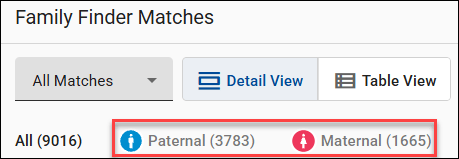
Looking at Patricia’s profile, I immediately see that she has been assigned to the maternal side of my tree. I’ve linked other known matches which allows FamilyTreeDNA to use triangulation to assign Patricia to the proper side.

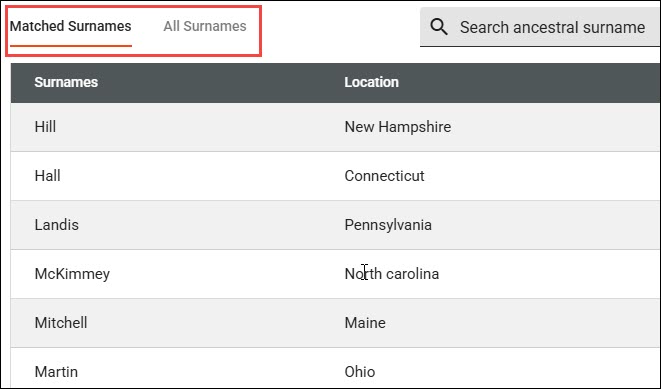
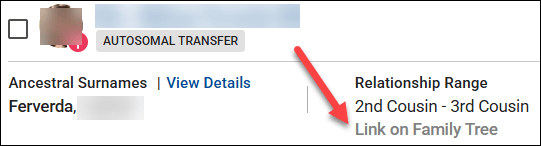
Then, I notice that even though Patricia doesn’t have a tree, she has provided her ancestral surnames.

Clicking on “View Details,” I can see if any of them match my surnames, or I can view all of her surnames.

Given that this is my mother’s side, these shared surnames give me an idea of a shared lineage.

Next, look for your closest shared match WITH a tree. Clicking on the two little people at far right displays your shared matches which are labeled “in common with.”

I share 122 matches in common with with Patricia, and our closest shared match, other than my mother who is not shown here, is Dennis. Dennis happens to be a known relative, which is why he already has a note.

But for purposes of this exercise, let’s say that I haven’t already figured out how Dennis and I are related. Viewing Dennis’s tree, I see that our common ancestors are Anthony (Antoine) Lore and Rachel Levina Hill. Hmmm, Hill is on Patricia’s list of surnames.

Sleuthing at the same vendor is MUCH EASIER when your matches have at least a couple of generations in a small tree. Having no tree is the most difficult situation at every vendor, but there are multiple ways to begin building a tree for your DNA match, or to expand a shrunken tree.

Step 5 – Google Is Your Friend

Google is your friend. Google cannot reach behind paywalled sites, so you won’t find records other than records from free indexes at Ancestry or MyHeritage in Google searches, but you will find information about people from other genealogy sites.

Let’s go back to Rolland Robison who died in 1963 and his wife, Chloe. And let’s also consider that his surname is often spelled RobiNson. We know from our match’s tree that Rolland’s wife’s first name is Chloe.

Look closely at the search box in the image below. By structuring the query as “rolland robison died 1963 wife chloe”, we combine a full name, a specific vital event year, and a spouse’s first name. This gives Google just enough precise detail to hopefully filter out (most) noise.

That’s interesting. It looks like Rolland can be spelled two ways too.

Not only is there an article (yes, I wrote about this previously), BUT there’s also an obituary and estate distribution in a local newspaper that I have never seen before.

Rolland’s wife’s birth surname is given in his obituary, even though her first name is misspelled. This is the link I need to establish our common ancestor, because Chloe is my grandfather’s sister.

Google can provide you with important links to information and articles that are not yet in genealogical databases, such as:

  • Facebook accounts for individuals: Useful for finding the tester, relatives or family connections.
  • Facebook groups and pages: Forums that contain local historical information and shared community memories.
  • LinkedIn & Instagram accounts: Social footprints that often reveal professional histories, geographic locations, and birth surnames.
  • Mentions elsewhere: Local newspaper archives, digital press releases, and published legal notices regarding estate partitions or land records.
  • Obituaries: Printed family notices that explicitly list surviving family names and relationships along with the Legacy.com tribute archives.
  • Public websites & genealogy blogs: Independent sites where genealogists sometimes publish deep-dive ancestral lineages. Always verify.

Google also provides an easy way to find free resources in public databases without having to search each one individually, including:

  • Collaborative family trees: WikiTree, FamilySearch, and Geni trees.
  • Cemetery registries: FindAGrave and BillionGraves.
  • Digital libraries: Internet Archive and Google Books, which hold a vast assortment of historical information like out-of-print town and county histories.
  • Open-Access portals: The Library of Congress (LOC) and the Digital Public Library of America (DPLA), which pulls photos, maps, and civic documents from libraries across the US.
  • Volunteer projects: Regional repositories like GenWeb.
  • Directories: Local alumni directories and digitized historical yearbooks.

Pro Tip: Resurrecting Old RootsWeb and Genealogy.com Breadcrumbs

RootsWeb was a wonderful resource for genealogists until Ancestry began systematically dismantling it in 2023.

While Google is fantastic at finding obscure text, it will occasionally point you to an old, broken RootsWeb link. Because Ancestry has frozen or removed much of the old platform, don’t let that 404 error stop you in your tracks. Copy the dead URL from Google and paste it into the Internet Archive Wayback Machine where you can sometimes resurrect the exact information you need!

The same methodology applies to the old message board, Genealogy.com.

Step 6 – Search Old Emails and Files On Your Own Computer

I know this probably sounds either ridiculous or incredibly obvious, but if you’re a typical genealogist, you probably have a quarter century of emails on your computer, not to mention reams of photos that you saved because someone gave them to you and you “might need them someday.”

I’ve never thought of myself as the family archivist, but I clearly must be, which is another name for the family packrat. Long live the packrats.

I’ve learned that I need to search all of my email folders for the names in someone’s shrunken tree. I’ve been shocked at what I’ve found there.

Don’t just search for full names. For example, Rolland Robison or Chloe Ferverda. Search for the names individually too. So, Rolland, Roland, Robison, Robinson, and Chloe. I didn’t know Chloe was a Ferverda yet when I was initially searching for her identity.

A middle-of-the-night insomnia-induced epiphany struck – “search your emails.” Who needs sleep? It’s overrated! I hopped right up, searched my emails and my computer and found even more.

As it turns out, I attended a Ferverda family reunion in 2010 where I only knew two people. Thankfully, cousin Cheryl thought to invite me, because someone brought an old photo album AND an old Ferverda family Bible. I took photos of everything in the album even though I had no idea who most of those people were and neither did the album’s owner.

Many photos had no surnames at all, or they were recorded as Mr. and Mrs. SoAndSo.

Here are “Chloe and Rolland” as they were named in the photo, with no last name or additional information.

Here are Mr and Mrs. Rolland Vincent Robison. I carelessly saved this one as Rolland RobiNson. My bad.

A search for just “Rolland” found both, which is exactly why you need to search creatively.

Finding those initially still wouldn’t have told me who they were, but I would have at least had some family context, given that a Ferverda descendant brought the album to the Ferverda reunion.

However, this article about Rolland and Chloe’s 50th wedding anniversary from that same album would have provided that missing context.

My emails revealed now-deceased cousin Cheryl referring to Aunt Chloey, but with nothing else to identify her. A search for simply “Chloe” found Cheryl’s emails.

More tidbits of evidence.

I did a very poor job of saving these images with useful names because they weren’t relevant at the time, although I did store them in a “Ferverda Reunion” folder. Now, I’m going to attach them to Chloe and Rolland’s profiles in my tree at both Ancestry and MyHeritage to make sure they don’t disappear forever.

I’m also going to send them to my match with the abbreviated tree. As Rolland and Chloe’s grandchild, if they don’t have these pictures, I’m positive they will want them.

I’m sure you’ve noticed that I got VERY squirreled during this process, but utilizing all of our resources is exactly how we make discoveries – and sometimes that includes chasing squirrels.

This is also why our research journals are important – so we don’t chase the same squirrel over and over.

Step 7 – Quick and Dirty Trees

I used the Robison example in an earlier article discussing how to build a “quick and dirty” tree. I use quick and dirty trees often because it’s the easiest way to keep track of informational tidbits from different places, including multiple vendors, during the research process.

I’ll say it again here. Quick and dirty trees aren’t meant to be public. They aren’t gospel. They are a structure for you to work through the various hints provided and to evaluate them to see if they are of sufficient quality for you to identify a common ancestor with a DNA tester who provided a minimal tree.

You can read about these investigative workbenches in the article, What is a Quick and Dirty Tree, and When Might I Need One?

What’s Next?

Have you decided which of your brick walls you’re going to focus on? Last week’s article discussed some of the criteria you might want to consider and how to prepare.

Select your ancestor, because next week, we’re going to begin using a variety of tools and techniques to track that ancestor. Bit by bit, we’re going to gather evidence that will hopefully lead to a breakthrough.

FOCUS – A New Series Focused on Breaking Down Brick Walls

When I teach about genetic genealogy, people often ask, “What’s next? How can I break down my brick wall?” Sometimes I can reply that a Y-DNA test or mitochondrial DNA will help them under specific circumstances. But more often than not, what they really need is a precise, step-by-step methodology that includes autosomal DNA and utilizes multiple tools and techniques across vendors.

Even after people have taken Y-DNA and/or mitochondrial DNA tests PLUS autosomal tests at the major vendors, we still need a methodology to work with combinations of those results. Often, the answers we need aren’t just sitting there like a pretty rock, waiting to be picked up and admired, but depend on us using the results and matches as tools to help focus our search in the right direction.

It’s more like a scavenger hunt than a single discovery.

Focus

Sometimes I feel like a fish out of water – flip-flopping from ancestor to ancestor, match to match and hint to hint, hoping that the magic bullet will fall into my lap, but that almost never happens.

By this point in my research, I’ve perused all the easy records and many of the not-so-easy ones. If you don’t have a surname, or you don’t have a first name, or worse yet, you don’t have either, how is one supposed to search for records?

The good news is that you still carry at least one record in your own body and/or the bodies of your relatives. The DNA of your ancestors.

This is where we’re going to focus our efforts – hence FOCUS, the name of this new series.

Everyone is going to select their closest, or one of their closest, brick-walled ancestors, and we’re going to use several methods and tools to focus on identifying that ancestor.

Prepare

Before I publish the next article in the series, there are a few things that I’d like you to think about and do in preparation.

  • First, there’s no guarantee that you’ll break through your brick wall during this series. You might, and you also might not. You stand a much better chance of breaking through that brick wall if you focus and follow these steps than if you don’t.

Keep in mind that even negative evidence is evidence, and just because you don’t break through right away doesn’t mean you won’t. New people test everyday and new records become available too. If nothing else, your ancestor will have more meat on their bones, and you’ll have a process to build upon.

  • Second, if your brick wall is very close in time, meaning parents or grandparents, you’ll want the already-written “In Search Of Unknown Family” series, which you can find, here.
  • Third, you’ll need to keep a research journal or log by ancestor, family or location, which will also include your other related ancestors. For example, if you’re looking for Lucy whose surname you don’t know, but you know that she married William Moore, then your research journal will apply to William Moore too, and other people including their children and either spouse’s parents and siblings, whether that was your intention or not. The neighbors are probably relevant as well.

That “it takes a village” saying is particularly relevant here. People didn’t tend to move to the next location alone, and often their community consisted of their cousins and relatives – who are also your relatives, and hold clues to the identity of your ancestor. When I’m extracting records for the Moore surname in Halifax County, VA, for example, I extract everything for that and similarly spelled surnames, not just one particular person, so I don’t have to replow that field.

Tracking and Recording Your Research

If you don’t already have a research journal methodology, I would suggest a spreadsheet.

Here’s a screenshot of two rows in my “Halifax County” spreadsheet where I’ve recorded separate rows for each person in every record. Note that I started this spreadsheet years ago and omitted some columns that I later wished I had included, like the access date.

You’ll want to record:

  • Item number beginning with 1. In the example above, the item number is 6, and it’s 6 for every person in that record. Each person in this transaction gets their own separate row, with the same item number. The next record I extracted would be item 7.
  • Access date (date you found and retrieved the record)
  • Last name
  • First name
  • State (add a column for country if multiple countries are relevant for this family)
  • County
  • Town, township or city
  • Geographic places like road or creek names (these can be VERY important)
  • Year, month and day that the record occurred
  • Record repository or source (including a link if applicable – you may want to add a separate column for the link)
  • Record type (deed, will, tax list, etc.)
  • Role of individual (buyer, seller, witness, etc.)
  • Names of additional people in the record (I retain the same item number and other information, changing the name of the person, their role and sometimes an associated comment)
  • Transcribed text of the record itself
  • Comment, which can include things like the name of an image, something about what you were searching for when you found the record, links, or anything else relevant

You will want to be able to sort and filter this spreadsheet when you are finished. Hint – be sure your date fields and formats are sortable in the way you wish. I normally use filters instead of the sort feature.

The goal isn’t just to record your findings, but to make this spreadsheet as useful as possible to make discoveries that are only available by comparing and incorporating multiple records.

For example, let’s say that you’re extracting all of the Moore records in a Halifax County, VA deed book, and you want to know how many times the surname Henderson is found in the Moore deeds or in conjunction with the Moore family. Is there a pattern? You won’t recognize a pattern from any ONE record, but you may eventually wonder if the Henderson’s are related to the Moore family, and if so, how.

You’ll also want to record nonproductive or negative evidence. For example, let’s say you searched the Halifax County Plea Book for William Moore (including More and Mohr) and found no occurrences. That’s important, because otherwise you‘ll eventually search again, so enter that as a record item.

Note that with the full text search feature introduced by FamilySearch a couple of years ago, if you extracted records from a book that did NOT include every-name indexing including property lines, creek names and witnesses – you’ll want to redo that search using the full text feature at FamilySearch. There’s often LOTS of valuable information buried in records that won’t be found if you’re only viewing records indexed by buyer and seller, for example.

Your To-Do List Before the Series Begins

The In Search Of Unknown Family Series introduces important concepts, so reading that series is your first assignment in preparation for the upcoming FOCUS articles.

Test Your DNA With the Major Vendors

It’s important to test with the major vendors. Each vendor has matches and tools that the others don’t, and we need to identify and work with as many relevant matches as possible.

If you have NOT taken an autosomal DNA test at the first three following vendors, order these tests now so you have results to work with.

  1. AncestryDNA
  2. FamilyTreeDNA – Purchase a Family Finder test or upgrade an earlier Family Finder test to the new Family Finder NGS test. You should upgrade if you uploaded your autosomal DNA file from another vendor at any time, or tested at FamilyTreeDNA directly before March of 2026. The upgrade is only $29.
  3. MyHeritage DNA
  4. A fourth vendor, 23andMe, is optional, but testing there certainly won’t hurt.

23andMe Sidebar

I have an issue with 23andMe’s policy of forcing customers to repurchase a DNA test at $199 PLUS a subscription at $149 for the first year, renewable at $69 per year, in order to obtain any of their latest tools. This happened around the time of their data breach and subsequent bankruptcy.

I would feel much better about the situation as a whole if a new owner had taken the wheel, but the original owner resigned from the 23andMe board, formed another corporation, and was allowed to buy 23andMe out of the bankruptcy that occurred on her watch.

Furthermore, 23andMe does not support genealogy trees, nor do they have Y-DNA or mitochondrial DNA testing and matching, or research records.

I have (begrudgingly) ordered an upgrade for my own 23andMe test in order to include accurate information in these articles, but I won’t be focusing on 23andMe specifically aside from any unique feature. You can apply the same concepts and techniques to results at 23andMe where possible.

Test Your Relatives

If you have close upstream relatives, such as parents, grandparents, aunts, uncles, and cousins who also descend from your brick-walled ancestor, please ask them to test too.

I explain what I’m trying to achieve, why their test is important, and offer scholarships to sweeten the pie. I view purchasing their DNA tests in the same way I view purchasing a rare research book that I KNOW includes my ancestors but it not available anyplace else.

Your shared matches are extremely important and may provide that brick-wall-breaker. Perhaps even more importantly, they will have relevant matches that you don’t.

So how do you know who to test? You certainly want to test everyone relevant, without wasting money.

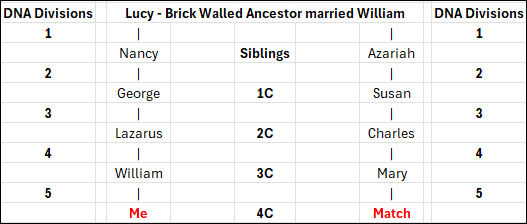
Let’s look at this example where Lucy is the brick-walled ancestor I’m seeking to identify. Her children (labeled siblings) and grandchildren (1C) are all deceased, but second cousins (2C), Rhonda, Charles and Sally are all available to test. Test each of them because they will all have some different segments of DNA from Lucy that the others don’t have.

Lazarus is also a second cousin, but he’s deceased. However, William, my father (in this example, not my real pedigree), and his sister, Jane are both available to test.

You ALWAYS want to test both of your parents and every available grandparent or direct ancestor. In this example, I’ll only inherit some portion of Lucy’s DNA that my father has, but Jane, my aunt, will carry segments of Lucy’s DNA that my father didn’t inherit from Lazarus. Jane’s matches on those segments that neither my father nor I have may be just what we need to identify Lucy.

If Lazarus has other children not shown in this example, we certainly want to test them too.

If the relevant parent has tested, you don’t need to test any of their children. However, if the parent hasn’t tested, absolutely test as many of their children or descendants as possible.

In this case, Rhonda, Jane, Charles and Sally have all tested, so I don’t need to test their children. Their children can only have as much of Lucy’s DNA as their parents had.

However, if any of them had been deceased, then I should test as many of their children as I can to “gather up” as much of Lucy’s DNA as possible.

If any of the people upstream of the bold red people have other children, those children or their descendants would be testing candidates too. Ideally, you want as many descendant testers as possible to increase your chances of identifying that ancestor.

Selecting Your Brick-Wall Ancestor

I want you to be successful, so you’re going to select your closest brick-walled ancestor within certain parameters. If you have multiple brick-walled ancestors at the at the same genealogical distance, you’ll choose one to focus on.

Why your closest brick-walled ancestor? If your brick wall is 5 generations back from you, and they are 5 generations back from your DNA match as well, that means you’re dealing with a 4th cousin match.

This also means that ancestor’s DNA has been divided a total of 10 times – five times on the path of descent to you, and five times on the path of descent to your match.

A 4th cousin match is likely to be in the 35 cM range. You can view the matching ranges for various relationships at DNAPainter, here.

The entire 4th cousin (4C) matching range is 0-139 cM. You won’t match all of your 4th cousins and are likely to match only 50-70% of your 4th cousins.

That said, the average person has between 1,500 and 4,000 4th cousins. At the 4th cousin level, you have 32 ancestors, so only between 46 and125 4th cousins will descend from any given ancestor, and of those, only a few will have taken a DNA test. The more children that ancestor had that lived to marry and have children of their own, the better your chances of more matches.

The Selection Process

I’m going to be stepping through the ancestor selection process with you, discussing who is and isn’t a good candidate, and why. I’m also going to be using this same methodology to (hopefully) identify one of my own mystery ancestors too.

I have no brick walls closer than 4th cousins. If I did, I’d choose the closest brick wall. You should too in order to have the best chance of solving this puzzle. The further back in time, the more difficult the solve will be.

In my tree, I have four mystery ancestors at the 5X great-grandparent level on my father’s side, and one on my mother’s side.

Those will be the four ancestors I consider selecting. And no, before you do it, I don’t recommend working on all four of them at the same time. Remember, the purpose is to FOCUS.

  • Select an ancestor as close generationally as possible, because it’s more likely that both you and other people will carry at least some of their DNA, and the same segment(s) of DNA. Matches closer in time generally carry more total DNA in common, which means better matching and more shared matches.
  • Given that the majority of testers are from the US, and assuming you are from the US too, I don’t recommend selecting an ancestor from another country unless you are very comfortable with that language and working with those records. Generally, there will be fewer people who have tested from other countries. If you are going to work with an ancestor from another country, be sure you are in both the MyHeritage and FamilyTreeDNA databases.

My mother’s entire paternal line is either Dutch or German Brethren, and her Dutch ancestors only immigrated in the mid 1800s, so have few descendants in the databases.

My closest brick wall on her paternal line is Traut Enterlein, a German man who was named in an out-of-wedlock baptism for his daughter in Germany in 1823. He is not found in any other records in that part of Germany, so actually identifying “who he is”, even with a name, would be extremely difficult, and I have nothing to “anchor to” here.  He is eliminated as a candidate because he’s found in a country where I don’t speak the language, where fewer people have taken DNA tests, and we’ve already spent a substantial amount of time trying to identify him in the records.

Brick-walled ancestors on Mom’s maternal side are two generations further back in time. Half are German and the other half are a combination of English and Acadian.

  • Avoid both endogamy and pedigree collapse, if possible. I don’t recommend a line with baked-in challenges that will make DNA more difficult.

Acadians are heavily endogamous and often suffer from pedigree collapse since there were so few founding families in the mid-1600s. The same goes for Brethren families who immigrated in the early 1700s. Those lines are too far back generationally anyway, so they have already been eliminated, but if they weren’t, I’d eliminate them because of heavy endogamy and pedigree collapse, both, not to mention record loss.

My father’s side has much better candidates.

  • Try to select an ancestor where you have some familiarity with the location, the culture, and the records. If you have printed resources at the ready, possibly ones that are not online, that’s a plus.
  • When you’re trying to decide between ancestors, select one whose spouse you are sure of, and who has children you can document. Do you know important things about them like their religion, where they lived during specific times, and who their neighbors were? If not, take some time now to brush up on what you do know about their spouse and children.
  • Check back at all of the records vendors and resources, including Ancestry, MyHeritage, WikiTree, and FamilySearch, to see if anything new is easily available for either your brick-wall candidate or their spouse.
  • I do NOT recommend selecting an ancestral couple, neither of whom you can identify, unless you’re “lucky” enough to have no other brick-walled ancestors to choose from. It’s possible to solve this “double-blind” couple, but it’s substantially more difficult because you have no same-generation anchor.

My Candidates

I’m selecting one of my brick walls and hope to solve it during this process. Let’s run through the decision-making process so you’ll understand some of the considerations and why they weigh as factors. I wish I didn’t have so many choices, and I’d like to solve them all, but my best chance is to work on one at a time.

Most candidates are women because their birth surnames tend to easily become lost after they marry, and with their surname, their parents are lost too. Given how little we know, we have to presume (dangerous word), at least for now, that your missing female ancestor was the mother of all of their husband’s children, unless we know or subsequently prove otherwise.

Let’s review my candidates.

  1. Lucy was born about 1754, probably in Virginia, and died in 1832 in Halifax County, VA. She married William Moore between 1772 and 1774, who may or may not have been a circuit-riding minister at that time. She is found under her own name on the 1830 census, there’s an 1826 chancery suit, and I know who her children and neighbors are, so she might be a good candidate. One vote against selecting Lucy is that I don’t know where she was born, nor do I know where they were married, although there’s a very strong possibility that it took place in Halifax County. The fact that he was a circuit-rider means he could have met her anyplace. If they were married in Halifax County, their families could have been allied before arriving there. William Moore’s family came from Prince Edward County about 1770, and we know who his parents were. One good thing is that Lucy is a fairly uncommon name, but there are multiple William Moores in Halifax County, and there are two other Lucy Moores. One is her daughter, and one is her daughter-in-law. The fact that Lucy and William Moore had 12 known children, with at least 8 who married, means there is a good chance of matching at least some descendants. Unfortunately, I don’t have her mitochondrial DNA, which removes one possible tool unless I can find a tester.
  2. Jane, born about 1760 in an unknown location, but probably Virginia, was the wife of Lazarus Dodson. They moved across multiple frontiers into what would become early Tennessee, an area that sustained substantial record loss. Jane died between 1830 and 1840. There’s a lot of uncertainty about Jane’s life. She probably had at least 8 children, and we know something about six of them. Given that we already have a better candidate with Lucy, I’ll eliminate Jane for now.
  3. William Crumley’s wife, whose name I don’t know, was born around 1765 or 1770, possibly in Virginia. She was married to William Crumley around 1786 or 1787, probably in Frederick County, VA, or nearby. I do have her mitochondrial DNA and we know the family was Quaker which are both benefits. I’ve been working with a cousin who has delved deeply into Quaker records, and I have some records from a trip to the FamilySearch Library in Salt Lake City that I have not yet processed. She and William had at least 10 children who married, and I know quite a bit about them. She would probably be an excellent choice. For lack of another name, I’ve been calling her H2a1, her legacy mitochondrial haplogroup before Mitotree, but she has a much more complete haplogroup now. She would be a good candidate, and I REALLY want to identify her.
  4. Mary, wife of John Harrold (by various spellings), was born about 1750, possibly in Ireland, although it would be unusual for a first-generation Irish immigrant to end up deep in the Appalachian frontier. Mary died in 1826 in Wilkes County, NC. We know nothing about John’s background, other than he served in the Revolutionary War, in Virginia. He may have been living in Botetourt County, although we don’t know for sure, and there are multiple men by that name. Mary had at least 7 children, six of whom were married. We do not have her mitochondrial DNA. Given that we know so little about John, and we have better candidates with both Lucy, William Moore’s wife, and William Crumley’s wife, I’m eliminating Mary for now.
  5. Isabel, the wife of Michael McDowell – another couple from Wilkes County, NC. Their daughter married the son of Mary and John Harrold. Isabel was probably born about 1750, someplace in Virginia. We don’t know where they were married, but it could have been in Franklin County, VA. They lived in Wilkes County for several decades before moving on to Claiborne County, TN. We know very little about Michael’s early life, other than his Revolutionary War service, although I’ve written about him four times as additional information dribbles out. They had at least 8 children, and a deposition after Michael’s death tells us where they moved and settled, which is a very big plus. We know her first name thanks to a 1793 deed. Isabel is a reasonable candidate, but I eliminated her after comparison to the other candidates, in part because of multiple frontier moves with few records and no known point of origin.
  6. Elizabeth, wife of Andrew McKee, was born about 1767, possibly someplace in Virginia. They were in Washington Co., VA by 1789, although we don’t know where either originated. They may have married before they moved to Washington County, where we find several records. They had 14 children. Twelve are known to have married, and the other two probably did as well. We know who their neighbors were. We also have Elizabeth’s mitochondrial DNA. Unfortunately, we know nothing about Andrew McKee’s family or where he was from. However, Elizabeth is a strong candidate because so many records exist in Washington County, they had a large number of children, and many continued to live in Washington County or nearby, making them easier to track.
  7. If I didn’t already have good candidates, there’s one more ancestor I’d consider, even though James Lee Claxton/Clarkson is a generation further back in my tree, born about 1775, and his unknown parents are the brick walls. I know I just told you NOT to do this, so I won’t either, but the reason I might have considered his parents, or more specifically his father, as a strong candidate is because we have several Y-DNA matches, including Big-Y testers, and we know the ancestors of his matches came from NC. We also have many autosomal testers and matches, which would help immensely, and there’s a Clarkson/Claxton DNA Surname Project. A contiguous surname is a HUGE benefit not available with female ancestors, and I just feel that I’m SO CLOSE to solving this mystery. For now, James’s parents are eliminated because they are two generations further back in time than our other candidates, we know nothing about either of them, except Y-DNA results, and we have better candidates for this exercise.

After evaluation, I still have two candidates in the running – Lucy, wife of William Moore, and H2a1, William Crumley’s wife. I haven’t decided for sure yet, but right now, William Crumley’s wife is leading because I have an amazing collaborator along with some unprocessed records that may hold important information. I know there probably aren’t any smoking guns there, but when combined with DNA, we may well ignite that gunpowder.

FOCUS

Are you ready to focus?

Let’s get our ducks in a row.

  • Order any DNA tests you need to order for yourself and relatives now.
  • Select your ancestor.
  • Prepare your research journal by reviewing which records you’ve already researched and record what you have.
  • Refamiliarize yourself. Take a look at those results again with fresh eyes. It helps when reviewing match results to be able to view surnames in your matches trees and recall that you’ve seen that name before, and where.
  • Check to see if any new records or resources are now available.

Who do you want to find?

_____________________________________________________________

Share the Love!

You’re always welcome to forward articles or links to friends and share on social media.

Subscribe!

If you haven’t already subscribed, it’s free. You’ll receive an e-mail whenever I publish by clicking the “follow” button at the top of the main blog page, here.

Help Keep This Blog Free

I receive a small commission when you click a vendor link in my articles and purchase that item. This does NOT increase your price but helps me keep the lights on and this informational blog free for everyone. Please click on the affiliate links in the articles or to the vendors below if you are purchasing products or DNA testing.

Thank you so much.

DNA Purchases and Free Uploads

Genealogy Products and Services

My Books

Genealogy Books

Genealogy Research

What is a Quick-and-Dirty Tree, and When Might I Need One?

You may have heard genealogists talk about creating a quick-and-dirty tree.

What is that, exactly? When and why would you want one?

Good questions.

Matches and Trees

DNA matches don’t always have useful trees.

They might have:

  • No tree
  • A partial tree with only a few people in the closest generation or two
  • A tree with some lines built out, but others not so much

What’s a genealogist to do? After all, it’s your match’s tree, not your tree, and you have no way to expand their tree.

Except, you do.

It’s called a quick-and-dirty tree.

Quick-and-Dirty Trees

A quick-and-dirty tree is essentially a “throw-away” tree that you construct at Ancestry with the express purpose of obtaining hints, including potential parents, in order to quickly build your matches tree backwards in time until you (hopefully) reach a common ancestor.

And yes, of course trees, hints and suggestions of any kind can be wrong – but that doesn’t mean they’re always wrong, and you’re not adding anything from your quick-and-dirty tree to your tree – or even displaying it publicly.

You’re simply trying to find a common ancestor by using what your match has provided in their tree. Think of a quick-and-dirty tree as a scratch pad of sorts.

Let’s work through an example.

Initial Analysis

In this example, Ancestry has already told me that this match is most probably my half-second-cousin (half 2C) or second-cousin-once-removed (2C1R) based on the amount of DNA that we share, although the full relationship range includes several more options.

Ancestry also tells me that this match is on my maternal side. There’s no information provided about whether this match is on their maternal or paternal side, or even both.

A second-cousin (2C) relationship means that we share great-grandparents, and once removed means that one of us is one step further down the tree than the other person.

In other words, I’m 2C with my match’s parents, or my match is 2C with my mother. I wrote about this in the article, Concepts: What Does a Cousin “Once Removed” Mean?

I see that my match has a public linked tree with 7 people, which probably isn’t going to be terribly helpful.

Of course, the first thing to do is to review my match’s tree and see if I recognize either their surname or the names in their tree.

This tree only reaches back two generations, and our common ancestor, based on the relationships predicted by shared DNA, would be another generation, or two, further removed.

I don’t recognize any of these names, although I’ll review each person for a location to see if I can narrow the scope to the couple most likely to lead to our common ancestor.

On my mother’s side, one of her parents is from northern Indiana, and one is from southern Indiana, but not everyone enters locations in their trees, and they aren’t necessarily accurate.

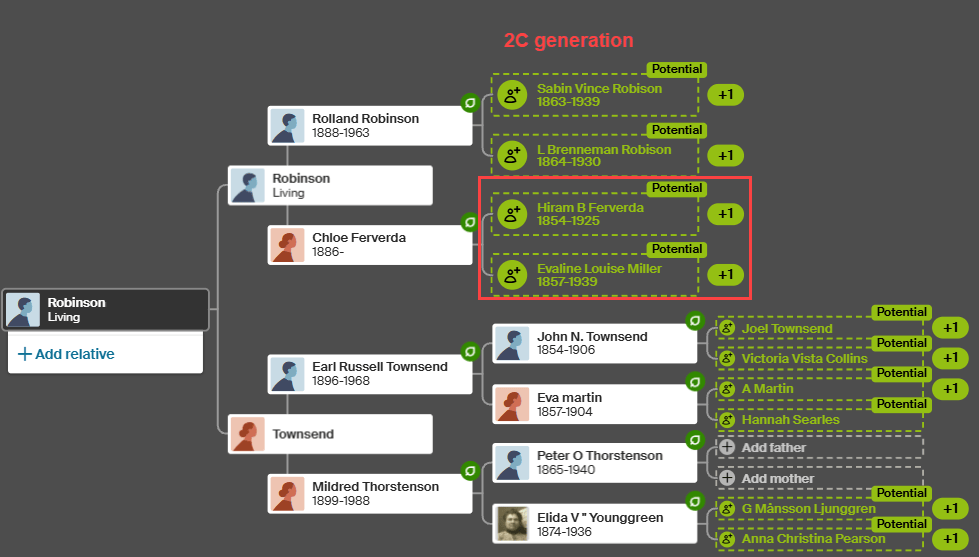
The list of “all people” in my match’s tree, under “Find in tree”, at far right, provides additional information. Unfortunately, this tree shows Earl Townsend’s wife’s name as Mildred Ideal Thorstenson Townsend Smith here and in her profile, but the name order differs. To begin, I’ll enter Thorstenson Smith, not her married name of Townsend, in the quick-and-dirty tree I’m building. You can refine this shortly.

In this case, it looks like the Townsend line is most promising to find a common ancestor, given that Fulton County is in northern Indiana, but we’ll find out that this isn’t the case when we construct our quick-and-dirty tree.

Building the Quick-and-Dirty Tree

You need to build a new tree, NOT add to your “real” tree.

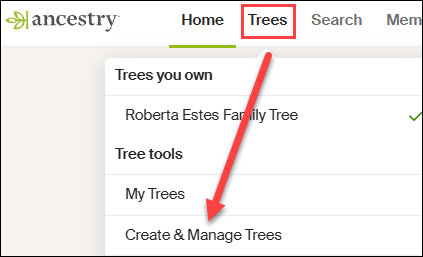
At Ancestry, go to Trees in the top banner, then click on “Create and Manage Trees.”

You’ll see the list of trees that you own. This is where all of the trees that you create live.

At the far bottom, you’ll see the prompt to create a new tree. Click there.

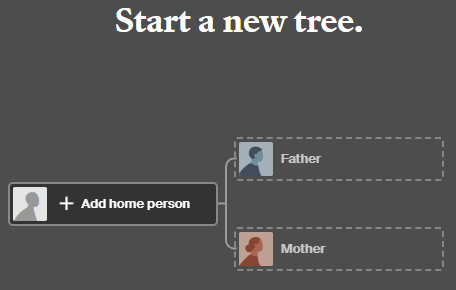
Next, you’ll see a blank tree.

For the home person, you can enter your match’s name, but be sure to list them as living so you’re not revealing private information.

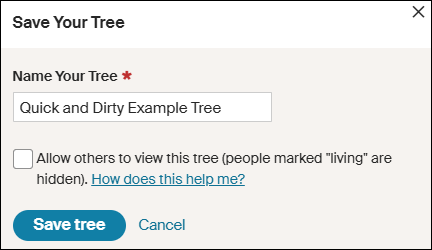
After adding one parent, you’ll be prompted to save and name the tree. Both the tester, who is designated as male by the Ancestry icon, and his father are either both living, or private, so I’m simply entering the surname of Robinson based on the grandfather’s surname. That could be incorrect of course, but it’s all I have to go on – yet.

Ironically, their grandfather’s surname was spelled Robison, without the “n”, not Robinson, but I accidentally entered Robinson and still got where I needed to go.

Clearly, I’m not going to allow this tree to be viewed by others, aka public, so I’m not checking that box. If it’s checked by default, uncheck it.

I don’t make my quick-and-dirty trees public because they are entirely unproven and unverified. I’m literally quickly searching for hints with every intention of abandoning the tree when I’m finished. If you want to clean the tree up later, you have the option to change the tree’s privacy settings.

Information in Your Match’s Tree Might Be Wrong

Complete the tree to be the same as your match’s tree. After saving your tree, click on the individuals you’ve added to view their hints.

Let’s start with Earl Townsend who appears to be our best candidate based on location.

Earl Russell Townsend has 13 hints, including a marriage license that confirms his birth date and location and provides the names of his parents, plus his wife’s name as Mildred Thorstenson. Based on what we know already, this is probably the correct Earl Townsend.

Of course, the wife’s surname could be incorrect. It could be her first or second marriage, or she could have been a widow when they married, so this surname might not be her birth surname.

Look for additional records in Earl’s hints.

Russell’s death certificate confirms that information, as do the birth and death certificates of their children.

Accept those hints.

If you determine that the original information in your match’s tree is incorrect, you’ll want to correct it in your quick-and-dirty tree. Remember, this is a scratch pad – you can’t hurt this tree.

Let’s change Mildred’s name to reflect her birth surname.

I refined Earl’s wife’s name to Mildred Thorstenson, which then produced 12 hints for her, including her marriage and Social Security record, with her birth and death dates, and her parents’ names. Her name in my match’s tree of Mildred Ideal Thorstenson Townsend Smith had produced zero hints.

Additionally, census records showed Mildred with her parents.

These seem to align, so accept those hints.

Looking at the pedigree view of my quick-and-dirty tree, we now see that both Russell and Mildred’s parents identified in the records are suggested as their potential parents.

Review each suggestion. If they look accurate based on the records identified, accept those potential parents in order to view the next generation.

Based on these names and census information, I can eliminate the Thorstenson line. It’s Swedish, not German or Dutch, which comprise my mother’s northern Indiana lines, My mother has no known Swedish ancestors, and we have proven her Indiana lineage in this timeframe.

Accepting the hints for the parents of both Earl Townsend and Mildred Thorstenson, parent hints appear for John Townsend and Eva Martin.

Now we’re viewing the next group of hints, which would be the great-great-grandparent generation. If these are our common ancestor, that would mean that I’m third cousins with my match, which is beyond the predicted relationship range. Third cousins is not impossible, but it’s beyond the probable match level based on the amount of shared DNA. furthermore, I don’t recognize any surnames.

So, let’s move to the Robison (incorrectly spelled Robinson) line and step through the same process. We can always come back and work with more parental hints on the Townsend/Martin line if we need to.

Rolland Robison only has a death year in my match’s tree, and that combined with the misspelled surname meant he had no hints on Ancestry, so I clicked on “Search” in my quick-and-dirty tree.

I’m searching for a man by this name, with a wife whose first name is Chloe.

AHA!

There it is! Note that Ancestry found Rolland Robison, not Robinson, married to Chloe.

Chloe was a Ferverda. My mother’s father was John Ferverda, and the location is correct for this family.

I saved this record to Rolland Robinson and added Ferverda as Chloe’s surname in our quick-and-dirty tree. This provided Rolland with 12 hints.

Adding Ferverda as Chloe’s surname provides her with a dozen hints too, including potential parents, Hiram B. Ferverda and Evaline Louise Miller – my great-great-grandparents who are indeed the 2C generation.

These common ancestors fall within the expected amount of shared DNA for second cousins, so this aligns well.

My quick-and-dirty tree has revealed at least one pair of common ancestors. Could there be more common lineages? Yes. I would continue building out this quick-and-dirty tree for (at least) another couple of generations on the other lines just to be sure.

What Next?

That depends on what you want to accomplish and your genealogy goals.

I used a DNA match at Ancestry in this example, but your match might be at a different vendor. Regardless, you’ll still want to use Ancestry to build your quick-and-dirty tree based on how they present hints and potential ancestors.

Now that you know how your DNA match connects:

  • Minimally, make a note on the match that indicates the most recent common ancestor(s) identified. I include a link to the quick-and-dirty tree I’ve created.
  • You can add your match and their ancestral path to your common ancestor into your own tree at whichever vendor where the match occurs.
  • If you match at either FamilyTreeDNA or MyHeritage, both of whom provide segment information, I suggest painting your matching segments to DNAPainter.

Painting your segments identifies your matching segments as descending from those ancestors and makes it easier to identify the shared ancestral lineage of anyone else who shares that segment on the same side of your tree (maternal or paternal).

Word of caution here: You can potentially share multiple ancestral paths with any match, so different segments with one match can descend from different ancestors.

  • If your match is at FamilyTreeDNA, you’ll want to link your match to their place in your tree.

Using triangulation, FamilyTreeDNA utilizes linked matches to assign matches who share the same segments to the maternal or paternal side of your tree (or both) using triangulation.

  • You may be trying to break through a brick wall by identifying common ancestors BETWEEN your shared matches that aren’t in your own tree.

This approach is obviously easier the closer your brick wall is in time to the present. Great-grandparents, at the second-cousin level, and great-great-grandparents at the third-cousin level are much easier than 5th- or 6th-generation ancestors who lived before birth and death certificates and detailed census records existed.

Furthermore, the further back in time, the more likely that you may encounter:

  • Pedigree collapse, where the same ancestors appear more than once in your tree
  • Or you share multiple common ancestors with your matches

Of course, there’s always the possibility of endogamy too, where you descend from a historically heavily-intermarried population, such as Ashkenazi Jews or the Amish, for example, which means you may share segments passed down within the population from distant common ancestors you won’t be able to identify. While endogamy in your lineages may increase the amount of shared DNA, which in turn can skew relationship estimates, it won’t prevent you from using quick-and-dirty trees to locate common ancestors.

And finally, unexpected parentage or issues like record destruction may impede your progress, but you’ll never know if you don’t try, which brings us back to the purpose of quick-and-dirty trees.

Building a quick-and-dirty tree is the easiest way to grow your matches’ trees to reveal your common ancestors.

_____________________________________________________________

Share the Love!

You’re always welcome to forward articles or links to friends and share on social media.

Subscribe!

If you haven’t already subscribed, it’s free. You’ll receive an e-mail whenever I publish by clicking the “follow” button at the top of the main blog page, here.

Help Keep This Blog Free

I receive a small commission when you click a vendor link in my articles and purchase that item. This does NOT increase your price but helps me keep the lights on and this informational blog free for everyone. Please click on the affiliate links in the articles or to the vendors below if you are purchasing products or DNA testing.

Thank you so much.

DNA Purchases and Free Uploads

Genealogy Products and Services

My Books

Genealogy Books

Genealogy Research

2025 Genetic Genealogy Retrospective: Wow – What a Year!

2025 has been quite a year in genetic genealogy. Genetic genealogy, per se, really isn’t a separate “thing” anymore. DNA testing is now an integral part of genealogy, with the potential to answer questions that nothing else can!

The 76 articles I wrote in 2025 fall into multiple categories and focus on different topics based on what was happening in the industry.

From my perspective, here are the most notable announcements and trends in genetic genealogy, and genealogy more broadly.

#1 for 2025 – Mitochondrial DNA: The Million Mito Project Released the New Mitotree, Updates, and mtDNA Discover

The biggest genealogy news items this year, both industry-wide and genealogy-changing are definitely the release of the new Mitotree, plus two tree updates. But that’s not all.

In addition, full sequence mitochondrial DNA testers received new Mitotree haplogroups, if appropriate, and everyone received a haplotype – a new feature. Along with Mitotree, FamilyTreeDNA introduced mtDNA Discover which provides 13 individual reports based on your haplogroup and matches.

It’s no wonder that mitochondrial DNA articles led the pack with the most views based on the eleven articles about that topic. If you haven’t yet tested your mitochondrial DNA at FamilyTreeDNA, there’s no better time! You never know what you’re going to discover and the more testers, the more matches for everyone.

You don’t know what you don’t know, and you’ll never know if you don’t test. Remember, mitochondrial DNA is for both males and females and tests your mother’s direct matrilineal line (mother to mother to mother, etc.) – reaching beyond known surnames.  Click here to order or upgrade.

#2 – MyHeritage Low Pass Whole Genome Sequence Test Charges into the Future

Another big hitter is the new MyHeritage low-pass whole genome test (WGS) test. It’s new and innovative, but we haven’t seen comparative results yet.

My results from the new low-pass whole genome test just came back, and I haven’t had the opportunity to review them yet, as compared to the earlier tests. That said, I do have roughly the same number of matches, but I need to determine if they are the same matches, and how well they track. I’ll be working on that review soon.

The new whole genome test may be more about future proofing and preparedness than additional current benefit – but we will see. I definately wanted to take the whole genome test so I can receive and benefit from whatever new is coming down the pike.

MyHeritage allows you to maintain multiple DNA tests on your account, so the new whole genome won’t “replace” your older or uploaded test. That way, you can easily compare the results of the whole genome against any DNA test that you curently have at MyHeritage.

Click here to order the new test.

#3 – 23andMe Experiences Problems

On a less positive note, but still quite newsworthy is the bankruptcy of 23andMe and subsequent repurchase of 23andMe by the original founder after setting up a new nonprofit. I have real mixed feelings about this topic. However, 23andMe was really never about genealogy, and now, matching segment information is no longer available. Those searching for unknown parents or family may want to test there if they are unsuccessful elsewhere.

Best Genealogy Tool

The FamilySearch full text search continues to have a HUGE impact for genealogists. This tool is not one-and-done, but provides increasing amounts of rich information as more records are added to the “fully scanned” collection. If you haven’t tried it, please do. It’s a game-changer and continues to improve.

A Cautionary Word About AI – Artificial Intelligence

AI is such a hot topic right now that I feel it needs to be included.

The FamilySearch full text search uses a form of AI. However, you’ll quickly notice that it can’t read everything, gets words and names wrong, and if you actually need to fully depend on it for accuracy, you cannot. (That said, it’s still an amazing tool, and I’m not picking on FamilySearch.)

Aside from FamilySearch, AI in its current form is both wonderful and terrible. I’ll be writing about AI in the new year, but for now, don’t ever rely on AI for anything that you can’t verity. It’s your assistant, not an expert, no matter how insistent it is. Never trust and always verify.

This is ESPECIALLY TRUE WHEN RELATED TO GENETICS and genetic related topics. I can’t even begin to tell you how very wrong it has been, and how much people fall in love with inaccurate results. No, just no – at least for now.

You need to know your AI tool, your skill set, your understanding of AI broadly, the tool’s limitations, and yours, and that’s all before verifying the actual AI results. If you want to educate yourself, and everyone should, treat yourself to anything, anyplace by either Mark Thompson or Steve Little, the dynamic AI duo. They offer YouTube videos and classes in a wide variety of places – but keep in mind that AI tools and technology literally change every few weeks.

AI is, indeed, a specialty all unto itself, much like genetic genealogy. And right now, it’s not soup yet, but it is cooking.

Tried and True Genetic Genealogy Staples – DNAPrint and Genetic Affairs

I haven’t written about either one this year, but I use both DNAPainter and Genetic Affairs regularly.

I consistently paint segments from matches at both MyHeritage, FamilyTreeDNA, and GEDmatch that are newly identified to an ancestor or ancestral couple at DNAPainter.

Unfortunately, neither Ancestry nor 23andMe provide matching cM location information for your matches (chromosome browser), but you may find some people who have tested at those companies at both FamilyTreeDNA and GEDmatch if they have uploaded to either of those vendors. Both vendors provide segment information and a Chromosome Browser, enabling you to paint that information to DNAPainter when you can identify your common ancestor.

MyHeritage also provides a Chromosome Browser, but unfortunately, no longer accepts uploads from any other vendor. You can paint segments from MyHeritage, but no longer upload DNA files to MyHeritage.

Thanks to DNAPainter, I have 90% of my segments identified to specific ancestors – which is actually rather remarkable given that my mother’s grandfather was a Dutch immigrant, and her great-grandparents on her other side were German immigrants, meaning we don’t have many matches on either of those lines.

Genetic Affairs continues to develop new, advanced clustering tools, one of which I’ll be reviewing soon.

Major Vendor Releases

Aside from what’s listed above, most of the major vendors released new features.

MyHeritage released a VERY COOL new tool called Cousin Finder that finds your relatives in the MyHeritage database, whether they match you on a DNA test, or not. They may not have even taken a DNA test. Cousin Finder identifies your common ancestor and shows your relationships. It’s a wonderful way to initiate communications, discuss your common ancestors, and ask about DNA testing.

Of my 378 Cousin Finder matches, only 23 (about 6%) are on my DNA match list, so that leaves 355 people to message, several of whom represent Y-DNA and mtDNA lines I don’t have. You can bet I’ll be offering testing scholarships.

Additionally, MyHeritage released a new ethnicity version.

FamilyTreeDNA, in addition to the new Mitotree, Discover, and associated features, released a new match matrix so you can see if and how selected matches are related to each other in a grid format. In other words, you can create your own cluster.

A new built-in “Share” feature blurs private information to make sharing easier both on the website and in Discover.

Discover improvements include thousands of new Y-DNA and mtDNA tree branches, plus thousands of new Ancient DNA samples. Discover is evergreen, so once you’ve taken that Big Y-700 test or the mitochondrial DNA test, your learning never stops as more content is added.

Tree integration with WikiTree is super-easy and means you don’t have to choose between trees. You can choose to retain your archived tree at FamilyTreeDNA, or move your tree to MyHeritage, PLUS link yourself to your family at WikiTree.

Ancestry released match clustering and a new beta pedigree view of ThruLines, but that’s back in the shop for more work. I’d expect to see it rereleased in 2026.

Conferences

RootsTech is the granddaddy of genealogy conferences, and it’s always fun to attend and write about the experience. Many vendors release new tools or products during the conference.

The ECGGC (East Coast Genetic Genealogy Conference), held in the fall, is the only conference that focuses entirely on genetic genealogy, new tools, how to use existing tools, and more. The 2025 conference was virtual and provided a great deal of focused content. Attendees particularly appreciate the deep dive in a particular topic presented in DNA Academy.

I’ll be at RootsTech in 2026, will write about that soon, and hope to see you there.

Concepts, Techniques and Plain Old Genealogy

In the past, my Concepts series and genealogy “how to” articles have been very popular, so, in 2025, I penned a half-dozen articles focusing on frequently asked questions about relationships and DNA.

For example, how does one go about finding DNA testing candidates? The number of options may surprise you and includes both Cousin Finder and Relatives at RootsTech.

By testing ONE PERSON for either Y-DNA or mitochondrial DNA that represents an ancestor, you actually receive information about that entire lineage of ancestors. So, on my Estes line, by locating an Estes male from my line to test, I received relevant information for every Estes male in my line, back to and beyond the progenitor.

Eventually, we hit a brick wall in every line, and those tools are the perfect way to break through those brick walls.

Other articles discuss things like how to use Discover’s Ancient Connections, and the difference between half and full relationships, both in your tree and genetically. Plus, what does a cousin “once removed” mean anyway? And why do I care?

Another question I receive is how far back, based on the shared amount of DNA, should I look in my matches’ trees for our common ancestor? In other words, how many generations back should I click? That article was fun and produced some unexpected results.

Memorial Articles

Because we are part of a community, I write memorial articles when one of our friends passes on. This year, sadly, Schelly Talalay Dardashti, well-known Jewish genealogist, and another very close friend joined the ancestors, so I’ve recognized the best in both of their lives which constitutes their legacy.

Be the Storyteller

Last, but not least, I wrote about my ancestors in the “52 Ancestors” series, which launched several years ago with Amy Johnson Crow’s challenge to write about one ancestor per week. She hosts this every year, and you can join (free) now.

I’m now on ancestor #467, so yes, it’s addictive, but it’s also AMAZING how many wonderful cousins I’ve met who have information that I did not. Not only that, but after publishing about an ancestor, I’ve discovered that I’m related to people I’ve known for years. We were SOOOooo excited!

I’ve been writing about the lives of my ancestors for several years now, and the articles include attempts to identify Y-DNA and mtDNA testers for each ancestor, where appropriate. There’s so much to learn that can’t be revealed any other way.

Plus, people seem to like the “mystery” and “short story” aspect, and I salt each story with the history of the region and relevant historical events of the timeframe. You might find your ancestors here too, or other helpful information.

Find a way to share about your ancestors!

Do You Have Suggestions for 2026 Topics?

Do you have suggestions or requests for article topics in 2026? If so, please comment on this article and let me know.

Check Out the 2025 List

Here’s the list of the 2025 articles. Did you miss something fun? Enjoy!

  Title Category Date Link
1 Welcome to 2025 – Opportunities and New Genetic Genealogy Articles Welcome, general 1-2-2025 https://dna-explained.com/2025/01/02/welcome-to-2025-opportunities-and-new-genetic-genealogy-articles/
2 Anne Doucet (1713-1791), Oceans, Rivers, and Perseverance – 52 Ancestors #438 52 Ancestors 1-4-2025 https://dna-explained.com/2025/01/04/anne-doucet-1713-1791-oceans-rivers-and-perseverance-52-ancestors-438/
3 Register for RootsTech 2025 Now RootsTech 1-16-2025 https://dna-explained.com/2025/01/16/register-for-rootstech-2025-now/
4 What IS the McNeil Family History, by George Franklin McNeil – 52 Ancestors #439 52 Ancestors 1-19-2025 https://dna-explained.com/2025/01/20/what-is-the-mcneil-family-history-by-george-franklin-mcneil-52-ancestors-439/
5 Jean Garceau dit Tranchemontagne (c1785-1711), Soldier from Saint Marseault – 52 Ancestors #440 52 Ancestors 1-29-2025 https://dna-explained.com/2025/01/29/jean-garceau-dit-tranchemontagne-c1785-1711-soldier-from-saint-marseault-52-ancestors-440/
6 Memories Resurface When the Old Family Home Gets a Facelift Genealogy 2-3-2025 https://dna-explained.com/2025/02/03/memories-resurface-when-the-old-family-home-gets-a-facelift/
7 MyHeritage Introduces Ethnicity v2.5 MyHeritage 2-6-2025 https://dna-explained.com/2025/02/06/myheritage-introduces-ethnicity-v2-5/
8 Relatives at RootsTech Reveals Cousins and Provides DNA Candidates RootsTech, techniques 2-8-2025 https://dna-explained.com/2025/02/08/relatives-at-rootstech-reveals-cousins-and-provides-dna-candidates/
9 FamilyTreeDNA’s New Matrix Shows How Your Matches Are Related to Each Other FamilyTreeDNA 2-12-2025 https://dna-explained.com/2025/02/12/familytreednas-new-matrix-shows-how-your-matches-are-related-to-each-other/
10 René Doucet (c1680-c1731), Lifetime of Incessant Upheaval – 52 Ancestors #441 52 Ancestors 2-15-2024 https://dna-explained.com/2025/02/16/rene-doucet-c1680-c1731-lifetime-of-incessant-upheaval-52-ancestors-441/
11 Lineages Versus Ancestors – How to Find and Leverage Yours Techniques 2-23-2025 https://dna-explained.com/2025/02/23/lineages-versus-ancestors-how-to-find-and-leverage-yours/
12 Mitotree is Born Mitochondrial DNA 2-25-2025 https://dna-explained.com/2025/02/25/mitotree-is-born/
13 RootsTech 2025 – The Year of Discover and the New Mitotree RootsTech, Mitochondrial DNA 3-14-2025 https://dna-explained.com/2025/03/15/rootstech-2025-the-year-of-discover-and-the-new-mitotree/
14 Pierre Doucet (c1621-1713), Walking History Book Lived to Nearly 100 – 52 Ancestors #442 3-16-2025 https://dna-explained.com/2025/03/16/pierre-doucet-c1621-1713-walking-history-book-lived-to-nearly-!100-52-ancestors-442/
15 Welcome to the New FamilyTreeDNA mtDNA Group Mitochondrial DNA 3-17-2025 https://dna-explained.com/2025/03/17/welcome-to-the-new-familytreedna-mtdna-group/
16 23andMe Files for Bankruptcy – What You Need to Know! 23andMe 3-24-2025 https://dna-explained.com/2025/03/25/23andme-files-for-bankruptcy-what-you-need-to-know/
17 New “Share” Features at FamilyTreeDNA Blur Match Information and Make Sharing Easy FamilyTreeDNA 4-1-2025 https://dna-explained.com/2025/04/01/new-share-features-at-familytreedna-blur-match-information-and-make-sharing-easy/
18 The Chauvet Cave: Trip Back in Time with Prehistoric European Humans – Are We Related? History, DNA 4-6-2025 https://dna-explained.com/2025/04/06/the-chauvet-cave-trip-back-in-time-with-prehistoric-european-humans-are-we-related/
19 DNA for Native American Genealogy Webinar & Companion Book Native American 4-8-2025 https://dna-explained.com/2025/04/08/dna-for-native-american-genealogy-webinar-companion-book/
20 Marie Levron (c1686-1727), Tragedy from Cradle to Grave – 52 Ancestors #443 52 Ancestors 4-14-2025 https://dna-explained.com/2025/04/14/marie-levron-c1686-1727-tragedy-from-cradle-to-grave-52-ancestors-443/
21 Mitochondrial DNA: What is a Haplotype Cluster and How Do I Find and Use Mine Mitochondrial DNA 4-14-2025 https://dna-explained.com/2025/04/14/mitochondrial-dna-what-is-a-haplotype-cluster-and-how-do-i-find-and-use-mine/
22 New Mitotree Haplogroups and How to Utilize Them for Genealogy Mitochondrial DNA 4-23-2025 https://dna-explained.com/2025/04/23/new-mitotree-haplogroups-and-how-to-utilize-them-for-genealogy/
23 Sir Francois Levron dit Nantois(c1651-1714), and Acadia’s Pirate – 52 Ancestors #444 52 Ancestors 4-26-2025 https://dna-explained.com/2025/04/27/sir-francois-levron-dit-nantois-c1651-1714-and-acadias-pirate-52-ancestors-444/
24 Catherine Savoie (c1661-c1722/25), Whispered Threads Weave a Tapestry of Life – 52 Ancestors #445 52 Ancestors 5-4-2025 https://dna-explained.com/2025/05/04/catherine-savoie-c1661-c1722-5-whispered-threads-weave-a-tapestry-of-life-52-ancestors-445/
25 Discover’s Ancient Connections – How Are You Related? Discover, Ancient DNA 5-8-2025 https://dna-explained.com/2025/05/08/discovers-ancient-connections-how-are-you-related/
26 Mother’s Day and Legacies 52 Ancestors, Genealogy 5-10-2025 https://dna-explained.com/2025/05/11/mothers-day-and-legacies/
27 The Mystery of the Blue Fugates and Smiths: A Study in Blue Genes and Pedigree Collapse Genetics, Genealogy 5-18-1015 https://dna-explained.com/2025/05/19/the-mystery-of-the-blue-fugates-and-smiths-a-study-in-blue-genes-and-pedigree-collapse/
28 Regeneron Wins Bid for Bankrupt 23andMe – Wedding Planned 23andMe 5-19-2023 https://dna-explained.com/2025/05/19/regeneron-wins-bid-for-bankrupt-23andme-wedding-planned/
29 Francois Savoie’s Homestead Rediscovered – 52 Ancestors #446 52 Ancestors 5-24-2025 https://dna-explained.com/2025/05/24/francois-savoies-homestead-rediscovered-52-ancestors-446/
30 Memorial Day – Some Gave All Memorial 5-25-2025 https://dna-explained.com/2025/05/25/memorial-day-some-gave-all/
31 Mitotree Webinar – What It Is, How We Did It, and What Mitotree Means to You Mitochondrial DNA 6-4-2025 https://dna-explained.com/2025/06/04/mitotree-webinar-what-it-is-how-we-did-it-and-what-mitotree-means-to-you/
32 Catherine LeJeune (c1633-1671/1686), Meet Your Grandchildren – 52 Ancestors #447 52 Ancestors 6-7-2025 https://dna-explained.com/2025/06/07/catherine-lejeune-c1633-1671-1686-meet-your-grandchildren-52-ancestors-447/
33 Mitotree Q&A for Everyone Mitochondrial DNA 6-11-2025 https://dna-explained.com/2025/06/11/mitotree-qa-for-everyone/
34 Father’s Day: Bravery and Love 52 Ancestors, Genealogy 6-14-2025 https://dna-explained.com/2025/06/14/fathers-day-bravery-and-love/
35 Francoise Bourgeois (c1659-1693/1697), High Drama in Beaubassin and Terror at Port Royal – 52 Ancestors #448 52 Ancestors 6-16-2025 https://dna-explained.com/2025/06/16/francoise-bourgeois-c1659-1693-97-high-drama-in-beaubassin-and-terror-at-port-royal-52-ancestors-448/
36 Requesting Suggestions for RootsTech 2026 Topics RootsTech 6-18-2025 https://dna-explained.com/2025/06/18/requesting-suggestions-for-rootstech-2026-topics/
37 FamilyTreeDNA and WikiTree Collaboration – In Two Easy Steps!! FamilyTreeDNA, WikiTree 6-25-2025 https://dna-explained.com/2025/06/25/familytreedna-and-wikitree-collaboration-in-two-easy-steps/
38 Jacques Bourgeois (c1620-c1700), Surgeon of Port Royal – 52 Ancestors #449 52 Ancestors 7-1-2025 https://dna-explained.com/2025/07/01/jacques-bourgeois-c1620-c1700-surgeon-of-port-royal-52-ancestors-449/
39 TTAM, a Nonprofit Formed by 23andMe’s Founder Now Plans to Buy 23andMe 23andMe 7-1-2025 https://dna-explained.com/2025/07/01/ttam-a-nonprofit-formed-by-23andmes-founder-now-plans-to-buy-23andme/
40 Jacques Bourgeois: Complex Acadian, Founder of Beaubassin – 52 Ancestors #450 52 Ancestors 7-6-2025 https://dna-explained.com/2025/07/06/jacques-bourgeois-complex-acadian-founder-of-beaubassin-52-ancestors-450/
41 How to Use Ancestry’s New Match Clusters and What They Mean Ancestry 7-10-2025 https://dna-explained.com/2025/07/10/how-to-use-ancestrys-new-match-clusters-and-what-they-mean/
42 Walk with Your Ancestors: Peace, Light and Healing in an Abandoned Medieval Village History 7-21-2025 https://dna-explained.com/2025/07/21/walk-with-your-ancestors-peace-light-and-healing-in-an-abandoned-medieval-village/
43 Jeanne Trahan (c1629-c1699), Life in Chinon, La Heve, Port Royal, and Beaubassin – 52 Ancestors #451 52 Ancestors 8-2-2025 https://dna-explained.com/2025/07/28/jeanne-trahan-c1629-c1699-life-in-chinon-la-heve-port-royal-and-beaubassin-52-ancestors-451/
44 Wherefore Art Thou, Oh Ancestor – New Generation Tree Chart Suggests Where to Look in Your Matches’ Trees Techniques, Genetics, Genealogy 8-2-2025 https://dna-explained.com/2025/08/02/wherefore-art-thou-oh-ancestor-new-generation-tree-chart-suggests-where-to-look-in-your-matches-trees/
45 Guillaume Trahan (c1601-1625), More Than Meets the Eye – 52 Ancestors #452 52 Ancestors 8-13-2025 https://dna-explained.com/2025/08/13/guillaume-trahan-c1601-c1684-more-than-meets-the-eye-52-ancestor-452/ 
46 The East Coast Genetic Genealogy Conference – ECGGC – Register Now for the Best of the Best ECGGC Conference 8-14-2025 https://dna-explained.com/2025/08/14/the-east-coast-genetic-genealogy-conference-ecggc-register-now-for-the-best-of-the-best/
47 Schelly Talalay Dardashti – May Her Memory Be a Blessing Memorial 8-17-2025 https://dna-explained.com/2025/08/17/schelly-talalay-dardashti-may-her-memory-be-a-blessing/
48 Francoise Corbineau (c1609-c1665), Bride in Chinon, Founder of Acadia – 52 Ancestors #453 52 Ancestors 8-25-2025 https://dna-explained.com/2025/08/23/francoise-corbineau-c1609-c1665-bride-in-chinon-founder-of-acadia-52-ancestors-453/
49 Nicolas Trahan (c1570->1632), Life in the Heart of French Wine Country – 52 Ancestors #454 52 Ancestors 8-31-2015 https://dna-explained.com/2025/08/31/nicolas-trahan-c1570-1632-life-in-the-heart-of-french-wine-country-52-ancestors-454/
50 Mitochondrial DNA A-Z: A Step-by-Step Guide to Matches, Mitotree, and mtDNA Discover Mitochondrial DNA, Discover, Genealogy, Techniques 10-2-2025 https://dna-explained.com/2025/09/02/mitochondrial-dna-a-z-a-step-by-step-guide-to-matches-mitotree-and-mtdna-discover/
51 Renée Desloges (c1570-1627/1632), Fragments of Life in Montreuil-Bellay – 52 Ancestors #454 (this is actually 455) 52 Ancestors 9-6-2025 https://dna-explained.com/2025/09/06/renee-desloges-c1570-1627-1632-fragments-of-life-in-montreuil-bellay-52-ancestors-454/
52 Best Mitochondrial DNA Presentation EVER – You’re Invited to DNA Academy!! Mitochondrial DNA 9-9-2025 https://dna-explained.com/2025/09/09/best-mitochondrial-dna-presentation-ever-youre-invited-to-dna-academy/
53 Unfillable Shoes Memorial – Douglas Rhodenbaugh 9-14-2025 https://dna-explained.com/2025/09/14/unfillable-shoes/
54 Concepts: What Does a Cousin “Once Removed” Mean? Concepts, Genealogy 9-24-2025 https://dna-explained.com/2025/09/24/concepts-what-does-a-cousin-once-removed-mean/
55 Daniel Vannoy (1752-after 1820), “Lived in the Boundary of the Cherokee Indians” – Say What??? 52 Ancestors 9-29-2025 https://dna-explained.com/2025/09/29/daniel-vannoy-1752-after-1820-lived-in-the-boundary-of-the-cherokee-indians-say-what/
56 Daniel Vannoy and the Strange Case of the Two Sarahs – 52 Ancestors #457 52 Ancestors 10-5-2025 https://dna-explained.com/2025/10/06/daniel-vannoy-and-the-strange-case-of-the-two-sarahs-52-ancestors-457/
57 Cousin Finder – MyHeritage’s Innovative New Tool Finds Your Relatives MyHeritage 10-9-2025 https://dna-explained.com/2025/10/09/cousin-finder-myheritages-innovative-new-tool-finds-your-relatives/
58 Sarah Hickerson Vannoy (c1761 – after 1826), Threw More than Shade – 52 Ancestors #458 52 Ancestors https://dna-explained.com/2025/10/13/sarah-hickerson-vannoy-c1761-after-1826-threw-more-than-shade-52-ancestors-458/
59 MyHeritage Introduces a Low-Pass Whole Genome Autosomal DNA Test & Why It Matters MyHeritage 10-14-2025 https://dna-explained.com/2025/10/14/myheritage-introduces-a-low-pass-whole-genome-autosomal-dna-test-why-it-matters/
60 Henriette Pelletret (c1640 – before 1694), Life Death in the Shadow of the Fort – 52 Ancestors #459 52 Ancestors 10-21-2025 https://dna-explained.com/2025/10/21/henriette-pelletret-c1640-before-1694-life-and-death-in-the-shadow-of-the-fort-52-ancestor-459/
61 Cheat Sheet: Mitochondrial Matches, Haplotype Clusters, and Haplogroups Mitochondrial DNA 10-22-2025 https://dna-explained.com/2025/10/22/cheat-sheet-mitochondrial-matches-haplotype-clusters-and-haplogroups/
62 Simon Pelletret (1610-1642/1645): A Walk Through Port Royal – 52 Ancestors #460 52 Ancestors 10-27-2025 https://dna-explained.com/2025/10/27/simon-pelletret-c1610-1642-1645-a-walk-through-port-royal-52-ancestors-460/
63 Perrine Bourg (c1626-1693/1698): Phoenix Rising from the Ashes – 52 Ancestors #461 52 Ancestors 11-2-2025 https://dna-explained.com/2025/11/02/perrine-bourg-c1626-1693-1698-phoenix-rising-from-the-ashes-52-ancestors-461/
64 Concepts: What is a Half Relationships, Life Half First Cousins, Anyway? Concepts, Genealogy 11-4-2025 https://dna-explained.com/2025/11/04/concepts-what-is-a-half-relationship-like-half-first-cousins-anyway/
65 Marie Broussard (1686-after 1752), Life Across the River from Port Royal – 52 Ancestors #462 52 Ancestors 11-10-2025 https://dna-explained.com/2025/11/10/marie-broussard-1686-after-1752-life-across-the-river-from-port-royal-52-ancestors-462/
66 Francois Broussard (1653-1716), Intractable Acadian – 52 Ancestors #463 52 Ancestors 11-22-2025 https://dna-explained.com/2025/11/22/francois-broussard-1653-1716-intractable-acadian-52-ancestors-463/
67 Mitotree Sprouts 12,773 New Branches and Includes Ancient DNA Mitochondrial DNA 11-24-2025 https://dna-explained.com/2025/11/24/mitotree-sprouts-12773-new-branches-and-includes-ancient-dna/
68 Catherine Richard (c1663 – after 1714), Mother of Beausoleil, Acadian Freedom Fighters – 52 Ancestors #464 52 Ancestors 11-29-2025 https://dna-explained.com/2025/11/29/catherine-richard-c1663-after-1714-mother-of-beausoleil-acadian-freedom-fighters-52-ancestors-464/
69 Ancestry’s ThruLines Has a New Pedigree View Ancestry 12-2-2025 https://dna-explained.com/2025/12/03/ancestrys-thrulines-has-a-new-pedigree-view/
70 Ancestry Reverts ThruLines to the Original View Ancestry 12-6-2025 https://dna-explained.com/2025/12/06/ancestry-reverts-thrulines-to-the-original-view/
71 Michel Richard (c1630-1686/1689), Carefree Acadian – 52 Ancestors #465 52 Ancestors 12-7-2025 https://dna-explained.com/2025/12/08/michel-richard-dit-sansoucy-c1630-1686-1689-carefree-acadian-52-ancestors-465/ 
72 Mitochondrial DNA: How Do I Know if I’m a Candidate to Receive a New Haplogroup? Mitochondrial DNA 12-9-2025 https://dna-explained.com/2025/12/09/mitochondrial-dna-how-do-i-know-if-im-a-candidate-to-receive-a-new-haplogroup/
73 Heavens Ablaze: the 1833 Leonid Meteor Storm and Your Ancestors History, Genealogy 12-15-2025 https://dna-explained.com/2025/12/15/heavens-ablaze-the-1833-leonid-meteor-storm-and-your-ancestors/
74 Madelaine Blanchard (c1643 – 1678/1683), Gone Too Soon – 52 Ancestors #466 52 Ancestors 12-20-2025 https://dna-explained.com/2025/12/20/madelaine-blanchard-c1643-1678-1683-gone-too-soon-52-ancestors-466/
75 Soar Inspiration 12-24-2025 https://dna-explained.com/2025/12/24/soar/

_____________________________________________________________

Share the Love!

You’re always welcome to forward articles or links to friends and share on social media.

Subscribe!

If you haven’t already subscribed, it’s free. You’ll receive an e-mail whenever I publish by clicking the “follow” button at the top of the main blog page, here.

Help Keep This Blog Free

I receive a small commission when you click a vendor link in my articles and purchase that item. This does NOT increase your price but helps me keep the lights on and this informational blog free for everyone. Please click on the affiliate links in the articles or to the vendors below if you are purchasing products or DNA testing.

Thank you so much.

DNA Purchases and Free Uploads

Genealogy Products and Services

My Books

Genealogy Books

Genealogy Research

Ancestry Reverts ThruLines to the Original View

Just a quick note to let everyone know that Ancestry has reverted ThruLines back to the original, legacy version, and has obsoleted the new pedigree view. I wrote about the new version in the article Ancestry’s ThruLines Has a New Pedigree View just three days ago.

  • If you didn’t yet have the new version of ThruLines, you won’t receive it because it has now been obsoleted.
  • If you DID have the new version, everyone has now been reverted back to the original or legacy version, including the important “Evaluate” feature that was missing in the new version

It’s always a good thing when vendors listen to their customers.

That said, I hope Ancestry is working on a new and truly “improved” version that combines the best features of both views, including Evaluate, as suggested by many customers and blog readers, and provides customers with the option to default to either view.

_____________________________________________________________

Share the Love!

You’re always welcome to forward articles or links to friends and share on social media.

Subscribe!

If you haven’t already subscribed (it’s free,) you can receive an e-mail whenever I publish by clicking the “follow” button on the main blog page, here.

Help Keep This Blog Free

I receive a small contribution when you click on some of the links to vendors in my articles. This does NOT increase your price but helps me keep the lights on and this informational blog free for everyone. Please click on the affiliate links in the articles or to the vendors below if you are purchasing products or DNA testing.

Thank you so much.

DNA Purchases and Free Uploads

Genealogy Products and Services

My Books

Genealogy Books

Genealogy Research

Ancestry’s ThruLines Has a New Pedigree View

Update: Ancestry obsoleted this new feature on December 5, 2025.

Ancestry recently updated ThruLines and introduced a new pedigree view.

I’m not sure that everyone has the new view yet, so here’s what to expect.

If you do have the new feature, let’s take a look, because there’s new functionality you may not have discovered.

When I signed in and clicked on ThruLines on the DNA tab, the first thing I saw certainly looked different. Needless to say, I was surprised because I wasn’t expecting anything new.

Click on any image to enlarge

This doesn’t look anything like what we’re used to, but Ancestry provides navigation buttons.

One person mentioned that the new view was so small they couldn’t really see clearly, but by rolling your mouse button up or clicking on the little “+” button in the upper right-hand corner, it’s easy to enlarge.

That said, on this and especially on subsequent screens, I would very much like for there to be less white space at the top, or have a “full screen” option.

You can navigate up your tree by clicking on the little up arrows above the ancestors in the top row.

The Tile Display is Still There

But perhaps more importantly for people who prefer the previous display, it’s actually right there.

Click on the little tile button to switch from the pedigree to the traditional tile view.

It’s easy to toggle back and forth.

Take a look at the new ThruLines layout. If you don’t like it, select the tiled version

Why Do I Like the Pedigree View?

I like the pedigree view because it lets me easily see how people connect with each other. While I’m intimately familiar with the more recent generations, I don’t like the more distant ancestors all being smooshed together in the tile view.

In the pedigree view, I can see how many of my matches descend from each ancestor in the tree format.

Clicking on that number opens the dropdown showing the matches and how they descend from that ancestor.

In these expanded tree views, we really do need a full-screen option. It is challenging to see the entire sequence of descent.

My focus right now is on determining if anyone that I match carries the mitochondrial DNA of my paternal grandmother. On other ancestral lines, I have both the Y-DNA and mtDNA from generations back in time, but not my grandmother. I’m hoping to remedy that.

This layout makes it easy to see that there are many potential candidates for generations upstream. If I find the right person, descended from that ancestor through all females to the current generation, which can be male, I’ll be offering them a DNA testing scholarship for a mitochondrial DNA test at FamilyTreeDNA.

Suggestions for Improving the View

Perhaps Ancestry will provide the option of selecting a default view, so we can select our favorite – tile or pedigree – plus a full-screen option for pedigree view.

Another alternative would be for the pedigree view to be horizontal and extend left to right instead of top to bottom, the same as Ancestry’s traditional trees.

Truthfully, I really like the pedigree format and functionality of the new ThruLines pedigree view, but I greatly prefer the layout of this traditional tree. It’s much easier to see and is expandable without running off the top or bottom of the screen. Maybe Ancestry could combine the best features of both.

Update: A sharp-eyed reader caught that the “Evaluate” feature is now gone, which used to allow you to evaluate other people’s trees that suggested the ThruLines connection. This is really important, and I hope that Ancestry restores it. Genealogists must evaluate everything and weigh the evidence when determining if a connection is accurate.

_____________________________________________________________

Share the Love!

You’re always welcome to forward articles or links to friends and share on social media.

Subscribe!

If you haven’t already subscribed (it’s free,) you can receive an e-mail whenever I publish by clicking the “follow” button on the main blog page, here.

Help Keep This Blog Free

I receive a small contribution when you click on some of the links to vendors in my articles. This does NOT increase your price but helps me keep the lights on and this informational blog free for everyone. Please click on the affiliate links in the articles or to the vendors below if you are purchasing products or DNA testing.

Thank you so much.

DNA Purchases and Free Uploads

Genealogy Products and Services

My Books

Genealogy Books

Genealogy Research

How to Use Ancestry’s New Match Clusters and What They Mean

Ancestry recently introduced matches by cluster a new ProTools feature that clusters your matches together. And no, before you ask, this is not the long-awaited triangulation.

Ancestry’s new match clusters are a grid-based visualization of your shared matches.

Manual clustering was introduced by Dana Leeds in September of 2018, and, appropriately, named the Leeds Method.

You’ve probably seen similar automated clustering features at Genetic Affairs, MyHeritage, and GEDmatch. Now Ancestry has climbed on the bandwagon, too.

The purpose of clustering is to group your matches that also match each other together. Clustered matches don’t necessarily match on the same segments, which is what defines triangulation.

Cluster members who match each other share common ancestors. Grouping them together in clusters helps you figure out the ancestor for the entire group.

Note that clustering requires a ProTools subscription, in addition to either an Ancestry family history membership or AncestryDNA Plus. Ancestry’s subscription model can be viewed here.

Let’s take a look at Ancestry’s clusters, discuss how clusters work conceptually, and then how clusters can help us with our genealogy.

Viewing Your Clusters

Sign on, select DNA, Matches, and then “By cluster.”

Everyone in a cluster matches you, and many of your matches match each other too.

Ancestry, in their Clustering introduction and support article, explains that:

  • Clustering looks at matches on each side of your family between 65 cM and 1300 cM.
  • They exclude close family members, such as parents, children, siblings, half-siblings, aunts, uncles and their children. Many of the people designated as “Close Family” on my match list are included in clusters, so “Close Family” on your match list is not the same as “close family” who is excluded from clusters.
  • While cousins are very useful to separate matches, close relatives like parents and siblings would be in just about every cluster, so they aren’t useful.
  • Ancestry compares your qualifying matches to see who shares 20 cM or more of DNA with each other
  • People who all match you above 65 cM, AND each other at 20 cM or greater, after Timber, are candidates to form a cluster. Not everyone in a cluster matches everyone else, but everyone matches some other cluster members.

To be clear, Ancestry includes SOME qualifying people in clusters, but not all people who qualify. We don’t know how or why that decision is made, but not everyone who meets these qualifications is included in a cluster.

While that’s frustrating and confusing, the clusters we do have are valuable for determining where those people fit in the puzzle, plus, I’ve developed an easy workaround for those unclustered shared matches.

Let’s view your clusters.

Viewing Your Cluster Members

I have two separate Ancestry DNA tests because I tested on two different chip versions. I have intentionally used all of the tools on one kit, and have not on the other, so that I can see a test “in the raw” compared to one that has utilized all of Ancestry’s available tools.

I refer to the first test as my V1 “tricked out” version, and the second test, V2 is “less developed”.

My cluster results are somewhat different between the two.

Also, every time you sign in or click on “By cluster,” Ancestry recalculates your clusters, so they may be slightly different from one time to the next, or one day to the next. This could be a function of Clusters being in Beta, or maybe not. New matches may also force reclustering, of course, but I haven’t had new qualifying matches since clusters was released. Basically, Ancestry uses between first and third cousins to define clusters.

Roberta’s V2 “Less Developed” Test

I’m starting with the less developed V2 test, because I did NOT use SideView to designate which parent is which by assigning either identifiable unique ethnicity or known matches to a specific parent. Everyone who can should utilize SideView.

Ancestry does their best to assign clusters to one parent or the other, even if you don’t (or can’t) designate parental “sides,” meaning which parent is which.

At the top of the cluster page, you’ll see tabs for “All”, “Parent 1”, and “Parent 2.”

The default view is “All,” so clusters from both parental sides are included in this display, if you have clusters on both sides.

Even though I did NOT use sideview to designate which parent certain matches or ethnicity are from, Ancestry was able to identify some clusters from Parent 1 and some from Parent 2. In total, I have 9 clusters with a total of 92 different people in those clusters.

In this test, you can see the clusters at the top of the page, but my V1 “tricked out” test is different.

Roberta’s V1 “Tricked Out” Test

I have used SideView to indicate parental “sides” using my ethnicity and/or known close matches for this test.

If you have used Sideview to indicate which side is which, then your cluster selections will say “All,” “Maternal,” and “Paternal.”

Notice, though, that this test does NOT show any of my clusters at the top like the V2 test did, just the dropdown description boxes where you can view each individual cluster.

This is because I have more than 100 cluster members, but it’s anything but intuitive and is apparently what the message, “Chart view is available for clusters of 100 matches or fewer,” is trying to tell me. However, I had no idea what “chart view” was, or, without adding the totals from each cluster, that I have more than 100 cluster members. In other words, no one who sees this will know what is missing, or why. Now you know!

Fortunately, I have other tests available from other testers that I could check.

For example, I manage my Acadian cousin’s test. He is heavily endogamous and has more than 700 people in his clusters. His clusters don’t show at the top of his page either. The tests I manage with less than 100 cluster members all show their clusters when they first open their cluster page.

This restriction also pertains to the number of matches within any individual cluster. Essentially, a cluster or combined clusters of 100 people is just about all that can be displayed on a computer screen, left to right.

Regardless, either way, your entire group of clusters is shown together initially, either in the grid format, which they’ve named “chart format” if 100 or fewer, and in a list accessible via dropdowns for everyone.

My Clusters

I’m using my V1 “tricked out” test for the rest of this article because it’s the one where I’ve used all the available tools. Therefore, my best result should be obtained using this test.

Ancestry has created eight clusters for me with a total of 102 members, which is why I don’t see the nice little grid view at the top of my list, but my V2 test with only 92 cluster members displays the chart/grid view.

To view any individual cluster, click on the dropdown box. If the clusters are displayed at the top, scroll down to the dropdown boxes beneath the colorful cluster view.

After clicking the down arrow, here’s a view of my first cluster.

  • All of these people match me at a qualifying level meaning 65-1300 cM and are not a close relative.
  • Not everyone included in a cluster will match each other.
  • The colored cells indicate matches, meaning those people also match each other at 20 cM or greater.
  • The non-colored or “blank” cells indicate that those two intersecting people don’t match each other at 20 cM or more. It does NOT mean they don’t match each other at all, just not above 20 cM which is the lowest amount of shared DNA between your matches that you can see using ProTools.

The first person in this cluster, meaning “DP”, the person in the top row (also the first column), matches everyone else in the cluster. The second person, “ER”, matches everyone except five people in the cluster, and so forth.

Hovering over any colored cell tells you how closely these two individuals are related to each other.

Scrolling down below the cluster displays your match information to each cluster member, including whether they have a tree and their estimated relationship to you.

I label my matches by MRCA, or most recent common ancestor, in the notes field. If Ancestry can identify a common ancestor based on both of your trees, they will note that there is a “Common ancestor,” which is ThruLines. To view additional information, click on that link.

Each cluster can be traced back to an ancestral couple.

My first cluster has 27 members, and I had previously figured out how most of them are related to me, meaning our common ancestor. I had already labeled them accordingly in the Notes field, and also by creating “group labels” for each ancestral couple, which we’ll discuss in a minute.

Of these 27 cluster members:

  • 13 track back to Lazarus Estes and Elizabeth Vannoy
  • 3 track back to John Y. Estes and Martha Ruthy Dodson
  • 4 have private trees
  • 2 have no trees
  • 2 have very tiny trees
  • 2 people share multiple ancestors with me, so they may be in other clusters too
  • The common ancestor of 3 cluster members remains a mystery, but I know this is “how” they are related because they are a member of this cluster

Clusters may contain people with generational differences. For example, it’s very likely that this entire cluster descends from John Y. Estes and Martha Ruth Dodson, but 13 people can only be tracked to Lazarus Estes and Elizabeth Vannoy based on their trees alone. No one in this cluster can be traced to Elizabeth Vannoy’s parents. Since 3 cluster members can be traced to Lazarus Estes’s parents, the entire cluster probably originated with John Y. Estes and Martha Rutha Dodson.

However, for now, I’m assigning this cluster to Lazarus and Elizabeth.

Viewing Maternal and Paternal Groups of Clusters

By clicking on either Maternal or Paternal at the top, you see a view of multiple maternal or paternal clusters, so long as the total number of members isn’t over 100.

I have three clusters on my mother’s side: two fairly large ones, plus the small green third cluster.

I can tell by the matches, some of whom I know, that the purple cluster is my mother’s paternal side, and the blue cluster is my mother’s maternal side.

The green cluster also includes my mother’s paternal line. How do I know this? The grey cells indicate people who are members of both clusters. Grey cells are intersections between two different clusters.

Follow the first person, “DZ”, or any purple person, through the purple cells, across the blue cells to their first grey cell, then directly down to the green cell, and those two people are members of the green cluster too.

So, for any one person, to see how many clusters they are a member of, and who they match in every cluster, just follow their row straight across, left to right. Or straight down, if you prefer top to bottom.

If you’re wondering how someone could be in BOTH my mother’s maternal and paternal clusters, the answer is first cousins and their descendants who descend from both of my grandparents.

Cluster Members in Multiple Clusters

Please note that when viewing cluster members in the cluster dropdown boxes, that:

  • When someone is a member of BOTH the purple and green cluster, they are only listed as a member of ONE cluster, not both.
  • Therefore, any individual person is only listed once, not in each cluster of which they are a member.
  • This also means they are only counted once, not twice.

For example, the person in the first row, “DZ”, is a member of both the purple and the green cluster, but in the cluster dropdown, DZ is only listed as a member of the purple cluster, NOT the green cluster. It’s exactly the opposite for “MF” who is a member of both, but is listed only in the green cluster but not the purple cluster.

Looking back at the image, you can see that everyone in the green cluster is also a member of either the purple cluster, the blue cluster, or all three.

Someone that is a member of two clusters, but only listed in one cluster, was very confusing until I realized what was going on. This makes it unnecessarily difficult to identify clusters and associate them with ancestors.

However, I created an easy workaround.

While listing someone who is a member of multiple clusters in only one cluster makes it difficult to identify ancestors with whom clusters are associated, you can overcome this by creating a separate spreadsheet or chart and manually add the people associated with two or more clusters. Just follow each person’s row across left to right and use the grey squares in the cluster image. Of course, your analysis will reveal WHY they are members of multiple clusters.

This approach works as long as you don’t have more than 100 people on either your maternal or paternal side, respectively. If the page of clusters is larger than 100, you can’t see the multiple cluster image, so you’re out of luck tracking matches in multiple clusters because you need to see those grey cells.

One person who is a member of two clusters means that they are in a cluster for each of two different ancestral couples. For example, let’s say Cousin John is in a cluster for Joe Smith and Jane Johnson. He’s also in a second cluster for Jane Johnson’s parents. Cousin John could be in a third cluster too, for Joe Smith’s parents, or a different ancestral couple on his other parent’s side.

Every cluster has their own unique history and it’s your job to figure out which ancestral couple each cluster represents. .

For example, I’ve scrolled down on my Paternal Clusters to the bottom. I have five clusters, and you can see that many people are members of multiple clusters. Some people are in four clusters, counting the marks in the spaces for the various clusters for each match.

One person is a member of all five clusters, but I happen to know some of my matches descend separately from both sides of my father’s family – so we have pedigree collapse. These people could also be descendants of my aunts and uncles, for example, so we do share all of our ancestors on my father’s side.

It’s easiest to work with clusters if we create cluster groups.

Creating and Using Cluster Groups

Groups allow you to tag someone with various colored group labels that you define for your genealogy.

I created a new group for each of my 8 clusters. You can easily create the new group and tag everyone at the same time by clicking on “Add All” at the top, which opens your defined groups, at right. You can either select an existing group, or create a new one. You can assign this group identifier to everyone in this cluster, or just some people by checking their box (at far left), or not. Remember, your matches are only listed in ONE cluster, so you’ll need to add people into multiple cluster groups manually.

I’m using the grouping feature to track who is in which cluster or clusters, and who is not. Please note that I found assigning a group to everyone in the cluster using the “Add all” feature to be a bit buggy, so check closely to be sure the clusters are recorded correctly and everyone who should be labeled with a group cluster tag actually is. Also, be sure to click on “Save changes” at the bottom.

Returning to my primary DNA match list, now it’s easy to see who is and is not included in a cluster, or multiple clusters based on my group tags.

Of my first four matches, two are maternal and two are paternal, and they are assigned to a purple or a yellow cluster accordingly.

Who’s Missing?

To quote another genetic genealogist, many qualifying matches who clearly meet the cluster criteria “have been left on the cutting room floor.”

I noticed that several of my cousins are missing from my clusters. Known cousins are used to identify matches. While these people clearly don’t fall in the ecluded “Close Family” category, they are certainly close enough to be very useful, first to third cousins, and meet the cluster criteria.

Adding to the confusion, many who match me more distantly, AND match these people, ARE included in clusters.

So, if you think you’re imagining things, no, you’re probably not!

Let’s take a look.

The first person NOT included in a cluster is only my 10th match, “MB” a suggested second cousin with whom I share 238 cM.

You can see that the people both above and below her on the list are included in clusters. Even more confusing is that a ThruLine has been formed, which is what the “Common Ancestor” designation means.

That makes it even easier for me to identify the cluster, so one would think that matches with ThruLines would be a priority to include in clusters.

The second cluster criterion is that the match also matches other people in the cluster with 20 cM or more. Looking at our shared matches, that’s clearly the case. All of our closest common matches are also clustered, but “MB” is not.

I’m baffled.

We have 20 pages of common matches. Of the first 25 matches, 22 are clustered and 3 are not, which is also a bit baffling. All meet the criteria.

One reason that someone might not be clustered is that two matches are too closely related to each other, like parent and child, and the other person is already clustered. But that’s not the situation here. In fact, MBs adult child, my third cousin, is also on my match list and is also not clustered, although people on both sides of MB’s child are in clusters too.

As I work down my match list, by the 5th page or so, there’s little consistency between who is and is not a cluster member. Each match page displays 20 matches. On the 7th page, there are only 5 matches who are clustered, sprinkled between the rest who are not. All of those matches meet the criteria and so do our shared matches.

At the point on my match list where clustering ends, and no one else further down my match list is a cluster member, that person shares 67 cM with me, and they share 20 cM or more with all of our 31 shared matches. Of our shared matches, five share more than 65 cM with me, so no matter how you slice it, we all qualify to be in a cluster, several of us together. In fact, four of the other five are members of cluster 4, but the other two are not.

There are a total of 35 people who match me at 66 cM to 238 cM who clearly qualify to be in a cluster, but who are not. If the threshold is actually 65 cM, instead of “above 65 cM,” there are six more.

Easy Workaround

While having clusters formed with all of the qualifying members would be extremely useful, I’ve found a way to work around it, using my spreadsheet.We are going to use these clusters as seeds to grow into something better.

I’ve identified the ancestral couple associated with cluster members and labeled each cluster with their name. The omitted shared matches between me and cluster members should be in the same or a related cluster, barring issues like pedigree collapse and endogamy.

In this example, Omitted person #1 matches with both DZ and SL in cluster 1, so should be in Cluster 1. Omitted person #2 matches MF and LS in Cluster 2, so they should be a member of Cluster 2. Of course, I’ll be reviewing everyone’s trees and sometimes doing their genealogy for them to uncover our common ancestor.

So, while Ancestry’s clusters may not cluster everyone that they logically should, you can:

  1. Use the clusters that have formed
  2. Combined with shared matches to other cluster members
  3. To further identify, or at least find hints pointing to common ancestors

Now, let’s analyze the clusters.

My Cluster Results

So, what have I been able to do with Ancestry’s clusters?

Ancestors defined by clusters can be identified in multiple ways:

  • Because the tester is known
  • A match has a common ancestor in their tree
  • You extended their tree to find your common ancestor
  • A ThruLine has been formed

I’ve placed cluster numbers on ancestor couples identified as common ancestors with cluster members.

  • 1 cluster descends from my paternal great-grandparents (cluster 1)
  • 3 clusters descend from my paternal great-great-grandparents (clusters 2, 3 and 4)
  • 1 cluster descends from my maternal great-great-grandparents (cluster 6)
  • 1 cluster descends from my maternal great-great-great-grandparents (cluster 5)
  • 2 of the smallest clusters can be identified only to grandparents, meaning just the maternal or paternal side (clusters 7 and 8)

Conversely, that means clusters didn’t develop for:

  • My father’s grandfather, Joseph B. Bolton’s line
  • My mother’s grandfather’s line, Hiram Bauke Ferverda
  • My mother’s grandmother’s father’s line, John David Miller
  • My mother’s grandmother’s line, Ellenora Kirsch

How Can Clusters Kick-Start Your Genealogy?

The answer to how clusters can help you depends, in part, on your goals.

If you’re searching for unknown parents, grandparents, or even great-grandparents, and assuming enough other people have tested, clusters should work well for you.

  • Of my 8 clusters, all can be identified maternally or paternally, meaning those sets of grandparents.
  • Keep in mind, though, that I identified my maternal and paternal “side” through Sideview for my V1 “tricked out” test, so your mileage without having indicated parental “sides” may vary a bit. My V2 test where I did not select sides, still had about 90% of the clustered matches of my V1 test with Sideview. Clusters are essential for people seeking unknown, relatively closely related family members.
  • If you’re searching for unknown parents or grandparents, smaller clusters that include members from several larger clusters, especially all clusters on one of your parent’s sides, may be pointing to grandparents.
  • Please note that clusters always identify a couple, not an individual. As soon as you can identify which one of the couple by matching with someone who descends from one of that ancestors’ siblings, then you’re automatically bumped back another generation to their parents.
  • You may only be able to identify a cluster match to a generation closer in time.
  • Remember that Ancestry’s clustering is not triangulation, so your matches may not match on the same segment. You could match person A due to one set of ancestors, person B due to another set of ancestors, and A and B could match each other due to a third set of ancestors.
  • This, in part, is why clustering is useful, as it reduces, not eliminates, the possibility of that happening because you’re dealing with groups of people, not just 3, multiple match criteria, and larger size segments.
  • When pedigree collapse or endogamy is involved, the three (or multiple) people may match due to different ancestors that they can’t identify because the group of matches shares multiple or many ancestors. Think of either first cousins marrying each other a couple of generations ago, which is pedigree collapse, or endogamous groups like Acadians or Jewish people, isolated cultural groups who intermarried for generations.
  • Triangulation, which clusters are NOT, further reduces ambiguity because the same segment of DNA is being measured and compared. Ancestry does not offer triangulation, but both FamilyTreeDNA and MyHeritage do in various ways.

If you’re looking to collaborate with genealogists who descend from ancestors in the past three generations, contact matches in formed clusters.

If you’re looking to break through a recent brick wall, you may be able to do that. In part, it’s a roll of the dice depending on who has tested, the size of the testing pool where your ancestors are from, combined with the unknown internal Ancestry algorithm. For example, if you descend from ancestors in an under-tested part of the world, you may have fewer or even no clusters. To aid in breaking down brick walls, utilize clusters that do form as seeds to group additional people using your cheat sheet.

If you’re an experienced genealogist trying to break through a distant brick wall, Ancestry’s clusters, as they are today, probably aren’t going to help you much, but never say never. You don’t know where that desperately needed next hint might come from. If you’re hunting for the identify of a 4th great-grandparent, pay close attention to the common ancestors of the people in your closest cluster to that unknown ancestor in your tree.

Work on each cluster. If you find a cluster you can’t attribute to one of your ancestors, compare the ancestors in the trees of each cluster member, looking for commonality. Ancestors shared between them and not you may point to your brick wall..

Use the clusters as a starting point, and continue working down your match list. Use shared matches with cluster members to continue to associate your matches with clusters, even if Ancestry doesn’t assign them. Your cheat sheet spreadsheet is your friend, and so are notes and grouping tags.

Beta

If things aren’t working quite right, remember that Ancestry’s clusters are in Beta. Just try again later.

Ancestry has also noted that they are rolling this feature out in stages, and some members won’t be able to access Clusters until December 2025.

Ancestry has announced that soon you’ll be able to create custom clusters with specific matches and cM ranges.

Try Additional Cluster Resources

Each vendor has a different pool of people who have tested there.

Other vendors and third-party tools provide cluster resources and various types of automated tree-building. I have between 18 and 40 clusters using these various tools at different places.

Take a look and see how many clusters you have, and what you can do with them at:

_____________________________________________________________

Share the Love!

You’re always welcome to forward articles or links to friends and share on social media.

If you haven’t already subscribed (it’s free,) you can receive an e-mail whenever I publish by clicking the “follow” button on the main blog page, here.

You Can Help Keep This Blog Free

I receive a small contribution when you click on some of the links to vendors in my articles. This does NOT increase your price but helps me keep the lights on and this informational blog free for everyone. Please click on the links in the articles or to the vendors below if you are purchasing products or DNA testing.

Thank you so much.

DNA Purchases and Free Uploads

Genealogy Products and Services

My Books

Genealogy Books

Genealogy Research

Leave No Stone Unturned, No Ancestor Behind: 10 Easy Steps to Capture DNA Clues

There’s a lot, a whole lot that DNA testing can tell you. Not just your own tests, but the genetic information carried by your relatives that you do not.

Recently, I’ve been reviewing my brick walls, which led me to realize there are several ancestors who are missing their mitochondrial DNA and/or Y-DNA  results. I need these to learn more about my ancestors that can’t be revealed any other way – and to break down those pesky brick walls.

I’ve solved two mysteries recently, one thanks to a Big Y-700 test, and a second very unexpectedly thanks to mitochondrial DNA – both thanks to cousins who tested. These revelations were very encouraging, especially since there’s no way other than DNA for me to break through these brick walls. The mitochondrial test had been sitting there, waiting for what seemed like forever until just the right other person tested.

I am in the process of unlocking several brick-walled ancestors by providing testing scholarships to people who are appropriately descended from known ancestors in those lines.

Don’t leave information on the table. If I were to tell you there even MIGHT be a book available about your family, you’d overturn Heaven and Earth to find it – but you don’t need to do that. All you need to do is order DNA tests for cousins.

All cousins can provide useful autosomal DNA results, but you do need to find appropriate cousins for Y-DNA and mitochondrial DNA testing.

I’m sharing the steps for how I accomplish this! You’ll be amazed at what’s out there – and someone may already have tested!

Take Advantage of the Holidays

I’m sharing NOW because it’s the holidays and you’re likely to gather with people you don’t see any other time – and because the best sale of the year for both Y-DNA and mitochondrial DNA lasts from now through the end of the year.

These two factors combined mean strike while the iron is hot.

Prices for new tests and bundles are at an all-time low.

If you or your relatives have already taken a lower-level test, now is the time to upgrade to either the Big Y-700 or the mtFull Sequence test.

Step 1 – Test Yourself and Your Known Family

If you’re a male, order both the Big Y-700 test and mitochondrial DNA tests.

Be sure to click on “See More” for more useful tools.

When you receive your results, be sure to click on all of the tabs in your results, and do the same by clicking through to Discover from your account. Discover has 13 more goodies for you to help with your genealogy.

Both your personal page and Discover are essentially chapters of your own personal book about your DNA results. 25 very interesting chapters, to be precise, that are uniquely you.

I’ve written about understanding Y-DNA results here, and mitochondrial results here. My book, Complete Guide to FamilyTreeDNA, covers both along with Discover.

Discover provides robust information for Y-DNA haplogroups. If you’ve taken a Big Y-700 test, you’ll want to click through from your page to receive additional, personalized and more robust information than is available through the free public Discover tool. That said, the public version of Discover is an amazing tool for everyone.

After the new Mitotree is released for mitochondrial DNA, mitochondrial haplogroups will be available in Discover too.

I can’t even begin to stress how important these tools are – in particular the Time Tree, the Group Time Tree for members of group projects, and the Match Time Tree for your own matches.

Who Can Test For What?

Once you’ve tested yourself, you will want to take a look in your pedigree chart at branches further up your tree to see who can be tested to represent specific ancestors.

Let’s begin with my father’s side.

A mother contributes her mitochondrial DNA to all of her children, so your father carries the mitochondrial DNA of his mother.

If you’re a female, and your father is available to test, you’ll want to test BOTH his mitochondrial DNA and Y-DNA, because there’s no way for you to obtain that information from your own test. Females don’t have a Y chromosome, and men don’t pass on their mitochondrial DNA.

If you’re a male, you can test your own mitochondrial DNA and Y-DNA, but you’ll need to test your father’s mitochondrial DNA to obtain his mother’s. You might still want to test your father’s Y-DNA, however, because you may discover a personal family haplogroup. How cool is that??!! Your own tiny branch on the tree of mankind!

Your father’s mitochondrial DNA provides you with mitochondrial matches and haplogroup information for your paternal grandmother – in this case, Ollie Bolton.

If your father and his siblings can’t test, then all of the children of your paternal aunts carry your paternal grandmother’s mitochondrial DNA.

If they have no children or they can’t test, then the children of Ollie Bolton’s mother, Margaret Claxton/Clarkson all carry her mitochondrial DNA, and the children of Ollie’s sisters continue the line of descent through all daughters to the current generation.

The male children of Joseph “Dode” Bolton and Margaret Claxton carry his Y-DNA. Fortunately, that’s not one of our missing haplogroups.

Yes, you may have to climb up your tree and climb down various branches to find a testing candidate.

One of the reasons I’m using this example is because, while I have a high-level haplogroup for my grandmother, Ollie Bolton, we need a full sequence tester – and I’m offering a mitochondrial DNA testing scholarship for anyone descending from Margaret Claxton (or her direct female ancestors) through all females to the current generation, which can be male.

Ok, now let’s switch to the maternal side of your tree.

On the other side of your tree, your maternal grandfather or your mother’s brothers will provide the Y-DNA of your mother’s father’s line. Your mother’s uncles or their sons will provide your grandfather’s Y-DNA line, too. In this case, that’s John Whitney Ferverda, who carries the Y-DNA of his father, Hiram Bauke Ferverda/Ferwerda.

Your maternal grandfather or his siblings will provide the mitochondrial DNA of their mother, Evaline Louise Miller.

If they are deceased or can’t test, for mitochondrial DNA, look to the children of Evaline Miller’s daughters or their descendants through all females to the current generation, which can be male.

And yes, in case you’re wondering, I do need Evaline Miller’s mitochondrial line too and am offering a scholarship.

You might have noticed that I’ve been inching my way up my tree. All of my immediate relatives have passed over already, so I’m now looking for testers that I don’t know but who I’m related to.

If you’re seeing family members anytime soon, figure out if their Y-DNA, mitochondrial DNA, or autosomal DNA would be useful for your common genealogy. Take advantage of the opportunity.

Next, you’ll want to figure out which ancestors need haplogroups and locate appropriate cousins.

Step 2 – Identify Ancestors Who Need Haplogroups

Peruse your tree to determine which of your ancestors you need haplogroup information for. To make it easy, on my computer, but never in a public tree anyplace, I store the haplogroup of my ancestor as a “middle name” so I can easily see which ones I have and which ones I need. Sometimes, I have a high-level haplogroup and either need a new tester or someone to upgrade.

Sometimes, I have one tester from a line but need a second for confirmation.

In this example, I’m not missing confirmation on any Y-DNA haplogroups (although I am further upstream on different lines,) but I do need four different mitochondrial DNA lineages.

For easy reference, make a list of all of the lines you can’t confirm with two testers from different children of the same ancestor.

You just might get lucky and discover that someone has already tested!

Step 3 – Check FamilyTreeDNA Projects

Check FamilyTreeDNA Projects to see if someone has already tested to represent those ancestors on your list.

Click here for the Group Project Search. It’s located at the very bottom of the main FamilyTreeDNA page in the footer.

I’m going to use Estes as an example since I’m the volunteer administrator of that project and am very familiar with the lineages.

I’m searching for projects that include the surname Estes.

The projects displayed on the list are projects where the volunteer administrators listed Estes as a possible surname of interest. It doesn’t mean those projects will be of interest to everyone or every line with that surname, but evaluate each project listed.

You probably want the surname project, but if there’s not a surname project for your surname, try alternate spellings or consider checking other projects.

You can see at the bottom that 384 people of both sexes by the surname of Estes have tested at FamilyTreeDNA.

Now, let’s look at the Estes project. Note that not everyone with the Estes surname has joined the Estes project.

I’ve clicked on the “Estes” link which takes me to an additional information page where I can read a description and click to view the project.

For the Estes project, you do not have to join to view the results. Nor does your surname have to be Estes. All Estes descendants of any line are welcome. Everyone can benefit from the Advanced Matching within project feature to see who else you match within the project by selecting a wide range of individual and combined filters.

Click on the Project Website link shown in the search results.

If you’re searching for a male Estes ancestor, you’ll want to review the project’s Y-DNA Results and the Group Time Tree, for sure, and possibly the Map as well.

Let’s pretend I’m trying to determine if anyone has tested who descends from my ancestor, Abraham Estes, the founding Estes ancestor in Virginia who arrived in the mid-1600s.

In the Estes project, the volunteer administrator has divided the Estes male participants by sons of Abraham, the immigrant. Only three are shown here, but there are several.

Some of the participants have completed their Earliest Known Ancestor information, in the red box. Sometimes people don’t think to update these when they make breakthroughs.

If you descend from Abraham’s son, Sylvester, three men have taken the Big Y-700. That’s the test results you need.

If you descend from Abraham’s son, Abraham, no project participants have taken the Big-Y test to represent that line, although six people have tested, so that’s great news. Maybe you can offer an upgrade scholarship to one or some of those men.

In other words, to establish the haplogroup for that lineage, at least two men need to test or upgrade to the Big Y-700, preferably through two different sons of the common ancestor. A new, more defining haplogroup is often formed every two or three generations for Y-DNA.

Your genetic pedigree chart looks a lot like your genealogy pedigree chart.

Click any image to enlarge

The project Group Time Tree shows selected groups of men who have taken Big Y tests, along with their Earliest Known Ancestor, if they’ve provided the information. This is one of the reasons why the Big Y-700 is so critically important to genealogy. The time granularity is amazing and can answer the question of whether men by the same surname descend from the same common ancestor – and when.

If you’ve taken a Family Finder autosomal test at FamilyTreeDNA, or uploaded an autosomal file from another vendor, you may match one of these men or another male that descends from the Estes line if they, too, have taken an autosomal test.

This same process applies to mitochondrial DNA, but generally surname projects aren’t (as) relevant for mitochondrial DNA since the surname changes every generation. However, sometimes other projects, such as the Acadian AmerIndian Project are quite beneficial if you have Acadian ancestry, or a geographic or regional project like the French Heritage Project, or something like the American Indian Project.

Another great way to find testers is by utilizing your Family Finder test.

Step 4 – Family Finder at FamilyTreeDNA

The next step is to see if you match anyone with the surname you’re searching for by using your autosomal test results, so select your Family Finder Matches.

At FamilyTreeDNA you’ll want to search your matches by the surname you seek. This surname search lists any tester who has that surname, or anyone who has entered that surname in their surname list. Please note that this search does NOT read ancestors in your matches’ trees. You’ll still need to view trees.

Reviewing the 32 Estes Family Finder matches reveals several men, but one man with the Estes surname has already taken a Y-DNA 25-marker test, so he would be an excellent candidate to offer a Big Y-700 upgrade scholarship. If he’s not interested or doesn’t respond, there are several more men to contact.

Click on your match’s name to display the profile card, along with the Earliest Known Ancestors, both Y-DNA and mitochondrial DNA haplogroups if they have tested, and the assigned haplogroup based on their testing level.

Craft an email and offer a testing scholarship. This will help both of you. I’ll provide a sample email at the end of this article.

If you match a female with an Estes surname, her father, brother, uncle or cousin may either have already tested or be willing.

If you match someone who has a different surname, that means they have an Estes surname in their surname list and may know a potential tester. If your match has a tree, click to check.

I’ve found that matching through a company where you’ve both tested is the easiest way to encourage someone to take an additional test, but certainly, it’s not the only way.

Step 5 – WikiTree

WikiTree is a quick and easy way to see if anyone has taken a Y-DNA or mitochondrial DNA test that should reflect a particular ancestor’s Y-DNA or mitochondrial DNA.

I just googled “Moses Estes 1711-1787 WikiTree” and clicked to view.

Each ancestor includes both Y-DNA and mitochondrial DNA information, in addition to people who descend from that ancestor through only autosomal lines.

In this case, two men have provided their Y-DNA results that pertain to Moses Estes. They have tested at different levels, which is why they have different haplogroups. That doesn’t mean either is “wrong,” one is just more refined than the other. You can correlate their kit number with the Estes surname project. People often don’t update their haplogroup information at WikiTree when it’s updated at FamilyTreeDNA.

Please note that if the genealogy is wrong, either at WikiTree or individually, the haplogroup may not reflect the appropriate lineage for the ancestor. Check to be sure that there’s no conflict showing between two testers for the same ancestor. For example, the same ancestor clearly can’t have two different base haplogroups, like E and R. The Discover Compare tool can help you evaluate if two haplogroups are in the same part of the Y-DNA tree.

When possible, it’s always best to test a close family member to represent your lineage even if someone else has already tested.

Scan down the list of autosomal testers for that ancestor to see if there’s someone with the Estes surname.

WikiTree provides additional tools to find descendants.

Sign in to WikiTree. You’ll see the ID of the profile you’re viewing – in this case – Estes-167. Click the down arrow and select “Descendants.”

This view shows all descendants through five generations, but you can click on DNA Descendants to see only Y-DNA descendants, X-DNA, or mitochondrial DNA descendants for female ancestors.

You may find people who are living and have added themselves who you can contact to offer a DNA testing scholarship.

Step 6 – MyHeritage

At MyHeritage, you can also search your DNA matches by surname.

Click on “Review DNA Match” to view more detail, including locations. Look to see if you have a Theory of Family Relativity Match which suggests how you may be related. That’s golden!

There’s no Y-DNA information at MyHeritage, BUT, you can search by surname and view DNA matches that either carry that surname or have that surname in their tree as an ancestor.

I have a total of 75 “Estes” matches, and other than the kits that I manage, searching through my matches shows:

  • Two Estes men connected to the same small tree, but that’s OK, I’m a genealogist!

  • One Estes male match with a Theory of Family Relativity. My lucky day!

You can contact your match easily through the MyHeritage messaging system and offer a DNA testing scholarship at FamilyTreeDNA. You may also want to share your email address.

MyHeritage customers may not be familiar with Y-DNA or mitochondrial DNA testing, so you might want to share this article about the 4 Kinds of DNA for Genealogy.

MyHeritage testers can also upload their DNA file to FamilyTreeDNA for free to receive autosomal matches plus a complimentary mid-range Y-DNA haplogroup. This free haplogroup is not even close to the detailed resolution of a Big Y-700 test, but it’s something, and it may well be an enticing first step for people who are only familiar with autosomal testing.

Step 7 – At Ancestry

At Ancestry, select DNA Matches and then search by surname.

You can search by the surname of the tester, which is very useful, or by people who have Estes in their trees.

I started with the surname Estes, because it’s the most straightforward and I may find a perfect male candidate for Y-DNA. If someone’s “screen name” doesn’t show as Estes, they won’t appear in the results of this search. In other words, if your Ancestry screen name is “robertaestes” you won’t show in this search, but “Roberta Estes” will.

For mitochondrial DNA, you would want to search for the surname in your matches’ trees. Unfortunately, you cannot search for the specific ancestor in someone’s tree, at least not directly.

Of my 19 Estes surname matches, ten are males, and of them:

  • Three have unlinked trees
  • Three have very small linked trees, but I can work on extending those if need be
  • Three have public linked trees AND a common ancestor, which means ThruLines

I can review which ancestor we share by clicking on my match’s name

The Estes side of this man’s tree has only one person and is marked “private,” but Ancestry has suggested common ancestors based on other people’s trees. (Yes, I know trees are dicey, but bear with me.)

It’s also worth mentioning that you can be related through multiple lines. I share surnames from Acadian lines with this man, but that really doesn’t matter here because I’m only using autosomal matching to find an Estes male.

Click on “View Relationship” to see our common Estes ancestor’s ThruLine.

The ThruLine shows how Ancestry thinks we’re related on the Estes line.

I can also click on “View ThruLines” to see all Thrulines for John R. Estes, which shows four additional males, some of which did NOT appear in the Estes surname search, and some of which don’t appear further up the tree. In other words, check all Estes ThruLine ancestor generations.

Don’t rely solely on Ancestry’s surname search.

Go directly to your ThruLines on the DNA menu.

Ancestry only reaches back seven generations, which for me is Moses Estes and Luremia Combs. Moses has 95 matches, but he has been given some incorrect children. Again, for this purpose, it doesn’t matter. Within all ThruLine matches, I found three Estes males who all descend through John R. Estes. Check every generation.

However, Luremia Combs shows promise for mitochondrial DNA descendants. Unfortunately, only two of her daughters are represented in ThruLines, and both of their descendants descend through Luremia’s grandsons. That’s too bad, because I need Luremia’s mitochondrial DNA line.

It’s easy to message your Ancestry matches. You may want to mention that they can upload their DNA file to FamilyTreeDNA for free where they will receive more matches and males will receive a complimentary mid-level Y-DNA haplogroup.

Please note that, in general, ThruLines need to be evaluated very carefully and are prone to errors, especially if you accept Ancestry’s suggestions of ancestors instead of carefully building out your own tree. Regardless, you can still find Estes cousin matches in your match list and by using ThruLines to find people that do not show up in an “Estes” match search.

Step 8 – At 23andMe

At 23andMe, you can search for anyone who either has the Estes surname or has included that surname in their “Family surnames” list. Keep in mind that your matches at 23andMe are restricted to either 1500 if you don’t have a subscripition, or about 4500 if you do have a subscription.

On my match list, I have two males with the Estes surname.

23andMe provides a mid-level Y-DNA haplogroup. You can’t use this to confirm the lineage when comparing with FamilyTreeDNA, especially given that 23andMe provides no genealogy or user-provided tree, but it is a clue.

Both Estes men at 23andMe have Y-DNA haplogroup R-CTS241. You could use this in some cases to potentially eliminate these matches at 23andMe. For example, if men in your lineage in the Estes project are in haplogroup R and your 23andMe matches are showing as haplogroup E, or any other base haplogroup, their common ancestor is tens of thousands of years ago.

Comparing the 23andMe haplogroup, which in this case is about 4500 years old, to contemporary testers who have taken the Big Y-700, which reaches within a few generations, isn’t terribly useful. These matches are extremely useful to identify individuals to reach out to for further information and potentially offer a Y-DNA testing scholarship at FamilyTreeDNA.

Remember, this also applies to females who have included Estes in their family surnames, given that they may have Estes male relatives.

By clicking to view your match, you can see if they have provided Family Background information, including a link to a family tree someplace.

Sometimes, there’s great information here, and other times, nothing.

You can’t verify this lineage without genealogy information.

I suggest leaving a genealogy-focused message, including where they can see your tree in addition to your Estes connection. Also include your e-mail.

You may want to say that if they descend appropriately, you have a Y-DNA or mitochondrial DNA testing scholarship, or you may want to wait to see how they descend. You can also ask if they have already taken a Y-DNA or mitochondrial DNA test at FamilyTreeDNA.

Step 9 – FamilySearch and Relatives at RootsTech

We’re getting ready for RootsTech 2025 which takes place in March. In the month or so before the last two RootsTechs, FamilySearch provided an absolutely wonderful tool called “Relatives at RootsTech.”

I’ve written about this several times, but essentially, you can see, by ancestor, other people who are registered both in-person and virtually for RootsTech, and how they descend.

Here’s an example.

In both years, I’ve found several people who descended from common ancestors AND were very willing to take the relevant DNA test. That’s a huge win-win for everyone.

The best part is that because these people have freshly registered for RootsTech, the reply rate is almost 100%.

I’ll write about this as soon as RootsTech makes it available this year. Fingers crossed that they do!

Step 10 – Social Media

Social media wouldn’t be my first choice to find DNA testers, but I have found perfectly willing cousins this way. You may be less successful on Facebook or other social media platforms, but if you’re striking out elsewhere, there’s absolutely no downside to trying.

You can enter a surname and search on Facebook, but I prefer to do a Google search like “Estes genealogy on Facebook” or even just “Estes genealogy,” which will produce far more widespread information, some of which may be irrelevant.

That Facebook Google search provided the names of two groups. People join groups because they have an interest, and I’ve had good luck in Facebook genealogy groups.

A Search of “Estes” on Facebook itself, then selecting “people” provided a list of Estes Facebook users.

I’ve had far better luck by joining a group that is focused on Estes genealogy, or even a county genealogy group that includes Estes families, than individuals. People who join any Estes group or project likely have an interest in that surname.

If you have a common surname, or there’s a park named after your surname, like Estes Park, you’ll probably want to focus by using Google searches for Estes genealogy.

The Descendants of Abraham Estes Facebook group has 222 members, of whom at least 31 are males with the Estes surname. Facebook just might be an underestimated resource.

If there isn’t a genealogy-focused group for your surname, you might want to consider starting one and encouraging people to join.

It can’t hurt, and it just might help. Before you start reaching out to random people on Facebook, please do a privacy checkup – I wrote about how, here.

Sale Prices

Remember, the sale prices at FamilyTreeDNA for new tests and upgrades last through year-end.

In my experience, it’s best to test as soon as someone agrees. You never know what will happen otherwise. I’ve had people pass away before they could swab. And yes, we’ve done funeral home swabs, too.

There’s no one-size-fits-all, but here’s a rough draft contact letter.

Potential Contact Letter

You’ll want to include several critical pieces of information.

Essentially:

  • Introduce yourself
  • Say their full name on their test AND the testing company in the title of an email. I manage many tests and if I receive an email that says, “Hi, can you tell me how we match” without telling me which person they match, I can’t even begin to answer.
  • Explain your genealogy connection
  • State your purpose in writing
  • Explain how a specific test will help them too
  • Offer to answer questions

Be sure to modify this letter to reflect your own voice and circumstances. You don’t want this to read like a form letter.

Dear cousin (insert their full name here,)

It was so nice to find our DNA match at <company name> (or we share a common ancestor, or appropriate circumstance.) (If you are managing someone else’s kit, say the name of who they match and explain that you manage their DNA kit.)

I descend from (ancestor plus birth and death date) who lived in Halifax County, Virginia and was married to (spouse.) You can view my tree at (insert link that does not require a subscription for viewing unless you match them on that platform. I use MyHeritage because everyone can view their trees)

I would very much like to confirm that our line descends from Abraham Estes (or relevant information meaning your reason for wanting them to test.)

Given that my surname is x (or I’m a female), we need to test the Y-DNA of a male who is descended from (ancestor) through all males to the current generation. (Or mitochondrial DNA descended through females to the current generation which can be male.)

FamilyTreeDNA provides this testing and shows who you match on that specific line using the Y chromosome (mitochondrial DNA).

This testing may connect us with earlier ancestors. Genetics can be used to determine when we share common Estes ancestors with others who test, where we come from overseas, and when. Even if we match ancient DNA samples that may tell us where our ancestors lived before surnames. In other words, where did we come from?

(Include a nice paragraph, but not a book about your ancestral lineage here.)

I have a DNA testing scholarship for someone from this line and you are the perfect candidate. I would like to take advantage of the current sales. If you’re interested, I only need two things from you.

First, permission so that I can order (or upgrade) and pay for the test, and second, an address where to send the test (unless it’s an upgrade). (If it’s an upgrade at FamilyTreeDNA, they can use a stored sample or will sent them a new kit if there’s not enough DNA.)

If you have any questions, please let me know. I’m very excited that we may be able to learn more about our heritage.

Please email me at xxx or call me at xxx if you have questions.

Your name

I know one person who offers to review results over Zoom. Someone else stresses that the tester’s email is attached to their test and they are always in control of their results. Another person asks them to join a project they manage to assure that they can follow their matches over time.

Customize this communication in your own voice and to fit the circumstances of each match.

It’s just me, but since I’m ordering while the tests are on sale, unless the person uploads their DNA file from another vendor, I add on a Family Finder test too and explain why. You never know if they will match you or another cousin, and they may have that match that eventually breaks down the next brick wall. Shared matches are powerful evidence and it’s a lot easier to add that test on now than try to contact them again later.

You Don’t Know What You Don’t Know

Which ancestors do you need Y-DNA or mitochondrial DNA results for? Methodically check each line.

There’s so much to learn. Don’t leave information on the table by virtue of omission.

Leave no stone unturned!

You don’t know what you don’t know.

Who’s waiting out there for you?

____________________________________________________________

Share the Love!

You’re always welcome to forward articles or links to friends and share on social media.

If you haven’t already subscribed (it’s free,) you can receive an e-mail whenever I publish by clicking the “follow” button on the main blog page, here.

You Can Help Keep This Blog Free

I receive a small contribution when you click on some of the links to vendors in my articles. This does NOT increase your price but helps me keep the lights on and this informational blog free for everyone. Please click on the links in the articles or to the vendors below if you are purchasing products or DNA testing.

Thank you so much.

DNA Purchases and Free Uploads

Genealogy Products and Services

My Books

Genealogy Books

Genealogy Research

Ancestry Updates Ethnicity, Renames Features, and Rearranges the Room

How many of you woke up recently to discover things were a bit different at Ancestry?

Ancestry has renamed their DNA tools, updated some of them, and essentially rearranged the furniture in the room.

It appears that the updates are rolling out to different users at different times, so if you don’t have these updates yet, you will soon.

A lot looks different and can be confusing until you figure out where things are.

Let’s start at the beginning – the first DNA option you see – the DNA Summary.

DNA Summary

Ancestry has rearranged the furniture with a new user interface and is in the process of updating some features, including ethnicity.

Your summary now looks like this.

New Terminology

Ancestry has changed their terminology too. No, I have no idea why.

What was previously called “Ethnicity” is now called “Ancestral Regions.”

What was previously called “Communities” is now called “Ancestral Journeys” and “Origins,” which is a very unfortunate choice because FamilyTreeDNA’s ethnicity feature is called myOrigins.

Nothing confusing here, right?

Where Are My Tests

Additionally, the location to find other DNA tests you have access to has changed as well. It’s not present on all pages, and it’s in a different location on some pages.

When in doubt or if you get lost, just go back to the main summary page.

On the main DNA Summary page, on the left, you’ll see your name with a down arrow. Click on the down arrow to display the names of others whose tests you have access to. In my case, I took the original Ancestry test and, later, the V2 test, which is why you see my name twice on the list, above, of DNA tests that I have access to.

Updated Regions

Ancestry has updated the regions and subregions that they report in their ethnicity, now “Ancestral Regions,” results.

Everyone is always excited to see their new results, but keep in mind that the smaller the size of reported regions becomes, the more like comparing ancestors from Indiana to ancestors from Illinois or Ohio and hoping to find enough genetic differences in order to separate them.

I wrote the article, Ethnicity is Just an Estimate – Yes, Really, a few years ago, and it’s just as true today as it was when I wrote it. That said, ethnicity is interesting and can be useful – just understand what you’re looking at and how it works.

The good news for genealogists is that updated ethnicity, at Ancestry or any other vendor, re-engages people and rekindles interest.

People not quite as interested in genealogy as we are might sign in to see “what’s new” and discover new matches or other interesting information. Genealogy, and genetic genealogy, are team sports so the more active players, the better. Whether you are happy or unhappy with your updated results, know that they serve as “bait” for the majority of testers.

Ancestral Regions

Ancestral Regions, previously known as ethnicity at Ancestry, are geographic locations where part of your DNA matches the DNA of people whose ancestors have, in theory, been there “forever.” People with known heritage in that region, and ostensibly no other regions, are called a “reference population,” and that group of people is who others, including you, are compared to.

Ancestry and other vendors tweak their results as new people and new populations are added. Sometimes, that tweaking improves things, and other times, not so much.

You’ll hear some people complaining loudly and others singing their praises with every update, regardless of which vendor.

My Native American DNA comes and goes at Ancestry. It’s back now.

This screenshot from February 2024 shows my V1 Ancestry test compared to my V2 test. One shows my Native heritage, and the other does not.

Unfortunately, without segment location information, there’s little more you can do with your ethnicity information unless there’s a high percentage of divergent regions. For example, European versus Native American versus African versus Asian. Continental differences are easy to discern from each other, and you can compare regions with your matches.

Another revelation might be a high percentage of a really surprising region that you weren’t expecting, which might suggest a grandparent or relatively close ancestor might have a different genealogy than you thought. Ireland versus Scotland isn’t surprising, given their location and migration heritage. However, Sweden versus Italy would be an unexpected finding if you thought you had a Swedish grandparent, for example, and instead you have 25% Italian.

Ancestral Journeys

In my own experience, Ancestral Journeys is much more useful than ethnicity (Ancestral Regions), but that isn’t universal, as we’ll see in a minute.

  1. Ancestral Journeys reflects where your ancestors lived within roughly 50-300 years, while Ancestral Regions (ethnicity) generally reaches back further in time.
  2. Ancestral Journeys regions are determined by common surnames of your DNA matches and where your matches’ ancestors lived, plus those same surnames and locations in your tree.

I find this information to be mostly accurate for my own tests, as far as it goes, but that’s not universal. Several regions are identified where my ancestors originated or lived in the US, but not in Europe, where 75% of my mother’s heritage was from prior to the 1880s.

Conversely, looking at the map, my mother had no Southern Louisiana French Settlers, but her Acadian cousins settled there, so that region makes perfect sense.

Divided By Parent

Ancestry encourages you to identify your ethnicity by parent, if possible, which allows them to divide (some of) your matches.

I wrote about how to accomplish this in the article, Ancestry’s SideView – Dividing Your Ethnicity in Two.

Alternatively, if you can’t identify which parent is which by ethnicity, if you can identify matches from either parental side, you can divide your matches that way as well.

This allows Ancestry to divide your results by parent, or at least try. They offer your Ancestral Regions (ethnicity), Ancestral Journeys (formerly Communities), and Chromosome Painter by parent.

Chromosome Painter

Ancestry paints your ethnicity regions on your chromosomes. You can view both your maternal and paternal chromosomes, or one at a time.

Ancestry’s Chromosome Painter shows an image, but doesn’t provide any additional useful information such as segment addresses.

In other words, I can see that Ancestry has assigned three separate segments of my DNA as Native American on my mother’s side, but they don’t provide that location so that I can compare it with other people to identify either a common segment that can be attributed to a specific ancestor, or common ethnicity.

However, you can upload your Ancestry DNA file to FamilyTreeDNA who provides chromosome painting PLUS ethnicity segment information, so you can determine which ancestor contributed that specific segment.

Additionally, DNAPainter allows you to paint your ethnicity and matching segments with others. Neither of those features is possible at Ancestry – so don’t get confused.

Origins By Parent

Ancestry divides, or attempts to divide, your Ancestral Regions (ethnicity) by parent.

In some cases, both parents may contribute DNA from some of the same world regions, as with mine, above. However, other regions are attributed to one parent and not the other.

Sometimes, you might notice that you have a small amount of DNA from a region that neither of your parents has. This is known as “noise” and happens when the DNA of your two parents combines in you to look like a different region. You can read more about how Ancestry does this division, here.

Journeys By Parent

You can view your Ancestral Journeys by parent as well.

My maternal journeys include the Acadian homeland in maritime Canada and another region that spans Pennsylvania, the Northern Blue Ridge, and on into Ohio.

Within that second orange grouping is a darker subgroup that includes Dayton, Ohio, shown with the green arrows, where Mom’s Brethren ancestors settled after migrating from Pennsylvania and Maryland.

Clicking on the region provides additional information, including a description and timeline of settlement in that region.

Ancestry connected the dots between this specific region and some ancestors shown in my tree, although these are just a few of my known ancestors who lived in Acadia.

Ancestry only shows a total of 7, but don’t limit your thinking to just what’s shown. I have more than 60 documented Acadian ancestors in my tree. In other words, don’t assume that Ancestry is showing you every ancestor you have that might fall into a region or category. Ancestry may be displaying only select ancestors.

Ancestry then shows selected matches by either Region or Journey.

Matches by Region and Journey

I need to say this in bright red before we review matches by Region and Journey, because it’s fundamentally important.

Just because you and another individual share a specific Ancestral Region or Ancestral Journey does NOT mean that your DNA and their DNA from that common Region or Journey is from a common ancestor that you share!

The DNA that you share may be from a completely different ancestor that lived in a region that neither of you show.

This is where genealogy research is required. Don’t be lulled into complacency and assume that because you share either a Region (ethnicity) or Journey (location settlement group) that your common ancestor is connected to either.
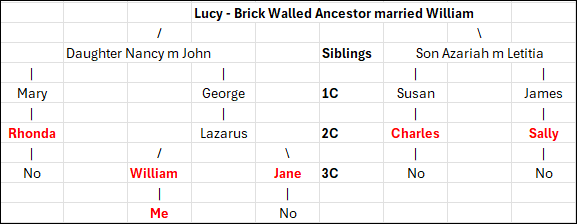
DNA Compare

That said, let’s take a look at these matching comparison features by scrolling all the way to the bottom and clicking on “DNA Compare.”

  • The first person shown is always you.
  • The second person is my other test at Ancestry.
  • The third person, Michael, is my first cousin, with whom I share 11% of my DNA and the same amount of Acadian heritage. We are both about 6.25% Acadian through our grandmother’s father’s paternal line.
  • Paul, a more distant cousin, and I share only our Acadian heritage.
  • This view shows both parents, so the fifth match is cousin Gregory, with whom I share known Danish ancestors. However, I have less than 1% Danish heritage, not the 16% that Ancestry has attributed. That’s a big difference and is unquestionably inaccurate.

Look at the results when we compare Ancestral Journeys for the same people I’m related to through my French Acadian heritage.

My two cousins who share Acadian DNA from Nova Scotia with me aren’t shown to be in the Canadian Maritimes Acadians Ancestral Journey. They clearly have numerous Acadian ancestors, and in Paul’s case, this is the only genealogical connection we share.

Michael and I share the same Acadian great-great-grandfather, Antoine Lore. Both of us would have inherited approximately 6.25% of his DNA, although not necessarily the same DNA. Antoine only had Acadian and Native American DNA to pass on to us, so any DNA descending from Antoine has to be one or the other.

Paul is 50% Acadian, and was assigned 49% French DNA, so he absolutely should have the Acadian Ancestral Journey. If you’re wondering if Michael and Paul are actually Acadian, they are, as proven by matches and shared matches.

While our Ancestral Regions both display some amount of “French,” neither Michael nor Paul are assigned the Acadian Journey. One might argue that Michael’s 5% French wasn’t sufficient to generate the Acadian Journey – but my 3% did – plus Michael and I share several Acadian matches and all of our Acadian ancestors.

Paul is another matter entirely. Regardless of our shared matches, with unquestionable 50% Acadian heritage, meaning his entire paternal line – there’s no reason Paul shouldn’t have been assigned an Acadian Journey.

So, what’s the moral of this story?

Don’t Get Too Attached

Don’t fall in love with ethnicity, now called Ancestral Origins, because it will change from time to time. So will your Ancestral Journeys.

For better or worse.

Maintain your genealogy skepticism and work to prove or disprove ethnicity and ethnicity-related information just as you would any other hint.

Evaluate your ethnicity percentages and locations based on known and proven genealogy. I wrote the article, Ancestral DNA Percentages – How Much of Them is in You?, where I explain how to determine, on average, what percent of each of your ancestors you would expect to inherit. Remember that recombination doesn’t give you that exact percentage, though. You could have inherited more or less.

Evaluate Ancestral Origins, Ancestral Journeys, and other relationship information, such as shared matches, logically. Does anything conflict? Does anything not make sense? Did anything click? Was there an “aha” moment?

Are there surprises that you wouldn’t have expected, and can you identify other forms of corroborating evidence? Build a case, and be sure to include genealogical information in the mix as well.

Essentially, treat everything as a hint to be proven or disproven.

Furthermore, be gentle with yourself as you learn your way around the rearranged furniture in the room. You might trip over the coffee table, but you can’t break it, so scroll around and click on everything to gather as much information as possible.

______________________________________________________________

Sign Up Now – It’s Free!

If you appreciate this article, subscribe to DNAeXplain for free, to automatically receive new articles by e-mail each week.

Here’s the link. Just look for the black “follow” button on the right-hand side on your computer screen below the black title bar, enter your e-mail address, and you’re good to go!

In case you were wondering, I never have nor ever will share or use your e-mail outside of the intended purpose.

_____________________________________________________________

Follow DNAexplain on Facebook, here.

Share the Love!

You’re always welcome to forward articles or links to friends and share on social media.

If you haven’t already subscribed (it’s free,) you can receive an e-mail whenever I publish by clicking the “follow” button on the main blog page, here.

You Can Help Keep This Blog Free

I receive a small contribution when you click on some of the links to vendors in my articles. This does NOT increase your price but helps me keep the lights on and this informational blog free for everyone. Please click on the links in the articles or to the vendors below if you are purchasing products or DNA testing.

Thank you so much.

DNA Purchases and Free Uploads

Genealogy Products and Services

My Books

Genealogy Books

Genealogy Research

Six Ways to Figure Out How We’re Related

In my latest Webinar, Six Ways to Figure Out How We’re Related, I discuss the various tools from Ancestry, FamilyTreeDNA, MyHeritage, and 23andMe – plus clusters from Genetic Affairs and the amazing DNAPainter.

This webinar lives in the Legacy Family Tree Webinar library, but as part of the “webtember” lineup, you can view it for free through the end of September.

It’s always exciting to discover a new match at one of the DNA testing companies, which, of course, begs the question of how you’re related.

So, what are the six ways to figure out how you’re related, and how do you use them?

Come along for a step-by-step guide!

Shared Matches

We begin with how each vendor handles shared matches, what that feature is called, where to find the information, and how to interpret what they are telling you.

23andMe goes a step further and creates a genetic tree, of sorts, although that functionality has changed since their breach last October.

Bucketing and Sides

Two vendors go a step further and provide unique tools to divide your matches maternally and paternally.

FamilyTreeDNA buckets your matches maternally and paternally (or both) based on matches you link to their profile cards in your tree. FamilyTreeDNA then uses your linked matches to triangulate with other matches and assign your matches accordingly, providing a maternal and paternal match list. Bucketing, also known as Family Matching, is one of my favorite tools.

Note that linking matches at FamilyTreeDNA requires that you have transferred your tree to MyHeritage. I wrote about that and provided instructions here and here, and produced a complimentary webinar, too.

Ancestry also divides your matches by parent, but they use a different technique based on their Sideview technology and either ethnicity or shared matches.

Surnames and Locations

Surnames and locations, either separately or together, provide HUGE hints!

MyHeritage provides a nice summary for each of your matches that includes ancestral surnames, a map of locations in common, and “Smart Matches” which shows you people in common in both of your trees. There are several ways to use these tools.

FamilyTreeDNA also provides a list of surnames. You can view either the surnames in common with a match, or all of their ancestral surnames, with locations if provided. The tester enters these surnames, and we review how to complete that step.

Ancestry also provides shared surnames, with clickable links to the number of people in your matches tree with that surname, plus common locations.

X-DNA

X-DNA is probably the most underutilized DNA matching tool. While each of the vendors actually test the X chromosome, only one, FamilyTreeDNA, provides X-matching. You can obtain X-matching results by uploading your DNA file to FamilyTreeDNA. I’ve provided upload/download instructions for all companies, here.

X-DNA has a very unique inheritance pattern because males only inherit an X chromosome from their mother which limits the number of potential common ancestors for any two testers. In other words, X-DNA matching does half your work for you!

Clustering Technology – AutoClusters, the Matrix and DNAPainter

In the past few years, match clustering has become a very useful tool. Clustering shows which of your matches match you and each other.

Genetic Affairs offers several flavors of these clusters, and both MyHeritage and GEDmatch have incorporated Genetic Affairs clusters into their product offerings.

If you haven’t used AutoClusters yet, by all means, try them out.

FamilyTreeDNA offers the Matrix, a slightly different version of clustering. You can select 10 people from your match list to see if they also match each other. Shared matches don’t automatically mean triangulation between you and those two people, or even that all three people descend from the same line. However, if the people are bucketed to your same side (parent) and they share common segments with you in the chromosome browser, they triangulate.

You’ll want to paint those matches to DNAPainter to determine which ancestor you share, especially if they haven’t provided a tree.

DNAPainter provides your chromosomes as the “canvas” upon which to paint your matches in order to correlate segments with ancestors and identify common ancestral lines with mystery matches.

Three vendors, FamilyTreeDNA, MyHeritage, and GEDmatch provide segment information with matches for you to paint. I illustrate how I walk segments back in time, identifying our most distant common ancestor possible.

Theories of Family Relativity and ThruLines

Both MyHeritage and Ancestry provide a combination of DNA matching and tree triangulation, where they search the trees of your DNA matches to find common ancestors with you – although their implementation is different.

MyHeritage’s Theories of Family Relativity provides varying theories about common ancestors for you and a specific match using both trees and historical documents. You can review the various pathways and confirm or reject theories. I love this tool.
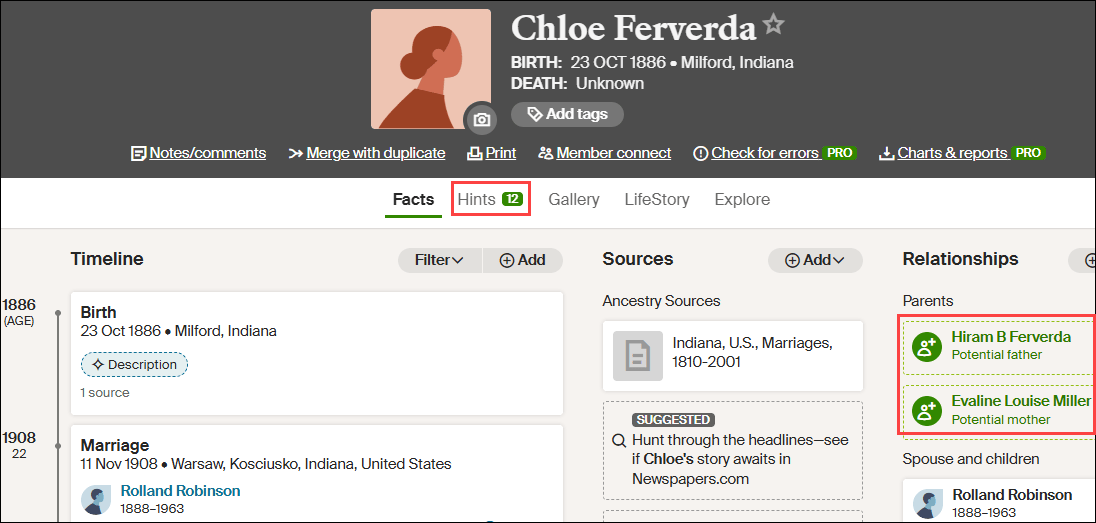
Ancestry’s Thrulines functions a bit differently, showing you all of your matches that descend from a common ancestor in all your matches’ trees. Sometimes, the trees are incorrect, but Theories of Family Relativity and ThruLines should still be used as hints.

I showed how ThruLines helped me discover what happened to one of my ancestor’s grandchildren who was lost to the family at his mother’s death – and to all of us since. Not anymore.

Bonus – Y-DNA and Mitochondrial DNA at FamilyTreeDNA

Only FamilyTreeDNA offers both Y-DNA and Mitochondrial DNA testing and matching. All of the tools above pertain to autosomal DNA testing, which is named Family Finder at FamilyTreeDNA. Illustrated by the green arrow below, autosomal DNA testing measures and compares the DNA you inherited from each ancestral line, but that’s not the only game in town.

Y-DNA, in blue, for males, tracks the direct paternal line, which is the surname line in Western cultures. Mitochondrial DNA, in red, is passed from mothers to all of their children. Therefore, everyone can test, revealing matches and information about their mother’s direct matrilineal lineage.

Y-DNA testing includes the amazing Discover tool with a baker’s dozen different reports, including ancient DNA. Mitochondrial DNA will soon have its own MitoDiscover after the rollout of the new Mitotree.

Both tests include “Matches Maps” to help you determine how you are related to your matches, as well as where your ancestors came from before the advent of surnames.

The Advanced Matching feature allows you to select multiple tests to see if your matches match you on combined types of tests.

Tune In

Now that you know what we cover in the webinar, please tune in to see how to use these awesome tools. Be sure to fish in all four “ponds” plus GEDmatch, where you may find people who didn’t test at a company that provides a chromosome browser or matching segment information.

Tools provided by the DNA testing vendors facilitate multiple ways to determine how we match and which ancestor(s) we have in common.

You can watch the webinar, here.

Additionally, subscribers to Legacy Family Tree Webinars have access to the 25-page syllabus with even more information!

A Legacy Family Tree Webinar subscription normally costs $49.95 per year, but through the end of September, there’s a coupon code good for 20% off. Just click here, then enter webtember24 at the checkout.

Enjoy!

_____________________________________________________________

Follow DNAexplain on Facebook, here.

Share the Love!

You’re always welcome to forward articles or links to friends and share on social media.

If you haven’t already subscribed (it’s free,) you can receive an e-mail whenever I publish by clicking the “follow” button on the main blog page, here.

You Can Help Keep This Blog Free

I receive a small contribution when you click on some of the links to vendors in my articles. This does NOT increase your price but helps me keep the lights on and this informational blog free for everyone. Please click on the links in the articles or to the vendors below if you are purchasing products or DNA testing.

Thank you so much.

DNA Purchases and Free Uploads

Genealogy Products and Services

My Books

Genealogy Books

Genealogy Research