This is the third article in our FOCUS series, providing step-by-step instructions for identifying brick-walled ancestors.
These two articles detail the initial steps:
- FOCUS: A New Series Focused on Breaking Down Brick Walls
- FOCUS: Step 1 – Seven Solutions for DNA Matches with Absent or Shrunken Trees
By now, you will have selected the ancestor you want to focus on identifying, and you have tools in your toolkit for working with DNA matches who have no trees.
You may have ordered DNA tests from multiple vendors and are waiting on results, so while you wait, we’ll start with finding the Y-DNA and mitochondrial DNA of your ancestors and identifying DNA testing candidates.
While it may sound counterintuitive, we’re going to be working with all of the major vendors, including FamilyTreeDNA, who actually tests for Y-DNA and mitochondrial DNA, plus WikiTree, 23andMe, MyHeritage, Ancestry, GEDmatch and FamilySearch. They are all quite useful in different ways.
This Type of Searching Is Different
Normally, when we search for brick-walled ancestors, we are searching backward in time. In other words, we begin with the last person we know and work back from there, hoping to identify the previous generation.
If we don’t know Lucy’s birth surname and she was born about 1750, and married William Moore in the late 1770s, we begin with what we do know in that timeframe.
Searching for our ancestor’s Y-DNA or mitochondrial DNA, and testers who carry that DNA, is fundamentally different because we begin with that ancestor and work forward in time.
In other words, if we want to find Lucy’s mitochondrial DNA, we begin with her daughters and track forward in time to the present. Hopefully, someone has already tested, and we can locate that result, but if not, we need to find people who descend through a specific path that carry Lucy’s mitochondrial DNA.
If we were searching for the Y-DNA of William Moore, we would look for his direct paternal descendant males who would carry the Moore surname.
Chicken or Egg?
I’ve been debating whether I should show you:
- How to locate and identify the Y-DNA and mitochondrial DNA of your ancestors first, or
- How to use Y-DNA and mitochondrial DNA (mtDNA) to help break through your brick wall first
I decided to write the “how to locate” article first because I don’t want you to skim over and ignore the ‘how to use’ article, thinking it’s irrelevant to your research because you don’t carry the Y-DNA and/or mtDNA of your brick-walled ancestor.
There are lots of avenues to locate the Y-DNA or mitochondrial DNA of your ancestors, something you definitely want to do. You’ll soon see that Y-DNA and mtDNA information can also assist with autosomal DNA results.
These are all pieces of your ancestor’s puzzle, and you never know which one will be the one to topple that wall.
Plus, you don’t know what you don’t know about that ancestor.
Let’s jump right in!
Who Carries the Y-DNA and Mitochondrial DNA of Your Ancestor?

As a quick refresher, only men can test for Y-DNA because only men have a Y chromosome which is inherited from their father. It’s passed in a direct paternal line from father to son, never mixed with DNA from the mother. Because it’s never divided during recombination like autosomal DNA, it’s uniquely useful for connecting lineages both recently and back in time hundreds and thousands of years.
Both Y-DNA and mitochondrial DNA incur occasional mutations that function as genetic breadcrumbs, making them incredibly useful for reassembling those specific family lines where genealogy paper trails have broken or been interrupted.

Mitochondrial DNA is passed from mothers to their children of both sexes, but only daughters pass it on. This means that in the current generation, males and females can both test for the mtDNA of their direct, mother-to-mother, matrilineal line.
Anyone, including males, who descends from an ancestor through all females can test for that ancestor’s mitochondrial DNA.
If you’re lucky, you’ll carry the Y-DNA or mitochondrial DNA of the ancestor you are seeking. If not, you’ll need to do one of two things:
- Determine if someone has already tested for that ancestor
- If not, find candidates to test
Y-DNA is generally easier because you at least (hopefully) have a surname to work with that has been passed from father to son, along with their Y chromosome.
Mitochondrial DNA is more challenging since surnames change each generation, so I’ve included several mitochondrial examples. Don’t skip over them, because the same research techniques apply to Y-DNA too, especially difficult cases.
If you’re a male, I strongly recommend that you order:
- A Big Y-700 test
- The mtFull mitochondrial DNA test
If you’re a female, you can only order the mtFull test, but you may be able to ask your father or brother or a male relative (with the surname in the lineage you seek) to take the Big Y-700 to represent your father’s family line. In other words, if you’re looking for a male Estes, you can ask your 2C Estes male who descends in a direct paternal line of all Estes men from your common ancestor.
Complete Versus Partial Tests
Haplogroup-only results derived from autosomal tests are fine as far as they go – but they don’t go very far. Most are what I would call midrange, providing testers with a haplogroup from maybe 2000 years ago, and some are much more distant than that. That isn’t to say they can’t be useful in a limited capacity, but Y-DNA and mtDNA have so much more potential.
You need comprehensive Y-DNA and mtDNA test results that identify all your haplogroup-defining mutations and can be refined as more people test and match family-level mutations.
Haplogroups are important, but you also need to match with other testers. Additionally, you’ll want the most complete haplogroup possible, because it will help you genealogically by providing a complete breadcrumb trail with the ability to identify your most recent common ancestor (MRCA).
FamilyTreeDNA is the only vendor that offers these complete tests that include matching with other testers, plus additional genealogy tools.
The Big Y-700 test scans for mutations in the stable portion of the Y chromosome and is the only way to obtain that personal-level information. It’s those recent mutations that will help place you within a biological family – or eliminate you from other lines, which prevents barking up the wrong tree.
The benefit of taking the test yourself, or sponsoring a test for someone willing to share their results with you, is that you have ready access to information through FamilyTreeDNA’s tools such as:
- Matches with other Y-DNA and mtDNA testers
- Matches Map (ancestor locations)
- Advanced Matching, which provides a filtered list of people who match you on BOTH your Y-DNA or mitochondrial DNA AND your Family Finder autosomal test
- Haplotype clusters (for mtDNA)
- Your mutations
- Block Tree (for Y-DNA)
- Customized Discover tools

Click any image to enlarge
- Discover’s Advanced Tools like the Match Time Tree, shown above, which displays your matches with their earliest known ancestors (EKA) together on the Time Tree
- Globetrekker™ (for Y-DNA with mtDNA coming soon)
- Up to 30 Ancient Connections
- Up to 20 Notable Connections
FamilyTreeDNA’s free Discover tool, here, provides public information for everyone about haplogroups, but if you haven’t taken the test, you won’t receive matching and customized information described above, which is essential to genealogy.
Upgrades for Partial Tests
You may have previously tested at a lower level at FamilyTreeDNA.
For mtDNA, the early mtPlus test examined a portion of the mitochondria and provided matching at lower levels, as do the 12-111 marker Y-DNA tests. Both provide a predicted high-level basic or midrange haplogroup based on the mutation information available in those limited tests.

If you took an earlier, partial test, you can sign on to your account to upgrade by clicking on the “Big Y,” even though it’s greyed out. Grey simply indicates that you don’t currently have that level of test.

Click on “Full” to upgrade to the mtFull test.
Test Features at Various Levels
Depending on the type of test you take, and at which vendor, you may have a fully refined or partial haplogroup.
Discover provides a substantial amount of information if you receive a partial haplogroup:
- From a lower-level Y-DNA or mtDNA test at FamilyTreeDNA
- From the Family Finder autosomal test at FamilyTreeDNA
- From an autosomal test at another vendor, such as 23andMe or LivingDNA
A partial haplogroup is better than no haplogroup, but it’s also like working with one hand tied behind your back. If at all possible, you need to work with a full haplogroup and matches.

Testers who click through to Discover from their own test, or a test they manage, can view additional features not available in the free version.
The table below shows the four different ways you can access and view your ancestor’s haplogroup. Based on the testing level and/or how they tested, the haplogroup level will vary.
Clearly, the best scenario is when you either take the Big Y-700 or mtFull test yourself, or you have access to the test results of someone who takes that test to represent your ancestor’s DNA. Primary access confers the greatest amount of information, but you can still glean information in other ways.
| Feature | Introductory Level Test at FamilyTreeDNA* | Tester’s Big Y-700 or mtFull Test – Full Access | Partial Haplogroup from Autosomal Test | Your Ancestor’s Haplogroup but without Full Access |
| Matching | Yes, at that lower level | Best – at all levels | No | No |
| Matches Map | Yes, at lower level | Yes | No | No |
| Mutation Values | Yes, STR markers at lower Y-DNA level | Yes, STRs (Y-DNA) and SNPs | Not directly but through Discover | Not directly but through Discover |
| Haplotree & SNPs with surnames (Y-DNA only) | Yes, at lower level | Yes | No | No |
| Block Tree (Big Y test only) | No | Yes | No | No
|
| Advanced Matching (multiple types of tests) | Yes, at that level | Yes | No | No |
| Ability to Join Group Projects | Yes | Yes | Only test owner or manager can join | Only test owner or manager can join |
| Discover Reports | Yes, same information as the free version due to lower coverage | Yes, when clicking through from your FamilyTreeDNA account | Free version | Free version |
| Haplogroup Story | Yes, at lower haplogroup level | Yes – best and highest level | Yes, at lower haplogroup level | Yes, at lower haplogroup level |
| Country Frequency Map and Table views | Yes, at lower haplogroup level | Yes, at most refined haplogroup level | Yes, at lower haplogroup level | Yes, at most refined haplogroup level |
| Notable Connections | Same as free version | About 20 for Y-DNA, 11 for mtDNA | About 10 for Y-DNA, 3 for mtDNA | About 10 for Y-DNA, 3 for mtDNA |
| Migration Map | Yes, at lower level | Yes, at advanced level | Yes, at lower level | Yes, at advanced level |
| Globetrekker (Y-DNA only, mtDNA coming soon) | No | Yes | No | No |
| Ancient Connections | Same as free version | About 30 | About 10 for Y-DNA, 3 for mtDNA | About 10 for Y-DNA, 3 for mtDNA |
| Time Tree | Yes, at lower haplogroup level – generally 2,000 years or older | Yes, at most refined haplogroup level, often within genealogical timeframe | Yes, at lower haplogroup level – generally 2,000 years or older | Yes, at most refined level |
| Match Time Tree | No | Yes – your matches & their EKA on the Time Tree including WikiTree Connections and Ancient DNA | No | No |
| Ancestral Path | Yes, at lower haplogroup level | Yes | Yes, at lower haplogroup level | Yes |
| Suggested Projects | Yes | Yes, at more refined level | Yes, but must test with FamilyTreeDNA to join | Yes, but must test with FamilyTreeDNA to join |
| Scientific Details, ages and variants | Yes, at lower level | Yes | Yes, at lower level | Yes |
| Compare Haplogroups | Yes | Yes | Yes | Yes |
*Note that often your ancestor’s haplogroup as reported by the Family Finder (autosomal) test is more refined, meaning closer in time, than the Y-DNA haplogroups predicted by STR tests, but both are always substantially less specific than the Big Y-700 test. As of the publication date of this article, Family Finder does not yet report a mitochondrial DNA haplogroup, but that is planned for the future.
This chart only includes features you would specifically use to identify an ancestor or ancestral lineage. There are other reports provided with your test that will be of interest. Discover provides about 14 reports that include various options.
Now we can envision:
- The benefits of finding our ancestors’ Y-DNA and mtDNA
- The benefits of obtaining the most refined haplogroup possible
- The benefits of being able to view the results directly
You may not be able to achieve all of these, but even a partial haplogroup is better than no haplogroup at all, and a fully refined haplogroup, even if you can’t see everything in another tester’s account, is better than a partial haplogroup.
So, let’s see how to find your ancestors’ haplogroups. I collect them all, not just for brick-walled ancestors, but because they tell a part of our story not available through any other means.
Finding Your Ancestor’s Mitochondrial and Y-DNA
If you are the DNA tester for your brick-wall ancestor, then you’re golden, but chances are that you’re not.
If you’re searching for Y-DNA, and you don’t carry that Y-DNA yourself, you’ll need a male relative who carries that Y chromosome to test.
Males carry the Y-DNA of their direct patrilineal ancestors, shown in the image below on the left side in blue, plus the mitochondrial DNA (mtDNA) of their mother, shown with yellow hearts at far right.
At the 4th generation level, we have 4 Y-DNA lineages to collect (light blue, dark green, medium green, and teal), and a total of 8 mtDNA lineages.

Let’s say you’re searching for your father’s mother’s mother as your brick-wall ancestor.
Your father (and his siblings) carry the mtDNA of his mother, shown above in fuchsia, as do her grandchildren through her daughters. That’s why your father has a fuchsia heart. If close family members test, chances are you can arrange to manage their test or view their results. (Be sure they take the autosomal Family Finder test too. You’ll need that later.
If you don’t manage their test for them, you’ll need to ask to see their results to view matches and work with trees.
I have a family project at FamilyTreeDNA that I manage. I ask people who have tested for a particular ancestor to join that project so I can easily view their results while they continue to manage their test, and can select how much they want me to see or do.
FamilyTreeDNA is currently working on a multi-kit management feature that will address the challenge of sharing results.
But I Don’t Know of Any Cousins…
Let’s say you don’t know of and can’t readily identify anyone who descends from your ancestor appropriately.
If the ancestor you seek is a male, mitochondrial DNA is probably not going to help you because men don’t pass their mitochondrial DNA on to their descendants. In order to obtain a male ancestor’s mitochondrial DNA, you’d need to be able to identify a sister or someone known to descend from his mother (or sisters) through all females to the current generation. Needless to say, if you know who his mother is, you probably already know who he is.
If your brick wall is a female ancestor, your first order of business is to find someone who descends from her through all females to the current generation, where the tester can be male or female.
Why is this so important?
Mitochondrial DNA isn’t admixed with the father’s DNA, so it’s not divided in each generation. This means that mitochondrial DNA is the only direct line-of-sight we have that bypasses both changing surnames and genetic recombination for females.
Who Has Tested for Your Ancestor?
If you’re NOT the tester for your brick-walled ancestor or aren’t the curator of the test, your first step is to see if someone else has already tested.
This can sometimes be challenging.
It’s impossible to obtain mitochondrial DNA for an unknown ancestor if there are no known daughters, and for Y-DNA if there are no known sons. You may need to review genealogical resources to make sure you’ve identified all of that ancestor’s children.
Barring those scenarios, there are a surprising number of resources available to find descendants.
WikiTree
The first place I check to see if someone has already tested for a particular ancestor is WikiTree.
WikiTree is the one place where you find the ancestor along with the people who have taken DNA tests who descend from that ancestor. It’s invaluable.
Normally, you have to work with matches to identify your common ancestor. WikiTree works the other way around. Your starting place is with the ancestor.
You can’t Google your mystery ancestor’s name because if you knew their name, they wouldn’t be a mystery ancestor – but you can Google their spouse or a child.
I’m using an example from my own line because my mitochondrial DNA results are connected to her.
I’m Googling:
Barbara Mehlheimer born 1822 died 1906 in Indiana at WikiTree
Google was slightly confused but the results got me to where I needed to go.
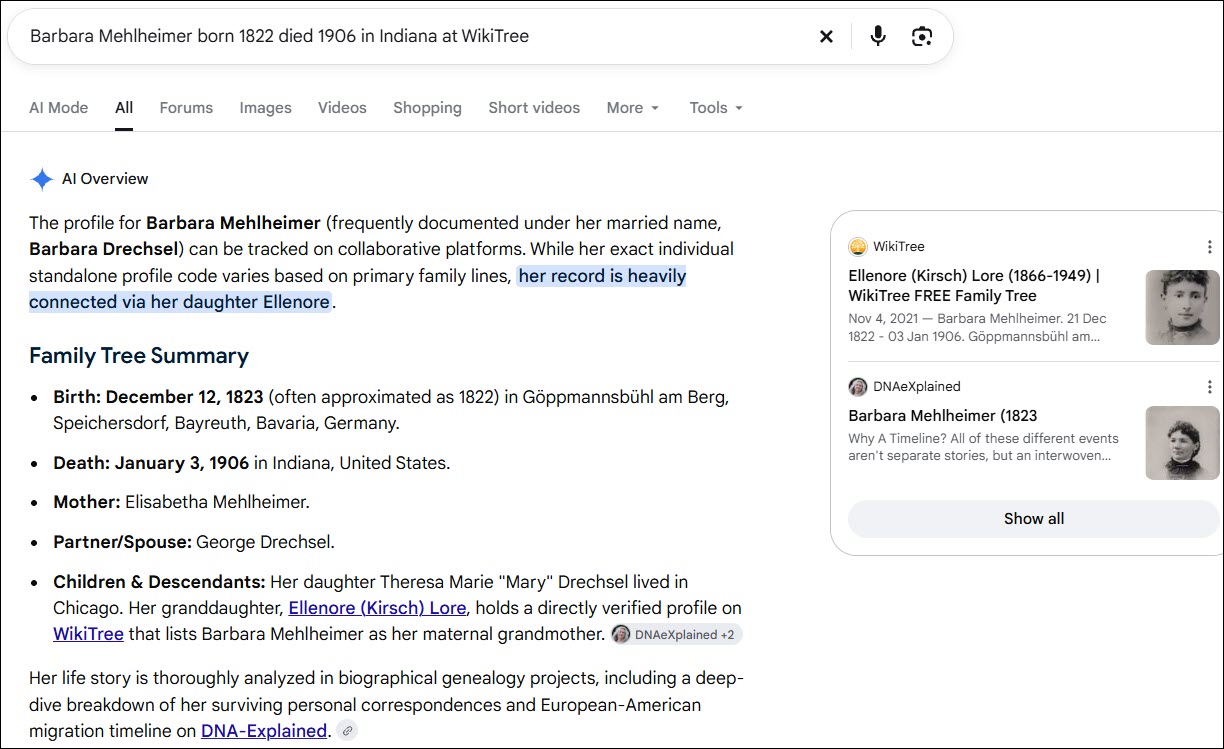
Barbara Mehlheimer married George Drechsel and her daughter was Barbara Drechsel who married Jacob Kirsch.

First, check Barbara’s WikiTree profile card to confirm you’ve found the correct person.
Next, click on the DNA tab beneath her profile information (or just scroll down). She has four DNA Connections.

You can see that one person, me, who carries Barbara’s mitochondrial DNA has connected their DNA to Barbara’s profile. I did this by entering my DNA information on my WikiTree profile, then WikiTree connects my DNA haplogroup information from mother to mother to mother to Barbara and propagates my DNA haplogroup to her, her matrilineal ancestors, and their female descendants. If you click on the haplogroup, it takes you directly to that haplogroup in Discover.
Three people have connected their autosomal results to Barbara. This information can be very important, and not just for mitochondrial DNA. It allows us to identify autosomal testers we may match at different testing companies who descend from Barbara.
In your research journal, make notes of these names, testing companies, and kit numbers. Remember that this doesn’t mean the company noted is the only place someone has taken an autosomal DNA test. I’ve tested at all of the major companies, but only GEDmatch and FamilyTreeDNA are listed here.
For Y-DNA and mitochondrial DNA, the haplogroup is shown, although when testers receive a new Y-DNA or Mitotree haplogroup, they seldom think to revise it in WikiTree. This means their current haplogroup may be more specific and improved since the WikiTree information was entered.
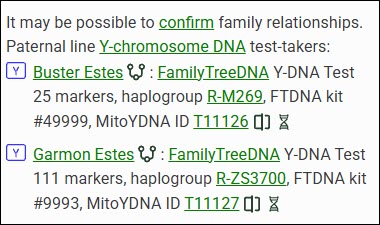
Some people may have tested at different levels too. In this case, Buster Estes, who is now deceased, was one of the earliest testers, long before the Big Y tests were available. He only took a 25-marker test, so his haplogroup was predicted as R-M269. Garmon, on the other hand, was able to upgrade his Y-DNA test to the Big Y-700, and his haplogroup is much more refined at R-ZS3700. Their haplogroups don’t match exactly due to the levels at which they tested, but they also don’t preclude the two testers from belonging to the same genetic line.
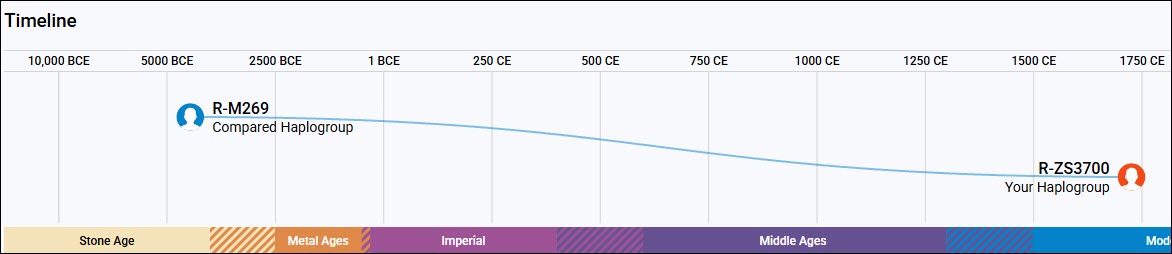
This screenshot of Discover’s Compare function illustrates how important the Big Y-700 test is when compared to the STR test’s predicted haplogroups. The man who developed the mutation that defines R-ZS3700 lived about 1750 CE, and the man who developed R-M269 lived about 4450 BCE, or 6,450 years ago. That’s a big difference.
Using a combination of multiple testers and genealogy, we’ve identified the man who developed R-ZS3700 and passed it on to his sons. Moses Estes was born in 1711 in Virginia and all of his descendant testers carry R-ZS3700.
Now that’s extremely useful information, because we know that any man with haplogroup R-ZS3700 descends from Moses Estes in a direct paternal line, and any man whose haplogroup is not R-ZS3700 or doesn’t include R-ZS3700 upstream of his haplogroup does not descend from Moses Estes in that way.
Please add your DNA tests, including haplogroups and your kit number, to your profile at WikiTree so that the haplogroup information can be populated appropriately to your ancestors.
Searching for a Test Candidate Using Autosomal Descendants
When you’re searching for a testing candidate at WikiTree, you can click through to the tester’s profile and view exactly how they descend from the ancestor shown.

Let’s say that no one has linked a mitochondrial DNA test to the ancestor you’re searching for, but several people have linked autosomal tests to that ancestor’s profile card.
Click on the tester’s name and then on the DNA Ancestors tab to see how they descend from that ancestor. If you’re lucky, you’ll find someone in the autosomal list who is a mitochondrial DNA testing candidate.
If you’re looking for a Y-DNA tester, begin by looking for a male with the same surname as that ancestor. If you’re looking for a mitochondrial DNA tester, you’ll need to view each tester’s ancestors.
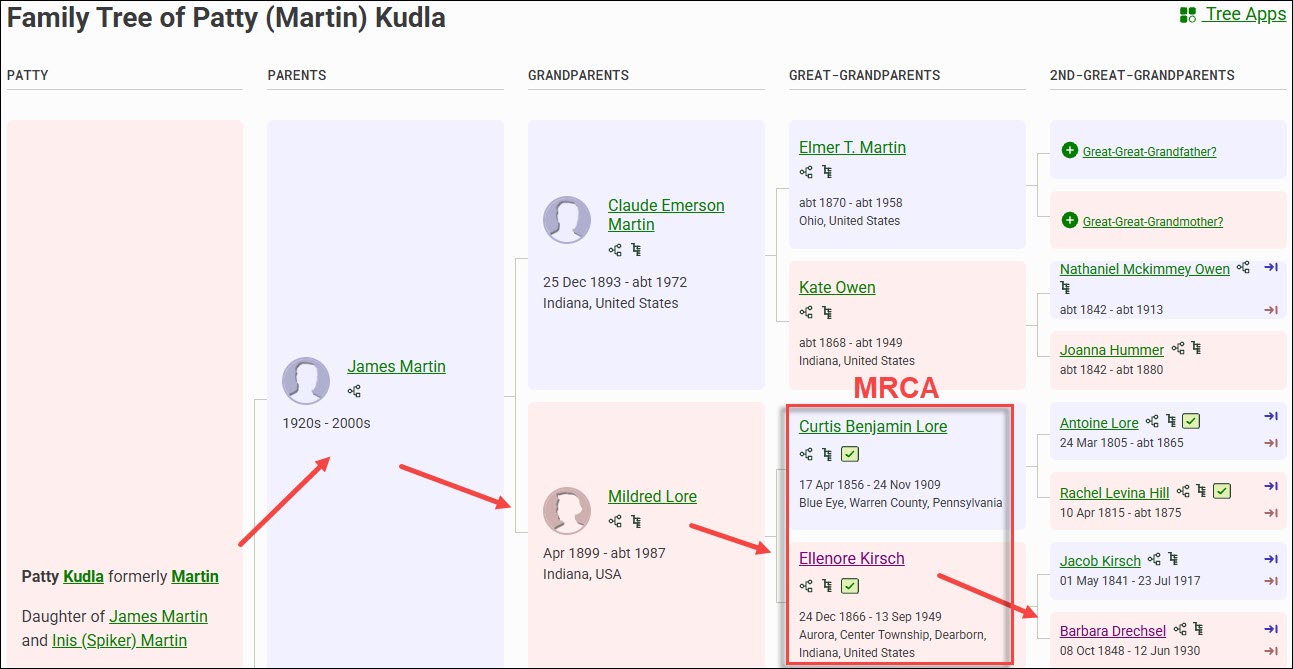
Regardless of whether they are a mitochondrial or Y-DNA testing candidate, you’ll identify your most recent common ancestor (MRCA) for each person, information that will become essential for the autosomal tools that we’ll be discussing in future articles.
In your research journal, I suggest that you record all of their descent information now, including their names, where they tested, your MRCA, kit numbers and any other relevant notes.
If you’d like to ask them to take a specific test, or if they already have and you’d like to know more, you can message WikiTree users by clicking on their profile, and then on the little envelope beside the profile manager’s name.
Finding Your Ancestor’s DNA Descendants at WikiTree
Let’s say that no one in the DNA list of people who have already taken tests descends from your ancestor matrilineally. Don’t worry, there are still more options!
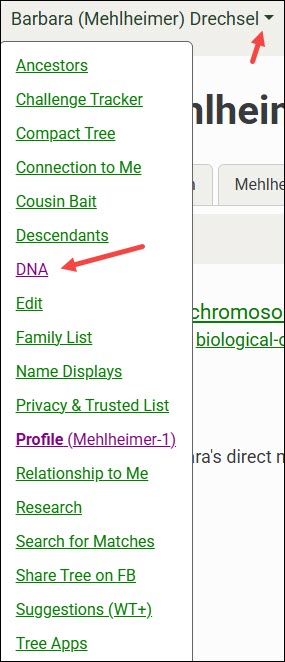
At the top of the WikiTree page for that ancestor, click the down arrow, then on DNA.

The default tab shows the DNA Ancestors of the profile you’re viewing. You’ll see Y-DNA for males, and both mitochondrial and X-chromosome ancestors for everyone.
You may notice that there’s an ancestor listed for your brick wall ancestor. That’s wonderful, but don’t jump for joy quite yet. Remember, WikiTree is a one-world tree, and you need to verify the underlying genealogy in every tree here, and at every vendor.
Always confirm using multiple sources, meaning resources other than trees. The great thing about WikiTree is that there are often several sources listed in each person’s profile, and other resources that can help immensely. I love WikiTree, but I’m always skeptical of information in any tree, and I prove everything to my own satisfaction. I wrote several articles about that topic in the Genealogy Proof Series, here.
To find testers, you’ll need to view your ancestor’s DNA Descendants.

Click on the DNA Descendants tab.

The Mitochondrial DNA Descendants view shows potential candidates for mtDNA testing. Remember, in the current generation, males and females can both test so long as they descend from that ancestor through all females.
In the case of Barbara Mehlheimer Drechsel and her descendants, there are several males who are immediately eliminated because they’ve been deceased for more than a century, and several daughters who didn’t have children.
Not every person’s line on WikiTree has been added or developed. You can see that three daughters’ lines that might hold candidates don’t list all their children, and I still need to research two additional people. That means I still have five candidate lines to extend that have potential mtDNA testers.
So, in summary, if Barbara was the ancestor I was seeking:
- One person has already tested
- Three daughters don’t have their families extended.
- Two have daughters that I need to research.
For both Y-DNA and mitochondrial DNA, I like to have at least two people who descend from different children of the ancestor, and whose tests match at a level that does not preclude that lineage. This helps confirm both the genetic line and the genealogy of both testers.
With male ancestors, having more than one tester for each line through different siblings is essential.
Kit Numbers, Earliest Known Ancestors and Google
When DNA kit numbers are included at WikiTree, you’ll want to Google to see if that kit number is shown in a public Group Project at FamilyTreeDNA where you may find more information.
The exact search string to use to find a specific kit at FamilyTreeDNA within projects is:
“9993” site:familytreedna.com
Replace 9993 with the kit number you’re interested in. You can also add the word “projects”, without quotes, to the end of that string to omit forums and limit the search to within projects. This string both focuses and limits the search, filtering out most noise.

By clicking on “read more,” you’re taken directly to the Estes Family Surname Project Y-DNA page.

The green haplogroups are SNP-confirmed, unlike the red predicted haplogroups from the lower-level 12, 25, 37, 67 or 111-marker tests. The R-ZS3700 haplogroup was obtained from the Big Y-700 test, so it is the most granular and specific. If this is your line, you’ve just found your ancestor’s haplogroup. It’s also possible that, by testing, you could receive an even more specific haplogroup.
Please note that haplogroup R-M269 is the most common haplogroup in Europe, and isn’t specific enough to use for anything other than very basic information. It can rule out two people with different base haplogroups, like haplogroup I or J, for example, as descending from a common patrilineal ancestor.
Project administrators are all volunteers, and each administrator groups their Group Project members differently, so take a few minutes to review the project pages. You may find additional testers who have joined this project who descend from your ancestors or your ancestral line.
You may also find other lines with the same surname and a substantially different haplogroup, which tells you that there are multiple genetic lines with the same surname. I have one example of this in the same county, at the same time, found in men by the same exact name – think John Smith. So frustrating. Without DNA testing, we would NEVER have sorted through those two same-name but completely different lines.
However, finding people who match your ancestor’s DNA but don’t have your earliest known ancestor (EKA) may be just the clue you need to knock down that brick wall. How are your ancestor and that other person’s EKA connected, and in what timeframe? Do they share a surname? A location? Are there other clues?
It’s unlikely that you’ll be able to use a kit number to Google unless you find one at WikiTree, but you can still search using the oldest name in that line that you know.
nicholas ewstas site:familytreedna.com
Replace the kit number with your EKA, in this case, “Nicholas Ewstas” in the search string, either with or without quotes. This takes you to the same page and any other projects that someone may have joined using exactly that earliest known ancestor’s name. Keep in mind that you’re only looking at their oldest ancestor, not every ancestor between them and their EKA. Your brick wall may lie someplace in there, which is why you need to check matches and view their trees.
Since women’s surnames change in every generation, they generally won’t be found in specific ancestral surname projects like men. This makes Googling using the ancestor’s name even more important.
catherine lejeune site:familytreedna.com
We don’t know who Catherine LeJeune’s mother is, so finding that someone has entered Catherine as their EKA may be critically important.
This is especially important for female brick-walled ancestors, since using this Google string with their daughters’ names may reveal someone else’s EKA in that genetic line within a project.

After clicking through to the project page, be sure to enlarge the page to display the full project, and use your browser search since partial results with predicted haplogroups may not be grouped with full mitochondrial sequence results.

Multiple people who descend from Catherine LeJeune have tested. The first six only took the partial test years ago. The bottom two testers took the full sequence test and have a new Mitotree haplogroup – U6a7a1a. We know that Catherine was born about 1633, in France, and we can see that other people have also tested and list different EKAs. Next, it’s time to research the other ancestors shown, or check WikiTree to see if any of these testers are listed there so you can contact them.
Now that you have found your ancestor’s haplogroup, you can use the free version of Discover to learn more. I wrote about using mitochondrial DNA and Discover in the article Mitochondrial DNA A-Z: A Step-by-Step Guide to Matches, Mitotree, and mtDNA Discover.
Now, let’s move to the DNA testing companies to see how we can find our ancestors’ Y-DNA, mitochondrial DNA, or testers, at 23andMe, FamilyTreeDNA, Ancestry, and MyHeritage.
At 23andMe
23andMe is not a genealogy company. That said, if you can figure out how people are related to you, you might be able to obtain a partial haplogroup for an ancestor. 23andMe shows both Y-DNA and mitochondrial DNA haplogroups to autosomal matches, but there is no Y-DNA or mitochondrial DNA matching, or associated tools.
23andMe caps matches without a subscription at only 1,500, and they don’t support trees, so I struggle to find useful haplogroups without an associated surname.
Browsing or searching your 1,500 allowed matches (you can have around 5,000 with a subscription) for a particular surname may provide you with an abbreviated haplogroup for both male and female ancestors.
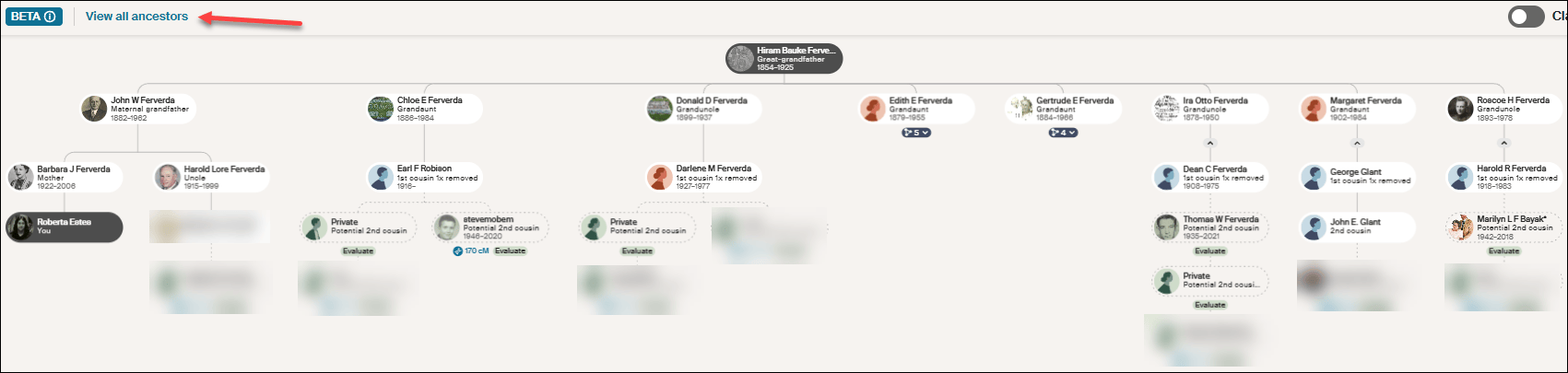
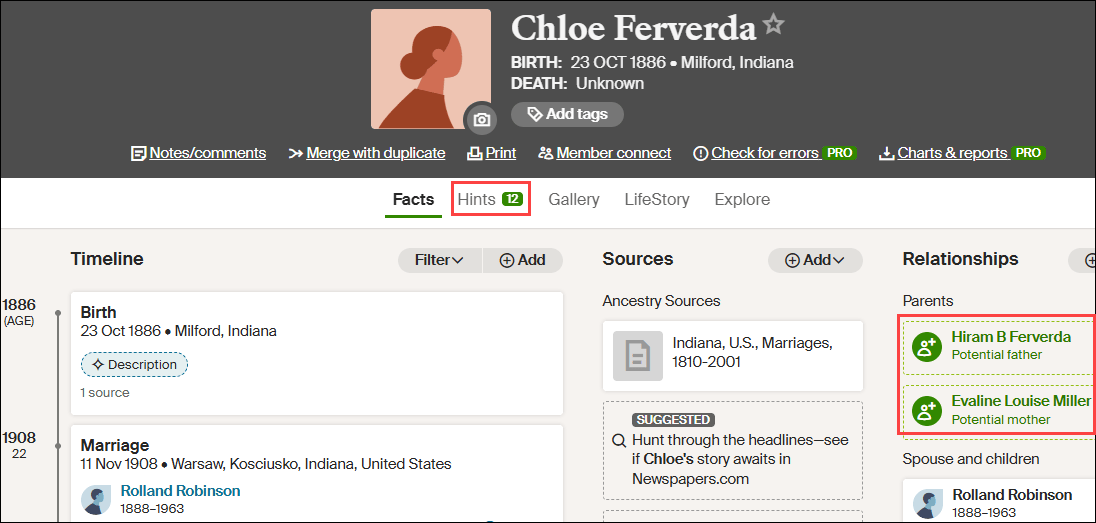
Despite my best efforts, while my maternal grandfather’s mother is not unknown, nor are her ancestors for several generations reaching back into Germany, I’ve been unable to find her mitochondrial haplogroup. Evaline Miller (1857-1939) was born and died in Kosciusko County, Indiana, where she married Hiram Bauke Ferverda, an immigrant from the Netherlands.
Ferverda is an unusual surname, so let’s use it for our example. Thankfully, I’m not dealing with something like Smith.
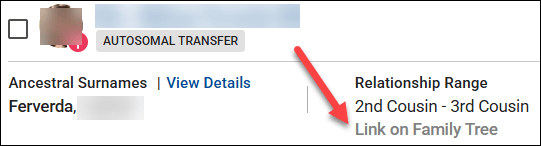
I entered Ferverda in the 23andMe search bar and it shows four results, two of which are in the 2C-3C range, and one that’s further distant.

I already have the Ferverda Y-DNA, so I don’t need that, but I do need the mitochondrial DNA of Eva Miller Ferverda, and I really don’t want to sift through Miller surnames.
I know who Mr. Ferverda is on my match list, and which ancestor we share. His mitochondrial DNA is not Eva Miller’s.

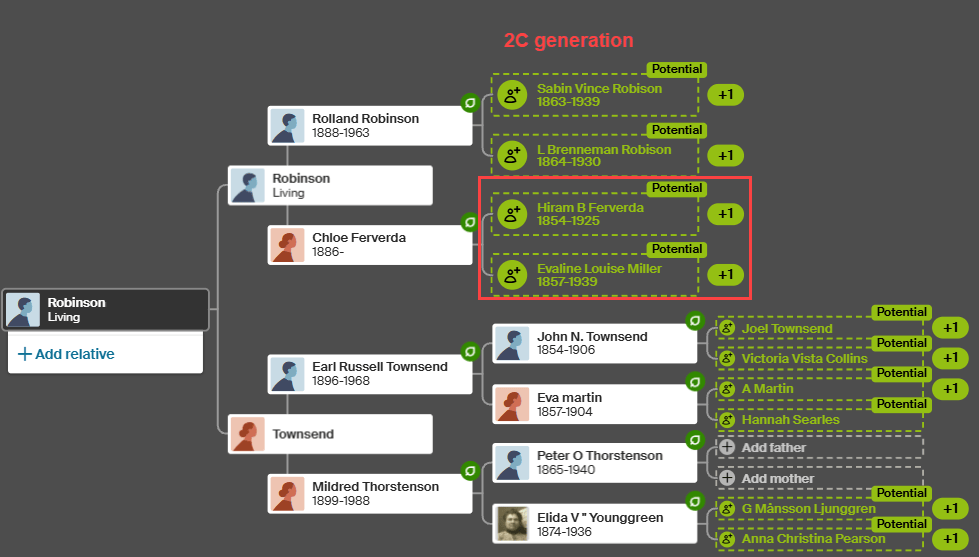
Fortunately, I know who Eva’s parents were, as shown above on my MyHeritage tree, so I can search for Ferverda, Miller, Lentz, Ruhle, Wolflin, and Heubach, several of which are unusual. Reaching back into Germany is difficult.
It’s likely I match all four of those people at 23andMe through a common lineage that descends from either Hiram Ferverda, Eva Miller, or both. Let’s see what I can put together.
Emily is estimated to be a 2C2R. She is younger than I am based on the birth year she provided in her profile which I am not showing for privacy reasons. Emily also stated that her maternal grandmother was born in Warsaw, Kosciusko County, Indiana, and provided family surnames that include Ferverda, Miller, Glant, Zimmermann, and others.
Kosciusko County is where Evaline Miller lived with Hiram Ferverda, and their daughter, Margaret, married Chester Glant. Margaret Ferverda Glant’s daughter, Joyce, was born in Kosciusko County and married a Zimmerman.
But now, I was stuck. That’s all I had in my desktop genealogy software.
I shifted to Ancestry, where I discovered a death certificate and other information that provided what I needed to close the gap.
This information confirmed Emily’s statement that her maternal grandmother was born in Warsaw, Kosciusko County, Indiana.

Therefore, drum roll…Emily carries Eva’s mitochondrial DNA haplogroup, which is T2b.
Let’s move on to the other two matches, both of whom carry haplogroup T2b.
Ian’s maternal grandmother’s birthplace is Leesburg, Kosciusko County, Indiana, and his surnames include both Ferverda and Robison.
Eva Miller Ferverda’s daughter, Chloe Ferverda, married Rolland Robison and had a daughter, Charlotte, whose daughter married a man with Ian’s surname. Their information allowed me to connect the dots appropriately. Ian’s mitochondrial haplogroup is also T2b, which confirms Eva Miller’s mtDNA haplogroup through a second child.
Shirley, the third match who carries haplogroup T2b, also shows the surnames of Ferverda and Robison, and tracks back matrilineally to Eva Miller.
In spite of the many challenges at 23andMe, and thanks to the rare surname of Ferverda, I’ve identified Eva Miller’s partial haplogroup, but not her full haplogroup. A partial haplogroup is much better than nothing and gives me something to work with.
I checked at Ancestry, MyHeritage and FamilyTreeDNA to see if any of those three people have tested there and have trees. Indeed, Ian tested at FamilyTreeDNA and I had corresponded with him and made a note that he is a matrilineal descendant of Eva Miller Ferverda, but he has not taken a mitochondrial DNA test there.
We know that if Emily, Ian, Shirley, or another appropriately descended person were to take a full-sequence mitochondrial DNA test, we would learn a LOT more about Eva’s mitochondrial DNA. If I can’t locate someone who has already tested, I’ll reach out to these people at 23andMe and offer a scholarship for a full-sequence mtDNA test.
It’s ironic that at the most restricted and least likely testing company, I found three people descended from Eva Miller. Hope springs eternal.
Unfortunately, T2b was formed about 8450 years ago and is a very broad haplogroup made up of many subclades, but at least I have something now – and this partial haplogroup may be just the seed I need to lead to more.
Now, let’s move to FamilyTreeDNA and hope that someone there has already taken the mtFull test.
At FamilyTreeDNA
There are multiple ways to find the Y-DNA or mitochondrial DNA of your ancestors at FamilyTreeDNA.
Project Search
You can search for surname projects along with other types of projects.

On FamilyTreeDNA’s main page, without signing in, scroll all the way to the very bottom footer where you will see the Group Projects link.

If you’re searching for a surname, enter that surname in the search box.

The next screen shows projects that people with the Estes surname, including females, have joined. This includes all types of projects and does NOT mean that these projects are relevant to your line, but it does include two surname projects you may find useful.
Scrolling down shows you how many people with the surname of Estes have tested. Keep in mind that some will be females, some use married names, and sometimes people use an alias, so they aren’t included in this count.
Surname projects for females aren’t terribly helpful since the surname typically changes in each generation, at least in Western cultures.

You can also search for keywords, such as Acadian. If you know that ancestral line is Acadian, you may find clues there, including descendants of your brick-wall ancestor.
Group Project Time Tree

Many Group Projects at FamilyTreeDNA have enabled the Y-DNA Group Time Tree feature. When visiting the project, if the administrator has the Group Time Tree enabled, click on that link under the DNA results tab.
The Group Time Tree is a genetic tree of Y-DNA testers within that project based on the groups created by the project administrator.
The groups constructed by the administrator are shown at left, the Time Tree in the middle, and the testers with their EKAs and country of origin flags at right. I’ve added the red text to reflect the Estes genealogical lineage.
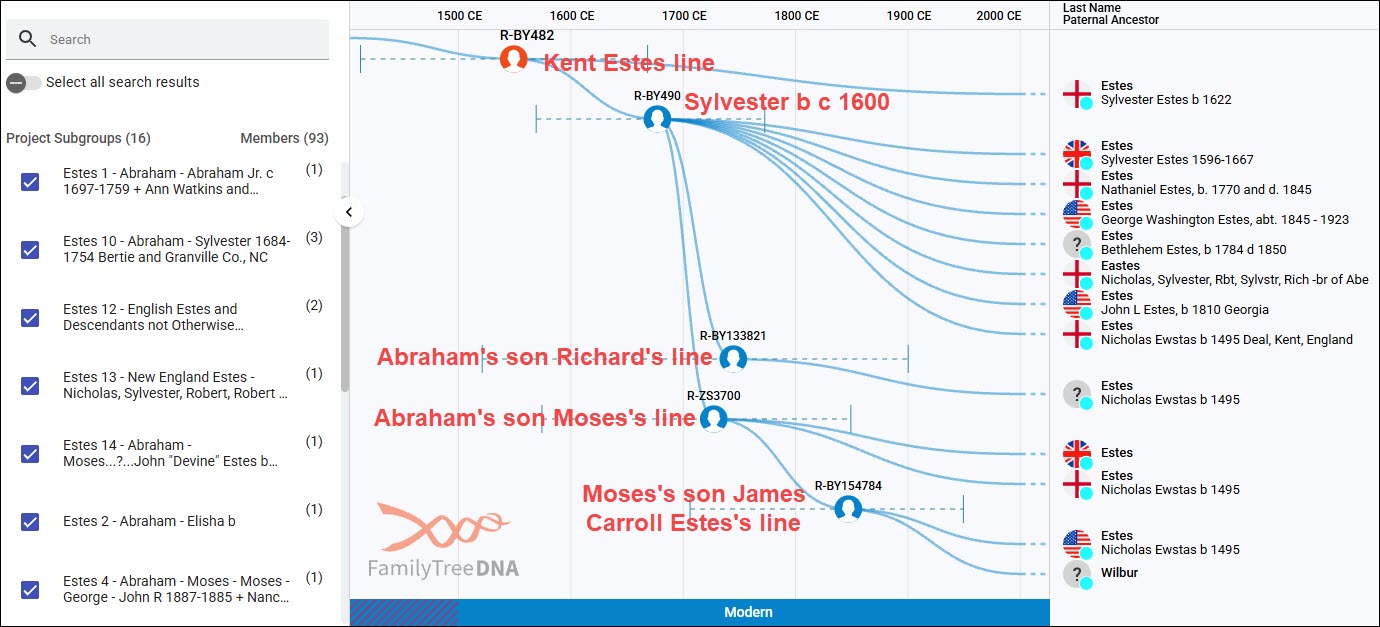
Based on the timeline at the top, you can see how closely these Y-DNA testers are related in time. Each haplogroup shown represents a different branching genetic lineage – breadcrumbs at work. If you are a genetic Estes male who descends from the Estes family that originated in Kent, England, and you take the Big Y-700 test, you’ll be a member of R-BY482 or its descendant haplogroups.
Keep in mind that not all testers join group projects, so it’s likely that there will be matches on your match list that aren’t here. Furthermore, only Big Y testers appear on any Time Tree.
The Group Time Tree is public, but when you sign in to your account and click on the Match Time Tree from your account, you’ll be able to view more, including testers’ trees and WikiTree connections if your matches have connected themselves to WikiTree.

Click to enlarge
I’ve converted the Estes genetic tree into a genealogical tree in a spreadsheet based on the trees of DNA matches. I’ve also included STR testers, because they are good candidates to upgrade to Big Y tests, and they are shown in the Estes Group Project. They can’t be included in the Time Trees because they don’t have the SNPs discovered with the Big Y tests. Please note that not all testers were included in this spreadsheet.
You can follow the paths of the various haplogroups. All of the red-background, black-outlined cells are Big Y-500 or Big Y-700 testers. The Big Y-500 was obsoleted several years ago in favor of the much more informative Big Y-700 test, which reveals additional haplogroups because it tests more of the Y chromosome. I’m still hoping that people will upgrade, although some testers are deceased and can’t.
The Big Y-500 tests with red stars are candidates to be upgraded to the Big Y-700 to potentially receive a more specific haplogroup. The balance of the tests in red cells are Big Y-700 tests, which identify several additional Estes haplogroup paths.
Let’s look at an example.
Beginning at the top, we know that R-BY482 is present in Nicholas Ewstas, born in 1496 in Kent, England, because all of his descendant testers carry that haplogroup too. Additionally, three generations later, in Silvester’s generation, he developed the additional mutation named R-BY490. We know it developed in Silvester’s generation for two reasons:
- The descendants of Silvester’s brother, Robert, born in 1603, do NOT carry R-BY490. Robert’s son Matthew’s descendants only carry R-BY482.
- The descendants of both of Silvester’s sons, Richard (pink column) and Abraham (the entire green row), all carry R-BY490.
All of the descendants of Silvester’s son, Abraham, born about 1647, the Virginia settler, who have taken the Big Y test carry R-BY490. Additionally, descendants of several of Abraham’s sons, color-coded columns beneath the green row, have developed additional haplogroups. Several more testers would likely have new haplogroups if they took the Big Y-700 test. A new haplogroup requires at least two men with the same unique mutation (breadcrumb), in addition to R-BY490 (in this case), to identify a specific lineage and assign it a new haplogroup name.
Abraham’s son, Moses Estes, born in 1711, is a good example. We know that Moses developed the mutation R-ZS3700 because four of his descendants have taken the Big Y-700 test and have that mutation that is not found in Moses’s brothers’ lines. All four Moses descendants carry R-ZS3700, and two, in the James Carroll Estes line, have developed an additional mutation, haplogroup R-BY154784.
Until Big Y testing became available, descendants of the R-BY154784 lineage didn’t know where they fit in the Estes tree, because the connecting genealogical records between Missouri, where their ancestors are found, and Virginia, where they came from, were missing.
Therefore, if you don’t carry the Estes Y-DNA, but you can find your ancestral line in projects, you can potentially do two things:
- Identify the specific lineage to which you belong, especially if you have access to your relative’s test results, including matches and trees.
- Without matches, you may still be able to identify at least some haplogroup levels, such as R-BY482 or R-BY490, which opens the door to:
-
- Using autosomal results to find matches with Estes-specific haplogroups
- Using Discover to utilize the dozen+ public reports available for everyone
- Asking people to upgrade
While I’ve been using the Estes DNA results because it’s a project I administer and the one with which I’m the most familiar, this same approach works for mitochondrial DNA as well, especially if you can identify your ancestor’s DNA in a project.
Finding Projects in Discover
The public version of Discover provides surname and project searches as well, but works a little differently.

Select Group Project and enter the term you wish to search for.

Clicking on the project takes you directly to that project’s Group Time Tree where you can identify your ancestral line.
People who have tested at FamilyTreeDNA can join projects. Many projects accept autosomal testers who descend from that family line.

To join projects, sign in, then from your home page, click on “Group Projects” in the header, and make your selection.
Search for Surnames in Family Finder Autosomal Matches
Now that you’ve identified your ancestor’s haplogroup, you can use that information to find, rule in, or rule out various people in your Family Finder match list as your ancestors’ haplogroup carriers.
FamilyTreeDNA displays the haplogroups of your autosomal matches who have taken the:
- Y-DNA test
- Mitochondrial DNA test
- Or Family Finder test directly at FamilyTreeDNA
The Family Finder test doesn’t test either the Y chromosome or mitochondria fully, but it target-tests a selected number of non-autosomal haplogroup-defining locations. The haplogroups that Family Finder identifies are typically midrange, meaning they are from roughly 2,000 to 5,000 years old. Furthermore, different tests on different chips at different times didn’t always test the same locations. This relatively new Family Finder haplogroup feature is free.
Uploaded DNA tests from other vendors may or may not receive a haplogroup, but regardless, it will NOT be displayed to their matches. Not all other vendors test or include Y-DNA or mtDNA SNP locations in their upload files, and your mileage may vary widely.

My cousin David has taken the mtFull test, so his mitochondrial haplogroup is the most refined possible, but his Y-DNA haplogroup of R-L151 was derived from his Family Finder test. Haplogroup R-L151 is about 5,000 years old. If I needed his haplogroup, it’s useful to rule out other major haplogroup branches that might be found in other men by the same surname. Plus, I can learn quite a bit from Discover.
Haplogroups are displayed in your Family Finder match list for everyone who has taken a Y-DNA or mtDNA test, but currently, only Y-DNA haplogroups are provided for Family Finder results. Midrange mtDNA haplogroups are planned for sometime in the future.
There are several methods to search for either a specific surname or haplogroup within Family Finder matches.
Let’s use my Ferverda/Miller/Lentz haplogroup T2b revealed at 23andMe. That haplogroup would almost assuredly be broken down further with full-sequence testing, and it might have been renamed as a different subgroup of haplogroup T in the new Mitotree.

Let’s begin with searching for haplogroup T2b.
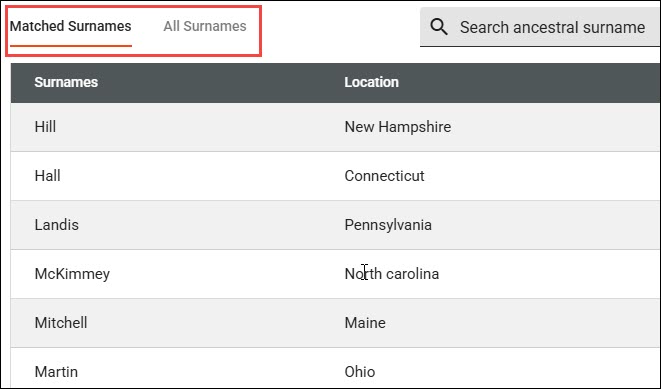
The search bar allows users to select Name, Ancestral Surname, mtDNA Haplogroup or Y-DNA Haplogroup.
You’ll notice that there are a total of 59 results that include T2b as a part of the haplogroup. The mitochondrial lineage I’m seeking is my mother’s paternal grandmother, so the matches should be on my mother’s side, although there is no guarantee I don’t match someone autosomally on my father’s side too.
I checked the trees of all 59 people in the T2b category, and unfortunately, none descended from the line I need.
If you change search terms or categories, be sure to clear your filters.

Under the Filter option, you can filter for several options in addition to searching.
For our next example, I’ve selected both the Big Y-500 and Big Y-700 tests, and searched for Ferverda.

I already have the Ferverda Big Y-700 haplogroup, but if I didn’t, I would now!
Don’t forget that you can sort by any number of fields, and you can download your entire match list into a csv file. I find that easier because I can search, sort and filter at will.
Don’t forget to check back from time to time as more matches are added.
Utilizing Haplogroup Projects
Under the Group Projects header, or by Googling for a haplogroup T2 (or T, or T2b, etc.) at FamilyTreeDNA, you can view the haplogroup T2 project, and filter for haplogroup T2b or any subclade.
Be sure to expand the project’s page size to display the entire project. It defaults to displaying 25 rows at a time, but you can see the number of pages at the bottom of the page. I expanded the page size to 5000 so that I can use my browser search for known surnames in the mitochondrial line.

By using my browser search and searching for each known surname by generation, I searched for Ferverda, Miller, Lentz, Ruhle, Wolflin and Heubach.

I was VERY excited for a minute when I found a Lydia Lentz listed as a tester’s EKA.

Because the female’s surname changes in every generation, there’s only one family in this lineage that Lydia Lentz could have been a member of to represent the mitochondrial DNA of Eva Miller whose mother was Margaret Elizabeth Lentz.
So, the question is whether or not Lydia Lentz is the sister of Margaret Elizabeth Lentz.

Shifting to my desktop software, it’s easy to see that Jacob Lentz and Johanna Frederica Ruhle had four Lentz daughters who lived to marry and have children. None of those daughters were named Lydia, so the Lydia Lentz EKA in the haplogroup T2 project is not representative of Eva Miller’s mother and grandmother.
Margaret Elizabeth Lentz is Eva Miller’s mother, and I had already searched within the project for Miller. I added Yost, Gallagher, and Overlease to the browser search in the haplogroup T2 project with the hope that someone might have listed a woman with one of those surnames as their EKA, but no such luck.
Not everyone joins projects, or provides their earliest known ancestors, but I didn’t find the surnames of any of the females in my known line here.
Let’s see if Ancestry can help.
At Ancestry
Ancestry doesn’t do Y-DNA or mitochondrial DNA testing, so you won’t find your ancestors’ Y-DNA or mtDNA at Ancestry, but their trees can help you find testers.
Let’s shift to Louisa Drechsel, one of the daughters in the Mehlheimer/Drechsel line we were working with earlier that needed more research.

I looked at the hints for Emma Louisa Drechsel, who was always called Louise or Aunt Lou in my family, and discovered another Ancestry member with Emma in their tree.

I clicked through to the tree to discover that the tree’s home person does not descend from Barbara matrilineally, which means they are not a candidate for Barbara’s mitochondrial DNA.

I then clicked on the tree owner’s name to see whether they happen to be an autosomal DNA match to me. They are not. Without messaging them, there’s no way to know whether they have taken a DNA test, and there’s really no point since they are not a mitochondrial DNA candidate.

While I’m at Ancestry, I’m going to check ThruLines to see if anyone who is an autosomal DNA match to me also descends matrilineally from Barbara. There are no autosomal matches shown who have our common ancestor in their tree, and who are mitochondrial candidates.
Remember, a male between the ancestor and the testing candidate always blocks the mitochondrial DNA path.
These people are all autosomal DNA matches.
There may be descendants who either aren’t DNA matches or who haven’t tested who might be mitochondrial candidates. They can be located by checking Ancestry’s trees for our common ancestors and determining how the tree owner relates to that ancestor, if they do.
Compare Trees is New
Ancestry recently introduced “Compare trees”, a new beta feature. It may not be fully rolled out to everyone yet, and because it’s in beta, the feature may change.
To access this feature, go to your tree, not their profile card.
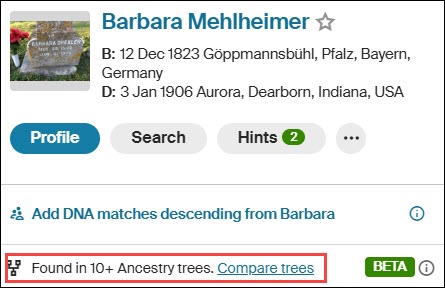
I clicked on Barbara Mehlheimer’s link in my tree, which displays this little mini-profile. Then click on “Compare trees” at the bottom.
Ancestry displays your tree, at right, and the other tree, at left. You can select another tree to compare at top right.
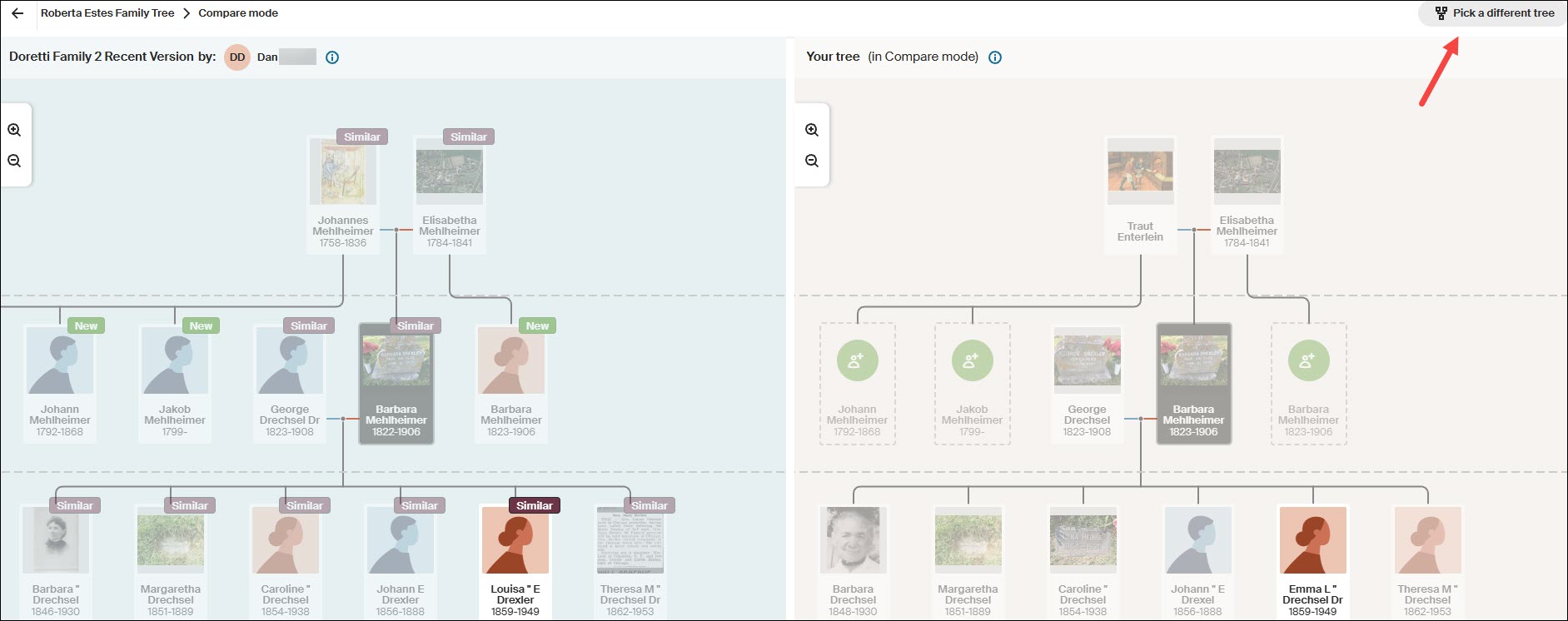
Ancestry’s comparison only shows a total of three generations – the selected person, their parents, and their children.
The person I actually want to follow is Louisa, but if you click on Louisa’s card here, it simply compares the two Louisas – it doesn’t shift down a generation.
This means that to follow more recent generations, you have to go back to your tree, select someone further down in the tree and repeat the process.
This process is cumbersome, but doable thanks to the new Compare Tree function. I’ll come back to this after checking the rest of the “easier to harvest” fruit from other resources. Remember to make notes in your research journal so you don’t forget where you left off – although trees are always changing.
MyHeritage has one of my favorite tools.
At MyHeritage
Recently, MyHeritage has begun providing midrange Y-DNA haplogroups for some of their DNA testers. If you’re one of the lucky testers, you can use the free Discover tool to learn about your haplogroup, but a haplogroup alone won’t help you much with genealogy. You need matching and advanced tools for that.
Unfortunately, you can’t see the haplogroups of your matches, so you can’t search or filter using that criterion. You can, however, ask any men with the surname you’re seeking if their haplogroup is displayed.
Cousin Finder
MyHeritage has an ingenious tool called Cousin Finder that I wrote about here. Cousin Finder helps you find cousins who share common ancestors with you, regardless of whether or not you are a DNA match.

MyHeritage found 531 people in their database that share ancestors according to both their and my trees.
This list of matches doesn’t page; it scrolls, so I made a spreadsheet of the people who are relevant to my search for my brick-walled ancestor. Scrolling becomes difficult and very slow as you proceed down the list. I didn’t want to have to do this twice.

You can improve performance by using the relationship side filter. Because your ancestors match, MyHeritage knows on which “side” of your tree your common ancestor is found.
At this point, I’m interested primarily in identifying Y-DNA or mitochondrial DNA candidates for a specific ancestor.
Using the Drechsel/Mehlheimer line as our example, I’ll search on my mother’s mother’s side.

We already met Patty at WikiTree, but let’s pretend we don’t know Patty. I can click on “View her tree” to see Patty’s whole tree, or I can click on “View Relationship,” which shows how we are both related to our common ancestor.

As we know, for mitochondrial DNA, any male in the line between the ancestor and the testing candidate blocks the mitochondrial DNA path. Patty inherited her mother’s mtDNA, not her father’s.
I didn’t forget about Eva Miller Ferverda either.
I searched for cousins who descended from my mother’s father’s side to find mtDNA candidates for Eva Miller and didn’t find any. But I did find an entirely unexpected bonus.

My mother’s father’s line shows all the connections on that side. While clicking through each one, I quite serendipitously discovered a mitochondrial DNA candidate for Eva Miller’s husband’s great-grandmother, Anna Elizabeth Jonker, AND, separately, a potential Camstra Y-DNA tester too. Oh, happy day!
It was only later, while working on my genealogy for Frederica Ruhle and hoping to discover where she actually lived in Pennsylvania, that I discovered that MyHeritage has put a Cousin Finder link in each ancestor’s profile.
Who doesn’t love a pleasant surprise?!

You no longer need to sift through all of your cousins on a particular side, but remember, had I not done that, I wouldn’t have found either the mitochondrial descendant of Anna Elizabeth Jonker nor the Camstra Y-DNA candidate.
At FamilySearch
FamilySearch is more challenging and is best for fleshing out trees where not much research has been done. Remember that FamilySearch has access to records that are not available at either Ancestry or MyHeritage.
FamilySearch is a one-world tree. Like all trees, it’s subject to errors, so caution is always advised.

At FamilySearch, from your profile card in the tree, locate the ancestor whose Y-DNA or mtDNA you seek.

Then click on that person. Their profile card will pop up. Click on “Tree,” then, at the top right, select Portrait.

Now you can expand their children downward. Note that the little “two people” in the top left corner of the profile card means there are multiple spouses. The only way to view all of the children is to click on that person’s placard, then select the alternate spouse.
Living people have no placeholders on this tree.
You can contact contributors who provided information on a profile in the tree.
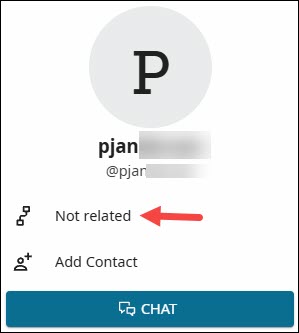
Click on the source provider’s name to see if they are related, and click on the little tree icon to see how.
However, once a year, there’s a great way to contact interested descendants.
Relatives at RootsTech
RootsTech is the largest genealogy conference in the world, and it’s sponsored by FamilySearch.
About six weeks before RootsTech takes place each year, and for about a month after, you can participate in Relatives at RootsTech.
During that time, you can select an ancestor and see which other people who have signed up for RootsTech also descend from that ancestor. I wrote about how to do that in the article, Relatives at RootsTech Reveals Cousins and Provides DNA Candidates. I almost always find someone who descends from an ancestor whose Y-DNA or mtDNA I need for my tree.
It’s a wonderful opportunity to meet new cousins and collaborate.
At GEDmatch
GEDmatch is an autosomal DNA upload site that offers a variety of matching and display options. While they don’t attempt to calculate a haplogroup, uploaders can enter their mtDNA and Y-DNA haplogroups, if known.
GEDmatch isn’t normally a resource we think of for either Y-DNA or mtDNA, but it can be useful under some circumstances.
In the One-To-Many limited free version and the Tier 1 subscription model, you can view haplogroups if someone has entered their haplogroup name, but you can’t filter without the Tier 1 version.

I filtered for haplogroup T2b and found one person in the match list with haplogroup T2b4. I then viewed the GEDCOM that this person has also uploaded, but they do not descend from Eva Miller Ferverda’s line.
GEDmatch isn’t built for haplogroups, but sometimes, if you have a known haplogroup that isn’t terribly common, you can catch a lucky break there.
Where AM I?
OK, so where am I in all of this?
I feel like I’ve searched the corners of the earth!
I’ve primarily used two examples.
- My own mtDNA line which is the Drechsel/Mehlheimer line that I chose because it’s a great example that I knew well.
If I had actually been searching for a testing candidate, we would easily have eliminated several possibilities. Five female lines remained as possibilities that need additional research, plus my own test if someone were actually searching.
- Then there was Eva Miller Ferverda (1857-1939), whose partial haplogroup, T2b, was discovered at 23andMe in three matches. I was able to reconstruct their trees, confirming that this was her line, but I was unable to find any testing candidates elsewhere.
Each of the DNA testing and genealogy vendors provides a way to communicate with other users of their platform.
- At both 23andMe and MyHeritage, you can message through their platform.
- At FamilyTreeDNA and GEDmatch, you can email your matches.
- At WikiTree, you send an email through their platform to the profile card manager.
- At FamilySearch, you cannot see placeholder cards for living people, so you need to check to see if people making changes to that ancestor’s profile are related. Then check their children closest to the present day for the same information. You can message through the FamilySearch platform.
- During Relatives at RootsTech, you can message your cousins through their platform. The great thing about these folks is that you know they are interested and engaged, because they’ve just signed up for RootsTech.
Communicating With Testing Candidates
I’m fortunate that there are three mitochondrial descendants of Eva Miller Ferverda at 23andMe, one of whom is also at FamilyTreeDNA. I will message or email all three of them individually with a short, customized message that contains:
- How I am related to our common ancestor.
- A question about whether they have taken the mtFull test, or any test, at FamilyTreeDNA. If they have taken any test there, it’s easy to upgrade.
- A sentence about how FamilyTreeDNA was the original genetic genealogy founder of this industry and the only company to offer the full mtDNA and Y-DNA tests.
- Why they can benefit from taking the mtFull test and how it can help us learn more about our common ancestor.
- An offer for a full-sequence mitochondrial DNA testing scholarship if they have not already taken that test.
- I ask if they are interested and provide my email in case they have questions or want to discuss further.
Depending on how much space I have for the message, there are two articles I often provide links to in case they are unfamiliar with either Y-DNA or mtDNA testing.
- 4 Kinds of DNA for Genetic Genealogy is a very basic article for people who might be unaware that there is any type of DNA testing other than autosomal. This is often the case with Ancestry.
- The article Mitochondrial DNA A-Z: A Step-by-Step Guide to Matches, Mitotree, and mtDNA Discover is an in-depth article about using mtDNA. This is a wonderfully educational how-to article, but I always hesitate before sending this one because I don’t want their eyes to glaze over.
Scholarships
I gladly and eagerly offer scholarships for both Y-DNA and mtDNA testers from lines I need to represent my ancestors.
I equate scholarships to finding a rare out-of-print book about that exact family line, with only one or two copies still in existence, and only one accessible in a rare book shop in Podunk, Idaho. I would book a flight tomorrow at 5 AM to go and pick it up in person even if I had to eat beans and hot dogs for the next six months to pay for it. If you know me, you know I’m not kidding! I’ve gone on many wonderful road trips to meet with and collect DNA samples from cousins.
A Y-DNA or mtDNA test doesn’t cost nearly as much as that excursion and is even more reliable, because we know the DNA results are accurate – assuming the tester’s genealogy is accurate, which you should verify, and no undocumented adoptions or broken lineages have occurred.
Good luck on your treasure hunt!
____________________________________________________________
Share the Love!
You’re always welcome to forward articles or links to friends and share on social media.
Subscribe!
If you haven’t already subscribed, it’s free. You’ll receive an e-mail whenever I publish by clicking the “follow” button at the top of the main blog page, here.
Help Keep This Blog Free
I receive a small commission when you click a vendor link in my articles and purchase that item. This does NOT increase your price but helps me keep the lights on and this informational blog free for everyone. Please click on the affiliate links in the articles or to the vendors below if you are purchasing products or DNA testing.
Thank you so much.
DNA Purchases and Free Uploads
- FamilyTreeDNA – Y-DNA, mitochondrial and autosomal DNA testing
- MyHeritage DNA – Autosomal DNA test
- AncestryDNA – Autosomal DNA test
- AncestryDNA Plus Traits
- 23andMe Ancestry – Autosomal DNA only, no Health
- 23andMe Ancestry Plus Health
Genealogy Products and Services
- MyHeritage Subscription with Free Trial
- Legacy Family Tree Webinars – Genealogy and DNA classes, subscription-based, some free
- Legacy Family Tree Software – Genealogy software for your computer
- OldNews – Old Newspapers with links to save to MyHeritage trees
- MyHeritage Omni comprehensive “everything included” subscription plan
- Newspapers.com – Search newspapers for your ancestors
- NewspaperArchive – Search different newspapers for your ancestors
My Books
- DNA for Native American Genealogy – by Roberta Estes, for those ordering the e-book from anyplace, or paperback within the United States
- DNA for Native American Genealogy – for those ordering the paperback outside the US
- The Complete Guide to FamilyTreeDNA – Y-DNA, Mitochondrial, Autosomal and X-DNA – for those ordering the e-book from anyplace, or paperback within the United States
- The Complete Guide to FamilyTreeDNA – Y-DNA, Mitochondrial, Autosomal and X-DNA for those ordering the paperback from outside the US
Genealogy Books
- Genealogical.com – Lots of wonderful genealogy research books
- American Ancestors – Wonderful selection of genealogy books
Genealogy Research
- Legacy Tree Genealogists – Professional genealogy research