
This article is focused on two things.
- Comparison of my new NGS and the earlier Family Finder tests
- How to prepare for yours if you’ve ordered the upgrade
I compared my results from my older Family Finder test with my new NGS Family Finder test results. As an early beta tester, I have two separate tests, a strategy that is not recommended because it causes duplicate matches for people within the database. Additionally, multiple kits for one person doubles the results and could skew future ethnicity research for myOrigins.
Therefore, FamilyTreeDNA has announced very attractively priced upgrades at $29 for both:
- People who have taken Family Finder test directly at FamilyTreeDNA
- People who have uploaded their DNA files into Family Finder from other companies
After seeing my comparison, you may want to compare your own results when they arrive, so I’ve documented that process. Warning: this took between 4 and five days because I was working with a spreadsheet with more than 15,000 rows, and I had to write scripts to perform multiple functions. It was NOT fun and I do not recommend it.
Personally, had I known then what I know now about how reliable the new NGS test is, I wouldn’t have bothered with the comparison. However, I would have downloaded my original match list for posterity, just in case.
If you purchase an upgrade to the new NGS Family Finder, your new test results will replace your older Family Finder test results, but will preserve important account features such as linked matches, any notes you have taken, and more. That’s another reason to upgrade rather than order a separate new test. They’ve done the heavy lifting, not to mention that you’ll save about $50 when compared to the price of a new test.
Why is the New NGS Family Finder Test Better?
The new NGS test holds immense promise for the future. This includes better matching, beginning now. Essentially, FamilyTreeDNA is skating to where the puck is going to be (hockey analogy) and preparing for future tools. That future is not far away!
An amazing new set of tools is goaled for release around the end of the year. And I do mean amazing. They are being beta-tested internally now.

Dave Vance spoke about the new Family Finder NGS test at the ECGGC conference in late August, which you can view through the end of 2026 if you register for the virtual conference, here, and watch the recorded sessions. You’re looking for the DNA Academy on Saturday evening. I can’t share specific preview slides with you as they are noted in his presentation as “not for distribution,” so my pen is capped for now.
All I can say is that after seeing what’s in store, people were literally throwing their billfold at the folks at the FamilyTreeDNA booth – and I do mean literally. “Here – take my money, please!” as the billfold went sailing. We all had a good laugh, but he was serious.
One presenter (not me, just in case you are wondering) left her credit card and a list of tests to upgrade while she was presenting.
They ran out of swab kits at the conference shortly after Dave’s presentation about what the future holds.
Additionally, you will also be treated to THE absolute best presentation I’ve ever seen about what NGS testing is, how it works, and how it compares to traditional tests, low-pass whole-genome tests, and medical-grade whole-genome tests.

You’ll be a passenger on the Genome Valley train, so climb aboard!
So, without spilling any beans, what’s so great about the NGS test?
To begin with, the older Family Finder tests won’t be able to provide everything the new NGS test will be able to offer – and those completely new tools are in active development today.
Why?
The NGS test targets over 280 million base pairs, up from the currently available 700,000.

That’s more than 400 TIMES the coverage.
This increases coverage in the human genome from about .02% to about 9%.
To quote FamilyTreeDNA, “This change allows us to deliver more precise autosomal results today while creating a strong foundation for future reports and tools.”
You can read the FamilyTreeDNA FAQ here.
Before we move on to the comparison, let’s talk for a minute about test types and uploads from other vendors.
Tests and Uploads
All new Family Finder tests purchased at FamilyTreeDNA since March 2, 2026 have been tested using Next Generation Sequencing (NGS), so the following matrix does not apply to those tests. Those tests don’t need to be upgraded.

If you sign on to your account, on the Family Ancestry dashboard, and see that your NGS button is grey, then you have not upgraded. Click on that grey button to read more and to upgrade. Right now the upgrade is $29, but I don’t know if that is a promotional price or permanent.
If you tested at FamilyTreeDNA prior to March 2, 2026, or uploaded a DNA file from another vendor, your test will fall into one of the following upgrade path categories.
| Tested at FamilyTreeDNA before March 2, 2026 | Uploaded and purchased the Unlock | Uploaded but did not purchase the Unlock | |
| Upgrade Path | Can use sample stored in lab if enough DNA remains* | If you purchased any other type of test at FamilyTreeDNA, they will use DNA stored in the lab if enough remains. Otherwise, you will be sent swabs. | If you purchased any other type of test at FamilyTreeDNA, they will use DNA stored in the lab if enough remains. Otherwise, you will be sent swabs. |
| New Swabs* | If needed, they will notify you | Yes, if needed, will notify or send swabs if you have not taken a direct test at FamilyTreeDNA | Yes, if needed, will notify or send swabs if you have not taken a direct test at FamilyTreeDNA |
| NGS Results | Will replace existing results | Will replace existing results | Will replace existing results |
*You will be notified if enough DNA does not remain, and you will be sent new swabs. Be sure your address is current.
One of the reasons the NGS test performs better, even with existing matches from earlier tests, is because less imputation is involved. Let’s talk for a minute about imputation and how it works.
The Concept of Imputation
Most vendors change chips internally from time to time, and FamilyTreeDNA is no different. The difference this time is that the new NGS test covers exponentially more DNA than any earlier test, and all earlier tests combined. This means more than 400 times greater coverage, which in turn means less imputation is needed to compensate for the inevitable no-reads and to be compatible with files that tested different DNA locations.
Imputation is also used when comparing DNA files between vendors who don’t test the same locations.
 Click to enlarge any image
Here’s an illustration of the concept of how imputation works.
All of the FamilyTreeDNA chip versions over the years have included about 700,000 locations, as have most other vendors. But the locations tested are not universally the same.
In our simplified concept example, FamilyTreeDNA’s tested “locations” are shown with blue cells.
The total of 20 squares shows the maximum amount of DNA tested by any of the three vendors shown, combined.
Green Vendor 1 in our illustration tests the same amount of DNA that FamilyTreeDNA tests, 12 squares, but some locations are the same and some are different. Of the 12 colored squares for both vendors, seven are the same locations, and five are not. The locations that are the same can be compared directly, but the locations that are different have to undergo special handling called imputation.
Looking at any location in our DNA, one of four nucleotides, or letters, can be present: T, A, C or G on each strand of our chromosomes, although we are only looking at one strand in our example.
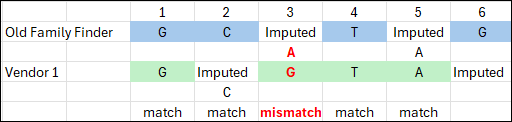
Using a very simplified model of imputation, think of imputation as “filling in the blanks” using clues from surrounding letters – kind of like a crossword puzzle.
When two vendors’ data doesn’t overlap, imputation is used to fill in the blanks, as accurately as possible, for the missing data.
Using a word analogy, for vendors one and two only, we see that blue location three has no Family Finder data, where green Vendor 1 does, and the same with location five. If blue locations two and four are C and T, and three has to make a word, then there are few options. In this case, let’s say it’s cat, and location five is imputed to an A too.
Now moving to green Vendor 1, their locations two and five need to be imputed. Moving away from the word analogy, let’s look to the human genome, and let’s say that most of the time, location two is a C if location one and three are Gs. So green location two is imputed to C.
If there’s not enough quality surrounding data, imputation can’t be performed reliably. Hence, location six is still in limbo here.
You can see that in our scenario, location three is the only mismatch, out of three imputed locations. Does location three mismatch because imputation was wrong? We don’t know. Do locations two and five match because imputation was wrong? We don’t know.
All things considered, imputation is based on the science of probability, and is usually relatively reliable, but it’s still not the same as comparing actual data. The more locations that have to be imputed, and the longer the stretch, the greater the possibility of error. Every vendor implements imputation differently too. Even vendors who don’t and have never accepted uploads still use imputation internally to equalize their own legacy files from earlier test versions.
Stepping back once again to compare the four vendors, you’ll notice that pink Vendor 3 only tested half as much DNA as the blue Family Finder test and green Vendor 1, and again, not all of the same locations. That’s exactly what happened with one of the vendors last December – they dropped the number of DNA locations tested to about 400,000 from about 700,000. In our example, you can see how much would have to be imputed. Locations 11, 15, 19 and 20 can’t be imputed for the pink vendor’s file because there’s no surrounding DNA. Location 17 can’t be imputed for the green vendor for the same reason.
When vendors impute to match multiple versions of other vendors’ uploaded files, it can quickly become messy.
The answer, of course, is a “supertest,” which tests all of the locations that overlap everyone, including that vendor’s own earlier tests.
Welcome to Family Finder NGS, shown in orange at the bottom of our example comparison.
As you can see, the orange NGS test covers all of the locations tested by all of the other tests.
NGS is targeted testing for a specific set of locations that are known to undergo mutations in the human genome and provides extremely high-quality results. Imputation for the NGS file is rarely necessary, although imputation for the other vendors’ and earlier file versions is still required for them to match to each other.
This is exactly why the upgrade is recommended, and why there’s no benefit to retaining your old test. The NGS test tests far more data and provides much more reliable matching.
NGS is the great equalizer.
NGS Test Comparison Process
I took my NGS test during the initial R&D development and testing phase, so my original Family Finder test was not upgraded. This afforded me the opportunity to compare the two results.
I downloaded the match files for both of my tests, the original Family Finder and the new NGS Family Finder test, color-coded the background of the cells, not the text inside the cells, and dropped them into a single combined spreadsheet.

It doesn’t matter what colors you choose, but be sure you can easily see the difference. I used apricot for the original Family Finder test matches and light purple for the new NGS test.
As we walk through these results together, you’ll notice that I continue to refer to them by color. In part, that’s so I can maintain my own sanity as I compare results. When I write these types of articles, I have to check and recheck results.
When the same person showed as a match to both tests (meaning they had both an apricot and purple row), I calculated the difference in matching amounts of DNA (cMs) between the match’s results on both tests. I added several calculation columns, which are not shown above.
I’ll tell you, this was not a trivial exercise. It was painful and I really don’t recommend it.
Let’s take a look at the results.
Total Matches
I have some matches with the new NGS test that I do not have with the legacy Family Finder, and I have some matches on the older test that are no longer present on the NGS test.
| Old Family Finder (apricot) | NGS Family Finder (purple) | Difference | |
| Total Matches | 9014 | 7719 | 1,295 |
| Maternal | 1665 | Not linked | |
| Paternal | 3783 | Not linked | |
| X-Matches | 2198 | 1849 | 349 |
I have not yet linked the same matches in my NGS test, so I can’t compare the number of maternal and paternal matches. Fortunately, when you upgrade an existing test, FamilyTreeDNA preserves your linked matches, so you won’t need to relink.
Relationship Estimates
| Old Family Finder (apricot) | NGS Family Finder (purple) | |
| 1st-2nd cousins, Great/Half Uncle/Aunt/Niece/Nephew, Great-Grandparent/Grandchild | 6 | 6 |
| 1st-3rd cousin | 1 | 1 |
| 2nd-3rd cousin | 5 | 4 |
| 2nd-4th cousin | 127 | 132 |
| 3rd-5th cousin | 1937 | 1900 |
| 4th to remote | 6938 | 5676 |
| Total | 9014 | 7719 |
The closest relationships remained the same. One 2nd-3rd cousin moved to the 2nd-4th cousin range by losing 10 cM, 194 cM to 184 cM, but they were apparently on the threshold anyway. That match is actually my second cousin, so both ranges are accurate. It was also a transfer kit, so they did not test at FamilyTreeDNA. This revised match is probably the difference between actual reads and imputed reads in some regions, meaning the match is now more accurate.
275 matches had a predicted relationship change, but not uniformly in one direction, and no one moved more than one category in either direction. This all makes sense.
Match Differences
| Number | |
| Matches found in both the apricot and purple spreadsheets | 7,352 |
| Unique (comparable) matches in both spreadsheets | 7,174 |
| Matches in original Family Finder apricot only | 1,681 |
| Matches in NGS purple only | 400 |
A total of 7,352 matches appear in both spreadsheets, meaning the apricot and purple names matched exactly.
Unfortunately, some people had multiple tests, so I couldn’t always compare apples to apples because they appear three times or more on the combined spreadsheet, and I don’t know which of their kits are which.
If someone with the same exact name had more than one match for either or both tests, I did not compare them because their matching amounts were different, and I didn’t know which one(s) my old test matched, versus which one(s) my new test matched. Usually, one was an upload and one was a test at FamilyTreeDNA, but not always. I excluded those 178 match rows from the analysis.
Therefore, 7,174 matches could be directly compared.
There were 1,681 people who match ONLY on the old Family Finder test, and 400 that match only on the new NGS test. And yes, I downloaded the match files at the same time on the same day, so this comparison was controlled for any time difference.
cM Differences
| Number | |
| Largest apricot match not in purple (NGS) list | 26.3 cM |
| Largest purple (NGS) match not in apricot list | 27.63 cM |
| Largest difference | 69.86 cM NGS kit more |
| NGS detected greater over 10 cMs | 19 |
| NGS detected less over 10 cM | 7 |
| Total NGS greater | 2,924 |
| Total NGS less | 3,040 |
| No change | 1,090 |
The largest value difference where a match appeared in the original apricot Family Finder test, and not in the purple NGS test, was 26.3 cMs.
The largest value difference where a match appeared in the NGS purple Family Finder test, and not in the apricot original Family Finder test was 27.63 cMs.
The largest difference between the two tests was 69.86 cMs larger detected by the NGS test. This match was a known second cousin whose matching cMs went from 373.06 to 442.92, but the longest block only increased a negligible amount from 87.47 to 87.69.
The next largest difference was with a 1C1R with a 41.56 cMs difference, also with the NGS-detected value being larger.
In all cases where the number of differing cMs was 16 or greater, the NGS had detected more.
There were very few tests that differed more than 10 cMs. In 19 cases, the NGS test detected a greater difference of 10 cMs or higher, meaning if the original test value was 100 cMs, in the NGS test, it was 110 cMs or greater.
In 7 cases the NGS test detected a smaller difference of 10 cMs or more, meaning that if the original test value was 100 cMs, in the NGS test, it was 90 cMs or smaller.
Out of the 7,174 tests being compared, 19 tests with greater than a 10 cM variation isn’t very many, around 0.26%.
In total, 1,090 matches had no change at all, while 2,924 NGS matches had more matching DNA detected, and 3,160 matches had less.
All but 287 of those differences were less than 5 cMs, and 6778 were less than 1 cM. In other words, literally not worth counting.
myOrigins Ethnicity
We all know to expect changes in our ethnicity from time to time at all vendors. The NGS test is exciting because it covers a much larger portion of our genome. As more people test, the reference library also becomes larger, which means that the ethnicity predictions can and will become more refined too
| myOrigins | Old Family Finder (apricot) | NGS Family Finder (purple) |
| Central Europe | 57% | 52% |
| England, Wales, Scotland | 28% | 33% |
| Ireland | 15% | 14% |
| Magyar | <1% | <2% |
| AmerIndian Andes and Caribbean | <1 (see below) | N/A |
| AmerIndian North America | <1% (chr 1 & 13) | <1 (chr 1 & 2) |
| Anatolia, Armenia, Mesopotamia, North Africa | <1 (chr 13) | <1% (chr 10) |
None of my major categories changed, but the amounts attributed to each category changed somewhat.
Trace regions, which are less than 1%, shifted some as well, as did their chromosome locations.
For me, this is particularly interesting, because I paint my ethnicity segments at DNAPainter in order to overlay my Native American segments over the matches with whom I’ve identified common ancestors.
Those segments, matches, and ancestors, taken together, help identify the source of the Native American segments.
My Native segment on chromosome one stayed essentially the same, but the Native segment on chromosome 13 is not present on the new NGS test. However, a new Native American segment is now shown on chromosome 2 in the same location that 23andMe also shows a Native American segment.
Chromosome one has already been proven to a Native American ancestor on my mother’s side, but I have hit a brick wall on the chromosome 13 segment. Now, I’ve painted the Native Segment on chromosome 2 and it aligns with the same ancestral line as my Native American segment on chromosome 1.
My Middle Eastern/North African segment still exists, but the location has changed. This segment was adjacent to my Native American segment on chromosome 13 before, on my father’s side, which suggested a history of enslavement. I thought I knew which ancestral line they both descend from, but now I need to review my matches and reconsider.
Unfortunately, my parents are both deceased and there’s no DNA available, so I cannot upgrade their tests or purchase new ones for them. No aunts or uncles are available either. In this case, cousin matches and their associated genealogy on those segments become critically important.
Native American and African American segments are often the best, and sometimes the only hints we have to find and identify those ancestors.
Preparing for Your NGS Results
To be very clear, you don’t necessarily need to compare or prepare, BUT, if you order an upgrade to an existing test, your old match list will be replaced with the new one. Your old match list will not be preserved unless you do it.
What may change?
- Your ethnicity results will probably change somewhat
- You will have matches you did not have before
- Some existing matches, especially at low matching levels, will no longer be there
- The amount of DNA you share with some people will change
Important: Any notes you have recorded on your matches and any matches that you have linked will be preserved and carried over to your new results when your new test is complete.
If you want to preserve your matches from your earlier test, or your myOrigins results, you’ll need to download your match list, and either download or take screenshots of your ethnicity information.
| Ability to Download | Tested at FamilyTreeDNA before March 2, 2026 | Uploaded and purchased the Unlock | Uploaded but did not purchase the Unlock |
| myOrigins | Can download | Can download | Cannot download |
| Chromosome Painter (ethnicity) | Can download | Can download | Cannot download |
| Match list with segment and other information | Can download | Can download | Cannot download |
| Raw data file | Can download | Cannot download* | Cannot download* |
*On tests you uploaded, you don’t need to download the raw data file because you already have it from the originating vendor.
What information is included in your Match List download file?
- Match name
- Relationship Range
- Shared Data cMs
- Longest Block cMs
- Linked Relationship (if you linked them in your tree) – this feature is what allows FamilyTreeDNA to assign your matches maternally, paternally or to both sides using triangulation
- Ancestral Surnames that they’ve entered
- Y-DNA Haplogroup if applicable
- mtDNA Haplogroup if applicable
- Notes
- Paternal/Maternal or Both side(s) match (if you’ve linked people and this match can be assigned using triangulation. (This is why it’s important to link as many people as possible to their place in your tree.)
- X-Match cMs
- Autosomal Transfer yes/no
If you match the same person on the NGS test, this information is preserved for that match.
Where to Download
You must have 2FA (Two-Factor Authentication) enabled for all downloads.
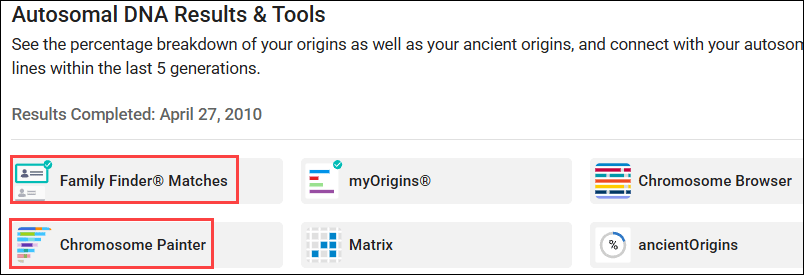
The files you may want to download are found on your dashboard in two locations.
- Family Finder Matches
- Chromosome Painter (ethnicity)
Family Finder Matches Download

To download your list of matches with their complete information, click on Family Finder Matches on the dashboard, then on “Export CSV.”
This download provides all the fields mentioned above, whereas the Chromosome Browser segment download provides only your matching segment data, without the additional information.
Download MyOrigins Ethnicity Segment Data

To download your myOrigins ethnicity segments, click on Chromosome Painter on your dashboard, then on “Download Segments.” You can also view or copy those segments by viewing the Detailed Segments tab.
I paint these segments at DNAPainter so that I can correlate my ethnicity regions with my ancestors’ segments.
To assign segments accurately, it helps immensely to have at least one parent’s DNA results too, and preferably both.
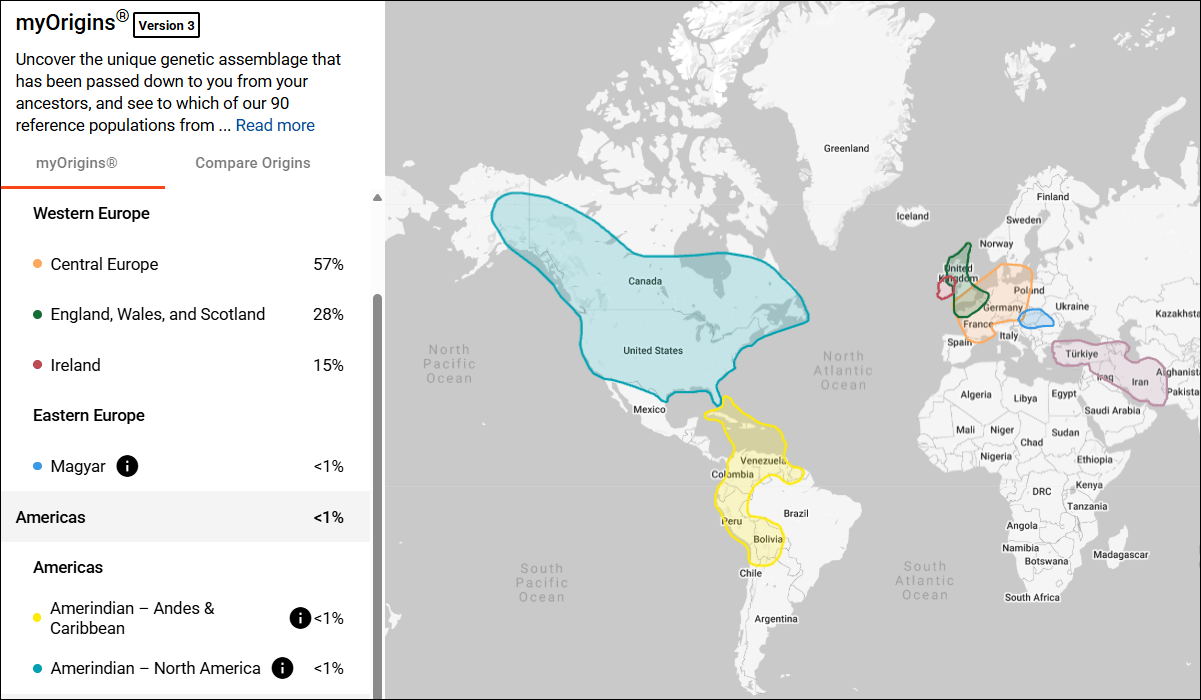
You may also want to take a screenshot of your myOrigins map. Note the left-side scroll bar when you’re taking screenshots.
What’s Next?
What else can you do at FamilyTreeDNA to benefit your genealogy?
- If you haven’t already, upload a GEDCOM file or create a tree at MyHeritage, and link your Family Finder test to your results.
- Link your individual matches to their place in your tree. This allows FamilyTreeDNA to use segments triangulated with linked matches to assign other matches to either the maternal or paternal side of your tree, or both.
- Add your line to WikiTree. It’s easy. Begin with yourself and add ancestors until you connect with someone who is already in WikiTree. For me, it was the grandparent level.
- Add your WikiTree link to your FamilyTreeDNA account under the gear in the upper right-hand corner, then Genealogy, then Family Tree. This gives your matches an easy way to identify common ancestors by using WikiTree’s Find Relationships feature, and provides two types of tree resources for you and your matches – MyHeritage and WikiTree.
- Make sure your Earliest Known Ancestor information is correct and up-to-date with your most recent research, including a specific map location. You’ll find that under the gear too, then Genealogy, then Earliest Known Ancestors.
- Add your surname list to your profile under the gear, Genealogy, Surnames tab.
- Use the Matrix tool at FamilyTreeDNA to see how much DNA your shared matches share with each other.
- Y-DNA – If you’re a male, test your Y-DNA, which is your father’s direct paternal line. The Big Y-700 test provides you with matches and the most detailed information possible.
- mtDNA – Everyone can take a mitochondrial DNA test, which shows matches and provides information about your mother’s direct matrilineal line.
- Use Advanced Matching, found under Additional Tests and Tools on your dashboard page, near the bottom, which allows you to select from multiple tests to see who matches you on both types of tests. For example, those who match you on both your full sequence mtDNA test and your Family Finder test.
- Join projects relevant to your family surname, geography or broader interests. You’ll find Group Projects in the top banner of your dashboard page after signing in.
- Utilize the Discover tools for both Y-DNA and mitochondrial DNA results.
Check your matches often to see who is new and what might have changed as people upgrade to the new NGS test and more people test.
_____________________________________________________________
Share the Love!
You’re always welcome to forward articles or links to friends and share on social media.
Subscribe!
If you haven’t already subscribed, it’s free. You’ll receive an e-mail whenever I publish by clicking the “follow” button at the top of the main blog page, here.
Help Keep This Blog Free
I receive a small commission when you click a vendor link in my articles and purchase that item. This does NOT increase your price but helps me keep the lights on and this informational blog free for everyone. Please click on the affiliate links in the articles or to the vendors below if you are purchasing products or DNA testing.
Thank you so much.
DNA Purchases and Free Uploads
- FamilyTreeDNA – Y-DNA, mitochondrial and autosomal DNA testing
- MyHeritage DNA – Autosomal DNA test
- AncestryDNA – Autosomal DNA test
- AncestryDNA Plus Traits
- 23andMe Ancestry – Autosomal DNA only, no Health
- 23andMe Ancestry Plus Health
Genealogy Products and Services
- MyHeritage Subscription with Free Trial
- Legacy Family Tree Webinars – Genealogy and DNA classes, subscription-based, some free
- Legacy Family Tree Software – Genealogy software for your computer
- OldNews – Old Newspapers with links to save to MyHeritage trees
- MyHeritage Omni comprehensive “everything included” subscription plan
- Newspapers.com – Search newspapers for your ancestors
- NewspaperArchive – Search different newspapers for your ancestors
My Books
- DNA for Native American Genealogy – by Roberta Estes, for those ordering the e-book from anyplace, or paperback within the United States
- DNA for Native American Genealogy – for those ordering the paperback outside the US
- The Complete Guide to FamilyTreeDNA – Y-DNA, Mitochondrial, Autosomal and X-DNA – for those ordering the e-book from anyplace, or paperback within the United States
- The Complete Guide to FamilyTreeDNA – Y-DNA, Mitochondrial, Autosomal and X-DNA for those ordering the paperback from outside the US
Genealogy Books
- Genealogical.com – Lots of wonderful genealogy research books
- American Ancestors – Wonderful selection of genealogy books
Genealogy Research
- Legacy Tree Genealogists – Professional genealogy research


