FOCUS Step 2: Finding the Y-DNA and Mitochondrial DNA of Your Ancestors

This is the third article in our FOCUS series, providing step-by-step instructions for identifying brick-walled ancestors.

These two articles detail the initial steps:

By now, you will have selected the ancestor you want to focus on identifying, and you have tools in your toolkit for working with DNA matches who have no trees.

You may have ordered DNA tests from multiple vendors and are waiting on results, so while you wait, we’ll start with finding the Y-DNA and mitochondrial DNA of your ancestors and identifying DNA testing candidates.

While it may sound counterintuitive, we’re going to be working with all of the major vendors, including FamilyTreeDNA, who actually tests for Y-DNA and mitochondrial DNA, plus WikiTree, 23andMe, MyHeritage, Ancestry, GEDmatch and FamilySearch. They are all quite useful in different ways.

This Type of Searching Is Different

Normally, when we search for brick-walled ancestors, we are searching backward in time. In other words, we begin with the last person we know and work back from there, hoping to identify the previous generation.

If we don’t know Lucy’s birth surname and she was born about 1750, and married William Moore in the late 1770s, we begin with what we do know in that timeframe.

Searching for our ancestor’s Y-DNA or mitochondrial DNA, and testers who carry that DNA, is fundamentally different because we begin with that ancestor and work forward in time.

In other words, if we want to find Lucy’s mitochondrial DNA, we begin with her daughters and track forward in time to the present. Hopefully, someone has already tested, and we can locate that result, but if not, we need to find people who descend through a specific path that carry Lucy’s mitochondrial DNA.

If we were searching for the Y-DNA of William Moore, we would look for his direct paternal descendant males who would carry the Moore surname.

Chicken or Egg?

I’ve been debating whether I should show you:

  1. How to locate and identify the Y-DNA and mitochondrial DNA of your ancestors first, or
  2. How to use Y-DNA and mitochondrial DNA (mtDNA) to help break through your brick wall first

I decided to write the “how to locate” article first because I don’t want you to skim over and ignore the ‘how to use’ article, thinking it’s irrelevant to your research because you don’t carry the Y-DNA and/or mtDNA of your brick-walled ancestor.

There are lots of avenues to locate the Y-DNA or mitochondrial DNA of your ancestors, something you definitely want to do. You’ll soon see that Y-DNA and mtDNA information can also assist with autosomal DNA results.

These are all pieces of your ancestor’s puzzle, and you never know which one will be the one to topple that wall.

Plus, you don’t know what you don’t know about that ancestor.

Let’s jump right in!

Who Carries the Y-DNA and Mitochondrial DNA of Your Ancestor?

As a quick refresher, only men can test for Y-DNA because only men have a Y chromosome which is inherited from their father. It’s passed in a direct paternal line from father to son, never mixed with DNA from the mother. Because it’s never divided during recombination like autosomal DNA, it’s uniquely useful for connecting lineages both recently and back in time hundreds and thousands of years.

Both Y-DNA and mitochondrial DNA incur occasional mutations that function as genetic breadcrumbs, making them incredibly useful for reassembling those specific family lines where genealogy paper trails have broken or been interrupted.

Mitochondrial DNA is passed from mothers to their children of both sexes, but only daughters pass it on. This means that in the current generation, males and females can both test for the mtDNA of their direct, mother-to-mother, matrilineal line.

Anyone, including males, who descends from an ancestor through all females can test for that ancestor’s mitochondrial DNA.

If you’re lucky, you’ll carry the Y-DNA or mitochondrial DNA of the ancestor you are seeking. If not, you’ll need to do one of two things:

  1. Determine if someone has already tested for that ancestor
  2. If not, find candidates to test

Y-DNA is generally easier because you at least (hopefully) have a surname to work with that has been passed from father to son, along with their Y chromosome.

Mitochondrial DNA is more challenging since surnames change each generation, so I’ve included several mitochondrial examples. Don’t skip over them, because the same research techniques apply to Y-DNA too, especially difficult cases.

If you’re a male, I strongly recommend that you order:

If you’re a female, you can only order the mtFull test, but you may be able to ask your father or brother or a male relative (with the surname in the lineage you seek) to take the Big Y-700 to represent your father’s family line. In other words, if you’re looking for a male Estes, you can ask your 2C Estes male who descends in a direct paternal line of all Estes men from your common ancestor.

Complete Versus Partial Tests

Haplogroup-only results derived from autosomal tests are fine as far as they go – but they don’t go very far. Most are what I would call midrange, providing testers with a haplogroup from maybe 2000 years ago, and some are much more distant than that. That isn’t to say they can’t be useful in a limited capacity, but Y-DNA and mtDNA have so much more potential.

You need comprehensive Y-DNA and mtDNA test results that identify all your haplogroup-defining mutations and can be refined as more people test and match family-level mutations.

Haplogroups are important, but you also need to match with other testers. Additionally, you’ll want the most complete haplogroup possible, because it will help you genealogically by providing a complete breadcrumb trail with the ability to identify your most recent common ancestor (MRCA).

FamilyTreeDNA is the only vendor that offers these complete tests that include matching with other testers, plus additional genealogy tools.

The Big Y-700 test scans for mutations in the stable portion of the Y chromosome and is the only way to obtain that personal-level information. It’s those recent mutations that will help place you within a biological family – or eliminate you from other lines, which prevents barking up the wrong tree.

The benefit of taking the test yourself, or sponsoring a test for someone willing to share their results with you, is that you have ready access to information through FamilyTreeDNA’s tools such as:

  • Matches with other Y-DNA and mtDNA testers
  • Matches Map (ancestor locations)
  • Advanced Matching, which provides a filtered list of people who match you on BOTH your Y-DNA or mitochondrial DNA AND your Family Finder autosomal test
  • Haplotype clusters (for mtDNA)
  • Your mutations
  • Block Tree (for Y-DNA)
  • Customized Discover tools

Click any image to enlarge

  • Discover’s Advanced Tools like the Match Time Tree, shown above, which displays your matches with their earliest known ancestors (EKA) together on the Time Tree
  • Globetrekker™ (for Y-DNA with mtDNA coming soon)
  • Up to 30 Ancient Connections
  • Up to 20 Notable Connections

FamilyTreeDNA’s free Discover tool, here, provides public information for everyone about haplogroups, but if you haven’t taken the test, you won’t receive matching and customized information described above, which is essential to genealogy.

Upgrades for Partial Tests

You may have previously tested at a lower level at FamilyTreeDNA.

For mtDNA, the early mtPlus test examined a portion of the mitochondria and provided matching at lower levels, as do the 12-111 marker Y-DNA tests. Both provide a predicted high-level basic or midrange haplogroup based on the mutation information available in those limited tests.

If you took an earlier, partial test, you can sign on to your account to upgrade by clicking on the “Big Y,” even though it’s greyed out. Grey simply indicates that you don’t currently have that level of test.

Click on “Full” to upgrade to the mtFull test.

Test Features at Various Levels

Depending on the type of test you take, and at which vendor, you may have a fully refined or partial haplogroup.

Discover provides a substantial amount of information if you receive a partial haplogroup:

A partial haplogroup is better than no haplogroup, but it’s also like working with one hand tied behind your back. If at all possible, you need to work with a full haplogroup and matches.

Testers who click through to Discover from their own test, or a test they manage, can view additional features not available in the free version.

The table below shows the four different ways you can access and view your ancestor’s haplogroup. Based on the testing level and/or how they tested, the haplogroup level will vary.

Clearly, the best scenario is when you either take the Big Y-700 or mtFull test yourself, or you have access to the test results of someone who takes that test to represent your ancestor’s DNA. Primary access confers the greatest amount of information, but you can still glean information in other ways.

Feature Introductory Level Test at FamilyTreeDNA* Tester’s Big Y-700 or mtFull Test – Full Access Partial Haplogroup from Autosomal Test Your Ancestor’s Haplogroup but without Full Access
Matching Yes, at that lower level Best – at all levels No No
Matches Map Yes, at lower level Yes No No
Mutation Values Yes, STR markers at lower Y-DNA level Yes, STRs (Y-DNA) and SNPs Not directly but through Discover Not directly but through Discover
Haplotree & SNPs with surnames (Y-DNA only) Yes, at lower level Yes No No
Block Tree (Big Y test only) No Yes No No


Advanced Matching (multiple types of tests) Yes, at that level Yes No No
Ability to Join Group Projects Yes Yes Only test owner or manager can join Only test owner or manager can join
Discover Reports Yes, same information as the free version due to lower coverage Yes, when clicking through from your FamilyTreeDNA account Free version Free version
Haplogroup Story Yes, at lower haplogroup level Yes – best and highest level Yes, at lower haplogroup level Yes, at lower haplogroup level
Country Frequency Map and Table views Yes, at lower haplogroup level Yes, at most refined haplogroup level Yes, at lower haplogroup level Yes, at most refined haplogroup level
Notable Connections Same as free version About 20 for Y-DNA, 11 for mtDNA About 10 for Y-DNA, 3 for mtDNA About 10 for Y-DNA, 3 for mtDNA
Migration Map Yes, at lower level Yes, at advanced level Yes, at lower level Yes, at advanced level
Globetrekker (Y-DNA only, mtDNA coming soon) No Yes No No
Ancient Connections Same as free version About 30 About 10 for Y-DNA, 3 for mtDNA About 10 for Y-DNA, 3 for mtDNA
Time Tree Yes, at lower haplogroup level – generally 2,000 years or older Yes, at most refined haplogroup level, often within genealogical timeframe Yes, at lower haplogroup level – generally 2,000 years or older Yes, at most refined level
Match Time Tree No Yes – your matches & their EKA on the Time Tree including WikiTree Connections and Ancient DNA No No
Ancestral Path Yes, at lower haplogroup level Yes Yes, at lower haplogroup level Yes
Suggested Projects Yes Yes, at more refined level Yes, but must test with FamilyTreeDNA to join Yes, but must test with FamilyTreeDNA to join
Scientific Details, ages and variants Yes, at lower level Yes Yes, at lower level Yes
Compare Haplogroups Yes Yes Yes Yes

*Note that often your ancestor’s haplogroup as reported by the Family Finder (autosomal) test is more refined, meaning closer in time, than the Y-DNA haplogroups predicted by STR tests, but both are always substantially less specific than the Big Y-700 test. As of the publication date of this article, Family Finder does not yet report a mitochondrial DNA haplogroup, but that is planned for the future.

This chart only includes features you would specifically use to identify an ancestor or ancestral lineage. There are other reports provided with your test that will be of interest. Discover provides about 14 reports that include various options.

Now we can envision:

  • The benefits of finding our ancestors’ Y-DNA and mtDNA
  • The benefits of obtaining the most refined haplogroup possible
  • The benefits of being able to view the results directly

You may not be able to achieve all of these, but even a partial haplogroup is better than no haplogroup at all, and a fully refined haplogroup, even if you can’t see everything in another tester’s account, is better than a partial haplogroup.

So, let’s see how to find your ancestors’ haplogroups. I collect them all, not just for brick-walled ancestors, but because they tell a part of our story not available through any other means.

Finding Your Ancestor’s Mitochondrial and Y-DNA

If you are the DNA tester for your brick-wall ancestor, then you’re golden, but chances are that you’re not.

If you’re searching for Y-DNA, and you don’t carry that Y-DNA yourself, you’ll need a male relative who carries that Y chromosome to test.

Males carry the Y-DNA of their direct patrilineal ancestors, shown in the image below on the left side in blue, plus the mitochondrial DNA (mtDNA) of their mother, shown with yellow hearts at far right.

At the 4th generation level, we have 4 Y-DNA lineages to collect (light blue, dark green, medium green, and teal), and a total of 8 mtDNA lineages.

Let’s say you’re searching for your father’s mother’s mother as your brick-wall ancestor.

Your father (and his siblings) carry the mtDNA of his mother, shown above in fuchsia, as do her grandchildren through her daughters. That’s why your father has a fuchsia heart. If close family members test, chances are you can arrange to manage their test or view their results. (Be sure they take the autosomal Family Finder test too. You’ll need that later.

If you don’t manage their test for them, you’ll need to ask to see their results to view matches and work with trees.

I have a family project at FamilyTreeDNA that I manage. I ask people who have tested for a particular ancestor to join that project so I can easily view their results while they continue to manage their test, and can select how much they want me to see or do.

FamilyTreeDNA is currently working on a multi-kit management feature that will address the challenge of sharing results.

But I Don’t Know of Any Cousins…

Let’s say you don’t know of and can’t readily identify anyone who descends from your ancestor appropriately.

If the ancestor you seek is a male, mitochondrial DNA is probably not going to help you because men don’t pass their mitochondrial DNA on to their descendants. In order to obtain a male ancestor’s mitochondrial DNA, you’d need to be able to identify a sister or someone known to descend from his mother (or sisters) through all females to the current generation. Needless to say, if you know who his mother is, you probably already know who he is.

If your brick wall is a female ancestor, your first order of business is to find someone who descends from her through all females to the current generation, where the tester can be male or female.

Why is this so important?

Mitochondrial DNA isn’t admixed with the father’s DNA, so it’s not divided in each generation. This means that mitochondrial DNA is the only direct line-of-sight we have that bypasses both changing surnames and genetic recombination for females.

Who Has Tested for Your Ancestor?

If you’re NOT the tester for your brick-walled ancestor or aren’t the curator of the test, your first step is to see if someone else has already tested.

This can sometimes be challenging.

It’s impossible to obtain mitochondrial DNA for an unknown ancestor if there are no known daughters, and for Y-DNA if there are no known sons. You may need to review genealogical resources to make sure you’ve identified all of that ancestor’s children.

Barring those scenarios, there are a surprising number of resources available to find descendants.

WikiTree

The first place I check to see if someone has already tested for a particular ancestor is WikiTree.

WikiTree is the one place where you find the ancestor along with the people who have taken DNA tests who descend from that ancestor. It’s invaluable.

Normally, you have to work with matches to identify your common ancestor. WikiTree works the other way around. Your starting place is with the ancestor.

You can’t Google your mystery ancestor’s name because if you knew their name, they wouldn’t be a mystery ancestor – but you can Google their spouse or a child.

I’m using an example from my own line because my mitochondrial DNA results are connected to her.

I’m Googling:

Barbara Mehlheimer born 1822 died 1906 in Indiana at WikiTree

Google was slightly confused but the results got me to where I needed to go.
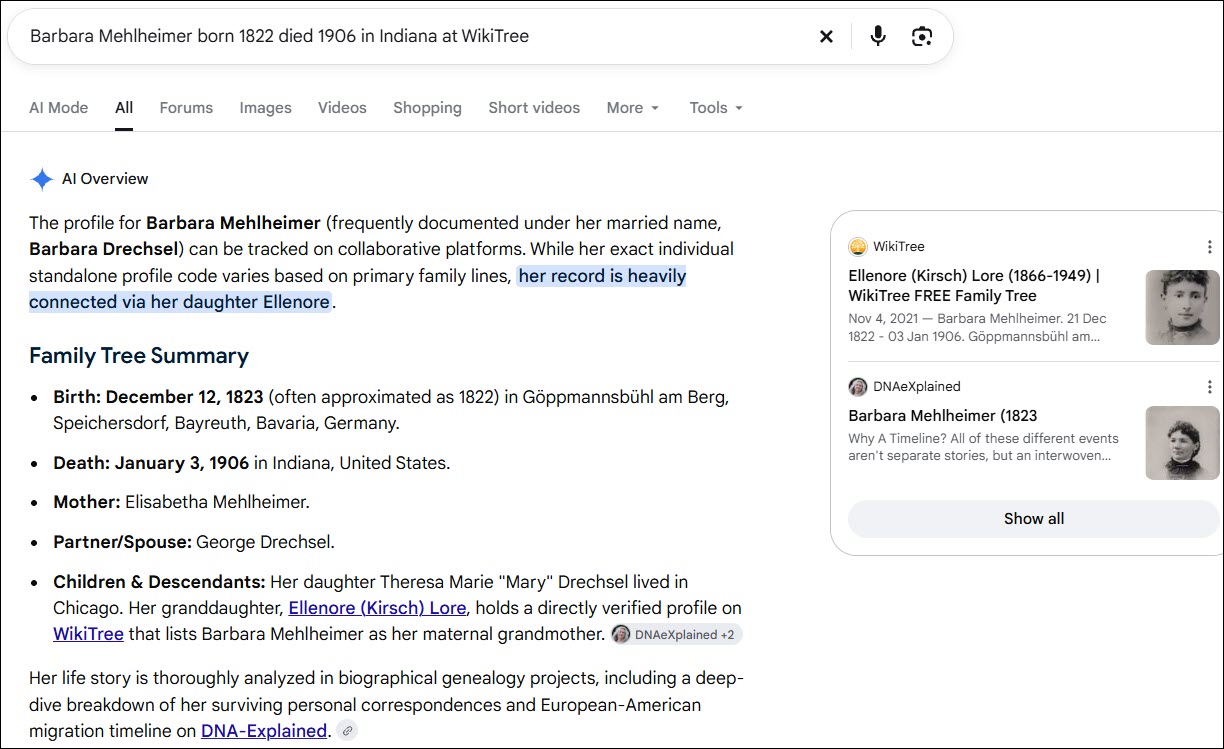
Barbara Mehlheimer married George Drechsel and her daughter was Barbara Drechsel who married Jacob Kirsch.

First, check Barbara’s WikiTree profile card to confirm you’ve found the correct person.

Next, click on the DNA tab beneath her profile information (or just scroll down). She has four DNA Connections.

You can see that one person, me, who carries Barbara’s mitochondrial DNA has connected their DNA to Barbara’s profile. I did this by entering my DNA information on my WikiTree profile, then WikiTree connects my DNA haplogroup information from mother to mother to mother to Barbara and propagates my DNA haplogroup to her, her matrilineal ancestors, and their female descendants. If you click on the haplogroup, it takes you directly to that haplogroup in Discover.

Three people have connected their autosomal results to Barbara. This information can be very important, and not just for mitochondrial DNA. It allows us to identify autosomal testers we may match at different testing companies who descend from Barbara.

In your research journal, make notes of these names, testing companies, and kit numbers. Remember that this doesn’t mean the company noted is the only place someone has taken an autosomal DNA test. I’ve tested at all of the major companies, but only GEDmatch and FamilyTreeDNA are listed here.

For Y-DNA and mitochondrial DNA, the haplogroup is shown, although when testers receive a new Y-DNA or Mitotree haplogroup, they seldom think to revise it in WikiTree. This means their current haplogroup may be more specific and improved since the WikiTree information was entered.
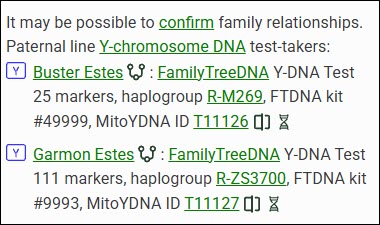
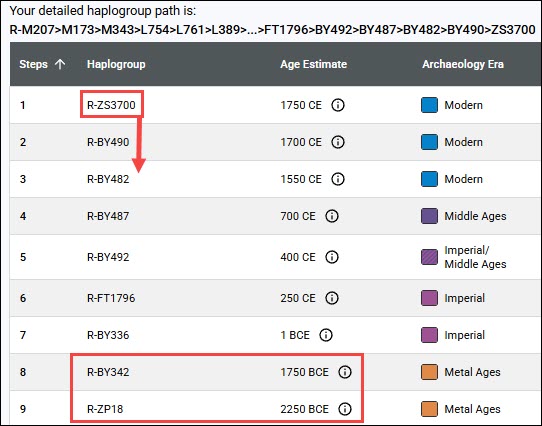
Some people may have tested at different levels too. In this case, Buster Estes, who is now deceased, was one of the earliest testers, long before the Big Y tests were available. He only took a 25-marker test, so his haplogroup was predicted as R-M269. Garmon, on the other hand, was able to upgrade his Y-DNA test to the Big Y-700, and his haplogroup is much more refined at R-ZS3700. Their haplogroups don’t match exactly due to the levels at which they tested, but they also don’t preclude the two testers from belonging to the same genetic line.
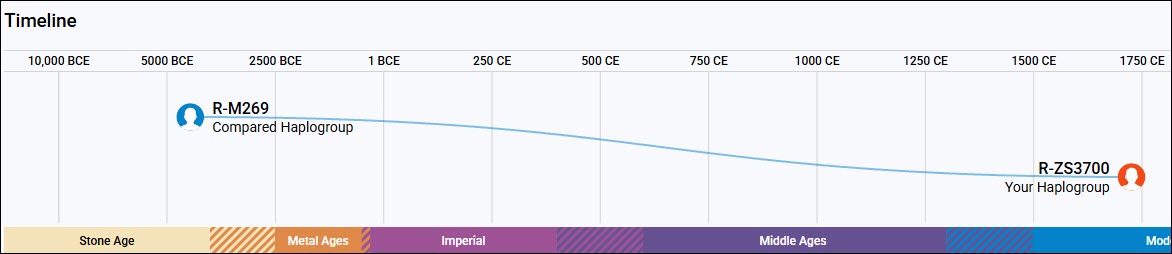
This screenshot of Discover’s Compare function illustrates how important the Big Y-700 test is when compared to the STR test’s predicted haplogroups. The man who developed the mutation that defines R-ZS3700 lived about 1750 CE, and the man who developed R-M269 lived about 4450 BCE, or 6,450 years ago. That’s a big difference.

Using a combination of multiple testers and genealogy, we’ve identified the man who developed R-ZS3700 and passed it on to his sons. Moses Estes was born in 1711 in Virginia and all of his descendant testers carry R-ZS3700.

Now that’s extremely useful information, because we know that any man with haplogroup R-ZS3700 descends from Moses Estes in a direct paternal line, and any man whose haplogroup is not R-ZS3700 or doesn’t include R-ZS3700 upstream of his haplogroup does not descend from Moses Estes in that way.

Please add your DNA tests, including haplogroups and your kit number, to your profile at WikiTree so that the haplogroup information can be populated appropriately to your ancestors.

Searching for a Test Candidate Using Autosomal Descendants

When you’re searching for a testing candidate at WikiTree, you can click through to the tester’s profile and view exactly how they descend from the ancestor shown.

Let’s say that no one has linked a mitochondrial DNA test to the ancestor you’re searching for, but several people have linked autosomal tests to that ancestor’s profile card.

Click on the tester’s name and then on the DNA Ancestors tab to see how they descend from that ancestor. If you’re lucky, you’ll find someone in the autosomal list who is a mitochondrial DNA testing candidate.

If you’re looking for a Y-DNA tester, begin by looking for a male with the same surname as that ancestor. If you’re looking for a mitochondrial DNA tester, you’ll need to view each tester’s ancestors.
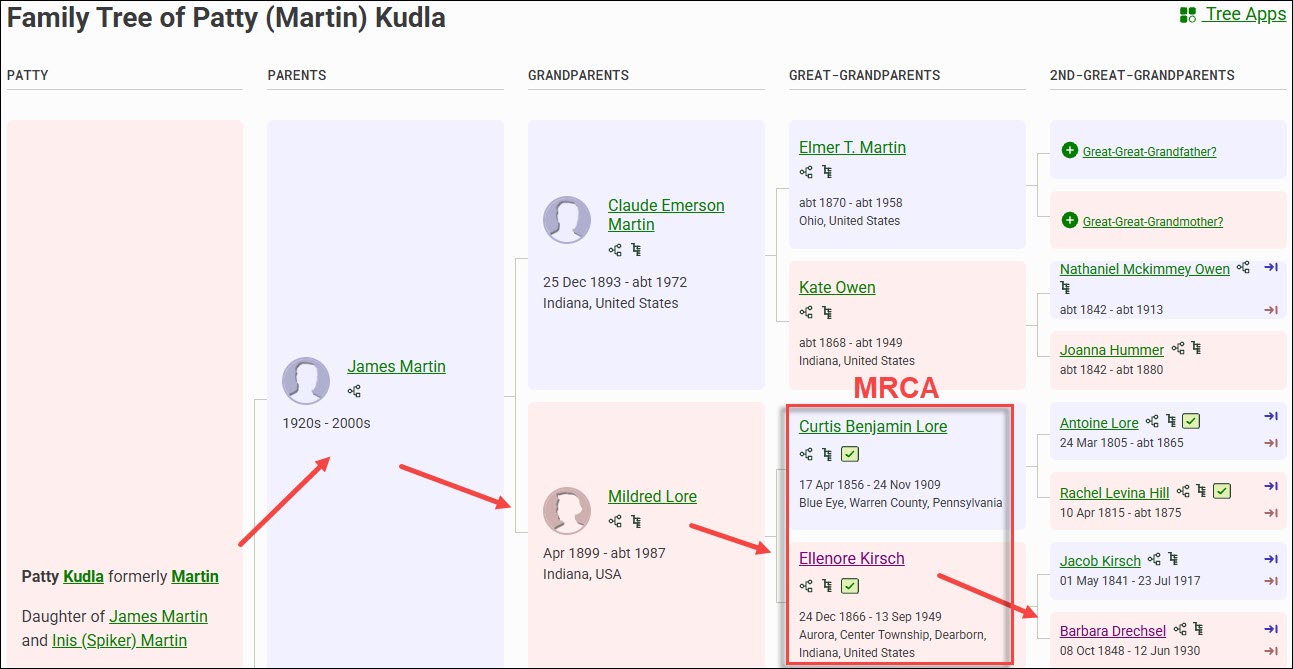
Regardless of whether they are a mitochondrial or Y-DNA testing candidate, you’ll identify your most recent common ancestor (MRCA) for each person, information that will become essential for the autosomal tools that we’ll be discussing in future articles.

In your research journal, I suggest that you record all of their descent information now, including their names, where they tested, your MRCA, kit numbers and any other relevant notes.
If you’d like to ask them to take a specific test, or if they already have and you’d like to know more, you can message WikiTree users by clicking on their profile, and then on the little envelope beside the profile manager’s name.

Finding Your Ancestor’s DNA Descendants at WikiTree

Let’s say that no one in the DNA list of people who have already taken tests descends from your ancestor matrilineally. Don’t worry, there are still more options!
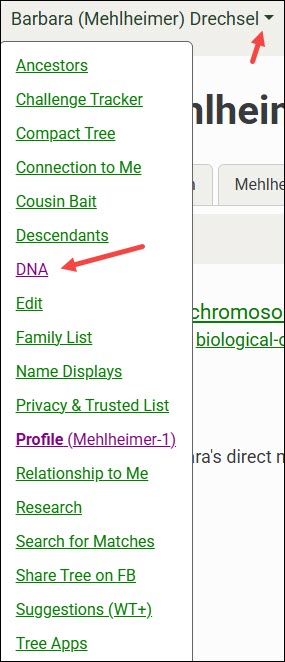
At the top of the WikiTree page for that ancestor, click the down arrow, then on DNA.

The default tab shows the DNA Ancestors of the profile you’re viewing. You’ll see Y-DNA for males, and both mitochondrial and X-chromosome ancestors for everyone.

You may notice that there’s an ancestor listed for your brick wall ancestor. That’s wonderful, but don’t jump for joy quite yet. Remember, WikiTree is a one-world tree, and you need to verify the underlying genealogy in every tree here, and at every vendor.

Always confirm using multiple sources, meaning resources other than trees. The great thing about WikiTree is that there are often several sources listed in each person’s profile, and other resources that can help immensely. I love WikiTree, but I’m always skeptical of information in any tree, and I prove everything to my own satisfaction. I wrote several articles about that topic in the Genealogy Proof Series, here.

To find testers, you’ll need to view your ancestor’s DNA Descendants.

Click on the DNA Descendants tab.

The Mitochondrial DNA Descendants view shows potential candidates for mtDNA testing. Remember, in the current generation, males and females can both test so long as they descend from that ancestor through all females.

In the case of Barbara Mehlheimer Drechsel and her descendants, there are several males who are immediately eliminated because they’ve been deceased for more than a century, and several daughters who didn’t have children.

Not every person’s line on WikiTree has been added or developed. You can see that three daughters’ lines that might hold candidates don’t list all their children, and I still need to research two additional people. That means I still have five candidate lines to extend that have potential mtDNA testers.

So, in summary, if Barbara was the ancestor I was seeking:

  • One person has already tested
  • Three daughters don’t have their families extended.
  • Two have daughters that I need to research.

For both Y-DNA and mitochondrial DNA, I like to have at least two people who descend from different children of the ancestor, and whose tests match at a level that does not preclude that lineage. This helps confirm both the genetic line and the genealogy of both testers.

With male ancestors, having more than one tester for each line through different siblings is essential.

Kit Numbers, Earliest Known Ancestors and Google

When DNA kit numbers are included at WikiTree, you’ll want to Google to see if that kit number is shown in a public Group Project at FamilyTreeDNA where you may find more information.

The exact search string to use to find a specific kit at FamilyTreeDNA within projects is:

“9993” site:familytreedna.com

Replace 9993 with the kit number you’re interested in. You can also add the word “projects”, without quotes, to the end of that string to omit forums and limit the search to within projects. This string both focuses and limits the search, filtering out most noise.

By clicking on “read more,” you’re taken directly to the Estes Family Surname Project Y-DNA page.

The green haplogroups are SNP-confirmed, unlike the red predicted haplogroups from the lower-level 12, 25, 37, 67 or 111-marker tests. The R-ZS3700 haplogroup was obtained from the Big Y-700 test, so it is the most granular and specific. If this is your line, you’ve just found your ancestor’s haplogroup. It’s also possible that, by testing, you could receive an even more specific haplogroup.

Please note that haplogroup R-M269 is the most common haplogroup in Europe, and isn’t specific enough to use for anything other than very basic information. It can rule out two people with different base haplogroups, like haplogroup I or J, for example, as descending from a common patrilineal ancestor.

Project administrators are all volunteers, and each administrator groups their Group Project members differently, so take a few minutes to review the project pages. You may find additional testers who have joined this project who descend from your ancestors or your ancestral line.

You may also find other lines with the same surname and a substantially different haplogroup, which tells you that there are multiple genetic lines with the same surname. I have one example of this in the same county, at the same time, found in men by the same exact name – think John Smith. So frustrating. Without DNA testing, we would NEVER have sorted through those two same-name but completely different lines.

However, finding people who match your ancestor’s DNA but don’t have your earliest known ancestor (EKA) may be just the clue you need to knock down that brick wall. How are your ancestor and that other person’s EKA connected, and in what timeframe? Do they share a surname? A location? Are there other clues?

It’s unlikely that you’ll be able to use a kit number to Google unless you find one at WikiTree, but you can still search using the oldest name in that line that you know.

nicholas ewstas site:familytreedna.com

Replace the kit number with your EKA, in this case, “Nicholas Ewstas” in the search string, either with or without quotes. This takes you to the same page and any other projects that someone may have joined using exactly that earliest known ancestor’s name. Keep in mind that you’re only looking at their oldest ancestor, not every ancestor between them and their EKA. Your brick wall may lie someplace in there, which is why you need to check matches and view their trees.

Since women’s surnames change in every generation, they generally won’t be found in specific ancestral surname projects like men. This makes Googling using the ancestor’s name even more important.

catherine lejeune site:familytreedna.com

We don’t know who Catherine LeJeune’s mother is, so finding that someone has entered Catherine as their EKA may be critically important.

This is especially important for female brick-walled ancestors, since using this Google string with their daughters’ names may reveal someone else’s EKA in that genetic line within a project.

After clicking through to the project page, be sure to enlarge the page to display the full project, and use your browser search since partial results with predicted haplogroups may not be grouped with full mitochondrial sequence results.

Multiple people who descend from Catherine LeJeune have tested. The first six only took the partial test years ago. The bottom two testers took the full sequence test and have a new Mitotree haplogroup – U6a7a1a. We know that Catherine was born about 1633, in France, and we can see that other people have also tested and list different EKAs. Next, it’s time to research the other ancestors shown, or check WikiTree to see if any of these testers are listed there so you can contact them.

Now that you have found your ancestor’s haplogroup, you can use the free version of Discover to learn more. I wrote about using mitochondrial DNA and Discover in the article Mitochondrial DNA A-Z: A Step-by-Step Guide to Matches, Mitotree, and mtDNA Discover.

Now, let’s move to the DNA testing companies to see how we can find our ancestors’ Y-DNA, mitochondrial DNA, or testers, at 23andMe, FamilyTreeDNA, Ancestry, and MyHeritage.

At 23andMe

23andMe is not a genealogy company. That said, if you can figure out how people are related to you, you might be able to obtain a partial haplogroup for an ancestor. 23andMe shows both Y-DNA and mitochondrial DNA haplogroups to autosomal matches, but there is no Y-DNA or mitochondrial DNA matching, or associated tools.

23andMe caps matches without a subscription at only 1,500, and they don’t support trees, so I struggle to find useful haplogroups without an associated surname.

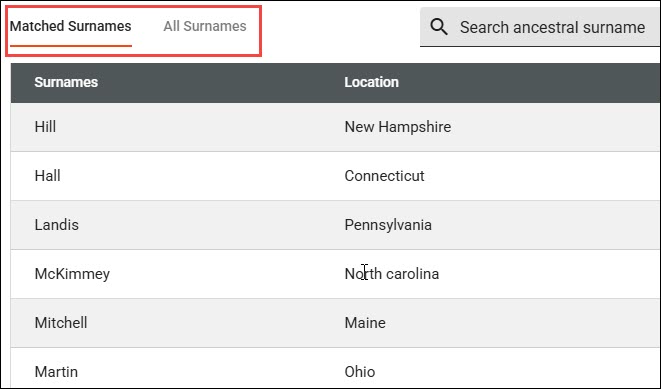
Browsing or searching your 1,500 allowed matches (you can have around 5,000 with a subscription) for a particular surname may provide you with an abbreviated haplogroup for both male and female ancestors.

Despite my best efforts, while my maternal grandfather’s mother is not unknown, nor are her ancestors for several generations reaching back into Germany, I’ve been unable to find her mitochondrial haplogroup. Evaline Miller (1857-1939) was born and died in Kosciusko County, Indiana, where she married Hiram Bauke Ferverda, an immigrant from the Netherlands.

Ferverda is an unusual surname, so let’s use it for our example. Thankfully, I’m not dealing with something like Smith.

I entered Ferverda in the 23andMe search bar and it shows four results, two of which are in the 2C-3C range, and one that’s further distant.

I already have the Ferverda Y-DNA, so I don’t need that, but I do need the mitochondrial DNA of Eva Miller Ferverda, and I really don’t want to sift through Miller surnames.

I know who Mr. Ferverda is on my match list, and which ancestor we share. His mitochondrial DNA is not Eva Miller’s.

Fortunately, I know who Eva’s parents were, as shown above on my MyHeritage tree, so I can search for Ferverda, Miller, Lentz, Ruhle, Wolflin, and Heubach, several of which are unusual. Reaching back into Germany is difficult.

It’s likely I match all four of those people at 23andMe through a common lineage that descends from either Hiram Ferverda, Eva Miller, or both. Let’s see what I can put together.

Emily is estimated to be a 2C2R. She is younger than I am based on the birth year she provided in her profile which I am not showing for privacy reasons. Emily also stated that her maternal grandmother was born in Warsaw, Kosciusko County, Indiana, and provided family surnames that include Ferverda, Miller, Glant, Zimmermann, and others.

Kosciusko County is where Evaline Miller lived with Hiram Ferverda, and their daughter, Margaret, married Chester Glant. Margaret Ferverda Glant’s daughter, Joyce, was born in Kosciusko County and married a Zimmerman.

But now, I was stuck. That’s all I had in my desktop genealogy software.

I shifted to Ancestry, where I discovered a death certificate and other information that provided what I needed to close the gap.

This information confirmed Emily’s statement that her maternal grandmother was born in Warsaw, Kosciusko County, Indiana.

Therefore, drum roll…Emily carries Eva’s mitochondrial DNA haplogroup, which is T2b.

Let’s move on to the other two matches, both of whom carry haplogroup T2b.

Ian’s maternal grandmother’s birthplace is Leesburg, Kosciusko County, Indiana, and his surnames include both Ferverda and Robison.

Eva Miller Ferverda’s daughter, Chloe Ferverda, married Rolland Robison and had a daughter, Charlotte, whose daughter married a man with Ian’s surname. Their information allowed me to connect the dots appropriately. Ian’s mitochondrial haplogroup is also T2b, which confirms Eva Miller’s mtDNA haplogroup through a second child.

Shirley, the third match who carries haplogroup T2b, also shows the surnames of Ferverda and Robison, and tracks back matrilineally to Eva Miller.

In spite of the many challenges at 23andMe, and thanks to the rare surname of Ferverda, I’ve identified Eva Miller’s partial haplogroup, but not her full haplogroup. A partial haplogroup is much better than nothing and gives me something to work with.

I checked at Ancestry, MyHeritage and FamilyTreeDNA to see if any of those three people have tested there and have trees. Indeed, Ian tested at FamilyTreeDNA and I had corresponded with him and made a note that he is a matrilineal descendant of Eva Miller Ferverda, but he has not taken a mitochondrial DNA test there.

We know that if Emily, Ian, Shirley, or another appropriately descended person were to take a full-sequence mitochondrial DNA test, we would learn a LOT more about Eva’s mitochondrial DNA. If I can’t locate someone who has already tested, I’ll reach out to these people at 23andMe and offer a scholarship for a full-sequence mtDNA test.

It’s ironic that at the most restricted and least likely testing company, I found three people descended from Eva Miller. Hope springs eternal.

Unfortunately, T2b was formed about 8450 years ago and is a very broad haplogroup made up of many subclades, but at least I have something now – and this partial haplogroup may be just the seed I need to lead to more.

Now, let’s move to FamilyTreeDNA and hope that someone there has already taken the mtFull test.

At FamilyTreeDNA

There are multiple ways to find the Y-DNA or mitochondrial DNA of your ancestors at FamilyTreeDNA.

Project Search

You can search for surname projects along with other types of projects.

On FamilyTreeDNA’s main page, without signing in, scroll all the way to the very bottom footer where you will see the Group Projects link.

If you’re searching for a surname, enter that surname in the search box.

The next screen shows projects that people with the Estes surname, including females, have joined. This includes all types of projects and does NOT mean that these projects are relevant to your line, but it does include two surname projects you may find useful.

Scrolling down shows you how many people with the surname of Estes have tested. Keep in mind that some will be females, some use married names, and sometimes people use an alias, so they aren’t included in this count.

Surname projects for females aren’t terribly helpful since the surname typically changes in each generation, at least in Western cultures.

You can also search for keywords, such as Acadian. If you know that ancestral line is Acadian, you may find clues there, including descendants of your brick-wall ancestor.

Group Project Time Tree

Many Group Projects at FamilyTreeDNA have enabled the Y-DNA Group Time Tree feature. When visiting the project, if the administrator has the Group Time Tree enabled, click on that link under the DNA results tab.

The Group Time Tree is a genetic tree of Y-DNA testers within that project based on the groups created by the project administrator.

The groups constructed by the administrator are shown at left, the Time Tree in the middle, and the testers with their EKAs and country of origin flags at right. I’ve added the red text to reflect the Estes genealogical lineage.
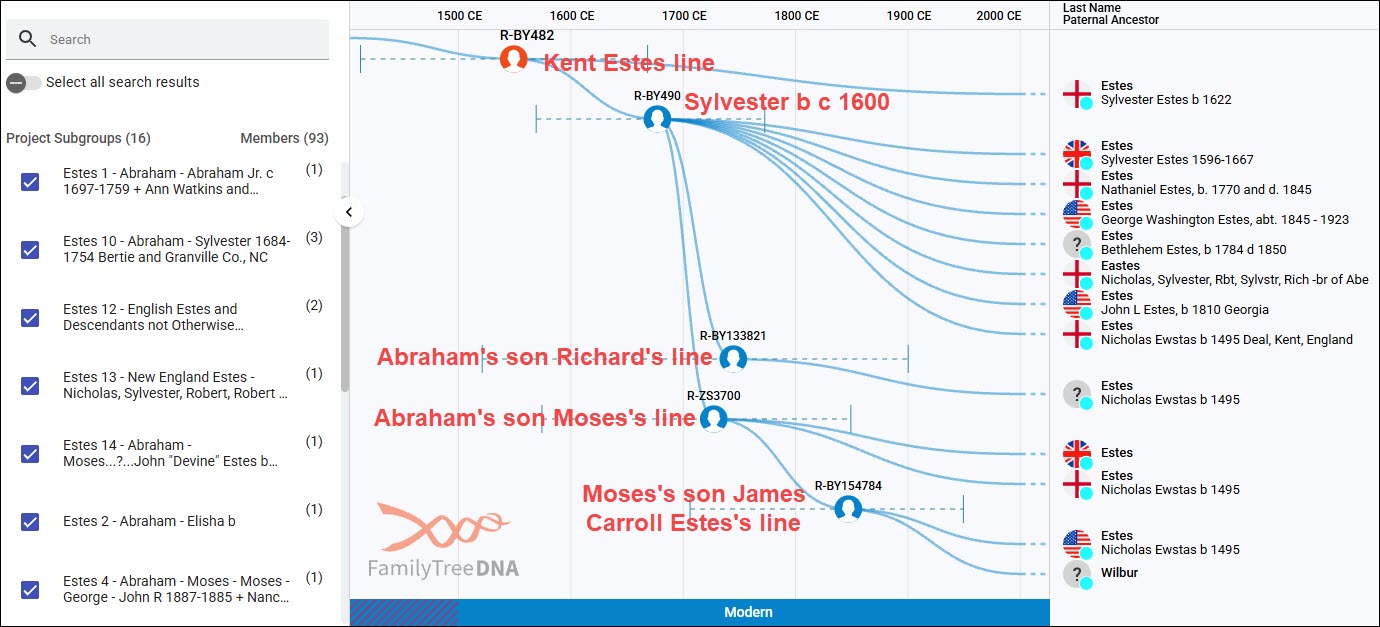
Based on the timeline at the top, you can see how closely these Y-DNA testers are related in time. Each haplogroup shown represents a different branching genetic lineage – breadcrumbs at work. If you are a genetic Estes male who descends from the Estes family that originated in Kent, England, and you take the Big Y-700 test, you’ll be a member of R-BY482 or its descendant haplogroups.

Keep in mind that not all testers join group projects, so it’s likely that there will be matches on your match list that aren’t here. Furthermore, only Big Y testers appear on any Time Tree.

The Group Time Tree is public, but when you sign in to your account and click on the Match Time Tree from your account, you’ll be able to view more, including testers’ trees and WikiTree connections if your matches have connected themselves to WikiTree.

Click to enlarge

I’ve converted the Estes genetic tree into a genealogical tree in a spreadsheet based on the trees of DNA matches. I’ve also included STR testers, because they are good candidates to upgrade to Big Y tests, and they are shown in the Estes Group Project. They can’t be included in the Time Trees because they don’t have the SNPs discovered with the Big Y tests. Please note that not all testers were included in this spreadsheet.

You can follow the paths of the various haplogroups. All of the red-background, black-outlined cells are Big Y-500 or Big Y-700 testers. The Big Y-500 was obsoleted several years ago in favor of the much more informative Big Y-700 test, which reveals additional haplogroups because it tests more of the Y chromosome. I’m still hoping that people will upgrade, although some testers are deceased and can’t.

The Big Y-500 tests with red stars are candidates to be upgraded to the Big Y-700 to potentially receive a more specific haplogroup. The balance of the tests in red cells are Big Y-700 tests, which identify several additional Estes haplogroup paths.

Let’s look at an example.

Beginning at the top, we know that R-BY482 is present in Nicholas Ewstas, born in 1496 in Kent, England, because all of his descendant testers carry that haplogroup too. Additionally, three generations later, in Silvester’s generation, he developed the additional mutation named R-BY490. We know it developed in Silvester’s generation for two reasons:

  • The descendants of Silvester’s brother, Robert, born in 1603, do NOT carry R-BY490. Robert’s son Matthew’s descendants only carry R-BY482.
  • The descendants of both of Silvester’s sons, Richard (pink column) and Abraham (the entire green row), all carry R-BY490.

All of the descendants of Silvester’s son, Abraham, born about 1647, the Virginia settler, who have taken the Big Y test carry R-BY490. Additionally, descendants of several of Abraham’s sons, color-coded columns beneath the green row, have developed additional haplogroups. Several more testers would likely have new haplogroups if they took the Big Y-700 test. A new haplogroup requires at least two men with the same unique mutation (breadcrumb), in addition to R-BY490 (in this case), to identify a specific lineage and assign it a new haplogroup name.

Abraham’s son, Moses Estes, born in 1711, is a good example. We know that Moses developed the mutation R-ZS3700 because four of his descendants have taken the Big Y-700 test and have that mutation that is not found in Moses’s brothers’ lines. All four Moses descendants carry R-ZS3700, and two, in the James Carroll Estes line, have developed an additional mutation, haplogroup R-BY154784.

Until Big Y testing became available, descendants of the R-BY154784 lineage didn’t know where they fit in the Estes tree, because the connecting genealogical records between Missouri, where their ancestors are found, and Virginia, where they came from, were missing.

Therefore, if you don’t carry the Estes Y-DNA, but you can find your ancestral line in projects, you can potentially do two things:

  1. Identify the specific lineage to which you belong, especially if you have access to your relative’s test results, including matches and trees.
  2. Without matches, you may still be able to identify at least some haplogroup levels, such as R-BY482 or R-BY490, which opens the door to:
    • Using autosomal results to find matches with Estes-specific haplogroups
    • Using Discover to utilize the dozen+ public reports available for everyone
    • Asking people to upgrade

While I’ve been using the Estes DNA results because it’s a project I administer and the one with which I’m the most familiar, this same approach works for mitochondrial DNA as well, especially if you can identify your ancestor’s DNA in a project.

Finding Projects in Discover

The public version of Discover provides surname and project searches as well, but works a little differently.

Select Group Project and enter the term you wish to search for.

Clicking on the project takes you directly to that project’s Group Time Tree where you can identify your ancestral line.

People who have tested at FamilyTreeDNA can join projects. Many projects accept autosomal testers who descend from that family line.

To join projects, sign in, then from your home page, click on “Group Projects” in the header, and make your selection.

Search for Surnames in Family Finder Autosomal Matches

Now that you’ve identified your ancestor’s haplogroup, you can use that information to find, rule in, or rule out various people in your Family Finder match list as your ancestors’ haplogroup carriers.

FamilyTreeDNA displays the haplogroups of your autosomal matches who have taken the:

The Family Finder test doesn’t test either the Y chromosome or mitochondria fully, but it target-tests a selected number of non-autosomal haplogroup-defining locations. The haplogroups that Family Finder identifies are typically midrange, meaning they are from roughly 2,000 to 5,000 years old. Furthermore, different tests on different chips at different times didn’t always test the same locations. This relatively new Family Finder haplogroup feature is free.

Uploaded DNA tests from other vendors may or may not receive a haplogroup, but regardless, it will NOT be displayed to their matches. Not all other vendors test or include Y-DNA or mtDNA SNP locations in their upload files, and your mileage may vary widely.

My cousin David has taken the mtFull test, so his mitochondrial haplogroup is the most refined possible, but his Y-DNA haplogroup of R-L151 was derived from his Family Finder test. Haplogroup R-L151 is about 5,000 years old. If I needed his haplogroup, it’s useful to rule out other major haplogroup branches that might be found in other men by the same surname. Plus, I can learn quite a bit from Discover.

Haplogroups are displayed in your Family Finder match list for everyone who has taken a Y-DNA or mtDNA test, but currently, only Y-DNA haplogroups are provided for Family Finder results. Midrange mtDNA haplogroups are planned for sometime in the future.

There are several methods to search for either a specific surname or haplogroup within Family Finder matches.

Let’s use my Ferverda/Miller/Lentz haplogroup T2b revealed at 23andMe. That haplogroup would almost assuredly be broken down further with full-sequence testing, and it might have been renamed as a different subgroup of haplogroup T in the new Mitotree.

Let’s begin with searching for haplogroup T2b.

The search bar allows users to select Name, Ancestral Surname, mtDNA Haplogroup or Y-DNA Haplogroup.

You’ll notice that there are a total of 59 results that include T2b as a part of the haplogroup. The mitochondrial lineage I’m seeking is my mother’s paternal grandmother, so the matches should be on my mother’s side, although there is no guarantee I don’t match someone autosomally on my father’s side too.

I checked the trees of all 59 people in the T2b category, and unfortunately, none descended from the line I need.

If you change search terms or categories, be sure to clear your filters.

Under the Filter option, you can filter for several options in addition to searching.

For our next example, I’ve selected both the Big Y-500 and Big Y-700 tests, and searched for Ferverda.

I already have the Ferverda Big Y-700 haplogroup, but if I didn’t, I would now!

Don’t forget that you can sort by any number of fields, and you can download your entire match list into a csv file. I find that easier because I can search, sort and filter at will.

Don’t forget to check back from time to time as more matches are added.

Utilizing Haplogroup Projects

Under the Group Projects header, or by Googling for a haplogroup T2 (or T, or T2b, etc.) at FamilyTreeDNA, you can view the haplogroup T2 project, and filter for haplogroup T2b or any subclade.

Be sure to expand the project’s page size to display the entire project. It defaults to displaying 25 rows at a time, but you can see the number of pages at the bottom of the page. I expanded the page size to 5000 so that I can use my browser search for known surnames in the mitochondrial line.

By using my browser search and searching for each known surname by generation, I searched for Ferverda, Miller, Lentz, Ruhle, Wolflin and Heubach.

I was VERY excited for a minute when I found a Lydia Lentz listed as a tester’s EKA.

Because the female’s surname changes in every generation, there’s only one family in this lineage that Lydia Lentz could have been a member of to represent the mitochondrial DNA of Eva Miller whose mother was Margaret Elizabeth Lentz.

So, the question is whether or not Lydia Lentz is the sister of Margaret Elizabeth Lentz.

Shifting to my desktop software, it’s easy to see that Jacob Lentz and Johanna Frederica Ruhle had four Lentz daughters who lived to marry and have children. None of those daughters were named Lydia, so the Lydia Lentz EKA in the haplogroup T2 project is not representative of Eva Miller’s mother and grandmother.

Margaret Elizabeth Lentz is Eva Miller’s mother, and I had already searched within the project for Miller. I added Yost, Gallagher, and Overlease to the browser search in the haplogroup T2 project with the hope that someone might have listed a woman with one of those surnames as their EKA, but no such luck.

Not everyone joins projects, or provides their earliest known ancestors, but I didn’t find the surnames of any of the females in my known line here.

Let’s see if Ancestry can help.

At Ancestry

Ancestry doesn’t do Y-DNA or mitochondrial DNA testing, so you won’t find your ancestors’ Y-DNA or mtDNA at Ancestry, but their trees can help you find testers.

Let’s shift to Louisa Drechsel, one of the daughters in the Mehlheimer/Drechsel line we were working with earlier that needed more research.

I looked at the hints for Emma Louisa Drechsel, who was always called Louise or Aunt Lou in my family, and discovered another Ancestry member with Emma in their tree.

I clicked through to the tree to discover that the tree’s home person does not descend from Barbara matrilineally, which means they are not a candidate for Barbara’s mitochondrial DNA.

I then clicked on the tree owner’s name to see whether they happen to be an autosomal DNA match to me. They are not. Without messaging them, there’s no way to know whether they have taken a DNA test, and there’s really no point since they are not a mitochondrial DNA candidate.

While I’m at Ancestry, I’m going to check ThruLines to see if anyone who is an autosomal DNA match to me also descends matrilineally from Barbara. There are no autosomal matches shown who have our common ancestor in their tree, and who are mitochondrial candidates.

Remember, a male between the ancestor and the testing candidate always blocks the mitochondrial DNA path.

These people are all autosomal DNA matches.

There may be descendants who either aren’t DNA matches or who haven’t tested who might be mitochondrial candidates. They can be located by checking Ancestry’s trees for our common ancestors and determining how the tree owner relates to that ancestor, if they do.

Compare Trees is New

Ancestry recently introduced “Compare trees”, a new beta feature. It may not be fully rolled out to everyone yet, and because it’s in beta, the feature may change.

To access this feature, go to your tree, not their profile card.
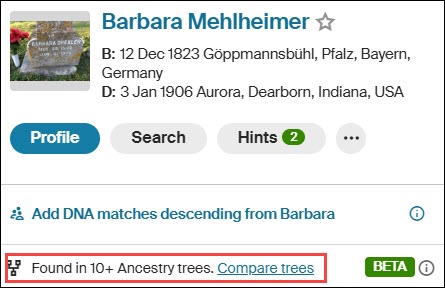
I clicked on Barbara Mehlheimer’s link in my tree, which displays this little mini-profile. Then click on “Compare trees” at the bottom.

Ancestry displays your tree, at right, and the other tree, at left. You can select another tree to compare at top right.
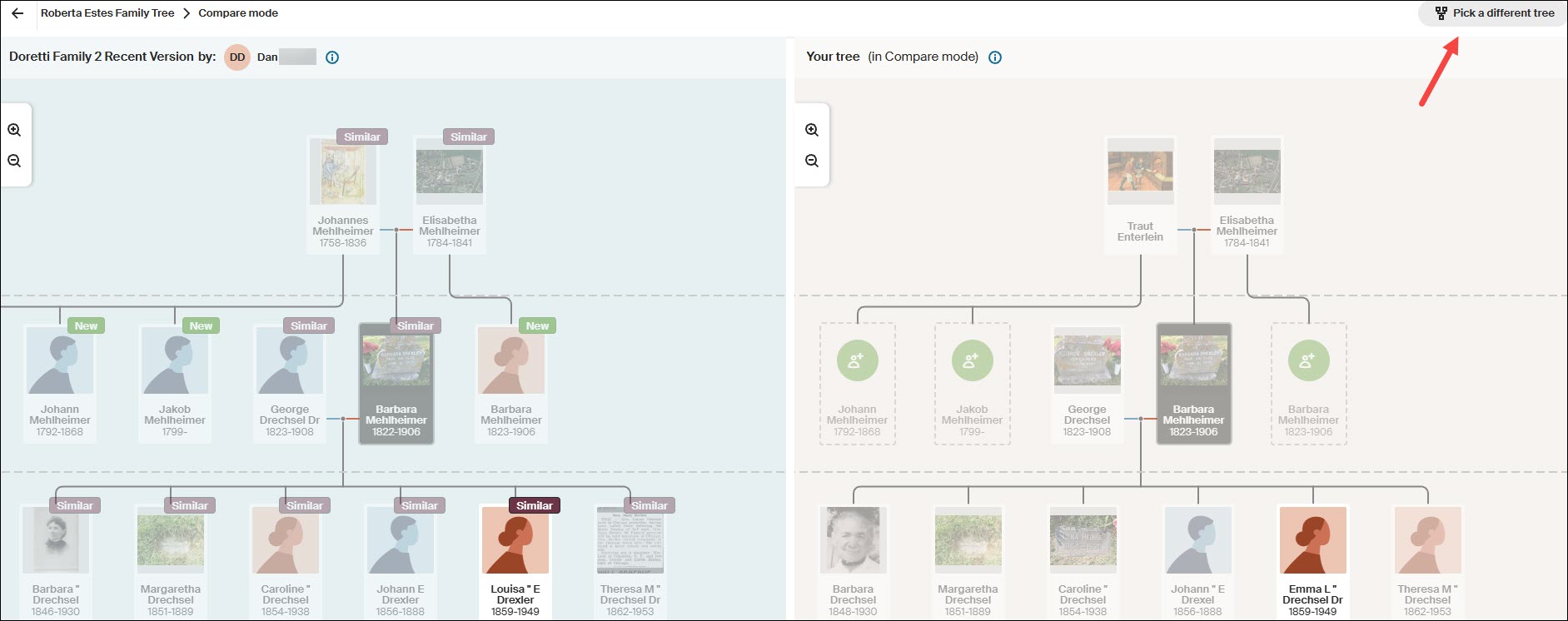
Ancestry’s comparison only shows a total of three generations – the selected person, their parents, and their children.

The person I actually want to follow is Louisa, but if you click on Louisa’s card here, it simply compares the two Louisas – it doesn’t shift down a generation.

This means that to follow more recent generations, you have to go back to your tree, select someone further down in the tree and repeat the process.

This process is cumbersome, but doable thanks to the new Compare Tree function. I’ll come back to this after checking the rest of the “easier to harvest” fruit from other resources. Remember to make notes in your research journal so you don’t forget where you left off – although trees are always changing.

MyHeritage has one of my favorite tools.

At MyHeritage

Recently, MyHeritage has begun providing midrange Y-DNA haplogroups for some of their DNA testers. If you’re one of the lucky testers, you can use the free Discover tool to learn about your haplogroup, but a haplogroup alone won’t help you much with genealogy. You need matching and advanced tools for that.

Unfortunately, you can’t see the haplogroups of your matches, so you can’t search or filter using that criterion. You can, however, ask any men with the surname you’re seeking if their haplogroup is displayed.

Cousin Finder

MyHeritage has an ingenious tool called Cousin Finder that I wrote about here. Cousin Finder helps you find cousins who share common ancestors with you, regardless of whether or not you are a DNA match.

MyHeritage found 531 people in their database that share ancestors according to both their and my trees.

This list of matches doesn’t page; it scrolls, so I made a spreadsheet of the people who are relevant to my search for my brick-walled ancestor. Scrolling becomes difficult and very slow as you proceed down the list. I didn’t want to have to do this twice.

You can improve performance by using the relationship side filter. Because your ancestors match, MyHeritage knows on which “side” of your tree your common ancestor is found.

At this point, I’m interested primarily in identifying Y-DNA or mitochondrial DNA candidates for a specific ancestor.

Using the Drechsel/Mehlheimer line as our example, I’ll search on my mother’s mother’s side.

We already met Patty at WikiTree, but let’s pretend we don’t know Patty. I can click on “View her tree” to see Patty’s whole tree, or I can click on “View Relationship,” which shows how we are both related to our common ancestor.

As we know, for mitochondrial DNA, any male in the line between the ancestor and the testing candidate blocks the mitochondrial DNA path. Patty inherited her mother’s mtDNA, not her father’s.

I didn’t forget about Eva Miller Ferverda either.

I searched for cousins who descended from my mother’s father’s side to find mtDNA candidates for Eva Miller and didn’t find any. But I did find an entirely unexpected bonus.

My mother’s father’s line shows all the connections on that side. While clicking through each one, I quite serendipitously discovered a mitochondrial DNA candidate for Eva Miller’s husband’s great-grandmother, Anna Elizabeth Jonker, AND, separately, a potential Camstra Y-DNA tester too. Oh, happy day!

It was only later, while working on my genealogy for Frederica Ruhle and hoping to discover where she actually lived in Pennsylvania, that I discovered that MyHeritage has put a Cousin Finder link in each ancestor’s profile.

Who doesn’t love a pleasant surprise?!

You no longer need to sift through all of your cousins on a particular side, but remember, had I not done that, I wouldn’t have found either the mitochondrial descendant of Anna Elizabeth Jonker nor the Camstra Y-DNA candidate.

At FamilySearch

FamilySearch is more challenging and is best for fleshing out trees where not much research has been done. Remember that FamilySearch has access to records that are not available at either Ancestry or MyHeritage.

FamilySearch is a one-world tree. Like all trees, it’s subject to errors, so caution is always advised.

At FamilySearch, from your profile card in the tree, locate the ancestor whose Y-DNA or mtDNA you seek.

Then click on that person. Their profile card will pop up. Click on “Tree,” then, at the top right, select Portrait.

Now you can expand their children downward. Note that the little “two people” in the top left corner of the profile card means there are multiple spouses. The only way to view all of the children is to click on that person’s placard, then select the alternate spouse.

Living people have no placeholders on this tree.

You can contact contributors who provided information on a profile in the tree.
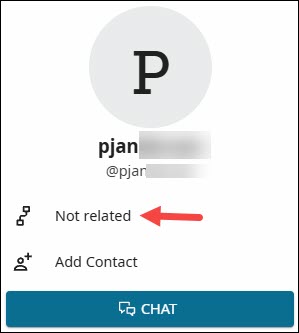
Click on the source provider’s name to see if they are related, and click on the little tree icon to see how.

However, once a year, there’s a great way to contact interested descendants.

Relatives at RootsTech

RootsTech is the largest genealogy conference in the world, and it’s sponsored by FamilySearch.

About six weeks before RootsTech takes place each year, and for about a month after, you can participate in Relatives at RootsTech.

During that time, you can select an ancestor and see which other people who have signed up for RootsTech also descend from that ancestor. I wrote about how to do that in the article, Relatives at RootsTech Reveals Cousins and Provides DNA Candidates. I almost always find someone who descends from an ancestor whose Y-DNA or mtDNA I need for my tree.

It’s a wonderful opportunity to meet new cousins and collaborate.

At GEDmatch

GEDmatch is an autosomal DNA upload site that offers a variety of matching and display options. While they don’t attempt to calculate a haplogroup, uploaders can enter their mtDNA and Y-DNA haplogroups, if known.

GEDmatch isn’t normally a resource we think of for either Y-DNA or mtDNA, but it can be useful under some circumstances.

In the One-To-Many limited free version and the Tier 1 subscription model, you can view haplogroups if someone has entered their haplogroup name, but you can’t filter without the Tier 1 version.

I filtered for haplogroup T2b and found one person in the match list with haplogroup T2b4. I then viewed the GEDCOM that this person has also uploaded, but they do not descend from Eva Miller Ferverda’s line.

GEDmatch isn’t built for haplogroups, but sometimes, if you have a known haplogroup that isn’t terribly common, you can catch a lucky break there.

Where AM I?

OK, so where am I in all of this?

I feel like I’ve searched the corners of the earth!

I’ve primarily used two examples.

  • My own mtDNA line which is the Drechsel/Mehlheimer line that I chose because it’s a great example that I knew well.

If I had actually been searching for a testing candidate, we would easily have eliminated several possibilities. Five female lines remained as possibilities that need additional research, plus my own test if someone were actually searching.

  • Then there was Eva Miller Ferverda (1857-1939), whose partial haplogroup, T2b, was discovered at 23andMe in three matches. I was able to reconstruct their trees, confirming that this was her line, but I was unable to find any testing candidates elsewhere.

Each of the DNA testing and genealogy vendors provides a way to communicate with other users of their platform.

  • At both 23andMe and MyHeritage, you can message through their platform.
  • At FamilyTreeDNA and GEDmatch, you can email your matches.
  • At WikiTree, you send an email through their platform to the profile card manager.
  • At FamilySearch, you cannot see placeholder cards for living people, so you need to check to see if people making changes to that ancestor’s profile are related. Then check their children closest to the present day for the same information. You can message through the FamilySearch platform.
  • During Relatives at RootsTech, you can message your cousins through their platform. The great thing about these folks is that you know they are interested and engaged, because they’ve just signed up for RootsTech.

Communicating With Testing Candidates

I’m fortunate that there are three mitochondrial descendants of Eva Miller Ferverda at 23andMe, one of whom is also at FamilyTreeDNA. I will message or email all three of them individually with a short, customized message that contains:

  • How I am related to our common ancestor.
  • A question about whether they have taken the mtFull test, or any test, at FamilyTreeDNA. If they have taken any test there, it’s easy to upgrade.
  • A sentence about how FamilyTreeDNA was the original genetic genealogy founder of this industry and the only company to offer the full mtDNA and Y-DNA tests.
  • Why they can benefit from taking the mtFull test and how it can help us learn more about our common ancestor.
  • An offer for a full-sequence mitochondrial DNA testing scholarship if they have not already taken that test.
  • I ask if they are interested and provide my email in case they have questions or want to discuss further.

Depending on how much space I have for the message, there are two articles I often provide links to in case they are unfamiliar with either Y-DNA or mtDNA testing.

  1. 4 Kinds of DNA for Genetic Genealogy is a very basic article for people who might be unaware that there is any type of DNA testing other than autosomal. This is often the case with Ancestry.
  2. The article Mitochondrial DNA A-Z: A Step-by-Step Guide to Matches, Mitotree, and mtDNA Discover is an in-depth article about using mtDNA. This is a wonderfully educational how-to article, but I always hesitate before sending this one because I don’t want their eyes to glaze over.

Scholarships

I gladly and eagerly offer scholarships for both Y-DNA and mtDNA testers from lines I need to represent my ancestors.

I equate scholarships to finding a rare out-of-print book about that exact family line, with only one or two copies still in existence, and only one accessible in a rare book shop in Podunk, Idaho. I would book a flight tomorrow at 5 AM to go and pick it up in person even if I had to eat beans and hot dogs for the next six months to pay for it. If you know me, you know I’m not kidding! I’ve gone on many wonderful road trips to meet with and collect DNA samples from cousins.

A Y-DNA or mtDNA test doesn’t cost nearly as much as that excursion and is even more reliable, because we know the DNA results are accurate – assuming the tester’s genealogy is accurate, which you should verify, and no undocumented adoptions or broken lineages have occurred.

Good luck on your treasure hunt!

____________________________________________________________

Share the Love!

You’re always welcome to forward articles or links to friends and share on social media.

Subscribe!

If you haven’t already subscribed, it’s free. You’ll receive an e-mail whenever I publish by clicking the “follow” button at the top of the main blog page, here.

Help Keep This Blog Free

I receive a small commission when you click a vendor link in my articles and purchase that item. This does NOT increase your price but helps me keep the lights on and this informational blog free for everyone. Please click on the affiliate links in the articles or to the vendors below if you are purchasing products or DNA testing.

Thank you so much.

DNA Purchases and Free Uploads

Genealogy Products and Services

My Books

Genealogy Books

Genealogy Research

FOCUS: Step 1 – Seven Solutions for DNA Matches with Absent or Shrunken Trees

This is the second article in the FOCUS series.

You can read the first article, FOCUS – A New Series Focused on Breaking Down Brick Walls, here.

DNA matches without trees, or bare-bones shrunken trees, can be a significant roadblock whether you’re looking at autosomal, Y-DNA, or mitochondrial DNA matches. To help resolve that issue, I’ve listed seven ways you can create or expand those trees. Not every methodology works every time, but none will work if you don’t invest the effort to try them.

I’ll probably say this in every article because it bears repeating. Everything we are working with is a hint. Breadcrumbs along the way. Sometimes they lead to the next wonderful breadcrumb. Sometimes to a dead end. Sometimes they look like useful breadcrumbs, but they are red herrings and not relevant. And sometimes they are simply wrong. Do not throw the baby out with the bathwater. Also, do not think every hint is accurate, because they aren’t, and many rely upon other people.

Our goal in the FOCUS series is to accrue evidence from multiple sources, tools and methodologies that leads us to our ancestor. So let’s start with trees.

Trees, Trees, But Not Everywhere

DNA testing relies on trees to identify our common ancestors, at least with matches beyond the closest generation or two.

This is true at all vendors, which is why all of the main vendors, except 23andMe, integrate with or provide trees as part of their platform.

Because we need to work with trees for all types of DNA testing and matching, I’m going to share various ways to overcome partial trees or even no tree at all. I’m intentionally using examples from multiple vendors throughout this series.

23andMe is omitted in this article because they don’t support trees, although testers can include a link to a tree elsewhere.

GEDmatch is omitted in this article because they are not a testing company. They are a DNA upload and matching site, so everyone at GEDmatch has tested elsewhere and probably has a tree there. You can upload a GEDCOM file to GEDmatch, though, so it never hurts to check and see if your match is there too.

Some of these techniques are vendor specific, and others can be applied broadly.

What Is a Shrunken Tree?

A shrunken tree is a small tree in which your DNA match has included only a few people. Small or missing trees tend to frustrate genealogists – a lot. I remind myself that these folks maybe seeking their family or new genealogists, trying to piece their tree together themselves.

This is a tree provided by one of my matches. Their mother is deceased, but it’s recent enough that I’ve chosen to obfuscate her name as well, and it’s not relevant to the next steps.

There’s not a lot to work with here, but as it turns out, there’s enough.

Based on this tree, we have no idea where in their tree our Most Recent Common Ancestor (MRCA) is found, so let’s look at a few ways to indirectly expand their tree in order to find our common ancestor.

Step 1 – Check Your Own Tree

I know this sounds like a “duh” moment, but always remember to check your own tree to see if you’ve expanded that branch to include your match’a ancestors and completely forgotten about it. I maintain my primary tree on my computer with lots of notes and information that I’m not comfortable uploading to a public space. I maintain smaller public trees with a couple thousand people at both Ancestry and MyHeritage, along with a link to my ancestors at WikiTree.

If your match is a female, they may be using a married surname, so always keep that in mind. I try their complete name first. Then I search for their surname to see if it’s a “married-in” name – and cross my fingers that it’s not Smith. If they have any ancestors in their tree, I try their oldest generation next.

Step 2 – Reach Out to Your Match

Every vendor provides some way of communicating with your matches. You can either message or email, depending on the vendor, and your match may be very willing to share more about their genealogy. They may have a better tree elsewhere that they will share with you, or may know more than is in their tree.

An Ancestry survey showed that about 53% of Americans can’t name all four grandparents, and only 47% can correctly name all four. Only 4% can name all eight great-grandparents. In the Rolland tree, the tester knew more about their mother’s side, and only knew the first name of their paternal grandmother.

So while shrunken trees are exasperating, they are probably more normal that we think, and we all have to start someplace. Your match might well appreciate some help.

Step 3 – Check Other DNA Testing Sites

If your match has a real name (meaning not just initials or something indecipherable), such as Heather Jacobs (made-up name), who is predicted to be your third cousin and shares 100 cM of (unweighted) DNA at one vendor, sign on to your accounts at the other vendors and see if Heather is a match there.

You’re looking for a Heather, or maybe HJacobs or something similar, who’s approximately a 3C with roughly the same amount of shared DNA. The exact relationship prediction may not match, but it should be close, and the amount of shared DNA may not be identical either. If it varies substantially, it may not be the same person, so exercise care.

Every vendor provides the ability to search for matches by name, and if you can’t find them by name, begin paging until you reach matches at the approximate predicted relationship level. In Heather’s case, that’s third cousins. Beyond third cousins, this paging technique quickly becomes too laborious.

At Ancestry

Only one vendor, Ancestry, “downweights” your DNA with your matches, meaning that they may remove some amount of DNA that they consider “too matchy.” In my case, this is often DNA from my Acadian lines, which collectively forms pileup regions. This does NOT mean those aren’t useful, but that’s not relevant for this discussion other than to alert you that you need to check both the assigned amount of DNA and your unweighted shared DNA with a match when you’re trying to verify that the match is the same person at two vendors.

Assuming you find “HeatherJ” at Ancestry, you’ll want to verify that it’s the same person as Heather Jacobs at the other vendor.

Is your amount of shared DNA roughly the same?

Click on the relationship link to view the amount of unweighted DNA. In this case, weighted and unweighted is the same, and Heather Jacobs matches you with 100 cM at the other vendor.

Heather has a public tree here, and it’s the same size. It’s probably the same person, but check anyway.

Heather’s tree at Ancestry is exactly the same as it was at the other vendor, so this confirms it’s the same person.

There’s an important hint here, and let me emphasize the word HINT.

While Heather’s actual 15-person tree does NOT extend to our common ancestor, Ancestry has pieced together other trees that include and extend beyond her ancestors to show my (purported) common ancestor with Heather. Click on Common Ancestor, which takes you to ThruLines.

This new version of ThruLines has now replaced the older version. Unfortunately it does not show Heather’s path back to our common ancestor, Hiram Bauke Ferverda.

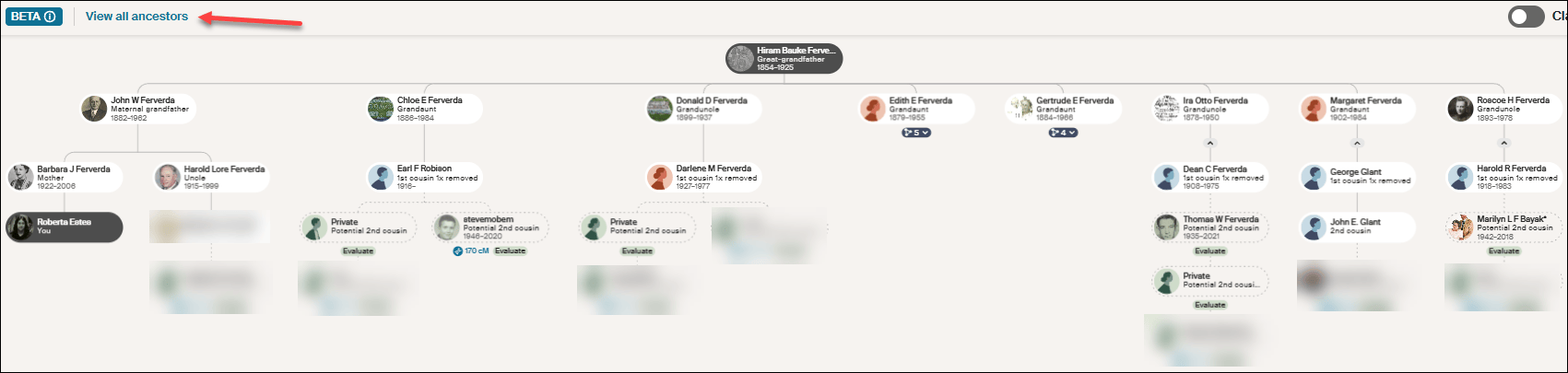
Click on “View all ancestors” in the upper left-hand corner.

Click on any image to enlarge

After clicking on “View all ancestors,” click on Hiram Bauke Ferverda to see the DNA matches who descend from him. Despite what Ancestry provided under my “Common ancestor” with Heather, she isn’t shown anyplace here. This could be a bug, given that I later confirmed this common ancestor using other techniques.

Regardless of the problem, this IS a hint, so don’t disregard it entirely. Just keep your “skeptic” hat handy and wear it liberally. You’ll need to use Ancestry searches and hints, including possibly Quick and Dirty Trees, to piece together the possibilities.

Make a note on Heather’s match at Ancestry so that you know what you found this time through. We’re not done with Heather. Move on to another vendor to see if Heather has tested and has a better tree elsewhere. We’re gathering evidence.

At MyHeritage

Heather is not at MyHeritage, so I’ll use a different example.

Let’s look for Cathy, a 3C match who has no tree at another vendor. I found her at MyHeritage with the same first and last name and approximately the same amount of shared DNA, so I’m confident it’s the same person.

Fortunately, at MyHeritage, Cathy has a tree, which is the first step, of course, but no common ancestor is shown in her tree.

MyHeritage has a wonderful feature called Theory of Family Relativity which are often based on “Smart Matches.” Click on “View theory.”

Click to enlarge

MyHeritage has found five possible paths to a common ancestor based on multiple documents and trees. In this case, Surrilda Claxton in my tree is the same person as Surelda Clarkson in Cathy’s tree, and MyHeritage made that connection correctly.

I confirmed this Theory at MyHeritage as accurate, and now I know how Cathy at the other vendor with no tree is related to me. I made a note about Cathy at MyHeritage on my match with Cathy at the other vendor too about our common ancestor AND where Cathy’s tree can be found. Add Cathy to her proper place in your trees.

Step 4 – Sleuth at the Same Vendor

At FamilyTreeDNA, when I find a match with no tree, I do two things.

Looking at Patricia’s profile, I immediately see that she has been assigned to the maternal side of my tree. I’ve linked other known matches which allows FamilyTreeDNA to use triangulation to assign Patricia to the proper side.

Then, I notice that even though Patricia doesn’t have a tree, she has provided her ancestral surnames.

Clicking on “View Details,” I can see if any of them match my surnames, or I can view all of her surnames.

Given that this is my mother’s side, these shared surnames give me an idea of a shared lineage.

Next, look for your closest shared match WITH a tree. Clicking on the two little people at far right displays your shared matches which are labeled “in common with.”

I share 122 matches in common with with Patricia, and our closest shared match, other than my mother who is not shown here, is Dennis. Dennis happens to be a known relative, which is why he already has a note.

But for purposes of this exercise, let’s say that I haven’t already figured out how Dennis and I are related. Viewing Dennis’s tree, I see that our common ancestors are Anthony (Antoine) Lore and Rachel Levina Hill. Hmmm, Hill is on Patricia’s list of surnames.

Sleuthing at the same vendor is MUCH EASIER when your matches have at least a couple of generations in a small tree. Having no tree is the most difficult situation at every vendor, but there are multiple ways to begin building a tree for your DNA match, or to expand a shrunken tree.

Step 5 – Google Is Your Friend

Google is your friend. Google cannot reach behind paywalled sites, so you won’t find records other than records from free indexes at Ancestry or MyHeritage in Google searches, but you will find information about people from other genealogy sites.

Let’s go back to Rolland Robison who died in 1963 and his wife, Chloe. And let’s also consider that his surname is often spelled RobiNson. We know from our match’s tree that Rolland’s wife’s first name is Chloe.

Look closely at the search box in the image below. By structuring the query as “rolland robison died 1963 wife chloe”, we combine a full name, a specific vital event year, and a spouse’s first name. This gives Google just enough precise detail to hopefully filter out (most) noise.

That’s interesting. It looks like Rolland can be spelled two ways too.

Not only is there an article (yes, I wrote about this previously), BUT there’s also an obituary and estate distribution in a local newspaper that I have never seen before.

Rolland’s wife’s birth surname is given in his obituary, even though her first name is misspelled. This is the link I need to establish our common ancestor, because Chloe is my grandfather’s sister.

Google can provide you with important links to information and articles that are not yet in genealogical databases, such as:

  • Facebook accounts for individuals: Useful for finding the tester, relatives or family connections.
  • Facebook groups and pages: Forums that contain local historical information and shared community memories.
  • LinkedIn & Instagram accounts: Social footprints that often reveal professional histories, geographic locations, and birth surnames.
  • Mentions elsewhere: Local newspaper archives, digital press releases, and published legal notices regarding estate partitions or land records.
  • Obituaries: Printed family notices that explicitly list surviving family names and relationships along with the Legacy.com tribute archives.
  • Public websites & genealogy blogs: Independent sites where genealogists sometimes publish deep-dive ancestral lineages. Always verify.

Google also provides an easy way to find free resources in public databases without having to search each one individually, including:

  • Collaborative family trees: WikiTree, FamilySearch, and Geni trees.
  • Cemetery registries: FindAGrave and BillionGraves.
  • Digital libraries: Internet Archive and Google Books, which hold a vast assortment of historical information like out-of-print town and county histories.
  • Open-Access portals: The Library of Congress (LOC) and the Digital Public Library of America (DPLA), which pulls photos, maps, and civic documents from libraries across the US.
  • Volunteer projects: Regional repositories like GenWeb.
  • Directories: Local alumni directories and digitized historical yearbooks.

Pro Tip: Resurrecting Old RootsWeb and Genealogy.com Breadcrumbs

RootsWeb was a wonderful resource for genealogists until Ancestry began systematically dismantling it in 2023.

While Google is fantastic at finding obscure text, it will occasionally point you to an old, broken RootsWeb link. Because Ancestry has frozen or removed much of the old platform, don’t let that 404 error stop you in your tracks. Copy the dead URL from Google and paste it into the Internet Archive Wayback Machine where you can sometimes resurrect the exact information you need!

The same methodology applies to the old message board, Genealogy.com.

Step 6 – Search Old Emails and Files On Your Own Computer

I know this probably sounds either ridiculous or incredibly obvious, but if you’re a typical genealogist, you probably have a quarter century of emails on your computer, not to mention reams of photos that you saved because someone gave them to you and you “might need them someday.”

I’ve never thought of myself as the family archivist, but I clearly must be, which is another name for the family packrat. Long live the packrats.

I’ve learned that I need to search all of my email folders for the names in someone’s shrunken tree. I’ve been shocked at what I’ve found there.

Don’t just search for full names. For example, Rolland Robison or Chloe Ferverda. Search for the names individually too. So, Rolland, Roland, Robison, Robinson, and Chloe. I didn’t know Chloe was a Ferverda yet when I was initially searching for her identity.

A middle-of-the-night insomnia-induced epiphany struck – “search your emails.” Who needs sleep? It’s overrated! I hopped right up, searched my emails and my computer and found even more.

As it turns out, I attended a Ferverda family reunion in 2010 where I only knew two people. Thankfully, cousin Cheryl thought to invite me, because someone brought an old photo album AND an old Ferverda family Bible. I took photos of everything in the album even though I had no idea who most of those people were and neither did the album’s owner.

Many photos had no surnames at all, or they were recorded as Mr. and Mrs. SoAndSo.

Here are “Chloe and Rolland” as they were named in the photo, with no last name or additional information.

Here are Mr and Mrs. Rolland Vincent Robison. I carelessly saved this one as Rolland RobiNson. My bad.

A search for just “Rolland” found both, which is exactly why you need to search creatively.

Finding those initially still wouldn’t have told me who they were, but I would have at least had some family context, given that a Ferverda descendant brought the album to the Ferverda reunion.

However, this article about Rolland and Chloe’s 50th wedding anniversary from that same album would have provided that missing context.

My emails revealed now-deceased cousin Cheryl referring to Aunt Chloey, but with nothing else to identify her. A search for simply “Chloe” found Cheryl’s emails.

More tidbits of evidence.

I did a very poor job of saving these images with useful names because they weren’t relevant at the time, although I did store them in a “Ferverda Reunion” folder. Now, I’m going to attach them to Chloe and Rolland’s profiles in my tree at both Ancestry and MyHeritage to make sure they don’t disappear forever.

I’m also going to send them to my match with the abbreviated tree. As Rolland and Chloe’s grandchild, if they don’t have these pictures, I’m positive they will want them.

I’m sure you’ve noticed that I got VERY squirreled during this process, but utilizing all of our resources is exactly how we make discoveries – and sometimes that includes chasing squirrels.

This is also why our research journals are important – so we don’t chase the same squirrel over and over.

Step 7 – Quick and Dirty Trees

I used the Robison example in an earlier article discussing how to build a “quick and dirty” tree. I use quick and dirty trees often because it’s the easiest way to keep track of informational tidbits from different places, including multiple vendors, during the research process.

I’ll say it again here. Quick and dirty trees aren’t meant to be public. They aren’t gospel. They are a structure for you to work through the various hints provided and to evaluate them to see if they are of sufficient quality for you to identify a common ancestor with a DNA tester who provided a minimal tree.

You can read about these investigative workbenches in the article, What is a Quick and Dirty Tree, and When Might I Need One?

What’s Next?

Have you decided which of your brick walls you’re going to focus on? Last week’s article discussed some of the criteria you might want to consider and how to prepare.

Select your ancestor, because next week, we’re going to begin using a variety of tools and techniques to track that ancestor. Bit by bit, we’re going to gather evidence that will hopefully lead to a breakthrough.

What is a Quick-and-Dirty Tree, and When Might I Need One?

You may have heard genealogists talk about creating a quick-and-dirty tree.

What is that, exactly? When and why would you want one?

Good questions.

Matches and Trees

DNA matches don’t always have useful trees.

They might have:

  • No tree
  • A partial tree with only a few people in the closest generation or two
  • A tree with some lines built out, but others not so much

What’s a genealogist to do? After all, it’s your match’s tree, not your tree, and you have no way to expand their tree.

Except, you do.

It’s called a quick-and-dirty tree.

Quick-and-Dirty Trees

A quick-and-dirty tree is essentially a “throw-away” tree that you construct at Ancestry with the express purpose of obtaining hints, including potential parents, in order to quickly build your matches tree backwards in time until you (hopefully) reach a common ancestor.

And yes, of course trees, hints and suggestions of any kind can be wrong – but that doesn’t mean they’re always wrong, and you’re not adding anything from your quick-and-dirty tree to your tree – or even displaying it publicly.

You’re simply trying to find a common ancestor by using what your match has provided in their tree. Think of a quick-and-dirty tree as a scratch pad of sorts.

Let’s work through an example.

Initial Analysis

In this example, Ancestry has already told me that this match is most probably my half-second-cousin (half 2C) or second-cousin-once-removed (2C1R) based on the amount of DNA that we share, although the full relationship range includes several more options.

Ancestry also tells me that this match is on my maternal side. There’s no information provided about whether this match is on their maternal or paternal side, or even both.

A second-cousin (2C) relationship means that we share great-grandparents, and once removed means that one of us is one step further down the tree than the other person.

In other words, I’m 2C with my match’s parents, or my match is 2C with my mother. I wrote about this in the article, Concepts: What Does a Cousin “Once Removed” Mean?

I see that my match has a public linked tree with 7 people, which probably isn’t going to be terribly helpful.

Of course, the first thing to do is to review my match’s tree and see if I recognize either their surname or the names in their tree.

This tree only reaches back two generations, and our common ancestor, based on the relationships predicted by shared DNA, would be another generation, or two, further removed.

I don’t recognize any of these names, although I’ll review each person for a location to see if I can narrow the scope to the couple most likely to lead to our common ancestor.

On my mother’s side, one of her parents is from northern Indiana, and one is from southern Indiana, but not everyone enters locations in their trees, and they aren’t necessarily accurate.

The list of “all people” in my match’s tree, under “Find in tree”, at far right, provides additional information. Unfortunately, this tree shows Earl Townsend’s wife’s name as Mildred Ideal Thorstenson Townsend Smith here and in her profile, but the name order differs. To begin, I’ll enter Thorstenson Smith, not her married name of Townsend, in the quick-and-dirty tree I’m building. You can refine this shortly.

In this case, it looks like the Townsend line is most promising to find a common ancestor, given that Fulton County is in northern Indiana, but we’ll find out that this isn’t the case when we construct our quick-and-dirty tree.

Building the Quick-and-Dirty Tree

You need to build a new tree, NOT add to your “real” tree.

At Ancestry, go to Trees in the top banner, then click on “Create and Manage Trees.”

You’ll see the list of trees that you own. This is where all of the trees that you create live.

At the far bottom, you’ll see the prompt to create a new tree. Click there.

Next, you’ll see a blank tree.

For the home person, you can enter your match’s name, but be sure to list them as living so you’re not revealing private information.

After adding one parent, you’ll be prompted to save and name the tree. Both the tester, who is designated as male by the Ancestry icon, and his father are either both living, or private, so I’m simply entering the surname of Robinson based on the grandfather’s surname. That could be incorrect of course, but it’s all I have to go on – yet.

Ironically, their grandfather’s surname was spelled Robison, without the “n”, not Robinson, but I accidentally entered Robinson and still got where I needed to go.

Clearly, I’m not going to allow this tree to be viewed by others, aka public, so I’m not checking that box. If it’s checked by default, uncheck it.

I don’t make my quick-and-dirty trees public because they are entirely unproven and unverified. I’m literally quickly searching for hints with every intention of abandoning the tree when I’m finished. If you want to clean the tree up later, you have the option to change the tree’s privacy settings.

Information in Your Match’s Tree Might Be Wrong

Complete the tree to be the same as your match’s tree. After saving your tree, click on the individuals you’ve added to view their hints.

Let’s start with Earl Townsend who appears to be our best candidate based on location.

Earl Russell Townsend has 13 hints, including a marriage license that confirms his birth date and location and provides the names of his parents, plus his wife’s name as Mildred Thorstenson. Based on what we know already, this is probably the correct Earl Townsend.

Of course, the wife’s surname could be incorrect. It could be her first or second marriage, or she could have been a widow when they married, so this surname might not be her birth surname.

Look for additional records in Earl’s hints.

Russell’s death certificate confirms that information, as do the birth and death certificates of their children.

Accept those hints.

If you determine that the original information in your match’s tree is incorrect, you’ll want to correct it in your quick-and-dirty tree. Remember, this is a scratch pad – you can’t hurt this tree.

Let’s change Mildred’s name to reflect her birth surname.

I refined Earl’s wife’s name to Mildred Thorstenson, which then produced 12 hints for her, including her marriage and Social Security record, with her birth and death dates, and her parents’ names. Her name in my match’s tree of Mildred Ideal Thorstenson Townsend Smith had produced zero hints.

Additionally, census records showed Mildred with her parents.

These seem to align, so accept those hints.

Looking at the pedigree view of my quick-and-dirty tree, we now see that both Russell and Mildred’s parents identified in the records are suggested as their potential parents.

Review each suggestion. If they look accurate based on the records identified, accept those potential parents in order to view the next generation.

Based on these names and census information, I can eliminate the Thorstenson line. It’s Swedish, not German or Dutch, which comprise my mother’s northern Indiana lines, My mother has no known Swedish ancestors, and we have proven her Indiana lineage in this timeframe.

Accepting the hints for the parents of both Earl Townsend and Mildred Thorstenson, parent hints appear for John Townsend and Eva Martin.

Now we’re viewing the next group of hints, which would be the great-great-grandparent generation. If these are our common ancestor, that would mean that I’m third cousins with my match, which is beyond the predicted relationship range. Third cousins is not impossible, but it’s beyond the probable match level based on the amount of shared DNA. furthermore, I don’t recognize any surnames.

So, let’s move to the Robison (incorrectly spelled Robinson) line and step through the same process. We can always come back and work with more parental hints on the Townsend/Martin line if we need to.

Rolland Robison only has a death year in my match’s tree, and that combined with the misspelled surname meant he had no hints on Ancestry, so I clicked on “Search” in my quick-and-dirty tree.

I’m searching for a man by this name, with a wife whose first name is Chloe.

AHA!

There it is! Note that Ancestry found Rolland Robison, not Robinson, married to Chloe.

Chloe was a Ferverda. My mother’s father was John Ferverda, and the location is correct for this family.

I saved this record to Rolland Robinson and added Ferverda as Chloe’s surname in our quick-and-dirty tree. This provided Rolland with 12 hints.

Adding Ferverda as Chloe’s surname provides her with a dozen hints too, including potential parents, Hiram B. Ferverda and Evaline Louise Miller – my great-great-grandparents who are indeed the 2C generation.

These common ancestors fall within the expected amount of shared DNA for second cousins, so this aligns well.

My quick-and-dirty tree has revealed at least one pair of common ancestors. Could there be more common lineages? Yes. I would continue building out this quick-and-dirty tree for (at least) another couple of generations on the other lines just to be sure.

What Next?

That depends on what you want to accomplish and your genealogy goals.

I used a DNA match at Ancestry in this example, but your match might be at a different vendor. Regardless, you’ll still want to use Ancestry to build your quick-and-dirty tree based on how they present hints and potential ancestors.

Now that you know how your DNA match connects:

  • Minimally, make a note on the match that indicates the most recent common ancestor(s) identified. I include a link to the quick-and-dirty tree I’ve created.
  • You can add your match and their ancestral path to your common ancestor into your own tree at whichever vendor where the match occurs.
  • If you match at either FamilyTreeDNA or MyHeritage, both of whom provide segment information, I suggest painting your matching segments to DNAPainter.

Painting your segments identifies your matching segments as descending from those ancestors and makes it easier to identify the shared ancestral lineage of anyone else who shares that segment on the same side of your tree (maternal or paternal).

Word of caution here: You can potentially share multiple ancestral paths with any match, so different segments with one match can descend from different ancestors.

  • If your match is at FamilyTreeDNA, you’ll want to link your match to their place in your tree.

Using triangulation, FamilyTreeDNA utilizes linked matches to assign matches who share the same segments to the maternal or paternal side of your tree (or both) using triangulation.

  • You may be trying to break through a brick wall by identifying common ancestors BETWEEN your shared matches that aren’t in your own tree.

This approach is obviously easier the closer your brick wall is in time to the present. Great-grandparents, at the second-cousin level, and great-great-grandparents at the third-cousin level are much easier than 5th- or 6th-generation ancestors who lived before birth and death certificates and detailed census records existed.

Furthermore, the further back in time, the more likely that you may encounter:

  • Pedigree collapse, where the same ancestors appear more than once in your tree
  • Or you share multiple common ancestors with your matches

Of course, there’s always the possibility of endogamy too, where you descend from a historically heavily-intermarried population, such as Ashkenazi Jews or the Amish, for example, which means you may share segments passed down within the population from distant common ancestors you won’t be able to identify. While endogamy in your lineages may increase the amount of shared DNA, which in turn can skew relationship estimates, it won’t prevent you from using quick-and-dirty trees to locate common ancestors.

And finally, unexpected parentage or issues like record destruction may impede your progress, but you’ll never know if you don’t try, which brings us back to the purpose of quick-and-dirty trees.

Building a quick-and-dirty tree is the easiest way to grow your matches’ trees to reveal your common ancestors.

_____________________________________________________________

Share the Love!

You’re always welcome to forward articles or links to friends and share on social media.

Subscribe!

If you haven’t already subscribed, it’s free. You’ll receive an e-mail whenever I publish by clicking the “follow” button at the top of the main blog page, here.

Help Keep This Blog Free

I receive a small commission when you click a vendor link in my articles and purchase that item. This does NOT increase your price but helps me keep the lights on and this informational blog free for everyone. Please click on the affiliate links in the articles or to the vendors below if you are purchasing products or DNA testing.

Thank you so much.

DNA Purchases and Free Uploads

Genealogy Products and Services

My Books

Genealogy Books

Genealogy Research

Rest Easy, Beloved Dolly Parton (1946-2026) – A Legacy of Love

Dolly’s gone, and my heart is broken. Dolly’s nephew shared the sad news with us today in this video, expressing his deep love for her.

I have shed so many tears to Dolly’s songs over the years, but none more than today. Dolly saw me through births, joy, excruciating loss, and so many deaths. Love and loss – and always a reason to get up and try again.

I didn’t realize just how deeply she was woven into my life and into the culture I grew up in until the world suddenly had a Dolly-shaped hole in it. Sometimes grief reveals the true impact of someone’s life.

Dolly was and remains the consummate ambassador of love and humanity – a role model for all.

Dolly inspired so many and lifted us up. Beloved is the only word I can think of that fits the moment.

Through unifying music and lyrics that captured the most universal human emotions, she brought people together despite their differences. She never hesitated to explain that she measured everything she did with the yardstick of love. Love determined what she stood for, what she supported, and how she lived – even when it wasn’t popular.

Everyone could understand the emotions she wrote and sang about because she had lived them, too. Her immediately recognizable Appalachian voice sounded like home to so many of us. Dolly was no stranger to poverty and hardship, and those experiences motivated her to help so many others escape similarly desperate circumstances. Once she started, she never stopped, spending decades lifting people up.

It’s like Dolly was always telling me that I could. Like a favorite auntie who always believes in you, even when you don’t have enough sense or maybe courage to believe in yourself.

I grew up listening to Dolly. Country music wasn’t my favorite genre, but Dolly was always one of my favorite artists because I could relate to everything she wrote about. She was always one of “us,” no matter who you were. Who among us hasn’t been sad or joyful? Her lilting voice carried that entire range of emotions home, reaching the very depths of our souls.

My favorite song of Dolly’s is “Coat of Many Colors,” which you can hear here.

Why? Because it speaks to poverty and redemption. The song isn’t really about the coat at all, but about creating and showing love from scraps that life gave her mother and gives us. Sometimes, those scraps, along with love, are all we have to work with. Life isn’t about money or worldly goods. Beauty is wherever you find it and believe it lives. Like in people’s hearts.

May we all take the scraps life gives us and stitch them into coats or quilts of warmth and love, creating something beautiful that touches people’s souls and helps those in need. We are not doing anyone a favor. We are the ones blessed with the opportunity to uplift others.

Dolly exemplified love and resilience and refused to be diminished by what others thought she, or any woman, could, ought to, or shouldn’t do. She forged her own path with indomitable determination despite what others considered improbable, improper, or, more likely, impossible.

Dolly’s music is legendary and beautiful, but the philanthropic efforts enabled by her success are her living legacy. Dolly’s website provides additional information about her life, along with a link to donate to the Imagination Library in her honor. Dolly founded the Imagination Library 31 years ago, and the program has provided more than 332 million free books to millions of children. Today, more than 3 million books are mailed each month. You can help continue that legacy, as her family requested in lieu of flowers.

Dolly’s own father never learned to read or write. Now, millions of children receive books of their own and, along with them, the opportunity to learn to read and fulfill their dreams, thanks to her.

May we all do even a fraction of the good she did in this world.

Rest easy, Dolly. We will always love you.

AI and Genealogy – Brick Walls, Breakthroughs and Blunders

This is the fourth article in the AI series.

I suggest that you read these articles in publication order, as they build on each other.

AI and Genealogy

Most genealogy vendors use AI in one way or another. Like with everything else, there’s yin and yang to AI and genealogy – but for the most part, sprinkled with a little salt, I love the advances.

Let’s survey the genealogy landscape.

FamilySearch is my go-to for document images, especially now. One of the absolute best things to happen in the genealogy field has been the FamilySearch implementation of full-text searches, which they are rolling out across all of their imaged records. I wrote about the rollout here, and it’s only gotten better in the two years since.

For their latest update, including search hints, watch the video FamilySearch Full-Text Search – Your Golden Path to Ancestral Discovery.

May I live long enough to go back and search for information about each one of my ancestors.

Some of what I’ve already found is, well, shocking and sure does make my ancestors more human. Often, only the primary records like deeds, wills and marriage records have been transcribed, indexed and are online, if that much. Some other records have been published, but you have to know to look in a specific county’s records and have access to the published book. If you were trying to “find your way back in time” to where your ancestor came from, before full-text searching, you were out of luck. Now it’s easy to search across time and locations. Let’s just hope you’re not searching for a common name. Sympathies if you have John Smith.

Is full-text search an application of AI? Absolutely – and it’s wonderful. Is it always accurate? Not by a long shot – but it’s much MUCH better than nothing, and if it’s enough to “get you there,” as genealogists, we can deal with the rest.

Don’t let the pursuit of perfect be the enemy of good!

MyHeritage has been leading the pack with AI for some time now. Initially with their newspaper scans and OCR transcriptions, followed by photo restoration tools, and AI Time Machine. Next, they introduced Tribute Reels, which I wrote about here. Tribute Reels allows you to select photos and then animates them to bring your ancestor to life.

MyHeritage has also recently released Scribe AI, which is now one of my favorites. Scribe AI helps to decipher, translate, transcribe, and interpret old documents, photos, and more. I have not written about Scribe AI yet, but you can read the MyHeritage introduction article here, and try it for yourself here.

As an experiment, I selected a document at random from my saved photos at MyHeritage to see what Scribe AI could tell me. This is a French parish marriage record from 1721. Yes, I submitted something difficult, on purpose, but Scribe AI did not disappoint.

Not only did I receive a historical explanation of what this document is, I received the details, key findings, suggested next steps, a full text transcription in French, PLUS a translation to English, my language of choice.

I have been using ChatGPT for this, but sometimes different AI tools stumble over bad handwriting and such. Mied versus Mius, for example. Now I have two “go-to” tools for translations and transcriptions – both ChatGPT and Scribe AI. Hopefully, if one stumbles over something, the other won’t stumble in the same place.

This is EXACTLY the kind of help that genealogists need.

At RootsTech, MyHeritage announced that they will be introducing GAIA, a genealogy AI assistant, soon. I can’t wait.

Ancestry has been using OCR for their newspaper articles and indexes too, and including items such as wedding announcements and obituaries in your hints. They’ve also implemented AI for LifeStory.

I wanted to see what Ancestry had to say about the LifeStory of William George Estes, who lived in Lynch, Kentucky.

On the next screen, I selected “What might William George have done for entertainment while living here?”

This absolutely cracked me up, because William George Estes was, among other things, a notorious bootlegger. I never heard of him setting foot in a church – not once – nor a library.

Lynch actually didn’t have a library, but it did benefit from the Pack Horse Library Project, where librarians on horses brought the library to remote schools and residents in their saddlebags. Now that would have been both interesting and much more accurate.

Generally, though, this description was relatively accurate. These types of activities were available to people in Lynch, a segregated coal-mining town established and owned by the mining company.

Limited drinking spots? William George counted on that, and it’s exactly how he made his living!

Another recent AI beta tool, “Ideas” has been added and can be found in the upper toolbar of any ancestor’s profile.

I tried “Ideas” for Ollie Florence Bolton because of missing chapters in her story that I’d love to fill.

I was excited. I have already looked for these items, but maybe they are available now, or Ollie’s record can be located. I clicked on “Start researching” for her death certificate.

Was I EVER disappointed. Ancestry, whose primary offering is records, has just told me to search records that IT ALREADY HAS. Ancestry owns Newspapers.com, for Pete’s sake. SEARCH THE DOGGONE RECORDS FOR ME!

As I’ve been using Ancestry over the past few days, I’ve noticed the little Ancestry AI diamond pop up from time to time asking if I’d like help with something. What I wish Ancestry would do is transcribe text in the documents shown, beside the document itself, similar to FamilySearch and MyHeritage.

Across Vendors

One place where we see AI across vendors today is for customer support.

All genealogy vendors and most other businesses now use AI chatbots to answer questions that are asked repeatedly.

AI is the way of the future, and eventually, AI will be able to guide us through records and collections relevant to our ancestors. One day soon, AI will know where to look next and will look there on our behalf, providing an accurate analysis of the results. At least that’s my dream.

Everybody has to crawl before they can walk, so let’s keep moving forward and verifying.

Generating Ancestors

Modifying, enhancing, or even creating photographs of our ancestors is certainly of interest to genealogists. If you haven’t encountered this yet, you will.

I submitted a family picture of the children of Hiram Bauke Ferverda and Evaline Miller to ChatGPT. I asked it to create a likeness of the parents of their adult children, who were standing, and to completely ignore the two seated people. I did not tell ChatGPT that the seated people were Hiram and Evaline.

ChatGPT indicated that it could do as I asked, but cautioned:

  • It won’t be historically accurate in a forensic sense—it’s an informed visual estimate based on facial features the siblings share.
  • If there are both brothers and sisters, I can usually generate separate likely father and mother composites.

Here’s the output.

Notice that ChatGPT “cleaned up” the images of the children. That means it actually recreated them behind the scenes.

Here’s the second image that is different yet.

Here’s the original for comparison.

Here’s the question we need to ask ourselves and answer.

As ChatGPT cautioned, the images aren’t accurate – and I must add, they are especially inaccurate after ChatGPT “fixed” the original.

Should genealogists do this and attach reconstituted AI images to their trees?

I don’t think so, as they fall into the same category as supposed photos of Revolutionary War soldiers who died in 1800, decades before cameras existed. At least, in that circumstance, with a little bit of applied knowledge and logic, the discrepancy quickly becomes clear.

If an AI-generated image is attached, it clearly needs to be marked “AI-generated” across the photo in a prominent location, larger than in my example, such that the watermark or label can’t easily be removed as the photo is copied from tree to tree in the future.

AI genealogy expert, Stephen Little points to the Coalition for Responsible AI in Genealogy‘s statement on “Protecting Trust in Historical Images” which suggests that we “always label, always cite, and use for illustration not evidence.” It further states that images generated by AI should not be used as historical documents.

Here’s the bottom line. If you put any of these images in your trees, anyplace other than on your own computer (assuming you don’t sync with an online tree), you’ve released it into the wild because it will spread, often as the result of “hints.” Other people will copy and save it, and it will be represented as the real McCoy, either intentionally or otherwise.

We all need to be hypervigilant when evaluating photos, now and in the future.

Custom GPTs and Experts

Some people write “Expert GPTs”. Think of AI, generally, as a general practitioner. An expert GPT is written by someone who either is an expert in that field or thinks they are.

Like everything else with AI, remain cognizant of your surroundings. I mention this because I’m aware of an instance where someone who was very excited and well-intentioned about a topic wrote a GPT that was inaccurate – and if you trusted that GPT as an expert, you would be wrong and unintentionally spreading misinformation too.

If you find an expert GPT, validate that the author actually IS an expert in the topic at hand.

There are several custom GPTs available under the “More” button in the ChatGPT sidebar. You can search by topic or keyword or scroll and view by category.

I searched for Y-GPT, about Y-DNA, because I know positively that Dave Vance is an expert and that the answers his Y-GPT provides can be trusted.

Scroll to the bottom and just click “Start Chat.”

In fact, Dave has pre-loaded his GPT with the most common questions.

Dave’s Y-GPT is a great resource, and I recommend it, but all GPTs are not created equal. Fortunately, there are experts like Dave who freely share their knowledge. Just because someone writes a GPT or THINKS they’re an expert does not make them one. Know your author and their level of expertise before you rely on anything.

Special Project – How I’m Using AI Right Now

I want to share a special project I’m currently working on and how I’m using AI to assist. Actually, AI has saved my bacon.

I’m planning to visit my ancestors’ locations in Massachusetts this year. When I began preparing, I discovered that I have 100 ancestors who hail from 45 different Massachusetts towns. Nobody seemed to stay put. Various reasons existed for moving on. More or better land, marrying someone from another town, religious tiffs within the church, change of religion, or simply the lure of the next frontier.

I’ve compiled research into a document for each individual that includes dates and locations for the following facts, when known:

  • Birth
  • Marriage
  • Childrens’ births and marriages
  • Land grants and ownership, including purchases, sales, and inheritance
  • Military service
  • Civic service or appointments, such as selectmen or jury members
  • Church membership
  • Wills and estates, particularly land distribution
  • Death
  • Burial
  • Anything else that is location-specific, unique, or particularly interesting, such as if they helped to found a town, a church, or built a fort

If you’ve read any of my 52 Ancestors articles, you’re aware that I enjoy visiting where my ancestors lived, and “being” with them where the events in their lives took place.

That meant that after I compiled the information about each ancestor, I had to reorganize it by town because that’s how the trip would be laid out. Furthermore, in each location, I wanted to find my ancestor’s land, today. This recent article about William and Nehemiah Hunt, who owned Punkatasset Hill, and its connection to the Revolutionary War is a good example.

At this point, I have more ancestors whose land I need to find than I have time to complete the detailed research – and I was beginning to feel incredibly discouraged.

I Accidentally Turned to Google AI

When I say accidentally, I mean I never realized just how useful Google’s AI could be until I submitted William Hunt’s name, birth and death dates, and location to see what other resources Google’s search engine might turn up. When reading the AI overview, I realized that Google had found resources that I had not and certainly would not in the time I have available to plan this trip.

Then, I switched to AI mode, and the resource improved even more.

Incredible!

When using AI tools, we need to take into consideration the strengths of the tool we are using or considering and the resources it has available. In this case, aside from being a search engine and finding information, Google’s specialty is maps, locations, place names, establishments like restaurants, hotels, historical societies, museums and more – including customer reviews.

While I was preparing for the upcoming trip, I stumbled across information that my ancestors, William Hunt and his son, Nehemiah Hunt, both owned Punkatasset Hill, the hill that the men marched down in Concord to take the Old North Bridge in 1775. That infamous “shot heard round the world.”

Google found those resources for me, and their AI tool linked them together. I spent about two days researching this one ancestral place and family for the article – working with Google resources and using each link provided to VERIFY accuracy. You will find that sometimes the resource links don’t contain what AI said they do.

I hurriedly put together William Hunt (c1604-1667), Punkatasset Hill, and the Revolution for America’s 250th.

I need to make it perfectly clear at this point that AI did NOT write that article or this article for me. I write all of my own articles. Yes, I know AI could write faster and I could publish more, but that’s not my goal or my work. This is my work. Google’s AI was my research assistant, feeding me places and resources to check based on dozens of individual prompts that I fed it in the form of questions.

As you can see in the article, I was able to locate the actual land and home of Nehemiah Hunt, and it was Google that provided the current address gleaned through the video posted by a realtor. Otherwise, I have no idea how I would ever have found that, especially since the local museum/genealogy society is closed on the day I’ll be there.

I was then able to verify that location using other means, including comparing an old photo with a satellite image.

Caution: AI was incorrect more than once, and had I not verified, I would have been off on a wild goose chase, thinking I was catching my ancestors. But without AI and prompting it in different ways, I would never have found this at all.

The Process

I’m going to step through a prompt series for my ancestor Gyles (also spelled Giles) Hopkins, Mayflower passenger and son of another passenger, Stephen Hopkins. I’ll add my own commentary as we go.

I knew that my ancestor, Gyles (or Giles) Hopkins, obtained land in Brewster, Massachusetts. Here’s information I already had before I engaged Google’s AI.

  • Stephen Hopkins, in his will dated June 6, 1644, made Caleb Hopkins, his younger son, his ‘heir apparent,’ and consequently the whole of his large real estate holding was inherited by Caleb after Stephen died in July or August of 1644. Soon after his father’s death, Caleb gave a very large tract of land located in what is now Brewster to Gyles Hopkins, his older and only surviving brother.
  • As early as 1653, Gyles Hopkins owned the 8th lot in a tract in what is now West Brewster, east of Quivet, which he sold on Nov. 9, 1666, to John Wing of Yarmouth in consideration of a mare, colt and other land.

I wanted to know specifically where this land was located and whether Gyles ever lived there.

My first question to Google was, “Where was Giles Hopkins’ land in Brewster, MA, and where is that today?”

Tip: Be very careful when Googling to include identifying information about the person you’re asking about. For example, “Where was the land of Gyles, also spelled Giles, Hopkins who lived between <date> and <date>…” would have been a better way to ask the question to ensure that I received what I wanted. There could be multiple men with the same name.

Based on what I knew about other aspects of Gyles’ life, I suspected that this land was held speculatively, as an investment, because I knew he had lived in Eastham.

So, I was surprised to see that a home had been built there.

But read carefully – it says, “A historical Hopkins home was later built in this area.” It doesn’t say HIS home, but still.

Plus, there’s a Hopkins Homestead and Bakery? Seriously? You mean, I can visit the land he owned, sit there, and have coffee? Maybe? And who built that house? Is it the original house? So many questions…I had to stop myself from immediately going down that rabbit hole. And I wasn’t even in “AI Mode” yet.

Ok, let’s switch to AI Mode and see what it says.

Now we have the name of Snowy Owl Coffee Roasters too, which says it’s a homestead site, but not necessarily “the” homestead site.

And it looks like Gyles’ (or Giles’) son, Stephen, lived in this location. His grandson apparently was also named Stephen.

Google in AI Mode almost always asks if you’d like additional information – and it’s like crack for genealogists – almost impossible to say no. Keep an eye on the sources on the right, because they change with each question or answer, and you may need to click to “show all.”

Tip: Read the sources; do NOT presume that the verbiage used by AI is verbatim in the sources or that it’s there at all.

Next, I asked to see the bakery on a map. You can tell that I’m considering stopping during my visit, right?

Google just backtracked a bit, saying that the Snowy Owl had moved and that the Hopkins House Bakery sits directly on the land granted in the 1640s.

Hot diggity!!!

Word of caution: Verify addresses and locations on Google Maps directly, as I have found discrepancies.

Keep reading, because there’s more!

Wait? What? There’s a First Encounter Beach monument? I had no idea.

Google asked if I wanted to know more. Yes, of COURSE I want to know more about that.

I already know where Gyles is buried, and I’ll get to that when I’m not focused on his land in Brewster.

Ok, I’m definitely visiting the First Encounter site, but where is it exactly?

Google asked me if I wanted driving directions. I asked for 3 locations to be included: the Hopkins House, the Cove Burying Ground in Eastham, where Gyles is buried, and the monument site.

Google must be experiencing “fatigue” because it can’t seem to retrieve everything from its memory. I’ve had this issue before. I know that Google can easily show multiple locations and stops on maps, but this time, it didn’t show “the map below” that it said was there.

Tip: When I encounter this issue, I close Google and sometimes the browser altogether, then reopen Google in AI Mode.

You can then select the conversation you were just engaged in from the AI history menu. You can also search for keywords and view your most recent AI Mode converations. How convenient is that?!

I noticed an “Upgrade” button appear in the top bar and wondered if that has anything to do with the “fatigue” Google’s AI was experiencing.

So, I clicked on the link to see if this could have been the problem with the fatigue that failed to produce the map. It wasn’t the problem, but the information provided was still useful.

I suspect that if I upgraded to either Plus or Pro, which is very reasonably priced, I might experience fewer display issues. I figured that I might have to do that to complete this time-critical project – but I didn’t.

Instead, I just clicked on the embedded link to the map, and saw that the route had been nicely mapped out.

Google even added a few local features that I hadn’t requested, which I found helpful. I should also note, though, that it missed an important landmark – so don’t get overconfident in its abilities and answers, and always verify.

I didn’t realize that the Cove Burying Ground was just a few feet away from the Eagle Wing Inn. I hadn’t asked for that information. I’m not complaining because I’m going to need a place to stay and I can click on that location and see important information like customer reviews.

Unfortunately, by the time I finished the planning for this project, this Inn was full, but Google recommended other locations based on clustering my visit locations so that I only had to move every few days – establishing a central hub in an area.

Often, several ancestors lived in a specific town, like both Plymouth and Eastham. I compiled my information for each individual location, even if they were adjacent and everything I knew about all ancestors in that location, into a PDF file. Providing AI with too much in a single prompt results in less, more diluted, and less reliable information.

For each town, I uploaded the PDF file and asked Google AI how to find each piece of land, where it is located today, how much time to allocate for each stop, the best order, and even for information on places I’ve missed that would be of interest.

In one location, Google suggested a harbor cruise, complete with a contact phone number and website, to view the land of my ancestor because it’s on Saquish Head, which is entirely privately owned and access-restricted.

In another instance, Google identified a home built by my ancestor that still stands. It has been moved from the original location, which is why I didn’t find it.

I did a LOT of prep work and provided summary information for each ancestor, including location, some of which Google helped me gather. The document totalled 551 pages. I asked Google if it could extract every mention of each town from that document, and it replied that its processing limit was between 50 and 100 pages, so the extraction would have to be done by hand. That’s OK, because it gave me a better feel for the landscape and their lives.

After I extracted the ancestors’ information by town, Google helped me immensely by adding information and organizing it into a plan, with directions and recommended time allocation for each place on the itinerary. In one town, Google even found a local Inn located on my ancestors’ land. Unfortunately, it’s booked, but it is open for dinner, so I’ll still be dining with my ancestor – so to speak.

Here were the project steps:

  1. Gather information by ancestor using traditional genealogical resources, plus Google AI to add anything I didn’t already have. Note that Google does not gather information from behind paywalled sites, or sites that technologically deflect crawling and indexing information.
  2. Create section in Master Ancestor Document for each ancestor.
  3. Ask Google to find ancestral land locations today, adding to their page
  4. Extract information from each person in the ancestor document and reassemble by town in travel order. When complete, save as PDF file by town.
  5. Submit PDF to Google AI and ask for land locations today – verifying what it said before. Prompt for an itinerary for each town, listing each stop, and how long each town’s activities will take. Include any gotchas such as locked cemeteries, museum hours, inaccessible locations (like islands), and accessibility concerns (walking, steep hills, etc.)
  6. After each town was complete, create itinerary in table format. Submit to Google AI for verification and suggested lodging in each area. Ask for driving suggestions to avoid high-traffic areas or congested times of day or other concerns or requests – including lunch or dinner suggestions.

This leaves me with the following documents:

Just a few of my Massachusetts ancestors.

  • Master Document by Ancestor – One master document that includes every ancestor in this region. The Table of Contents is 5 pages long, and the document eventually totalled 551 pages. This is how I gathered the information before any organization, and before eliminating Connecticut and Maine, which are outside the scope of this trip.
  • Master Document by Location – I quickly realized that the ancestor document was already much too long, so I created a second document by location which totalled 531 pages.
  • Individual Location Documents – When finished, I divided the Master Location Document into one file for each location. I eliminated locations where there was nothing to see, so I now have 35 individual files, which have been updated individually using AI, so they no longer match the Master Location Document. I will load these to my laptop and also to a location that I can access from my phone so I can reference them as I travel. I would actually like to print them by location to take with me, except 500 pages is a ream of paper and paper is heavy.
  • Master Itinerary by Day/Location – Detailing where I’m staying, confirmation and phone numbers, which town I’m visiting which day, and anything else I need “at a glance.”

What will I need to do after this trip? I’ll need to combine the information from the Master Document by Ancestor with information in the Individual Location Documents that pertains to them. I’ll add photos, of course, and new information gleaned during the trip. I will compile this by ancestor in their own personal file. Will AI be able to help with this step? I don’t know. We’ll see.

And yes, in case you’re wondering, you’ll be reading these as 52 Ancestors stories for years to come!

My intention in this exercize was to illustrate how AI can help locate important geographical features, like ancestral land, for instance, help you organize your data and even plan trips. I almost always find more than I was asking for. I’ve found that Google’s ability to read historical and local history websites is extremely beneficial.

I feared that I might not be ready for this trip in time to make reservations, but thanks to Google AI, I am – and I’ve discovered things about my ancestors I would not have found in time. The worst thing possible is to make a critical discovery AFTER you’ve visited and don’t have the opportunity to return.

Advanced Tools and Bleeding Edge

This series has been focused on the “normie” user, not someone pushing the frontiers of the AI envelope – although we certainly need those pioneers to help sort out how to use these tools safely for genealogy and when to stay away.

When attempting more complex tasks using AI, I’ve experienced spectacular failures. But yesterday’s failures are today’s or tomorrow’s successes. The tools literally get better every day, and a week or month in AI is like a year anywhere else.

The tools from the various AI vendors leapfrog each other, too, and each tool has a unique learning curve.

Recently, Anthropic’s Claude introduced an extremely powerful tool called Fable 5 that was free for the first several days, then available via the purchase of prepaid usage credits or tokens. That’s marketing genius, because it encouraged what I would consider “complex genealogy users” to try it. People who had projects either in mind or in the wings where other models had failed.

Specifically, Fable 5 is focused on what I would call “long horizon” jobs or tasks, such as, “Here are 300 Acadian documents. Please translate and transcribe them, then reconstruct the relationships of the people in these documents.” Or, “Here are 550 pages of ancestors, please reorganize them by town, and within town, by year.” Of course, the construction of the prompt has a lot to do with the degree of success of any query.

Anthropic says it can sustain multi-stage projects over hours or even days, planning work, checking its own output, delegating to sub-agents in agent frameworks, and producing deliverables with much less supervision than previous models.

Some people reported amazing successes with multiple files and hundreds of pages being read, processed, correlated, and reported, mostly accurately. Others had a completely different experience.

I have not been working with these new tools, but Mark Thompson and Steve Little have been. Not only did I not have a massive project ready and waiting, as I had already completed by Massachusetts town extraction, I also needed to have time to VERIFY something that large, because as tempting as this is, AI can be and is often wrong.

You can read about Mark turning Fable 5 loose on his archiving project, here.

Catch up with Steve’s interesting experiments, troubleshooting, analysis and guidance here and here.

The AI landscape is shifting away from asking “Which AI is best?” to asking “How do I assemble the best team of AI specialists and effectively use them?”

Interestingly, these advanced agents are now being used both independently and together to answer complex questions and analyze projects. This is known informally as cross-model verification. Sometimes the models agree, and sometimes they disagree, presenting different “evidence” and debate positions for their conclusions. Ultimately, you are the final arbiter.

Just as genealogists don’t rely on a single record, increasingly they shouldn’t rely on a single AI assistant either. A census, will, land grant, deed, and church record each contribute different evidence, all of which needs to be considered together. Likewise, different AI models have different strengths, weaknesses, and biases. Comparing their answers is often the digital equivalent of seeking independent corroborating evidence.

You don’t need to work on the bleeding edge. Just tuck this away for a future project after these tools are more reliable and stable.

The Take-Away

The takeaway from this is that AI is a force to be reckoned with.

Vendors are using AI, sometimes when we know it, and other times behind the scenes to process text, for example. The net-net of this is absolutely positive.

AI usage will increase over time – and that’s a good thing since we can verify the output. AI can accomplish in seconds, minutes or hours what would take us hours, days, months or maybe never.

As always, AI becomes dangerous when we don’t verify, don’t understand that we need to, don’t know how to confirm the results or we trust “experts” who aren’t.

What Do You Want?

I’m excited for the future and I have my own personal list of how I hope the vendors will integrate AI with tools they provide.

My list includes, but is not limited to:

  • AI records transcription at Ancestry, similar to FamilySearch.
  • At FamilySearch, full-text records by name and location “suggested” as hints, by individual, along with a multiple-record summary of evidence. Over time, this could go a VERY long way in resolving the “wrong spouse” or “wrong child” connected issues that persist.
  • AI “DNA plus tree matching” WITH common ancestors, meaning providing a list of people on your DNA match list who match you and each other and have common ancestors in their tree that you have. Both Ancestry and MyHeritage provide part of this in different ways today, but not all of it.
  • AI “DNA plus tree matching” WITHOUT a common ancestor in YOUR tree. This provides a means to potentially identify a brick-walled ancestor by identifying the ancestors of the people whose DNA matches yours and each other, but who do not share a common ancestor in your tree. However, they DO share ancestors with each other, which could be critically important to your research. Yes, I know this would need to be fleshed out – but it’s doable.
  • AI records searching. Essentially, what Ancestry suggests as next steps, but to actually DO THE SEARCH on your behalf and provide those results. Go a step further and indicate where to find the records if they aren’t on the platform. Message you if those records ever become available there, or the person has been revealed in existing records. For example, if death certificates are now available but weren’t previously – or the writing was so horrendous that the indexing didn’t pick it up before, but the person has been identified now – let me know.
  • At FamilySearch, something similar to relatives at RootsTech, but year-round so that cousins can contact each other, collaborate and make breakthroughs together.
  • Broad yet restricted AI searching, such as “provide me with a list of all transactions that include anyone with the surname of Estes or Eastes between 1700 and 1720 in Halifax County, Virginia.” Or, “Provide me with a list of all Estes men who live in Tennessee but who were born in Virginia in the 1850-1880 censuses.” Or, “Provide me with a list of all Estes men who are listed on the 1840 census as being pensioners or having served in the Revolutionary War.”
  • At WikiTree, FamilySearch, GEDmatch, Geni and other public sharing platforms,  identify and provide a way to contact individuals who qualify to test for the Y-DNA (male direct paternal male-to-male line) or mitochondrial DNA (everyone’s direct matrilineal mother-to-mother line) of your common ancestors. Include an avenue to offer a testing scholarship at FamilyTreeDNA. There’s so much we could learn!!!

I’m sure you can add to this list. Specifically, what would you like to see AI be able to do for you, either within or outside of a vendor’s platform?

The sky’s the limit, so dream big!

_____________________________________________________________

Share the Love!

You’re always welcome to forward articles or links to friends and share on social media.

Subscribe!

If you haven’t already subscribed, it’s free. You’ll receive an e-mail whenever I publish by clicking the “follow” button at the top of the main blog page, here.

Help Keep This Blog Free

I receive a small commission when you click a vendor link in my articles and purchase that item. This does NOT increase your price but helps me keep the lights on and this informational blog free for everyone. Please click on the affiliate links in the articles or to the vendors below if you are purchasing products or DNA testing.

Thank you so much.

DNA Purchases and Free Uploads

Genealogy Products and Services

My Books

Genealogy Books

Genealogy Research

All About AI – What It Is, What It Isn’t, and Why It Matters

This is the second article in the AI series. The first, Your Wonderful AI Assistant – Sometimes Wrong, Never Unsure, Always Convincing, explains why I’m writing this series and what to expect. I suggest that you read these articles in publication order, as they build on each other.

AI is neither inherently good nor bad. The outcome depends on:

  • How it is used
  • By whom
  • Capabilities of the (ever-changing) tools themselves
  • The understanding level of the “requester” and the “consumer,” both
  • Safeguards applied or neglected

About AI

Let me start by saying that I don’t love AI, and I don’t hate it. I’m neither an evangelist nor a doomsayer. I’m a realist. AI is a powerful tool, capable of remarkable things and spectacular failures. Understanding the difference and interacting appropriately are the keys to success or failure.

AI is simply a tool, and like all tools, it can be used for good or evil. AI has the potential to, and does, in some cases, make our lives easier. However, the bad guys and miscreants saw that potential early and have perfected it.

AI is all around us, whether you realize it or not, so don’t think you can just avoid it, because you can’t. AI exists in many forms and is here to stay. We need to educate ourselves so we can reap some of the benefits and avoid the pitfalls.

Education and increased vigilance are the only ways to protect yourself, and I mean vigilance incorporated into the very fiber of your being. No more, “that looks interesting” and clicking without thinking. It’s so easy to do.

When I talk about AI safety, I’m referring to two types of safety.

  1. Using AI tools for reliable results, and how to determine when you’re receiving or consuming something questionable. AI failures occur often and are both irritating and misleading, but not always obvious.
  2. Literally protecting yourself from danger. This includes recognizing when AI is being used without your knowledge and how to protect yourself in the new threat landscape. I am not overexaggerating.

Unfortunately, AI safety is a sliding scale, progressing from one end of the spectrum to the other. There’s not always a clear delineation between correct and incorrect, safe and unsafe, or between different types of AI. As I am wont to say, “It depends.”

Learning about AI, both in general and in specific contexts, is critical. Not yesterday’s AI – but AI right now, because both the AI tools and AI’s capabilities are changing at lightning speed.

We all need to up our game and retrain ourselves to always stop and think first.

AI and You

There are essentially three ways people encounter or interact with AI.

  1. You’re actively using AI as a tool, such as ChatGPT, Claude, Gemini, or others. This is generally safe from an actual danger or “threat” perspective, particularly because you are in the driver’s seat. However, there are aspects you need to be aware of – especially if you’re a novice. I’ll explain methodologies to use AI to (hopefully) increase your productivity and save you from following AI into the underbrush of falsehoods, inaccuracies, and misplaced confidence. In other words, so you don’t have to say, “Wow, was I ever an idiot,” too often.
  2. You’re unknowingly interacting with AI. Sometimes this is fine, but it can open the door to inadvertent reliance on incorrect information and therefore various forms of harm. Sometimes, harm rises to the level of actual danger. Understanding when you’re interacting with AI, understanding its limitations, and recognizing danger signs are important aspects of staying safe.
  3. The AI threat landscape. AI can be dangerous and used against you. I mean screaming-red-neon-flashing-sign hair-on-fire dangerous, and I’m going to explain this new threat landscape and how to improve your chances of being safe, primarily in the final article of this series.

I Use AI, But There Are Limits

I hold a graduate degree in Computer Science and have years of experience in the technology industry where security is both essential and critical. That background, while preparing me generally, cannot prepare one for the situations and well-hidden threats we now encounter every day. Being overconfident and overreliant on prior experience is foolhardy and a sure way to get burned.

The one thing that’s constant in the computer industry is change. The underlying fundamentals remain the same, but everything else changes – and AI is morphing rapidly.

I’ve been using AI since the beginning in a very restricted, measured way. I use AI regularly, tactically, and cautiously, with huge guardrails. I started out by taking classes from Mark Thompson and Steve Little, AI experts in the genealogy space, to learn how to use AI productively. That was a couple of years ago, and the entire landscape has changed since then. I make it a priority to stay current.

In the next article about using AI safely, I’ll share recommendations for training and education from Mark and Steve.

AI tools are trying to emerge from their terrible toddler stage and morph into early teens, but they relapse a lot! Sometimes AI is very helpful, sometimes wrong, and often frustrating – interspersed with amazing victories where AI helps us immensely.

Unfortunately, often it’s almost impossible to tell which is which.

Inspired by a posting in the Facebook group, Genealogy and Artificial Intelligence. Image is AI generated and appropriately labeled as such.

Here’s the caveat – I know I’m using AI. I’m not accidentally interfacing with a Chatbot, thinking it’s a human. I’m not reading something someone else posted and believing I’m reading about an experience that’s true – when it’s AI-created fiction. The question, of course, at that point, is WHY someone created it and posted it in a way that conceals its true origins.

My AI usage is intentional. I know how to be vigilant, generally what AI can and can’t do, and that I absolutely positively MUST fact-check everything. Often, I inadvertently push the limits of AI, thinking it can perform more than it can accurately, which is another reason everything must be checked. As genealogists, verifying sources should be second nature.

If you’re going to use AI, it’s essential that you do the same thing.

So, what, exactly, is AI?

What is Artificial Intelligence?

This is really a difficult question to answer, because AI has been more of a slow evolution, followed by a rapid acceleration of technology – not a specific “thing.” That acceleration occurred when standalone AI tools like ChatGPT, which we know are AI because they are specifically called that, were introduced and made available to the consuming public.

We’ve been using computers for decades now, assisting us on platforms from mainframes to PCs to tablets. Today, our phones are more powerful and useful than early mainframes.

AI is the latest in the cadre of applications, a type of tool that can either stand alone or be embedded in other software tools for specific tasks. Think Chatbots for business websites.

While AI is beginning to be “everywhere,” it’s not a universal scapegoat.

Two years in, AI is being blamed for everything. While AI does make a lot of mistakes, many issues aren’t a result of AI, and it’s not fair to presume they are. Let me give you two examples of what is and is not AI.

  • Not AI – Someone tried to enter text, meaning alphabet, in a field meant exclusively for numbers, like a month field that’s supposed to be a number and not the month name. The person was angry because “AI was wrong” and prevented the erroneous entry. First, it wasn’t wrong, and second, it wasn’t AI.

One of the earliest computer uses was to parse date fields and ensure that the “right thing” was being entered in the correct place. In this case, a numerical month, not the month name. That’s not AI. That’s just plain old-fashioned programming error-checking that’s been a part of software for decades. The program was performing exactly as it was intended.

  • AI – I submitted a spreadsheet to ChatGPT and instructed it to move all of the data in cells in column A that are entirely numeric to the same row in Column B, and to leave everything that contains any alphabetic characters where it is in column A. That’s AI, both because I’m using a known AI tool, and it’s processing my instructions to produce output that did not exist before.

The above image is what I wanted. I completed this by hand to show you what I had in mind. Working by hand is fine with 8 rows of data, but it wouldn’t be fine with 1000 rows, or more. That’s when you need a tool.

What could go wrong? Plenty.

Let’s say that I didn’t provide specific instructions and a cell contained mixed alpha and numeric, like Jane2. Or, if the tool just plain messed up because of some other unknown reason – such as the file being too long, or it misinterpreted an instruction. That’s why you have to verify everything.

With AI, it’s always some variant of the wild west frontier.

Next, I submitted my Before and After spreadsheet, above, and instructed ChatGPT to “Please put this in a chart and make it pretty.”

This is exactly what I received.

I didn’t receive what I wanted, because I didn’t tell the AI tool specifically what I wanted (spacing, color, font, size), and what I didn’t want. This isn’t a problem with the AI tool, it’s a problem with the instructions provided by the “driver.” AI is not a mind-reader, at least not yet.

Hint: When I don’t receive what I wanted, I tell ChatGPT what I wanted and ask it why I didn’t receive that, and what instructions I could provide differently. In this case, I learned that it can’t “discern colored text” (red) and only sometimes can “see” bolding.

This was a very simple comparison of AI versus non-AI. Of course there are endless variations, but in general, AI does something that produces something new or different or in another format – based on conversational instructions.

Examples of what AI can do well:

  • Take notes and summarize online meetings
  • Organize information into outline format
  • Suggest structure
  • Proofread and sometimes provide editing suggestions
  • Suggest places to look for additional information
  • Translate, transcribe and summarize both typewritten and handwritten documents, in multiple languages

Every one of these comes with a caveat. AI can always be wrong. Like any helper or intern, it’s up to us, as the responsible party, to be, well, responsible by monitoring and verifying everything.

Being wrong in places does not mean the tool isn’t useful. AI can transcribe an entire document in seconds, but I need to proofread it against the original. That’s a significant time savings for me. AI can then assist with the logic of how people are related to each other. That doesn’t mean it’s accurate, but it’s a place to start.

We have to learn how to communicate with our intern in a way it can understand to (hopefully) receive the output we want, and we have to confirm that it is.

The more difficult and complex the task, the more difficult the verification.

GIGO

The overarching theme for all computer data is GIGO – garbage in, garbage out. I know everyone can think of hundreds of examples that have absolutely nothing to do with AI. It’s the same now, but on steroids because we add the layers of:

  • Our instructions to AI, which may or may not be as thorough as we thought
  • AI interpreting what it thought we said, according to its internal rules and limitations that we don’t understand
  • AI manipulating data and producing output on our behalf

Additionally, when we ask AI to gather information about something, it can only gather what it can see. For example, some AI tools cannot reliably open weblinks, while others can. Some, like Google have internal routines to rank sites that are more reliable and accurate, and other tools do not.

Asking your AI tool for it’s sources so you can evaluate the GIGO factor is essential too.

Drinking From the Firehose

You might think AI is completely new, but it really isn’t. What’s new is the label of AI and consumer-based products where you get to be the driver.

Think of AI as the big umbrella.

In the past decade or so, artificial intelligence models have been slowly being developed, often for specific use cases. Machine learning models that are self-teaching are good examples. Genetic imputation to equalize autosomal DNA files produced by different vendors before matching is a specific use case.

Traditional programming is very specific and instructs, “If X, then Y.” Imputation, within a limited range of options, says, “Based on X, I think Y is most likely next character.” Machine learning learns by example. AI is the next generation where answers to questions are not hard-coded or self-learned in the same way.

With AI, one could interact and say, “Based on X, what do you think is next, and why?” The answer would be conversational, and would explain how the AI tool got to the result of Y. That doesn’t mean Y is accurate.

Before AI, consumers had never been in the driver’s seat, with the ability to query computers easily about anything with no programming needed – receiving conversational answers in their language of choice. Answers that are hopefully accurate.

Back in 2011, Siri became available, Amazon Alexa in 2014, and Google Assistant in 2016, but these were all command driven with a restricted vocabulary and could only perform limited actions.

In October 2022, ChatGPT introduced us to a new world, triggering the AI boom. By late 2023 and early 2024, suddenly the term AI, artificial intelligence, snowballed and was everywhere. The early versions of AI tools could only do a fraction of what they can in 2026, and could not perform tasks on your behalf.

ChatGPT prompt: “Make me a fun goofy picture with a cat that illustrates the ability of AI to make a fun goofy picture.”

Today that has all changed and it seems like everyone is making goofy pictures for fun.

Artificial Intelligence is NOT Intelligent

Let me say this loudly – artificial intelligence is not intelligent!

AI is a computer – electronic pulses in a data center somewhere. AI is trained to gather massive amounts of data, distill it in specific ways, and then, using various types of skills, interact with humans in a helpful manner. “Helpful” depends on perspective.

This field, as a whole, is really still in its infancy. That’s both the bad news and the good news.

AI tools are “new,” exciting, and frightening all at once. AI has enormous potential, but it also creates opportunities for misuse, deception, and unintended consequences.

I’m not referring to water and electricity consumption and the impact of building thousands of data centers on the environment. I’ll let you decide for yourself on that one.

Risks include:

  • Frequent errors
  • GIGO
  • Results being presented overconfidently by the AI agent
  • Faulty results being believed by the consumer (that’s you and me) with the same level of overconfidence, and without verification
  • Social engineering – meaning the manipulation and influence of people by bad actors
  • Extremely dangerous, highly malicious manipulation and applications in ways not possible before

The entire AI landscape is complicated by a lack of public understanding and made even more challenging by the extraordinary pace of this technology’s evolution.

Multiple Types of AI

There are multiple types of AI, ranging from Machine Learning models to full-blown Generative AI that creates goofy cat images for you. For the most part, today, we’re talking about LLMs and Generative AI.

Large Language Models, called LLMs, are artificial intelligence tools, like ChatGPT or Claude, that are designed to process human-like text or speech and generate output in the same way. AI doesn’t just give you a list of resources that you evaluate yourself, like a search engine; it gives you an “answer” (such as it is), writes text, and has an interactive “conversation” with you.

How does that happen?

The AI tool at the data center aggregates and amalgamates data based on your input and its training, then predicts the words most likely to come next, in what context, and how those words relate to each other.

That’s how AI forms an “answer.”

This is how and why AI, specifically LLMs, can write essays on a topic, create entirely fictitious but highly engaging social media postings and stories that aren’t presented as “stories,” but as someone’s personal experiences, meaning as “truth.”

AI, or the people who generated that AI script, or both, present fictional results with great confidence, often beautifully, and far more convincingly than humans.

This is where it’s important to differentiate between the tool itself, and the “driver,” meaning the human that’s prompting the AI tool.

  • The driver needs to prompt AI correctly and verify the output.
  • AI, the tool itself, sometimes generates incorrect information, often regardless of the prompts provided by the driver.
  • Sometimes the AI tool performs exactly as instructed, but the driver requested something “improper.” By improper, I don’t mean inadvertently or by accident.
  • Sometimes the human is unethical.
  • AI isn’t a sentient being and doesn’t understand the difference.

The human decides what to do with AI-generated results. Many times, AI-generated text, recognizable by word patterns or other characteristics (today), is posted to social media as “original” or factual, and contains incorrect information.

This is often referred to as “AI slop,” as one of the nicer terms, especially by those of us who increasingly find incorrect but convincing AI slop posted as “helpful information” and positioned as “expert,” even though it contains substantial inaccuracies.

Worse yet, very convincing AI slop can easily be generated to part you and your money.

And do I EVER have an example for you that combines AI slop and ethics.

AI SLOP and Ethics

Just two days after our new paper, on which I’m a co-author, Mitotree: The Universal Human Mitochondrial Reference Phylogeny at 10x the Resolution, was published, a company, whose name I’m not including because I don’t want to give it any oxygen or get it indexed with this article, posted a “beautiful” AI poster based on our paper – without our knowledge.

Looks nice, right?

To begin with, it appears for all the world like the authors provided this infographic, which we ABSOLUTELY DID NOT DO. Our names are right at the top. However, our names, as the paper’s authors, lend this “thing” credibility, thereby leveraging our work BOTH unethically and inaccurately.

This AI-generated infographic, although it’s not labeled as such, was created by a third party shortly after the publication of the Mitotree paper. While visually impressive, it contains several scientific inaccuracies, illustrating how quickly and easily authoritative-looking but incorrect content can be created and disseminated.

That’s one of the issues with AI – the beauty and professional appearance of AI-generated “things” encourages unwarranted confidence in the output, when the information is very wrong.

That’s why humans bear the responsibility of BOTH using AI ethically, AND verifying its accuracy. It’s also why, as consumers, we need to question everything.

My biggest issue with this situation isn’t with AI, other than the fact that it generated incorrect output – the issue is with the humans who intentionally created this, using AI. In other words, the drivers.

The infographic doesn’t say they created this incorrect rubbish, and I assure you, they never asked for permission. Then, they published the infographic on their own blog. In case you’re wondering, the company encourages uploads and charges people to get “new results.”

Now for the AI part.

The information IS WRONG and NOT a synthesis of what we published!!!! This infographic shows that all non-L haplogroups descend from haplogroup L4, which is absolutely FALSE.

Haplogroups M and N descend from haplogroup L3, and haplogroup R descends from a subclade of N. You can trust me because I’m one of the paper’s authors, or better yet, you can look for yourself, here, on Discover, or here, here, and here.

That isn’t the only thing that’s wrong, either, but how would normal air-breathing humans, meaning consumers, ever know?

Doesn’t that infographic look professional and convincing, especially if you, as a consumer, didn’t actually check everything on the document – AND its authenticity?

You’d assume legitimacy, right?

If you didn’t know, wouldn’t you be impressed with the expertise of the company that posted this infographic on their blog? And, as a normal consumer, how would you know?

You’d be impressed because you didn’t realize they hijacked someone else’s work, created this “beautiful” infographic, included the authors’ names on something inaccurate that the authors knew nothing about and didn’t endorse, and then published it. All without saying one word indicating that the infographic isn’t the authors’ work, was AI generated, or by whom.

In the past, before generating AI slop was this easy, consumers often presumed that a business was ethical and accurate. Of course that wasn’t always true, but being convincing at first glance is much easier today. Also, presume is related to assume…and we all know the rest of that story.

This is one of the dangerous sides of AI – illustrating how easy it is to deceive people now. It’s increasingly difficult to distinguish between legitimate expertise and fabricated authority. AI has removed that barrier.

You can no longer accept that anything is what it appears to be unless you’re working directly with known, trustworthy entities. The offending company completed that infographic in the click of a button and the blink of an eye, while I hadn’t even finished writing my own article about the paper’s release.

That company wants you to upload your DNA to them so that they can tell you “things” about your DNA. The intention is clear.

Of course, the consuming public, unless they were extremely vigilant, would never figure out either issue – ethics or accuracy.

I had to delete the next paragraph or two that I wrote on the topics of ethics, trust and confidence because I’m still so furious. Hot under the collar doesn’t even begin to describe how I feel about the ethics of misrepresenting something that we authors just spent six years of our lives on. Trust me when I tell you that my internal monologue was both very salty and rather spicy!😊

However, there’s good news. This infographic provides a perfect illustration of both AI slop, how deceptively great it looks, the ethics surrounding AI usage, and how difficult AI is to discern.

In fact, I couldn’t have come up with a better “bad example.”

A six-fingered hand, misspelled words or three arms in an image are obvious, and are yesterday’s AI tipoffs.

A misrepresented phylogenetic relationship or an incorrect founder-clade example is not obvious. Only subject-matter experts would or could notice if they were focused and paying attention.

That’s the problem in a nutshell.

The infographic wasn’t obviously wrong. It was convincingly wrong.

And convincing wrongness is far more dangerous than ridiculous wrongness, like six fingers, because most readers never realize they’ve been misled. Or why.

This single example demonstrates several AI themes in one fell swoop:

  • AI-generated content
  • Ease of creating complex and convincing output
  • Apparent authority
  • Misplaced trust
  • Lack of topic expertise
  • Overconfidence
  • AI slop
  • Difficulty of discerning truth
  • Yesterday’s “AI clues” are gone now – like misspelled words
  • Marketing vs. science
  • The necessity of human review
  • The fact that human review is only effective when the reviewer actually understands the subject, and cares.
  • Ethics

Like with this example, often AI slop is interspersed with accurate information, and it’s impossible to tell the difference unless you actually DO DUE DILIGENCE AND VERIFY ALL OUTPUT.

Yes, all of it.

Don’t shoot the messenger!

Hallucinations

Next, let’s discuss genetic genealogy, particularly haplogroup information. Hallucination or hallucinating is the term used for when AI simply makes things up, which often sound extremely convincing.

There’s nothing AI can tell you about your haplogroup that reputable sources cannot – and AI can’t see behind paywalls or logins, into your matches.

FamilyTreeDNA has an article in their help center titled, Why AI Models Struggle with Haplogroup Analysis.

Unfortunately, I encounter more and more instances where someone uploads their DNA to a third-party site, or “asks AI”. They receive a (sometimes substantially) incorrect haplogroup in a completely different part of the tree, complete with convincing language, posts it publicly, and then decides to argue that the third-party site, (who probably uses AI), or their AI tool, is correct.

Let’s look at an example. The mitochondrial DNA haplogroup for the Native American Anzick-1 burial in Montana that dates from roughly 12,500 years ago is mitochondrial haplogroup D4h3a. There’s no dispute about that.

A tester uploaded their mitochondrial DNA to “AI” and was very confidently told that, based on their mutations, their results belonged to haplogroup A2ex. They don’t.

ChatGPT misinformation about Anzick-1 haplogroup

They were then informed that it was also Anzick’s haplogroup. Wrong again.

FamilyTreeDNA's Discover tool information comparing haplogroups D4h3a and A2ex

FamilyTreeDNA’s Discover tool comparing mitochondrial DNA haplogroups D4h3a and A2ex. Their common ancestor lived about 66,000 years ago.

Not only did AI report Anzick’s haplogroup incorrectly on a grandiose scale, those two haplogroups don’t share a common ancestor for roughly 66,000 years – specifically haplogroup L3 who lived in Africa. AI made a massive mistake.

But it gets worse.

ChatGPT incorrect information about haplogroup A2ex.

The AI “answer” continued for four pages, containing completely erroneous information. To begin with, A2ex is a haplogroup, and “ex” has never meant excluding.

That’s bizarre, and an example of AI making something up that is patently false, but sounds wonderful and very authoritative.

The term for this AI behavior is hallucinating. I’m not publishing the rest of this exchange because I don’t want anyone (or any AI bot), for one minute, to think any of it is accurate. AI even made up mutations, along with four pages of “fairy tale.”

The individual who received this information was so excited and proudly posted it, which in turn provided incorrect information for other consumers, and encouraged them to use a badly flawed tool. Then they proceeded to argue with the experts.

They were absolutely convinced because it “felt” true to them, and because they wanted to believe they had discovered something special, and were related to Anzick. Their comment was, “You’re wrong, because AI told me it was true, and I’ve learned a lot from AI.” I was quite exasperated, but also feel sorry for them and can’t help but wonder how much else of what they “learned” from AI is wrong too, but I digress.

Most AI errors aren’t obviously wrong to the consumer. If AI said that you were descended from Tyrannosaurus Rex, you’d laugh. But if it tells you something more plausible and sounds confident, it’s very easy to be convinced. The reason these errors are so dangerous isn’t because the experts are fooled, it’s because non-experts either can’t, don’t, won’t or don’t think they need to invest the time to discern the difference.

I find it a bit baffling why anyone would use AI, or worse yet, a pay site for haplogroup misinformation, especially since FamilyTreeDNA provides the Discover website with free reports for every haplogroup. They are the unquestioned industry phylogenetic experts for both Y-DNA and mitochondrial DNA, and literally created the reference model for all haplogroups with the Mitotree.

Everyone can use Discover to access both the Y-DNA tree and Mitotree – for free – here. Discover isn’t even behind a paywall, and every customer can click through from their results page.

As far as haplogroups are concerned, there’s really no reason to rely on AI-generated answers without verifying them, because the authoritative resources are freely available and incredibly easy to access.

FamilyTreeDNA’s Discover Ancient Connection for Anzick-1.

Regarding Anzick’s haplogroup, all I had to do was enter haplogroup D4h3a in Discover and under Ancient Connections, right there is Anzick’s information.

I may start posting a link to this article on every single post where someone starts out with, “I submitted my DNA (or haplogroup) to AI, and it said…”

Let me be very direct. Don’t believe AI when it has to do with genetic information, especially Y-DNA, mitochondrial DNA, and haplogroups. AI does not have the capability of understanding topology and nuances of phylogenetic trees, and can only parrot back what others have said – correctly or incorrectly.

Incorrect information that’s publicly posted is then fed back into the AI algorithm, further reinforcing incorrect results.

You can find the free Discover tool for both Y and mtDNA, here, and you can join FamilyTreeDNA’s Mitochondrial DNA Group, here, and the Big Y Group, here.

AI Training and AI at Work

AI is trained on massive datasets of mostly unknown origin, including all public postings such as Reddit and Facebook public groups, pages and postings.

In other words, AI is always accruing additional information, including data uploaded by users.

As genealogists, we are already aware of the dangers of unsourced trees and and information that is repeated and copy/pasted without verification.

AI’s training provides more than just data points for you to evaluate, like trees.

AI bots are trained to interact in a humanlike manner. So instead of trees with hints, think hypothetically of an AI bot that reads the trees, then “creates” a wonderful story or infographic about your ancestor – that may or may not be either fully or partially accurate. But it’s beautiful, heartwarming and you love it! Plus, you don’t have to sort through all those trees, hints, and do the work yourself. AI did it for you! Win – win, right? Wrong.

AI knows how to very effectively manipulate language, images, and with them, emotion. Yours, to be specific. That’s both the bad news and the good news.

AI also has the ability to sift through large amounts of data and summarize succinctly –  sometimes even correctly. Sometimes it takes several refinements to obtain something that’s both correct and what you want. AI can discern patterns in massive amounts of data that we cannot, at least not readily.

Think of AI as your not-so-trusty but very confident and friendly intern – and I don’t necessarily mean a college intern.

Remember when you see AI published by others, their intern has been at work too.

AI itself is not a sentient being. It’s not inherently ethical or unethical. However, it has been trained to interact with you in a human way. It’s easy after tens of thousands of years of human conditioning for us to interpret AI as human.

Let me give you an example.

I use ChatGPT regularly and was having an interactive conversation after asking it a question. ChatGPT replied that it didn’t know, which is a substantial and startling improvement over earlier versions. I replied, “I’m one of the team members, and even I don’t know.” Really, there was no reason for me to say that, except we interact with our GPTs as human, sometimes even naming them. Then, ChatGPT said, “That made me laugh.”

I was a bit startled.

That made ME laugh, because AI is a machine. It can’t laugh, but it has been trained how to interact with us in a humanlike manner – often sycophantically. Remember how LLMs are trained. It knows what to say next. The smiley face was probably its “humor” clue. Making your interactions both useful and enjoyable keeps you paying your monthly subscription fee.

Remember that AI has no morals, because it’s a machine, and no ethics, for the same reason. That falls to the humans driving. If someone intentionally drives their car into a crowd, it’s not the car’s fault.

AI currently doesn’t have the ability to self-check or self-regulate, though this has improved somewhat in recent months and will, hopefully, continue to improve over time.

People who use AI can use the results for good, for nefarious purposes, or simply as a “time-saving” assistant. There are no guardrails. I could give you very ugly examples, but I’ll simply say that, if prompted, AI will generate the worst things you can imagine, including nonconsensual adult images of people that never happened. These are generally called deepfakes, although deepfakes aren’t always generated in a negative context. I’ll discuss this phenomenon as part of Generative AI in the final article where we’ll cover the dark side of AI.

Conversely, AI can be intended for good by its human “driver” but still be inaccurate and, consequently, unintentionally inflict damage or spread misinformation.

The Bottom Line

Here’s the bottom line.

Your personal threat level warning flag now needs to be permanently set to red.

You need to be increasingly vigilant, meaning actively suspicious, of absolutely everything, even exchanges that used to be safe. In other words, if you receive an email from an organization or government agency that you’ve interacted with in the past – don’t click on an embedded link because you always have in the past and it was safe then.

Hint: Go to the website directly. E-mails are very easy to spoof and your SS account password, for example, is invaluable to a hacker.

The bad guys have gotten really good at being horrible. AI is becoming more difficult to detect every day – even for those of us with a significant amount of experience.

I realize that I sound paranoid, but I just completed security update training, and the threat landscape is worse than I ever imagined. I’ll be sharing that information throughout these articles. Better paranoid and safe than trusting and sorry. What I’m striving for is an appropriate amount of alarm and a safe level of balance. I don’t want you to learn the hard way.

Today’s tip-offs that something is AI-generated will be gone tomorrow.

To use AI tools is to learn what AI output looks and feels like, so you can recognize when you encounter AI that you didn’t generate.

Now that we know what AI is, and isn’t, the next article will focus on AI Assistants, using AI successfully, and how to avoid pitfalls. You don’t want to be the president of the AI Fan Club, nor do you want to feel like you’re in an AI Escape Room.

_____________________________________________________________

Share the Love!

You’re always welcome to forward articles or links to friends and share on social media.

Subscribe!

If you haven’t already subscribed, it’s free. You’ll receive an e-mail whenever I publish by clicking the “follow” button at the top of the main blog page, here.

Help Keep This Blog Free

I receive a small commission when you click a vendor link in my articles and purchase that item. This does NOT increase your price but helps me keep the lights on and this informational blog free for everyone. Please click on the affiliate links in the articles or to the vendors below if you are purchasing products or DNA testing.

Thank you so much.

DNA Purchases and Free Uploads

Genealogy Products and Services

My Books

Genealogy Books

Genealogy Research
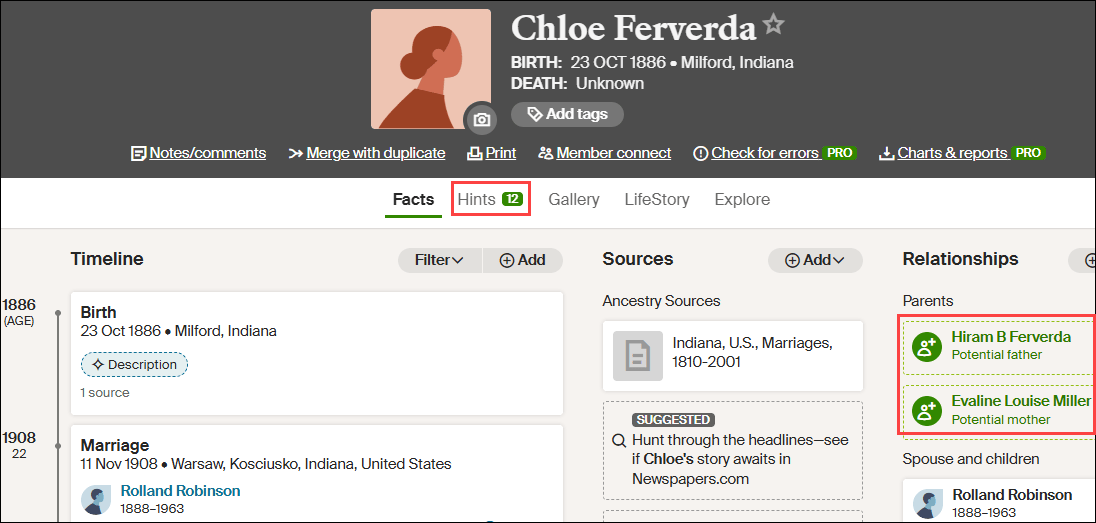
Mitotree: First, the Tree – Now the Paper

It’s definitely a red-letter day.

Dr. Paul Maier, the lead author on the new paper Mitotree: The Universal Human Mitochondrial Reference Phylogeny at 10x the Resolution has uploaded the paper to the bioRxiv preprint server, here.

I want to congratulate all of the authors, most of whom are members of the FamilyTreeDNA R&D team as either employees or contractors. I’m a contractor and have had the honor of working with these amazing colleagues on this project since 2020.

About Mitotree

Mitotree was officially “born” on February 25, 2025, and the tree has been updated several times since. About 75% of FamilyTreeDNA’s customers who have taken the full-sequence mitochondrial DNA test received a more refined haplogroup with the release of Mitotree or subsequent updates. Those haplogroups are, on average, 2000 years newer than the person’s legacy Phylotree haplogroup, and some are much more recent.

This means that the tree branches have gotten much, much bushier close to the tips. In other words, lots more twigs and leaves!

Unfortunately, about 25% of testers did not receive a new haplogroup because they do not have any qualifying mutations:

  • Either because they have no additional mutations
  • Or because they have mutations, but they are unstable
  • Or because they have mutations, but no other testers have yet tested that match them to split a branch

The good news is that with the addition of haplotype clusters, everyone benefits from new matching and grouping tools. Testers are grouped into clusters on their matches page, and on the Match Time Tree in Discover, which is much more useful for genealogy.

I know this paper has been a long time coming, but it’s well worth the wait.

Mitotree was a massive undertaking. We began with PhyloTree v17 which had 5,438 hand-curated branches constructed from 24,275 full and partial mitochondrial sequences. Phylotree was last updated in 2016 before subsequently being abandoned.

The Million Mito Team developed Mitotree, a robust phylogeny with more than 54,000 branches formed from over 330,000 complete mitochondrial sequences, of which 177,196 are unique sequences.

Let’s Look Under the Hood

There are three critical pieces of information in those statements.

First, the PhyloTree curation and maintenance was not automated, and a paper detailing their build process, what mutations were included or excluded, and under what circumstances was never published.

Approximately once a year, a new PhyloTree was published where newer samples were individually evaluated and new haplogroups were hand-grafted onto an existing backbone tree.

This methodology did not allow for deep splits to become apparent, because the tree itself was never recalculated. This is exactly how haplogroup L7 went undetected until the Million Mito Team recalculated the tree, including the backbone, in 2022, and published this paper about L7’s discovery.

In other words, while PhyloTree was publicly available, there was no recipe for how it was created or maintained.

Clearly, the tree-building process had to be automated, as hand-curation was unsustainable. There were no academic programs in existence capable of handling the number of samples involved. Not even in 2016 for fewer than 25,000 samples, let alone today.

To maintain haplogroup naming consistency, the first thing our team had to do was write software to phylogenetically reverse engineer PhyloTree v17 to establish a common foundation on which to build. This step was essential for consistency and maintaining the established haplogroup naming pattern.

That software also had to be capable of scaling up exponentially. The first versions took weeks to run, which clearly wasn’t an acceptable long-term solution. Still, being able to establish a foundational backbone to build on programmatically was a victory in and of itself.

Second, PhyloTree used partial sequences, meaning HVR1 and HVR2 samples. Early academic researchers did not perform full sequence testing, so the curators of PhyloTree used what was available to the best of their ability.

With over 330,000 full-sequence samples available today, we no longer include partial samples.

Third, 177,196 of the 331,221 full sequence samples used were unique. Before launching the program to construct the tree, identical samples from known immediate relatives are deduped, when possible, in order to reduce unnecessary clutter and processing time.

This means two things. The actual number of testers is greater than 331,000. But more importantly, anyone who thinks that mitochondrial DNA isn’t interesting should take another look. More than half of the sequences used for tree-building are unique, which handily dispels the myth that mitochondrial DNA doesn’t mutate often enough to be useful for genealogy.

The Mitotree initiative has been both scientifically and genealogically successful beyond anything we could have imagined. The base tree includes approximately 180 branches that are older than 30,000 years, including the discovery of haplogroup L7 at 100,000 years old. These branches both expand and more firmly root the oldest portions of the tree.

Amazingly, haplogroup L7 has living descendants whose earliest known family members are found in Turkey, Saudi Arabia, Yemen, the UAE, Palestinian Territory, Ethiopia, Sudan, and South Africa.

Another fun discovery involved Otzi, the Iceman, a mummy found frozen in the Italian Alps who lived more than 5,000 years ago. He was thought to carry an extinct haplogroup, K1ö, named in his honor, but as it turns out, he’s actually a member of haplogroup K1f, a clade with living descendants in Algeria. Additionally, Otzi now matches four ancient burials too, so he does have cousins.

We couldn’t have made these discoveries without the right people testing, so please encourage everyone and dispel the discouraging myth that mitochondrial DNA isn’t useful or interesting. It absolutely IS, and the success stories keep rolling in!

Why Build a Phylogenetic Tree?

Simply put, the history of our ancestors, both recently and reaching back into ancient history, is revealed in the tree – and there’s absolutely no other avenue to reach this information. Ironically, it’s readily available to everyone because everyone has mitochondrial DNA and can easily take the test.

Mitochondrial DNA is different than Y-DNA, which has its own phylogenetic tree based on SNP mutations, and autosomal DNA, which has no tree.

The reason that both Y-DNA and mitochondrial DNA can have phylogenetic trees is that they are inherited from the appropriate parent with only occasional mutations, while autosomal DNA is roughly halved in each generation.

Y-DNA is inherited by males only from their fathers, with no admixture from their mother, while mitochondrial DNA is inherited by everyone from only their mothers, with no admixture from their father.

Autosomal DNA is inherited through random recombination, with half coming from each parent, except for the X chromosome which has its own inheritance pattern. X-DNA is often confused with mitochondrial DNA, but they are entirely different types of DNA. I wrote about that here.

No tree is possible for autosomal DNA, because it gets diced and riced in each generation.

The mutations that occur occasionally and randomly in both Y and mitochondrial DNA form a trail of breadcrumbs leading backward in time, or in our case, they form both the trunk and branches on the tree.

Those unique mutations, once they occur, are inherited by subsequent generations, forming a path back in time.

In current generations, those mutations provide testers with the ability to identify our closest cousins who inherited those same mutations and who have taken either a Big Y-700 test, in males, or a mitochondrial DNA full sequence test for everyone.

In this conceptual example, you can see that Ancestor 1 carries mutation A, as do the next two generations who inherited it from their parent. However, Ancestor 4 now has additional mutation B, so that person carries mutations A+B. This inheritance pattern continues through the apricol lineage as mutations C and D are added in subsequent generations, until “You” are born with A+B+C+D.

Your cousin’s ancestor, on the other hand, was also born to Ancestor 4 and carries both A+B, as seen in the green column. Three generations later, that line added mutation F. Your  ancestor 7 added mutation C, so now the apricot and green lineages can easily be genetically distinguished from each other.

When a living person tests, we immediately know, based on the combination of their mutations, if and where they fit in this lineage, because both the apricot and green branches have accumulated unique mutations that the original blue Ancestor 4 and earlier ancestors did not have.

Using our knowledge of the tree branches, when and where they occurred, provides valuable genealogical information, along with fascinating Ancient Connections, both since and prior to the adoption of surnames.

Both Y-DNA and mitochondrial DNA can reach much further back in time than autosomal DNA because they are not diluted with DNA from the other parent in each generation.

So mitochondrial DNA is both broad, meaning many leaves, and deep, meaning it helps us look straight back in time like a laser sight, all the way to the common ancestor of all humanity, Mitochondrial Eve, who lived about 140,000 years ago in Africa.

Mitochondrial DNA Presents Unique Challenges

Mitochondrial DNA presents challenges not found in Y-DNA tree building.

For example, mitochondrial DNA only has 16,569 locations available to utilize, while Y-DNA currently uses roughly 22 million “gold standard” locations on the Y chromosome.

Of those 16,569 mitochondrial locations, some are not reliable enough for tree-building.

Unreliable mutations include:

  • Insertions, where extra copies of a particular nucleotide (Thymine, Adenine, Cytosine and Guanine) have been inserted at a specific location. Those are indicated by designations such as 309.1C where 309 indicates the marker location, .1 indicates the number of insertions at that location, and C (for Cytosine in this example) indicates the nucleotide inserted.
  • Heteroplasmies occur when multiple nucleotides are detected at a specific location. They are reported by a different letter than T, A, C or G, depending on which of multiple nucleotides are found. Heteroplasmies tend to “come and go” based on detection and threshold levels, so they can’t be used the same way as more stable mutations for tree building – and are often, but not always, unreliable for genealogy. I wrote about this in the article, What is a Heteroplasmy and Why Do I Care?.

Those locations and types of mutations have been excluded from forming tree branches, or downweighted, because they are too prone to mutating back and forth. However, they *might* be useful for genealogical purposes. Less-than-reliable mutations are now used to create haplotype clusters, even though they aren’t used to create new branches on the Mitotree.

I wrote about how haplogroups and haplotype clusters are formed in these articles:

Weighting and Confidence Factors

Mitotree formation would have been a lot easier if delineations, meaning inclusions and exclusions, were clear, either yes or no, but they aren’t.

Some were obvious from the get-go, such as insertions at location 309 and elsewhere, but other situations were much less obvious.

For example, sometimes there’s a specific location that seems prone to reversion, mutating back and forth, meaning that it mutates, then returns to its original state, then repeats the process.

Reversions are a natural phenomenon that occurs frequently in mitochondrial DNA, but is rarely, if ever, found in Y-DNA.

Let’s look at an example.

Courtesy Dr. Paul Maier

How many reversions at the same location are too many, especially if they are close in the tree?

In the above example, the mutation from A to G occurs just below the first arrow, forming haplogroup L1, a branch of L. The red areas all carry that mutation, subsequently forming eight new branches.

However, one step downstream from that mutation, just above the second arrow, location 7055 back-mutates, or reverts to A from G, which is indicated by the “!”. That reverse mutation forms haplogroup L1c3.

If location 7055 continues to flip back and forth between A and G, at what point do we have less confidence in that location, and at what point should a location be excluded from the tree and prevented from creating or dividing a branch?

The answer is that “it depends,” sometimes on the branch, sometimes on the “group” of other mutations it’s found with, and other factors. Some locations are stable in some parts of the tree, but unstable in others. We certainly never expected to see that!

This means the team had to design and build a weighting methodology so that relevant mutations, such as reversions, are not summarily excluded from tree building but instead carry different confidence weighting levels, depending on the circumstances.

Some samples, such as ancient DNA, were down-weighted in general due to their propensity to contain artifacts resulting from deterioration. Ancient samples can still influence branching, just not as much as a high-quality modern sample.

Furthermore, especially when utilizing academic samples, results with a high number of heteroplasmies are excluded, along with those with ambiguous reads and missing upstream mutations, which were previously inferred with PhyloTree. Academic samples vary in quality and age, and we have no way of knowing which quality criteria were used by that lab at that time.

These types of variances made constructing and updating the Mitotree more challenging than the Y-DNA tree, which is not subject to weighting, resulting from phylogenetic tug-of-war between mutations.

In some situations, the addition of just one test can make the difference between a new branch, or no branch, in a subsequent run of the tree. Due to this type of scenario, and fine-tuning the algorithm, some people’s new haplogroups have reverted to an earlier haplogroup in subsequent Mitotree updates.

The paper and supplemental materials provide details about the exclusion process, types of exclusions, and a list of excluded marker locations.

You can view the confidence of any haplogroup in the Classic Mitotree view in Discover.

My haplogroup, J1c2f, is formed by the mutation G9055A, and you can see that the confidence rank is 7.5 out of 10.

Mousing over the little up-arrow tree icon beside the star explains changes in nearby branches, which can affect the haplogroup’s confidence ranking.

Branches are not renamed for convenience, and only when phylogenetically warranted. Existing haplogroup names used either on PhyloTree, in academic literature, or previously on the Y-Full tree are either maintained or avoided to eliminate potential confusion. No one wants two different haplogroup names depending on which tree is being viewed.

Previously obsoleted names remain permanently obsoleted and are not reused.

The paper explains further about technical corrections and tie-breaker situations. In some cases, potential branches with equal or near-equal weighting are flagged for team review.

Amazing Discoveries

I encourage everyone to read the section in the paper beginning with “Notable discoveries.” These aren’t people, as in Discover’s Notable Connections, but scientific accomplishments achieved with the new Mitotree.

Our knowledge of human migration within and out of Africa has been greatly refined, as well as the ancestral path into and across Eurasia, Asia, and into the Pacific Rim. If you have unusual mitochondrial haplogroups such as L, M, N, P, Q, R or S, you’ll absolutely want to read this.

Of course, in time these haplogroups branch and become Paleolithic haplogroups, then the Gravettian-Mesolithic followed by the Hunter-Gatherers found throughout Europe that we are familiar with. We’ve learned a great deal from rare ancient DNA samples that anchor more modern haplogroups in a place and time, and inform us of migration patterns as well as how now-extinct ghost populations gave rise to current ones.

The earliest humans, whom Mitotree has more firmly anchored, formed a trickle out of Africa that became a bifurcated stream, eventually flowing across the rest of the world. What recorded and even archaeological history cannot tell us can be and is revealed through the patterns held in our DNA today – and Mitotree is our map to read them. Common ancestors are found where our mutations as haplogroups converge, joining as we travel backward in time, piercing an otherwise impenetrable veil.

For those with Native American ancestry, Mitotree expands the two-wave theory, refining it into five or six probable migration surges, depending on how you count, based on a combination of haplogroup ages and distribution.

Summarizing from the paper:

The first wave of haplogroups A2, B2, C1b, C1c, C1d, D1, and D4h3a arrived from Asia, across Beringia or along the Pacific Corridor, about 17,000 to 18,500 years ago, and expanded along the Pacific coast. D4h3a is found almost exclusively in the Pacific region.

This was followed by haplogroup C4c about 15,800 years ago and X2a about 10,000 years ago, which expanded into the interior through the ice-free corridor east of the Rockies after the ice melted.

Next were the Paleo-Eskimo and Na-Dene speakers in haplogroups A2a, D2a, D2b, D2c/D3, and D4b1a2a1a2, who, between 3000 and 7000 years ago, made their way from Alaska, across the polar regions of Canada, into Greenland.

Na-Dene speakers, Apache and Navajo, in haplogroups A2a and B2a made their way southwest between 1300 and 1500 CE, or between 500 and 700 years ago.

Last, the present-day Inuit-Yupik expanded from Beringia to Greenland about 1000 CE.

For additional information, please see the Native American lineages section of the paper.

Mitotree has also clarified the ancestors of the Ainu/Jomon people from Hokkaido, Japan, and their ancient Paleolithic northwest Asian and Siberian relatives. The ancestors of this group and Native Americans share even earlier Asian ancestors.

The history of the Jewish people has been significantly refined as well, expanding on earlier works, and is found in the Counting the newest Jewish founders section of the paper.

  • 43% of Ashkenazi Jewish testers fell into 5 founding lineages where they had no subclades before, but they do now.
  • Two clades of haplogroup K have now been split 4000 to 5000 years ago in Romania.
  • There’s new information about the crypto-Jewish community in Portugal, Mountain Jews from Persia and the Caucasus, plus Jewish groups in India, Georgia, Azerbaijan, Israel and Libya.
  • Additionally, haplogroup M33c9b tells the story of Ashkenazi Silk Road merchants who traveled between China and Europe.

The paper reports the isolation of Sardinian-specific haplogroups and provides substantially greater structural definition for the Saami people, increasing from 22 subclades to more than 300.

The Notable discoveries section is chock full of information.

Genealogy Jump-Start

Today’s tree is ten times larger than the 2016 tree, and will continue to grow as more people take a full sequence mitochondrial DNA test, available at FamilyTreeDNA.

The greatly improved tree alone is not the only facilitator of genealogical success. A dozen reports, including Haplotype Clusters and the Match Time Tree are provided for all full-sequence testers in Discover. I wrote about how to effectively use your matches and Discover to break through genealogy brick walls, here.

There are a couple of things you need to do to increase your opportunities for success and to help Discover and Mitotree.

Genealogy is a team sport, and you can increase everyone’s success rate by completing (and updating) your Earliest Known Ancestor (EKA) and location information, found under “Account Settings” beneath your name in the upper right hand corner when signed on, then “Genealogy”, then “Earliest Known Ancestor”, and by providing a family tree or a link to WikiTree.

Identifying common ancestors is what testing is all about, and these are all important success factors. Everyone wants to identify previously unknown ancestors.

Mitotree is More Than Genealogy

Of course, as genealogists, we’re focused on how to use the new Mitotree information, paired with Discover, to identify brick-walled ancestors and learn more about them. I’ve written specifically about how to do that in these two articles:

Mitotree isn’t just an explosion for genealogy, though – it’s an incredible scientific achievement. Instead of genealogy benefiting from other specialties, now they can benefit from what genealogy has wrought.

Mitotree presents opportunities to rethink and potentially recalculate dating and information in other fields, such as archaeology, medical genetics, forensics, and history.

We know vastly more than ever before, but this is only the beginning.

With each new tester and every ancient genome added to the growing body of evidence, our understanding becomes more refined, revealing insights about our ancestors, and weaving our thread into the broader tapestry of human history.

_____________________________________________________________

Share the Love!

You’re always welcome to forward articles or links to friends and share on social media.

Subscribe!

If you haven’t already subscribed, it’s free. You’ll receive an e-mail whenever I publish by clicking the “follow” button at the top of the main blog page, here.

Help Keep This Blog Free

I receive a small commission when you click a vendor link in my articles and purchase that item. This does NOT increase your price but helps me keep the lights on and this informational blog free for everyone. Please click on the affiliate links in the articles or to the vendors below if you are purchasing products or DNA testing.

Thank you so much.

DNA Purchases and Free Uploads

Genealogy Products and Services

My Books

Genealogy Books

Genealogy Research
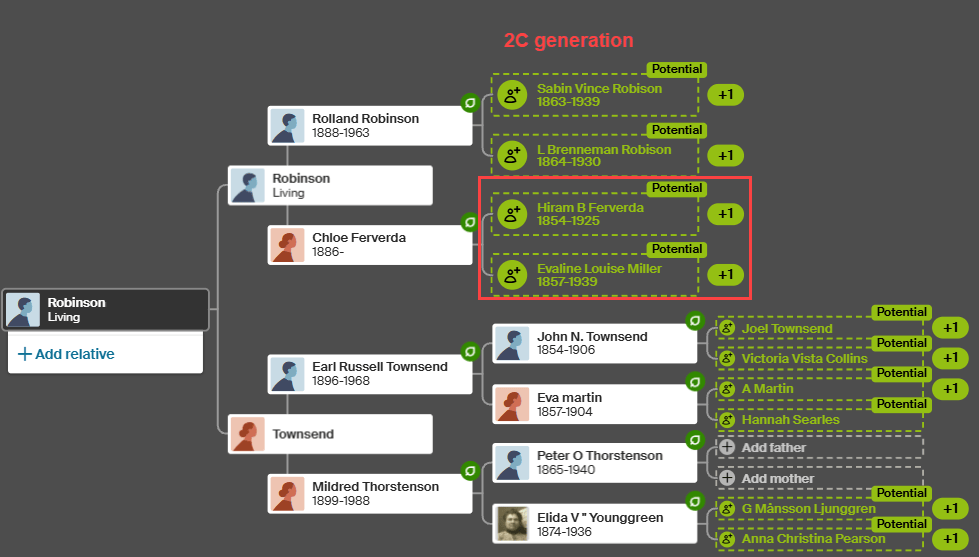
Ancient Connections: Where Archaeology Meets Your Ancestors

Ancient Connections, a report found on FamilyTreeDNA’s Discover platform for both Y-DNA and mitochondrial DNA (mtDNA), can be used in multiple ways to enhance your genealogy and unlock secrets.

It’s exciting to examine ancient burials linked to our ancestors and understand how we connect to them. Ancient Connections offer a wealth of information, providing clues that can help unravel long-standing mysteries.

Today, there are more than 12,960 Y-DNA Ancient Connections in Discover, along with more than 25,310 mitochondrial Ancient Connections, and that number increases weekly.

Why the disparity, you ask? Remember, everyone has mitochondrial DNA, but only males have Y-DNA.

In addition to matches, your DNA results hold something even more powerful – evidence of where your ancestors and their cousins lived in the distant past, when they lived, and the cultural context surrounding them. These essential insights are unavailable through any other means. Ancient Connections help us answer the age-old question, “Where did I come from?”

Could These People Be My Ancestors?

I’ll show you how to answer another question, too. Which of these Ancient Connections could potentially be your ancestors, and which ones are your “haplo-cousins”?

Regardless, they all help us understand our ancestors’ past, and that of their descendants.

Discover is for Everyone

FamilyTreeDNA provides a free version of Discover that everyone can use. There’s also an enriched version with additional information for their customers who have purchased Y-DNA and mitochondrial DNA tests.

Discover has something to offer for everyone.

Mitochondrial DNA is passed from mothers to all of their children of both sexes – unmixed with the DNA of the father.

Everyone has their mother’s mitochondrial DNA, which is passed intact, except for an occasional mutation, directly down through generations of mothers. It’s not admixed like autosomal DNA, so we don’t lose some portion in each generation. This is exactly why we can track mitochondrial DNA infinitely far back in time and why it’s so crucial for understanding the origins of your mother’s specific line.

Y-DNA is passed from fathers only to their sons, which is what makes males male. Like mitochondrial DNA, Y-DNA is not admixed with any DNA from the mother, so we get a laser line-of-sight view of the direct patrilineal line back in time. The Y-DNA direct paternal line is the male’s surname line in cultures where males carry their father’s surname.

If you’ve tested at or upgraded to either the Big Y-700 level or the mtFull, full mitochondrial sequence test, you will receive the most granular haplogroup possible, meaning the closest in time and most informative. You’ll also match with other testers who have taken the less-refined lower-level tests.

The most informative and precise results occur when both people have taken the premium tests. As more people test and science advances, you may receive a new haplogroup from time to time when you and another tester share a rare mutation – so these tests are evergreen.

Both Y-DNA and mitochondrial DNA testers at any level have access to Discover on their dashboard for those products, although the results of lower-level tests provide less information.

The Free Version of Discover Compared to the Premium Version for Testers

Here’s a comparison of lower-level Y-DNA tests and the Big Y-700.

Click any image to enlarge

Y-DNA testers who have only taken the 12-111 STR panel tests receive a predicted haplogroup, and when clicking through to Discover, receive up to 10 Ancient Connections.

For example, If your Y-DNA haplogroup is predicted as R-M269, the most common male lineage in Europe that arose some 6450 years ago, your Ancient Connections begin with the closest genetic match to R-M269. Viewing Ancient Connections that are 6500 years ago will certainly be interesting, so please do look, but probably not terribly useful for genealogy.

However, if that same person were to upgrade to the Big Y-700, they would receive a much more recent haplogroup, and along with it, up to 30 Ancient Connections within their major haplogroup lineage, R in this case, plus the oldest sample in the database. For some haplogroups, there may not yet be 30 Ancient Connections, although new ancient samples are added weekly for both Y-DNA and mitochondrial DNA.

All Ancient Connections begin with the matches who are genetically closest to the haplogroup requested.

The same scenario holds true for mitochondrial DNA testers who previously tested at the HVR1/HVR2 level, but not at the full sequence level, which is the only test available today.

This article focuses on testers at the higher levels, meaning the Big Y-700 and the mtFull tests, and how to utilize their 30 closest Ancient Connections. We’ll walk through step-by-step examples using both.

However, before we begin evaluating our Ancient Connections, we need to cover two fundamental concepts.

BCE, CE and Converting to “Years Ago”

It’s helpful to understand date structures and how they are used.

It’s easy to get confused when seeing the dates of CE, current era, and BCE, before current era, which means we misinterpret the information.

For example, the year 100 CE is the year 100 that occurred roughly 1900 years ago. We round 2026 to 2000 for these types of calculations. The year 100 BCE, before current era, occurred approximately 2100 years ago. I often prefer to work in “years ago”, because it equalizes the numbers, meaning you’re less likely to get confused about how long ago someone lived or something happened.

To do the calculations from BCE dates to “years ago,” add 2000, so 2250 BCE equals 4250 years ago.

For CE dates, subtract from 2000. The date 500 CE occurred 1500 years ago.

This can be especially confusing when you’re dealing with the same number on either side of the current era, which began in the year 1. There is no year zero. For example, we need to be vigilant not to confuse 500 BCE, which was 2500 years ago, and 500 CE, which was 1500 years ago.

Now, on to our second concept.

Haplogroup Age and Burial Age Are Not the Same

When viewing Ancient Connections, the genetic age of the haplogroup, meaning when it was formed, and age of the burial are two different things.

Haplogroup R-ZP18 is about 4250 years old, and this Late Iron Age, pre-Roman burial which is also R-ZP18, occurred about between 2337 and 2043 years ago.

Haplogroup ages and the date they emerged, which show on the Timeline, sometimes mature and are refined with additional testers and branching.

Burials are dated using various techniques, and sometimes the ages provided in the academic papers are earlier than the genetic age of the haplogroup, shown on the Timeline at the bottom of the Connections page.

Discover makes no attempt to “fix” this situation, because it’s unclear which age should be changed. It’s not unusual to be unable to fully analyze ancient remains. For example, let’s say a sample is determined to have the SNP for R-ZP18, but simultaneously lacks downstream SNPs and some upstream SNPs, and the burial was dated from surrounding soil or artifacts. In that case, it would be impossible to know what is precisely “accurate”, but the sample is accurate enough to be included in Ancient Connections. This is also why some samples aren’t included in Globetrekker™ calculations. Some low-quality samples are excluded entirely.

Every ancient sample is individually analyzed by R&D team members before being included in the phylogenetic tree and Ancient Connections. Sometimes, the scientists at FamilyTreeDNA can assign a more specific haplogroup than was available to the paper authors at the time of publication because the tree has since branched.

As you receive new Ancient Connections, your older ones, except your final or oldest connection, will roll off of your list.

That’s one reason I devised a process for analyzing and recording my Ancient Connections, and for determining which ones might be actual ancestors – or at least aren’t precluded from it.

First Peek at Ancient Connections

Sign in to your FamilyTreeDNA account and click on the Discover link on the dashboard for the type of test you wish to view.

In the Y-DNA example, I’m using my male Estes cousins. As a female, I can’t test for the Estes Y chromosome, so I recruited others to represent my line. You can see the results in the Estes DNA project.

After signing in, click on Discover, then on Ancient Connections.

Y-DNA Ancient Connections 

It’s a bonanza!

Your Ancient Connections are displayed at the top of the page, ordered from genetically closest to most distant. These are archaeological samples whose data has been extracted from academic papers and analyzed before being include in Discover.

You’ll see a description of the first sample, or any sample you click on. The Timeline for that sample, along with your haplogroup and your common ancestor’s haplogroup, is displayed at the bottom of the page.

The first, meaning closest, Ancient Connection is highlighted, so let’s take a look.

  • “You” are shown in the dark purple frame (with purple arrows) at right, with your haplogroup, in this case R-ZS3700, which is placed on the Timeline at the bottom of the page in the appropriate location.
  • The Ancient Connection named “North Berwick 16499”, whose name was taken from the academic paper in which it was found, is shown in a red frame and placed on the timeline based on information provided in the paper.

“North Berwick” has been assigned to haplogroup R-ZP18, either in the paper, or by the FamilyTreeDNA R&D team if a more refined haplogroup can be determined, and is this tester’s closest Ancient Connection based on its position on the list.

Note that you may have other Ancient Connections who are genetically equivalent in age, meaning they too would be R-ZP18. In our case, only one sample is assigned to that haplogroup.

  • Your Shared Ancestor, in the green frame, is the first man who carried R-ZP18, which emerged about 2250 BCE, or 4250 years ago.

Notice that I said, “the first man.” That man’s sons, grandsons and so forth were also haplogroup R-ZP18. Some went on to develop new downstream haplogroups, but apparently, North Berwick, by the time he lived, had not. Either that, or a downstream haplogroup cannot yet be determined due to a lack of other testers in that lineage.

Men with downstream SNPs (mutations), meaning downstream haplogroups, also descended from R-ZP18. Those SNP mutations become downstream haplogroups when two or more men who carry the same SNP mutation match each other. For example, our Estes ancestor who carries haplogroup R-ZS3700 descends from R-ZP18 through a distinct series of downstream SNPs (mutations). While we carry R-ZP18 in our lineage, it’s not our most refined haplogroup.

However, for North Berwick, haplogroup R-ZP18 is his most refined haplogroup.

Because of this, we know for sure that North Berwick and the Estes men both descend from the original R-ZP18 man who lived about 4250 years ago, but we can’t tell when they shared a common ancestor between 4250 years ago and 3750 years ago when the next downstream haplogroup R-BY342, was formed in the Estes lineage.

Because North Berwick does not belong to a different downstream haplogroup, it’s genetically possible that the Estes men could descend from him during that 500-year timeframe. There’s nothing to exclude that possibility based on his haplogroup alone, but looking at when North Berwick lived is another matter.

North Berwick lived between 2337 and 2043 years ago, which is 1400 years LATER than when the first downstream haplogroup, R-BY342 was formed, about 3750 year ago, in the Estes lineage. This precludes North Berwick from being our direct ancestor. Instead, he’s our “haplocousin.” We share a common upstream ancestor.

What we absolutely CAN confirm, though, is that between 500 and 1300 years earlier than North Berwick lived, between when haplogroups R-BY342 and R-ZP18 were formed, both North Berwick and our Estes ancestor descended from the same man.

This kind of information is like waving a red flag in a genealogist’s face. We immediately need to know more.

This is just the beginning, and we have so many questions!

Revealing More Information

Did our common ancestor live in or near North Berwick, or someplace else? What do we know about the history of North Berwick?

What can we discern about North Berwick?

  • When did this man live, and where?
  • What do we know about him?
  • Who was he?
  • Did he live close to where my earliest known ancestor in this line is found?
  • What can I tell about his culture?
  • Were there grave goods that provide at least a peek into his life?

So many questions!

Discover tells us that he lived between 337 and 43 BCE, so between 2337 and 2043 years ago, during the Late Iron Age, and is associated with the Iron Age Britain cultural group.

The Ancient Connections “Reference” provides information about the paper where the North Berwick sample was found. No links are provided because sometimes the paper is behind a paywall, and you can’t access it without paying, and sometimes it’s a preprint and will appear later elsewhere. Sometimes one paper actually uses data from an earlier paper, and it gets complicated.

The first thing I do is Google the paper – Patterson et al. 2022. Google provides two links – one that’s free, and one that isn’t. Many times, the sample data is found in the supplementary material, which may also be behind a paywall, even if the paper isn’t.

I know you’re going to think it’s a pain, but I strongly encourage you to read every paper, though sometimes they can be challenging to understand, so read them when you’re fresh, not tired, and can concentrate. If nothing else, at least read the abstract. There’s so much great information buried in academic papers, including nice maps and discussions of the burial site. You can also learn more sometimes by Googling the burial site itself.

Let me give you an example from this paper’s abstract. I’ve added the brackets [ ] for clarity, from the body of the paper:

Between 1000 and 875 BC[E], EEF [Early European Farmer] ancestry increased in southern Britain [England and Wales] but not northern Britain [Scotland] due to incorporation of migrants who arrived at this time and over previous centuries, and who were genetically most similar to ancient individuals from France. These migrants contributed about half the ancestry of people of England and Wales from the Iron Age, thereby creating a plausible vector for the spread of early Celtic languages into Britain.

How does this information align with our North Berwick man? He lived between 2337 and 2043 years ago, and the EEF ancestry increased in southern Britain between 3000 and 2875 years ago. The authors do add “over previous centuries” which probably accounts for the 500-year gap and gets closer to when R-ZP18 lived. North Berwick is found in Scotland, not England or Wales, so not part of the group of people most closely aligned with the ancient French migrants from this timeframe. Maps in the paper confirm this as well.

Googling the paper and sample name provided additional sourced information. This paper incorporates samples from earlier papers and performed a different type of analysis.

Ironically, I wrote about this in detail in 2022, here, before Discover was introduced, so I had absolutely no idea that North Berwick 16499, discovered on Law Road in North Berwick, was related to my ancestors, and therefore, to me.

In that article, I researched and mapped the samples. North Berwick 16499 is located on the coast, along the harbour, not far from Edinburgh.

The burial was excavated in the cemetery of the original St. Andrew’s Church in North Berwick, originally built in the 1100s, but now in ruins.
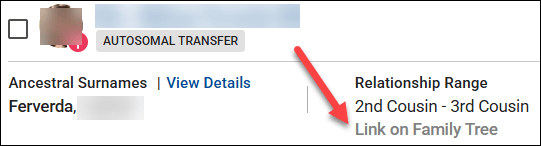
This paper’s supplementary material explains that:

Excavation of a substantial square cist at Law Road, North Berwick, uncovered the remains of four inhumations of Late Iron Age date (Richardson et al. 2005). Two adult males 3603 (Skeletons C46 and C51) and a female around 16–18 years of age at death (Skeleton C50) appeared to have been displaced for the burial of an adult female (Skeleton C47), wearing an iron brooch. One of the males (C46) had been buried with a bone-handled iron knife.

What I wouldn’t give to see that iron brooch and bone-handled knife.
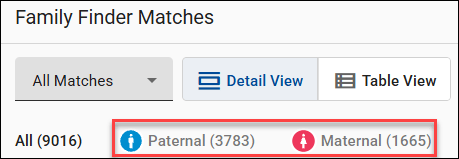
C51 is North Berwick 16499, “our” skeleton. A cist grave is a small, stone-lined burial box, and this one was preserved beneath medieval deposits.

That reference gave the even more precise location of Law Road and St. Andrews Street and informs us that the remains are held by National Museums Scotland. Checking their collections confirms that they hold these items, plus the bones. However, there are no photos shown. Contacting them for images might yield results.

What the paper did not say is that little was known prior to these excavations about early North Berwick.

By Stefan Schäfer, Lich – Own work, CC BY-SA 3.0, https://commons.wikimedia.org/w/index.php?curid=19450589

North Berwick was known to exist as a ferry landing from the 7th century, but an archaeological survey of Berwick Law, a hill that overlooks the town, revealed much earlier information:

The earliest features on North Berwick Law comprise a pair of newly discovered cup-marked rocks and the scanty remains of a prehistoric hilltop fort discovered by RCAHMS (1957, xv), whose outworks appear to be more limited than suggested by previous authorities (Feachem 1963, 119; OS 1975). The lower SW flank of the Law is dotted with the remains of a prehistoric settlement comprising at least 12 hut circles or house platforms and fragments of an associated field system of small cairns and banks.

Unfortunately, the perimeters of Berwick Law have been settled and farmed since, and the hilltop has served recently in the same capacity as it probably served initially – as a lookout across the firth. The residents would have been watching from this highest point for invaders arriving by sea.

It’s about half a mile from the foot of the hill to the burial cist.

The survey also mentioned that they found “stray bronze age finds” that had likely been disrupted by subsequent settlement. The bronze age in Northern Scotland began about 4200 years ago, about the time that R-ZP18 lived, until about 2800 years ago. Whoever North Berwick 16499 was, the man who was buried here some 2400 years ago, he was probably associated with this hilltop fort, perhaps farming at the base, probably living in one of those huts or nearby. His body wouldn’t have been taken far for burial.

We are left to wonder how long his family had lived here, and how they had arrived. Was his cist burial a sign of status? Was he sent to commend the fort, or had his family settled here centuries earlier? Did our ancestor descend from this location, too?

After our analysis, we know that our ancestor did not descend from North Berwick 16499 himself, but North Berwick definitely descended from our ancestor.

If you’re thinking this is a rabbit hole, it definitely is – but what a rabbit hole! There is so much to be gleaned from these Connections.

The Evaluation Process

I needed a process to keep track of these Ancient Connections, my findings, and how they relate to my Estes ancestors. Who begat, or might have begat whom, and where?

I created a spreadsheet as I read and analyzed each Ancient Connection relative to my ancestral line. I include what I know about it, and what I THINK I know about it. Those can be two vastly different things. I follow this same process for every ancestral line where I can find a representative Y-DNA or mitochondrial DNA tester.

For example, there’s a persistent rumor that the Estes family line descends from the d’Este family of Italy. That rumor was spun up long before we had genetic proof that our line was found in Kent, England, in records dating back to about 1495. Fortunately, church records, for the most part, and some civil records still exist.

The first known record is the will of our Nycholas Ewstas written on January 1, 1533/1534 in Deal, Kent, England. We confirmed that this is our Estes line by testing the Y-DNA of his descendant who still lives a few miles up the road, compared with the descendants of Abraham Estes (1647-1720), the man who immigrated to Virginia in 1673. We believed that Abraham Estes, who married in 1672, then immigrated 14 months later, was one and the same person.

Based on the details of the d’Este rumor, the Estes line was supposed to descend from one Francesco d’Este (Esteuse), an illegitimate royal son, exiled to France about 1471 after the death of his father, Azzo VI of Este, by a jealous half-brother, complete with a royal allowance. There are mentions of him in the Dutch and French courts, then nothing. Silence.

Apparently, various Estes lines in England liked the idea that he crossed the English Channel and settled in the fishing village of Deal, with his descendants carrying the surname Estes, a derivative of d’Este. King James apparently believed there was a connection and made that suggestion himself in one instance, although it’s unclear if that Estes man was from our Estes line.

It’s difficult to prove a negative, so we need to rely on the evidence we do have, much of which has been discovered and accumulated in more recent years, since the genesis of that rumor which was widely believed.

To begin with, it makes no sense that between 1471 and 1495, the family suddenly went from being a wealthy exiled royal circulating at court in France and the Netherlands, to peasant fishermen on the coast across the channel.

There is a legitimate royal lineage that does descend from the d’Este family in Italy, but until and unless someone who is a descendant of the direct male line of the House of Hanover, which reaches back to the Azzo line of Ferrara, takes the Y-DNA test, there’s no proof positive. Either their Y-DNA would match the Estes line, or not. I’d wager that it does not, but I’d love to find out for sure.

I’m hopeful that some nugget in Ancient Connections might add weight to either side of the argument.

Creating a Spreadsheet

First, I’ll show you the Ancient Connections spreadsheet built for the Estes line, then I’ll demonstrate how to build it.

Here’s the finished spreadsheet. Every haplogroup’s spreadsheet will be different.

I placed the four confirmed Estes haplogroups at the bottom because that’s the base from which the Ancient Connections are built, beginning with the closest Connection first.

“My” haplogroup, meaning for my ancestor’s Estes male line, is R-ZS3700, but there’s one additional downstream haplogroup, which I’ve included for completeness.

Let me alert you now that you WILL receive new Ancient Connections, which means that for every new Connection you receive, one more distant Connection rolls off the end because it’s outside of your 30 genetically closest Connections threshold. I’ve received new Ancient Connections in the past three months, between the time I originally began gathering this information and when I published this article.

The underlying message, in addition to maintaining your spreadsheet, is to set a calendar alert to check your Ancient Connections regularly. One rolled off that was more distant genetically, but was located only 10 miles away from where my Estes ancestors originated in Deal, England.

We’ll build the spreadsheet so you can easily expand it as new Connections are added.

Also, note that you may receive multiple matches from the same archaeological excavation site, which, of course, is highly suggestive of a family. If the multiple burials are in the same exact location and from roughly the same timeframe, I only record them on the spreadsheet once to reduce clutter, but I add a note that there are multiples.

The Build Process

Referencing the image above, haplogroups in the column directly above the originating haplogroup, R-BY154784, then R-ZS3700, colored apricot, are parent haplogroups – meaning that these haplogroups descend from the haplogroups above them. Look at R-ZP18, North Berwick, above R-BY482 as an example. This means two things.

  1. It’s possible that my ancestors could descend from these individuals in this column. However, all things considered, it’s more likely that they are a “cousin” of my ancestor who lived at that time and carried that haplogroup before a new mutation happened and branched into a new downstream haplogroup. That’s exactly what we proved about North Berwick based on when he lived and our downstream haplogroup formation date.
  2. Every man who shares that haplogroup, R-ZP18, absolutely DOES descend from the original man who carried that haplogroup-defining mutation that arose about 2250 BCE or about 4250 years ago. That one man in whom R-ZP18 occurred is noted above North Berwick, in red, indicating that both North Berwick and the Estes men descend from the man whose name is now R-ZP18.

On my spreadsheet, I’ve colored the cells of the haplogroups that I do descend from, and the burials I might descend from, apricot. The common haplogroups that burials and contemporary testers downstream descend from are in bold red text (R-ZP18 and R-DF49).

Burials who carry a different branching haplogroup, meaning they aren’t R-ZP18, but branch FROM from R-ZP18, are shown with their branches in blue. My ancestors cannot descend from blue haplogroups because we are on different branches of R-ZP18. Our branch is apricot.

Let’s add the next Ancient Connection.

Here’s the Time Tree Timeline of the second Ancient Connection, named Mount Pleasant 746, found at All Saints, Cambridgeshire, England, who lived between 940 and 1365 CE.

This shows two things.

  • My R-ZS3700 ancestor cannot descend from the Mount Pleasant burial, since R-ZS3700 doesn’t carry the mutation for R-BY173525, found in the Mount Pleasant burial.
  • However, since R-BY173525 branched from R-ZP18, we DO SHARE a common ancestor who lived about 4250 years ago. This means that between 4250 years ago and 940-1385 CE, the man found in Cambridgeshire, and my ancestor found in Kent around 1495 CE, both migrated in different directions from where their common ancestor, R-ZP18, lived, wherever that was.

The next closest Ancient Connection is Vor Frue Kirkegård 336, buried in the yard of a former monastic church in Vor Frue Kirkegård, Aalborg, Denmark, which dates from the 12th century. This man lived between 1536 and 1806 CE.

Again, my Estes ancestor who carries R-ZS3700 can’t descend directly from this man. Three things preclude Vor Frue Kirkegård 336 from being our ancestor:

  • The fact that Vor Frue Kirkegard 336 carries R-BY203953, but the Estes line does not.
  • Vor Frue Kirkegard 336 does not carry, R-BY342, the next downstream SNP for the Estes line.
  • Vor Frue Kirkegard 336 lived between 1536 and 1806 CE, which is contemporary with or after the earliest documented Estes ancestor was living in Kent, England circa 1495.

In this case, the locations are not in close proximity, over 500 miles apart by a combination of land and water. This distance would be less compelling as an elimination factor if the men were further separated by time.

In this case, any one of the first three pieces of evidence, alone, would preclude Vor Frue Kirkegard from being our ancestor.

Once again, R-ZS3700 shares the common ancestor of R-ZP18 with Vor Frue Kirkegård 336, along with Mount Pleasant 746 and North Berwick 16499. All of those men shared one common ancestor 4250 years ago.

Now, we have the bottom portion of our tree built out – meaning everyone who either carries haplogroup R-ZP18 as their primary haplogroup, or descends from that man.

Moving up the tree in the apricot column, you’ll notice that I’ve left spaces that leave room for the branching haplogroups in blue on the right. You won’t know how many spaces you need or the configuration until you start building the tree in your spreadsheet.

I listed both “5 haplogroups” and “3 haplogroups,” in the apricot column. You can spell those haplogroups out if you wish, but for my Ancient Connections, they didn’t matter. They may matter in the future, though, if you have an Ancient Connection who descends from or branches from one of them.

If you need an easy way to determine your ancestral lineage, the Ancestral Path is just the thing for you and will help build your spreadsheet.

Your Ancestral Path

It’s easy to view which haplogroups are in your direct ancestral line. Just click on the “Ancestral Path” link in Discover’s sidebar.

Your haplogroup is shown at the top, with the parent haplogroups in order beneath. I’ve boxed the “5 haplogroups” between R-BY482 and R-ZP18 here, and then the “3 haplogroups” between R-ZP18 and R-DF49, which is where we find the next closest Ancient Connections.

One bonus of the Ancestral Path display is that you can see how many Ancient Connections are in the database for each haplogroup, at far right.

As I continue to build out my spreadsheet, the next four burials are all R-DF49, a haplogroup that was formed about 4400 years ago. Three of those burials are in England, and the fourth is in the Orkney Islands. They are all apricot, meaning:

  • They don’t carry any downstream haplogroups
  • They all descend from R-DF49
  • Based on haplogroups alone, nothing precludes the Estes line from descending from any of those men

Evaluating each Ancient Connection in the same way we did for North Berwick, when they lived, as compared to our Estes men, and where, may eliminate some of these burials as possible direct ancestors.

The balance of the Ancient Connections descend from R-DF49 through different branches and are colored blue, removing them as possible ancestors of R-ZS3700.

Regardless, we all share an ancestor, R-DF49, about 4400 years ago, just shortly before R-ZP18 lived some 4250 years ago. It would make sense that R-DF49 and R-ZP18 lived in relatively close proximity, given that they only lived about 200 years apart.

What else can we learn about these Ancient Connections?

Migration Map

To view all of your Ancient Connections on a map, just click on “Migration Map” in Discover’s sidebar.

The haplogroup whose path you are viewing, in this case, R-DF13, is the red dot on the bar at the top and is shown on the map with a red circle, but is mostly obscured here by the blue and red circles with numbers in the British Isles.

That haplogroup’s migration map, and your Ancient Connections, are displayed together. Individual burials not in close proximity to others are shown with individual trowels, and multiple burials are shown with blue and red circles, with the number indicating how many burials are found at that location.

Expanding the map shows more detail. I placed a red star to indicate the Estes lineage in Deal, at the bottom right.

Many of the blue and red circles have expanded, too.

By clicking on the blue circle, you can see which samples are found there. In this case, these 7 matching samples were all found in the same archaeological dig.

By clicking on any sample, you’ll see additional information.

One of my original questions was whether or not there was any indication whatsoever, even a smidgen of possibility that the d’Este rumor might be true. Some Estes researchers are not convinced by other arguments.

Given that our closest Ancient Connection lived about 2000 years ago in the British Isles, as do most, but not all, of the other Ancient Connections, it’s exceptionally unlikely that the progenitor of the Estes lineage was living in Italy in the 1400s, just a generation before our Estes ancestors are found in the records in Deal, and some 2000 years after the parent haplogroups of R-ZS3700 were already well-established in the British Isles.

There’s another place to check for additional information.

Notable Connections

Sometimes Notable Connections includes people who are either “ancient” themselves, and whose haplogroups have been identified through their descendants, or are from burials, or a combination of both. The difference is that their identity is not entirely a mystery.

When evaluating Notable Connections for genealogy, focus on:

  • Their haplogroup
  • Your shared haplogroup
  • When and where they lived
  • Any precluding factors like we found when analyzing North Berwick

Notable Connections are all interesting, but only a few may be relevant to your genealogy or your ancestors’ journey to where you first found them.

Speaking of their journey, Globetrekker™ shows you the most likely path of your ancestor’s haplogroup over time.

Globetrekker™

Globetrekker™ is currently only available for Y-DNA, and only for those who have taken the Big Y test.

Clicking on Globetrekker™ through my cousin’s account shows the path of his haplogroup, through Europe, in this case, into England and, if I enable them, includes relevant Ancient Connections. One Ancient Connection, Mount Pleasant 746, at Cambridgeshire, is found on the estimated genetic haplogroup path.

We’ve already determined that the Estes line cannot descend from Mount Pleasant 746, but the locations of the descendants of our common ancestor, R-ZP18 can still provide substantial clues about where our common ancestor might have lived, and his culture.

I’ve also enabled Globetrekker™’s “Sibling Lines” which indicate haplogroup siblings with the thinner lines. These display options are easy to toggle on and off.

Note that this is an estimated genetic path. In other words, it’s not exact. Especially, paths of the newer haplogroups can and will change over time as more testers test, and earliest known ancestors (EKAs) are added. I wrote about how to add EKAs in the article, “Earliest Known Ancestors” at FamilyTreeDNA in 3 Easy Steps. Please add yours, along with their location.

Sometimes the most refined haplogroup did not emerge in England, R-ZS3700 in this case, but in America. However, since the descendants have noted their EKA correctly as originating in England, that’s where the most refined haplogroup is also shown.

Furthermore, other than for Native Americans who are indigenous to the Americas, Globetrekker™ and the Migration Map both stop at the originating land mass for both Y-DNA and mitochondrial DNA.

You can read more about Globetrekker™, here.

What About the d’Este Family Story?

Now, about that d’Este family story.

Globetrekker™ utilizes the “least cost” migration methodology, which means the easiest, least risky, route of passage from place to place for our ancestors. The Strait of Dover is the closest link to the European mainland, and was shallower at that time as well.

There’s absolutely no genetic evidence that points to Italy or anyplace south for the Estes ancestral line. In fact, haplogroup R-S552 emerged about 4650 years ago, and appeared about the time that this lineage crossed from continental Europe into what is today England. There’s no evidence that this line back-migrated to the continent, to then remigrate back to the British Isles after 1471.

Ancient Connections show us that there’s evidence of the Estes ancestral haplogroups in many locations across the British Isles, long before Frencesco d’Este was being exiled from Italy. Multiple Estes family members appear in the earliest records in the Deal area, so it’s certain that they were well established and probably fishing on those same shores hundreds, if not thousands, of years earlier, based on Ancient Connections these various migration maps.

These provide one more very large nail in the coffin of that much-loved but extremely unlikely family story.

The final piece of evidence would be if a proven male descendant of the d’Este line tested and did or didn’t match. I’m not holding my breath.

Mitochondrial DNA

The methodology for building your Ancient Connections spreadsheet is exactly the same for mitochondrial DNA, with one exception.

You immediately know that you cannot descend from any male burial, because men don’t pass their mitochondrial DNA on to their children of either sex. You could, however, potentially be descended from his mother, or sister, or cousin, etc. Otherwise, the guidelines are the same.

Sometimes, Ancient Connections can resolve long-standing conflicts.

The Conflict Surrounding Radegonde Lambert

For a very long time, it was believed that Radegonde Lambert, an early Acadian woman born around 1621, was Native American because there were no known people, other than her, with that surname in Acadia. Based on the birth years of her children, she married Jean Blanchard, a French man, around 1642.

It doesn’t help any that French soldiers arrived in 1632, family settlement began about 1636, but there are virtually no records until the 1671 census, nearly 40 years later. Lots of people perished during that 40 year window.

Radegonde could have married before her arrival in Acadia, and Lambert may not be spelled accurately. We are fortunate that French women are referenced by their birth surnames, not their married surnames, so she is listed as Radegonde Lambert, the wife of Jean Blanchard on the 1671, 1678 and 1686 censuses.

Based on the conflict swirling around her presumed Native American ancestry, plus early mitochondrial DNA HVR1/HVR2 results that pointed to haplogroup “X”, which has both Native American and European branches, Radegonde began to be reported as “DNA confirmed Native”. However, that was incorrect, and she was NOT DNA confirmed as Native. Haplogroup X2a and subclades are Native American, while other haplogroup X AND X2 subclades are European, as can be viewed in the Acadian AmerIndian DNA Project.

By the time full mitochondrial sequence testing became available, that incorrect “confirmation” was firmly entrenched in family trees and among researchers, leading me to pen the article, Haplogroup X2b4 is European, Not Native American.

While ho-hum with a yawn today, it was radical at the time and greeted with quite the kerfluffle. After all, Radegonde was proven Native and HOW DARE ME! 😊

Prior to Mitotree, Radegonde’s haplogroup was X2b4, but now it’s been extended to X2b4t2, which arose about the year 500, or around 1500 years ago.

X2b4 and subclades are quite rare, with only 353 descendants today, including subclades.

X2b4t2 only has 65 members.

Clicking on the “Other Countries” link takes you to the Country Frequency report.

Click on “Table View.”

Note that the 36 “Other Countries” includes people who have listed “Unknown Origin,” who are counted individually. People listing United States often mean they are brick walled here. Some people interpret this as Native American, but there is a separate United States Native American category. Not everyone selects the correct category.

These locations are user-reported in the Earliest Known Ancestor (EKA) information, which is critical for Discover reports. I wrote about how to complete that information in 3 easy steps, here. Please add yours, including location!

One person has reported that Radegonde Lambert is “United States Native American.” She’s not Native, and she never lived in the United States either. During her lifetime, Acadians lived in Nova Scotia, where three censuses accurately reflect her residence.  Perhaps that incorrect information was entered by someone years ago, and never changed. Most people don’t think to update their EKA information.

Unfortunately, when misinformation is provided, or not corrected after we learn more, new testers view that as nuggets of evidence, and the misinformation cycle continues.

One of the benefits of Ancient Connections is that they are NOT based on trees, historical records, or genealogy of any sort. Ancient Connections are based on archaeological digs, and the location of the excavation is not subject to question.

So, let’s take a quick look at Radegonde Lambert’s Ancient Connections and see what we find.

A Quick Sneak Preview

Because I’m interested primarily in a quick view of locations, I’m skipping right to the Migration Map where all of the Ancient Connections are shown.

Radegonde’s Ancient Connections are scattered all over Europe, but there’s absolutely nothing in the Americas.

Given that Native burial excavations are culturally frowned upon in many locations, we might not see any in the US, but we also wouldn’t see any recent burials in Europe, given that the Native people have been in the Americas for well over 10,000 years.

Generally, even when Ancient Connections are missing in the US, we still find some contemporary testers with proven genealogy who carry that haplogroup, and at least a few ancient burials in Canada, Mexico, Central and South America.

The first seven Ancient Connection matches carry haplogroup X2b4, and the rest are European subgroups of X2b4. There are no closer matches as of today, but that doesn’t mean there won’t be eventually.

X2b4 emerged sometime before 5200 years ago, clearly someplace in Europe, possibly central Europe.

Radegonde’s X2b4 match locations are:

  • Malá Ohrada site in Prague – the individual lived 5800-5400 years ago
  • Hetty Peglers Tump, Gloucestershire, England – lived 5639-5383 years ago
  • Sorsum, Hildesheim, Lower Saxony, Germany – lived 5350-5100 years ago
  • Passage Tomb, Carrowkeel, Cairn K, Sligo, Ireland – lived 5100-4600 years ago
  • Kolín I-7b, Bohemia, Czech Republic – lived 4835-4485 years ago
  • De Tuithoorn, Oostwoud, Netherlands – lived 4579-4421 years ago

It’s unquestionable that X2b4 was found across Europe, not in the Americas, 5000 years ago.

This image is NOT from Radegonde Lambert’s Ancient Connections. I’ve included it to illustrate a Native American branch of haplogroup X2.

The descendants of Native American haplogroup X2a, shown above, match Kennewick Man, who is also X2a, as their closest Ancient Connection. He lived between 9250 and 8390 years ago along the river in present-day Kennewick, Washington. Their second-closest Ancient Connection is with an X2a1 burial found in Windsor, Ontario, who lived between 1223 and 1384 CE.

Neither of these unquestionably Native burials are found in the Ancient Connections of Radegonde Lambert’s descendants.

It’s worth noting here that when evaluating rare haplogroups, their Ancient Connections may reach far back in time. For example, if a Native American haplogroup only has a few Ancient Connections within the Americas, the rest of their Ancient Connections, if any, will be found on another continent. Failing to read the results thoroughly and thoughtfully could lead to an inappropriate and incorrect conclusion.

For example, haplogroup X is found in Eurasia prior to the migrated of people across Beringia, the now-submerged landmass connecting Asia with Alaska, to become the indigenous people of the Americas. Therefore, if there are less than 30 closer X2a Ancient Connections, one would expect to find Ancient Connections reflecting that continental Asian, or even Eurasian, heritage far back in time.

Notable Connections

One final tip for both Y-DNA and mitochondrial DNA is to check Notable Connections and selectively add them to your spreadsheet, if appropriate. Sometimes you’ll find people there that are both Notable and Ancient.

Not that we need more evidence about whether Radegonde Lambert’s matrilineal ancestors were Native or European, but Notable Connections provides us with one more corroborating piece of evidence.

Cangrande della Scala was an Italian nobleman who lived around 1300. He and Radegonde share a haplogroup X2b1″79 ancestor in Europe around 9000 years ago, which was after the Native people had crossed Siberia and Beringia to begin settling Canada and the Americas.

If there was any question left about Radegonde Lambert’s origins, Ancient Connections resolved it, with a backup volley from Notable Connections.

Radegonde Lambert was my ancestor, so I’m going to build her Ancient Connections spreadsheet and savor every discovery, but if I were simply seeking confirmation of or the answer to the question of whether Radegonde Lambert was Native American or European, I need look no further.

Mitochondrial DNA Case Study

In the article, Mitochondrial DNA A-Z: A Step-by-Step Guide to Matches, Mitotree and mtDNA Discover, I wrote in detail about utilizing mitochondrial DNA to break through genealogy brick walls.

My goal was to detremine if Catherine LeJeune, Edmee LeJeune and Jeanne LeJeune dit Briard were sisters or at least matrilineal relatives. Fortunately, we had several testers.

As it turned out, Catherine and Edmee were European sisters, but Jeanne did not share a matrilineal ancestor with Catherine and Edmee. Jeanne was Native American.

Next, we wanted to discover as much information about the LeJeune sisters as possible.

I created an Ancient Connections spreadsheet for the LeJeune sisters and included those results in my analysis, so please take a look. Their Ancient Connections were unexpected and simply astounding.

You literally never know who is waiting for you, nor the message they hold, just waiting to be delivered.

Ancient Connections are clues from your ancestors.

_____________________________________________________________

Share the Love!

You’re always welcome to forward articles or links to friends and share on social media.

Subscribe!

If you haven’t already subscribed, it’s free. You’ll receive an e-mail whenever I publish by clicking the “follow” button at the top of the main blog page, here.

Help Keep This Blog Free

I receive a small commission when you click a vendor link in my articles and purchase that item. This does NOT increase your price but helps me keep the lights on and this informational blog free for everyone. Please click on the affiliate links in the articles or to the vendors below if you are purchasing products or DNA testing.

Thank you so much.

DNA Purchases and Free Uploads

Genealogy Products and Services

My Books

Genealogy Books

Genealogy Research

Sixteen Unique Trees at FamilyTreeDNA: How and When to Use Each

I love all the various trees at FamilyTreeDNA – and I’m not referring just to traditional genealogy trees with people, names, and dates. I’m talking about phylogenetic or haplogroup trees – the ones you use to understand your Y-DNA and mitochondrial DNA haplogroups, origins – and more. These trees tell you ABOUT your ancestors, those people in the more traditional genealogy tree, and the combination of both is powerful.

This article introduces the various trees available at FamilyTreeDNA, when and where you’ll find them, and what they can do for you.

Haplogroup Trees

Phylogenetic, or haplogroup trees, provide a genetic path from you, or the tester, today, back in time to Y-Line Adam, or Mitochondrial Eve – the first two humans who lived AND have descendants today.

Let’s start by explaining about Y-DNA and mitochondrial DNA (mtDNA), their inheritance path, and what they mean to you.

Y-DNA

Only men have a Y-chromosome, so only biological males can test their Y-DNA.

Y-Line Adam, Y-DNA haplogroup A-PR2921, lived about 232,000 BCE, or 234,000 years ago.

Is it possible that one day someone will test whose results push that date back somewhat? Yes, of course, as we are always learning, and many testers split branches.

Today, all 711,000+ modern descendants who have tested carry the mutation named A-PR2921 as their oldest SNP (single nucleotide polymorphism), or haplogroup-defining mutation in their Y-DNA. That’s because we all descend from that one man.

If you’re a male, Y-DNA testing tells you about your direct paternal line by matching with other men who have also taken a Y-DNA test, and by revealing valuable information from before the adoption of surnames. There’s no other way to reach that far back in time.

If you’re a female, you can recruit males in your family to test.

The Big Y-700 test provides the deepest-reaching and most refined Y-DNA test available, which is essential for both genealogy and tree-building.

Mitochondrial DNA

All people have mitochondrial DNA, inherited from their mother directly through her matrilineal line – meaning her mother, her mother, her mother, and so forth – directly up your tree through all mothers.

Everyone inherits their mitochondrial DNA (mtDNA) from their mother, but only females pass it on. Both males and females in the current generation, meaning you, can (and should) test their mitochondrial DNA.

Mitochondrial Eve, mitochondrial DNA haplogroup L, lived about 141,000 BCE, or about 143,000 years ago. All 315,000 testers descend from this one woman.

Like with Y-Line Adam, one day the results of future testers may push this date further back in time. A full sequence mitochondrial DNA test, mtFull, is necessary to test all 16,569 mitochondrial locations.

Test Types

FamilyTreeDNA has been in business for more than 25 years. Technology has advanced dramatically during that time. While they continue to offer new tests and products, they strive to maintain value for their original testers.

Even though some early testers may have joined their ancestors, matching with their test results is still beneficial to us.

Present-day DNA testers can still derive value by matching the earlier, lower-level, lower-resolution tests. Not as much value as if the original tester had taken a higher-level test, but those tests may not have been available at that time.

Matches, surnames, genealogy, locations, and haplogroups provide us with valuable information. The more people who test, the larger the pool becomes, and the better our chances of discovering something that refines our understanding of our ancestors – and identifies who they are.

Before we look at the trees available, let’s take a look at where haplogroups come from. Different level tests assign different levels of haplogroups, based on how much is tested.

Let’s answer two common questions:

  1. Where can you find your haplogroup, and what does it mean?
  2. How can haplogroups be different for people who descend from the same ancestor?

Where Do Haplogroups Come From?

Since the beginning, FamilyTreeDNA has always provided their customers with haplogroup information. Haplogroups are very genealogically useful today, but initially, 25 years ago, they were only able to provide essentially continental-level origin information for your particular line. That too was useful, and helped to identify and eliminate common lineages – just not as useful as today.

Science and testing have both come a long way. Present-day testers still match with people who only tested at a lower level. You never know what you might find at that level – a match to someone who has not taken the current tests, but is still very relevant because they share your ancestor. In fact, they may be the only tester who does.

For Y-DNA testers, you’ll notice several match categories that reflect different testing levels – along with the number of matches at each level. At one time, you could purchase each one of these tests individually, then later upgrade to higher-level tests. Today, only the 37 and 111 marker tests, and the Big Y-700, which scans the entire gold-standard region of the Y chromosome, are available. Higher level tests include the lower-level tests.

Click any image to enlarge

Different types of tests provide either a predicted or a confirmed haplogroup which shows on your match list.

Without getting all sciency on you – the 12-111 marker tests test targeted STRs, or short tandem repeats, which can’t be used for haplogroup assignment and confirmation. They can and are used to compare to other testers for matching because the number of repeats, or stutters, are inherited on the Y chromosome. The Big Y test scans the Y chromosome for SNPs, single nucleotide polymorphisms, which are stable mutations that define haplogroups. I wrote about this in the article, STRs vs SNPs, Multiple DNA Personalities.

Some haplogroups are much further down the tree, or more current, than others. Your most current haplogroup, only available with the Big Y-700 test, is the best because it brings you the closest to current in time, often placing you within family branches. The Big Y-700 scans about 23 million locations on the Y chromosome, revealing both known and unknown mutations, not just a few markers, making it the most refined and relevant test genealogically.

Each higher-level test includes the lower-level tests. You can see what tests your matches have taken by looking beneath their names on your match list. In this case, these Estes men who match my cousin have taken the Family Finder (or uploaded an autosomal transfer), and taken the mtFull test. One match initially took the Big Y-500 but has since upgraded to the Big Y-700, and the other originally tested at the 111 marker level, and has since upgraded as well.

The Big Y-700 includes all lower-level tests, such as the Big Y-500 (now obsolete), the 111, 67, 37, 25, and 12 marker STR tests. You still match with people who only tested at those levels, plus everyone else who ordered a more refined test.

The haplogroup you receive is more or less refined, based on the test level you take.

Y-DNA Test Type Haplogroup Provided Relevance Upgradable
Y-DNA STR 12-111 marker tests (only 37 and 111 are available today – the rest are obsolete) Predicted based on STRs – very reliable at the level predicted Predicted (not confirmed) haplogroup that was generally formed a couple thousand years ago, or earlier Yes, if enough quality DNA remains. Only 37, 111, and the Big Y-700 tests are available today. Recommend the upgrade to Big Y-700.
Individual SNP test (now obsolete) Confirms a predicted haplogroup or tests a single SNP to confirm a closer haplogroup Relevant at the level tested – either positive or negative result was reported Individual SNP tests have now been replaced by Big Y-700, which covers all individual SNPs that were available to test, plus much more.
Big Y-500 test (now obsolete) Confirmed haplogroup within range of that test’s ability, replaced by much more granular Big Y-700 Big Y-700 is more refined and moves the tester towards more current haplogroups, so more genealogically significant Yes, upgrade to Big Y-700 if enough DNA remains, or tester can re-swab
Big Y-700 – scans the entire gold-standard region of the Y chromosome – approximately 23 million base pairs Top-of-the-line SNP-confirmed test, most granular and refined. Scans for known and previously unknown mutations. Extremely accurate. Generally advances the tester into a genealogical timeframe, and often divides testers into multiple lineages descended from a known common ancestor No more advanced test is available.
Family Finder autosomal test or transfer Confirmed to mid-range level if possible. Not all transfer files have Y-DNA or mtDNA SNPs so you get what you get. Useful in autosomal matching for locating people you may be related to you with that surname. Ask the match if they are willing to take a Y-DNA test, if relevant, or sponsor a testing scholarship for them.

Family Finder haplogroups are relatively new at FamilyTreeDNA. Each chip level that FamilyTreeDNA has used for testing over the years, and the chips that other vendors have used, contain different SNPs (or none at all on the Ancestry test) that can be measured for some level of haplogroup. Other vendors generally don’t quality-control for either Y-DNA or mtDNA SNPs because they don’t use them. This is a “you get what you get” freebie.

That said, most Family Finder haplogroups are closer in time, or “better” than the predicted R-M269, the most common haplogroup in Europe, often reported with STR testing.

Not everyone with a transfer kit receives a haplogroup. Due to quality and reliability issues, you cannot see haplogroups on your autosomal match list for those who only have a haplogroup through an autosomal transfer.

Using our male Estes testers as an example, we find the following haplogroup results at the various testing levels:

Haplogroup Haplogroup Formation Date Ancestor or Haplogroup Formation Location Haplogroup Source
R-M269 4450 BCE (6450 years ago) Between Ukraine and Kazakhstan, north of the Black and Caspian Seas Predicted from 12-111 STR marker tests
R-BY487 700 CE (1300 years ago) UK, Scotland/England Family Finder DNA SNP Confirmed
R-BY482 1550 CE Robert Eastye b 1555 Ringwould, Kent, England Big Y-700
R-BY490 1700 CE Silvester Eastye b 1596 Kent, England Big Y-700
R-ZS3700 1750 CE Moses Estes 1711 VA Big Y-700
R-BY154784 1850 CE Joseph Estes b c 1790 VA or TN Big Y-700

All of these are valid and accurate haplogroups – some are just closer in time and much more useful than others. All of these men have R-M269, because it is a parent haplogroup of all of those downstream haplogroups. The Big-Y tested men beginning with R-BY482 don’t share the haplogroups below them, because they don’t have those mutations that are downstream on the tree. However, the men at the bottom with R-BY154784 have all of the SNPs above them.

Note that all haplogroup formation dates are ranges. I’m showing the midpoint here.

When upgrading, if the original tester is deceased, select the highest-level test available, as there may not be enough DNA to run more than one test. When I offer scholarships now, I always just offer the Big Y-700 test to avoid future issues.

If the tester you need is no longer available, consider the possibility that other people, family members perhaps, might be available to test to represent this same line.

Next, let’s look at mitochondrial test levels and haplogroups.

Mitochondrial DNA Test Type Haplogroup Provided Relevance Upgradable
HVR1 & HVR2 tests (no longer available) Predicted based on around 1000 markers – very reliable at the level predicted Predicted haplogroup, not confirmed, generally formed a couple thousand years ago or earlier Yes, if enough quality DNA remains. Only the mtFull test is available today.
mtFull, full sequence test Tests all 16,569 SNP locations in the entire mitochondria. Most granular and refined. Extremely accurate. Often brings tester into genealogical timeframe, especially with the new Mitotree. Divides testers into multiple haplotype lineages, sometimes descended from known common ancestor. No upgrade needed to receive new Mitotree and mtDNA Discover benefits.
Family Finder autosomal test or transfer Coming soon. Will be the same criteria and caveats as Y-DNA SNPs. May be able to find a similar or upstream haplogroup that might point to a common ancestor. Ask autosomal match if they are willing to take a mtFull test, if relevant, or sponsor a scholarship for them.

Ok, now that we understand more about haplogroups, how they are determined, and where yours came from, let’s look at all of the trees at FamilyTreeDNA.

Trees Within Your Y-DNA and Mitochondrial DNA Account

Let’s start with trees found within your personal account, so sign in.

Each tree has a different purpose and unique benefits.

Tree #1 – Your Matches Genealogy Trees

Each of your matches may have provided links to genealogical trees. They may show trees in multiple places too; at MyHeritage, an archived tree at FamilyTreeDNA, and a WikiTree link. I makes notes about their trees in the comments field, and I also keep a spreadsheet to look for commonalities.

Tree #2 – Haplogroups and SNPs for Y-DNA Testers

Next, for Y-DNA testers, click on the Y-DNA Results and Tools.

You’ll see the Haplotree & SNPs tile on the dashboard.

The Haplotree and SNPs link takes you to a phylogenetic tree that defaults to your haplogroup, where you can view:

  • Variants – SNP mutations that define your haplogroup
  • Surnames with this haplogroup – so long as there are multiple public testers
  • Countries – self-reported for earliest known ancestors (EKA)
  • Recommended Projects – haplogroup projects only – others such as surname projects are found in Discover under Suggested Projects

Tree #3 – The Block Tree for Big Y Testers

People who have taken the Big Y-700 test have a separate section that includes tools for the Big-Y test that aren’t relevant for the 12-111 STR marker tests.

Big Y testers will see the Block Tree tile on their dashboard.

The block tree is an alternative way of displaying matches on a phylogenetic tree. While the Discover Time Tree is viewed left to right, this tree is displayed top to bottom, with each mutation being represented by one grey bar on the scale at left. Each mutation corresponds to approximately 100 years, which is a rough average for the frequency of Y-chromosomal mutations.

People with 30 mutations or fewer are shown as matches, with the goal of reaching back about 1500 years.

Each large block shows the mutation for which the haplogroup is named, such as R-BY482, at the top. The mutations, known as variants, shown below that haplogroup name, are found in the results of each person in that haplogroup, but in the future, people without those mutations, or with additional mutations, will form a new branching haplogroup.

The green “Private Variants” at the bottom of the branches display the average number of mutations of people within that group awaiting another tester to have the same mutations, so a new branch can be formed. I view Private Mutations as “haplogroups in waiting.”

Discover

In addition to the haplogroup trees shown in your account at FamilyTreeDNA, there are several additional trees in Discover for both Y-DNA and mitochondrial DNA. Discover, updated weekly, is a suite of tools for both Y-DNA and mitochondrial DNA that, cumulatively, provides a book about your haplogroup results.

Discover comes in two flavors:

  • The publicly available free version with limited functionality
  • Your private version with expanded functionality available from within your account

You can access Discover, here if you’d like to follow along.

Discover is a publicly available free tool introduced in the fall of 2023 that provides more than a dozen reports, enabling a deeper understanding of all haplogroups.

Just select Y-DNA or mtDNA and enter your haplogroup of choice.

Think of these menu choices, in the sidebar, as chapters in your personal book. Every chapter has something interesting to tell you. Please read them – don’t just scan.

In addition to the free version, if you have taken a Big-Y or mitochondrial DNA full sequence test at FamilyTreeDNA, you’ll have additional information available.

For mitochondrial DNA results, just click on the pink Discover tile.

For Y-DNA results, click on the blue Discover tile.

Within Discover, you’ll find three distinct trees.

Trees #4 and #5 – Y-DNA and Mitochondrial DNA Time Trees

The Time Tree shows your Y-DNA or mitochondrial DNA haplogroup displayed on a timeline, along with:

  • A self-reported ancestral country indicator for every person’s DNA in that haplogroup
  • Haplotype groupings indicating exact matches between everyone in that haplotype.

A haplotype is a grouping of people whose DNA matches exactly, including unstable or hypervariable locations too unreliable to use for haplogroup formation. However, those mutations may be relevant for genealogical matching.

I wrote about haplogroups and haplotypes here and here.

Tree #6 and #7 – Y-DNA and Mitochondrial DNA Class Tree View

The Classic Tree is available for both Y-DNA and mitochondrial DNA.

On the Classic Mitotree View, you can display and filter the tree, including haplotypes, in seven ways, as shown in the dropdown “Display Options.”

Tree #8 and #9 – Y-DNA and Mitochondrial DNA Tree Branch Comparison

Have you ever seen two haplogroups and wondered how closely they are related? Compare provides that answer.

Here, I’m comparing my haplogroup to that of a family member. Everyone is related, but how long ago are we related on our matrilineal lines?

Haplogroup J1c2f compared with haplogroup V216a shows that our common ancestor lived a VERY long time ago – about 55,000 years in the past, someplace in the fertile crescent.

For either Y-DNA or mitochondrial DNA, you can compare two haplogroups. This provides specific information about those two branches of the tree, and where they intersect. To view more about the common ancestor, just pop R+10398 into Discover and learn more about when and where that ancestor lived.

Trees #10 and #11 – Match Time Trees

Match Time Trees are one of the most useful Discover features.

In addition to the Time Trees and Classic Trees provided for everyone in Discover, test takers will also have a Match Time Tree that shows all of your matches, organized genetically.

For mtFull testers, your matches are organized by haplotype cluster. People in your haplotype cluster are your exact matches.

I have over 100 full sequence matches, so I’m only showing the first few in this screenshot. In addition to the match’s name, their EKA (earliest known ancestor) is shown, if provided.

On the Y-DNA Match Time Tree, links are provided to genealogical trees of the tester, which could be an archived FamilyTreeDNA tree, a MyHeritage tree, WikiTree, or some combination.

You can actually see your matches’ WikiTree tree on your Match Time Tree by enabling another feature.

Trees #12 and #13 – WikiTree Tree Integration

While you’re still on the Match Time Tree page for either Y-DNA or mitochondrial DNA, click on Display Options, above the Time Tree, and enable WikiTree Connections. Unfortunately, the default for this great feature is “off.”

I’ve enabled “Share Mode” at the top to obfuscate the names of the testers, and I’ve adjusted the vertical spacing so you can see more in my examples. You’ll notice the grey lines with dots inside circles. I think of these as beads or maybe knots on a rope, but they actually represent a line of ancestors.

Each tester with one of those grey dot bars has connected themselves to their ancestors at WikiTree, a public one-world tree. Living people are not shown, hence the dash marks to the immediate left of the tester’s name.

By mousing over any of the dots, aka ancestors, you can view information about this ancestor of this Estes tester at WikiTree. Ancestors appear in genealogical order in their relevant place on the Time Tree. How cool is that!!!

WikiTree, like any tree, public or private, can have errors. Always verify any tree using original source documents.

As far as I’m concerned, the Match Time Tree is one of the very best features of both Y-DNA and mitochondrial DNA testing and matching. There are so many options to select from, so take some time to look around.

Your Personal Version of Discover is Best

Y-DNA Discover and mtDNA Discover can both be useful for any level of haplogroup, but the best results are obtained when clicking through from the tester’s FamilyTreeDNA account. Big Y and full sequence mitochondrial DNA customers receive additional information, not available in the free, public version of Discover, including

  • The Match Time Tree
    • Including WikiTree integration
  • Globetrekker™ (Y-DNA, mtDNA coming eventually)
  • Up to 30 Ancient Connections, as compared to 3 in the free version
  • Up to 30 Notable Connections, as compared to 3 in the free version


Tree #14 – Group Time Trees

I absolutely love Group Time Trees. They are similar to Match Time Trees, but unlike Match Time Trees, are publicly viewable for Group Projects if the volunteer project administrators have enabled this feature for the project.

There are two ways to access Group Time Trees – through publicly accessible Discover or directly through any project.

In Discover, select Group Project in the dropdown.

Then type the name of the surname project you’re seeking. You’ll be presented with a menu if the surname you’ve entered is found in multiple projects, or administrators have listed it as “of interest” in their project.

I clicked on the Estes project.

Viewing the Estes DNA Project, under DNA Results, you can see the various options.

Selecting Y-DNA Results Overview displays the project results by administrator-defined group. The teal groups all descend through Abraham Estes through various sons.

However, by clicking the Group Time Tree instead, you can view all these testers and their results in a Match Time Tree format, arranged genetically.

Clicking on the Group Time Tree link takes you to the Group Time Tree for this project. A menu is displayed at left, based on how the administrator has grouped the project.

I’ve selected several groups that I know descend from the original Estes ancestor from Kent, England. Testers who have joined the Estes project and granted permission for their results to be displayed publicly are automatically grouped genetically, at right, with their surname and EKA (earliest known ancestor), assuming they have entered that information.

Earliest Known Ancestors (EKA)

You’ve probably noticed that earliest known ancestors, along with their locations, are used in many places.

Please enter both your direct paternal (father, father, to father’s line) and direct matrilineal (mother, mother, to mother’s line) earliest known ancestors, along with their locations. I wrote about how to do that in “Earliest Known Ancestors” at FamilyTreeDNA in 3 Easy Steps, here.

Trees #15 and #16 – Public Trees

In addition to trees within testers’ accounts, Discover trees, Group Time Trees, and WikiTree tree integration, FamilyTreeDNA provides two additional public trees.

FamilyTreeDNA made the Y-DNA and mitochondrial DNA haplogroup trees freely available years ago, at the bottom of their main company public page – without signing in.

These trees are still actively maintained today and are free for everyone to use.

To find these trees, scroll all the way to the very bottom of the page, in the footer, to the Community section. Yes, I know, it’s a bit like a scavenger hunt!

You can select to view either the Y-DNA or mtDNA tree. I love this tree, because it shows how many SNP-confirmed people have been tested. That number does not include the thousands of academic and public samples that may be utilized to help define haplogroups, and that you’ll sometimes see in your Ancient and Notable Connections.

So, if you receive a new haplogroup, but you don’t see a new match on your list or on the Block Tree, it’s probably because you match a high-quality academic sample.

The trees display from the root, meaning the oldest haplogroup is shown at the top. In the Y-DNA tree, above, haplogroup A-PR2921 is “Y-Adam”.

You can select any haplogroup on the bar across the top, search by country, or select a specific branch name to view.
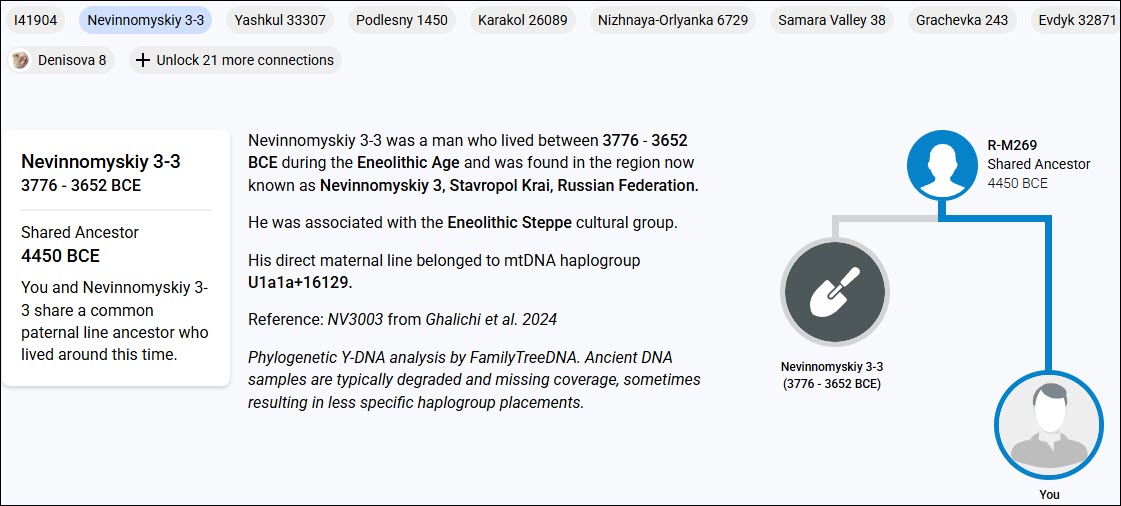
The tree itself is viewable by country, as shown above, or by variant, meaning the haplogroup-defining mutations, shown below.

Additionally, for the Y-DNA tree, you can choose to display by surname, so long as there are two or more testers with that identically spelled surname who share this haplogroup and who have given permission for public display.

Please note that these people are all SNP-tested and confirmed at the level reported, but they are NOT all Big-Y testers.

This feature alone can be genealogy-changing because they may be surnames associated with your ancestors in records, or they may just be neighbors. Or maybe you thought they were “just neighbors,” but they are actually related.

At one time, customers could order an individual SNP test for R-M269 to confirm their predicted haplogroup. That test is no longer available, but anyone who took that test to confirm R-M269 and never tested or received results (like Family Finder) at a more granular level will be reported at R-M269. Note that 687 is the number of distinct surnames shown, not the total number of testers.

The three “hamburger dots” on the right side provide options for a user-reported Country Report based on the location of their earliest known ancestor, and a Surname Report. The surname report for R-M269 shows a total of 2448 testers who share those 687 surnames.

It’s a Whole Forest

Who knew there were 16 unique trees available at FamilyTreeDNA!

Each tree has a unique purpose and provides information not available elsewhere.

Take a look and see what kind of information is waiting for you – and don’t forget to check back often.

_____________________________________________________________

Share the Love!

You’re always welcome to forward articles or links to friends and share on social media.

Subscribe!

If you haven’t already subscribed, it’s free. You’ll receive an e-mail whenever I publish by clicking the “follow” button at the top of the main blog page, here.

Help Keep This Blog Free

I receive a small commission when you click a vendor link in my articles and purchase that item. This does NOT increase your price but helps me keep the lights on and this informational blog free for everyone. Please click on the affiliate links in the articles or to the vendors below if you are purchasing products or DNA testing.

Thank you so much.

DNA Purchases and Free Uploads

Genealogy Products and Services

My Books

Genealogy Books

Genealogy Research

RootsTech 2026 – The Wind Beneath Our Wings

I started writing this article on Sunday evening, the day after RootsTech ended, and I’m basking in the afterglow. Also, my back and feet may never forgive me.

As a tongue-in-cheek comment, I think someone coined the word “exhausterwhelmulated” and defined it as being exhausted, overwhelmed, and overstimulated all at once. Yep, that’s me.

However, I need to add another couple of words to this – gratitude and joy.

Gratitude and Joy

I’m going to try to express this without sounding too sappy.

Do you recall the joy you used to feel when you spotted a relative you loved dearly but didn’t get to see often? Think of the unbridled joy as you piled out of your parents’ car and spotted your grandmother coming out of the door because she saw the car pull up. You ran as fast as your little legs could carry you directly into her arms, and got hugged so tightly it nearly squeezed the breath out of you.

I don’t know what the word for that would be, but it’s similar to how RootsTech feels.

Let me explain. Continue reading →