The New Family Finder NGS Test Results, Comparison, and Preparation

This article is focused on two things.

  1. Comparison of my new NGS and the earlier Family Finder tests
  2. How to prepare for yours if you’ve ordered the upgrade

I compared my results from my older Family Finder test with my new NGS Family Finder test results. As an early beta tester, I have two separate tests, a strategy that is not recommended because it causes duplicate matches for people within the database. Additionally, multiple kits for one person doubles the results and could skew future ethnicity research for myOrigins.

Therefore, FamilyTreeDNA has announced very attractively priced upgrades at $29 for both:

  • People who have taken Family Finder test directly at FamilyTreeDNA
  • People who have uploaded their DNA files into Family Finder from other companies

After seeing my comparison, you may want to compare your own results when they arrive, so I’ve documented that process. Warning: this took between 4 and five days because I was working with a spreadsheet with more than 15,000 rows, and I had to write scripts to perform multiple functions. It was NOT fun and I do not recommend it.

Personally, had I known then what I know now about how reliable the new NGS test is, I wouldn’t have bothered with the comparison. However, I would have downloaded my original match list for posterity, just in case.

If you purchase an upgrade to the new NGS Family Finder, your new test results will replace your older Family Finder test results, but will preserve important account features such as linked matches, any notes you have taken, and more. That’s another reason to upgrade rather than order a separate new test. They’ve done the heavy lifting, not to mention that you’ll save about $50 when compared to the price of a new test.

Why is the New NGS Family Finder Test Better?

The new NGS test holds immense promise for the future. This includes better matching, beginning now. Essentially, FamilyTreeDNA is skating to where the puck is going to be (hockey analogy) and preparing for future tools. That future is not far away!

An amazing new set of tools is goaled for release around the end of the year. And I do mean amazing. They are being beta-tested internally now.

Dave Vance spoke about the new Family Finder NGS test at the ECGGC conference in late August, which you can view through the end of 2026 if you register for the virtual  conference, here, and watch the recorded sessions. You’re looking for the DNA Academy on Saturday evening. I can’t share specific preview slides with you as they are noted in his presentation as “not for distribution,” so my pen is capped for now.

All I can say is that after seeing what’s in store, people were literally throwing their billfold at the folks at the FamilyTreeDNA booth – and I do mean literally. “Here – take my money, please!” as the billfold went sailing. We all had a good laugh, but he was serious.

One presenter (not me, just in case you are wondering) left her credit card and a list of tests to upgrade while she was presenting.

They ran out of swab kits at the conference shortly after Dave’s presentation about what the future holds.

Additionally, you will also be treated to THE absolute best presentation I’ve ever seen about what NGS testing is, how it works, and how it compares to traditional tests, low-pass whole-genome tests, and medical-grade whole-genome tests.

You’ll be a passenger on the Genome Valley train, so climb aboard!

So, without spilling any beans, what’s so great about the NGS test?

To begin with, the older Family Finder tests won’t be able to provide everything the new NGS test will be able to offer – and those completely new tools are in active development today.

Why?

The NGS test targets over 280 million base pairs, up from the currently available 700,000.

That’s more than 400 TIMES the coverage.

This increases coverage in the human genome from about .02% to about 9%.

To quote FamilyTreeDNA, “This change allows us to deliver more precise autosomal results today while creating a strong foundation for future reports and tools.”

You can read the FamilyTreeDNA FAQ here.

Before we move on to the comparison, let’s talk for a minute about test types and uploads from other vendors.

Tests and Uploads

All new Family Finder tests purchased at FamilyTreeDNA since March 2, 2026 have been tested using Next Generation Sequencing (NGS), so the following matrix does not apply to those tests. Those tests don’t need to be upgraded.

If you sign on to your account, on the Family Ancestry dashboard, and see that your NGS button is grey, then you have not upgraded. Click on that grey button to read more and to upgrade. Right now the upgrade is $29, but I don’t know if that is a promotional price or permanent.

If you tested at FamilyTreeDNA prior to March 2, 2026, or uploaded a DNA file from another vendor, your test will fall into one of the following upgrade path categories.

Tested at FamilyTreeDNA before March 2, 2026 Uploaded and purchased the Unlock Uploaded but did not purchase the Unlock
Upgrade Path Can use sample stored in lab if enough DNA remains* If you purchased any other type of test at FamilyTreeDNA, they will use DNA stored in the lab if enough remains. Otherwise, you will be sent swabs. If you purchased any other type of test at FamilyTreeDNA, they will use DNA stored in the lab if enough remains. Otherwise, you will be sent swabs.
New Swabs* If needed, they will notify you Yes, if needed, will notify or send swabs if you have not taken a direct test at FamilyTreeDNA Yes, if needed, will notify or send swabs if you have not taken a direct test at FamilyTreeDNA
NGS Results Will replace existing results Will replace existing results Will replace existing results

*You will be notified if enough DNA does not remain, and you will be sent new swabs. Be sure your address is current.

One of the reasons the NGS test performs better, even with existing matches from earlier tests, is because less imputation is involved. Let’s talk for a minute about imputation and how it works.

The Concept of Imputation

Most vendors change chips internally from time to time, and FamilyTreeDNA is no different. The difference this time is that the new NGS test covers exponentially more DNA than any earlier test, and all earlier tests combined. This means more than 400 times greater coverage, which in turn means less imputation is needed to compensate for the inevitable no-reads and to be compatible with files that tested different DNA locations.

Imputation is also used when comparing DNA files between vendors who don’t test the same locations.

Click to enlarge any image

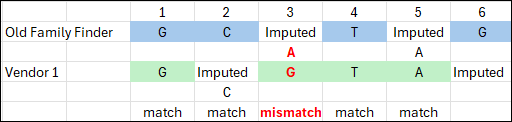
Here’s an illustration of the concept of how imputation works.

All of the FamilyTreeDNA chip versions over the years have included about 700,000 locations, as have most other vendors. But the locations tested are not universally the same.

In our simplified concept example, FamilyTreeDNA’s tested “locations” are shown with blue cells.

The total of 20 squares shows the maximum amount of DNA tested by any of the three vendors shown, combined.

Green Vendor 1 in our illustration tests the same amount of DNA that FamilyTreeDNA tests, 12 squares, but some locations are the same and some are different. Of the 12 colored squares for both vendors, seven are the same locations, and five are not. The locations that are the same can be compared directly, but the locations that are different have to undergo special handling called imputation.

Looking at any location in our DNA, one of four nucleotides, or letters, can be present: T, A, C or G on each strand of our chromosomes, although we are only looking at one strand in our example.

Using a very simplified model of imputation, think of imputation as “filling in the blanks” using clues from surrounding letters – kind of like a crossword puzzle.

When two vendors’ data doesn’t overlap, imputation is used to fill in the blanks, as accurately as possible, for the missing data.

Using a word analogy, for vendors one and two only, we see that blue location three has no Family Finder data, where green Vendor 1 does, and the same with location five. If blue locations two and four are C and T, and three has to make a word, then there are few options. In this case, let’s say it’s cat, and location five is imputed to an A too.

Now moving to green Vendor 1, their locations two and five need to be imputed. Moving away from the word analogy, let’s look to the human genome, and let’s say that most of the time, location two is a C if location one and three are Gs. So green location two is imputed to C.

If there’s not enough quality surrounding data, imputation can’t be performed reliably. Hence, location six is still in limbo here.

You can see that in our scenario, location three is the only mismatch, out of three imputed locations. Does location three mismatch because imputation was wrong? We don’t know. Do locations two and five match because imputation was wrong? We don’t know.

All things considered, imputation is based on the science of probability, and is usually relatively reliable, but it’s still not the same as comparing actual data. The more locations that have to be imputed, and the longer the stretch, the greater the possibility of error. Every vendor implements imputation differently too. Even vendors who don’t and have never accepted uploads still use imputation internally to equalize their own legacy files from earlier test versions.

Stepping back once again to compare the four vendors, you’ll notice that pink Vendor 3 only tested half as much DNA as the blue Family Finder test and green Vendor 1, and again, not all of the same locations. That’s exactly what happened with one of the vendors last December – they dropped the number of DNA locations tested to about 400,000 from about 700,000. In our example, you can see how much would have to be imputed. Locations 11, 15, 19 and 20 can’t be imputed for the pink vendor’s file because there’s no surrounding DNA. Location 17 can’t be imputed for the green vendor for the same reason.

When vendors impute to match multiple versions of other vendors’ uploaded files, it can quickly become messy.

The answer, of course, is a “supertest,” which tests all of the locations that overlap everyone, including that vendor’s own earlier tests.

Welcome to Family Finder NGS, shown in orange at the bottom of our example comparison.

As you can see, the orange NGS test covers all of the locations tested by all of the other tests.

NGS is targeted testing for a specific set of locations that are known to undergo mutations in the human genome and provides extremely high-quality results. Imputation for the NGS file is rarely necessary, although imputation for the other vendors’ and earlier file versions is still required for them to match to each other.

This is exactly why the upgrade is recommended, and why there’s no benefit to retaining your old test. The NGS test tests far more data and provides much more reliable matching.

NGS is the great equalizer.

NGS Test Comparison Process

I took my NGS test during the initial R&D development and testing phase, so my original Family Finder test was not upgraded. This afforded me the opportunity to compare the two results.

I downloaded the match files for both of my tests, the original Family Finder and the new NGS Family Finder test, color-coded the background of the cells, not the text inside the cells, and dropped them into a single combined spreadsheet.

It doesn’t matter what colors you choose, but be sure you can easily see the difference. I used apricot for the original Family Finder test matches and light purple for the new NGS test.

As we walk through these results together, you’ll notice that I continue to refer to them by color. In part, that’s so I can maintain my own sanity as I compare results. When I write these types of articles, I have to check and recheck results.

When the same person showed as a match to both tests (meaning they had both an apricot and purple row), I calculated the difference in matching amounts of DNA (cMs) between the match’s results on both tests. I added several calculation columns, which are not shown above.

I’ll tell you, this was not a trivial exercise. It was painful and I really don’t recommend it.

Let’s take a look at the results.

Total Matches

I have some matches with the new NGS test that I do not have with the legacy Family Finder, and I have some matches on the older test that are no longer present on the NGS test.

  Old Family Finder (apricot) NGS Family Finder (purple) Difference
Total Matches 9014 7719 1,295
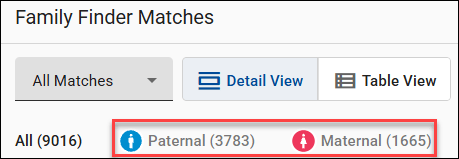
Maternal 1665 Not linked
Paternal 3783 Not linked
X-Matches 2198 1849 349

I have not yet linked the same matches in my NGS test, so I can’t compare the number of maternal and paternal matches. Fortunately, when you upgrade an existing test, FamilyTreeDNA preserves your linked matches, so you won’t need to relink.

Relationship Estimates

  Old Family Finder (apricot) NGS Family Finder (purple)
1st-2nd cousins, Great/Half Uncle/Aunt/Niece/Nephew, Great-Grandparent/Grandchild 6 6
1st-3rd cousin 1 1
2nd-3rd cousin 5 4
2nd-4th cousin 127 132
3rd-5th cousin 1937 1900
4th to remote 6938 5676
Total 9014 7719

The closest relationships remained the same. One 2nd-3rd cousin moved to the 2nd-4th cousin range by losing 10 cM, 194 cM to 184 cM, but they were apparently on the threshold anyway. That match is actually my second cousin, so both ranges are accurate. It was also a transfer kit, so they did not test at FamilyTreeDNA. This revised match is probably the difference between actual reads and imputed reads in some regions, meaning the match is now more accurate.

275 matches had a predicted relationship change, but not uniformly in one direction, and no one moved more than one category in either direction. This all makes sense.

Match Differences

  Number
Matches found in both the apricot and purple spreadsheets 7,352
Unique (comparable) matches in both spreadsheets 7,174
Matches in original Family Finder apricot only 1,681
Matches in NGS purple only 400

A total of 7,352 matches appear in both spreadsheets, meaning the apricot and purple names matched exactly.

Unfortunately, some people had multiple tests, so I couldn’t always compare apples to apples because they appear three times or more on the combined spreadsheet, and I don’t know which of their kits are which.

If someone with the same exact name had more than one match for either or both tests, I did not compare them because their matching amounts were different, and I didn’t know which one(s) my old test matched, versus which one(s) my new test matched. Usually, one was an upload and one was a test at FamilyTreeDNA, but not always. I excluded those 178 match rows from the analysis.

Therefore, 7,174 matches could be directly compared.

There were 1,681 people who match ONLY on the old Family Finder test, and 400 that match only on the new NGS test. And yes, I downloaded the match files at the same time on the same day, so this comparison was controlled for any time difference.

cM Differences

  Number
Largest apricot match not in purple (NGS) list 26.3 cM
Largest purple (NGS) match not in apricot list 27.63 cM
Largest difference 69.86 cM NGS kit more
NGS detected greater over 10 cMs 19
NGS detected less over 10 cM 7
Total NGS greater 2,924
Total NGS less 3,040
No change 1,090

The largest value difference where a match appeared in the original apricot Family Finder test, and not in the purple NGS test, was 26.3 cMs.

The largest value difference where a match appeared in the NGS purple Family Finder test, and not in the apricot original Family Finder test was 27.63 cMs.

The largest difference between the two tests was 69.86 cMs larger detected by the NGS test. This match was a known second cousin whose matching cMs went from 373.06 to 442.92, but the longest block only increased a negligible amount from 87.47 to 87.69.

The next largest difference was with a 1C1R with a 41.56 cMs difference, also with the NGS-detected value being larger.

In all cases where the number of differing cMs was 16 or greater, the NGS had detected more.

There were very few tests that differed more than 10 cMs. In 19 cases, the NGS test detected a greater difference of 10 cMs or higher, meaning if the original test value was 100 cMs, in the NGS test, it was 110 cMs or greater.

In 7 cases the NGS test detected a smaller difference of 10 cMs or more, meaning that if the original test value was 100 cMs, in the NGS test, it was 90 cMs or smaller.

Out of the 7,174 tests being compared, 19 tests with greater than a 10 cM variation isn’t very many, around 0.26%.

In total, 1,090 matches had no change at all, while 2,924 NGS matches had more matching DNA detected, and 3,160 matches had less.

All but 287 of those differences were less than 5 cMs, and 6778 were less than 1 cM. In other words, literally not worth counting.

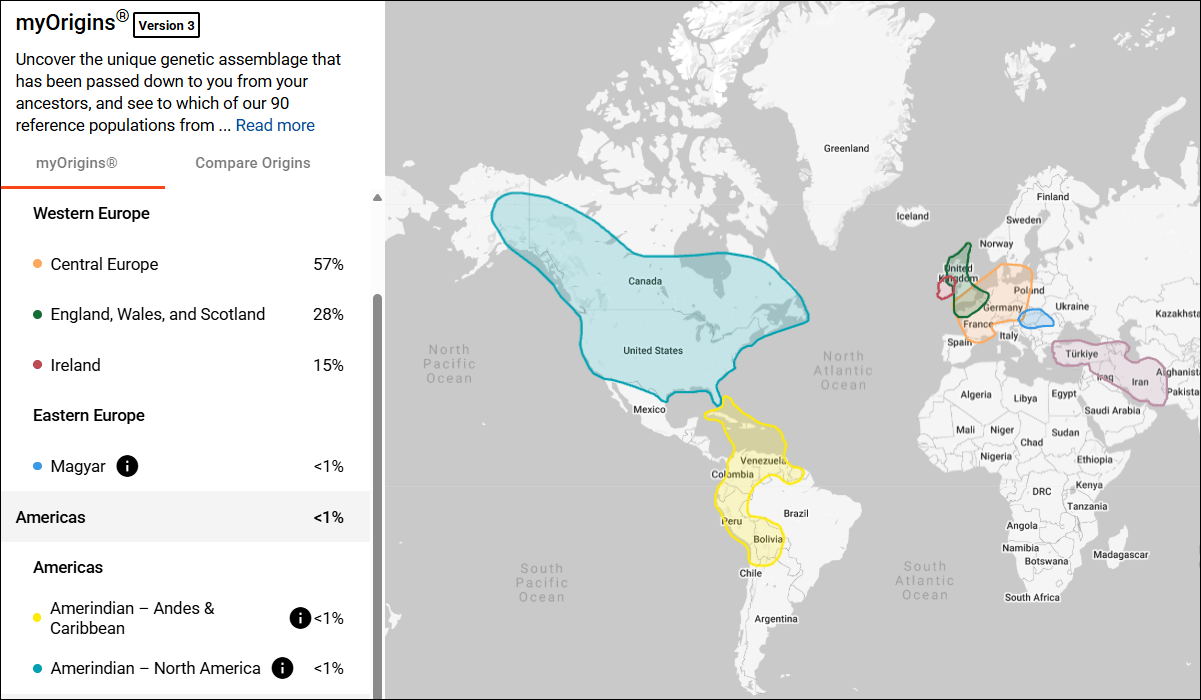
myOrigins Ethnicity

We all know to expect changes in our ethnicity from time to time at all vendors. The NGS test is exciting because it covers a much larger portion of our genome. As more people test, the reference library also becomes larger, which means that the ethnicity predictions can and will become more refined too

myOrigins Old Family Finder (apricot) NGS Family Finder (purple)
Central Europe 57% 52%
England, Wales, Scotland 28% 33%
Ireland 15% 14%
Magyar <1% <2%
AmerIndian Andes and Caribbean <1 (see below) N/A
AmerIndian North America <1% (chr 1 & 13) <1 (chr 1 & 2)
Anatolia, Armenia, Mesopotamia, North Africa <1 (chr 13) <1% (chr 10)

None of my major categories changed, but the amounts attributed to each category changed somewhat.

Trace regions, which are less than 1%, shifted some as well, as did their chromosome locations.

For me, this is particularly interesting, because I paint my ethnicity segments at DNAPainter in order to overlay my Native American segments over the matches with whom I’ve identified common ancestors.

Those segments, matches, and ancestors, taken together, help identify the source of the Native American segments.

My Native segment on chromosome one stayed essentially the same, but the Native segment on chromosome 13 is not present on the new NGS test. However, a new Native American segment is now shown on chromosome 2 in the same location that 23andMe also shows a Native American segment.

Chromosome one has already been proven to a Native American ancestor on my mother’s side, but I have hit a brick wall on the chromosome 13 segment. Now, I’ve painted the Native Segment on chromosome 2 and it aligns with the same ancestral line as my Native American segment on chromosome 1.

My Middle Eastern/North African segment still exists, but the location has changed. This segment was adjacent to my Native American segment on chromosome 13 before, on my father’s side, which suggested a history of enslavement. I thought I knew which ancestral line they both descend from, but now I need to review my matches and reconsider.

Unfortunately, my parents are both deceased and there’s no DNA available, so I cannot upgrade their tests or purchase new ones for them. No aunts or uncles are available either. In this case, cousin matches and their associated genealogy on those segments become critically important.

Native American and African American segments are often the best, and sometimes the only hints we have to find and identify those ancestors.

Preparing for Your NGS Results

To be very clear, you don’t necessarily need to compare or prepare, BUT, if you order an upgrade to an existing test, your old match list will be replaced with the new one. Your old match list will not be preserved unless you do it.

What may change?

  • Your ethnicity results will probably change somewhat
  • You will have matches you did not have before
  • Some existing matches, especially at low matching levels, will no longer be there
  • The amount of DNA you share with some people will change

Important: Any notes you have recorded on your matches and any matches that you have linked will be preserved and carried over to your new results when your new test is complete.

If you want to preserve your matches from your earlier test, or your myOrigins results, you’ll need to download your match list, and either download or take screenshots of your ethnicity information.

Ability to Download Tested at FamilyTreeDNA before March 2, 2026 Uploaded and purchased the Unlock Uploaded but did not purchase the Unlock
myOrigins Can download Can download Cannot download
Chromosome Painter (ethnicity) Can download Can download Cannot download
Match list with segment and other information Can download Can download Cannot download
Raw data file Can download Cannot download* Cannot download*

*On tests you uploaded, you don’t need to download the raw data file because you already have it from the originating vendor.

What information is included in your Match List download file?

  • Match name
  • Relationship Range
  • Shared Data cMs
  • Longest Block cMs
  • Linked Relationship (if you linked them in your tree) – this feature is what allows FamilyTreeDNA to assign your matches maternally, paternally or to both sides using triangulation
  • Ancestral Surnames that they’ve entered
  • Y-DNA Haplogroup if applicable
  • mtDNA Haplogroup if applicable
  • Notes
  • Paternal/Maternal or Both side(s) match (if you’ve linked people and this match can be assigned using triangulation. (This is why it’s important to link as many people as possible to their place in your tree.)
  • X-Match cMs
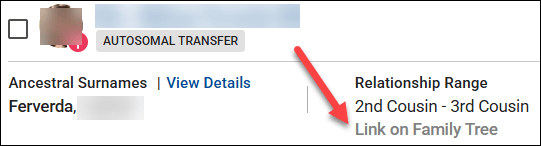
  • Autosomal Transfer yes/no

If you match the same person on the NGS test, this information is preserved for that match.

Where to Download

You must have 2FA (Two-Factor Authentication) enabled for all downloads.

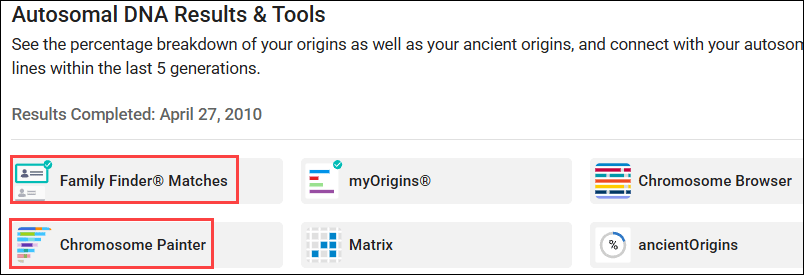
The files you may want to download are found on your dashboard in two locations.

  • Family Finder Matches
  • Chromosome Painter (ethnicity)

Family Finder Matches Download

To download your list of matches with their complete information, click on Family Finder Matches on the dashboard, then on “Export CSV.”

This download provides all the fields mentioned above, whereas the Chromosome Browser segment download provides only your matching segment data, without the additional information.

Download MyOrigins Ethnicity Segment Data

To download your myOrigins ethnicity segments, click on Chromosome Painter on your dashboard, then on “Download Segments.” You can also view or copy those segments by viewing the Detailed Segments tab.

I paint these segments at DNAPainter so that I can correlate my ethnicity regions with my ancestors’ segments.

To assign segments accurately, it helps immensely to have at least one parent’s DNA results too, and preferably both.

You may also want to take a screenshot of your myOrigins map. Note the left-side scroll bar when you’re taking screenshots.

What’s Next?

What else can you do at FamilyTreeDNA to benefit your genealogy?

  • If you haven’t already, upload a GEDCOM file or create a tree at MyHeritage, and link your Family Finder test to your results.
  • Link your individual matches to their place in your tree. This allows FamilyTreeDNA to use segments triangulated with linked matches to assign other matches to either the maternal or paternal side of your tree, or both.
  • Add your line to WikiTree. It’s easy. Begin with yourself and add ancestors until you connect with someone who is already in WikiTree. For me, it was the grandparent level.
  • Add your WikiTree link to your FamilyTreeDNA account under the gear in the upper right-hand corner, then Genealogy, then Family Tree. This gives your matches an easy way to identify common ancestors by using WikiTree’s Find Relationships feature, and provides two types of tree resources for you and your matches – MyHeritage and WikiTree.
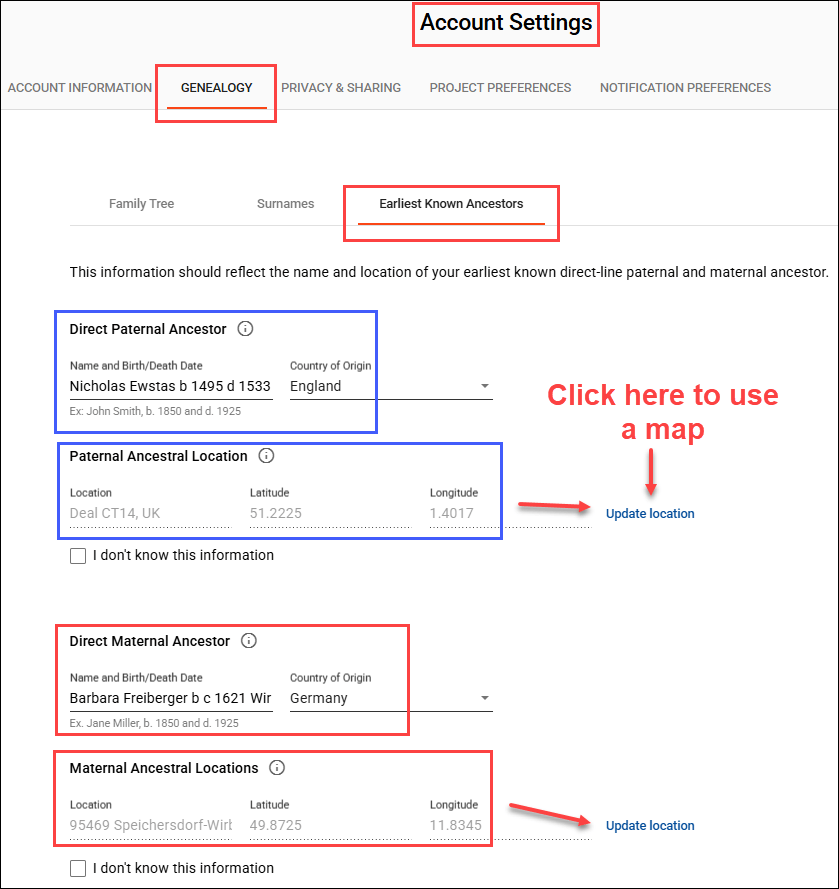
  • Make sure your Earliest Known Ancestor information is correct and up-to-date with your most recent research, including a specific map location. You’ll find that under the gear too, then Genealogy, then Earliest Known Ancestors.
  • Add your surname list to your profile under the gear, Genealogy, Surnames tab.
  • Use the Matrix tool at FamilyTreeDNA to see how much DNA your shared matches share with each other.
  • Y-DNA – If you’re a male, test your Y-DNA, which is your father’s direct paternal line. The Big Y-700 test provides you with matches and the most detailed information possible.
  • mtDNA – Everyone can take a mitochondrial DNA test, which shows matches and provides information about your mother’s direct matrilineal line.
  • Use Advanced Matching, found under Additional Tests and Tools on your dashboard page, near the bottom, which allows you to select from multiple tests to see who matches you on both types of tests. For example, those who match you on both your full sequence mtDNA test and your Family Finder test.
  • Join projects relevant to your family surname, geography or broader interests. You’ll find Group Projects in the top banner of your dashboard page after signing in.
  • Utilize the Discover tools for both Y-DNA and mitochondrial DNA results.

Check your matches often to see who is new and what might have changed as people upgrade to the new NGS test and more people test.

_____________________________________________________________

Share the Love!

You’re always welcome to forward articles or links to friends and share on social media.

Subscribe!

If you haven’t already subscribed, it’s free. You’ll receive an e-mail whenever I publish by clicking the “follow” button at the top of the main blog page, here.

Help Keep This Blog Free

I receive a small commission when you click a vendor link in my articles and purchase that item. This does NOT increase your price but helps me keep the lights on and this informational blog free for everyone. Please click on the affiliate links in the articles or to the vendors below if you are purchasing products or DNA testing.

Thank you so much.

DNA Purchases and Free Uploads

Genealogy Products and Services

My Books

Genealogy Books

Genealogy Research

What is a Quick-and-Dirty Tree, and When Might I Need One?

You may have heard genealogists talk about creating a quick-and-dirty tree.

What is that, exactly? When and why would you want one?

Good questions.

Matches and Trees

DNA matches don’t always have useful trees.

They might have:

  • No tree
  • A partial tree with only a few people in the closest generation or two
  • A tree with some lines built out, but others not so much

What’s a genealogist to do? After all, it’s your match’s tree, not your tree, and you have no way to expand their tree.

Except, you do.

It’s called a quick-and-dirty tree.

Quick-and-Dirty Trees

A quick-and-dirty tree is essentially a “throw-away” tree that you construct at Ancestry with the express purpose of obtaining hints, including potential parents, in order to quickly build your matches tree backwards in time until you (hopefully) reach a common ancestor.

And yes, of course trees, hints and suggestions of any kind can be wrong – but that doesn’t mean they’re always wrong, and you’re not adding anything from your quick-and-dirty tree to your tree – or even displaying it publicly.

You’re simply trying to find a common ancestor by using what your match has provided in their tree. Think of a quick-and-dirty tree as a scratch pad of sorts.

Let’s work through an example.

Initial Analysis

In this example, Ancestry has already told me that this match is most probably my half-second-cousin (half 2C) or second-cousin-once-removed (2C1R) based on the amount of DNA that we share, although the full relationship range includes several more options.

Ancestry also tells me that this match is on my maternal side. There’s no information provided about whether this match is on their maternal or paternal side, or even both.

A second-cousin (2C) relationship means that we share great-grandparents, and once removed means that one of us is one step further down the tree than the other person.

In other words, I’m 2C with my match’s parents, or my match is 2C with my mother. I wrote about this in the article, Concepts: What Does a Cousin “Once Removed” Mean?

I see that my match has a public linked tree with 7 people, which probably isn’t going to be terribly helpful.

Of course, the first thing to do is to review my match’s tree and see if I recognize either their surname or the names in their tree.

This tree only reaches back two generations, and our common ancestor, based on the relationships predicted by shared DNA, would be another generation, or two, further removed.

I don’t recognize any of these names, although I’ll review each person for a location to see if I can narrow the scope to the couple most likely to lead to our common ancestor.

On my mother’s side, one of her parents is from northern Indiana, and one is from southern Indiana, but not everyone enters locations in their trees, and they aren’t necessarily accurate.

The list of “all people” in my match’s tree, under “Find in tree”, at far right, provides additional information. Unfortunately, this tree shows Earl Townsend’s wife’s name as Mildred Ideal Thorstenson Townsend Smith here and in her profile, but the name order differs. To begin, I’ll enter Thorstenson Smith, not her married name of Townsend, in the quick-and-dirty tree I’m building. You can refine this shortly.

In this case, it looks like the Townsend line is most promising to find a common ancestor, given that Fulton County is in northern Indiana, but we’ll find out that this isn’t the case when we construct our quick-and-dirty tree.

Building the Quick-and-Dirty Tree

You need to build a new tree, NOT add to your “real” tree.

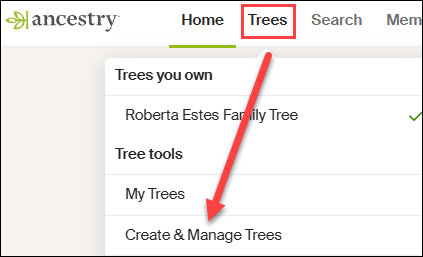
At Ancestry, go to Trees in the top banner, then click on “Create and Manage Trees.”

You’ll see the list of trees that you own. This is where all of the trees that you create live.

At the far bottom, you’ll see the prompt to create a new tree. Click there.

Next, you’ll see a blank tree.

For the home person, you can enter your match’s name, but be sure to list them as living so you’re not revealing private information.

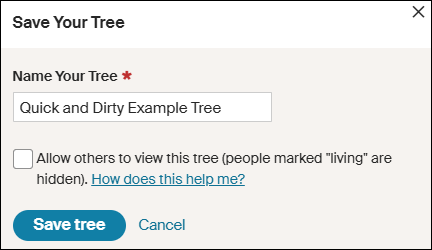
After adding one parent, you’ll be prompted to save and name the tree. Both the tester, who is designated as male by the Ancestry icon, and his father are either both living, or private, so I’m simply entering the surname of Robinson based on the grandfather’s surname. That could be incorrect of course, but it’s all I have to go on – yet.

Ironically, their grandfather’s surname was spelled Robison, without the “n”, not Robinson, but I accidentally entered Robinson and still got where I needed to go.

Clearly, I’m not going to allow this tree to be viewed by others, aka public, so I’m not checking that box. If it’s checked by default, uncheck it.

I don’t make my quick-and-dirty trees public because they are entirely unproven and unverified. I’m literally quickly searching for hints with every intention of abandoning the tree when I’m finished. If you want to clean the tree up later, you have the option to change the tree’s privacy settings.

Information in Your Match’s Tree Might Be Wrong

Complete the tree to be the same as your match’s tree. After saving your tree, click on the individuals you’ve added to view their hints.

Let’s start with Earl Townsend who appears to be our best candidate based on location.

Earl Russell Townsend has 13 hints, including a marriage license that confirms his birth date and location and provides the names of his parents, plus his wife’s name as Mildred Thorstenson. Based on what we know already, this is probably the correct Earl Townsend.

Of course, the wife’s surname could be incorrect. It could be her first or second marriage, or she could have been a widow when they married, so this surname might not be her birth surname.

Look for additional records in Earl’s hints.

Russell’s death certificate confirms that information, as do the birth and death certificates of their children.

Accept those hints.

If you determine that the original information in your match’s tree is incorrect, you’ll want to correct it in your quick-and-dirty tree. Remember, this is a scratch pad – you can’t hurt this tree.

Let’s change Mildred’s name to reflect her birth surname.

I refined Earl’s wife’s name to Mildred Thorstenson, which then produced 12 hints for her, including her marriage and Social Security record, with her birth and death dates, and her parents’ names. Her name in my match’s tree of Mildred Ideal Thorstenson Townsend Smith had produced zero hints.

Additionally, census records showed Mildred with her parents.

These seem to align, so accept those hints.

Looking at the pedigree view of my quick-and-dirty tree, we now see that both Russell and Mildred’s parents identified in the records are suggested as their potential parents.

Review each suggestion. If they look accurate based on the records identified, accept those potential parents in order to view the next generation.

Based on these names and census information, I can eliminate the Thorstenson line. It’s Swedish, not German or Dutch, which comprise my mother’s northern Indiana lines, My mother has no known Swedish ancestors, and we have proven her Indiana lineage in this timeframe.

Accepting the hints for the parents of both Earl Townsend and Mildred Thorstenson, parent hints appear for John Townsend and Eva Martin.

Now we’re viewing the next group of hints, which would be the great-great-grandparent generation. If these are our common ancestor, that would mean that I’m third cousins with my match, which is beyond the predicted relationship range. Third cousins is not impossible, but it’s beyond the probable match level based on the amount of shared DNA. furthermore, I don’t recognize any surnames.

So, let’s move to the Robison (incorrectly spelled Robinson) line and step through the same process. We can always come back and work with more parental hints on the Townsend/Martin line if we need to.

Rolland Robison only has a death year in my match’s tree, and that combined with the misspelled surname meant he had no hints on Ancestry, so I clicked on “Search” in my quick-and-dirty tree.

I’m searching for a man by this name, with a wife whose first name is Chloe.

AHA!

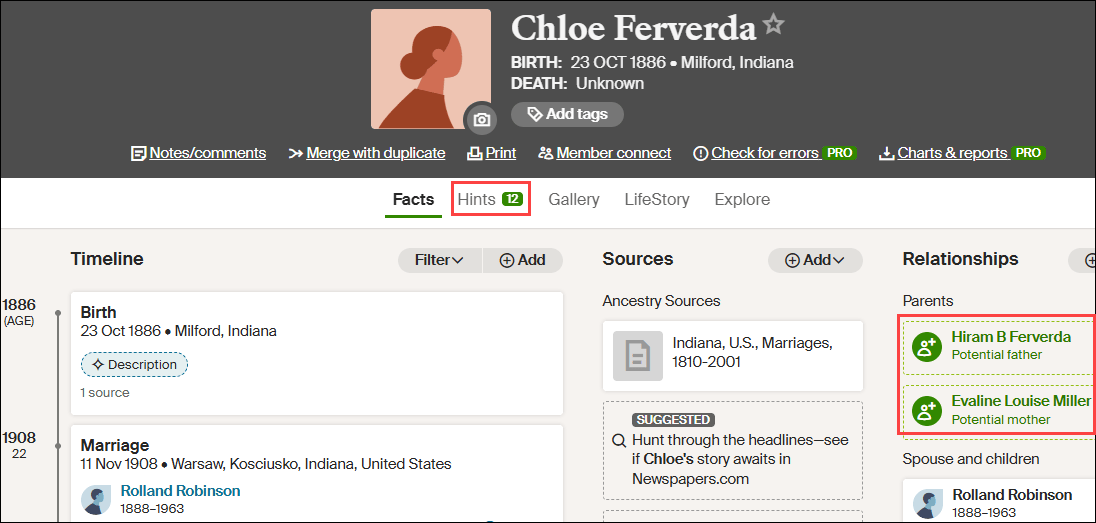
There it is! Note that Ancestry found Rolland Robison, not Robinson, married to Chloe.

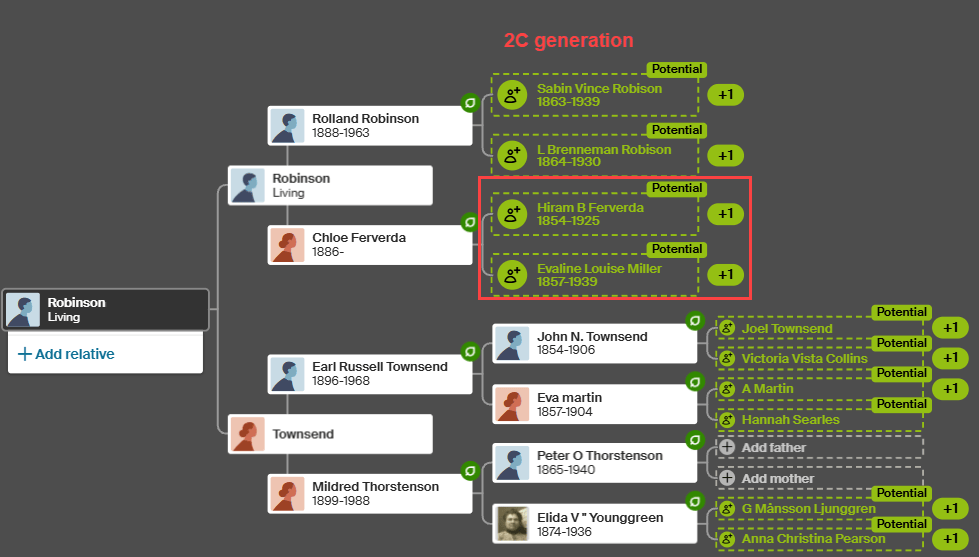
Chloe was a Ferverda. My mother’s father was John Ferverda, and the location is correct for this family.

I saved this record to Rolland Robinson and added Ferverda as Chloe’s surname in our quick-and-dirty tree. This provided Rolland with 12 hints.

Adding Ferverda as Chloe’s surname provides her with a dozen hints too, including potential parents, Hiram B. Ferverda and Evaline Louise Miller – my great-great-grandparents who are indeed the 2C generation.

These common ancestors fall within the expected amount of shared DNA for second cousins, so this aligns well.

My quick-and-dirty tree has revealed at least one pair of common ancestors. Could there be more common lineages? Yes. I would continue building out this quick-and-dirty tree for (at least) another couple of generations on the other lines just to be sure.

What Next?

That depends on what you want to accomplish and your genealogy goals.

I used a DNA match at Ancestry in this example, but your match might be at a different vendor. Regardless, you’ll still want to use Ancestry to build your quick-and-dirty tree based on how they present hints and potential ancestors.

Now that you know how your DNA match connects:

  • Minimally, make a note on the match that indicates the most recent common ancestor(s) identified. I include a link to the quick-and-dirty tree I’ve created.
  • You can add your match and their ancestral path to your common ancestor into your own tree at whichever vendor where the match occurs.
  • If you match at either FamilyTreeDNA or MyHeritage, both of whom provide segment information, I suggest painting your matching segments to DNAPainter.

Painting your segments identifies your matching segments as descending from those ancestors and makes it easier to identify the shared ancestral lineage of anyone else who shares that segment on the same side of your tree (maternal or paternal).

Word of caution here: You can potentially share multiple ancestral paths with any match, so different segments with one match can descend from different ancestors.

  • If your match is at FamilyTreeDNA, you’ll want to link your match to their place in your tree.

Using triangulation, FamilyTreeDNA utilizes linked matches to assign matches who share the same segments to the maternal or paternal side of your tree (or both) using triangulation.

  • You may be trying to break through a brick wall by identifying common ancestors BETWEEN your shared matches that aren’t in your own tree.

This approach is obviously easier the closer your brick wall is in time to the present. Great-grandparents, at the second-cousin level, and great-great-grandparents at the third-cousin level are much easier than 5th- or 6th-generation ancestors who lived before birth and death certificates and detailed census records existed.

Furthermore, the further back in time, the more likely that you may encounter:

  • Pedigree collapse, where the same ancestors appear more than once in your tree
  • Or you share multiple common ancestors with your matches

Of course, there’s always the possibility of endogamy too, where you descend from a historically heavily-intermarried population, such as Ashkenazi Jews or the Amish, for example, which means you may share segments passed down within the population from distant common ancestors you won’t be able to identify. While endogamy in your lineages may increase the amount of shared DNA, which in turn can skew relationship estimates, it won’t prevent you from using quick-and-dirty trees to locate common ancestors.

And finally, unexpected parentage or issues like record destruction may impede your progress, but you’ll never know if you don’t try, which brings us back to the purpose of quick-and-dirty trees.

Building a quick-and-dirty tree is the easiest way to grow your matches’ trees to reveal your common ancestors.

_____________________________________________________________

Share the Love!

You’re always welcome to forward articles or links to friends and share on social media.

Subscribe!

If you haven’t already subscribed, it’s free. You’ll receive an e-mail whenever I publish by clicking the “follow” button at the top of the main blog page, here.

Help Keep This Blog Free

I receive a small commission when you click a vendor link in my articles and purchase that item. This does NOT increase your price but helps me keep the lights on and this informational blog free for everyone. Please click on the affiliate links in the articles or to the vendors below if you are purchasing products or DNA testing.

Thank you so much.

DNA Purchases and Free Uploads

Genealogy Products and Services

My Books

Genealogy Books

Genealogy Research

Mitotree: First, the Tree – Now the Paper

It’s definitely a red-letter day.

Dr. Paul Maier, the lead author on the new paper Mitotree: The Universal Human Mitochondrial Reference Phylogeny at 10x the Resolution has uploaded the paper to the bioRxiv preprint server, here.

I want to congratulate all of the authors, most of whom are members of the FamilyTreeDNA R&D team as either employees or contractors. I’m a contractor and have had the honor of working with these amazing colleagues on this project since 2020.

About Mitotree

Mitotree was officially “born” on February 25, 2025, and the tree has been updated several times since. About 75% of FamilyTreeDNA’s customers who have taken the full-sequence mitochondrial DNA test received a more refined haplogroup with the release of Mitotree or subsequent updates. Those haplogroups are, on average, 2000 years newer than the person’s legacy Phylotree haplogroup, and some are much more recent.

This means that the tree branches have gotten much, much bushier close to the tips. In other words, lots more twigs and leaves!

Unfortunately, about 25% of testers did not receive a new haplogroup because they do not have any qualifying mutations:

  • Either because they have no additional mutations
  • Or because they have mutations, but they are unstable
  • Or because they have mutations, but no other testers have yet tested that match them to split a branch

The good news is that with the addition of haplotype clusters, everyone benefits from new matching and grouping tools. Testers are grouped into clusters on their matches page, and on the Match Time Tree in Discover, which is much more useful for genealogy.

I know this paper has been a long time coming, but it’s well worth the wait.

Mitotree was a massive undertaking. We began with PhyloTree v17 which had 5,438 hand-curated branches constructed from 24,275 full and partial mitochondrial sequences. Phylotree was last updated in 2016 before subsequently being abandoned.

The Million Mito Team developed Mitotree, a robust phylogeny with more than 54,000 branches formed from over 330,000 complete mitochondrial sequences, of which 177,196 are unique sequences.

Let’s Look Under the Hood

There are three critical pieces of information in those statements.

First, the PhyloTree curation and maintenance was not automated, and a paper detailing their build process, what mutations were included or excluded, and under what circumstances was never published.

Approximately once a year, a new PhyloTree was published where newer samples were individually evaluated and new haplogroups were hand-grafted onto an existing backbone tree.

This methodology did not allow for deep splits to become apparent, because the tree itself was never recalculated. This is exactly how haplogroup L7 went undetected until the Million Mito Team recalculated the tree, including the backbone, in 2022, and published this paper about L7’s discovery.

In other words, while PhyloTree was publicly available, there was no recipe for how it was created or maintained.

Clearly, the tree-building process had to be automated, as hand-curation was unsustainable. There were no academic programs in existence capable of handling the number of samples involved. Not even in 2016 for fewer than 25,000 samples, let alone today.

To maintain haplogroup naming consistency, the first thing our team had to do was write software to phylogenetically reverse engineer PhyloTree v17 to establish a common foundation on which to build. This step was essential for consistency and maintaining the established haplogroup naming pattern.

That software also had to be capable of scaling up exponentially. The first versions took weeks to run, which clearly wasn’t an acceptable long-term solution. Still, being able to establish a foundational backbone to build on programmatically was a victory in and of itself.

Second, PhyloTree used partial sequences, meaning HVR1 and HVR2 samples. Early academic researchers did not perform full sequence testing, so the curators of PhyloTree used what was available to the best of their ability.

With over 330,000 full-sequence samples available today, we no longer include partial samples.

Third, 177,196 of the 331,221 full sequence samples used were unique. Before launching the program to construct the tree, identical samples from known immediate relatives are deduped, when possible, in order to reduce unnecessary clutter and processing time.

This means two things. The actual number of testers is greater than 331,000. But more importantly, anyone who thinks that mitochondrial DNA isn’t interesting should take another look. More than half of the sequences used for tree-building are unique, which handily dispels the myth that mitochondrial DNA doesn’t mutate often enough to be useful for genealogy.

The Mitotree initiative has been both scientifically and genealogically successful beyond anything we could have imagined. The base tree includes approximately 180 branches that are older than 30,000 years, including the discovery of haplogroup L7 at 100,000 years old. These branches both expand and more firmly root the oldest portions of the tree.

Amazingly, haplogroup L7 has living descendants whose earliest known family members are found in Turkey, Saudi Arabia, Yemen, the UAE, Palestinian Territory, Ethiopia, Sudan, and South Africa.

Another fun discovery involved Otzi, the Iceman, a mummy found frozen in the Italian Alps who lived more than 5,000 years ago. He was thought to carry an extinct haplogroup, K1ö, named in his honor, but as it turns out, he’s actually a member of haplogroup K1f, a clade with living descendants in Algeria. Additionally, Otzi now matches four ancient burials too, so he does have cousins.

We couldn’t have made these discoveries without the right people testing, so please encourage everyone and dispel the discouraging myth that mitochondrial DNA isn’t useful or interesting. It absolutely IS, and the success stories keep rolling in!

Why Build a Phylogenetic Tree?

Simply put, the history of our ancestors, both recently and reaching back into ancient history, is revealed in the tree – and there’s absolutely no other avenue to reach this information. Ironically, it’s readily available to everyone because everyone has mitochondrial DNA and can easily take the test.

Mitochondrial DNA is different than Y-DNA, which has its own phylogenetic tree based on SNP mutations, and autosomal DNA, which has no tree.

The reason that both Y-DNA and mitochondrial DNA can have phylogenetic trees is that they are inherited from the appropriate parent with only occasional mutations, while autosomal DNA is roughly halved in each generation.

Y-DNA is inherited by males only from their fathers, with no admixture from their mother, while mitochondrial DNA is inherited by everyone from only their mothers, with no admixture from their father.

Autosomal DNA is inherited through random recombination, with half coming from each parent, except for the X chromosome which has its own inheritance pattern. X-DNA is often confused with mitochondrial DNA, but they are entirely different types of DNA. I wrote about that here.

No tree is possible for autosomal DNA, because it gets diced and riced in each generation.

The mutations that occur occasionally and randomly in both Y and mitochondrial DNA form a trail of breadcrumbs leading backward in time, or in our case, they form both the trunk and branches on the tree.

Those unique mutations, once they occur, are inherited by subsequent generations, forming a path back in time.

In current generations, those mutations provide testers with the ability to identify our closest cousins who inherited those same mutations and who have taken either a Big Y-700 test, in males, or a mitochondrial DNA full sequence test for everyone.

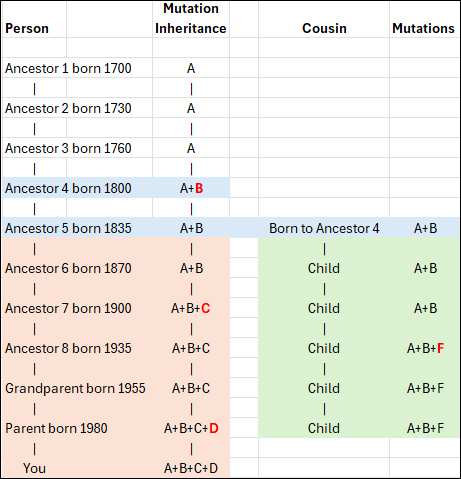
In this conceptual example, you can see that Ancestor 1 carries mutation A, as do the next two generations who inherited it from their parent. However, Ancestor 4 now has additional mutation B, so that person carries mutations A+B. This inheritance pattern continues through the apricol lineage as mutations C and D are added in subsequent generations, until “You” are born with A+B+C+D.

Your cousin’s ancestor, on the other hand, was also born to Ancestor 4 and carries both A+B, as seen in the green column. Three generations later, that line added mutation F. Your  ancestor 7 added mutation C, so now the apricot and green lineages can easily be genetically distinguished from each other.

When a living person tests, we immediately know, based on the combination of their mutations, if and where they fit in this lineage, because both the apricot and green branches have accumulated unique mutations that the original blue Ancestor 4 and earlier ancestors did not have.

Using our knowledge of the tree branches, when and where they occurred, provides valuable genealogical information, along with fascinating Ancient Connections, both since and prior to the adoption of surnames.

Both Y-DNA and mitochondrial DNA can reach much further back in time than autosomal DNA because they are not diluted with DNA from the other parent in each generation.

So mitochondrial DNA is both broad, meaning many leaves, and deep, meaning it helps us look straight back in time like a laser sight, all the way to the common ancestor of all humanity, Mitochondrial Eve, who lived about 140,000 years ago in Africa.

Mitochondrial DNA Presents Unique Challenges

Mitochondrial DNA presents challenges not found in Y-DNA tree building.

For example, mitochondrial DNA only has 16,569 locations available to utilize, while Y-DNA currently uses roughly 22 million “gold standard” locations on the Y chromosome.

Of those 16,569 mitochondrial locations, some are not reliable enough for tree-building.

Unreliable mutations include:

  • Insertions, where extra copies of a particular nucleotide (Thymine, Adenine, Cytosine and Guanine) have been inserted at a specific location. Those are indicated by designations such as 309.1C where 309 indicates the marker location, .1 indicates the number of insertions at that location, and C (for Cytosine in this example) indicates the nucleotide inserted.
  • Heteroplasmies occur when multiple nucleotides are detected at a specific location. They are reported by a different letter than T, A, C or G, depending on which of multiple nucleotides are found. Heteroplasmies tend to “come and go” based on detection and threshold levels, so they can’t be used the same way as more stable mutations for tree building – and are often, but not always, unreliable for genealogy. I wrote about this in the article, What is a Heteroplasmy and Why Do I Care?.

Those locations and types of mutations have been excluded from forming tree branches, or downweighted, because they are too prone to mutating back and forth. However, they *might* be useful for genealogical purposes. Less-than-reliable mutations are now used to create haplotype clusters, even though they aren’t used to create new branches on the Mitotree.

I wrote about how haplogroups and haplotype clusters are formed in these articles:

Weighting and Confidence Factors

Mitotree formation would have been a lot easier if delineations, meaning inclusions and exclusions, were clear, either yes or no, but they aren’t.

Some were obvious from the get-go, such as insertions at location 309 and elsewhere, but other situations were much less obvious.

For example, sometimes there’s a specific location that seems prone to reversion, mutating back and forth, meaning that it mutates, then returns to its original state, then repeats the process.

Reversions are a natural phenomenon that occurs frequently in mitochondrial DNA, but is rarely, if ever, found in Y-DNA.

Let’s look at an example.

Courtesy Dr. Paul Maier

How many reversions at the same location are too many, especially if they are close in the tree?

In the above example, the mutation from A to G occurs just below the first arrow, forming haplogroup L1, a branch of L. The red areas all carry that mutation, subsequently forming eight new branches.

However, one step downstream from that mutation, just above the second arrow, location 7055 back-mutates, or reverts to A from G, which is indicated by the “!”. That reverse mutation forms haplogroup L1c3.

If location 7055 continues to flip back and forth between A and G, at what point do we have less confidence in that location, and at what point should a location be excluded from the tree and prevented from creating or dividing a branch?

The answer is that “it depends,” sometimes on the branch, sometimes on the “group” of other mutations it’s found with, and other factors. Some locations are stable in some parts of the tree, but unstable in others. We certainly never expected to see that!

This means the team had to design and build a weighting methodology so that relevant mutations, such as reversions, are not summarily excluded from tree building but instead carry different confidence weighting levels, depending on the circumstances.

Some samples, such as ancient DNA, were down-weighted in general due to their propensity to contain artifacts resulting from deterioration. Ancient samples can still influence branching, just not as much as a high-quality modern sample.

Furthermore, especially when utilizing academic samples, results with a high number of heteroplasmies are excluded, along with those with ambiguous reads and missing upstream mutations, which were previously inferred with PhyloTree. Academic samples vary in quality and age, and we have no way of knowing which quality criteria were used by that lab at that time.

These types of variances made constructing and updating the Mitotree more challenging than the Y-DNA tree, which is not subject to weighting, resulting from phylogenetic tug-of-war between mutations.

In some situations, the addition of just one test can make the difference between a new branch, or no branch, in a subsequent run of the tree. Due to this type of scenario, and fine-tuning the algorithm, some people’s new haplogroups have reverted to an earlier haplogroup in subsequent Mitotree updates.

The paper and supplemental materials provide details about the exclusion process, types of exclusions, and a list of excluded marker locations.

You can view the confidence of any haplogroup in the Classic Mitotree view in Discover.

My haplogroup, J1c2f, is formed by the mutation G9055A, and you can see that the confidence rank is 7.5 out of 10.

Mousing over the little up-arrow tree icon beside the star explains changes in nearby branches, which can affect the haplogroup’s confidence ranking.

Branches are not renamed for convenience, and only when phylogenetically warranted. Existing haplogroup names used either on PhyloTree, in academic literature, or previously on the Y-Full tree are either maintained or avoided to eliminate potential confusion. No one wants two different haplogroup names depending on which tree is being viewed.

Previously obsoleted names remain permanently obsoleted and are not reused.

The paper explains further about technical corrections and tie-breaker situations. In some cases, potential branches with equal or near-equal weighting are flagged for team review.

Amazing Discoveries

I encourage everyone to read the section in the paper beginning with “Notable discoveries.” These aren’t people, as in Discover’s Notable Connections, but scientific accomplishments achieved with the new Mitotree.

Our knowledge of human migration within and out of Africa has been greatly refined, as well as the ancestral path into and across Eurasia, Asia, and into the Pacific Rim. If you have unusual mitochondrial haplogroups such as L, M, N, P, Q, R or S, you’ll absolutely want to read this.

Of course, in time these haplogroups branch and become Paleolithic haplogroups, then the Gravettian-Mesolithic followed by the Hunter-Gatherers found throughout Europe that we are familiar with. We’ve learned a great deal from rare ancient DNA samples that anchor more modern haplogroups in a place and time, and inform us of migration patterns as well as how now-extinct ghost populations gave rise to current ones.

The earliest humans, whom Mitotree has more firmly anchored, formed a trickle out of Africa that became a bifurcated stream, eventually flowing across the rest of the world. What recorded and even archaeological history cannot tell us can be and is revealed through the patterns held in our DNA today – and Mitotree is our map to read them. Common ancestors are found where our mutations as haplogroups converge, joining as we travel backward in time, piercing an otherwise impenetrable veil.

For those with Native American ancestry, Mitotree expands the two-wave theory, refining it into five or six probable migration surges, depending on how you count, based on a combination of haplogroup ages and distribution.

Summarizing from the paper:

The first wave of haplogroups A2, B2, C1b, C1c, C1d, D1, and D4h3a arrived from Asia, across Beringia or along the Pacific Corridor, about 17,000 to 18,500 years ago, and expanded along the Pacific coast. D4h3a is found almost exclusively in the Pacific region.

This was followed by haplogroup C4c about 15,800 years ago and X2a about 10,000 years ago, which expanded into the interior through the ice-free corridor east of the Rockies after the ice melted.

Next were the Paleo-Eskimo and Na-Dene speakers in haplogroups A2a, D2a, D2b, D2c/D3, and D4b1a2a1a2, who, between 3000 and 7000 years ago, made their way from Alaska, across the polar regions of Canada, into Greenland.

Na-Dene speakers, Apache and Navajo, in haplogroups A2a and B2a made their way southwest between 1300 and 1500 CE, or between 500 and 700 years ago.

Last, the present-day Inuit-Yupik expanded from Beringia to Greenland about 1000 CE.

For additional information, please see the Native American lineages section of the paper.

Mitotree has also clarified the ancestors of the Ainu/Jomon people from Hokkaido, Japan, and their ancient Paleolithic northwest Asian and Siberian relatives. The ancestors of this group and Native Americans share even earlier Asian ancestors.

The history of the Jewish people has been significantly refined as well, expanding on earlier works, and is found in the Counting the newest Jewish founders section of the paper.

  • 43% of Ashkenazi Jewish testers fell into 5 founding lineages where they had no subclades before, but they do now.
  • Two clades of haplogroup K have now been split 4000 to 5000 years ago in Romania.
  • There’s new information about the crypto-Jewish community in Portugal, Mountain Jews from Persia and the Caucasus, plus Jewish groups in India, Georgia, Azerbaijan, Israel and Libya.
  • Additionally, haplogroup M33c9b tells the story of Ashkenazi Silk Road merchants who traveled between China and Europe.

The paper reports the isolation of Sardinian-specific haplogroups and provides substantially greater structural definition for the Saami people, increasing from 22 subclades to more than 300.

The Notable discoveries section is chock full of information.

Genealogy Jump-Start

Today’s tree is ten times larger than the 2016 tree, and will continue to grow as more people take a full sequence mitochondrial DNA test, available at FamilyTreeDNA.

The greatly improved tree alone is not the only facilitator of genealogical success. A dozen reports, including Haplotype Clusters and the Match Time Tree are provided for all full-sequence testers in Discover. I wrote about how to effectively use your matches and Discover to break through genealogy brick walls, here.

There are a couple of things you need to do to increase your opportunities for success and to help Discover and Mitotree.

Genealogy is a team sport, and you can increase everyone’s success rate by completing (and updating) your Earliest Known Ancestor (EKA) and location information, found under “Account Settings” beneath your name in the upper right hand corner when signed on, then “Genealogy”, then “Earliest Known Ancestor”, and by providing a family tree or a link to WikiTree.

Identifying common ancestors is what testing is all about, and these are all important success factors. Everyone wants to identify previously unknown ancestors.

Mitotree is More Than Genealogy

Of course, as genealogists, we’re focused on how to use the new Mitotree information, paired with Discover, to identify brick-walled ancestors and learn more about them. I’ve written specifically about how to do that in these two articles:

Mitotree isn’t just an explosion for genealogy, though – it’s an incredible scientific achievement. Instead of genealogy benefiting from other specialties, now they can benefit from what genealogy has wrought.

Mitotree presents opportunities to rethink and potentially recalculate dating and information in other fields, such as archaeology, medical genetics, forensics, and history.

We know vastly more than ever before, but this is only the beginning.

With each new tester and every ancient genome added to the growing body of evidence, our understanding becomes more refined, revealing insights about our ancestors, and weaving our thread into the broader tapestry of human history.

_____________________________________________________________

Share the Love!

You’re always welcome to forward articles or links to friends and share on social media.

Subscribe!

If you haven’t already subscribed, it’s free. You’ll receive an e-mail whenever I publish by clicking the “follow” button at the top of the main blog page, here.

Help Keep This Blog Free

I receive a small commission when you click a vendor link in my articles and purchase that item. This does NOT increase your price but helps me keep the lights on and this informational blog free for everyone. Please click on the affiliate links in the articles or to the vendors below if you are purchasing products or DNA testing.

Thank you so much.

DNA Purchases and Free Uploads

Genealogy Products and Services

My Books

Genealogy Books

Genealogy Research

Ancient Connections: Where Archaeology Meets Your Ancestors

Ancient Connections, a report found on FamilyTreeDNA’s Discover platform for both Y-DNA and mitochondrial DNA (mtDNA), can be used in multiple ways to enhance your genealogy and unlock secrets.

It’s exciting to examine ancient burials linked to our ancestors and understand how we connect to them. Ancient Connections offer a wealth of information, providing clues that can help unravel long-standing mysteries.

Today, there are more than 12,960 Y-DNA Ancient Connections in Discover, along with more than 25,310 mitochondrial Ancient Connections, and that number increases weekly.

Why the disparity, you ask? Remember, everyone has mitochondrial DNA, but only males have Y-DNA.

In addition to matches, your DNA results hold something even more powerful – evidence of where your ancestors and their cousins lived in the distant past, when they lived, and the cultural context surrounding them. These essential insights are unavailable through any other means. Ancient Connections help us answer the age-old question, “Where did I come from?”

Could These People Be My Ancestors?

I’ll show you how to answer another question, too. Which of these Ancient Connections could potentially be your ancestors, and which ones are your “haplo-cousins”?

Regardless, they all help us understand our ancestors’ past, and that of their descendants.

Discover is for Everyone

FamilyTreeDNA provides a free version of Discover that everyone can use. There’s also an enriched version with additional information for their customers who have purchased Y-DNA and mitochondrial DNA tests.

Discover has something to offer for everyone.

Mitochondrial DNA is passed from mothers to all of their children of both sexes – unmixed with the DNA of the father.
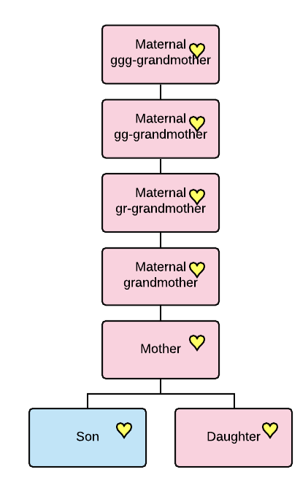
Everyone has their mother’s mitochondrial DNA, which is passed intact, except for an occasional mutation, directly down through generations of mothers. It’s not admixed like autosomal DNA, so we don’t lose some portion in each generation. This is exactly why we can track mitochondrial DNA infinitely far back in time and why it’s so crucial for understanding the origins of your mother’s specific line.

Y-DNA is passed from fathers only to their sons, which is what makes males male. Like mitochondrial DNA, Y-DNA is not admixed with any DNA from the mother, so we get a laser line-of-sight view of the direct patrilineal line back in time. The Y-DNA direct paternal line is the male’s surname line in cultures where males carry their father’s surname.

If you’ve tested at or upgraded to either the Big Y-700 level or the mtFull, full mitochondrial sequence test, you will receive the most granular haplogroup possible, meaning the closest in time and most informative. You’ll also match with other testers who have taken the less-refined lower-level tests.

The most informative and precise results occur when both people have taken the premium tests. As more people test and science advances, you may receive a new haplogroup from time to time when you and another tester share a rare mutation – so these tests are evergreen.

Both Y-DNA and mitochondrial DNA testers at any level have access to Discover on their dashboard for those products, although the results of lower-level tests provide less information.

The Free Version of Discover Compared to the Premium Version for Testers

Here’s a comparison of lower-level Y-DNA tests and the Big Y-700.

Click any image to enlarge

Y-DNA testers who have only taken the 12-111 STR panel tests receive a predicted haplogroup, and when clicking through to Discover, receive up to 10 Ancient Connections.

For example, If your Y-DNA haplogroup is predicted as R-M269, the most common male lineage in Europe that arose some 6450 years ago, your Ancient Connections begin with the closest genetic match to R-M269. Viewing Ancient Connections that are 6500 years ago will certainly be interesting, so please do look, but probably not terribly useful for genealogy.

However, if that same person were to upgrade to the Big Y-700, they would receive a much more recent haplogroup, and along with it, up to 30 Ancient Connections within their major haplogroup lineage, R in this case, plus the oldest sample in the database. For some haplogroups, there may not yet be 30 Ancient Connections, although new ancient samples are added weekly for both Y-DNA and mitochondrial DNA.

All Ancient Connections begin with the matches who are genetically closest to the haplogroup requested.

The same scenario holds true for mitochondrial DNA testers who previously tested at the HVR1/HVR2 level, but not at the full sequence level, which is the only test available today.

This article focuses on testers at the higher levels, meaning the Big Y-700 and the mtFull tests, and how to utilize their 30 closest Ancient Connections. We’ll walk through step-by-step examples using both.

However, before we begin evaluating our Ancient Connections, we need to cover two fundamental concepts.

BCE, CE and Converting to “Years Ago”

It’s helpful to understand date structures and how they are used.

It’s easy to get confused when seeing the dates of CE, current era, and BCE, before current era, which means we misinterpret the information.

For example, the year 100 CE is the year 100 that occurred roughly 1900 years ago. We round 2026 to 2000 for these types of calculations. The year 100 BCE, before current era, occurred approximately 2100 years ago. I often prefer to work in “years ago”, because it equalizes the numbers, meaning you’re less likely to get confused about how long ago someone lived or something happened.

To do the calculations from BCE dates to “years ago,” add 2000, so 2250 BCE equals 4250 years ago.

For CE dates, subtract from 2000. The date 500 CE occurred 1500 years ago.

This can be especially confusing when you’re dealing with the same number on either side of the current era, which began in the year 1. There is no year zero. For example, we need to be vigilant not to confuse 500 BCE, which was 2500 years ago, and 500 CE, which was 1500 years ago.

Now, on to our second concept.

Haplogroup Age and Burial Age Are Not the Same

When viewing Ancient Connections, the genetic age of the haplogroup, meaning when it was formed, and age of the burial are two different things.

Haplogroup R-ZP18 is about 4250 years old, and this Late Iron Age, pre-Roman burial which is also R-ZP18, occurred about between 2337 and 2043 years ago.

Haplogroup ages and the date they emerged, which show on the Timeline, sometimes mature and are refined with additional testers and branching.

Burials are dated using various techniques, and sometimes the ages provided in the academic papers are earlier than the genetic age of the haplogroup, shown on the Timeline at the bottom of the Connections page.

Discover makes no attempt to “fix” this situation, because it’s unclear which age should be changed. It’s not unusual to be unable to fully analyze ancient remains. For example, let’s say a sample is determined to have the SNP for R-ZP18, but simultaneously lacks downstream SNPs and some upstream SNPs, and the burial was dated from surrounding soil or artifacts. In that case, it would be impossible to know what is precisely “accurate”, but the sample is accurate enough to be included in Ancient Connections. This is also why some samples aren’t included in Globetrekker™ calculations. Some low-quality samples are excluded entirely.

Every ancient sample is individually analyzed by R&D team members before being included in the phylogenetic tree and Ancient Connections. Sometimes, the scientists at FamilyTreeDNA can assign a more specific haplogroup than was available to the paper authors at the time of publication because the tree has since branched.

As you receive new Ancient Connections, your older ones, except your final or oldest connection, will roll off of your list.

That’s one reason I devised a process for analyzing and recording my Ancient Connections, and for determining which ones might be actual ancestors – or at least aren’t precluded from it.

First Peek at Ancient Connections

Sign in to your FamilyTreeDNA account and click on the Discover link on the dashboard for the type of test you wish to view.

In the Y-DNA example, I’m using my male Estes cousins. As a female, I can’t test for the Estes Y chromosome, so I recruited others to represent my line. You can see the results in the Estes DNA project.

After signing in, click on Discover, then on Ancient Connections.

Y-DNA Ancient Connections 

It’s a bonanza!

Your Ancient Connections are displayed at the top of the page, ordered from genetically closest to most distant. These are archaeological samples whose data has been extracted from academic papers and analyzed before being include in Discover.

You’ll see a description of the first sample, or any sample you click on. The Timeline for that sample, along with your haplogroup and your common ancestor’s haplogroup, is displayed at the bottom of the page.

The first, meaning closest, Ancient Connection is highlighted, so let’s take a look.

  • “You” are shown in the dark purple frame (with purple arrows) at right, with your haplogroup, in this case R-ZS3700, which is placed on the Timeline at the bottom of the page in the appropriate location.
  • The Ancient Connection named “North Berwick 16499”, whose name was taken from the academic paper in which it was found, is shown in a red frame and placed on the timeline based on information provided in the paper.

“North Berwick” has been assigned to haplogroup R-ZP18, either in the paper, or by the FamilyTreeDNA R&D team if a more refined haplogroup can be determined, and is this tester’s closest Ancient Connection based on its position on the list.

Note that you may have other Ancient Connections who are genetically equivalent in age, meaning they too would be R-ZP18. In our case, only one sample is assigned to that haplogroup.

  • Your Shared Ancestor, in the green frame, is the first man who carried R-ZP18, which emerged about 2250 BCE, or 4250 years ago.

Notice that I said, “the first man.” That man’s sons, grandsons and so forth were also haplogroup R-ZP18. Some went on to develop new downstream haplogroups, but apparently, North Berwick, by the time he lived, had not. Either that, or a downstream haplogroup cannot yet be determined due to a lack of other testers in that lineage.

Men with downstream SNPs (mutations), meaning downstream haplogroups, also descended from R-ZP18. Those SNP mutations become downstream haplogroups when two or more men who carry the same SNP mutation match each other. For example, our Estes ancestor who carries haplogroup R-ZS3700 descends from R-ZP18 through a distinct series of downstream SNPs (mutations). While we carry R-ZP18 in our lineage, it’s not our most refined haplogroup.

However, for North Berwick, haplogroup R-ZP18 is his most refined haplogroup.

Because of this, we know for sure that North Berwick and the Estes men both descend from the original R-ZP18 man who lived about 4250 years ago, but we can’t tell when they shared a common ancestor between 4250 years ago and 3750 years ago when the next downstream haplogroup R-BY342, was formed in the Estes lineage.

Because North Berwick does not belong to a different downstream haplogroup, it’s genetically possible that the Estes men could descend from him during that 500-year timeframe. There’s nothing to exclude that possibility based on his haplogroup alone, but looking at when North Berwick lived is another matter.

North Berwick lived between 2337 and 2043 years ago, which is 1400 years LATER than when the first downstream haplogroup, R-BY342 was formed, about 3750 year ago, in the Estes lineage. This precludes North Berwick from being our direct ancestor. Instead, he’s our “haplocousin.” We share a common upstream ancestor.

What we absolutely CAN confirm, though, is that between 500 and 1300 years earlier than North Berwick lived, between when haplogroups R-BY342 and R-ZP18 were formed, both North Berwick and our Estes ancestor descended from the same man.

This kind of information is like waving a red flag in a genealogist’s face. We immediately need to know more.

This is just the beginning, and we have so many questions!

Revealing More Information

Did our common ancestor live in or near North Berwick, or someplace else? What do we know about the history of North Berwick?

What can we discern about North Berwick?

  • When did this man live, and where?
  • What do we know about him?
  • Who was he?
  • Did he live close to where my earliest known ancestor in this line is found?
  • What can I tell about his culture?
  • Were there grave goods that provide at least a peek into his life?

So many questions!

Discover tells us that he lived between 337 and 43 BCE, so between 2337 and 2043 years ago, during the Late Iron Age, and is associated with the Iron Age Britain cultural group.

The Ancient Connections “Reference” provides information about the paper where the North Berwick sample was found. No links are provided because sometimes the paper is behind a paywall, and you can’t access it without paying, and sometimes it’s a preprint and will appear later elsewhere. Sometimes one paper actually uses data from an earlier paper, and it gets complicated.

The first thing I do is Google the paper – Patterson et al. 2022. Google provides two links – one that’s free, and one that isn’t. Many times, the sample data is found in the supplementary material, which may also be behind a paywall, even if the paper isn’t.

I know you’re going to think it’s a pain, but I strongly encourage you to read every paper, though sometimes they can be challenging to understand, so read them when you’re fresh, not tired, and can concentrate. If nothing else, at least read the abstract. There’s so much great information buried in academic papers, including nice maps and discussions of the burial site. You can also learn more sometimes by Googling the burial site itself.

Let me give you an example from this paper’s abstract. I’ve added the brackets [ ] for clarity, from the body of the paper:

Between 1000 and 875 BC[E], EEF [Early European Farmer] ancestry increased in southern Britain [England and Wales] but not northern Britain [Scotland] due to incorporation of migrants who arrived at this time and over previous centuries, and who were genetically most similar to ancient individuals from France. These migrants contributed about half the ancestry of people of England and Wales from the Iron Age, thereby creating a plausible vector for the spread of early Celtic languages into Britain.

How does this information align with our North Berwick man? He lived between 2337 and 2043 years ago, and the EEF ancestry increased in southern Britain between 3000 and 2875 years ago. The authors do add “over previous centuries” which probably accounts for the 500-year gap and gets closer to when R-ZP18 lived. North Berwick is found in Scotland, not England or Wales, so not part of the group of people most closely aligned with the ancient French migrants from this timeframe. Maps in the paper confirm this as well.

Googling the paper and sample name provided additional sourced information. This paper incorporates samples from earlier papers and performed a different type of analysis.

Ironically, I wrote about this in detail in 2022, here, before Discover was introduced, so I had absolutely no idea that North Berwick 16499, discovered on Law Road in North Berwick, was related to my ancestors, and therefore, to me.

In that article, I researched and mapped the samples. North Berwick 16499 is located on the coast, along the harbour, not far from Edinburgh.

The burial was excavated in the cemetery of the original St. Andrew’s Church in North Berwick, originally built in the 1100s, but now in ruins.

This paper’s supplementary material explains that:

Excavation of a substantial square cist at Law Road, North Berwick, uncovered the remains of four inhumations of Late Iron Age date (Richardson et al. 2005). Two adult males 3603 (Skeletons C46 and C51) and a female around 16–18 years of age at death (Skeleton C50) appeared to have been displaced for the burial of an adult female (Skeleton C47), wearing an iron brooch. One of the males (C46) had been buried with a bone-handled iron knife.

What I wouldn’t give to see that iron brooch and bone-handled knife.

C51 is North Berwick 16499, “our” skeleton. A cist grave is a small, stone-lined burial box, and this one was preserved beneath medieval deposits.

That reference gave the even more precise location of Law Road and St. Andrews Street and informs us that the remains are held by National Museums Scotland. Checking their collections confirms that they hold these items, plus the bones. However, there are no photos shown. Contacting them for images might yield results.

What the paper did not say is that little was known prior to these excavations about early North Berwick.

By Stefan Schäfer, Lich – Own work, CC BY-SA 3.0, https://commons.wikimedia.org/w/index.php?curid=19450589

North Berwick was known to exist as a ferry landing from the 7th century, but an archaeological survey of Berwick Law, a hill that overlooks the town, revealed much earlier information:

The earliest features on North Berwick Law comprise a pair of newly discovered cup-marked rocks and the scanty remains of a prehistoric hilltop fort discovered by RCAHMS (1957, xv), whose outworks appear to be more limited than suggested by previous authorities (Feachem 1963, 119; OS 1975). The lower SW flank of the Law is dotted with the remains of a prehistoric settlement comprising at least 12 hut circles or house platforms and fragments of an associated field system of small cairns and banks.

Unfortunately, the perimeters of Berwick Law have been settled and farmed since, and the hilltop has served recently in the same capacity as it probably served initially – as a lookout across the firth. The residents would have been watching from this highest point for invaders arriving by sea.

It’s about half a mile from the foot of the hill to the burial cist.

The survey also mentioned that they found “stray bronze age finds” that had likely been disrupted by subsequent settlement. The bronze age in Northern Scotland began about 4200 years ago, about the time that R-ZP18 lived, until about 2800 years ago. Whoever North Berwick 16499 was, the man who was buried here some 2400 years ago, he was probably associated with this hilltop fort, perhaps farming at the base, probably living in one of those huts or nearby. His body wouldn’t have been taken far for burial.

We are left to wonder how long his family had lived here, and how they had arrived. Was his cist burial a sign of status? Was he sent to commend the fort, or had his family settled here centuries earlier? Did our ancestor descend from this location, too?

After our analysis, we know that our ancestor did not descend from North Berwick 16499 himself, but North Berwick definitely descended from our ancestor.

If you’re thinking this is a rabbit hole, it definitely is – but what a rabbit hole! There is so much to be gleaned from these Connections.

The Evaluation Process

I needed a process to keep track of these Ancient Connections, my findings, and how they relate to my Estes ancestors. Who begat, or might have begat whom, and where?

I created a spreadsheet as I read and analyzed each Ancient Connection relative to my ancestral line. I include what I know about it, and what I THINK I know about it. Those can be two vastly different things. I follow this same process for every ancestral line where I can find a representative Y-DNA or mitochondrial DNA tester.

For example, there’s a persistent rumor that the Estes family line descends from the d’Este family of Italy. That rumor was spun up long before we had genetic proof that our line was found in Kent, England, in records dating back to about 1495. Fortunately, church records, for the most part, and some civil records still exist.

The first known record is the will of our Nycholas Ewstas written on January 1, 1533/1534 in Deal, Kent, England. We confirmed that this is our Estes line by testing the Y-DNA of his descendant who still lives a few miles up the road, compared with the descendants of Abraham Estes (1647-1720), the man who immigrated to Virginia in 1673. We believed that Abraham Estes, who married in 1672, then immigrated 14 months later, was one and the same person.

Based on the details of the d’Este rumor, the Estes line was supposed to descend from one Francesco d’Este (Esteuse), an illegitimate royal son, exiled to France about 1471 after the death of his father, Azzo VI of Este, by a jealous half-brother, complete with a royal allowance. There are mentions of him in the Dutch and French courts, then nothing. Silence.

Apparently, various Estes lines in England liked the idea that he crossed the English Channel and settled in the fishing village of Deal, with his descendants carrying the surname Estes, a derivative of d’Este. King James apparently believed there was a connection and made that suggestion himself in one instance, although it’s unclear if that Estes man was from our Estes line.

It’s difficult to prove a negative, so we need to rely on the evidence we do have, much of which has been discovered and accumulated in more recent years, since the genesis of that rumor which was widely believed.

To begin with, it makes no sense that between 1471 and 1495, the family suddenly went from being a wealthy exiled royal circulating at court in France and the Netherlands, to peasant fishermen on the coast across the channel.

There is a legitimate royal lineage that does descend from the d’Este family in Italy, but until and unless someone who is a descendant of the direct male line of the House of Hanover, which reaches back to the Azzo line of Ferrara, takes the Y-DNA test, there’s no proof positive. Either their Y-DNA would match the Estes line, or not. I’d wager that it does not, but I’d love to find out for sure.

I’m hopeful that some nugget in Ancient Connections might add weight to either side of the argument.

Creating a Spreadsheet

First, I’ll show you the Ancient Connections spreadsheet built for the Estes line, then I’ll demonstrate how to build it.

Here’s the finished spreadsheet. Every haplogroup’s spreadsheet will be different.

I placed the four confirmed Estes haplogroups at the bottom because that’s the base from which the Ancient Connections are built, beginning with the closest Connection first.

“My” haplogroup, meaning for my ancestor’s Estes male line, is R-ZS3700, but there’s one additional downstream haplogroup, which I’ve included for completeness.

Let me alert you now that you WILL receive new Ancient Connections, which means that for every new Connection you receive, one more distant Connection rolls off the end because it’s outside of your 30 genetically closest Connections threshold. I’ve received new Ancient Connections in the past three months, between the time I originally began gathering this information and when I published this article.

The underlying message, in addition to maintaining your spreadsheet, is to set a calendar alert to check your Ancient Connections regularly. One rolled off that was more distant genetically, but was located only 10 miles away from where my Estes ancestors originated in Deal, England.

We’ll build the spreadsheet so you can easily expand it as new Connections are added.

Also, note that you may receive multiple matches from the same archaeological excavation site, which, of course, is highly suggestive of a family. If the multiple burials are in the same exact location and from roughly the same timeframe, I only record them on the spreadsheet once to reduce clutter, but I add a note that there are multiples.

The Build Process

Referencing the image above, haplogroups in the column directly above the originating haplogroup, R-BY154784, then R-ZS3700, colored apricot, are parent haplogroups – meaning that these haplogroups descend from the haplogroups above them. Look at R-ZP18, North Berwick, above R-BY482 as an example. This means two things.

  1. It’s possible that my ancestors could descend from these individuals in this column. However, all things considered, it’s more likely that they are a “cousin” of my ancestor who lived at that time and carried that haplogroup before a new mutation happened and branched into a new downstream haplogroup. That’s exactly what we proved about North Berwick based on when he lived and our downstream haplogroup formation date.
  2. Every man who shares that haplogroup, R-ZP18, absolutely DOES descend from the original man who carried that haplogroup-defining mutation that arose about 2250 BCE or about 4250 years ago. That one man in whom R-ZP18 occurred is noted above North Berwick, in red, indicating that both North Berwick and the Estes men descend from the man whose name is now R-ZP18.

On my spreadsheet, I’ve colored the cells of the haplogroups that I do descend from, and the burials I might descend from, apricot. The common haplogroups that burials and contemporary testers downstream descend from are in bold red text (R-ZP18 and R-DF49).

Burials who carry a different branching haplogroup, meaning they aren’t R-ZP18, but branch FROM from R-ZP18, are shown with their branches in blue. My ancestors cannot descend from blue haplogroups because we are on different branches of R-ZP18. Our branch is apricot.

Let’s add the next Ancient Connection.

Here’s the Time Tree Timeline of the second Ancient Connection, named Mount Pleasant 746, found at All Saints, Cambridgeshire, England, who lived between 940 and 1365 CE.

This shows two things.

  • My R-ZS3700 ancestor cannot descend from the Mount Pleasant burial, since R-ZS3700 doesn’t carry the mutation for R-BY173525, found in the Mount Pleasant burial.
  • However, since R-BY173525 branched from R-ZP18, we DO SHARE a common ancestor who lived about 4250 years ago. This means that between 4250 years ago and 940-1385 CE, the man found in Cambridgeshire, and my ancestor found in Kent around 1495 CE, both migrated in different directions from where their common ancestor, R-ZP18, lived, wherever that was.

The next closest Ancient Connection is Vor Frue Kirkegård 336, buried in the yard of a former monastic church in Vor Frue Kirkegård, Aalborg, Denmark, which dates from the 12th century. This man lived between 1536 and 1806 CE.

Again, my Estes ancestor who carries R-ZS3700 can’t descend directly from this man. Three things preclude Vor Frue Kirkegård 336 from being our ancestor:

  • The fact that Vor Frue Kirkegard 336 carries R-BY203953, but the Estes line does not.
  • Vor Frue Kirkegard 336 does not carry, R-BY342, the next downstream SNP for the Estes line.
  • Vor Frue Kirkegard 336 lived between 1536 and 1806 CE, which is contemporary with or after the earliest documented Estes ancestor was living in Kent, England circa 1495.

In this case, the locations are not in close proximity, over 500 miles apart by a combination of land and water. This distance would be less compelling as an elimination factor if the men were further separated by time.

In this case, any one of the first three pieces of evidence, alone, would preclude Vor Frue Kirkegard from being our ancestor.

Once again, R-ZS3700 shares the common ancestor of R-ZP18 with Vor Frue Kirkegård 336, along with Mount Pleasant 746 and North Berwick 16499. All of those men shared one common ancestor 4250 years ago.

Now, we have the bottom portion of our tree built out – meaning everyone who either carries haplogroup R-ZP18 as their primary haplogroup, or descends from that man.

Moving up the tree in the apricot column, you’ll notice that I’ve left spaces that leave room for the branching haplogroups in blue on the right. You won’t know how many spaces you need or the configuration until you start building the tree in your spreadsheet.

I listed both “5 haplogroups” and “3 haplogroups,” in the apricot column. You can spell those haplogroups out if you wish, but for my Ancient Connections, they didn’t matter. They may matter in the future, though, if you have an Ancient Connection who descends from or branches from one of them.

If you need an easy way to determine your ancestral lineage, the Ancestral Path is just the thing for you and will help build your spreadsheet.

Your Ancestral Path

It’s easy to view which haplogroups are in your direct ancestral line. Just click on the “Ancestral Path” link in Discover’s sidebar.

Your haplogroup is shown at the top, with the parent haplogroups in order beneath. I’ve boxed the “5 haplogroups” between R-BY482 and R-ZP18 here, and then the “3 haplogroups” between R-ZP18 and R-DF49, which is where we find the next closest Ancient Connections.

One bonus of the Ancestral Path display is that you can see how many Ancient Connections are in the database for each haplogroup, at far right.

As I continue to build out my spreadsheet, the next four burials are all R-DF49, a haplogroup that was formed about 4400 years ago. Three of those burials are in England, and the fourth is in the Orkney Islands. They are all apricot, meaning:

  • They don’t carry any downstream haplogroups
  • They all descend from R-DF49
  • Based on haplogroups alone, nothing precludes the Estes line from descending from any of those men

Evaluating each Ancient Connection in the same way we did for North Berwick, when they lived, as compared to our Estes men, and where, may eliminate some of these burials as possible direct ancestors.

The balance of the Ancient Connections descend from R-DF49 through different branches and are colored blue, removing them as possible ancestors of R-ZS3700.

Regardless, we all share an ancestor, R-DF49, about 4400 years ago, just shortly before R-ZP18 lived some 4250 years ago. It would make sense that R-DF49 and R-ZP18 lived in relatively close proximity, given that they only lived about 200 years apart.

What else can we learn about these Ancient Connections?

Migration Map

To view all of your Ancient Connections on a map, just click on “Migration Map” in Discover’s sidebar.

The haplogroup whose path you are viewing, in this case, R-DF13, is the red dot on the bar at the top and is shown on the map with a red circle, but is mostly obscured here by the blue and red circles with numbers in the British Isles.

That haplogroup’s migration map, and your Ancient Connections, are displayed together. Individual burials not in close proximity to others are shown with individual trowels, and multiple burials are shown with blue and red circles, with the number indicating how many burials are found at that location.

Expanding the map shows more detail. I placed a red star to indicate the Estes lineage in Deal, at the bottom right.

Many of the blue and red circles have expanded, too.

By clicking on the blue circle, you can see which samples are found there. In this case, these 7 matching samples were all found in the same archaeological dig.

By clicking on any sample, you’ll see additional information.

One of my original questions was whether or not there was any indication whatsoever, even a smidgen of possibility that the d’Este rumor might be true. Some Estes researchers are not convinced by other arguments.

Given that our closest Ancient Connection lived about 2000 years ago in the British Isles, as do most, but not all, of the other Ancient Connections, it’s exceptionally unlikely that the progenitor of the Estes lineage was living in Italy in the 1400s, just a generation before our Estes ancestors are found in the records in Deal, and some 2000 years after the parent haplogroups of R-ZS3700 were already well-established in the British Isles.

There’s another place to check for additional information.

Notable Connections

Sometimes Notable Connections includes people who are either “ancient” themselves, and whose haplogroups have been identified through their descendants, or are from burials, or a combination of both. The difference is that their identity is not entirely a mystery.

When evaluating Notable Connections for genealogy, focus on:

  • Their haplogroup
  • Your shared haplogroup
  • When and where they lived
  • Any precluding factors like we found when analyzing North Berwick

Notable Connections are all interesting, but only a few may be relevant to your genealogy or your ancestors’ journey to where you first found them.

Speaking of their journey, Globetrekker™ shows you the most likely path of your ancestor’s haplogroup over time.

Globetrekker™

Globetrekker™ is currently only available for Y-DNA, and only for those who have taken the Big Y test.

Clicking on Globetrekker™ through my cousin’s account shows the path of his haplogroup, through Europe, in this case, into England and, if I enable them, includes relevant Ancient Connections. One Ancient Connection, Mount Pleasant 746, at Cambridgeshire, is found on the estimated genetic haplogroup path.

We’ve already determined that the Estes line cannot descend from Mount Pleasant 746, but the locations of the descendants of our common ancestor, R-ZP18 can still provide substantial clues about where our common ancestor might have lived, and his culture.

I’ve also enabled Globetrekker™’s “Sibling Lines” which indicate haplogroup siblings with the thinner lines. These display options are easy to toggle on and off.

Note that this is an estimated genetic path. In other words, it’s not exact. Especially, paths of the newer haplogroups can and will change over time as more testers test, and earliest known ancestors (EKAs) are added. I wrote about how to add EKAs in the article, “Earliest Known Ancestors” at FamilyTreeDNA in 3 Easy Steps. Please add yours, along with their location.

Sometimes the most refined haplogroup did not emerge in England, R-ZS3700 in this case, but in America. However, since the descendants have noted their EKA correctly as originating in England, that’s where the most refined haplogroup is also shown.

Furthermore, other than for Native Americans who are indigenous to the Americas, Globetrekker™ and the Migration Map both stop at the originating land mass for both Y-DNA and mitochondrial DNA.

You can read more about Globetrekker™, here.

What About the d’Este Family Story?

Now, about that d’Este family story.

Globetrekker™ utilizes the “least cost” migration methodology, which means the easiest, least risky, route of passage from place to place for our ancestors. The Strait of Dover is the closest link to the European mainland, and was shallower at that time as well.

There’s absolutely no genetic evidence that points to Italy or anyplace south for the Estes ancestral line. In fact, haplogroup R-S552 emerged about 4650 years ago, and appeared about the time that this lineage crossed from continental Europe into what is today England. There’s no evidence that this line back-migrated to the continent, to then remigrate back to the British Isles after 1471.

Ancient Connections show us that there’s evidence of the Estes ancestral haplogroups in many locations across the British Isles, long before Frencesco d’Este was being exiled from Italy. Multiple Estes family members appear in the earliest records in the Deal area, so it’s certain that they were well established and probably fishing on those same shores hundreds, if not thousands, of years earlier, based on Ancient Connections these various migration maps.

These provide one more very large nail in the coffin of that much-loved but extremely unlikely family story.

The final piece of evidence would be if a proven male descendant of the d’Este line tested and did or didn’t match. I’m not holding my breath.

Mitochondrial DNA

The methodology for building your Ancient Connections spreadsheet is exactly the same for mitochondrial DNA, with one exception.

You immediately know that you cannot descend from any male burial, because men don’t pass their mitochondrial DNA on to their children of either sex. You could, however, potentially be descended from his mother, or sister, or cousin, etc. Otherwise, the guidelines are the same.

Sometimes, Ancient Connections can resolve long-standing conflicts.

The Conflict Surrounding Radegonde Lambert

For a very long time, it was believed that Radegonde Lambert, an early Acadian woman born around 1621, was Native American because there were no known people, other than her, with that surname in Acadia. Based on the birth years of her children, she married Jean Blanchard, a French man, around 1642.

It doesn’t help any that French soldiers arrived in 1632, family settlement began about 1636, but there are virtually no records until the 1671 census, nearly 40 years later. Lots of people perished during that 40 year window.

Radegonde could have married before her arrival in Acadia, and Lambert may not be spelled accurately. We are fortunate that French women are referenced by their birth surnames, not their married surnames, so she is listed as Radegonde Lambert, the wife of Jean Blanchard on the 1671, 1678 and 1686 censuses.

Based on the conflict swirling around her presumed Native American ancestry, plus early mitochondrial DNA HVR1/HVR2 results that pointed to haplogroup “X”, which has both Native American and European branches, Radegonde began to be reported as “DNA confirmed Native”. However, that was incorrect, and she was NOT DNA confirmed as Native. Haplogroup X2a and subclades are Native American, while other haplogroup X AND X2 subclades are European, as can be viewed in the Acadian AmerIndian DNA Project.

By the time full mitochondrial sequence testing became available, that incorrect “confirmation” was firmly entrenched in family trees and among researchers, leading me to pen the article, Haplogroup X2b4 is European, Not Native American.

While ho-hum with a yawn today, it was radical at the time and greeted with quite the kerfluffle. After all, Radegonde was proven Native and HOW DARE ME! 😊

Prior to Mitotree, Radegonde’s haplogroup was X2b4, but now it’s been extended to X2b4t2, which arose about the year 500, or around 1500 years ago.

X2b4 and subclades are quite rare, with only 353 descendants today, including subclades.

X2b4t2 only has 65 members.

Clicking on the “Other Countries” link takes you to the Country Frequency report.

Click on “Table View.”

Note that the 36 “Other Countries” includes people who have listed “Unknown Origin,” who are counted individually. People listing United States often mean they are brick walled here. Some people interpret this as Native American, but there is a separate United States Native American category. Not everyone selects the correct category.

These locations are user-reported in the Earliest Known Ancestor (EKA) information, which is critical for Discover reports. I wrote about how to complete that information in 3 easy steps, here. Please add yours, including location!

One person has reported that Radegonde Lambert is “United States Native American.” She’s not Native, and she never lived in the United States either. During her lifetime, Acadians lived in Nova Scotia, where three censuses accurately reflect her residence.  Perhaps that incorrect information was entered by someone years ago, and never changed. Most people don’t think to update their EKA information.

Unfortunately, when misinformation is provided, or not corrected after we learn more, new testers view that as nuggets of evidence, and the misinformation cycle continues.

One of the benefits of Ancient Connections is that they are NOT based on trees, historical records, or genealogy of any sort. Ancient Connections are based on archaeological digs, and the location of the excavation is not subject to question.

So, let’s take a quick look at Radegonde Lambert’s Ancient Connections and see what we find.

A Quick Sneak Preview

Because I’m interested primarily in a quick view of locations, I’m skipping right to the Migration Map where all of the Ancient Connections are shown.

Radegonde’s Ancient Connections are scattered all over Europe, but there’s absolutely nothing in the Americas.

Given that Native burial excavations are culturally frowned upon in many locations, we might not see any in the US, but we also wouldn’t see any recent burials in Europe, given that the Native people have been in the Americas for well over 10,000 years.

Generally, even when Ancient Connections are missing in the US, we still find some contemporary testers with proven genealogy who carry that haplogroup, and at least a few ancient burials in Canada, Mexico, Central and South America.

The first seven Ancient Connection matches carry haplogroup X2b4, and the rest are European subgroups of X2b4. There are no closer matches as of today, but that doesn’t mean there won’t be eventually.

X2b4 emerged sometime before 5200 years ago, clearly someplace in Europe, possibly central Europe.

Radegonde’s X2b4 match locations are:

  • Malá Ohrada site in Prague – the individual lived 5800-5400 years ago
  • Hetty Peglers Tump, Gloucestershire, England – lived 5639-5383 years ago
  • Sorsum, Hildesheim, Lower Saxony, Germany – lived 5350-5100 years ago
  • Passage Tomb, Carrowkeel, Cairn K, Sligo, Ireland – lived 5100-4600 years ago
  • Kolín I-7b, Bohemia, Czech Republic – lived 4835-4485 years ago
  • De Tuithoorn, Oostwoud, Netherlands – lived 4579-4421 years ago

It’s unquestionable that X2b4 was found across Europe, not in the Americas, 5000 years ago.

This image is NOT from Radegonde Lambert’s Ancient Connections. I’ve included it to illustrate a Native American branch of haplogroup X2.

The descendants of Native American haplogroup X2a, shown above, match Kennewick Man, who is also X2a, as their closest Ancient Connection. He lived between 9250 and 8390 years ago along the river in present-day Kennewick, Washington. Their second-closest Ancient Connection is with an X2a1 burial found in Windsor, Ontario, who lived between 1223 and 1384 CE.

Neither of these unquestionably Native burials are found in the Ancient Connections of Radegonde Lambert’s descendants.

It’s worth noting here that when evaluating rare haplogroups, their Ancient Connections may reach far back in time. For example, if a Native American haplogroup only has a few Ancient Connections within the Americas, the rest of their Ancient Connections, if any, will be found on another continent. Failing to read the results thoroughly and thoughtfully could lead to an inappropriate and incorrect conclusion.

For example, haplogroup X is found in Eurasia prior to the migrated of people across Beringia, the now-submerged landmass connecting Asia with Alaska, to become the indigenous people of the Americas. Therefore, if there are less than 30 closer X2a Ancient Connections, one would expect to find Ancient Connections reflecting that continental Asian, or even Eurasian, heritage far back in time.

Notable Connections

One final tip for both Y-DNA and mitochondrial DNA is to check Notable Connections and selectively add them to your spreadsheet, if appropriate. Sometimes you’ll find people there that are both Notable and Ancient.

Not that we need more evidence about whether Radegonde Lambert’s matrilineal ancestors were Native or European, but Notable Connections provides us with one more corroborating piece of evidence.

Cangrande della Scala was an Italian nobleman who lived around 1300. He and Radegonde share a haplogroup X2b1″79 ancestor in Europe around 9000 years ago, which was after the Native people had crossed Siberia and Beringia to begin settling Canada and the Americas.

If there was any question left about Radegonde Lambert’s origins, Ancient Connections resolved it, with a backup volley from Notable Connections.

Radegonde Lambert was my ancestor, so I’m going to build her Ancient Connections spreadsheet and savor every discovery, but if I were simply seeking confirmation of or the answer to the question of whether Radegonde Lambert was Native American or European, I need look no further.

Mitochondrial DNA Case Study

In the article, Mitochondrial DNA A-Z: A Step-by-Step Guide to Matches, Mitotree and mtDNA Discover, I wrote in detail about utilizing mitochondrial DNA to break through genealogy brick walls.

My goal was to detremine if Catherine LeJeune, Edmee LeJeune and Jeanne LeJeune dit Briard were sisters or at least matrilineal relatives. Fortunately, we had several testers.

As it turned out, Catherine and Edmee were European sisters, but Jeanne did not share a matrilineal ancestor with Catherine and Edmee. Jeanne was Native American.

Next, we wanted to discover as much information about the LeJeune sisters as possible.

I created an Ancient Connections spreadsheet for the LeJeune sisters and included those results in my analysis, so please take a look. Their Ancient Connections were unexpected and simply astounding.

You literally never know who is waiting for you, nor the message they hold, just waiting to be delivered.

Ancient Connections are clues from your ancestors.

_____________________________________________________________

Share the Love!

You’re always welcome to forward articles or links to friends and share on social media.

Subscribe!

If you haven’t already subscribed, it’s free. You’ll receive an e-mail whenever I publish by clicking the “follow” button at the top of the main blog page, here.

Help Keep This Blog Free

I receive a small commission when you click a vendor link in my articles and purchase that item. This does NOT increase your price but helps me keep the lights on and this informational blog free for everyone. Please click on the affiliate links in the articles or to the vendors below if you are purchasing products or DNA testing.

Thank you so much.

DNA Purchases and Free Uploads

Genealogy Products and Services

My Books

Genealogy Books

Genealogy Research

Sixteen Unique Trees at FamilyTreeDNA: How and When to Use Each

I love all the various trees at FamilyTreeDNA – and I’m not referring just to traditional genealogy trees with people, names, and dates. I’m talking about phylogenetic or haplogroup trees – the ones you use to understand your Y-DNA and mitochondrial DNA haplogroups, origins – and more. These trees tell you ABOUT your ancestors, those people in the more traditional genealogy tree, and the combination of both is powerful.

This article introduces the various trees available at FamilyTreeDNA, when and where you’ll find them, and what they can do for you.

Haplogroup Trees

Phylogenetic, or haplogroup trees, provide a genetic path from you, or the tester, today, back in time to Y-Line Adam, or Mitochondrial Eve – the first two humans who lived AND have descendants today.

Let’s start by explaining about Y-DNA and mitochondrial DNA (mtDNA), their inheritance path, and what they mean to you.

Y-DNA

Only men have a Y-chromosome, so only biological males can test their Y-DNA.

Y-Line Adam, Y-DNA haplogroup A-PR2921, lived about 232,000 BCE, or 234,000 years ago.

Is it possible that one day someone will test whose results push that date back somewhat? Yes, of course, as we are always learning, and many testers split branches.

Today, all 711,000+ modern descendants who have tested carry the mutation named A-PR2921 as their oldest SNP (single nucleotide polymorphism), or haplogroup-defining mutation in their Y-DNA. That’s because we all descend from that one man.

If you’re a male, Y-DNA testing tells you about your direct paternal line by matching with other men who have also taken a Y-DNA test, and by revealing valuable information from before the adoption of surnames. There’s no other way to reach that far back in time.

If you’re a female, you can recruit males in your family to test.

The Big Y-700 test provides the deepest-reaching and most refined Y-DNA test available, which is essential for both genealogy and tree-building.

Mitochondrial DNA

All people have mitochondrial DNA, inherited from their mother directly through her matrilineal line – meaning her mother, her mother, her mother, and so forth – directly up your tree through all mothers.

Everyone inherits their mitochondrial DNA (mtDNA) from their mother, but only females pass it on. Both males and females in the current generation, meaning you, can (and should) test their mitochondrial DNA.

Mitochondrial Eve, mitochondrial DNA haplogroup L, lived about 141,000 BCE, or about 143,000 years ago. All 315,000 testers descend from this one woman.

Like with Y-Line Adam, one day the results of future testers may push this date further back in time. A full sequence mitochondrial DNA test, mtFull, is necessary to test all 16,569 mitochondrial locations.

Test Types

FamilyTreeDNA has been in business for more than 25 years. Technology has advanced dramatically during that time. While they continue to offer new tests and products, they strive to maintain value for their original testers.

Even though some early testers may have joined their ancestors, matching with their test results is still beneficial to us.

Present-day DNA testers can still derive value by matching the earlier, lower-level, lower-resolution tests. Not as much value as if the original tester had taken a higher-level test, but those tests may not have been available at that time.

Matches, surnames, genealogy, locations, and haplogroups provide us with valuable information. The more people who test, the larger the pool becomes, and the better our chances of discovering something that refines our understanding of our ancestors – and identifies who they are.

Before we look at the trees available, let’s take a look at where haplogroups come from. Different level tests assign different levels of haplogroups, based on how much is tested.

Let’s answer two common questions:

  1. Where can you find your haplogroup, and what does it mean?
  2. How can haplogroups be different for people who descend from the same ancestor?

Where Do Haplogroups Come From?

Since the beginning, FamilyTreeDNA has always provided their customers with haplogroup information. Haplogroups are very genealogically useful today, but initially, 25 years ago, they were only able to provide essentially continental-level origin information for your particular line. That too was useful, and helped to identify and eliminate common lineages – just not as useful as today.

Science and testing have both come a long way. Present-day testers still match with people who only tested at a lower level. You never know what you might find at that level – a match to someone who has not taken the current tests, but is still very relevant because they share your ancestor. In fact, they may be the only tester who does.

For Y-DNA testers, you’ll notice several match categories that reflect different testing levels – along with the number of matches at each level. At one time, you could purchase each one of these tests individually, then later upgrade to higher-level tests. Today, only the 37 and 111 marker tests, and the Big Y-700, which scans the entire gold-standard region of the Y chromosome, are available. Higher level tests include the lower-level tests.

Click any image to enlarge

Different types of tests provide either a predicted or a confirmed haplogroup which shows on your match list.

Without getting all sciency on you – the 12-111 marker tests test targeted STRs, or short tandem repeats, which can’t be used for haplogroup assignment and confirmation. They can and are used to compare to other testers for matching because the number of repeats, or stutters, are inherited on the Y chromosome. The Big Y test scans the Y chromosome for SNPs, single nucleotide polymorphisms, which are stable mutations that define haplogroups. I wrote about this in the article, STRs vs SNPs, Multiple DNA Personalities.

Some haplogroups are much further down the tree, or more current, than others. Your most current haplogroup, only available with the Big Y-700 test, is the best because it brings you the closest to current in time, often placing you within family branches. The Big Y-700 scans about 23 million locations on the Y chromosome, revealing both known and unknown mutations, not just a few markers, making it the most refined and relevant test genealogically.

Each higher-level test includes the lower-level tests. You can see what tests your matches have taken by looking beneath their names on your match list. In this case, these Estes men who match my cousin have taken the Family Finder (or uploaded an autosomal transfer), and taken the mtFull test. One match initially took the Big Y-500 but has since upgraded to the Big Y-700, and the other originally tested at the 111 marker level, and has since upgraded as well.

The Big Y-700 includes all lower-level tests, such as the Big Y-500 (now obsolete), the 111, 67, 37, 25, and 12 marker STR tests. You still match with people who only tested at those levels, plus everyone else who ordered a more refined test.

The haplogroup you receive is more or less refined, based on the test level you take.

Y-DNA Test Type Haplogroup Provided Relevance Upgradable
Y-DNA STR 12-111 marker tests (only 37 and 111 are available today – the rest are obsolete) Predicted based on STRs – very reliable at the level predicted Predicted (not confirmed) haplogroup that was generally formed a couple thousand years ago, or earlier Yes, if enough quality DNA remains. Only 37, 111, and the Big Y-700 tests are available today. Recommend the upgrade to Big Y-700.
Individual SNP test (now obsolete) Confirms a predicted haplogroup or tests a single SNP to confirm a closer haplogroup Relevant at the level tested – either positive or negative result was reported Individual SNP tests have now been replaced by Big Y-700, which covers all individual SNPs that were available to test, plus much more.
Big Y-500 test (now obsolete) Confirmed haplogroup within range of that test’s ability, replaced by much more granular Big Y-700 Big Y-700 is more refined and moves the tester towards more current haplogroups, so more genealogically significant Yes, upgrade to Big Y-700 if enough DNA remains, or tester can re-swab
Big Y-700 – scans the entire gold-standard region of the Y chromosome – approximately 23 million base pairs Top-of-the-line SNP-confirmed test, most granular and refined. Scans for known and previously unknown mutations. Extremely accurate. Generally advances the tester into a genealogical timeframe, and often divides testers into multiple lineages descended from a known common ancestor No more advanced test is available.
Family Finder autosomal test or transfer Confirmed to mid-range level if possible. Not all transfer files have Y-DNA or mtDNA SNPs so you get what you get. Useful in autosomal matching for locating people you may be related to you with that surname. Ask the match if they are willing to take a Y-DNA test, if relevant, or sponsor a testing scholarship for them.

Family Finder haplogroups are relatively new at FamilyTreeDNA. Each chip level that FamilyTreeDNA has used for testing over the years, and the chips that other vendors have used, contain different SNPs (or none at all on the Ancestry test) that can be measured for some level of haplogroup. Other vendors generally don’t quality-control for either Y-DNA or mtDNA SNPs because they don’t use them. This is a “you get what you get” freebie.

That said, most Family Finder haplogroups are closer in time, or “better” than the predicted R-M269, the most common haplogroup in Europe, often reported with STR testing.

Not everyone with a transfer kit receives a haplogroup. Due to quality and reliability issues, you cannot see haplogroups on your autosomal match list for those who only have a haplogroup through an autosomal transfer.

Using our male Estes testers as an example, we find the following haplogroup results at the various testing levels:

Haplogroup Haplogroup Formation Date Ancestor or Haplogroup Formation Location Haplogroup Source
R-M269 4450 BCE (6450 years ago) Between Ukraine and Kazakhstan, north of the Black and Caspian Seas Predicted from 12-111 STR marker tests
R-BY487 700 CE (1300 years ago) UK, Scotland/England Family Finder DNA SNP Confirmed
R-BY482 1550 CE Robert Eastye b 1555 Ringwould, Kent, England Big Y-700
R-BY490 1700 CE Silvester Eastye b 1596 Kent, England Big Y-700
R-ZS3700 1750 CE Moses Estes 1711 VA Big Y-700
R-BY154784 1850 CE Joseph Estes b c 1790 VA or TN Big Y-700

All of these are valid and accurate haplogroups – some are just closer in time and much more useful than others. All of these men have R-M269, because it is a parent haplogroup of all of those downstream haplogroups. The Big-Y tested men beginning with R-BY482 don’t share the haplogroups below them, because they don’t have those mutations that are downstream on the tree. However, the men at the bottom with R-BY154784 have all of the SNPs above them.

Note that all haplogroup formation dates are ranges. I’m showing the midpoint here.

When upgrading, if the original tester is deceased, select the highest-level test available, as there may not be enough DNA to run more than one test. When I offer scholarships now, I always just offer the Big Y-700 test to avoid future issues.

If the tester you need is no longer available, consider the possibility that other people, family members perhaps, might be available to test to represent this same line.

Next, let’s look at mitochondrial test levels and haplogroups.

Mitochondrial DNA Test Type Haplogroup Provided Relevance Upgradable
HVR1 & HVR2 tests (no longer available) Predicted based on around 1000 markers – very reliable at the level predicted Predicted haplogroup, not confirmed, generally formed a couple thousand years ago or earlier Yes, if enough quality DNA remains. Only the mtFull test is available today.
mtFull, full sequence test Tests all 16,569 SNP locations in the entire mitochondria. Most granular and refined. Extremely accurate. Often brings tester into genealogical timeframe, especially with the new Mitotree. Divides testers into multiple haplotype lineages, sometimes descended from known common ancestor. No upgrade needed to receive new Mitotree and mtDNA Discover benefits.
Family Finder autosomal test or transfer Coming soon. Will be the same criteria and caveats as Y-DNA SNPs. May be able to find a similar or upstream haplogroup that might point to a common ancestor. Ask autosomal match if they are willing to take a mtFull test, if relevant, or sponsor a scholarship for them.

Ok, now that we understand more about haplogroups, how they are determined, and where yours came from, let’s look at all of the trees at FamilyTreeDNA.

Trees Within Your Y-DNA and Mitochondrial DNA Account

Let’s start with trees found within your personal account, so sign in.

Each tree has a different purpose and unique benefits.

Tree #1 – Your Matches Genealogy Trees

Each of your matches may have provided links to genealogical trees. They may show trees in multiple places too; at MyHeritage, an archived tree at FamilyTreeDNA, and a WikiTree link. I makes notes about their trees in the comments field, and I also keep a spreadsheet to look for commonalities.

Tree #2 – Haplogroups and SNPs for Y-DNA Testers

Next, for Y-DNA testers, click on the Y-DNA Results and Tools.

You’ll see the Haplotree & SNPs tile on the dashboard.

The Haplotree and SNPs link takes you to a phylogenetic tree that defaults to your haplogroup, where you can view:

  • Variants – SNP mutations that define your haplogroup
  • Surnames with this haplogroup – so long as there are multiple public testers
  • Countries – self-reported for earliest known ancestors (EKA)
  • Recommended Projects – haplogroup projects only – others such as surname projects are found in Discover under Suggested Projects

Tree #3 – The Block Tree for Big Y Testers

People who have taken the Big Y-700 test have a separate section that includes tools for the Big-Y test that aren’t relevant for the 12-111 STR marker tests.

Big Y testers will see the Block Tree tile on their dashboard.

The block tree is an alternative way of displaying matches on a phylogenetic tree. While the Discover Time Tree is viewed left to right, this tree is displayed top to bottom, with each mutation being represented by one grey bar on the scale at left. Each mutation corresponds to approximately 100 years, which is a rough average for the frequency of Y-chromosomal mutations.

People with 30 mutations or fewer are shown as matches, with the goal of reaching back about 1500 years.

Each large block shows the mutation for which the haplogroup is named, such as R-BY482, at the top. The mutations, known as variants, shown below that haplogroup name, are found in the results of each person in that haplogroup, but in the future, people without those mutations, or with additional mutations, will form a new branching haplogroup.

The green “Private Variants” at the bottom of the branches display the average number of mutations of people within that group awaiting another tester to have the same mutations, so a new branch can be formed. I view Private Mutations as “haplogroups in waiting.”

Discover

In addition to the haplogroup trees shown in your account at FamilyTreeDNA, there are several additional trees in Discover for both Y-DNA and mitochondrial DNA. Discover, updated weekly, is a suite of tools for both Y-DNA and mitochondrial DNA that, cumulatively, provides a book about your haplogroup results.

Discover comes in two flavors:

  • The publicly available free version with limited functionality
  • Your private version with expanded functionality available from within your account

You can access Discover, here if you’d like to follow along.

Discover is a publicly available free tool introduced in the fall of 2023 that provides more than a dozen reports, enabling a deeper understanding of all haplogroups.

Just select Y-DNA or mtDNA and enter your haplogroup of choice.

Think of these menu choices, in the sidebar, as chapters in your personal book. Every chapter has something interesting to tell you. Please read them – don’t just scan.

In addition to the free version, if you have taken a Big-Y or mitochondrial DNA full sequence test at FamilyTreeDNA, you’ll have additional information available.

For mitochondrial DNA results, just click on the pink Discover tile.

For Y-DNA results, click on the blue Discover tile.

Within Discover, you’ll find three distinct trees.

Trees #4 and #5 – Y-DNA and Mitochondrial DNA Time Trees

The Time Tree shows your Y-DNA or mitochondrial DNA haplogroup displayed on a timeline, along with:

  • A self-reported ancestral country indicator for every person’s DNA in that haplogroup
  • Haplotype groupings indicating exact matches between everyone in that haplotype.

A haplotype is a grouping of people whose DNA matches exactly, including unstable or hypervariable locations too unreliable to use for haplogroup formation. However, those mutations may be relevant for genealogical matching.

I wrote about haplogroups and haplotypes here and here.

Tree #6 and #7 – Y-DNA and Mitochondrial DNA Class Tree View

The Classic Tree is available for both Y-DNA and mitochondrial DNA.

On the Classic Mitotree View, you can display and filter the tree, including haplotypes, in seven ways, as shown in the dropdown “Display Options.”

Tree #8 and #9 – Y-DNA and Mitochondrial DNA Tree Branch Comparison

Have you ever seen two haplogroups and wondered how closely they are related? Compare provides that answer.

Here, I’m comparing my haplogroup to that of a family member. Everyone is related, but how long ago are we related on our matrilineal lines?

Haplogroup J1c2f compared with haplogroup V216a shows that our common ancestor lived a VERY long time ago – about 55,000 years in the past, someplace in the fertile crescent.

For either Y-DNA or mitochondrial DNA, you can compare two haplogroups. This provides specific information about those two branches of the tree, and where they intersect. To view more about the common ancestor, just pop R+10398 into Discover and learn more about when and where that ancestor lived.

Trees #10 and #11 – Match Time Trees

Match Time Trees are one of the most useful Discover features.

In addition to the Time Trees and Classic Trees provided for everyone in Discover, test takers will also have a Match Time Tree that shows all of your matches, organized genetically.

For mtFull testers, your matches are organized by haplotype cluster. People in your haplotype cluster are your exact matches.

I have over 100 full sequence matches, so I’m only showing the first few in this screenshot. In addition to the match’s name, their EKA (earliest known ancestor) is shown, if provided.

On the Y-DNA Match Time Tree, links are provided to genealogical trees of the tester, which could be an archived FamilyTreeDNA tree, a MyHeritage tree, WikiTree, or some combination.

You can actually see your matches’ WikiTree tree on your Match Time Tree by enabling another feature.

Trees #12 and #13 – WikiTree Tree Integration

While you’re still on the Match Time Tree page for either Y-DNA or mitochondrial DNA, click on Display Options, above the Time Tree, and enable WikiTree Connections. Unfortunately, the default for this great feature is “off.”

I’ve enabled “Share Mode” at the top to obfuscate the names of the testers, and I’ve adjusted the vertical spacing so you can see more in my examples. You’ll notice the grey lines with dots inside circles. I think of these as beads or maybe knots on a rope, but they actually represent a line of ancestors.

Each tester with one of those grey dot bars has connected themselves to their ancestors at WikiTree, a public one-world tree. Living people are not shown, hence the dash marks to the immediate left of the tester’s name.

By mousing over any of the dots, aka ancestors, you can view information about this ancestor of this Estes tester at WikiTree. Ancestors appear in genealogical order in their relevant place on the Time Tree. How cool is that!!!

WikiTree, like any tree, public or private, can have errors. Always verify any tree using original source documents.

As far as I’m concerned, the Match Time Tree is one of the very best features of both Y-DNA and mitochondrial DNA testing and matching. There are so many options to select from, so take some time to look around.

Your Personal Version of Discover is Best

Y-DNA Discover and mtDNA Discover can both be useful for any level of haplogroup, but the best results are obtained when clicking through from the tester’s FamilyTreeDNA account. Big Y and full sequence mitochondrial DNA customers receive additional information, not available in the free, public version of Discover, including

  • The Match Time Tree
    • Including WikiTree integration
  • Globetrekker™ (Y-DNA, mtDNA coming eventually)
  • Up to 30 Ancient Connections, as compared to 3 in the free version
  • Up to 30 Notable Connections, as compared to 3 in the free version


Tree #14 – Group Time Trees

I absolutely love Group Time Trees. They are similar to Match Time Trees, but unlike Match Time Trees, are publicly viewable for Group Projects if the volunteer project administrators have enabled this feature for the project.

There are two ways to access Group Time Trees – through publicly accessible Discover or directly through any project.

In Discover, select Group Project in the dropdown.

Then type the name of the surname project you’re seeking. You’ll be presented with a menu if the surname you’ve entered is found in multiple projects, or administrators have listed it as “of interest” in their project.

I clicked on the Estes project.

Viewing the Estes DNA Project, under DNA Results, you can see the various options.

Selecting Y-DNA Results Overview displays the project results by administrator-defined group. The teal groups all descend through Abraham Estes through various sons.

However, by clicking the Group Time Tree instead, you can view all these testers and their results in a Match Time Tree format, arranged genetically.

Clicking on the Group Time Tree link takes you to the Group Time Tree for this project. A menu is displayed at left, based on how the administrator has grouped the project.

I’ve selected several groups that I know descend from the original Estes ancestor from Kent, England. Testers who have joined the Estes project and granted permission for their results to be displayed publicly are automatically grouped genetically, at right, with their surname and EKA (earliest known ancestor), assuming they have entered that information.

Earliest Known Ancestors (EKA)

You’ve probably noticed that earliest known ancestors, along with their locations, are used in many places.

Please enter both your direct paternal (father, father, to father’s line) and direct matrilineal (mother, mother, to mother’s line) earliest known ancestors, along with their locations. I wrote about how to do that in “Earliest Known Ancestors” at FamilyTreeDNA in 3 Easy Steps, here.

Trees #15 and #16 – Public Trees

In addition to trees within testers’ accounts, Discover trees, Group Time Trees, and WikiTree tree integration, FamilyTreeDNA provides two additional public trees.

FamilyTreeDNA made the Y-DNA and mitochondrial DNA haplogroup trees freely available years ago, at the bottom of their main company public page – without signing in.

These trees are still actively maintained today and are free for everyone to use.

To find these trees, scroll all the way to the very bottom of the page, in the footer, to the Community section. Yes, I know, it’s a bit like a scavenger hunt!

You can select to view either the Y-DNA or mtDNA tree. I love this tree, because it shows how many SNP-confirmed people have been tested. That number does not include the thousands of academic and public samples that may be utilized to help define haplogroups, and that you’ll sometimes see in your Ancient and Notable Connections.

So, if you receive a new haplogroup, but you don’t see a new match on your list or on the Block Tree, it’s probably because you match a high-quality academic sample.

The trees display from the root, meaning the oldest haplogroup is shown at the top. In the Y-DNA tree, above, haplogroup A-PR2921 is “Y-Adam”.

You can select any haplogroup on the bar across the top, search by country, or select a specific branch name to view.

The tree itself is viewable by country, as shown above, or by variant, meaning the haplogroup-defining mutations, shown below.

Additionally, for the Y-DNA tree, you can choose to display by surname, so long as there are two or more testers with that identically spelled surname who share this haplogroup and who have given permission for public display.

Please note that these people are all SNP-tested and confirmed at the level reported, but they are NOT all Big-Y testers.

This feature alone can be genealogy-changing because they may be surnames associated with your ancestors in records, or they may just be neighbors. Or maybe you thought they were “just neighbors,” but they are actually related.

At one time, customers could order an individual SNP test for R-M269 to confirm their predicted haplogroup. That test is no longer available, but anyone who took that test to confirm R-M269 and never tested or received results (like Family Finder) at a more granular level will be reported at R-M269. Note that 687 is the number of distinct surnames shown, not the total number of testers.

The three “hamburger dots” on the right side provide options for a user-reported Country Report based on the location of their earliest known ancestor, and a Surname Report. The surname report for R-M269 shows a total of 2448 testers who share those 687 surnames.

It’s a Whole Forest

Who knew there were 16 unique trees available at FamilyTreeDNA!

Each tree has a unique purpose and provides information not available elsewhere.

Take a look and see what kind of information is waiting for you – and don’t forget to check back often.

_____________________________________________________________

Share the Love!

You’re always welcome to forward articles or links to friends and share on social media.

Subscribe!

If you haven’t already subscribed, it’s free. You’ll receive an e-mail whenever I publish by clicking the “follow” button at the top of the main blog page, here.

Help Keep This Blog Free

I receive a small commission when you click a vendor link in my articles and purchase that item. This does NOT increase your price but helps me keep the lights on and this informational blog free for everyone. Please click on the affiliate links in the articles or to the vendors below if you are purchasing products or DNA testing.

Thank you so much.

DNA Purchases and Free Uploads

Genealogy Products and Services

My Books

Genealogy Books

Genealogy Research

The New FamilyTreeDNA NGS Family Finder Test

Click on any image to enlarge

Recently, in a press release, FamilyTreeDNA announced a new version of their Family Finder autosomal test that increases coverage from about .02% to about 9% of the human genome. Increasing coverage to this level using precision genomics holds great promise for the future.

Everyone who has purchased a Family Finder test since the beginning of March is automatically tested using the new technology – and it doesn’t cost any more than the earlier test.

Image not to scale because if it was, you would be able to see the bottom line at all:) This is meant to convey the message of more data!

As shown in this slide presented by Dave Vance, Senior VP and General Manager at FamilyTreeDNA, the new test covers 400 times more DNA locations than the industry-standard microarray chip-based test.

The typical vendor microarray autosomal DNA test covers somewhere between 400,000 and 750,000 locations.

Utilizing this new technology is an investment in the future.

You Don’t Know What You Don’t Know

To quote Dave:

Two numbers I want you to remember.

0.02 is the percent of your whole genome reported by standard autosomal tests today. All of your ancestry estimates, shared segments, and autosomal matches come from that small fraction.

9 is the percent of your genome that our new Family Finder test reports at high quality coverage. Starting right now — that’s over 400 times more data, from the very same test.

And the real point isn’t the number. It’s what that data makes possible. This gives us the foundation to unlock deeper, more meaningful insights — not just today, but for years to come. And when it becomes possible to go even further, I want FamilyTreeDNA to lead the way.

But what does that 9% mean for your genealogy research?

It means fewer unexplained matches, a clearer understanding of how people are related, and more confidence in the conclusions you draw from your autosomal DNA. Moving from connections to explanations, and from data to answers.

And until we can start rolling out those deeper insights, for now you’ll still get the same trusted Family Finder experience you’re used to — but you’ll also have the benefit of data that’s ready to unlock even more as new insights become possible.

In fact, you can watch Dave for yourself, at RootsTech, on the mainstage, here, having the unenviable position of following the Irish-step-dancing Gardiner Brothers. Yea, Dave, I didn’t get that gene either!

What makes NGS sequencing so special?

Sequencing Types

NGS is the abbreviation for Next Generation Sequencing, also called massive parallel sequencing. Rather than using individual probes, NGS is a high-throughput technology that simultaneously sequences millions of DNA fragments while still allowing targeting of specific regions.

Dave wrote about the differences between different types of sequencing, here.

All vendors select or target locations in the human genome that are most relevant for their product set, purpose or goals.

The older microarray sequencing machines have been in use for many years. They use probes to read specific targeted addresses, one by one, identifying which of four nucleotides is present at each location on your two copies of each chromosome.

The four nucleotides, adenine (A), thymine (T), cytosine (C), and guanine (G) are the building blocks of DNA, and you receive one from each parent at every location on chromosomes 1-22. Chromosome 23, the sex selection chromosome is a little bit different due to X-DNA and Y-DNA, but the locations are still read the same way using NGS technology.

The results of DNA testing are essentially a downloadable output file with the following information for each read:

  • The RSID SNP cluster ID chromosome
  • The chromosome number
  • The position (think street address) on the chromosome
  • The results, which are the abbreviations for the nucleotide found on the first and second strands of your DNA at that location

In autosomal DNA testing, positions on strands cannot inherently be identified as maternal or paternal without additional techniques such as parental comparison or phasing.

This data file is not meant for you to analyze, but for computers to compare to other DNA testers. Needless to say, the power of the data lies in the information it holds, such as ethnicity, haplogroup-identifying mutations, and matching with other testers.

The output files must be compatible with each other, or the vendors must make accommodations for any incompatibility.

Regardless of the sequencing type, currently, all genetic genealogy vendors’ download files use this same pattern.

The difference between the files and file types from each vendor is:

  • The technology used for the test
  • How much DNA is tested
  • How many rows of data are provided in the download file
  • The quality of the results

Sequencing Type Differences

Let’s put this in terms that we all understand.

With microarray sequencing, a utility worker is sent to each address to read the two nucleotides.

With both NGS and whole-genome sequencing, many addresses are read at the same time. Think of a fleet of drones flying over a neighborhood and reading what is written on the rooftops of each house address.

The difference between the type of NGS sequencing utilized by FamilyTreeDNA, and whole-genome sequencing is threefold:

  1. NGS targets specific addresses and neighborhoods in a controlled manner, because we know they are useful and are specifically interested in the data at those locations. In other words, it omits oceans, deserts, and other places that we know aren’t useful for genealogy.
  2. Whole-genome sequencing covers the majority of the genome, even though more than 90% of the genome is identical in all humans. In other words, the fleet of whole-genome sequencing drones flies over everything, including oceans and deserts, reading and storing everything.
  3. The number of times the drones fly over each address.

For example, a low-pass whole-genome test would fly over the entire world (your genome), scanning it once or twice, but there will be cloud cover and weather in some locations. Typically, you want at least two complete reads from each address to compare to ensure a minimum level of quality. The missed areas need to be estimated with tools like imputation to fill in the blanks.

The breadth of DNA covered is known as “coverage”, or “pass coverage”. So, whole-genome testing covers all or most of the genome, including more than 90% that is not genealogically relevant because it’s identical in all humans.

With NGS sequencing, you specify which locations or neighborhoods you want the drones to read, and you instruct them to fly over just those regions, say, 5 or 10 times. Even if there’s weather or another issue, chances are that at least some of those passes will be able to read both nucleotides.

How many times a particular location, or base, is read is known as “read depth” or “sequencing depth”. The greater the depth, the higher the quality and accuracy of the targeted locations, which means less imputation or “fixing” is needed.

Within the industry, confidence to coverage correlation is about 93% confidence of accuracy for both alleles at a given location at a depth of 5X, which rises to about 99% accuracy at a depth of 10X.

Using our examples, whole-genome sequencing covers about 98% of the genome, at a depth specified by the vendor. Low-pass whole-genome testing is typically performed at a depth of 2X, meaning each location is scanned twice.

NGS combines the best aspects of both “drone style” and “targeted” reads, providing the highest accuracy for the areas that are most important for genetic genealogy at an affordable price, while also targeting enough of the human genome to allow for new discoveries that may be important to either population genetics for ethnicity identification, or to identify your own family lineage mutations.

Yes, you can get both high coverage and very deep reads. That’s called medical-grade whole-genome sequencing, where your entire genome is sequenced to a depth of at least 30X, but it’s both expensive and not useful for genealogy. None of the genealogy vendors are prepared to, or need to, process the massive amount of data generated by a medical-grade whole-genome test, so there is no benefit to taking that type of test for genealogical purposes.

Why is NGS Sequencing Important?

FamilyTreeDNA has moved from the 700,000+ SNPs previously read on their microarray chip, to more than 280 million base pairs. So, from about .02% to about 9% of the 3.1 billion base pairs of the human genome.

Technology has improved to the point where NGS sequencing is no more expensive than microarray sequencing and provides substantially more results.

In other words, there’s no reason NOT to implement this technology now. The new Family Finder test is fully compatible with their earlier Family Finder tests, so everything is painless.

Plus, NGS allows FamilyTreeDNA to target specific locations that benefit their customers, such as both Y-DNA and mitochondrial DNA SNPs. Of course, you’ll still need to take the Big Y-700 or the full sequence mitochondrial DNA (mtDNA) test for full results and matching – but males will receive a confirmed Y-DNA mid-level haplogroup now, with midrange mtDNA haplogroups coming in the future for Family Finder testers. This is a feature that other vendors don’t target or provide at the same level.

I’m very hopeful that these foundation haplogroups will serve as an “appetizer” and will encourage more people to take both the Big Y-700 (males only) and the mtFull test (for everyone), as applicable, to receive those types of specific matches and learn more about their ancestors.

Speaking of the future, how do you future-proof your DNA?

Future-Proofing Your DNA

If you’ve already tested, should you purchase a new Family Finder test for yourself now?

No.

I know you didn’t expect that answer, but here’s why.

Everyone who purchases a Family Finder test, which uses NGS technology, receives the same matching and features as the legacy test.

FamilyTreeDNA doesn’t yet know the benefits and discoveries that will eventually be available, and they won’t know until after they have results of customers to work with.

Having said that, you will definitely want to future-proof your DNA and the results of anyone whose results you count on to help sort through your own.

So, let’s make a plan!

Assuring Future Compatibility

Plan 1 – Test Your Relatives:

Your closest relatives are your best assets. They help you determine how you match others, who you share ancestors with, and the identities of those ancestors. You absolutely need to test the following relatives if they are available:

  • Parents
  • Grandparents
  • Siblings, both full and half – test all of them if both parents aren’t available for testing.
  • If your sibling(s) are deceased or not available, their children carry half of their DNA, but not the same half, so test everyone available. You don’t need to test your siblings’ children if that sibling is available to test.
  • Aunts and uncles, or their descendants if they are not available
  • Great-aunts and uncles, or their descendants if they are not available
  • First and second cousins

Plan 2 – Person Has Never Tested:

Plan 3 – Already Tested at FamilyTreeDNA:

  • If they or you have already taken a Family Finder test at FamilyTreeDNA, an upgrade offer will be forthcoming soon. You don’t need to do anything now.
  • If the person is critical for your research, elderly, or there is some other reason for concern, the tester or kit manager can contact FamilyTreeDNA customer support now and inquire whether or not there is an unopened vial of DNA.
  • To assure that there is enough DNA left for the future, or that the DNA sample is not too old, you can request that a “C/D vial” set be sent to you/them just in case. Be sure the current address is valid.
  • This is also a good time to be sure that your/their Beneficiary Information and/or Kit Manager information is current as well. You’ll find both under Account Settings beside the name in the upper right corner of the page.

Plan 4 – Uploaded From Another Vendor:

  • If you uploaded your DNA file to FamilyTreeDNA from another vendor instead of testing there, hold your horses for now. You’ll clearly have to swab, because when you do an upload, only the data file is uploaded. No DNA is actually transferred or uploaded. I’m not sure what process will be put in place for transfer/uploaded testers, but FamilyTreeDNA will let you know when something is available.

What NOT to Do

I contacted FamilyTreeDNA and this is what they ask customers NOT to do:

  1. Don’t request that your current test be deleted so you can order a new one. This removes everything – linkages, trees, family matching, permissions, project membership, other tests, and notes. Not just for you, but for your matches who have done work on their match with you as well.
  2. Don’t order a second kit, which causes “twins” in the system. I don’t have inside knowledge, but I’ll bet there will be special upgrade pricing if you just wait a bit!

I’m Excited

I don’t know what the future holds, but I’m hoping for:

  • More granular ethnicity (we always want that, right?)
  • More confident matching
  • Improved relationship identification
  • Additional tools to identify descendants of specific ancestors
  • Tools to identify missing ancestors

As a contract member of the R&D team, I’ll let you know when my NGS results are back and how they compare to my matches on the current chip. You know I’m building that spreadsheet already!!

_____________________________________________________________

Share the Love!

You’re always welcome to forward articles or links to friends and share on social media.

Subscribe!

If you haven’t already subscribed, it’s free. You’ll receive an e-mail whenever I publish by clicking the “follow” button at the top of the main blog page, here.

Help Keep This Blog Free

I receive a small commission when you click a vendor link in my articles and purchase that item. This does NOT increase your price but helps me keep the lights on and this informational blog free for everyone. Please click on the affiliate links in the articles or to the vendors below if you are purchasing products or DNA testing.

Thank you so much.

DNA Purchases and Free Uploads

Genealogy Products and Services

My Books

Genealogy Books

Genealogy Research

AutoKinship by Genetic Affairs Builds Family Trees from Your Matches at FamilyTreeDNA, and More

Genetic Affairs released a new AutoKinship tool designed for FamilyTreeDNA’s autosomal Family Finder matches, which also incorporates information from other sources. I must have fallen asleep at the wheel, because AutoKinship has been available for more than six months now.

I’ve been testing this tool with my matches, and it’s an immense help to those of us trying to untangle complicated family relationships using DNA evidence. I don’t know about you, but I have a long list of brick well where I could use help!

How to Use This Guide

This article is long and there are many steps involved – but it’s well worth it at the end.

My suggestion for using this article effectively is to read it through, at least once, to see what you’re going to be doing, and why.

Then, after you get things set up at Genetic Affairs, and any files you want to include, come back and use this article as a step-by-step guide to navigate these new tools.

Here’s the bottom line. The Genetic Affairs tools use matches, along with shared and bucketed matches at FamilyTreeDNA, plus their archived trees, in addition to external GEDCOM files and other information that you can provide in order to create customized, focused clusters and potential family trees for your clustered matches.

These tools combine DNA matching with internal and external trees for the composite best of both types of information.

So grab your favorite drink and let’s get started.

FamilyTreeDNA

AutoKinship works in conjunction with FamilyTreeDNA’s tools, such as Shared Matching, the Matrix tool, and Family Matching, also known as bucketing, which assigns parental sides to your matches using linked matches.

Linked matches are your matches whose relationship to you is known. If you haven’t already, link them to their profile card on your tree by clicking on “Link on Family Tree.” This allows FamilyTreeDNA, by using triangulation, to “bucket” your matches either maternally or paternally – meaning if they are related to you on your maternal side, paternal side, or both.

In my cousin Patricia’s case, the little pink icon by her profile picture shows that she has been bucketed maternally. That occurred when I linked my mother’s DNA to my tree because Patricia matches us both, plus other linked maternal cousins, on the same segments. For bucketing to occur, you don’t have to do anything except link known relatives to their proper place in your tree. FamilyTreeDNA does the rest by assigning your matches either maternally or paternally if they match on common segments.

Upload DNA Files to FamilyTreeDNA from Other Vendors

If you have not taken the Family Finder test at FamilyTreeDNA or uploaded your DNA file from 23andMe (Dec 2010 to present), Ancestry (May 2012 to present), or MyHeritage (March 2019 to May 7, 2025) to FamilyTreeDNA, you should do so now to take advantage of their tools, plus AutoKinship at Genetic Affairs.

What is AutoKinship and Why is it Different?

AutoKinship takes traditional clustering and kicks it up several notches. Instead of just showing you which matches cluster together, it actually attempts to build family trees based on the shared DNA amounts between your matches.

AutoKinship looks at how much DNA your matches share with you, and with each other, and uses that information to predict their relationships. Then AutoKinship builds potential family trees showing how everyone might connect. Additionally, you get to provide input in the process.

The timing couldn’t be better, especially since FamilyTreeDNA recently launched their updated Matrix tool, showing how your matches are related to each other. I wrote about that, here.

Two Steps

There are two primary steps in the AutoKinship process that build on each other. However, within these steps, there are many stepping-stones, so I’ve documented each one.

We’re going to use these tools, one at a time, in order.

I suggest that you join the Genetic Affairs User Group on Facebook for additional support and information.

Using AutoKinship with FamilyTreeDNA

The AutoKinship functionality for FamilyTreeDNA provides an automated approach using both AutoCluster and AutoKinship, together, then AutoLineage, where you can refine the information in a number of ways.

🔹 Step 1: Automated AutoKinship via Genetic Affairs

The first step involves running the AutoKinship tool directly from the Genetic Affairs members’ site. This process is fully automated:

  • It starts with the FamilyTreeDNA AutoCluster option, which groups DNA matches into shared clusters based on their connections to each other.
  • AutoKinship is then automatically launched on each cluster, adding the DNA tester and generating relationship hypotheses among the group.
  • Several family tree models are produced, showing how the matches and the tester could be connected based on shared DNA and cluster structure.

This step is ideal for getting quick insights into how groups of matches may relate.

🔹 Step 2: Refined Clustering & Relationship Analysis Using AutoLineage

After the automated run, downloadable files for AutoLineage are generated. These files allow you to re-import the match, shared matches, and tree data into the AutoLineage web application for further analysis.

This second step offers greater control and customization:

  • You can redo the clustering, optionally tweaking parameters to fine-tune how matches are grouped.
  • You can redo the common ancestor analysis, optionally tweaking parameters to fine-tune the discovery of MRCAs
  • The AutoKinship tool within AutoLineage becomes available again, this time with additional functionality:
    • Define known relationships between matches, such as parent-child or cousin relationships
    • Define generational information, for instance, if you know certain matches are not on the same generational level
    • Integrate MRCA (Most Recent Common Ancestor) data from reconstructed trees, e.g., from the Find Common Ancestors module.

This enhanced phase is especially useful for integrating genealogical trees for targeted clusters.

By combining both steps, automated clustering with AutoKinship, and manual refinement with known or tree-derived relationships using AutoLineage – you can leverage your FamilyTreeDNA data for in-depth relationship exploration.

Let’s Take AutoKinship for a Spin

As always, I’ll walk you through this process step by step, using my own DNA results as an example.

Getting Started

First things first – you’ll need to be a member of Genetic Affairs, so sign up for their free membership, here. Genetic Affairs’ customers purchase “credits” to spend on various features and reports, but you receive 200 free to start.

The automated AutoKinship analysis available on the Genetic Affairs website can be run using credits from the free tier – perfect for exploring the tool without any commitment. This allows users to generate relationship trees for FamilyTreeDNA clusters right away.

To access the more advanced features in the AutoLineage desktop application—including refined clustering, manual relationship input, and integration of MRCA data from reconstructed trees – you’ll need an active subscription.

To get started, sign in to the Genetic Affairs member site, here.

Let’s walk through the process step by step.

We’ll begin by registering a FamilyTreeDNA profile at Genetic Affairs. Click on “Register a new website” to get started.

FamilyTreeDNA account passwords are not stored at Genetic Affairs.

After clicking “Register profile,” you’ll see a message asking you to double-check the credentials for the kit you’re about to use. This is also a good time to log in to your FamilyTreeDNA account directly to make sure there are no pending actions — such as enabling two-factor authentication or accepting updated terms of service.

Once you click “I understand, continue,” you’ll see a list of all registered FamilyTreeDNA profiles at Genetic Affairs.

Locate the kit you want to analyze and click the blue “Start analysis” button.
This opens a guided wizard that walks you through each step of the setup.

First, select AutoKinship and click “Next.”

You’ll then be asked to define several thresholds:

  • Minimum and maximum shared cM
  • Minimum size of the largest segment
  • Minimum cluster size

A quick word of caution here: selecting a very low minimum cM value may actually reduce the number of usable matches. That’s because the system must download shared match data until it either reaches that threshold, or a preset timer expires, which can limit how much data is downloaded. When in doubt, start conservatively. You can always rerun the analysis later and change the parameters. Unfortunately, there’s no way to simoly “get everything” in one run which is, of course, what everyone would do.

Click “Next” to continue.

This section determines which matches will be included in the analysis.
For your first run, I recommend using the top matches within the selected range. This provides a strong foundation and usually produces the clearest results.

Later, once you’re more familiar with the output, you may want to experiment by analyzing only the shared matches of a specific person or group. For now, keep it simple and click “Next.”

Here, you’ll enter your FamilyTreeDNA password (twice) so the system can retrieve the required data.

If you use two-factor authentication, you can enter the 2FA code here, as well. To do that, log in to your FamilyTreeDNA account, retrieve the code from your email, and paste it into the wizard.

Then click “Next.”

You’ll now see a summary of all the settings you’ve chosen. Take a moment to review everything. When you’re ready, click “Perform analysis” in the bottom right corner.

At this point, the Genetic Affairs servers take over and begin processing your data.

The Results Arrive

When your report is ready, you’ll receive an email with a download link. You can also access it through the notification panel in the top right corner of the Genetic Affairs site.

Downloading the report will result in a zipped file. Save it in a location on your computer where you can find it.

Critical Step

This step is critical and will save you a great deal of frustration: If you’re using a PC, you MUST extract or unzip the files before you can properly use them. I can’t tell you how many people skip this step and then wonder why they’re receiving error messages. Ask me how I know!

This is your zipped file.

If you try to open the HTML file while it’s still zipped, it might appear to work at first, but when you click on any links within the file, you’ll receive an error.

If this happens to you, close everything, right-click on that yellow zipped folder, select “extract all,” and then try again.

Now you’re set up, so on to the fun part – viewing the results.

Exploring Your Results

Once you have everything properly extracted and open the HTML file, you’ll watch your AutoCluster literally fly into place on your screen. I love this part. It’s like watching my family fly into place. I wish the actual genealogy research was this easy.

The new Genetic Affairs reports include significantly more information than previous versions.

You can change what’s displayed using the dropdown menu.

By default, you’ll see the shared cM amounts between your matches, but you can change this to show paternal or maternal information if you’ve identified those lineages by linking your matches.

In my case, my maternal line has fewer matches because my mother’s ancestry includes both recent Dutch and German immigrants, so the majority of my high cM matches are US-centric on my father’s side. My father’s ancestors have been in this country since colonial times, and a lot of testers in the US are looking back to the old country for their origins.

Therefore, in my first several clusters, I see squares with the symbol P, indicating they are paternal matches – designated as such through linked family matches, aka bucketing.

You can see the faint Ps inside the orange cells.

Here’s a close-up so you can see the “P” for paternal. If you haven’t linked your matches, you won’t have bucketed matches. Your Genetic Affairs results don’t require bucketing – it’s just a really beneficial feature.

You can change your AutoCluster settings in several ways. I tend to start with the defaults and then modify from there.

Genetic Affairs functions based on the amount of server time a particular tool takes, so it’s not possible to just “run everything,” or trust me, I would.

The Common Ancestor Magic

In your report, scroll down several sections, and you’ll find Common Ancestors – my favorite feature.

This section shows you the common ancestors that have been identified between your matches’ trees.

Looking at the Common Ancestors cluster report, you can click on three things for each cluster:

  • FamilyTreeDNA Trees of Cluster #
  • Common Ancestors of Cluster #
  • Common Locations of Cluster #

Let’s examine the reconstructed trees based on the common ancestor analysis. The first cluster shows some of my close DNA matches that are descendants of my Vannoy line.

You can see that there are six testers, in addition to me, who descend from Joel Vannoy.

Next, scroll down to the AutoKinship section of your report.

The AutoKinship Analysis

The real treasure lies in the AutoKinship analysis, which is presented in a small table on the main HTML page. When you click on the AutoKinship results for any cluster, you’ll see reconstructed trees based on the shared DNA amounts between matches, meaning between you and each of them, and between each other.

You can see that I have 10 reports available based on the cluster numbers indicated.

I clicked on Cluster 1, which shows some of my close DNA matches who are Vannoy line descendants. This includes testers both with and without trees.

Since the AutoKinship algorithm doesn’t have access to age information, it sometimes struggles with generational differences – but the relationship predictions are still remarkably useful.

Alternative trees are also provided, giving you multiple hypotheses to investigate.

Some matches may not be integrated because of incompatible relationships.

The Next Step with AutoLineage – Adding Genealogical Trees to the Mix

We’ve seen AutoTree and AutoKinship. The new upgraded AutoLineage adds genealogical tree information to genetic information by allowing the user to:

  • Import other trees
  • Integrate most recent common ancestors (MRCAs) in AutoKinship trees
  • Set known relationships
  • Provide generational information.

AutoLineage, Genetic Affairs’ online clustering and tree-building tool, has been around for several years but was recently upgraded to create trees based on shared DNA and incorporate genealogical evidence.

This is where the proverbial rubber meets the road.

Setting Up AutoLineage

Return to the home page at Genetic Affairs and select AutoLineage.

If you’re new to this tool, you’ll see a simplified workflow on the start page that walks you through the process.

First, create a profile representing the DNA test taker – in my case, that’s me.

After creating the profile, you’ll be redirected to the landing page of the profile. From there, you can register DNA tests linked to the profile. From the home page, you can see the different profiles.

You’ll register a new FamilyTreeDNA test specifically for each user whose kit you manage and who took a test.

FamilyTreeDNA is the only DNA testing company for which Genetic Affairs runs automated analyses on their site.

Additionally, you can:

Importing the Data

After registering a FamilyTreeDNA test, you are redirected to the overview of this DNA page, where matches are imported.

Click on “Import matches” and select the CSV file from Genetic Affairs. Here’s where that AutoKinship report we generated earlier comes in handy. The unzipped report contains match and shared match information that we can import directly into AutoLineage.

Navigate to the gephi folder in your report and select the nodes.csv file to import your matches.

After importing the matches, a short dialog shows how many matches were imported.

After closing the dialog box, the DNA matches pane is opened.

You’ll see your DNA matches that were downloaded.

Next, import the shared match information from the edges.csv file in the same gephi folder.

Once both data sets are imported, you’ll see that the ICW (In Common With) column has populated, showing how many shared matches are available for each DNA match.

Clustering in AutoLineage

Now, with the shared match data loaded, you can perform your own clustering analysis.

The wizard allows you to set parameters for which matches to include based on:

  • The amount of shared cMs
  • Weighted or unweighted clustering
  • How much DNA is shared between shared matches

You can also define the cluster characteristics, from sparse to very dense clusters.

Last, you can select the coloring scheme. After setting the parameters, click on “Start Clustering,” at bottom right.

After clustering is finished, the clustering chart is displayed. It looks fairly similar to the ones obtained automatically from Genetic Affairs, but with some differences.

The first thing I noticed is that the large orange cluster 1 in the automated clustering is now mostly represented by the purple cluster 4.

Let’s zoom in on this cluster. By looking more closely at the numbers contained in each cluster, you can already make an estimated guess about the richness in relationship information for cluster members. This cluster has lots of close relationships. Clusters whose matches only share a small amount of DNA with each other are not the best candidates for an AutoKinship analysis because they most likely share a distant common ancestor. Unless, of course, it’s a distant ancestor you’re searching for. (Hello brick wall.)

Adding and Importing Tree Information

Now that we have the new clusters, we could continue to directly run the tree reconstruction on these clusters using the shared DNA information, but let’s wait  since we want to include the tree information as well to guide this process.

To use common ancestors, we need to import the available trees that are linked to the DNA matches. Luckily, just like (shared) match information, the tree information is provided with the automated analysis as well. Let’s import the data.

First, navigate to the tree management page. As you can see, no trees have been created or imported. Let’s start the wizard by clicking on the “Import Trees” button.

An “Import tree” wizard pops up, providing different ways to import tree information. It’s also possible to import GEDCOM files or tree data from other resources, but for now, I’m only using the archived trees at FamilyTreeDNA.

Click on the last option and select the files.

Navigate to the matches folder and select the HTML files contained in the folder.

Each file represents a DNA match report, some of which have a tree associated with them.

After importing the trees, they are automatically associated with the concerned DNA matches (using the unique identifier present in each file name). The tree overview page shows which tree is linked to a profile or DNA test, and the amount of DNA shared with the linked DNA match.

If you have created trees for your matches based on your own research (like quick and dirty trees), now is the time to import these using the “Import Tree” wizard again. This is a wonderful feature, because it means you’re not entirely dependant on your match having uploaded a tree themselves.

If you don’t import trees from GEDCOMs, you don’t need the linking wizard.

Click on the “Import Tree” wizard and select the GEDCOM option.

Now that we have imported additional trees, we need to associate them with DNA matches.

You can use a wizard to link the unlinked trees to the DNA matches, or link them from each DNA match. The wizard will try to guestimate, based on the content of the tree file name, which DNA match could be associated with the tree. Change the search criteria if it does not provide the correct results.

TIP: Save the GEDCOM files with the name of the linked DNA match as well the shared cM, which speeds up the importing process

Don’t forget to import your own tree. I imported my GEDCOM file from my computer genealogy software and associated it with my profile so it’s included in the common ancestor identification. You can easily upload your GEDCOM from your computer software, or download your tree from either Ancestry or MyHeritage to upload here.

Visit the profile, and select the tree pane. The tree pane only shows a single individual and allows you to add ancestors to it manually. To associate that individual with an existing tree, click on “Link to Existing Tree”.

A wizard will be displayed, which shows all available trees on the left side. Sort by clicking on the “Created” column to display the most recent trees.

Next, you need to select the root person.

I selected my tree.

Next, the right side of the wizard fills with the people in the selected tree. Select the root person, which is me, and click on “Save” in the lower right corner.

Finding Common Ancestors

Now that we have associated a tree with the profile and imported trees for the FamilyTreeDNA matches, it’s time to locate some common ancestors. Fingers crossed!

Go back to the profile and select the profile overview. Scroll down to the “Find common ancestors” section and click on the “Find common ancestors” button.

The “common ancestors” wizard shows trees that are associated with this profile in the table on the left and provides information about the different steps on the right. You can change the settings to make the search more restrictive or more relaxed.

After running the common ancestor identification, a dialog shows the number of trees and tree persons that were used, and the number of common ancestors that were identified.

After the analysis runs, you’ll be able to view all reconstructed trees or filter them based on common ancestors, trees, or linked DNA matches.

Common ancestors, not surprisingly, often align closely with what the automated analysis discovered.

All six testers are now shown descending from our common ancestor, in the approximate location where they will fit in our common tree.

But we aren’t quite finished yet.

The Final AutoKinship Analysis

Finally, we’ve arrived. The earlier steps were necessary to pave the way.

We have the common ancestors and clusters, and it’s time to go back to the clusters to begin the reconstruction of trees using trees combined with DNA.

Click on the profile and go to the clustering results pane. Select the 1x view, which will show the clustering chart.

Now select the matches pane that shows the different matches that are contained in each cluster. Scroll down until you reach your cluster of interest, which is four for me.

After clicking on any cluster, you’ll be redirected to a cluster view with only the information for that particular cluster.

Let’s view purple cluster 4, which looks fairly dense, with only a couple of empty cells, indicating that these shared matches with white cells did not share (enough) DNA with each other to be included in the cluster. Now select the matches pane in the dashboard at the top of this cluster, which displays the matches linked to this specific cluster. As you can see, a button is now available that allows us to run the AutoKinship analysis. Click on the button.

Single cluster matches are displayed.

Now back to the wizard.

The wizard provides several important parameters:

  • Maximum number of generations between DNA matches
  • Number of trees to analyze in each iteration
  • Final number of trees to keep
  • Whether to include known relationships and/or MRCA (Most Recent Common Ancestor) relationships

In this example, MRCA relationships were found because we performed the common ancestor identification that resulted in common ancestors between the matches of this cluster.

If you know specific relationships between matches, you can set those manually. Sometimes you might not know the exact relationship, but if you can estimate that a match is one or more generations older or younger than yourself, you can set that too.

In addition to setting the relationship between the test taker (indicated in green in the table) and the DNA matches, it’s also possible to set the relationship between shared matches, if known.

The Hybrid Results

After the analysis has finished, an overview of the identified trees is presented.

The final result is a blended tree where DNA evidence fills in the blanks for matches who haven’t uploaded trees, or you haven’t provided a tree, and known genealogy supports the structure where it exists. This hybrid approach gives us the best of both worlds – the precision of documented genealogy combined with the discovery power of DNA analysis.

I particularly like this approach, because when I identify how a DNA match is related to me from any vendor, I enter their lineage in my desktop genealogy software. Therefore, using that GEDCOM file is the most complete source of my identified relatives.

Testers 1-6 were shown using the regular AutoTree, without the integrated tree, but an additional 11 matches were placed for consideration using all available tools.

I was using this as an experiment because I know how most people in this cluster are related, and those are all placed accurately. There is one person, located on the branch between 1 and 5, who I had no idea how they fit into this puzzle. Now, at least I know where to look.

I can’t imagine trying to do all of this manually.

Why This Matters

For those of us dealing with unknown parent or grandparent situations, poorly documented lines, non-existent trees, or just plain stubborn brick walls, this combination of tools is nothing short of amazing. You can now explore relationship hypotheses even when traditional documentation is scarce.

The reconstructed trees show how common ancestor information provides the template, while the AutoLineage tool fills gaps using shared DNA information. The updated AutoLineage is the genealogical assistant that never gets tired and can deal with relationship possibilities much more effectively than traditional hand-based methods.

In Summary

If you haven’t explored Genetic Affairs recently, give it a look. The integration between AutoKinship and AutoLineage represents a significant step forward in DNA analysis.

While AutoKinship offers valuable insights on its own, its full potential is truly unlocked when you export the data into AutoLineage. The combination creates a comprehensive analysis that was previously impossible.

For researchers dealing with complex family relationships or challenging genealogical puzzles, this hybrid approach that combines matches at FamilyTreeDNA with DNA evidence and genealogical trees could be the key to breaking through stubborn brick walls that nothing else has budged.

Last but not least, I suggest reading Dr. Patricia Coleman’s blog articles about these tools and her methodologies here and here. Patricia works extensively with these tools, and I often recommend her for private autosomal research consultations. Patricia’s 2026 RootsTech Session, DNA Case Study: Finding an 1877 Birth Father with Genetic Affairs, BanyanDNA, and No Birth Record, details her work solving a long-standing problem for my cousin in the Speaks family.

_____________________________________________________________

Share the Love!

You’re always welcome to forward articles or links to friends and share on social media.

Subscribe!

If you haven’t already subscribed, it’s free. You’ll receive an e-mail whenever I publish by clicking the “follow” button at the top of the main blog page, here.

Help Keep This Blog Free

I receive a small commission when you click a vendor link in my articles and purchase that item. This does NOT increase your price but helps me keep the lights on and this informational blog free for everyone. Please click on the affiliate links in the articles or to the vendors below if you are purchasing products or DNA testing.

Thank you so much.

DNA Purchases and Free Uploads

Genealogy Products and Services

My Books

Genealogy Books

Genealogy Research

Y-DNA Results at 20 Years: Answers, Lessons, Methods, and Workarounds

Our goal as genealogists is always to learn what we don’t know and reveal anything we should know.

I’m going to share the evolution of four tests, purchased exactly twenty years ago. I haven’t cherry-picked these, so you’re getting the raw story. Successes, challenges and regrets, plus a few hacks to help you out when you’ve hit a roadblock.

I’m also sharing how I work around some issues – like tests that haven’t been (and can’t be) upgraded to Big Y tests.

DNA testing has come a long way from an infant science two decades ago, when we were tentatively establishing a new industry – one that today has evolved into a staple for serious genealogists.

On New Year’s Eve, 2005, exactly 20 years ago, I was doing the same thing I was doing at midnight in 2025 – genealogy.

That was long before the days of social media and chat groups, so some of us geeky types were discussing our genealogy research on the now-obsoleted RootsWeb e-mail list.

I Was Planning for 2006 Travel

I realized that I was going to be traveling during 2006 and would be asking several men to take a Y-DNA test, so I should purchase several kits while they were still on sale.

Then I got a bit giddy when I realized that I could actually celebrate the New Year by making those purchases right at midnight.

And I did too – I hit it right on the dot.

I mean, for a genealogist, what better way to celebrate? Right?

What I didn’t know is that, quite by accident, I managed to score kit 50,000. That seemed like such a milestone!

And now, I can’t believe it’s been 20 years. How is that even possible?

After I went to bed in the wee hours of January 1, 2026, I decided I needed to check in on the kits I purchased on that fateful New Year’s Eve, 2005, and see how they are doing. What were my goals, aspirations and expectations? Did we accomplish them then? Have we now?

What has happened in the past twenty years?

Let’s take a look, beginning with kit 50,000.

Kit 50,000 – Mr. Miller

Mr. Miller is my mother’s second cousin, so the perfect person to represent our Miller line.

Goals and Questions:

  • Do we descend from Johann Michael Miller born in 1692 in Germany? At that time, we did not know his birth location, and only knew that the line was German. Later research would add two additional generations and place his grandfather, Heinsman Mueller in Schwarzenmatt, Switzerland before 1655.
  • Does the Elder Jacob Miller (born about 1710 in Germany), a Brethren minister, match the Johann Michael Miller line? They were both Brethren, clearly knew each other, and were found in some of the same locations. The answer is conclusively no; the lineages are not the same based on both STR and Big Y-700 tests.

2005 – 12-marker test – $99

  • Initial 2006 haplogroup – R-M269 – about 6,500 years old
  • 2025 haplogroup – R-BY56132 – about 350 years old, obtained via DNA match to another Miller tester

That a HUGE difference!

2006 matches – no Y-DNA matches.

Remember, this was early, with less than 50,000 results in the database, compared to just under 700,000 SNP-confirmed testers today, not to mention probably double many more STR-only testers.

Haplogroups for STR testers are predicted based on marker values and are not SNP tested or confirmed. The Big Y tests, SNP tests and SNP packs which are no longer available, and haplogroups assigned through Family Finder are SNP confirmed.

2025 matches – 2 (yes two) 12-marker matches, both Millers. At 25 markers, he has 7 matches, all Millers.

I created the Miller-Brethren Project in September 2006 for any Miller line that was of the Brethren faith, hoping to differentiate between families with the same names in the same place.

2009 – upgraded to 67 markers – $148

In 2009, I upgraded Mr. Miller to 67 markers and recruited two other Miller males from our believed line. They all matched at 25 markers and above, confirming the lineage to our ancestor, Johann Michael Miller/Mueller. Whew! That one was close, because there was a great deal of consternation and confusion about these lineages.

2011 – added Family Finder – $289

Mr. Miller’s haplogroup today, confirmed by Family Finder, is still same as his predicted R-M269 from his STR results. Unfortunately, the kit has never been upgraded to the Big Y test, and I desperately want our personal lineage haplogroup. However, all is not lost because he matches several males from the same lineage who have been assigned to haplogroup R-BY56132 through the Big Y-700 test.

Every haplogroup is publicly viewable in Discover, but testers can see additional information and features when they click through to Discover from their own account – including the Match Time Tree, Globetrekker™, and more Ancient and Notable DNA Connections.

Discover provides an informative Haplogroup Story, an overview before viewing the dozen reports available in the left sidebar about that haplogroup’s history and lineage. You can take a look, here.

From Discover, we learn that the Miller haplogroup was born (or branches off from) its parent haplogroup about the year 1650 CE, so when the Millers were still living in either Switzerland or Germany. If we match males from either of those locations, they would probably match us upstream at R-BY115568. Their genealogy would certainly help our genealogy!

Ancient Connections, which are ancient DNA matches, extend beyond surnames, revealing connections to both the Yamnaya and Moros cultures and shared ancestry with Bronze Age Balkan burials.

Viewing the Ancient Connections tab, we learn that remains related to or upstream of our haplogroup were excavated in Albania, Germany, Hungary, Bulgaria, the North Banat and Mokrin in Serbia, and Macedonia. The closest genetic connections are shown first.

New Goal: Would love to test and match with Mueller men from Steindwenden, Germany, Schwarzenmatt, Switzerland, or anyplace near either location.

Kit 49,999 – Mr. Estes

Goals and Questions:

  • Do we connect with the Abraham Estes (c1647-1720) lineage?
  • Was there more than one early colonial Estes line?
  • If so, were they related?
  • Did our line come from Kent, England?

2005 – 25-marker test – $150

2006 matches –  54 12-marker matches

2025 matches – 326 12-marker matches

2006 matches – 4 25-marker matches – one to a known cousin, two more to other Estes males

2025 matches – 30 25-marker matches, including several Estes men

Crucial – this tester matched an Eastes male who lived in Kent and whose ancestors never left. This confirmed our oral history and early research suggesting that Abraham Estes’s origins were in Kent.

  • Original 2006 haplogroup – R-M269 – about 6.500 years old
  • Current Haplogroup – R-L151 – about 5,000 years old, SNP confirmed from the Family Finder test
  • Match Haplogroup – R-ZS3700 – about 250 years old obtained from STR match to multiple Big Y testers who shares same ancestor

In 2012, we added the Family Finder test for $199, which answered questions about whether multiple half-siblings were actually descended from a close relative of the tester. Family Finder also allowed people descended from this line, but who don’t carry the Estes Y-DNA to confirm their relationship to the Estes family.

This tester has not upgraded to the Big Y-700, but does match at the STR level with those who have taken that test.

Today, the Eastes male from Kent who subsequently upgraded to the Big Y-700 forms the base of the Estes family genetic tree, and others in the American lines form descendant branches based on the Big Y-700 test!

This includes some men whose genealogy we can’t yet connect vis the paper trail, such as kit 491887, shown in lavender below, but we know where he connects genetically. We were able to place him due to his Big Y-700 test results.

Thanks to the man from Kent whose results appear in the pink column, we know that both the Massachusetts and the Virginia immigrants descend from the Estes line in Kent, based on haplogroup R-BY490.

The Massachusetts line carries only R-BY482, so R-BY490 occurred in the generation between Robert b 1555 and Sylvester b 1600. Because the descendant of Sylvester’s brother Robert, born in 1603, does NOT carry the BY490 SNP, so we know exactly where and when it was introduced.

In Abraham’s lineage, two additional branches have been discovered. R-ZS3700, and within that haplogroup, R-BY154784.

All of this structure was built beginning with kit 9,993, followed by 49,999 (for my line), which is not shown in the chart above because there is no Big Y test, but whose STRs do match with kit 9,993, our very first Estes male to test.

Discover shows that R-ZS3700, the defining haplogroup of the Moses Estes lineage, kit 9,993, was born about 1750, which is within the genetic range of about 1600 to about 1820. Moses Estes, the man in whom this SNP originated, was actually born in 1711. The genetic tree closely matches the genealogy tree.

Ancient Connections reveals that we share distant ancestors from about 4400 years ago with Iron Age burials in Scotland, Cambridgeshire, Denmark, Dorset, Cornwall, Bedfordshire, Oxfordshire, Yorkshire, and Iceland. In other words, the Estes lineage has been in England for a very, very long time.

One of the upstream parent haplogroups, R-S252, dating from about 4500 years ago, was found in an Anglo-Saxon burial at Cliff’s End Farm, a mortuary and ritual Bronze Age site in Kent, England.

Cliffsend is only about 10 miles from Deal, where many Estes family records are found, and about 5 miles from Sandwich where Abraham Estes, the immigrant, was a weaver, next to the village of Worth, where he was married in 1672.

Kit 49,998 – Mr. Moore

Goals and Questions:

  • I was desperate to test a male from my Moore family in Halifax County, VA, and was very fortunate to locate Mr. Moore when I visited in person. I had to work on his genealogy, but once I was able to connect him, he was excited to test.
  • Could we connect our line with other Virginia lines, or eliminate them from consideration?

2005 -12 marker test – $99

2006 matches – 37 12-marker matches, two of whom were Moore men. One was a man I believed to be from my James Moore and William Moore line, and one we suspected, but really didn’t know. Many records from that time period are missing, and people were moving to the next frontier, with no connection to where they came from.

Mr. Moore’s matches, combined with his genealogy, confirmed what we thought we knew, but we still needed more.

  • Original 2006 haplogroup – J-M172 – about 28,000 years old
  • Current Haplogroup – J-M241 – about 8,600 years old, obtained from Family Finder
  • Match Haplogroup – J-Z631 – about 2,950 years old, obtained from matches to other Moore men who took the Family Finder test
  • Big Y Match Haplogroup – J-BY136349 – about 1,300 years old, obtained from a 111-marker Moore match to a non-Moore man who has taken a Big Y test

In 2012, we added Family Finder for $199, which provided invaluable matches to known Moore lineage family members, including Mr. Estes, kit 49,999. That makes perfect sense, since they are 4C1R.

2025 matches – 276 12-marker matches, of which five are Moore men, none of whom have taken the Big Y-DNA test.

One Moore match, who has not responded to emails, shows his paternal Moore ancestor as having been born in Scotland.

Three of Mr. Moore’s matches whose haplogroups were determined by Family Finder are J-Z631, which is closer to the present time than Mr. Moore’s haplogroup.

Why might that be?

Different autosomal DNA testing chips were used by different vendors at different times. Mr. Moore and the three other Moore men all took a Family Finder test at FamilyTreeDNA, but at different times when different chips were in use. That’s probably why the haplogroup assignment is different. The other reason could be that one of the SNP locations was missed in the autosomal DNA test. The haplogroup designation from the Family Finder test is a recent freebie, so was never actually intended to be a feature.

That’s all fine and dandy, but I STILL need a Moore Big Y tester to reveal more information about my line.

Workarounds for No Big Y Testers

Without a Big Y-700 Moore tester, is there something else we can try to obtain at least a somewhat more refined haplogroup?

Perhaps.

Without at least one Big Y-700 test, the next two things can do are:

  • Hope that someone has included at least some genealogy for you to follow.
  • One of the 111 marker matches will help by sharing if they have any Moore matches at that level. Remember, this kit, 49,998, only has 12 marker matches.

In this case, there is one match with a tree, but I hit the same genealogical brick wall that they did.

They, and now I am stuck with John Moore, born between 1851 and 1860, possibly in Sullivan County, TN. He was married to Mary, Polly, Mollie (take your pick based on the census and death certificates) Whitaker, who died between 1900 and 1910. John Moore died on September 25, 1936, in Sullivan County, TN, with several children and a brother named Bob Moore who lived in nearby Bristol listed in a brief obituary. I’m doing the “quick and dirty” tree thing, here, hoping to perhaps track his Moore back further than I have my own so we can connect – but so far – no cigar. I’m not finished yet, but this one is challenging. I’m always hopeful that I’ll find some hint about where James Moore (c1718-c1798) came from before Prince Edward and Amelia County, VA.

Eliminating Other Moore Lines

I certainly don’t have as much information as I want about my own Moore line, but I do have something. How can I use this to eliminate other potential Moore lines?

Checking the Moore Surname Project, I use the browser search and located the group of my James Moore testers.

These six men are candidates for Big Y upgrades.

I can also use the browser search to locate other groups of Moore men that have tested and I know we’re not related to.

For example, here’s another group of Moore men that we aren’t related but – but here’s the catch. This is the “other” James Moore that appears in Halifax County, and whose land is located right across the road from my James Moore. I kid you not. I could have SWORN these two Moore lines were the same, but they are not. This line track back to Thomas Moore born in 1720 and who married Mary Farrar. Using genealogy and projects, combined with what we do know, we can eliminate many possibilties.

Ok, let’s set genealogy aside for a minute.

Working With Alternative Haplogroups

What else can we do if we cannot upgrade either our tester or convince other Moore men to upgrade to the Big Y-700?

If a tester has higher level STR matches, meaning 67 or 111, and they match anyone with a Big Y-700 test, they will likely be in the same area of the genetic tree, but probably not the same branch, and possibly not within hundreds to the low thousands of years. This approach is an extremely poor substitute for the Big Y test and should never be used unless there is absolutely no other alternative. Think of it as sitting proxy at home, watching the Jumbotron on your TV, versus sitting behind home plate in the ballpark. It will do if you have no other choice.

That said, let’s see what we have. Our Moore Family Finder SNP is J-Z631, which is about 2,950 years old.

Our J-Z631 haplogroup story shows that the majority are found in Germany, followed by England, and the Ancient Connections are associated with the Roman era in the Balkans and Sicily. Burials from that era were found in Rome, Montenegro, Hungary, Poland, Serbia, Croatia, and Trapani, Italy.

Next, let’s look at one of the Moore men’s 111 matches, who has been assigned the Big Y-700 haplogroup of J-BY136349.

This is quite interesting, because this haplogroup has few testers, but the Ancient Connections are found in some of the same locations.

Next question – how are these two haplogroups related? Let’s see, using Discover’s Compare feature.

Wow, I didn’t expect to discover that J-BY136349 (111 marker match to a non-Moore man) is a descendant of J-Z631 (Moore haplogroup from Family Finder) and is about 2,200 years closer to the present time. Our Moore men, if we can ever find a Big Y-700 tester, will likely be someplace near J-BY136349.

Goals:

  • To upgrade at least one of Mr. Moore’s matches to the Big Y-700, and for some new Moore male to match so we can figure out which Virginia line, and which European line our Moore family descends from.
  • To break through the John Moore brick wall in Sullivan County, TN to see if we can track that lineage further back in time – informing us of our Moore line.

Kit 49,994 – Mr. Speaks

Goals and Questions:

  • To find and test any Speak/Speaks tester for our line.
  • Were the two Thomas Speaks in Maryland in the 1700s related?
  • Were various Speaks lines, by various spellings, throughout the country, related?
  • Where did we “come from?”

Twenty years ago, we had no Speaks males to test until Joyce, one of our long-time genealogy experts, located one man. She visited him and explained why his DNA was important. I provided a scholarship, and the rest, as they say, is history.

Not long after, another Speaks man tested, but did not match our original tester. Everyone was shocked. No one expected that result, and it only confused matters even more.

We needed tie-breakers, meaning other men from both of the known sons of immigrant, Thomas Speake (1633-1681).

At this point, we had far more questions than answers.

The Speaks Family Association had a whole list of questions, in part due to a lack of early records in Maryland, combined with burned southern states in later generations. That list was growing, not shrinking.

How many Speaks lines were there anyway? Had we stumbled across a descendants from the “other” Thomas Speaks in Maryland? I can’t answer that question now, and the answer is no, we had not accidentally found the other Thomas. That Thomas’s will and estate shows he had no sons other than a son Thomas who is not our Thomas, based on the fact that he died before his father. That also means there are no males from his line to test. You can read more, here, if you’re interested.

Did men with the surname Speak, Speaks and similar spellings all descend from the same Maryland line? Apparently not, or maybe not, based on those early results.

Could we determine through which men various testers descend?

At that time, we didn’t even dream that we’d be able to obtain Y-DNA from various men in the Lancashire villages where we thought our line might have originated. That was still years in the future. Our big breakthrough came after a Speaks man from New Zealand tested, and knew the name of the Lancashire village, Gisburn, where his grandfather was born. Working with local historical societies in England, we made that trip happen in 2014 and learned even more about differing Speaks lines.

In other words, in 2005, we were starting from scratch with pockets of men in various locations across the US who shared the same or similar surnames.

2005 – 25-marker – $150

  • Initial haplogroup – I-M170 – about 28,000 years old
  • Current 2025 haplogroup – I-FTA13986 – about 250 years old, obtained from a Big Y test

2014 – 111-marker upgrade – $184

2024 – Family Finder and the Big Y

2006 matches – Mr. Speaks had no 12 or 25-marker matches, which was discouraging. In fact, Mr. Speaks wouldn’t have any matches until the Family Association began actively recruiting testers a few years later. As it turns out, the Speaks family line has a rather unique DNA signature.

Today, Mr. Speak has 61 12-marker matches, and 54 25-marker matches, but it’s his Big Y results that confirm his placement in the tree as a descendant of John Speake the Innkeeper, son of Thomas Speake the immigrant.

Initially, we did the best we could, placing people in the tree based on STR results, but STRs did not provide the granularity we needed to define lines conclusively. STR mutations tend to back-mutate and aren’t always reliable.

Fast forward to January 2026.

The Speaks DNA project now has 48 Y-DNA testers, of which 32 fall into the Lancashire Speaks line we were seeking.

The Speak Family Association funded several Big Y-700 tests and upgrades for critical men in known lines.

Additionally, we’ve finally placed the elusive Aaron Lucky Speaks line, found in North Carolina, without any connecting documents back to Maryland. DNA connected him!

We’ve also eliminated several lines that were possibly connected to the Lancashire/Maryland line, thanks to DNA testing.

The Speak Family DNA Project Time Tree shows the Big Y testers with their self-identified earliest known ancestors (EKA) placed on branches of the genetic Time Tree.

Shifting to Discover, we see that Lancashire SNP, I-BY14004, which defines our Speak line, is associated with Medieval Britain, the early Slavs, and a historical Romanian culture.

Checking Ancient Connections, our ancestors are associated with burials from Yorkshire, Croatia, Romania, Denmark, Italy, the Czech Republic, France, Germany, and more, dating from about 4500 years ago.

Today, if a Speak/Speaks male takes a Big Y-700 test, we can assign his location in the tree very closely, and can tell him definitively which lines he does not descend from.

The Speaks project also welcomes all Speaks descendants, from any line, who have taken or uploaded autosomal DNA tests.

Regrets

Yes, I have regrets – learned in the school of hard knocks.

  1. My largest regret is that I didn’t test all of “my” kits at the highest level possible initially.
  2. My second regret is that I didn’t reach out to matches much earlier (when they still might answer) to inquire about genealogy and offer scholarships for upgrades. My testers need someone from that same line to match at the Big Y level. In some cases, I need that person to upgrade because my tester cannot. The longer you wait, the less likely you’ll receive a response.

Many tests, especially early tests, cannot be upgraded for various reasons:

  • Deceased tester
  • Lost the ability to contact the tester – obsolete or bounced email
  • Tester does not want to upgrade or does not reply to emails
  • Last vial available was already used and tester cannot provide another
  • Last vial was tested and failed

Solutions

  • Buy the most advanced test immediately. I literally have a kit available at all times.
  • Upgrade to the newest relevant tests as soon as they are introduced. In this case, that would be the Big Y-700 today and the Family Finder when it was introduced.
  • If the tester is deceased and you can contact the family, after offering condolences, ask for brothers, sons, or nephews who would be willing to retest.
  • Offer DNA testing scholarships either personally, through family associations, or through surname projects.
  • Request extra vials be sent to the tester so they can be returned and stored for future use.

There’s one more thing you need to do too.

Permissions

Testers can grant various forms of permission to other people, which allows their tests to be upgraded later. One man even sent me an affidavit stating I could do so after he died. Today, that’s not necessary because FamilyTreeDNA provides a Beneficiary service.

Permissions can be granted under the tester’s Account Settings.

  • Ask the tester to designate a Beneficiary which can be a Group Project Administrator. That means any person who is a group project administrator of a project the tester belongs to, after they are deceased.
  • Ask the tester to assign a Kit Manager who literally manages their kit on their behalf.

Under Project Preferences, project members can grant Advanced Access to individual project administrators by name. Advanced Access provides the ability for that specific administrator to act on behalf of the tester, including ordering upgrades and additional tests, so long as the administrator pays for them, which they often do with project funds.

Looking Back

I have absolutely no regrets about purchasing any of the tests I’ve bought over the years.

I look at it this way – if someone told me that a book about my ancestral line was in a library, and it held the undisputed truth about that one line – I’d spend far more than what I’ve spent on any one DNA test to obtain it. There’s simply no other way to conclusively unravel direct paternal vines, both within a genealogical timeframe, and before.

I want to know everything. Not just since the advent of surnames, but where my ancestors came from before that, and before that, and before that. I want to read about the culture and history of the land where my ancestors lived. What did they survive to travel to the next frontier? And where was that next frontier, and when?

Their own Y-DNA, passed down to their direct male descendants holds those secrets, just waiting to be revealed.

What’s Next?

  • Check your own and any Y-DNA tests that you sponsor or manage to see how they’re doing and what’s new.
  • Check surname projects at FamilyTreeDNA, here, to see if your ancestral surnames are represented any other information, similar to my Moore line.
  • Check your ancestor at WikiTree to see if anyone has entered a haplogroup for that ancestor, which tells you that someone has tested. The haplogroup may not be current, but it gives you a connection and someplace to start.
  • Check your autosomal matches at FamilyTreeDNA and any other vendor to see if you match surnames of interest. If the match is male, reach out and see if they descend from your line, and if they haven’t taken a Y-DNA test, would they be willing. If your match is female, reach out to see if it’s your line, and if so, if they know of males who have tested or would be willing.
  • If you’re a male and have not yet tested your Y-DNA, by all means, order that test now, by clicking here! Then make sure to join your surname project!

Is there something new and wonderful waiting for you?

_____________________________________________________________

Share the Love!

You’re always welcome to forward articles or links to friends and share on social media.

Subscribe!

If you haven’t already subscribed, it’s free. You’ll receive an e-mail whenever I publish by clicking the “follow” button at the top of the main blog page, here.

Help Keep This Blog Free

I receive a small commission when you click a vendor link in my articles and purchase that item. This does NOT increase your price but helps me keep the lights on and this informational blog free for everyone. Please click on the affiliate links in the articles or to the vendors below if you are purchasing products or DNA testing.

Thank you so much.

DNA Purchases and Free Uploads

Genealogy Products and Services

My Books

Genealogy Books

Genealogy Research

2025 Genetic Genealogy Retrospective: Wow – What a Year!

2025 has been quite a year in genetic genealogy. Genetic genealogy, per se, really isn’t a separate “thing” anymore. DNA testing is now an integral part of genealogy, with the potential to answer questions that nothing else can!

The 76 articles I wrote in 2025 fall into multiple categories and focus on different topics based on what was happening in the industry.

From my perspective, here are the most notable announcements and trends in genetic genealogy, and genealogy more broadly.

#1 for 2025 – Mitochondrial DNA: The Million Mito Project Released the New Mitotree, Updates, and mtDNA Discover

The biggest genealogy news items this year, both industry-wide and genealogy-changing are definitely the release of the new Mitotree, plus two tree updates. But that’s not all.

In addition, full sequence mitochondrial DNA testers received new Mitotree haplogroups, if appropriate, and everyone received a haplotype – a new feature. Along with Mitotree, FamilyTreeDNA introduced mtDNA Discover which provides 13 individual reports based on your haplogroup and matches.

It’s no wonder that mitochondrial DNA articles led the pack with the most views based on the eleven articles about that topic. If you haven’t yet tested your mitochondrial DNA at FamilyTreeDNA, there’s no better time! You never know what you’re going to discover and the more testers, the more matches for everyone.

You don’t know what you don’t know, and you’ll never know if you don’t test. Remember, mitochondrial DNA is for both males and females and tests your mother’s direct matrilineal line (mother to mother to mother, etc.) – reaching beyond known surnames.  Click here to order or upgrade.

#2 – MyHeritage Low Pass Whole Genome Sequence Test Charges into the Future

Another big hitter is the new MyHeritage low-pass whole genome test (WGS) test. It’s new and innovative, but we haven’t seen comparative results yet.

My results from the new low-pass whole genome test just came back, and I haven’t had the opportunity to review them yet, as compared to the earlier tests. That said, I do have roughly the same number of matches, but I need to determine if they are the same matches, and how well they track. I’ll be working on that review soon.

The new whole genome test may be more about future proofing and preparedness than additional current benefit – but we will see. I definately wanted to take the whole genome test so I can receive and benefit from whatever new is coming down the pike.

MyHeritage allows you to maintain multiple DNA tests on your account, so the new whole genome won’t “replace” your older or uploaded test. That way, you can easily compare the results of the whole genome against any DNA test that you curently have at MyHeritage.

Click here to order the new test.

#3 – 23andMe Experiences Problems

On a less positive note, but still quite newsworthy is the bankruptcy of 23andMe and subsequent repurchase of 23andMe by the original founder after setting up a new nonprofit. I have real mixed feelings about this topic. However, 23andMe was really never about genealogy, and now, matching segment information is no longer available. Those searching for unknown parents or family may want to test there if they are unsuccessful elsewhere.

Best Genealogy Tool

The FamilySearch full text search continues to have a HUGE impact for genealogists. This tool is not one-and-done, but provides increasing amounts of rich information as more records are added to the “fully scanned” collection. If you haven’t tried it, please do. It’s a game-changer and continues to improve.

A Cautionary Word About AI – Artificial Intelligence

AI is such a hot topic right now that I feel it needs to be included.

The FamilySearch full text search uses a form of AI. However, you’ll quickly notice that it can’t read everything, gets words and names wrong, and if you actually need to fully depend on it for accuracy, you cannot. (That said, it’s still an amazing tool, and I’m not picking on FamilySearch.)

Aside from FamilySearch, AI in its current form is both wonderful and terrible. I’ll be writing about AI in the new year, but for now, don’t ever rely on AI for anything that you can’t verity. It’s your assistant, not an expert, no matter how insistent it is. Never trust and always verify.

This is ESPECIALLY TRUE WHEN RELATED TO GENETICS and genetic related topics. I can’t even begin to tell you how very wrong it has been, and how much people fall in love with inaccurate results. No, just no – at least for now.

You need to know your AI tool, your skill set, your understanding of AI broadly, the tool’s limitations, and yours, and that’s all before verifying the actual AI results. If you want to educate yourself, and everyone should, treat yourself to anything, anyplace by either Mark Thompson or Steve Little, the dynamic AI duo. They offer YouTube videos and classes in a wide variety of places – but keep in mind that AI tools and technology literally change every few weeks.

AI is, indeed, a specialty all unto itself, much like genetic genealogy. And right now, it’s not soup yet, but it is cooking.

Tried and True Genetic Genealogy Staples – DNAPrint and Genetic Affairs

I haven’t written about either one this year, but I use both DNAPainter and Genetic Affairs regularly.

I consistently paint segments from matches at both MyHeritage, FamilyTreeDNA, and GEDmatch that are newly identified to an ancestor or ancestral couple at DNAPainter.

Unfortunately, neither Ancestry nor 23andMe provide matching cM location information for your matches (chromosome browser), but you may find some people who have tested at those companies at both FamilyTreeDNA and GEDmatch if they have uploaded to either of those vendors. Both vendors provide segment information and a Chromosome Browser, enabling you to paint that information to DNAPainter when you can identify your common ancestor.

MyHeritage also provides a Chromosome Browser, but unfortunately, no longer accepts uploads from any other vendor. You can paint segments from MyHeritage, but no longer upload DNA files to MyHeritage.

Thanks to DNAPainter, I have 90% of my segments identified to specific ancestors – which is actually rather remarkable given that my mother’s grandfather was a Dutch immigrant, and her great-grandparents on her other side were German immigrants, meaning we don’t have many matches on either of those lines.

Genetic Affairs continues to develop new, advanced clustering tools, one of which I’ll be reviewing soon.

Major Vendor Releases

Aside from what’s listed above, most of the major vendors released new features.

MyHeritage released a VERY COOL new tool called Cousin Finder that finds your relatives in the MyHeritage database, whether they match you on a DNA test, or not. They may not have even taken a DNA test. Cousin Finder identifies your common ancestor and shows your relationships. It’s a wonderful way to initiate communications, discuss your common ancestors, and ask about DNA testing.

Of my 378 Cousin Finder matches, only 23 (about 6%) are on my DNA match list, so that leaves 355 people to message, several of whom represent Y-DNA and mtDNA lines I don’t have. You can bet I’ll be offering testing scholarships.

Additionally, MyHeritage released a new ethnicity version.

FamilyTreeDNA, in addition to the new Mitotree, Discover, and associated features, released a new match matrix so you can see if and how selected matches are related to each other in a grid format. In other words, you can create your own cluster.

A new built-in “Share” feature blurs private information to make sharing easier both on the website and in Discover.

Discover improvements include thousands of new Y-DNA and mtDNA tree branches, plus thousands of new Ancient DNA samples. Discover is evergreen, so once you’ve taken that Big Y-700 test or the mitochondrial DNA test, your learning never stops as more content is added.

Tree integration with WikiTree is super-easy and means you don’t have to choose between trees. You can choose to retain your archived tree at FamilyTreeDNA, or move your tree to MyHeritage, PLUS link yourself to your family at WikiTree.

Ancestry released match clustering and a new beta pedigree view of ThruLines, but that’s back in the shop for more work. I’d expect to see it rereleased in 2026.

Conferences

RootsTech is the granddaddy of genealogy conferences, and it’s always fun to attend and write about the experience. Many vendors release new tools or products during the conference.

The ECGGC (East Coast Genetic Genealogy Conference), held in the fall, is the only conference that focuses entirely on genetic genealogy, new tools, how to use existing tools, and more. The 2025 conference was virtual and provided a great deal of focused content. Attendees particularly appreciate the deep dive in a particular topic presented in DNA Academy.

I’ll be at RootsTech in 2026, will write about that soon, and hope to see you there.

Concepts, Techniques and Plain Old Genealogy

In the past, my Concepts series and genealogy “how to” articles have been very popular, so, in 2025, I penned a half-dozen articles focusing on frequently asked questions about relationships and DNA.

For example, how does one go about finding DNA testing candidates? The number of options may surprise you and includes both Cousin Finder and Relatives at RootsTech.

By testing ONE PERSON for either Y-DNA or mitochondrial DNA that represents an ancestor, you actually receive information about that entire lineage of ancestors. So, on my Estes line, by locating an Estes male from my line to test, I received relevant information for every Estes male in my line, back to and beyond the progenitor.

Eventually, we hit a brick wall in every line, and those tools are the perfect way to break through those brick walls.

Other articles discuss things like how to use Discover’s Ancient Connections, and the difference between half and full relationships, both in your tree and genetically. Plus, what does a cousin “once removed” mean anyway? And why do I care?

Another question I receive is how far back, based on the shared amount of DNA, should I look in my matches’ trees for our common ancestor? In other words, how many generations back should I click? That article was fun and produced some unexpected results.

Memorial Articles

Because we are part of a community, I write memorial articles when one of our friends passes on. This year, sadly, Schelly Talalay Dardashti, well-known Jewish genealogist, and another very close friend joined the ancestors, so I’ve recognized the best in both of their lives which constitutes their legacy.

Be the Storyteller

Last, but not least, I wrote about my ancestors in the “52 Ancestors” series, which launched several years ago with Amy Johnson Crow’s challenge to write about one ancestor per week. She hosts this every year, and you can join (free) now.

I’m now on ancestor #467, so yes, it’s addictive, but it’s also AMAZING how many wonderful cousins I’ve met who have information that I did not. Not only that, but after publishing about an ancestor, I’ve discovered that I’m related to people I’ve known for years. We were SOOOooo excited!

I’ve been writing about the lives of my ancestors for several years now, and the articles include attempts to identify Y-DNA and mtDNA testers for each ancestor, where appropriate. There’s so much to learn that can’t be revealed any other way.

Plus, people seem to like the “mystery” and “short story” aspect, and I salt each story with the history of the region and relevant historical events of the timeframe. You might find your ancestors here too, or other helpful information.

Find a way to share about your ancestors!

Do You Have Suggestions for 2026 Topics?

Do you have suggestions or requests for article topics in 2026? If so, please comment on this article and let me know.

Check Out the 2025 List

Here’s the list of the 2025 articles. Did you miss something fun? Enjoy!

  Title Category Date Link
1 Welcome to 2025 – Opportunities and New Genetic Genealogy Articles Welcome, general 1-2-2025 https://dna-explained.com/2025/01/02/welcome-to-2025-opportunities-and-new-genetic-genealogy-articles/
2 Anne Doucet (1713-1791), Oceans, Rivers, and Perseverance – 52 Ancestors #438 52 Ancestors 1-4-2025 https://dna-explained.com/2025/01/04/anne-doucet-1713-1791-oceans-rivers-and-perseverance-52-ancestors-438/
3 Register for RootsTech 2025 Now RootsTech 1-16-2025 https://dna-explained.com/2025/01/16/register-for-rootstech-2025-now/
4 What IS the McNeil Family History, by George Franklin McNeil – 52 Ancestors #439 52 Ancestors 1-19-2025 https://dna-explained.com/2025/01/20/what-is-the-mcneil-family-history-by-george-franklin-mcneil-52-ancestors-439/
5 Jean Garceau dit Tranchemontagne (c1785-1711), Soldier from Saint Marseault – 52 Ancestors #440 52 Ancestors 1-29-2025 https://dna-explained.com/2025/01/29/jean-garceau-dit-tranchemontagne-c1785-1711-soldier-from-saint-marseault-52-ancestors-440/
6 Memories Resurface When the Old Family Home Gets a Facelift Genealogy 2-3-2025 https://dna-explained.com/2025/02/03/memories-resurface-when-the-old-family-home-gets-a-facelift/
7 MyHeritage Introduces Ethnicity v2.5 MyHeritage 2-6-2025 https://dna-explained.com/2025/02/06/myheritage-introduces-ethnicity-v2-5/
8 Relatives at RootsTech Reveals Cousins and Provides DNA Candidates RootsTech, techniques 2-8-2025 https://dna-explained.com/2025/02/08/relatives-at-rootstech-reveals-cousins-and-provides-dna-candidates/
9 FamilyTreeDNA’s New Matrix Shows How Your Matches Are Related to Each Other FamilyTreeDNA 2-12-2025 https://dna-explained.com/2025/02/12/familytreednas-new-matrix-shows-how-your-matches-are-related-to-each-other/
10 René Doucet (c1680-c1731), Lifetime of Incessant Upheaval – 52 Ancestors #441 52 Ancestors 2-15-2024 https://dna-explained.com/2025/02/16/rene-doucet-c1680-c1731-lifetime-of-incessant-upheaval-52-ancestors-441/
11 Lineages Versus Ancestors – How to Find and Leverage Yours Techniques 2-23-2025 https://dna-explained.com/2025/02/23/lineages-versus-ancestors-how-to-find-and-leverage-yours/
12 Mitotree is Born Mitochondrial DNA 2-25-2025 https://dna-explained.com/2025/02/25/mitotree-is-born/
13 RootsTech 2025 – The Year of Discover and the New Mitotree RootsTech, Mitochondrial DNA 3-14-2025 https://dna-explained.com/2025/03/15/rootstech-2025-the-year-of-discover-and-the-new-mitotree/
14 Pierre Doucet (c1621-1713), Walking History Book Lived to Nearly 100 – 52 Ancestors #442 3-16-2025 https://dna-explained.com/2025/03/16/pierre-doucet-c1621-1713-walking-history-book-lived-to-nearly-!100-52-ancestors-442/
15 Welcome to the New FamilyTreeDNA mtDNA Group Mitochondrial DNA 3-17-2025 https://dna-explained.com/2025/03/17/welcome-to-the-new-familytreedna-mtdna-group/
16 23andMe Files for Bankruptcy – What You Need to Know! 23andMe 3-24-2025 https://dna-explained.com/2025/03/25/23andme-files-for-bankruptcy-what-you-need-to-know/
17 New “Share” Features at FamilyTreeDNA Blur Match Information and Make Sharing Easy FamilyTreeDNA 4-1-2025 https://dna-explained.com/2025/04/01/new-share-features-at-familytreedna-blur-match-information-and-make-sharing-easy/
18 The Chauvet Cave: Trip Back in Time with Prehistoric European Humans – Are We Related? History, DNA 4-6-2025 https://dna-explained.com/2025/04/06/the-chauvet-cave-trip-back-in-time-with-prehistoric-european-humans-are-we-related/
19 DNA for Native American Genealogy Webinar & Companion Book Native American 4-8-2025 https://dna-explained.com/2025/04/08/dna-for-native-american-genealogy-webinar-companion-book/
20 Marie Levron (c1686-1727), Tragedy from Cradle to Grave – 52 Ancestors #443 52 Ancestors 4-14-2025 https://dna-explained.com/2025/04/14/marie-levron-c1686-1727-tragedy-from-cradle-to-grave-52-ancestors-443/
21 Mitochondrial DNA: What is a Haplotype Cluster and How Do I Find and Use Mine Mitochondrial DNA 4-14-2025 https://dna-explained.com/2025/04/14/mitochondrial-dna-what-is-a-haplotype-cluster-and-how-do-i-find-and-use-mine/
22 New Mitotree Haplogroups and How to Utilize Them for Genealogy Mitochondrial DNA 4-23-2025 https://dna-explained.com/2025/04/23/new-mitotree-haplogroups-and-how-to-utilize-them-for-genealogy/
23 Sir Francois Levron dit Nantois(c1651-1714), and Acadia’s Pirate – 52 Ancestors #444 52 Ancestors 4-26-2025 https://dna-explained.com/2025/04/27/sir-francois-levron-dit-nantois-c1651-1714-and-acadias-pirate-52-ancestors-444/
24 Catherine Savoie (c1661-c1722/25), Whispered Threads Weave a Tapestry of Life – 52 Ancestors #445 52 Ancestors 5-4-2025 https://dna-explained.com/2025/05/04/catherine-savoie-c1661-c1722-5-whispered-threads-weave-a-tapestry-of-life-52-ancestors-445/
25 Discover’s Ancient Connections – How Are You Related? Discover, Ancient DNA 5-8-2025 https://dna-explained.com/2025/05/08/discovers-ancient-connections-how-are-you-related/
26 Mother’s Day and Legacies 52 Ancestors, Genealogy 5-10-2025 https://dna-explained.com/2025/05/11/mothers-day-and-legacies/
27 The Mystery of the Blue Fugates and Smiths: A Study in Blue Genes and Pedigree Collapse Genetics, Genealogy 5-18-1015 https://dna-explained.com/2025/05/19/the-mystery-of-the-blue-fugates-and-smiths-a-study-in-blue-genes-and-pedigree-collapse/
28 Regeneron Wins Bid for Bankrupt 23andMe – Wedding Planned 23andMe 5-19-2023 https://dna-explained.com/2025/05/19/regeneron-wins-bid-for-bankrupt-23andme-wedding-planned/
29 Francois Savoie’s Homestead Rediscovered – 52 Ancestors #446 52 Ancestors 5-24-2025 https://dna-explained.com/2025/05/24/francois-savoies-homestead-rediscovered-52-ancestors-446/
30 Memorial Day – Some Gave All Memorial 5-25-2025 https://dna-explained.com/2025/05/25/memorial-day-some-gave-all/
31 Mitotree Webinar – What It Is, How We Did It, and What Mitotree Means to You Mitochondrial DNA 6-4-2025 https://dna-explained.com/2025/06/04/mitotree-webinar-what-it-is-how-we-did-it-and-what-mitotree-means-to-you/
32 Catherine LeJeune (c1633-1671/1686), Meet Your Grandchildren – 52 Ancestors #447 52 Ancestors 6-7-2025 https://dna-explained.com/2025/06/07/catherine-lejeune-c1633-1671-1686-meet-your-grandchildren-52-ancestors-447/
33 Mitotree Q&A for Everyone Mitochondrial DNA 6-11-2025 https://dna-explained.com/2025/06/11/mitotree-qa-for-everyone/
34 Father’s Day: Bravery and Love 52 Ancestors, Genealogy 6-14-2025 https://dna-explained.com/2025/06/14/fathers-day-bravery-and-love/
35 Francoise Bourgeois (c1659-1693/1697), High Drama in Beaubassin and Terror at Port Royal – 52 Ancestors #448 52 Ancestors 6-16-2025 https://dna-explained.com/2025/06/16/francoise-bourgeois-c1659-1693-97-high-drama-in-beaubassin-and-terror-at-port-royal-52-ancestors-448/
36 Requesting Suggestions for RootsTech 2026 Topics RootsTech 6-18-2025 https://dna-explained.com/2025/06/18/requesting-suggestions-for-rootstech-2026-topics/
37 FamilyTreeDNA and WikiTree Collaboration – In Two Easy Steps!! FamilyTreeDNA, WikiTree 6-25-2025 https://dna-explained.com/2025/06/25/familytreedna-and-wikitree-collaboration-in-two-easy-steps/
38 Jacques Bourgeois (c1620-c1700), Surgeon of Port Royal – 52 Ancestors #449 52 Ancestors 7-1-2025 https://dna-explained.com/2025/07/01/jacques-bourgeois-c1620-c1700-surgeon-of-port-royal-52-ancestors-449/
39 TTAM, a Nonprofit Formed by 23andMe’s Founder Now Plans to Buy 23andMe 23andMe 7-1-2025 https://dna-explained.com/2025/07/01/ttam-a-nonprofit-formed-by-23andmes-founder-now-plans-to-buy-23andme/
40 Jacques Bourgeois: Complex Acadian, Founder of Beaubassin – 52 Ancestors #450 52 Ancestors 7-6-2025 https://dna-explained.com/2025/07/06/jacques-bourgeois-complex-acadian-founder-of-beaubassin-52-ancestors-450/
41 How to Use Ancestry’s New Match Clusters and What They Mean Ancestry 7-10-2025 https://dna-explained.com/2025/07/10/how-to-use-ancestrys-new-match-clusters-and-what-they-mean/
42 Walk with Your Ancestors: Peace, Light and Healing in an Abandoned Medieval Village History 7-21-2025 https://dna-explained.com/2025/07/21/walk-with-your-ancestors-peace-light-and-healing-in-an-abandoned-medieval-village/
43 Jeanne Trahan (c1629-c1699), Life in Chinon, La Heve, Port Royal, and Beaubassin – 52 Ancestors #451 52 Ancestors 8-2-2025 https://dna-explained.com/2025/07/28/jeanne-trahan-c1629-c1699-life-in-chinon-la-heve-port-royal-and-beaubassin-52-ancestors-451/
44 Wherefore Art Thou, Oh Ancestor – New Generation Tree Chart Suggests Where to Look in Your Matches’ Trees Techniques, Genetics, Genealogy 8-2-2025 https://dna-explained.com/2025/08/02/wherefore-art-thou-oh-ancestor-new-generation-tree-chart-suggests-where-to-look-in-your-matches-trees/
45 Guillaume Trahan (c1601-1625), More Than Meets the Eye – 52 Ancestors #452 52 Ancestors 8-13-2025 https://dna-explained.com/2025/08/13/guillaume-trahan-c1601-c1684-more-than-meets-the-eye-52-ancestor-452/ 
46 The East Coast Genetic Genealogy Conference – ECGGC – Register Now for the Best of the Best ECGGC Conference 8-14-2025 https://dna-explained.com/2025/08/14/the-east-coast-genetic-genealogy-conference-ecggc-register-now-for-the-best-of-the-best/
47 Schelly Talalay Dardashti – May Her Memory Be a Blessing Memorial 8-17-2025 https://dna-explained.com/2025/08/17/schelly-talalay-dardashti-may-her-memory-be-a-blessing/
48 Francoise Corbineau (c1609-c1665), Bride in Chinon, Founder of Acadia – 52 Ancestors #453 52 Ancestors 8-25-2025 https://dna-explained.com/2025/08/23/francoise-corbineau-c1609-c1665-bride-in-chinon-founder-of-acadia-52-ancestors-453/
49 Nicolas Trahan (c1570->1632), Life in the Heart of French Wine Country – 52 Ancestors #454 52 Ancestors 8-31-2015 https://dna-explained.com/2025/08/31/nicolas-trahan-c1570-1632-life-in-the-heart-of-french-wine-country-52-ancestors-454/
50 Mitochondrial DNA A-Z: A Step-by-Step Guide to Matches, Mitotree, and mtDNA Discover Mitochondrial DNA, Discover, Genealogy, Techniques 10-2-2025 https://dna-explained.com/2025/09/02/mitochondrial-dna-a-z-a-step-by-step-guide-to-matches-mitotree-and-mtdna-discover/
51 Renée Desloges (c1570-1627/1632), Fragments of Life in Montreuil-Bellay – 52 Ancestors #454 (this is actually 455) 52 Ancestors 9-6-2025 https://dna-explained.com/2025/09/06/renee-desloges-c1570-1627-1632-fragments-of-life-in-montreuil-bellay-52-ancestors-454/
52 Best Mitochondrial DNA Presentation EVER – You’re Invited to DNA Academy!! Mitochondrial DNA 9-9-2025 https://dna-explained.com/2025/09/09/best-mitochondrial-dna-presentation-ever-youre-invited-to-dna-academy/
53 Unfillable Shoes Memorial – Douglas Rhodenbaugh 9-14-2025 https://dna-explained.com/2025/09/14/unfillable-shoes/
54 Concepts: What Does a Cousin “Once Removed” Mean? Concepts, Genealogy 9-24-2025 https://dna-explained.com/2025/09/24/concepts-what-does-a-cousin-once-removed-mean/
55 Daniel Vannoy (1752-after 1820), “Lived in the Boundary of the Cherokee Indians” – Say What??? 52 Ancestors 9-29-2025 https://dna-explained.com/2025/09/29/daniel-vannoy-1752-after-1820-lived-in-the-boundary-of-the-cherokee-indians-say-what/
56 Daniel Vannoy and the Strange Case of the Two Sarahs – 52 Ancestors #457 52 Ancestors 10-5-2025 https://dna-explained.com/2025/10/06/daniel-vannoy-and-the-strange-case-of-the-two-sarahs-52-ancestors-457/
57 Cousin Finder – MyHeritage’s Innovative New Tool Finds Your Relatives MyHeritage 10-9-2025 https://dna-explained.com/2025/10/09/cousin-finder-myheritages-innovative-new-tool-finds-your-relatives/
58 Sarah Hickerson Vannoy (c1761 – after 1826), Threw More than Shade – 52 Ancestors #458 52 Ancestors https://dna-explained.com/2025/10/13/sarah-hickerson-vannoy-c1761-after-1826-threw-more-than-shade-52-ancestors-458/
59 MyHeritage Introduces a Low-Pass Whole Genome Autosomal DNA Test & Why It Matters MyHeritage 10-14-2025 https://dna-explained.com/2025/10/14/myheritage-introduces-a-low-pass-whole-genome-autosomal-dna-test-why-it-matters/
60 Henriette Pelletret (c1640 – before 1694), Life Death in the Shadow of the Fort – 52 Ancestors #459 52 Ancestors 10-21-2025 https://dna-explained.com/2025/10/21/henriette-pelletret-c1640-before-1694-life-and-death-in-the-shadow-of-the-fort-52-ancestor-459/
61 Cheat Sheet: Mitochondrial Matches, Haplotype Clusters, and Haplogroups Mitochondrial DNA 10-22-2025 https://dna-explained.com/2025/10/22/cheat-sheet-mitochondrial-matches-haplotype-clusters-and-haplogroups/
62 Simon Pelletret (1610-1642/1645): A Walk Through Port Royal – 52 Ancestors #460 52 Ancestors 10-27-2025 https://dna-explained.com/2025/10/27/simon-pelletret-c1610-1642-1645-a-walk-through-port-royal-52-ancestors-460/
63 Perrine Bourg (c1626-1693/1698): Phoenix Rising from the Ashes – 52 Ancestors #461 52 Ancestors 11-2-2025 https://dna-explained.com/2025/11/02/perrine-bourg-c1626-1693-1698-phoenix-rising-from-the-ashes-52-ancestors-461/
64 Concepts: What is a Half Relationships, Life Half First Cousins, Anyway? Concepts, Genealogy 11-4-2025 https://dna-explained.com/2025/11/04/concepts-what-is-a-half-relationship-like-half-first-cousins-anyway/
65 Marie Broussard (1686-after 1752), Life Across the River from Port Royal – 52 Ancestors #462 52 Ancestors 11-10-2025 https://dna-explained.com/2025/11/10/marie-broussard-1686-after-1752-life-across-the-river-from-port-royal-52-ancestors-462/
66 Francois Broussard (1653-1716), Intractable Acadian – 52 Ancestors #463 52 Ancestors 11-22-2025 https://dna-explained.com/2025/11/22/francois-broussard-1653-1716-intractable-acadian-52-ancestors-463/
67 Mitotree Sprouts 12,773 New Branches and Includes Ancient DNA Mitochondrial DNA 11-24-2025 https://dna-explained.com/2025/11/24/mitotree-sprouts-12773-new-branches-and-includes-ancient-dna/
68 Catherine Richard (c1663 – after 1714), Mother of Beausoleil, Acadian Freedom Fighters – 52 Ancestors #464 52 Ancestors 11-29-2025 https://dna-explained.com/2025/11/29/catherine-richard-c1663-after-1714-mother-of-beausoleil-acadian-freedom-fighters-52-ancestors-464/
69 Ancestry’s ThruLines Has a New Pedigree View Ancestry 12-2-2025 https://dna-explained.com/2025/12/03/ancestrys-thrulines-has-a-new-pedigree-view/
70 Ancestry Reverts ThruLines to the Original View Ancestry 12-6-2025 https://dna-explained.com/2025/12/06/ancestry-reverts-thrulines-to-the-original-view/
71 Michel Richard (c1630-1686/1689), Carefree Acadian – 52 Ancestors #465 52 Ancestors 12-7-2025 https://dna-explained.com/2025/12/08/michel-richard-dit-sansoucy-c1630-1686-1689-carefree-acadian-52-ancestors-465/ 
72 Mitochondrial DNA: How Do I Know if I’m a Candidate to Receive a New Haplogroup? Mitochondrial DNA 12-9-2025 https://dna-explained.com/2025/12/09/mitochondrial-dna-how-do-i-know-if-im-a-candidate-to-receive-a-new-haplogroup/
73 Heavens Ablaze: the 1833 Leonid Meteor Storm and Your Ancestors History, Genealogy 12-15-2025 https://dna-explained.com/2025/12/15/heavens-ablaze-the-1833-leonid-meteor-storm-and-your-ancestors/
74 Madelaine Blanchard (c1643 – 1678/1683), Gone Too Soon – 52 Ancestors #466 52 Ancestors 12-20-2025 https://dna-explained.com/2025/12/20/madelaine-blanchard-c1643-1678-1683-gone-too-soon-52-ancestors-466/
75 Soar Inspiration 12-24-2025 https://dna-explained.com/2025/12/24/soar/

_____________________________________________________________

Share the Love!

You’re always welcome to forward articles or links to friends and share on social media.

Subscribe!

If you haven’t already subscribed, it’s free. You’ll receive an e-mail whenever I publish by clicking the “follow” button at the top of the main blog page, here.

Help Keep This Blog Free

I receive a small commission when you click a vendor link in my articles and purchase that item. This does NOT increase your price but helps me keep the lights on and this informational blog free for everyone. Please click on the affiliate links in the articles or to the vendors below if you are purchasing products or DNA testing.

Thank you so much.

DNA Purchases and Free Uploads

Genealogy Products and Services

My Books

Genealogy Books

Genealogy Research

Mitochondrial DNA: How Do I Know if I’m a Candidate to Receive a New Haplogroup?

New haplogroups, which are phylogenetic tree branches, are formed with periodic updates to the Mitotree. In the November 2025 Mitotree release, 12,773 new branches were formed, and an amazing 67,000+ people received a new haplogroup. Haplogroups are relevant for both genealogy and more distant information about your direct matrilineal ancestor and their origins.

Are You a Candidate to Receive a New Haplogroup?

Lots of people have asked how one might know if they are a candidate to receive a new haplogroup, or tree branch, or why they didn’t, so let’s talk about the three ways your haplogroup could potentially change.

To follow along, if you have taken the full sequence mitochondrial DNA test, sign in to your FamilyTreeDNA account and click on Discover on the mtDNA Results and Tools page.

After clicking on Discover, you’ll see the mtDNA Discover sidebar menu on the left. Click on Scientific Details

You Have Private Variants

The first reason you might be a candidate to receive a new haplogroup is that you have private variants. Private variants are mutations that have not already been used to form a haplogroup, hence, they are still private to you.

To see if you have private variants, click on Scientific Details on the sidebar, then on the Variants Tab.

Click any image to enlarge

You’ll see a list of haplogroups under the Placement column header. Your assigned haplogroup is noted by the red square, J1c2f in this instance.

At the top is an “F” number, which is your Haplotype. Haplotype numbers are randomly assigned, and everyone with exactly the same mitochondrial sequence will have the same haplotype number.

You can see your haplogroup and haplotype matches on your match list. If you match both, both blue circles will be checked.

In this example, you can see that beside the haplotype number, which I’ve blurred, in the Name column, it says “No private variants.” This means that all of this person’s mutations have been used to assign them to haplogroup J1c2f and the haplogroups upstream of J1c2f.

This tester cannot match anyone any more closely than the exact same haplogroup, J1c2f, and the exact same Haplotype number, which means they match exactly and have no private variants. This means there’s no material available to form a new haplogroup.

I’ve written about mitochondrial haplogroups, haplotypes and haplotype clusters, in two articles.

Let’s look at an example of someone who does have Private Variants.

This tester, who is a member of haplogroup C4c1h has one private variant, T13879g. When another tester in haplogroup C3c1h also has this variant, or mutation, they are candidates to form a new branch in the next Mitotree release.

Keep in mind that not every private variant will become a haplogroup, based on several scientific factors.

So, while our haplogroup J1c2f tester is NOT a candidate to form a new haplogroup branch due to no private variants, our C4c1h person with one high-quality private variant is.

However, private variants are only one way in which a new haplogroup might form. There are others.

The Tree Splits Upstream

Sometimes the tree splits upstream.

Looking further upstream, or back in time from haplogroup J1c2f, we see that two of the foundation haplogroups that formed J1c2f are defined by more than one mutation.

Haplogroup J1 was formed using both C462T and G3010A, bracketed in red.

Haplogroup J was formed using seven different mutations, beginning with C295T and continuing to the bottom of the screen capture, bracketed in purple.

As more people test, eventually a new tester may have C462T, but NOT G3010A, AND their downstream mutations are different too. In other words, we’re not looking at a reversal for 3010, but at a completely different haplogroup with a split at C462T as its defining mutation.

In this case, the new branch would receive the new haplogroup name, and the existing branch would remain the same. But what if this scenario happened far up the tree and changed our understanding of this portion of the tree?

In that case it’s still very unlikely that your haplogroup would change, based on existing naming structures. FamilyTreeDNA makes every effort to NOT rename existing haplogroups when these types of branching situations occur.

The Branch is Renamed

Sometimes the existing tree structure is clarified, prompting branch renaming.

Let’s look at an earlier structure of this portion of haplogroup J1c2f.

In the earlier version of the Mitotree, shown above, you can see that two mutations define haplogroup J1c2, two mutations define J1c, and there’s a haplogroup called J1c’g that is constructed using a reversal at location 152.

In the November 2025 release of the Mitotree, this exact same portion of the tree looks different. The tester is still haplogroup J1c2f, but the upstream structure has changed.

  • J1c2 is now defined by only one mutation, A188G.
  • A new haplogroup has been formed: J1c2+16519. Notice the Weight column at far right. This mutation’s confidence weighting is very low, so this haplogroup is a good candidate for refinement in future trees.

Now look at J1c where we see the same thing occurring.

  • J1c is now comprised of just T14798C.
  • A new haplogroup, J1c+185 has formed. It has a weight of 17, still in the red zone, but more confident than J1c2+16519.

Looking further down the original placement table, we see J1c’g, which is a collapsed haplogroup based on a double reversal at C152T!!. It’s gone in the most current version of the tree. You can see that haplogroup J1c’g only had a weight of 1, so it was a good candidate to be refined, eliminated, or assigned elsewhere in the tree.

None of these changes affect haplogroup J1c2f itself, meaning the tester’s assigned haplogroup. Unless they actually look at their haplogroup mutations, they won’t see any difference. This person was and still is assigned to J1c2f.

However, if someone was assigned to J1 or J1c2 before, they might have a new haplogroup name. If they were assigned to J1c’g, they definitely have a new haplogroup name.

These scenarios are repeated throughout the tree, and may be exactly why you receive a new haplogroup, even without having any private variants.

Older Versus Newer

Haplogroups that form as a result of your private variants tend to be newer, or closer in time, but not always. You never know when just the right person will test to split an upstream branch!

Regardless, all new haplogroups help refine the tree, and all refinements are important. Branches that form in more recent generations are often the most useful for genealogy.

However, that’s not always the case. “Newer” versus “older” is sometimes relative (pardon the pun.) Let’s say that you are trying to figure out which of two sisters, or cousins, born in the 1600s, you descend from.

You may desperately need an “older” haplogroup that will divide the branches of the ancestral tree.

Or maybe you want to know whether your ancestor came from Scotland or Germany, so you may need an older haplogroup yet.

Want to know if they were Celtic or from a different culture? An older haplogroup fills in cultural and genealogical blanks that no other type of testing can reach. Haplogroups pierce the veil of time.

OK, So What Should I Check?

Even if you don’t receive a new haplogroup when a new Mitotree version is released, you’re certainly not out of luck.

Some of your matches may have received a new haplogroup, further refining the genetic tree, causing them to cluster together. This should correlate with the genealogical tree.

For example, I’m desperate to identify the wife of my ancestor, who has been known affectionately for years as H2a1. She is now haplogroup H2a1ay1, but I still don’t know her name.

The haplogroup formation date range extends back to around 1820, which is slightly late, but certainly not far off either. The dates for the genetic Time Tree, and the genealogical tree may not align exactly, but the date ranges generally do. Mutations don’t occur on an exact schedule.

However, matches for the tester who represents H2a1 (now H2a1ay1) have been nicely narrowed down to two other full sequence testers. Both have this exact same haplogroup, and one of them also has the exact same haplotype. The balance of her matches are now in a more distant haplogroup.

Now I can focus on the two matches with the same haplogroup.

Even though the trees of these three testers don’t seem to intersect, some genealogical sleuthing tells me a lot.

The ancestor of one of the haplogroup matches was born in 1741, a Quaker, in Chester, Pennsylvania, and died in 1818.

The ancestor of the haplogroup plus haplotype match lived in the same Virginia County as my ancestor, and they were both Quakers, whose families attended the same church.

So we have:

  • Haplogroup match – Born a Quaker in 1741 in Chester, PA.
  • Haplogroup AND haplotype match – Lived in Frederick Co., VA in the 1780s and attended same Quaker church as the tester’s ancestor

These new haplogroups, both of the tester’s haplogroup matches, and others whose new haplogroup shows they are more distant, are critical to refining my search.

I’m so close to identifying H2a1ay1 and her parents that I can smell it!

Any self-respecting genealogist would end this article right here and get busy!

I’m outta here!!!

Don’t stop with checking your own haplogroup. Review any changes to people on your match list and view the Match Time Tree, even if you didn’t receive a new haplogroup.
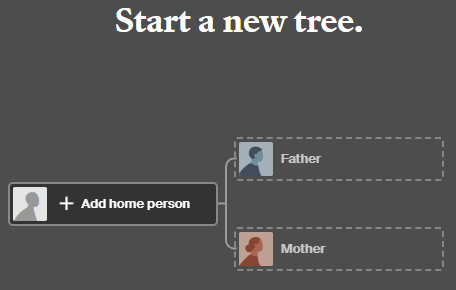
While receiving a new haplogroup is exciting, sometimes refinements among people around you can be equally, if not more, important and informative.

_____________________________________________________________

Share the Love!

You’re always welcome to forward articles or links to friends and share on social media.

Subscribe!

If you haven’t already subscribed (it’s free,) you can receive an e-mail whenever I publish by clicking the “follow” button on the main blog page, here.

Help Keep This Blog Free

I receive a small contribution when you click on some of the links to vendors in my articles. This does NOT increase your price but helps me keep the lights on and this informational blog free for everyone. Please click on the affiliate links in the articles or to the vendors below if you are purchasing products or DNA testing.

Thank you so much.

DNA Purchases and Free Uploads

Genealogy Products and Services

My Books

Genealogy Books

Genealogy Research