
You may have heard genealogists talk about creating a quick-and-dirty tree.
What is that, exactly? When and why would you want one?
Good questions.
Matches and Trees

DNA matches don’t always have useful trees.
They might have:
- No tree
- A partial tree with only a few people in the closest generation or two
- A tree with some lines built out, but others not so much
What’s a genealogist to do? After all, it’s your match’s tree, not your tree, and you have no way to expand their tree.
Except, you do.
It’s called a quick-and-dirty tree.
Quick-and-Dirty Trees
A quick-and-dirty tree is essentially a “throw-away” tree that you construct at Ancestry with the express purpose of obtaining hints, including potential parents, in order to quickly build your matches tree backwards in time until you (hopefully) reach a common ancestor.
And yes, of course trees, hints and suggestions of any kind can be wrong – but that doesn’t mean they’re always wrong, and you’re not adding anything from your quick-and-dirty tree to your tree – or even displaying it publicly.
You’re simply trying to find a common ancestor by using what your match has provided in their tree. Think of a quick-and-dirty tree as a scratch pad of sorts.
Let’s work through an example.
Initial Analysis

In this example, Ancestry has already told me that this match is most probably my half-second-cousin (half 2C) or second-cousin-once-removed (2C1R) based on the amount of DNA that we share, although the full relationship range includes several more options.
Ancestry also tells me that this match is on my maternal side. There’s no information provided about whether this match is on their maternal or paternal side, or even both.
A second-cousin (2C) relationship means that we share great-grandparents, and once removed means that one of us is one step further down the tree than the other person.

In other words, I’m 2C with my match’s parents, or my match is 2C with my mother. I wrote about this in the article, Concepts: What Does a Cousin “Once Removed” Mean?
I see that my match has a public linked tree with 7 people, which probably isn’t going to be terribly helpful.
Of course, the first thing to do is to review my match’s tree and see if I recognize either their surname or the names in their tree.

This tree only reaches back two generations, and our common ancestor, based on the relationships predicted by shared DNA, would be another generation, or two, further removed.
I don’t recognize any of these names, although I’ll review each person for a location to see if I can narrow the scope to the couple most likely to lead to our common ancestor.
On my mother’s side, one of her parents is from northern Indiana, and one is from southern Indiana, but not everyone enters locations in their trees, and they aren’t necessarily accurate.

The list of “all people” in my match’s tree, under “Find in tree”, at far right, provides additional information. Unfortunately, this tree shows Earl Townsend’s wife’s name as Mildred Ideal Thorstenson Townsend Smith here and in her profile, but the name order differs. To begin, I’ll enter Thorstenson Smith, not her married name of Townsend, in the quick-and-dirty tree I’m building. You can refine this shortly.
In this case, it looks like the Townsend line is most promising to find a common ancestor, given that Fulton County is in northern Indiana, but we’ll find out that this isn’t the case when we construct our quick-and-dirty tree.
Building the Quick-and-Dirty Tree
You need to build a new tree, NOT add to your “real” tree.
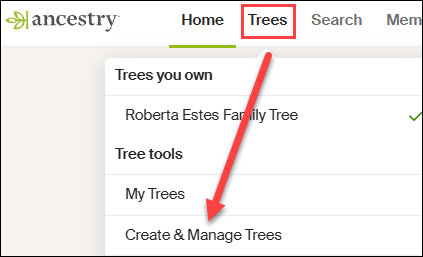
At Ancestry, go to Trees in the top banner, then click on “Create and Manage Trees.”
You’ll see the list of trees that you own. This is where all of the trees that you create live.
At the far bottom, you’ll see the prompt to create a new tree. Click there.

Next, you’ll see a blank tree.
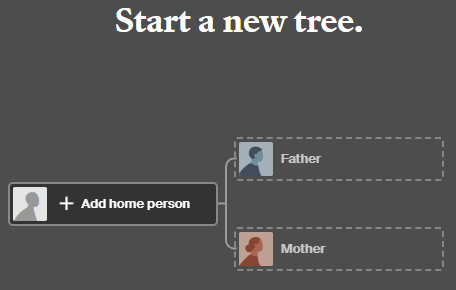
For the home person, you can enter your match’s name, but be sure to list them as living so you’re not revealing private information.

After adding one parent, you’ll be prompted to save and name the tree. Both the tester, who is designated as male by the Ancestry icon, and his father are either both living, or private, so I’m simply entering the surname of Robinson based on the grandfather’s surname. That could be incorrect of course, but it’s all I have to go on – yet.
Ironically, their grandfather’s surname was spelled Robison, without the “n”, not Robinson, but I accidentally entered Robinson and still got where I needed to go.
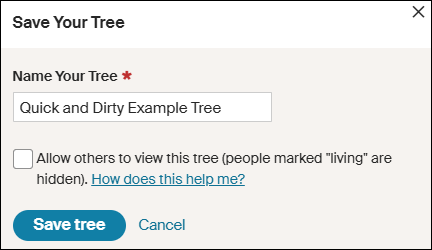
Clearly, I’m not going to allow this tree to be viewed by others, aka public, so I’m not checking that box. If it’s checked by default, uncheck it.
I don’t make my quick-and-dirty trees public because they are entirely unproven and unverified. I’m literally quickly searching for hints with every intention of abandoning the tree when I’m finished. If you want to clean the tree up later, you have the option to change the tree’s privacy settings.
Information in Your Match’s Tree Might Be Wrong
Complete the tree to be the same as your match’s tree. After saving your tree, click on the individuals you’ve added to view their hints.
Let’s start with Earl Townsend who appears to be our best candidate based on location.

Earl Russell Townsend has 13 hints, including a marriage license that confirms his birth date and location and provides the names of his parents, plus his wife’s name as Mildred Thorstenson. Based on what we know already, this is probably the correct Earl Townsend.
Of course, the wife’s surname could be incorrect. It could be her first or second marriage, or she could have been a widow when they married, so this surname might not be her birth surname.
Look for additional records in Earl’s hints.
Russell’s death certificate confirms that information, as do the birth and death certificates of their children.
Accept those hints.
If you determine that the original information in your match’s tree is incorrect, you’ll want to correct it in your quick-and-dirty tree. Remember, this is a scratch pad – you can’t hurt this tree.
Let’s change Mildred’s name to reflect her birth surname.

I refined Earl’s wife’s name to Mildred Thorstenson, which then produced 12 hints for her, including her marriage and Social Security record, with her birth and death dates, and her parents’ names. Her name in my match’s tree of Mildred Ideal Thorstenson Townsend Smith had produced zero hints.
Additionally, census records showed Mildred with her parents.
These seem to align, so accept those hints.

Looking at the pedigree view of my quick-and-dirty tree, we now see that both Russell and Mildred’s parents identified in the records are suggested as their potential parents.
Review each suggestion. If they look accurate based on the records identified, accept those potential parents in order to view the next generation.
Based on these names and census information, I can eliminate the Thorstenson line. It’s Swedish, not German or Dutch, which comprise my mother’s northern Indiana lines, My mother has no known Swedish ancestors, and we have proven her Indiana lineage in this timeframe.

Accepting the hints for the parents of both Earl Townsend and Mildred Thorstenson, parent hints appear for John Townsend and Eva Martin.
Now we’re viewing the next group of hints, which would be the great-great-grandparent generation. If these are our common ancestor, that would mean that I’m third cousins with my match, which is beyond the predicted relationship range. Third cousins is not impossible, but it’s beyond the probable match level based on the amount of shared DNA. furthermore, I don’t recognize any surnames.
So, let’s move to the Robison (incorrectly spelled Robinson) line and step through the same process. We can always come back and work with more parental hints on the Townsend/Martin line if we need to.

Rolland Robison only has a death year in my match’s tree, and that combined with the misspelled surname meant he had no hints on Ancestry, so I clicked on “Search” in my quick-and-dirty tree.
I’m searching for a man by this name, with a wife whose first name is Chloe.

AHA!
There it is! Note that Ancestry found Rolland Robison, not Robinson, married to Chloe.
Chloe was a Ferverda. My mother’s father was John Ferverda, and the location is correct for this family.
I saved this record to Rolland Robinson and added Ferverda as Chloe’s surname in our quick-and-dirty tree. This provided Rolland with 12 hints.
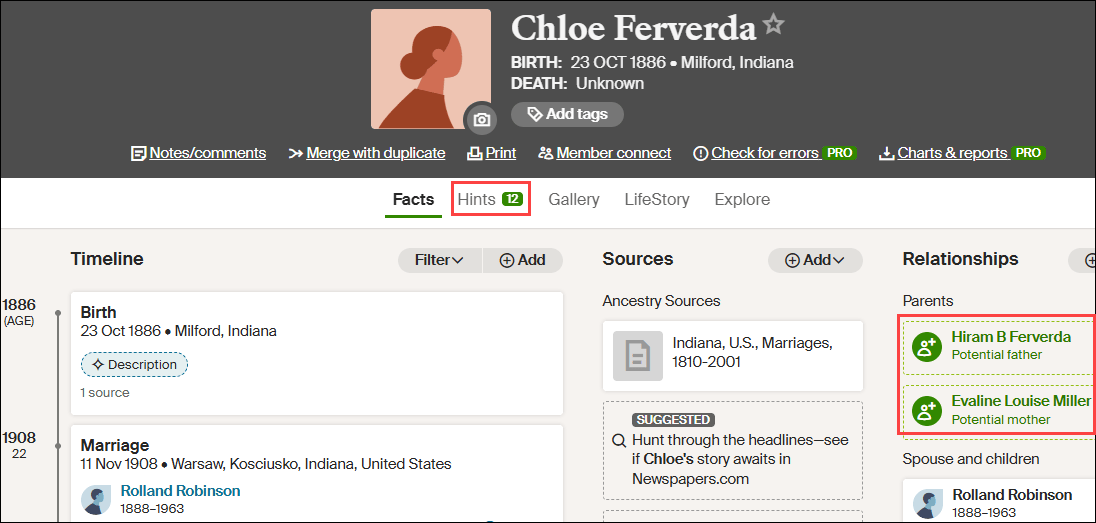
Adding Ferverda as Chloe’s surname provides her with a dozen hints too, including potential parents, Hiram B. Ferverda and Evaline Louise Miller – my great-great-grandparents who are indeed the 2C generation.
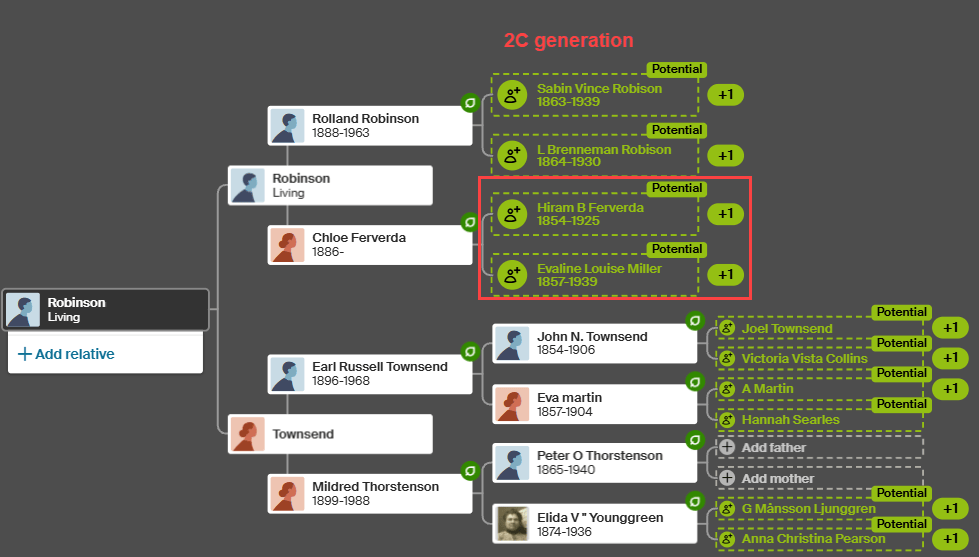
These common ancestors fall within the expected amount of shared DNA for second cousins, so this aligns well.
My quick-and-dirty tree has revealed at least one pair of common ancestors. Could there be more common lineages? Yes. I would continue building out this quick-and-dirty tree for (at least) another couple of generations on the other lines just to be sure.
What Next?
That depends on what you want to accomplish and your genealogy goals.
I used a DNA match at Ancestry in this example, but your match might be at a different vendor. Regardless, you’ll still want to use Ancestry to build your quick-and-dirty tree based on how they present hints and potential ancestors.
Now that you know how your DNA match connects:
- Minimally, make a note on the match that indicates the most recent common ancestor(s) identified. I include a link to the quick-and-dirty tree I’ve created.
- You can add your match and their ancestral path to your common ancestor into your own tree at whichever vendor where the match occurs.
- If you match at either FamilyTreeDNA or MyHeritage, both of whom provide segment information, I suggest painting your matching segments to DNAPainter.
Painting your segments identifies your matching segments as descending from those ancestors and makes it easier to identify the shared ancestral lineage of anyone else who shares that segment on the same side of your tree (maternal or paternal).
Word of caution here: You can potentially share multiple ancestral paths with any match, so different segments with one match can descend from different ancestors.
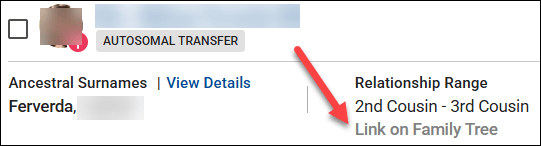
- If your match is at FamilyTreeDNA, you’ll want to link your match to their place in your tree.
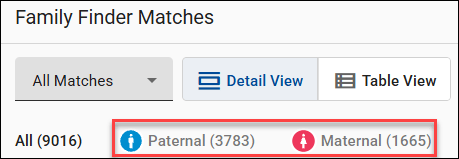
Using triangulation, FamilyTreeDNA utilizes linked matches to assign matches who share the same segments to the maternal or paternal side of your tree (or both) using triangulation.
- You may be trying to break through a brick wall by identifying common ancestors BETWEEN your shared matches that aren’t in your own tree.
This approach is obviously easier the closer your brick wall is in time to the present. Great-grandparents, at the second-cousin level, and great-great-grandparents at the third-cousin level are much easier than 5th- or 6th-generation ancestors who lived before birth and death certificates and detailed census records existed.
Furthermore, the further back in time, the more likely that you may encounter:
- Pedigree collapse, where the same ancestors appear more than once in your tree
- Or you share multiple common ancestors with your matches
Of course, there’s always the possibility of endogamy too, where you descend from a historically heavily-intermarried population, such as Ashkenazi Jews or the Amish, for example, which means you may share segments passed down within the population from distant common ancestors you won’t be able to identify. While endogamy in your lineages may increase the amount of shared DNA, which in turn can skew relationship estimates, it won’t prevent you from using quick-and-dirty trees to locate common ancestors.
And finally, unexpected parentage or issues like record destruction may impede your progress, but you’ll never know if you don’t try, which brings us back to the purpose of quick-and-dirty trees.
Building a quick-and-dirty tree is the easiest way to grow your matches’ trees to reveal your common ancestors.
_____________________________________________________________
Share the Love!
You’re always welcome to forward articles or links to friends and share on social media.
Subscribe!
If you haven’t already subscribed, it’s free. You’ll receive an e-mail whenever I publish by clicking the “follow” button at the top of the main blog page, here.
Help Keep This Blog Free
I receive a small commission when you click a vendor link in my articles and purchase that item. This does NOT increase your price but helps me keep the lights on and this informational blog free for everyone. Please click on the affiliate links in the articles or to the vendors below if you are purchasing products or DNA testing.
Thank you so much.
DNA Purchases and Free Uploads
- FamilyTreeDNA – Y-DNA, mitochondrial and autosomal DNA testing
- MyHeritage DNA – Autosomal DNA test
- AncestryDNA – Autosomal DNA test
- AncestryDNA Plus Traits
- 23andMe Ancestry – Autosomal DNA only, no Health
- 23andMe Ancestry Plus Health
Genealogy Products and Services
- MyHeritage Subscription with Free Trial
- Legacy Family Tree Webinars – Genealogy and DNA classes, subscription-based, some free
- Legacy Family Tree Software – Genealogy software for your computer
- OldNews – Old Newspapers with links to save to MyHeritage trees
- MyHeritage Omni comprehensive “everything included” subscription plan
- Newspapers.com – Search newspapers for your ancestors
- NewspaperArchive – Search different newspapers for your ancestors
My Books
- DNA for Native American Genealogy – by Roberta Estes, for those ordering the e-book from anyplace, or paperback within the United States
- DNA for Native American Genealogy – for those ordering the paperback outside the US
- The Complete Guide to FamilyTreeDNA – Y-DNA, Mitochondrial, Autosomal and X-DNA – for those ordering the e-book from anyplace, or paperback within the United States
- The Complete Guide to FamilyTreeDNA – Y-DNA, Mitochondrial, Autosomal and X-DNA for those ordering the paperback from outside the US
Genealogy Books
- Genealogical.com – Lots of wonderful genealogy research books
- American Ancestors – Wonderful selection of genealogy books
Genealogy Research
- Legacy Tree Genealogists – Professional genealogy research
Share this:

Discover more from DNAeXplained - Genetic Genealogy
Subscribe to get the latest posts sent to your email.
Great advice Roberta.
I build the pedigree of an unidentified match as a floating branch in my own tree. When I find the connection, I can then easily link it to my tree. No extra keying required. If I don’t find the link, it remains a floating branch, with the potential for future discoveries.
If it’s not private, Ancestry uses it to provide hints to others, right? I hate to do that if it’s wrong.
Ha ha, true. But I either make everyone living, or I research them very thoroughly. I cannot make myself take shortcuts.
The additional benefit of building a floating tree within your own tree is that you can link your match to the corresponding person in your tree.
yes, I also started out building separate trees, but more recently changed to adding them in as disconnected branches on my own tree. Two main reasons:
1. while it is easy enough to import a simple ancestral line from one tree to another if I do identify the link, this does not transfer any of the record evidence that I have accumulated. Ancestry does not necessarily even provide me with my own evidence as hints. The lack of ability to copy over the entire tree with supporting evidence is a real pain.
2. Sometimes unknown people ask me about my link to X. But if X is not in my tree, I then need to search every other tree looking for them, hoping they did not use a different name. With the most recent request, I could not find the person in any tree at all.
Hi Roberta,
All the way through this article, you refer to Rolland ROBINSON, however in your matches tree and the marriage record for Rolland and Chloe, it is ROBISON. Just wondering which surname is correct?
Kind regards, Neil McNicol
Good eye. It’s Robison based on the actual records. I’ll fix that when I get home. Thank you. Ironically, in my own family tree from family records, it’s Robinson. Passed down orally I’d guess until someone wrote it down. Incorrectly.
I must have done more than 100 Quick and Dirty Trees. Love doing those. The new CA (Common Ancestor Hints) they are now giving us at Ancestry: Do you base these on dna shared? These have helped me so much and give validity (in my mind) to the accuracy of my tree. Will you be doing a blog on this in the future? Thank you, as always!
I have the beta version and I’ll wait for it to calm down a bit and for Ancestry to produce a non-beta version first so everyone will be seeing the same thing. There’s not much information about the new feature/format yet. I’m not sure what I think about it either. I would like to understand it better.
What I find interesting about the new CA feature is for 15 years I have been trying to extend my ggrandfather’s tree correctly because I felt confident it was all wrong. So, I deleted it all and after 15 years, I started finding records to extend all of his lines, and then I started getting CA hints on my new lines which to me gave it validity.
About a quick & dirty tree, there is a way to do that in MyHeritage as well;
Simply add a son/father/daughter … to an existing person, the in his profile, under the more option, remove the connection. This loose person is now the start of you Q&D tree. I usualy use the word LOOSE as his last given name, allowing me to find him easily afterwards (and deleting the whole tree when required.