
This is the second article in the FOCUS series.
You can read the first article, FOCUS – A New Series Focused on Breaking Down Brick Walls, here.
DNA matches without trees, or bare-bones shrunken trees, can be a significant roadblock whether you’re looking at autosomal, Y-DNA, or mitochondrial DNA matches. To help resolve that issue, I’ve listed seven ways you can create or expand those trees. Not every methodology works every time, but none will work if you don’t invest the effort to try them.
I’ll probably say this in every article because it bears repeating. Everything we are working with is a hint. Breadcrumbs along the way. Sometimes they lead to the next wonderful breadcrumb. Sometimes to a dead end. Sometimes they look like useful breadcrumbs, but they are red herrings and not relevant. And sometimes they are simply wrong. Do not throw the baby out with the bathwater. Also, do not think every hint is accurate, because they aren’t, and many rely upon other people.
Our goal in the FOCUS series is to accrue evidence from multiple sources, tools and methodologies that leads us to our ancestor. So let’s start with trees.
Trees, Trees, But Not Everywhere
DNA testing relies on trees to identify our common ancestors, at least with matches beyond the closest generation or two.
This is true at all vendors, which is why all of the main vendors, except 23andMe, integrate with or provide trees as part of their platform.
Because we need to work with trees for all types of DNA testing and matching, I’m going to share various ways to overcome partial trees or even no tree at all. I’m intentionally using examples from multiple vendors throughout this series.
23andMe is omitted in this article because they don’t support trees, although testers can include a link to a tree elsewhere.
GEDmatch is omitted in this article because they are not a testing company. They are a DNA upload and matching site, so everyone at GEDmatch has tested elsewhere and probably has a tree there. You can upload a GEDCOM file to GEDmatch, though, so it never hurts to check and see if your match is there too.
Some of these techniques are vendor specific, and others can be applied broadly.
What Is a Shrunken Tree?
A shrunken tree is a small tree in which your DNA match has included only a few people. Small or missing trees tend to frustrate genealogists – a lot. I remind myself that these folks maybe seeking their family or new genealogists, trying to piece their tree together themselves.

This is a tree provided by one of my matches. Their mother is deceased, but it’s recent enough that I’ve chosen to obfuscate her name as well, and it’s not relevant to the next steps.
There’s not a lot to work with here, but as it turns out, there’s enough.
Based on this tree, we have no idea where in their tree our Most Recent Common Ancestor (MRCA) is found, so let’s look at a few ways to indirectly expand their tree in order to find our common ancestor.
Step 1 – Check Your Own Tree
I know this sounds like a “duh” moment, but always remember to check your own tree to see if you’ve expanded that branch to include your match’a ancestors and completely forgotten about it. I maintain my primary tree on my computer with lots of notes and information that I’m not comfortable uploading to a public space. I maintain smaller public trees with a couple thousand people at both Ancestry and MyHeritage, along with a link to my ancestors at WikiTree.
If your match is a female, they may be using a married surname, so always keep that in mind. I try their complete name first. Then I search for their surname to see if it’s a “married-in” name – and cross my fingers that it’s not Smith. If they have any ancestors in their tree, I try their oldest generation next.
Step 2 – Reach Out to Your Match
Every vendor provides some way of communicating with your matches. You can either message or email, depending on the vendor, and your match may be very willing to share more about their genealogy. They may have a better tree elsewhere that they will share with you, or may know more than is in their tree.
An Ancestry survey showed that about 53% of Americans can’t name all four grandparents, and only 47% can correctly name all four. Only 4% can name all eight great-grandparents. In the Rolland tree, the tester knew more about their mother’s side, and only knew the first name of their paternal grandmother.
So while shrunken trees are exasperating, they are probably more normal that we think, and we all have to start someplace. Your match might well appreciate some help.
Step 3 – Check Other DNA Testing Sites
If your match has a real name (meaning not just initials or something indecipherable), such as Heather Jacobs (made-up name), who is predicted to be your third cousin and shares 100 cM of (unweighted) DNA at one vendor, sign on to your accounts at the other vendors and see if Heather is a match there.
You’re looking for a Heather, or maybe HJacobs or something similar, who’s approximately a 3C with roughly the same amount of shared DNA. The exact relationship prediction may not match, but it should be close, and the amount of shared DNA may not be identical either. If it varies substantially, it may not be the same person, so exercise care.
Every vendor provides the ability to search for matches by name, and if you can’t find them by name, begin paging until you reach matches at the approximate predicted relationship level. In Heather’s case, that’s third cousins. Beyond third cousins, this paging technique quickly becomes too laborious.
At Ancestry
Only one vendor, Ancestry, “downweights” your DNA with your matches, meaning that they may remove some amount of DNA that they consider “too matchy.” In my case, this is often DNA from my Acadian lines, which collectively forms pileup regions. This does NOT mean those aren’t useful, but that’s not relevant for this discussion other than to alert you that you need to check both the assigned amount of DNA and your unweighted shared DNA with a match when you’re trying to verify that the match is the same person at two vendors.
Assuming you find “HeatherJ” at Ancestry, you’ll want to verify that it’s the same person as Heather Jacobs at the other vendor.

Is your amount of shared DNA roughly the same?
Click on the relationship link to view the amount of unweighted DNA. In this case, weighted and unweighted is the same, and Heather Jacobs matches you with 100 cM at the other vendor.

Heather has a public tree here, and it’s the same size. It’s probably the same person, but check anyway.
Heather’s tree at Ancestry is exactly the same as it was at the other vendor, so this confirms it’s the same person.
There’s an important hint here, and let me emphasize the word HINT.

While Heather’s actual 15-person tree does NOT extend to our common ancestor, Ancestry has pieced together other trees that include and extend beyond her ancestors to show my (purported) common ancestor with Heather. Click on Common Ancestor, which takes you to ThruLines.

This new version of ThruLines has now replaced the older version. Unfortunately it does not show Heather’s path back to our common ancestor, Hiram Bauke Ferverda.

Click on “View all ancestors” in the upper left-hand corner.
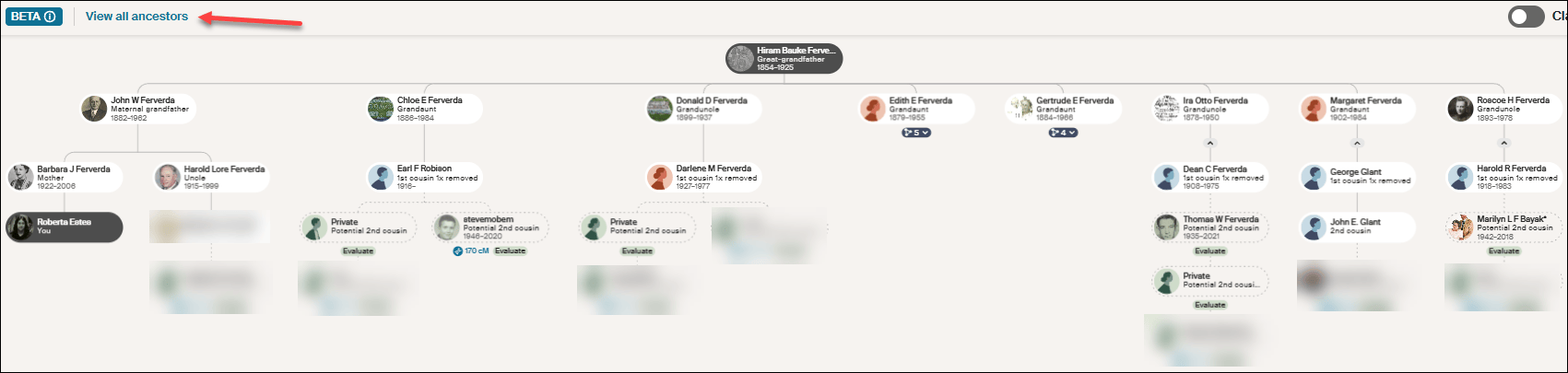
Click on any image to enlarge
After clicking on “View all ancestors,” click on Hiram Bauke Ferverda to see the DNA matches who descend from him. Despite what Ancestry provided under my “Common ancestor” with Heather, she isn’t shown anyplace here. This could be a bug, given that I later confirmed this common ancestor using other techniques.
Regardless of the problem, this IS a hint, so don’t disregard it entirely. Just keep your “skeptic” hat handy and wear it liberally. You’ll need to use Ancestry searches and hints, including possibly Quick and Dirty Trees, to piece together the possibilities.
Make a note on Heather’s match at Ancestry so that you know what you found this time through. We’re not done with Heather. Move on to another vendor to see if Heather has tested and has a better tree elsewhere. We’re gathering evidence.
At MyHeritage
Heather is not at MyHeritage, so I’ll use a different example.
Let’s look for Cathy, a 3C match who has no tree at another vendor. I found her at MyHeritage with the same first and last name and approximately the same amount of shared DNA, so I’m confident it’s the same person.

Fortunately, at MyHeritage, Cathy has a tree, which is the first step, of course, but no common ancestor is shown in her tree.
MyHeritage has a wonderful feature called Theory of Family Relativity which are often based on “Smart Matches.” Click on “View theory.”

Click to enlarge
MyHeritage has found five possible paths to a common ancestor based on multiple documents and trees. In this case, Surrilda Claxton in my tree is the same person as Surelda Clarkson in Cathy’s tree, and MyHeritage made that connection correctly.
I confirmed this Theory at MyHeritage as accurate, and now I know how Cathy at the other vendor with no tree is related to me. I made a note about Cathy at MyHeritage on my match with Cathy at the other vendor too about our common ancestor AND where Cathy’s tree can be found. Add Cathy to her proper place in your trees.
Step 4 – Sleuth at the Same Vendor
At FamilyTreeDNA, when I find a match with no tree, I do two things.

Looking at Patricia’s profile, I immediately see that she has been assigned to the maternal side of my tree. I’ve linked other known matches which allows FamilyTreeDNA to use triangulation to assign Patricia to the proper side.
Then, I notice that even though Patricia doesn’t have a tree, she has provided her ancestral surnames.
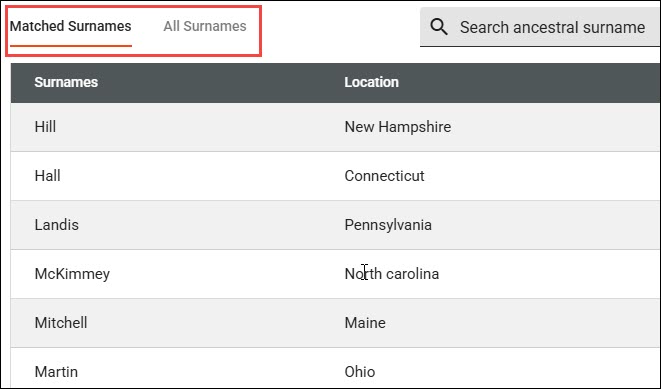
Clicking on “View Details,” I can see if any of them match my surnames, or I can view all of her surnames.
Given that this is my mother’s side, these shared surnames give me an idea of a shared lineage.
Next, look for your closest shared match WITH a tree. Clicking on the two little people at far right displays your shared matches which are labeled “in common with.”

I share 122 matches in common with with Patricia, and our closest shared match, other than my mother who is not shown here, is Dennis. Dennis happens to be a known relative, which is why he already has a note.
But for purposes of this exercise, let’s say that I haven’t already figured out how Dennis and I are related. Viewing Dennis’s tree, I see that our common ancestors are Anthony (Antoine) Lore and Rachel Levina Hill. Hmmm, Hill is on Patricia’s list of surnames.
Sleuthing at the same vendor is MUCH EASIER when your matches have at least a couple of generations in a small tree. Having no tree is the most difficult situation at every vendor, but there are multiple ways to begin building a tree for your DNA match, or to expand a shrunken tree.
Step 5 – Google Is Your Friend
Google is your friend. Google cannot reach behind paywalled sites, so you won’t find records other than records from free indexes at Ancestry or MyHeritage in Google searches, but you will find information about people from other genealogy sites.
Let’s go back to Rolland Robison who died in 1963 and his wife, Chloe. And let’s also consider that his surname is often spelled RobiNson. We know from our match’s tree that Rolland’s wife’s first name is Chloe.
Look closely at the search box in the image below. By structuring the query as “rolland robison died 1963 wife chloe”, we combine a full name, a specific vital event year, and a spouse’s first name. This gives Google just enough precise detail to hopefully filter out (most) noise.

That’s interesting. It looks like Rolland can be spelled two ways too.
Not only is there an article (yes, I wrote about this previously), BUT there’s also an obituary and estate distribution in a local newspaper that I have never seen before.

Rolland’s wife’s birth surname is given in his obituary, even though her first name is misspelled. This is the link I need to establish our common ancestor, because Chloe is my grandfather’s sister.
Google can provide you with important links to information and articles that are not yet in genealogical databases, such as:
- Facebook accounts for individuals: Useful for finding the tester, relatives or family connections.
- Facebook groups and pages: Forums that contain local historical information and shared community memories.
- LinkedIn & Instagram accounts: Social footprints that often reveal professional histories, geographic locations, and birth surnames.
- Mentions elsewhere: Local newspaper archives, digital press releases, and published legal notices regarding estate partitions or land records.
- Obituaries: Printed family notices that explicitly list surviving family names and relationships along with the Legacy.com tribute archives.
- Public websites & genealogy blogs: Independent sites where genealogists sometimes publish deep-dive ancestral lineages. Always verify.
Google also provides an easy way to find free resources in public databases without having to search each one individually, including:
- Collaborative family trees: WikiTree, FamilySearch, and Geni trees.
- Cemetery registries: FindAGrave and BillionGraves.
- Digital libraries: Internet Archive and Google Books, which hold a vast assortment of historical information like out-of-print town and county histories.
- Open-Access portals: The Library of Congress (LOC) and the Digital Public Library of America (DPLA), which pulls photos, maps, and civic documents from libraries across the US.
- Volunteer projects: Regional repositories like GenWeb.
- Directories: Local alumni directories and digitized historical yearbooks.
Pro Tip: Resurrecting Old RootsWeb and Genealogy.com Breadcrumbs
RootsWeb was a wonderful resource for genealogists until Ancestry began systematically dismantling it in 2023.
While Google is fantastic at finding obscure text, it will occasionally point you to an old, broken RootsWeb link. Because Ancestry has frozen or removed much of the old platform, don’t let that 404 error stop you in your tracks. Copy the dead URL from Google and paste it into the Internet Archive Wayback Machine where you can sometimes resurrect the exact information you need!
The same methodology applies to the old message board, Genealogy.com.
Step 6 – Search Old Emails and Files On Your Own Computer
I know this probably sounds either ridiculous or incredibly obvious, but if you’re a typical genealogist, you probably have a quarter century of emails on your computer, not to mention reams of photos that you saved because someone gave them to you and you “might need them someday.”
I’ve never thought of myself as the family archivist, but I clearly must be, which is another name for the family packrat. Long live the packrats.
I’ve learned that I need to search all of my email folders for the names in someone’s shrunken tree. I’ve been shocked at what I’ve found there.
Don’t just search for full names. For example, Rolland Robison or Chloe Ferverda. Search for the names individually too. So, Rolland, Roland, Robison, Robinson, and Chloe. I didn’t know Chloe was a Ferverda yet when I was initially searching for her identity.
A middle-of-the-night insomnia-induced epiphany struck – “search your emails.” Who needs sleep? It’s overrated! I hopped right up, searched my emails and my computer and found even more.
As it turns out, I attended a Ferverda family reunion in 2010 where I only knew two people. Thankfully, cousin Cheryl thought to invite me, because someone brought an old photo album AND an old Ferverda family Bible. I took photos of everything in the album even though I had no idea who most of those people were and neither did the album’s owner.
Many photos had no surnames at all, or they were recorded as Mr. and Mrs. SoAndSo.

Here are “Chloe and Rolland” as they were named in the photo, with no last name or additional information.

Here are Mr and Mrs. Rolland Vincent Robison. I carelessly saved this one as Rolland RobiNson. My bad.
A search for just “Rolland” found both, which is exactly why you need to search creatively.
Finding those initially still wouldn’t have told me who they were, but I would have at least had some family context, given that a Ferverda descendant brought the album to the Ferverda reunion.

However, this article about Rolland and Chloe’s 50th wedding anniversary from that same album would have provided that missing context.
My emails revealed now-deceased cousin Cheryl referring to Aunt Chloey, but with nothing else to identify her. A search for simply “Chloe” found Cheryl’s emails.
More tidbits of evidence.
I did a very poor job of saving these images with useful names because they weren’t relevant at the time, although I did store them in a “Ferverda Reunion” folder. Now, I’m going to attach them to Chloe and Rolland’s profiles in my tree at both Ancestry and MyHeritage to make sure they don’t disappear forever.
I’m also going to send them to my match with the abbreviated tree. As Rolland and Chloe’s grandchild, if they don’t have these pictures, I’m positive they will want them.
I’m sure you’ve noticed that I got VERY squirreled during this process, but utilizing all of our resources is exactly how we make discoveries – and sometimes that includes chasing squirrels.
This is also why our research journals are important – so we don’t chase the same squirrel over and over.
Step 7 – Quick and Dirty Trees
I used the Robison example in an earlier article discussing how to build a “quick and dirty” tree. I use quick and dirty trees often because it’s the easiest way to keep track of informational tidbits from different places, including multiple vendors, during the research process.
I’ll say it again here. Quick and dirty trees aren’t meant to be public. They aren’t gospel. They are a structure for you to work through the various hints provided and to evaluate them to see if they are of sufficient quality for you to identify a common ancestor with a DNA tester who provided a minimal tree.
You can read about these investigative workbenches in the article, What is a Quick and Dirty Tree, and When Might I Need One?
What’s Next?
Have you decided which of your brick walls you’re going to focus on? Last week’s article discussed some of the criteria you might want to consider and how to prepare.
Select your ancestor, because next week, we’re going to begin using a variety of tools and techniques to track that ancestor. Bit by bit, we’re going to gather evidence that will hopefully lead to a breakthrough.
Share this:

Discover more from DNAeXplained - Genetic Genealogy
Subscribe to get the latest posts sent to your email.
I check the match’s Ancestry Profile page to see if they have other trees that might provide more info. Sometimes they do have another tree (or several trees).
Sometimes it’s difficult to know which trees are theirs versus ones built for someone else or another purpose.
Hi, I don’t see the illustrations
I don’t know if you’re looking at an email or the website. I just checked from a different computer and they look fine here. Please check the website site directly. Photos generally load after text, but I bet you already know that.
23andMe does have a tree. It’s not a very good tree, as it doesn’t allow the same person to appear multiple times, and it may require a premium subscription – the docs seem to suggest so, but I had access to it all along.
It even tries to pre-fill the tree for you with your closest DNA matches (but that wasn’t very useful for me).
It does, but it’s useless in the context of others being able to see the tree. You can’t upload a GEDCOM, and there’s no way to see your matches trees. So they don’t support trees in a genealogical context.