FOCUS: Step 1 – Seven Solutions for DNA Matches with Absent or Shrunken Trees

This is the second article in the FOCUS series.

You can read the first article, FOCUS – A New Series Focused on Breaking Down Brick Walls, here.

DNA matches without trees, or bare-bones shrunken trees, can be a significant roadblock whether you’re looking at autosomal, Y-DNA, or mitochondrial DNA matches. To help resolve that issue, I’ve listed seven ways you can create or expand those trees. Not every methodology works every time, but none will work if you don’t invest the effort to try them.

I’ll probably say this in every article because it bears repeating. Everything we are working with is a hint. Breadcrumbs along the way. Sometimes they lead to the next wonderful breadcrumb. Sometimes to a dead end. Sometimes they look like useful breadcrumbs, but they are red herrings and not relevant. And sometimes they are simply wrong. Do not throw the baby out with the bathwater. Also, do not think every hint is accurate, because they aren’t, and many rely upon other people.

Our goal in the FOCUS series is to accrue evidence from multiple sources, tools and methodologies that leads us to our ancestor. So let’s start with trees.

Trees, Trees, But Not Everywhere

DNA testing relies on trees to identify our common ancestors, at least with matches beyond the closest generation or two.

This is true at all vendors, which is why all of the main vendors, except 23andMe, integrate with or provide trees as part of their platform.

Because we need to work with trees for all types of DNA testing and matching, I’m going to share various ways to overcome partial trees or even no tree at all. I’m intentionally using examples from multiple vendors throughout this series.

23andMe is omitted in this article because they don’t support trees, although testers can include a link to a tree elsewhere.

GEDmatch is omitted in this article because they are not a testing company. They are a DNA upload and matching site, so everyone at GEDmatch has tested elsewhere and probably has a tree there. You can upload a GEDCOM file to GEDmatch, though, so it never hurts to check and see if your match is there too.

Some of these techniques are vendor specific, and others can be applied broadly.

What Is a Shrunken Tree?

A shrunken tree is a small tree in which your DNA match has included only a few people. Small or missing trees tend to frustrate genealogists – a lot. I remind myself that these folks maybe seeking their family or new genealogists, trying to piece their tree together themselves.

This is a tree provided by one of my matches. Their mother is deceased, but it’s recent enough that I’ve chosen to obfuscate her name as well, and it’s not relevant to the next steps.

There’s not a lot to work with here, but as it turns out, there’s enough.

Based on this tree, we have no idea where in their tree our Most Recent Common Ancestor (MRCA) is found, so let’s look at a few ways to indirectly expand their tree in order to find our common ancestor.

Step 1 – Check Your Own Tree

I know this sounds like a “duh” moment, but always remember to check your own tree to see if you’ve expanded that branch to include your match’a ancestors and completely forgotten about it. I maintain my primary tree on my computer with lots of notes and information that I’m not comfortable uploading to a public space. I maintain smaller public trees with a couple thousand people at both Ancestry and MyHeritage, along with a link to my ancestors at WikiTree.

If your match is a female, they may be using a married surname, so always keep that in mind. I try their complete name first. Then I search for their surname to see if it’s a “married-in” name – and cross my fingers that it’s not Smith. If they have any ancestors in their tree, I try their oldest generation next.

Step 2 – Reach Out to Your Match

Every vendor provides some way of communicating with your matches. You can either message or email, depending on the vendor, and your match may be very willing to share more about their genealogy. They may have a better tree elsewhere that they will share with you, or may know more than is in their tree.

An Ancestry survey showed that about 53% of Americans can’t name all four grandparents, and only 47% can correctly name all four. Only 4% can name all eight great-grandparents. In the Rolland tree, the tester knew more about their mother’s side, and only knew the first name of their paternal grandmother.

So while shrunken trees are exasperating, they are probably more normal that we think, and we all have to start someplace. Your match might well appreciate some help.

Step 3 – Check Other DNA Testing Sites

If your match has a real name (meaning not just initials or something indecipherable), such as Heather Jacobs (made-up name), who is predicted to be your third cousin and shares 100 cM of (unweighted) DNA at one vendor, sign on to your accounts at the other vendors and see if Heather is a match there.

You’re looking for a Heather, or maybe HJacobs or something similar, who’s approximately a 3C with roughly the same amount of shared DNA. The exact relationship prediction may not match, but it should be close, and the amount of shared DNA may not be identical either. If it varies substantially, it may not be the same person, so exercise care.

Every vendor provides the ability to search for matches by name, and if you can’t find them by name, begin paging until you reach matches at the approximate predicted relationship level. In Heather’s case, that’s third cousins. Beyond third cousins, this paging technique quickly becomes too laborious.

At Ancestry

Only one vendor, Ancestry, “downweights” your DNA with your matches, meaning that they may remove some amount of DNA that they consider “too matchy.” In my case, this is often DNA from my Acadian lines, which collectively forms pileup regions. This does NOT mean those aren’t useful, but that’s not relevant for this discussion other than to alert you that you need to check both the assigned amount of DNA and your unweighted shared DNA with a match when you’re trying to verify that the match is the same person at two vendors.

Assuming you find “HeatherJ” at Ancestry, you’ll want to verify that it’s the same person as Heather Jacobs at the other vendor.

Is your amount of shared DNA roughly the same?

Click on the relationship link to view the amount of unweighted DNA. In this case, weighted and unweighted is the same, and Heather Jacobs matches you with 100 cM at the other vendor.

Heather has a public tree here, and it’s the same size. It’s probably the same person, but check anyway.

Heather’s tree at Ancestry is exactly the same as it was at the other vendor, so this confirms it’s the same person.

There’s an important hint here, and let me emphasize the word HINT.

While Heather’s actual 15-person tree does NOT extend to our common ancestor, Ancestry has pieced together other trees that include and extend beyond her ancestors to show my (purported) common ancestor with Heather. Click on Common Ancestor, which takes you to ThruLines.

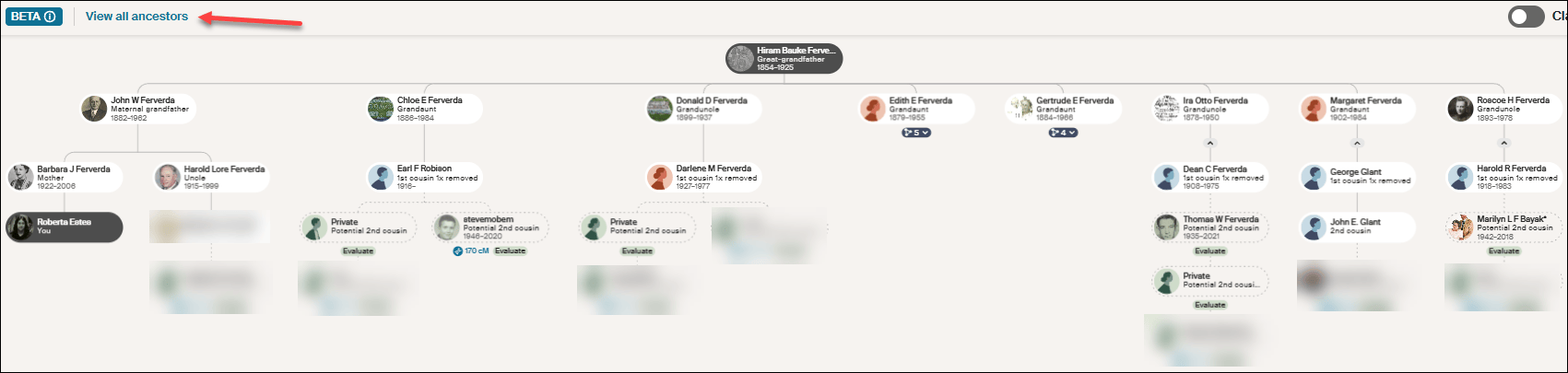
This new version of ThruLines has now replaced the older version. Unfortunately it does not show Heather’s path back to our common ancestor, Hiram Bauke Ferverda.

Click on “View all ancestors” in the upper left-hand corner.

Click on any image to enlarge

After clicking on “View all ancestors,” click on Hiram Bauke Ferverda to see the DNA matches who descend from him. Despite what Ancestry provided under my “Common ancestor” with Heather, she isn’t shown anyplace here. This could be a bug, given that I later confirmed this common ancestor using other techniques.

Regardless of the problem, this IS a hint, so don’t disregard it entirely. Just keep your “skeptic” hat handy and wear it liberally. You’ll need to use Ancestry searches and hints, including possibly Quick and Dirty Trees, to piece together the possibilities.

Make a note on Heather’s match at Ancestry so that you know what you found this time through. We’re not done with Heather. Move on to another vendor to see if Heather has tested and has a better tree elsewhere. We’re gathering evidence.

At MyHeritage

Heather is not at MyHeritage, so I’ll use a different example.

Let’s look for Cathy, a 3C match who has no tree at another vendor. I found her at MyHeritage with the same first and last name and approximately the same amount of shared DNA, so I’m confident it’s the same person.

Fortunately, at MyHeritage, Cathy has a tree, which is the first step, of course, but no common ancestor is shown in her tree.

MyHeritage has a wonderful feature called Theory of Family Relativity which are often based on “Smart Matches.” Click on “View theory.”

Click to enlarge

MyHeritage has found five possible paths to a common ancestor based on multiple documents and trees. In this case, Surrilda Claxton in my tree is the same person as Surelda Clarkson in Cathy’s tree, and MyHeritage made that connection correctly.

I confirmed this Theory at MyHeritage as accurate, and now I know how Cathy at the other vendor with no tree is related to me. I made a note about Cathy at MyHeritage on my match with Cathy at the other vendor too about our common ancestor AND where Cathy’s tree can be found. Add Cathy to her proper place in your trees.

Step 4 – Sleuth at the Same Vendor

At FamilyTreeDNA, when I find a match with no tree, I do two things.

Looking at Patricia’s profile, I immediately see that she has been assigned to the maternal side of my tree. I’ve linked other known matches which allows FamilyTreeDNA to use triangulation to assign Patricia to the proper side.

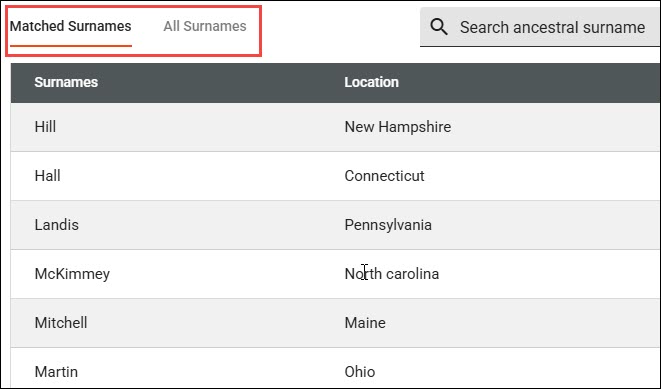
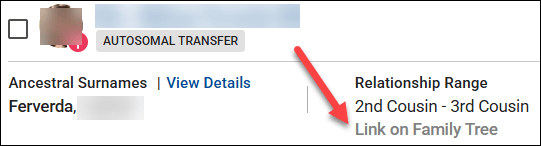
Then, I notice that even though Patricia doesn’t have a tree, she has provided her ancestral surnames.

Clicking on “View Details,” I can see if any of them match my surnames, or I can view all of her surnames.

Given that this is my mother’s side, these shared surnames give me an idea of a shared lineage.

Next, look for your closest shared match WITH a tree. Clicking on the two little people at far right displays your shared matches which are labeled “in common with.”

I share 122 matches in common with with Patricia, and our closest shared match, other than my mother who is not shown here, is Dennis. Dennis happens to be a known relative, which is why he already has a note.

But for purposes of this exercise, let’s say that I haven’t already figured out how Dennis and I are related. Viewing Dennis’s tree, I see that our common ancestors are Anthony (Antoine) Lore and Rachel Levina Hill. Hmmm, Hill is on Patricia’s list of surnames.

Sleuthing at the same vendor is MUCH EASIER when your matches have at least a couple of generations in a small tree. Having no tree is the most difficult situation at every vendor, but there are multiple ways to begin building a tree for your DNA match, or to expand a shrunken tree.

Step 5 – Google Is Your Friend

Google is your friend. Google cannot reach behind paywalled sites, so you won’t find records other than records from free indexes at Ancestry or MyHeritage in Google searches, but you will find information about people from other genealogy sites.

Let’s go back to Rolland Robison who died in 1963 and his wife, Chloe. And let’s also consider that his surname is often spelled RobiNson. We know from our match’s tree that Rolland’s wife’s first name is Chloe.

Look closely at the search box in the image below. By structuring the query as “rolland robison died 1963 wife chloe”, we combine a full name, a specific vital event year, and a spouse’s first name. This gives Google just enough precise detail to hopefully filter out (most) noise.

That’s interesting. It looks like Rolland can be spelled two ways too.

Not only is there an article (yes, I wrote about this previously), BUT there’s also an obituary and estate distribution in a local newspaper that I have never seen before.

Rolland’s wife’s birth surname is given in his obituary, even though her first name is misspelled. This is the link I need to establish our common ancestor, because Chloe is my grandfather’s sister.

Google can provide you with important links to information and articles that are not yet in genealogical databases, such as:

  • Facebook accounts for individuals: Useful for finding the tester, relatives or family connections.
  • Facebook groups and pages: Forums that contain local historical information and shared community memories.
  • LinkedIn & Instagram accounts: Social footprints that often reveal professional histories, geographic locations, and birth surnames.
  • Mentions elsewhere: Local newspaper archives, digital press releases, and published legal notices regarding estate partitions or land records.
  • Obituaries: Printed family notices that explicitly list surviving family names and relationships along with the Legacy.com tribute archives.
  • Public websites & genealogy blogs: Independent sites where genealogists sometimes publish deep-dive ancestral lineages. Always verify.

Google also provides an easy way to find free resources in public databases without having to search each one individually, including:

  • Collaborative family trees: WikiTree, FamilySearch, and Geni trees.
  • Cemetery registries: FindAGrave and BillionGraves.
  • Digital libraries: Internet Archive and Google Books, which hold a vast assortment of historical information like out-of-print town and county histories.
  • Open-Access portals: The Library of Congress (LOC) and the Digital Public Library of America (DPLA), which pulls photos, maps, and civic documents from libraries across the US.
  • Volunteer projects: Regional repositories like GenWeb.
  • Directories: Local alumni directories and digitized historical yearbooks.

Pro Tip: Resurrecting Old RootsWeb and Genealogy.com Breadcrumbs

RootsWeb was a wonderful resource for genealogists until Ancestry began systematically dismantling it in 2023.

While Google is fantastic at finding obscure text, it will occasionally point you to an old, broken RootsWeb link. Because Ancestry has frozen or removed much of the old platform, don’t let that 404 error stop you in your tracks. Copy the dead URL from Google and paste it into the Internet Archive Wayback Machine where you can sometimes resurrect the exact information you need!

The same methodology applies to the old message board, Genealogy.com.

Step 6 – Search Old Emails and Files On Your Own Computer

I know this probably sounds either ridiculous or incredibly obvious, but if you’re a typical genealogist, you probably have a quarter century of emails on your computer, not to mention reams of photos that you saved because someone gave them to you and you “might need them someday.”

I’ve never thought of myself as the family archivist, but I clearly must be, which is another name for the family packrat. Long live the packrats.

I’ve learned that I need to search all of my email folders for the names in someone’s shrunken tree. I’ve been shocked at what I’ve found there.

Don’t just search for full names. For example, Rolland Robison or Chloe Ferverda. Search for the names individually too. So, Rolland, Roland, Robison, Robinson, and Chloe. I didn’t know Chloe was a Ferverda yet when I was initially searching for her identity.

A middle-of-the-night insomnia-induced epiphany struck – “search your emails.” Who needs sleep? It’s overrated! I hopped right up, searched my emails and my computer and found even more.

As it turns out, I attended a Ferverda family reunion in 2010 where I only knew two people. Thankfully, cousin Cheryl thought to invite me, because someone brought an old photo album AND an old Ferverda family Bible. I took photos of everything in the album even though I had no idea who most of those people were and neither did the album’s owner.

Many photos had no surnames at all, or they were recorded as Mr. and Mrs. SoAndSo.

Here are “Chloe and Rolland” as they were named in the photo, with no last name or additional information.

Here are Mr and Mrs. Rolland Vincent Robison. I carelessly saved this one as Rolland RobiNson. My bad.

A search for just “Rolland” found both, which is exactly why you need to search creatively.

Finding those initially still wouldn’t have told me who they were, but I would have at least had some family context, given that a Ferverda descendant brought the album to the Ferverda reunion.

However, this article about Rolland and Chloe’s 50th wedding anniversary from that same album would have provided that missing context.

My emails revealed now-deceased cousin Cheryl referring to Aunt Chloey, but with nothing else to identify her. A search for simply “Chloe” found Cheryl’s emails.

More tidbits of evidence.

I did a very poor job of saving these images with useful names because they weren’t relevant at the time, although I did store them in a “Ferverda Reunion” folder. Now, I’m going to attach them to Chloe and Rolland’s profiles in my tree at both Ancestry and MyHeritage to make sure they don’t disappear forever.

I’m also going to send them to my match with the abbreviated tree. As Rolland and Chloe’s grandchild, if they don’t have these pictures, I’m positive they will want them.

I’m sure you’ve noticed that I got VERY squirreled during this process, but utilizing all of our resources is exactly how we make discoveries – and sometimes that includes chasing squirrels.

This is also why our research journals are important – so we don’t chase the same squirrel over and over.

Step 7 – Quick and Dirty Trees

I used the Robison example in an earlier article discussing how to build a “quick and dirty” tree. I use quick and dirty trees often because it’s the easiest way to keep track of informational tidbits from different places, including multiple vendors, during the research process.

I’ll say it again here. Quick and dirty trees aren’t meant to be public. They aren’t gospel. They are a structure for you to work through the various hints provided and to evaluate them to see if they are of sufficient quality for you to identify a common ancestor with a DNA tester who provided a minimal tree.

You can read about these investigative workbenches in the article, What is a Quick and Dirty Tree, and When Might I Need One?

What’s Next?

Have you decided which of your brick walls you’re going to focus on? Last week’s article discussed some of the criteria you might want to consider and how to prepare.

Select your ancestor, because next week, we’re going to begin using a variety of tools and techniques to track that ancestor. Bit by bit, we’re going to gather evidence that will hopefully lead to a breakthrough.

What is a Quick-and-Dirty Tree, and When Might I Need One?

You may have heard genealogists talk about creating a quick-and-dirty tree.

What is that, exactly? When and why would you want one?

Good questions.

Matches and Trees

DNA matches don’t always have useful trees.

They might have:

  • No tree
  • A partial tree with only a few people in the closest generation or two
  • A tree with some lines built out, but others not so much

What’s a genealogist to do? After all, it’s your match’s tree, not your tree, and you have no way to expand their tree.

Except, you do.

It’s called a quick-and-dirty tree.

Quick-and-Dirty Trees

A quick-and-dirty tree is essentially a “throw-away” tree that you construct at Ancestry with the express purpose of obtaining hints, including potential parents, in order to quickly build your matches tree backwards in time until you (hopefully) reach a common ancestor.

And yes, of course trees, hints and suggestions of any kind can be wrong – but that doesn’t mean they’re always wrong, and you’re not adding anything from your quick-and-dirty tree to your tree – or even displaying it publicly.

You’re simply trying to find a common ancestor by using what your match has provided in their tree. Think of a quick-and-dirty tree as a scratch pad of sorts.

Let’s work through an example.

Initial Analysis

In this example, Ancestry has already told me that this match is most probably my half-second-cousin (half 2C) or second-cousin-once-removed (2C1R) based on the amount of DNA that we share, although the full relationship range includes several more options.

Ancestry also tells me that this match is on my maternal side. There’s no information provided about whether this match is on their maternal or paternal side, or even both.

A second-cousin (2C) relationship means that we share great-grandparents, and once removed means that one of us is one step further down the tree than the other person.

In other words, I’m 2C with my match’s parents, or my match is 2C with my mother. I wrote about this in the article, Concepts: What Does a Cousin “Once Removed” Mean?

I see that my match has a public linked tree with 7 people, which probably isn’t going to be terribly helpful.

Of course, the first thing to do is to review my match’s tree and see if I recognize either their surname or the names in their tree.

This tree only reaches back two generations, and our common ancestor, based on the relationships predicted by shared DNA, would be another generation, or two, further removed.

I don’t recognize any of these names, although I’ll review each person for a location to see if I can narrow the scope to the couple most likely to lead to our common ancestor.

On my mother’s side, one of her parents is from northern Indiana, and one is from southern Indiana, but not everyone enters locations in their trees, and they aren’t necessarily accurate.

The list of “all people” in my match’s tree, under “Find in tree”, at far right, provides additional information. Unfortunately, this tree shows Earl Townsend’s wife’s name as Mildred Ideal Thorstenson Townsend Smith here and in her profile, but the name order differs. To begin, I’ll enter Thorstenson Smith, not her married name of Townsend, in the quick-and-dirty tree I’m building. You can refine this shortly.

In this case, it looks like the Townsend line is most promising to find a common ancestor, given that Fulton County is in northern Indiana, but we’ll find out that this isn’t the case when we construct our quick-and-dirty tree.

Building the Quick-and-Dirty Tree

You need to build a new tree, NOT add to your “real” tree.

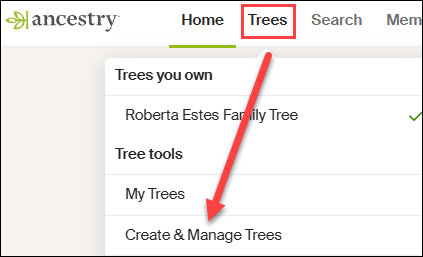
At Ancestry, go to Trees in the top banner, then click on “Create and Manage Trees.”

You’ll see the list of trees that you own. This is where all of the trees that you create live.

At the far bottom, you’ll see the prompt to create a new tree. Click there.

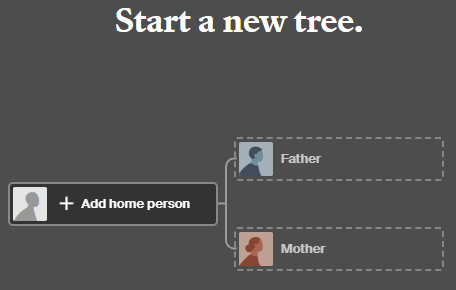
Next, you’ll see a blank tree.

For the home person, you can enter your match’s name, but be sure to list them as living so you’re not revealing private information.

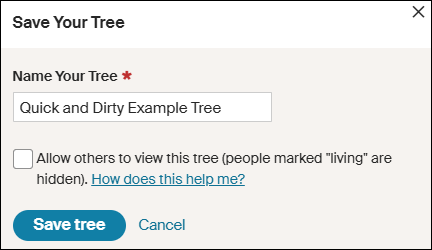
After adding one parent, you’ll be prompted to save and name the tree. Both the tester, who is designated as male by the Ancestry icon, and his father are either both living, or private, so I’m simply entering the surname of Robinson based on the grandfather’s surname. That could be incorrect of course, but it’s all I have to go on – yet.

Ironically, their grandfather’s surname was spelled Robison, without the “n”, not Robinson, but I accidentally entered Robinson and still got where I needed to go.

Clearly, I’m not going to allow this tree to be viewed by others, aka public, so I’m not checking that box. If it’s checked by default, uncheck it.

I don’t make my quick-and-dirty trees public because they are entirely unproven and unverified. I’m literally quickly searching for hints with every intention of abandoning the tree when I’m finished. If you want to clean the tree up later, you have the option to change the tree’s privacy settings.

Information in Your Match’s Tree Might Be Wrong

Complete the tree to be the same as your match’s tree. After saving your tree, click on the individuals you’ve added to view their hints.

Let’s start with Earl Townsend who appears to be our best candidate based on location.

Earl Russell Townsend has 13 hints, including a marriage license that confirms his birth date and location and provides the names of his parents, plus his wife’s name as Mildred Thorstenson. Based on what we know already, this is probably the correct Earl Townsend.

Of course, the wife’s surname could be incorrect. It could be her first or second marriage, or she could have been a widow when they married, so this surname might not be her birth surname.

Look for additional records in Earl’s hints.

Russell’s death certificate confirms that information, as do the birth and death certificates of their children.

Accept those hints.

If you determine that the original information in your match’s tree is incorrect, you’ll want to correct it in your quick-and-dirty tree. Remember, this is a scratch pad – you can’t hurt this tree.

Let’s change Mildred’s name to reflect her birth surname.

I refined Earl’s wife’s name to Mildred Thorstenson, which then produced 12 hints for her, including her marriage and Social Security record, with her birth and death dates, and her parents’ names. Her name in my match’s tree of Mildred Ideal Thorstenson Townsend Smith had produced zero hints.

Additionally, census records showed Mildred with her parents.

These seem to align, so accept those hints.

Looking at the pedigree view of my quick-and-dirty tree, we now see that both Russell and Mildred’s parents identified in the records are suggested as their potential parents.

Review each suggestion. If they look accurate based on the records identified, accept those potential parents in order to view the next generation.

Based on these names and census information, I can eliminate the Thorstenson line. It’s Swedish, not German or Dutch, which comprise my mother’s northern Indiana lines, My mother has no known Swedish ancestors, and we have proven her Indiana lineage in this timeframe.

Accepting the hints for the parents of both Earl Townsend and Mildred Thorstenson, parent hints appear for John Townsend and Eva Martin.

Now we’re viewing the next group of hints, which would be the great-great-grandparent generation. If these are our common ancestor, that would mean that I’m third cousins with my match, which is beyond the predicted relationship range. Third cousins is not impossible, but it’s beyond the probable match level based on the amount of shared DNA. furthermore, I don’t recognize any surnames.

So, let’s move to the Robison (incorrectly spelled Robinson) line and step through the same process. We can always come back and work with more parental hints on the Townsend/Martin line if we need to.

Rolland Robison only has a death year in my match’s tree, and that combined with the misspelled surname meant he had no hints on Ancestry, so I clicked on “Search” in my quick-and-dirty tree.

I’m searching for a man by this name, with a wife whose first name is Chloe.

AHA!

There it is! Note that Ancestry found Rolland Robison, not Robinson, married to Chloe.

Chloe was a Ferverda. My mother’s father was John Ferverda, and the location is correct for this family.

I saved this record to Rolland Robinson and added Ferverda as Chloe’s surname in our quick-and-dirty tree. This provided Rolland with 12 hints.

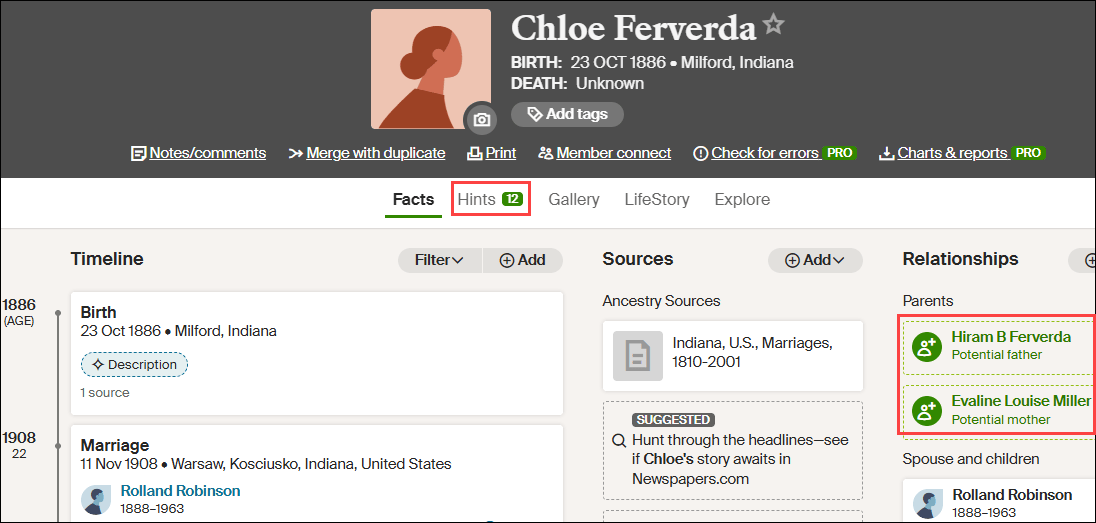
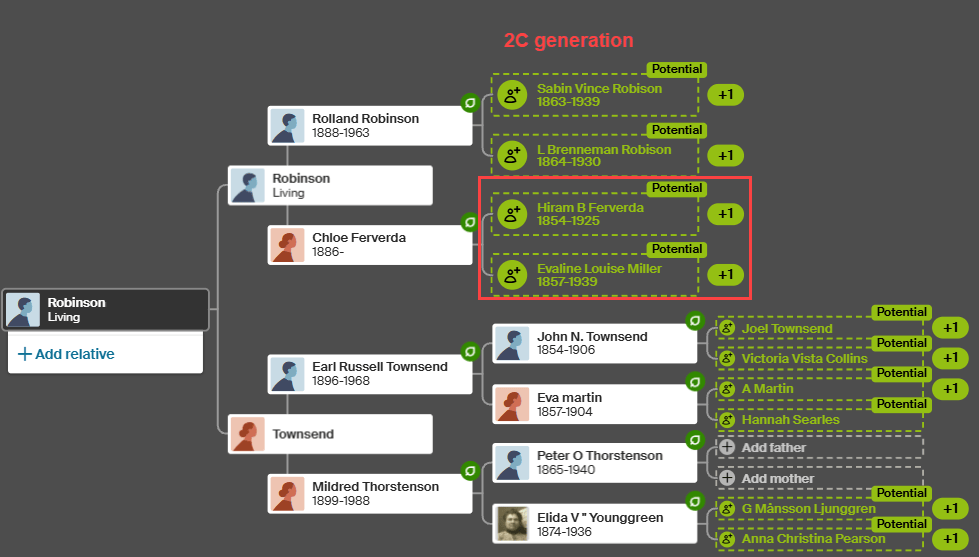
Adding Ferverda as Chloe’s surname provides her with a dozen hints too, including potential parents, Hiram B. Ferverda and Evaline Louise Miller – my great-great-grandparents who are indeed the 2C generation.

These common ancestors fall within the expected amount of shared DNA for second cousins, so this aligns well.

My quick-and-dirty tree has revealed at least one pair of common ancestors. Could there be more common lineages? Yes. I would continue building out this quick-and-dirty tree for (at least) another couple of generations on the other lines just to be sure.

What Next?

That depends on what you want to accomplish and your genealogy goals.

I used a DNA match at Ancestry in this example, but your match might be at a different vendor. Regardless, you’ll still want to use Ancestry to build your quick-and-dirty tree based on how they present hints and potential ancestors.

Now that you know how your DNA match connects:

  • Minimally, make a note on the match that indicates the most recent common ancestor(s) identified. I include a link to the quick-and-dirty tree I’ve created.
  • You can add your match and their ancestral path to your common ancestor into your own tree at whichever vendor where the match occurs.
  • If you match at either FamilyTreeDNA or MyHeritage, both of whom provide segment information, I suggest painting your matching segments to DNAPainter.

Painting your segments identifies your matching segments as descending from those ancestors and makes it easier to identify the shared ancestral lineage of anyone else who shares that segment on the same side of your tree (maternal or paternal).

Word of caution here: You can potentially share multiple ancestral paths with any match, so different segments with one match can descend from different ancestors.

  • If your match is at FamilyTreeDNA, you’ll want to link your match to their place in your tree.

Using triangulation, FamilyTreeDNA utilizes linked matches to assign matches who share the same segments to the maternal or paternal side of your tree (or both) using triangulation.

  • You may be trying to break through a brick wall by identifying common ancestors BETWEEN your shared matches that aren’t in your own tree.

This approach is obviously easier the closer your brick wall is in time to the present. Great-grandparents, at the second-cousin level, and great-great-grandparents at the third-cousin level are much easier than 5th- or 6th-generation ancestors who lived before birth and death certificates and detailed census records existed.

Furthermore, the further back in time, the more likely that you may encounter:

  • Pedigree collapse, where the same ancestors appear more than once in your tree
  • Or you share multiple common ancestors with your matches

Of course, there’s always the possibility of endogamy too, where you descend from a historically heavily-intermarried population, such as Ashkenazi Jews or the Amish, for example, which means you may share segments passed down within the population from distant common ancestors you won’t be able to identify. While endogamy in your lineages may increase the amount of shared DNA, which in turn can skew relationship estimates, it won’t prevent you from using quick-and-dirty trees to locate common ancestors.

And finally, unexpected parentage or issues like record destruction may impede your progress, but you’ll never know if you don’t try, which brings us back to the purpose of quick-and-dirty trees.

Building a quick-and-dirty tree is the easiest way to grow your matches’ trees to reveal your common ancestors.

_____________________________________________________________

Share the Love!

You’re always welcome to forward articles or links to friends and share on social media.

Subscribe!

If you haven’t already subscribed, it’s free. You’ll receive an e-mail whenever I publish by clicking the “follow” button at the top of the main blog page, here.

Help Keep This Blog Free

I receive a small commission when you click a vendor link in my articles and purchase that item. This does NOT increase your price but helps me keep the lights on and this informational blog free for everyone. Please click on the affiliate links in the articles or to the vendors below if you are purchasing products or DNA testing.

Thank you so much.

DNA Purchases and Free Uploads

Genealogy Products and Services

My Books

Genealogy Books

Genealogy Research

Sixteen Unique Trees at FamilyTreeDNA: How and When to Use Each

I love all the various trees at FamilyTreeDNA – and I’m not referring just to traditional genealogy trees with people, names, and dates. I’m talking about phylogenetic or haplogroup trees – the ones you use to understand your Y-DNA and mitochondrial DNA haplogroups, origins – and more. These trees tell you ABOUT your ancestors, those people in the more traditional genealogy tree, and the combination of both is powerful.

This article introduces the various trees available at FamilyTreeDNA, when and where you’ll find them, and what they can do for you.

Haplogroup Trees

Phylogenetic, or haplogroup trees, provide a genetic path from you, or the tester, today, back in time to Y-Line Adam, or Mitochondrial Eve – the first two humans who lived AND have descendants today.

Let’s start by explaining about Y-DNA and mitochondrial DNA (mtDNA), their inheritance path, and what they mean to you.

Y-DNA

Only men have a Y-chromosome, so only biological males can test their Y-DNA.

Y-Line Adam, Y-DNA haplogroup A-PR2921, lived about 232,000 BCE, or 234,000 years ago.

Is it possible that one day someone will test whose results push that date back somewhat? Yes, of course, as we are always learning, and many testers split branches.

Today, all 711,000+ modern descendants who have tested carry the mutation named A-PR2921 as their oldest SNP (single nucleotide polymorphism), or haplogroup-defining mutation in their Y-DNA. That’s because we all descend from that one man.

If you’re a male, Y-DNA testing tells you about your direct paternal line by matching with other men who have also taken a Y-DNA test, and by revealing valuable information from before the adoption of surnames. There’s no other way to reach that far back in time.

If you’re a female, you can recruit males in your family to test.

The Big Y-700 test provides the deepest-reaching and most refined Y-DNA test available, which is essential for both genealogy and tree-building.

Mitochondrial DNA

All people have mitochondrial DNA, inherited from their mother directly through her matrilineal line – meaning her mother, her mother, her mother, and so forth – directly up your tree through all mothers.

Everyone inherits their mitochondrial DNA (mtDNA) from their mother, but only females pass it on. Both males and females in the current generation, meaning you, can (and should) test their mitochondrial DNA.

Mitochondrial Eve, mitochondrial DNA haplogroup L, lived about 141,000 BCE, or about 143,000 years ago. All 315,000 testers descend from this one woman.

Like with Y-Line Adam, one day the results of future testers may push this date further back in time. A full sequence mitochondrial DNA test, mtFull, is necessary to test all 16,569 mitochondrial locations.

Test Types

FamilyTreeDNA has been in business for more than 25 years. Technology has advanced dramatically during that time. While they continue to offer new tests and products, they strive to maintain value for their original testers.

Even though some early testers may have joined their ancestors, matching with their test results is still beneficial to us.

Present-day DNA testers can still derive value by matching the earlier, lower-level, lower-resolution tests. Not as much value as if the original tester had taken a higher-level test, but those tests may not have been available at that time.

Matches, surnames, genealogy, locations, and haplogroups provide us with valuable information. The more people who test, the larger the pool becomes, and the better our chances of discovering something that refines our understanding of our ancestors – and identifies who they are.

Before we look at the trees available, let’s take a look at where haplogroups come from. Different level tests assign different levels of haplogroups, based on how much is tested.

Let’s answer two common questions:

  1. Where can you find your haplogroup, and what does it mean?
  2. How can haplogroups be different for people who descend from the same ancestor?

Where Do Haplogroups Come From?

Since the beginning, FamilyTreeDNA has always provided their customers with haplogroup information. Haplogroups are very genealogically useful today, but initially, 25 years ago, they were only able to provide essentially continental-level origin information for your particular line. That too was useful, and helped to identify and eliminate common lineages – just not as useful as today.

Science and testing have both come a long way. Present-day testers still match with people who only tested at a lower level. You never know what you might find at that level – a match to someone who has not taken the current tests, but is still very relevant because they share your ancestor. In fact, they may be the only tester who does.

For Y-DNA testers, you’ll notice several match categories that reflect different testing levels – along with the number of matches at each level. At one time, you could purchase each one of these tests individually, then later upgrade to higher-level tests. Today, only the 37 and 111 marker tests, and the Big Y-700, which scans the entire gold-standard region of the Y chromosome, are available. Higher level tests include the lower-level tests.

Click any image to enlarge

Different types of tests provide either a predicted or a confirmed haplogroup which shows on your match list.

Without getting all sciency on you – the 12-111 marker tests test targeted STRs, or short tandem repeats, which can’t be used for haplogroup assignment and confirmation. They can and are used to compare to other testers for matching because the number of repeats, or stutters, are inherited on the Y chromosome. The Big Y test scans the Y chromosome for SNPs, single nucleotide polymorphisms, which are stable mutations that define haplogroups. I wrote about this in the article, STRs vs SNPs, Multiple DNA Personalities.

Some haplogroups are much further down the tree, or more current, than others. Your most current haplogroup, only available with the Big Y-700 test, is the best because it brings you the closest to current in time, often placing you within family branches. The Big Y-700 scans about 23 million locations on the Y chromosome, revealing both known and unknown mutations, not just a few markers, making it the most refined and relevant test genealogically.

Each higher-level test includes the lower-level tests. You can see what tests your matches have taken by looking beneath their names on your match list. In this case, these Estes men who match my cousin have taken the Family Finder (or uploaded an autosomal transfer), and taken the mtFull test. One match initially took the Big Y-500 but has since upgraded to the Big Y-700, and the other originally tested at the 111 marker level, and has since upgraded as well.

The Big Y-700 includes all lower-level tests, such as the Big Y-500 (now obsolete), the 111, 67, 37, 25, and 12 marker STR tests. You still match with people who only tested at those levels, plus everyone else who ordered a more refined test.

The haplogroup you receive is more or less refined, based on the test level you take.

Y-DNA Test Type Haplogroup Provided Relevance Upgradable
Y-DNA STR 12-111 marker tests (only 37 and 111 are available today – the rest are obsolete) Predicted based on STRs – very reliable at the level predicted Predicted (not confirmed) haplogroup that was generally formed a couple thousand years ago, or earlier Yes, if enough quality DNA remains. Only 37, 111, and the Big Y-700 tests are available today. Recommend the upgrade to Big Y-700.
Individual SNP test (now obsolete) Confirms a predicted haplogroup or tests a single SNP to confirm a closer haplogroup Relevant at the level tested – either positive or negative result was reported Individual SNP tests have now been replaced by Big Y-700, which covers all individual SNPs that were available to test, plus much more.
Big Y-500 test (now obsolete) Confirmed haplogroup within range of that test’s ability, replaced by much more granular Big Y-700 Big Y-700 is more refined and moves the tester towards more current haplogroups, so more genealogically significant Yes, upgrade to Big Y-700 if enough DNA remains, or tester can re-swab
Big Y-700 – scans the entire gold-standard region of the Y chromosome – approximately 23 million base pairs Top-of-the-line SNP-confirmed test, most granular and refined. Scans for known and previously unknown mutations. Extremely accurate. Generally advances the tester into a genealogical timeframe, and often divides testers into multiple lineages descended from a known common ancestor No more advanced test is available.
Family Finder autosomal test or transfer Confirmed to mid-range level if possible. Not all transfer files have Y-DNA or mtDNA SNPs so you get what you get. Useful in autosomal matching for locating people you may be related to you with that surname. Ask the match if they are willing to take a Y-DNA test, if relevant, or sponsor a testing scholarship for them.

Family Finder haplogroups are relatively new at FamilyTreeDNA. Each chip level that FamilyTreeDNA has used for testing over the years, and the chips that other vendors have used, contain different SNPs (or none at all on the Ancestry test) that can be measured for some level of haplogroup. Other vendors generally don’t quality-control for either Y-DNA or mtDNA SNPs because they don’t use them. This is a “you get what you get” freebie.

That said, most Family Finder haplogroups are closer in time, or “better” than the predicted R-M269, the most common haplogroup in Europe, often reported with STR testing.

Not everyone with a transfer kit receives a haplogroup. Due to quality and reliability issues, you cannot see haplogroups on your autosomal match list for those who only have a haplogroup through an autosomal transfer.

Using our male Estes testers as an example, we find the following haplogroup results at the various testing levels:

Haplogroup Haplogroup Formation Date Ancestor or Haplogroup Formation Location Haplogroup Source
R-M269 4450 BCE (6450 years ago) Between Ukraine and Kazakhstan, north of the Black and Caspian Seas Predicted from 12-111 STR marker tests
R-BY487 700 CE (1300 years ago) UK, Scotland/England Family Finder DNA SNP Confirmed
R-BY482 1550 CE Robert Eastye b 1555 Ringwould, Kent, England Big Y-700
R-BY490 1700 CE Silvester Eastye b 1596 Kent, England Big Y-700
R-ZS3700 1750 CE Moses Estes 1711 VA Big Y-700
R-BY154784 1850 CE Joseph Estes b c 1790 VA or TN Big Y-700

All of these are valid and accurate haplogroups – some are just closer in time and much more useful than others. All of these men have R-M269, because it is a parent haplogroup of all of those downstream haplogroups. The Big-Y tested men beginning with R-BY482 don’t share the haplogroups below them, because they don’t have those mutations that are downstream on the tree. However, the men at the bottom with R-BY154784 have all of the SNPs above them.

Note that all haplogroup formation dates are ranges. I’m showing the midpoint here.

When upgrading, if the original tester is deceased, select the highest-level test available, as there may not be enough DNA to run more than one test. When I offer scholarships now, I always just offer the Big Y-700 test to avoid future issues.

If the tester you need is no longer available, consider the possibility that other people, family members perhaps, might be available to test to represent this same line.

Next, let’s look at mitochondrial test levels and haplogroups.

Mitochondrial DNA Test Type Haplogroup Provided Relevance Upgradable
HVR1 & HVR2 tests (no longer available) Predicted based on around 1000 markers – very reliable at the level predicted Predicted haplogroup, not confirmed, generally formed a couple thousand years ago or earlier Yes, if enough quality DNA remains. Only the mtFull test is available today.
mtFull, full sequence test Tests all 16,569 SNP locations in the entire mitochondria. Most granular and refined. Extremely accurate. Often brings tester into genealogical timeframe, especially with the new Mitotree. Divides testers into multiple haplotype lineages, sometimes descended from known common ancestor. No upgrade needed to receive new Mitotree and mtDNA Discover benefits.
Family Finder autosomal test or transfer Coming soon. Will be the same criteria and caveats as Y-DNA SNPs. May be able to find a similar or upstream haplogroup that might point to a common ancestor. Ask autosomal match if they are willing to take a mtFull test, if relevant, or sponsor a scholarship for them.

Ok, now that we understand more about haplogroups, how they are determined, and where yours came from, let’s look at all of the trees at FamilyTreeDNA.

Trees Within Your Y-DNA and Mitochondrial DNA Account

Let’s start with trees found within your personal account, so sign in.

Each tree has a different purpose and unique benefits.

Tree #1 – Your Matches Genealogy Trees

Each of your matches may have provided links to genealogical trees. They may show trees in multiple places too; at MyHeritage, an archived tree at FamilyTreeDNA, and a WikiTree link. I makes notes about their trees in the comments field, and I also keep a spreadsheet to look for commonalities.

Tree #2 – Haplogroups and SNPs for Y-DNA Testers

Next, for Y-DNA testers, click on the Y-DNA Results and Tools.

You’ll see the Haplotree & SNPs tile on the dashboard.

The Haplotree and SNPs link takes you to a phylogenetic tree that defaults to your haplogroup, where you can view:

  • Variants – SNP mutations that define your haplogroup
  • Surnames with this haplogroup – so long as there are multiple public testers
  • Countries – self-reported for earliest known ancestors (EKA)
  • Recommended Projects – haplogroup projects only – others such as surname projects are found in Discover under Suggested Projects

Tree #3 – The Block Tree for Big Y Testers

People who have taken the Big Y-700 test have a separate section that includes tools for the Big-Y test that aren’t relevant for the 12-111 STR marker tests.

Big Y testers will see the Block Tree tile on their dashboard.

The block tree is an alternative way of displaying matches on a phylogenetic tree. While the Discover Time Tree is viewed left to right, this tree is displayed top to bottom, with each mutation being represented by one grey bar on the scale at left. Each mutation corresponds to approximately 100 years, which is a rough average for the frequency of Y-chromosomal mutations.

People with 30 mutations or fewer are shown as matches, with the goal of reaching back about 1500 years.

Each large block shows the mutation for which the haplogroup is named, such as R-BY482, at the top. The mutations, known as variants, shown below that haplogroup name, are found in the results of each person in that haplogroup, but in the future, people without those mutations, or with additional mutations, will form a new branching haplogroup.

The green “Private Variants” at the bottom of the branches display the average number of mutations of people within that group awaiting another tester to have the same mutations, so a new branch can be formed. I view Private Mutations as “haplogroups in waiting.”

Discover

In addition to the haplogroup trees shown in your account at FamilyTreeDNA, there are several additional trees in Discover for both Y-DNA and mitochondrial DNA. Discover, updated weekly, is a suite of tools for both Y-DNA and mitochondrial DNA that, cumulatively, provides a book about your haplogroup results.

Discover comes in two flavors:

  • The publicly available free version with limited functionality
  • Your private version with expanded functionality available from within your account

You can access Discover, here if you’d like to follow along.

Discover is a publicly available free tool introduced in the fall of 2023 that provides more than a dozen reports, enabling a deeper understanding of all haplogroups.

Just select Y-DNA or mtDNA and enter your haplogroup of choice.

Think of these menu choices, in the sidebar, as chapters in your personal book. Every chapter has something interesting to tell you. Please read them – don’t just scan.

In addition to the free version, if you have taken a Big-Y or mitochondrial DNA full sequence test at FamilyTreeDNA, you’ll have additional information available.

For mitochondrial DNA results, just click on the pink Discover tile.

For Y-DNA results, click on the blue Discover tile.

Within Discover, you’ll find three distinct trees.

Trees #4 and #5 – Y-DNA and Mitochondrial DNA Time Trees

The Time Tree shows your Y-DNA or mitochondrial DNA haplogroup displayed on a timeline, along with:

  • A self-reported ancestral country indicator for every person’s DNA in that haplogroup
  • Haplotype groupings indicating exact matches between everyone in that haplotype.

A haplotype is a grouping of people whose DNA matches exactly, including unstable or hypervariable locations too unreliable to use for haplogroup formation. However, those mutations may be relevant for genealogical matching.

I wrote about haplogroups and haplotypes here and here.

Tree #6 and #7 – Y-DNA and Mitochondrial DNA Class Tree View

The Classic Tree is available for both Y-DNA and mitochondrial DNA.

On the Classic Mitotree View, you can display and filter the tree, including haplotypes, in seven ways, as shown in the dropdown “Display Options.”

Tree #8 and #9 – Y-DNA and Mitochondrial DNA Tree Branch Comparison

Have you ever seen two haplogroups and wondered how closely they are related? Compare provides that answer.

Here, I’m comparing my haplogroup to that of a family member. Everyone is related, but how long ago are we related on our matrilineal lines?

Haplogroup J1c2f compared with haplogroup V216a shows that our common ancestor lived a VERY long time ago – about 55,000 years in the past, someplace in the fertile crescent.

For either Y-DNA or mitochondrial DNA, you can compare two haplogroups. This provides specific information about those two branches of the tree, and where they intersect. To view more about the common ancestor, just pop R+10398 into Discover and learn more about when and where that ancestor lived.

Trees #10 and #11 – Match Time Trees

Match Time Trees are one of the most useful Discover features.

In addition to the Time Trees and Classic Trees provided for everyone in Discover, test takers will also have a Match Time Tree that shows all of your matches, organized genetically.

For mtFull testers, your matches are organized by haplotype cluster. People in your haplotype cluster are your exact matches.

I have over 100 full sequence matches, so I’m only showing the first few in this screenshot. In addition to the match’s name, their EKA (earliest known ancestor) is shown, if provided.

On the Y-DNA Match Time Tree, links are provided to genealogical trees of the tester, which could be an archived FamilyTreeDNA tree, a MyHeritage tree, WikiTree, or some combination.

You can actually see your matches’ WikiTree tree on your Match Time Tree by enabling another feature.

Trees #12 and #13 – WikiTree Tree Integration

While you’re still on the Match Time Tree page for either Y-DNA or mitochondrial DNA, click on Display Options, above the Time Tree, and enable WikiTree Connections. Unfortunately, the default for this great feature is “off.”

I’ve enabled “Share Mode” at the top to obfuscate the names of the testers, and I’ve adjusted the vertical spacing so you can see more in my examples. You’ll notice the grey lines with dots inside circles. I think of these as beads or maybe knots on a rope, but they actually represent a line of ancestors.

Each tester with one of those grey dot bars has connected themselves to their ancestors at WikiTree, a public one-world tree. Living people are not shown, hence the dash marks to the immediate left of the tester’s name.

By mousing over any of the dots, aka ancestors, you can view information about this ancestor of this Estes tester at WikiTree. Ancestors appear in genealogical order in their relevant place on the Time Tree. How cool is that!!!

WikiTree, like any tree, public or private, can have errors. Always verify any tree using original source documents.

As far as I’m concerned, the Match Time Tree is one of the very best features of both Y-DNA and mitochondrial DNA testing and matching. There are so many options to select from, so take some time to look around.

Your Personal Version of Discover is Best

Y-DNA Discover and mtDNA Discover can both be useful for any level of haplogroup, but the best results are obtained when clicking through from the tester’s FamilyTreeDNA account. Big Y and full sequence mitochondrial DNA customers receive additional information, not available in the free, public version of Discover, including

  • The Match Time Tree
    • Including WikiTree integration
  • Globetrekker™ (Y-DNA, mtDNA coming eventually)
  • Up to 30 Ancient Connections, as compared to 3 in the free version
  • Up to 30 Notable Connections, as compared to 3 in the free version


Tree #14 – Group Time Trees

I absolutely love Group Time Trees. They are similar to Match Time Trees, but unlike Match Time Trees, are publicly viewable for Group Projects if the volunteer project administrators have enabled this feature for the project.

There are two ways to access Group Time Trees – through publicly accessible Discover or directly through any project.

In Discover, select Group Project in the dropdown.

Then type the name of the surname project you’re seeking. You’ll be presented with a menu if the surname you’ve entered is found in multiple projects, or administrators have listed it as “of interest” in their project.

I clicked on the Estes project.

Viewing the Estes DNA Project, under DNA Results, you can see the various options.

Selecting Y-DNA Results Overview displays the project results by administrator-defined group. The teal groups all descend through Abraham Estes through various sons.

However, by clicking the Group Time Tree instead, you can view all these testers and their results in a Match Time Tree format, arranged genetically.

Clicking on the Group Time Tree link takes you to the Group Time Tree for this project. A menu is displayed at left, based on how the administrator has grouped the project.

I’ve selected several groups that I know descend from the original Estes ancestor from Kent, England. Testers who have joined the Estes project and granted permission for their results to be displayed publicly are automatically grouped genetically, at right, with their surname and EKA (earliest known ancestor), assuming they have entered that information.

Earliest Known Ancestors (EKA)

You’ve probably noticed that earliest known ancestors, along with their locations, are used in many places.

Please enter both your direct paternal (father, father, to father’s line) and direct matrilineal (mother, mother, to mother’s line) earliest known ancestors, along with their locations. I wrote about how to do that in “Earliest Known Ancestors” at FamilyTreeDNA in 3 Easy Steps, here.

Trees #15 and #16 – Public Trees

In addition to trees within testers’ accounts, Discover trees, Group Time Trees, and WikiTree tree integration, FamilyTreeDNA provides two additional public trees.

FamilyTreeDNA made the Y-DNA and mitochondrial DNA haplogroup trees freely available years ago, at the bottom of their main company public page – without signing in.

These trees are still actively maintained today and are free for everyone to use.

To find these trees, scroll all the way to the very bottom of the page, in the footer, to the Community section. Yes, I know, it’s a bit like a scavenger hunt!

You can select to view either the Y-DNA or mtDNA tree. I love this tree, because it shows how many SNP-confirmed people have been tested. That number does not include the thousands of academic and public samples that may be utilized to help define haplogroups, and that you’ll sometimes see in your Ancient and Notable Connections.

So, if you receive a new haplogroup, but you don’t see a new match on your list or on the Block Tree, it’s probably because you match a high-quality academic sample.

The trees display from the root, meaning the oldest haplogroup is shown at the top. In the Y-DNA tree, above, haplogroup A-PR2921 is “Y-Adam”.

You can select any haplogroup on the bar across the top, search by country, or select a specific branch name to view.

The tree itself is viewable by country, as shown above, or by variant, meaning the haplogroup-defining mutations, shown below.

Additionally, for the Y-DNA tree, you can choose to display by surname, so long as there are two or more testers with that identically spelled surname who share this haplogroup and who have given permission for public display.

Please note that these people are all SNP-tested and confirmed at the level reported, but they are NOT all Big-Y testers.

This feature alone can be genealogy-changing because they may be surnames associated with your ancestors in records, or they may just be neighbors. Or maybe you thought they were “just neighbors,” but they are actually related.

At one time, customers could order an individual SNP test for R-M269 to confirm their predicted haplogroup. That test is no longer available, but anyone who took that test to confirm R-M269 and never tested or received results (like Family Finder) at a more granular level will be reported at R-M269. Note that 687 is the number of distinct surnames shown, not the total number of testers.

The three “hamburger dots” on the right side provide options for a user-reported Country Report based on the location of their earliest known ancestor, and a Surname Report. The surname report for R-M269 shows a total of 2448 testers who share those 687 surnames.

It’s a Whole Forest

Who knew there were 16 unique trees available at FamilyTreeDNA!

Each tree has a unique purpose and provides information not available elsewhere.

Take a look and see what kind of information is waiting for you – and don’t forget to check back often.

_____________________________________________________________

Share the Love!

You’re always welcome to forward articles or links to friends and share on social media.

Subscribe!

If you haven’t already subscribed, it’s free. You’ll receive an e-mail whenever I publish by clicking the “follow” button at the top of the main blog page, here.

Help Keep This Blog Free

I receive a small commission when you click a vendor link in my articles and purchase that item. This does NOT increase your price but helps me keep the lights on and this informational blog free for everyone. Please click on the affiliate links in the articles or to the vendors below if you are purchasing products or DNA testing.

Thank you so much.

DNA Purchases and Free Uploads

Genealogy Products and Services

My Books

Genealogy Books

Genealogy Research

2025 Genetic Genealogy Retrospective: Wow – What a Year!

2025 has been quite a year in genetic genealogy. Genetic genealogy, per se, really isn’t a separate “thing” anymore. DNA testing is now an integral part of genealogy, with the potential to answer questions that nothing else can!

The 76 articles I wrote in 2025 fall into multiple categories and focus on different topics based on what was happening in the industry.

From my perspective, here are the most notable announcements and trends in genetic genealogy, and genealogy more broadly.

#1 for 2025 – Mitochondrial DNA: The Million Mito Project Released the New Mitotree, Updates, and mtDNA Discover

The biggest genealogy news items this year, both industry-wide and genealogy-changing are definitely the release of the new Mitotree, plus two tree updates. But that’s not all.

In addition, full sequence mitochondrial DNA testers received new Mitotree haplogroups, if appropriate, and everyone received a haplotype – a new feature. Along with Mitotree, FamilyTreeDNA introduced mtDNA Discover which provides 13 individual reports based on your haplogroup and matches.

It’s no wonder that mitochondrial DNA articles led the pack with the most views based on the eleven articles about that topic. If you haven’t yet tested your mitochondrial DNA at FamilyTreeDNA, there’s no better time! You never know what you’re going to discover and the more testers, the more matches for everyone.

You don’t know what you don’t know, and you’ll never know if you don’t test. Remember, mitochondrial DNA is for both males and females and tests your mother’s direct matrilineal line (mother to mother to mother, etc.) – reaching beyond known surnames.  Click here to order or upgrade.

#2 – MyHeritage Low Pass Whole Genome Sequence Test Charges into the Future

Another big hitter is the new MyHeritage low-pass whole genome test (WGS) test. It’s new and innovative, but we haven’t seen comparative results yet.

My results from the new low-pass whole genome test just came back, and I haven’t had the opportunity to review them yet, as compared to the earlier tests. That said, I do have roughly the same number of matches, but I need to determine if they are the same matches, and how well they track. I’ll be working on that review soon.

The new whole genome test may be more about future proofing and preparedness than additional current benefit – but we will see. I definately wanted to take the whole genome test so I can receive and benefit from whatever new is coming down the pike.

MyHeritage allows you to maintain multiple DNA tests on your account, so the new whole genome won’t “replace” your older or uploaded test. That way, you can easily compare the results of the whole genome against any DNA test that you curently have at MyHeritage.

Click here to order the new test.

#3 – 23andMe Experiences Problems

On a less positive note, but still quite newsworthy is the bankruptcy of 23andMe and subsequent repurchase of 23andMe by the original founder after setting up a new nonprofit. I have real mixed feelings about this topic. However, 23andMe was really never about genealogy, and now, matching segment information is no longer available. Those searching for unknown parents or family may want to test there if they are unsuccessful elsewhere.

Best Genealogy Tool

The FamilySearch full text search continues to have a HUGE impact for genealogists. This tool is not one-and-done, but provides increasing amounts of rich information as more records are added to the “fully scanned” collection. If you haven’t tried it, please do. It’s a game-changer and continues to improve.

A Cautionary Word About AI – Artificial Intelligence

AI is such a hot topic right now that I feel it needs to be included.

The FamilySearch full text search uses a form of AI. However, you’ll quickly notice that it can’t read everything, gets words and names wrong, and if you actually need to fully depend on it for accuracy, you cannot. (That said, it’s still an amazing tool, and I’m not picking on FamilySearch.)

Aside from FamilySearch, AI in its current form is both wonderful and terrible. I’ll be writing about AI in the new year, but for now, don’t ever rely on AI for anything that you can’t verity. It’s your assistant, not an expert, no matter how insistent it is. Never trust and always verify.

This is ESPECIALLY TRUE WHEN RELATED TO GENETICS and genetic related topics. I can’t even begin to tell you how very wrong it has been, and how much people fall in love with inaccurate results. No, just no – at least for now.

You need to know your AI tool, your skill set, your understanding of AI broadly, the tool’s limitations, and yours, and that’s all before verifying the actual AI results. If you want to educate yourself, and everyone should, treat yourself to anything, anyplace by either Mark Thompson or Steve Little, the dynamic AI duo. They offer YouTube videos and classes in a wide variety of places – but keep in mind that AI tools and technology literally change every few weeks.

AI is, indeed, a specialty all unto itself, much like genetic genealogy. And right now, it’s not soup yet, but it is cooking.

Tried and True Genetic Genealogy Staples – DNAPrint and Genetic Affairs

I haven’t written about either one this year, but I use both DNAPainter and Genetic Affairs regularly.

I consistently paint segments from matches at both MyHeritage, FamilyTreeDNA, and GEDmatch that are newly identified to an ancestor or ancestral couple at DNAPainter.

Unfortunately, neither Ancestry nor 23andMe provide matching cM location information for your matches (chromosome browser), but you may find some people who have tested at those companies at both FamilyTreeDNA and GEDmatch if they have uploaded to either of those vendors. Both vendors provide segment information and a Chromosome Browser, enabling you to paint that information to DNAPainter when you can identify your common ancestor.

MyHeritage also provides a Chromosome Browser, but unfortunately, no longer accepts uploads from any other vendor. You can paint segments from MyHeritage, but no longer upload DNA files to MyHeritage.

Thanks to DNAPainter, I have 90% of my segments identified to specific ancestors – which is actually rather remarkable given that my mother’s grandfather was a Dutch immigrant, and her great-grandparents on her other side were German immigrants, meaning we don’t have many matches on either of those lines.

Genetic Affairs continues to develop new, advanced clustering tools, one of which I’ll be reviewing soon.

Major Vendor Releases

Aside from what’s listed above, most of the major vendors released new features.

MyHeritage released a VERY COOL new tool called Cousin Finder that finds your relatives in the MyHeritage database, whether they match you on a DNA test, or not. They may not have even taken a DNA test. Cousin Finder identifies your common ancestor and shows your relationships. It’s a wonderful way to initiate communications, discuss your common ancestors, and ask about DNA testing.

Of my 378 Cousin Finder matches, only 23 (about 6%) are on my DNA match list, so that leaves 355 people to message, several of whom represent Y-DNA and mtDNA lines I don’t have. You can bet I’ll be offering testing scholarships.

Additionally, MyHeritage released a new ethnicity version.

FamilyTreeDNA, in addition to the new Mitotree, Discover, and associated features, released a new match matrix so you can see if and how selected matches are related to each other in a grid format. In other words, you can create your own cluster.

A new built-in “Share” feature blurs private information to make sharing easier both on the website and in Discover.

Discover improvements include thousands of new Y-DNA and mtDNA tree branches, plus thousands of new Ancient DNA samples. Discover is evergreen, so once you’ve taken that Big Y-700 test or the mitochondrial DNA test, your learning never stops as more content is added.

Tree integration with WikiTree is super-easy and means you don’t have to choose between trees. You can choose to retain your archived tree at FamilyTreeDNA, or move your tree to MyHeritage, PLUS link yourself to your family at WikiTree.

Ancestry released match clustering and a new beta pedigree view of ThruLines, but that’s back in the shop for more work. I’d expect to see it rereleased in 2026.

Conferences

RootsTech is the granddaddy of genealogy conferences, and it’s always fun to attend and write about the experience. Many vendors release new tools or products during the conference.

The ECGGC (East Coast Genetic Genealogy Conference), held in the fall, is the only conference that focuses entirely on genetic genealogy, new tools, how to use existing tools, and more. The 2025 conference was virtual and provided a great deal of focused content. Attendees particularly appreciate the deep dive in a particular topic presented in DNA Academy.

I’ll be at RootsTech in 2026, will write about that soon, and hope to see you there.

Concepts, Techniques and Plain Old Genealogy

In the past, my Concepts series and genealogy “how to” articles have been very popular, so, in 2025, I penned a half-dozen articles focusing on frequently asked questions about relationships and DNA.

For example, how does one go about finding DNA testing candidates? The number of options may surprise you and includes both Cousin Finder and Relatives at RootsTech.

By testing ONE PERSON for either Y-DNA or mitochondrial DNA that represents an ancestor, you actually receive information about that entire lineage of ancestors. So, on my Estes line, by locating an Estes male from my line to test, I received relevant information for every Estes male in my line, back to and beyond the progenitor.

Eventually, we hit a brick wall in every line, and those tools are the perfect way to break through those brick walls.

Other articles discuss things like how to use Discover’s Ancient Connections, and the difference between half and full relationships, both in your tree and genetically. Plus, what does a cousin “once removed” mean anyway? And why do I care?

Another question I receive is how far back, based on the shared amount of DNA, should I look in my matches’ trees for our common ancestor? In other words, how many generations back should I click? That article was fun and produced some unexpected results.

Memorial Articles

Because we are part of a community, I write memorial articles when one of our friends passes on. This year, sadly, Schelly Talalay Dardashti, well-known Jewish genealogist, and another very close friend joined the ancestors, so I’ve recognized the best in both of their lives which constitutes their legacy.

Be the Storyteller

Last, but not least, I wrote about my ancestors in the “52 Ancestors” series, which launched several years ago with Amy Johnson Crow’s challenge to write about one ancestor per week. She hosts this every year, and you can join (free) now.

I’m now on ancestor #467, so yes, it’s addictive, but it’s also AMAZING how many wonderful cousins I’ve met who have information that I did not. Not only that, but after publishing about an ancestor, I’ve discovered that I’m related to people I’ve known for years. We were SOOOooo excited!

I’ve been writing about the lives of my ancestors for several years now, and the articles include attempts to identify Y-DNA and mtDNA testers for each ancestor, where appropriate. There’s so much to learn that can’t be revealed any other way.

Plus, people seem to like the “mystery” and “short story” aspect, and I salt each story with the history of the region and relevant historical events of the timeframe. You might find your ancestors here too, or other helpful information.

Find a way to share about your ancestors!

Do You Have Suggestions for 2026 Topics?

Do you have suggestions or requests for article topics in 2026? If so, please comment on this article and let me know.

Check Out the 2025 List

Here’s the list of the 2025 articles. Did you miss something fun? Enjoy!

  Title Category Date Link
1 Welcome to 2025 – Opportunities and New Genetic Genealogy Articles Welcome, general 1-2-2025 https://dna-explained.com/2025/01/02/welcome-to-2025-opportunities-and-new-genetic-genealogy-articles/
2 Anne Doucet (1713-1791), Oceans, Rivers, and Perseverance – 52 Ancestors #438 52 Ancestors 1-4-2025 https://dna-explained.com/2025/01/04/anne-doucet-1713-1791-oceans-rivers-and-perseverance-52-ancestors-438/
3 Register for RootsTech 2025 Now RootsTech 1-16-2025 https://dna-explained.com/2025/01/16/register-for-rootstech-2025-now/
4 What IS the McNeil Family History, by George Franklin McNeil – 52 Ancestors #439 52 Ancestors 1-19-2025 https://dna-explained.com/2025/01/20/what-is-the-mcneil-family-history-by-george-franklin-mcneil-52-ancestors-439/
5 Jean Garceau dit Tranchemontagne (c1785-1711), Soldier from Saint Marseault – 52 Ancestors #440 52 Ancestors 1-29-2025 https://dna-explained.com/2025/01/29/jean-garceau-dit-tranchemontagne-c1785-1711-soldier-from-saint-marseault-52-ancestors-440/
6 Memories Resurface When the Old Family Home Gets a Facelift Genealogy 2-3-2025 https://dna-explained.com/2025/02/03/memories-resurface-when-the-old-family-home-gets-a-facelift/
7 MyHeritage Introduces Ethnicity v2.5 MyHeritage 2-6-2025 https://dna-explained.com/2025/02/06/myheritage-introduces-ethnicity-v2-5/
8 Relatives at RootsTech Reveals Cousins and Provides DNA Candidates RootsTech, techniques 2-8-2025 https://dna-explained.com/2025/02/08/relatives-at-rootstech-reveals-cousins-and-provides-dna-candidates/
9 FamilyTreeDNA’s New Matrix Shows How Your Matches Are Related to Each Other FamilyTreeDNA 2-12-2025 https://dna-explained.com/2025/02/12/familytreednas-new-matrix-shows-how-your-matches-are-related-to-each-other/
10 René Doucet (c1680-c1731), Lifetime of Incessant Upheaval – 52 Ancestors #441 52 Ancestors 2-15-2024 https://dna-explained.com/2025/02/16/rene-doucet-c1680-c1731-lifetime-of-incessant-upheaval-52-ancestors-441/
11 Lineages Versus Ancestors – How to Find and Leverage Yours Techniques 2-23-2025 https://dna-explained.com/2025/02/23/lineages-versus-ancestors-how-to-find-and-leverage-yours/
12 Mitotree is Born Mitochondrial DNA 2-25-2025 https://dna-explained.com/2025/02/25/mitotree-is-born/
13 RootsTech 2025 – The Year of Discover and the New Mitotree RootsTech, Mitochondrial DNA 3-14-2025 https://dna-explained.com/2025/03/15/rootstech-2025-the-year-of-discover-and-the-new-mitotree/
14 Pierre Doucet (c1621-1713), Walking History Book Lived to Nearly 100 – 52 Ancestors #442 3-16-2025 https://dna-explained.com/2025/03/16/pierre-doucet-c1621-1713-walking-history-book-lived-to-nearly-!100-52-ancestors-442/
15 Welcome to the New FamilyTreeDNA mtDNA Group Mitochondrial DNA 3-17-2025 https://dna-explained.com/2025/03/17/welcome-to-the-new-familytreedna-mtdna-group/
16 23andMe Files for Bankruptcy – What You Need to Know! 23andMe 3-24-2025 https://dna-explained.com/2025/03/25/23andme-files-for-bankruptcy-what-you-need-to-know/
17 New “Share” Features at FamilyTreeDNA Blur Match Information and Make Sharing Easy FamilyTreeDNA 4-1-2025 https://dna-explained.com/2025/04/01/new-share-features-at-familytreedna-blur-match-information-and-make-sharing-easy/
18 The Chauvet Cave: Trip Back in Time with Prehistoric European Humans – Are We Related? History, DNA 4-6-2025 https://dna-explained.com/2025/04/06/the-chauvet-cave-trip-back-in-time-with-prehistoric-european-humans-are-we-related/
19 DNA for Native American Genealogy Webinar & Companion Book Native American 4-8-2025 https://dna-explained.com/2025/04/08/dna-for-native-american-genealogy-webinar-companion-book/
20 Marie Levron (c1686-1727), Tragedy from Cradle to Grave – 52 Ancestors #443 52 Ancestors 4-14-2025 https://dna-explained.com/2025/04/14/marie-levron-c1686-1727-tragedy-from-cradle-to-grave-52-ancestors-443/
21 Mitochondrial DNA: What is a Haplotype Cluster and How Do I Find and Use Mine Mitochondrial DNA 4-14-2025 https://dna-explained.com/2025/04/14/mitochondrial-dna-what-is-a-haplotype-cluster-and-how-do-i-find-and-use-mine/
22 New Mitotree Haplogroups and How to Utilize Them for Genealogy Mitochondrial DNA 4-23-2025 https://dna-explained.com/2025/04/23/new-mitotree-haplogroups-and-how-to-utilize-them-for-genealogy/
23 Sir Francois Levron dit Nantois(c1651-1714), and Acadia’s Pirate – 52 Ancestors #444 52 Ancestors 4-26-2025 https://dna-explained.com/2025/04/27/sir-francois-levron-dit-nantois-c1651-1714-and-acadias-pirate-52-ancestors-444/
24 Catherine Savoie (c1661-c1722/25), Whispered Threads Weave a Tapestry of Life – 52 Ancestors #445 52 Ancestors 5-4-2025 https://dna-explained.com/2025/05/04/catherine-savoie-c1661-c1722-5-whispered-threads-weave-a-tapestry-of-life-52-ancestors-445/
25 Discover’s Ancient Connections – How Are You Related? Discover, Ancient DNA 5-8-2025 https://dna-explained.com/2025/05/08/discovers-ancient-connections-how-are-you-related/
26 Mother’s Day and Legacies 52 Ancestors, Genealogy 5-10-2025 https://dna-explained.com/2025/05/11/mothers-day-and-legacies/
27 The Mystery of the Blue Fugates and Smiths: A Study in Blue Genes and Pedigree Collapse Genetics, Genealogy 5-18-1015 https://dna-explained.com/2025/05/19/the-mystery-of-the-blue-fugates-and-smiths-a-study-in-blue-genes-and-pedigree-collapse/
28 Regeneron Wins Bid for Bankrupt 23andMe – Wedding Planned 23andMe 5-19-2023 https://dna-explained.com/2025/05/19/regeneron-wins-bid-for-bankrupt-23andme-wedding-planned/
29 Francois Savoie’s Homestead Rediscovered – 52 Ancestors #446 52 Ancestors 5-24-2025 https://dna-explained.com/2025/05/24/francois-savoies-homestead-rediscovered-52-ancestors-446/
30 Memorial Day – Some Gave All Memorial 5-25-2025 https://dna-explained.com/2025/05/25/memorial-day-some-gave-all/
31 Mitotree Webinar – What It Is, How We Did It, and What Mitotree Means to You Mitochondrial DNA 6-4-2025 https://dna-explained.com/2025/06/04/mitotree-webinar-what-it-is-how-we-did-it-and-what-mitotree-means-to-you/
32 Catherine LeJeune (c1633-1671/1686), Meet Your Grandchildren – 52 Ancestors #447 52 Ancestors 6-7-2025 https://dna-explained.com/2025/06/07/catherine-lejeune-c1633-1671-1686-meet-your-grandchildren-52-ancestors-447/
33 Mitotree Q&A for Everyone Mitochondrial DNA 6-11-2025 https://dna-explained.com/2025/06/11/mitotree-qa-for-everyone/
34 Father’s Day: Bravery and Love 52 Ancestors, Genealogy 6-14-2025 https://dna-explained.com/2025/06/14/fathers-day-bravery-and-love/
35 Francoise Bourgeois (c1659-1693/1697), High Drama in Beaubassin and Terror at Port Royal – 52 Ancestors #448 52 Ancestors 6-16-2025 https://dna-explained.com/2025/06/16/francoise-bourgeois-c1659-1693-97-high-drama-in-beaubassin-and-terror-at-port-royal-52-ancestors-448/
36 Requesting Suggestions for RootsTech 2026 Topics RootsTech 6-18-2025 https://dna-explained.com/2025/06/18/requesting-suggestions-for-rootstech-2026-topics/
37 FamilyTreeDNA and WikiTree Collaboration – In Two Easy Steps!! FamilyTreeDNA, WikiTree 6-25-2025 https://dna-explained.com/2025/06/25/familytreedna-and-wikitree-collaboration-in-two-easy-steps/
38 Jacques Bourgeois (c1620-c1700), Surgeon of Port Royal – 52 Ancestors #449 52 Ancestors 7-1-2025 https://dna-explained.com/2025/07/01/jacques-bourgeois-c1620-c1700-surgeon-of-port-royal-52-ancestors-449/
39 TTAM, a Nonprofit Formed by 23andMe’s Founder Now Plans to Buy 23andMe 23andMe 7-1-2025 https://dna-explained.com/2025/07/01/ttam-a-nonprofit-formed-by-23andmes-founder-now-plans-to-buy-23andme/
40 Jacques Bourgeois: Complex Acadian, Founder of Beaubassin – 52 Ancestors #450 52 Ancestors 7-6-2025 https://dna-explained.com/2025/07/06/jacques-bourgeois-complex-acadian-founder-of-beaubassin-52-ancestors-450/
41 How to Use Ancestry’s New Match Clusters and What They Mean Ancestry 7-10-2025 https://dna-explained.com/2025/07/10/how-to-use-ancestrys-new-match-clusters-and-what-they-mean/
42 Walk with Your Ancestors: Peace, Light and Healing in an Abandoned Medieval Village History 7-21-2025 https://dna-explained.com/2025/07/21/walk-with-your-ancestors-peace-light-and-healing-in-an-abandoned-medieval-village/
43 Jeanne Trahan (c1629-c1699), Life in Chinon, La Heve, Port Royal, and Beaubassin – 52 Ancestors #451 52 Ancestors 8-2-2025 https://dna-explained.com/2025/07/28/jeanne-trahan-c1629-c1699-life-in-chinon-la-heve-port-royal-and-beaubassin-52-ancestors-451/
44 Wherefore Art Thou, Oh Ancestor – New Generation Tree Chart Suggests Where to Look in Your Matches’ Trees Techniques, Genetics, Genealogy 8-2-2025 https://dna-explained.com/2025/08/02/wherefore-art-thou-oh-ancestor-new-generation-tree-chart-suggests-where-to-look-in-your-matches-trees/
45 Guillaume Trahan (c1601-1625), More Than Meets the Eye – 52 Ancestors #452 52 Ancestors 8-13-2025 https://dna-explained.com/2025/08/13/guillaume-trahan-c1601-c1684-more-than-meets-the-eye-52-ancestor-452/ 
46 The East Coast Genetic Genealogy Conference – ECGGC – Register Now for the Best of the Best ECGGC Conference 8-14-2025 https://dna-explained.com/2025/08/14/the-east-coast-genetic-genealogy-conference-ecggc-register-now-for-the-best-of-the-best/
47 Schelly Talalay Dardashti – May Her Memory Be a Blessing Memorial 8-17-2025 https://dna-explained.com/2025/08/17/schelly-talalay-dardashti-may-her-memory-be-a-blessing/
48 Francoise Corbineau (c1609-c1665), Bride in Chinon, Founder of Acadia – 52 Ancestors #453 52 Ancestors 8-25-2025 https://dna-explained.com/2025/08/23/francoise-corbineau-c1609-c1665-bride-in-chinon-founder-of-acadia-52-ancestors-453/
49 Nicolas Trahan (c1570->1632), Life in the Heart of French Wine Country – 52 Ancestors #454 52 Ancestors 8-31-2015 https://dna-explained.com/2025/08/31/nicolas-trahan-c1570-1632-life-in-the-heart-of-french-wine-country-52-ancestors-454/
50 Mitochondrial DNA A-Z: A Step-by-Step Guide to Matches, Mitotree, and mtDNA Discover Mitochondrial DNA, Discover, Genealogy, Techniques 10-2-2025 https://dna-explained.com/2025/09/02/mitochondrial-dna-a-z-a-step-by-step-guide-to-matches-mitotree-and-mtdna-discover/
51 Renée Desloges (c1570-1627/1632), Fragments of Life in Montreuil-Bellay – 52 Ancestors #454 (this is actually 455) 52 Ancestors 9-6-2025 https://dna-explained.com/2025/09/06/renee-desloges-c1570-1627-1632-fragments-of-life-in-montreuil-bellay-52-ancestors-454/
52 Best Mitochondrial DNA Presentation EVER – You’re Invited to DNA Academy!! Mitochondrial DNA 9-9-2025 https://dna-explained.com/2025/09/09/best-mitochondrial-dna-presentation-ever-youre-invited-to-dna-academy/
53 Unfillable Shoes Memorial – Douglas Rhodenbaugh 9-14-2025 https://dna-explained.com/2025/09/14/unfillable-shoes/
54 Concepts: What Does a Cousin “Once Removed” Mean? Concepts, Genealogy 9-24-2025 https://dna-explained.com/2025/09/24/concepts-what-does-a-cousin-once-removed-mean/
55 Daniel Vannoy (1752-after 1820), “Lived in the Boundary of the Cherokee Indians” – Say What??? 52 Ancestors 9-29-2025 https://dna-explained.com/2025/09/29/daniel-vannoy-1752-after-1820-lived-in-the-boundary-of-the-cherokee-indians-say-what/
56 Daniel Vannoy and the Strange Case of the Two Sarahs – 52 Ancestors #457 52 Ancestors 10-5-2025 https://dna-explained.com/2025/10/06/daniel-vannoy-and-the-strange-case-of-the-two-sarahs-52-ancestors-457/
57 Cousin Finder – MyHeritage’s Innovative New Tool Finds Your Relatives MyHeritage 10-9-2025 https://dna-explained.com/2025/10/09/cousin-finder-myheritages-innovative-new-tool-finds-your-relatives/
58 Sarah Hickerson Vannoy (c1761 – after 1826), Threw More than Shade – 52 Ancestors #458 52 Ancestors https://dna-explained.com/2025/10/13/sarah-hickerson-vannoy-c1761-after-1826-threw-more-than-shade-52-ancestors-458/
59 MyHeritage Introduces a Low-Pass Whole Genome Autosomal DNA Test & Why It Matters MyHeritage 10-14-2025 https://dna-explained.com/2025/10/14/myheritage-introduces-a-low-pass-whole-genome-autosomal-dna-test-why-it-matters/
60 Henriette Pelletret (c1640 – before 1694), Life Death in the Shadow of the Fort – 52 Ancestors #459 52 Ancestors 10-21-2025 https://dna-explained.com/2025/10/21/henriette-pelletret-c1640-before-1694-life-and-death-in-the-shadow-of-the-fort-52-ancestor-459/
61 Cheat Sheet: Mitochondrial Matches, Haplotype Clusters, and Haplogroups Mitochondrial DNA 10-22-2025 https://dna-explained.com/2025/10/22/cheat-sheet-mitochondrial-matches-haplotype-clusters-and-haplogroups/
62 Simon Pelletret (1610-1642/1645): A Walk Through Port Royal – 52 Ancestors #460 52 Ancestors 10-27-2025 https://dna-explained.com/2025/10/27/simon-pelletret-c1610-1642-1645-a-walk-through-port-royal-52-ancestors-460/
63 Perrine Bourg (c1626-1693/1698): Phoenix Rising from the Ashes – 52 Ancestors #461 52 Ancestors 11-2-2025 https://dna-explained.com/2025/11/02/perrine-bourg-c1626-1693-1698-phoenix-rising-from-the-ashes-52-ancestors-461/
64 Concepts: What is a Half Relationships, Life Half First Cousins, Anyway? Concepts, Genealogy 11-4-2025 https://dna-explained.com/2025/11/04/concepts-what-is-a-half-relationship-like-half-first-cousins-anyway/
65 Marie Broussard (1686-after 1752), Life Across the River from Port Royal – 52 Ancestors #462 52 Ancestors 11-10-2025 https://dna-explained.com/2025/11/10/marie-broussard-1686-after-1752-life-across-the-river-from-port-royal-52-ancestors-462/
66 Francois Broussard (1653-1716), Intractable Acadian – 52 Ancestors #463 52 Ancestors 11-22-2025 https://dna-explained.com/2025/11/22/francois-broussard-1653-1716-intractable-acadian-52-ancestors-463/
67 Mitotree Sprouts 12,773 New Branches and Includes Ancient DNA Mitochondrial DNA 11-24-2025 https://dna-explained.com/2025/11/24/mitotree-sprouts-12773-new-branches-and-includes-ancient-dna/
68 Catherine Richard (c1663 – after 1714), Mother of Beausoleil, Acadian Freedom Fighters – 52 Ancestors #464 52 Ancestors 11-29-2025 https://dna-explained.com/2025/11/29/catherine-richard-c1663-after-1714-mother-of-beausoleil-acadian-freedom-fighters-52-ancestors-464/
69 Ancestry’s ThruLines Has a New Pedigree View Ancestry 12-2-2025 https://dna-explained.com/2025/12/03/ancestrys-thrulines-has-a-new-pedigree-view/
70 Ancestry Reverts ThruLines to the Original View Ancestry 12-6-2025 https://dna-explained.com/2025/12/06/ancestry-reverts-thrulines-to-the-original-view/
71 Michel Richard (c1630-1686/1689), Carefree Acadian – 52 Ancestors #465 52 Ancestors 12-7-2025 https://dna-explained.com/2025/12/08/michel-richard-dit-sansoucy-c1630-1686-1689-carefree-acadian-52-ancestors-465/ 
72 Mitochondrial DNA: How Do I Know if I’m a Candidate to Receive a New Haplogroup? Mitochondrial DNA 12-9-2025 https://dna-explained.com/2025/12/09/mitochondrial-dna-how-do-i-know-if-im-a-candidate-to-receive-a-new-haplogroup/
73 Heavens Ablaze: the 1833 Leonid Meteor Storm and Your Ancestors History, Genealogy 12-15-2025 https://dna-explained.com/2025/12/15/heavens-ablaze-the-1833-leonid-meteor-storm-and-your-ancestors/
74 Madelaine Blanchard (c1643 – 1678/1683), Gone Too Soon – 52 Ancestors #466 52 Ancestors 12-20-2025 https://dna-explained.com/2025/12/20/madelaine-blanchard-c1643-1678-1683-gone-too-soon-52-ancestors-466/
75 Soar Inspiration 12-24-2025 https://dna-explained.com/2025/12/24/soar/

_____________________________________________________________

Share the Love!

You’re always welcome to forward articles or links to friends and share on social media.

Subscribe!

If you haven’t already subscribed, it’s free. You’ll receive an e-mail whenever I publish by clicking the “follow” button at the top of the main blog page, here.

Help Keep This Blog Free

I receive a small commission when you click a vendor link in my articles and purchase that item. This does NOT increase your price but helps me keep the lights on and this informational blog free for everyone. Please click on the affiliate links in the articles or to the vendors below if you are purchasing products or DNA testing.

Thank you so much.

DNA Purchases and Free Uploads

Genealogy Products and Services

My Books

Genealogy Books

Genealogy Research

Wherefore Art Thou, Oh Ancestor? – New Generation Tree Chart Suggests Where to Look in Your Matches’ Trees

When you see a DNA match, do you wonder how far back in your trees your common ancestors live? How do you know where to search?

I’ve been working through my DNA match list person by person, reviewing the information and trees for each match, searching for common ancestors.

Whether you’re looking at individual matches, shared matches, clusters or triangulation groups, trees are essential for finding common ancestors.

My favorite vendor-provided tree is my MyHeritage tree. They’ve done a great job, so I’m using their tree for my examples today.

Here’s the question I’m trying to answer – based on how much DNA I share with someone, how far up that person’s tree, roughly, do I need to look for our most recent common ancestor? And, is there something else I can tell?

Tree Size Matters aka How Far Up the Tree Do I Need to Look?

So, if you click on your matches’ trees, how far up their tree do you need to look for a common ancestor? How many times will you need to click to expand their tree beyond the 4 (Ancestry) or 5 (MyHeritage) generations initially displayed, assuming your match has a tree that size? How far out, meaning how many generations do you need to hope and pray they have extended their tree?

Conversely, how many generations do YOU need to include for your tree to be useful for:

  • Other testers to find common ancestors with you
  • Theories of Family Relativity provided by MyHeritage, suggesting common ancestors with other testers
  • ThruLines at Ancestry
  • Family Matching (bucketing) at FamilyTreeDNA which assigns your matches either maternally or paternally. (Note – FamilyTreeDNA is transitioning their trees to the MyHeritage platform.)

If you’re thinking that the size of YOUR tree doesn’t matter, think again.

Not only can the vendors not help you effectively without a tree – genealogy is a collaborative sport. Other people NEED the generations in your tree to locate your common ancestors, just like you NEED to see as many generations in their tree as possible. The vendors NEED as complete a tree as you can provide to help you further.

DNA+Trees Bulldoze Brick Walls

But maybe the most important aspect is that you NEED trees to break through brick walls – especially in conjunction with DNA and tools like clustering that show you visual images of genetic commonality.

We all need to be team players when we have that option – meaning we know who are ancestors are. Our brick walls can be solved, and you can be a puzzle piece of solving brick walls for others too.

Some of my closest friends and cousins are a direct result of DNA matches and genealogy collaboration over the years. (You know who you are!) I’ve even discovered that several friends are cousins too – which I would never have happened without DNA and trees.

Guidelines for What’s Reasonable

What is a reasonable number of generations to peruse for common ancestors?

The answer is – it depends! (I’m sorry…)

Let’s sort through this.

Given that, on AVERAGE, inherited autosomal DNA from a particular ancestor is halved in each successive generation during recombination between the parents, we can calculate the expected average. However, in reality – DNA isn’t always halved. Sometimes segments are passed intact, divided but not in half, or not inherited at all. That’s why you may not match some third cousins, but match some 7th cousins. Random recombination is, in fact, random.

Every segment has its own individual history.

That’s part of the reason we use triangulation, to confirm that a specific segment originated with a particular couple or ancestral line.

Here are a few rules of thumb, with links to articles that explain the various terms and concepts:

  • There are no known instances of second cousins or closer NOT matching.
  • Some (but not all) people find their common ancestor in the first 5 or 6 generations.
  • Many people have proven, triangulated matches to the 10th generation, but those are more difficult to prove, often due to incomplete trees (brick walls) at that distance on either your side, your match’s side, or both. I have no brick walls at 5 generations, counting my parents as generation 1, but I have 6 female brick walls in the 6th generation.
  • If you’re lucky, you can spot your common ancestral surname on the first page of your match’s tree – and follow that line back. Note that there may be additional common ancestors, so view each of their lines to the end. The MyHeritage tree makes this super easy!
  • Pedigree collapse, where you, and/or the other person share multiple lines, known or unknown, is a complicating factor. Pedigree collapse often means you share more DNA than would be expected for a specific relationship.
  • Endogamy, which is pedigree collapse on steroids, is real and will cause many smaller matches.
  • Based on the number of distant versus close cousins you have, you will have MANY more smaller matches than larger ones.
  • And last, but not least, some matches, especially smaller ones, are identical by chance (IBC), not identical by descent (IBD).

All of that said, we can estimate the number of generations back in our matches’ trees where we might need to look for that common ancestor.

As I’ve been reviewing all of my matches, I realized that I can look at the match cM size and mentally size up just about where in their tree I will find our common ancestor. In essence, I’ve “bottled that” for you, here.

Using Trees Effectively

One of the reasons I love the MyHeritage tree is that as you need to click further back in trees beyond the generations initially displayed, which occurs often – the next generations open to the right, the earlier generations just shift left and they all remain visible.

I know that might not sound important, but it is – incredibly – especially when you’re evaluating several matches. Otherwise, it’s easy to lose track of where you are in someone’s tree. I have 9 generations open, above, and I can just keep going – with the more recent generations just shifting left.

But there’s more!

When viewing matches’ trees, I can also click on anyone in their tree, and a profile box opens to the left with additional information about that person, leaving the tree open so I don’t lose my place and have to click around to find it again. I can’t even begin to tell you how wonderful this is, and it’s unique to MyHeritage. You can tell the MyHeritage tree was designed by actual genealogists.

This feature is incredibly useful because many, if not most, of the common ancestors with your matches will be beyond the first page displayed.

Thank you, thank you, MyHeritage!!!

Estimating the Number of Generations by the Amount of Shared DNA

How far up the tree you’ll need to look can be estimated by the amount of DNA that you share with a particular match.

Vendors estimate the relationship of DNA matches by either the percentage of shared DNA or the number of shared centimorgans (cMs), but there’s no quick reference to show you, generationally, where to focus in you and your matches’ trees for your common ancestor.

That’s the handy reference Generation Tree Chart that I’ve created here.

In the article, Shared cM Project 2020 Analysis, Comparison and Handy Reference Charts, I compiled information from multiple sources into one chart detailing HOW MUCH DNA can be expected to be shared at various relationship levels. Shared cM Project information is also visualized at DNAPainter

What I need to know now, though, isn’t an estimate of how closely we are related, but how many generations back to look for our common ancestor in my and their trees.

As I’m clicking through my matches, the majority, by far, are smaller than larger. That makes sense, of course, because we have many more distant relatives than close relatives.

At FamilyTreeDNA, I have 8758 matches who are not immediate or close family.

Number of Matches Relationship Range cM Range
10 Half-1C and 1C1R 318-637 cM
4 2C and equivalent 159-318 cM
7 Between 2C-3C, such as half-2C 80-159 cM
79 3C and equivalent 40-80 cM
814 3C-4C and equivalent 20-40 cM
7548 4C and equivalent 9-20 cM
293 Below 4C and equivalent 7-9 cM

I know the people in the first two categories and some of the people in the third category, but the genetic/ancestral scavenger hunt begins there.

All Cousins Are Not Equivalent

You’re probably wondering about the word “equivalent.” Genetically, people of different relationships carry the same amount of expected DNA. We not only have 5th cousins (5C), for example, we have:

  • Half-fifth-cousins
  • Fifth-cousins-once-removed (5C1R)
  • Fifth-cousins-twice-removed (5C2R)
  • And so forth

I wrote about determining cousin relationships, meaning halves and removed,here.

Genetically speaking, a 5C2R carries the same expected amount of shared DNA as a 6C, so they are functional equivalents. How do we resolve this and where do we look in our trees for our common ancestors?

I’m so glad you asked!

Where Do Various Cousin Levels Fall in My Tree?

We know that first cousins share grandparents, but as we get further back in our tree, it’s difficult to remember or calculate how many generations back a 6th cousin is in our tree.

I’ve used my MyHeritage tree to display 1st through 10th cousins, labeled in red, and the generation number they represent, in black. So, my common ancestors with my second cousins are found 3 generations out in my tree.

Making things more challenging, however, is that unless we know the match already, we’re trying to figure out how closely the match is actually related to us based on their DNA. Not all cousins of any level share the same amount of DNA, so the best vendors can do is provide an estimate or relationship range.

To determine our actual relationship, we need to find our most recent common ancestor.

Where, approximately, in my tree would I look for each category of match, especially that huge group of 7548 people?

Good question!

The Generation Tree Chart is Born

I needed a quick reference for approximately how many generations back in time our common ancestors existed by how much DNA we share, so I know how far back in someone’s tree I need to look.

I’ve reorganized the data from my earlier articles and created a new resource.

The Generation Tree Chart

The Generation Tree Chart:

  • Is not meant to identify parents or close relatives.
  • Does not include parents or grandparents.
  • Counts your parents as generation 1. Some people count themselves as generation 1. If you’re discussing this table, keep in mind that you may be one generation “off” in your discussions with someone who counts differently.
  • This chart clusters the relationships according to color, based on how much DNA people of that relationship are expected to share. For example, a first-cousin-twice-removed (1C2R) shares the same expected amount of DNA with you as a second-cousin (2C).
  • All cousin relationships that are expected to share the same amount of DNA are in the same color band.
  • If you’re using this chart with Ancestry’s numbers, use the unweighted (pre-Timber) amount of DNA.

The colored bands correlate to shared DNA, but the shared ancestor isn’t necessarily the same generation back in time.

This is my “show your work” chart. You’ll notice a few things.

  • The “Avg % Shared” column is the amount of shared DNA expected based on a 50% division (recombination) in each generation, which almost never happens exactly.
  • The “Expected cM” column is the expected cM amount based a 50% division in each generation.
  • I’ve incorporated the DNAPainter mean, low and high range for each relationship.
  • The expected number of shared cMs, in the “Expected cM” column is almost always smaller than the “cM Mean” from DNAPainter. The mean is the midpoint reported in the Shared cM Project for all respondents of that relationship who reported their shared DNA – minus the outliers.

This fact that reported is often significantly higher than expected is particularly interesting. In the closer generations, it doesn’t really matter, but beginning about the 6th blue band and the 7th red band in the chart, the mean is often twice the expected amount.

Remember that DNAPainter numbers are based on the Shared cM Project which relies on user-reported relationships and their associated cM match amounts. You can view Blaine Bettinger’s paper about the most recent Shared cM Project version (2020) and his methodologies here.

My theory is that the more distantly people match, the less likely they are to report the relationship accurately. They may be reporting the relationship they believe to be accurate, life a full versus a half cousin, but that’s not actually the case. It’s also possible that there are multiple unknown relationships or pedigree collapse, or both.

Furthermore, from the red band to the end of the chart, the reported amounts are significantly higher than expected, which is probably a function, in part, of “all or nothing” segment transmission. In other words, if someone’s parent carries a 10 cM segment, you’re probably going to inherit all of it or none of it. If it’s actually divided to 5 and 5 cM, you’re not going to see it on any match list.

In my case, I have several 8 cM triangulated matches who descend from common Dodson ancestors whose descendants intermarried a couple of generations later. Therefore, these matches are, respectively, both my 6C2R and 7C3R from the same line (20 cM total match), two matches at 6C1R (66 cM and 19 cM), and one 6C (51 cM). These people also triangulate on multiple segments. Given the high amount of shared DNA for this relationship level, I suspect additional pedigree collapse someplace. At least one person also matches on an unrelated line that I never realized before doing this match-by-match analysis, which opens up new possibilities.

Next, the meat of this chart.

  • The “Generations Back in Tree” column shows where your common ancestor with someone in that cousin generation would be expected. For example, in the first three bands, all of the first cousin variants are found two generations back, and your grandparents are your common ancestors.

All of the 2C variants descend through great-grandparents, which are 3 generations back in your tree.

Plase note that you can easily find the amount of DNA that you share with a match in the “Expected cM” and “Mean” Columns, and look to the right to see the Generations Back in Tree. 

For example, if I have a match where I share 20 cM of DNA, I’m going to be looking between the red band and the second white band. The generations back in tree range from 4-6, or the common ancestor could potentially be further back. In other words, if I’m lucky, I’ll spot common ancestors on the first tree page displayed, but I may well need to display additional generations.

  • The “Common Ancestors” column displays the common ancestor with anyone in that cousin generation. So, anyone in any variation of 3C shares great-great-grandparents with you.
  • “How Many” shows how many great-great-grandparents you have – 8.

Color Bands and Generations

Color bands represent the same amount of expected DNA, but the various relationships that are included in those bands represent at least two different “Generations Back in Tree.”

For example, looking at the green band, the half 1C3R will be found in the grandparents generation, or generation 2, the 2C2R and half 2C1R are in the great-grandparents, or generation 3, and the 3C is found in the great-great-grandparents, or generation 4.

Where I really needed this chart, though, was in the more distant generations. While we are clearly dealing with a range, if I see a match with 11 or 12 cM, our common ancestor is nearly always at least 6 generations out, and often more.

The Net-Net of This Exercise

The majority of my matches, 7548, fall into the red band of 9-20 cM, which should be the 4th or 5th generation, either great-great or GGG-grandparents, but in reality, common ancestors will often be found more distantly in matches’ trees.

Most of your matches will be 20 cM or below, meaning they are at least 4/5 generations distant, or further – which translates to NOT the first tree page displayed. This why using the MyHeritage tree is so convenient, because when you click to the next generations, they just open and it’s VERY easy to quickly click and expand every generation with no back-clicking needed. Tip – when viewing profile cards for their ancestors, be sure to note locations which are important hints too. You can also click to “research this person.”

If your match doesn’t have a tree developed to at least 5 generations, it’s unlikely that you will be able to find a common ancestor for someone with less than a 20 cM match. However, all is not lost because you may recognize a surname, and if you build out the tree for your match, you may find your common ancestor. I build out my matches’ trees often! (Yes, it’s painful and irritating, but just do it! After all, we’re genealogists. We got this.)

For people with smaller cM matches, you may be looking even further out. I have some solid triangulated matches with multiple people at 6 and 7 generations..

The further out in time, the more triangulated people you need to be confident that your common ancestor who contributed that segment is identified correctly. At that distance, most people will have dead end lines and brick walls, probably yourself included.

However, my research methodology has the potential to break through brick walls.

Brick Walls Breakers

When I’m working on match and triangulation clusters, not only am I looking for MY known ancestors, I’m also looking for common surnames, or more specifically, common ancestors between my matches trees.

In some cases, common ancestors only mean that I’m viewing first cousins to each other, but in other cases, those common ancestors between my matches, but not me, MAY POINT DIRECTLY TO A MISSING BRICK WALL ancestor of mine.

Another hint that this might be the case is when the shared cMs seem high relative to how far back your common identified ancestor is in your tree – which is the case with my Dodson cluster. There may be a second relationship obscured there, especially if they match each other more “normally” and it’s only my matches that are higher than expected with multiple people in this cluster.

Research Methodology

If you’re wondering how I approach this process, I use a spreadsheet organized by triangulation cluster because everyone in a triangulation cluster matches each other on a particular segment. This means that the triangulated segment comes from a common ancestor (or is idencal by chance.) Each match has it’s own row in the cluster on my spreadsheet.

This spreadsheet could also be organized by shared match or matrix cluster, but I prefer smaller triangulation clusters where everyone matches each other and me on the same segment – because it points to ONE shared souce of the DNA – meaning one ancestor or ancestral couple.

I downloaded my match list at FamilyTreeDNA where I can see which matches are assigned either maternally or paternally based on identified, linked relationships, and who matches on the same segments. I used that spreadsheet as the foundation of this spreadsheet, but I could also add people who match on that segment and triangulate from other vendors who provide matching segment information, such as MyHeritage.

Using my Dodson example group, this group of people above, on my father’s side, hence the blue color, also triangulates on other segments. Other clusters are significantly larger, with around 50 cluster members.

One person, JA, descends from Dodson cousins who intermarried, which is pedigree collapse, so they may carry more Dodson/Durham DNA than they would otherwise.

If someone has a small tree, I often use traditional genealogy resources to expand their tree if I recognize a surname.

I track my other ancestors’ surnames that I notice in their trees, which provides a clue for additional ancestors. Of course, common surnames sometimes aren’t useful. However, one match, JC, found in this group is a proven Crumley line cousin who has colonial Virginia ancestors, but no prior knowledge of a Dodson/Durham line – so this could be a HUGE hint for one of JC’s brick walls.

This example cluster from my mother’s side includes my mother, who I haven’t listed, and also RM, a known second cousin who I tested. Based on his known common ancestors with me, I know immediately that these segment matches all track to John David Miller and Margaret Elizabeth Lentz, or beyond. Sure enough DW has a tree where our common ancestor is David Miller, father of John David Miller, and TK is related to DW based on an obituary. So far, we know this segment originated with David Miller and his wife, Catherine Schaeffer, but we don’t know if the segment originated with the Miller or Schaeffer parent.

One additional cluster member shows a Cyrus Miller out of Pennsylvania and my initial attempt at extending their tree using WikiTree, MyHeritage and Ancestry to find a common ancestor was not fruitful, but a deep dive might well produce more, or the common ancestor could reach back into Europe.

As new people test and match, I can add them to the spreadsheet in the clusters where they fit.

Summary Generation Tree Chart

Here’s a summary version of the Generation Tree Chart for you to use, without the cM high and low ranges, and without the red boxes. This is the one I use the most.

Here’s the full chart, including the ranges, but with no red boxes.

The Bottom Line

To derive the most benefit, we all need to develop our trees as far as possible, and share with others. A rising tide lifts all ships!

It’s impossible to identify common ancestors without trees, which means it’s also impossible to use genetic genealogy to break through brick walls.

Please check your trees at the various vendors, if you have multiple trees, and at WikiTree, to be sure you’ve added your most distant known ancestor in each line.

Link your known relatives to their position in your tree at FamilyTreeDNA, which allows them to triangulate behind the scenes and assign (bucket) your matches either maternally or paternally on your match list.

What new information is waiting for you in your matches? Do you have brick walls that need to fall?

_____________________________________________________________

Share the Love!

You’re always welcome to forward articles or links to friends and share on social media.

If you haven’t already subscribed (it’s free,) you can receive an e-mail whenever I publish by clicking the “follow” button on the main blog page, here.

You Can Help Keep This Blog Free

I receive a small contribution when you click on some of the links to vendors in my articles. This does NOT increase your price but helps me keep the lights on and this informational blog free for everyone. Please click on the affiliate links in the articles or to the vendors below if you are purchasing products or DNA testing.

Thank you so much.

DNA Purchases and Free Uploads

Genealogy Products and Services

My Books

Genealogy Books

Genealogy Research

FamilyTreeDNA and WikiTree Collaboration – In Two Easy Steps!!

I’m thrilled to see that FamilyTreeDNA and WikiTree have joined genealogical forces!

FamilyTreeDNA  has announced a second option for tree connections for their customers – WikiTree. If you’ve been a blog subscriber for long, you know that I love WikiTree and use it almost daily.

A few months ago, FamilyTreeDNA obsoleted their own family trees and encouraged their customers to migrate their family trees to MyHeritage. Now there’s an additional option for FamilyTreeDNA customers.

This is NOT an either/or decision, because you can easily choose both. You can link to your MyHeritage tree, or you can link to your WikiTree profile, or both. I’m doing both because I want the maximum reach for my testing dollar!

Katy Rowe at FamilyTreeDNA  has done a wonderful job of providing examples of how to use the various WikiTree DNA features, here, in her blog article, so I’m not replowing that field.

I do want to show you how to implement the new WikiTree connection in two easy steps.

But first, let me tell you why I love WikiTree so much, and why you will too.

Why I Love WikiTree

Let me confess – in general, I don’t care for one-world-trees, but WikiTree is the exception because WikiTree has built a platform that incorporates a collaborative community.

I will always maintain my detailed genealogy information in my desktop computer program, and I will also maintain my trees at both Ancestry and MyHeritage, which are subscription sites that facilitate records searching. Both have different strengths and weaknesses, but WikiTree is free, and everyone can participate.

I think of WikiTree as an “ancestor information aggregator” or maybe a “data repository” that’s available to everyone.

People often ask, “How can I preserve my research for future generations?” and WikiTree is certainly an excellent answer.

Here’s the link to my profile at WikiTree so you can take a look.

https://www.wikitree.com/wiki/Estes-2153

Click on any image to enlarge

I’ve made this much of my profile information public, but just so you know, you’re in charge of what information is private and what is not by clicking on the little lock at the top right of your profile page.

You can see that there’s a lot of information available to help with just about everything WikiTree, including privacy selections.

On my profile, you might notice that I’m fairly active.

At right, I’ve entered the DNA tests that I’ve taken, except I need to update this to include both Ancestry and MyHeritage.

WikiTree shows other testers who have tested and may match people related to this ancestor, populating the information up and down the tree appropriately.

WikiTree also populates Y-DNA and mitochondrial DNA information up the tree to the appropriate ancestors. I can’t tell you how much I LOVE THIS!! As you know, I encourage everyone to “collect” the Y-DNA and mtDNA haplogroups of their ancestors because they not only are genealogically relevant, but haplogroups also reach back before surnames where no other tests can reach – and let’s face it, you don’t know what you don’t know.

Here’s the DNA section of my mother’s profile, with my mtDNA test showing for her, because I’m her direct matrilineal descendant and received my mitochondrial DNA from her.

In the autosomal section, you’ll find other people who might share some of her DNA, and where they tested.

Wait! What??? There’s a new person, Helene, that I don’t know. I need to run right over and take a look at Helene’s profile. Because I can just click on these tester’s name to see their tree, I immediately know how they are related to my mom.

My Tree

You can also see my tree easily from my profile by clicking on the “Ancestors” tab.

And you know what, I didn’t have to build the entire thing. I only had to build the part that is unique to me, until I connected with a WikiTree profile that already exists.

Step 1 – Getting Started at WikiTree

WikiTree has provided a series of instructional pages to help you get started, here.

This article tells you very specifically how to begin to set up your profile and find your ancestors.

You can approach this one of two ways:

  • You can search to see if your grandparents or great grandparents are already at WikiTree. Mine were, so all I had to do was add the profiles that don’t already exist down to me.
  • Or, you can upload a 5000-person or less GEDCOM file and use the GEDCOMpare report which shows you which profiles already in WikiTree might be your ancestors.

My recommendation is to try searching for your grandparents and great-grandparents first because you only need to provide information until you connect with a profile that already exists.

And yes, after you get started and “settled in,” you absolutely will want to review the profiles of each ancestor, add sourced information, and make corrections, if needed. If there’s a conflict, the comments serve as a discussion area, there’s a profile manager, and if needed, there are moderators with specialties to help. That’s what WikiTree is all about – jointly beneficial collaboration.

Once you’ve set up your profile at WikiTree, you just provide a link at FamilyTreeDNA to your WikiTree profile. That’s it. Seriously, just this easy.

Step 2 – Entering Your WikiTree ID at FamilyTreeDNA

Sign on to your account at FamilyTreeDNA.

On your personal page, in the upper right-hand corner, click the down arrow, then “Account Settings.”

Then select “Genealogy” and “Family Tree” and scroll to the WikiTree section at the bottom.

You’ll just copy and paste your WikiTree profile ID.

You can find your WikiTree profile ID in two places. The URL is shown at the top of your profile page, or you can click the link button, which copies the link for you. Be sure you’re on the profile of the page you want to enter into the account at FamilyTreeDNA . I manage several accounts, so don’t forget whose profile you’re viewing.

Back at FamilyTreeDNA, just paste your WikiTree profile ID link into that field at the bottom of the page, and click “Save.” That’s it!!

It takes effect immediately, so now your matches can choose to view any tree you have made available at FamilyTreeDNA.

Viewing WikiTree Trees of Your Matches

I’m signing on to my Mom’s account at FamilyTreeDNA, which I manage, to show you how WikiTree availability appears to your matches.

On my Mom’s match with me, if you click on the little tree icon at far right, you’ll see that you can now select from both trees that I have available, MyHeritage and WikiTree.

If you click on WikiTree, you will see my profile page. Just click on the “Ancestors” tab to view my tree!

That’s it.

I’m signing in right now to every FamilyTreeDNA kit that I manage and adding their WikiTree profile link. This is SO EASY, and FamilyTreeDNA says that more collaborative features are on the way!

_____________________________________________________________

Share the Love!

You’re always welcome to forward articles or links to friends and share on social media.

If you haven’t already subscribed (it’s free,) you can receive an e-mail whenever I publish by clicking the “follow” button on the main blog page, here.

You Can Help Keep This Blog Free

I receive a small contribution when you click on some of the links to vendors in my articles. This does NOT increase your price but helps me keep the lights on and this informational blog free for everyone. Please click on the links in the articles or to the vendors below if you are purchasing products or DNA testing.

Thank you so much.

DNA Purchases and Free Uploads

Genealogy Products and Services

My Books

Genealogy Books

Genealogy Research

Six Ways to Figure Out How We’re Related

In my latest Webinar, Six Ways to Figure Out How We’re Related, I discuss the various tools from Ancestry, FamilyTreeDNA, MyHeritage, and 23andMe – plus clusters from Genetic Affairs and the amazing DNAPainter.

This webinar lives in the Legacy Family Tree Webinar library, but as part of the “webtember” lineup, you can view it for free through the end of September.

It’s always exciting to discover a new match at one of the DNA testing companies, which, of course, begs the question of how you’re related.

So, what are the six ways to figure out how you’re related, and how do you use them?

Come along for a step-by-step guide!

Shared Matches

We begin with how each vendor handles shared matches, what that feature is called, where to find the information, and how to interpret what they are telling you.

23andMe goes a step further and creates a genetic tree, of sorts, although that functionality has changed since their breach last October.

Bucketing and Sides

Two vendors go a step further and provide unique tools to divide your matches maternally and paternally.

FamilyTreeDNA buckets your matches maternally and paternally (or both) based on matches you link to their profile cards in your tree. FamilyTreeDNA then uses your linked matches to triangulate with other matches and assign your matches accordingly, providing a maternal and paternal match list. Bucketing, also known as Family Matching, is one of my favorite tools.

Note that linking matches at FamilyTreeDNA requires that you have transferred your tree to MyHeritage. I wrote about that and provided instructions here and here, and produced a complimentary webinar, too.

Ancestry also divides your matches by parent, but they use a different technique based on their Sideview technology and either ethnicity or shared matches.

Surnames and Locations

Surnames and locations, either separately or together, provide HUGE hints!

MyHeritage provides a nice summary for each of your matches that includes ancestral surnames, a map of locations in common, and “Smart Matches” which shows you people in common in both of your trees. There are several ways to use these tools.

FamilyTreeDNA also provides a list of surnames. You can view either the surnames in common with a match, or all of their ancestral surnames, with locations if provided. The tester enters these surnames, and we review how to complete that step.

Ancestry also provides shared surnames, with clickable links to the number of people in your matches tree with that surname, plus common locations.

X-DNA

X-DNA is probably the most underutilized DNA matching tool. While each of the vendors actually test the X chromosome, only one, FamilyTreeDNA, provides X-matching. You can obtain X-matching results by uploading your DNA file to FamilyTreeDNA. I’ve provided upload/download instructions for all companies, here.

X-DNA has a very unique inheritance pattern because males only inherit an X chromosome from their mother which limits the number of potential common ancestors for any two testers. In other words, X-DNA matching does half your work for you!

Clustering Technology – AutoClusters, the Matrix and DNAPainter

In the past few years, match clustering has become a very useful tool. Clustering shows which of your matches match you and each other.

Genetic Affairs offers several flavors of these clusters, and both MyHeritage and GEDmatch have incorporated Genetic Affairs clusters into their product offerings.

If you haven’t used AutoClusters yet, by all means, try them out.

FamilyTreeDNA offers the Matrix, a slightly different version of clustering. You can select 10 people from your match list to see if they also match each other. Shared matches don’t automatically mean triangulation between you and those two people, or even that all three people descend from the same line. However, if the people are bucketed to your same side (parent) and they share common segments with you in the chromosome browser, they triangulate.

You’ll want to paint those matches to DNAPainter to determine which ancestor you share, especially if they haven’t provided a tree.

DNAPainter provides your chromosomes as the “canvas” upon which to paint your matches in order to correlate segments with ancestors and identify common ancestral lines with mystery matches.

Three vendors, FamilyTreeDNA, MyHeritage, and GEDmatch provide segment information with matches for you to paint. I illustrate how I walk segments back in time, identifying our most distant common ancestor possible.

Theories of Family Relativity and ThruLines

Both MyHeritage and Ancestry provide a combination of DNA matching and tree triangulation, where they search the trees of your DNA matches to find common ancestors with you – although their implementation is different.

MyHeritage’s Theories of Family Relativity provides varying theories about common ancestors for you and a specific match using both trees and historical documents. You can review the various pathways and confirm or reject theories. I love this tool.

Ancestry’s Thrulines functions a bit differently, showing you all of your matches that descend from a common ancestor in all your matches’ trees. Sometimes, the trees are incorrect, but Theories of Family Relativity and ThruLines should still be used as hints.

I showed how ThruLines helped me discover what happened to one of my ancestor’s grandchildren who was lost to the family at his mother’s death – and to all of us since. Not anymore.

Bonus – Y-DNA and Mitochondrial DNA at FamilyTreeDNA

Only FamilyTreeDNA offers both Y-DNA and Mitochondrial DNA testing and matching. All of the tools above pertain to autosomal DNA testing, which is named Family Finder at FamilyTreeDNA. Illustrated by the green arrow below, autosomal DNA testing measures and compares the DNA you inherited from each ancestral line, but that’s not the only game in town.

Y-DNA, in blue, for males, tracks the direct paternal line, which is the surname line in Western cultures. Mitochondrial DNA, in red, is passed from mothers to all of their children. Therefore, everyone can test, revealing matches and information about their mother’s direct matrilineal lineage.

Y-DNA testing includes the amazing Discover tool with a baker’s dozen different reports, including ancient DNA. Mitochondrial DNA will soon have its own MitoDiscover after the rollout of the new Mitotree.

Both tests include “Matches Maps” to help you determine how you are related to your matches, as well as where your ancestors came from before the advent of surnames.

The Advanced Matching feature allows you to select multiple tests to see if your matches match you on combined types of tests.

Tune In

Now that you know what we cover in the webinar, please tune in to see how to use these awesome tools. Be sure to fish in all four “ponds” plus GEDmatch, where you may find people who didn’t test at a company that provides a chromosome browser or matching segment information.

Tools provided by the DNA testing vendors facilitate multiple ways to determine how we match and which ancestor(s) we have in common.

You can watch the webinar, here.

Additionally, subscribers to Legacy Family Tree Webinars have access to the 25-page syllabus with even more information!

A Legacy Family Tree Webinar subscription normally costs $49.95 per year, but through the end of September, there’s a coupon code good for 20% off. Just click here, then enter webtember24 at the checkout.

Enjoy!

_____________________________________________________________

Follow DNAexplain on Facebook, here.

Share the Love!

You’re always welcome to forward articles or links to friends and share on social media.

If you haven’t already subscribed (it’s free,) you can receive an e-mail whenever I publish by clicking the “follow” button on the main blog page, here.

You Can Help Keep This Blog Free

I receive a small contribution when you click on some of the links to vendors in my articles. This does NOT increase your price but helps me keep the lights on and this informational blog free for everyone. Please click on the links in the articles or to the vendors below if you are purchasing products or DNA testing.

Thank you so much.

DNA Purchases and Free Uploads

Genealogy Products and Services

My Books

Genealogy Books

Genealogy Research

Announcing: The Complete Guide to FamilyTreeDNA; Y-DNA, Mitochondrial, Autosomal and X-DNA

I’m so very pleased to announce the publication of my new book, The Complete Guide to FamilyTreeDNA – Y-DNA, Mitochondrial, Autosomal and X-DNA.

For the first time, the publisher, Genealogical.com, is making the full-color, searchable e-book version available before the hardcopy print version, here. The e-book version can be read using your favorite e-book reader such as Kindle or iBooks.

Update: The hardcopy version was released at the end of May and is available from the publisher in the US and from Amazon internationally.

This book is about more than how to use the FamilyTreeDNA products and interpreting their genealogical meaning, it’s also a primer on the four different types of DNA used for genealogy and how they work:

  • Autosomal DNA
  • Mitochondrial DNA
  • Y-DNA
  • X-DNA

There’s a LOT here, as shown by the table of contents, below

This book is chocked full of great information in one place. As an added bonus, the DNA glossary is 18 pages long.

I really hope you enjoy my new book, in whatever format you prefer.

_____________________________________________________________

Follow DNAexplain on Facebook, here.

Share the Love!

You’re always welcome to forward articles or links to friends and share on social media.

If you haven’t already subscribed (it’s free,) you can receive an e-mail whenever I publish by clicking the “follow” button on the main blog page, here.

You Can Help Keep This Blog Free

I receive a small contribution when you click on some of the links to vendors in my articles. This does NOT increase your price but helps me keep the lights on and this informational blog free for everyone. Please click on the links in the articles or to the vendors below if you are purchasing products or DNA testing.

Thank you so much.

DNA Purchases and Free Uploads

Genealogy Products and Services

My Books

Genealogy Books

Genealogy Research

DNA: In Search Of…Your Grandparents

Are you searching for an unknown relative or trying to unravel and understand unexpected results? Maybe you discovered that one or both of your parents is not your biological parent. Maybe one of your siblings might be a half-sibling instead. Or maybe you suddenly have an unexpected match that looks to be an unknown close relative, possibly a half-sibling. Perhaps there’s a close match you can’t place.

Or, are you searching for the identity of your grandparent or grandparents? If you’re searching for your parent or parents, often identifying your grandparents is a necessary step to narrow the parent-candidates.

I’ve written an entire series of “In Search of Unknown Family” articles, permanently listed together, here. They will step you through the search process and help you understand how to unravel your results. If you’re new, reading these, in order, before proceeding, would be a good idea.

Identifying a Grandparent

I saved this “grandparents” article for later in the series because you will need the tools and techniques I’ve introduced in the earlier articles. Identifying grandparents is often the most challenging of any of the relationships we’ve covered so far. In part because each of those four individuals occupies a different place in your tree, meaning their X, Y-DNA and mitochondrial DNA is carried by different, and not all, descendants. This means we sometimes have to utilize different tools and techniques.

If you’re trying to identify any of your four grandparents, females are sometimes more challenging than males.

Why?

Women don’t have a Y chromosome to test. This can be a double handicap. Female testers can’t test a Y chromosome, and maternal ancestors don’t have a Y chromosome to match.

Of course, every circumstance differs. You may not have a male to test for paternal lines either.

The maternal grandfather can be uniquely challenging, because two types of DNA, Y-DNA and mitochondrial DNA matching are immediately eliminated for all testers.

While I’ve focused on the maternal grandfather in this example, these techniques can be utilized for all four grandparents as well as for parents. At the end, I’ll review other grandparent relationships and additional tools you might be able to utilize for each one.

In addition to autosomal DNA, we can also utilize mitochondrial DNA, Y-DNA and sometimes X DNA in certain situations.

Testing, Tests and Vendors

As you recall, only men have a Y chromosome (blue arrow), so only genetic males can take a Y-DNA test. Men pass their Y chromosome from father to son in each generation. Daughters don’t receive a Y chromosome.

Everyone has their mother’s mitochondrial DNA (pink arrow.) Women pass their mitochondrial DNA to both sexes of their children, but only females pass it on. In the current generation, represented by the son and daughter, above, the mother’s yellow heart-shaped mitochondrial DNA is inherited by both sexes of her children. In the current generation, males and females can both test for their mother’s mitochondrial DNA.

Of course, everyone has autosomal DNA, inherited from all of their ancestral lines through at least the 5th or 6th generation, and often further back in time. Autosomal DNA is divided in half in each generation, as children inherit half of each parents’ autosomal DNA (with the exception of the X chromosome, which males only inherit from their mother.)

The four major vendors, Ancestry, 23andMe, FamilyTreeDNA and MyHeritage sell autosomal DNA tests, but only FamilyTreeDNA sells Y-DNA and mitochondrial DNA tests.

Only 23andMe and FamilyTreeDNA report X matching.

All vendors except Ancestry provide segment location information along with a chromosome browser.

You can read about the vendor’s strengths and weaknesses in the third article, here.

Ordering Y and Mitochondrial DNA Tests

If you’re seeking the identities of grandparents, the children and parents, above, can test for the following types of DNA in addition to autosomal:

Person in Pedigree Y-DNA Mitochondrial
Son His father’s blue star His mother’s pink heart
Daughter None Her mother’s pink heart
Father His father’s blue star His mother’s gold heart
Mother None Her mother’s pink heart

Note that none of the people shown above in the direct pedigree line carry the Y-DNA of the green maternal grandfather. However, if the mother has a full sibling, the green “Male Child,” he will carry the Y-DNA of the maternal grandfather. Just be sure the mother and her brother are full siblings, because otherwise, the brother’s Y-DNA may not have been inherited from your mother’s father. I wrote about full vs half sibling determination, here.

Let’s view this from a slightly different perspective. For each grandparent in the tree, which of the two testers, son or daughter, if either, carry that ancestor’s DNA of the types listed in the columns.

Ancestor in Tree Y-DNA Mitochondrial DNA Autosomal DNA X DNA
Paternal Grandfather Son Neither Son, daughter Neither
Paternal Grandmother Has no Y chromosome None (father has it, doesn’t pass it on to son or daughter) Son, daughter Daughter (son does not receive father’s X chromosome)
Maternal Grandfather Neither Neither Son, daughter Son, daughter (potentially)
Maternal Grandmother Has no Y chromosome Son, daughter Son, daughter Son, daughter (potentially)

Obtaining the Y-DNA and mitochondrial DNA of those grandparents from their descendants will provide hints and may be instrumental in identifying the grandparent.

FamilyTreeDNA

You’ll need to order Y-DNA (males only) and mitochondrial DNA tests separately from autosomal DNA tests. They are three completely different tests.

At FamilyTreeDNA, the autosomal DNA test is called Family Finder to differentiate it from their Y-DNA and mitochondrial DNA tests.

Their autosomal test is called Family Finder whether you order a test from FamilyTreeDNA, or upload your results to their site from another vendor (instructions here.)

I recommend ordering the Big Y-700 Y-DNA test if possible, and if not, the highest resolution Y-DNA test you can afford. The Big Y-700 is the most refined Y-DNA test available, includes multiple tools and places Big Y-700 testers on the Time Tree through the Discover tool, providing relatively precise estimates of when those men shared a common ancestor. If you’ve already purchased a lower-precision Y-DNA test at FamilyTreeDNA, you can easily upgrade.

I wrote about using the Discover tool here. The recently added Group Time Tree draws a genetic Y-DNA tree of Big-Y testers in common projects, showing earliest known ancestors and the date of the most recent common ancestor.

You need to make sure your Family Finder, mitochondrial DNA and Y-DNA (if you’re a male) tests are ordered from the same account at FamilyTreeDNA.

You want all 3 of your tests on the same account (called a kit number) so that you can use the advanced search features that display people who match you on combinations of multiple kinds of tests. For example, if you’re a male, do your Y-DNA matches also match you on the autosomal Family Finder test, and if so, how closely? Advanced matching also provides X matching tools.

X DNA is included in autosomal tests. X DNA has a distinct matching pattern for males and females which makes it uniquely useful for genealogy. I wrote about X DNA matching here.

If you upload your autosomal results to FamilyTreeDNA from another company, you’re only uploading a raw DNA file, not the DNA itself, so FamilyTreeDNA will need to send you a swab kit to test your Y-DNA and mitochondrial DNA. If you upload your autosomal DNA, simply sign in to your kit, purchase the Y-DNA and/or mitochondrial DNA tests and they will send you a swab kit.

If you test directly at FamilyTreeDNA, you can add any test easily by simply signing in and placing an order. They will use your archived DNA from your swab sample, as long as there’s enough left and it’s of sufficient quality.

Fish In All Ponds

The first important thing to do in your grandparent search is to be sure you’re fishing in all ponds. In other words, be sure you’ve tested at all 4 vendors, or uploaded files to FamilyTreeDNA and MyHeritage.

When you upload files to those vendors, be sure to purchase the unlock for their advanced tools, because you’re going to utilize everything possible.

If you have relatively close matches at other vendors, ask if they will upload their files too. The upload is free. Not only will they receive additional matches, and another set of ethnicity results, their results will help you by associating your matches with specific sides of your family.

Why Order Multiple Tests Now Instead of Waiting?

I encourage testers to order their tests at the beginning of their journey, not one at a time. Each new test from a vendor takes about 6-8 weeks from the time you initially order – they send the test, you swab or spit, return it, and they process your DNA. Of course, uploading takes far less time.

If you’re adding elapsed time, two autosomal tests (Ancestry and 23andMe), two uploads (FamilyTreeDNA and MyHeritage,) a Y-DNA and a mitochondrial DNA test, if all purchased serially, one after the other, means you’ll be waiting about 6-8 months.

Do you want to wait 6-8 months? Can you afford to?

Part of that answer has to do with what, exactly, you’re seeking.

A Name or Information?

Are you seeking the name of a person, or are you seeking information about that person? With grandparents, you may be hoping to meet them, and time may be of the essence. Time delayed may not be able to be recovered or regained.

Most people don’t just want to put a name to the person they are seeking – they want to learn about them. You will have different matches at each company. Even after you identify the person you seek, the people you match at each company may have information about them, their photos, know about their life, family, and their ancestors. They may be able and willing to facilitate an introduction if that’s what you seek.

One cousin that I assisted discovered that his father had died just 6 weeks before he made the connection. He was heartsick.

Having data from all vendors simultaneously will allow you to compile that data and work with it together as well as separately. Using your “best” matches at each company, augmented by both Y-DNA and mitochondrial DNA can make MUCH shorter work of this search.

Your Y-DNA, if you’re a male will give you insights into your surname line, and the Big-Y test now comes with estimates of how far in the past you share a common ancestor with other men that have taken the Big-Y test. This can be a HUGE boon to a male trying to figure out his surname line.

Y-DNA and mitochondrial DNA, respectively, will eliminate many people from being your mother or father, or your direct paternal or direct maternal line ancestor. Both provide insights into which population and where that population originated as well. In other words, it provides you lineage-specific information not available elsewhere.

Your Y-DNA and mitochondrial DNA can also provide critically important information about whether that direct line ancestor belonged to an endogamous population, and where they came from.

Strategies

You may be tempted to think that you only need to test at one vendor, or at the vendor with the largest database, but that’s not necessarily true.

Here’s a table of my closest matches at the 4 vendors.

Vendor Closest Maternal Closest Paternal Comments
Ancestry 1C, 1C1R Half 1C, 2C I recognized both of the maternal and neither of the paternal.
23andMe 2C, 2C 1C1R, half-gr-niece Recognized both maternal, one paternal
MyHeritage Mother uploaded, 1C Half-niece, half 1C Recognized both maternal, one paternal
FamilyTreeDNA Mother tested, 1C1R Parent/child, half-gr-niece Recognized all 4

To be clear, I tested my mother at FamilyTreeDNA before she passed away, but if I was an adoptee searching for my mother, that’s the first database she would be in. As her family, we were able to order the Family Finder test from her archived DNA after she had passed away. I then uploaded her DNA file to MyHeritage, but she’ll never be at either 23andMe or Ancestry because they don’t accept uploads and she clearly can’t test.

Additionally, being able to identify maternal matches by viewing shared matches with my mother separates out close matches from my paternal side.

Let’s put this another way, I stand a MUCH BETTER chance of unraveling this mystery with the combined closest matches of all 4 databases instead of the top ones from just one database.

I’m providing analysis methodologies for working with results from all of the vendors together, in case your answer is not immediately obvious. Taking multiple tests facilitates using all of these tools immediately, not months later. Solving the puzzle sooner means you may not miss valuable connection opportunities.

You may also discover that the door slams shut with some people, but another match may be unbelievably helpful. Don’t unnecessarily limit your possibilities.

Here’s the testing and upload strategy I recommend.

What When Ancestry 23andMe MyHeritage FamilyTreeDNA GEDmatch
Order autosomal test Initially Yes Yes Upload Upload Upload
Order Big-Y DNA test if male Initially Yes
Order mitochondrial DNA test Initially Yes
Upload free autosomal file From Ancestry or 23andMe Yes Yes Yes
Unlock Advanced Tools When upload file $29 $19 $9.95 month
Includes X Matching No Yes No Yes Yes
Chromosome Browser, segment location information No Yes Yes Yes Yes

When you upload a DNA file to a vendor site, only upload one file per site, per tester. Otherwise, multiple tests simply glom up everyone’s match list with multiple matches to the same person and can be very confusing.

  • One person took an autosomal test at a company that accepts uploads, forgot about it, uploaded a file from another vendor later, and immediately thought she had found her parent. She had not. She “found” herself.
  • Another person though she had found two sisters, but one person had uploaded their own file from two different vendors.

Multiple vendor sites reveal multiple close matches to different people which increase your opportunity to discover INFORMATION about your family, not just the identity of the person.

Match Ranges

Given that we are searching for an unknown maternal grandfather, your mother may not have had any (known) full siblings. The “best” match would be to a full or half siblings to your parents, or their descendants, depending on how old your grandparents would be.

Let’s take the “worst case” scenario, meaning there are no full siblings AND there are many possible generations between you and the people you may match.

Now, let’s look at DNAPainter’s Shared cM tool.

You’re going to be looking for someone who is either your mother’s half sibling on her father’s side, or who is a full sibling.

If your mother is adopted, it’s possible that she has or had full siblings. If your mother was born circa 1920, it’s likely that you will be matching the next generation, or two, or three.

However, if your mother was born later, you could be matching her siblings directly.

I’m going to assume half siblings for this example, because they are more difficult than full siblings.

Full sibling relationships for your mother’s siblings are listed at right. Your full aunt or uncle at top, then their descendant generations below.

At left, in red, are the half-sibling relationships and the matching amounts.

You can see that if you’re dealing with half 1C3R (half first cousin three times removed,) you may not match.

Therefore, in order to isolate matches, it’s imperative to test every relevant relative possible.

Who’s Relevant for DNA Testing?

Who is relevant to test If you’re attempting to identify your maternal grandfather?

The goal is to be able to assign matches to the most refined ancestor possible. In other words, if you can assign someone to either your grandmother’s line, or your grandfather’s line, that’s better than assigning the person to your grandparents jointly.

Always utilize the tests of the people furthest up the tree, meaning the oldest generations. Their DNA is less-diluted, meaning it has been divided fewer times. Think about who is living and might be willing to test.

You need to be able to divide your matches between your parents, and then between your grandparents on your mother’s side.

  • Test your parents, of course, and any of their known siblings, half or full.
  • If those siblings have passed away, test as many of their children as you can.
  • If any of your grandparents are living, test them
  • If BOTH of your grandparents on the same side aren’t available to test, test any, preferably all, living aunts or uncles.
  • If your maternal grandmother had siblings, test them or their descendants if they are deceased.
  • If your parents are deceased, test your aunts, uncles, full siblings and half-siblings on your mother’s side. (Personally, I’d test all half-siblings, not just maternal.)
  • Half-siblings are particularly valuable because there is no question which “side” your shared DNA came from. They will match people you don’t because they received part of your parent’s DNA that you did not.

Furthermore, shared matches to half-siblings unquestionably identify which parent those matches are through.

Essentially, you’re trying to account for all matches that can be assigned to your grandparents whose identities you know – leaving only people who descend from your unknown maternal grandfather.

Testing your own descendants will not aid your quest. There is no need to test them for this purpose, given that they received half of your DNA.

I wrote about why testing close relatives is important in the article Superpower: Your Aunts’ and Uncles’ DNA is Your DNA Too – Maximize Those Matches!

Create or Upload a Tree

Three of the four major vendors, plus GEDMatch, support and utilize family trees.

You’ll want to either upload or create a tree at each of the vendor sites.

You can either upload a GEDCOM file from your home computer genealogy software, or you can create a tree at one of the vendors, download it, and upload to the others. I described that process at Ancestry, here.

Goal

Your goal is to work with your highest matches first to determine how they are related to you, thereby eliminating matches to known lineages.

Assuming you’re only searching for the identity of one grandparent, it’s beneficial to have done enough of your genealogy on your three known grandparents to be able to assign matches from those lines to those sides.

Step 1 is to check each vendor for close matches that might fall into that category.

The Top 15 at Each Vendor

Your closest several autosomal matches are the most important and insightful. I begin with the top 15 autosomal results at each vendor, initially, which provides me with the best chance of meaningful close relationship discoveries.

Create a Spreadsheet or Chart

I hate to use that S word (spreadsheet), because I don’t want non-technical people to be discouraged. So, I’m going to show you how I set up a spreadsheet and you can simply create a chart or even draw this out on paper if you wish.

I’ve color-coded columns for each of my 4 grandparents. The green column is the target Maternal Grandfather whose identity I’m seeking.

I match our first example; Erik, at 417 cM. Based on various pieces of information, taken together, I’ve determined that I’m Erik’s half 1C1R. His 8 great-grandparent surnames, or the ones he has provided, indicate that I’m related to Eric on my paternal grandfather’s line.

You’ll want to record your closest matches in this fashion.

Let’s look at how to find this information and work with the tools at the individual vendors.

23andMe

Let’s start at 23andMe, because they create a potential genetic tree for you, which may or may not be accurate.

I have two separate tests at 23andMe. One is a V3 and one is a V4 test. I keep one in its pristine state, and I work with the second one. You’ll see two of “me” in the tree, and that’s why.

23andMe makes it easy to see estimated relationships, although they are not always correct. Generally, they are close, and they can be quite valuable.

Click on any image to enlarge

The maternal and paternal “sides” may not be positioned where genealogists are used to seeing them. Remember, 23andMe has no genealogy trees, so they are attempting to construct a genetic tree based on how people are related to you and to each other, with no prior knowledge. They do sometimes have issues with half-relationships, so I’d encourage you to use this tree to isolate people to the three grandparents you know.

In my case, I was able to determine the maternal and paternal sides easily based on known cousins. This is the perfect example of why it’s important to test known relatives from both sides of your family.

My paternal side, at right, in blue, was easy because I recognized my half-sister’s family, and because of known cousins who I recognized from having tested elsewhere. I’ve worked with them for years. The blue stars show people I could identify, mostly second cousins.

My maternal side is at left, in red. Normally, for genealogists, the maternal side is at right, and the paternal at left, so don’t make assumptions, and don’t let this positioning throw you.

I’m pretending I don’t know who my maternal grandfather is. I was able to identify my maternal grandmother’s side based on a known second cousin.

That leaves my target – my maternal grandfather’s line.

All of the matches to the left of the red circle would, by process of elimination, be on my maternal grandfather’s side.

The next step would be to figure out how the 5 people descending from my maternal grandfather’s line are related to each other – through which of their ancestors.

On the DNA Relatives match list, here’s what needs to be checked:

  • Do your matches share surnames with you or your ancestors?
  • Do they show surnames in common with each other?
  • Is there a common location?
  • Birth year which helps you understand their potential generation.
  • Did they list their grandparents’ birthplaces?
  • Did they provide a family tree link?
  • Do they also match each other using the Relatives in Common feature?
  • Do they triangulate, indicated by “DNA Overlap” in Relatives in Common?
  • Who else is on the Relatives in Common list, and what do they have in common with each other?
  • Looking at your Ancestry Composition compared with theirs, what are your shared populations, and are they relevant? If you are both 100% European, then shared populations aren’t useful, but if both people share the same minority ancestry, especially on the same segments, it may indeed be relevant – especially if it can’t be accounted for on the known sides of the family.

Reach out to these people and see what they know about their genealogy, if they have tested elsewhere, and if they have a genealogy tree someplace that you can view.

If they can tell you their grandparents’ names, birth and death dates and locations, you can check public sources like WikiTree, FamilySearch and Geni, or build trees for them. You can also use Newspaper resources, like Newspapers.com, NewspaperArchive and the newspapers at MyHeritage.

I added the top 15 23andMe matches into the spreadsheet I created.

You’ll notice that not many people at 23andMe enter surnames. However, if you can identify individuals from your 3 known lines, you can piggyback the rest by using Relatives in Common in conjunction with the genetic tree placement.

Be sure to check all the people that are connected to the target line in your genetic tree.

You’ll want to harvest your DNA segments to paint at DNAPainter if you don’t solve this mystery with initial reviews at each vendor.

Ancestry

Let’s move to Ancestry next.

At Ancestry, you’ll want to start with your closest matches on your match list.

Ancestry classifies “Close Matches” as anyone 200 cM or greater, which probably won’t reach as far down as the matches we’ll want to include.

Some of the categories in the Shared cM Chart from DNAPainter, above, don’t work based on ages, so I’ve eliminated those. I also know, for example, that someone who could fall in the grandparent/grandchild category (blue star,) in my case, does not, so must be a different relationship.

Second cousins, who share great-grandparents, can be expected to share about 229 cM of DNA on average, or between 41 and 592 cM. First cousins share 866 cM, and half first cousins share 449 cM on average.

I have 13 close matches (over 200 cM), but I’m including my top 15 at each vendor, so I added two more. You can always go back and add more matches if necessary. Just keep in mind that the smaller the match, the greater the probability that it came from increasingly distant generations before your grandparents. Your sweet spot to identify grandparents is between 1C and 2C.

I need to divide my close matches into 4 groups, each one equating to a grandparent. Record this on your spreadsheet.

You can group your matches at Ancestry using colored dots, which means you can sort by those groups.

You can also select a “side” for a match by clicking on “Yes” under the question, “Do you recognize them?”

Initially, you want to determine if this person is related to you on your mother’s or father side, and hopefully, through which grandparent.

Recently, Ancestry added a feature called SideView which allows testers to indicate, based on ethnicity, which side is “parent 1” and which side is “parent 2.” I wrote about that, here.

Make your selection, assuming you can tell which “side” of you descends from which parent based on ethnicity and/or shared matches. How you label “parent 1,” meaning either maternal or paternal, determines how Ancestry assigns your matches, when possible.

Using these tools, which may not be completely accurate, plus shared matches with people you can identify, divide your matches among your three known grandparents, meaning that the people you cannot assign will be placed in the fourth “unknown” column.

On my spreadsheet, I assign all of my closest matches to one of my grandparents. Michael is my first cousin (1C) and we share both maternal grandparents, so he’s not helpful in the division because he can’t be assigned to only one grandparent.

The green maternal grandfather is who I’m attempting to identify.

There are 4 people, highlighted in yellow, who don’t fall into the other three grandparent lines, so they get added to the green column and will be my focus.

I would be inclined to continue adding matches using a process known as the Leeds Method, until I had several people in each category. Looking back at the DNAPainter cM chart, at this point, we don’t have anyone below 200 cM and the matches we need might be below that threshold. The more matches you have to work with, the better.

At Ancestry, you cannot download your matches into a spreadsheet, nor can you work with other clustering tools such as Genetic Affairs, so you’ll have to build out your spreadsheet manually.

Check for the same types of information that I reviewed at 23andMe:

  • Review trees, if your matches have them, minimally recording the surnames of their 8 great-grandparents.
  • Review shared matches, looking for common names in the trees in recent generations.
  • View shared matches with people with whom you have a “Common Ancestor” indication, which means a ThruLine. You won’t have Thrulines with your target grandparent, of course, but Thrulines will allow you to place the match in one of the other columns. I wrote about ThruLines here, here and here.
  • ThruLines sometimes suggests ancestors based on other people’s trees, so be EXCEEDINGLY careful with potential ancestor suggestions. That’s not to say you should discount those suggestions. Just treat them as tree hints that may have been copy/pasted hundreds of times, because that’s what they are.

I make notes on each match so I can easily see the connection by scanning without opening the match.

Now, I have a total of 30 entries on my spreadsheet, 15 from 23and Me and 15 from Ancestry.

Why Not Use Autosclusters?

Even with vendors who allow or provide cluster tools, I don’t use an automated autocluster tool at this point. Autocluster tools often omit your closest matches because your closest matches would be in nearly half of all your clusters, which isn’t exactly informative. However, for this purpose, those are the very matches we need to evaluate.

After identifying groups of people that represent the missing grandparent, using our spreadsheet methodology, autoclusters could be useful to identify common surnames and even to compare the trees of our matches using AutoTree, AutoPedigree and AutoKinship. AutoClusters cannot be utilized at Ancestry, but is available through MyHeritage and at GEDmatch, or through Genetic Affairs for 23andMe and FamilyTreeDNA.

Next, let’s move to FamilyTreeDNA.

FamilyTreeDNA

FamilyTreeDNA is the only vendor that provides Family Matching, also known as “bucketing.” FamilyTreeDNA assigns your matches to either a paternal or maternal bucket, or both, based on triangulated matches with someone you’ve linked to a profile in your tree.

The key to Family Matching is to link known Family Finder matches to their profile cards in your tree.

Clicking on the Family Tree link at the top of your personal page allows you to link your matches to the profile cards of your matches.

FamilyTreeDNA utilizes these linked matches to assign those people, and matches who match you and those people, both, on at least one common segment, to the maternal or paternal tabs on your match list.

Always link as many known people as possible (red stars) which will result in more matches being bucketed and assigned to parents’ sides for you, even if neither parent is available to test.

I wrote about Triangulation in Action at FamilyTreeDNA, here.
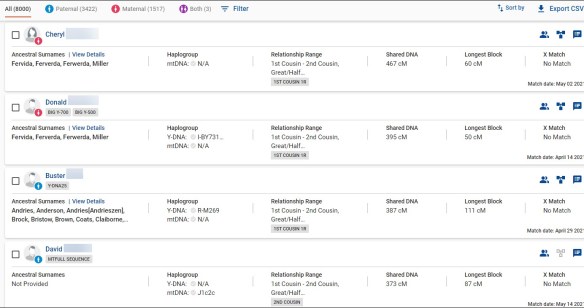
You can see at the top of my match list that I have a total of 8000 matches of which 3422 are paternal, 1517 are maternal and 3 match on both sides. Full siblings, their (and my) children and their descendants will always match on both sides. People with endogamy across both parents may have several matches on both sides.

If your relevant parent has tested, always work from their test.

Because we are searching for the maternal grandfather, in this case, we can ignore all tests that are bucketed as paternal matches.

Given that we are searching for my maternal grandfather, I probably have not been able to link as many maternal matches, other than possibly ones from my maternal grandmother. This means that the maternal grandfather’s matches are not bucketed because there are no identified matches to link on that side of my tree.

If you sort by maternal and paternal tabs, you’ll miss people who aren’t bucketed, meaning they have no maternal or paternal icon, so I recommend simply scanning down the list and processing maternal matches and non-bucketed matches.

By being able to confidently ignore paternally bucketed matches and only processing maternal and non-assigned matches, this is equivalent to processing the first 48 total matches. If I were to only look at the first 15 matches, 12 were paternal and only 3 are maternal.

Using bucketing at FamilyTreeDNA is very efficient and saves a lot of work.

Omitting paternal matches also means we are including smaller matches which could potentially be from common ancestors further back in the tree. Or, they could be younger testers. Or simply smaller by the randomness of recombination.

FamilyTreeDNA is a goldmine, with 16 of 20 maternal matches being from the unknown maternal grandfather.

Next, let’s see what’s waiting at MyHeritage.

MyHeritage

MyHeritage is particularly useful if your lineage happens to be from Europe. Of course, if you’re searching for an unknown person, you probably have no idea where they or their ancestors are from. Two of my best matches first appeared at MyHeritage.

Of course, your matches with people who descend from your unknown maternal grandfather won’t have any Theories of Family Relativity, as that tool is based on BOTH a DNA match plus a tree or document match. However, Theories is wonderful to group your matches to your other three grandparents.

MyHeritage provides a great deal of information for each match, including common surnames with your tree. If you recognize the surnames (and shared matches) as paternal or maternal, then you can assign the match. However, the matches you’re most interested in are the highest matches without any surnames in common with you – which likely point to the missing maternal grandfather.

However, those people may, and probably do, have surnames in common with each other.

Of the matches who aren’t attributed to the other three grandparents, the name Ferverda arises again and again. So does Miller, which suggests the grandparent or great-grandparent couple may well be Ferverda/Miller.

Let’s continue working through the process with our spreadsheet and see what we can discover about those surnames.

Our 60 Results

Of the 60 total results, 15 from each vendor, a total of 24 cannot be assigned to other columns through bucketing or shared matches, so are associated with the maternal grandfather. Of course, Michael who descends from both of my maternal grandparents won’t be helpful initially.

Cheryl, Donald and Michael are duplicates at different vendors, but the rest are not.

Of the relevant matches, the majority, 12 are from FamilyTreeDNA, four each are from Ancestry and MyHeritage, and three are from 23andMe.

Of the names provided in the surname fields of matches, in matches’ trees in the first few generations, and the testers’ surnames, Ferverda is repeated 12 times, for 50% of the time. Miller is repeated 9 times, so it’s likely that either of those are the missing grandfather’s surname. Of course, if we had Y-DNA, we’d know the answer to that immediately.

Comparing trees of my matches, we find John Ferverda as the common ancestor between two different matches. John is the son of Hiram Ferverda and Eva Miller who are found in several trees.

That’s a great hint. But is this the breakthrough I need?

What’s Next?

The next step is to look for connections between the maternal grandmother, Edith Lore, who is known in our example, and a Ferverda male. He is probably one of the sons of Hiram Ferverda and Eva Miller. Do they lived in the same area? In close proximity? Do they attend the same church or school? Are they neighbors or live close to the family or some of their relatives? Does she have connections with Ferverda family members? We are narrowing in.

Some of Hiram and Eva’s sons might be able to be eliminated based on age or other factors, or at least be less likely candidates. Any of their children who had moved out of state when the child was conceived would be less likely candidates. Age would be a factor, as would opportunity.

Target testing of the Ferverda sons’ children, or the descendants of their children would (probably) be able to pinpoint which of their sons is more closely related to me (or my mother) than the rest.

In our case, indeed, John Ferverda is the son we are searching for and his descendant, Michael is the highest match on the list. Cheryl and Donald descend from John’s brother, which eliminates him as a candidate. Another tester descends from a third Ferverda son, which eliminates that son as well.

Michael, my actual first cousin with a 755 cM match at one vendor, and 822 cM at a second vendor, is shown by the MyHeritage cM Explainer with an 88% probability that he is my first cousin.

However, when I’m trying to identify the maternal grandfather, which is half of that couple, I need to focus one generation further back in time to eliminate other candidates.

The second and third closest matches are both Donald at 395 cM and Cheryl at 467 cM who also share the same Ferverda/Miller lineage and are the children of my maternal grandfather’s brother.

On the spreadsheet, I need to look at the trees of people who have both Ferverda and Miller, which brought me to both Cheryl and Donald, then Michael, which allowed me to identify John Ferverda, unquestionably, as my grandfather based on the cM match amounts.

Cheryl and Donald, who are confirmed full siblings, and my mother either have to be first cousins, or half siblings. Their match with mother is NOT in the half-sibling range for one sibling, and on the lower edge with the other. Mother also matches Michael as a nephew, not more distantly as she would if he were a first cousin once removed (1C1R) instead of a nephew.

Evaluating these matches combined confirms that my maternal grandfather is indeed John Ferverda.

What About X DNA?

The X chromosome has a unique inheritance path which is sometimes helpful in this circumstance, especially to males.

Women inherit an X chromosome from both parents, but males inherit an X chromosome from ONLY their mother. A male inherits a Y chromosome from his father which is what makes him male. Women inherit two X chromosomes, one from each parent, and no Y, which is what makes them female.

Therefore, if you are a male and are struggling with which side of your tree matches are associated with, the X chromosome may be of help.

Your mother passed her X chromosome to you, which could be:

  • Her entire maternal X, meaning your maternal grandmother’s X chromosome
  • Her entire paternal X, meaning your maternal grandfather’s X chromosome (which descends from his mother)
  • Some combination of your maternal grandmother and maternal grandfather’s chromosomes

One thing we know positively is that a male’s X matches are ALWAYS from their maternal side only, so that should help when dividing a male’s matches maternally or paternally. Note – be aware of potential pedigree collapse, endogamy and identical-by-chance matches if it looks like a male has a X match on his father’s side.

Unfortunately, the X chromosome cannot assist females in the same way, because females inherit an X from both parents. Therefore, they can match people in the same was as a male, but also in additional ways.

  • Females will match their paternal grandmother on her entire X chromosome, and will match one or both of their maternal grandparents on the X chromosome.
  • Females will NEVER match their paternal grandfather’s X chromosome because their father did not inherit an X chromosome from his father.
  • Males will match one or both of their maternal grandparents on their X chromosome.
  • Males will NEVER match their paternal grandparents, because males do not receive an X chromosome from their father.

The usefulness of X DNA matching depends on the inheritance path of both the tester AND their match.

When Can Y-DNA or Mitochondrial DNA Help with Grandparent Identification?

If you recall, I selected the maternal grandfather as the person to seek because no tester carries either the Y-DNA or mitochondrial DNA of their maternal grandfather. In other words, this was the most difficult identification, meaning that any of the other three grandparents would be, or at least could be, easier with the benefit of Y-DNA and/or mitochondrial DNA testing.

In addition to matching, both Y-DNA and mitochondrial DNA will provide testers with location origins, both continental and often much more specific locations based on where other testers and matches are from.

Y-DNA often provides a surname.

Let’s see how these tests, matches and results can assist us.

  • Paternal grandfather – If I was a male descended from John Ferverda paternally, I could have tested both my autosomal DNA PLUS my Y-DNA, which would have immediately revealed the Ferverda surname via Y-DNA. Two Ferverda men are shown in the Ferverda surname DNA project, above.

That revelation would have confirmed the Ferverda surname when combined with the high frequency of Ferverda found among autosomal matches on the spreadsheet.

  • Maternal grandmother – If we were searching for a maternal grandmother, both the male and female sibling testers (as shown in the pedigree chart) would have her mitochondrial DNA which could provide matches to relevant descendants. Mitochondrial DNA at both FamilyTreeDNA and 23andMe could also eliminate anyone who does not match on a common haplogroup, when comparing 23andMe results to 23andMe results, and FamilyTreeDNA to FamilyTreeDNA results at the same level.

At 23andMe, only base level haplogroups are provided, but they are enough to rule out a direct matrilineal line ancestor.

At FamilyTreeDNA, the earlier HVR1 and HVR2 tests provide base level haplogroups, while full sequence testing provides granular, specific haplogroups. Full sequence is the recommended testing level.

  • Paternal grandmother – If we were searching for a paternal grandmother, testers would, of course, need either their father to test his mitochondrial DNA, or for one of his siblings to test which could be used in the same way as described for maternal grandmother matching.

Summary

Successfully identifying a grandparent is dependent on many factors. Before you make that identification, it’s very difficult to know which are more or less important.

For example, if the grandparent is from a part of the world with few testers, you will have far fewer matches, potentially, than other lines from more highly tested regions. In my case, two of my four grandparents’ families, including Ferverda, immigrated in the 1850s, so they had fewer matches than families that have been producing large families in the US for generations.

Endogamy may be a factor.

Family size in past and current generations may be a factor.

Simple luck may be a factor.

Therefore, it’s always wise to test your DNA, and that of your parents and close relatives if possible, and upload to all of the autosomal databases. Then construct an analysis plan based on:

  • How you descend from the grandparent in question, meaning do you carry their X DNA, Y-DNA or mitochondrial DNA.
  • Who else is available to test their autosomal DNA to assist with shared matches and the process of elimination.
  • Who else is available to test for Y-DNA and/or mitochondrial DNA of the ancestor in question.

If you don’t find the answer initially, schedule a revisit of your matches periodically and update your spreadsheet. Sometimes DNA and genealogy is a waiting same.

Just remember, luck always favors the prepared!

Resources

You may find the following resource articles beneficial in addition to the links provided throughout this article.

_____________________________________________________________

Follow DNAexplain on Facebook, here or follow me on Twitter, here.

Share the Love!

You’re always welcome to forward articles or links to friends and share on social media.

If you haven’t already subscribed (it’s free,) you can receive an email whenever I publish by clicking the “follow” button on the main blog page, here.

You Can Help Keep This Blog Free

I receive a small contribution when you click on some of the links to vendors in my articles. This does NOT increase the price you pay but helps me to keep the lights on and this informational blog free for everyone. Please click on the links in the articles or to the vendors below if you are purchasing products or DNA testing.

Thank you so much.

DNA Purchases and Free Uploads

Genealogy Products and Services

My Book

Genealogy Books

Genealogy Research

Connect Your DNA Test, and Others, to Your Tree

To optimize your DNA tests, each tester needs to take advantage of the features offered by each vendor.

In order to do that, we need to perform the following tasks.

  1. Upload or create a tree (except at 23andMe who does not support trees)
  2. Connect our own test to our own profile card on our tree
  3. Connect other tests we manage to their (or our) tree, depending on the vendor
  4. Connect matches who are known relatives to their profiles on our tree

Each vendor handles these situations differently, so we’ll look at each one of the vendors with step-by-step instructions for handling those situations. We all want to get the most out of the tests we’ve taken!

Plant a Tree

If you have not created or uploaded a tree at each one of the vendors (except 23andMe who does not support genealogy trees), please do so. However, 23andMe does provide for links to your tree elsewhere, so we will review that function.

I manage my “master tree” on my own computer, but I also maintain trees at both Ancestry and MyHeritage where I attach documents and research found at that vendor. I also update my ancestors at WikiTree to be sure other researchers benefit from new discoveries.

I have not uploaded my full tree from my computer anyplace because I have many private notes that are not appropriate for disclosure, not to mention speculative and unproven relationships. I created a pared-down tree at one time to upload to both Ancestry and MyHeritage, and build those trees out from there.

I’m often asked about replacing your tree at the various vendors with an updated tree. If you do that, be aware that you will lose your DNA connections and document links. I do NOT recommend that. I simply maintain multiple trees. I wrote about this in the article, “Genealogy Tree Replacement – Should I or Shouldn’t I?” If you are considering that option, PLEASE read that article first.

RootsMagic, Family Tree Maker, and Legacy Family Tree Software all provide a syncing option with various vendors and FamilySearch, although not every vendor allows access to each of those software companies. I probably should experiment with the syncing option, but given a family member’s terrible experience some years back, I’ve been unwilling to do that. My biggest fear is that I will corrupt the file and not notice it until it’s far too late to revert to a backup.

When you upload or create a tree, make sure deceased and living people are marked as such, and you’ve opted to share your tree. If you don’t, you accidentally have a private tree. Worse yet, you might not realize it. I wrote about that in Quick Tip: Trees, Death Dates and Unintentionally Private Ancestors.

Now, let’s take a look at each vendor.

23andMe

23andMe does not support traditional genealogy trees, but they do provide a location for you to link your tree at another vendor or source.

Under your name at the right side, you’ll see “View Your Profile” under the dropdown.

I’ve not been able to find a generic Ancestry tree link that will allow non-Ancestry subscribers to view my tree, but it’s easy to do at MyHeritage. Simply open your tree at  MyHeritage and just copy the link at the top. Don’t worry, people won’t see anyone living.

If you want to use “one world” types of trees, you can also link to other trees such as FamilySearch or WikiTree, but just remember that you don’t control that content.

You don’t need to connect yourself to your tree at 23andMe, because there is no genealogy tree. However, 23andMe constructs a “genetic tree” for you using your closest matches, based on how you match other people, and how they match each other.

You can view your tree under “Family and Friends,” then “Family Tree.”

I added my ancestors’ names so it’s easy to keep straight. You can do that by simply clicking on the colored circle representing the ancestor, starting with your parents.

If you know that one of your matching relatives is not in exactly the correct tree location, you can click on their circle, and then click on Edit to make modifications.

You may want to add a relative that you can identify but who isn’t connected on the tree that 23andMe constructed.

Looking on the far-right side of the tree, in the lower corner, you’ll see “Add a Relative.” Click there and follow the instructions.

Ancestry

At Ancestry, you need to link your test to “you” in a tree. Your test can only be linked to one person in one tree at a time. You can change this, but you will lose any ThruLines you currently have. They will be regenerated based on the new tree you connect your test to, but based on the tree and other factors, they may not be the same. My recommendation is if you’re going to disconnect yourself and reconnect yourself elsewhere, record everything first.

Alternatively, you can take a second DNA test and simply link that second test to another tree. IMHO, that’s a better alternative. You can leave one in place as your research tree and use the second test to experiment with.

To link your test to your tree, select the “DNA” tab. At far right, you’ll see “Settings.”

You need to tell Ancestry who you are in your tree. Click on “Settings,” then scroll to “Tree Link.”

You can also link other tests you directly manage to their placards in your tree as well.

These links allow Ancestry to form ThruLines using both DNA matches and common ancestors in trees for 7 generations.

On your DNA Match page, Ancestry will ask you if you recognize a match.
If you click on “Yes,” you’ll be asked which side the match is on.

Then you’ll be given a long list of possible relationships in most-likely to least-likely order. Literally, Erik is the last option offered.

Select and confirm.

I’m not positive exactly HOW this helps Ancestry help you, but I suspect it confirms and helps Ancestry perfect ThruLines, relationship predictions, and perhaps even “sides” of ethnicity.

I wrote about Optimizing Your Tree at Ancestry for More Hints and DNA ThruLines.

FamilyTreeDNA

At FamilyTreeDNA, every DNA test kit has its own kit number and associated tree, so you don’t need to tell FamilyTreeDNA who you are if you create a tree from scratch on their site.

FamilyTreeDNA offers a unique family matching feature that sorts your matches into maternal and paternal sides.

In order to take advantage of this, you will need a tree. You can upload a GEDCOM file, although the upload at FamilyTreeDNA does not seem to do well with very large files.

If you don’t have a GEDCOM file on your computer, you can download a tree from either Ancestry or MyHeritage and upload to FamilyTreeDNA.

I wrote about this in the article Download Your Ancestry Tree and Upload it Elsewhere for Added Benefit.

If you upload a tree, you’ll be asked to select the person in the tree that is “you,” meaning the person who tested their DNA.

You’ll want to link known matches to your tree to enable Family Matching, aka bucketing, so that FamilyTreeDNA can divide and assign your matches maternally and paternally.

If you are building your tree at FamilyTreeDNA from scratch, simply click to begin and complete the information on the placards to add your information, then your parents, building out from there. You’ll want to add the ancestral lines to connect with your closest matches on your match list.

Family matching, or bucketing, is enabled by linking known matches to their proper place on your tree. FamilyTreeDNA then evaluates each match, determining if they match a common segment with you and someone you’ve linked. If that match does share a segment with both of you, meaning they triangulate, then that person is assigned either maternally, paternally, or both. I wrote about Triangulation in Action at FamilyTreeDNA, here.

The best people to link are your parents and grandparents, of course, but that’s not always an option. You’ll want to link as many matches as you can.

To link people, either click on the Family Tree tab at the top of the page, or on the “Link on Family Tree” under Relationship Range for individual matches.

Simply click on “Link Matches,” then drag and drop your match to their placard.

Here’s an example of linking parents.

Once someone is linked, the green dot will appear signifying that they are linked, and which type of test. Green is a Family Finder autosomal test, blue means they’ve taken a Y DNA test, and pink is a mitochondrial DNA test.

If your parents aren’t available to test, link every upstream relative that you can identify. By this, I mean that your children and full siblings will match you on both sides, so aren’t helpful for parental-side assignment.

People who have DNA tests from both parents can expect around 80% of their matches to be assigned maternally, paternally, or both.

If you have relatives who have tested at other vendors, you can ask them to upload to FamilyTreeDNA for free matching.

MyHeritage

At MyHeritage, you will connect yourself and any relatives whose tests you manage to your tree.

Under “DNA,” select “Manage DNA kits.”

At the right, you’ll click on the three dots, also known as a hamburger menu (who knew.)

Select Assign (if this is a new test or a transfer) or Re-assign a kit.

Be sure to do this for every kit you manage. I made that mistake and wrote about how I discovered and fixed the problem, here. Kit assignment enables Theories of Family Relativity and other super-helpful features.

I wrote about several things you can do to optimize your chances of receiving Theories of Family Relativity, here.

You can upload DNA kits to MyHeritage from tests taken at other vendors, here.

Fish in All the Ponds

I have provided step-by-step download/upload instructors for all vendors, here. It’s important to fish in all available ponds by making sure you have DNA tests at all four vendors. Then, upload or create trees and complete this bit of housekeeping to increase your chances of catching fish!

_____________________________________________________________

Follow DNAexplain on Facebook, here or follow me on Twitter, here.

Share the Love!

You’re always welcome to forward articles or links to friends and share on social media.

If you haven’t already subscribed (it’s free,) you can receive an email whenever I publish by clicking the “follow” button on the main blog page, here.

You Can Help Keep This Blog Free

I receive a small contribution when you click on some of the links to vendors in my articles. This does NOT increase the price you pay but helps me to keep the lights on and this informational blog free for everyone. Please click on the links in the articles or to the vendors below if you are purchasing products or DNA testing.

Thank you so much.

DNA Purchases and Free Uploads

Genealogy Products and Services

My Book

Genealogy Books

Genealogy Research