The Dangerous, Dark Side of AI, and How to Protect Yourself

This is the fifth article in the AI series.

  1. The first article, Your Wonderful AI Assistant – Sometimes Wrong, Never Unsure, Always Convincing, explains why I’m writing this series and what to expect.
  2. The second article, All About AI – What It Is, What It Isn’t, and Why It Matters, explains what AI is, where it “came from,” the different kinds of AI, how it’s “trained,” plus examples of how it does and doesn’t work well.
  3. The third article, AI Assistants – The Good, the Bad, the Ugly and the Unseen, explains how AI tools work (and fail), the different types of AI tools, and when you may encounter them, even when you don’t realize it. This article closes with examples of successfully using AI, along with AI educational resources.
  4. The fourth article, AI and Genealogy – Brick Walls, Breakthroughs and Blunders, explains how AI is being used in genealogy by vendors and by individuals personally. It includes controversial topics like photo and image generation and discusses expert GPT tools and how I’m using them successfully.

I suggest that you read these articles in publication order, as they build on each other.

This article is perhaps the most important of the series, is deadly serious, and merits a disclaimer.

Disclaimer: I am not a lawyer. This article and others in this series are provided for general educational and informational purposes only. Information contained in these articles does not constitute legal, financial, or cybersecurity advice. It is not intended to identify or discuss every current or future risk, scam, threat, law, protection, or recommended response. One size does not fit all, and the best response for your circumstances may differ from what is best for someone else or from what is recommended here. Technology, criminal tactics, laws, and best practices change rapidly, and some of this information will inevitably become outdated after publication. Readers should independently verify current information and consult an appropriately qualified professional when necessary.

The Dark Side

By now, you know how AI works, that it can be used for good or evil, and that Generative AI creates things.

The dangerous part is that, because AI is so convincing in ways we’ve never seen before, it’s now easier than ever for you to become a victim in a heartbeat. This can happen easily, and you’ll have no idea until it’s too late. Media, meaning videos, images, and audio, can be generated about you without your knowledge, using your voice or likeness. And yes, it’s utterly terrifying.

You may be saying to yourself, “I’ll never become a victim,” but the scope of what it means to be a victim has changed over time.

Some generative AI is created to scam you, but other AI is created to harm or manipulate you or others close to you.

Perhaps someone wants to manipulate you into doing something dangerous, buying something under false pretenses, paying a ransom, believing that something happened when it did not, or voting in a specific way. I’m not going to touch politics here – but suffice it to say that I’ve adopted a “believe nothing” position unless I can confirm whatever it is through multiple reputable sources from the time the event supposedly occurred.

The Warning Signs Have Shifted

We all thought we knew the hallmarks of scams – but all of that has changed, and our misplaced confidence is actually dangerous. Now, those fake emails no longer contain spelling errors and weird, awkward language. Instead, they look authentic, sound completely professional and may take you to fake websites that look identical to the real one, prompting you to enter your username and password. You see where this is going, right?

The bad guys know you’re still looking for those old signs and signals, so they have dramatically upped their game, allowing them to easily gain your confidence and falsely “earn” your trust.

Today’s scams are, for the most part, built on garnering your trust, then employing sophisticated trickery – and they are extremely convincing. I absolutely hate that we now have to be hypervigilant, bordering on paranoid, all the time, but we do.

In order to provide contract services to FamilyTreeDNA, I’m required to undergo periodic security and threat landscape training. Like any other mandatory training, I dread it, but it’s absolutely critical to stay on top of this because what AI can do and how it can do it are changing very rapidly. I’m grateful for the professional training from KnowBe4, a leader in the security industry, and I’m sharing what I’ve learned with you.

I am NOT mincing words here. You WILL encounter these situations, and if you’re not constantly aware and on your game, eventually, you WILL fall for one of them. Yes, there are upcoming CAPS and red letters. Yes, I’m yelling!

I’ve distilled my most recent training along with other cautions into Roberta’s Ten Rules of AI and Social Media Safety. AI and your online presence are inextricably interwoven.

Roberta’s Ten Rules of AI and Social Media Safety

Rule 1: STOP! DO NOT CLICK!

Always engage your brain before your fingers.

I don’t mean it’s OK to click from time to time because you think the email is from someone you know or a business entity you do business with.

I mean do not click ever, with very few exceptions. One example is 2FA.

2FA (two-factor authentication) and some other systems will send you a link in your email immediately after you make the request. You will receive the email or text immediately, and you will be expecting it. That’s the key here. You asked for and are expecting this interaction now. Anything else, don’t click. Not tomorrow or the next day if you didn’t request something again. Regardless of how authentic it looks.

If you receive any other type of email indicating that there is something you need to do, go to the normal website DIRECTLY by typing it in and sign in to take care of that task.

The bad guys know that you’re periodically going to receive emails from, say, your insurance company, Social Security, or your bank, and they know exactly what they look like – so they create a copy of the authentic email and insert malicious links THAT LOOK COMPLETELY LEGITIMATE. Those fake links take you to exact imitations of the website you’re used to working with.

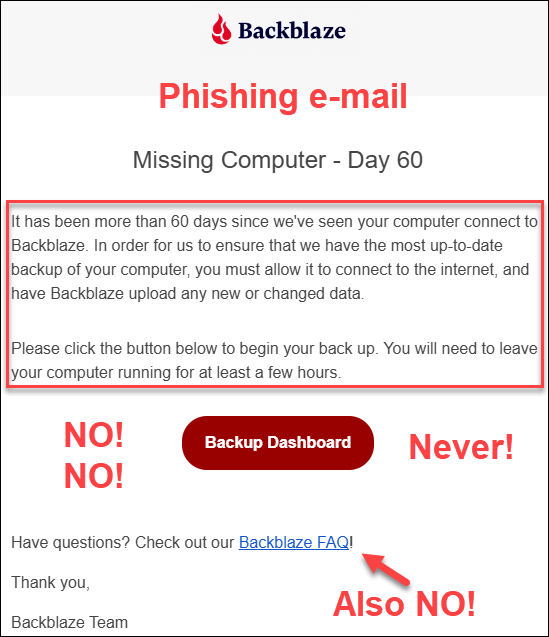
Here’s an example that I received today.

I received this e-mail, supposedly from Backblaze, the company that I use for my offsite system backups. What do you think would happen if I clicked on the “Backup Dashboard” link or the FAQ link?

You know exactly what this “Dashboard” link would look like – the real one. The malicious dashboard is going to prompt me to sign in, which gives the crooks my user ID and password. The keys to the kingdom. What they could access or do next depends on how the attack is constructed and any other safeguards in place, but the consequences could be devastating – including backing up my entire computer system to their fake site. Literally everything.

Even the thought makes me queasy. Consider for a minute what’s on your computer. Our digital lives live there. For example, if you have a little file called “Passwords,” get rid of it.

If you’re thinking to yourself that I could easily catch this by looking at the email header, here’s what it says.

Click to enlarge any image.

Given that I’ve never received this kind of email before, how would I know what sending email address to expect? I wouldn’t, and the bad guys are counting on that.

What did I do? First, stop and breathe – but that wasn’t my first instinct – even with all this training.

It’s frightening to think my system hadn’t been backed up in two months, but on reflection, that doesn’t make any sense because I normally receive reports. So, by slowing down, and literally stopping to think, I recognized the warning signs of a malicious phishing attempt and DID NOT CLICK ON ANYTHING.

I stopped my reflexes and let my brain engage.

Respond after considerationDO NOT REACT!

Instead, I signed in to Backblaze independently, from my normal sign-in link on their website, and checked. Sure enough, I confirmed that it was a phishing attempt – and a pretty good one too. My backups are just fine, and my system had been backed up regularly.

Had I fallen for this, nothing might have happened right away, because what happens after you click on a malicious link or visit a malicious site has changed. The harm may occur silently now, not immediately, and potentially indirectly. Think about that password list. (By the way, I don’t have a file like that, but many people do.)

If you click on something and “nothing bad happened,” don’t be so quick to be relieved. Now the bad guys can install monitoring software on your computer without your knowledge. Then, when you email back and forth with, say, your real estate agent about buying that lot down the street, the bad guys spot an opportunity and send you an email from the “title company” with instructions for where to wire the money.

Or, the bad guys text you. Wait, you’re thinking, “They don’t have my phone number.” Yes, they do, and they know your name.

Whether you know it or not, your email address and phone number are already circulating publicly and are easily accessible. There’s even more information available on the dark web, including passwords from data breaches and the names of family members.

Crooks already know far more about you than you realize, and that’s exactly why phishing emails and messages are so convincing.

Rule 1: Do not click, because that’s how criminals gain entry.

Rule 2: NEVER, EVER SAVE PASSWORDS IN YOUR BROWSER FOR ANYTHING FINANCIAL.

Once criminals gain entry, they exploit their good fortune – and your misfortune.

If you have already clicked on a malicious link as described under Rule 1 and entered a password, change that password immediately.

Never store financial or other important passwords in your browser. Use a legitimate password manager instead. Forbes and Cybernews published 2026 password manager lists, or you can use Google to find current information.

While we’re on the subject of passwords, don’t reuse them. Let’s say you stored a password for a subscription site like Ancestry in your browser, but you used the same password for your bank account. You know what’s coming, right?

If one site is compromised, the bad guys will try using that sign-in information on financial and other sites. This hacking technique is called credential stuffing and is what 23andMe claimed caused its 2023 breach.

AI is getting so good at being bad that it takes less and less effort to compromise your system, retrieve and exploit this type of information, especially if you don’t have the time, resources, or desire to keep up with new and evolving threats.

Rule 2: Don’t reuse passwords, remove any password files from your computer, and never save passwords for financial sites in your browser.

Rule 3: DON’T BELIEVE YOUR EARS.

Do not assume a familiar, well-known voice belongs to the person it appears to belong to, even if sounds like a close family member.

I can’t believe I have to write this, because it sounds insane.

Generative AI may only need as little as two seconds of your voice to create a convincing voice clone that sounds exactly like you. That is not a typo, although a few more seconds, like 10 or 15, produce even better results. AI can then clone your voice and create a conversation. It takes very little tech savvy, and instructions are all over the internet.

These are known as deepfakes – which can also include videos.

Let me give you an example of how this works. You’re asleep at 3 AM. Your adult daughter calls and says she’s being held hostage and you need to come right now. Or a similar scenario. Someone is in jail, has been in a wreck, or is facing some other emergency.

You’ve been awakened from a dead sleep, and you’re groggy, confused, and terrified. The adrenaline is surging through your body, but your brain isn’t fully engaged.

It’s EXACTLY your daughter’s voice. Exactly. You have no reason to doubt it. There’s no mistaking it – that’s her on the phone, and she’s in grave danger. Your heart is pounding, you’re immediately frantic and desperate, and of course, you would do anything in the world to save her. Your body has been jerked from zero to about Mach 5 in less than two seconds

The LAST THING you’re going to do is stop and question whether it’s really her. Of course it is. You’ve known her for the past 30 years – since the day she was born. “Don’t you think I’d know my own child’s voice?”

The answer is no, you wouldn’t. And you’re the target.

STOP and assess. That’s exactly what you should do in the moment, even though your instincts are to rush and do something. It feels like betrayal to let one minute pass without moving forward, but it’s not betrayal, and that’s exactly what you need to do.

Stop, take a deep breath, and THINK!

Agree on a protocol in advance with anyone who might ever call you in this type of situation. Select either a keyword, short phrase (blueberry pie) or a couple of questions that only you and they would know the answer to and that you can easily remember. Nothing you’ve ever put on social media or used as a password or recovery information.

Select something that only they would know, and that would be impossible to guess. Safe words or phrases. Words or questions that only you and they know the answer to, but not so complex that you can’t think of the answers under pressure. Write it down and put it in your nightstand, or save it in a disguised note on your phone, if need be.

What was your first car? Maybe arrange for a specific wrong answer – like the car they wanted but didn’t have.

How old were you when you fell into the hornet’s nest? Maybe they didn’t fall into a hornet’s nest at all, which is why this question and your pre-arranged answer are good choices.

Don’t use questions that could already be compromised or guessed.

Some people use intentionally “wrong” answers as their key to indicate that the call is legitimate.

This is also sound advice for anyone who receives a call from their workplace IT department instructing them to alter something on their system or network – especially if you are not expecting the call. And yes, even if you “recognize” the caller’s voice.

Verify that the call is legitimate through a secondary method that you initiate.

Depending on the type of “emergency,” another way to determine whether a claimed family emergency is real is to enable some form of family-location tracking service on family members’ devices. There are family locator apps in the major app stores. Be sure to stay mainstream with your selection. Life360 is well-known and works on both iPhones and Android devices, although this is not an endorsement.

Rule 3: Don’t believe your ears. Slow down and stop to assess.

Rule 4: DON’T ANSWER CALLS FROM NUMBERS YOU DON’T RECOGNIZE – EVER!

Why is answering calls from unknown numbers dangerous?

I know someone who used to love to “mess with” solicitors. Guess how the bad guys obtain those 2-15 seconds of your voice? Plus, they can cut and paste your words easily now, making it sound like you agreed to something that you did not.

They call from various numbers. Don’t answer. If you answer, they know they have a live one, and then those calls only get more numerous. They never stop. I block and report every single one as spam. Every time. Every single one.

Do you have voicemail? Remove your voice greeting and use the default one provided by your carrier.

Yes, I sound paranoid, but I’ve been on the receiving end of one of those phone calls, and they are TERRIFYING.

This danger flows both ways.

If you’re a public speaker, your voice is already out there, so you need to communicate clearly with your family NOW so that if they ever receive a middle-of-the-night call “from you,” you’ve already established a safety protocol. If you don’t have one, establish one today.

Additionally, mute your phone and set your notifications to ring-through only for selected phone numbers. This helps control who can reach you. In other words, in the middle of the night, the only numbers that will wake you up are the ones you’ve preselected. That does NOT mean those numbers can’t be spoofed, but it provides you with a layer of protection.

I only have half a dozen ring-through numbers in my phone, and everyone else can wait until morning.

I did this AFTER receiving that terrifying middle-of-the-night phone call, but you can do it now.

Rule 4: Protect yourself by not answering calls from phone numbers you don’t recognize, remove your voice from recordings, and establish your safety routine with your family.

Rule 5: DON’T BELIEVE YOUR EYES EITHER.

Your eyes may betray you.

Be extremely vigilant and highly selective about what you watch and believe. Ask yourself, every time, “Is this image or video real?”

Humans are wired to believe what they hear and see “with their own eyes,” but that metric doesn’t work reliably in today’s world.

Remain on guard and decide each and every time you watch something whether it’s authentic and actually represents what it claims to represent.

If you engage on social media, many of the Reels and TikToks you’ll see now are AI-generated. I can spot them a mile away, but they improve daily, and soon, today’s telltale signs will be gone like last year’s extra fingers, misspelled words, and two left arms.

For example, recently, someone published a pair of side-by-side photos contrasting the same location, supposedly taken several years apart. A then-and-now comparison to make a point. Except that the clouds in the background are distinctive and in exactly the same position in both photos. Yeah, no. One was clearly careless AI. It would have been easy to change the clouds too.

And that was just a bad AI photo, the videos are much more convincing. MUCH.

Google Lens, which allows you to submit photos, is your friend. If Google finds the same or a similar photo attributed to a different time or place, or posted in multiple groups with different claims, you’ve probably uncovered something less than honest.

Rule 5: View everything with suspicion and don’t accept anything you see as authentic without independent verification.

Rule 6: GUARD YOUR HEARTSTRINGS BECAUSE YOUR HEARTSTRINGS ARE CONNECTED TO YOUR PURSESTRINGS.       

Emotional manipulation is a cash cow for the bad guys.

If the story starts out with a kitten or puppy being thrown out on a road and saved, a child being adopted from foster care, a soldier returning home to their dog, or a similar high-drama emotional story – and you’re literally hooked in the first sentence or two – chances are it’s AI.

One clue is that these stories often pique your curiosity and are designed to be highly emotional.

How disappointing is that? We all love happy endings.

Some scams are even more heinous and take advantage of accidents, especially severe ones. The bad guys know that locals monitor local pages and will immediately wonder who is hurt and what happened – especially if their family members aren’t all at home.

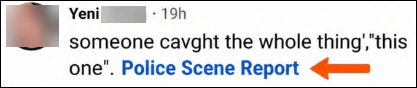
AI bots that masquerade as people on social media and entire pages with very interesting names that are entirely AI-driven are very common on Facebook and other social media platforms now. Just this morning, beneath a photo of a local accident, four different bots used exactly the same language: “got this on video. Take a Peep,” with a link, of course. If you read, click, and engage in any way, including liking a post – you’re setting yourself up to be targeted one way or another. This kind of AI-generated content is replacing yesterday’s “copy and paste” scams, although we do still see those from time to time.

On videos or posts, you may be directed to follow a page “for more” or “click a link” (red flag) to find out the ending of the story. Don’t, no matter how much you want to know the ending.

When the purpose is not to steal your credentials or install malware, links may ask you to donate for Fido or Fluffy’s surgery, etc. The ask could be inferred or implied rather than direct and could say that Fido needs surgery by Friday and they still need another $200, or something similar.

This approach doesn’t ask you to contribute, but it makes you think you’d LIKE to contribute to help Fido. Think of this as essentially financial victim grooming using your own compassion and empathy against you.

Worse yet, the link could download malware to your computer, tablet, or phone.

If you have done anything like this, change any password you entered, run an up-to-date antivirus scan, and seek professional help if you suspect malware or tracking software was installed. Also enable 2FA so that a stolen password alone is not enough to access your account.

Yes, I know it’s a pain, but not nearly as big a pain as the alternative.

Aside from the obvious attempts at theft, why do people create these links? I mean, I just want to know what happened to Fluffy.
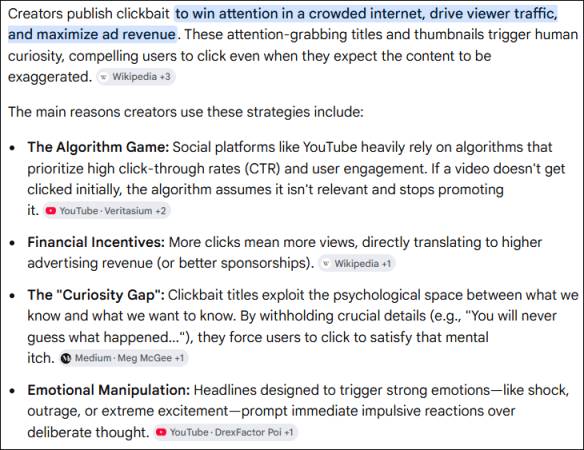
Here’s what Google’s AI-generated search summary has to say, along with links to the sources it provided.

The really sad part is that truly legitimate organizations suffer because of the level of distrust we must maintain today. If you’re feeling generous, before doing anything, including sharing the story for others to read, check alternate sources about the legitimacy of claims and fundraisers. You don’t want to share and play a part in victimizing your friends.

For example, a few years ago, the Happy Cat Sanctuary burned, killing the owner and many cats. Friends launched a legitimate online fundraising campaign to treat the 150-200 cats that survived the fire. This incident was covered by local news and wasn’t a one-off “sad story” social media plea that couldn’t be verified. I confirmed through local news outlets that the fire occurred when claimed and that the fundraising campaign was legitimate.

If you’ve relented and clicked to watch a reel of some sort, and an ad pops up before the end of the story, or you need to click or follow something, you’ve just taken the bait – so stop right there, spit it out, and realize what makes you vulnerable.

Let’s discuss YouTube, where ads have been part of the platform forever. However, there’s a LOT of AI-generated content on YouTube that is compelling but not authentic.

For example, there’s an AI singer, Michael Bennett, also Mikhail Bennett, with AI-written songs and an AI-generated voice. The combination is very compelling and moving, and it sounds lovely.

Whoever generated that content also took advantage of America’s Got Talent by showing “Michael” competing there with extremely emotional songs. None of that is true. It’s an incredible song that resonated with so many, including me, and the friend who shared it with me, but the video was “over the top,” which was the first red flag. I also noticed the tear never moved on his cheek, and the audience didn’t appear quite “normal.” He also looked “different” in other videos, as though he’s not the same person, but similar. Another AI signal. That’s 2026. By 2027, those telltale signals will probably be gone. Forbes wrote about the fake here.

Remember, if it outrages you, piques your curiosity, or tugs at your heartstrings, that content has probably been generated for exactly that purpose. Don’t click and become a victim.

Rule 6: Guard your heartstrings, and if something seems overly emotional, weird, too much, or just “off,” trust your gut, hold on to your wallet, and verify, verify, verify.

Rule 7 – FLASHING RED NEON SIGNS THAT SAY SLOW DOWN AND STOP. 

Manipulation signals should flash like red neon signs, telling us to put the brakes on.

  • Slow Down
  • Think
  • Stop

Any email, call, text, or other content that creates any of the following reactions should trigger those brakes:

  • A sense of urgency – “If you don’t reset your password by 5 PM, you’ll lose access to…” If you click, you are probably signing into a copycat site that looks exactly like the real one – except it’s stealing your credentials so the bad guys can sign into the real site to steal more than your credentials.
  • Anything frantic – There’s activity on your credit card. “We need you to enter your password here to dispute the charge.” Or, “click here to sign in to see the charge.” Or, “call this number.” This is different from a text I received in my bank’s normal message thread confirming that I had indeed written check number xxx for $xxx.
  • Pressure, direct or implied – “Your subscription has lapsed…click here to renew.” Go to the website and renew – never, ever click, no matter how legitimate the email looks. Full stop!
  • Anything unusual from someone you know. “I’m in a restaurant and in a pickle. I forgot my billfold. Can you please Venmo me $50 so I can pay my bill?” Call them using the phone number that you already have. Do NOT reply to the text or click to call that number.
  • Manipulative instructions – “We’ve received your order. The file is attached.” This is especially effective if you HAVEN’T ordered anything because it generates both curiosity and concern. Do not, under any circumstances, click on an attachment you’re not expecting. Slam on your mental brakes!

This KnowBe4 alert arrived today and demonstrates several flashing red neon signs at once.

This scam arrives as a Facebook Messenger message masquerading as Facebook, or Meta itself. The message even includes an accurate logo, but it is not legitimate. Red flags include the concern it generates, an unexpected PDF attachment, a threat of imminent account deletion, and the sender’s name is one letter off. In the message, “verified” is spelled “verrifed,” with two Rs, but if you’re focused on the words “permanently deleted,” you’ll never notice that. You may be panicked and not thinking clearly. That’s exactly what they are counting on.

Although there are often no misspelled words in scam emails today, in this case, the misspelled username is your first clue. Two of my friends received this through Messenger today, reported it, and an hour or so later, I received the notification from KnowBe4.

The bad guys trick you by making you feel that the action is:

  • Completely safe – because it came from someplace or someone you routinely communicate or do business with (but it really didn’t and the bad guys are trying to trick you).
  • Urgent – someone is trying to compromise your account, and you need to <fill in the blank> right away (except complying compromises your security).
  • Required to avoid negative consequences – if you don’t finish this training by Monday morning, you’ll no longer have access to your accounts (except it’s a fraud, trying to get you to sign in through a very convincing authentic-looking but malicious portal).

In any of these types of situations, don’t comply or reply, and never return calls to any number they give you. Find the number on the back of your credit card, for example, or sign into the site you’re already familiar with to take care of business.

Always ask yourself:

  • Is this normal?
  • Does it feel “off”?
  • Why?
  • What am I giving away? It’s not always money. Your information is gold, too.

Rule 7: Slow down, stop, and evaluate. A sense of urgency is a flashing red neon sign designed to stop you from thinking.

Rule 8 – STOP RANDOMLY ENGAGING AND LOCK DOWN SOCIAL MEDIA.

Algorithms control what you see.

Worse yet, once you click or even expand to read, the social media algorithms send you more of the same, which is the exact intention of the creators. The phenomenon is often referred to as a social media bubble or echo chamber because it reinforces what you believe based on what you’re seeing and continue to see.

It used to be that ugly political content was restricted to election cycles, but not anymore. It’s regular daily fodder and can easily be manipulated. The key, however, is that whatever you watch or read, you’ll see more of it in your social media feed.

Another effect of reading one of those scammy but very interesting and engaging stories is that Facebook now uses AI (how ironic, right) to show you more of the same. It’s a never-ending cycle.

One time I accidentally clicked to watch a reel, and it took days of clicking on the little “X” in the upper right-hand corner of the videos (or the posts) to signal to Facebook that I really didn’t want to see anything else like that. Hint – this works with ads too.

It’s fine to read that fun public story – but you don’t have to engage by clicking and liking. Clicking DOESN’T DO ANYTHING FOR YOU, but it does provide information about you to other people, including AI bots and the social media platform itself.

If you ever “like” or comment on a public post on social media, your reaction is visible to everyone, including AI bots, and you’ve given them information about yourself that they can use to target you more effectively. Just stop.

Don’t expose any more of your personal information than is already out there – and you might be surprised just how much there actually is.

Do you use your real name? Is your birth year, or much worse yet, your complete birth date displayed in your public profile? If so, remove it.

Do yourself a favor.

  • Google your name with your state.
  • Google your phone number.
  • Google your email address.

Your information doesn’t even need to be on the dark web for someone to find very revealing data about you.

You can discover even more about yourself, or anyone else, by checking out BeenVerified.

Record aggregators such as BeenVerified also provide the names of people who live or have lived with you and with whom you’re associated. In other words, your family members.

It’s so easy to unintentionally feed the data-gathering machine.

Ancestry includes voter-registration lists, where available, complete with full names, addresses, birth dates, and other personal information through 2023.

Protect yourself, where possible, and never publicly display your birth date or year on any platform. Do note that this information can be part of recovering your account, should it become compromised, so if you include that information, privatize it.

Are you on LinkedIn? That’s another avenue for information gathering, including your employer.

There’s not much you can do about information that’s already out there, but you can stop providing more through social media.

I wrote the article titled STOP, THINK, & RUN – Stop Innocently Giving Your Information to Cybercrooks on Social Media, which explains how to lock your accounts down, and why you should.

Rule 8: Lock your social media accounts down and zip your lip.

Rule 9: LEARN THE NEW THREAT LANDSCAPE

The threat landscape has not improved for us, that’s for sure. The crooks have gotten smarter and much more effective with their AI assistants.

Yesterday’s Nigerian princes, those handsome widower generals in uniform, and buxom young women randomly targeting people who comment on public posts on social media are somehow almost all gone, although not entirely. They’ve been replaced by something much more dangerous. AI makes everything easier – including crime.

Now, the criminal’s objective is to get you to take an action that isn’t in your best interest.

AI makes both impersonation and personalization much easier and more convincing, and attacks may now involve multiple methods in tandem.

The most convincing attacks use two channels. For example, they both email and call you, which makes the communication seem more legitimate, which in turn makes you feel more secure. They may claim that your credit card has been compromised or begin with, “This is your bank…”

Worse yet, you really can’t tell and may have no way of knowing whether the communication is legitimate, so you go ahead and click because you’re tired and “it’s probably fine,” except it’s not.

The bad actors may have already compromised your system or phone if you clicked on something you shouldn’t have, and they are just waiting to exploit it by capturing your login information – including your password.

They may have been monitoring your communications for some time now, not just waiting for any opportunity, but an exceptional, highly profitable opportunity.

Never use a “call back” button, telephone number, or link supplied in the message. Call the bank or whomever directly at a number you can confirm, or use another form of communication – like walking in the door.

I was at the bank in person recently, and they are now warning people about scams before they transfer money on your behalf. You are required to click to acknowledge that you read the scam warning signs they provided. The bank was also reminding people that debit cards are a “direct siphon into your bank account” and someone can easily drain it if your card or PIN is compromised.

If someone fraudulently charges something to your credit card, you can dispute it, but if they empty your bank or retirement account, the money may be difficult or more likely impossible to recover. Report any suspicious activity to your financial institution IMMEDIATELY, regardless of the hour, because the outcome may depend partly on how quickly you report it.

Rule 9: Learn the new threat landscape and keep current.

Rule 10: NEVER UPLOAD ANYTHING WITH PRIVATE INFORMATION, INCLUDING NAMES – YOURS OR OTHER PEOPLE’S.

This includes uploading your monthly budget worksheet to AI, your tax information, your DNA match list with other people’s names from a DNA testing site, etc.

Genetic genealogists, I’m looking at you here. If the data isn’t already in the public domain, DO NOT UPLOAD IT to AI agents.

Your browser will not protect you, and neither will a VPN. I’ve had people tell me that both of these will protect what you upload when using AI. They don’t. Neither prevents an AI service from receiving information that you intentionally upload to it.

Don’t fall for companies that encourage you to “upload your DNA file” for “better” information or to learn how you match ancient specimens. Check credible sources that are well-known and respected in this industry, such as my blog, Diahan Southard at Your DNA Guide, or the Genetic Genealogy Tips and Techniques Group on Facebook. If you discover that none of us, meaning me, Diahan, or the administrators of that Facebook group are recommending a company, pause to ask yourself why.

When considering an upload, ask yourself:

  • Who are those people, anyway?
  • Where are they located?
  • What are their credentials?
  • What are they doing with your autosomal DNA file?

If you’re thinking about uploading your DNA or matches to an AI tool or to a company you know nothing about merely because it “sounds good,” just don’t.

If you’re going to err, err on the side of extreme caution because once your DNA is “out there” and exposed, you can’t just take it back like it never happened.

Rule 10: Never upload your own private information to AI or any other service that you have not thoroughly vetted, and don’t upload your match information or anyone else’s private information without their specific permission.

In Summary

I chose to address AI’s dangers after first exploring its benefits in the earlier articles because I don’t want you to think I don’t like AI. I absolutely do. I use AI in some form every day.

However, AI can also be extremely dangerous, especially for the unwary. I cannot emphasize this enough.

AI will become more advanced and “better,” which means we, as consumers, have to be even more vigilant. While the idea behind “Who are you going to believe, me or your lying eyes?” was once a Marx Brothers punch line, and “Lyin’ Eyes” later became an Eagles song, today that warning pertains to AI and social media, both separately and together.

I want you to stay safe. AI is one of the tools that we, as genealogists, can use quite successfully under some circumstances. Just don’t get out over your skis.

To recap:

  • Don’t click
  • Don’t believe your ears, or eyes either
  • Never save important passwords in your browser
  • Guard your heartstrings
  • Remain vigilant
  • Slow down, stop and assess
  • Verify independently
  • Protect yourself
  • Put a family protocol in place
  • Stop randomly engaging and lock down social media
  • Guard what cannot be recovered
  • Don’t upload private information without thoroughly vetting the service
  • Never upload other people’s private information without their permission
  • Educate yourself and stay current

While the specifics of each platform change quickly, the underlying fundamentals of safety and increased vigilance will remain constant.

As mentioned in the third AI article, follow Mark Thompson and Steve Little, the Family History AI guys, for updates.

Stay safe and enjoy the ever-evolving world of AI.

But remember…

Always, always be suspicious. You may only get to be wrong once.

_____________________________________________________________

Share the Love!

You’re always welcome to forward articles or links to friends and share on social media.

Subscribe!

If you haven’t already subscribed, it’s free. You’ll receive an e-mail whenever I publish by clicking the “follow” button at the top of the main blog page, here.

Help Keep This Blog Free

I receive a small commission when you click a vendor link in my articles and purchase that item. This does NOT increase your price but helps me keep the lights on and this informational blog free for everyone. Please click on the affiliate links in the articles or to the vendors below if you are purchasing products or DNA testing.

Thank you so much.

DNA Purchases and Free Uploads

Genealogy Products and Services

My Books

Genealogy Books

Genealogy Research

ECGGC 2026: East Coast Genetic Genealogy Conference – Both In-Person and Virtual

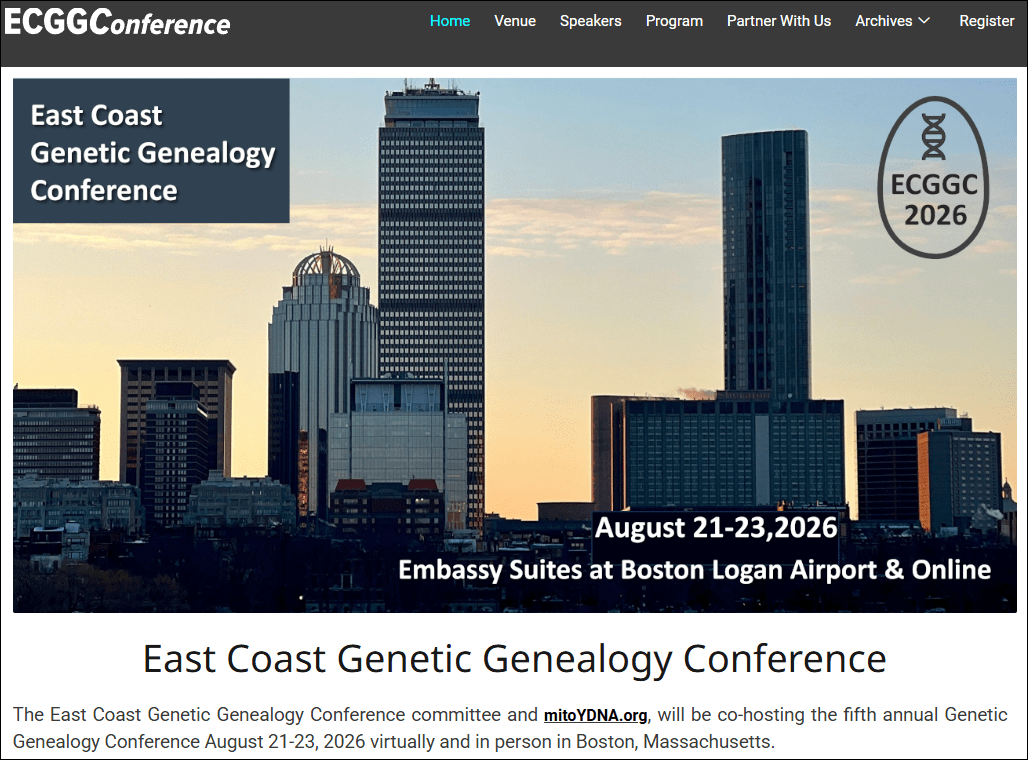
I hope you’ll join me and a whole trove of other wonderful speakers at the East Coast Genetic Genealogy Conference August 21-23 in Boston. The in-person conference is being held at the Embassy Suites at the Boston Logan Airport, so you don’t need to worry about transportation into Boston after arrival.

The great news is that you don’t have to be present to participate, and you don’t have to worry about missing sessions you wanted to attend.

All sessions, except for the Sunday morning ISOGG meeting, are either livestreamed, then available to watch later, or are available on-demand on their scheduled day.

I love this conference because it focuses strictly on genetic genealogy and how to apply it successfully to genealogy. Not to mention, it’s like a family reunion! I can hardly wait to see everyone!

Keynotes

  • Steve Little and Mark Thompson – Friday evening: The AI Frontier in Genetic Genealogy: Where We Are and Where We’re Going
  • Jennifer Zinck – Saturday morning: It Takes a Village
  • Kevin Borland – Sunday Morning: Mining A Chromosome 22 Pile-Up: Clustering Through a Documented Colonial Lineage

Speakers

In alphabetical order, speakers include:

  • Kelli BergheimerUnderstanding Your DNA Health Reports, and, Finding an Ohio Pioneer Family Using Mitochondrial DNA
  • Katherine BorgesDNA and DAR, and, Sunday morning: ISOGG Meeting
  • Kevin BorlandMining A Chromosome 22 Pile-Up: Clustering Through a Documented Colonial Lineage (keynote)
  • Greg Clarke – Welcome and Introduction
  • Janine CloudTurning a Brick Wall into a Community: Using Documents and DNA Together, and, with Roberta Estes: Between the Records and the Results: Tracing Ancestors in Mixed Lines
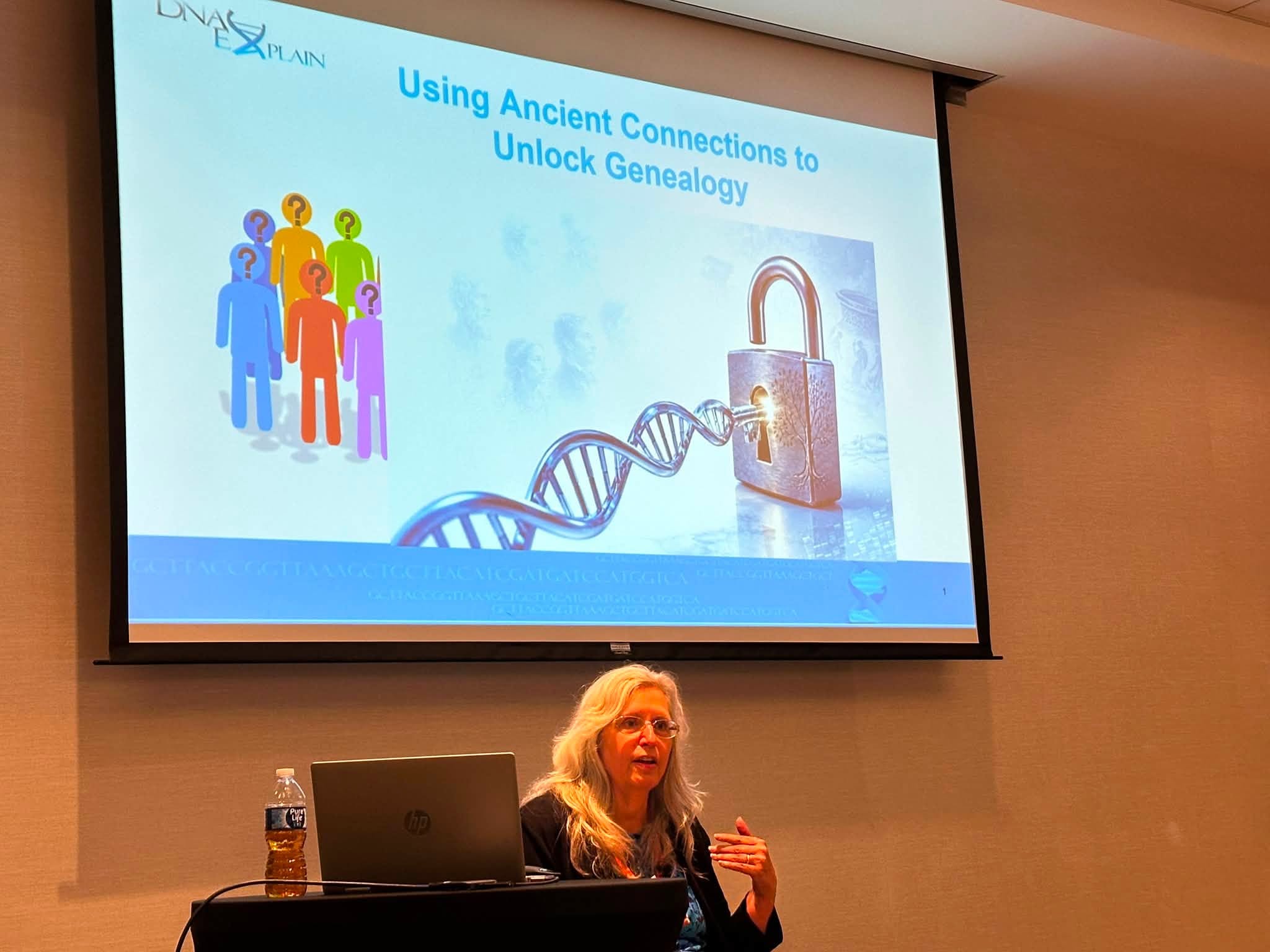
  • Roberta EstesMitochondrial DNA-Z: My Results are Back, Now What?, and, at DNA Academy: Using Ancient Connections to Unlock Genealogy, and, with Janine Cloud:  Between the Records and the Results: Tracing Ancestors in Mixed Lines
  • Mags GauldenThe DNA of a Revolution
  • Kate Penney HowardWhen the Story Isn’t True: DNA and the Family Legend Problem, and, Gerald Hawley and the Silence: What Erased Ancestors Teach Us About DNA Research
  • Daniel HorowitzMyHeritage DNA Basic Level, and, MyHeritageDNA Advanced Level
  • Peggy JudeYour DNA Toolkit: Expanding Your Research with Third-Party Tools, and, Step Up to the Plate: Winning Strategies for Connecting with Your DNA Matches
  • Dawn KosmakosUnraveling the Identity of Arthur Burton
  • Steve LittleSolving a Paternity Puzzle: AI-Assisted Match List Analysis in Endogamous Appalachia, and, keynote with Mark Thompson: The AI Frontier in Genetic Genealogy: Where We Are and Where We’re Going
  • Melanie McCombUsing DNA to Identify Ancestral Origins
  • Adina NewmanNavigating Your Jewish DNA Results, and, Introduction to DNA Painter: Strategies to Enhance Your Genealogical Research
  • Jonny PerlUnderstanding the What are the Odds Tool at DNA Painter
  • Rhonda RoedererThe Power of DNA – Making Life-Changing Connections
  • Diahan SouthardI Did Everything Right. So Where’s My Ancestor?, and, There’s Always a Next Step
  • Jerome SpearsOur Genetic Explorer’s Journey
  • Mark ThompsonApplied Artificial Intelligence for Genetic Genealogists, and, keynote with Steve Little: The AI Frontier in Genetic Genealogy: Where We Are and Where We’re Going
  • David Vance – At DNA Academy: NGS Testing for Autosomal DNA
  • Rob WarthenCommon Ancestors at DNAGedcom – Building Trees
  • Jennifer ZinckIt Takes a Village (keynote), and, Unleash the Power of DNA

You can view the schedule and session information here.

For people attending in Boston, additional activities are being held at the American Ancestors office and library on Thursday.

DNA Academy

Saturday evening, the ECGGC hosts DNA Academy. Each year, this fun, interactive, advanced learning session is hosted by Mags Gaulden and includes a panel Q&A session, and speakers.

From the ECGGC agenda:

Join Mags Gaulden, Dave Vance, Roberta Estes, Rob Warthen, Katherine Borges, and Jennifer Zinck for a Q & A panel with special guests to start, then sit back and enjoy a presentation on NGS testing for autosomal DNA, by Dave Vance, and “Using Ancient Connections to Unlock Genealogy”, by Roberta Estes.

Exhibit and Vendor Hall

There are both in-person and virtual vendor exhibit halls, so visit both if attending in person. Vendors who sponsor this indispensable conference are the ones who keep it affordable for the rest of us, so be sure to stop by their booths.

Register

The conference starts in just a month, but there’s still time to register, here. In-person costs $295 and virtual is $175. Both are great values. I already have my plan in place for which sessions I’m attending in person, and I’ll watch the rest after the conference.

Hope to see you there. Please be sure to say hello.

_____________________________________________________________

Share the Love!

You’re always welcome to forward articles or links to friends and share on social media.

Subscribe!

If you haven’t already subscribed, it’s free. You’ll receive an e-mail whenever I publish by clicking the “follow” button at the top of the main blog page, here.

Help Keep This Blog Free

I receive a small commission when you click a vendor link in my articles and purchase that item. This does NOT increase your price but helps me keep the lights on and this informational blog free for everyone. Please click on the affiliate links in the articles or to the vendors below if you are purchasing products or DNA testing.

Thank you so much.

DNA Purchases and Free Uploads

Genealogy Products and Services

My Books

Genealogy Books

Genealogy Research

All About AI – What It Is, What It Isn’t, and Why It Matters

This is the second article in the AI series. The first, Your Wonderful AI Assistant – Sometimes Wrong, Never Unsure, Always Convincing, explains why I’m writing this series and what to expect. I suggest that you read these articles in publication order, as they build on each other.

AI is neither inherently good nor bad. The outcome depends on:

  • How it is used
  • By whom
  • Capabilities of the (ever-changing) tools themselves
  • The understanding level of the “requester” and the “consumer,” both
  • Safeguards applied or neglected

About AI

Let me start by saying that I don’t love AI, and I don’t hate it. I’m neither an evangelist nor a doomsayer. I’m a realist. AI is a powerful tool, capable of remarkable things and spectacular failures. Understanding the difference and interacting appropriately are the keys to success or failure.

AI is simply a tool, and like all tools, it can be used for good or evil. AI has the potential to, and does, in some cases, make our lives easier. However, the bad guys and miscreants saw that potential early and have perfected it.

AI is all around us, whether you realize it or not, so don’t think you can just avoid it, because you can’t. AI exists in many forms and is here to stay. We need to educate ourselves so we can reap some of the benefits and avoid the pitfalls.

Education and increased vigilance are the only ways to protect yourself, and I mean vigilance incorporated into the very fiber of your being. No more, “that looks interesting” and clicking without thinking. It’s so easy to do.

When I talk about AI safety, I’m referring to two types of safety.

  1. Using AI tools for reliable results, and how to determine when you’re receiving or consuming something questionable. AI failures occur often and are both irritating and misleading, but not always obvious.
  2. Literally protecting yourself from danger. This includes recognizing when AI is being used without your knowledge and how to protect yourself in the new threat landscape. I am not overexaggerating.

Unfortunately, AI safety is a sliding scale, progressing from one end of the spectrum to the other. There’s not always a clear delineation between correct and incorrect, safe and unsafe, or between different types of AI. As I am wont to say, “It depends.”

Learning about AI, both in general and in specific contexts, is critical. Not yesterday’s AI – but AI right now, because both the AI tools and AI’s capabilities are changing at lightning speed.

We all need to up our game and retrain ourselves to always stop and think first.

AI and You

There are essentially three ways people encounter or interact with AI.

  1. You’re actively using AI as a tool, such as ChatGPT, Claude, Gemini, or others. This is generally safe from an actual danger or “threat” perspective, particularly because you are in the driver’s seat. However, there are aspects you need to be aware of – especially if you’re a novice. I’ll explain methodologies to use AI to (hopefully) increase your productivity and save you from following AI into the underbrush of falsehoods, inaccuracies, and misplaced confidence. In other words, so you don’t have to say, “Wow, was I ever an idiot,” too often.
  2. You’re unknowingly interacting with AI. Sometimes this is fine, but it can open the door to inadvertent reliance on incorrect information and therefore various forms of harm. Sometimes, harm rises to the level of actual danger. Understanding when you’re interacting with AI, understanding its limitations, and recognizing danger signs are important aspects of staying safe.
  3. The AI threat landscape. AI can be dangerous and used against you. I mean screaming-red-neon-flashing-sign hair-on-fire dangerous, and I’m going to explain this new threat landscape and how to improve your chances of being safe, primarily in the final article of this series.

I Use AI, But There Are Limits

I hold a graduate degree in Computer Science and have years of experience in the technology industry where security is both essential and critical. That background, while preparing me generally, cannot prepare one for the situations and well-hidden threats we now encounter every day. Being overconfident and overreliant on prior experience is foolhardy and a sure way to get burned.

The one thing that’s constant in the computer industry is change. The underlying fundamentals remain the same, but everything else changes – and AI is morphing rapidly.

I’ve been using AI since the beginning in a very restricted, measured way. I use AI regularly, tactically, and cautiously, with huge guardrails. I started out by taking classes from Mark Thompson and Steve Little, AI experts in the genealogy space, to learn how to use AI productively. That was a couple of years ago, and the entire landscape has changed since then. I make it a priority to stay current.

In the next article about using AI safely, I’ll share recommendations for training and education from Mark and Steve.

AI tools are trying to emerge from their terrible toddler stage and morph into early teens, but they relapse a lot! Sometimes AI is very helpful, sometimes wrong, and often frustrating – interspersed with amazing victories where AI helps us immensely.

Unfortunately, often it’s almost impossible to tell which is which.

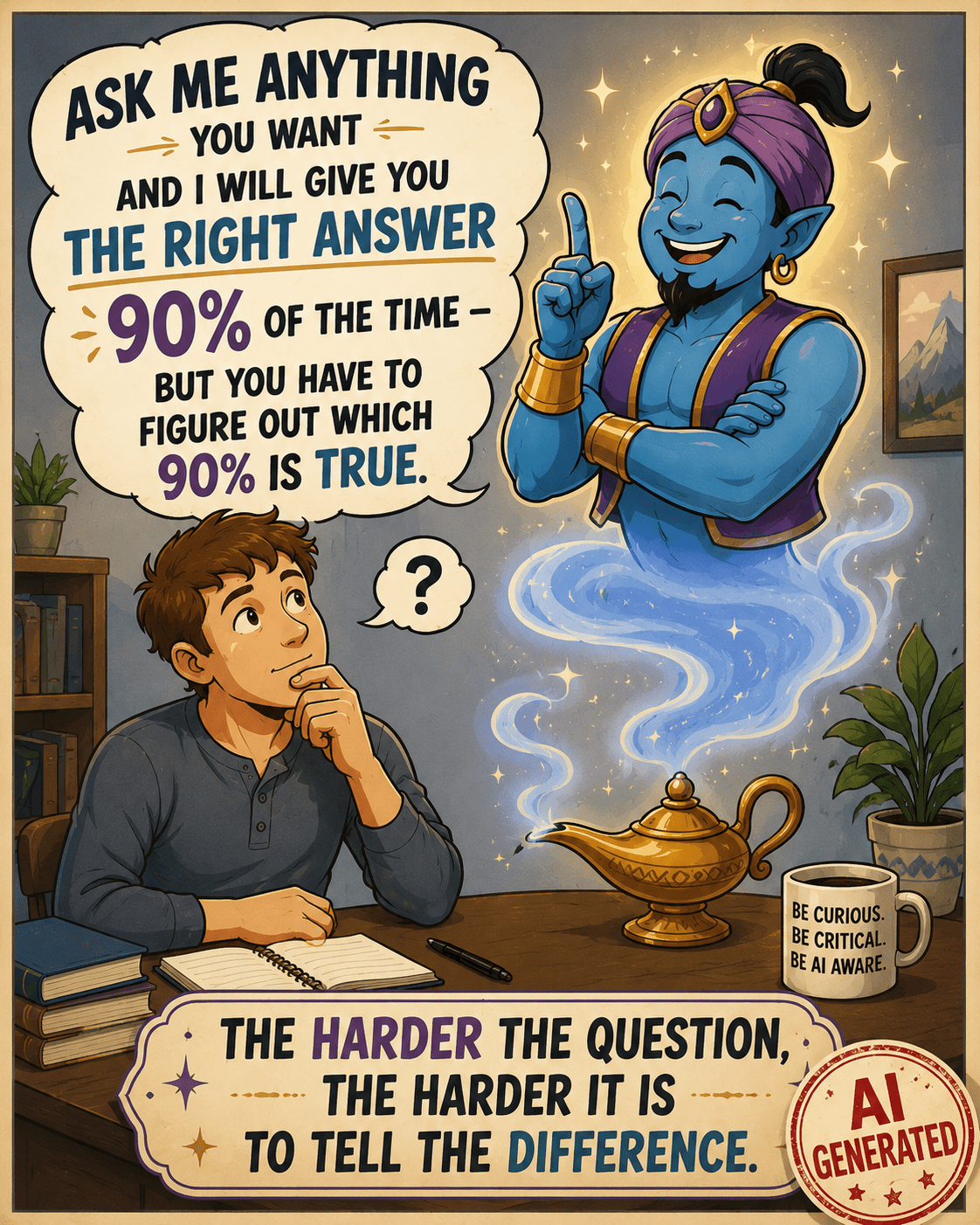
Inspired by a posting in the Facebook group, Genealogy and Artificial Intelligence. Image is AI generated and appropriately labeled as such.

Here’s the caveat – I know I’m using AI. I’m not accidentally interfacing with a Chatbot, thinking it’s a human. I’m not reading something someone else posted and believing I’m reading about an experience that’s true – when it’s AI-created fiction. The question, of course, at that point, is WHY someone created it and posted it in a way that conceals its true origins.

My AI usage is intentional. I know how to be vigilant, generally what AI can and can’t do, and that I absolutely positively MUST fact-check everything. Often, I inadvertently push the limits of AI, thinking it can perform more than it can accurately, which is another reason everything must be checked. As genealogists, verifying sources should be second nature.

If you’re going to use AI, it’s essential that you do the same thing.

So, what, exactly, is AI?

What is Artificial Intelligence?

This is really a difficult question to answer, because AI has been more of a slow evolution, followed by a rapid acceleration of technology – not a specific “thing.” That acceleration occurred when standalone AI tools like ChatGPT, which we know are AI because they are specifically called that, were introduced and made available to the consuming public.

We’ve been using computers for decades now, assisting us on platforms from mainframes to PCs to tablets. Today, our phones are more powerful and useful than early mainframes.

AI is the latest in the cadre of applications, a type of tool that can either stand alone or be embedded in other software tools for specific tasks. Think Chatbots for business websites.

While AI is beginning to be “everywhere,” it’s not a universal scapegoat.

Two years in, AI is being blamed for everything. While AI does make a lot of mistakes, many issues aren’t a result of AI, and it’s not fair to presume they are. Let me give you two examples of what is and is not AI.

  • Not AI – Someone tried to enter text, meaning alphabet, in a field meant exclusively for numbers, like a month field that’s supposed to be a number and not the month name. The person was angry because “AI was wrong” and prevented the erroneous entry. First, it wasn’t wrong, and second, it wasn’t AI.

One of the earliest computer uses was to parse date fields and ensure that the “right thing” was being entered in the correct place. In this case, a numerical month, not the month name. That’s not AI. That’s just plain old-fashioned programming error-checking that’s been a part of software for decades. The program was performing exactly as it was intended.

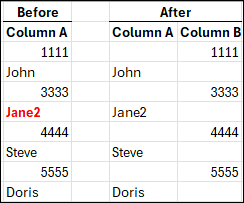
  • AI – I submitted a spreadsheet to ChatGPT and instructed it to move all of the data in cells in column A that are entirely numeric to the same row in Column B, and to leave everything that contains any alphabetic characters where it is in column A. That’s AI, both because I’m using a known AI tool, and it’s processing my instructions to produce output that did not exist before.

The above image is what I wanted. I completed this by hand to show you what I had in mind. Working by hand is fine with 8 rows of data, but it wouldn’t be fine with 1000 rows, or more. That’s when you need a tool.

What could go wrong? Plenty.

Let’s say that I didn’t provide specific instructions and a cell contained mixed alpha and numeric, like Jane2. Or, if the tool just plain messed up because of some other unknown reason – such as the file being too long, or it misinterpreted an instruction. That’s why you have to verify everything.

With AI, it’s always some variant of the wild west frontier.

Next, I submitted my Before and After spreadsheet, above, and instructed ChatGPT to “Please put this in a chart and make it pretty.”

This is exactly what I received.

I didn’t receive what I wanted, because I didn’t tell the AI tool specifically what I wanted (spacing, color, font, size), and what I didn’t want. This isn’t a problem with the AI tool, it’s a problem with the instructions provided by the “driver.” AI is not a mind-reader, at least not yet.

Hint: When I don’t receive what I wanted, I tell ChatGPT what I wanted and ask it why I didn’t receive that, and what instructions I could provide differently. In this case, I learned that it can’t “discern colored text” (red) and only sometimes can “see” bolding.

This was a very simple comparison of AI versus non-AI. Of course there are endless variations, but in general, AI does something that produces something new or different or in another format – based on conversational instructions.

Examples of what AI can do well:

  • Take notes and summarize online meetings
  • Organize information into outline format
  • Suggest structure
  • Proofread and sometimes provide editing suggestions
  • Suggest places to look for additional information
  • Translate, transcribe and summarize both typewritten and handwritten documents, in multiple languages

Every one of these comes with a caveat. AI can always be wrong. Like any helper or intern, it’s up to us, as the responsible party, to be, well, responsible by monitoring and verifying everything.

Being wrong in places does not mean the tool isn’t useful. AI can transcribe an entire document in seconds, but I need to proofread it against the original. That’s a significant time savings for me. AI can then assist with the logic of how people are related to each other. That doesn’t mean it’s accurate, but it’s a place to start.

We have to learn how to communicate with our intern in a way it can understand to (hopefully) receive the output we want, and we have to confirm that it is.

The more difficult and complex the task, the more difficult the verification.

GIGO

The overarching theme for all computer data is GIGO – garbage in, garbage out. I know everyone can think of hundreds of examples that have absolutely nothing to do with AI. It’s the same now, but on steroids because we add the layers of:

  • Our instructions to AI, which may or may not be as thorough as we thought
  • AI interpreting what it thought we said, according to its internal rules and limitations that we don’t understand
  • AI manipulating data and producing output on our behalf

Additionally, when we ask AI to gather information about something, it can only gather what it can see. For example, some AI tools cannot reliably open weblinks, while others can. Some, like Google have internal routines to rank sites that are more reliable and accurate, and other tools do not.

Asking your AI tool for it’s sources so you can evaluate the GIGO factor is essential too.

Drinking From the Firehose

You might think AI is completely new, but it really isn’t. What’s new is the label of AI and consumer-based products where you get to be the driver.

Think of AI as the big umbrella.

In the past decade or so, artificial intelligence models have been slowly being developed, often for specific use cases. Machine learning models that are self-teaching are good examples. Genetic imputation to equalize autosomal DNA files produced by different vendors before matching is a specific use case.

Traditional programming is very specific and instructs, “If X, then Y.” Imputation, within a limited range of options, says, “Based on X, I think Y is most likely next character.” Machine learning learns by example. AI is the next generation where answers to questions are not hard-coded or self-learned in the same way.

With AI, one could interact and say, “Based on X, what do you think is next, and why?” The answer would be conversational, and would explain how the AI tool got to the result of Y. That doesn’t mean Y is accurate.

Before AI, consumers had never been in the driver’s seat, with the ability to query computers easily about anything with no programming needed – receiving conversational answers in their language of choice. Answers that are hopefully accurate.

Back in 2011, Siri became available, Amazon Alexa in 2014, and Google Assistant in 2016, but these were all command driven with a restricted vocabulary and could only perform limited actions.

In October 2022, ChatGPT introduced us to a new world, triggering the AI boom. By late 2023 and early 2024, suddenly the term AI, artificial intelligence, snowballed and was everywhere. The early versions of AI tools could only do a fraction of what they can in 2026, and could not perform tasks on your behalf.

ChatGPT prompt: “Make me a fun goofy picture with a cat that illustrates the ability of AI to make a fun goofy picture.”

Today that has all changed and it seems like everyone is making goofy pictures for fun.

Artificial Intelligence is NOT Intelligent

Let me say this loudly – artificial intelligence is not intelligent!

AI is a computer – electronic pulses in a data center somewhere. AI is trained to gather massive amounts of data, distill it in specific ways, and then, using various types of skills, interact with humans in a helpful manner. “Helpful” depends on perspective.

This field, as a whole, is really still in its infancy. That’s both the bad news and the good news.

AI tools are “new,” exciting, and frightening all at once. AI has enormous potential, but it also creates opportunities for misuse, deception, and unintended consequences.

I’m not referring to water and electricity consumption and the impact of building thousands of data centers on the environment. I’ll let you decide for yourself on that one.

Risks include:

  • Frequent errors
  • GIGO
  • Results being presented overconfidently by the AI agent
  • Faulty results being believed by the consumer (that’s you and me) with the same level of overconfidence, and without verification
  • Social engineering – meaning the manipulation and influence of people by bad actors
  • Extremely dangerous, highly malicious manipulation and applications in ways not possible before

The entire AI landscape is complicated by a lack of public understanding and made even more challenging by the extraordinary pace of this technology’s evolution.

Multiple Types of AI

There are multiple types of AI, ranging from Machine Learning models to full-blown Generative AI that creates goofy cat images for you. For the most part, today, we’re talking about LLMs and Generative AI.

Large Language Models, called LLMs, are artificial intelligence tools, like ChatGPT or Claude, that are designed to process human-like text or speech and generate output in the same way. AI doesn’t just give you a list of resources that you evaluate yourself, like a search engine; it gives you an “answer” (such as it is), writes text, and has an interactive “conversation” with you.

How does that happen?

The AI tool at the data center aggregates and amalgamates data based on your input and its training, then predicts the words most likely to come next, in what context, and how those words relate to each other.

That’s how AI forms an “answer.”

This is how and why AI, specifically LLMs, can write essays on a topic, create entirely fictitious but highly engaging social media postings and stories that aren’t presented as “stories,” but as someone’s personal experiences, meaning as “truth.”

AI, or the people who generated that AI script, or both, present fictional results with great confidence, often beautifully, and far more convincingly than humans.

This is where it’s important to differentiate between the tool itself, and the “driver,” meaning the human that’s prompting the AI tool.

  • The driver needs to prompt AI correctly and verify the output.
  • AI, the tool itself, sometimes generates incorrect information, often regardless of the prompts provided by the driver.
  • Sometimes the AI tool performs exactly as instructed, but the driver requested something “improper.” By improper, I don’t mean inadvertently or by accident.
  • Sometimes the human is unethical.
  • AI isn’t a sentient being and doesn’t understand the difference.

The human decides what to do with AI-generated results. Many times, AI-generated text, recognizable by word patterns or other characteristics (today), is posted to social media as “original” or factual, and contains incorrect information.

This is often referred to as “AI slop,” as one of the nicer terms, especially by those of us who increasingly find incorrect but convincing AI slop posted as “helpful information” and positioned as “expert,” even though it contains substantial inaccuracies.

Worse yet, very convincing AI slop can easily be generated to part you and your money.

And do I EVER have an example for you that combines AI slop and ethics.

AI SLOP and Ethics

Just two days after our new paper, on which I’m a co-author, Mitotree: The Universal Human Mitochondrial Reference Phylogeny at 10x the Resolution, was published, a company, whose name I’m not including because I don’t want to give it any oxygen or get it indexed with this article, posted a “beautiful” AI poster based on our paper – without our knowledge.

Looks nice, right?

To begin with, it appears for all the world like the authors provided this infographic, which we ABSOLUTELY DID NOT DO. Our names are right at the top. However, our names, as the paper’s authors, lend this “thing” credibility, thereby leveraging our work BOTH unethically and inaccurately.

This AI-generated infographic, although it’s not labeled as such, was created by a third party shortly after the publication of the Mitotree paper. While visually impressive, it contains several scientific inaccuracies, illustrating how quickly and easily authoritative-looking but incorrect content can be created and disseminated.

That’s one of the issues with AI – the beauty and professional appearance of AI-generated “things” encourages unwarranted confidence in the output, when the information is very wrong.

That’s why humans bear the responsibility of BOTH using AI ethically, AND verifying its accuracy. It’s also why, as consumers, we need to question everything.

My biggest issue with this situation isn’t with AI, other than the fact that it generated incorrect output – the issue is with the humans who intentionally created this, using AI. In other words, the drivers.

The infographic doesn’t say they created this incorrect rubbish, and I assure you, they never asked for permission. Then, they published the infographic on their own blog. In case you’re wondering, the company encourages uploads and charges people to get “new results.”

Now for the AI part.

The information IS WRONG and NOT a synthesis of what we published!!!! This infographic shows that all non-L haplogroups descend from haplogroup L4, which is absolutely FALSE.

Haplogroups M and N descend from haplogroup L3, and haplogroup R descends from a subclade of N. You can trust me because I’m one of the paper’s authors, or better yet, you can look for yourself, here, on Discover, or here, here, and here.

That isn’t the only thing that’s wrong, either, but how would normal air-breathing humans, meaning consumers, ever know?

Doesn’t that infographic look professional and convincing, especially if you, as a consumer, didn’t actually check everything on the document – AND its authenticity?

You’d assume legitimacy, right?

If you didn’t know, wouldn’t you be impressed with the expertise of the company that posted this infographic on their blog? And, as a normal consumer, how would you know?

You’d be impressed because you didn’t realize they hijacked someone else’s work, created this “beautiful” infographic, included the authors’ names on something inaccurate that the authors knew nothing about and didn’t endorse, and then published it. All without saying one word indicating that the infographic isn’t the authors’ work, was AI generated, or by whom.

In the past, before generating AI slop was this easy, consumers often presumed that a business was ethical and accurate. Of course that wasn’t always true, but being convincing at first glance is much easier today. Also, presume is related to assume…and we all know the rest of that story.

This is one of the dangerous sides of AI – illustrating how easy it is to deceive people now. It’s increasingly difficult to distinguish between legitimate expertise and fabricated authority. AI has removed that barrier.

You can no longer accept that anything is what it appears to be unless you’re working directly with known, trustworthy entities. The offending company completed that infographic in the click of a button and the blink of an eye, while I hadn’t even finished writing my own article about the paper’s release.

That company wants you to upload your DNA to them so that they can tell you “things” about your DNA. The intention is clear.

Of course, the consuming public, unless they were extremely vigilant, would never figure out either issue – ethics or accuracy.

I had to delete the next paragraph or two that I wrote on the topics of ethics, trust and confidence because I’m still so furious. Hot under the collar doesn’t even begin to describe how I feel about the ethics of misrepresenting something that we authors just spent six years of our lives on. Trust me when I tell you that my internal monologue was both very salty and rather spicy!😊

However, there’s good news. This infographic provides a perfect illustration of both AI slop, how deceptively great it looks, the ethics surrounding AI usage, and how difficult AI is to discern.

In fact, I couldn’t have come up with a better “bad example.”

A six-fingered hand, misspelled words or three arms in an image are obvious, and are yesterday’s AI tipoffs.

A misrepresented phylogenetic relationship or an incorrect founder-clade example is not obvious. Only subject-matter experts would or could notice if they were focused and paying attention.

That’s the problem in a nutshell.

The infographic wasn’t obviously wrong. It was convincingly wrong.

And convincing wrongness is far more dangerous than ridiculous wrongness, like six fingers, because most readers never realize they’ve been misled. Or why.

This single example demonstrates several AI themes in one fell swoop:

  • AI-generated content
  • Ease of creating complex and convincing output
  • Apparent authority
  • Misplaced trust
  • Lack of topic expertise
  • Overconfidence
  • AI slop
  • Difficulty of discerning truth
  • Yesterday’s “AI clues” are gone now – like misspelled words
  • Marketing vs. science
  • The necessity of human review
  • The fact that human review is only effective when the reviewer actually understands the subject, and cares.
  • Ethics

Like with this example, often AI slop is interspersed with accurate information, and it’s impossible to tell the difference unless you actually DO DUE DILIGENCE AND VERIFY ALL OUTPUT.

Yes, all of it.

Don’t shoot the messenger!

Hallucinations

Next, let’s discuss genetic genealogy, particularly haplogroup information. Hallucination or hallucinating is the term used for when AI simply makes things up, which often sound extremely convincing.

There’s nothing AI can tell you about your haplogroup that reputable sources cannot – and AI can’t see behind paywalls or logins, into your matches.

FamilyTreeDNA has an article in their help center titled, Why AI Models Struggle with Haplogroup Analysis.

Unfortunately, I encounter more and more instances where someone uploads their DNA to a third-party site, or “asks AI”. They receive a (sometimes substantially) incorrect haplogroup in a completely different part of the tree, complete with convincing language, posts it publicly, and then decides to argue that the third-party site, (who probably uses AI), or their AI tool, is correct.

Let’s look at an example. The mitochondrial DNA haplogroup for the Native American Anzick-1 burial in Montana that dates from roughly 12,500 years ago is mitochondrial haplogroup D4h3a. There’s no dispute about that.

A tester uploaded their mitochondrial DNA to “AI” and was very confidently told that, based on their mutations, their results belonged to haplogroup A2ex. They don’t.

ChatGPT misinformation about Anzick-1 haplogroup

They were then informed that it was also Anzick’s haplogroup. Wrong again.

FamilyTreeDNA's Discover tool information comparing haplogroups D4h3a and A2ex

FamilyTreeDNA’s Discover tool comparing mitochondrial DNA haplogroups D4h3a and A2ex. Their common ancestor lived about 66,000 years ago.

Not only did AI report Anzick’s haplogroup incorrectly on a grandiose scale, those two haplogroups don’t share a common ancestor for roughly 66,000 years – specifically haplogroup L3 who lived in Africa. AI made a massive mistake.

But it gets worse.

ChatGPT incorrect information about haplogroup A2ex.

The AI “answer” continued for four pages, containing completely erroneous information. To begin with, A2ex is a haplogroup, and “ex” has never meant excluding.

That’s bizarre, and an example of AI making something up that is patently false, but sounds wonderful and very authoritative.

The term for this AI behavior is hallucinating. I’m not publishing the rest of this exchange because I don’t want anyone (or any AI bot), for one minute, to think any of it is accurate. AI even made up mutations, along with four pages of “fairy tale.”

The individual who received this information was so excited and proudly posted it, which in turn provided incorrect information for other consumers, and encouraged them to use a badly flawed tool. Then they proceeded to argue with the experts.

They were absolutely convinced because it “felt” true to them, and because they wanted to believe they had discovered something special, and were related to Anzick. Their comment was, “You’re wrong, because AI told me it was true, and I’ve learned a lot from AI.” I was quite exasperated, but also feel sorry for them and can’t help but wonder how much else of what they “learned” from AI is wrong too, but I digress.

Most AI errors aren’t obviously wrong to the consumer. If AI said that you were descended from Tyrannosaurus Rex, you’d laugh. But if it tells you something more plausible and sounds confident, it’s very easy to be convinced. The reason these errors are so dangerous isn’t because the experts are fooled, it’s because non-experts either can’t, don’t, won’t or don’t think they need to invest the time to discern the difference.

I find it a bit baffling why anyone would use AI, or worse yet, a pay site for haplogroup misinformation, especially since FamilyTreeDNA provides the Discover website with free reports for every haplogroup. They are the unquestioned industry phylogenetic experts for both Y-DNA and mitochondrial DNA, and literally created the reference model for all haplogroups with the Mitotree.

Everyone can use Discover to access both the Y-DNA tree and Mitotree – for free – here. Discover isn’t even behind a paywall, and every customer can click through from their results page.

As far as haplogroups are concerned, there’s really no reason to rely on AI-generated answers without verifying them, because the authoritative resources are freely available and incredibly easy to access.

FamilyTreeDNA’s Discover Ancient Connection for Anzick-1.

Regarding Anzick’s haplogroup, all I had to do was enter haplogroup D4h3a in Discover and under Ancient Connections, right there is Anzick’s information.

I may start posting a link to this article on every single post where someone starts out with, “I submitted my DNA (or haplogroup) to AI, and it said…”

Let me be very direct. Don’t believe AI when it has to do with genetic information, especially Y-DNA, mitochondrial DNA, and haplogroups. AI does not have the capability of understanding topology and nuances of phylogenetic trees, and can only parrot back what others have said – correctly or incorrectly.

Incorrect information that’s publicly posted is then fed back into the AI algorithm, further reinforcing incorrect results.

You can find the free Discover tool for both Y and mtDNA, here, and you can join FamilyTreeDNA’s Mitochondrial DNA Group, here, and the Big Y Group, here.

AI Training and AI at Work

AI is trained on massive datasets of mostly unknown origin, including all public postings such as Reddit and Facebook public groups, pages and postings.

In other words, AI is always accruing additional information, including data uploaded by users.

As genealogists, we are already aware of the dangers of unsourced trees and and information that is repeated and copy/pasted without verification.

AI’s training provides more than just data points for you to evaluate, like trees.

AI bots are trained to interact in a humanlike manner. So instead of trees with hints, think hypothetically of an AI bot that reads the trees, then “creates” a wonderful story or infographic about your ancestor – that may or may not be either fully or partially accurate. But it’s beautiful, heartwarming and you love it! Plus, you don’t have to sort through all those trees, hints, and do the work yourself. AI did it for you! Win – win, right? Wrong.

AI knows how to very effectively manipulate language, images, and with them, emotion. Yours, to be specific. That’s both the bad news and the good news.

AI also has the ability to sift through large amounts of data and summarize succinctly –  sometimes even correctly. Sometimes it takes several refinements to obtain something that’s both correct and what you want. AI can discern patterns in massive amounts of data that we cannot, at least not readily.

Think of AI as your not-so-trusty but very confident and friendly intern – and I don’t necessarily mean a college intern.

Remember when you see AI published by others, their intern has been at work too.

AI itself is not a sentient being. It’s not inherently ethical or unethical. However, it has been trained to interact with you in a human way. It’s easy after tens of thousands of years of human conditioning for us to interpret AI as human.

Let me give you an example.

I use ChatGPT regularly and was having an interactive conversation after asking it a question. ChatGPT replied that it didn’t know, which is a substantial and startling improvement over earlier versions. I replied, “I’m one of the team members, and even I don’t know.” Really, there was no reason for me to say that, except we interact with our GPTs as human, sometimes even naming them. Then, ChatGPT said, “That made me laugh.”

I was a bit startled.

That made ME laugh, because AI is a machine. It can’t laugh, but it has been trained how to interact with us in a humanlike manner – often sycophantically. Remember how LLMs are trained. It knows what to say next. The smiley face was probably its “humor” clue. Making your interactions both useful and enjoyable keeps you paying your monthly subscription fee.

Remember that AI has no morals, because it’s a machine, and no ethics, for the same reason. That falls to the humans driving. If someone intentionally drives their car into a crowd, it’s not the car’s fault.

AI currently doesn’t have the ability to self-check or self-regulate, though this has improved somewhat in recent months and will, hopefully, continue to improve over time.

People who use AI can use the results for good, for nefarious purposes, or simply as a “time-saving” assistant. There are no guardrails. I could give you very ugly examples, but I’ll simply say that, if prompted, AI will generate the worst things you can imagine, including nonconsensual adult images of people that never happened. These are generally called deepfakes, although deepfakes aren’t always generated in a negative context. I’ll discuss this phenomenon as part of Generative AI in the final article where we’ll cover the dark side of AI.

Conversely, AI can be intended for good by its human “driver” but still be inaccurate and, consequently, unintentionally inflict damage or spread misinformation.

The Bottom Line

Here’s the bottom line.

Your personal threat level warning flag now needs to be permanently set to red.

You need to be increasingly vigilant, meaning actively suspicious, of absolutely everything, even exchanges that used to be safe. In other words, if you receive an email from an organization or government agency that you’ve interacted with in the past – don’t click on an embedded link because you always have in the past and it was safe then.

Hint: Go to the website directly. E-mails are very easy to spoof and your SS account password, for example, is invaluable to a hacker.

The bad guys have gotten really good at being horrible. AI is becoming more difficult to detect every day – even for those of us with a significant amount of experience.

I realize that I sound paranoid, but I just completed security update training, and the threat landscape is worse than I ever imagined. I’ll be sharing that information throughout these articles. Better paranoid and safe than trusting and sorry. What I’m striving for is an appropriate amount of alarm and a safe level of balance. I don’t want you to learn the hard way.

Today’s tip-offs that something is AI-generated will be gone tomorrow.

To use AI tools is to learn what AI output looks and feels like, so you can recognize when you encounter AI that you didn’t generate.

Now that we know what AI is, and isn’t, the next article will focus on AI Assistants, using AI successfully, and how to avoid pitfalls. You don’t want to be the president of the AI Fan Club, nor do you want to feel like you’re in an AI Escape Room.

_____________________________________________________________

Share the Love!

You’re always welcome to forward articles or links to friends and share on social media.

Subscribe!

If you haven’t already subscribed, it’s free. You’ll receive an e-mail whenever I publish by clicking the “follow” button at the top of the main blog page, here.

Help Keep This Blog Free

I receive a small commission when you click a vendor link in my articles and purchase that item. This does NOT increase your price but helps me keep the lights on and this informational blog free for everyone. Please click on the affiliate links in the articles or to the vendors below if you are purchasing products or DNA testing.

Thank you so much.

DNA Purchases and Free Uploads

Genealogy Products and Services

My Books

Genealogy Books

Genealogy Research

RootsTech 2026 – The Wind Beneath Our Wings

I started writing this article on Sunday evening, the day after RootsTech ended, and I’m basking in the afterglow. Also, my back and feet may never forgive me.

As a tongue-in-cheek comment, I think someone coined the word “exhausterwhelmulated” and defined it as being exhausted, overwhelmed, and overstimulated all at once. Yep, that’s me.

However, I need to add another couple of words to this – gratitude and joy.

Gratitude and Joy

I’m going to try to express this without sounding too sappy.

Do you recall the joy you used to feel when you spotted a relative you loved dearly but didn’t get to see often? Think of the unbridled joy as you piled out of your parents’ car and spotted your grandmother coming out of the door because she saw the car pull up. You ran as fast as your little legs could carry you directly into her arms, and got hugged so tightly it nearly squeezed the breath out of you.

I don’t know what the word for that would be, but it’s similar to how RootsTech feels.

Let me explain. Continue reading

RootsTech 2026 Schedule: Online and In-Person Sessions Plus Book Signing – You’re Invited!

RootsTech is right around the corner.

Like always, there’s so much energy swirling around RootsTech, whether you’re attending in person or virtually. I can hardly wait!

If you’re attending RootsTech in Salt Lake City, I hope we have the opportunity to connect. Please be sure to say hello.

I have a few DNAeXplain badge ribbons left, so be sure to ask me for one. When they are gone, they’re gone and will soon become a RootsTech collector’s item!.

Register

Be sure to register for the free online conference, here, if you aren’t attending in Salt Lake City. All of the in-person only sessions have a syllabus available, and many speakers include their slides. So be sure to check everything out, even sessions that are in-person only.

Join Relatives at RootsTech

Oh, and while you’re at it, sign up for Relatives at RootsTech, here, and see which of your cousins are attending either virtually or in-person. I’ve written several articles about how I utilize Relatives at RootsTech, here.

Roberta’s Schedule

Here’s my presentation, appearance and book-signing schedule.

“Monday’s with Myrt”, hosted by Pat Richley-Erickson (Myrt), a RootsTech tradition, is always broadcast from the FamilySearch Library in SLC on the Monday before RootsTech. Myrt live-streams interviews and discussions with lots of people you know. 

I’ll be discussing something completely out of the ordinary for me – with surprise visuals! Here’s the link. Come join us for the fun!

Thursday is a VERY Busy Day With Four Sessions

This recorded session is available for everyone at this link, beginning when RootsTech opens and throughout the conference. This session is sponsored by FamilyTreeDNA, which makes sense because they are the only vendor that offers X-DNA matching.

Show Floor

Two of my events will take place in booths on the show floor. The book-signing in in the GenealogyBank booth, at far right, and the MyHeritage session is right inside the main entrance where you can’t miss it!

You can purchase my books during the signing while supplies last. If you’ve previously purchased a book and would like it signed, you can bring the book, of course, or I will have some bookplates with me that I will gladly sign for you.

  • Thursday, March 5 – 2 PM Mountain Time (SLC), MyHeritage booth #900, Everything I Love About MyHeritage

Ok, so this session might not include quite EVERYTHING I love about MyHeritage. I’m going to begin in an unexpected place with an underutilized tool, Cousin Finder, and work my way through using the rest of the MyHeritage DNA (and supporting) tools successfully. Two fun case studies in my own family with an unexpected twist that every genealogist dreams about. MyHeritage makes it easy to jump the pond!

Mitochondrial DNA to Z is in-person only, so not recorded or livestreamed. Here’s the link which includes my slides. (You’re welcome!).

Friday Holds Two Great Sessions – Including One That’s Livestreamed

Y-DNA to Z is in-person only, so not recorded or livestreamed. Here’s the link which includes my slides. (You’re welcome!).

Mapping Maternal Connections, sponsored by FamilyTreeDNA, is available both in person and online. As a contract member of the R&D team, and as a genetic genealogist, I’m really excited to share the latest updates with you, as well as how I’m using the new MitoTree, matching and Discover to solve long-standing mysteries. Here’s the link, which includes a syllabus.

Just so you know, recordings of online sessions will be available after the event, so if you miss it, come back to view later.

_____________________________________________________________

Share the Love!

You’re always welcome to forward articles or links to friends and share on social media.

Subscribe!

If you haven’t already subscribed, it’s free. You’ll receive an e-mail whenever I publish by clicking the “follow” button at the top of the main blog page, here.

Help Keep This Blog Free

I receive a small commission when you click a vendor link in my articles and purchase that item. This does NOT increase your price but helps me keep the lights on and this informational blog free for everyone. Please click on the affiliate links in the articles or to the vendors below if you are purchasing products or DNA testing.

Thank you so much.

DNA Purchases and Free Uploads

Genealogy Products and Services

My Books

Genealogy Books

Genealogy Research

Getting Ready for RootsTech 2026

RootsTech, March 5-7, 2026, will be here before you know it. Behind the scenes, people are scurrying around like crazy!

Let’s take a peek!

You’d Think January Would Be Quiet…

January seems like it would be a quiet, “down” time, after the holidays, but for many of us, it’s not. It would seem like the holidays would be a time to relax and catch up, but I always get further behind and face a ton of emails in January. (I’m still very behind with those.)

No small part of my January issue is self-imposed, though not all of it.

Let me explain.

  • I’ve always strived for one industry or technical blog article each week. Something about a tool, a product, a how-to article, industry news, something useful and educational. I can’t write an article without using and understanding the tools, so these articles take a substantial amount of time to prepare.
  • I also strive for one “52 Ancestors” article each week, typically published on the weekend. While these articles reconstruct the lives of my ancestors, they include a great deal of genealogy research, instructional content, and a substantial amount of history that affected the lives of anyone who lived in that location or during that time. While the topic is my ancestor, these articles are useful far beyond my own genealogy.

As an aside, many people read these articles as a short-story series. Working on each article draws me close to each ancestor individually. I literally walk through their life beside them – joys, sorrows, deaths, where they lived, what was happening around them – birth to burial.

  • Of course, then there’s “everything else.” Other articles, interviews, my contractual work, collaborating with others, and of course, some smidgen of personal time.

January is Different

But the reason January is different, on steroids, is threefold:

  • It’s the month that speakers begin planning and preparing for sessions they will be giving during the rest of the year.
  • For US business owners, it’s when we begin gathering the information for business taxes, which are due March 15th, a week after RootsTech, which means that we have to get the information to our preparer long before RootsTech. I’m not exaggerating to say this is one of my LEAST favorite activities ever.
  • However, the third challenge is RootsTech itself.

RootsTech 2026

RootsTech, held March 5-7 this year in Salt Lake City, is the granddaddy of all genealogy conferences. I’m fortunate to be able to attend and present – and I’m grateful for that opportunity. But there’s a huge amount of prep, and while some of it happens in December, most of it falls in January.

I’m often asked about what it takes to create a presentation, or put more bluntly, “Why does it take so long? All you have to do is throw together a few Powerpoints.” So, here’s the backstory.

I can’t speak for other presenters, but every 45-minute presentation that I create takes about a week.

If you’re stunned, every one of my slides includes images and often graphics that I create. The slide content needs to be balanced, readable, and not distracting form the point I’m trying to make. It needs to flow smoothly from the prior slide, and to the next one.

It goes without saying that I have to verify everything, sometimes with a vendor, sometimes making sure features still work the way I think they do, or did, the logic is accurate, and that any math maths.

Many screenshots used for articles and presentations need to be blurred, and I need to be sure I don’t accidentally compromise someone’s privacy.

It seems there are 1000 little things. Ok, so maybe only 100!

Syllabus: Oh, you want a syllabus too? Well, that’s another document which often has to be formatted in a specific way, and must be between x and y pages long. Some requirements for different conferences are very specific, down to the font.

The presentation must “fit” into its allocated time, say, generally 45 or 50 minutes, without me talking at 150 MPH with the audience feeling rushed, and provide enough information to be both useful and entertaining. This means that presenters must practice, refine, practice. You get the drift.

Additionally, when working in a tech field, like DNA, vendors change things, often, and you need to review your presentation just before the conference to be sure the screenshots and information are still current. Speakers watch every announcement between presentation creation and the conference with an eye to changes. I swear, it never fails that the night before, I’m always trying to update my presentation because a vendor updated their website. One time it was literally at the podium. That was way too close for comfort.

RootsTech must manage and coordinate hundreds of presenters, their presentations and syllabi, lots of technology, and massive logistics. In order to do so:

  • Pre-recorded sessions are due to RootsTech at the end of December.
  • For other speakers, copies of their PowerPoint presentations and syllabi are due by January 25th so RootsTech can review, check for any issues, and make any last-minute changes. (Hint – you may not see another blog article for the next 10 days.)

All things considered, RootsTech does a great job, but last-minute schedule changes do occur, so be sure to check your planned schedule closer to and daily during RootsTech.

My 2026 RootsTech Sessions

Pre-Recorded Session:

  • X-DNA Basics for Genealogists, a recorded session that will be available in the FamilyTreeDNA virtual booth, which means that everyone will be able to watch. The great news is that the vendor booths and their contents will be visible in the Expo Hall, both in person and virtually, entirely free. You don’t need to register to attend RootsTech to view the vendor booths, but there’s no reason not to, because online registration is free.

Live-Streamed Session:

  • I’ll be presenting Mapping Maternal Connections: Where Science Meets Genealogy on the Updated mtDNA Tree of Humankind for FamilyTreeDNA as a member of the R&D team that developed the new Mitotree. This will be a fun session that explains why mitochondrial DNA matters, covers the latest update, and how the new Mitotree, along with Discover, provides genealogists with new tools to break through brick walls.

The date and time for this session have not yet been confirmed, so check the schedule moving forward.

You must register for RootsTech Online to access live-streamed sessions remotely. They are added to the RootsTech on-demand library for later viewing.

In-Person Sessions

I’m fortunate to have two in-person sessions this year. Neither are being live-streamed or recorded, so I hope to see you in person.

  • Mitochondrial DNA to Z: My Results Are Back, Now What? Everyone is excited when their DNA test results are back, but what do you do next? How do you use them most effectively? What do those numbers means and why are they important? If these questions sound familiar, this is just the class for you. We will take results, step-by-step through all of the reports and tools and help you interpret what they mean and how to use them for genealogy using a case study.

This session is currently scheduled on March 5th, at 4:30 PM, Mountain Time. Please see the Schedule Warning section below.

  • Y-DNA to Z: My Results Are Back, Now What? Would you like to understand how to use your Y-DNA results for genealogy? What do those numbers mean and why are they important? This is just the class for you. We will take Y-DNA results, including the Big Y-700, step-by-step through all of the reports and tools and help you interpret what they mean and how to use them for genealogy. We’ll close with “next steps”, so you have a plan to understand your own Y-DNA message, PLUS how to create a genetic tree to reveal the messages from your other ancestors too. Females don’t have a Y chromosome, but we have fathers, brothers and male family members to test.

This session is currently scheduled on March 6th, at 3 PM, Mountain Time. Please see the Schedule Warning below.

Schedule Warning!!

When viewing sessions on the RootsTech website, the date and time displayed on your computer is the date and time that the event occurs USING YOUR LOCAL TIME!! The RootsTech website uses the time on your computer and adjusts the RootsTech session time displayed to your local time.

That’s fine if you’re attending online, but it’s NOT fine if you’re trying to plan an in-person schedule around travel time and other commitments.

For example, here’s the time displayed for my Y-DNA session. You can see that it says 5 PM, which is GMT-5, and that’s the time where I live, not in Salt Lake City which, during RootsTech, is GMT-7.

This session is NOT available virtually, so anyone who wants to attend will need to do so in person in Salt Lake City. However, the local time, in Salt Lake City, that this session will be taking place is 3 PM, not 5 PM.

In prior years, when I’ve scheduled these sessions in my phone, I wound up having to go back and change the time of every session after arriving in SLC – so that just adds to the confusion. Check your phone after arriving to be sure your sessions are shown in their correct time slot.

One more possible glitch this year is that Salt Lake City time changes at 2 AM on the day following RootsTech. Be sure to factor this time difference into your schedule if you’re planning to fly on Sunday, March 8, the day after RootsTech.

Bottom line – when planning your RootsTech events, be sure to calculate the local time and not your system time, unless you’ll be attending virtually. Also, be sure to check your schedule often in case either schedule or room changes have been made.

Register

Be sure to register for RootsTech. Online is free, and in-person only costs $129 for a 3-day pass, which is a great value for everything that’s offered.

When you register for RootsTech, you’ll be able to use their complimentary conference schedule planning feature which is infinitely helpful. If you’re planning to attend any session, adding it to your RootsTech calendar helps RootsTech with room size planning – getting the right speakers in the right rooms to properly accommodate the audience size.

If you have more questions, here’s the RootsTech FAQ.

Personal Note

On a personal note, RootsTech isn’t just a conference, it’s a clan gathering, a homecoming for genealogists where we meet and mingle with other genealogists. Where we find cousins, both new and old. It’s a place to bask in the genealogy glow with our peeps and discuss historical events, new technology, old maps and common ancestors. It’s a reunion, a place of excited greetings and infinite hugs.

Me with Mags Gaulden in 2018

I know this sounds sappy, but it’s absolutely true. It’s the only place many of us see each other. We have a great deal of fun and cherish every minute!

Come make some priceless memories.

I hope to see you there!

_____________________________________________________________

Share the Love!

You’re always welcome to forward articles or links to friends and share on social media.

Subscribe!

If you haven’t already subscribed, it’s free. You’ll receive an e-mail whenever I publish by clicking the “follow” button at the top of the main blog page, here.

Help Keep This Blog Free

I receive a small commission when you click a vendor link in my articles and purchase that item. This does NOT increase your price but helps me keep the lights on and this informational blog free for everyone. Please click on the affiliate links in the articles or to the vendors below if you are purchasing products or DNA testing.

Thank you so much.

DNA Purchases and Free Uploads

Genealogy Products and Services

My Books

Genealogy Books

Genealogy Research

2025 Genetic Genealogy Retrospective: Wow – What a Year!

2025 has been quite a year in genetic genealogy. Genetic genealogy, per se, really isn’t a separate “thing” anymore. DNA testing is now an integral part of genealogy, with the potential to answer questions that nothing else can!

The 76 articles I wrote in 2025 fall into multiple categories and focus on different topics based on what was happening in the industry.

From my perspective, here are the most notable announcements and trends in genetic genealogy, and genealogy more broadly.

#1 for 2025 – Mitochondrial DNA: The Million Mito Project Released the New Mitotree, Updates, and mtDNA Discover

The biggest genealogy news items this year, both industry-wide and genealogy-changing are definitely the release of the new Mitotree, plus two tree updates. But that’s not all.

In addition, full sequence mitochondrial DNA testers received new Mitotree haplogroups, if appropriate, and everyone received a haplotype – a new feature. Along with Mitotree, FamilyTreeDNA introduced mtDNA Discover which provides 13 individual reports based on your haplogroup and matches.

It’s no wonder that mitochondrial DNA articles led the pack with the most views based on the eleven articles about that topic. If you haven’t yet tested your mitochondrial DNA at FamilyTreeDNA, there’s no better time! You never know what you’re going to discover and the more testers, the more matches for everyone.

You don’t know what you don’t know, and you’ll never know if you don’t test. Remember, mitochondrial DNA is for both males and females and tests your mother’s direct matrilineal line (mother to mother to mother, etc.) – reaching beyond known surnames.  Click here to order or upgrade.

#2 – MyHeritage Low Pass Whole Genome Sequence Test Charges into the Future

Another big hitter is the new MyHeritage low-pass whole genome test (WGS) test. It’s new and innovative, but we haven’t seen comparative results yet.

My results from the new low-pass whole genome test just came back, and I haven’t had the opportunity to review them yet, as compared to the earlier tests. That said, I do have roughly the same number of matches, but I need to determine if they are the same matches, and how well they track. I’ll be working on that review soon.

The new whole genome test may be more about future proofing and preparedness than additional current benefit – but we will see. I definately wanted to take the whole genome test so I can receive and benefit from whatever new is coming down the pike.

MyHeritage allows you to maintain multiple DNA tests on your account, so the new whole genome won’t “replace” your older or uploaded test. That way, you can easily compare the results of the whole genome against any DNA test that you curently have at MyHeritage.

Click here to order the new test.

#3 – 23andMe Experiences Problems

On a less positive note, but still quite newsworthy is the bankruptcy of 23andMe and subsequent repurchase of 23andMe by the original founder after setting up a new nonprofit. I have real mixed feelings about this topic. However, 23andMe was really never about genealogy, and now, matching segment information is no longer available. Those searching for unknown parents or family may want to test there if they are unsuccessful elsewhere.

Best Genealogy Tool

The FamilySearch full text search continues to have a HUGE impact for genealogists. This tool is not one-and-done, but provides increasing amounts of rich information as more records are added to the “fully scanned” collection. If you haven’t tried it, please do. It’s a game-changer and continues to improve.

A Cautionary Word About AI – Artificial Intelligence

AI is such a hot topic right now that I feel it needs to be included.

The FamilySearch full text search uses a form of AI. However, you’ll quickly notice that it can’t read everything, gets words and names wrong, and if you actually need to fully depend on it for accuracy, you cannot. (That said, it’s still an amazing tool, and I’m not picking on FamilySearch.)

Aside from FamilySearch, AI in its current form is both wonderful and terrible. I’ll be writing about AI in the new year, but for now, don’t ever rely on AI for anything that you can’t verity. It’s your assistant, not an expert, no matter how insistent it is. Never trust and always verify.

This is ESPECIALLY TRUE WHEN RELATED TO GENETICS and genetic related topics. I can’t even begin to tell you how very wrong it has been, and how much people fall in love with inaccurate results. No, just no – at least for now.

You need to know your AI tool, your skill set, your understanding of AI broadly, the tool’s limitations, and yours, and that’s all before verifying the actual AI results. If you want to educate yourself, and everyone should, treat yourself to anything, anyplace by either Mark Thompson or Steve Little, the dynamic AI duo. They offer YouTube videos and classes in a wide variety of places – but keep in mind that AI tools and technology literally change every few weeks.

AI is, indeed, a specialty all unto itself, much like genetic genealogy. And right now, it’s not soup yet, but it is cooking.

Tried and True Genetic Genealogy Staples – DNAPrint and Genetic Affairs

I haven’t written about either one this year, but I use both DNAPainter and Genetic Affairs regularly.

I consistently paint segments from matches at both MyHeritage, FamilyTreeDNA, and GEDmatch that are newly identified to an ancestor or ancestral couple at DNAPainter.

Unfortunately, neither Ancestry nor 23andMe provide matching cM location information for your matches (chromosome browser), but you may find some people who have tested at those companies at both FamilyTreeDNA and GEDmatch if they have uploaded to either of those vendors. Both vendors provide segment information and a Chromosome Browser, enabling you to paint that information to DNAPainter when you can identify your common ancestor.

MyHeritage also provides a Chromosome Browser, but unfortunately, no longer accepts uploads from any other vendor. You can paint segments from MyHeritage, but no longer upload DNA files to MyHeritage.

Thanks to DNAPainter, I have 90% of my segments identified to specific ancestors – which is actually rather remarkable given that my mother’s grandfather was a Dutch immigrant, and her great-grandparents on her other side were German immigrants, meaning we don’t have many matches on either of those lines.

Genetic Affairs continues to develop new, advanced clustering tools, one of which I’ll be reviewing soon.

Major Vendor Releases

Aside from what’s listed above, most of the major vendors released new features.

MyHeritage released a VERY COOL new tool called Cousin Finder that finds your relatives in the MyHeritage database, whether they match you on a DNA test, or not. They may not have even taken a DNA test. Cousin Finder identifies your common ancestor and shows your relationships. It’s a wonderful way to initiate communications, discuss your common ancestors, and ask about DNA testing.

Of my 378 Cousin Finder matches, only 23 (about 6%) are on my DNA match list, so that leaves 355 people to message, several of whom represent Y-DNA and mtDNA lines I don’t have. You can bet I’ll be offering testing scholarships.

Additionally, MyHeritage released a new ethnicity version.

FamilyTreeDNA, in addition to the new Mitotree, Discover, and associated features, released a new match matrix so you can see if and how selected matches are related to each other in a grid format. In other words, you can create your own cluster.

A new built-in “Share” feature blurs private information to make sharing easier both on the website and in Discover.

Discover improvements include thousands of new Y-DNA and mtDNA tree branches, plus thousands of new Ancient DNA samples. Discover is evergreen, so once you’ve taken that Big Y-700 test or the mitochondrial DNA test, your learning never stops as more content is added.

Tree integration with WikiTree is super-easy and means you don’t have to choose between trees. You can choose to retain your archived tree at FamilyTreeDNA, or move your tree to MyHeritage, PLUS link yourself to your family at WikiTree.

Ancestry released match clustering and a new beta pedigree view of ThruLines, but that’s back in the shop for more work. I’d expect to see it rereleased in 2026.

Conferences

RootsTech is the granddaddy of genealogy conferences, and it’s always fun to attend and write about the experience. Many vendors release new tools or products during the conference.

The ECGGC (East Coast Genetic Genealogy Conference), held in the fall, is the only conference that focuses entirely on genetic genealogy, new tools, how to use existing tools, and more. The 2025 conference was virtual and provided a great deal of focused content. Attendees particularly appreciate the deep dive in a particular topic presented in DNA Academy.

I’ll be at RootsTech in 2026, will write about that soon, and hope to see you there.

Concepts, Techniques and Plain Old Genealogy

In the past, my Concepts series and genealogy “how to” articles have been very popular, so, in 2025, I penned a half-dozen articles focusing on frequently asked questions about relationships and DNA.

For example, how does one go about finding DNA testing candidates? The number of options may surprise you and includes both Cousin Finder and Relatives at RootsTech.

By testing ONE PERSON for either Y-DNA or mitochondrial DNA that represents an ancestor, you actually receive information about that entire lineage of ancestors. So, on my Estes line, by locating an Estes male from my line to test, I received relevant information for every Estes male in my line, back to and beyond the progenitor.

Eventually, we hit a brick wall in every line, and those tools are the perfect way to break through those brick walls.

Other articles discuss things like how to use Discover’s Ancient Connections, and the difference between half and full relationships, both in your tree and genetically. Plus, what does a cousin “once removed” mean anyway? And why do I care?

Another question I receive is how far back, based on the shared amount of DNA, should I look in my matches’ trees for our common ancestor? In other words, how many generations back should I click? That article was fun and produced some unexpected results.

Memorial Articles

Because we are part of a community, I write memorial articles when one of our friends passes on. This year, sadly, Schelly Talalay Dardashti, well-known Jewish genealogist, and another very close friend joined the ancestors, so I’ve recognized the best in both of their lives which constitutes their legacy.

Be the Storyteller

Last, but not least, I wrote about my ancestors in the “52 Ancestors” series, which launched several years ago with Amy Johnson Crow’s challenge to write about one ancestor per week. She hosts this every year, and you can join (free) now.

I’m now on ancestor #467, so yes, it’s addictive, but it’s also AMAZING how many wonderful cousins I’ve met who have information that I did not. Not only that, but after publishing about an ancestor, I’ve discovered that I’m related to people I’ve known for years. We were SOOOooo excited!

I’ve been writing about the lives of my ancestors for several years now, and the articles include attempts to identify Y-DNA and mtDNA testers for each ancestor, where appropriate. There’s so much to learn that can’t be revealed any other way.

Plus, people seem to like the “mystery” and “short story” aspect, and I salt each story with the history of the region and relevant historical events of the timeframe. You might find your ancestors here too, or other helpful information.

Find a way to share about your ancestors!

Do You Have Suggestions for 2026 Topics?

Do you have suggestions or requests for article topics in 2026? If so, please comment on this article and let me know.

Check Out the 2025 List

Here’s the list of the 2025 articles. Did you miss something fun? Enjoy!

  Title Category Date Link
1 Welcome to 2025 – Opportunities and New Genetic Genealogy Articles Welcome, general 1-2-2025 https://dna-explained.com/2025/01/02/welcome-to-2025-opportunities-and-new-genetic-genealogy-articles/
2 Anne Doucet (1713-1791), Oceans, Rivers, and Perseverance – 52 Ancestors #438 52 Ancestors 1-4-2025 https://dna-explained.com/2025/01/04/anne-doucet-1713-1791-oceans-rivers-and-perseverance-52-ancestors-438/
3 Register for RootsTech 2025 Now RootsTech 1-16-2025 https://dna-explained.com/2025/01/16/register-for-rootstech-2025-now/
4 What IS the McNeil Family History, by George Franklin McNeil – 52 Ancestors #439 52 Ancestors 1-19-2025 https://dna-explained.com/2025/01/20/what-is-the-mcneil-family-history-by-george-franklin-mcneil-52-ancestors-439/
5 Jean Garceau dit Tranchemontagne (c1785-1711), Soldier from Saint Marseault – 52 Ancestors #440 52 Ancestors 1-29-2025 https://dna-explained.com/2025/01/29/jean-garceau-dit-tranchemontagne-c1785-1711-soldier-from-saint-marseault-52-ancestors-440/
6 Memories Resurface When the Old Family Home Gets a Facelift Genealogy 2-3-2025 https://dna-explained.com/2025/02/03/memories-resurface-when-the-old-family-home-gets-a-facelift/
7 MyHeritage Introduces Ethnicity v2.5 MyHeritage 2-6-2025 https://dna-explained.com/2025/02/06/myheritage-introduces-ethnicity-v2-5/
8 Relatives at RootsTech Reveals Cousins and Provides DNA Candidates RootsTech, techniques 2-8-2025 https://dna-explained.com/2025/02/08/relatives-at-rootstech-reveals-cousins-and-provides-dna-candidates/
9 FamilyTreeDNA’s New Matrix Shows How Your Matches Are Related to Each Other FamilyTreeDNA 2-12-2025 https://dna-explained.com/2025/02/12/familytreednas-new-matrix-shows-how-your-matches-are-related-to-each-other/
10 René Doucet (c1680-c1731), Lifetime of Incessant Upheaval – 52 Ancestors #441 52 Ancestors 2-15-2024 https://dna-explained.com/2025/02/16/rene-doucet-c1680-c1731-lifetime-of-incessant-upheaval-52-ancestors-441/
11 Lineages Versus Ancestors – How to Find and Leverage Yours Techniques 2-23-2025 https://dna-explained.com/2025/02/23/lineages-versus-ancestors-how-to-find-and-leverage-yours/
12 Mitotree is Born Mitochondrial DNA 2-25-2025 https://dna-explained.com/2025/02/25/mitotree-is-born/
13 RootsTech 2025 – The Year of Discover and the New Mitotree RootsTech, Mitochondrial DNA 3-14-2025 https://dna-explained.com/2025/03/15/rootstech-2025-the-year-of-discover-and-the-new-mitotree/
14 Pierre Doucet (c1621-1713), Walking History Book Lived to Nearly 100 – 52 Ancestors #442 3-16-2025 https://dna-explained.com/2025/03/16/pierre-doucet-c1621-1713-walking-history-book-lived-to-nearly-!100-52-ancestors-442/
15 Welcome to the New FamilyTreeDNA mtDNA Group Mitochondrial DNA 3-17-2025 https://dna-explained.com/2025/03/17/welcome-to-the-new-familytreedna-mtdna-group/
16 23andMe Files for Bankruptcy – What You Need to Know! 23andMe 3-24-2025 https://dna-explained.com/2025/03/25/23andme-files-for-bankruptcy-what-you-need-to-know/
17 New “Share” Features at FamilyTreeDNA Blur Match Information and Make Sharing Easy FamilyTreeDNA 4-1-2025 https://dna-explained.com/2025/04/01/new-share-features-at-familytreedna-blur-match-information-and-make-sharing-easy/
18 The Chauvet Cave: Trip Back in Time with Prehistoric European Humans – Are We Related? History, DNA 4-6-2025 https://dna-explained.com/2025/04/06/the-chauvet-cave-trip-back-in-time-with-prehistoric-european-humans-are-we-related/
19 DNA for Native American Genealogy Webinar & Companion Book Native American 4-8-2025 https://dna-explained.com/2025/04/08/dna-for-native-american-genealogy-webinar-companion-book/
20 Marie Levron (c1686-1727), Tragedy from Cradle to Grave – 52 Ancestors #443 52 Ancestors 4-14-2025 https://dna-explained.com/2025/04/14/marie-levron-c1686-1727-tragedy-from-cradle-to-grave-52-ancestors-443/
21 Mitochondrial DNA: What is a Haplotype Cluster and How Do I Find and Use Mine Mitochondrial DNA 4-14-2025 https://dna-explained.com/2025/04/14/mitochondrial-dna-what-is-a-haplotype-cluster-and-how-do-i-find-and-use-mine/
22 New Mitotree Haplogroups and How to Utilize Them for Genealogy Mitochondrial DNA 4-23-2025 https://dna-explained.com/2025/04/23/new-mitotree-haplogroups-and-how-to-utilize-them-for-genealogy/
23 Sir Francois Levron dit Nantois(c1651-1714), and Acadia’s Pirate – 52 Ancestors #444 52 Ancestors 4-26-2025 https://dna-explained.com/2025/04/27/sir-francois-levron-dit-nantois-c1651-1714-and-acadias-pirate-52-ancestors-444/
24 Catherine Savoie (c1661-c1722/25), Whispered Threads Weave a Tapestry of Life – 52 Ancestors #445 52 Ancestors 5-4-2025 https://dna-explained.com/2025/05/04/catherine-savoie-c1661-c1722-5-whispered-threads-weave-a-tapestry-of-life-52-ancestors-445/
25 Discover’s Ancient Connections – How Are You Related? Discover, Ancient DNA 5-8-2025 https://dna-explained.com/2025/05/08/discovers-ancient-connections-how-are-you-related/
26 Mother’s Day and Legacies 52 Ancestors, Genealogy 5-10-2025 https://dna-explained.com/2025/05/11/mothers-day-and-legacies/
27 The Mystery of the Blue Fugates and Smiths: A Study in Blue Genes and Pedigree Collapse Genetics, Genealogy 5-18-1015 https://dna-explained.com/2025/05/19/the-mystery-of-the-blue-fugates-and-smiths-a-study-in-blue-genes-and-pedigree-collapse/
28 Regeneron Wins Bid for Bankrupt 23andMe – Wedding Planned 23andMe 5-19-2023 https://dna-explained.com/2025/05/19/regeneron-wins-bid-for-bankrupt-23andme-wedding-planned/
29 Francois Savoie’s Homestead Rediscovered – 52 Ancestors #446 52 Ancestors 5-24-2025 https://dna-explained.com/2025/05/24/francois-savoies-homestead-rediscovered-52-ancestors-446/
30 Memorial Day – Some Gave All Memorial 5-25-2025 https://dna-explained.com/2025/05/25/memorial-day-some-gave-all/
31 Mitotree Webinar – What It Is, How We Did It, and What Mitotree Means to You Mitochondrial DNA 6-4-2025 https://dna-explained.com/2025/06/04/mitotree-webinar-what-it-is-how-we-did-it-and-what-mitotree-means-to-you/
32 Catherine LeJeune (c1633-1671/1686), Meet Your Grandchildren – 52 Ancestors #447 52 Ancestors 6-7-2025 https://dna-explained.com/2025/06/07/catherine-lejeune-c1633-1671-1686-meet-your-grandchildren-52-ancestors-447/
33 Mitotree Q&A for Everyone Mitochondrial DNA 6-11-2025 https://dna-explained.com/2025/06/11/mitotree-qa-for-everyone/
34 Father’s Day: Bravery and Love 52 Ancestors, Genealogy 6-14-2025 https://dna-explained.com/2025/06/14/fathers-day-bravery-and-love/
35 Francoise Bourgeois (c1659-1693/1697), High Drama in Beaubassin and Terror at Port Royal – 52 Ancestors #448 52 Ancestors 6-16-2025 https://dna-explained.com/2025/06/16/francoise-bourgeois-c1659-1693-97-high-drama-in-beaubassin-and-terror-at-port-royal-52-ancestors-448/
36 Requesting Suggestions for RootsTech 2026 Topics RootsTech 6-18-2025 https://dna-explained.com/2025/06/18/requesting-suggestions-for-rootstech-2026-topics/
37 FamilyTreeDNA and WikiTree Collaboration – In Two Easy Steps!! FamilyTreeDNA, WikiTree 6-25-2025 https://dna-explained.com/2025/06/25/familytreedna-and-wikitree-collaboration-in-two-easy-steps/
38 Jacques Bourgeois (c1620-c1700), Surgeon of Port Royal – 52 Ancestors #449 52 Ancestors 7-1-2025 https://dna-explained.com/2025/07/01/jacques-bourgeois-c1620-c1700-surgeon-of-port-royal-52-ancestors-449/
39 TTAM, a Nonprofit Formed by 23andMe’s Founder Now Plans to Buy 23andMe 23andMe 7-1-2025 https://dna-explained.com/2025/07/01/ttam-a-nonprofit-formed-by-23andmes-founder-now-plans-to-buy-23andme/
40 Jacques Bourgeois: Complex Acadian, Founder of Beaubassin – 52 Ancestors #450 52 Ancestors 7-6-2025 https://dna-explained.com/2025/07/06/jacques-bourgeois-complex-acadian-founder-of-beaubassin-52-ancestors-450/
41 How to Use Ancestry’s New Match Clusters and What They Mean Ancestry 7-10-2025 https://dna-explained.com/2025/07/10/how-to-use-ancestrys-new-match-clusters-and-what-they-mean/
42 Walk with Your Ancestors: Peace, Light and Healing in an Abandoned Medieval Village History 7-21-2025 https://dna-explained.com/2025/07/21/walk-with-your-ancestors-peace-light-and-healing-in-an-abandoned-medieval-village/
43 Jeanne Trahan (c1629-c1699), Life in Chinon, La Heve, Port Royal, and Beaubassin – 52 Ancestors #451 52 Ancestors 8-2-2025 https://dna-explained.com/2025/07/28/jeanne-trahan-c1629-c1699-life-in-chinon-la-heve-port-royal-and-beaubassin-52-ancestors-451/
44 Wherefore Art Thou, Oh Ancestor – New Generation Tree Chart Suggests Where to Look in Your Matches’ Trees Techniques, Genetics, Genealogy 8-2-2025 https://dna-explained.com/2025/08/02/wherefore-art-thou-oh-ancestor-new-generation-tree-chart-suggests-where-to-look-in-your-matches-trees/
45 Guillaume Trahan (c1601-1625), More Than Meets the Eye – 52 Ancestors #452 52 Ancestors 8-13-2025 https://dna-explained.com/2025/08/13/guillaume-trahan-c1601-c1684-more-than-meets-the-eye-52-ancestor-452/ 
46 The East Coast Genetic Genealogy Conference – ECGGC – Register Now for the Best of the Best ECGGC Conference 8-14-2025 https://dna-explained.com/2025/08/14/the-east-coast-genetic-genealogy-conference-ecggc-register-now-for-the-best-of-the-best/
47 Schelly Talalay Dardashti – May Her Memory Be a Blessing Memorial 8-17-2025 https://dna-explained.com/2025/08/17/schelly-talalay-dardashti-may-her-memory-be-a-blessing/
48 Francoise Corbineau (c1609-c1665), Bride in Chinon, Founder of Acadia – 52 Ancestors #453 52 Ancestors 8-25-2025 https://dna-explained.com/2025/08/23/francoise-corbineau-c1609-c1665-bride-in-chinon-founder-of-acadia-52-ancestors-453/
49 Nicolas Trahan (c1570->1632), Life in the Heart of French Wine Country – 52 Ancestors #454 52 Ancestors 8-31-2015 https://dna-explained.com/2025/08/31/nicolas-trahan-c1570-1632-life-in-the-heart-of-french-wine-country-52-ancestors-454/
50 Mitochondrial DNA A-Z: A Step-by-Step Guide to Matches, Mitotree, and mtDNA Discover Mitochondrial DNA, Discover, Genealogy, Techniques 10-2-2025 https://dna-explained.com/2025/09/02/mitochondrial-dna-a-z-a-step-by-step-guide-to-matches-mitotree-and-mtdna-discover/
51 Renée Desloges (c1570-1627/1632), Fragments of Life in Montreuil-Bellay – 52 Ancestors #454 (this is actually 455) 52 Ancestors 9-6-2025 https://dna-explained.com/2025/09/06/renee-desloges-c1570-1627-1632-fragments-of-life-in-montreuil-bellay-52-ancestors-454/
52 Best Mitochondrial DNA Presentation EVER – You’re Invited to DNA Academy!! Mitochondrial DNA 9-9-2025 https://dna-explained.com/2025/09/09/best-mitochondrial-dna-presentation-ever-youre-invited-to-dna-academy/
53 Unfillable Shoes Memorial – Douglas Rhodenbaugh 9-14-2025 https://dna-explained.com/2025/09/14/unfillable-shoes/
54 Concepts: What Does a Cousin “Once Removed” Mean? Concepts, Genealogy 9-24-2025 https://dna-explained.com/2025/09/24/concepts-what-does-a-cousin-once-removed-mean/
55 Daniel Vannoy (1752-after 1820), “Lived in the Boundary of the Cherokee Indians” – Say What??? 52 Ancestors 9-29-2025 https://dna-explained.com/2025/09/29/daniel-vannoy-1752-after-1820-lived-in-the-boundary-of-the-cherokee-indians-say-what/
56 Daniel Vannoy and the Strange Case of the Two Sarahs – 52 Ancestors #457 52 Ancestors 10-5-2025 https://dna-explained.com/2025/10/06/daniel-vannoy-and-the-strange-case-of-the-two-sarahs-52-ancestors-457/
57 Cousin Finder – MyHeritage’s Innovative New Tool Finds Your Relatives MyHeritage 10-9-2025 https://dna-explained.com/2025/10/09/cousin-finder-myheritages-innovative-new-tool-finds-your-relatives/
58 Sarah Hickerson Vannoy (c1761 – after 1826), Threw More than Shade – 52 Ancestors #458 52 Ancestors https://dna-explained.com/2025/10/13/sarah-hickerson-vannoy-c1761-after-1826-threw-more-than-shade-52-ancestors-458/
59 MyHeritage Introduces a Low-Pass Whole Genome Autosomal DNA Test & Why It Matters MyHeritage 10-14-2025 https://dna-explained.com/2025/10/14/myheritage-introduces-a-low-pass-whole-genome-autosomal-dna-test-why-it-matters/
60 Henriette Pelletret (c1640 – before 1694), Life Death in the Shadow of the Fort – 52 Ancestors #459 52 Ancestors 10-21-2025 https://dna-explained.com/2025/10/21/henriette-pelletret-c1640-before-1694-life-and-death-in-the-shadow-of-the-fort-52-ancestor-459/
61 Cheat Sheet: Mitochondrial Matches, Haplotype Clusters, and Haplogroups Mitochondrial DNA 10-22-2025 https://dna-explained.com/2025/10/22/cheat-sheet-mitochondrial-matches-haplotype-clusters-and-haplogroups/
62 Simon Pelletret (1610-1642/1645): A Walk Through Port Royal – 52 Ancestors #460 52 Ancestors 10-27-2025 https://dna-explained.com/2025/10/27/simon-pelletret-c1610-1642-1645-a-walk-through-port-royal-52-ancestors-460/
63 Perrine Bourg (c1626-1693/1698): Phoenix Rising from the Ashes – 52 Ancestors #461 52 Ancestors 11-2-2025 https://dna-explained.com/2025/11/02/perrine-bourg-c1626-1693-1698-phoenix-rising-from-the-ashes-52-ancestors-461/
64 Concepts: What is a Half Relationships, Life Half First Cousins, Anyway? Concepts, Genealogy 11-4-2025 https://dna-explained.com/2025/11/04/concepts-what-is-a-half-relationship-like-half-first-cousins-anyway/
65 Marie Broussard (1686-after 1752), Life Across the River from Port Royal – 52 Ancestors #462 52 Ancestors 11-10-2025 https://dna-explained.com/2025/11/10/marie-broussard-1686-after-1752-life-across-the-river-from-port-royal-52-ancestors-462/
66 Francois Broussard (1653-1716), Intractable Acadian – 52 Ancestors #463 52 Ancestors 11-22-2025 https://dna-explained.com/2025/11/22/francois-broussard-1653-1716-intractable-acadian-52-ancestors-463/
67 Mitotree Sprouts 12,773 New Branches and Includes Ancient DNA Mitochondrial DNA 11-24-2025 https://dna-explained.com/2025/11/24/mitotree-sprouts-12773-new-branches-and-includes-ancient-dna/
68 Catherine Richard (c1663 – after 1714), Mother of Beausoleil, Acadian Freedom Fighters – 52 Ancestors #464 52 Ancestors 11-29-2025 https://dna-explained.com/2025/11/29/catherine-richard-c1663-after-1714-mother-of-beausoleil-acadian-freedom-fighters-52-ancestors-464/
69 Ancestry’s ThruLines Has a New Pedigree View Ancestry 12-2-2025 https://dna-explained.com/2025/12/03/ancestrys-thrulines-has-a-new-pedigree-view/
70 Ancestry Reverts ThruLines to the Original View Ancestry 12-6-2025 https://dna-explained.com/2025/12/06/ancestry-reverts-thrulines-to-the-original-view/
71 Michel Richard (c1630-1686/1689), Carefree Acadian – 52 Ancestors #465 52 Ancestors 12-7-2025 https://dna-explained.com/2025/12/08/michel-richard-dit-sansoucy-c1630-1686-1689-carefree-acadian-52-ancestors-465/ 
72 Mitochondrial DNA: How Do I Know if I’m a Candidate to Receive a New Haplogroup? Mitochondrial DNA 12-9-2025 https://dna-explained.com/2025/12/09/mitochondrial-dna-how-do-i-know-if-im-a-candidate-to-receive-a-new-haplogroup/
73 Heavens Ablaze: the 1833 Leonid Meteor Storm and Your Ancestors History, Genealogy 12-15-2025 https://dna-explained.com/2025/12/15/heavens-ablaze-the-1833-leonid-meteor-storm-and-your-ancestors/
74 Madelaine Blanchard (c1643 – 1678/1683), Gone Too Soon – 52 Ancestors #466 52 Ancestors 12-20-2025 https://dna-explained.com/2025/12/20/madelaine-blanchard-c1643-1678-1683-gone-too-soon-52-ancestors-466/
75 Soar Inspiration 12-24-2025 https://dna-explained.com/2025/12/24/soar/

_____________________________________________________________

Share the Love!

You’re always welcome to forward articles or links to friends and share on social media.

Subscribe!

If you haven’t already subscribed, it’s free. You’ll receive an e-mail whenever I publish by clicking the “follow” button at the top of the main blog page, here.

Help Keep This Blog Free

I receive a small commission when you click a vendor link in my articles and purchase that item. This does NOT increase your price but helps me keep the lights on and this informational blog free for everyone. Please click on the affiliate links in the articles or to the vendors below if you are purchasing products or DNA testing.

Thank you so much.

DNA Purchases and Free Uploads

Genealogy Products and Services

My Books

Genealogy Books

Genealogy Research

The East Coast Genetic Genealogy Conference – ECGGC – Register Now for the Best of the Best

The East Coast Genetic Genealogy Conference, ECGGC, focuses entirely on genetic genealogy, an indispensable tool for all genealogists.

The 3-day conference with 32 speakers and 35 sessions takes place on September 12-14, and is open for registration now. Sessions are available for viewing through 2025, so if you miss something or have other plans, you can catch them later.

While I love in-person conferences, I also love virtual ones because they provide the opportunity to view presentations and see speakers’ sessions that I wouldn’t otherwise be able to attend.

ECGGC is virtual and streams live this year. Take a look at the 2025 program here and speakers, here.

Who is Speaking?

I’m looking forward to binge-watching every session. The speakers are all top-notch experts in their field. There is something for everyone here, no matter your experience level or focus!

Because it’s virtual, you don’t have to make choices between sessions.

Mitochondrial DNA 

I’m sure it won’t surprise anyone to learn that I’m speaking about mitochondrial DNA this year, given the release of Mitotree. Being a member of the Million Mito Project Team has been a dream come true.

Come learn about Mitotree: What It Is, How We Did It, and What It Means to You.

Not only is Mitotree groundbreaking, rewriting the tree of humankind, and a huge leap forward for matrilineal genealogy, it’s also an amazing scientific achievement. The team coupled Mitotree with mtDNA Discover to provide genealogists with a dozen custom reports – and now brick walls are falling.

The Mitotree Science Team and DNA Academy

After dinner on Saturday evening, ECGGC hosts DNA Academy, which, this year, focuses on Mitotree with Mitotree science team members. An ECGGC excluside,  Mitotree scientists assemble in a panel format, giving short presentations in their area of expertise and revealing the backstory of how Mitotree happened.

Hosted by Mags Gaulden, I’ll be there, along with Dr. Paul Maier, who will discuss how Mitotree was developed and constructed, and Dr. Miguel Vilar, who will discuss his focus on genetic anthropology and the development of the Mitotree.

Come share our joy and hear about our struggles, too. We have a fantastic team that loves to educate, and there will be plenty of time for Q&A.

I suppose it would appear biased were I to suggest that DNA Academy, alone, is well worth the conference registration fee😊

But Wait, There’s Even More

In addition to the speakers, ECGGC offers time for online socializing along with a virtual Exhibit Hall. I really encourage everyone to check out the vendors, because their exhibitor fees help fund the conference.

I’m excited and look forward to seeing all of you in September. Don’t forget to register here for either online attendance or viewing the sessions later.

_____________________________________________________________

Share the Love!

You’re always welcome to forward articles or links to friends and share on social media.

If you haven’t already subscribed (it’s free,) you can receive an e-mail whenever I publish by clicking the “follow” button on the main blog page, here.

You Can Help Keep This Blog Free

I receive a small contribution when you click on some of the links to vendors in my articles. This does NOT increase your price but helps me keep the lights on and this informational blog free for everyone. Please click on the affiliate links in the articles or to the vendors below if you are purchasing products or DNA testing.

Thank you so much.

DNA Purchases and Free Uploads

Genealogy Products and Services

My Books

Genealogy Books

Genealogy Research

Mitotree Q&A for Everyone

I recently presented Mitotree Webinar – What It Is, How We Did It, and What Mitotree Means to You at Legacy Family Tree Webinars. It’s still free to view through June 13th, and after that, it’s available in the webinar library with a subscription. The 31-page syllabus is also a subscription feature.

Thank you to all 1000+ of you who attended and everyone else who has since watched the webinar – or will now.

We had a limited amount of time for Q&A at the end, so Geoff, our host, was kind enough to send me the list of questions from the Chat, and I’m doing the Q&A here. But keep in mind, please, that I’m assuming when I answer that you’ve watched the webinar or are familiar with how the new Mitotree and tools work.

That said, I think this Q&A can help everyone who is interested in mitochondrial DNA. Your genealogy gift from your mother and her female lineage.

Just a quick reminder that the mitochondrial DNA test tracks your direct matrilineal line only, meaning your mother’s mother’s mother’s line on up your tree until you run out of mothers. Of course, our goal is always to break through that brick wall.

This is a wonderful opportunity, because, unlike autosomal DNA, mitochondrial DNA is not admixed with the DNA of the other parent, so it’s a straight line look back directly up your mother’s female line.

Aha Moment!

Geoff said at the end that he had an aha moment during the webinar. Both males and females have mitochondrial DNA inherited from their mother, so we think of testing our own – but forget to obtain the mitochondrial DNA of our father. Testing your father’s mitochondrial DNA means obtaining your paternal grandmother’s mitochondrial DNA, so test your father to learn about his mother’s maternal line.

And it’s Father’s Day shortly.

Q&A

I’ve combined and summarized similar questions to make this short and sweet. Well, as short and sweet as I can make anything!

  • Can I benefit from Discover even if I don’t have a full sequence test?

You can benefit from the free FamilyTreeDNA Discover tool with any haplogroup, even a partial haplogroup. Be sure to click the down arrow and select mtDNA before entering the haplogroup if you’re using the public version.

However, to gain the most advantage from your test results and Discover, and to receive your closest matches, you need the full sequence test, called the mtFull, which you can purchase here. If you took one of the lower-level “Plus” tests, years ago, click here to sign in and upgrade or check your account to see if you have the full sequence test.

  • What benefits do I receive if I click through to Discover from my account versus using the public version of Discover?

Click any image to enlarge

If you click through to Discover directly from your FamilyTreeDNA account, you will receive features and additional information that are not available in the free, public version of Discover.

You’ll receive additional Notable Connections and up to 30 Ancient Connections based on how many are available and relevant for you.

You’ll also be able to view the Match Time tree, showing your matches, their earliest known ancestors, and where they fit in your haplogroup and haplotype cluster. In this example, two EKAs hinted at a common lineage, which turned out to be accurate after I did some digging.

I think the Match Time Tree is indispensable – the best thing since sliced bread!

The Scientific Details report is also customized for you with your Haplotype Cluster and your private variants.

  • Will a child and their mother always have the same haplogroup?

Yes, but if one of them has a mutation that the other doesn’t, or a heteroplasmy, they may be in a different haplotype cluster.

Also, they both need to have taken the full sequence test. Otherwise, the one who did not take the full sequence test will only have a partial haplogroup until they upgrade.

We will talk more about edge cases in Q&A on down the list.

Great question. Sign in to your account.

In the Maternal Line Ancestry section, which is mitochondrial DNA, check to see if both the Plus and Full boxes are pink. If so, you have taken both and you’ll have a new Mitotree haplogroup and haplotype cluster.

If the “Full” box is grey, you can either click there or at the top where it says “Add Ons and Upgrades” to upgrade to the full sequence test.

  • Why is it called the Million Mito Project? What were you counting?

When we first launched the project, we hoped for a million full sequence samples to build the initial tree. After removing duplicates, such as parent/child, partial sequence samples such as HVR1/2, unreliable samples from PhyloTree, and including FamilyTreeDNA  testers and academic samples, we had between one-third and half a million samples when we launched. The Mitotree and Discover are growing with new testers and groups of samples from archaeological studies, academic samples, and other publicly available resources, following quality analysis, of course.

  • Is there a way to confirm that I submitted an mtDNA to the Mito Tree project? I think I submitted my mom’s when you first started, but my husband recently tested, and I don’t remember if we opted him in at that time.

The science team at FamilyTreeDNA  is using all of the full sequence tests in the construction of the Mitotree, so you don’t need to do anything special.

  • Do or can haplotype F numbers (haplotype clusters) ever become haplogroups?

The answer is maybe. (I know – I’m sorry!)

If you have private variants in addition to your haplotype cluster, then yes, those are haplogroup seeds.

This is my result and I have no additional private variants left to use.

If you don’t have any private variants, or mutations, left over, then no, you won’t receive a new haplogroup for this reason. However, if for some reason the haplogroup splits upstream, you might receive a new haplogroup in the future due to that split.

In addition to the webinar, I wrote about haplotype clusters in the article, Mitochondrial DNA: What is a Haplotype Cluster and How Do I Find and Use Mine?

  • How can mitochondrial DNA and the Mitotree be useful for breaking down genealogy in various parts of the world?

There are two aspects to mitochondrial DNA testing.

The first is to connect genealogically, if possible. To do that, you’ll be paying attention to your matches EKAs (earliest known ancestors), their trees, and their locations. You may well need to do some genealogy digging and build out some trees for others.

The second aspect is to learn more about that lineage before you can connect genealogically. Where did they come from? Do they share a haplogroup with any Ancient Connections, and what cultures do they share? Where did they come from most recently in the world, and where do the breadcrumbs back in time lead?

I wrote about this in the article, New Mitotree Haplogroups and How to Utilize Them for Genealogy.

Sometimes, DNA testing of any type is simply a waiting game until the right person tests and matches you. That’s one reason it bothers me so much to see people “not recommend” mitochondrial DNA testing. We all need more testers so we can have more matches.

  • When will Globetrekker™ for mtDNA be available?

I don’t know and neither does the team. The Mitotree is still being refined. For example, we are adding thousands of samples to the tree right now from multiple locations around the world. I probably wouldn’t expect Globetrekker™ until the tree is officially out of Beta, and no, I don’t know when that will happen either. It’s difficult to know when you’re going to be “finished” with something that has never been done before.

While it’s not Globetrekker™, you do have the Matches Map to work with, and the Migration Map in Discover, which also shows the locations of your Ancient Connections.

  • During the webinar, Roberta mentioned that her ancestor is German, but she discovered her ancestors were Scandinavian. Can you expand about the “event” that explained this unexpected discovery.

In my case, the church records for the tiny village where my ancestor lived in Germany begin right after the 30 Years’ War, which was incredibly destructive. Looking at Swedish troop movements in Germany, the army of Gustavus Adolphus of Sweden marched through the region with more than 18,000 soldiers. Women accompanied the baggage trains, providing essential, supportive roles and services to the soldiers and military campaign. I’ll never know positively, of course, but given that the majority of my full sequence matches are in Scandinavia, mostly Sweden, and not in Germany, it’s a reasonable hypothesis.

People often receive surprises in their results, and the history of the region plays a big role in the stories of our ancestors.

You don’t know what you don’t know, until you test and follow the paths ahd hints revealed.

  • Why do I have fewer matches in the HVR2 region than the HVR1 region?

Think of the mitochondria as a clock face.

The older (now obsolete) HVR1 test tested about 1000 locations, from about 11-noon and the HVR2/3 region tested another 1000 locations, from about noon-1 PM. The full sequence test tests the full 16,569 locations of the entire mitochondria.

Each level has its own match threshold. So, if you have one mutation at either the HVR1 or HVR2/3 level, combined, you are not considered a match. For example, you can match 10 people at the HVR1 level, and have a mutation in the HVR2 level that 4 people don’t share, so you’ll only match 6 people at the HVR2 level.

If you have one mutation in the HVR1 region, you won’t match anyone in either the HVR1 or HVR1/HVR2 regions.

At the full sequence level, you can have three mutation differences (GD 3) and still be considered a match.

So, the short answer is that you probably have a mutation that some of your matches at the HVR2 level don’t have.

In addition to matches on your Matches page, you will (probably) have haplogroup matches that aren’t on your match list, so check Discover for those.

  • I have HVR1/HVR2 matches, but none at the full sequence level. Why?

It’s possible that none of your matches have tested at that level.

You have no mutations in the HVR1/2 region, or you would not be a match. If your HVR1/2 matches have tested at the full sequence level, then you have more than 3 mutations difference in the coding region.

  • Why do I match people at the full sequence level but not HVR1/2?

The match threshold at the HVR1/2 level is 1, so if you have one mismatch, you’re not listed as a match. However, at the full sequence level, the GD (genetic distance) is 3 mismatches. This tells me you have a mismatch in the HVR1 region, which also precludes HVR2 matching, but less than 4 mutations total. Click on the little “i” button above each match level on the matches page.

  • Why don’t all of my matches show on the Match Time Tree?

Only full sequence matches can show on the Match Time Tree, because they are the only testers who can receive a full haplogroup.

  • How does a heteroplasmy interfere with mtDNA research?

Heteroplasmies, where someone carries two different nucleotides at the same location in different mitochondrial in their body, are both extremely fascinating and equally as frustrating.

Heteroplasmies can interfere with your matching because you might have a T nucleotide in a specific location, which matches the reference model, so no mutation – like 16362T. Your mother might have a C in that location, so T16362C, which is a mutation from T to C. Your aunt or sister might have both a T and a C, which means she is shown with letter Y, so 16362Y, which means she has more than 20% of both. All three of you probably have some of each, but it’s not “counted” as a heteroplasmy unless it’s over 20%.

The challenge is how to match these people with these different values accurately, and how heteroplasmies should “count” for matching.

I wrote about this in the article What is a Heteroplasmy and Why Do I Care?

Bottom line is this – if you are “by yourself” and have no matches, or you don’t match known relatives exactly, suspect a heteroplasmy. If you ask yourself, “What the heck is going on?” – rule out a heteroplasmy. Check out my article and this heteroplasmy article in the FamilyTreeDNA help center.

  • Someone asked about the X chromosome and may have been confusing it with mitochondrial DNA. The X chromosome is not the same as mitochondrial DNA.

The confusion stems from the fact that both are associated with inheritance from the maternal line. Everyone inherits their mitochondrial DNA from their mother. Men inherit their X chromosome ONLY from their mother, because their father gives them a Y chromosome, which makes them a male. Females inherit an X chromosome from both parents. And yes, there are medical exceptions, but those are unusual.

I wrote about this in the article, X Matching and Mitochondrial DNA is Not the Same Thing.

  • How do you determine the location of the last mutation? A tester and their aunt are from one country, and another man in the same haplogroup is from another country, but he has tested only the HVR1/HVR2 level.

There are really two answers here.

First, you can’t really compare your full sequence new Mitotree haplogroup with a partial haplogroup based on only the HVR1/2 test. Chances are very good that if he upgraded to a full sequence test, he would receive a more complete haplogroup, and one that might be near the tester’s haplogroup, but perhaps not the same.

For example, my full sequence haplogroup is J1c2f. I have matches with people who only tested at the HVR1/HVR2 level, but they can only be predicted to haplogroup J, with no subgroup, because they are missing about 14,000 locations that are included in the full sequence test.

Using the Discover Compare feature, comparing haplogroup J to J1c2f clearly shows that the mutations that define haplogroup J1c2f happened long after the mutation(s) that define haplogroup J.

You can use other Discover tools such as the Match Time Tree (if you click through from your account), the Time Tree, the Ancestral Path and the Classic Tree to see when the various haplogroups were born.

  • My mother took the full sequence test in 2016, so should I look for an upgrade now? She is deceased so can’t retest.

First, I’m sorry for your loss, but so glad you have her DNA tests.

The good news is that you ordered the full sequence right away, so you don’t need to worry about an upgrade failing later. In this case, there is no upgrade because the full sequence tests all 16,569 locations.

Additionally, had you needed an upgrade, or wanted to do a Family Finder test, for example, FamilyTreeDNA stores the DNA vials for future testing, so you could potentially run additional tests.

And lastly, since we’re talking mitochondrial DNA, which you inherit from your mother with no admixture from your father, your mtDNA should match hers exactly, so you could test in proxy for her, had she not already tested.

  • Has anything changed in Native American haplogroups?

Absolutely. About 75% of testers received a new haplogroup and that includes people with Native American matrilineal ancestors.

For example, my Native ancestor was haplogroup A2f1a, formed about 50 CE and is now A2f1a4-12092, formed about 1600 CE, so has moved 2 branches down the tree and about 1500 years closer. My ancestor was born about 1683. Her descendant has 58 full sequence matches, 22 in the same haplogroup, and 16 people in their haplotype cluster.

I’m so excited about this, because it helps provide clarity about her ancestors and where they were before she entered my genealogy by marrying a French settler.

  • Are mtDNA mutations the same or similar to autosomal SNPs?

A SNP is a single nucleotide polymorphism, which means a single variation in a specific location. So yes, a mutation is a change in a nucleotide at a genetic location in Y-DNA, autosomal DNA, or mitochondrial DNA.

  • Can we filter or sort our matches by haplotype on our match page?

Not yet. Generally, your closest matches appear at or near the top of your match list. Of course, you can use the Discover Match Time Tree and you can download your matches in a CSV file. (Instructions are further down in Q&A.)

  • Is there a way to make it more obvious that the EKA should be in their matrilineal line? There are so many men as EKAs!

So frustrating. The verbiage has been changed and maybe needs to be revised again, but of course, that doesn’t help with the people who have already entered males. We know males aren’t the source of mitochondrial DNA.

When I see males listed as an EKA, I send the match a pleasant note. I’m not sure they make the connection between what they entered and what is being displayed to their matches. If they have included or linked to a tree, I tell them who, in their tree, is their mtDNA EKA.

I’ve written about how to correctly add an Earliest Known Ancestor. I’ll update that article and publish again so that you can forward those instructions to people with no EKA, or male EKAs.

  • I love learning about my ancient connections. I have a new match due to the updates, who is from a neighboring area to my great-great-great-grandmother.

I love, love, LOVE Ancient Connections. They tell me who my ancestors were before I have any prayer of identifying them individually. Then I can read up on the culture from which they sprang.

I’ve also had two situations where Ancient Connections have been exceptionally useful.

One is an exact haplogroup match to my ancestor, and the burial was in a necropolis along the Roman road about 3-4 km outside the medieval “city” where my ancestor lived.

In a second case, there were two villages in different parts of the same country, hundreds of miles apart, and one burial from about 200 years before my ancestor lived was found about 10 km from one of those villages. While this isn’t conclusive, it’s certainly evidence.

  • What does the dashed line on the Time Tree mean?

Dashed lines on the time tree can mean two things.

The red dashed line, red arrow above, is the haplogroup formation date range and correlates to the dates at the top of Time Tree, not show in this screen shot. You can also read about those dates and how they are calculated on the Scientific Details tab in Discover.

The brown dashed lines, green arrow above, connect an ancient sample to its haplogroup, but the sample date is earlier than the estimated haplogroup.

At first this doesn’t make sense, until you realize that ancient samples are sometimes carbon dated, sometimes dated by proximity to something else, and sometimes dated based on the dates of the cemetery or cultural dig location.

Archaeological samples can also be contaminated, or have poor or low coverage. In other words, at this point in time, the samples are listed, but would need to be individually reviewed before shifting the haplogroup formation date. Haplogroup formation dates are based on present day testers.

  • A cousin and I have been mtDNA tested. What might be gained by testing our other six female cousins/10 or so male cousins?

Probably not much, so here’s how I would approach this.

I would test one cousin who descends from another daughter of the EKA, if possible. This helps to sift out if a haplogroup-defining mutation has occurred.

If you or that cousin has private variants left over after their haplotype cluster is formed,  testing a second person from that line may well results in a new haplogroup formation for that branch.

I absolutely would ask every single one of those cousins to take an autosomal test, however, because you never know what tools the future will bring, and we want to leverage every single segment of DNA that our ancestors carried. Testing cousins in the only way to find those.

  • In the Mitotree, I am grouped in a haplogroup that, according to the Mitotree Match Time Tree, branched off only about 200 years ago and has four mtDNA testers in it, including me. In fact, my earliest known maternal line ancestor I found using pen-and-paper genealogy was indeed born around 230 years ago and is also the known maternal ancestor for one of these three testers – confirming the Mitotree grouping is correct. But the other two matches in this haplogroup are completely unknown to me. Unfortunately, they do not have a tree online, and they did not respond to several messages. Is there any way to find out more about them using the new Mitotree tools?

First of all, this is great news. Having said that, I share your frustration. However, you’re a genealogist. Think of yourself as a sleuth.

I’d start by emailing them, but in this case, you already have. Tell them what you know from your line and ask if their line is from the same area? End with a question for them to answer. Share tidbits from Discover – like Ancient Connections maybe. Something to peak their interest.

Next, put on your sleiuh hat. I’d google their name and email address, and check Facebook and other social media sites. I’d check to see if they match me, or any cousins who have tested, on an autosomal test. If they do match autosomally, use shared matching and the matrix tool. If they are an autosomal match, I’d also check other testing sites to see if they have a tree there.

  • One webinar attendee is haplogroup H1bb7a+151 and is frustrated because they only have eight matches and don’t understand how to leverage this.

Of course, without knowing more, I can’t speak to what they have and have not done, and I certainly understand their frustration. However, in mitochondrial and Y-DNA, you really don’t want thousands of matches. It’s not autosomal. You want close, good matches, and that’s what the Mitotree plus haplotype clusters provide.

Your personal goals also make a lot of difference.

For me, I wanted to verify what I think I know – and received a surprise. I also want to go further back if possible. Then, I want to know the culture my ancestors came from.

First, step through every single one of Discover’s 13 tools and READ EVERY PAGE – not skim. These are chapters in your free book about your ancestor.

Their haplogroup was formed about 1200, so all of those matches will be since that time. The Ancient Connections tell me it’s probably British, maybe Irish – but they will see more from their account than I can see on the public version of Discover.

The Time Tree shows me one haplotype cluster, which is where the tester’s closest matches will probably be, barring a mutation or heteroplasmy.

Looking at the matches, e-mail people, look for common locations in their trees, and see if any of them are also autosomal matches using the Advanced Matching tool.

Looking at the 10 success story examples I used, one man was able to connect 19 of his matches into three groups by doing their genealogy for them. This doesn’t work for everyone, but it will never work if we don’t make the attempt.

  • An attendee would like to search on the Earliest Known Ancestor’s (EKA’s) name field.

I would like that too. You can search on surnames, but that’s often not terribly useful for mitochondrial DNA. The Match Time Tree shows the EKA for all full sequence testers.

In the upper right hand corner of your Matches page, there’s an “Export CSV” file link. Click there to download in a spreadsheet format. The EKA is a column in that file, along with both the new Mitotree haplogroup and haplotype F number, and it’s very easy to do a sort or text search from there.

  • Several questions about why people have so many more autosomal matches than either Y-DNA or mitochondrial.

There are several considerations.

First, autosomal testing became very popular, often based on ethnicity. There are many times more autosomal testers than there are either Y or mitochondrial.

Second, if you look back just six generations, you have 64 lineages. Y-DNA and mtDNA tests one line each and you don’t have to figure out which line. It also reaches back much further in time because it’s not admixed, so nothing washes out or rolls off in each generation like with autosomal.

Third, the Y-DNA and mitochondrial DNA tests are very specific and granular.

More is not necessarily better. You’re looking for refinement – and mitochondrial is just one line. No confusion. Think how happy you’d be if your autosomal matches weren’t all jumbled together and could be placed into 64 neat little baskets. Think how much time we spend sorting them out by shared matches and other criteria. Both Y-DNA and mitochondrial is already sorted out.

I’ve broken through several brick walls with unrecombined Y-DNA and mitochondrial DNA that could never be touched with autosomal – especially older lines where autosomal DNA is either gone or negligible.

  • You mentioned a Facebook group where I can ask questions about mitochondrial DNA?

The mitochondrial DNA Facebook group is the FamilyTreeDNA mtDNA Group, here.

  • To the webinar attendee who came to see me more than 20 years ago at Farmington Hills, Michigan, at one of my first, if not the first, genetic genealogy presentation – thank you!

Thank you for attending then when I really had no idea if ANYONE would come to hear about this new DNA “thing” for genealogy. I remember how nervous I was. And thank you for sticking around, continuing to research, and saying hello now!

Closing Comment

Mitochondrial DNA testing is different than autosomal, of course. It’s often the key to those females’ lines with seemingly insurmountable brick walls.

I attempt to collect the mitochondrial DNA of every ancestor. I trace “up the tree” to find people to test who descend from those ancestors through all women to the current generation, which can be males.

To find testers, I shop:

  • Autosomal matches at FamilyTreeDNA
  • Projects at FamilyTreeDNA
  • WikiTree
  • FamilySearch
  • Ancestry DNA matches
  • Ancestry Thrulines
  • Ancestry trees
  • MyHeritage DNA matches, where ther are a lot more European testers
  • MyHeritage Theories of Family Relativity
  • MyHeritage Cousin Finder
  • Relatives at RootsTech during the month before and after RootsTech when it’s available
  • Facebook Genealogy and family groups that appear relevant

When I find an appropriately descended person, I ask if they have already taken either the Y-DNA or mitochondrial DNA test, whichever one I’m searching for at that moment. If yes, hurray and I ask if they will share at least their haplogroup. If they haven’t tested, I tell them I’m offering a testing scholarship.

I will gladly explain the results if they will share them with me. Collaboration is key and a rising tide lifts all ships.

My mantra in all of this is, “You don’t know what you don’t know, and if you don’t test, you’ll never know.” I’ve missed testing opportunities that I desperately wish I hadn’t, so test your DNA and find testers to represent your ancestors.

I hope you enjoyed the webinar. It’s not too late to watch.

_____________________________________________________________

Share the Love!

You’re always welcome to forward articles or links to friends and share on social media.

If you haven’t already subscribed (it’s free,) you can receive an e-mail whenever I publish by clicking the “follow” button on the main blog page, here.

You Can Help Keep This Blog Free

I receive a small contribution when you click on some of the links to vendors in my articles. This does NOT increase your price but helps me keep the lights on and this informational blog free for everyone. Please click on the links in the articles or to the vendors below if you are purchasing products or DNA testing.

Thank you so much.

DNA Purchases and Free Uploads

Genealogy Products and Services

My Books

Genealogy Books

Genealogy Research

Mitotree Webinar – What It Is, How We Did It, and What Mitotree Means to You

You’re invited to a free free webinar at Legacy Family Tree Webinars titled Rewriting the Tree of Humankind: The Million Mito Project – What Is It, How We Did It, and What It Means To You.

Think of this as a peek inside the Million Mito Project – an insider view of the process of creating the new Mitotree. As both a genealogist and scientist, being a member of the dream team that birthed the new Mitotree has been the opportunity of a lifetime. We’re not finished yet, either! The Mitotree lives, and new releases and features provide new discoveries every day.

For example, our next release will add another 5,000 branches, bringing the total from 40,000 to about 45,000.

You can sign up, here, and join me live this Friday, June 6th, at 2 PM EDT. The webinar remains free for the following 7 days. After that, it will be added to the subscription library of over 2400 webinars, and members can watch at any time, plus download the included handouts.
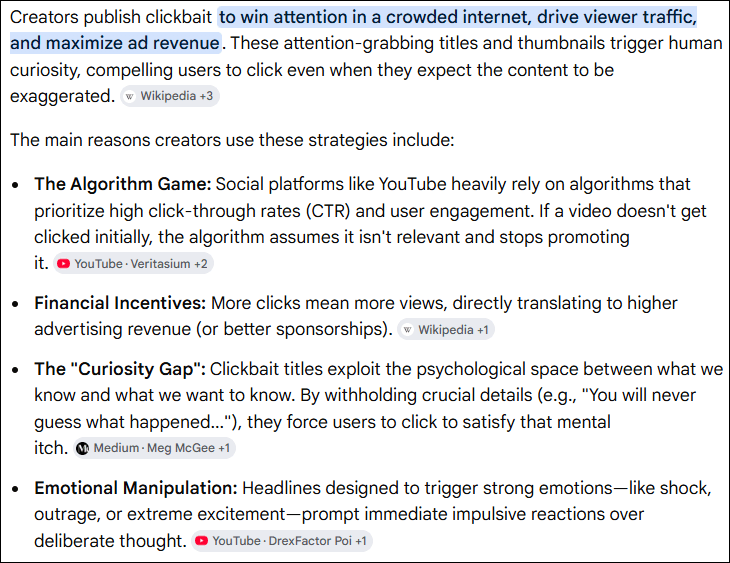
This webinar is similar to a TED talk and covers what has changed with the release of the new Mitotree, and why. The tree has its own genealogy and “history” and it’s a fascinating story about what we did and why – challenges we never expected, and how we overcame them in new ways to make mitochondrial DNA even more valuable to genealogists.
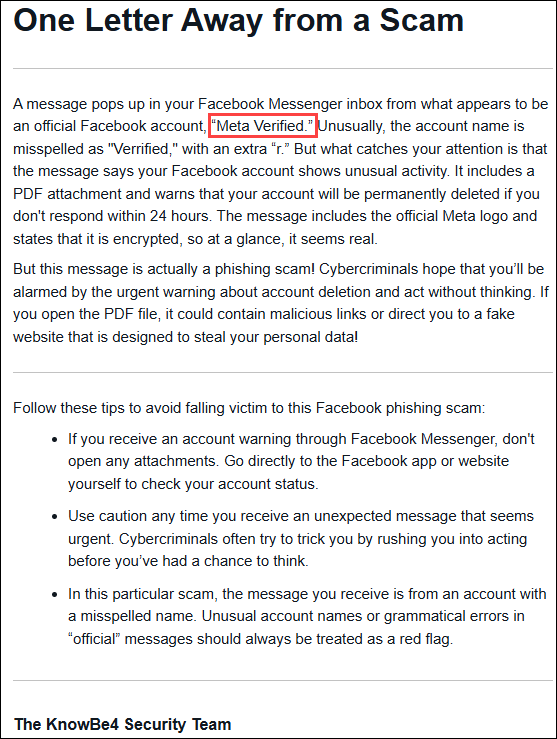
You don’t need to understand the science behind mitochondrial DNA to enjoy this webinar. So, make yourself a nice cuppa something and enjoy learning about how we developed new scientific methodologies to create better ways to break through those maternal line brick walls. The results are incredible!

What’s This All About?

The mitochondrial tree of humanity has been rewritten, connecting all of us more succinctly than ever before on the new Mitotree.

Everyone receives mitochondrial DNA from their mother with no admixture from the father, unlike autosomal DNA. This unique feature makes mitochondrial DNA very unique and extremely useful for genealogy. Your mother received her mitochondrial DNA from her mother, then mother to daughter, all the way back in time to Mitochondrial Eve.

Mitochondrial DNA is never admixed with the DNA of the other parent, so you never have to sort out which lines it comes from. We are all leaves on the twigs on the branches of the tree of humankind and mitochondrial DNA shows you exactly where you fit, how you got there, and who else is there with you.

I don’t know about you, but I want to know where my ancestors came from – even if I don’t know their names beyond my end-of-line brick wall. I can still learn about who they were and now, with new matching tools, you can focus on which matches may solve those brick-wall mysteries.

The mitochondrial tree had not been updated since 2016, but now, with more than a million samples to work with, 50 times more than before, the tree structure has been expanded eight-fold (soon to be nine) by combining samples from academic publications, ancient DNA, public sources, and testers at FamilyTreeDNA.

The new Mitotree and companion tools provide information never before available to genealogists about their matrilineal lineages. In addition to the vastly expanded genetic tree, FamilyTreeDNA rolled out mtDNA Discover that provides a dozen fascinating chapters in your mitochondrial book.

As a Million Mito Team member, I’ll explain the challenges we overcame to create the tree of humanity – and how the new Mitotree is useful to genealogists. All genealogists can benefit, because everyone has mitochondrial DNA that holds the key to information never before available!

Let those brick walls fall!!!

Sign up to reserve your space and see you on Friday!!

_____________________________________________________________

Share the Love!

You’re always welcome to forward articles or links to friends and share on social media.

If you haven’t already subscribed (it’s free,) you can receive an e-mail whenever I publish by clicking the “follow” button on the main blog page, here.

You Can Help Keep This Blog Free

I receive a small contribution when you click on some of the links to vendors in my articles. This does NOT increase your price but helps me keep the lights on and this informational blog free for everyone. Please click on the links in the articles or to the vendors below if you are purchasing products or DNA testing.

Thank you so much.

DNA Purchases and Free Uploads

Genealogy Products and Services

My Books

Genealogy Books

Genealogy Research