When I teach about genetic genealogy, people often ask, “What’s next? How can I break down my brick wall?” Sometimes I can reply that a Y-DNA test or mitochondrial DNA will help them under specific circumstances. But more often than not, what they really need is a precise, step-by-step methodology that includes autosomal DNA and utilizes multiple tools and techniques across vendors.
Even after people have taken Y-DNA and/or mitochondrial DNA tests PLUS autosomal tests at the major vendors, we still need a methodology to work with combinations of those results. Often, the answers we need aren’t just sitting there like a pretty rock, waiting to be picked up and admired, but depend on us using the results and matches as tools to help focus our search in the right direction.
It’s more like a scavenger hunt than a single discovery.
Focus
Sometimes I feel like a fish out of water – flip-flopping from ancestor to ancestor, match to match and hint to hint, hoping that the magic bullet will fall into my lap, but that almost never happens.
By this point in my research, I’ve perused all the easy records and many of the not-so-easy ones. If you don’t have a surname, or you don’t have a first name, or worse yet, you don’t have either, how is one supposed to search for records?
The good news is that you still carry at least one record in your own body and/or the bodies of your relatives. The DNA of your ancestors.
This is where we’re going to focus our efforts – hence FOCUS, the name of this new series.
Everyone is going to select their closest, or one of their closest, brick-walled ancestors, and we’re going to use several methods and tools to focus on identifying that ancestor.
Prepare
Before I publish the next article in the series, there are a few things that I’d like you to think about and do in preparation.
- First, there’s no guarantee that you’ll break through your brick wall during this series. You might, and you also might not. You stand a much better chance of breaking through that brick wall if you focus and follow these steps than if you don’t.
Keep in mind that even negative evidence is evidence, and just because you don’t break through right away doesn’t mean you won’t. New people test everyday and new records become available too. If nothing else, your ancestor will have more meat on their bones, and you’ll have a process to build upon.
- Second, if your brick wall is very close in time, meaning parents or grandparents, you’ll want the already-written “In Search Of Unknown Family” series, which you can find, here.
- Third, you’ll need to keep a research journal or log by ancestor, family or location, which will also include your other related ancestors. For example, if you’re looking for Lucy whose surname you don’t know, but you know that she married William Moore, then your research journal will apply to William Moore too, and other people including their children and either spouse’s parents and siblings, whether that was your intention or not. The neighbors are probably relevant as well.
That “it takes a village” saying is particularly relevant here. People didn’t tend to move to the next location alone, and often their community consisted of their cousins and relatives – who are also your relatives, and hold clues to the identity of your ancestor. When I’m extracting records for the Moore surname in Halifax County, VA, for example, I extract everything for that and similarly spelled surnames, not just one particular person, so I don’t have to replow that field.
Tracking and Recording Your Research
If you don’t already have a research journal methodology, I would suggest a spreadsheet.

Here’s a screenshot of two rows in my “Halifax County” spreadsheet where I’ve recorded separate rows for each person in every record. Note that I started this spreadsheet years ago and omitted some columns that I later wished I had included, like the access date.
You’ll want to record:
- Item number beginning with 1. In the example above, the item number is 6, and it’s 6 for every person in that record. Each person in this transaction gets their own separate row, with the same item number. The next record I extracted would be item 7.
- Access date (date you found and retrieved the record)
- Last name
- First name
- State (add a column for country if multiple countries are relevant for this family)
- County
- Town, township or city
- Geographic places like road or creek names (these can be VERY important)
- Year, month and day that the record occurred
- Record repository or source (including a link if applicable – you may want to add a separate column for the link)
- Record type (deed, will, tax list, etc.)
- Role of individual (buyer, seller, witness, etc.)
- Names of additional people in the record (I retain the same item number and other information, changing the name of the person, their role and sometimes an associated comment)
- Transcribed text of the record itself
- Comment, which can include things like the name of an image, something about what you were searching for when you found the record, links, or anything else relevant
You will want to be able to sort and filter this spreadsheet when you are finished. Hint – be sure your date fields and formats are sortable in the way you wish. I normally use filters instead of the sort feature.
The goal isn’t just to record your findings, but to make this spreadsheet as useful as possible to make discoveries that are only available by comparing and incorporating multiple records.
For example, let’s say that you’re extracting all of the Moore records in a Halifax County, VA deed book, and you want to know how many times the surname Henderson is found in the Moore deeds or in conjunction with the Moore family. Is there a pattern? You won’t recognize a pattern from any ONE record, but you may eventually wonder if the Henderson’s are related to the Moore family, and if so, how.
You’ll also want to record nonproductive or negative evidence. For example, let’s say you searched the Halifax County Plea Book for William Moore (including More and Mohr) and found no occurrences. That’s important, because otherwise you‘ll eventually search again, so enter that as a record item.
Note that with the full text search feature introduced by FamilySearch a couple of years ago, if you extracted records from a book that did NOT include every-name indexing including property lines, creek names and witnesses – you’ll want to redo that search using the full text feature at FamilySearch. There’s often LOTS of valuable information buried in records that won’t be found if you’re only viewing records indexed by buyer and seller, for example.
Your To-Do List Before the Series Begins
The In Search Of Unknown Family Series introduces important concepts, so reading that series is your first assignment in preparation for the upcoming FOCUS articles.
Test Your DNA With the Major Vendors
It’s important to test with the major vendors. Each vendor has matches and tools that the others don’t, and we need to identify and work with as many relevant matches as possible.
If you have NOT taken an autosomal DNA test at the first three following vendors, order these tests now so you have results to work with.
- AncestryDNA
- FamilyTreeDNA – Purchase a Family Finder test or upgrade an earlier Family Finder test to the new Family Finder NGS test. You should upgrade if you uploaded your autosomal DNA file from another vendor at any time, or tested at FamilyTreeDNA directly before March of 2026. The upgrade is only $29.
- MyHeritage DNA
- A fourth vendor, 23andMe, is optional, but testing there certainly won’t hurt.
23andMe Sidebar
I have an issue with 23andMe’s policy of forcing customers to repurchase a DNA test at $199 PLUS a subscription at $149 for the first year, renewable at $69 per year, in order to obtain any of their latest tools. This happened around the time of their data breach and subsequent bankruptcy.
I would feel much better about the situation as a whole if a new owner had taken the wheel, but the original owner resigned from the 23andMe board, formed another corporation, and was allowed to buy 23andMe out of the bankruptcy that occurred on her watch.
Furthermore, 23andMe does not support genealogy trees, nor do they have Y-DNA or mitochondrial DNA testing and matching, or research records.
I have (begrudgingly) ordered an upgrade for my own 23andMe test in order to include accurate information in these articles, but I won’t be focusing on 23andMe specifically aside from any unique feature. You can apply the same concepts and techniques to results at 23andMe where possible.
Test Your Relatives
If you have close upstream relatives, such as parents, grandparents, aunts, uncles, and cousins who also descend from your brick-walled ancestor, please ask them to test too.
I explain what I’m trying to achieve, why their test is important, and offer scholarships to sweeten the pie. I view purchasing their DNA tests in the same way I view purchasing a rare research book that I KNOW includes my ancestors but it not available anyplace else.
Your shared matches are extremely important and may provide that brick-wall-breaker. Perhaps even more importantly, they will have relevant matches that you don’t.
So how do you know who to test? You certainly want to test everyone relevant, without wasting money.
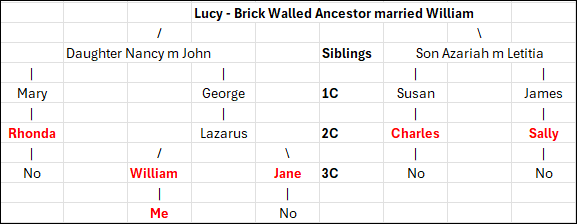
Let’s look at this example where Lucy is the brick-walled ancestor I’m seeking to identify. Her children (labeled siblings) and grandchildren (1C) are all deceased, but second cousins (2C), Rhonda, Charles and Sally are all available to test. Test each of them because they will all have some different segments of DNA from Lucy that the others don’t have.
Lazarus is also a second cousin, but he’s deceased. However, William, my father (in this example, not my real pedigree), and his sister, Jane are both available to test.
You ALWAYS want to test both of your parents and every available grandparent or direct ancestor. In this example, I’ll only inherit some portion of Lucy’s DNA that my father has, but Jane, my aunt, will carry segments of Lucy’s DNA that my father didn’t inherit from Lazarus. Jane’s matches on those segments that neither my father nor I have may be just what we need to identify Lucy.
If Lazarus has other children not shown in this example, we certainly want to test them too.
If the relevant parent has tested, you don’t need to test any of their children. However, if the parent hasn’t tested, absolutely test as many of their children or descendants as possible.
In this case, Rhonda, Jane, Charles and Sally have all tested, so I don’t need to test their children. Their children can only have as much of Lucy’s DNA as their parents had.
However, if any of them had been deceased, then I should test as many of their children as I can to “gather up” as much of Lucy’s DNA as possible.
If any of the people upstream of the bold red people have other children, those children or their descendants would be testing candidates too. Ideally, you want as many descendant testers as possible to increase your chances of identifying that ancestor.
Selecting Your Brick-Wall Ancestor
I want you to be successful, so you’re going to select your closest brick-walled ancestor within certain parameters. If you have multiple brick-walled ancestors at the at the same genealogical distance, you’ll choose one to focus on.
Why your closest brick-walled ancestor? If your brick wall is 5 generations back from you, and they are 5 generations back from your DNA match as well, that means you’re dealing with a 4th cousin match.
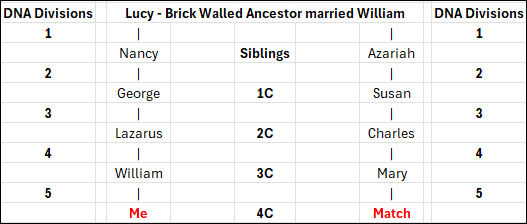
This also means that ancestor’s DNA has been divided a total of 10 times – five times on the path of descent to you, and five times on the path of descent to your match.
A 4th cousin match is likely to be in the 35 cM range. You can view the matching ranges for various relationships at DNAPainter, here.
The entire 4th cousin (4C) matching range is 0-139 cM. You won’t match all of your 4th cousins and are likely to match only 50-70% of your 4th cousins.
That said, the average person has between 1,500 and 4,000 4th cousins. At the 4th cousin level, you have 32 ancestors, so only between 46 and125 4th cousins will descend from any given ancestor, and of those, only a few will have taken a DNA test. The more children that ancestor had that lived to marry and have children of their own, the better your chances of more matches.
The Selection Process
I’m going to be stepping through the ancestor selection process with you, discussing who is and isn’t a good candidate, and why. I’m also going to be using this same methodology to (hopefully) identify one of my own mystery ancestors too.
I have no brick walls closer than 4th cousins. If I did, I’d choose the closest brick wall. You should too in order to have the best chance of solving this puzzle. The further back in time, the more difficult the solve will be.
In my tree, I have four mystery ancestors at the 5X great-grandparent level on my father’s side, and one on my mother’s side.
Those will be the four ancestors I consider selecting. And no, before you do it, I don’t recommend working on all four of them at the same time. Remember, the purpose is to FOCUS.
- Select an ancestor as close generationally as possible, because it’s more likely that both you and other people will carry at least some of their DNA, and the same segment(s) of DNA. Matches closer in time generally carry more total DNA in common, which means better matching and more shared matches.
- Given that the majority of testers are from the US, and assuming you are from the US too, I don’t recommend selecting an ancestor from another country unless you are very comfortable with that language and working with those records. Generally, there will be fewer people who have tested from other countries. If you are going to work with an ancestor from another country, be sure you are in both the MyHeritage and FamilyTreeDNA databases.
My mother’s entire paternal line is either Dutch or German Brethren, and her Dutch ancestors only immigrated in the mid 1800s, so have few descendants in the databases.
My closest brick wall on her paternal line is Traut Enterlein, a German man who was named in an out-of-wedlock baptism for his daughter in Germany in 1823. He is not found in any other records in that part of Germany, so actually identifying “who he is”, even with a name, would be extremely difficult, and I have nothing to “anchor to” here. He is eliminated as a candidate because he’s found in a country where I don’t speak the language, where fewer people have taken DNA tests, and we’ve already spent a substantial amount of time trying to identify him in the records.
Brick-walled ancestors on Mom’s maternal side are two generations further back in time. Half are German and the other half are a combination of English and Acadian.
- Avoid both endogamy and pedigree collapse, if possible. I don’t recommend a line with baked-in challenges that will make DNA more difficult.
Acadians are heavily endogamous and often suffer from pedigree collapse since there were so few founding families in the mid-1600s. The same goes for Brethren families who immigrated in the early 1700s. Those lines are too far back generationally anyway, so they have already been eliminated, but if they weren’t, I’d eliminate them because of heavy endogamy and pedigree collapse, both, not to mention record loss.
My father’s side has much better candidates.
- Try to select an ancestor where you have some familiarity with the location, the culture, and the records. If you have printed resources at the ready, possibly ones that are not online, that’s a plus.
- When you’re trying to decide between ancestors, select one whose spouse you are sure of, and who has children you can document. Do you know important things about them like their religion, where they lived during specific times, and who their neighbors were? If not, take some time now to brush up on what you do know about their spouse and children.
- Check back at all of the records vendors and resources, including Ancestry, MyHeritage, WikiTree, and FamilySearch, to see if anything new is easily available for either your brick-wall candidate or their spouse.
- I do NOT recommend selecting an ancestral couple, neither of whom you can identify, unless you’re “lucky” enough to have no other brick-walled ancestors to choose from. It’s possible to solve this “double-blind” couple, but it’s substantially more difficult because you have no same-generation anchor.
My Candidates
I’m selecting one of my brick walls and hope to solve it during this process. Let’s run through the decision-making process so you’ll understand some of the considerations and why they weigh as factors. I wish I didn’t have so many choices, and I’d like to solve them all, but my best chance is to work on one at a time.
Most candidates are women because their birth surnames tend to easily become lost after they marry, and with their surname, their parents are lost too. Given how little we know, we have to presume (dangerous word), at least for now, that your missing female ancestor was the mother of all of their husband’s children, unless we know or subsequently prove otherwise.
Let’s review my candidates.
- Lucy was born about 1754, probably in Virginia, and died in 1832 in Halifax County, VA. She married William Moore between 1772 and 1774, who may or may not have been a circuit-riding minister at that time. She is found under her own name on the 1830 census, there’s an 1826 chancery suit, and I know who her children and neighbors are, so she might be a good candidate. One vote against selecting Lucy is that I don’t know where she was born, nor do I know where they were married, although there’s a very strong possibility that it took place in Halifax County. The fact that he was a circuit-rider means he could have met her anyplace. If they were married in Halifax County, their families could have been allied before arriving there. William Moore’s family came from Prince Edward County about 1770, and we know who his parents were. One good thing is that Lucy is a fairly uncommon name, but there are multiple William Moores in Halifax County, and there are two other Lucy Moores. One is her daughter, and one is her daughter-in-law. The fact that Lucy and William Moore had 12 known children, with at least 8 who married, means there is a good chance of matching at least some descendants. Unfortunately, I don’t have her mitochondrial DNA, which removes one possible tool unless I can find a tester.
- Jane, born about 1760 in an unknown location, but probably Virginia, was the wife of Lazarus Dodson. They moved across multiple frontiers into what would become early Tennessee, an area that sustained substantial record loss. Jane died between 1830 and 1840. There’s a lot of uncertainty about Jane’s life. She probably had at least 8 children, and we know something about six of them. Given that we already have a better candidate with Lucy, I’ll eliminate Jane for now.
- William Crumley’s wife, whose name I don’t know, was born around 1765 or 1770, possibly in Virginia. She was married to William Crumley around 1786 or 1787, probably in Frederick County, VA, or nearby. I do have her mitochondrial DNA and we know the family was Quaker which are both benefits. I’ve been working with a cousin who has delved deeply into Quaker records, and I have some records from a trip to the FamilySearch Library in Salt Lake City that I have not yet processed. She and William had at least 10 children who married, and I know quite a bit about them. She would probably be an excellent choice. For lack of another name, I’ve been calling her H2a1, her legacy mitochondrial haplogroup before Mitotree, but she has a much more complete haplogroup now. She would be a good candidate, and I REALLY want to identify her.
- Mary, wife of John Harrold (by various spellings), was born about 1750, possibly in Ireland, although it would be unusual for a first-generation Irish immigrant to end up deep in the Appalachian frontier. Mary died in 1826 in Wilkes County, NC. We know nothing about John’s background, other than he served in the Revolutionary War, in Virginia. He may have been living in Botetourt County, although we don’t know for sure, and there are multiple men by that name. Mary had at least 7 children, six of whom were married. We do not have her mitochondrial DNA. Given that we know so little about John, and we have better candidates with both Lucy, William Moore’s wife, and William Crumley’s wife, I’m eliminating Mary for now.
- Isabel, the wife of Michael McDowell – another couple from Wilkes County, NC. Their daughter married the son of Mary and John Harrold. Isabel was probably born about 1750, someplace in Virginia. We don’t know where they were married, but it could have been in Franklin County, VA. They lived in Wilkes County for several decades before moving on to Claiborne County, TN. We know very little about Michael’s early life, other than his Revolutionary War service, although I’ve written about him four times as additional information dribbles out. They had at least 8 children, and a deposition after Michael’s death tells us where they moved and settled, which is a very big plus. We know her first name thanks to a 1793 deed. Isabel is a reasonable candidate, but I eliminated her after comparison to the other candidates, in part because of multiple frontier moves with few records and no known point of origin.
- Elizabeth, wife of Andrew McKee, was born about 1767, possibly someplace in Virginia. They were in Washington Co., VA by 1789, although we don’t know where either originated. They may have married before they moved to Washington County, where we find several records. They had 14 children. Twelve are known to have married, and the other two probably did as well. We know who their neighbors were. We also have Elizabeth’s mitochondrial DNA. Unfortunately, we know nothing about Andrew McKee’s family or where he was from. However, Elizabeth is a strong candidate because so many records exist in Washington County, they had a large number of children, and many continued to live in Washington County or nearby, making them easier to track.
- If I didn’t already have good candidates, there’s one more ancestor I’d consider, even though James Lee Claxton/Clarkson is a generation further back in my tree, born about 1775, and his unknown parents are the brick walls. I know I just told you NOT to do this, so I won’t either, but the reason I might have considered his parents, or more specifically his father, as a strong candidate is because we have several Y-DNA matches, including Big-Y testers, and we know the ancestors of his matches came from NC. We also have many autosomal testers and matches, which would help immensely, and there’s a Clarkson/Claxton DNA Surname Project. A contiguous surname is a HUGE benefit not available with female ancestors, and I just feel that I’m SO CLOSE to solving this mystery. For now, James’s parents are eliminated because they are two generations further back in time than our other candidates, we know nothing about either of them, except Y-DNA results, and we have better candidates for this exercise.
After evaluation, I still have two candidates in the running – Lucy, wife of William Moore, and H2a1, William Crumley’s wife. I haven’t decided for sure yet, but right now, William Crumley’s wife is leading because I have an amazing collaborator along with some unprocessed records that may hold important information. I know there probably aren’t any smoking guns there, but when combined with DNA, we may well ignite that gunpowder.
FOCUS
Are you ready to focus?
Let’s get our ducks in a row.
- Order any DNA tests you need to order for yourself and relatives now.
- Select your ancestor.
- Prepare your research journal by reviewing which records you’ve already researched and record what you have.
- Refamiliarize yourself. Take a look at those results again with fresh eyes. It helps when reviewing match results to be able to view surnames in your matches trees and recall that you’ve seen that name before, and where.
- Check to see if any new records or resources are now available.
Who do you want to find?
_____________________________________________________________
Share the Love!
You’re always welcome to forward articles or links to friends and share on social media.
Subscribe!
If you haven’t already subscribed, it’s free. You’ll receive an e-mail whenever I publish by clicking the “follow” button at the top of the main blog page, here.
Help Keep This Blog Free
I receive a small commission when you click a vendor link in my articles and purchase that item. This does NOT increase your price but helps me keep the lights on and this informational blog free for everyone. Please click on the affiliate links in the articles or to the vendors below if you are purchasing products or DNA testing.
Thank you so much.
DNA Purchases and Free Uploads
- FamilyTreeDNA – Y-DNA, mitochondrial and autosomal DNA testing
- MyHeritage DNA – Autosomal DNA test
- AncestryDNA – Autosomal DNA test
- AncestryDNA Plus Traits
- 23andMe Ancestry – Autosomal DNA only, no Health
- 23andMe Ancestry Plus Health
Genealogy Products and Services
- MyHeritage Subscription with Free Trial
- Legacy Family Tree Webinars – Genealogy and DNA classes, subscription-based, some free
- Legacy Family Tree Software – Genealogy software for your computer
- OldNews – Old Newspapers with links to save to MyHeritage trees
- MyHeritage Omni comprehensive “everything included” subscription plan
- Newspapers.com – Search newspapers for your ancestors
- NewspaperArchive – Search different newspapers for your ancestors
My Books
- DNA for Native American Genealogy – by Roberta Estes, for those ordering the e-book from anyplace, or paperback within the United States
- DNA for Native American Genealogy – for those ordering the paperback outside the US
- The Complete Guide to FamilyTreeDNA – Y-DNA, Mitochondrial, Autosomal and X-DNA – for those ordering the e-book from anyplace, or paperback within the United States
- The Complete Guide to FamilyTreeDNA – Y-DNA, Mitochondrial, Autosomal and X-DNA for those ordering the paperback from outside the US
Genealogy Books
- Genealogical.com – Lots of wonderful genealogy research books
- American Ancestors – Wonderful selection of genealogy books
Genealogy Research
- Legacy Tree Genealogists – Professional genealogy research