How to Download Your DNA Match Lists & Segment Files

If you’ve taken an autosomal DNA test and you’re working to determine how your matches are related to you, meaning which ancestors you share, you’ll want to download your DNA match list.

There are three types of files that you can potentially download from each of the major autosomal DNA testing vendors.

Raw DNA file – If you want to upload your DNA file to another vendor for matching at their site (MyHeritage and FamilyTreeDNA,) you’ll need to download your raw data file from the vendor where you tested. I provided step-by-step instructions for this process at each of the vendors, here.

DNA Segment File – This file contains the segment information with each of your matches, including the start and end locations of your matching segment(s), the total number of matching (shared) centiMorgans (cM) above the vendor’s matching threshold, and sometimes the longest segment.

If you want to sort a spreadsheet to look for all of your matches on specific areas of chromosomes, this is the best way to achieve that goal. I use this information at DNAPainter when painting the segments of matches with whom I can identify a common ancestor.

You may be able to download filtered lists or individual match data as well, as opposed to an entire match list spreadsheet, but the methodology varies at each vendor.

Ancestry does not provide segment information at all. 23and Me combines this information with the next file.

Match List – This file will contain your list of matches along with other information about the matches which you will find genealogically helpful. I find using this file easier than viewing each match separately at the vendors when trying to obtain an overview or when searching for a particular surname in either my match list or their ancestral surnames.

I can also sort by haplogroup, for example, which can sometimes help immensely if that information is available.

Ancestry does not facilitate or allow downloading your match list. 23andMe combines this information with your matching DNA segments in one file.

Here’s a handy-dandy summary by testing vendor.

Vendor Raw DNA File DNA Segment File Match List
23andMe Yes, instructions here Yes, instructions in this article Yes, instructions in this article
FamilyTreeDNA Yes, instructions here Yes, instructions in this article Yes, instructions in this article
MyHeritage Yes, instructions here Yes, instructions in this article Yes, instructions in this article
Ancestry Yes, instructions here No, does not provide No, does not provide

I’ve written step-by-step instructions for how to download your Match List and DNA Segment file(s) at each vendor.

23andMe

Please note that 23and Me is the only vendor to limit your matches, which means you will only receive a file containing:

  • 1500 matches if you tested before the V5 chip, so before August 9, 2017, and have not established communications with matches that would have rolled off of your list otherwise. (I have 1805 matches, so have established contact with 305 that would otherwise have rolled off the end.)
  • 1500 if you tested on the V5 chip, so beginning August 9, 2017, but did not establish communications OR did not purchase the health option, OR did not purchase the yearly membership. If you established communications, those matches won’t roll off, and if you purchase the membership, the match threshold is raised. You may still need to establish contact to keep people from rolling off the larger list as well.
  • 5000-ish (23andMe doesn’t say exactly) if you tested on the V5 chip for BOTH ancestry and healthy AND purchased the yearly membership.

You will only receive match information for people who are listed on your restricted match list, not people who have rolled off as closer matches arrived. Therefore, I encourage you to retain your old match lists because some of your matches will be gone each time you download.

23andMe combines your match list with your segment file.

Sign on and select DNA Relatives on the toolbar.

Next, select “See all relatives.”

Scroll to the very bottom and click on Request DNA Relatives Data Download.

Your file will be prepared, and you’ll receive an email when the file is ready to be downloaded. Mine only took a minute or two, and I simply waited on my 23andMe page until the message appeared.

Save and open the downloaded file, and you’ll see a variety of information about each of your matches, in closest-match-first order, including:

  • Match name
  • Chromosome segment match information, including start and end locations, genetic distance (centiMorgans cMs,) and SNPs
  • Maternal and paternal sides if your parent or parents have tested
  • Number of matching segments
  • Relationship information
  • Birth year
  • Percent shared DNA
  • Haplogroups
  • Notes you’ve made
  • Family surnames
  • Family locations
  • 4 Grandparents’ birth country
  • Family Tree URL, external to 23andMe, if provided by tester

FamilyTreeDNA

At FamilyTreeDNA, your match list and segment information are contained in two separate files.

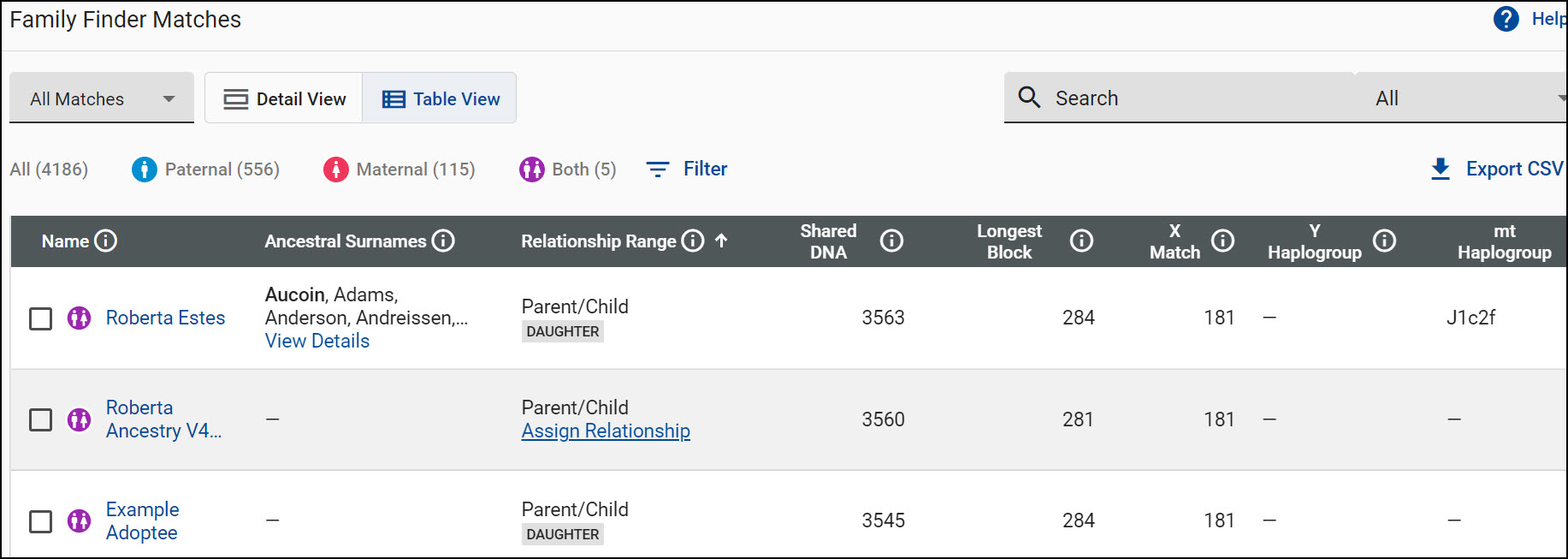
Sign on and click on Family Finder Matches under Autosomal DNA Results and Tools.

You’ll see your matches. At the top of your match list, on the right side, click on “Export CSV.”

You can select “All Matches” or “Filtered Matches.”

If you haven’t selected a filter, you won’t be able to make that selection. Generally, you want the entire match list.

Your match list will be prepared and downloaded.

You’ll find:

  • Match name
  • Relationship information
  • Shared DNA total
  • Longest segment
  • Linked relationship if you have linked that person to their profile card in your tree
  • Ancestral surnames
  • Haplogroups if tested
  • Notes you’ve made
  • Bucketing – Paternal, maternal, both, none
  • X-Match amount

Note – If you’re a male, valid X matches (meaning matches that are not identical by chance,) will always be on your maternal side because you received your Y chromosome from your father instead of a copy of his X. I wrote about X matching, here.

If your match is a male, an X match will always be through his mother’s line.

Segment information is available in a separate download on the chromosome browser page.

Under Autosomal DNA Results and Tools, click on the Chromosome Browser.

You’ll be able to select people to compare in the chromosome browser, but to download all of your matching segments to all of your matches, click on “Download All Segments.”

If you select people to compare your relationship, and then click on “Download Segments,” you’ll only be downloading the segments for the people you are comparing.

To download all of your segments, be sure the “All” is showing in the link and download before selecting anyone for comparison.

MyHeritage

MyHeritage also provides two separate files for matches and chromosome segment information.

Select DNA matches, then the 3-dot menu, then “Export DNA Matches.”

If you also want your individual segment information for your matches, also order the second file on that menu, “Export shared DNA segment info for shared DNA matches.”.

You’ll see a message that your report is being prepared and will be sent to the email address on file.

If your file doesn’t appear in your email box, check your spam folder.

Your match list provides:

  • Match name
  • Age
  • Country
  • Contact link
  • DNA managed by (if not the tester)
  • Contact link for DNA manager
  • Relationship information
  • Total cM
  • Percent of matching DNA
  • Number of matching segments
  • Largest segment
  • Has tree and tree manager
  • Number of people in their tree
  • Tree link and link to contact tree manager
  • Number of SmartMatches
  • Shared ancestral surnames
  • All ancestral surnames
  • Notes you’ve made
  • Has Theory of Family Relativity

Now that you have these files, what do you do with them?

Evaluating

Is there anything that stands out as remarkable, perhaps that you didn’t know or notice before? Patterns that might be informative?

I had a huge brick wall on my mother’s side that has since fallen, but retrospectively, had I reviewed these lists when that wall was still standing firm, there was a huge hint just waiting for me.

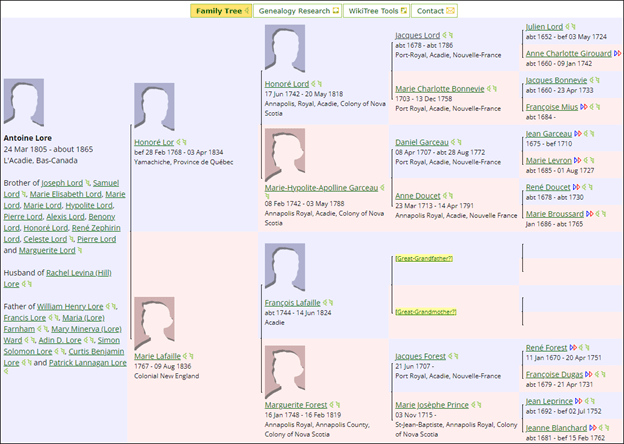
My mother has a very unexpected Acadian line through her great-grandfather, Anthony Lore, so 12.5% of her heritage.

On my match list, I see a large number of French surnames, but I didn’t know of any French ancestors on either side of my tree. Many surnames repeat, such as LeBlanc, d’Entremont (which is really unusual), Landry, and deForest. Why were these people on my match list? This is definitely smoke, and there must be fire someplace, but where?

Looking at the locations associated with these matches’ ancestors would have provided additional clues.

However, simply googling my great-grandfather’s surname in combination with those French surnames I listed above produced these 3 top search results.

Yes, you guessed it. Anthony turned out to be “Antoine” and Lore is spelled in a variety of ways, including Lord. His family is Acadian.

That’s Anthony Lore, which is how he was listed on the death certificate of his son, in the software on my computer, above, and here is Antoine Lore at WikiTree, below.

As you can see, that brick wall falling opened a whole new group of ancestors, and along with it, my appreciation of endogamy😊

Match lists facilitate viewing the big picture and can be a very useful tool for people seeking unknowns or trying to group people together in a variety of ways.

Do you have any brick walls that need to fall?

How can or do you utilize your match lists?

_____________________________________________________________

Follow DNAexplain on Facebook, here or follow me on Twitter, here.

Share the Love!

You’re always welcome to forward articles or links to friends and share on social media.

If you haven’t already subscribed (it’s free,) you can receive an email whenever I publish by clicking the “follow” button on the main blog page, here.

You Can Help Keep This Blog Free

I receive a small contribution when you click on some of the links to vendors in my articles. This does NOT increase the price you pay but helps me to keep the lights on and this informational blog free for everyone. Please click on the links in the articles or to the vendors below if you are purchasing products or DNA testing.

Thank you so much.

DNA Purchases and Free Uploads

Genealogy Products and Services

My Book

Genealogy Books

Genealogy Research

In Search of…Vendor Features, Strengths, and Testing Strategies

This is the third in our series of articles about searching for unknown close family members, specifically; parents, grandparents, or siblings. However, these same techniques can be applied to ancestors further back in time too.

In this article, we are going to discuss your goals and why testing or uploading to multiple vendors is advantageous – even if you could potentially solve the initial mystery at one vendor. Of course, the vendor you test with first might not be the vendor where the mystery will be solved, and data from multiple vendors might just be the combination you need.

Testing Strategy – You Might Get Lucky

I recommended in the first article that you go ahead and test at the different vendors.

Some people asked why, and specifically, why you wouldn’t just test at one vendor with the largest database first, then proceed to the others if you needed to.

That’s a great question, and I want to discuss the pros and cons in this article more specifically.

Clearly, that is one strategy, but the approach you select might differ based on a variety of considerations:

  • You may only be interested in obtaining the name of the person you are seeking – or – you may be interested in finding out as much as possible.
  • You may find that your best match at one company is decidedly unhelpful, and may even block you or your efforts, while someone elsewhere may be exactly the opposite.
  • Solving your mystery may be difficult and painful at one vendor, but the answer may be infinitely easier at a different vendor where the answer may literally be waiting.
  • There may not be enough, or the right information, or matches, at any one vendor, but the puzzle may be solvable by combining information from multiple vendors and tests. Every little bit helps.
  • You may have a sense of urgency, especially if you hope to meet the person and you’re searching for parents, siblings or grandparents who may be aging.
  • You may be cost-sensitive and cannot afford more than one test at a time. Fortunately, our upload strategy helps with that too. Also, watch for vendor sales or bundles.

From the time you order your DNA test, it will be about 6-8 weeks, give or take a week or two in either direction, before you receive results.

When those results arrive, you might get lucky, and the answer you seek is immediately evident with no additional work and just waiting for you at the first testing company.

If that’s the case, you got lucky and hit the jackpot. If you’re searching for both parents, that means you still have one parent to go.

Unidentified grandparents can be a little more difficult, because there are four of them to sort between.

If you discover a sibling or half-sibling, you still need to figure out who your common parent is. Sometimes X, Y, and mitochondrial DNA provides an immediate answer and is invaluable in these situations.

It’s more likely that you’ll find a group of somewhat more distant relatives. You may be able to figure out who your common grandparents or great-grandparents are, but not your parent(s) initially. Often, the closer generation or two is actually the most difficult because you’re dealing with contemporary records which are not publicly available, fewer descendants, and the topic may be very uncomfortable for some people. It’s also complicated because you’re often not dealing with “full” relationships, but “half,” as in half-sibling, half-niece, half-1C, etc.

You may spend a substantial amount of time trying to solve this puzzle at the first vendor before ordering your next test.

That second test will also take about 6-8 weeks, give or take. I recommend that you order the first two autosomal tests, now.

Order Your First Two Autosomal Tests

The two testing companies with the largest autosomal databases for comparison, Ancestry, and 23andMe, DO NOT accept DNA file uploads from other companies, so you’ll need to test with each individually.

Fortunately, you CAN transfer your autosomal DNA tests to both MyHeritage and FamilyTreeDNA, for free.

You will have different matches at each company. Some people will be far more responsive and helpful than others.

I recommend that you go ahead and order both the Ancestry and 23andMe tests initially, then upload the first one that comes back with results to both FamilyTreeDNA and MyHeritage. Complete, step-by-step download/upload instructions can be found here.

You can also upload your DNA file to a fifth company, Living DNA, but they are significantly smaller and heavily focused on England and Great Britain. However, if that’s where you’re searching, this might be where you find important matches.

You can also upload to GEDMatch, a popular third-party database, but since you’re going to be in the databases of the four major testing companies, there is little to be gained at GEDMatch in terms of people who have not tested at one of the major companies. Do NOT upload to GEDMatch INSTEAD of testing or uploading to the four major sites, as GEDMatch only has a small fraction of the testers in each of the vendor databases.

What GEDMatch does offer is a chromosome browser – something that Ancestry does NOT offer, along with other clustering tools which you may find useful. I recommend GEDMatch in addition to the others, if needed or desired.

Ordering Y and Mitochondrial DNA Tests

We reviewed the basics of the different kinds of DNA, here.

Some people have asked why, if autosomal DNA shows relatives on all of your lines, would one would want to order specific tests that focus on just one line?

It just so happens that the two lines that Y and mitochondrial DNA test ARE the two lines you’re seeking – direct maternal – your mother (and her mother), and direct paternal, your father (and his father.)

These two tests are different kinds of DNA tests, testing a different type of DNA, and provide very focused information, and matches, not available from autosomal DNA tests.

For men, Y DNA can reveal your father’s surname, which can be an invaluable clue in narrowing paternal candidates. Knowing that my brother’s Y DNA matched several men with the surname of Priest made me jump for joy when he matched a woman of that same last name at another vendor.

Here’s a quote from one of the members of a Y DNA project where I’m the volunteer administrator:

“Thank you for your help understanding and using all 4 kinds of my DNA results. By piecing the parts together, I identified my father. Specifically, without Y DNA testing, and the Big Y test, I would not have figured out my parental connection, and then that my paternal line had been assigned to the wrong family. STR testing gave me the correct surname, but the Big Y test showed me exactly where I fit, and disproved that other line. I’m now in touch with my father, and we both know who our relatives are – two things that would have never happened otherwise.”

If you fall into the category of, “I want to know everything I can now,” then order both Y and mitochondrial DNA tests initially, along with those two autosomal tests.

You will need to order Y (males only) and mitochondrial DNA tests separately from the autosomal Family Finder test, although you should order on the same account as your Family Finder test at FamilyTreeDNA.

If you take the Family Finder autosomal test at FamilyTreeDNA or upload your autosomal results from another vendor, you can simply select to add the Y and mitochondrial DNA tests to your account, and they will send you a swab kit.

Conversely, you can order either a Y or mitochondrial DNA test, and then add a Family Finder or upload a DNA file if you’ve already taken an autosomal DNA test to that account too. Note – these might not be current prices – check here for sales.

You will want all 3 of your tests on the same account so that you can use the Advanced Matches feature.

Using Advanced Matches, you’ll be able to view people who match you on combinations of multiple kinds of tests.

For example, if you’re a male, you can see if your Y DNA matches also match you on the Family Finder autosomal test, and if so, how closely?

Here’s an example.

In this case, I requested matches to men with 111 markers who also match the tester on the Family Finder test. I discovered both a father and a full sibling, plus a few more distant matches. There were ten total combined matches to work with, but I’ve only shown five for illustration purposes.

This information is worth its weight in gold.

Is the Big Y Test Worth It?

People ask if the Big Y test is really worth the extra money.

The answer is, “it depends.”

If all you’re looking for are matching surnames, then the answer is probably no. A 37 or 111 marker test will probably suffice. Eventually, you’ll probably want to do the Big Y, though.

If you’re looking for exact placement on the tree, with an estimated distance to other men who have taken that test, then the answer is, “absolutely.” I wish the Big Y test had been available back when I was hunting for my brother’s biological family.

The Big Y test provides a VERY specific haplogroup and places you very accurately in your location on the Y DNA tree, along with other men of your line, assuming they have tested. You may find the surname, as well as being placed within a generation or a few of current in that family line.

Additionally, the Discover page provides estimates of how far in the past you share a common ancestor with other people that share the same haplogroup. This can be a HUGE boon to a male trying to figure out his surname line and how closely in time he’s related to his matches.

Big Y NPE Examples

Y DNA SNP mutations tested with the Big Y test accrue a mutation about every generation, or so. Sometimes we see mutations in every generation.

Here’s an example from my Campbell line. Haplogroups are listed in the top three rows.

I created this spreadsheet, but FamilyTreeDNA provides a block tree for Big Y testers. I’ve added the genealogy of the testers, with the various Big Y testers at the bottom and common ancestors above, in bold.

We have two red NPE lines showing. The MacFarlane tester matches M. Campbell VERY closely, and two Clark males match W. Campbell and other Campbells quite closely. We utilized autosomal plus the Y results to determine where the unknown parentage events occurred. Today, if you’re a Clark or MacFarlane male, or a male by any other surname who was fathered by a Y chromosome Campbell male (by any surname), you’ll know exactly where you fit in this group of testers on your direct paternal line.

Y DNA is important because men often match other men with the same surname, which is a HUGE clue, especially in combination with autosomal DNA results. I say “often,” because it’s possible that no one in your line has tested, or that your father’s surname is not his biological surname either.

Y and mitochondrial DNA matches can be HUGELY beneficial pieces of information either by confirming a close autosomal relationship on that line, or eliminating the possibility.

Lineage-Specific Population Information

In addition to matching other people, both Y and mitochondrial DNA tests provide you with lineage-specific population or “ethnicity” information for this specific line which helps you focus your research.

For example, if you view the Y DNA Haplogroup Origins shown for this tester, you’ll discover that these matches are Jewish.

The tester might not be Jewish on any other genealogical line, but they definitely have Jewish ancestry on their Y DNA, paternal, line.

The same holds true for mitochondrial DNA as well. The main difference with mitochondrial DNA is that the surname changes with each generation, haplogroups today (pre-Million Mito) are less specific, and fewer people have been tested.

Y and Mitochondrial DNA Benefits

Knowing your Y and mitochondrial DNA haplogroups not only arm you with information about yourself, they provide you with matching tools and an avenue to include or exclude people as your direct line paternal or maternal ancestors.

Your Y and mitochondrial DNA can also provide CRITICALLY IMPORTANT information about whether that direct line ancestor belonged to an endogamous population, and where they came from.

For example, both Jewish and Native populations are endogamous populations, meaning highly intermarried for many generations into the past.

Knowing that helps you adjust your autosomal relationship analysis.

Why Order Multiple Tests Initially Instead of Waiting?

If you’ve been adding elapsed time, two autosomal tests (Ancestry and 23andMe), two uploads (to FamilyTreeDNA and MyHeritage,) a Y DNA test, and a mitochondrial DNA test, if all purchased serially, one following the other, means you’ll be waiting approximately 6-8 months.

Do you want to wait 6-8 months for all of your results? Can you afford to?

Part of this answer has to do with what, exactly, you’re seeking, and how patient you are.

Only you can answer that question.

A Name or Information?

Are you seeking the name or identity of a person, or are you seeking information about that person?

Most people don’t just want to put a name to the person they are seeking – they want to learn about them and the rest of the family that door opens.

You will have different matches at each company. Even after you identify the person you seek, the people you match may have trees you can view, with family photos and other important information. (Remember, you can’t see living people in trees.) Your matches may have first-person information about your relative and may know them if they are living, or have known them.

Furthermore, you may have the opportunity to meet that person. Time delayed may not be able to be recovered or regained.

One cousin that I assisted discovered that his father had died just six weeks before he broke through that wall and made the connection.

Working with data from all vendors simultaneously will allow you to combine that data and utilize it together. Using your “best” matches at each company, augmented by X, Y, and/or mitochondrial DNA, can make MUCH shorter work of this search.

Your closest autosomal matches are the most important and insightful. In this series, I will be working with the top 15 autosomal results at each vendor, at least initially. This approach provides me with the best chance of meaningful close relationship discoveries.

Data and Vendor Results Integration

Here’s a table of my two closest maternal and paternal matches at the four major vendors. I can assign these to maternal or paternal sides, because I know the identity of my parents, and I know some of these people. If an adoptee was doing this, the top 4 could all be from one parent, which is why we work with the top 15 or so matches.

Vendor Closest Maternal Closest Paternal Comments
Ancestry 1C, 1C1R Half-1C, 2C I recognized both of the maternal and neither of the paternal.
23andMe 2C, 2C 1C1R, half-gr-niece Recognized both maternal, one paternal
MyHeritage Mother uploaded, 1C Half-niece, half-1C Recognized both maternal, one paternal
FamilyTreeDNA Mother tested, 1C1R Parent/child, half-gr-niece uploaded Recognized all 4

To be clear, I tested my mother’s mitochondrial DNA before she passed away, but because FamilyTreeDNA archives DNA samples for 25 years, as the owner/manager of her DNA kit, I was able to order the Family Finder test after she had passed away. Her tests are invaluable today.

Then, years later, I uploaded her results to MyHeritage.

If I was an adopted child searching for my mother, I would find her results in both databases today. She’ll never be at either 23andMe or Ancestry because she passed away before she could test there and they don’t accept uploads.

Looking at the other vendors, my half-niece at MyHeritage is my paternal half-sibling’s daughter. My half-sibling is deceased, so this is as close as I’ll ever get to matching her.

At 23andMe, the half-great-niece is my half-siblings grandchild.

It’s interesting that I have no matches to descendants of my other half-sibling, who is also deceased. Maybe I should ask if any of his children or grandchildren have tested. Hmmmm…..

You can see that I stand a MUCH BETTER chance of figuring out close relatives using the combined closest matches of all four databases instead of the top matches from just one database. It doesn’t matter if the database is large if the right person or people didn’t test there.

Combine Resources

I’ll be providing analysis methodologies for working with results from all of the vendors together, just in case your answer is not immediately obvious. Taking multiple DNA tests facilitates using all of these tools immediately, not months later. Solving the puzzle sooner means you may not miss valuable opportunities.

You may also discover that the door slams shut with some people, or they may not respond to your queries, but another match may be unbelievably helpful. Don’t limit your possibilities.

Let’s take a look at the strengths of each vendor.

Vendor Strengths and Things to Know

Every vendor has product strengths and idiosyncracies that the others do not. All vendors provide matches and shared matches. Each vendor provides ethnicity tools which certainly can be useful, but the features differ and will be covered elsewhere.

  • AncestryAncestry has the largest autosomal database and includes ThruLines, but no Y or mitochondrial DNA testing, no clusters, no chromosome browser, no triangulation, and no X chromosome matching or reporting. Ancestry provides genealogical records, advanced tools, and full tree access to your matches’ trees with an Ancestry subscription. Ancestry does not allow downloading your match list or segment match information, but the other vendors do.
  • 23andMe 23andMe has the second largest database. They provide triangulation and genetic trees that include your closest matches. Many people test at 23andMe for health and wellness information, so 23andMe has people in their database who are not specifically interested in genealogy and probably won’t have tested elsewhere, but may be invaluable to your search. 23andMe provides Y and mtDNA high-level haplogroups only, but no matching or other haplogroup information. If you purchase a new test or have a V5 ancestry+health current test, you can expand your matches from a limit of 1500 to about 5000 with an annual membership. For seeking close relatives, you don’t need those features, but you may want them for genealogy. 23andMe is the only vendor that limits their customers’ matches.
  • MyHeritageMyHeritage has the third largest database that includes lots of European testers. MyHeritage provides triangulation, Theories of Family Relativity, and an integrated cluster tool* but does not report X matches and does not offer Y or mitochondrial DNA testing. MyHeritage accepts autosomal DNA file uploads from other testing companies for free and provides access to advanced DNA features for a one-time unlock fee. MyHeritage includes genealogical records and full feature access to advanced DNA tools with a Complete Subscription. (Free 15 days trial subscription, here.)
  • FamilyTreeDNA Family Finder (autosomal)FamilyTreeDNA is the oldest DNA testing company, meaning their database includes people who initially tested 20+ years ago and have since passed away. This, in essence, gets you one generation further back in time, with the possibility of stronger matches. Their Family Matching feature buckets and triangulates your matches, assigning them to your maternal or paternal sides if you link known matches to their proper place in your tree, even if your parents have not tested. FamilyTreeDNA accepts uploads from other testing companies for free and provides advanced DNA features for a one time unlock fee.
  • FamilyTreeDNAFamilyTreeDNA is the only company that offers both Y and mitochondrial DNA testing products that include matching, integration with autosomal test results, and other tools. These two tests are lineage-specific and don’t have to be sorted from your other ancestral lines.

I wrote about using Y DNA results, here.

I wrote about using mitochondrial DNA results, here.

*Third parties such as Genetic Affairs provide clustering tools for both 23andMe and FamilyTreeDNA. Clustering is integrated at MyHeritage. Ancestry does not provide a tool for nor allow third-party clustering. If the answer you seek isn’t immediately evident, Genetic Affairs clustering tools group people together who are related to each other, and you, and create both genetic and genealogical trees based on shared matches. You can read more about their tools, here.

Fish in all the Ponds and Use All the Bait Possible

Here’s the testing and upload strategy I recommend, based on the above discussion and considerations. The bottom line is this – if you want as much information as possible, as quickly as possible, order the four tests in red initially. Then transfer the first autosomal test results you receive to the two companies identified in blue. Optionally, GEDMatch may have tools you want to work with, but they aren’t a testing company.

What When Ancestry 23andMe MyHeritage FamilyTreeDNA
Order autosomal Initially X X    
Order Y 111 or Big-Y DNA test if male Initially       X
Order mitochondrial DNA test Initially if desired       X
Upload free autosomal When Ancestry or 23andMe results are available     X X
Unlock Advanced Tools When you upload     $29 $19
Optional GEDMatch free upload If desired, can subscribe for advanced tools

When you upload an autosomal DNA file to a vendor site, only upload one file per site, per tester. Otherwise, multiple tests simply glom up everyone’s match list with multiple matches to the same person.

Multiple vendor sites will hopefully provide multiple close matches, which increase your opportunity to discover INFORMATION about your family, not just the identity of the person you seek.

Or maybe you prefer to wait and order these DNA tests serially, waiting until one set of results is back and you’re finished working with them before ordering the next one. If so, that means you’re a MUCH more patient person than me. 😊

Our next article in this series will be about endogamy, how to know if it applies to you, and what that means to your search.

_____________________________________________________________

Follow DNAexplain on Facebook, here or follow me on Twitter, here.

Share the Love!

You’re always welcome to forward articles or links to friends and share on social media.

If you haven’t already subscribed (it’s free,) you can receive an email whenever I publish by clicking the “follow” button on the main blog page, here.

You Can Help Keep This Blog Free

I receive a small contribution when you click on some of the links to vendors in my articles. This does NOT increase the price you pay but helps me to keep the lights on and this informational blog free for everyone. Please click on the links in the articles or to the vendors below if you are purchasing products or DNA testing.

Thank you so much.

DNA Purchases and Free Uploads

Genealogy Products and Services

My Book

Genealogy Books

Genealogy Research

Top Ten RootsTech 2022 DNA Sessions + All DNA Session Links

The official dates of RootsTech 2022 were March 3-5, but the sessions and content in the vendor booths are still available. I’ve compiled a list of the sessions focused on DNA, with web links on the RootsTech YouTube channel

YouTube reports the number of views, so I was able to compile that information as of March 8, 2022.

I do want to explain a couple of things to add context to the numbers.

Most speakers recorded their sessions, but a few offered live sessions which were recorded, then posted later for participants to view. However, there have been glitches in that process. While the sessions were anticipated to be available an hour or so later, that didn’t quite happen, and a couple still aren’t posted. I’m sure the presenters are distressed by this, so be sure to watch those when they are up and running.

The Zoom rooms where participants gathered for the live sessions were restricted to 500 attendees. The YouTube number of views does not include the number of live viewers, so you’ll need to add an additional number, up to 500.

When you see a number before the session name, whether recorded or live, that means that the session is part of a series. RootsTech required speakers to divide longer sessions into a series of shorter sessions no longer than 15-20 minutes each. The goal was for viewers to be able to watch the sessions one after the other, as one class, or separately, and still make sense of the content. Let’s just say this was the most challenging thing I’ve ever done as a presenter.

For recorded series sessions, these are posted as 1, 2 and 3, as you can see below with Diahan Southard’s sessions. However, with my live session series, that didn’t happen. It looks like my sessions are a series, but when you watch them, parts 1, 2 and 3 are recorded and presented as one session. Personally, I’m fine with this, because I think the information makes a lot more sense this way. However, it makes comparisons difficult.

This was only the second year for RootsTech to be virtual and the conference is absolutely HUGE, so live and learn. Next year will be smoother and hopefully, at least partially in-person too.

When I “arrived” to present my live session, “Associating Autosomal DNA Segments With Ancestors,” my lovely moderator, Rhett, told me that they were going to livestream my session to the RootsTech page on Facebook as well because they realized that the 500 Zoom seat limit had been a problem the day before with some popular sessions. I have about 9000 views for that session and more than 7,400 of them are on the RootsTech Facebook page – and that was WITHOUT any advance notice or advertising. I know that the Zoom room was full in addition. I felt kind of strange about including my results in the top ten because I had that advantage, but I didn’t know quite how to otherwise count my session. As it turns out, all sessions with more than 1000 views made it into the top ten so mine would have been there one way or another. A big thank you to everyone who watched!

I hope that the RootsTech team notices that the most viewed session is the one that was NOT constrained by the 500-seat limited AND was live-streamed on Facebook. Seems like this might be a great way to increase session views for everyone next year. Hint, hint!!!

I also want to say a huge thank you to all of the presenters for producing outstanding content. The sessions were challenging to find, plus RootsTech is always hectic, even virtually. So, I know a LOT of people will want to view these informative sessions, now that you know where to look and have more time. Please remember to “like” the session on YouTube as a way of thanking your presenter.

With 140 DNA-focused sessions available, you can watch a new session, and put it to use, every other day for the next year! How fun is that! You can use this article as your own playlist.

Please feel free to share this article with your friends and genealogy groups so everyone can learn more about using DNA for genealogy.

Ok, let’s look at the top 10. Drum roll please…

Top 10 Most Viewed RootsTech Sessions

Session Title Presenter YouTube Link Views
1 1. Associating Autosomal DNA Segments With Ancestors Roberta Estes (live) https://www.youtube.com/watch?v=_IHSCkNnX48


~9000: 1019 + 500 live viewers + 7,400+ Facebook
2 1. What to Do with Your DNA Test Results in 2022 (part 1 of 3) Diahan Southard https://www.youtube.com/watch?v=FENAKAYLXX4 7428
3 Who Is FamilyTreeDNA? FamilyTreeDNA – Bennett Greenspan https://www.youtube.com/watch?v=MHFtwoatJ-A 2946
4 2. What to Do with Your DNA Test Results in 2022 (part 2 of 3) Diahan Southard https://www.youtube.com/watch?v=mIllhtONhlI 2448
5 Latest DNA Painter Releases DNAPainter Jonny Perl (live) https://www.youtube.com/watch?v=iLBThU8l33o 2230 + live viewers
6 DNA Painter Introduction DNAPainter – Jonny Perl https://www.youtube.com/watch?v=Rpe5LMPNmf0 1983
7 3. What to Do with Your DNA Test Results in 2022 (part 3 of 3) Diahan Southard https://www.youtube.com/watch?v=hemY5TuLmGI 1780
8 The Tree of Mankind Age Estimates Paul Maier https://www.youtube.com/watch?v=jjkL8PWAEwk 1638
9 A Sneak Peek at FamilyTreeDNA Coming Attractions FamilyTreeDNA (live) https://www.youtube.com/watch?v=K9sKqNScvnE 1270 + live viewers


10 Extending Time Horizons with DNA Rob Spencer (live) https://www.youtube.com/watch?v=wppXD1Zz2sQ 1037 + live viewers


All DNA-Focused Sessions

I know you’ll find LOTS of goodies here. Which ones are your favorites?

  Session Presenter YouTube Link Views
1 Estimating Relationships by Combining DNA from Multiple Siblings Amy Williams https://www.youtube.com/watch?v=xs1U0ohpKSA 201
2 Overview of HAPI-DNA.org Amy Williams https://www.youtube.com/watch?v=FjNiJgWaBeQ 126
3 How do AncestryDNA® Communities help tell your story? | Ancestry® Ancestry https://www.youtube.com/watch?v=EQNpUxonQO4 183


4 AncestryDNA® 201 Ancestry – Crista Cowan https://www.youtube.com/watch?v=lbqpnXloM5s


494
5 Genealogy in a Minute: Increase Discoveries by Attaching AncestryDNA® Results to Family Tree Ancestry – Crista Cowan https://www.youtube.com/watch?v=iAqwSCO8Pvw 369
6 AncestryDNA® 101: Beginner’s Guide to AncestryDNA® | Ancestry® Ancestry – Lisa Elzey https://www.youtube.com/watch?v=-N2usCR86sY 909
7 Hidden in Plain Sight: Free People of Color in Your Family Tree Cheri Daniels https://www.youtube.com/watch?v=FUOcdhO3uDM 179
8 Finding Relatives to Prevent Hereditary Cancer ConnectMyVariant – Dr. Brian Shirts https://www.youtube.com/watch?v=LpwLGgEp2IE 63
9 Piling on the chromosomes Debbie Kennett https://www.youtube.com/watch?v=e14lMsS3rcY 465
10 Linking Families With Rare Genetic Condition Using Genealogy Deborah Neklason https://www.youtube.com/watch?v=b94lUfeAw9k 43
11 1. What to Do with Your DNA Test Results in 2022 Diahan Southard https://www.youtube.com/watch?v=FENAKAYLXX4 7428
12 1. What to Do with Your DNA Test Results in 2022 Diahan Southard https://www.youtube.com/watch?v=hemY5TuLmGI 1780
13 2. What to Do with Your DNA Test Results in 2022 Diahan Southard https://www.youtube.com/watch?v=mIllhtONhlI 2448
14 DNA Testing For Family History Diahan Southard https://www.youtube.com/watch?v=kCLuOCC924s 84


15 Understanding Your DNA Ethnicity Estimate at 23andMe Diana Elder


https://www.youtube.com/watch?v=xT1OtyvbVHE 66
16 Understanding Your Ethnicity Estimate at FamilyTreeDNA Diana Elder https://www.youtube.com/watch?v=XosjViloVE0 73
17 DNA Monkey Wrenches Katherine Borges https://www.youtube.com/watch?v=Thv79pmII5M 245
18 Advanced Features in your Ancestral Tree and Fan Chart DNAPainter – Jonny Perl https://www.youtube.com/watch?v=4u5Vf13ZoAc 425
19 DNA Painter Introduction DNAPainter – Jonny Perl https://www.youtube.com/watch?v=Rpe5LMPNmf0 1983
20 Getting Segment Data from 23andMe DNA Matches DNAPainter – Jonny Perl https://www.youtube.com/watch?v=8EBRI85P3KQ 134
21 Getting segment data from FamilyTreeDNA DNA matches DNAPainter – Jonny Perl https://www.youtube.com/watch?v=rWnxK86a12U 169
22 Getting segment data from Gedmatch DNA matches DNAPainter – Jonny Perl https://www.youtube.com/watch?v=WF11HEL8Apk 163
23 Getting segment data from Geneanet DNA Matches DNAPainter – Jonny Perl https://www.youtube.com/watch?v=eclj8Ap0uK4 38
24 Getting segment data from MyHeritage DNA matches DNAPainter – Jonny Perl https://www.youtube.com/watch?v=9rGwOtqbg5E 160
25 Inferred Chromosome Mapping: Maximize your DNA Matches DNAPainter – Jonny Perl https://www.youtube.com/watch?v=tzd5arHkv64 688
26 Keeping track of your genetic family tree in a fan chart DNAPainter – Jonny Perl https://www.youtube.com/watch?v=W3Hcno7en94 806


27 Mapping a DNA Match in a Chromosome Map DNAPainter – Jonny Perl https://www.youtube.com/watch?v=A61zQFBWaiY 423
28 Setting up an Ancestral Tree and Fan Chart and Exploring Tree Completeness DNAPainter – Jonny Perl https://www.youtube.com/watch?v=lkJp5Xk1thg 77
29 Using the Shared cM Project Tool to Evaluate DNA Matches DNAPainter – Jonny Perl https://www.youtube.com/watch?v=vxhn9l3Dxg4 763
30 Your First Chromosome Map: Using your DNA Matches to Link Segments to Ancestors DNAPainter – Jonny Perl https://www.youtube.com/watch?v=tzd5arHkv64 688
31 DNA Painter for absolute beginners DNAPainter (Jonny Perl) https://www.youtube.com/watch?v=JwUWW4WHwhk 1196
32 Latest DNA Painter Releases DNAPainter (live) https://www.youtube.com/watch?v=iLBThU8l33o 2230 + live viewers
33 Unraveling your genealogy with DNA segment networks using AutoSegment from Genetic Affairs Evert-Jan Blom https://www.youtube.com/watch?v=rVpsJSqOJZI


162
34 Unraveling your genealogy with genetic networks using AutoCluster Evert-Jan Blom https://www.youtube.com/watch?v=ZTKSz_X7_zs 201


35 Unraveling your genealogy with reconstructed trees using AutoTree & AutoKinship from Genetic Affairs Evert-Jan Blom https://www.youtube.com/watch?v=OmDQoAn9tVw 143
36 Research Like a Pro with DNA – A Genealogist’s Guide to Finding and Confirming Ancestors with DNA Family Locket Genealogists https://www.youtube.com/watch?v=NYpLscJJQyk 183
37 How to Interpret a DNA Network Graph Family Locket Genealogists – Diana Elder https://www.youtube.com/watch?v=i83WRl1uLWY 393
38 Find and Confirm Ancestors with DNA Evidence Family Locket Genealogists – Nicole Dyer https://www.youtube.com/watch?v=DGLpV3aNuZI 144
39 How To Make A DNA Network Graph Family Locket Genealogists – Nicole Dyer https://www.youtube.com/watch?v=MLm_dVK2kAA 201
40 Create A Family Tree With Your DNA Matches-Use Lucidchart To Create A Picture Worth A Thousand Words Family Locket Genealogists – Robin Wirthlin https://www.youtube.com/watch?v=RlRIzcW-JI4 270
41 Charting Companion 7 – DNA Edition Family Tree Maker https://www.youtube.com/watch?v=k2r9rkk22nU 316


42 Family Finder Chromosome Browser: How to Use FamilyTreeDNA https://www.youtube.com/watch?v=w0_tgopBn_o 750


43 FamilyTreeDNA: 22 Years of Breaking Down Brick Walls FamilyTreeDNA https://www.familysearch.org/rootstech/session/familytreedna-22-years-of-breaking-down-brick-walls Not available
44 Review of Autosomal DNA, Y-DNA, & mtDNA FamilyTreeDNA  – Janine Cloud https://www.youtube.com/watch?v=EJoQVKxgaVY 77
45 Who Is FamilyTreeDNA? FamilyTreeDNA – Bennett Greenspan https://www.youtube.com/watch?v=MHFtwoatJ-A 2946
46 Part 1: How to Interpret Y-DNA Results, A Walk Through the Big Y FamilyTreeDNA – Casimir Roman https://www.youtube.com/watch?v=ra1cjGgvhRw 684


47 Part 2: How to Interpret Y-DNA Results, A Walk Through the Big Y FamilyTreeDNA – Casimir Roman https://www.youtube.com/watch?v=CgqcjBD6N8Y


259
48 Big Y-700: A Brief Overview FamilyTreeDNA – Janine Cloud https://www.youtube.com/watch?v=IefUipZcLCQ 96
49 Mitochondrial DNA & The Million Mito Project FamilyTreeDNA – Janine Cloud https://www.youtube.com/watch?v=5Zppv2uAa6I 179
50 Mitochondrial DNA: What is a Heteroplasmy FamilyTreeDNA – Janine Cloud https://www.youtube.com/watch?v=ZeGTyUDKySk 57
51 Y-DNA Big Y: A Lifetime Analysis FamilyTreeDNA – Janine Cloud https://www.youtube.com/watch?v=E6NEU92rpiM 154
52 Y-DNA: How SNPs Are Added to the Y Haplotree FamilyTreeDNA – Janine Cloud https://www.youtube.com/watch?v=CGQaYcroRwY 220
53 Family Finder myOrigins: Beginner’s Guide FamilyTreeDNA – Katy Rowe https://www.youtube.com/watch?v=VrJNpSv8nlA 88
54 Mitochondrial DNA: Matches Map & Results for mtDNA FamilyTreeDNA – Katy Rowe https://www.youtube.com/watch?v=YtA1j01MOvs 190
55 Mitochondrial DNA: mtDNA Mutations Explained FamilyTreeDNA – Katy Rowe https://www.youtube.com/watch?v=awPs0cmZApE 340


56 Y-DNA: Haplotree and SNPs Page Overview FamilyTreeDNA – Katy Rowe https://www.youtube.com/watch?v=FOuVhoMD-hw 432
57 Y-DNA: Understanding the Y-STR Results Page FamilyTreeDNA – Katy Rowe https://www.youtube.com/watch?v=gCeZz1rQplI 148
58 Y-DNA: What Is Genetic Distance? FamilyTreeDNA – Katy Rowe https://www.youtube.com/watch?v=qJ6wY6ILhfg 149
59 DNA Tools: myOrigins 3.0 Explained, Part 1 FamilyTreeDNA – Paul Maier https://www.youtube.com/watch?v=ACgY3F4-w78 74


60 DNA Tools: myOrigins 3.0 Explained, Part 2 FamilyTreeDNA – Paul Maier https://www.youtube.com/watch?v=h7qU36bIFg0 50
61 DNA Tools: myOrigins 3.0 Explained, Part 3 FamilyTreeDNA – Paul Maier https://www.youtube.com/watch?v=SWlGPm8BGyU 36
62 African American Genealogy Research Tips FamilyTreeDNA – Sherman McRae https://www.youtube.com/watch?v=XdbkM58rXIQ 153


63 Connecting With My Ancestors Through Y-DNA FamilyTreeDNA – Sherman McRae https://www.youtube.com/watch?v=xbo1XnLkuQU 200
64 Join The Million Mito Project FamilyTreeDNA (Join link) https://www.familysearch.org/rootstech/session/join-the-million-mito-project link
65 View the World’s Largest mtDNA Haplotree FamilyTreeDNA (Link to mtDNA tree) https://www.familytreedna.com/public/mt-dna-haplotree/L n/a
66 View the World’s Largest Y Haplotree FamilyTreeDNA (Link to Y tree) https://www.familytreedna.com/public/y-dna-haplotree/A link
67 A Sneak Peek at FamilyTreeDNA Coming Attractions FamilyTreeDNA (live) https://www.youtube.com/watch?v=K9sKqNScvnE 1270 + live viewers


68 DNA Upload: How to Transfer Your Autosomal DNA Data FamilyTreeDNA -Katy Rowe https://www.youtube.com/watch?v=CS-rH_HrGlo 303
69 Family Finder myOrigins: How to Compare Origins With Your DNA Matches FamilyTreeDNA -Katy Rowe https://www.youtube.com/watch?v=7mBmWhM4j9Y 145
70 Join Group Projects at FamilyTreeDNA FamilyTreeDNA link to learning center article) https://www.familysearch.org/rootstech/session/join-group-projects-at-familytreedna link


71 Product Demo – Unraveling your genealogy with reconstructed trees using AutoKinship GEDmatch https://www.youtube.com/watch?v=R7_W0FM5U7c 803
72 Towards a Genetic Genealogy Driven Irish Reference Genome Gerard Corcoran https://www.youtube.com/watch?v=6Kx8qeNiVmo 155


73 Discovering Biological Origins in Chile With DNA: Simple Triangulation Gonzalo Alexis Luengo Orellana https://www.youtube.com/watch?v=WcVby54Uigc 40
74 Cousin Lynne: An Adoption Story International Association of Jewish Genealogical Societies https://www.youtube.com/watch?v=AptMcV4_B4o 111
75 Using DNA Testing to Uncover Native Ancestry Janine Cloud https://www.youtube.com/watch?v=edzebJXepMA 205
76 1. Forensic Genetic Genealogy Jarrett Ross https://www.youtube.com/watch?v=0euIDZTmx5g 58
77 Reunited and it Feels so Good Jennifer Mendelsohn https://www.youtube.com/watch?v=X-hxjm7grBE 57


78 Genealogical Research and DNA Testing: The Perfect Companions Kimberly Brown https://www.youtube.com/watch?v=X82jA3xUVXk 80
79 Finding a Jewish Sperm Donor Kitty Munson Cooper https://www.youtube.com/watch?v=iKRjFfNcpug 164
80 Using DNA in South African Genealogy Linda Farrell https://www.youtube.com/watch?v=HXkbBWmORM0 141
81 Using DNA Group Projects In Your Family History Research Mags Gaulden https://www.youtube.com/watch?v=0tX7QDib4Cw 165
82 2. The Expansion of Genealogy Into Forensics Marybeth Sciaretta https://www.youtube.com/watch?v=HcEO-rMe3Xo 35


83 DNA Interest Groups That Keep ’em Coming Back McKell Keeney (live) https://www.youtube.com/watch?v=HFwpmtA_QbE 180 plus live viewers
84 Searching for Close Relatives with Your DNA Results Mckell Keeney (live) https://www.familysearch.org/rootstech/session/searching-for-close-relatives-with-your-dna-results Not yet available
85 Top Ten Reasons To DNA Test For Family History Michelle Leonard https://www.youtube.com/watch?v=1B9hEeu_dic 181
86 Top Tips For Identifying DNA Matches Michelle Leonard https://www.youtube.com/watch?v=-3Oay_btNAI 306
87 Maximising Messages Michelle Patient https://www.youtube.com/watch?v=4TRmn0qzHik 442
88 How to Filter and Sort Your DNA Matches MyHeritage https://www.youtube.com/watch?v=fmIgamFDvc8 88
89 How to Get Started with Your DNA Matches MyHeritage https://www.youtube.com/watch?v=JPOzhTxhU0E 447


90 How to Track DNA Kits in MyHeritage` MyHeritage https://www.youtube.com/watch?v=2W0zBbkBJ5w 28


91 How to Upload Your DNA Data to MyHeritage MyHeritage https://www.youtube.com/watch?v=nJ4RoZOQafY 82
92 How to Use Genetic Groups MyHeritage https://www.youtube.com/watch?v=PtDAUHN-3-4 62
My Story: Hope MyHeritage https://www.youtube.com/watch?v=qjyggKZEXYA 133
93 MyHeritage Keynote, RootsTech 2022 MyHeritage https://www.familysearch.org/rootstech/session/myheritage-keynote-rootstech-2022 Not available
94 Using Labels to Name Your DNA Match List MyHeritage https://www.youtube.com/watch?v=enJjdw1xlsk 139


95 An Introduction to DNA on MyHeritage MyHeritage – Daniel Horowitz https://www.youtube.com/watch?v=1I6LHezMkgc 60
96 Using MyHeritage’s Advanced DNA Tools to Shed Light on Your DNA Matches MyHeritage – Daniel Horowitz https://www.youtube.com/watch?v=Pez46Xw20b4 110
97 You’ve Got DNA Matches! Now What? MyHeritage – Daniel Horowitz https://www.youtube.com/watch?v=gl3UVksA-2E 260
98 My Story: Lizzie and Ayla MyHeritage – Elizbeth Shaltz https://www.youtube.com/watch?v=NQv6C8G39Kw 147
99 My Story: Fernando and Iwen MyHeritage – Fernando Hermansson https://www.youtube.com/watch?v=98-AR0M7fFE 165


100 Using the Autocluster and the Chromosome Browser to Explore Your DNA Matches MyHeritage – Gal Zruhen https://www.youtube.com/watch?v=a7aQbfP7lWU 115


101 My Story : Kara Ashby Utah Wedding MyHeritage – Kara Ashby https://www.youtube.com/watch?v=Qbr_gg1sDRo 200
102 When Harry Met Dotty – using DNA to break down brick walls Nick David Barratt https://www.youtube.com/watch?v=8SdnLuwWpJs 679
103 How to Add a DNA Match to Airtable Nicole Dyer https://www.youtube.com/watch?v=oKxizWIOKC0 161
104 How to Download DNA Match Lists with DNAGedcom Client Nicole Dyer https://www.youtube.com/watch?v=t9zTWnwl98E 124
105 How to Know if a Matching DNA Segment is Maternal or Paternal Nicole Dyer https://www.youtube.com/watch?v=-zd5iat7pmg 161
106 DNA Basics Part I Centimorgans and Family Relationships Origins International, Inc. dba Origins Genealogy https://www.youtube.com/watch?v=SI1yUdnSpHA 372
107 DNA Basics Part II Clustering and Connecting Your DNA Matches Origins International, Inc. dba Origins Genealogy https://www.youtube.com/watch?v=ECs4a1hwGcs 333
108 DNA Basics Part III Charting Your DNA Matches to Get Answers Origins International, Inc. dba Origins Genealogy https://www.youtube.com/watch?v=qzybjN0JBGY 270
109 2. Using Cluster Auto Painter Patricia Coleman https://www.youtube.com/watch?v=-nfLixwxKN4 691
110 3. Using Online Irish Records Patricia Coleman https://www.youtube.com/watch?v=mZsB0l4z4os 802
111 Exploring Different Types of Clusters Patricia Coleman https://www.youtube.com/watch?v=eEZBFPC8aL4 972


112 The Million Mito Project: Growing the Family Tree of Womankind Paul Maier https://www.youtube.com/watch?v=cpctoeKb0Kw 541
113 The Tree of Mankind Age Estimates Paul Maier https://www.youtube.com/watch?v=jjkL8PWAEwk 1638
114 Y-DNA and Mitochondrial DNA Testing Plans Paul Woodbury https://www.youtube.com/watch?v=akymSm0QKaY 168
115 Finding Biological Family Price Genealogy https://www.youtube.com/watch?v=4xh-r3hZ6Hw 137
116 What Y-DNA Testing Can Do for You Richard Hill https://www.youtube.com/watch?v=a094YhIY4HU 191
117 Extending Time Horizons with DNA Rob Spencer (live) https://www.youtube.com/watch?v=wppXD1Zz2sQ 1037 + live viewers
118 DNA for Native American Ancestry by Roberta Estes Roberta Estes https://www.youtube.com/watch?v=EbNyXCFfp4M 212
119 1. Associating Autosomal DNA Segments With Ancestors Roberta Estes (live) https://www.youtube.com/watch?v=_IHSCkNnX48


~9000: 1019 + 500 live viewers + 7,400+ Facebook
120 1. What Can I Do With Ancestral DNA Segments? Roberta Estes (live) https://www.youtube.com/watch?v=Suv3l4iZYAQ 325 plus live viewers


121 Native American DNA – Ancient and Contemporary Maps Roberta Estes (live) https://www.youtube.com/watch?v=dFTl2vXUz_0 212 plus 483 live viewers


122 How Can DNA Enhance My Family History Research? Robin Wirthlin https://www.youtube.com/watch?v=f3KKW-U2P6w 102
123 How to Analyze a DNA Match Robin Wirthlin https://www.youtube.com/watch?v=LTL8NbpROwM 367
124 1. Jewish Ethnicity & DNA: History, Migration, Genetics Schelly Talalay Dardashti https://www.youtube.com/watch?v=AIJyphGEZTA 82


125 2. Jewish Ethnicity & DNA: History, Migration, Genetics Schelly Talalay Dardashti https://www.youtube.com/watch?v=VM3MCYM0hkI 72
126 Ask us about DNA Talking Family History (live) https://www.youtube.com/watch?v=kv_RfR6OPpU 96 plus live viewers
127 1. An Introduction to Visual Phasing Tanner Blair Tolman https://www.youtube.com/watch?v=WNhErW5UVKU


183
128 2. An Introduction to Visual Phasing Tanner Blair Tolman https://www.youtube.com/watch?v=CRpQ8EVOShI 110


129 Common Problems When Doing Visual Phasing Tanner Blair Tolman https://www.youtube.com/watch?v=hzFxtBS5a8Y 68
130 Cross Visual Phasing to Go Back Another Generation Tanner Blair Tolman https://www.youtube.com/watch?v=MrrMqhfiwbs 64
131 DNA Basics Tanner Blair Tolman https://www.youtube.com/watch?v=OCMUz-kXNZc 155
132 DNA Painter and Visual Phasing Tanner Blair Tolman https://www.youtube.com/watch?v=2-eh1L4wOmQ 155
133 DNA Painter Part 2: Chromosome Mapping Tanner Blair Tolman https://www.youtube.com/watch?v=zgOJDRG7hJc 172
134 DNA Painter Part 3: The Inferred Segment Generator Tanner Blair Tolman https://www.youtube.com/watch?v=96ai8nM4lzo


100
135 DNA Painter Part 4: The Distinct Segment Generator Tanner Blair Tolman https://www.youtube.com/watch?v=Pu-WIEQ_8vc 83
136 DNA Painter Part 5: Ancestral Trees Tanner Blair Tolman https://www.youtube.com/watch?v=dkYDeFLduKA 73
137 Understanding Your DNA Ethnicity Results Tanner Blair Tolman https://www.youtube.com/watch?v=4tAd8jK6Bgw 518
138 What’s New at GEDmatch Tim Janzen https://www.youtube.com/watch?v=AjA59BG_cF4


515
139 What Does it Mean to Have Neanderthal Ancestry? Ugo Perego https://www.youtube.com/watch?v=DshCKDW07so 190
140 Big Y-700 Your DNA Guide https://www.youtube.com/watch?v=rIFC69qswiA 143
141 Next Steps with Your DNA Your DNA Guide – Diahan Southard (live) https://www.familysearch.org/rootstech/session/next-steps-with-your-dna Not yet available

Additions:

142  Adventures of an Amateur Genetic Genealogist – Geoff Nelson https://www.familysearch.org/rootstech/session/adventures-of-an-amateur-genetic-genealogist     291 views

____________________________________________________________

Sign Up Now – It’s Free!

If you enjoyed this article, subscribe to DNAeXplain for free, to automatically receive new articles by email each week.

Here’s the link. Just look for the little grey “follow” button on the right-hand side on your computer screen below the black title bar, enter your e-mail address, and you’re good to go!

In case you were wondering, I never have nor ever will share or use your e-mail outside of the intended purpose.

_____________________________________________________________

Follow DNAexplain on Facebook, here or follow me on Twitter, here.

Share the Love!

You’re always welcome to forward articles or links to friends and share on social media.

If you haven’t already subscribed (it’s free,) you can receive an email whenever I publish by clicking the “follow” button on the main blog page, here.

You Can Help Keep This Blog Free

I receive a small contribution when you click on some of the links to vendors in my articles. This does NOT increase the price you pay but helps me to keep the lights on and this informational blog free for everyone. Please click on the links in the articles or to the vendors below if you are purchasing products or DNA testing.

Thank you so much.

DNA Purchases and Free Uploads

Genealogy Products and Services

My Book

Genealogy Books

Genealogy Research

FamilyTreeDNA Keynote, RootsTech Wrap + Special Show Pricing Still Available

Am I ever whipped. My two live Sessions that were actually a series of three classes each took place on Friday. Yes, that means I presented 6 sessions on Friday, complete with a couple of Zoom gremlins, of course. It’s the nature of the time we live in.

RootsTech tried something new that they’ve never done before. The Zoom class sessions were restricted to 500 attendees each. RootsTech was concerned about disappointed attendees when the room was full and they couldn’t get in, so we live-streamed three of my sessions to Facebook in addition to the 500 Zoom seats.

As of this evening, 6,800 of you have viewed the Facebook video, “Associating Autosomal DNA Segments With Ancestors.” I’m stunned, and touched. Thank you, thank you. Here’s the Facebook link, and here’s the RootsTech YouTube link.

My afternoon sessions, “What Can I DO With Ancestral DNA Segments?” can be viewed here at RootsTech or here on YouTube.

I must admit, I’m really, REALLY looking forward to being together again because RootsTech without the socializing and in-person Expo Hall just isn’t the same. Still, be sure to take a virtual walk through the Expo Hall, here. There’s lots of content in the vendors” booths and it will remain available for all of 2022, until the beginning of RootsTech 2023..

Between prep for my classes and presenting, I didn’t have a lot of time to watch other sessions, but I was able to catch the FamilyTreeDNA keynote and their 2022 Product Sneak Peek. Both were quite worthwhile.

However, I just realized that FamilyTreeDNA’s special show pricing promo codes are still valid for the next two days.

 Special Prices Are Still Available

Every single test that FamilyTreeDNA offers, including UPGRADES, is on sale right now by using special RootsTech promo codes. These prices are good for two more days, through March 7th, so if you want to purchase a Y DNA test, mitochondrial, or Family Finder autosomal test, or upgrade, click here to see the prices only available at RootsTech (and to you through my blog.) It’s not too late, but it will be soon.

To order, click here to sign on or place your order.

FamilyTreeDNA’s Keynote

FamilyTreeDNA’s keynote was titled FamilyTreeDNA: 22 Years of Breaking Down Brick Walls.

I really enjoyed this session, in part because I’ve been a part of the genetic genealogy revolution and evolution from the beginning. Not only that, but I know every single person they interviewed for this video, and have for years. If you’ve been participating in genetic genealogy for some time, you’ll know many of these people too. For a minute, it was almost as good as visiting in person.

I’m going to share a few highlights from the session, but I’m also going to include information NOT in the video. I was one of the early project administrators, so I’ve been along for the ride for just a few months shy of 22 years.

FamilyTreeDNA was the first US company to enter the DNA testing space, the first to offer Y DNA testing, and the only one of the early companies that remains viable today. FamilyTreeDNA was the result of Bennett Greenspan’s dream – but initially, he was only dreaming small. Just like any other genealogist – he was dreaming about breaking down a brick wall which he explains in the video.

I’m so VERY grateful that Bennett had that dream, and persisted, because it means that now millions of us can do the same – and will into the future.

Bennett tells this better than anyone else, along with his partner, Max Blankfeld.

“Some people were fascinated,” Bennett said.

Yep, that’s for sure! I certainly was.

“Among the first genetic genealogists in the world.”

“Frontier of the genetic genealogy revolution.”

Indeed, we were and still are. Today’s genetic genealogy industry wouldn’t even exist were it not for FamilyTreeDNA and their early testers.

I love Max Blankfeld’s story of their first office, and you will too.

This IS the quintessential story of entrepreneurship.

In 2004, when FamilyTreeDNA was only four years old, they hosted the very first annual international project administrator’s conference. At that time, it was believed that the only people that would be interested in learning at that level and would attend a DNA conference would be project administrators who were managing surname and regional projects. How times have changed! This week at RootsTech, we probably had more people viewing DNA sessions than people that had tested altogether in 2004. I purchased kit number 30,087 on December 28, 2004, and kit 50,000 a year later on New Year’s Eve right at midnight!

In April 2005, Nat Geo partnered with FamilyTreeDNA and founded the Genographic Project which was scheduled to last for 5 years. They were hoping to attract 100,000 people who would be willing to test their DNA to discover their roots – and along with that – our human roots. The Genographic Project would run for an incredible 15 years.

In 2005 when the second Project Administrator’s conference was held at the National Geographic Society headquarters in Washington DC, I don’t think any of us realized the historic nature of the moment we were participating in.

I remember walking from my hotel, ironically named “Helix,” to that iconic building. I had spent my childhood reading those yellow magazines at school and dreaming of far-away places. As an adult, I had been a life-long subscriber. Never, in my wildest dreams did I imagine ever visiting Nat Geo and walking the marble Explorer’s Hall with the portraits of the founders and early explorers hanging above and keeping a watchful eye on us. We would not disappoint them.

That 100,000 participation goal was quickly reached, within weeks, and surpassed, leading us all to walk the road towards the building that housed the Explorer’s Hall, Explorers’ in Residence, and so much more.

We were all explorers, pioneers, adventurers seeking to use the DNA from our ancestors in the past to identify who they were. Using futuristic technology tools like a mirror to look backward into the dim recesses of the past.

The archaeology being unearthed and studied was no longer at the ends of the earth but within our own bodies. The final frontier. Reaching out to explore meant reaching inward, and backward in time, using the most progressive technology of the day.

Most of the administrators in attendance, all volunteers, were on a first-name basis with each other and also with Max, Bennett, and the scientists.

Here, Bennett with a member of the science team from the University of Arizona describes future research goals. Every year FamilyTreeDNA has improved its products in numerous ways.

Today, that small startup business has its own ground-breaking state-of-the-art lab. More than 10,000 DNA projects are still administered by passionate volunteer administrators who focus on what they seek – such as the history of their surname or a specific haplogroup. Their world-class lab allows FamilyTreeDNA to focus on research and science in addition to DNA processing. The lab allows constant improvement so their three types of genetic genealogy products, Y, mitochondrial and autosomal DNA.

Those three types of tests combine to provide genealogical insights and solutions. The more the science improves, the more solutions can and will be found.

If you watch the video, you’ll see 6 people who have solved particularly difficult and thorny problems. We are all long-time project administrators, all participate on a daily basis in this field and community – and all have an undying love for both genealogy and genetic genealogy.

You’ll recognize most of these people, including yours truly.

  • I talk about my mother’s heritage, unveiled through mitochondrial DNA.
  • Rob Warthen speaks about receiving a random phone call from another genealogist as his introduction to genetic genealogy. Later, he purchased a DNA test for his girlfriend, an adoptee, for Christmas and sweetened the deal by offering to “go where you’re from” for vacation. He didn’t realize why she was moved to tears – that test revealed the first piece of information she had ever known about her history. DNA changed her and Rob’s life. He eventually identified her birth parents – and went on to found both DNAAdoption.org and DNAGedcom.
  • Richard Hill was adopted and began his search in his 30s, but it would be DNA that ended his search. His moving story is told in his book, Finding Family: My Search for Roots and the Secrets in My DNA.
  • Mags Gaulden, professional genealogist and founder of Grandma’s Genes and MitoYDNA.org tells about her 91-year-old adopted client who had given up all hope of discovering her roots. Back in the 1950s, there was literally nothing in her client’s adoption file. She was reconciled to the fact that “I would never know who I was.” Mags simply could not accept that and 2 years later, Mags found her parents’ names.

  • Lara Diamond’s family was decimated during the holocaust. Lara’s family thought everyone in her grandfather’s family had been killed, but in 2013, autosomal DNA testing let her to her grandfather’s aunt who was not killed in the holocaust as everyone thought. The aunt and first cousin were living in Detroit. Lara went from almost no family to a family reunion, shown above. She says she finally met “people who look like me.”
  • Katherine Borges founded ISOGG.org, the International Society of Genetic Genealogy in 2005, following the first genetic genealogy conference in late 2004 where she realized that the genealogy community desperately needed education – beginning with DNA terms. I remember her jokingly standing in the hallway saying that she understood three words, “a, and and the.” While that’s cute today, it was real at that time because DNA was a foreign language, technology, and concept to genealogy. In fact, for years we were banned from discussing the topic on RootsWeb. The consummate genetic genealogist, Katherine carries DNA kits in her purse, even to Scotland!

Bennett says that he’s excited about the future, for the next generation of molecular scientific achievements. It was Bennett that greenlit the Million Mito project. Bennett’s challenge as a genetic genealogy/business owner was to advance the science that led to products while making enough money to be able to continue advancing the science. It was a fine line, but Max and Bennett navigated those waters quite well.

Apparently, Max, Bennett, and the FamilyTreeDNA customers weren’t the only people who believe that.

In January 2021, myDNA acquired and merged with FamilyTreeDNA. Max and Bennett remain involved as board members.

Dr.Lior Rauchberger, CEO of myDNA which includes FamilyTreeDNA

Dr. Lior Rauchberger, the CEO of the merged enterprise believes in the power of genetics, including genetic genealogy, and is continuing to make investments in FamilyTreeDNA products – including new features. There have already been improvements in 2021 and in the presentation by Katy Rowe, the Product Manager for the FamilyTreeDNA products, she explains what is coming this year.

I hope you enjoyed this retrospective on the past 22 years and are looking forward to crossing new frontiers, and breaking down those brick walls, in the coming decades.

Sneak Peek at FamilyTreeDNA – New Features and Upcoming Releases

You can watch Katy Rowe’s Sneak Peek video about what’s coming, here.

Of course, while other companies need to split their focus between traditional genealogy research records and DNA, FamilyTreeDNA does not. Their only focus is genetics. They plan to make advances in every aspect of their products.

FamilyTreeDNA announced a new Help Center which you can access, here. I found lots of short videos and other helpful items. I had no idea it existed.

In 2021, customers began being able to order a combined Family Finder and myDNA test to provide insights into genealogy along with health and wellness

Wellness includes nutrition and fitness insights.

Existing customers either are or will be able to order the myDNA upgrade to their existing test. The ability to upgrade is being rolled out by groups. I haven’t had my turn yet, but when I do, I’ll test and let you know what I think. Trust me, I’m not terribly interested in how many squats I can do anymore, because I already know that number is zero, but I am very interested in nutrition and diet. I’d like to stay healthy enough to research my ancestors for a long time to come.

FamilyTreeDNA announced that over 72,000 men have taken the Big Y test which has resulted in the Y DNA tree of mankind surpassing 50,000 branches.

This is utterly amazing when you consider how far we’ve come since 2002. This also means that a very high number of men, paired with at least one other man, actually form a new branch on the Y haplotree.

The “age” of tester’s Y DNA haplogroups is now often within the 500-year range – clearly genealogical in nature. Furthermore, many leaf-tip haplogroups as defined by the Big Y SNPs are much closer than that and can differentiate between branches of a known family. The Big Y-700 is now the go-to test for Y DNA and genealogy.

Of course, all these new branches necessitate new maps and haplogroup information. These will be released shortly and will provide users with the ability to see the paths together, which is the view you see here, or track individual lines. The same is true for mitochondrial DNA as well.

Y DNA tree branch ages will be forthcoming soon too. I think this is the #1 most requested feature.

On the Mitochondrial DNA side of the house, the Million Mito project has led to a significant rewrite of the MitoTree. As you know, I’m a Million Mito team member.

Here’s Dr. Paul Maier’s branch, for example. You can see that in the current version of the Phylotree, there is one blue branch and lots of “child” branches beneath that. Of course, when we’re measuring the tree from “Eve,” the end tip leaf branches look small, but it’s there that our genealogy resides.

In the new version, yet to be released, there is much more granularity in the branches of U5a2b2a.

To put this another way, in today’s tree, haplogroup U5a2b2a is about 5,000 years old, but the newly defined branches bring the formation of Paul’s (new) haplogroup into the range of about 500 years. Similar in nature to the Y DNA tree and significantly more useful for genealogical purposes. If you have not taken a mitochondrial DNA full sequence test, please order one now. Maybe your DNA will help define a new branch on the tree plus reveal new information about your genealogy.

Stay tuned on this one. You know the Million Mito Project is near and dear to my heart.

2022 will also see much-needed improvements in the tree structure and user experience, as well as the matches pages.

There are a lot of exciting things on FamilyTreeDNA’s plate and I’m excited to see these new features and functions roll out over the next few months.

Just the Beginning

The three days of RootsTech 2022 may be over, but the content isn’t.

In fact, it’s just the beginning of being able to access valuable information at your convenience. The vendor booths will remain in the Expo Hall until RootsTech 2023, so for a full year, plus the individual instructor’s sessions will remain available for three years.

In a few days, after I take a break, I’ll publish a full list of DNA sessions, along with links for your convenience.

Thank You Shout Outs

I want to say a HUGE thank you to RootsTech for hosting the conference and making it free. I specifically want to express my gratitude to the many, many people working diligently behind the scenes during the last year, and frantically during the past three days.

Another huge thank you to the speakers and vendors whose efforts provide the content for the conference.

And special thanks to you for loving genealogy, taking your time to watch and learn, and for reading this blog.

_____________________________________________________________

Follow DNAexplain on Facebook, here or follow me on Twitter, here.

Share the Love!

You’re always welcome to forward articles or links to friends and share on social media.

If you haven’t already subscribed (it’s free,) you can receive an email whenever I publish by clicking the “follow” button on the main blog page, here.

You Can Help Keep This Blog Free

I receive a small contribution when you click on some of the links to vendors in my articles. This does NOT increase the price you pay but helps me to keep the lights on and this informational blog free for everyone. Please click on the links in the articles or to the vendors below if you are purchasing products or DNA testing.

Thank you so much.

DNA Purchases and Free Uploads

Genealogy Products and Services

My Book

Genealogy Books

Genealogy Research

Identify Your Ancestors – Follow Nested Ancestral Segments

I don’t think that we actively think about our DNA segments as nested ancestors, like Russian Matryoshka dolls, but they are.

That’s exactly why segment information is critical for genealogists. Every segment, and every portion of a segment, has an incredibly important history. In fact, you could say that the further back in time we can track a segment, the more important it becomes.

Let’s see how to unveil nested segments. I’ll use my chromosome 20 as an example because it’s a smaller chromosome. But first, let’s start with my pedigree chart.

Pedigree

Click images to enlarge.

Before we talk about nested segments that originated with specific ancestors, it’s important to take a look at the closest portion of my maternal pedigree chart. My DNA segments came from and through these people. I’ll be working with the first 5 generations, beginning with my mother as generation #1.

Generation 1 – Parents

In the first generation, we receive a copy of each chromosome from each parent. I have a copy of chromosome 20 from my mother and a copy from my father.

At FamilyTreeDNA, you can see that I match my mother on the entire tested region of each chromosome.

Therefore, the entire length of each of my chromosomes is assigned to both mother and father because I received a copy from each parent. I’m fortunate that my mother’s DNA was able to be tested before she passed away.

We see that each copy of chromosome 20 is a total of 110.20 cM long with 17,695 SNPs.

Of course, my mother inherited the DNA on her chromosome 20 from multiple ancestors whose DNA combined in her parents, a portion of which was inherited by my mother. Mom received one chromosome from each of her parents.

I inherited only one copy of each chromosome (In this case, chromosome 20) from Mom, so the DNA of her two parents was divided and recombined so that I inherited a portion of my maternal chromosome 20 from both of my maternal grandparents.

Identifying Maternal and Paternal Matches

Associating matches with your maternal or paternal side is easy at FamilyTreeDNA because their Family Finder matching does it automatically for you if you upload (or create) a tree and link matches that you can identify to their proper place in your tree.

FamilyTreeDNA then uses that matching segment information from known, identified relatives in your tree to place people who match you both on at least one significant-sized segment in the correct maternal, paternal, (or both) buckets. That’s triangulation, and it happens automatically. All you have to do is click on the Maternal tab to view your triangulated maternal matches. As you can see, I have 1432 matches identified as maternal. 

Some other DNA testing companies and third-party tools provide segment information and various types of triangulation information, but they aren’t automated for your entire match list like Family Finder matching at FamilyTreeDNA.

You can read about triangulation in action at MyHeritage, here, 23andMe, here, GEDmatch, here, and DNAPainter, which we’ll use, here. Genetic Affairs AutoKinship tool incorporates triangulation, as does their AutoSegment Triangulation Cluster Tool at GEDmatch. I’ve compiled a reference resource for triangulation, here.

Every DNA testing vendor has people in their database that haven’t tested anyplace else. Your best strategy for finding nested segments and identifying matches to specific ancestors is to test at or transfer your DNA file to every vendor plus GEDmatch where people who test at Ancestry sometimes upload for matching. Ancestry does not provide segment information or a chromosome browser so you’ll sometimes find Ancestry testers have uploaded to GEDmatch, FamilyTreeDNA  or MyHeritage where segment information is readily available. I’ve created step-by-step download/upload instructions for all vendors, here.

Generation 2 – Grandparents

In the second generation, meaning that of my grandparents, I inherited portions of my maternal and paternal grandmother’s and grandfather’s chromosomes.

My maternal and paternal chromosomes can be divided into two pieces or groups each, one for each grandparent.

Using DNAPainter, we can see my father’s chromosome 20 on top and my mother’s on the bottom. I have previously identified segments assigned to specific ancestors which are represented by different colors on these chromosomes. You can read more about how to use DNAPainter, here.

We can divide the DNA inherited from each parent into the DNA inherited from each grandparent based on the trees of people we match. If we test cousins from each side, assigning segments maternally or paternally becomes much, much easier. That’s exactly why I’ve tested several.

For the rest of this article, I’m focusing only on my mother’s side because the concepts and methods are the same regardless of whether you’re working on your maternal side or your paternal side.

Using DNAPainter, I expanded my mother’s chromosome 20 in order to see all of the people I’ve painted on my mother’s side.

DNAPainter allows us to paint matching segments from multiple testing vendors and assign them to specific ancestors as we identify common ancestors with our matches.

Based on these matches, I’ve divided these maternal matches into two categories:

  • Maternal grandmother, meaning my mother’s mother, bracketed in red boxes
  • Maternal grandfather, meaning my mother’s father, bracketed in black boxes.

The text and arrows in these graphics refer to the colors of the brackets/boxes, and NOT the colors of the segments beside people’s names. For example, if you look at the large black box at far right, you’ll see several people, with their matching segments identified by multiple colored bars. The different colored segments (bars) mean I’ve associated the match with different ancestors in multiple or various levels of generations.

Generation 3 – Great-grandparents

Within those maternal and paternal grandparent segments, more nested information is available.

The black Ferverda grandfather segments are further divided into black, from Hiram Ferverda, and gold from his wife Eva Miller. The same concept applies to the red grandmother segments which are now divided into red representing Nora Kirsch and purple representing Curtis Lore, her husband.

While I have only been able to assign the first four segments (at the top) to one person/ancestor, there’s an entire group of matches who share the grouping of segments at right, in gold, descended through Eva Miller. The Miller line is Brethren and Mennonite with lots of testers, so this is a common pattern in my DNA matches.

Eva Miller, the gold ancestor, has two parents, Margaret Elizabeth Lentz and John David Miller, so her segments would come from those two sides.

Generation 4 and 5 – Fuschia Segment

I was able to track the segment shown in fuschia indicated by the blue arrow to Jacob Lentz and his wife Fredericka Ruhle, German immigrant ancestors. Other people in this same match (triangulation) group descend from Margaret Elizabeth Lentz and John David Miller – but that fuschia match is the one that shows us where that segment originated. This allows us to assign that entire gold/blue bracketed set of segments to a specific ancestor or ancestral couple because they triangulate, meaning they all match me and each other.

Therefore, all of the segments that match with the fuschia segment also track back to Jacob Lentz and Fredericka Ruhle, or to their ancestors. We would need people who descend from Jacob’s parents and/or Fredericka’s parents to determine the origins of that segment.

In other words, we know all of these people share a common source of that segment, even if we don’t yet know exactly who that common ancestor was or when they lived. That’s what the process of tracking back discovers.

To be very clear, I received that segment through Jacob and Fredericka, but some of those matches who I have not been able to associate with either Jacob or Fredericka may descend from either Jacob or Fredericka’s ancestors, not Jacob and Fredericka themselves. Connecting the dots between Jacob/Fredericka and their ancestors may be enlightening as to the even older source of that segment.

Let’s take a look at nested segments on my pedigree chart.

Nested Pedigree

Click to enlarge.

You can see the progression of nesting on my pedigree chart, using the same colors for the brackets/boxes. The black Ferverda box at the grandparent level encompasses the entire paternal side of my mother’s ancestry, and the red includes her mother’s entire side. This is identical to the DNAPainter graphic, just expressed on my pedigree chart instead of my chromosome 20.

Then the black gets broken into smaller nested segments of black, gold and fuschia, while the red gets broken into red and purple.

If I had more matches that could be assigned to ancestors, I would have even more nested levels. Of course, if I was using all of my chromosomes, not just 20, I would be able to go back further as well.

You can see that as we move further back in time, the bracketed areas assigned to each color become smaller and smaller, as do the actual segments as viewed on my DNAPainter chromosomes.

Segments Get Progressively Smaller

You can see in the pedigree chart and segment painting above that the segments we inherit from specific ancestors divide over time. As we move further and further back in our tree, the segments inherited from any specific ancestor get smaller and smaller too.

Dr. Paul Maier in the MyOrigins 3.0 White Paper provides this informative graphic that shows the reduction in segments and the number of ancestors whose DNA we carry reaching back in time.

I refer to this as a porcupine chart.

Eventually, we inherit no segments from red ancestors, and the pieces of DNA that we inherit from the distant blue ancestors become so small and fragmented that they cannot be positively identified as coming from a specific ancestor when compared to and matched with other people. That’s why vendors don’t show small segment matches, although different vendors utilize different segment thresholds.

The debate about how small is too small continues, but the answer is not simply segment size alone. There is no one-size-fits-all answer.

As segments become smaller, the probability, or chances that we match another person by chance (IBC) increases. Proof that someone shares a specific ancestor, especially when dealing with increasingly smaller segments is a function of multiple factors, such as tree completeness for both people, shared matches, parental match confirmation, and more. I wrote about What Constitutes Proof, here.

In the Family Finder Matching White Paper, Dr. Maier provides this chart reflecting IBD (Identical By Descent) and IBC (Identical By Chance) segments and the associated false positivity rate. That means how likely you are to match someone on a segment of that size by chance and NOT because you both share the DNA from a common ancestor.

I wrote Concepts: Identical by Descent, State, Population and Chance to help you better understand how this works.

In the chart below, I’ve combined the generations, relationships, # of ancestors, assuming no duplicates, birth year range based on an approximate 30-year generation, percent of DNA assuming exactly half of each ancestor’s DNA descends in each generation (which we know isn’t exactly accurate), and the average amount of total inherited cMs using that same assumption.

Note that beginning with the 7th generation, on average, we can expect to inherit less than 1% of the DNA of an ancestor, or approximately 55 total cM which may be inherited in multiple segments.

The amount of actual cMs inherited in each generation can vary widely and explains why, beginning with third cousins, some people won’t share DNA from a common ancestor above the various vendor matching thresholds. Yet, other cousins several generations removed will match. Inheritance is random.

Parallel Inheritance

In order to match someone else descended from that 11th generation ancestor, BOTH you AND your match will need to have inherited the exact SAME DNA segment, across 11 generations EACH in order to match. This means that 11 transmission events for each person will need to have taken place in parallel with that identical segment being passed from parent to child in each line. For 22 rolls of the genetic dice in a row, the same segment gets selected to be passed on.

You can see why we all need to work to prove that distant matches are valid.

The further back in time we work, the more factors we must take into consideration, and the more confirming proof is needed that a match with another individual is a result of a shared ancestor.

Having said that, shared distant matches ARE the key to breaking through brick-wall ancestors. We just need to be sure we are chasing the real deal and not a red herring.

Exciting Possibilities

The most exciting possibility is that some segments are actually passed intact for several generations, meaning those segments don’t divide into segments too small for matching.

For example, the 22 cM fuschia segment that tracks through generations 4 and 5 to Jacob Lentz and Fredericka Ruhle has been passed either intact or nearly intact to all of those people who stack up and match each other and me on that segment. 22 cM is definitely NOT a small segment and we know that it descended from either Jacob or Fredericka, or perhaps combined segments from each. In any case, if someone from the Lentz line in Germany tested and matched me on that segment (and by inference, the rest of these people too), we would know that segment descended to me from Jacob Lentz – or at least the part we match on if we don’t match on the entire segment.

This is exactly what nested segments are…breadcrumbs to ancestors.

Part of that 22cM segment could be descended from Jacob and part from Fredericka. Then of Jacob’s portion, for example, pieces could descend from both his mother and father.

This is why we track individual segments back in time to discern their origin.

The Promise of the Future

The promise of the future is when a group of other people triangulate on a reasonably sized segment AND know where it came from. When we match that triangulation group, their identified segment may well help break down our brick walls because we match all of them on that same segment.

It is exactly this technique that has helped me identify a Womack segment on my paternal line. I still haven’t identified our common ancestor, but I have confirmed that the Womacks and my Moore/Rice family interacted as neighbors 8 generations ago and likely settled together in Amelia county, migrating from eastern Virginia. In time, perhaps I’ll be able to identify the common Womack ancestor and the link into either my Moore or Rice lines.

I’m hoping for a similar breakthrough on my mother’s side for Philip Jacob Miller’s wife, Magdalena, 7 generations back in my tree. We know Magdalena was Brethren and where they lived when they took up housekeeping. We don’t know who her parents were. However, there are thousands of Miller descendants, so it’s possible that eventually, we will be able to break down that brick wall by using nested segments – ours and people who descend from Magdalena’s siblings, aunts, and uncles.

Whoever those people were, at least some of their descendants will likely match me and/or my cousins on at least one nested Miller segment that will be the same segment identified to their ancestors.

Genealogy is a team sport and solving puzzles using nested segments requires that someone out there is working on identifying triangulated segments that track to their common ancestors – which will be my ancestors too. I have my fingers crossed that someone is working on that triangulation group and I find them or they find me. Of course, I’m working to triangulate and identify my segments to specific ancestors – hoping for a meeting in the middle – that much-desired bridge to the past.

By the time you’ve run out of other records, nested segments are your last chance to identify those elusive ancestors. 

Do you have genealogical brick walls that nested segments could solve?

__________________________________________________________

Follow DNAexplain on Facebook, here or follow me on Twitter, here. You can also subscribe to receive emails when I publish articles by clicking the “Follow” button at www.DNAexplain.com.

You’re always welcome to forward articles or links to friends.

You Can Help Out and It’s Free

I receive a small contribution when you click on some of the links to vendors in my articles. This does NOT increase the price you pay but helps me to keep the lights on and this informational blog free for everyone. Please click on the links in the articles or to the vendors below if you are purchasing products or DNA testing.

Thank you so much.

DNA Purchases and Free Uploads

Genealogy Products and Services

My Book

Genealogy Books

Genealogy Research

2021 Favorite Articles

It’s that time of the year again when we welcome the next year.

2021 was markedly different than anything that came before. (Is that ever an understatement!)

Maybe you had more time for genealogy and spent time researching!

So, what did we read in 2021? Which of my blog articles were the most popular?

In reverse order, beginning with number 10, we have:

This timeless article published in 2015 explains how to calculate the amount of any specific heritage you carry based on your ancestors.

Just something fun that’s like your regular pedigree chart, except color coded locations instead of ancestors. Here’s mine

The Autosegment Triangulation Cluster Tool is a brand new tool introduced in October 2021. Created by Genetic Affairs for GEDmatch, this tool combines autoclusters and triangulation.

Many people don’t realize that we actually don’t inherit exactly 25% of our DNA from each grandparent, nor why.

This enlightening article co-authored with statistician Philip Gammon explains how this works, and why it affects all of your matches.

Who doesn’t love learning about ancient DNA and the messages it conveys. Does your Y or mitochondrial DNA match any of these burials? Take a look. You might be surprised.

How can you tell if you are full or half siblings with another person? You might think this is a really straightforward question with an easy answer, but it isn’t. And trust me, if you EVER find yourself in a position of needing to know, you really need to know urgently.

Using simple match, it’s easy to figure how much of your ancestor’s DNA you “should” have, but that’s now how inheritance actually works. This article explains why and shows different inheritance scenarios.

That 28 day timer has expired, but the article can still be useful in terms of educating yourself. This should also be read in conjunction with Ancestry Retreats, by Judy Russell.

If I had a dollar for every time I’ve heard someone say that their ethnicity percentages were “wrong,” I’d be a rich woman, living in a villa in sun-drenched Tuscany😊

This extremely popular article has either been first or second every year since it was published. Ethnicity is both exciting and perplexing.

As genealogists, the first thing we need to do is to calculate what, according to our genealogy, we would expect those percentages to be. Of course, we also need to factor in the fact that we don’t inherit exactly the same amount of DNA from each grandparent. I explain how I calculated my “expected” percentages of ethnicity based on my known tree. That’s the best place to start.

Please note that I am no longer updating the vendor comparison charts in the article. Some vendors no longer release updates to the entire database at the same time, and some “tweak” results periodically without making an announcement. You’ll need to compare your own results at the different vendors at the same point in time to avoid comparing apples and oranges.

The #1 Article for 2021 is…

  1. Proving Native American Ancestry Using DNA

This article has either been first (7 times) or second (twice) for 9 years running. Now you know why I chose this topic for my new book, DNA for Native American Genealogy.

If you’re searching for your Native American ancestry, I’ve provided step-by-step instructions, both with and without some percentage of Native showing in your autosomal DNA percentages.

Make 2022 a Great Year!

Here’s wishing you the best in 2022. I hope your brick walls cave. What are you doing to help that along? Do you have a strategy in mind?

__________________________________________________________

Follow DNAexplain on Facebook, here or follow me on Twitter, here. You can also subscribe to receive emails when I publish articles by clicking the “Follow” button at www.DNAexplain.com.

You’re always welcome to forward articles or links to friends.

Help Out, Please

I receive a small contribution when you click on some of the links to vendors in my articles. This does NOT increase the price you pay but helps me to keep the lights on and this informational blog free for everyone. Please click on the links in the articles or to the vendors below if you are purchasing products or DNA testing.

Thank you so much.

DNA Purchases and Free Uploads

Genealogy Products and Services

My Book

Genealogy Books

Genealogy Research

DNA for Native American Genealogy – Hot Off the Press!

Drum roll please…my new book, DNA for Native American Genealogy, was just released today, published by Genealogical.com.

I’m so excited! I expected publication around the holidays. What a pleasant surprise.

This 190-page book has been a labor of love, almost a year in the making. There’s a lot.

  • Vendor Tools – The book incorporates information about how to make the best use of the autosomal DNA tools offered by all 4 of the major testing vendors; FamilyTreeDNA, MyHeritage, Ancestry, and 23andMe.
  • Chromosome Painting – I’ve detailed how to use DNAPainter to identify which ancestor(s) your Native heritage descends from by painting your population/ethnicity segments provided by FamilyTreeDNA and 23andMe.
  • Y and Mitochondrial DNA – I’ve described how and when to utilize the important Y and mitochondrial DNA tests, for you and other family members.
  • Maps – Everyone wants to know about ancient DNA. I’ve included ancient DNA information complete with maps of ancient DNA sites by major Native haplogroups, gathered from many academic papers, as well as mapped contemporary DNA locations.
  • Haplogroups – Locations in the Americas, by haplogroup, where individual haplogroups and subgroups are found. Some haplogroups are regional in nature. If you happen to have one of these haplogroups, that’s a BIG HINT about where your ancestor lived.
  • Tribes – Want to know, by tribe, which haplogroups have been identified? Got you covered there too.
  • Checklist – I’ve provided a checklist type of roadmap for you to follow, along with an extensive glossary.
  • Questions – I’ve answered lots of frequently asked questions. For example – what about joining a tribe? I’ve explained how tribes work in the US and Canada, complete with links for relevant forms and further information.

But wait, there’s more…

New Revelations!!!

There is scientific evidence suggesting that two haplogroups not previously identified as Native are actually found in very low frequencies in the Native population. Not only do I describe these haplogroups, but I provide their locations on a map.

I hope other people will test and come forward with similar results in these same haplogroups to further solidify this finding.

It’s important to understand the criteria required for including these haplogroups as (potentially) Native. In general, they:

  • Must be found multiple times outside of a family group
  • Must be unexplained by any other scenario
  • Must be well-documented both genetically as well as using traditional genealogical records
  • Must be otherwise absent in the surrounding populations

This part of the research for the book was absolutely fascinating to me.

Description

Here’s the book description at Genealogical.com:

DNA for Native American Genealogy is the first book to offer detailed information and advice specifically aimed at family historians interested in fleshing out their Native American family tree through DNA testing.

Figuring out how to incorporate DNA testing into your Native American genealogy research can be difficult and daunting. What types of DNA tests are available, and which vendors offer them? What other tools are available? How is Native American DNA determined or recognized in your DNA? What information about your Native American ancestors can DNA testing uncover? This book addresses those questions and much more.

Included are step-by-step instructions, with illustrations, on how to use DNA testing at the four major DNA testing companies to further your genealogy and confirm or identify your Native American ancestors. Among the many other topics covered are the following:

    • Tribes in the United States and First Nations in Canada
    • Ethnicity
    • Chromosome painting
    • Population Genetics and how ethnicity is assigned
    • Genetic groups and communities
    • Y DNA paternal direct line male testing for you and your family members
    • Mitochondrial DNA maternal direct line testing for you and your family members
    • Autosomal DNA matching and ethnicity comparisons
    • Creating a DNA pedigree chart
    • Native American haplogroups, by region and tribe
    • Ancient and contemporary Native American DNA

Special features include numerous charts and maps; a roadmap and checklist giving you clear instructions on how to proceed; and a glossary to help you decipher the technical language associated with DNA testing.

Purchase the Book and Participate

I’ve included answers to questions that I’ve received repeatedly for many years about Native American heritage and DNA. Why Native DNA might show in your DNA, why it might not – along with alternate ways to seek that information.

You can order DNA for Native American Genealogy, here.

For customers in Canada and outside the US, you can use the Amazon link, here, to reduce the high shipping/customs costs.

I hope you’ll use the information in the book to determine the appropriate tests for your situation and fully utilize the tools available to genealogists today to either confirm those family rumors, put them to rest – or maybe discover a previously unknown Native ancestor.

Please feel free to share this article with anyone who might be interested.

_____________________________________________________________

Disclosure

I receive a small contribution when you click on some of the links to vendors in my articles. This does NOT increase the price you pay but helps me to keep the lights on and this informational blog free for everyone. Please click on the links in the articles or to the vendors below if you are purchasing products or DNA testing.

Thank you so much.

DNA Purchases and Free Uploads

Genealogy Products and Services

My Book

Genealogy Books

Genealogy Research

DNA Beginnings: How Many DNA Matches Do I Have?

People often want to know how many DNA matches they have.

Sounds simple, right?

At some vendors, the answer to this question is easy to find, and at others, not so much.

How do you locate this information at each of the four major vendors?

What else do you need to know?

I’ve written handy step-by-step instructions for each company!

Matches at FamilyTreeDNA

Sign on at FamilyTreeDNA and under autosomal results, click on Family Finder Matches.

At the top of the next page, you’ll see your total number of matches along with matches that FamilyTreeDNA has been able to assign maternally or paternally based on creating/uploading a tree and linking known matches to that tree in their proper place.

Your parents do NOT need to have tested for the maternal/paternal bucketing functionality, but you DO need to identify some relatives and link their tests to their place in your tree. It’s that easy. Instructions for linking can be found in the “Linking Matches on Your Tree” section of this article (click here), along with information about how that helps you, or here.

Obviously, if your parents have tested, that’s the best scenario. For people who don’t have that option, FamilyTreeDNA is the ONLY vendor that offers this type of feature if your parents have NOT tested.

At FamilyTreeDNA, I have 7313 total matches of which 3169 are paternal, 1402 are maternal and 6 are related to both parents.

Hint – your siblings, their children, your children, grandchildren, etc. will be related to you on both your paternal and maternal sides.

If you don’t have an autosomal DNA test at FamilyTreeDNA, you can upload one from Ancestry, 23andMe, or MyHeritage for free. Click here for instructions.

Matches at MyHeritage

At MyHeritage, sign on and click on DNA, then DNA Matches.

At the top of your matches page, you’ll see your total number of matches.

At MyHeritage, I have 14,082 matches.

Matches are not broken down maternally and paternally automatically, but I can filter my matches in a wide variety of ways, including shared matches with either parent if they have tested, or other relatives.

If you don’t have an autosomal DNA test at MyHeritage, you can transfer one from Ancestry, 23andMe, or FamilyTreeDNA for free. Click here to begin your upload to MyHeritage.

Click here for instructions about how to download a copy of your DNA file from other vendors.

Matches at Ancestry

At Ancestry, sign on and click on DNA, then DNA Matches.

On your matches page, at the top, you’ll see a number of function widgets. Look for “Shared DNA.”

Click the down arrow to expand the Shared DNA box and you’ll see the total number of matches, along with the breakdown between 4th cousins or closer and distant matches.

Sometimes the number of matches doesn’t show up which means Ancestry’s servers are too busy to calculate the number of matches. Refresh your screen or try again in a few minutes. This happens often to me and always makes me question my sanity:)

I have 53,435 matches at Ancestry, of which 4,102 are estimated to be 4th cousins or closer and 49,333 are more distant.

For close matches only, if your parents have tested at Ancestry, when possible, Ancestry tells you on each match if that person is associated with your father’s side or your mother’s side.

You can’t upload DNA files from other vendors to Ancestry, but you can download a copy of your DNA file from Ancestry and upload to either FamilyTreeDNA or MyHeritage. Click here for instructions.

You can also download a copy of your tree from Ancestry and upload it to either of those vendors, along with your DNA file for best results.

Matches at 23andMe

23andMe functions differently from the other vendors. They set a hard limit on the number of matches you receive.

That maximum number differs based on the test version you took and if you pay for a membership subscription that provides enhanced medical information along with advanced filters and the ability to have a maximum of 5000 matches.

In order to purchase the membership subscription, you need to take their most current V5 test. If you tested with an earlier product, you will need to repurchase, retest or upgrade your current test which means you’ll need to spit in the vial again.

Please note the words, “up to 5000 relatives,” in the 23andMe verbiage. They also say that’s “over 3 times what you get” with their test without a subscription.

23andMe handles things differently from any other vendor in the industry. They made changes recently which created quite a stir because they removed some capabilities from existing customers and made those functions part of their subscription model. You can read about that here and here.

The match limit on the current 23andMe V5 test, WITHOUT the subscription, is 1500. If you tested previously on earlier kits, V2-V4, 23andMe has reinstated your prior maximum match limit which was 2000.

So, here’s the maximum match summary for 23andMe:

  • Earlier kits (V2-V4) – 2000 maximum matches
  • Current V5 kit with no subscription – 1500 maximum matches
  • Current V5 kit with subscription – 5000 maximum matches

Except, that’s NOT the number of matches you’ll actually see.

23andMe handles matching differently too.

23andMe matches you with their other customers up to your maximum, whatever that is, then subtracts the people who have not opted-in to genealogy matching. Remember, 23andMe focuses on health, not genealogy, so not all of their customers want matching.

Therefore, you’ll NEVER see your total number of allowed matches, which is why 23andMe cleverly says you “get access to up to 5000 relatives.”

Let’s look at my V4 test at 23andMe. Sign on and click on Ancestry, then DNA Relatives. (Please note, Ancestry is not Ancestry the company, but at 23andMe means genealogy results as opposed to medical/health results.)

At the top of your DNA Relatives page, you’ll see your total number of matches, before any sorting filters are applied.

23andMe does not automatically assign matches maternally or paternally, but if your parents have tested AND opt-in to matching, then you can filter by people who also match either parent.

I have 1796 matches at 23andMe, which means that 204 or 11% of my matches have not opted-in to matching.

You can’t upload DNA files from other vendors to 23andMe, but you can download a copy of your DNA file from 23andMe and upload to either FamilyTreeDNA or MyHeritage where you will assuredly receive more matches. Click here for instructions.

Summary

Each vendor has its own unique set of features and operates differently. It’s not so much the number of matches you have, but if you have the RIGHT match to break through a particular brick wall or provide you with a previously unknown photo of a cherished family member.

I encourage everyone to fish in all 4 of these ponds by testing or uploading your DNA. Uploading and matching are both free. Advanced tools require a small one-time unlock fee, but it’s significantly less than testing again. You can find step-by-step instructions to walk you through the process, here.

Have fun!!!

_____________________________________________________________

Disclosure

I receive a small contribution when you click on some of the links to vendors in my articles. This does NOT increase the price you pay but helps me to keep the lights on and this informational blog free for everyone. Please click on the links in the articles or to the vendors below if you are purchasing products or DNA testing.

Thank you so much.

DNA Purchases and Free Transfers

Genealogy Products and Services

Books

Genealogy Research

DNA Beginnings: What is a Match?

Before we evaluate matches at each of the four major vendors, FamilyTreeDNA, MyHeritage, Ancestry and 23andMe, let’s discuss what a DNA match is, what it means, and what it does NOT mean.

A Match to Another Person

Each of the four major vendors, but not some other vendors, provide matches to you and other individuals in their database.

This example from FamilyTreeDNA shows my mother’s match list listing me as her closest match, along with a kit I uploaded from Ancestry when I was recently updating upload/download article instructions for my readers. You don’t need to upload multiple kits to vendors.

Every vendor’s match list looks different, as is the information they provide. We will cover each vendor’s match list individually in future articles in this DNA Beginnings series.

Each vendor has different criteria for matching, but in essence, using that vendor’s match criteria – your DNA and the DNA of a person you match are identical on a section of DNA of a vendor-defined length.

Each of those vendors identifies the people who match each other and opt-in to matching in one way or another,

When you sign on to your account at each vendor, you’ll see a match list. Each of those people on that list match your DNA:

  • At or above the vendor-defined centiMorgan (cM) threshold. You can read more about centiMorgans here.
  • At or above the vendor-defined SNP threshold, meaning the number individual contiguous matching locations.

Each vendor has their own thresholds and internal algorithms that define matches. For example, a match of 8 cM with 1500 SNPs refers to both the length of the match (cM) and the density of locations within that segment of DNA that match between two people. Only matches above each vendor’s threshold appear on your match list.

Matches smaller than or beneath those vendor thresholds are considered less likely to be valid matches, so are excluded and do not appear on your match list.

Imputation Affects Matching

Different vendors test their customers’ DNA on different DNA chips:

  • Different chips test a different amount of DNA, but generally roughly 700,000 SNP locations
  • That 700K locations of DNA can be in different locations in your genome

In other words, just because two vendors both test 700,000 locations doesn’t mean they test the same 700,000 locations.

Even the same vendor will, over time, implement different DNA testing chips or modify the SNP locations tested on the same chip.

These different chips, chip versions and SNP locations are not fully compatible with each other, so the vendors use a technique known as imputation to level the playing field between non-identical files.

This is particularly relevant for vendors that accept uploads from other vendors.

In this example, we have 3 vendors and 10 different SNPs, or DNA locations.

  • Vendor 1, on their first Version 1 chip, tested locations 1-8.
  • Vendor 1, on their second V2 chip, tested locations 3-10.

Therefore only 6 locations, 3-8, were “common” between those two different chips used by the same vendor.

  • Vendor 2, on yet a different DNA testing chip version (V3) tested locations 1-4 and 7-10.
  • Vendor 3 on chip version V4 tested locations 2-5, 7, 8 and 10.

There are only 4 locations out of 10 tested by all the vendors’ chips.

If the vendor’s match criteria is that 10 locations in a row must match, then none of these people will match each other.

Sometimes differences occur because of chip differences, and sometimes a difference occurs because a location doesn’t read well for some reason.

In order to compensate for the differences in DNA locations tested/reported, a technique called imputation is widely used.

Imputation uses scientific probability techniques to fill in the blanks based on DNA that typically neighbors or “travels with” the nucleotides or DNA values, (T, A, C or G), found in the customer being tested.

Imputation allows all of those blanks to be filled in for all customers for each of those 10 locations, assuming the “missing DNA” is close to tested DNA locations.

It’s thanks to imputation that customers can download their raw DNA files from one vendor and upload to another for matching, even though the vendors don’t use the same exact chip.

Sometimes imputation is incorrect. Matching can be affected in both directions, meaning that some people will be on each other’s match lists who actually don’t match on a particular segment. Others would actually match if all of those locations were tested.

The highest quality matches are between people who tested at the same vendor, on the same chip or at two different vendors who use exactly the same chip. However, that’s often not possible and isn’t within the control of the customer.

False Positive Matches

This translates to, “You’re a match but not really” and is a headache for genealogists.

False positive matches show as a match between two people on their match lists, but they aren’t actually valid matches for genealogy.

  • A false positive match could occur as a result of imputation, of course.
  • A false positive match could also occur because the two people match because part of the DNA of their mother and part of the DNA of their father at those locations just happens to combine to appear as a match.

For purposes of these examples, presume that each of these matches exceeds the vendor’s match criteria so would be shown on your match list.

In our example, Person 1 and Person 2 match at all 10 locations, so they would appear on each other’s match lists.

However, if we could see the DNA of Person 2’s parents, we would see that Person 2 DOES match Person 1, but is NOT a valid match. Person 3 inherited the first 5 DNA locations from their mother and the second 5 DNA locations from their father.

While Person 2 technically is a match to Person 1, they aren’t a legitimate match because the segment of DNA that matches does not descend from the same parent. This means that the DNA did not descend in one piece from ONE ancestor, but clearly descended in pieces from two ancestors – one maternal and one paternal.

Therefore a technical match that is not a genealogical match because the DNA is inherited in part from both parents is known as a false positive and is said to be Identical by Chance, or IBC. You can read about IBC matches here.

False Negative Matches

A false negative match is just the opposite. False negatives occur when two people are NOT reported on each other’s match lists when they actually would match if all of the DNA at the various required locations were tested, read, and reported accurately. In other words, if imputation were not necessary.

  • False negatives can be caused by imputation not working as accurately as we would hope. Imputation is a probability tool, and it’s not perfect.
  • False negatives can also be caused by differing match thresholds at different vendors.

For example, if one vendor reports matches at 6 cM and above, and a second vendor reports matches at 8 cM and above, the same two people who match at 7 cM will match at the first vendor, but not at the second.

The only way you would ever know about a false negative match, because they aren’t reported, is if you simply happen to match at a vendor who allows smaller thresholds.

Also, keep in mind that each vendor creates their own imputations algorithms, so two different vendors using imputation on the same file may produce different results.

Determining Valid Matches

So, how might you determine which matches are actually valid matches?

That’s a great question.

There are useful “hints:”

  • If your parents have tested, a valid match will match one of your parents on that same segment of DNA. If your match does NOT match one of your parents, it’s a false positive match and invalid for genealogy.
  • If only one of your parents has tested, and your match does NOT match the tested parent, you can’t presume that person automatically matches your other, non-tested parent. That match could match your non-tested parent, or could be IBC.
  • If neither of your parents have tested, check to see if your match also matches close relatives who have tested, but not your descendants. For example, if a match also matches your aunt or uncle, or first cousins, that increases the probability that the match is probably valid.
  • The larger the match, the more likely it is to be a valid match. For example, matches in the 6-7 cM level are IBC about half the time. By the time you’re evaluating matches at the 20 cM level for a single segment, they are accurate almost all the time.

Keep in mind that each matching segment must be confirmed separately, and not every vendor shares the locations of the segments that match.

So What Is a Match?

  • A match is a person who is found on your match list at one of the major vendors.
  • A match at one vendor may not be on your match list if you both have DNA at another common vendor due to various reasons including the vendor’s match criteria, imputation, or file compatibility issues.
  • A match may be false positive, or IBC which means that person is not an accurate match for genealogy. This is especially true for smaller segment matches.
  • A false positive match can occur because of erroneous reads, imputation, or because your match is identical by chance.
  • The larger a matching segment of DNA, the more likely it is to be an accurate match meaning you and your match share a common ancestor.
  • The best way to tell if your match is valid is to compare your match to both of your parents as well.

A match is not a guarantee that you share a common ancestor unless you are matching to close relatives. You won’t match a close relative if the match is not valid.

What About You?

What is your plan to verify that your matches are valid?

Have your parents tested their DNA? Either of both parents?

If so, ask for your parents to upload their DNA with you to each vendor where you upload your own results.

At each vendor, you’ll have different matches. That’s exactly why we fish in multiple ponds.

I always work with my closest matches first, because I’m the most likely to be able to easily identify our common ancestor.

Locate your closest known relatives from both your mother’s side and your father’s side at each vendor. These people will be extremely helpful for our next article about shared matches.

_____________________________________________________________

Disclosure

I receive a small contribution when you click on some of the links to vendors in my articles. This does NOT increase the price you pay but helps me to keep the lights on and this informational blog free for everyone. Please click on the links in the articles or to the vendors below if you are purchasing products or DNA testing.

Thank you so much.

DNA Purchases and Free Transfers

Genealogy Products and Services

Books

Genealogy Research

FamilyTreeDNA Relaunch – New Feature Overview

The brand-new FamilyTreeDNA website is live!

I’m very pleased with the investment that FamilyTreeDNA has made in their genealogy platform and tools. This isn’t just a redesign, it’s more of a relaunch.

I spoke with Dr. Lior Rauchberger, CEO of myDNA, the parent company of FamilyTreeDNA briefly yesterday. He’s excited too and said:

“The new features and enhancements we are releasing in July are the first round of updates in our exciting product roadmap. FamilyTreeDNA will continue to invest heavily in the advancement of genetic genealogy.”

In other words, this is just the beginning.

In case you were wondering, all those features everyone asked for – Lior listened.

Lior said earlier in 2021 that he was going to do exactly this and he’s proven true to his word, with this release coming just half a year after he took the helm. Obviously, he hit the ground running.

A few months ago, Lior said that his initial FamilyTreeDNA focus was going to be on infrastructure, stability, and focusing on the customer experience. In other words, creating a foundation to build on.

The new features, improvements, and changes are massive and certainly welcome.

I’ll be covering the new features in a series of articles, but in this introductory article, I’m providing an overview so you can use it as a guide to understand and navigate this new release.

Change is Challenging

I need to say something here.

Change is hard. In fact, change is the most difficult challenge for humans. We want improvements, yet we hate it when the furniture is rearranged in our “room.” However, we can’t have one without the other.

So, take a deep breath, and let’s view this as a great new adventure. These changes and tools will provide us with a new foundation and new clues. Think of this as finding long-lost documents in an archive about your ancestors. If someone told me that there is a potential for discovering the surname of one of my elusive female ancestors in an undiscovered chest in a remote library, trust me, I’d be all over it – regardless of where it was or how much effort I had to expend to get there. In this case, I can sit right here in front of my computer and dig for treasure.

We just need to learn to navigate the new landscape in a virtual room. What a gift!

Let’s start with the first thing you’ll see – the main page when you sign in.

Redesigned Main Page

The FamilyTreeDNA main page has changed. To begin with, the text is darker and the font is larger across the entire platform. OMG, thank you!!!

The main page has been flipped left to right, with results on the left now. Projects, surveys, and other information, along with haplogroup badges are on the right. Have you answered any surveys? I don’t think I even noticed them before. (My bad!)

Click any image to enlarge.

The top tabs have changed too. The words myTree and myProjects are now gone, and descriptive tabs have replaced those. The only “my” thing remaining is myOrigins. This change surprises me with myDNA being the owner.

The Results & Tools tab at the top shows the product dropdowns.

The most popular tabs are shown individually under each product, with additional features being grouped under “See More.”
Every product now has a “See More” link where less frequently used widgets will be found, including the raw data downloads. This is the Y DNA “See More” dropdown by way of example.

You can see the green Updated badge on the Family Finder Matches tab. I don’t know if that badge will always appear when customers have new matches, or if it’s signaling that all customers have updated Family Finder Matches now.

We’ll talk about matches in the Family Finder section.

The Family Finder “See More” tab includes the Matrix, ancientOrigins, and the raw data file download.

The mitochondrial DNA section, titled Maternal Line Ancestry, mtDNA Results and Tools includes several widgets grouped under the “See More” tab.

Additional Tests and Tools

The Additional Tests and Tools area includes a link to your Family Tree (please do upload or create one,) Public Haplotrees, and Advanced Matches.

Public haplotrees are free-to-the-public Y and mitochondrial DNA trees that include locations. They are also easily available to FamilyTreeDNA customers here.

Please note that you access both types of trees from one location after clicking the Public Haplotrees page. The tree defaults to Y-DNA, but just click on mtDNA to view mitochondrial haplogroups and locations. Both trees are great resources because they show the location flags of the earliest known ancestors of the testers within each haplogroup.

Advanced Matches used to be available from the menu within each test type, but since advanced matching includes all three types of tests, it’s now located under the Additional Tests and Tools banner. Don’t forget about Advanced Matches – it’s really quite useful to determine if someone matches you on multiple types of tests and/or within specific projects.

Hey, look – I found a tooltip. Just mouse over the text and tabs on various pages to see where tooltips have been added.

Help and Help Center

The new Help Center is debuting in this release. The former Learning Center is transitioning to the Help Center with new, updated content.

Here’s an example of the new easy-to-navigate format. There’s a search function too.

Each individual page, test type, and section on your personal home page has a “Helpful Information” button.

On the main page, at the top right, you’ll see a new Help button.

Did you see that Submit Feedback link?

If you click on the Help Center, you’ll be greeted with context-sensitive help.

I clicked through from the dashboard, so that’s what I’m seeing. However, other available topics are shown at left.

I clicked on both of the links shown and the content has been updated with the new layout and features. No wonder they launched a new Help Center!

Account Settings

Account settings are still found in the same place, and those pages don’t appear to have changed. However, please keep in mind that some settings make take up to 24 hours to take effect.

Family Finder Rematching

Before we look at what has changed on your Family Finder pages, let’s talk about what happened behind the scenes.

FamilyTreeDNA has been offering the Family Finder test for 11 years, one of two very early companies to enter that marketspace. We’ve learned so much since then, not only about DNA itself, but about genetic genealogy, matching, triangulation, population genetics, how to use these tools, and more.

In order to make improvements, FamilyTreeDNA changing the match criteria which necessitated rematching everyone to everyone else.

If you have a technology background of any type, you’ll immediately realize that this is a massive, expensive undertaking requiring vast computational resources. Not only that, but the rematching has to be done in tandem with new kits coming in, coordinated for all customers, and rolled out at once. Based on new matches and features, the user interface needed to be changed too, at the same time.

Sounds like a huge headache, right?

Why would a company ever decide to undertake that, especially when there is no revenue for doing so? The answer is to make functionality and accuracy better for their customers. Think of this as a new bedrock foundation for the future.

FamilyTreeDNA has made computational changes and implemented several features that require rematching:

  • Improved matching accuracy, in particular for people in highly endogamous populations. People in this category have thousands of matches that occur simply because they share multiple distant ancestors from within the same population. That combination of multiple common ancestors makes their current match relationships appear to be closer in time than they are. In order to change matching algorithms, FamilyTreeDNA had to rewrite their matching software and then run matching all over to enable everyone to receive new, updated match results.
  • FamilyTreeDNA has removed segments below 6 cM following sustained feedback from the genealogical community.
  • X matching has changed as well and no longer includes anyone as an X match below 6 cM.
  • Family Matching, meaning paternal, maternal and both “bucketing” uses triangulation behind the scenes. That code also had to be updated.
  • Older transfer kits used to receive only closer matches because imputation was not in place when the original transfer/upload took place. All older kits have been imputed now and matched with the entire database, which is part of why you may have more matches.
  • Relationship range calculations have changed, based on the removal of microsegments, new matching methodology and rematching results.
  • FamilyTreeDNA moved to hg37, known as Build 37 of the human genome. In layman’s terms, as scientists learn about our DNA, the human map of DNA changes and shifts slightly. The boundary lines change somewhat. Versions are standardized so all researchers can use the same base map or yardstick. In some cases, early genetic genealogy implementers are penalized because they will eventually have to rematch their entire database when they upgrade to a new build version, while vendors who came to the party later won’t have to bear that internal expense.

As you can see, almost every aspect of matching has changed, so everyone was rematched against the entire database. You’ll see new results. Some matches may be gone, especially distant matches or if you’re a member of an endogamous population.

You’ll likely have new matches due to older transfer kits being imputed to full compatibility. Your matches should be more accurate too, which makes everyone happy.

I understand a white paper is being written that will provide more information about the new matching algorithms.

Ok, now let’s check out the new Family Finder Matches page.

Family Finder Matches

FamilyTreeDNA didn’t just rearrange the furniture – there’s a LOT of new content.

First, a note. You’ll see “Family Finder” in some places, and “Autosomal DNA” in other places. That’s one and the same at FamilyTreeDNA. The Family Finder test is their autosomal test, named separately because they also have Y DNA and mitochondrial DNA tests.

When you click on Family Finder matches for the first time, you will assuredly notice one thing and will probably notice a second.

First, you’ll see a little tour that explains how to use the various new tools.

Secondly, you will probably see the “Generating Matches” notice for a few seconds to a few minutes while your match list is generated, especially if the site is busy because lots of people are signing on. I saw this message for maybe a minute or two before my match list filled.

This should be a slight delay, but with so many people signing in right now, my second kit took longer. If you receive a message that says you have no matches, just refresh your page. If you had matches before, you DO have matches now.

While working with the new interface this morning, I’ve found that refreshing the screen is the key to solving issues.

My kits that have a few thousand matches loaded Family Matching (bucketing) immediately, but this (Jewish) kit that has around 30,000 matches received this informational message instead. FamilyTreeDNA has removed the little spinning icon. If you mouse over the information, you’ll see the following message:

This isn’t a time estimate. Everyone receives the same message. The message didn’t even last long enough for me to get a screenshot on the first kit that received this message. The results completed within a minute or so. The Family Matching buckets will load as soon as the parental matching is ready.

These delays should only happen the first time, or if someone has a lot of matches that they haven’t yet viewed. Once you’ve signed in, your matches are cached, a technique that improves performance, so the loading should be speedy, or at least speedier, during the second and subsequent visits.

Of course, right now, all customers have an updated match list, so there’s something new for everyone.

Getting Help

Want to see that tutorial again?

Click on that little Help box in the upper right-hand corner. You can view the Tutorial, look at Quick References that explain what’s on this page, visit the Help Center or Submit Feedback.

Two Family Finder Matches Views – Detail and Table

The first thing you’ll notice is that there are two views – Detail View and Table View. The default is Detail View.

Take a minute to get used to the new page.

Detail View – Filter Matches by Match Type

I was pleased to see new filter buttons, located in several places on the page.

The Matches filter at left allows you to display only specific relationship levels, including X-Matches which can be important in narrowing matches to a specific subset of ancestors.

You can display only matches that fall within certain relationship ranges. Note the new “Remote Relative” that was previously called speculative.

Parental Matching and Filtering by Test Type or Trees

All of your matches are displayed by default, of course, but you can click on Paternal, Maternal or Both, like before to view only matches in those buckets. In order for the Family Matching bucketing feature to be enabled, you must attach known relatives’ DNA matches to their proper place in your tree.

Please note that I needed to refresh the page a couple of times to get my parental matches to load the first time. I refreshed a couple of times to be sure that all of my bucketed matches loaded. This should be a first-time loading blip.

There’s a new filter button to the right of the bucketing tabs.

You can now filter by who has trees and who has taken which kinds of tests.

You can apply multiple filters at the same time to further narrow your matches.

Important – Clearing Filters

It’s easy to forget you have a filter enabled. This section is important, in part because Clear Filter is difficult to find.

The clear filter button does NOT appear until you’ve selected a filter. However, after applying that filter, to clear it and RESET THE MATCHES to unfiltered, you need to click on the “Clear Filter” button which is located at the top of the filter selections, and then click “Apply” at the bottom of the menu. I looked for “clear filter” forever before finding it here.

You’re welcome😊

Enhanced Search

Thank goodness, the search functionality has been enhanced and simplified too. Full name search works, both here and on the Y DNA search page.

If you type in a surname without selecting any search filters, you’ll receive a list of anyone with that word in their name, or in their list of ancestral surnames. This does NOT include surnames in their tree if they have not added those surnames to their list of ancestral surnames.

Notice that your number of total matches and bucketed people will change based on the results of this search and any filters you have applied.

I entered Estes in the search box, with no filters. You can see that I have a total of 46 matches that contain Estes in one way or another, and how they are bucketed.

Estes is my birth surname. I noticed that three people with Estes in their information are bucketed maternally. This is the perfect example of why you can’t assume a genetic relationship based on only a surname. Those three people’s DNA matches me on my mother’s side. And yes, I confirmed that they matched my mother too on that same segment or segments.

Search Filters

You can also filter by haplogroup. This is very specific. If you select mitochondrial haplogroup J, you will only receive Family Finder matches that have haplogroup J, NOT J1 or J1c or J plus anything.

If you’re looking for your own haplogroup, you’ll need to type your full haplogroup in the search box and select mtDNA Haplogroup in the search filter dropdown.

Resetting Search Results

To dismiss search results, click on the little X. It’s easy to forget that you have initiated a search, so I need to remember to dismiss searches after I’m finished with each one.

Export Matches

The “Export CSV” button either downloads your entire match list, or the list of filtered matches currently selected. This is not your segment information, but a list of matches and related information such as which side they are bucketed on, if any, notes you’ve made, and more.

Your segment information is available for download on the chromosome browser.

Sort By

The Sort By button facilitates sorting your matches versus filtering your matches. Filters ONLY display the items requested, while sorts display all of the items requested, sorting them in a particular manner.

You can sort in any number of ways. The default is Relationship Range followed by Shared DNA.

Your Matches – Detail View

A lot has changed, but after you get used to the new interface, it makes more sense and there are a lot more options available which means increased flexibility. Remember, you can click to enlarge any of these images.

To begin with, you can see the haplogroups of your matches if they have taken a Y or mitochondrial DNA test. If you match someone, you’ll see a little check in the haplogroup box. I’m not clear whether this means you’re a haplogroup match or that person is on your match list.

To select people to compare in the chromosome browser, you simply check the little square box to the left of their photo and the chromosome browser box pops up at the bottom of the page. We’ll review the chromosome browser in a minute.

The new Relationship Range prediction is displayed, based on new calculations with segments below 6 cM removed. The linked relationship is displayed below the range.

A linked relationship occurs when you link that person to their proper place in your tree. If you have no linked relationship, you’ll see a link to “assign relationship” which takes you to your tree to link this person if you know how you are related.

The segments below 6 cM are gone from the Shared DNA total and X matches are only shown if they are 6 cM or above.

In Common With and Not In Common With

In Common With and Not In Common With is the little two-person icon at the right.

Just click on the little person icon, then select “In Common With” to view your shared matches between you, that match, and other people. The person you are viewing matches in common with is highlighted at the top of the page, with your common matches below.

You can stack filters now. In this example, I selected my cousin, Don, to see our common matches. I added the search filter of the surname Ferverda, my mother’s maiden name. She is deceased and I manage her kit. You can see that my cousin Don and I have 5 total common matches – four maternal and one both, meaning one person matches me on both my maternal and paternal lines.

It’s great news that now Cousin Don pops up in the chromosome browser box at the bottom, enabling easy confusion-free chromosome segment comparisons directly from the In Common With match page. I love this!!!.

All I have to do now is click on other people and then on Compare Relationship which pushes these matches through to the chromosome browser. This is SOOOO convenient.

You’ll see a new tree icon at right on each match. A dark tree means there’s content and a light tree means this person does not have a tree. Remember, you can filter by trees with content using the filter button beside “Both”.

Your notes are shown at far right. Any person with a note is dark grey and no note is white.

If you’re looking for the email contact information, click on your match’s name to view their placard which also includes more detailed ancestral surname information.

Family Finder – Table View

The table view is very similar to the Detail View. The layout is a bit different with more matches visible in the same space.
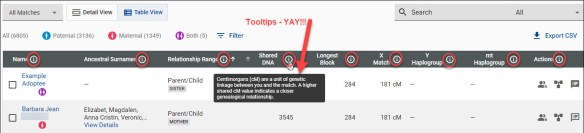
This view has lots of tooltips on the column heading bar! Tooltips are great for everyone, but especially for people just beginning to find their way in the genetic genealogy world.

I’ll have to experiment a bit to figure out which view I prefer. I’d like to be able to set my own default for whichever view I want as my default. In fact, I think I’ll submit that in the “Submit Feedback” link. For every suggestion, I’m going to find something really positive to say. This was an immense overhaul.

Chromosome Browser

Let’s look at the chromosome Browser.

You can arrive at the Chromosome Browser by selecting people on your match page, or by selecting the Chromosome Browser under the Results and Tools link.

Everything is pretty much the same on the chromosome browser, except the default view is now 6 cM and the smaller segments are gone. You can also choose to view only segments above 10 cM.

If you have people selected in the chromosome browser and click on Download Segments in the upper right-hand corner, it downloads the segments of only the people currently selected.

You can “Clear All” and then click on Download All Segments which downloads your entire segment file. To download all segments, you need to have no people selected for comparison.

The contents of this file are greatly reduced as it now contains only the segments 6 cM and above.

Family Tree

No, the family tree has not changed, and yes, it needs to, desperately. Trust me, the management team is aware and I suspect one of the improvements, hopefully sooner than later, will be an improved tree experience.

Y DNA

The Y DNA page has received an update too, adding both a Detail View and a Table View with the same basic functionality as the Family Finder matching above. If you are reading this article for Y DNA only, please read the Family Finder section to understand the new layout and features.

Like previously, the match comparison begins at the 111 marker level.

However, there’s a BIG difference. If there are no matches at this level, YOU NEED TO CLICK THE NEXT TAB. You can easily see that this person has matches at the 67 level and below, but the system no longer “counts down” through the various levels until it either finds a level with a match or reaches 12 markers.

If you’re used to the old interface, it’s easy to think you’re at the final destination of 12 markers with no matches when you’re still at 111.

Y DNA Detail View

The Y-DNA Detail and Table views features are the same as Family Finder and are described in that section.

The new format is quite different. One improvement is that the Paternal Country of Origin is now displayed, along with a flag. How cool is that!

The Paternal Earliest Known Ancestor and Match Date are at far right. Note that match dates have been reset to the rerun date. At this point, FamilyTreeDNA is evaluating the possibility of restoring the original match date. Regardless, you’ll be able to filter for match dates when new matches arrive.

Please check to be sure you have your Country of Origin, Earliest Known Ancestor, and mapped location completed and up to date.

Earliest Known Ancestor

If you haven’t completed your Earliest Known Ancestor (EKA) information, now’s the perfect time. It’s easy, so let’s do it before you forget.

Click on the Account Settings gear beneath your name in the right-hand upper corner. Click on Genealogy, then on Earliest Known Ancestors and complete the information in the red boxes.

  • Direct paternal line means your father’s father’s father’s line – as far up through all fathers as you can reach. This is your Y DNA lineage, but females should complete this information on general principles.
  • Direct maternal line means your mother’s mother’s mother’s line – as far up through all mothers that you can reach. This is your mitochondrial DNA lineage, so relevant for both males and females.

Completing all of the information, including the location, will help you and your matches as well when using the Matches Map.

Be sure to click Save when you’re finished.

Y DNA Filters

Y DNA has more filter options than autosomal.

The Y DNA filter, located to the right of the 12 Markers tab allows testers to filter by:

  • Genetic distance, meaning how many mutations difference between you and your matches
  • Groups meaning group projects that the tester has joined
  • Tree status
  • Match date
  • Level of test taken

If none of your matches have taken the 111 marker test or you don’t match anyone at that level, that test won’t show up on your list.

Y DNA Table View

As with Family Finder, the Table View is more condensed and additional features are available on the right side of each match. For details, please review the Family Finder section.

If you’re looking for the old Y DNA TiP report, it’s now at the far right of each match.

The actual calculator hasn’t changed yet. I know people were hoping for the new Y DNA aging in this release, but that’s yet to follow.

Other Pages

Other pages like the Big Y and Mitochondrial DNA did not receive new features or functionality in this release, but do sport new user-friendly tooltips.

I lost track, but I counted over 100 tooltips added across the platform, and this is just the beginning.

There are probably more new features and functionality that I haven’t stumbled across just yet.

And yes, we are going to find a few bugs. That’s inevitable with something this large. Please report anything you find to FamilyTreeDNA.

Oh wait – I almost forgot…

New Videos

I understand that there are in the ballpark of 50 new videos that are being added to the new Help Center, either today or very shortly.

When I find out more, I’ll write an article about what videos are available and where to find them. People learn in various ways. Videos are often requested and will be a popular addition. I considered making videos, but that’s almost impossible for anyone besides the vendor because the names on screens either need to be “fake” or the screen needs to be blurred.

So hurray – very glad to hear these are imminent!

Stay Tuned

Stay tuned for new developments. As Lior said, FamilyTreeDNA is investing heavily in genetic genealogy and there’s more to come.

My Mom used to say that the “proof is in the pudding.” I’d say the myDNA/FamilyTreeDNA leadership team has passed this initial test with flying colors.

Of course, there’s more to do, but I’m definitely grateful for this lovely pudding. Thank you – thank you!

I can’t wait to get started and see what new gems await.

Take a Look!

Sign in and take a look for yourself.

Do you have more matches?

Are your matches more accurate?

How about predicted relationships?

How has this new release affected you?

What do you like the best?

_____________________________________________________________

Disclosure

I receive a small contribution when you click on some of the links to vendors in my articles. This does NOT increase the price you pay but helps me to keep the lights on and this informational blog free for everyone. Please click on the links in the articles or to the vendors below if you are purchasing products or DNA testing.

Thank you so much.

DNA Purchases and Free Transfers

Genealogy Products and Services

Books

Genealogy Research