DNA for Native American Genealogy – Hot Off the Press!

Drum roll please…my new book, DNA for Native American Genealogy, was just released today, published by Genealogical.com.

I’m so excited! I expected publication around the holidays. What a pleasant surprise.

This 190-page book has been a labor of love, almost a year in the making. There’s a lot.

  • Vendor Tools – The book incorporates information about how to make the best use of the autosomal DNA tools offered by all 4 of the major testing vendors; FamilyTreeDNA, MyHeritage, Ancestry, and 23andMe.
  • Chromosome Painting – I’ve detailed how to use DNAPainter to identify which ancestor(s) your Native heritage descends from by painting your population/ethnicity segments provided by FamilyTreeDNA and 23andMe.
  • Y and Mitochondrial DNA – I’ve described how and when to utilize the important Y and mitochondrial DNA tests, for you and other family members.
  • Maps – Everyone wants to know about ancient DNA. I’ve included ancient DNA information complete with maps of ancient DNA sites by major Native haplogroups, gathered from many academic papers, as well as mapped contemporary DNA locations.
  • Haplogroups – Locations in the Americas, by haplogroup, where individual haplogroups and subgroups are found. Some haplogroups are regional in nature. If you happen to have one of these haplogroups, that’s a BIG HINT about where your ancestor lived.
  • Tribes – Want to know, by tribe, which haplogroups have been identified? Got you covered there too.
  • Checklist – I’ve provided a checklist type of roadmap for you to follow, along with an extensive glossary.
  • Questions – I’ve answered lots of frequently asked questions. For example – what about joining a tribe? I’ve explained how tribes work in the US and Canada, complete with links for relevant forms and further information.

But wait, there’s more…

New Revelations!!!

There is scientific evidence suggesting that two haplogroups not previously identified as Native are actually found in very low frequencies in the Native population. Not only do I describe these haplogroups, but I provide their locations on a map.

I hope other people will test and come forward with similar results in these same haplogroups to further solidify this finding.

It’s important to understand the criteria required for including these haplogroups as (potentially) Native. In general, they:

  • Must be found multiple times outside of a family group
  • Must be unexplained by any other scenario
  • Must be well-documented both genetically as well as using traditional genealogical records
  • Must be otherwise absent in the surrounding populations

This part of the research for the book was absolutely fascinating to me.

Description

Here’s the book description at Genealogical.com:

DNA for Native American Genealogy is the first book to offer detailed information and advice specifically aimed at family historians interested in fleshing out their Native American family tree through DNA testing.

Figuring out how to incorporate DNA testing into your Native American genealogy research can be difficult and daunting. What types of DNA tests are available, and which vendors offer them? What other tools are available? How is Native American DNA determined or recognized in your DNA? What information about your Native American ancestors can DNA testing uncover? This book addresses those questions and much more.

Included are step-by-step instructions, with illustrations, on how to use DNA testing at the four major DNA testing companies to further your genealogy and confirm or identify your Native American ancestors. Among the many other topics covered are the following:

    • Tribes in the United States and First Nations in Canada
    • Ethnicity
    • Chromosome painting
    • Population Genetics and how ethnicity is assigned
    • Genetic groups and communities
    • Y DNA paternal direct line male testing for you and your family members
    • Mitochondrial DNA maternal direct line testing for you and your family members
    • Autosomal DNA matching and ethnicity comparisons
    • Creating a DNA pedigree chart
    • Native American haplogroups, by region and tribe
    • Ancient and contemporary Native American DNA

Special features include numerous charts and maps; a roadmap and checklist giving you clear instructions on how to proceed; and a glossary to help you decipher the technical language associated with DNA testing.

Purchase the Book and Participate

I’ve included answers to questions that I’ve received repeatedly for many years about Native American heritage and DNA. Why Native DNA might show in your DNA, why it might not – along with alternate ways to seek that information.

You can order DNA for Native American Genealogy, here.

For customers in Canada and outside the US, you can use the Amazon link, here, to reduce the high shipping/customs costs.

I hope you’ll use the information in the book to determine the appropriate tests for your situation and fully utilize the tools available to genealogists today to either confirm those family rumors, put them to rest – or maybe discover a previously unknown Native ancestor.

Please feel free to share this article with anyone who might be interested.

_____________________________________________________________

Disclosure

I receive a small contribution when you click on some of the links to vendors in my articles. This does NOT increase the price you pay but helps me to keep the lights on and this informational blog free for everyone. Please click on the links in the articles or to the vendors below if you are purchasing products or DNA testing.

Thank you so much.

DNA Purchases and Free Uploads

Genealogy Products and Services

My Book

Genealogy Books

Genealogy Research

How to Join a Project at FamilyTreeDNA – And Why You Want To

I’ve been receiving a lot of questions about how to join projects lately, and I think I know why.

Right now, FamilyTreeDNA is having a pre-holiday sale. All tests are on sale – the Family Finder autosomal test for $59, here, and the mitochondrial full sequence DNA test for your matrilineal line for $139, here. However, of particular significance is that the Y DNA tests are heavily discounted which is what’s driving the questions about joining projects.

The Y-37 is $79 and the Big Y-700, the most refined Y-DNA test, is only $379, here.

Why the Y DNA Test?

Y DNA tests facilitate men matching other men on their direct paternal line, which is generally the surname line. In other words, Estes men can be expected to match other Estes men, and so forth, unless an adoption or unknown parentage is involved. In that case, the man can expect to match his biological surname line.

The even better news is that the Big Y-700 test is refined to the level that WITHIN surname lines, testers can often differentiate and are able to tell where a specific mutation occurred in their genealogy.

You can see matches with either the 37 or 111 marker Y DNA test, but this level of detail is ONLY available with the Big Y-700 test.

A picture is worth 1000 words.

Here’s the view of the Estes portion of the Y DNA Block Tree, viewed from the account of one of my male Estes cousins who took the Big Y-700 test.

  • You can see that if a male takes the Big Y-700 test and receives the haplogroup of R-BY154784, we know he’s in the line of John born 1732, son of Moses Estes. This can be especially important for the man in the project with a Wilbur surname. It connects him with his Estes paternal lineage. For other Estes men, it tells them which son of Moses was their paternal ancestor.
  • If a man tests and receives R-ZS3700, upstream of R-BY154784, then we know he’s in the line of Moses Estes born 1711, son of Abraham, the Virginia immigrant.
  • If a tester receives haplogroup R-BY490, we know he descends from the Silvester Estes line, but NOT from the Moses line, or he would be R-ZS3700.
  • If a tester receives R-BY482 but not R-BY490, we know he is from the line of Robert Estes born in 1555, in Kent, but not in the American Estes line who all carry R-BY490 or more granular downstream haplogroups.

This is why people are ordering the Big Y-700 tests and want to join projects.

How do you know if a surname project exists for your surname of interest?

Does a Surname Project Exist for Me?

To see if a surname project exists for your surname of interest, click here, then scroll a little way down until you see the surname search box.

I typed Vannoy, my great-grandmother’s birth surname, and the following projects are shown.

Click any image to enlarge

You can see that the administrators for three projects have included Vannoy in their project names-of-interest, which is why the projects appear on the Vannoy search list.

Hurray! There is a Vannoy surname project with 66 members.

Ok, excuse me while I cheat for a minute. How many of these 66 people do I match on my Family Finder test?

Using the Advanced Matches tool on my main page, selecting Family Finder and the Vannoy project, I match 11 of those 66 people in the Vannoy project. How fun is that!?!

Ok, done cheating and back to the surname search results.

In the FamilyTreeDNA database, a total of 22 people have the surname of Vannoy, spelled exactly this way. Of the 11 people I match in the project, 7 have a surname of Vannoy or a derivative.

So, yes, there is a Vannoy project AND there are people with the Vannoy surname who have tested – and – as it turns out, I match several of the project members.

If you haven’t yet tested at FamilyTreeDNA, you can click here to check to see if there are surname projects of interest to you and to order a test.

If you’ve already tested or transferred your results, how do you join a project at FamilyTreeDNA?

How Do Customers Join Projects at FamilyTreeDNA?

Joining projects is easy and very beneficial. You can collaborate with other testers and you can use the Advanced Tools to see who else in the project you match as well.

Joining Projects

Family Tree DNA provides three types of projects for their customers to join. All projects are free to join and are run by volunteer project administrators, people who have a specific interest in the topic at hand and are generally quite glad to be of assistance. Projects are great ways to find people you match and others interested in a common topic.

There are three primary kinds of DNA projects:

  • Surname projects – like Estes
  • Haplogroup projects – like R-L21 for my cousin’s Y DNA or J-mtDNA for my own mitochondrial DNA haplogroup. Both Y and mitochondrial DNA projects exist for haplogroups and subgroups.
  • Geographic projects – really anything else that isn’t a surname or a haplogroup, like Cumberland Gap, American Indian or Scottish DNA

Sign on to your account. Begin by clicking on Group Projects at the top of your personal page.

You can join an unlimited number of projects, but you want to make sure projects you join are relevant to your genealogy, your research and/or your haplogroup.

If you click on “Join a Project,” you’ll see a number of projects where the volunteer administrators have listed your surname as a surname of interest to that project.

First, of course, you must have tested at or transferred your (autosomal) results to Family Tree DNA and you must have taken the type of test relevant to the project at hand.

For example, if you have taken the Family Finder autosomal test and not taken any other tests, you can’t join a Y DNA-only project because you have not tested your Y chromosome. (Women don’t have a Y chromosome.)

Some surname projects are for males only who have tested their Y DNA and carry that surname or are related on the direct paternal line. Like the Wilbur gentleman in the Estes Y-DNA Block Tree example. This is why surname projects are often called Y DNA projects.

Surname projects fall into three categories, based on the goals of the project:

  • Y DNA, meaning only males with that surname can join.
  • People who have a mitochondrial connection to the surname can join as well.
  • Anyone who is descended from any ancestor with that surname can join.

In the Estes surname project, I welcome anyone with an Estes ancestor.

The Project List

When you click on “Join a Project,” you’ll see the list of projects that are “Recommended Projects.” This means that the administrator has added your surname as one of interest. This doesn’t necessarily mean you should join all those projects, but that you might want to evaluate each project for appropriateness.

Let’s take a quick look.

  • The Cumberland Gap mtDNA project isn’t relevant, because my Estes line is my paternal line and my mitochondrial DNA is my matrilineal line – so no cigar on this one, at least not for me.
  • The Cumberland Gap Y DNA project isn’t relevant for me, because I’m a female and don’t have a Y chromosome, although my family is from the Cumberland Gap area. However, my male Estes cousins can join.
  • The Estes surname project welcomes anyone descended from an Estes by any spelling.
  • Estis Jewish Ukraine – Nope doesn’t pertain to me or my Estes line.
  • The I-L161 (Isles) project is a Y DNA haplogroup project, so does not apply to me as I have no Y chromosome.
  • The Jester project listed Estes as a variant spelling.
  • I would need to read about the rest of the projects.

Note that only the first 10 project are shown in the list and there may be more.

Searching

Obviously, there are probably other projects of interest that can’t be sensed by your surname.

For example, I’d like to know about the Bolton project – my grandmother’s surname, so I entered Bolton in the search box.

Click the project name to read more about each project.

Once you’ve determined that a project is for you, click the orange “Join” button to join. Don’t worry, you can unjoin easily if you make a mistake. Some projects have a “request to join” feature to be sure the pairing is a good fit.

Browse

Can’t find your surname or want to see what else is available? Try an alternate name spelling or scroll down to the Browse Group Projects section.

There are so many great possibilities.

Projects fall into multiple browse categories:

  • Surname
  • Y DNA Geographical
  • MtDNA Geographical
  • Dual (Y DNA and mtDNA Geographical)
  • MtDNA Lineage
  • Y-DNA Haplogroup
  • MtDNA Haplogroup

There’s so much of interest.

If I know a topic name, I can search here to see if an administrator has entered that as a keyword.

I searched for Acadian and found 6 options to evaluate.

Now all I have to do is click on the project link and then on the orange Join button to become a member.

Check Your Sharing Option

One quick housekeeping item as a project member is to check to be sure that your results can be shared on the project page, if that’s what you want.

At the top of your page, under “Manage Group Projects,” click on “Project Preferences.”

You can view the administrators of each project and manage permissions for each administrator individually.

Scroll down just a bit more and you’ll see the group project profile.

If you’d like for your DNA results to be included in the public project page results, be sure sharing is set to “on.” Your name is never shown publicly, except to your matches on your match page. In projects, only a surname and earliest known ancestor is shown. Here’s the Vannoy Y DNA page as an example.

Sharing in genealogy benefits everyone and encourages other people to test.

What About You?

Have you joined the projects that would be a good fit for you? Check out your surnames and topics of interest, here.

You can always transfer your autosomal DNA from other vendors and join projects today with no waiting.

If you transfer an autosomal kit from another vendor (instructions here,) you can order a Y DNA or mitochondrial upgrade and FamilyTreeDNA will send you a swab kit. That way all of your test results can be utilized together for added benefit.

————————————————————————————————————-

Disclosure

I receive a small contribution when you click on some of the links to vendors in my articles. This does NOT increase the price you pay but helps me to keep the lights on and this informational blog free for everyone. Please click on the links in the articles or to the vendors below if you are purchasing products or DNA testing.

Thank you so much.

DNA Purchases and Free Uploads

Genealogy Products and Services

Books

Genealogy Research

Come Sit a Spell With Jacob Dobkins – 52 Ancestors #345

Probably 20 years ago, I discovered that Jacob Dobkins (1751-1835) was my ancestor, and began researching in Claiborne County, Tennessee where his daughter, Jenny Dobkins lived with her husband, John Campbell.

In fact, two of Jacob’s daughters married Campbell men. His daughter Elizabeth married George Campbell, believed to be John’s brother, back in Hawkins County before the entire group moved to Claiborne. Jacob lived in Claiborne County in 1801 when the county was formed and he attended the first court session.

Jacob purchased 1400 acres for $100, land roughly a mile wide and about two and a half miles long. That’s a LOT of land. Of course, it was densely forested and no houses or other improvements had been made. Jacob immediately began parceling it out to his sons and sons-in-law, essentially assuring that most of his family would stay nearby.

In the research process, I met other Dobkins researchers, including Bill Nevils, a local historian, and genealogist. He too was descended from Jacob.

In 2006, cousin Daryl talked to Bill who told us he knew where Jacob Dobkins was buried.

Stopped us cold in our tracks. There was no marked grave. No known Dobkins Cemetery.

Say what?

Jacob’s grave?

Seriously?

Cousin Daryl discovered more than that too. She made other calls and the owners in 2006 were family members who had VERY INTERESTING photos of the original cabin.

This very old photo from (probably) sometime in the early 1900s or possibly even late 1800s shows Jacob Dobkins’ homestead, fenced, with a secondary, larger building having been added to the left. Yet another building is shown in the distance and a structure to the rear as well. Notice the fieldstone chimney.

Yes, this is Jacob’s original cabin! Be still my heart.

How can I be sure? The deed work shows that in 1835, when Jacob died, his heirs quitclaimed his property to Betsy Campbell, his daughter who was married to George Campbell. From that point on, her son, Barney, his son Alexander, then his son Arthur lived in this home until Arthur died in 1969. The family had built a new home and retained the property.

Jacob’s cabin in the 1960s or 1970s, abandoned.

Jacob’s cabin lasted for at least another 150 years after his 1835 death before it was purchased, disassembled, and reassembled elsewhere – we think someplace in North Carolina (maybe) in some sort of reenactment or historical park. If you recognize this cabin, please let me know.

Daryl made contact with the lady who owned the farm in 2006:

I just had a lovely conversation with our cousin who owns the property and descends from Barney Campbell. Her family recently celebrated her birthday at the old farm and gave her a photo frame with digital family photos that include the old cabin.

She claims the farm has been in the family since about 1820, but she has never checked it out. Her nephew is the one interested in the family history. Her grandmother, Sally, died when she was about 10 and she heard the story of Barney many times growing up…Barney was a Dobkins, his mother was Elizabeth and he took the Campbell name when Elizabeth married George Campbell.

The original old house was 2 stories, living room & one bedroom on the main floor and 2 more bedrooms upstairs. The kitchen was detached from the original house. I quizzed her a bit, because there were not too many houses two stories in those woods in the late 1700s or early 1800s. She did not know how old the house was, or who the first occupants were. She assumed it was Barney.

The house was moved about 1970. All she remembers is that a man who owned a pottery company, factory or shop bought it. He took it apart and it was to be reassembled at his business in western NC. A cousin in Tazewell was building a house about the same time and he took the chimney/fireplace and connected it to his house. He has since died. She said the old house reminds her of one she saw in the Museum of the Appalachia brochure, the one near Norris Dam.

It’s worth noting that the founder of the Museum of the Appalachia began collecting in 1969, so the timing would be right. Maybe Jacob’s house is there. If so, it’s probably labeled as the Campbell home.

Here’s the cabin from a different view after it was abandoned, but before it was deconstructed.

And here, before it was abandoned, with the “wash” hanging on the line. It looks like a typical home here.

I should mention that this building does not appear, on the surface, to be the traditional log cabin, but is instead a plank or clapboard building. If Jacob did indeed own that sawmill, as was described in the 1819 deed from Jacob Dobkins to John Whitaker, this wouldn’t be too surprising. Regardless, this tells us that a mill was very close by sometime before 1819.

Another story says that this building incorporated the original structure, but was built by Barney Campbell, possibly in the 1830s.

According to family members:

There was a kitchen behind the former house which was converted into a loom house and the previous living quarters used as kitchen facilities when the new house was occupied. The kitchen and dining ell of the present old house is not as old as the living quarters but some of the material of the original house was incorporated into the ell which would indicate that part of the house may date back to 1800.

According to this, the original home was incorporated into the “new” house, a very common practice of that time. Frugal settlers wasted nothing and did not simply “move” to a new house. They added on.

A third story says that Barney built this cabin, but his first wife, then pregnant with twins, died before ever getting to live there. That would have put the origin of this building about 1838 or so. Jacob’s original cabin would have been more than 30 years old by then, and Barney had a passel of kids – something like 17 between both wives, not counting the twins that died when his first wife did! Yes, Barney definitely could have used more room.

But that story doesn’t quite make sense either – because nobody would intentionally build a log cabin and immediately cover it up with lap siding.

Do we have any evidence? Why yes, yes we do.

Aha – this photo of the cabin during disassembly clearly shows a chinked log cabin beneath the clapboard siding.

Here’s the rear during the deconstruction process. Look at those dovetailed logs. Indeed, this is the house that Jacob built from the trees he felled clearing the land. Later deeds also refer to this property as being where Jacob lived.

Barney’s grandson lived here until sometime in the 1960s, so this land never left the Dobkins/Campbell family.

About Barney

Interestingly, we have Y DNA genetic evidence that conflicts with the story about Barney being adopted by George Campbell. Some of Barney’s descendants match the Y DNA of the Campbell line, and some do not. Given that at least one of Barney’s son’s lines matches the Campbell Y DNA, it’s unlikely that Barney was not George Campbell’s son! Not to mention that George was very generous with Barney.

Barney is of course a Dobkins on his mother’s side, so I’m not exactly sure how that original story was intended. It’s ironic that the family story includes an unknown father, but the DNA might disprove that, and prove that a Campbell male was indeed the father – exactly the opposite of what sometimes happens.

Obviously, we have absolutely NO IDEA what actually happened back in 1797 when Barney was born, or later with his descendants.

What I can say is that we could probably resolve this question if male Campbell men descended directly through all males from Barney through the following sons would do a Y DNA test.

Barney had the following sons through his first wife, Mary Brooks:

  • Benjamin Campbell (1820-1882) married Eliza or Louisa Eastridge, born and died in Claiborne County, TN.
  • George Campbell (c1821-1860s) married Nancy Eastridge, lived in Claiborne County and died during the Civil War.
  • Andrew Campbell (c1826-?) married Louisa (Eliza) Campbell, lived in Claiborne County.
  • John Campbell (c 1829-after 1900) married Mary Ann Chadwell, lived and died in Claiborne County.
  • Toliver Campbell (1835-1899) married Sarah Lewis, lived and died in Claiborne County.

Barney had these sons through his second wife, Martha Jane “Jennie” Kesterson:

  • David Campbell (c 1841-1919) married Missouri Williams, lived and died in Claiborne County.
  • Arthur L. Campbell (born circa 1842)
  • Newton J. Campbell (1845-1911) married Lucy Williams, lived and died in Claiborne County.
  • Abraham Campbell (1850-1914) married Nancy Cornelia Williams, lived, and died in Claiborne County.
  • Alexander Campbell (1853-1923) married Sarah “Sallie” Campbell, lived, and died in Claiborne County.

Come On – Let’s Visit Jacob!

Bill Nevils and his mother hosted us for a lovely lunch, but we could hardly wait to set out for the Dobkins land and cemetery, circled in red, above. The house was located near the building with the white roof, halfway between the main road and the cemetery.

Jacob is buried in the Campbell Family Cemetery at 230 A. L. Campbell Lane in Tazewell, although there is no reference to a cemetery on the deed back in the 1800s. Cemeteries were assumed back then and seldom mentioned. It’s still a private cemetery today.

I can’t tell you how much fun Daryl and I had that day. This chimney, at least that’s what I think it is, was probably for the outside kitchen. This chimney was not taken when the cabin was removed – probably because it was not attached to the house. We know that the chimney on the house was moved to Tazewell.

I can only imagine cooking outside in all types of weather, all seasons of the year. Well, actually, I can’t imagine that.

There’s another very early building too.

Look at the size of those logs. This is clearly a very early structure. Is this the building that was converted into the loom house? If so, then it was here when Jacob lived. It’s standing beside that chimney or stone column, whatever it is.

Behind these buildings and the modern-day house, we crossed through the working farm, drove through a gate, and across the field.

This is the same path that would have been followed when a “buryin'” needed to take place. The wagon with the coffin, pulled by horses or mules, would lead the procession of walking family members from the house where the family would have “kept watch” and prepared the body for burial. The wagon wheels would have squeaked under the load. The family knew this was Jacob’s last trip – that late fall day in 1835 – accompanied by a preacher.

Jacob had cleared the field where his funeral procession took place more than three decades earlier. We drove up to the cemetery 171 years after Jacob’s final journey.

Jacob Dobkins Cemetery, Known as the Campbell Cemetery

A fence surrounds the cemetery which is far to the rear of the property, near the Powell River. You didn’t want a cemetery too near a house, or the well for that matter.

Cousin Bill and me before entering this sacred ground. I’m so incredibly glad we made this visit when we did, because Father Bill, an Episcopal priest, has gone on now to meet Jacob. Bill spent years researching this family and I wish he would send a few answers!

A HUGE, massive tree grows in the center of the cemetery.

As we strolled in that direction, Bill told us that it’s believed that both Jacob and his wife are buried under that expansive tree.

That makes sense given that the newer graves radiate out towards the edges. Jacob assuredly wasn’t the first burial here, but he was likely one of the early ones. He would have established the cemetery after he bought the land, as need dictated.

Graves were marked only with rocks. Everyone who needed to know already knew who was buried where. They had stood graveside as the casket was lowered. Neighbors would have come over to help dig the graves and cover them after the service. Perhaps they were marked with a simple wooden cross at the time.

Looking around, we can see Wallen’s Ridge there in the distance.

John Campbell’s land, part of which was apparently originally owned by Jacob, lies across the ridge in this direction. Today’s there’s a cemetery behind Liberty Church, established in the 1850s, on John’s land, but I bet in that time, everyone in the family was simply buried here, in the Dobkins family cemetery. Jacob was the family patriarch.

The photo below connects with the one above at the mountain, looking back over the homeplace, providing a panorama vista of sorts.

Elisha Wallen, the Longhunter, claimed vast tracts of land and sold this farm to Jacob immediately after Claiborne County was formed.

Jane Dobkins Campbell who had married John lived across what is locally known as “Little Ridge.” It doesn’t look very little to me.

I’d wager she’s buried here too.

Jacob would have cleared these fields, tree by tree. Except for that one tree, of course. It was left to shelter those attending funerals. I can’t help but wonder if Jacob did that intentionally. Or maybe he simply started burying family members beneath its branches.

Standing beneath the tree, this is what I see.

I can only imagine the amount of labor that was invested in establishing a farm from the wilderness. By the time Jacob bought this land, he was 50 years old. He did have sons and sons-in-law, but they had their own farms to clear.

Jacob sold the land in the photo below to his son-in-law, George Campbell who was married to Elizabeth.

Even after clearing, Cedar trees aggressively try to reclaim the land for the forest.

You can see that this part of George’s land is very rocky. Impossible to plow after clearing, but reminds me so much of Scotland.

I can see Jacob Dobkins and Elisha Wallen, walking this land together before Jacob’s purchase, discussing the land, and probably so much more. Both men had faced incredible challenges in this new land and somehow survived.

Both had followed what would become the Wilderness Road, when it was wilderness and before it was a road. The only thing there when Jacob and Elisha first arrived was buffalo and Native people, angry at the incursion. Elisha’s first visit was about 1761, and Jacob’s was about 1779 when he arrived at Fort Harrod before the Revolutionary War.

This beautiful stream, Russell Creek, is only about 15 miles, less as the crow flies, from where Jacob traveled back in 1779 between his home in Shenandoah County and Fort Harrod. In 1779, this land was beyond the frontier line.

The area was much tamer 20 years later when Jacob bought this land from Elisha Wallen. Jacob’s service helped to tame the region, making it safe for settlers. Jacob switched from soldiering to homesteading. It’s ironic that Jacob survived the Revolutionary War battles, although bullets ripped through his clothes – but homesteading, which you think would be safer, broke his collarbone and shoulder, disabling him.

Did Jacob look across these ridges from Cumberland Gap and fall in love back in 1779? Did he tell his son-in-law, George about those adventures as they walked this land before Jacob sold him this portion?

Clearly, Jacob wasn’t just buying land for himself, but with the intention of purchasing enough land for his entire family, probably so that his sons and sons-in-law wouldn’t feel the need to “move on.” Best investment ever!

That’s probably the exact reason he sold his land on White Horn Creek near Bull’s Gap and moved everyone to Claiborne County where large tracts of land had become available. Opportunity was knocking.

Of course, Jacob was also establishing a family cemetery whether he initially meant to or not. Every family had one. I wonder if he thought about where would be a good location for a cemetery on his land or if he only thought about that when, due to necessity, they needed to bury someone. Would that first burial have been one of his grandchildren? I would bet so.

Cemeteries were often on higher land so that they didn’t flood and contaminate the water supply. Did Jacob choose this location because of this beautiful tree?

Did he decide that he’d like to be buried right here?

Cousin Bill, dwarfed, pondering beneath Jacob’s tree.

I can’t help but wonder if this tree was already old when Jacob bought this land more than 200 years before.

If only this tree could talk. What stories it would have to tell.

I think this is a maple tree. Medium growth rate for a maple tree is about a foot each year, so this tree must be ancient. Based on the photos, I’m guessing at least 300-400 years and maybe more.

Some gravestones are located beneath its sprawling branches. Bill told us that Jacob is supposed to be buried beneath this tree.

Most of the space beneath the tree consists of unmarked graves. Apparently, there are many, many unmarked graves.

Perhaps Jacob is resting right here in the shade. Surrounded by his children and grandchildren.

Some died in his lifetime. Jacob’s son Reuben died in 1823 at the age of 40.

More unmarked graves.

Many graves weren’t marked, except for field stones, if that, until in the 1900s. A gravestone was a luxury none could afford.

Some field stones remain, but others are clearly gone.

Findagrave shows the Arch Campbell Cemetery with a total of 138 burials, some with photos of the stones.

Barney Campbell’s son Benjamin is listed among the burials. Assuredly, Barney was buried here too following his death between 1853 and 1855, as are his parents who died about the same time, and grandparents who died twenty years earlier.

The day in May that we visited was stunningly beautiful with spring’s warmth not yet giving way to the oppressive summer heat.

Daryl, Bill, and I walked every inch of this cemetery, looking for any clue. Just being with Jacob and our family members for a short time.

I couldn’t help but glance over each fence and picture Jacob standing and doing the same. Of course, his split rail fences would have looked quite different.

Did Jacob go to the far side of his property each day and fell more trees?

Did he stand here pondering life’s unfairness when he buried family members?

I slowly turned in a circle to see what Jacob would have seen.

I can’t help but wonder how all of these people are connected to Jacob. Maybe some aren’t but many appear to have “married in” to the family. After a few generations, these Appalachian families are all related to each other one way or another.

Daryl and I, always the consummate genealogists, photographed gravestones.

This cemetery is not small. Many areas are entirely vacant, signifying unmarked graves. It looks like there are as many unmarked as marked, or maybe more.

While the old burials are near the middle, there are contemporary graves too.

Areas towards the fence had modern burials.

No matter where you look, the mountains are ever-present in the distance. Today, just as Jacob saw them two centuries ago.

By now, there are probably 8 or maybe 10 generations of family members all resting together here. Jacob would probably be quite pleased that his investment in a large amount of common land, enough to share with his sons and sons-in-law, paid such handsome dividends. Indeed, many stayed and continue to stay.

Of his own children, 5 lived out their lives in Claiborne County, two struck out for Texas, and one is uncertain.

Many of Jacob’s descendants still live in Claiborne County, Tennessee, and perhaps some still live on Jacob’s land.

————————————————————————————————————-

Disclosure

I receive a small contribution when you click on some of the links to vendors in my articles. This does NOT increase the price you pay but helps me to keep the lights on and this informational blog free for everyone. Please click on the links in the articles or to the vendors below if you are purchasing products or DNA testing.

Thank you so much.

DNA Purchases and Free Uploads

Genealogy Products and Services

Books

Genealogy Research

Free Webinar: 10 Ways to Find Your Native American Ancestor Using Y, Mitochondrial and Autosomal DNA

I recorded 10 Ways to Find Your Native American Ancestor Using Y, Mitochondrial and Autosomal DNA for Legacy Family Tree Webinars.

Webinars are free for the first week. After that, you’ll need a subscription.

If you subscribe to Legacy Family Tree, here, you’ll also receive the downloadable 24-page syllabus and you can watch any of the 1500+ webinars available at Legacy Family Tree Webinars anytime.

In 10 Ways to Find Your Native American Ancestor Using Y, Mitochondrial and Autosomal DNA, I covered the following features and how to use them for your genealogy:

  • Ethnicity – why it works and why it sometimes doesn’t
  • Ethnicity – how it works
  • Your Chromosomes – Mom and Dad
  • Ethnicity at AncestryDNA, 23andMe, FamilyTreeDNA and MyHeritage DNA
  • Genetic Communities at AncestryDNA
  • Genetic Groups at MyHeritage DNA
  • Painted ethnicity segments at 23andMe and FamilyTreeDNA
  • Painting ethnicity segments at DNAPainter – and why you want to
  • Shared ethnicity segments with your matches at AncestryDNA, 23andMe, FamilyTreeDNA and MyHeritage DNA
  • Downloading matches and segment files
  • Techniques to pinpoint Native Ancestors in your tree
  • Y DNA, Native ancestors and haplogroups
  • Mitochondrial DNA, Native ancestors and haplogroups
  • Creating a plan to find your Native ancestor
  • Strategies for finding test candidates
  • Your Ancestor DNA Pedigree Chart
  • Success!!!

If you haven’t yet tested at or uploaded your DNA to both FamilyTreeDNA and MyHeritage, you can find upload/download instructions, here, so that you can take advantage of the unique tools at all vendors.

Hope you enjoy the webinar and find those elusive ancestors!

_____________________________________________________________

Disclosure

I receive a small contribution when you click on some of the links to vendors in my articles. This does NOT increase the price you pay but helps me to keep the lights on and this informational blog free for everyone. Please click on the links in the articles or to the vendors below if you are purchasing products or DNA testing.

Thank you so much.

DNA Purchases and Free Uploads

Genealogy Products and Services

Books

Genealogy Research

Join Me for Free Webinars in August and “Webtember”

Legacy Family Webinars provides free webinars every month. Check out the upcoming schedule, here.

You can register for free and watch live. If you’d like access to the ever-growing Webinar Library, you can subscribe, here, and watch any webinar, anytime.

I’m presenting a free webinar in both August and September.

10 Ways to Find Your Native American Ancestor Using Y, Mitochondrial and Autosomal DNA

On Friday, August 27th at 2 PM Eastern, I’ll be presenting “10 Ways to Find Your Native American Ancestor Using Y, Mitochondrial and Autosomal DNA.” You can register for free, here.

If you’re trying to figure out if you have a Native ancestor or you’d like to confirm those family legends, this webinar is for you.

Webtember Free Month-Long Genealogy Conference

Legacy Tree Webinars is sponsoring a free month-long virtual conference every Friday featuring 7 or 8 speakers each week. There are so many sessions I can’t wait to see.

Here’s the conference pdf listing all of the speakers and schedule.

On September 3rd at 11 AM, I’ll be presenting Paint Your Way Up Your Tree with MyHeritage and DNAPainter.

I love combining these two wonderful tools to easily discover which ancestors contributed my DNA segments. Once you know who contributed each segment, you also know how (through which line) you’re related to the other people you match (and who match each other) on that same segment. This is going to be so much fun!

Everyone can watch the Webtember presentations for free through the end of September.

I hope you’ll join us.

_____________________________________________________________

Disclosure

I receive a small contribution when you click on some of the links to vendors in my articles. This does NOT increase the price you pay but helps me to keep the lights on and this informational blog free for everyone. Please click on the links in the articles or to the vendors below if you are purchasing products or DNA testing.

Thank you so much.

DNA Purchases and Free Transfers

Genealogy Products and Services

Books

Genealogy Research

The Origins of Zana of Abkhazia

Recently, Margaryan et al published a paper titled The genomic origin of Zana of Abkhazia.

Margaryan was the lead author on the 2020 paper, the Population genomics of the Viking world. I wrote about that in the article, 442 Ancient Viking Skeletons Hold DNA Surprises – Does Your Y or Mitochondrial DNA Match?

Why are people interested in the origins of Zana? Who was Zana?

Zana

Zana was initially believed to have been a member of a group of Afro-Abkhazian people who lived in the Caucasus in the later 1800s.

Known as the African Caucasians, the Abkhazians of African descent lived in and near the settlement of Adzyubzha on the east coast of the Black Sea.

By Unknown author – livejournal.com, Public Domain, https://commons.wikimedia.org/w/index.php?curid=8701583

This photo of an Afro-Abkhazian family is from “Caucasus. Volume I. The peoples of the Caucasus”, St. Petersburg., Kovalevsky P. I., 1914.

It’s uncertain how this group of African people came to live in this region, but they seem to have arrived when the region was under the rule of the Ottoman Empire in the 1600s, possibly as slaves to work the citrus plantations. In 1927, two Russian men visited the village and met elderly Africans. The Russian men felt that an Ethiopian version of their arrival story was likely accurate since there were several parallels between the names of the villages in Ethiopia and the Afro-Abkhazian villages.

By the 1800s, they spoke only the northwest Caucasian Abkhaz language.

The origins of Zana herself are cloaked in myth. One thing is for certain. Zana was exploited horribly.

How much of the story of Zana’s origins is accurate, and how much was concocted to justify her subsequent treatment is unknown.

The Story

Zana was reportedly living wild and naked in the forest in the Caucasus region. These mountains had long been rumored to hold creatures similar to Bigfoot, called Almasty in Russia.

The story goes that a traveling noble merchant, possibly Edgi Genaba, heard about an apewoman living in the forest and paid the local men to capture this poor creature sometime between 1850 and 1870. The locals forced her into a spike-lined pit.

The nobleman paid the men, named his captive Zana, shackled her, took her home, and enclosed Zana in a cage where she dug a hole in which to sleep. A slightly different version of the story says that Zana was sold from man to man until Genaba bought her.

Zana was apparently covered in thick red hair, powerfully muscular and at 6 feet 6 inches in height, towering over the local residents. When given clothes, she reportedly would shred them.

Genaba charged people who would come and gawk at the naked caged “apewoman” who could not or did not speak.

Zana did not try to escape and eventually, she was granted some reprieve by “only” being chained to a fence.

Eventually, Zana was taught to do chores and in essence, became a servant. She was also provided with alcohol. The local men repeatedly raped Zana while she was drunk.

Zana reportedly had a total of 6 children by unknown local men, although only four can be relatively assured and two proven. Zana apparently took the first two babies to a river to wash them, but the children died. After that, the local women took the following four children away from Zana to protect them since she apparently didn’t understand how to care for an infant.

None of Zana’s children had her thick hair. They all spoke normally and had families. Pictures remain of two of her children, a daughter, Kodzhanar and a son, Khwit. You can see photos of Kodzhanar, Khwit and Khwit’s children, here, in a supplement to the paper.

Zana died after living in captivity for about 20 years, having been taken advantage of, first by Genaba and eventually, by the village men as well.

But Zana’s exploitation didn’t even end there.

Dr. Bryan Sykes, once a respected geneticist, in his later years, became a Bigfoot hunter. After analyzing DNA evidence from Zana’s granddaughter and relatives, along with the remains of her son, Sykes suggested that Zana belonged to a “sub-species of modern humans,” and called her “half human and half ape,” according to a Daily Mail article published in April of 2015. Sykes published a book in 2015, whose title I refuse to print, in which he suggests that Zana’s ancestors exited Africa 100,000 years before and she and her ancestors had, in essence, become a Caucuses Bigfoot – or Almasty in the local vernacular. However, Sykes also states that Zana was 100% African, had genes from west Africa, yet resembled no west African group of people. If you’re scratching your head saying to yourself that those things are contradictory – you’d be right.

Thankfully, Margaryan has now published a respectful academic paper about Zana.

The genomic origin of Zana of Abkhazia

Margaryan paper abstract:

Enigmatic phenomena have sparked the imagination of people around the globe into creating folkloric creatures. One prime example is Zana of Abkhazia (South Caucasus), a well-documented 19th-century female who was captured living wild in the forest. Zana’s appearance was sufficiently unusual, that she was referred to by locals as an Almasty—the analog of Bigfoot in the Caucasus. Although the exact location of Zana’s burial site was unknown, the grave of her son, Khwit, was identified in 1971. The genomes of Khwit and the alleged Zana skeleton were sequenced to an average depth of ca. 3× using ancient DNA techniques. The identical mtDNA and parent-offspring relationship between the two indicated that the unknown woman was indeed Zana. Population genomic analyses demonstrated that Zana’s immediate genetic ancestry can likely be traced to present-day East-African populations. We speculate that Zana might have had a genetic disorder such as congenital generalized hypertrichosis which could partially explain her strange behavior, lack of speech, and long body hair. Our findings elucidate Zana’s unfortunate story and provide a clear example of how prejudices of the time led to notions of cryptic hominids that are still held and transmitted by some today.

Hypertrichosis

Hypertrichosis, also known as “werewolf syndrome” is an extremely rare condition in which an abnormal amount of hair grows on the body. While this condition can develop later in life, it can also be congenital, or present at birth.

In some cases, hair grows all over the body, but in others, only grows in some places.

While Zana’s hair growth suggests hypertrichosis, Zana may have had other challenges as well given that she was nonverbal.

In medieval times, people who suffered from hypertrichosis often lived in courts and functioned as entertainers. In the 19th and 20th centuries, you could find them as performers in circuses and sideshows.

Congenital hypertrichosis, present from birth, can be inherited.

Petrus Gonsalvus, born in 1537 and referred to as “the man of the woods” spent his life in royal courts in Italy and France. He had seven children, four of whom apparently inherited the mutation for this condition from Petrus.

Petrus and his children with excessive hair, two of whom are shown above, were not considered fully human, although their court life allowed them to be well documented.

Petrus married Lady Catherine and their story may have been at least a part of the inspiration for the fairy tale, Beauty and the Beast, published in 1740, 122 years after Petrus’s death.

Zana’s Son, Khwit’s Y DNA

Due to Zana’s circumstances, we have no idea who Khwit’s father was. Khwit and the father himself may have not known either, given how Zana was treated by the local men who raped her. Furthermore, Zana’s children were taken from her and she was non-verbal, so even if she did know, she couldn’t have told her children.

Khwit’s Y DNA provides tantalizing clues.

FamilyTreeDNA’s analysis of Zana’s son, Khwit’s Y chromosome places him in the R-Z2103 subclade of R1b associated with the Yamnaya culture, and more specifically on branch R-Y4364 which has its highest frequency in the Caucasus.

You can see that the flags beside the subgroups above R-FTA50400 are all represented in the Caucasus region; Armenia, Russian Federation, Turkey, and the Palestinian Territory. They also reach into the surrounding areas: Italy, Poland, Greece, Germany, and then beneath Khwit’s branch, we find Scotland represented by subclade R-FTA49702. Khwit and the man from Scotland share 14 variants that branch subclade R-FTA50400 from R-FGCLR459.

Scotland? Well, that’s unexpected.

Looking at the block tree, below, you can see that while the two men are related back in time, it’s distant and they are separated by many private variants.

How long ago did the common ancestor of Khwit and the Scotsman live?

Goran Runfeldt, Head of Research and Development at FamilyTreeDNA, indicated that an early estimate would be that the common ancestor of Khwit’s father and the tester from Scotland would have lived in the Caucasus about 2200 years ago.

He stated that additional Big Y-700 testing is underway and a more definitive MRCA date may be able to be established.

Zana’s Mitochondrial DNA

Of course, Zana’s children all carried her mitochondrial DNA. Her daughters passed Zana’s mitochondrial DNA on to their children as well.

Fortunately, Zana’s mitochondrial DNA helps reassemble the pieces of Zana’s history.

I reached out to Dr. Miguel Vilar, a member of the Million Mito team member in the hope of revealing more of Zana’s puzzle. Dr. Villar is a molecular anthropologist at UMD and former lead scientist for the Genographic Project.

Dr. Vilar offered:

The DNA data and old stories together paint a very sad picture for the historical figure of Zana. The PCA plot of the autosomal DNA suggests she was genetically related to the Dinka pastoralist people from South Sudan, a marginalized group known to be above average in height and body size. Further, Zana’s mtDNA results place her on a basal branch of L2b1b, which geographically would align with an East Central African origin.

The combination of Zana’s height, body size, hair, and (apparent) inability to speak certainly advanced or at least fostered the story of Zana not being human.

Unfortunately, these combined features seemed to justify the non-human treatment of Zana by the local residents, particularly the men.

Contemporary DNA analysis proves Zana was fully human with African origins. She was not admixed with non-African DNA. How she or her family came to the Caucasus, or when, is unknown, but it likely has to do with the Ottoman Empire slave trade that began in the 16th century. The legend of Zana has probably grown and changed with time and retelling.

Ethics

Clearly, Zana’s original situation and later exploitation have been an ethical quagmire.

The authors of the Zana paper perhaps sum this up best:

Following her capture in the forest, Zana was deprived of her basic human rights, and treated as a slave: she was kept in captivity, likely forced to have sexual relations with local men, and worked in forced labor conditions. After she passed away, the accounts on her mythical figure attracted several scientists to unearth her story and her son’s bones were exhumed. Our study intends both to reveal the true human nature of Zana and grant her and her descendants’ remains the dignity they deserve.

Zana’s story isn’t over. Additional testing and analysis are being performed. Based on those findings, if any, we may be able to add another chapter to Zana’s story.

Zana, like everyone else, deserves the truth, even if unraveled and told posthumously. We can’t right the historical wrongs today, but at least we can correct the record.

_____________________________________________________________

Disclosure

I receive a small contribution when you click on some of the links to vendors in my articles. This does NOT increase the price you pay but helps me to keep the lights on and this informational blog free for everyone. Please click on the links in the articles or to the vendors below if you are purchasing products or DNA testing.

Thank you so much.

DNA Purchases and Free Transfers

Genealogy Products and Services

Books

Genealogy Research

FamilyTreeDNA Relaunch – New Feature Overview

The brand-new FamilyTreeDNA website is live!

I’m very pleased with the investment that FamilyTreeDNA has made in their genealogy platform and tools. This isn’t just a redesign, it’s more of a relaunch.

I spoke with Dr. Lior Rauchberger, CEO of myDNA, the parent company of FamilyTreeDNA briefly yesterday. He’s excited too and said:

“The new features and enhancements we are releasing in July are the first round of updates in our exciting product roadmap. FamilyTreeDNA will continue to invest heavily in the advancement of genetic genealogy.”

In other words, this is just the beginning.

In case you were wondering, all those features everyone asked for – Lior listened.

Lior said earlier in 2021 that he was going to do exactly this and he’s proven true to his word, with this release coming just half a year after he took the helm. Obviously, he hit the ground running.

A few months ago, Lior said that his initial FamilyTreeDNA focus was going to be on infrastructure, stability, and focusing on the customer experience. In other words, creating a foundation to build on.

The new features, improvements, and changes are massive and certainly welcome.

I’ll be covering the new features in a series of articles, but in this introductory article, I’m providing an overview so you can use it as a guide to understand and navigate this new release.

Change is Challenging

I need to say something here.

Change is hard. In fact, change is the most difficult challenge for humans. We want improvements, yet we hate it when the furniture is rearranged in our “room.” However, we can’t have one without the other.

So, take a deep breath, and let’s view this as a great new adventure. These changes and tools will provide us with a new foundation and new clues. Think of this as finding long-lost documents in an archive about your ancestors. If someone told me that there is a potential for discovering the surname of one of my elusive female ancestors in an undiscovered chest in a remote library, trust me, I’d be all over it – regardless of where it was or how much effort I had to expend to get there. In this case, I can sit right here in front of my computer and dig for treasure.

We just need to learn to navigate the new landscape in a virtual room. What a gift!

Let’s start with the first thing you’ll see – the main page when you sign in.

Redesigned Main Page

The FamilyTreeDNA main page has changed. To begin with, the text is darker and the font is larger across the entire platform. OMG, thank you!!!

The main page has been flipped left to right, with results on the left now. Projects, surveys, and other information, along with haplogroup badges are on the right. Have you answered any surveys? I don’t think I even noticed them before. (My bad!)

Click any image to enlarge.

The top tabs have changed too. The words myTree and myProjects are now gone, and descriptive tabs have replaced those. The only “my” thing remaining is myOrigins. This change surprises me with myDNA being the owner.

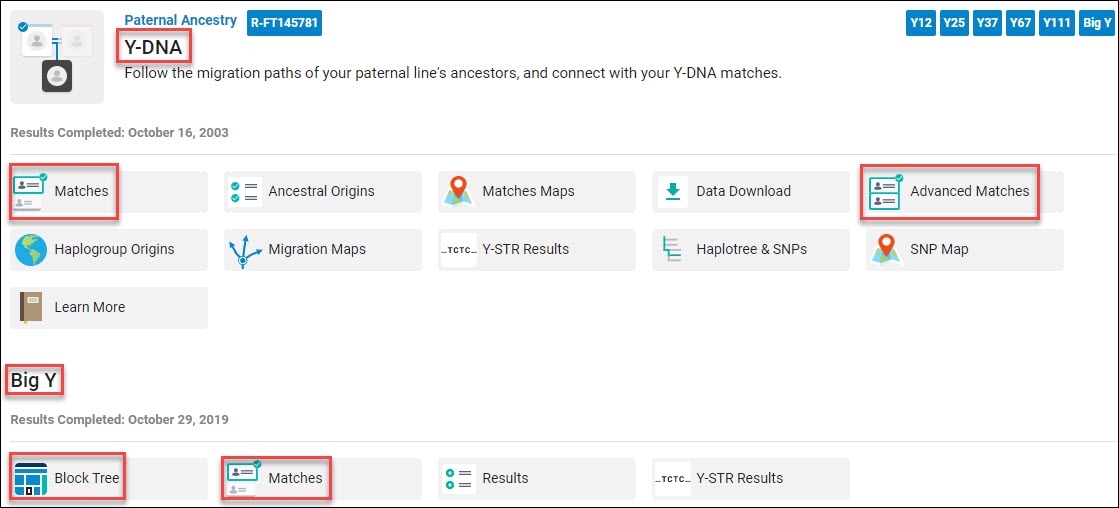
The Results & Tools tab at the top shows the product dropdowns.

The most popular tabs are shown individually under each product, with additional features being grouped under “See More.”
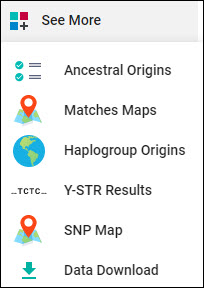
Every product now has a “See More” link where less frequently used widgets will be found, including the raw data downloads. This is the Y DNA “See More” dropdown by way of example.

You can see the green Updated badge on the Family Finder Matches tab. I don’t know if that badge will always appear when customers have new matches, or if it’s signaling that all customers have updated Family Finder Matches now.

We’ll talk about matches in the Family Finder section.

The Family Finder “See More” tab includes the Matrix, ancientOrigins, and the raw data file download.

The mitochondrial DNA section, titled Maternal Line Ancestry, mtDNA Results and Tools includes several widgets grouped under the “See More” tab.

Additional Tests and Tools

The Additional Tests and Tools area includes a link to your Family Tree (please do upload or create one,) Public Haplotrees, and Advanced Matches.

Public haplotrees are free-to-the-public Y and mitochondrial DNA trees that include locations. They are also easily available to FamilyTreeDNA customers here.

Please note that you access both types of trees from one location after clicking the Public Haplotrees page. The tree defaults to Y-DNA, but just click on mtDNA to view mitochondrial haplogroups and locations. Both trees are great resources because they show the location flags of the earliest known ancestors of the testers within each haplogroup.

Advanced Matches used to be available from the menu within each test type, but since advanced matching includes all three types of tests, it’s now located under the Additional Tests and Tools banner. Don’t forget about Advanced Matches – it’s really quite useful to determine if someone matches you on multiple types of tests and/or within specific projects.

Hey, look – I found a tooltip. Just mouse over the text and tabs on various pages to see where tooltips have been added.

Help and Help Center

The new Help Center is debuting in this release. The former Learning Center is transitioning to the Help Center with new, updated content.

Here’s an example of the new easy-to-navigate format. There’s a search function too.

Each individual page, test type, and section on your personal home page has a “Helpful Information” button.

On the main page, at the top right, you’ll see a new Help button.

Did you see that Submit Feedback link?

If you click on the Help Center, you’ll be greeted with context-sensitive help.

I clicked through from the dashboard, so that’s what I’m seeing. However, other available topics are shown at left.

I clicked on both of the links shown and the content has been updated with the new layout and features. No wonder they launched a new Help Center!

Account Settings

Account settings are still found in the same place, and those pages don’t appear to have changed. However, please keep in mind that some settings make take up to 24 hours to take effect.

Family Finder Rematching

Before we look at what has changed on your Family Finder pages, let’s talk about what happened behind the scenes.

FamilyTreeDNA has been offering the Family Finder test for 11 years, one of two very early companies to enter that marketspace. We’ve learned so much since then, not only about DNA itself, but about genetic genealogy, matching, triangulation, population genetics, how to use these tools, and more.

In order to make improvements, FamilyTreeDNA changing the match criteria which necessitated rematching everyone to everyone else.

If you have a technology background of any type, you’ll immediately realize that this is a massive, expensive undertaking requiring vast computational resources. Not only that, but the rematching has to be done in tandem with new kits coming in, coordinated for all customers, and rolled out at once. Based on new matches and features, the user interface needed to be changed too, at the same time.

Sounds like a huge headache, right?

Why would a company ever decide to undertake that, especially when there is no revenue for doing so? The answer is to make functionality and accuracy better for their customers. Think of this as a new bedrock foundation for the future.

FamilyTreeDNA has made computational changes and implemented several features that require rematching:

  • Improved matching accuracy, in particular for people in highly endogamous populations. People in this category have thousands of matches that occur simply because they share multiple distant ancestors from within the same population. That combination of multiple common ancestors makes their current match relationships appear to be closer in time than they are. In order to change matching algorithms, FamilyTreeDNA had to rewrite their matching software and then run matching all over to enable everyone to receive new, updated match results.
  • FamilyTreeDNA has removed segments below 6 cM following sustained feedback from the genealogical community.
  • X matching has changed as well and no longer includes anyone as an X match below 6 cM.
  • Family Matching, meaning paternal, maternal and both “bucketing” uses triangulation behind the scenes. That code also had to be updated.
  • Older transfer kits used to receive only closer matches because imputation was not in place when the original transfer/upload took place. All older kits have been imputed now and matched with the entire database, which is part of why you may have more matches.
  • Relationship range calculations have changed, based on the removal of microsegments, new matching methodology and rematching results.
  • FamilyTreeDNA moved to hg37, known as Build 37 of the human genome. In layman’s terms, as scientists learn about our DNA, the human map of DNA changes and shifts slightly. The boundary lines change somewhat. Versions are standardized so all researchers can use the same base map or yardstick. In some cases, early genetic genealogy implementers are penalized because they will eventually have to rematch their entire database when they upgrade to a new build version, while vendors who came to the party later won’t have to bear that internal expense.

As you can see, almost every aspect of matching has changed, so everyone was rematched against the entire database. You’ll see new results. Some matches may be gone, especially distant matches or if you’re a member of an endogamous population.

You’ll likely have new matches due to older transfer kits being imputed to full compatibility. Your matches should be more accurate too, which makes everyone happy.

I understand a white paper is being written that will provide more information about the new matching algorithms.

Ok, now let’s check out the new Family Finder Matches page.

Family Finder Matches

FamilyTreeDNA didn’t just rearrange the furniture – there’s a LOT of new content.

First, a note. You’ll see “Family Finder” in some places, and “Autosomal DNA” in other places. That’s one and the same at FamilyTreeDNA. The Family Finder test is their autosomal test, named separately because they also have Y DNA and mitochondrial DNA tests.

When you click on Family Finder matches for the first time, you will assuredly notice one thing and will probably notice a second.

First, you’ll see a little tour that explains how to use the various new tools.

Secondly, you will probably see the “Generating Matches” notice for a few seconds to a few minutes while your match list is generated, especially if the site is busy because lots of people are signing on. I saw this message for maybe a minute or two before my match list filled.

This should be a slight delay, but with so many people signing in right now, my second kit took longer. If you receive a message that says you have no matches, just refresh your page. If you had matches before, you DO have matches now.

While working with the new interface this morning, I’ve found that refreshing the screen is the key to solving issues.

My kits that have a few thousand matches loaded Family Matching (bucketing) immediately, but this (Jewish) kit that has around 30,000 matches received this informational message instead. FamilyTreeDNA has removed the little spinning icon. If you mouse over the information, you’ll see the following message:

This isn’t a time estimate. Everyone receives the same message. The message didn’t even last long enough for me to get a screenshot on the first kit that received this message. The results completed within a minute or so. The Family Matching buckets will load as soon as the parental matching is ready.

These delays should only happen the first time, or if someone has a lot of matches that they haven’t yet viewed. Once you’ve signed in, your matches are cached, a technique that improves performance, so the loading should be speedy, or at least speedier, during the second and subsequent visits.

Of course, right now, all customers have an updated match list, so there’s something new for everyone.

Getting Help

Want to see that tutorial again?

Click on that little Help box in the upper right-hand corner. You can view the Tutorial, look at Quick References that explain what’s on this page, visit the Help Center or Submit Feedback.

Two Family Finder Matches Views – Detail and Table

The first thing you’ll notice is that there are two views – Detail View and Table View. The default is Detail View.

Take a minute to get used to the new page.

Detail View – Filter Matches by Match Type

I was pleased to see new filter buttons, located in several places on the page.

The Matches filter at left allows you to display only specific relationship levels, including X-Matches which can be important in narrowing matches to a specific subset of ancestors.

You can display only matches that fall within certain relationship ranges. Note the new “Remote Relative” that was previously called speculative.

Parental Matching and Filtering by Test Type or Trees

All of your matches are displayed by default, of course, but you can click on Paternal, Maternal or Both, like before to view only matches in those buckets. In order for the Family Matching bucketing feature to be enabled, you must attach known relatives’ DNA matches to their proper place in your tree.

Please note that I needed to refresh the page a couple of times to get my parental matches to load the first time. I refreshed a couple of times to be sure that all of my bucketed matches loaded. This should be a first-time loading blip.

There’s a new filter button to the right of the bucketing tabs.

You can now filter by who has trees and who has taken which kinds of tests.

You can apply multiple filters at the same time to further narrow your matches.

Important – Clearing Filters

It’s easy to forget you have a filter enabled. This section is important, in part because Clear Filter is difficult to find.

The clear filter button does NOT appear until you’ve selected a filter. However, after applying that filter, to clear it and RESET THE MATCHES to unfiltered, you need to click on the “Clear Filter” button which is located at the top of the filter selections, and then click “Apply” at the bottom of the menu. I looked for “clear filter” forever before finding it here.

You’re welcome😊

Enhanced Search

Thank goodness, the search functionality has been enhanced and simplified too. Full name search works, both here and on the Y DNA search page.

If you type in a surname without selecting any search filters, you’ll receive a list of anyone with that word in their name, or in their list of ancestral surnames. This does NOT include surnames in their tree if they have not added those surnames to their list of ancestral surnames.

Notice that your number of total matches and bucketed people will change based on the results of this search and any filters you have applied.

I entered Estes in the search box, with no filters. You can see that I have a total of 46 matches that contain Estes in one way or another, and how they are bucketed.

Estes is my birth surname. I noticed that three people with Estes in their information are bucketed maternally. This is the perfect example of why you can’t assume a genetic relationship based on only a surname. Those three people’s DNA matches me on my mother’s side. And yes, I confirmed that they matched my mother too on that same segment or segments.

Search Filters

You can also filter by haplogroup. This is very specific. If you select mitochondrial haplogroup J, you will only receive Family Finder matches that have haplogroup J, NOT J1 or J1c or J plus anything.

If you’re looking for your own haplogroup, you’ll need to type your full haplogroup in the search box and select mtDNA Haplogroup in the search filter dropdown.

Resetting Search Results

To dismiss search results, click on the little X. It’s easy to forget that you have initiated a search, so I need to remember to dismiss searches after I’m finished with each one.

Export Matches

The “Export CSV” button either downloads your entire match list, or the list of filtered matches currently selected. This is not your segment information, but a list of matches and related information such as which side they are bucketed on, if any, notes you’ve made, and more.

Your segment information is available for download on the chromosome browser.

Sort By

The Sort By button facilitates sorting your matches versus filtering your matches. Filters ONLY display the items requested, while sorts display all of the items requested, sorting them in a particular manner.

You can sort in any number of ways. The default is Relationship Range followed by Shared DNA.

Your Matches – Detail View

A lot has changed, but after you get used to the new interface, it makes more sense and there are a lot more options available which means increased flexibility. Remember, you can click to enlarge any of these images.

To begin with, you can see the haplogroups of your matches if they have taken a Y or mitochondrial DNA test. If you match someone, you’ll see a little check in the haplogroup box. I’m not clear whether this means you’re a haplogroup match or that person is on your match list.

To select people to compare in the chromosome browser, you simply check the little square box to the left of their photo and the chromosome browser box pops up at the bottom of the page. We’ll review the chromosome browser in a minute.

The new Relationship Range prediction is displayed, based on new calculations with segments below 6 cM removed. The linked relationship is displayed below the range.

A linked relationship occurs when you link that person to their proper place in your tree. If you have no linked relationship, you’ll see a link to “assign relationship” which takes you to your tree to link this person if you know how you are related.

The segments below 6 cM are gone from the Shared DNA total and X matches are only shown if they are 6 cM or above.

In Common With and Not In Common With

In Common With and Not In Common With is the little two-person icon at the right.

Just click on the little person icon, then select “In Common With” to view your shared matches between you, that match, and other people. The person you are viewing matches in common with is highlighted at the top of the page, with your common matches below.

You can stack filters now. In this example, I selected my cousin, Don, to see our common matches. I added the search filter of the surname Ferverda, my mother’s maiden name. She is deceased and I manage her kit. You can see that my cousin Don and I have 5 total common matches – four maternal and one both, meaning one person matches me on both my maternal and paternal lines.

It’s great news that now Cousin Don pops up in the chromosome browser box at the bottom, enabling easy confusion-free chromosome segment comparisons directly from the In Common With match page. I love this!!!.

All I have to do now is click on other people and then on Compare Relationship which pushes these matches through to the chromosome browser. This is SOOOO convenient.

You’ll see a new tree icon at right on each match. A dark tree means there’s content and a light tree means this person does not have a tree. Remember, you can filter by trees with content using the filter button beside “Both”.

Your notes are shown at far right. Any person with a note is dark grey and no note is white.

If you’re looking for the email contact information, click on your match’s name to view their placard which also includes more detailed ancestral surname information.

Family Finder – Table View

The table view is very similar to the Detail View. The layout is a bit different with more matches visible in the same space.
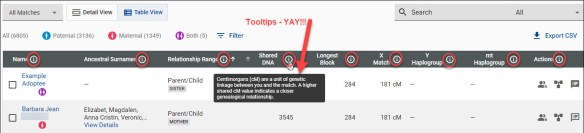
This view has lots of tooltips on the column heading bar! Tooltips are great for everyone, but especially for people just beginning to find their way in the genetic genealogy world.

I’ll have to experiment a bit to figure out which view I prefer. I’d like to be able to set my own default for whichever view I want as my default. In fact, I think I’ll submit that in the “Submit Feedback” link. For every suggestion, I’m going to find something really positive to say. This was an immense overhaul.

Chromosome Browser

Let’s look at the chromosome Browser.

You can arrive at the Chromosome Browser by selecting people on your match page, or by selecting the Chromosome Browser under the Results and Tools link.

Everything is pretty much the same on the chromosome browser, except the default view is now 6 cM and the smaller segments are gone. You can also choose to view only segments above 10 cM.

If you have people selected in the chromosome browser and click on Download Segments in the upper right-hand corner, it downloads the segments of only the people currently selected.

You can “Clear All” and then click on Download All Segments which downloads your entire segment file. To download all segments, you need to have no people selected for comparison.

The contents of this file are greatly reduced as it now contains only the segments 6 cM and above.

Family Tree

No, the family tree has not changed, and yes, it needs to, desperately. Trust me, the management team is aware and I suspect one of the improvements, hopefully sooner than later, will be an improved tree experience.

Y DNA

The Y DNA page has received an update too, adding both a Detail View and a Table View with the same basic functionality as the Family Finder matching above. If you are reading this article for Y DNA only, please read the Family Finder section to understand the new layout and features.

Like previously, the match comparison begins at the 111 marker level.

However, there’s a BIG difference. If there are no matches at this level, YOU NEED TO CLICK THE NEXT TAB. You can easily see that this person has matches at the 67 level and below, but the system no longer “counts down” through the various levels until it either finds a level with a match or reaches 12 markers.

If you’re used to the old interface, it’s easy to think you’re at the final destination of 12 markers with no matches when you’re still at 111.

Y DNA Detail View

The Y-DNA Detail and Table views features are the same as Family Finder and are described in that section.

The new format is quite different. One improvement is that the Paternal Country of Origin is now displayed, along with a flag. How cool is that!

The Paternal Earliest Known Ancestor and Match Date are at far right. Note that match dates have been reset to the rerun date. At this point, FamilyTreeDNA is evaluating the possibility of restoring the original match date. Regardless, you’ll be able to filter for match dates when new matches arrive.

Please check to be sure you have your Country of Origin, Earliest Known Ancestor, and mapped location completed and up to date.

Earliest Known Ancestor

If you haven’t completed your Earliest Known Ancestor (EKA) information, now’s the perfect time. It’s easy, so let’s do it before you forget.

Click on the Account Settings gear beneath your name in the right-hand upper corner. Click on Genealogy, then on Earliest Known Ancestors and complete the information in the red boxes.

  • Direct paternal line means your father’s father’s father’s line – as far up through all fathers as you can reach. This is your Y DNA lineage, but females should complete this information on general principles.
  • Direct maternal line means your mother’s mother’s mother’s line – as far up through all mothers that you can reach. This is your mitochondrial DNA lineage, so relevant for both males and females.

Completing all of the information, including the location, will help you and your matches as well when using the Matches Map.

Be sure to click Save when you’re finished.

Y DNA Filters

Y DNA has more filter options than autosomal.

The Y DNA filter, located to the right of the 12 Markers tab allows testers to filter by:

  • Genetic distance, meaning how many mutations difference between you and your matches
  • Groups meaning group projects that the tester has joined
  • Tree status
  • Match date
  • Level of test taken

If none of your matches have taken the 111 marker test or you don’t match anyone at that level, that test won’t show up on your list.

Y DNA Table View

As with Family Finder, the Table View is more condensed and additional features are available on the right side of each match. For details, please review the Family Finder section.

If you’re looking for the old Y DNA TiP report, it’s now at the far right of each match.

The actual calculator hasn’t changed yet. I know people were hoping for the new Y DNA aging in this release, but that’s yet to follow.

Other Pages

Other pages like the Big Y and Mitochondrial DNA did not receive new features or functionality in this release, but do sport new user-friendly tooltips.

I lost track, but I counted over 100 tooltips added across the platform, and this is just the beginning.

There are probably more new features and functionality that I haven’t stumbled across just yet.

And yes, we are going to find a few bugs. That’s inevitable with something this large. Please report anything you find to FamilyTreeDNA.

Oh wait – I almost forgot…

New Videos

I understand that there are in the ballpark of 50 new videos that are being added to the new Help Center, either today or very shortly.

When I find out more, I’ll write an article about what videos are available and where to find them. People learn in various ways. Videos are often requested and will be a popular addition. I considered making videos, but that’s almost impossible for anyone besides the vendor because the names on screens either need to be “fake” or the screen needs to be blurred.

So hurray – very glad to hear these are imminent!

Stay Tuned

Stay tuned for new developments. As Lior said, FamilyTreeDNA is investing heavily in genetic genealogy and there’s more to come.

My Mom used to say that the “proof is in the pudding.” I’d say the myDNA/FamilyTreeDNA leadership team has passed this initial test with flying colors.

Of course, there’s more to do, but I’m definitely grateful for this lovely pudding. Thank you – thank you!

I can’t wait to get started and see what new gems await.

Take a Look!

Sign in and take a look for yourself.

Do you have more matches?

Are your matches more accurate?

How about predicted relationships?

How has this new release affected you?

What do you like the best?

_____________________________________________________________

Disclosure

I receive a small contribution when you click on some of the links to vendors in my articles. This does NOT increase the price you pay but helps me to keep the lights on and this informational blog free for everyone. Please click on the links in the articles or to the vendors below if you are purchasing products or DNA testing.

Thank you so much.

DNA Purchases and Free Transfers

Genealogy Products and Services

Books

Genealogy Research

Heads Up – Great Changes Coming at FamilyTreeDNA

This should be subtitled “Confessions of a Squeaky Wheel.”

Yes, I’ve been incessantly squeaky for a long time now, and it looks for all the world like this nagging, er, squeaking has worked.

Just a few minutes ago, this email arrived from FamilyTreeDNA, addressed to project administrators.

There’s at least one thing that’s time-sensitive, so be sure to read this today.

You may have been one of the FamilyTreeDNA customers who received one of two surveys a few weeks ago, after myDNA merged with FamilyTreeDNA. FamilyTreeDNA asked for feedback about what customers would like to see.

At that time, there was a raft of unfounded rumors that myDNA wasn’t committed to genealogy.

That was wrong, dead wrong. Couldn’t be further from the truth, and that’s not just extrapolated from this email. It’s a function of being that squeaky wheel. Based on this, FamilyTreeDNA obviously listened.

This is certainly welcome news!

That list of things we’ve been asking for…well, here you go.

Increased matches for many, along with improved matches. Did you see that?

There’s a lot here. It’s no wonder the matches page has been redesigned with all these new features.

It looks like the Y DNA page has been redesigned for the same reason. No mention of mitochondrial DNA though. Maybe that’s coming soon.

Thank goodness – a new Help Center.

And VIDEOs too!!!

Yes!!!

Ok, who loves that “Houston we have a problem” message? No one with their hand up? Me either.

However, I’ve already seen an improvement over the past few weeks, so maybe this has been an ongoing behind-the-scenes process.

And tooltips too!

For those who don’t know, a tooltip is a little information box with a couple of sentences that you can just mouse over. For example, a good place for a tooltip would be on the column headers explaining what that column means.

Ok, here’s the time-sensitive part.

I know FamilyTreeDNA said that they had closed the National Geographic Genographic transfer portal a year ago, but clearly they left it open as a courtesy.

However, with all these changes, it’s going away for good, now.

If you don’t transfer your Nat Geo Genographic kit before end of day on June 30th, you will not be able to do so. You can find instructions, here.

What’s Next?

We don’t know when these features will be released, exactly, but we do know it’s coming in July.

The fact that the Genographic transfer is gone as of June 30th suggests that at least some changes are imminent.

This cumulative list equates to a huge change, so I’d wager that it won’t be one big release, but a series of releases that build on each other.

I don’t know about you, but I can hardly wait. I’ll be writing about the new features as soon as they arrive.

I’m signing in now to record the number of matches I have so I can compare when the new features arrive. You can too, by clicking here.

If you have kits from other vendors that you’ve been meaning to upload to FamilyTreeDNA, now would be a great time to do that. You can find step-by-step instructions for downloading raw data files from each vendor and uploading them elsewhere, here.

Feel free to share this article with groups or anyone else who might be interested!

_____________________________________________________________

Disclosure

I receive a small contribution when you click on some of the links to vendors in my articles. This does NOT increase the price you pay but helps me to keep the lights on and this informational blog free for everyone. Please click on the links in the articles or to the vendors below if you are purchasing products or DNA testing.

Thank you so much.

DNA Purchases and Free Transfers

Genealogy Products and Services

Books

Genealogy Research

How Many Men Discover or Confirm Their Surname with Y DNA Testing?

About 15 years ago, Bennett Greenspan, founder of FamilyTreeDNA, at one of the early conferences said that about 30% of men who take a Y DNA test find a strong surname match. That number has increased now to nearly 100%, or “almost everyone.”

Exceptions

Of course, there are exceptions that fall into a number of categories:

  • Jewish families from regions where surnames weren’t adopted until in the 1800s.
  • Jewish families whose direct paternal line suffered dramatic losses during the Holocaust.
  • Dutch families who did not adopt surnames until Napoleon’s edict in 1811.
  • Cultures who have or recently had patronymic surnames that change every generation.
  • Men whose DNA is either extremely rare (and no relatives have tested) or are from under-sampled regions of the world.
  • Males whose paternal line may be recent immigrants and people in the homeland don’t participate in genealogy or don’t DNA test.
  • Males whose ancestors were enslaved. In the US, families adopted surnames after the Civil War ended slavery in the 1860s, so Y DNA testing plus autosomal is critically important to reunite these families. Please note that the Y DNA haplogroup, even an estimate provided with STR testing, will indicate whether the direct paternal lineage is European, African, Native American/Asian – all of which are found in the descendants of men who were enslaved. The Big Y-700 provides significantly more information along with placement on the haplotree.

I started writing Y DNA reports for clients in 2004 (although I no longer accept private clients) and at that time, often saw men with no matches. Today, a man with no matches is extremely unusual, and most have strong surname matches. As more men test, everyone will have more matches, of course, and the more we can learn about our ancestors.

What do matches reveal?

Matches Reveal

In essence, matches to other men with common surnames do one of two things:

  1. Confirm the surname lineage, at least to the common ancestor.
  2. Identify the surname where the tester is likely to find his ancestral roots.
  3. Provide perspective further back in time answering the question, “Where did I come from?”

Of course, this second point is crucial for males searching for the identity of their paternal lines.

While time has moved on, the number of testers in the database has dramatically increased, and almost everyone has relevant matches now – I still see the 30% metric oft-repeated. Let’s put this to the test and see what we find.

Setting Up the Experiment

I selected 20 men who have taken the Big Y test whose kits I manage or who were randomly selected from projects that I manage and who have given permission for their results to be published on public project pages.

I recorded results for the tester’s own or very similar surnames. Slightly different but recognizable spellings are counted as the same name.

I included matches at 12 markers, 111 markers, and the Big Y results. Men who purchase or upgrade to the Big Y-700 test will have all 111 STR panel markers included. Obviously, individual testers should check their results at every level.

Big Y testers actually receive 700+ STR markers, but can only easily filter for matches at 111 (or below), so that’s the number I used. Plus, males can purchase  37 and 111 panels without taking the Big Y test, so this comparative information will be valid for all Y DNA testers.

Click to enlarge image.

Additionally, I used the Advanced Matches feature to check for people who match someone on BOTH the Y DNA and their Family Finder autosomal test. Of course, this doesn’t guarantee that the reason they match on both tests is because of their common surname line – but it’s a hint and may be very useful, especially with closer Family Finder matches.

I intentionally included some men with recent European heritage who are unlikely to have matches simply because their families have been in colonial America since the 1600s or 1700s and their ancestor had a dozen sons who each had a dozen sons.

Why Did I Include 12 Marker Results?

You may wonder why I included 12 marker matches since that test is no longer sold individually and is the least granular. Truthfully, it’s too often deemed useless and overlooked.

Hear me out on this one😊

Many of the men who originally took the 12 and 25 marker tests, before the higher panels (37, 67, 111, and Big Y) were available are deceased now. Twenty years is a generation, and FamilyTreeDNA began testing the Y chromosome in the year 2000.

While these low marker tests alone are not conclusive, with additional information, such as trees, common ancestors, and other testers who match, they form pieces of evidence that can be invaluable. Some have also taken an autosomal test which can be especially important, given that they are another generation or two (or three) further back in time than the people testing today.

You won’t see these men as matches at 37, 67 or 111 markers, because they are deceased and can’t upgrade, but they may provide the nugget of information you need by matching at 12 or 25 markers. You’ll need to evaluate that match in light of other information. I’ll review that in the next two sections.

20 Men

If you’re a man or can find a male to test for each of your genealogy lines, the Y DNA is the fastest, most reliable way to identify an ancestral surname – not just in your father’s generation, but moving back in time.

Of the 20 men selected, all men had matches to their surname. However, one Smith man, #18, had a unique situation that might be very genealogically relevant.

I’ll discuss each match briefly with some commentary below the chart.

Surname Match Name 12 Marker 111 Marker Big Y Advanced – 12 + FF Both
1 Howery Howery 9 of 20 2 of 2 0 (none tested) 1
2 Graves Graves 8 of 51 2 of 8 1 Graves + others 1 – different surname
3 Perkins Perkins/McDonald 16 of 1762 1 of 63, many McDonalds 0 Perkins (no testers) but several McD names 8 – 2 McDonald
4 Napier Napier 19 of 19,217 2 of 13 2 Napier + others 1 + many others
5 Rice Rice 45 of 58 14 of 19 7 of 10 1
6 Rader Rader  13 of 18,576 7 of 7 7 3
7 Estes Estes 69 of 502 21 of 24 9 of 10 2 + 4 different surname
8 Campbell Campbell 178 of 369 61 of 103 7 of 10 4 of 5
9 Lentz Lentz 1 of 1 0 of 1 1 different name, no other Lentz Big Y testers 0
10 Bonnevie Bonnevie 1 of 1 (tested to 37) 0 0 no test
11 Vannoy Vannoy 7 of 49 2 of 4 0 of 1 0
12 Lore/Lord Lore/Lord 3 of 7 1 of 3 1 of 1 0
13 Clarkson/Claxton Clarkson/Claxton 19 of 540 1 of 1 0 of 9 (No Big Y testers) 0 of 3
14 Muncey Muncy/Muncey 9 of 155 7 of 16 1 of 4 1
15 Miller Miller 5 of 6 2 at 67, no 111 testers 0 – no Miller match testers 1 of 2
16 Speak(s) Speak(s) 9 of 9 21 of 51 4 of 17 0
17 Smith Smith/Jennings 2 of 16, 9 Jennings 0 of 2 (Jennings) 1 Jennings of 3 1 Jennings
18 Bolton Bolton 8 of 1750 2 of 2 0 of 28 0 of 12
19 Crumley Crumley 10 of 79 7 of 93 3 of 127 0 of 2
20 Harrell Harrell 81 of 17,638 3 of 7 2 of 2 0 of 119

Messages Revealed in the Results

Let’s briefly review the information we’ve discovered and extrapolate from each of these 20 matches. Analysis is the key to success.

  1. The Howery surname is rather unusual. This man had only two 111 marker matches and both were to men of the same surname. Half of his 12 marker matches are the same surname. None of his matches had taken the Big Y test, so he has no same-surname or other surname matches there. He did match one of his Y DNA matches on the Family Finder test though. This is high-quality confirmation that Howery is indeed the biological ancestral surname and our tester can set about finding and confirming his common ancestors with his matches.
  2. The Graves male had several 12-marker matches, but many 12-marker matches have not tested at the 111 marker level. He matches one Graves male on the Big Y plus some men with other surnames. The Big Y reaches back further in time, so these matches may reflect common ancestors before the advent of surnames.
  3. Our Perkins male has very interesting matches. He does have both 12 and 111 Perkins matches, but he also had a LOT of McDonald matches. More McDonald matches than Perkins matches. This suggests that indeed, his ancestors were Perkins, at least back to the earliest known ancestor (EKA), but before that, he may well be a member of the McDonald Y DNA clan. There were no Perkins Big Y testers, but if I were him, I’d ask my Perkins matches to upgrade.
  4. I can tell by looking at the huge number of 12 marker matches for our Napier man that he is haplogroup R, the most common in Europe, with an EXTREMELY common 12 marker haplotype. Note how dramatically the number of 111 marker matches drops – from 19,000+ to 13 – a perfect example of why we suggest men upgrade to at least 111 markers to refine their matches. Both of his 111 marker Napier matches have upgraded to the Big Y, and he matches them there as well. He does match one Napier on both the 12 marker test and Family Finder Advanced Matching – but he also matches MANY other men. This is because of the extremely high number of 12 marker matches. In his case, I would only use Y DNA marker panels higher than 12 markers in the Advanced Matching.
  5. Lots of Rice testers from this line confirm a common ancestor. I wonder if there is a Rice male from someplace overseas who has tested. If so, this might be that “jump the pond” event that genealogists who have European ancestors who are found in colonial America seek.
  6. Our Rader tester also has many 12 marker matches, but his only matches at 111 and on the Big Y are his Rader kinsmen. No doubt about that surname whatsoever.
  7. My Estes line has several 12 marker matches, but that gets slimmed right down at 111 markers. Using the Big Y test, we further divided those branches of Estes men. I literally could not have sorted out who was descended from whom without the Big Y test results. Way too many Johns, Williams, and Elishas in burned counties in Virginia.
  8. Our Campbell tester is unquestionably confirmed to be descended from the Clan Campbell line from Inverary, Scotland. However, the challenge in this family is which Campbell male they descend from in Virginia. The Big Y-700 test has narrowed the possibilities significantly, and the tester is currently in the process of attempting to convince his three closest Y STR 111 matches to take the Big Y test. Yes, he has offered to pay as well. Hey, in genealogy, you do what you need to do. Y DNA is likely the only way this puzzle from the 1700s will ever be unraveled.
  9. The Lentz line is German with rare DNA, but they do have a confirming match to another Lentz male.
  10. Bonnievie spelled various ways is French and has one 12 marker match who only tested to 37 markers. He has no matches above that. Not only is his Y DNA quite rare, DNA testing is illegal in France which makes additional testers few and far between. Unfortunately, his one match has not taken a Family Finder test either.
  11. Several men from the Vannoy line have tested and a Big Y test match to another man confirmed that the ancestral line is Dutch – not French as was speculated for decades. The STR tests have revealed Vannoy lines, by similar spellings, from lines we didn’t know existed.
  12. Lore or Lord is a rare Acadian family surname. Our tester does have matches to other Lore/Lord men, which confirms the line to the ancestor who arrived in Acadia in the early 1600s, but future testers will be needed before we can confirm his origins to either France or as one of the English soldiers who served at the fort.
  13. The Clarkson/Claxton testers confirm two lines, one spelled each way, from Tennessee and North Carolina line to a common ancestor in either Virginia or North Carolina in the 1770s. However, the family is still working to further assemble that puzzle. Finding a Clarkson/Claxton match on STR markers or the Big Y who descends from a male not from the two known lines would help immensely. Our hope is that a Clarkson/Claxton from an earlier line or from the British Isles will test and provide that push over the brick wall. Any Clarkson/Clarkson men out there who haven’t taken the Y DNA test yet?
  14. The Muncy/Munsey line is confirmed to a common ancestor born in England in and died on Long Island in 1674. Based on both STR and SNP results from the Big Y, we can narrow the lineages of Muncy men who test and aren’t familiar with their Muncy genealogy. Of course, the Muncy line eventually migrated through Virginia and seemingly named every man in every generation either John, Samuel or Francis – but DNA testing helps immensely to sort this out.
  15. While Miller is a very common occupation surname, DNA testing has put to rest many incorrect myths about this particular Swiss Miller line. Men with the same surname in the same location, even in the same church, does not equate to the same genetic family line. Any male with a common surname absolutely needs to do Y DNA testing and at the highest level. There’s nothing worse than spending countless hours barking up the wrong tree – especially when Y DNA testing will save you.
  16. Our Speaks man matched another Speak male who knew where his ancestors were from in Lancashire. Testing additional men living in Lancashire at the 111 marker and Big Y levels allowed the Speak line to be divided into specific lineages beginning in the 1500s, piecing together the earlier ancestors into a descendant tree. Recently, an “orphan” line in the US has been connected to his ancestors, thanks to both STR values AND Big Y testing.
  17. Smith is quite interesting because we discover that something doesn’t add up. Our Smith man matches two Smith men who have the same ancestor born in 1810 but that son, John, does not match the descendants of his brothers. There seems to be an undocumented adoption of some sort at that point in time. John Smith’s Y DNA is not the same as his brothers whose descendants match each other. Given that our Smith tester, and his two matches, do not match the other descendants of the ancestor they are supposed to descend from, we can pinpoint the generation in which the adoption event occurred. However, we have a further clue, because these Smith men match the Jennings line closely- including one advanced match where the Smith man also matches autosomally in addition to the Y DNA. This is clearly a case of “you don’t know what you don’t know” and would never have known without Y DNA testing.
  18. Our Bolton tester matches several other Bolton men who descend from a common immigrant ancestor. If the Bolton matches upgrade to the Big Y-700 test, they might be able to determine separate genetic lines branching through the various sons of the immigrant ancestor. Evaluating the surnames that the tester matches at the Big Y level may assist with evaluating deeper ancestry in England and determining where the Bolton ancestors originated before the 1600s in London.
  19. Crumley is a difficult family to research, in part because several people with the same surname are found in close proximity, but Y DNA testing has shown that these men are not related. Big Y testing has disproved that the Crumley progenitor originated in Germany, although a different Crumley family did. The Big Y matches include many Mc… surnames along with Ferguson and Gillespie. The Big Y Block Tree shows the closest matches with ancestors born in Scotland, Ireland, and Northern Ireland – which is very likely where the Crumley progenitor originated too.
  20. Harrell is another difficult surname, spelled numerous ways with several Harrell/Herrell/Harrold/Herrald families moving westward in the 1600s and 1700s from the thirteen original colonies. This Harrell line has not been able to connect to a single progenitor in the colonies, yet, but Y DNA testing and the block tree confirm that this Harrell line originated in the British Isles, very likely England.

What Did These 20 Men Learn?

Every single one of these men benefitted from Y DNA testing, although exactly how depends to some extent on their testing goal. Other men also benefitted by matching.

One man, our Smith, #17, needs to look at the Jennings family prior to 1810. Is there a Jennings man living in close proximity, or do court records exist that might be illuminating?

If one of these 20 men had been an adoptee or otherwise searching for an unknown paternal line, they would have been able to identify a surname connection and perhaps a progenitor ancestor. I encourage everyone to either order a Family Finder autosomal test or transfer a DNA file (for free) from another vendor if they have taken an autosomal test elsewhere. Step-by-step transfer instructions are found here. Be sure that the Y DNA and autosomal tests are on the same kit/account at FamilyTreeDNA so that you can use the advanced matching tool.

With the Big Y-700 test, these men can discern or confirm lines descending from their direct paternal ancestors – sometimes within a generation or two of the tester. This test is so sensitive and granular and has such deep coverage (millions of bases) now that often we find small mutations between fathers and sons or brothers.

While STR markers, 12-111 are genealogically important, they do tend to mutate rapidly and sometimes back-mutate. SNPs, tested in the Big Y-700 test, don’t do that, and the power of STRs and SNPs together have the potential to break down brick walls and correct trees. In fact, it happens every single day.

Resources

If you’d like to watch a video about Y DNA, Y DNA-related genetic terms, and the benefits of Big Y-700 testing, you can watch a great educational video by Janine Cloud here. Be sure to note the part where she talks about why people who have previously taken the Big Y-500 might want to upgrade to the Big Y-700.

Also, check out my Y DNA Resource page, here.

What Don’t You Know?

Y DNA tests, including the Big Y-700 which includes all STR panels, and the autosomal Family Finder test are on sale at FamilyTreeDNA right now for Father’s Day.

There’s no better time to find missing pieces and discover information that you can’t find any other way.

Click here to order Y DNA tests, the Family Finder, or upgrade an existing test.

_____________________________________________________________

Disclosure

I receive a small contribution when you click on some of the links to vendors in my articles. This does NOT increase the price you pay but helps me to keep the lights on and this informational blog free for everyone. Please click on the links in the articles or to the vendors below if you are purchasing products or DNA testing.

Thank you so much.

DNA Purchases and Free Transfers

Genealogy Products and Services

Books

Genealogy Research

Misleading 23andMe Paternal Haplogroup Emails For Females

I received an email for a 23andMe kit that I manage stating “Your Paternal Haplogroup Report is waiting for you.” Really? Cool!!!

Only problem is that the tester is a female – and females don’t have a paternal haplogroup available because females don’t have Y DNA.

Clearly, this is just not possible.

Three things crossed my mind:

  1. Erroneous email, as in “oops.” Some marketing person is going to be in a heap of trouble.
  2. Incompetence following the sale of the company. There have been other recent changes that caused me to wonder, although some were reversed.
  3. Bait and switch. Surely not. 23andMe has never been like that, so this is a distant third.

I knew for an absolute fact, beyond any doubt that this close family member is female.

I also realize that any female who receives this email would excitedly check their Paternal Haplogroup report – thinking that maybe, just maybe, some new scientific discovery had been made so they CAN actually see a paternal haplogroup from their own DNA test.

Time to see what’s going on.

I Signed In

I signed in and saw an unopened Paternal Haplogroup report under “Next Reports” at the top of the main page.

click to enlarge

I checked another female kit that I manage, plus my own. The same thing appeared on both of those accounts too.

This e-mail was clearly not an “oops” email inadvertently sent to a female group of testers. It has to be something else.

Sure enough, on the Ancestry tab, if I scroll down, I see these two placards.

click to enlarge image

Maternal Haplogroup, which everyone has, and Paternal Haplogroup, which only males have. Did 23andMe make some kind of mistake? I clicked on the “View Your Report” button for Paternal Haplogroup. It took me to the same page the Paternal Haplogroup link on my main page did.

click to enlarge image

My heart just sank.

Sure enough, it’s a pitch to test another family member, a father or brother. 23andMe explains that no, the female tester really doesn’t have a paternal haplogroup.

So, it IS bait and switch, the least likely scenario I expected. I’m really disappointed. I never thought I’d see the day 23andMe would adopt this type of disingenuous marketing technique.

Why Does This Bother Me So Much?

In general, acquisitions make people uneasy, and 23andMe was acquired in February.

We don’t know what to expect of the new owners, or the direction they will take a company. In this case, the company involved, 23andMe, not only has my DNA, they provide information about my health as part of my test.

Consumers need to be able to have confidence that the information 23andMe provides is accurate. We need to be able to trust them, to believe what they tell us about our DNA results without having to wonder if there is something more, or less, in this case, to the story. In other words, that there’s no ulterior motive in their message.

I grew up on a farm and my old farmer Dad used to tell me that “if someone will lie to you about one thing, they will lie to you about anything.”

I would have NO PROBLEM whatsoever with 23andMe sending an email telling females how to obtain a paternal haplogroup for their paternal line.

There’s a significant difference, though, between that and telling female testers that their “Paternal Haplogroup report is waiting for you,” when it’s very clearly not. The email says the report “includes insights about your DNA,” which it clearly does not, because there is no report. 23andMe knows this. That email says “View Report” twice, with links. It’s not a mistake. It’s a hook, using my own DNA as bait, and I’m the fish.

This tactic is misleading, at best. In my opinion, it’s an unethical and dishonest attempt to manipulate unwary or naïve customers. And truthfully, I’m shocked. I never expected behavior like this from 23andMe. It seems so out-of-character about what I thought I understood about Ann Wojcicki. In this 2015 interview in PLOS Genetics, she said, “I think that for our mission, it’s really important that people trust the company.” What happened?

If I WAS inclined to test another family member, given this deceptive bait and switch sales tactic, I assuredly wouldn’t. Telling me I “have” something only to discover I don’t in an attempt to sell me that same “something” is just not a technique I would have expected 23andMe to embrace.

Come on 23andMe, you are, or were, better than this. ☹

_____________________________________________________________

Disclosure

I receive a small contribution when you click on some of the links to vendors in my articles. This does NOT increase the price you pay but helps me to keep the lights on and this informational blog free for everyone. Please click on the links in the articles or to the vendors below if you are purchasing products or DNA testing.

Thank you so much.

DNA Purchases and Free Transfers

Genealogy Products and Services

Books

Genealogy Research