
There are two types of access you may want to share with other users at Ancestry, and specific times when you’ll want to do each.
- Shared DNA results
- Shared family trees
These two things are not the same, and granting access to one does NOT grant access to the other. Having access to your DNA matches without having access to your tree drastically hobbles anyone’s ability to make sense of your DNA matches.
For someone to use your DNA matches effectively, they need access to your tree too.
If you have set your account selections set to allow shared DNA results, AND tree sharing, your DNA matches will have access to both. If not, they won’t.
Let’s check this out!
DNA Match Sharing

Click the down arrow to the right on your signon page, then Account Settings.

Click on DNA.

Then, click on the little right arrow waaaaayyyy over there.
Next you will see your personal details.
Look in the section titled “DNA and family tree linking.”

If your test is NOT linked to your profile in your tree, click here to do so now.
Visibility
Next, the Visibility section displays your selections in effect for both DNA matching and your ethnicity estimates. Click on the right arrow to view other options.

Important: If you do NOT have matching enabled, you won’t see any matches and they won’t see you.
Note that if you don’t match with someone, they will not be able to tell if you’ve taken a DNA test or not.
Granting DNA Test Sharing Access
You can choose to share access to your DNA test results with anyone. Generally, that would be someone who is managing your test for you or assisting with your genealogy.
You can choose their role, and what they can do.

Click on “DNA test sharing.”
You can see that I’ve invited 8 collaborators to share my DNA results, meaning they can view and work with my matches. In my case, these are cousins I’m collaborating with closely, but it could also be someone who is managing your account or a professional genealogist helping you to break through a brick wall.
Plus, not to be morbid, but you just never know when you’ll be meeting your ancestors on the other side, and I want my DNA to go on working for my genealogy partners and family members after I’m no longer doing the work myself.

Click the “Invite” button.

Next, enter either the email of the person you’re granting access to, or ancestry username, and select the level of access you want them to have.
- Viewers have read-only access and cannot do anything, including make or edit notes, link results to trees, or change settings.
- Collaborators have the same access as Viewers, plus they can assist with research by linking test results to trees, made and edit notes, and create and assign custom match groups.
- Managers essentially function on your behalf. They can do everything above, plus invite other users, message people on your behalf, download your DNA file, and delete the test itself.
Let’s Consider an Example
You might be wondering what kind of information another researcher might be looking for and why they need access to your DNA test results.
Even though our DNA doesn’t match, my cousin Greg has been looking for people that we both match independently, that he knows descend from our common ancestor, Peter Johnson. We can’t use “Shared matches” because we don’t match each other, so he has been kind enough to sift through my matches and comparing them, one by one, with his known matches.

On your DNA sharing list, any tests you own are listed first, along with anyone you’ve granted access to, and their role.
Typically, I typically grant View access because the cousins I’m working with can see everything I can see, but they can’t change things. If you’re working with a professional genealogist, you would probably want to grant Collaborator access. Manager access should be reserved for only your most trusted family member(s).
Important: Sharing DNA does NOT mean you’re automatically sharing your tree.
Sharing Trees
Sharing your family tree is important for three reasons.
- DNA matches
- For people who don’t match your DNA but are researching the same ancestors and find your tree through hints or ancestor searches
- People you specifically want to provide access to your tree to help you
One of my cousins kindly shared his DNA results with me, but he didn’t realize that he needed to share his private tree with me separately, so he didn’t, and now I can no longer get in touch with him. He was very ill when he shared his DNA results and has since passed away.
Let’s look at tree management, sharing and invitations.
Your Tree Privacy Settings
Go back to Account Settings and select “Trees.”

Next, you’ll see your trees and trees that others have shared with you.

Select the tree you wish to view, share, or work with.
Then, select Privacy Settings at the top of the page.

Take this opportunity to review your tree privacy settings.
As you can see, my tree is public. I firmly believe that a rising tide lifts all ships. I realize that this is a controversial topic, but I share my work freely and hope others will as well. I’m providing quality breadcrumbs for present and future researchers.
My cousin who shared his DNA with me, then died, has a private tree, and even though I can see how he matches people, I cannot view their common ancestors because his tree is private and he didn’t realize he needed to grant me separate access to his tree in addition to his DNA results.
Furthermore, if your tree is private, your DNA matches can’t view your tree either, and a DNA match has limited utility without tree access.
Invite People to Your Tree
My tree is public, so it’s available for viewing in searches and by DNA matches.
However, I still need to grant specific access to people to directly access my tree without them having to search around to find my tree in their ancestor search hints and matches.
Click on “Invitations.”

You’ll be able to see who you’ve granted access to, their Role relative to your tree (which is entirely separate from their role relative to your DNA test), and if they can see living people. If you make changes, don’t forget to click “save” at the bottom of the page.
To invite someone to your tree, click on “Invite People.”
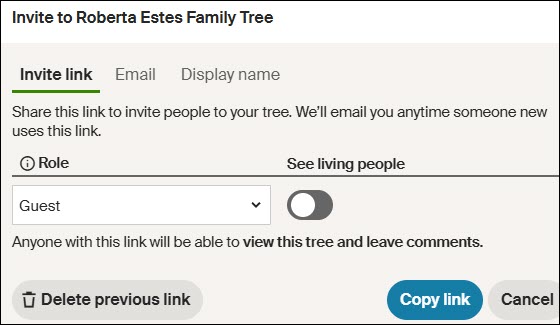
You can invite someone to your tree in one of three ways.
- A One-Time Link: Click on “Invite link,” then click “Copy link” at the bottom, and then send it to the recipient
- Email: Click on “Email” and enter their email address
- Display Name: Click on “Display name” and enter their Ancestry name
You’ll be notified if they accept.
Another Tree Invite Location
There is no easier way to invite people to view your DNA results, but there is another way to share your tree.
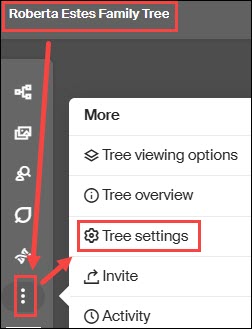
On your main Ancestry page, click on Trees, and then select the tree you wish to share.
Clicking on the three little dots takes you to tree settings, where you can follow the instructions above.
Now is a good time to review your settings and be sure they are the most beneficial for your genealogy goals.
____________________________________________________________
Follow DNAexplain on Facebook, here or follow me on Twitter, here.
Share the Love!
You’re always welcome to forward articles or links to friends and share on social media.
If you haven’t already subscribed (it’s free,) you can receive an email whenever I publish by clicking the “follow” button on the main blog page, here.
You Can Help Keep This Blog Free
I receive a small contribution when you click on some of the links to vendors in my articles. This does NOT increase the price you pay but helps me to keep the lights on and this informational blog free for everyone. Please click on the links in the articles or to the vendors below if you are purchasing products or DNA testing.
Thank you so much.
DNA Purchases and Free Uploads
- FamilyTreeDNA – Y, mitochondrial and autosomal DNA testing
- MyHeritage DNA – Autosomal DNA test
- MyHeritage FREE DNA file upload – Upload your DNA file from other vendors free
- AncestryDNA – Autosomal DNA test
- 23andMe Ancestry – Autosomal DNA only, no Health
- 23andMe Ancestry Plus Health
Genealogy Products and Services
- MyHeritage FREE Tree Builder – Genealogy software for your computer
- MyHeritage Subscription with Free Trial
- Legacy Family Tree Webinars – Genealogy and DNA classes, subscription-based, some free
- Legacy Family Tree Software – Genealogy software for your computer
- Newspapers.com – Search newspapers for your ancestors
- NewspaperArchive – Search different newspapers for your ancestors
My Book
- DNA for Native American Genealogy – by Roberta Estes, for those ordering the e-book from anyplace, or paperback within the United States
- DNA for Native American Genealogy – for those ordering the paperback outside the US
Genealogy Books
- Genealogical.com – Lots of wonderful genealogy research books
Genealogy Research
- Legacy Tree Genealogists – Professional genealogy research
Share this:

Discover more from DNAeXplained - Genetic Genealogy
Subscribe to get the latest posts sent to your email.
to share a match list is now different. So wording and location are now not the same as before. I think this will affect the instructions on how to find and do now.
Unfortunately, I discovered that Ancestry has updated portions of this page with the same rollout that will provide the maternal/paternal “sides” feature. I don’t have that yet, and today, I saw a notice that stated that many people won’t have it until in February of 2023. For some people, this article will work just fine, and others it will have to be a general guideline. I’ll update it or write another article when I receive my update.
good to know about Feb 2023. I was trying to send out an invite and was lost. I eventually figured it out. I think with the possibility of two ways to find I will give both ways if someone asks me.
Pingback: The Best of 2022 | DNAeXplained – Genetic Genealogy
Pingback: DNA: In Search Of…Your Grandparents | DNAeXplained – Genetic Genealogy