MyHeritage Updates Theories of Family Relativity – Who is Waiting for You?

I always love to receive e-mails from Daniel Horowitz, Genealogy Expert at MyHeritage, because I know there is always something good waiting for me.

Today, it was the announcement that MyHeritage has refreshed the Theories of Family Relativity database again. The last time was mid-May.

If you recall, Theories of Family Relativity (TOFR) provide you with theories, aka, hints, as to how you and other people whose DNA you match may be related to each other – through which common ancestor.

According to Daniel:

Since the last update, the number of theories on MyHeritage has grown by 64%, from 20,330,031 to 33,373,070! The number of MyHeritage users who now have at least one Theory of Family Relativity™ for their DNA Matches has increased by 28%.

MyHeritage reruns the connections periodically and updates customer results.

By signing on to your account and clicking on “View Theories,” you can view only the matches that have an associated theory.

I have a total of 67 theories, 5 of which are new.

In my case, I create a note for each match, so I can scroll down my match list and easily identify which people have new TOFR

click to enlarge

You can see in the screenshot that my match, David, has a note, indicated by the purple icon, but Sarah does not. She also has a “New” indication for the TOFR which will remain for 30 days.

I’m excited. I can’t guess based on the 13 people in her tree how we might be connected, which is a little game I like to play, so I’m going to have to click on “View Theory” to make that discovery.

click to enlarge

Aha – William Crumley through daughter Mary who married William Testerman. I’m glad to see this, and I suspect this new connection may be due to the fact that I optimized my trees to enable TOFR to make connections by adding all of the children and grandchildren of my ancestors, with their spouses. This facilitates the “spanning trees” connections, indicated by the red arrows above, where Mary Brown “Polly” Crumley 1803-1881 connects in another tree with Mary Brown 1803-1881 and then further down that tree, James Harold Mitchell 1899-1961 connects with James Harold Mitchell born 1899-deceased. In other words, the theory is that these are the same people and those connections allow us to “cross and connect trees” and walk down them like a genealogical ladder.

Now, of course, I need to verify the connection both genetically and genealogically as well as reach out to my new cousin.

Sarah only has 13 people in her tree. She might be a new researcher. I’d like to provide her with my articles about our common ancestor, assuming the connection verifies. There were multiple William Crumleys and there is a lot of misinformation out there, waiting for unsuspecting genealogists. Maybe my articles will help her avoid the sand traps I landed in and who knows what information she might have to share. Like, if there is a graveyard on her Testerman ancestor’s property – which might be where William is buried. You never know and hope springs eternal!

If you already have DNA results at MyHeritage, sign in, and see if you have new Theories of Family Relativity.

If you don’t have DNA results there, you can transfer from elsewhere for free by clicking here and then either try a trial MyHeritage subscription, here or unlock the advanced features that include TOFR for $29. Or you can order a DNA test from MyHeritage, here.

We don’t know in advance when MyHeritage is going to refresh the database for new TOFR connections, so it’s important to be in the database when that happens.

If you’d like to know more about Theories of Family Relativity, I wrote about how to work with them here, here, and here.

Have fun!!!

_____________________________________________________________

Disclosure

I receive a small contribution when you click on some of the links to vendors in my articles. This does NOT increase the price you pay but helps me to keep the lights on and this informational blog free for everyone. Please click on the links in the articles or to the vendors below if you are purchasing products or DNA testing.

Thank you so much.

DNA Purchases and Free Transfers

Genealogy Products and Services

Genealogy Research

Ancestry Releases Updated Ethnicity Estimates – Hope You Still Have Your Kilt!

Ancestry has been rolling out their new DNA ethnicity results over the past couple of weeks. By now, pretty much all customers have updated results.

When you sign on and click on your DNA tab, you’ll see a message at the top that tells you whether you have new results or they are coming soon.

I wrote about how ethnicity results are calculated in the article, Ethnicity Testing – A Conundrum. You might want to take a minute and read the article because it applies to methods generally and is not specific to any one vendor.

Ethnicity analysis is quite accurate at the continental level, plus Jewish, but less so within continents like Europe. Your results will vary from vendor to vendor and from update to update with the same vendor over time.

To be very clear, your DNA doesn’t change – and neither does your genealogy, obviously – but the evaluation methods used by various vendors change as more people test, reference populations grow, and the vendors improve their algorithms.

Of course, “improve” is subjective. Changes that “improve” one person’s results have the exact opposite effect on other people.

The Eye of the Beholder

Every time vendors release new population or ethnicity results, everyone runs to check. Then – queue up either “they finally got it right” or teeth gnashing! 😊

Everyone hopes for “better” results – but expectations vary widely and how people determine what “better” means to them is quite subjective.

So yes, the accuracy of the results is truly in the eye of the beholder and often related to how much genealogy they’ve actually done. Surprises in your genealogy can equal surprises in your ethnicity too.

Quantitative Analysis

First, let’s be very clear – you do NOT inherit exactly half of the DNA of each of your distant ancestors in each generation. So you might have NO DNA of an ancestor several generations back in time and multiple segments contributed by another ancestor in the same generation. I wrote about how inheritance actually works in the article, Concepts: Inheritance.

Obviously, if you don’t carry a specific ancestor’s DNA, you also don’t carry any genetic markers for any portion of their ethnic heritage either.

Measuring

The best you can do in terms of ancestral ethnicity percentage expectations is to methodically analyze your tree for the geographic and ethnic heritage of your ancestors.

I explained how I calculated realistic ethnicity estimate percentages in the article, Concepts – Calculating Ethnicity Percentages.

In summary, I made a spreadsheet of my 64 great-great-great-great-great-grandparents, each of which, if the DNA was divided in exactly half and passed to the next generation, would contribute 1.56% of my DNA.

Vendors can typically measure geographically-associated DNA less than 1%. At some point, however, the segments are simply too small to reliably identify and associate with a geographic location or population.

Over time, how different vendors refer to and label different parts of the world both vary and change.

Region Names and Ancestral Assignment

I created a spreadsheet where I track both my “expected” DNA based on my genealogy and the amount of reported DNA from that region by each vendor. As I added vendor results, I sometimes had to add categories since their categories aren’t exactly the same as mine. You’ll observe this in the following sections.

You might notice the “inferred” category. I wrote about this in the Calculating Ethnicity Percentages article, but the inferred locations stem from situations like an unknown wife of a man who is living in England or Germany. We can probably infer that they are from that same country.

In the US, an earlier era spouse’s ethnicity might be inferred from marrying a Scot’s-Irish person, living in a Scots-Irish community or being a member of a Scots-Irish church, for example. Chances are very high that a Scots-Irish man’s wife is also from the “British Isles” someplace.

When creating my spreadsheet, I was intentionally conservative in my genealogical estimates.

Ancestry Update in General

Are there any trends or themes in this most recent Ancestry update? As a matter of fact, yes.

Everybody’s Scottish it seems. I hope you didn’t trade your kilt in for that liederhosen a few years ago, because it looks like you just might need that kilt again.

In fact, Ancestry wrote a blog article about why so many people now have Scotland as an ethnicity location, or have a higher percentage if they already showed Scotland before. I had to laugh, because let me summarize the net-net of the Ancestry article for you, the British Isles is “all mixed up,” meaning highly admixed of course. That’s pretty much the definition of my genealogy!

Another theme is that many testers have Scandinavian origins again.

Back in 2012, Ancestry had a “Scandinavian problem,” and pretty much everyone was Scandinavian in that release, even if they had nary a drop of Scandinavian ancestry. And no, not every person has an unknown paternity event and if they did, the Scandinavians cannot possibly be responsible for all of them. The Viking prowess was remarkable, but not THAT remarkable.

Eight years later, Scandinavian is back.

So, how did Ancestry do on my percentages?

Well, I’m Not Scottish…

In the greatest of ironies, I now show no Scottish at all. My calculations show 5.46%, and it’s probably higher because I descend from Scots-Irish that I can’t place in a location.

I guess I need to turn in my Campbell tartan along with a few others.

I do, however, have Norway back again, but no Scandinavian genealogy.

This chart shows all of the Ancestry updates over time, including this latest, plus a range column for this update.

In addition to the 2020 percentage numbers, I’ve included the ranges shown by Ancestry in the far right column for the 2020 update.

Ranges

When viewing your own results, be sure to click on the right arrow for a population to view the range.

You’ll be able to view the range and additional information.

In this case, Ancestry is confident that I have at least 35% DNA from England & Northwest Europe, and perhaps as much as 41%.

You’ll note that my range for the questionable Scandinavia is 0-5. The only two ethnicities that have ranges that do not include zero are England & Northwestern Europe and Germanic Europe.

My Opinion

I know that I have Native American heritage and that it’s reflected in my ethnicity – or should be.

23andMe results, below, shows me the chromosome locations of Native American segments, and when I track those segments back in time, they track to the ancestors in the Acadian population known to have married Native American partners as reflected in church records. Those ancestors were proven as Native through Y and mitochondrial DNA of their descendants which you can view in the Acadian AmerIndian DNA Project, here.

I wrote about using ethnicity segments identified at 23andMe with DNAPainter to triangulate ancestors in the article, Native American and Minority Ancestors Identified Using DNAPainter Plus Ethnicity Segments.

For me personally, including my Native heritage in my ethnicity results is important. I can’t “do” anything much with that at Ancestry, other than view my match’s shared ethnicity. Since my Native heritage doesn’t show at Ancestry, I can’t use it at all genetically.

Why is this important? Looking at a match on my Acadian line and seeing that we share at least some Native heritage MIGHT, just MIGHT be a hint about a common ancestor. Of course, that’s just a clue, because we might both be native from different sources. If my Native ethnicity is missing at Ancestry, I can’t do that. It’s worth noting that in 2017, Ancestry did report my Native heritage and other vendors do as well.

23andMe provides detailed, downloadable, segment information that translates into useful genealogical information. FamilyTreeDNA has announced that they will be providing ethnicity segment information as well after their new myOrigins release.

The Big 4

How do the Big 4 vendors stack up relative to my genealogy and ethnicity?

And for Native American heritage?

I took the liberty of highlighting which vendor is the closest to my estimated genealogy percentages, but want to remind you that these percentages will only be exactly accurate if the DNA is passed exactly in half in each generation, which doesn’t happen. Therefore, my genealogy is an educated estimate as well. Still, the results shouldn’t be WAY off.

An appropriate sanity check would be that my genealogy analysis and the DNA ethnicity results are relatively close. Many people think they are a lot more of something because those are the family stories they heard – but when they do the analysis, they realize that they might expect a different mixture. For example, my aunt told me that my paternal grandmother’s Appalachian family line was German and Jewish – and they are neither. However, German and Jewish lived in my head for a long time and that was what I initially expected to find.

What’s Next?

Both MyHeritage and Family Tree DNA are slated to release new versions of their population genetics tools – so you’ll be seeing new estimates from both vendors “soon.” Both announced at RootsTech they would deliver new results later in the year, and while I don’t have a release date for either vendor – keep in mind that both FamilyTreeDNA and MyHeritage have brought new labs online from scratch in record time in a humanitarian effort to fight Covid. This critically important work has assuredly interrupted their development schedules. You can read about that here and here.

Kudos to both vendors. Ethnicity can wait.

_____________________________________________________________

Disclosure

I receive a small contribution when you click on some of the links to vendors in my articles. This does NOT increase the price you pay but helps me to keep the lights on and this informational blog free for everyone. Please click on the links in the articles or to the vendors below if you are purchasing products or DNA testing.

Thank you so much.

DNA Purchases and Free Transfers

Genealogy Products and Services

Genealogy Research

Deleting DNA Results or Closing Your Account Does NOT Automatically = Destroying Your Original DNA Sample

First and foremost, I want to state unequivocally that I am NOT advocating closing your account at any of the testing vendor sites. That’s not the purpose of this article. In fact, I encourage everyone to use each tool to extract every drop of information possible.

The purpose is to educate and inform you that IF you close your account and/or delete your DNA RESULTS from your account, even if the vendor in question says that the action is irreversible and you will need to resubmit a new sample and purchase a new test if you change your mind, that does NOT necessarily mean that your physical DNA sample itself will be destroyed unless you take separate action to request sample destruction. It also does not automatically reverse any previously-granted research permissions.

Many people presume that if they delete their results and/or close their account, that automatically means that their original spit or swab sample is destroyed – and that’s not necessarily true.

First, we need to understand the difference between:

  • A DNA sample
  • A DNA raw data results file, also referred to as a download file
  • DNA matches or a match file

The Difference Between a DNA Sample, Results and Download Files, and Matches

There are three distinct parts of the DNA testing process that people often confuse. It’s important to understand these distinct pieces because you interact with them differently and vendors do as well. In other words, deleting your DNA results file, or closing your account does not necessarily mean that your original sample is destroyed unless you request (and confirm) that separately.

DNA Sample – The DNA sample itself is the swab or vial of spit that you submit to the vendor for processing. That sample is sent to a lab where DNA is extracted and processed on a specific DNA chip that produces a file with roughly 700,000 locations for autosomal tests.

After your DNA results are processed and the vendor knows that they do not need to rerun your sample, how or if your DNA sample is stored, and where, is a function of each specific vendor and their policies.

One vendor, Family Tree DNA archives your DNA sample vials for 25 years as a free benefit so that you (or your heirs should you pass away) can order additional products or upgrades. FamilyTreeDNA offers various levels of Y DNA and mitochondrial DNA testing along with autosomal (Family Finder) results – so there are several upgrade avenues.

This short article, 4 Kinds of DNA for Genetic Genealogy, explains the difference between various kinds of DNA tests.

It’s less obvious why a vendor who does not offer genealogical DNA products other than autosomal testing would retain a customer’s actual DNA sample. The other three vendors, while they don’t currently offer additional genealogy DNA products, do offer health upgrades and purchase options. They may be retaining samples so that their customers could potentially upgrade and they would have a sample on-hand to rerun, if necessary.

Both MyHeritage and 23andMe offer a combined ancestry/genealogy plus health product initially, or customers can purchase the health add-on later. FamilyTreeDNA offers a high-end comprehensive Exome health product for existing customers, the Tovana Genome Report, but it’s a different test altogether and requires a fresh DNA sample. (Update – this information is no longer valid in 2021. Both Ancestry and FamilyTreeDNA have discontinued their health products.)

Furthermore, both Ancestry and 23andMe either conduct health/medical research internally and/or participate in research partnerships with outside entities and may be hoping that their customers will opt-in to research.

Regardless of the underlying reason why, keep in mind that your actual sample is likely being archived someplace, assuming there is any left after processing, unless you request that your sample be destroyed.

Refer to each vendor’s Terms and Conditions, their Privacy Policy along with any other linked documents to gain insight into how each vendor operates. Furthermore, one of those documents will provide instructions for how to request the destruction of your actual DNA sample, should you choose to do so.

All vendors change the contents of their Terms and Conditions along with other legal documents from time to time, so be sure to refer to the current version.

The DNA sample itself is NOT the same thing as the output from the processing, which is the DNA raw data results file.

DNA Raw Data Results File – The DNA results file contains only a small fraction of the three billion locations found in the human genome. Autosomal DNA tests include only about 700,000 (plus or minus) selected locations produced by the chip the vendor is utilizing. The output of the laboratory process is referred to as a raw data file or the DNA results file. People sometimes refer to this as the download file as well, because it’s the file you can download from each vendor.

The results in a raw data file look like this:

When you download and transfer your file from one vendor to another, the raw data file is what you are transferring. You can find instructions for downloading your data file from each vendor, here.

  • The DNA raw data or download file is NOT your actual DNA, which is what is extracted from the liquid in the vial.
  • The raw data or download file is NOT a list of your matches, which may or may not be a separate file available for downloading, depending on the vendor.

The raw data file only contains letters representing your two genotyped nucleotides (T, A, C or G) for the rsid (accession #) for each genetic address or position tested. Each genetic address contains two SNPs, or single nucleotide polymorphisms. You don’t need to understand the details, just that one nucleotide at that address is received from your mother and one from your father.

The example above shows my first 4 locations in my raw data file. You can see that I received an A from both parents at the first two locations, and a G from both parents and the second two locations.

Match File

The values in your DNA results file are compared to other people in the vendor’s database. If enough contiguous locations match, typically more than 500 matching SNPs, plus additional cM (centiMorgan) threshold match criteria, shown below, you are determined to be a match with that other person. You will each be placed on the other person’s match list, and the vendor will then provide additional processing based on the signature features they offer to their clients.

Of the four main vendors, three, Family Tree DNA, MyHeritage and 23andMe allow customers to download a match file in spreadsheet format that provides additional information about each match. Ancestry, unfortunately, does not.

You cannot upload your match file to other vendors – only your raw data file gets uploaded which the vendor then processes in the same way they would if you had tested at their company.

If someone on your match list wants to be included in the database at another vendor, they will either need to test at that vendor or transfer their file to that vendor. Every vendor has people in their database that the other vendors don’t have, so it behooves all genealogists to be in each of the four databases either by testing directly or uploading their raw data files as a transfer.

Of the four main vendors, FamilyTreeDNA and MyHeritage both accept transfers from other vendors and provide free matching, but 23andMe and Ancestry do not. Note that both FamilyTreeDNA and MyHeritage do charge for advanced features, $19 and $29, respectively, but in both cases, it’s significantly less than the cost of a test.

Deleting Results and Closing Accounts

Again, I am NOT advocating that anyone should close accounts at any vendor. In fact, I would discourage DNA deletion. Some people delete their DNA or close their accounts when other options would better serve their purposes. However, if you decide to do so, you need to be aware of the following:

  • If you have a genealogical tree/records research account at Ancestry or MyHeritage, you can delete your DNA results but maintain your genealogy research account, if you desire. You will lose the benefits of having a DNA test at that vendor if you delete your DNA test.
  • At those two vendors, if you delete your DNA, that does not automatically affect the genealogy side of your account except for combined features like ThruLines at Ancestry and Theories of Family Relativity at MyHeritage.
  • If you DOWNLOAD your DNA file, that does NOT delete the file at the original testing vendor unless you do so separately. Downloading only means that you download a copy of the file. Your original raw data results file is still at the vendor, UNLESS YOU CHOOSE TO DELETE YOUR RESULTS. Do not delete your results file unless you want to lose your matches and no longer participate in DNA testing or DNA-related features at that vendor.
  • If you are planning to delete your DNA results at a particular vendor, download a raw data file first, and verify that the file works correctly by uploading the file to one of the vendors that accepts transfers. Save the raw data file permanently on your computer. This preserves at least some of your testing investment and allows you to utilize your DNA results file elsewhere.
  • If you delete your DNA results at any of the major vendors, you cannot restore the results file at that vendor without repurchasing and resubmitting a new DNA test. For vendors who accept transfers, you could potentially re-upload your file as a transfer, but you would need to pay for advanced features.
  • If you delete your DNA results at vendors who do NOT offer additional genealogical research services, meaning at 23andMe and Family Tree DNA, there is no reason to maintain an account at that vendor.

If you delete your results or close your account at any vendor, it DOES mean that:

  • The DNA result you’ve deleted along with corresponding matches and other features are permanently gone. You cannot change your mind. Delete=permanent.
  • At FamilyTreeDNA, you can delete one kind of DNA test without deleting all types of DNA tests for a particular individual. For example, you could delete a Y DNA result but not delete mitochondrial or the autosomal Family Finder test.
  • You will have to pay to retest should you change your mind.

If you delete your results or close the DNA portion of your account, it DOES NOT necessarily mean that:

  • Your DNA sample is destroyed.
  • You’ve revoked any permissions previously given for participation in research.

You will need to perform both of these tasks separately and independently of deleting your DNA file at a vendor and/or closing your account.

Every Vendor is Different

The process of requesting sample destruction and revoking research permissions is different at each vendor, with or without closing your account.

Every vendor’s terms and conditions are separate and different. Some vendors may automatically close your account if you request sample destruction, and others won’t. Some may automatically delete your sample if you close your account, but I know for certain that’s not uniformly true.

Terms and conditions, as well as standard procedures, change over time as well.

I’m not telling you which vendors operate in which ways, because this article will someday be dated and vendor policies change. I don’t want to take the chance of leading someone astray in the future.

Therefore, if you wish to have your sample destroyed and/or revoke any research permissions previously granted, I strongly suggest that you call the vendor’s customer support and convey specifically what you want, and why. The vendor may offer alternatives to achieve what you desire without deleting your sample and account.

To delete your sample and/or account, you may need to provide your request in writing.

Request verification in writing that your sample has been destroyed and that any previously granted research authority/permission has been rescinded.

Research Permission

Please note that you can rescind previously granted research permission WITHOUT affecting your account in any other way. However, the reverse is not true – deleting your sample and closing your account does not automatically rescind previously-granted research permission.

You can only rescind permission for future research, not research already underway or completed that includes your DNA and corresponding answers to research questions.

Extra Steps

I hope you will continue to enjoy the results of your DNA tests for years to come. New features and benefits are added regularly, as are new matches – any one of which has the potential to break down that pesky brick wall. Equally as important, at least to me, is the legacy I’m leaving with my combined tree, DNA, and research work for future generations.

However, what’s right for me may not be right for you. If you make a different decision, be sure that you fully understand the different parts of DNA testing along with the various options and steps you may need to take to achieve your goal.

_____________________________________________________________

Disclosure

I receive a small contribution when you click on some of the links to vendors in my articles. This does NOT increase the price you pay but helps me to keep the lights on and this informational blog free for everyone. Please click on the links in the articles or to the vendors below if you are purchasing products or DNA testing.

Thank you so much.

DNA Purchases and Free Transfers

Genealogy Products and Services

Genealogy Research

Search Techniques for Y and Mitochondrial DNA Test Candidates

I utilize DNA matches in various ways, some of which are a little unusual. In many cases, I mine autosomal DNA matches to search for people whose Y and mitochondrial DNA can provide descendants, including me and them, with additional insights into our common ancestors.

Y and mitochondrial DNA connects testers to their ancestors in ways that autosomal cannot. It’s a different type of DNA, not combined with the DNA of the other parent, so it’s not diluted and halved in each generation like autosomal DNA. Y and mitochondrial lines each descend from only one ancestral line, rich in historical information, with the ability to reach far back in time along with the ability to connect testers recently.

You First

The very first thing you can do to further your own research is to test yourself in three ways:

  • Autosomal DNA – Test at all 4 primary testing vendors, meaning FamilyTreeDNA, MyHeritage, Ancestry and 23andMe. The reason for testing at (or transferring to) multiple vendors is because they each have a unique focus and tools. Perhaps more importantly, they each have different people in their databases. Each testing company has benefits. FamilyTreeDNA has people who tested as long as 20 years ago and are no longer available for testing. MyHeritage has many European testers and you’ll find matches there that you won’t find elsewhere if your ancestors came from Europe. Ancestry has the largest database, but fewer advanced tools.
  • Full Sequence Mitochondrial DNA – Available at FamilyTreeDNA, this test allows focus solely on your matrilineal line, meaning your mother’s mother’s mother’s line directly without confusion introduced by DNA from other lines.
  • Y DNA – For males only, also available at FamilyTreeDNA, provides focus on the direct patrilineal, or surname, line.

Obviously, if you haven’t upgraded your own Y and mitochondrial DNA tests to the highest level possible, the first thing you can do is to test or upgrade to the highest level where you receive the most refined amount of information.

(There’s a sale at FamilyTreeDNA right now, lasting until August 31, 2020, so it’s a great time to upgrade or order Y and mitochondrial. Check it out here.)

Different Kinds of DNA Serve Different Genealogical Purposes

Let’s look, briefly at how the various types of DNA tests benefit genealogy. Autosomal tests that you and family members can take will help you find other family members to test for specific Y and mitochondrial DNA lines.

Remember that you can test family members in addition to yourself, so if you’re a female, you may want to recruit your father or an uncle or brother to represent your patrilineal line DNA. If you’d like to read a brief article about the different types of DNA and their benefits, 4 Kinds of DNA for Genetic Genealogy is a good resource.
Y and Mito Pedigree.png

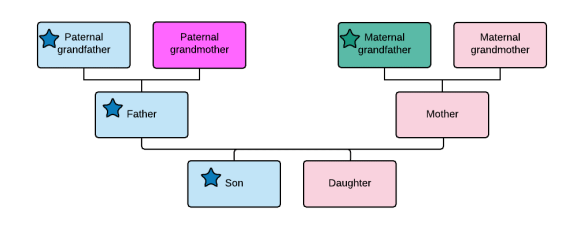
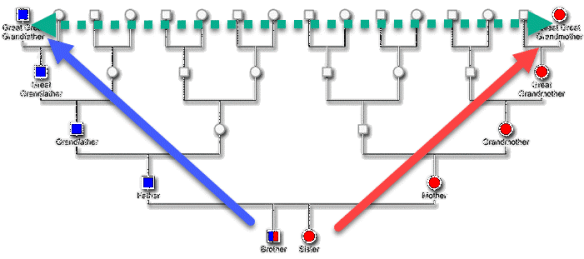
In this image, you can see that if you’re a male you can test for both your Y (blue-square) and mitochondrial DNA (red-circle) ancestral lines. If you’re a female, you can test only your mitochondrial DNA because females don’t have a Y chromosome. Both males and females, of course, can test (green) autosomal DNA which reveals a different type of connection to all of your ancestral lines, but with autosomal, you have to figure out which people match you on which lines.

Y and mitochondrial DNA provides you with a different type of information about laser-focused specific lines that you can’t obtain through autosomal testing, and reaches back in time far beyond the curtain when surnames were adopted.
personal pedigree

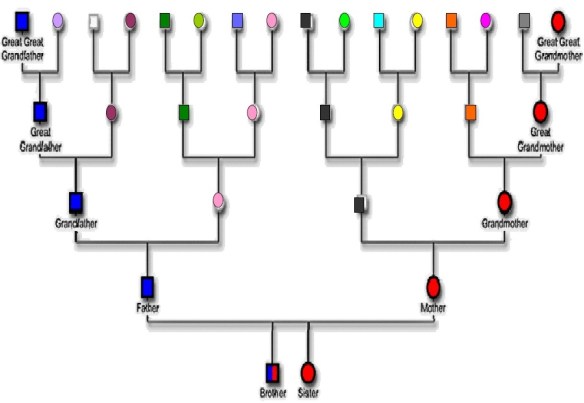
You personally can only test for the red-circle mitochondrial DNA line, and perhaps the blue-square Y DNA line if you’re a male. Unless you find family members to test for the Y and mitochondrial DNA of your ancestors, you’re leaving valuable information unresearched. That means all those colored boxes and squares that aren’t blue or red.

I’ve solved MANY brick walls using both Y and mitochondrial DNA, often in conjunction with autosomal.

Let’s take a look at each type of DNA testing a little more in-depth, so that you understand how each one works and why they are important to genealogy.

The Specifics

Y DNA – Y DNA descends through the direct male paternal line and is inherited by men only. You match against other Y DNA testers, hopefully finding surname links.

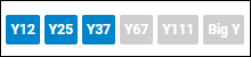
The Big Y test and upgrade at FamilyTreeDNA provides testers with all 111 traditional STR markers, plus another 589+ STRs available only in the Big Y test, plus a scan of the balance of the rest of the Y chromosome that is useful for genealogy. SNP results are increasingly being used for genealogy, in addition to STRs.

SNPs group men into genetic lineages and STRs help with defining and refining the closest generations when matching to each other. Often, the benefits of these two tests overlap, which is why I recommend that males test to the Big Y-700 level which provides 700+ STR markers plus all SNPs with mutations that define ancestral lineages.

Y DNA haplogroups, derived from SNPs, reveal the geographic part of the world where the lineage originated, such as Europe, the Americas, Asia and Africa, as well as a migration path across the continents based on where SNPs are and were historically found. Ancient DNA samples are being added to the database.

If you or a family member took an earlier Y DNA test, you can upgrade to the Big Y-700 today which provides you with matching for both the STR markers and separately, SNP markers, along with other genealogical tools.

You can order or upgrade your Y DNA here. Don’t forget family members accounts you may control. They may agree to have their kit upgraded too.

To upgrade, sign in to your account, and click on your desired upgrade level under Y DNA testing.
ymt y upgrade.png

Then click on upgrades.

ymt upgrade.png

I wrote about Y DNA in these recent articles:

I have more Y DNA articles planned for the future.

You can search for additional articles by going to the main page of this blog and enter “Y DNA” into the search box for additional articles already published.

Many features such as the matches maps, haplogroup origins and ancestral origins pages are the same for Y DNA results as mitochondrial DNA results. You can view mitochondrial articles here.

Mitochondrial DNA (mtDNA) – Mitochondrail DNA descends through the direct matrilineal line to both sexes of children. Everyone has mitochondrial DNA and it is inherited matrilineally by you from your mother, from her mother, from her mother, etc.

The FMS or full mitochondrial sequence DNA test tests the entire mitochondria that provides information about your direct matrilineal line. Family Tree DNA provides matching, which can sometimes lead to genealogical breakthroughs such as when I identified Lydia Brown, the mother of my Phoebe Crumley and then a couple years later, her mother, Phoebe Cole – via mitochondrial DNA. Those discoveries led us to her mother, Mary Mercy Kent, via genealogy records. All we needed was to punch our way through that initial brick wall – and mitochondrial DNA was our battering ram.

Additionally, you’ll receive a full haplogroup designation which allows you to look back in time before the advent of surnames and identifies the location where your ancestral line came from. For those seeking confirmation of Native American heritage, Y and mitochondrial DNA provides unquestionable proof and doesn’t wash out in time as autosomal DNA does.

Mitochondrial DNA includes haplogroups, matching and other genealogical tools.

You can order or upgrade you or a family member’s mitochondrial DNA here.

To upgrade, sign in to your account, and click on the desired upgrade level.

ymt mt upgrade

Then click on Upgrade if you’re upgrading or Add On if you’re ordering a new product for yourself.

ymt add ons upgrades.png

I wrote several mitochondrial DNA articles and compiled them into a summary article for your convenience.

Autosomal DNA – With autosomal DNA testing, you test once and there’s not an upgrade unless the vendor changes DNA testing platforms, which is rare. Each of the four vendors compares your DNA with all other people who’ve taken that test, or transferred from other companies. They match you with descendants from all of your ancestral lines. While the Y and mtDNA tests look back deeply in time as well as recently on one specific line, the autosomal tests are broad but not deep, spanning all ancestral lines, but limited to approximately 10 generations.

Each autosomal vendor has unique benefits and focus as well as shortcomings. I’ve listed the major points for each vendor relative to searching for Y and mitochondrial
DNA testing candidates. It’s important to understand the advantages of each vendor because it will help you understand the testers you are most likely to find in each database and may help focus your search.

FamilyTreeDNA’s Family Finder

  • Because FamilyTreeDNA archives customer’s DNA for 25 years, many people who tested Y or mitochondrial DNA 20 years ago and are now deceased upgraded to autosomal tests when they became available, or have been upgraded by family members since. These early testers often reach back another generation or so into the past to people born a century ago.
  • Advanced autosomal matching integrates with Y and mitochondrial DNA along with surname and other projects
  • Phased Family Matching provides the ability to link family members that match you to your tree which allows Family Tree DNA to group matches as paternal or maternal by utilizing matching segments to the same side of your family
  • Genetic Affairs, a third-party tool available for testers, builds common trees by reading the trees of your matches and comparing their trees with your own to identify common ancestors.
  • Genetic Affairs builds trees and pedigrees of your matches by searching for common ancestors in your MATCHES trees, even if you have no tree or don’t share those ancestors in your tree. This functionality includes Y and mitochondrial DNA if you have tested. This facilitates discovery of common ancestors of the people who you match, which may well lead you to ancestral discoveries as well.
  • Genetic Affairs offers clustering of your shared matches.
  • DNA file transfers are accepted from other vendors, free, with a $19 one time fee to unlock advanced tools.
  • Family Tree DNA has tested people worldwide, with a few location exceptions, since inception in the year 2000.
  • No direct triangulation, but Phased Family Matching provides maternal and paternal side triangulation when matches can be grouped into maternal and paternal sides.
  • Matches and segment match information are available for download.
  • The great thing about the advanced matching tool at Family Tree DNA is that it facilitates searching for people who match you on different kinds of tests, so it helps determine the potential closeness or distance of Y and mitochondrial relationships.

MyHeritage

Ancestry

  • Ancestry has the largest database, but did not begin testing until 2012 and did not test widely outside of the US/UK for some time. They now sell tests in 34 countries. Their testers are primarily focused in the US, Canada, England, Scotland, Ireland, and diaspora, with some overlap into Europe.
  • Ancestry offers ThruLines, a tool that connects testers whose DNA matches with common ancestors in their trees.
  • Ancestry does not provide a chromosome browser, a tool provided by the other three primary testing companies, nor do they provide triangulation or matching segment location information necessary to confirm that you match on the same segment with other people.
  • Ancestry has issued cease and desist orders to third party tools that perform functions such as clustering, autotrees, autopedigrees or downloading of matches. Ancestry does not provide these types of features for their users.
  • Ancestry does not accept transfers, so if you want to be in Ancestry’s database, you must test with Ancestry.
  • No Y or mitochondrial DNA testing available.
  • Match list is not available for download.

23andMe

  • The primary focus of 23andMe has always been health testing, so many people who test at 23andMe are not interested in genealogy.
  • 23andMe tests are sold in about 50 countries, but not worldwide.
  • 23andMe provides a chromosome browser, triangulation, segment information and a beta genetically constructed tree for close matches.
  • 23andMe does NOT support a genealogical tree either uploaded or created on their site, making tree comparisons impossible.
  • Genetic Affairs AutoCluster works at 23andMe, but AutoTree and AutoPedigree do not because 23andMe does not support trees.
  • 23andMe does make match files available for downloading.
  • No Y or mitochondrial DNA full testing or matching, but basic haplogroups are provided.
  • 23andMe caps matches at 2000, less any matches that have opted out of matching. My matches currently number 1770.
  • 23andMe does not accept transfers from other vendors, so if you want to be in their database, you must test with 23andMe.

Reaching Out to Find Testers

Unfortunately, we only carry the mitochondrial DNA of our mother and only men carry the Y DNA of their father. That means if we want to obtain that DNA information about our other family lines, we have to find people who descend appropriately from the ancestor in question and test that person.

I’ll share with you how I search for people who descend from each ancestor. After finding that person, I explain the situation, why the different kinds of tests are important, and offer a testing scholarship for the Y or mtDNA test at Family Tree DNA if they have not already taken that test. If they’ve tested their autosomal DNA elsewhere. I also explain that they can transfer their autosomal DNA file for free too and will receive new matches.

Here’s an article with links to upload/download instructions for each testing company. Feel free to share.

Each DNA testing company has different features, but you can use all of the companies to find people descended in the appropriate way from each ancestor. It’s easier if you know how to utilize each vendor’s tools to optimize your chances of success. I’m going to step you through the search process with hints and tips for each vendor.

Finding Y DNA and Mitochondrial DNA Candidates at FamilyTreeDNA

Because FamilyTreeDNA tests for both Y and mitochondrial DNA and has for 20 years, you stand a better chance of finding a candidate there who may have already tested, so that’s where I always begin.

Y DNA

Let’s say, for example, that I need to find a male descendant of my Ferverda line in order to ask them to test for Y DNA. The person can be descended from either a close relative, if I know of one, or a more distant relative that I don’t know, but need to find through searching other ways.

Search for Surnames and Projects at Family Tree DNA

First, search the FamilyTreeDNA website for your goal surname among existing testers, and then the appropriate surname project to see if your line has already tested.

ymt ferverda

On the main page, here, scroll down to until you see the prompt, above, and enter the surname. Be sure to consider alternate spellings too.

ymt ferverda search.png

In this case, I see that there is a Ferverda surname project with 18 people, and scrolling on down, that 4 people with this specific surname have tested.

ymt results.png

However, searching for an alternate spelling, the way it’s spelled in the Netherlands, I find that another 10 people have tested.

ymt ferwerda

Of course, some may be females, but they probably know males by that surname.

First, I’m going to check the Ferverda DNA project to see if a Ferverda male from my line has tested, and if so, to what level.

Click on the project link in the search results to see the DNA Project.

ymt admin.png

Note two things. First, the administrator’s name, as you may need this later. If you click on their name, their email address is displayed.

Second, click on DNA Results and select Y DNA if you’re presented with a choice. If the project has a public facing page, and most do, you’ll see something like the following information.

ymt project

Hey look, it’s my lucky day, given that both of these men descend from my ancestor. I happen to know that they have both taken the Big Y test, because I’m the project administrator, but you won’t know that. One way to get an idea is if they have less than the full 111 markers showing, they probably haven’t taken the Big Y, because a 111 upgrade is included in the Big Y test today.

You have three options at this point to contact one of these men:

  • See if the people are on your own autosomal DNA match list, or the match lists of kits from that family that you manage. If so, you can view their email address and contact them. If you haven’t yet tested autosomally, meaning the Family Finder test, at Family Tree DNA, you can transfer autosomal tests from elsewhere, for free, which means you will be viewing matches within hours or a couple days. Otherwise, you can order a Family Finder test, of course.
  • If the person with the Ferverda or Ferwerda surname is not on your Family Finder match list, reach out to the project administrator with a note to the person you want to contact and ask the administrator to forward your email to the project member.
  • If the administrator doesn’t answer, contact Family Tree DNA support and make the same request.

Checking Family Finder, one of those people is on my match list and I’m pretty sure it’s the right person, because when I click on his profile, not only does the haplogroup match the DNA project, but so does the ancestor.

ymt ferverda profile.png

Searching Family Finder

If there isn’t a DNA project match you can identify as your direct line ancestor, you can search your Family Finder matches for the surname to find a male with that surname. If your match has a tree, see if your ancestor or ancestral line is showing, then note whether they have taken a Y DNA test. They may have taken a Y test, but have not joined a project or not entered any “earliest known ancestor.” You can see which tests they’ve taken by looking at the little tabs above their profile on their tree, or on their profile card.

ymt ferverda tree

click to enlarge

Regardless, you’re now in touch with a potential contact.

Don’t dismiss females with that surname, or people who show that surname in their ancestral surname list. Women with the surname you’re looking for may have husbands, fathers, brothers or uncles who descend from the line you are seeking.

ymt search field.png

Utilize Genetic Affairs

My ace in the hole at FamilyTreeDNA is the Genetic Affairs AutoTree and AutoPedigree function.

Genetic Affairs is a third-party tool that you can use to assist with analysis of your matches at FamilyTreeDNA.

ymt genetic affairs

click to enlarge

At Genetic Affairs, selecting AutoTree generates trees where common ancestors of you and your matches, or your matches to each other, are displayed.

Your goal is to identify people descended from a common ancestor either directly paternally through all males for Y DNA or through all females to the current generation, which can be males, for mitochondrial DNA.

This article provides step-by-step instructions for the Genetic Affairs AutoTree and AutoPedigree functions.

Mitochondrial DNA

Mitochondrial DNA lineages are a bit more challenging because the surname changes every generation and DNA projects are unlikely to help.

The AutoTree/AutoPedigree report through Genetic Affairs serves the same purpose for mitochondrial DNA – building trees that intersect with a common ancestor. I generally drop the “minimum size of the largest DNA segment shared with the match” to 7 cM for this report. My goal running this report for this purpose isn’t to analyze autosomal DNA, but to find testing candidates based on how my matches descend from a specific ancestor, so I want to include as many matches as possible.

Family Finder Can Refine Y and mtDNA Information

In some cases, a Family Finder test can refine a potential relationship between two people who match on either Y DNA or mitochondrial. Additionally, you may want to encourage, or gift, specific matches with an upgrade to see if they continue to match you at higher testing levels.

Let’s say that two men match closely on a Y DNA test, but you’d like to know how far back the common ancestor lived.

ymt y matches.png

In this instance, you can see that the second match has taken a BIg Y and a Family Finder test, but the exact match (genetic distance of 0) has not. If the first individual cannot provide much genealogy, having them take a Family Finder test would help at least rule out a relationship through second cousins and would give you at least some idea how far back in time your common ancestor may have lived. If you do match on Family Finder, you receive an estimate of your relationship and can check the match level possibilities using the DNAPainter Shared cM Tool. If they upgrade to the Big Y-700 test, you may be able to differentiate your line from theirs, or confirm when and where a split occurred – or that there is no split.

This same autosomal testing scenario works for mitochondrial DNA.

For people who have taken both tests, Family Finder plus either Y or mitochondrial DNA, the Advanced Matching menu allows you to select combinations of tests and projects to query.

ymt advanced

click to enlarge

Finding Y and Mitochondrial DNA Candidates at MyHeritage

MyHeritage provides a wonderful tool called Theories of Family Relativity (TOFR) which finds common ancestors between you and your DNA matches, even if the ancestor is not in both trees, so long as a path exists between the two testers’ trees using other trees or research documents, such as census records. Of course, you’ll need to verify accuracy.

ymt tofr.png

At MyHeritage, select DNA Matches, then “Has Theory of Family Relativity.”

ymt mh ferverda

click to enlarge

You can see that I have 65 matches with a Theory of Family Relativity. Additionally, I can then search by surname.

ymt mh ferverda tree.png

click to enlarge

If I am looking for a Ferverda Y DNA candidate, I’ve found one thanks to this TOFR.

If you don’t find a tree where your match descends from your ancestor in the desired way, you can also widen the search by de-selecting Theories of Family Relativity and instead selecting SmartMatchs or shared surname combined with the name of your ancestor. There are many search and filter combinations available.

Let’s look at a mitochondrial DNA example where I’m searching for a descendant of Elizabeth Speaks who married Samuel Clarkson/Claxton.

ymt smartmatches

click to enlarge

In this case, I have one SmartMatch, which means that someone by the name of Elizabeth Speaks is found in my matches tree. I need to look to see if it’s the RIGHT Elizabeth Speaks and if my match descends through all females to the current generation. If so, I’ve found my mitochondrial DNA candidate and I can leave them a message.

You can also view SmartMatches (without a DNA match) from your own tree.

I can go to that person in my tree, click on their profile, and see how many SmartMatches I have. Clicking on 13 SmartMatches allows me to view those matches and I can click through to the connected trees.

ymt mt speaks.png

I can also click on “research this person” to discover more.

If you’re still not successful, don’t give up quite yet, because you can search in the records for trees that shows the person whom you seek. A SmartMatch is only created if the system thinks it’s the same person in both trees. Computers are far from perfect.

ymt mh trees

click to enlarge

Narrow the search as much as possible to make it easier to find the right individual, and then view the trees for descent in the proper manner.

Another wonderful tool at MyHeritage is the Genetic Affairs AutoCluster tool, built-in for MyHeritage users.

ymt mh cluster.png

The above cluster shows that one person carries the surname of Elizabeth’s husband. Viewing the accompanying spreadsheet for the AutoCluster run reveals that indeed, I’ve already identified a couple of matches as descendants of the desired ancestral couple. The spreadsheet shows links to their trees, my notes and more.

ymt cluster ss

Clusters show you where to look. Without the cluster, I had only identified two people as descendants of this ancestral couple. I found several more candidates to evaluate and two mitochondrial candidates are found in this cluster.

Finding Y and Mitochondrial DNA Candidates at 23andMe

23andMe is a little more tricky because they don’t support either uploaded or created user trees which makes finding descendants of a particular ancestor quite challenging.

However, 23andMe attempts to create a tree of your closer relatives genetically. which you can find under “DNA Relatives,” under the Ancestry tab, then “Family Tree” at the top.

I’ve added the names of my ancestors when I can figure out who the match is. Please note that this “created tree” is seldom exactly accurate, but there are often enough hints that you’ll be able to piece together at least some of the rest.

Here’s part of my “created” tree at 23andMe. I’m at far right.

ymt23 tree.png

click to enlarge

If you’re a genealogist, your eyes are going to glaze over about now, because the “people” aren’t in the correct locations – with maternal and paternal sides of the tree swapped. Also, please note, the locations in which they place people are estimates AND 23andMe does NOT take into account or provide for half-relationships.

That said, you can still obtain candidates for Y and mitochondrial DNA testing.

In this case, I’m searching for a mitochondrial DNA candidate for Evaline Miller, my grandfather’s mother or a Y DNA candidate for the Ferverda line.

I can tell by the surname of the male match, Ferverda, that he probably descends through a son, making him a Y DNA candidate.

Both Cheryl and Laura are possible mitochondrial DNA candidates for Evaline Miller, based on this tree, depending of course on how they actually do descend.

I can contact all of my matches, but in the event that they don’t answer, I’m not entirely out of luck. If I can determine EXACTLY how the match descends, and they descend appropriately for mitochondrial DNA, I can view the match to see at least a partial haplogroup. Since 23andMe only uses relatively close matches when constructing your tree, I’m relatively likely to recognize the names of the testers and may have them in my genealogy program.

By clicking on the Ferverda male, I can see that his Y haplogroup is I-Z58. That’s not nearly as refined as the Y DNA information at Family Tree DNA, but it’s something if I have nothing else and he doesn’t answer my query that would include the offer of a Y DNA test at Family Tree DNA.

ymt 23 hap

You can search at 23andMe by surname, but unless your match has entered their ancestral surnames and you recognize surnames that fit together, without a tree, unless your match answers your query, it’s very difficult to determine how you connect.

ymt 23 search.png

You can also view “Relatives in Common,” hoping to recognize someone you know as a common match.

ymt relatives in common

Please note that 23andMe does allow testers to enter a link to a tree, but few do.

ymt tree link.png

It’s worth checking, and be sure to enter your own tree link location.

Finding Y and Mitochondrial DNA Candidates at Ancestry

Ancestry’s ThruLines provides an excellent tool to find both Y and mitochondrial DNA participants.

Ancestry organizes their ThruLines by ancestor.

ymt thrulines

click to enlarge

Select your desired Ancestor, someone whose DNA you seek. Clearly, Y DNA candidates are very easy because you simply choose any male ancestor in the correct line with the surname and look for a male match with the appropriate surname.

In this case, I’m selecting Martha Ruth Dodson, because I need her mitochondrial DNA.

ymt dodson.png

By clicking on her “card” I then see my matches assigned to her ThruLine.

Ymt ancestry thruline

Obviously, for mitochondrial DNA, I’m looking for someone descended through all females, so Martha’s daughter, Elizabeth Estes’s son Robert won’t work, but her daughter, Louisa Vannoy, at left is the perfect candidate. Thankfully, my cousin whom I match, at bottom left is descended through all females to the current generation, which can be male or female, so is a mitochondrial DNA candidate.

Finding Y and Mitochondrial DNA Candidates in Trees in General

I’ve utilized the combination of trees and DNA matches at FamilyTreeDNA through Genetic Affairs, Ancestry and MyHeritage, but you can also simply search for people who descend from the same ancestor based on their tree alone at the vendors who support trees as part of genealogical records. This includes both Ancestry and MyHeritage but also sites like Geneanet which is becoming increasingly popular, especially in Europe. (I have not worked extensively with Geneanet yet but plan to take it for a test drive soon.)

My reason for utilizing DNA matches+trees first is that the person has already been introduced to the concept that DNA can help with genealogy, and has obviously embraced DNA testing at least once. Not only that, with the assist of a Theory of Family Relativity, ThruLine or genetic Affairs automation tools, it’s much easier to find appropriate candidates.

Finding Y and Mitochondrial DNA Candidates at WikiTree

If you reach beyond DNA testing companies, WikiTree provides a valuable feature which allows people to specify that they descend from a particular ancestor, and if they have DNA tested, how they descend – including Y DNA, mitochondrial DNA and autosomal.

Here’s an example on the profile of John Y. Estes at WikiTree, one of my Estes ancestors.

ymt wiki.png

If someone descends appropriately for either Y or mitochondrial DNA line, and has taken that test, their information is listed.

In this case, there are two Y DNA testers and two autosomal, but no mitochondrial DNA which would have descended from John’s mother, of course.

You can click on the little green arrow icon to see how any DNA tested person descends from the ancestor whose profile you are accessing.

ymt wiki compare

Of course, the same surname for males is a good indication that the man in question is descended from that paternal line, but check to be sure, because some males took their mother’s surname for various reasons.

Here’s my line-of-descent from John Y. Estes. I can click on anyone else whose DNA information is listed as well to see how they descend from John. If they descend from John through all females, then they obviously descend from his wife though all females too which means they are a mitochondrial DNA candidate for her.

ymt wiki relationship.png

click to enlarge

Clicking on autosomal testers may reveal someone appropriately descended from the ancestor in question.

You can then click on any ancestor shown to view their profile, and any DNA tested descendants.

By clicking on name of the descendant whose DNA test you are interested in, you’ll be able to view their profile. Look for the Collaboration section where you can send them a private message that will be delivered by email from WikiTree.

ymt collaborate

Finding Y and Mitochondrial DNA Candidates at GedMatch

One final avenue to find Y and mitochondrial DNA candidates is through GedMatch, It’s probably the least useful option, though, because the major vendors all have some sort of tree function, except for 23andMe, and for some reason, many people have not uploaded GEDCOM files (trees) to GEDmatch.

Therefore, if you can find someone on GedMatch that tested elsewhere perhaps, such as LivingDNA who also provides a base haplogroup, or 23andMe, and they uploaded a GEDCOM file (tree) to GedMatch, you can utilize the GEDmatch “Find common ancestors” automated tree-matching functionality.

gedmatch mrca matches

click to enlarge

GEDmatch produces a list of your matches with common ancestors in their trees, allowing you to select the appropriate ancestor or lineage.

I wrote step-by-step instructions in the article, GEDmatch Introduces Automated Tree Matching.

Additionally, GEDmatch includes the Genetic Affairs AutoCluster tool in their Tier1 subscription offering,

ymt gedmatch.png

Gedmatch users who know their Y and mitochondrial haplogroup can enter that information in their profile and it will be reflected on the autosomal match list.

ymt gedmatch hap

Summary Chart

In summary, each testing vendor has a different focus and unique tools that can be used to search for Y and mitochondrial DNA candidates. Additionally, two other resources, WikiTree and GEDmatch, although not DNA testing vendors, can lead to discovering Y and mtDNA candidates as well.

I’ve created a quick-reference chart.

  Family Tree DNA MyHeritage Ancestry 23andMe Wikitree GEDmatch
Y DNA Test Yes No No No, partial haplogroup provided No test, listed by ancestor No, user entered
mtDNA Test Yes No No No, partial haplogroup provided No test, listed by ancestor No, user entered
DNA Projects Yes No No No Some Some
Strengths other than mentioned categories 20 year worldwide customer base, phased family matching European focus, SmartMatches, wide variety of filters Largest autosomal database Genetic tree beta DNA by ancestor May include users not found elsewhere who tested outside the major companies
Drawbacks No direct triangulation or tree matching No Genetic Affairs AutoTree or AutoPedigree Can’t download matches, no triangulation, clusters, AutoTree, or AutoPedigree No trees, 2000 match limit “One tree” may be incorrect Few trees, no AutoTree or AutoPedigree
Clustering Genetic Affairs Included in advanced tools No, prohibited Genetic Affairs N/A Included in Tier1
Genetic Affairs AutoTree & AutoPedigree Yes No No No, no tree support N/A No
Tree matching between users No, through Genetic Affairs Theories of Family Relativity ThruLines No Not directly MRCA common ancestors in Tier1

Now it’s your turn. Which Y and mitochondrial DNA lines can you find today?

Happy Hunting!

_____________________________________________________________

Disclosure

I receive a small contribution when you click on some of the links to vendors in my articles. This does NOT increase the price you pay but helps me to keep the lights on and this informational blog free for everyone. Please click on the links in the articles or to the vendors below if you are purchasing products or DNA testing.

Thank you so much.

DNA Purchases and Free Transfers

Genealogy Products and Services

Genealogy Research

Genetic Affairs Instructions and Resources

I’ve created this summary article that includes links to the various step-by-step instructional articles I’ve published about Genetic Affairs, a wonderful DNA analysis tool. I’ll add more articles as they are published.

Genetic Affairs is a third-party tool created by Evert-Jan Blom that works through the Genetic Affairs website for FamilyTreeDNA and 23andMe and is integrated into products for other vendors such as MyHeritage and GEDmatch. Unfortunately, one vendor, Ancestry, has issued a cease-and-desist order, preventing the usage of Genetic Affairs and other third-party tools altogether for customers who have tested there.

Different features are available at different vendors based on their product offerings, as noted below.

AutoCluster

Article: AutoClustering by Genetic Affairs

This article explains the basics of AutoClustering of matches and how AutoClusters benefit genealogy.

AutoTree and AutoPedigree

click to enlarge

Article: Genetic Affairs Reconstructs Trees from Genetic Clusters – Even Without Your Tree or Common Ancestors

click to enlarge

This wonderful tool scans your matches and their trees, and constructs trees of you and your matches that share common ancestors. The best thing about this tool is that it reconstructs trees of your matches to each other in a cluster, even if you DON’T share a common ancestor in a tree with your matches (that also match each other.) This tool is HUGELY helpful in identifying ancestors that are unknown to you and includes the option for Y and mtDNA to be incorporated into the trees if you’ve taken those tests at Family Tree DNA.

AutoPedigree + WATO

click to enlarge

Article: Genetic Affairs: AutoPedigree Combined AutoTree with WATO to Identify Your Potential Tree Locations

WATO, short for “what are the odds,” is a calculation method that provides ranked hypotheses that show you where you “might” fit in the composite tree of your matches. This is the “AutoPedigree generate hypothesis automatically” option under AutoCluster analysis and is particularly useful for people with unknown parentage, unknown close relatives, or clusters that they can’t identify.

  • AutoPedigree+WATO can only be used with results at FamilyTreeDNA, and not at any of the other vendors for the same reasons as AutoTree/AutoPedigree. I encourage my matches to upload their DNA files from other vendors for free to FamilyTreeDNA so that everyone has more information points to work with.

AutoClusters at MyHeritage

Article: Utilizing MyHeritage AutoClusters to Analyze your DNA Matches

  • MyHeritage incorporates AutoClusters into their advanced DNA toolset for customers. Utilizing AutoClusters with DNA tools like Theories of Family Relativity and Triangulation provide a powerful 1-2-3 punch to identify family groupings.
  • Additionally, MyHeritage provides trees, Smart Matches, Shared Ancestral Surnames, Shared Ancestral Places, Shared DNA Matches and the ability to download both your shared match information along with shared segment data.
  • This article provides step-by-step information about how to use each tool and is paired with a free webinar.

AutoKinship 

Article: Genetic Affairs – New AutoKinship Tool Predicts Relationships and Builds Genetic Trees

  • The AutoKinship tool constructs multiple genetic trees for each cluster based on your clustered matches at 23andMe, and their relationships to you and each other.
  • An AutoCluster is included with AutoKinship along with membership and segment information for each cluster, including triangulation for cluster members.
  • A relationship matrix shows how closely your matches are related to each other.
  • AutoKinship paints your matches on your chromosomes and provides overlapping segment information
  • The Surname Enrichment option provides common surnames in each cluster and shows you which members list each surname at 23andMe. 
  • A stand-alone manual version of AutoKinship is available at Genetic Affairs for MyHeritage profiles, with a tutorial, here.

AutoSegment at GEDmatch

AutoSegment is available at GEDmatch under the Tier 1 tools.

AutoSegment at GEDmatch clusters your TRIANGULATED matches together in cluster groups and paints those segments on your chromosomes by cluster.

Article: AutoSegment Triangulation Cluster Tool at GEDmatch

  • AutoSegment can perform this function at GEDmatch because Genetic Affairs can determine not only that your matches match you, but that they also match each other, and on which segment(s).
  • AutoSegment colored cluster cells indicate triangulation, not just matching.
  • AutoSegment offers several options, including the option to remove segments in known pileup areas.
  • AutoSegment provides a Pileup Report, whether you choose to remove segments in pileup regions or not.
  • In addition to the normal HTML cluster file, AutoSegment also offers an Excel option.
  • The Excel file also groups your clustered matches by chromosome.
  • AutoSegment provides the option of viewing where each person matches you, including segments that triangulate and those that do not triangulate with others.
  • AutoSegment provides an option to upload the results to DNAPainter.
  • AutoSegment provides information on linked clusters where individuals are members of more than one cluster.
  • AutoCluster provides cluster analysis in various formats, complete with links to trees.

New AutoKinship Tool at GEDmatch

Genetic Affairs partnered with GEDmatch to produce the super-sundae of reports, a new version of AutoKinship at GEDmatch. The new AutoKinship report adds new features, allows for more kits to be included in the analysis, and integrates multiple reports together:

  • AutoCluster – the AutoClusters we all know and love
  • AutoSegment – clusters based on segments
  • AutoTree – reconstructed tree based on GEDCOM files of you and your matches, even if you don’t have a tree
  • AutoKinship – the original AutoKinship report provided genetic trees. The new AutoKinship report includes AutoTree, combines both, and adds features called AutoKinship Tree. (Trust me on this one – you’ll see in a minute!)
  • Matches
    • Common Ancestors with your ancestors
    • Common Ancestors between matches, even if they don’t match your tree
    • Common Locations

Maybe the best news is that some reports provide automatic triangulation because, at GEDmatch, it’s possible to not only see how you match multiple people, but also if those people match each other on that same segment. Of course, triangulation requires three-way matching in addition to the identification of common ancestors which is part of what AutoKinship provides, in multiple ways.

Article: AutoKinship at GEDmatch by Genetic Affairs

______________________________________________________________

Disclosure

I receive a small contribution when you click on some of the links to vendors in my articles. This does NOT increase the price you pay but helps me to keep the lights on and this informational blog free for everyone. Please click on the links in the articles or to the vendors below if you are purchasing products or DNA testing.

Thank you so much.

DNA Purchases and Free Transfers

Genealogy Products and Services

Genealogy Research

August Hot News: Ancestry Match Tagging Script, DNA Sales, DNAPainter Newsletter & More

August news.png

This wasn’t exactly how I had in mind to convey these news items, but you know that saying, “Life is what happens when you’re making other plans,”? Well, let’s just say it’s one of those weeks/months and years.

So, this article is going to be short and sweet, and I promise a more detailed article in a few days.

However, you need at least some of this info ASAP, so here it is in its rather unrefined raw state.

  • Ancestry Tagging Script
  • Ancestry Acquisition Update
  • Summer Sales
  • MyHeritage Sale
  • FamilyTreeDNA Sale
  • DNAPainter Free Newsletter
  • New Ancient Ancestor

Ancestry Tagging Script (to Save Your Sanity)

A very nice person, Roger Frøysaa, has written a free javascript to group your Ancestry matches. Of course, I’m referring to your 6-8 cM matches that are subject to the upcoming purge later in August.  I’m using Roger’s gracious gift, but struggling because the script keeps timing out, or Ancestry’s backend keeps timing out, etc.

You might need to be at least somewhat comfortable with computers for this to work and it doesn’t work on a tablet or iPad, but does work on a Mac.

I have the latest version of both Chrome and Edge browsers installed on a relatively new computer with lots of memory. For me, the script works best on Edge and in the middle of the night when Ancestry’s servers are less busy. Still, I can’t seem to get below my 6.2 cM matches without the script or Ancestry bombing. It doesn’t help any that my internet service has been flaky this week too.

The author recommends Firefox. (Update. I’ve installed Firefox and it’s running like a champ.)

Here are the instructions: https://docs.google.com/document/d/100BqYdjeVdwmHaT9gTL3miknxm7bKik4KwcHaoUX72I/edit?fbclid=IwAR04u0VQaaVeG-6pkif-ILYmLPQgHTtCf13A0lW4EMPTm0QwOb1hDb9o7L4

Print these out, read them thoroughly, and follow them step by step.

Here’s a link to the script on GitHub: https://github.com/lrf1/ancestry_scripts/blob/master/ancestry_dnsmatches_grouptagger_v2.js

Here’s a YouTube video about how to use the script: https://www.youtube.com/watch?v=pnqGChJL0kw&fbclid=IwAR04iTVzcaKF8YJx2ewX_2rMEXQFaFaNIW5YfPQMlJYG6yfd1U6NvCN47Vc

Individual tweaking is required.

In my case, I have named the group where I want my 6-8 cM matches saved “1saved.” I selected that name because the 1 locates it near the top and I’ll know what’s there.

August ancestry 1saved

Following Roger’s instructions, 1saved should be row 3, but I had to enter row “2” in the script to get the matches to save to the group 1saved.

// MODIFY THE FOLLOWING LINES AS NEEDED

var groupTitle = “1saved“;

var groupRow = 2;

Regardless, the script works, and truthfully, all I really care about is that these matches are preserved.

My biggest problem occurs after the script bombs the first few times, and it will – you’ll need to restart it. Until the script manages to work its way to the location in the file, which is increasing further down in the scrolling, where it discovers matches to be tagged, I must re-enter and re-enter the script to reinitiate the searching.

This is by NO MEANS a complaint because I’m very grateful for this free tool. It’s just an observation that I hope will help you too. Having said that, I can’t tell you how many surnames like Bolton, my grandmother’s birth surname, Estes and Vannoy by various spellings, my great-grandmother’s surname I’ve seen scroll past as they are being tagged. There’s gold in those matches.

Furthermore, many people are reporting successes now that they’re actually looking at these smaller matches. If half of these are identical by chance, or false positives, that means half are NOT false and you need to use your analytical skills to figure out which is which.

Someone asked me earlier if I know anyone who will run the script or tag on behalf of someone else. I don’t, but you could ask on any number of Facebook groups, specifically the AncestryDNA Matching group or the ISOGG group.

If you’re NOT going to use the script, I recommend the following methodology to save at least some of your highest quality matches that are most likely to be relevant.

Select both “Common Ancestors” and “Shared DNA.” Enter the levels of shared DNA you want to view, meaning 6-6 or 6-7 or 7-7, which will display all of your matches where a potentially shared ancestor has been identified (ThruLine.)

August ancestry common plus 6.png

This won’t save anyplace near all of your 6-8 cM matches, but it will save the potentially most beneficial.

I wrote the article, Ancestry to Remove DNA Matches Soon – Preservation Strategies with Detailed Instructions, here, and Ancestry Match Purge Update here.

Note that Ancestry has stated they are delaying the purge until “late August,” but I’m seeing multiple people report that their 6-8 cM matches are already gone, so if you want to save them, one way or another, don’t delay.

Ancestry Acquisition Update

Ancestry’s announced acquisition by Blackstone Group, which I wrote about here, has raised questions about privacy. An article this week in Vice quotes both an Ancestry and Blackstone spokesperson on the topic who say that Blackstone will not have access to user data nor will it be shared with Blackstone’s portfolio companies.

Summer Sales Have Arrived

Late summer always ushers in summer DNA sales.

Right now, FamilyTreeDNA, MyHeritage, and Ancestry are having sales.

AncestryDNA is on sale for $59, here.

MyHeritage is on sale for $49, here and has a significant customer base in Europe where most of my ancestors originated.

Of course, FamilyTreeDNA has Y DNA and mitochondrial DNA in addition to autosomal plus 20 years’ worth of testers in their database.

Regardless of where you’ve tested, having family members in the same database makes your own test so much more valuable because many of your matches will match family members too. I’m in all of the databases, and several of my family members are as well.

Remember, you can transfer tests for free to both MyHeritage and Family Tree DNA from other vendors. Instructions for each company can be found here.

MyHeritage Sale

The MyHeritage DNA kit is on sale right now for $49 and free shipping with 2 or more.

August myheritage

Don’t forget that if you’ve tested elsewhere, you can transfer to MyHeritage for free and pay just $29 to unlock the advanced tools, such as Theories of Family Relativity, or subscribe to the full records package and the unlock is free.

Family Tree DNA Sale

Family Tree DNA offers their Family Finder autosomal test, but additionally, they offer Y and mitochondrial DNA testing and matching which provide insights you can’t obtain with autosomal DNA testing alone.

  • Y DNA is for males only and tests the direct paternal (surname) line.
  • Mitochondrial DNA is for both men and women and tests your direct matrilineal line – your mother, her mother, her mother, etc.

If you’ve already tested at a lower level, you can upgrade.

august ftdna 2

If you know what you want, go right ahead and order.

This is a wonderful time to order tests for family members who represent Y DNA and mitochondrial lines that you can’t test for yourself.

Early in the week, I’ll publish an article that shows how to locate people at each testing company who are appropriately descended from your ancestor whose Y DNA or mitochondrial DNA results you’d like to have.

This sale runs through the end of August, so you have time to search out and find people to ask if they’d be willing to test. Of course, if you already know people appropriately descended, by all means, ask them and get a kit on order. I generally offer a DNA testing scholarship so that the $$ factor is removed from my request. It makes it easier for them to say yes. If they agree, I add a Family Finder test too. I believe in striking while the iron is hot.

If you’d like to read about the different kinds of DNA testing, the article 4 Kinds of DNA for Genetic Genealogy is great to share with others as well.

Free DNAPainter Newsletter

I received an email this week from Jonny Perl at DNAPainter, one of my favorite tools, and he’s now offering a free monthly newsletter with tips on how to use DNAPainter. You can sign up here. I certainly did.

I’ve written extensively about DNAPainter, here.

New Ancient Mystery Ancestor

Guess what, you may have a new mystery ancestor. How cool is this??!!

LiveScience reported this week that scientists have detected traces of an earlier human ancestor in Neanderthal and Denisovan DNA. That ancient ancestor existed 200,000-300,000 years ago, in Africa, leaving and intermixing with the Neanderthals then living in the Middle East or elsewhere outside of Africa, but before the move to Europe.

You can read the PLOS article, here.

I don’t know about you, but I find this absolutely fascinating.

TTFN

Enough news for now, although I’ve probably forgotten something.

Order a DNA test, find an ancestor, subscribe to the DNAPainter newsletter, and enjoy summer, safely.

I’ll see you later this week with an article about how to search for family members, in particular Y and mitochondrial DNA carriers that represent your ancestral lines. You never know what critical information is waiting just to be discovered.

_____________________________________________________________

Disclosure

I receive a small contribution when you click on some of the links to vendors in my articles. This does NOT increase the price you pay but helps me to keep the lights on and this informational blog free for everyone. Please click on the links in the articles or to the vendors below if you are purchasing products or DNA testing.

Thank you so much.

DNA Purchases and Free Transfers

Genealogy Products and Services

Genealogy Research

Download Your Ancestry Tree and Upload It Elsewhere for Added Benefit

Once you’ve created a tree at Ancestry, you can download or export that tree to upload it elsewhere, or for safekeeping at home.

Be aware that while the tree itself is downloaded, any documents you have attached through Ancestry are NOT downloaded along with the tree. To do that, you’ll need to sync your tree through RootsMagic or Family Tree Maker software on your home computer. That’s not the focus of this article.

This article provides step-by-step instructions on how to make a downloaded copy of your actual tree called a GEDCOM file. All vendors understand the GEDCOM file exchange format for family trees.

Uploading your tree elsewhere allows you to save time and enhances your experience at other vendors, such as Family Tree DNA, MyHeritage, and GEDmatch – all three of whom utilize your DNA test in addition to your tree in order to provide you with advanced tools and enhanced results.

These three vendors all use and provide segment information, in addition to trees, and matching is free if you transfer a DNA file. Transferring a DNA file and downloading a tree are two separate things.

To use DNA plus trees, there are two steps and I’ll cover both. First, let’s look at the benefits and the differences between those three vendors so you know what to expect.

Features Summary

Here’s a quick and very basic summary of the features and functions of each of the three companies that accept both GEDCOM and DNA file uploads and provide tree+DNA combination features.

  FamilyTreeDNA MyHeritage GEDmatch
Upload DNA File Yes Yes Yes
Free Matching Yes Yes Yes
Advanced Features $19 one-time unlock $29 one-time unlock $10 monthly subscription for Tier 1
Upload GEDCOM file* Yes Yes** Yes
Features Using GEDCOM File Phased Family Matching Theories of Family Relativity, Smart Matches, searches Comparison with matches’ trees
Genealogy Records Subscription Available No Yes No
DNA Testing in House Yes Yes No, upload only
Unique Features Assigning matches maternally and paternally, Y and mtDNA tests, archives your DNA Theories of Family Relativity, genealogical records, photo enhancement Ability to view your matches’ matches, advanced DNA tools

*There may be GEDCOM file size restrictions at some vendors.

**MyHeritage restricts free trees to 250 individuals, but you can add a records subscription to be able to work with a larger tree. You can read more, here. You can try a free subscription, here. I believe you can upload any size GEDCOM file without a subscription, but advanced functions such as record matches are restricted.

Unlike at the other vendors who focus exclusively on DNA, MyHeritage provides the resources to build and add branches to your tree, hence the restriction on how much is provided for free.

Both MyHeritage and FamilyTreeDNA also do their own DNA testing, so you don’t need to test at Ancestry. I wrote about testing and transfer strategies, here.

Regardless of where you test, you can download your tree from Ancestry and upload it to other sites.

I initially started out with only my direct ancestors in my tree, but you’ll want to include their children, minimally, in order to assist the vendors with tree comparisons, assuring that a person in two different trees is actually the same person, not just someone with the same or a similar name.

Downloading Your Ancestry Tree

After signing on to Ancestry, you’ll see the following at the upper left:

Download ancestry tree.png

Click on “Trees.”

Download Ancestry tree 2

You’ll see a list of all the trees you’ve created or that have been shared with you.

Click on the tree you want to download.

Download Ancestry tree settings.png

Next, you’ll see your tree displayed. Click on the down arrow to display options and click on “Tree Settings.”

Download Ancestry tree manage

You’ll see your tree settings, above. We’re focused ONLY on the area in the red box.

Downloading does NOT delete your tree. That is a different option.

Let’s look at a closeup of this section.

Do NOT Delete Your Tree

Delete means “throw away” permanently – you cannot retrieve the tree. Export means to make a copy, leaving the original intact on Ancestry.

Let’s look closer.

Download Ancestry export.png

People see the warning at the bottom, in the Delete tree section and they don’t realize that’s NOT referring to Export Tree.

See those little red arrows, above? They’re all pointing to minuscule tiny grey dividing lines between the Hint Preferences Section, the Manage Your Tree export function and the Delete your tree function.

The warning pertains to deleting your tree, not “Export tree.”

DO NOT DELETE YOUR TREE!!!

If you accidentally click on “Delete your tree,” you do get a confirmation step, shown below.

Download Ancestry delete

If you want to export or copy your tree for use elsewhere, do NOT press delete.

Download/Export Your Tree

To download your tree, click on the green Export tree button.

Download ancestry export 2.png

Export means to download a COPY of your tree, leaving the original on Ancestry.

Next, you’ll receive an “in process” message while your GEDCOM file is being created.

Download Ancestry generating

After you click on “Export tree,” you’ll receive this message.

Download Ancestry download.png

When finished, you’ll be able to click on “download tips” if you wish, then click on the green “Download your GEDCOM file.”

Save this file on your computer.

Uploading Your GEDCOM Elsewhere

Next, it’s time to upload your GEDCOM file to our three vendors. Please note that if you have previously uploaded a GEDCOM file to these vendors, you can replace that GEDCOM file, but that’s not always in your best interest.

We’ll look at GEDCOM replacement strategies and ramifications in each vendor’s section.

You’ll need to have an account set up with each vendor first.

Uploading to Family Tree DNA

At FamilyTreeDNA, the way to set up an account is to either order a DNA test, here, or transfer your autosomal DNA file from either 23andMe, Ancestry, or MyHeritage.

Transferring your DNA to FamilyTreeDNA

Transfer instructions for DNA from or to Family Tree DNA are found in the article, Family Tree DNA Step by Step Guide: How to Upload-Download DNA Files.

After you set up an account at Family Tree DNA, you can then upload your GEDCOM file.

Uploading Your GEDCOM File to FamilyTreeDNA

You can upload any GEDCOM file to FamilyTreeDNA.

Sign on to your account, then click on “myTREE” on the upper toolbar.

download ancestry ftdna

Click on “Tree Mgmt” at upper right.

Download ancestry ftdna gedcom.png

Next, you’ll see the “GEDCOM UPLOAD” beneath.

You can only upload one tree to Family Tree DNA. When you upload a new GEDCOM file, your current tree is deleted at the beginning of the process.

FamilyTreeDNA GEDCOM Replacement Strategy

You can replace a GEDCOM file with a newer, better one at FamilyTreeDNA, however, doing so means that any people you match who you’ve linked to their profiles in your original tree will need to be relinked.

Phased Family Matching where your matches are bucketed to maternal, paternal or both sides are created based on matches to people you’ve attached to their proper places in your tree.

If you have few or no matches attached to their profiles in your tree, then relinking won’t be a problem. If, like me, you’re taking full advantage of the ability to connect matches on your tree in order for your matches to be assigned maternally or paternally, then replacing your GEDCOM file would constitute a significant investment of time relinking.

The best plan for FamilyTreeDNA is to upload a robust tree initially with lines extended to current so that you can attach testers easily to their proper place in the tree.

If you didn’t do this initially, you’ll need to add the line to the tester from your common ancestor as you identify matches with common ancestors.

Uploading to MyHeritage

At MyHeritage, you can begin by ordering a DNA test, here, or transferring a DNA file from another vendor, here. You can also sign up to try a free genealogy subscription, here. From any of these three links, you’ll be prompted to set up an account.

Transferring Your DNA to MyHeritage

Instructions for transferring your DNA to MyHeritage can be found in the article, MyHeritage Step by Step Guide: How to Upload-Download DNA Files.

Uploading your GEDCOM File to MyHeritage

You can upload a GEDCOM file from any source to MyHeritage. After signing in to your account, you’ll see “Family tree” in the top task bar.

download ancestry myheritage

Click on Family tree and you’ll see “Import GEDCOM.”

Download Ancestry MyHeritage import.png

At MyHeritage you can have multiple GEDCOMs uploaded, but you’ll only be able to link your DNA test to your primary tree from which Theories of Family Relativity for you are generated.

MyHeritage GEDCOM Replacement Strategy

I have a full subscription to MyHeritage which allows an unlimited number in people of an unlimited number of trees. Smart Matches and other hints are generated for every person in every tree unless I disable that feature.

If I were to replace my primary GEDCOM file that is linked to my own DNA test, I would lose all of my Theories of Family Relativity which are only generated every few months. The next time Theories are run, I would receive new ones, but not before then.

Replacing an existing GEDCOM file at MyHeritage also means that you’ll lose links to any attached documents or photos that you’ve associated with that tree, additions of changed you’ve made, as well as Smart Matches to other people’s trees. You can, however, sync with MyHeritage’s own free desktop tree builder software.

Initially, a few years ago, I uploaded an ancestors-only tree to MyHeritage reaching back a few generations. Now I wish I had uploaded my entire GEDCOM file. I didn’t because I have unproven people and relationships in my computer file and I didn’t want to mislead anyone. However, Theories of Family Relativity uses descendants of your ancestors to connect across lines to other people. Having descendants of my ancestors in that tree wasn’t important at MyHeritage then, before that feature was introduced, but it is now.

Today, I’ve minimally added children and grandchildren of my ancestors, by hand. I use MyHeritage records and searches extensively, and I’d lose thousands of links if I replaced my primary GEDCOM file. Besides, when I review each person I add in the tree, it provides the opportunity of reviewing their information for accuracy and searching for new documents. I’ve discovered amazing things by using this one-at-a-time method for adding my ancestors’ children and descendants – including new information that led to a new ancestor just last week.

Uploading to GEDMatch

You’ll begin by setting up a free account at GEDmatch.

Download Ancestry gedmatch

GEDmatch isn’t a DNA testing site or a genealogy records site. It’s a DNA tools site that provides tools not found elsewhere. Sometimes matches found at Ancestry will download to GEDmatch but not elsewhere. Ancestry does not provide genealogically valuable segment information.

GEDmatch not only provides segment information and triangulation, as do FamilyTreeDNA and MyHeritage, but they also provide the ability for you to view the matches of your matches. This open-source approach is one of GEDmatch’s founding principles.

Uploading Your DNA to GEDmatch

After you sign in to GEDmatch, you’ll need to upload your DNA file from one of the vendors to GEDmatch. I strongly recommend using DNA files from the standard vendors, such as Ancestry, FamilyTreeDNA, MyHeritage or even LivingDNA. Other vendors use different chips or test different DNA locations and matching is sometimes less reliable.

download ancestry gedmatch upload DNA.png

After signing on to Gedmatch, you’ll see “Upload your DNA files.” Click on the link there for further prompts.

After uploading your DNA file, you’ll want to upload your GEDCOM file so that your matches can see if you have a common ancestor in your trees.

Upload Your GEDCOM file to GEDmatch

Scrolling down the sidebar below the “Upload Your DNA” section, past the various applications, you’ll see the Family Trees section.

download ancestry gedmatch gedcom

You’ll see the GEDCOM upload section, as well as various comparison tools. Click on “Upload GEDCOM (Fast)” to begin.

GEDmatch GEDCOM Replacement Strategy

You can replace your GEDCOM file at GEDmatch at will. Since all information at GEDmatch is generated real-time, meaning when the request is submitted, nothing is “saved” nor pre-generated, so you won’t lose anything by replacing a GEDCOM file, at least not as of this writing.

However, you’ll need to delete your current GEDCOM file first. You can do that by scrolling to the bottom of your User Profile area where your kit number is listed. (Mine is obscured, below.) You’ll see your GEDCOM file information.

download ancestry gedmatch resources.png

Click to manage resources, including deleting a GEDCOM file.

Currently, at GEDmatch, my direct line ancestral tree is sufficient.

Summary

Regardless of where you maintain your primary family tree, download or export it as a GEDCOM file and upload it elsewhere. You’re only cheating yourself (and your matches) if you don’t take advantage of all available tools.

_____________________________________________________________

Disclosure

I receive a small contribution when you click on some of the links to vendors in my articles. This does NOT increase the price you pay but helps me to keep the lights on and this informational blog free for everyone. Please click on the links in the articles or to the vendors below if you are purchasing products or DNA testing.

Thank you so much.

DNA Purchases and Free Transfers

Genealogy Products and Services

Genealogy Research

MyHeritage New Photo Enhancer – Seeing Family Faces for the First Time

MyHeritage has introduced a wonderful new photo enhancement tool.

A few months ago, MyHeritage introduced their photo colorization tool. I uploaded many photos and colorized old black and white family photos. I wrote about that here and colorized several photos of Mom and her amazing dance partner, here.

I knew that improvements were underway, but the newly released MyHeritage Photo Enhancer, which works in conjunction with, or separately from the colorizer, is absolutely wonderful.

The new Photo Enhancer brings blurry, grainy or fuzzy photos into focus. It works amazingly well on old photos, especially groups, that were taken in black and white although it works on color pictures too. For black and white, colorizing the result makes them literally come to life in an unimaginable, breathtaking way.

And of course, there’s a story…my grandfather was a photographer, that is, when he wasn’t bootlegging. Yea, a moonshining photographer – and not one picture of his mother-in-law. There’s a joke in there someplace.

My Grandfather

I never knew my father’s side of the family. My parents were divorced and my father died when I was a child. His father, my grandfather, William George Estes, known as Will, lived to be almost 99 and died when I was in high school.

My grandfather lived in another state, 800+ miles away, and wasn’t the most upstanding of citizens. He, apparently, was not interested one iota in me. I never met him and didn’t even realize he had been alive during my lifetime until some years after his death.

Retrospectively, that’s probably for the best, considering I would likely, as a rebellious teen, have been easily influenced by a bootlegging grandpa. Maybe influenced isn’t the correct word. I would have welcomed Grandpa with open arms, wanting to sample each of his wares that he had spent decades perfecting. I would have volunteered to be the taste tester. That combined with the “less than stellar” aspect of his character is probably exactly why my mother never mentioned him.

Some of the stories I’ve heard about him since since would curl your toenails.

All that said, after I began researching my genealogy, I was intensely curious about the side of my family that I never knew. I found and made contact with my father’s sisters – the elderly, eccentric crazy aunts.

Photographer 

Will married my grandmother in 1892 at the ripe old age of 19 and drifted from job to job for years. Not long after the wedding, rumored to have taken place on horseback in the road at the county line, since he was from Claiborne County and she was from neighboring Hancock County, the young couple left Tennessee for Springdale, Arkansas.

Had he stayed in Claiborne County, Will would have farmed. There was little else to be done. He would have built a cabin in Estes Holler and tried to eek a living out of some rocky area not already being cultivated. Opportunity beckoned elsewhere.

In Arkansas, my grandmother, Ollie, ran a boarding house and according to her, Will fished all day and drank, generally at the same time, and was pretty much good for nothing.

A few years and four babies later, Ollie grew tired of his shiftlessness and aversion to work, and the couple, now with two living children headed back for Tennessee. He promised to do better back home, and at least she would have her family nearby.

I don’t know exactly when Will bought his first camera, but I can get some idea by when he began to take photographs of his parents, Lazarus Estes and Elizabeth Vannoy.

color Lazarus black and white

In the photo where they look the youngest, I’d say they are about 50, which would date the photo to about 1898 or so. You can see that Will used a backdrop, because you can see the field stones in the building to the right.

I had colorized this photo before.

color lazarus

Now, I’ve enhanced it too.

Estes, Lazarus Enhanced.png

This resolution is remarkable. Just look at this.

Now, for the closeup.

Estes, Lazarus close

Aren’t these just amazing? I have no idea what the caterpillar-looking “growth” is beneath Lazarus’s nose – perhaps a flaw in the more than century old photo. I don’t have the original.

Estes, Elizabeth Vannoy close.png

The census tells us that Will and Ollie had returned to Claiborne County, Tennessee by 1900. Will reported when the census-taker came around that he was a farmer and that he had been out of work for 6 months. Given that the census was taken in June, that meant he had been out of work for the entire year. The couple lived next to Lazarus, who was also a farmer, but hadn’t been out of work at all. Hmmm….maybe Will was fishing again.

It was about this time that Will bought a camera. Maybe Lazarus bought it for him, purchasing the “high-falutin’” camera on one of his trips to Knoxville as a way to encourage his son to do something – anything.

Will would travel around the countryside attending various family reunions and taking pictures with his black camera, perched on a tripod, with a black cloth that covered Will’s his head and the top of the camera. People still remembered him riding a horse with that camera in the saddle bags when I first began interviewing the older people in the 1970s and 1980s.

Will would join people’s family reunions and take pictures all weekend. Most reunions weren’t just a day, but lasted for several, complete with great food and plenty of liquor.

Will would then develop the photos and go back to visit for another weekend where the family would gather to purchase or order photos. More food and liquor.

He loved this setup. Seeing another opportunity, soon, he was taking along some of his home-brewed liquor to sell too.

Ollie, as you might imagine, was left home tending to the children – and none too happy with Will.

Then, one Saturday night, tragedy struck.

Their cabin burned, claiming the life of their son, Robert. Neither parent was at home. The oldest child, Estel, age 12 or 13, had been left in charge and tried to get Robbie out of the cabin, but he hid under the bed, where he died. Estel was able to get the rest of the children out of the house.

Estes Ollie and kids 1907 colorized and enhanced

Photo both enhanced and colorized using the MyHeritage photo tools.

We don’t know exactly when Robbie died, but we know, based on Estel’s age at the time, what Aunt Margaret said about the event, her age in this photo, and Robbie’s absence, that the fire occurred before April, 1907.

This is not the picture of a happy family. This is a picture of grief.

Uncle George eventually planted a willow, also now gone, on the bank of the creek where their cabin stood – a silent marker to Robbie. His grave in the family cemetery, long since lost, is probably marked with a field stone.

Willow in Claiborne cabin location.jpg

Ollie and Will were never the same after Robbie’s death, although they did remain married for a few more years.

The Man Behind the Camera 

Because Will was the person behind the camera, we have very few photos of him. Not only just during this time, but for the duration of his life.

None of the photos of Will are either large or clear. I was lucky to obtain any at all.

After their divorce, his children by Ollie didn’t see much of their father, so photos were altogether quite scarce. The few I have of him in later years were contributed by other family members.

MyHeritage

The earliest photo that includes my grandfather is from about 1910 when Will would have been about 37 years old. My aunt told me the camera had been fitted with a timer or remote release so he could be in photos too.

Estes 1910 family

I uploaded this photo to MyHeritage, without much hope. It’s small, at least somewhat blurry and has lots of people.

Estes 1910 family enhanced.png

Here, the photo has been both colorized and enhanced. Better than I expected.

But what I saw next took my breath away.

Estes William George 1910 close

That’s my grandfather.

I have never seen this man.

And he’s staring right at me with soul-piercing eyes – across a divide of 110 years.

I presumed Will looked similar to my father, and while he does, he also looks different. (Yes, the DNA has been verified – no NPEs in this line.)

Will’s draft registration tells us that he was medium height and build and had brown eyes and black hair.

That looks accurate.

He’s not clean shaven. I didn’t realize that in the other photo. He’s also not balding – perhaps a nod to our Native American ancestors who generally don’t bald.

About this time, Will and Ollie moved to Fowler, Indiana as tenant farmers. A year or two later, family was visiting, so another picture.

Estes 1913 Fowler cropped

Next, colorized and enhanced.

Estes 1913 enhanced.png

And now for my grandfather again.

Estes 1913 Will close

Was Will trying to grow a beard, and couldn’t? This one looks a bit scruffy. Is that his beard below his ear on the left-hand side of this picture?

Shortly after this photo was taken, Will and Ollie divorced. Ollie moved to Chicago, and Will went back south, settling in Harlan County, KY – bloody Harlan – moonshine capital of Appalachia.

There are no more photos of Will until more than 20 years later, in the 1930s or 1940s.

Estes, Will and Cornie.jpg

Will and his sister, Cornie Estes Epperson.

Estes, Will and Cornie enhanced

And again, his closeup.

Estes Will 1940 close.png

Hmm, his beard – you can see it’s thin and scruffy here too. I wonder if he couldn’t grow a beard – another hallmark of Native American heritage.

It’s one thing to see photos of my grandfather where he’s a small grey entity in a black and white photo, and another to see him literally in living color, just as if I were looking at him in person today.

And do I ever, ever have questions for this man. So many questions.

Next, I’d like MyHeritage to implement Photo Speaker where the ancestors answer questions😊

It’s Your Turn

Surely you must already be thinking about your photos that can potentially be enhanced. There’s nothing to lose by trying. It’s free.

If you already uploaded photos to be colorized, you can simply sign in to your account, click on “My photos” under the “Family tree” tab, select a photo and click on the Enhance “magic wand” icon. There’s more, too.

Let’s walk through this step by step.

Enhancing Photos – Step-by-Step

First, scan your photos at the highest resolution possible.

Click here and you’ll see the following image:

Estes MyHeritage enhance

You can either drag and drop a photo onto that page, or upload your photos by clicking on the little orange “Upload photo” link. If you don’t have an account already, you’ll be asked to create a free one.

There are additional benefits to having an account and working with your photos at MyHeritage. I’ll show you momentarily.

I have only one photo of me with my Dad. My fingers are crossed that this will work. We’re going to find out together.

Me and Dad

I dragged this photo of me and my Dad, plus an unknown child at bottom left and dropped it into the frame. The Enhancer got busy and in a few seconds – which seemed like the longest minute ever – the photo was ready.

Here’s the enhanced “after” photo.

Drum roll….

Estes me dad enhanced.png

You’re being shown the composite view, but you can click on the various people to see their faces.

Estes Dad 1956 enhanced

I think my Dad has my grandpa’s hairline – what do you think?

Estes 1956 me enhanced.jpg

And here’s me as a baby.

Next, I’m going to click on colorize.

Estes 1956 dad me colorized

What does Dad look like now?

Estes 1956 dad colorized.jpg

Dad’s hair was salt and pepper grey by this point, and I suspect the last photo of my grandfather where his hair looks lighter means that his was grey too.

Estes 1956 me colorized

I look for this baby’s face in my face today, and I look for me in my father’s face too.

Estes go to photos.png

You can download your enhanced photos, but they are automatically saved for you at MyHeritage.

There’s MORE!

Next, click on “Go to my photos,” or you can simply click on My photos” under the Family Tree tab, below.

Estes my photos

You can do everything you need to do with photos from this tab.

If you’ve just set up your account, import your GEDCOM file of your tree to give yourself a head start.

You’ll want your family members to be in your tree, because now you’re going to tag and link the photos to the correct people.

On your My photos page, you’ll see all of the photos you’ve uploaded whether you’ve colorized or enhanced them or not. Both versions are here, before and after.

If you have photos you uploaded prior to these features being available, you can easily colorize them and enhance them by simply clicking on the photo. You can tell which have been colorized or enhanced by the icons displayed over the photos

Estes photo gallery.png

The first two photos have the magic enhancement wand button and the colorize button displayed, so those photos have had both treatments. The third photo, at right, has only been enhanced. You always see the original photo displayed on your page initially.

To tag people in photos, click on the photo, which will expand to a screen, shown below.

Estes tag

You’ll notice that you can type a comment and also that you can tag photos. If you fly your mouse over the faces of the people, you’ll be able to tag them with their name, if they are in your tree.

Estes dad tag
I clicked in the frame to start tagging, began typing the person’s name, and the system showed me candidates. William Sterling Estes is the only person in the database with that name, so I’m selecting him.

I tagged myself too. At right, the photo information is updated.

Estes two tags

Now, when I see this photo and fly over the people, the tag box shows me the identity of that person.

Estes tag box.png

By clicking on the little dots to the right of the name of the person you’ve tagged, you can visit their profile page, among other things.

Estes profile page.png

The photo you tagged is automatically saved to their profile page.

Estes dad profile page

When you look at your tree, you’ll see that it’s now “decorated” with the ancestors you’ve tagged, and you likely have different kinds of hints waiting for you.

Estes tree with photos.png

You’ll notice informational icons for each person in your tree.

Estes smart matches

  • The green icon indicates Smart Matches to other people’s trees which may include additional photos, if they’ve uploaded photos to their trees too.
  • The brown sheet-of-paper icon indicates historical record matches, such as census, books and other records.

MyHeritage allows a complimentary 250 person tree for free, but you’ll want to add more people or better yet, upload your GEDCOM file. You’ll also want to take advantage of Smart Matches, super searches, hints, DNA tools and record matches that are benefits of a subscription.

I’m so grateful for the integration between the various MyHeritage tools – and I especially love seeing the faces of my ancestors.

Thank you, thank you, thank you MyHeritage!

_____________________________________________________________

Disclosure

I receive a small contribution when you click on some of the links to vendors in my articles. This does NOT increase the price you pay but helps me to keep the lights on and this informational blog free for everyone. Please click on the links in the articles or to the vendors below if you are purchasing products or DNA testing.

Thank you so much.

DNA Purchases and Free Transfers

Genealogy Products and Services

Genealogy Research

DNA Q&A With Roberta Estes on MyHeritage Facebook LIVE – June 24 at 2 PM EDT

MyHeritage June Q&A

I’m so pleased to send this invitation to the free MyHeritage Facebook LIVE series where I’ll be answering DNA questions beginning at 2 PM EDT on Wednesday, June 24th.

The Facebook LIVE session that I did in April, Top Tips for Triangulation, is MyHeritage’s most-viewed Facebook LIVE session with over 13,000 people to date. We realized then that a DNA Q&A session would be very well-received – so here we are!

For my friends with time conflicts, or for whom it’s the middle of the night – the session will be recorded and available afterward.

Please note that I can’t answer support type questions nor product release questions. For example, I don’t know when MyHeritage is going to roll out enhancements or updates.

All DNA questions are welcome, and you can ask them in advance at this link. You will also be able to ask questions during the session.

Tomorrow, about 10 minutes before we go live, MyHeritage will post a link to the live session on their Facebook page, here.

I will also post the live link on my DNAexplain Facebook page, here.

I’m so excited. This is going to be SOOO much fun!

Hope to see you there!

_____________________________________________________________

Disclosure

I receive a small contribution when you click on some of the links to vendors in my articles. This does NOT increase the price you pay but helps me to keep the lights on and this informational blog free for everyone. Please click on the links in the articles or to the vendors below if you are purchasing products or DNA testing.

Thank you so much.

DNA Purchases and Free Transfers

Genealogy Products and Services

Genealogy Research

Concepts: Inheritance

Inheritance.

What is it?

How does it work?

I’m not talking about possessions – but about the DNA that you receive from your parents, and their parents.

The reason that genetic genealogy works is because of inheritance. You inherit DNA from your parents in a known and predictable fashion.

Fortunately, we have more than one kind of DNA to use for genealogy.

Types of DNA

Females have 3 types of DNA and males have 4. These different types of DNA are inherited in various ways and serve different genealogical purposes.

Males Females
Y DNA Yes No
Mitochondrial DNA Yes Yes
Autosomal DNA Yes Yes
X Chromosome Yes, their mother’s only Yes, from both parents

Different Inheritance Paths

Different types of DNA are inherited from different ancestors, down different ancestral paths.

Inheritance Paths

The inheritance path for Y DNA is father to son and is inherited by the brother, in this example, from his direct male ancestors shown by the blue arrow. The sister does not have a Y chromosome.

The inheritance path for the red mitochondrial DNA for both the brother and sister is from the direct matrilineal ancestors, only, shown by the red arrow.

Autosomal DNA is inherited from all ancestral lines on both the father’s and mother’s side of your tree, as illustrated by the broken green arrow.

The X chromosome has a slightly different inheritance path, depending on whether you are a male or female.

Let’s take a look at each type of inheritance, how it works, along with when and where it’s useful for genealogy.

Autosomal DNA

Autosomal DNA testing is the most common. It’s the DNA that you inherit from both of your parents through all ancestral lines back in time several generations. Autosomal DNA results in matches at the major testing companies such as FamilyTreeDNA, MyHeritage, Ancestry, and 23andMe where testers view trees or other hints, hoping to determine a common ancestor.

How does autosomal DNA work?

22 autosomes

Every person has two each of 22 chromosomes, shown above, meaning one copy is contributed by your mother and one copy by your father. Paired together, they form the two-sided shape we are familiar with.

For each pair of chromosomes, you receive one from your father, shown with a blue arrow under chromosome 1, and one from your mother, shown in red. In you, these are randomly combined, so you can’t readily tell which piece comes from which parent. Therein lies the challenge for genealogy.

This inheritance pattern is the same for all chromosomes, except for the 23rd pair of chromosomes, at bottom right, which determined the sex of the child.

The 23rd chromosome pair is inherited differently for males and females. One copy is the Y chromosome, shown in blue, and one copy is the X, shown in red. If you receive a Y chromosome from your father, you’re a male. If you receive an X from your father, you’re a female.

Autosomal Inheritance

First, let’s talk about how chromosomes 1-22 are inherited, omitting chromosome 23, beginning with grandparents.

Inheritance son daughter

Every person inherits precisely half of each of their parents’ autosomal DNA. For example, you will receive one copy of your mother’s chromosome 1. Your mother’s chromosome 1 is a combination of her mother’s and father’s chromosome 1. Therefore, you’ll receive ABOUT 25% of each of your grandparents’ chromosome 1.

Inheritance son daughter difference

In reality, you will probably receive a different amount of your grandparent’s DNA, not exactly 25%, because your mother or father will probably contribute slightly more (or less) of the DNA of one of their parents than the other to their offspring.

Which pieces of DNA you inherit from your parents is random, and we don’t know how the human body selects which portions are and are not inherited, other than we know that large pieces are inherited together.

Therefore, the son and daughter won’t inherit the exact same segments of the grandparents’ DNA. They will likely share some of the same segments, but not all the same segments.

Inheritance maternal autosomalYou’ll notice that each parent carries more of each color DNA than they pass on to their own children, so different children receive different pieces of their parents’ DNA, and varying percentages of their grandparents’ DNA.

I wrote about a 4 Generation Inheritance Study, here.

Perspective

Keep in mind that you will only inherit half of the DNA that each of your parents carries.

Looking at a chromosome browser, you match your parents on all of YOUR chromosomes.

Inheritance parental autosomal

For example, this is me compared to my father. I match my father on either his mother’s side, or his father’s side, on every single location on MY chromosomes. But I don’t match ALL of my father’s DNA, because I only received half of what he has.

From your parents’ perspective, you only have half of their DNA.

Let’s look at an illustration.

Inheritance mom dad

Here is an example of one of your father’s pairs of chromosomes 1-22. It doesn’t matter which chromosome, the concepts are the same.

He inherited the blue chromosome from his father and the pink chromosome from his mother.

Your father contributed half of his DNA to you, but that half is comprised of part of his father’s chromosome, and part of his mother’s chromosome, randomly selected in chunks referred to as segments.

Inheritance mom dad segments

Your father’s chromosomes are shown in the upper portion of the graphic, and your chromosome that you inherited from you father is shown below.

On your copy of your father’s chromosome, I’ve darkened the dark blue and dark pink segments that you inherited from him. You did not receive the light blue and light pink segments. Those segments of DNA are lost to your line, but one of your siblings might have inherited some of those pieces.

Inheritance mom dad both segments

Now, I’ve added the DNA that you inherited from your Mom into the mixture. You can see that you inherited the dark green from your Mom’s father and the dark peach from your Mom’s mother.

Inheritance grandparents dna

These colored segments reflect the DNA that you inherited from your 4 grandparents on this chromosome.

I often see questions from people wondering how they match someone from their mother’s side and someone else from their father’s side – on the same segment.

Understanding that you have a copy of the same chromosome from your mother and one from your father clearly shows how this happens.

Inheritance match 1 2

You carry a chromosome from each parent, so you will match different people on the same segment. One match is to the chromosome copy from Mom, and one match is to Dad’s DNA.

Inheritance 4 gen

Here is the full 4 generation inheritance showing Match 1 matching a segment from your Dad’s father and Match 2 matching a segment from your Mom’s father.

Your Parents Will Have More Matches Than You Do

From your parents’ perspective, you will only match (roughly) half of the DNA with other people that they will match. On your Dad’s side, on segment 1, you won’t match anyone pink because you didn’t inherit your paternal grandmother’s copy of segment 1, nor did you inherit your maternal grandmother’s segment 1 either. However, your parents will each have matches on those segments of DNA that you didn’t inherit from them.

From your perspective, one or the other of your parents will match ALL of the people you match – just like we see in Match 1 and Match 2.

Matching you plus either of your parents, on the same segment, is exactly how we determine whether a match is valid, meaning identical by descent, or invalid, meaning identical by chance. I wrote about that in the article, Concepts: Identical by…Descent, State, Population and Chance.

Inheritance on chromosomes 1-22 works in this fashion. So does the X chromosome, fundamentally, but the X chromosome has a unique inheritance pattern.

X Chromosome

The X chromosome is inherited differently for males as compared to females. This is because the 23rd pair of chromosomes determines a child’s sex.

If the child is a female, the child inherits an X from both parents. Inheritance works the same way as chromosomes 1-22, conceptually, but the inheritance path on her father’s side is different.

If the child is a male, the father contributes a Y chromosome, but no X, so the only X chromosome a male has is his mother’s X chromosome.

Males inherit X chromosomes differently than females, so a valid X match can only descend from certain ancestors on your tree.

inheritance x fan

This is my fan chart showing the X chromosome inheritance path, generated by using Charting Companion. My father’s paternal side of his chart is entirely blank – because he only received his X chromosome from his mother.

You’ll notice that the X chromosome can only descend from any male though his mother – the effect being a sort of checkerboard inheritance pattern. Only the pink and blue people potentially contributed all or portions of X chromosomes to me.

This can actually be very useful for genealogy, because several potential ancestors are immediately eliminated. I cannot have any X chromosome segment from the white boxes with no color.

The X Chromsome in Action

Here’s an X example of how inheritance works.

Inheritance X

The son inherits his entire X chromosome from his mother. She may give him all of her father’s or mother’s X, or parts of both. It’s not uncommon to find an entire X chromosome inherited. The son inherits no X from his father, because he inherits the Y chromosome instead.

Inheritance X daughter

The daughter inherits her father’s X chromosome, which is the identical X chromosome that her father inherited from his mother. The father doesn’t have any other X to contribute to his daughter, so like her father, she inherits no portion of an X chromosome from her paternal grandfather.

The daughter also received segments of her mother’s X that her mother inherited maternally and paternally. As with the son, the daughter can receive an entire X chromosome from either her maternal grandmother or maternal grandfather.

This next illustration ONLY pertains to chromosome 23, the X and Y chromosomes.

Inheritance x y

You can see in this combined graphic that the Y is only inherited by sons from one direct line, and the father’s X is only inherited by his daughter.

X chromosome results are included with autosomal results at both Family Tree DNA and 23andMe, but are not provided at MyHeritage. Ancestry, unfortunately, does not provide segment information of any kind, for the X or chromosomes 1-22. You can, however, transfer the DNA files to Family Tree DNA where you can view your X matches.

Note that X matches need to be larger than regular autosomal matches to be equally as useful due to lower SNP density. I use 10-15 cM as a minimum threshold for consideration, equivalent to about 7 cM for autosomal matches. In other words, roughly double the rule of thumb for segment size matching validity.

Autosomal Education

My blog is full of autosomal educational articles and is fully keyword searchable, but here are two introductory articles that include information from the four major vendors:

When to Purchase Autosomal DNA Tests

Literally, anytime you want to work on genealogy to connect with cousins, prove ancestors or break through brick walls.

  • Purchase tests for yourself and your siblings if both parents aren’t living
  • Purchase tests for both parents
  • Purchase tests for all grandparents
  • Purchase tests for siblings of your parents or your grandparents – they have DNA your parents (and you) didn’t inherit
  • Test all older generation family members
  • If the family member is deceased, test their offspring
  • Purchase tests for estimates of your ethnicity or ancestral origins

Y DNA

Y DNA is only inherited by males from males. The Y chromosome is what makes a male, male. Men inherit the Y chromosome intact from their father, with no contribution from the mother or any female, which is why men’s Y DNA matches that of their father and is not diluted in each generation.

Inheritance y mtdna

If there are no adoptions in the line, known or otherwise, the Y DNA will match men from the same Y DNA line with only small differences for many generations. Eventually, small changes known as mutations accrue. After many accumulated mutations taking several hundred years, men no longer match on special markers called Short Tandem Repeats (STR). STR markers generally match within the past 500-800 years, but further back in time, they accrue too many mutations to be considered a genealogical-era match.

Family Tree DNA sells this test in 67 and 111 marker panels, along with a product called the Big Y-700.

The Big Y-700 is the best-of-class of Y DNA tests and includes at least 700 STR markers along with SNPs which are also useful genealogically plus reach further back in time to create a more complete picture.

The Big Y-700 test scans the entire useful portion of the Y chromosome, about 15 million base pairs, as compared to 67 or 111 STR locations.

67 and 111 Marker Panel Customers Receive:

  • STR marker matches
  • Haplogroup estimate
  • Ancestral Origins
  • Matches Map showing locations of the earliest known ancestors of matches
  • Haplogroup Origins
  • Migration Maps
  • STR marker results
  • Haplotree and SNPs
  • SNP map

Y, mitochondrial and autosomal DNA customers all receive options for Advanced Matching.

Big Y-700 customers receive, in addition to the above:

  • All of the SNP markers in the known phylotree shown publicly, here
  • A refined, definitive haplogroup
  • Their place on the Block Tree, along with their matches
  • New or unknown private SNPs that might lead to a new haplogroup, or genetic clan, assignment
  • 700+ STR markers
  • Matching on both the STR markers and SNP markers, separately

Y DNA Education

I wrote several articles about understanding and using Y DNA:

When to Purchase Y DNA Tests

The Y DNA test is for males who wish to learn more about their paternal line and match against other men to determine or verify their genealogical lineage.

Women cannot test directly, but they can purchase the Y DNA test for men such as fathers, brothers, and uncles.

If you are purchasing for someone else, I recommend purchasing the Big Y-700 initially.

Why purchase the Big Y-700, when you can purchase a lower level test for less money? Because if you ever want to upgrade, and you likely will, you have to contact the tester and obtain their permission to upgrade their test. They may be ill, disinterested, or deceased, and you may not be able to upgrade their test at that time, so strike while the iron is hot.

The Big Y-700 provides testers, by far, the most Y DNA data to work (and fish) with.

Mitochondrial DNA

Inheritance mito

Mitochondrial DNA is passed from mothers to both sexes of their children, but only females pass it on.

In your tree, you and your siblings all inherit your mother’s mitochondrial DNA. She inherited it from her mother, and your grandmother from her mother, and so forth.

Mitochondrial DNA testers at FamilyTreeDNA receive:

  • A definitive haplogroup, thought of as a genetic clan
  • Matching
  • Matches Map showing locations of the earliest know ancestors of matches
  • Personalized mtDNA Journey video
  • Mutations
  • Haplogroup origins
  • Ancestral origins
  • Migration maps
  • Advanced matching

Of course, Y, mitochondrial and autosomal DNA testers can join various projects.

Mitochondrial DNA Education

I created a Mitochondrial DNA page with a comprehensive list of educational articles and resources.

When to Purchase Mitochondrial DNA Tests

Mitochondrial DNA can be valuable in terms of matching as well as breaking down brick walls for women ancestors with no surnames. You can also use targeted testing to prove, or disprove, relationship theories.

Furthermore, your mitochondrial DNA haplogroup, like Y DNA haplogroups, provides information about where your ancestors came from by identifying the part of the world where they have the most matches.

You’ll want to purchase the mtFull sequence test provided by Family Tree DNA. Earlier tests, such as the mtPlus, can be upgraded. The full sequence test tests all 16,569 locations on the mitochondria and provides testers with the highest level matching as well as their most refined haplogroup.

The full sequence test is only sold by Family Tree DNA and provides matching along with various tools. You’ll also be contributing to science by building the mitochondrial haplotree of womankind through the Million Mito Project.

Combined Resources for Genealogists

You may need to reach out to family members to obtain Y and mitochondrial DNA for your various genealogical lines.

For example, the daughter in the tree below, a genealogist, can personally take an autosomal test along with a mitochondrial test for her matrilineal line, but she cannot test for Y DNA, nor can she obtain her paternal grandmother’s mitochondrial DNA directly by testing herself.

Hearts represent mitochondrial DNA, and stars, Y DNA.

Inheritance combined

However, our genealogist’s brother, father or grandfather can test for her father’s (blue star) Y DNA.

Her father or any of his siblings can test for her paternal grandmother’s (hot pink heart) mitochondrial DNA, which provides information not available from any other tester in this tree, except for the paternal grandmother herself.

Our genealogist’s paternal grandfather, and his siblings, can test for his mother’s (yellow heart) mitochondrial DNA.

Our genealogist’s maternal grandfather can test for his (green star) Y DNA and (red heart) mitochondrial DNA.

And of course, it goes without saying that every single generation upstream of the daughter, our genealogist, should all take autosomal DNA tests.

So, with several candidates, who can and should test for what?

Person Y DNA Mitochondrial Autosomal
Daughter No Y – can’t test Yes, her pink mother’s Yes – Test
Son Yes – blue Y Yes, his pink mother’s Yes – Test
Father Yes – blue Y Yes – his magenta mother’s Yes – Test
Paternal Grandfather Yes – blue Y – Best to Test Yes, his yellow mother’s – Test Yes – Test
Mother No Y – can’t test Yes, her pink mother’s Yes – Test
Maternal Grandmother No Y – can’t test Yes, her pink mother’s – Best to Test Yes – Test
Maternal Grandfather Yes – green Y – Test Yes, his red mother’s – Test Yes – Test

The best person/people to test for each of the various lines and types of DNA is shown bolded above…assuming that all people are living. Of course, if they aren’t, then test anyone else in the tree who carries that particular DNA – and don’t forget to consider aunts and uncles, or their children, as candidates.

If one person takes the Y and/or mitochondrial DNA test to represent a specific line, you don’t need another person to take the same test for that line. The only possible exception would be to confirm a specific Y DNA result matches a lineage as expected.

Looking at our three-generation example, you’ll be able to obtain a total of two Y DNA lines, three mitochondrial DNA lines, and 8 autosomal results, helping you to understand and piece together your family line.

You might ask, given that the parents and grandparents have all autosomally tested in this example, if our genealogist really needs to test her brother, and the answer is probably not – at least not today.

However, in cases like this, I do test the sibling, simply because I can learn and it may encourage their interest or preserve their DNA for their children who might someday be interested. We also don’t know what kind of advances the future holds.

If the parents aren’t both available, then you’ll want to test as many of your (and their) siblings as possible to attempt to recover as much of the parents’ DNA, (and matches) as possible.

Your family members’ DNA is just as valuable to your research as your own.

Increase Your Odds

Don’t let any of your inherited DNA go unused.

You can increase your odds of having autosomal matches by making sure you are in all 4 major vendor databases.

Both FamilyTreeDNA and MyHeritage accept transfers from 23andMe and Ancestry, who don’t accept transfers. Transferring and matching is free, and their unlock fees, $19 at FamilyTreeDNA, and $29 at MyHeritage, respectively, to unlock their advanced tools are both less expensive than retesting.

You’ll find easy-to-follow step-by-step transfer instructions to and from the vendors in the article DNA File Upload-Download and Transfer Instructions to and from DNA Testing Companies.

Order

You can order any of the tests mentioned above by clicking on these links:

Autosomal:

Transfers

_____________________________________________________________

Disclosure

I receive a small contribution when you click on some of the links to vendors in my articles. This does NOT increase the price you pay but helps me to keep the lights on and this informational blog free for everyone. Please click on the links in the articles or to the vendors below if you are purchasing products or DNA testing.

Thank you so much.

DNA Purchases and Free Transfers

Genealogy Products and Services

Genealogy Research