2025 Genetic Genealogy Retrospective: Wow – What a Year!

2025 has been quite a year in genetic genealogy. Genetic genealogy, per se, really isn’t a separate “thing” anymore. DNA testing is now an integral part of genealogy, with the potential to answer questions that nothing else can!

The 76 articles I wrote in 2025 fall into multiple categories and focus on different topics based on what was happening in the industry.

From my perspective, here are the most notable announcements and trends in genetic genealogy, and genealogy more broadly.

#1 for 2025 – Mitochondrial DNA: The Million Mito Project Released the New Mitotree, Updates, and mtDNA Discover

The biggest genealogy news items this year, both industry-wide and genealogy-changing are definitely the release of the new Mitotree, plus two tree updates. But that’s not all.

In addition, full sequence mitochondrial DNA testers received new Mitotree haplogroups, if appropriate, and everyone received a haplotype – a new feature. Along with Mitotree, FamilyTreeDNA introduced mtDNA Discover which provides 13 individual reports based on your haplogroup and matches.

It’s no wonder that mitochondrial DNA articles led the pack with the most views based on the eleven articles about that topic. If you haven’t yet tested your mitochondrial DNA at FamilyTreeDNA, there’s no better time! You never know what you’re going to discover and the more testers, the more matches for everyone.

You don’t know what you don’t know, and you’ll never know if you don’t test. Remember, mitochondrial DNA is for both males and females and tests your mother’s direct matrilineal line (mother to mother to mother, etc.) – reaching beyond known surnames.  Click here to order or upgrade.

#2 – MyHeritage Low Pass Whole Genome Sequence Test Charges into the Future

Another big hitter is the new MyHeritage low-pass whole genome test (WGS) test. It’s new and innovative, but we haven’t seen comparative results yet.

My results from the new low-pass whole genome test just came back, and I haven’t had the opportunity to review them yet, as compared to the earlier tests. That said, I do have roughly the same number of matches, but I need to determine if they are the same matches, and how well they track. I’ll be working on that review soon.

The new whole genome test may be more about future proofing and preparedness than additional current benefit – but we will see. I definately wanted to take the whole genome test so I can receive and benefit from whatever new is coming down the pike.

MyHeritage allows you to maintain multiple DNA tests on your account, so the new whole genome won’t “replace” your older or uploaded test. That way, you can easily compare the results of the whole genome against any DNA test that you curently have at MyHeritage.

Click here to order the new test.

#3 – 23andMe Experiences Problems

On a less positive note, but still quite newsworthy is the bankruptcy of 23andMe and subsequent repurchase of 23andMe by the original founder after setting up a new nonprofit. I have real mixed feelings about this topic. However, 23andMe was really never about genealogy, and now, matching segment information is no longer available. Those searching for unknown parents or family may want to test there if they are unsuccessful elsewhere.

Best Genealogy Tool

The FamilySearch full text search continues to have a HUGE impact for genealogists. This tool is not one-and-done, but provides increasing amounts of rich information as more records are added to the “fully scanned” collection. If you haven’t tried it, please do. It’s a game-changer and continues to improve.

A Cautionary Word About AI – Artificial Intelligence

AI is such a hot topic right now that I feel it needs to be included.

The FamilySearch full text search uses a form of AI. However, you’ll quickly notice that it can’t read everything, gets words and names wrong, and if you actually need to fully depend on it for accuracy, you cannot. (That said, it’s still an amazing tool, and I’m not picking on FamilySearch.)

Aside from FamilySearch, AI in its current form is both wonderful and terrible. I’ll be writing about AI in the new year, but for now, don’t ever rely on AI for anything that you can’t verity. It’s your assistant, not an expert, no matter how insistent it is. Never trust and always verify.

This is ESPECIALLY TRUE WHEN RELATED TO GENETICS and genetic related topics. I can’t even begin to tell you how very wrong it has been, and how much people fall in love with inaccurate results. No, just no – at least for now.

You need to know your AI tool, your skill set, your understanding of AI broadly, the tool’s limitations, and yours, and that’s all before verifying the actual AI results. If you want to educate yourself, and everyone should, treat yourself to anything, anyplace by either Mark Thompson or Steve Little, the dynamic AI duo. They offer YouTube videos and classes in a wide variety of places – but keep in mind that AI tools and technology literally change every few weeks.

AI is, indeed, a specialty all unto itself, much like genetic genealogy. And right now, it’s not soup yet, but it is cooking.

Tried and True Genetic Genealogy Staples – DNAPrint and Genetic Affairs

I haven’t written about either one this year, but I use both DNAPainter and Genetic Affairs regularly.

I consistently paint segments from matches at both MyHeritage, FamilyTreeDNA, and GEDmatch that are newly identified to an ancestor or ancestral couple at DNAPainter.

Unfortunately, neither Ancestry nor 23andMe provide matching cM location information for your matches (chromosome browser), but you may find some people who have tested at those companies at both FamilyTreeDNA and GEDmatch if they have uploaded to either of those vendors. Both vendors provide segment information and a Chromosome Browser, enabling you to paint that information to DNAPainter when you can identify your common ancestor.

MyHeritage also provides a Chromosome Browser, but unfortunately, no longer accepts uploads from any other vendor. You can paint segments from MyHeritage, but no longer upload DNA files to MyHeritage.

Thanks to DNAPainter, I have 90% of my segments identified to specific ancestors – which is actually rather remarkable given that my mother’s grandfather was a Dutch immigrant, and her great-grandparents on her other side were German immigrants, meaning we don’t have many matches on either of those lines.

Genetic Affairs continues to develop new, advanced clustering tools, one of which I’ll be reviewing soon.

Major Vendor Releases

Aside from what’s listed above, most of the major vendors released new features.

MyHeritage released a VERY COOL new tool called Cousin Finder that finds your relatives in the MyHeritage database, whether they match you on a DNA test, or not. They may not have even taken a DNA test. Cousin Finder identifies your common ancestor and shows your relationships. It’s a wonderful way to initiate communications, discuss your common ancestors, and ask about DNA testing.

Of my 378 Cousin Finder matches, only 23 (about 6%) are on my DNA match list, so that leaves 355 people to message, several of whom represent Y-DNA and mtDNA lines I don’t have. You can bet I’ll be offering testing scholarships.

Additionally, MyHeritage released a new ethnicity version.

FamilyTreeDNA, in addition to the new Mitotree, Discover, and associated features, released a new match matrix so you can see if and how selected matches are related to each other in a grid format. In other words, you can create your own cluster.

A new built-in “Share” feature blurs private information to make sharing easier both on the website and in Discover.

Discover improvements include thousands of new Y-DNA and mtDNA tree branches, plus thousands of new Ancient DNA samples. Discover is evergreen, so once you’ve taken that Big Y-700 test or the mitochondrial DNA test, your learning never stops as more content is added.

Tree integration with WikiTree is super-easy and means you don’t have to choose between trees. You can choose to retain your archived tree at FamilyTreeDNA, or move your tree to MyHeritage, PLUS link yourself to your family at WikiTree.

Ancestry released match clustering and a new beta pedigree view of ThruLines, but that’s back in the shop for more work. I’d expect to see it rereleased in 2026.

Conferences

RootsTech is the granddaddy of genealogy conferences, and it’s always fun to attend and write about the experience. Many vendors release new tools or products during the conference.

The ECGGC (East Coast Genetic Genealogy Conference), held in the fall, is the only conference that focuses entirely on genetic genealogy, new tools, how to use existing tools, and more. The 2025 conference was virtual and provided a great deal of focused content. Attendees particularly appreciate the deep dive in a particular topic presented in DNA Academy.

I’ll be at RootsTech in 2026, will write about that soon, and hope to see you there.

Concepts, Techniques and Plain Old Genealogy

In the past, my Concepts series and genealogy “how to” articles have been very popular, so, in 2025, I penned a half-dozen articles focusing on frequently asked questions about relationships and DNA.

For example, how does one go about finding DNA testing candidates? The number of options may surprise you and includes both Cousin Finder and Relatives at RootsTech.

By testing ONE PERSON for either Y-DNA or mitochondrial DNA that represents an ancestor, you actually receive information about that entire lineage of ancestors. So, on my Estes line, by locating an Estes male from my line to test, I received relevant information for every Estes male in my line, back to and beyond the progenitor.

Eventually, we hit a brick wall in every line, and those tools are the perfect way to break through those brick walls.

Other articles discuss things like how to use Discover’s Ancient Connections, and the difference between half and full relationships, both in your tree and genetically. Plus, what does a cousin “once removed” mean anyway? And why do I care?

Another question I receive is how far back, based on the shared amount of DNA, should I look in my matches’ trees for our common ancestor? In other words, how many generations back should I click? That article was fun and produced some unexpected results.

Memorial Articles

Because we are part of a community, I write memorial articles when one of our friends passes on. This year, sadly, Schelly Talalay Dardashti, well-known Jewish genealogist, and another very close friend joined the ancestors, so I’ve recognized the best in both of their lives which constitutes their legacy.

Be the Storyteller

Last, but not least, I wrote about my ancestors in the “52 Ancestors” series, which launched several years ago with Amy Johnson Crow’s challenge to write about one ancestor per week. She hosts this every year, and you can join (free) now.

I’m now on ancestor #467, so yes, it’s addictive, but it’s also AMAZING how many wonderful cousins I’ve met who have information that I did not. Not only that, but after publishing about an ancestor, I’ve discovered that I’m related to people I’ve known for years. We were SOOOooo excited!

I’ve been writing about the lives of my ancestors for several years now, and the articles include attempts to identify Y-DNA and mtDNA testers for each ancestor, where appropriate. There’s so much to learn that can’t be revealed any other way.

Plus, people seem to like the “mystery” and “short story” aspect, and I salt each story with the history of the region and relevant historical events of the timeframe. You might find your ancestors here too, or other helpful information.

Find a way to share about your ancestors!

Do You Have Suggestions for 2026 Topics?

Do you have suggestions or requests for article topics in 2026? If so, please comment on this article and let me know.

Check Out the 2025 List

Here’s the list of the 2025 articles. Did you miss something fun? Enjoy!

  Title Category Date Link
1 Welcome to 2025 – Opportunities and New Genetic Genealogy Articles Welcome, general 1-2-2025 https://dna-explained.com/2025/01/02/welcome-to-2025-opportunities-and-new-genetic-genealogy-articles/
2 Anne Doucet (1713-1791), Oceans, Rivers, and Perseverance – 52 Ancestors #438 52 Ancestors 1-4-2025 https://dna-explained.com/2025/01/04/anne-doucet-1713-1791-oceans-rivers-and-perseverance-52-ancestors-438/
3 Register for RootsTech 2025 Now RootsTech 1-16-2025 https://dna-explained.com/2025/01/16/register-for-rootstech-2025-now/
4 What IS the McNeil Family History, by George Franklin McNeil – 52 Ancestors #439 52 Ancestors 1-19-2025 https://dna-explained.com/2025/01/20/what-is-the-mcneil-family-history-by-george-franklin-mcneil-52-ancestors-439/
5 Jean Garceau dit Tranchemontagne (c1785-1711), Soldier from Saint Marseault – 52 Ancestors #440 52 Ancestors 1-29-2025 https://dna-explained.com/2025/01/29/jean-garceau-dit-tranchemontagne-c1785-1711-soldier-from-saint-marseault-52-ancestors-440/
6 Memories Resurface When the Old Family Home Gets a Facelift Genealogy 2-3-2025 https://dna-explained.com/2025/02/03/memories-resurface-when-the-old-family-home-gets-a-facelift/
7 MyHeritage Introduces Ethnicity v2.5 MyHeritage 2-6-2025 https://dna-explained.com/2025/02/06/myheritage-introduces-ethnicity-v2-5/
8 Relatives at RootsTech Reveals Cousins and Provides DNA Candidates RootsTech, techniques 2-8-2025 https://dna-explained.com/2025/02/08/relatives-at-rootstech-reveals-cousins-and-provides-dna-candidates/
9 FamilyTreeDNA’s New Matrix Shows How Your Matches Are Related to Each Other FamilyTreeDNA 2-12-2025 https://dna-explained.com/2025/02/12/familytreednas-new-matrix-shows-how-your-matches-are-related-to-each-other/
10 René Doucet (c1680-c1731), Lifetime of Incessant Upheaval – 52 Ancestors #441 52 Ancestors 2-15-2024 https://dna-explained.com/2025/02/16/rene-doucet-c1680-c1731-lifetime-of-incessant-upheaval-52-ancestors-441/
11 Lineages Versus Ancestors – How to Find and Leverage Yours Techniques 2-23-2025 https://dna-explained.com/2025/02/23/lineages-versus-ancestors-how-to-find-and-leverage-yours/
12 Mitotree is Born Mitochondrial DNA 2-25-2025 https://dna-explained.com/2025/02/25/mitotree-is-born/
13 RootsTech 2025 – The Year of Discover and the New Mitotree RootsTech, Mitochondrial DNA 3-14-2025 https://dna-explained.com/2025/03/15/rootstech-2025-the-year-of-discover-and-the-new-mitotree/
14 Pierre Doucet (c1621-1713), Walking History Book Lived to Nearly 100 – 52 Ancestors #442 3-16-2025 https://dna-explained.com/2025/03/16/pierre-doucet-c1621-1713-walking-history-book-lived-to-nearly-!100-52-ancestors-442/
15 Welcome to the New FamilyTreeDNA mtDNA Group Mitochondrial DNA 3-17-2025 https://dna-explained.com/2025/03/17/welcome-to-the-new-familytreedna-mtdna-group/
16 23andMe Files for Bankruptcy – What You Need to Know! 23andMe 3-24-2025 https://dna-explained.com/2025/03/25/23andme-files-for-bankruptcy-what-you-need-to-know/
17 New “Share” Features at FamilyTreeDNA Blur Match Information and Make Sharing Easy FamilyTreeDNA 4-1-2025 https://dna-explained.com/2025/04/01/new-share-features-at-familytreedna-blur-match-information-and-make-sharing-easy/
18 The Chauvet Cave: Trip Back in Time with Prehistoric European Humans – Are We Related? History, DNA 4-6-2025 https://dna-explained.com/2025/04/06/the-chauvet-cave-trip-back-in-time-with-prehistoric-european-humans-are-we-related/
19 DNA for Native American Genealogy Webinar & Companion Book Native American 4-8-2025 https://dna-explained.com/2025/04/08/dna-for-native-american-genealogy-webinar-companion-book/
20 Marie Levron (c1686-1727), Tragedy from Cradle to Grave – 52 Ancestors #443 52 Ancestors 4-14-2025 https://dna-explained.com/2025/04/14/marie-levron-c1686-1727-tragedy-from-cradle-to-grave-52-ancestors-443/
21 Mitochondrial DNA: What is a Haplotype Cluster and How Do I Find and Use Mine Mitochondrial DNA 4-14-2025 https://dna-explained.com/2025/04/14/mitochondrial-dna-what-is-a-haplotype-cluster-and-how-do-i-find-and-use-mine/
22 New Mitotree Haplogroups and How to Utilize Them for Genealogy Mitochondrial DNA 4-23-2025 https://dna-explained.com/2025/04/23/new-mitotree-haplogroups-and-how-to-utilize-them-for-genealogy/
23 Sir Francois Levron dit Nantois(c1651-1714), and Acadia’s Pirate – 52 Ancestors #444 52 Ancestors 4-26-2025 https://dna-explained.com/2025/04/27/sir-francois-levron-dit-nantois-c1651-1714-and-acadias-pirate-52-ancestors-444/
24 Catherine Savoie (c1661-c1722/25), Whispered Threads Weave a Tapestry of Life – 52 Ancestors #445 52 Ancestors 5-4-2025 https://dna-explained.com/2025/05/04/catherine-savoie-c1661-c1722-5-whispered-threads-weave-a-tapestry-of-life-52-ancestors-445/
25 Discover’s Ancient Connections – How Are You Related? Discover, Ancient DNA 5-8-2025 https://dna-explained.com/2025/05/08/discovers-ancient-connections-how-are-you-related/
26 Mother’s Day and Legacies 52 Ancestors, Genealogy 5-10-2025 https://dna-explained.com/2025/05/11/mothers-day-and-legacies/
27 The Mystery of the Blue Fugates and Smiths: A Study in Blue Genes and Pedigree Collapse Genetics, Genealogy 5-18-1015 https://dna-explained.com/2025/05/19/the-mystery-of-the-blue-fugates-and-smiths-a-study-in-blue-genes-and-pedigree-collapse/
28 Regeneron Wins Bid for Bankrupt 23andMe – Wedding Planned 23andMe 5-19-2023 https://dna-explained.com/2025/05/19/regeneron-wins-bid-for-bankrupt-23andme-wedding-planned/
29 Francois Savoie’s Homestead Rediscovered – 52 Ancestors #446 52 Ancestors 5-24-2025 https://dna-explained.com/2025/05/24/francois-savoies-homestead-rediscovered-52-ancestors-446/
30 Memorial Day – Some Gave All Memorial 5-25-2025 https://dna-explained.com/2025/05/25/memorial-day-some-gave-all/
31 Mitotree Webinar – What It Is, How We Did It, and What Mitotree Means to You Mitochondrial DNA 6-4-2025 https://dna-explained.com/2025/06/04/mitotree-webinar-what-it-is-how-we-did-it-and-what-mitotree-means-to-you/
32 Catherine LeJeune (c1633-1671/1686), Meet Your Grandchildren – 52 Ancestors #447 52 Ancestors 6-7-2025 https://dna-explained.com/2025/06/07/catherine-lejeune-c1633-1671-1686-meet-your-grandchildren-52-ancestors-447/
33 Mitotree Q&A for Everyone Mitochondrial DNA 6-11-2025 https://dna-explained.com/2025/06/11/mitotree-qa-for-everyone/
34 Father’s Day: Bravery and Love 52 Ancestors, Genealogy 6-14-2025 https://dna-explained.com/2025/06/14/fathers-day-bravery-and-love/
35 Francoise Bourgeois (c1659-1693/1697), High Drama in Beaubassin and Terror at Port Royal – 52 Ancestors #448 52 Ancestors 6-16-2025 https://dna-explained.com/2025/06/16/francoise-bourgeois-c1659-1693-97-high-drama-in-beaubassin-and-terror-at-port-royal-52-ancestors-448/
36 Requesting Suggestions for RootsTech 2026 Topics RootsTech 6-18-2025 https://dna-explained.com/2025/06/18/requesting-suggestions-for-rootstech-2026-topics/
37 FamilyTreeDNA and WikiTree Collaboration – In Two Easy Steps!! FamilyTreeDNA, WikiTree 6-25-2025 https://dna-explained.com/2025/06/25/familytreedna-and-wikitree-collaboration-in-two-easy-steps/
38 Jacques Bourgeois (c1620-c1700), Surgeon of Port Royal – 52 Ancestors #449 52 Ancestors 7-1-2025 https://dna-explained.com/2025/07/01/jacques-bourgeois-c1620-c1700-surgeon-of-port-royal-52-ancestors-449/
39 TTAM, a Nonprofit Formed by 23andMe’s Founder Now Plans to Buy 23andMe 23andMe 7-1-2025 https://dna-explained.com/2025/07/01/ttam-a-nonprofit-formed-by-23andmes-founder-now-plans-to-buy-23andme/
40 Jacques Bourgeois: Complex Acadian, Founder of Beaubassin – 52 Ancestors #450 52 Ancestors 7-6-2025 https://dna-explained.com/2025/07/06/jacques-bourgeois-complex-acadian-founder-of-beaubassin-52-ancestors-450/
41 How to Use Ancestry’s New Match Clusters and What They Mean Ancestry 7-10-2025 https://dna-explained.com/2025/07/10/how-to-use-ancestrys-new-match-clusters-and-what-they-mean/
42 Walk with Your Ancestors: Peace, Light and Healing in an Abandoned Medieval Village History 7-21-2025 https://dna-explained.com/2025/07/21/walk-with-your-ancestors-peace-light-and-healing-in-an-abandoned-medieval-village/
43 Jeanne Trahan (c1629-c1699), Life in Chinon, La Heve, Port Royal, and Beaubassin – 52 Ancestors #451 52 Ancestors 8-2-2025 https://dna-explained.com/2025/07/28/jeanne-trahan-c1629-c1699-life-in-chinon-la-heve-port-royal-and-beaubassin-52-ancestors-451/
44 Wherefore Art Thou, Oh Ancestor – New Generation Tree Chart Suggests Where to Look in Your Matches’ Trees Techniques, Genetics, Genealogy 8-2-2025 https://dna-explained.com/2025/08/02/wherefore-art-thou-oh-ancestor-new-generation-tree-chart-suggests-where-to-look-in-your-matches-trees/
45 Guillaume Trahan (c1601-1625), More Than Meets the Eye – 52 Ancestors #452 52 Ancestors 8-13-2025 https://dna-explained.com/2025/08/13/guillaume-trahan-c1601-c1684-more-than-meets-the-eye-52-ancestor-452/ 
46 The East Coast Genetic Genealogy Conference – ECGGC – Register Now for the Best of the Best ECGGC Conference 8-14-2025 https://dna-explained.com/2025/08/14/the-east-coast-genetic-genealogy-conference-ecggc-register-now-for-the-best-of-the-best/
47 Schelly Talalay Dardashti – May Her Memory Be a Blessing Memorial 8-17-2025 https://dna-explained.com/2025/08/17/schelly-talalay-dardashti-may-her-memory-be-a-blessing/
48 Francoise Corbineau (c1609-c1665), Bride in Chinon, Founder of Acadia – 52 Ancestors #453 52 Ancestors 8-25-2025 https://dna-explained.com/2025/08/23/francoise-corbineau-c1609-c1665-bride-in-chinon-founder-of-acadia-52-ancestors-453/
49 Nicolas Trahan (c1570->1632), Life in the Heart of French Wine Country – 52 Ancestors #454 52 Ancestors 8-31-2015 https://dna-explained.com/2025/08/31/nicolas-trahan-c1570-1632-life-in-the-heart-of-french-wine-country-52-ancestors-454/
50 Mitochondrial DNA A-Z: A Step-by-Step Guide to Matches, Mitotree, and mtDNA Discover Mitochondrial DNA, Discover, Genealogy, Techniques 10-2-2025 https://dna-explained.com/2025/09/02/mitochondrial-dna-a-z-a-step-by-step-guide-to-matches-mitotree-and-mtdna-discover/
51 Renée Desloges (c1570-1627/1632), Fragments of Life in Montreuil-Bellay – 52 Ancestors #454 (this is actually 455) 52 Ancestors 9-6-2025 https://dna-explained.com/2025/09/06/renee-desloges-c1570-1627-1632-fragments-of-life-in-montreuil-bellay-52-ancestors-454/
52 Best Mitochondrial DNA Presentation EVER – You’re Invited to DNA Academy!! Mitochondrial DNA 9-9-2025 https://dna-explained.com/2025/09/09/best-mitochondrial-dna-presentation-ever-youre-invited-to-dna-academy/
53 Unfillable Shoes Memorial – Douglas Rhodenbaugh 9-14-2025 https://dna-explained.com/2025/09/14/unfillable-shoes/
54 Concepts: What Does a Cousin “Once Removed” Mean? Concepts, Genealogy 9-24-2025 https://dna-explained.com/2025/09/24/concepts-what-does-a-cousin-once-removed-mean/
55 Daniel Vannoy (1752-after 1820), “Lived in the Boundary of the Cherokee Indians” – Say What??? 52 Ancestors 9-29-2025 https://dna-explained.com/2025/09/29/daniel-vannoy-1752-after-1820-lived-in-the-boundary-of-the-cherokee-indians-say-what/
56 Daniel Vannoy and the Strange Case of the Two Sarahs – 52 Ancestors #457 52 Ancestors 10-5-2025 https://dna-explained.com/2025/10/06/daniel-vannoy-and-the-strange-case-of-the-two-sarahs-52-ancestors-457/
57 Cousin Finder – MyHeritage’s Innovative New Tool Finds Your Relatives MyHeritage 10-9-2025 https://dna-explained.com/2025/10/09/cousin-finder-myheritages-innovative-new-tool-finds-your-relatives/
58 Sarah Hickerson Vannoy (c1761 – after 1826), Threw More than Shade – 52 Ancestors #458 52 Ancestors https://dna-explained.com/2025/10/13/sarah-hickerson-vannoy-c1761-after-1826-threw-more-than-shade-52-ancestors-458/
59 MyHeritage Introduces a Low-Pass Whole Genome Autosomal DNA Test & Why It Matters MyHeritage 10-14-2025 https://dna-explained.com/2025/10/14/myheritage-introduces-a-low-pass-whole-genome-autosomal-dna-test-why-it-matters/
60 Henriette Pelletret (c1640 – before 1694), Life Death in the Shadow of the Fort – 52 Ancestors #459 52 Ancestors 10-21-2025 https://dna-explained.com/2025/10/21/henriette-pelletret-c1640-before-1694-life-and-death-in-the-shadow-of-the-fort-52-ancestor-459/
61 Cheat Sheet: Mitochondrial Matches, Haplotype Clusters, and Haplogroups Mitochondrial DNA 10-22-2025 https://dna-explained.com/2025/10/22/cheat-sheet-mitochondrial-matches-haplotype-clusters-and-haplogroups/
62 Simon Pelletret (1610-1642/1645): A Walk Through Port Royal – 52 Ancestors #460 52 Ancestors 10-27-2025 https://dna-explained.com/2025/10/27/simon-pelletret-c1610-1642-1645-a-walk-through-port-royal-52-ancestors-460/
63 Perrine Bourg (c1626-1693/1698): Phoenix Rising from the Ashes – 52 Ancestors #461 52 Ancestors 11-2-2025 https://dna-explained.com/2025/11/02/perrine-bourg-c1626-1693-1698-phoenix-rising-from-the-ashes-52-ancestors-461/
64 Concepts: What is a Half Relationships, Life Half First Cousins, Anyway? Concepts, Genealogy 11-4-2025 https://dna-explained.com/2025/11/04/concepts-what-is-a-half-relationship-like-half-first-cousins-anyway/
65 Marie Broussard (1686-after 1752), Life Across the River from Port Royal – 52 Ancestors #462 52 Ancestors 11-10-2025 https://dna-explained.com/2025/11/10/marie-broussard-1686-after-1752-life-across-the-river-from-port-royal-52-ancestors-462/
66 Francois Broussard (1653-1716), Intractable Acadian – 52 Ancestors #463 52 Ancestors 11-22-2025 https://dna-explained.com/2025/11/22/francois-broussard-1653-1716-intractable-acadian-52-ancestors-463/
67 Mitotree Sprouts 12,773 New Branches and Includes Ancient DNA Mitochondrial DNA 11-24-2025 https://dna-explained.com/2025/11/24/mitotree-sprouts-12773-new-branches-and-includes-ancient-dna/
68 Catherine Richard (c1663 – after 1714), Mother of Beausoleil, Acadian Freedom Fighters – 52 Ancestors #464 52 Ancestors 11-29-2025 https://dna-explained.com/2025/11/29/catherine-richard-c1663-after-1714-mother-of-beausoleil-acadian-freedom-fighters-52-ancestors-464/
69 Ancestry’s ThruLines Has a New Pedigree View Ancestry 12-2-2025 https://dna-explained.com/2025/12/03/ancestrys-thrulines-has-a-new-pedigree-view/
70 Ancestry Reverts ThruLines to the Original View Ancestry 12-6-2025 https://dna-explained.com/2025/12/06/ancestry-reverts-thrulines-to-the-original-view/
71 Michel Richard (c1630-1686/1689), Carefree Acadian – 52 Ancestors #465 52 Ancestors 12-7-2025 https://dna-explained.com/2025/12/08/michel-richard-dit-sansoucy-c1630-1686-1689-carefree-acadian-52-ancestors-465/ 
72 Mitochondrial DNA: How Do I Know if I’m a Candidate to Receive a New Haplogroup? Mitochondrial DNA 12-9-2025 https://dna-explained.com/2025/12/09/mitochondrial-dna-how-do-i-know-if-im-a-candidate-to-receive-a-new-haplogroup/
73 Heavens Ablaze: the 1833 Leonid Meteor Storm and Your Ancestors History, Genealogy 12-15-2025 https://dna-explained.com/2025/12/15/heavens-ablaze-the-1833-leonid-meteor-storm-and-your-ancestors/
74 Madelaine Blanchard (c1643 – 1678/1683), Gone Too Soon – 52 Ancestors #466 52 Ancestors 12-20-2025 https://dna-explained.com/2025/12/20/madelaine-blanchard-c1643-1678-1683-gone-too-soon-52-ancestors-466/
75 Soar Inspiration 12-24-2025 https://dna-explained.com/2025/12/24/soar/

_____________________________________________________________

Share the Love!

You’re always welcome to forward articles or links to friends and share on social media.

Subscribe!

If you haven’t already subscribed, it’s free. You’ll receive an e-mail whenever I publish by clicking the “follow” button at the top of the main blog page, here.

Help Keep This Blog Free

I receive a small commission when you click a vendor link in my articles and purchase that item. This does NOT increase your price but helps me keep the lights on and this informational blog free for everyone. Please click on the affiliate links in the articles or to the vendors below if you are purchasing products or DNA testing.

Thank you so much.

DNA Purchases and Free Uploads

Genealogy Products and Services

My Books

Genealogy Books

Genealogy Research

Mitochondrial DNA A–Z: A Step-by-Step Guide to Matches, Mitotree, and mtDNA Discover

People have been asking for a step-by-step guide for mitochondrial DNA, and here it is!

This article steps testers through all their results, page by page, including a dozen Discover reports, explaining what the information in each tool means. There’s SO MUCH great content provided, and you’ll want to absorb every tidbit.

This is meant to be a roadmap for you – a recipe card to follow to get the most out of your results.

You can either read through this article once, then sign on to your own account, or sign on now and follow along. Yes, this article is long, but it’s also a one-stop shop when you want information about any page or feature. Refer back to this article as needed, and feel free to forward it to others when they receive their results.

I’ve also provided additional resources for you at each step of the way, along with many tips and suggestions to help you help yourself.

I’m using the LeJeune sisters of Acadia as my example – in part because there were several questions about their heritage – including whether they were actually sisters, whether they were Native American, and if a third woman was also a sister.

Think about why you tested, and what you hope to learn so you know where to focus.

Everyone has their own motivation for testing, and we all want to extract as much information as possible. Some answers are genetic – thanks to mitochondrial, Y-DNA, and autosomal testing. Some answers are historical and genealogical. All of them need to mesh nicely together and confirm each other.

When they don’t, if they don’t, we need to understand how to discern the truth.

Every Ancestor Has a Mitochondrial DNA Story to Tell You

Sometimes it’s not our own results we’re analyzing, but the results of another tester – a cousin whose mitochondrial DNA represents a particular shared ancestor. We aren’t restricted to just our own mitochondrial DNA to decipher our ancestors’ stories.

What messages and secrets do those ancestors have to tell us? Our results read like the very best mystery novel ever – except it’s not a novel – it’s fact. And it’s ours!
Mitochondrial DNA is only passed from mothers to their children, never admixed or combined with the DNA of the father, so your mitochondrial DNA today is either exactly the same as that of your ancestors a few generations ago, or very close if a mutation has occurred between when they lived and today’s tester.

One of mitochondrial DNA’s strengths is that it can reach far back in time, it’s message undiluted and uninterrupted by recombination.

The messages from our ancestors are very clear. We just need to understand how to hear what they are telling us.

Step-by-Step Soup to Nuts

We will analyze the mitochondrial DNA results of multiple testers who descend from the LeJeune sisters, Edmee and Catherine, born in 1624 and 1633, respectively, to see what they have to tell their descendants. For a very long time, rumors abounded that their mother was Native American, so we will keep that in mind as we review all matching, Mitotree and mtDNA Discover tools provided by FamilyTreeDNA.

We will also learn how to evaluate seemingly conflicting information.

Soup to nuts – we will incorporate every sliver of information along the way and extract every morsel that can help you. Think of this article as your recipe and the reports and information as ingredients!

To be clear, you don’t HAVE to read all of this or decipher anything if you don’t want to. You can just glance at the matches and be on your way – but if you do – you’re leaving an incredible amount of useful information on the table, along with MANY hints that you can’t find elsewhere.

If there was an out-of-print book about this ancestral line in a rare book collection someplace, as a genealogist, you would drive half-way across the country to access that information. This is your rare book, that updates itself, and you don’t have to do anything other than take a mitochondrial DNA test, or find a cousin to take one for lines you don’t carry..

Come along and join the fun! Your ancestors are waiting!

The LeJeune Question

Recently, I wrote about my ancestor Catherine LeJeune, who was born about 1633, probably in France before her family settled in Acadia, present-day Nova Scotia.

The identity of her parents has been hotly contested and widely debated for a long time.

I intentionally did not address her DNA results in that article because I wanted to establish the historical facts about her life and address her mitochondrial DNA separately. The process we are following to analyze her DNA results is the same process everyone should follow, which is why we are taking this step-by-step approach, complete with detailed explanations.

Often, when people hit a brick wall with an ancestor, especially during European colonization of the Americas, someone suggests that the person surely “must be” Native American. Lack of records is interpreted to add layers of evidence, when, in fact, absence of evidence is not evidence of absence.

For example, for many of the earliest French Acadians, birth and baptism records have NOT been located in France, where massive record loss has been experienced.

Additionally, not all records that do exist have been indexed, transcribed, or digitized. Many are damaged and/or nearly impossible to read. Lack of records does NOT mean that those settlers weren’t French, or in this case, it does NOT indicate that they were Native American. It simply means we are lacking that piece of evidence.

Enter mitochondrial DNA.

This article is focused on how to use mitochondrial DNA to decode these messages from our ancestors. I’m providing a very short summary of the relevant historical factors about the LeJeune sisters so readers can keep this in mind as we review the 17+ tools waiting for us when mitochondrial DNA results are ready.

The First Acadian Settlers

The Acadians were French settlers in what is today Nova Scotia. The first Acadians arrived in LaHeve (LaHave), on the southern coast of Acadia, in 1632 after Acadia was returned to France from English control. There may or may not have been any French families in the original group, but if so, very few. In 1636, another group of settlers arrived, but no LeJeune is on the roster.

At the end of 1636, the fledgling Acadian colony was moved from LaHeve, on the southern coast, to Port Royal, a more protected environment.

While we don’t know exactly when the family of Catherine and Edmee LeJeune arrived, we can bracket the dates. We know that Catherine’s sister, Edmee LeJeune, born about 1624, married another settler, Francois Gautrot, about 1644 in Port Royal, so they had arrived by that time.

Edmee’s 1624 birth year is important for two reasons. First, there were no French settlers in the part of Acadia that became Nova Scotia in 1624, so that clearly demonstrates that Edmee was born in France.

It’s unlikely that Catherine was born in Acadia in 1633 given that the first known families arrived in 1636, and we have their names from the ship roster. Pierre Martin was on the 1636 ship, and Acadian history tells us that his son, Mathieu Martin, was the first French child born in Acadia, about 1636, based on the 1671 census.

We also know that there was an early Acadian man, Jean LeJeune, who was granted land at BelleIsle, near Port Royal, among other Acadian families, but he was deceased before the first Acadian census in 1671. Acadia was under English control again from 1654 to 1670, so Jean LeJeune’s land grant had to have occurred after 1636 and prior to 1654, and is where Catherine LeJeune is found as an adult.

Another source of confusion is that there is a third LeJeune woman, Jeanne LeJeune dit Briard, born about 1659. Her daughter, Catherine Joseph’s 1720 marriage record in Port Royal refers to her mother, Jeanne, as being “d’un nation sauvagé”, giving her parents’ names as Francois Joseph and Jeanne LeJeune “of the Indian Nation.” Jeanne LeJeune dit Briard lived with her first husband in Port Royal, but had relocated to LaHeve by 1708.

You can see why this led to confusion about LeJeune females.

Another male, Pierre LeJeune was associated with LaHeve, which suggests he may have been awarded land there, possibly before the colony moved to Port Royal. One of the reasons that the rumor that Catherine LeJeune had a Native mother is so persistent is the belief that Pierre came over early, as a laborer or soldier, and married a Native woman because there weren’t any European women available.

Pierre may well have arrived as a single man, but there is no shred of evidence to suggest Pierre is the father of the sisters, Catherine LeJeune and Edmee LeJeune. In fact, given that Jeanne was born about 1659, Pierre, if he was her father, may have been born as late as 1627, which makes it impossible for him to have been Catherine and Edmee’s father.

That speculation was before the advent of DNA testing, and before Stephen White discovered that there was also a Jean LeJeune who was awarded land exactly where Catherine is known to have been living a few years later.

While it would be nice to unravel this entire cat’s cradle of confusion, the questions we are seeking to answer definitively here are:

  • Are Catherine LeJeune (born 1633) and Edmee LeJeune (born 1624) actually sisters?
  • Is the mother of Catherine LeJeune and her sister, Edmee LeJeune, Native American or European?
  • Is Jeanne LeJeune dit Briard, born about 1659, “d’un nation sauvagé” another sister of the LeJeune sisters?
  • What else is revealed about the LeJeune sisters and their ancestors? Is there something else we should know?

I’ll provide a summary of the combined evidence after our step-by-step mitochondrial analysis.

Testing for Sisters

Mitochondrial DNA is passed from mothers to all of their children, but only females pass it on.

Since we have two LeJeune females, believed to be sisters, we need mitochondrial DNA from direct matrilineal testers for each woman. This is particularly important because we know unquestionably that Edmee was born in France in 1624, prior to Acadian settlement in New France, so her DNA should be European. If they match, it means that Catherine was born to the same mother who was not Native. If they don’t match, there’s a different message.

In some cases, a match might mean that they were born to females related on the matrilineal line, like first cousins, for example. But in the early days of Acadia, there were no European females other than the handful, less than a dozen, who arrived on the Saint-Jehan in 1636.

Fortunately, we have multiple testers for each woman in two DNA projects at FamilyTreeDNA, the only DNA testing company that provides mitochondrial DNA testing and matching. Testers can join special interest projects, and both the Mothers of Acadia Project, and the Acadian AmerIndian Project have testers who descend from the LeJeune sisters.

I’ve identified 28 descendants of Catherine, and 25 from Edmee, giving us a total of 53 known matrilineal descendants to work with. Not all are shown publicly, in projects. Catherine has a known total of 14 testers, and Edmee has 17 that are shown publicly. All testers are members of haplogroup U6a7a1a.

The fact that the descendants of these women match each other, often exactly, combined with Catholic parish register dispensations for their descendants, when taken together, prove conclusively that Catherine and Edmee were sisters, not paternal half-sisters.

Let’s look at each piece of evidence.

Mitochondrial DNA Results

When the lab finishes processing the mtFull test, the results are posted to the account of the test taker.

Click on any image to enlarge

You’ll see the Maternal Line Ancestry section which displays your mitochondrial mtDNA Results.

The three tabs we will be primarily working with are:

  • mtDNA Matches
  • Matches Maps
  • Discover Haplogroup Reports, which includes another dozen+ reports and an updated Migration Map
  • Advanced Matching

At the bottom right of your page, you’ll see two haplogroup badges.

The one at right is called the “Legacy” haplogroup, which means the haplogroup you were assigned prior to the release of the new Mitotree.

The Mitotree mtDNA Haplogroup, with the green “Beta” at the bottom, is the new Mitotree haplogroup, which I wrote about in a series of articles:

Your old Legacy haplogroup will never change, because it’s the 2016 version that was not updated by the previous tree-keepers. That’s why the FamilyTreeDNA R&D team, me included, developed and birthed the new Mitotree. There were thousands of new haplogroups that could be defined to kick-start our genealogy, so we did.

The mitochondrial tree went from about 5000 branches to over 40,000 in the new Mitotree, each providing additional information to testers.

Not everyone received a new haplogroup, but about 75% of testers did, and another new Mitotree version will be released soon. In order to receive a new haplogroup, testers needed to:

  • Have at least one qualifying, stable mutation that had not been previously used to define a haplogroup
  • Match at least one other person in the same haplogroup branch with the same mutation(s)

In the case of the LeJeune sisters, there were no mutations that met all of the qualifications, so their known descendants did not receive a new haplogroup. That’s fine, though, because it’s not the name but the messages held by the information that’s important – and there’s a LOT to work with.

Let’s start with matches.

Matches

Of course, the first thing everyone does is click to see their matches.

The default is Detail View, but I prefer Table View (top left) because you can see more matches on the same page.

Catherine’s descendant whose matches are shown here has 108 Full Sequence matches, which are labeled as the “Coding Region.” The Coding Regions is the mtFULL test and includes both the HVR1 and HVR2 regions. Viewing Coding Region matches means they have taken the mtFull test, which sequences all 16,569 locations of the mitochondria.

When you click on the “Coding Region”, you are seeing matches to people who took all three test levels, not just the first one or two.

There are three test levels to view:

  1. HVR1
  2. HVR1+HVR2 both
  3. Coding Region, which is in addition to the HVR1+HVR2 regions

You can no longer order three different test levels today, although at one time you could. As costs decreased, it no longer made sense to offer multiple testing levels, and often the HVR1 or HVR1+HVR2 results, which only tested about 500 locations each, would confuse people.

People at the lower HVR1 or HVR1+HVR2 levels, known as mtPlus, can upgrade to the complete mtFull level, and should.

However, because some people only tested at those lower levels, matches are still shown at three levels, with different match thresholds for each level.

Matches at the HVR1 or HVR1+HVR2 levels *might* be entirely irrelevant, reaching back thousands of years. They could also be much more current, and critical to your genealogy, so don’t assume. Just one unstable mutation can cause a mismatch though, and at lower levels, cause you not to match someone with the same ancestor, which is why the full sequence test is so critically important.

For some testers, matches at lower levels sometimes provide the ONLY match to your known ancestor. So don’t skip over them. If you find a critical match there, you can email the tester to see if they will upgrade to the mtFull test.

People who test only at the HVR1 or HVR1+HVR2 level receive a more refined haplogroup after they upgrade, so the haplogroups between the HVR1/HVR2 testers and the full sequence test won’t match exactly. For the LeJeune sisters, the haplogroup for HVR1/HVR2-only testers is U6a and for full sequence testers, it’s U6a7a1a.

While full sequence matches are wonderful, if you’re searching for a particular ancestor and the ONLY place they appear is the HVR1 or HVR1+HVR2 testing levels, you’ll want to pursue the match. You may also want to evaluate lower level matches if their ancestors are from a specific location – like France – even if their earliest known ancestor (EKA) is not your ancestor.

To view your  HVR1 or HVR1+HVR2 matches, just click on either of those links. You’ll see ALL of the results, including everyone who took the full sequence test. In this case, that means that the 217 HVR1 (hypervariable region 1) results will include the 120 coding region (full sequence) tests. I’ve already looked through the full sequence matches, so that’s not what I want.

If you ONLY want to see testers who did NOT take the Full Sequence test, use the Filter option. Select Filter, then the features you seek.

Fortunately, the LeJeune sisters have lots of known descendants at the mtFull level to work with, so we will focus on their full sequence matches.

Your Focus

On the matches page, you’ll be immediately interested in two fields:

  • Maternal Earliest Known Ancestor (EKA) – the direct matrilineal ancestor of your match – unless they got confused and entered someone else
  • Their Tree

Viewing the first several matches only produced one match to someone whose earliest known ancestor (EKA) is listed as Catherine or Edmee LeJeune, but perhaps the next group will be more productive. Note that females’ EKAs, earliest known ancestors, are sometimes challenging, given surname changes. So unfamiliar EKAs could represent generational differences and sometimes offer other hints based on their information.

Shifting to the detail view for a minute, you’ll want to review the genetic distance,  meaning whether you’re an exact match or not.

If you’re not an exact match, a genetic distance of “1 step” means that you match except for one mutation at a specific location.

If you have a genetic distance greater than 3, meaning 4 mutations or more, you won’t be shown as a match on this match list. However, you can still be a haplogroup match, which we’ll discuss in the Discover section.

Essentially, with more than 3 mutations difference, it’s unlikely (but not impossible) that your match is genealogically relevant – meaning you probably won’t be able to identify your most recent common ancestor (MRCA).

However, that doesn’t mean that haplogroup-only matches can’t provide important clues, and we will look under every rock!

A Slight Detour – Confirmation Bias

This is a good place to mention that both ancestors and their location (country) of origin are provided by (some) testers to the best of their ability and understanding.

This tester selected “United States Native American” as the location for their earliest known ancestor. We don’t know why they entered that information. It could be that:

  • The tester did not understand that the maternal country of origin means the direct MATRILINEAL line, not just someplace on the maternal side
  • Selina Sinott was Native on her father’s side, or any line OTHER than her direct matrilineal line.
  • They relied on oral history or made a guess
  • They found the information in someone else’s tree
  • They found all of the LeJeune information confusing (because it is)

The tester has provided no tree, so we can’t do any sleuthing here, but an Ancestry search shows a woman by that name born in 1855 in Starksboro, VT to Louis Senott and Victoria Reya. A further search on Victoria leads me to Marie Lussier who leads me to Marguerite Michel who leads me to Marie Anne Lord (Lore, Laure), who lived in Acadia, whose ancestor is…drum roll…Catherine LeJeune. You get the idea.

Yes, you may need to extend other people’s trees.

The Point

However, and this is the point – if you’re looking for confirmation that the LeJeune sisters were Native American, this ONE tester who entered Native American for an unknown reason is NOT the confirmation you’re looking for. Don’t get sucked into confirmation bias, or into categorically believing what someone else entered without additional information.

You need haplogroup confirmation, but, in this case, you don’t have it. However, if you’re new to genetic genealogy, you don’t know that yet, so hold on. We’re still getting there. This is why we need to review all of the reports.

And trust me, I’m not being critical because there isn’t a single seasoned genealogist who has NOT fallen down the rathole of excited confirmation bias or accepting information without further analysis – me included. We all need to actively guard against it, all the time. Confirm and weigh all of the evidence we do have, and seek missing evidence.

Let’s go back to the match results.

Matches – Haplogroups and Haplotypes

Scrolling down the Table View, the next group of matches shows many more matches to descendants of both Catherine and Edmee LeJeune.

Next, you’ll notice that there’s a Mitotree haplogroup, U6a7a1a, AND an F number. In this case, they are both checked in blue, which means you share the exact same haplogroup with that tester, and the exact same haplotype cluster, which is the F number.

I wrote about haplotype clusters, here.

If NEITHER box is checked, you don’t share either the haplogroup nor the haplotype cluster.

You can match the haplogroup, but not the haplotype cluster, which means the haplogroup box will be checked, but the haplotype cluster will not. If you share the same haplotype cluster, you WILL share the same haplogroup, but the reverse is not true.

What is a Haplotype Cluster, and why do they matter?

Haplotype Clusters

We need to talk about exact matches and what they mean. Yes, I know it seems intuitive, but it isn’t.

There are three types of matches

  • Matching and Genetic Distance on your Match List
  • Haplotype matching
  • Haplogroup matching

Without getting (too much) into the weeds, an Exact Match in the Genetic Distance column on your match list excludes locations 309 and 315 because they are too unstable to be considered reliable for matching. So, 309 and 315 are EXCLUDED from this type of matching. In other words, you may or may not match at either or both of those locations. They are ignored for matching on your match list.

Locations 309 and 315 are also EXCLUDED from haplogroup definitions.

A haplotype F cluster match indicates that everyone in that cluster is an exact match, taking into consideration EVERY mutation, INCLUDING 309 and 315.

309 and 315 Why
Matching and Genetic Distance Excluded Unstable, probably not genealogically relevant and may be deceptive, leading you down a rathole
Haplogroup Definition Excluded Too unstable for tree branching and definition
Haplotype F Clusters Included Might be genealogically useful, so everyone can evaluate the rathole for themselves

Some people think that if they don’t match someone exactly, they can’t have the same ancestor as people who do match exactly, but that’s not true. “Mutations happen” whenever they darned well please. Downstream mutations in stable locations that match between two or more testers will form their own haplogroup branch.

The most distant matches are shown on the last match page, and as you can see below, some descendants of Catherine and Edmee LeJeune have a 1-step difference with our tester, meaning a genetic distance of one, or one mutation (disregarding 309 and 315). One match has a 2-step mutation.

The fact that their F numbers are not the same tells you that their mutations are different from each other, too. If two of those people also matched each other, their F# would be identical.

The mutations that do not (yet) form a haplogroup, and are included in your haplotype cluster, are called Private Variants, and you cannot see the private variants of other people. Clearly, you and anyone in your haplotype cluster share all of the same mutations, including Private Variants.

Evaluating Trees and EKAs

By reviewing the matches, their EKAs, and the trees for the matches of Catherine’s descendants, I was able to create a little mini-tree of sorts. Keep in mind that not everyone with an EKA has a tree, and certainly not everyone who uploaded a tree listed an EKA. So be sure to check both resources. Here’s how to add your EKA, and a one-minute video, here.

The good news is that if your match has a WikiTree link when you click on their tree icon, you know their tree actually reaches back to either Edmee or Catherine if that’s their ancestor, and you’re not dealing with a frustrating, truncated two or three-generation tree, or a private tree. You can add your WikiTree link at FamilyTreeDNA here, in addition to any other tree you’ve linked.

Takeaways from Matches

  • You can identify your common ancestor with other testers. By viewing people’s trees and emailing other testers, you can often reconstruct the trees from the tester back through either Catherine or Edmee LeJeune.
  • Your primary focus should be on the people in your haplotype cluster, but don’t neglect other clusters where you may find descendants of your ancestor.
  • If you see a male EKA name, or something other than a female name in the EKA field, like a location, the tester was confused. Only females pass their mitochondrial DNA to their descendants.
  • If you’re searching for an ancestor whose mitochondrial DNA you don’t carry, use projects and WikiTree to see if you can determine if someone has tested from that line. From viewing the project results, I already knew that the LeJeune sisters had several descendants who had tested.
  • If you’re searching for your ancestor on your match list, and you don’t find them in the full sequence results, use the filter to view people who ONLY took the HVR1 and HVR1+HVR2 tests to see if the results you seek are there. They won’t be on your full sequence match list because they didn’t test at that level. Testers at the lower levels will only have a partial, estimated haplogroup – in this case, U6a.
  • For Edmee and Catherine LeJeune, we have enough testers to ensure that we don’t have just one or two people with the same erroneous genealogy. If you do find someone in a project or at WikiTree claiming descent from the same ancestor, but with a different haplogroup, you’ll need to focus on additional research to verify each step for all testers.

Resources:

Matches Maps

The Matches Map is a great visual resource. That “picture is worth 1000 words” tidbit of wisdom definitely applies here.

Clicking on the Matches Maps displays the locations that your matches entered for their EKA.

In the upper left-hand corner, select “Full Sequence,” and only the full sequence matches will be displayed on the map. All full sequence testers also have HVR1/HVR2 results, so those results will be displayed under that selection, along with people who ONLY took the HVR1 or HVR1/HVR2 tests.

We know that the Acadians originally came from France, and their descendants were forcibly expelled from Nova Scotia in 1755. Families found themselves scattered to various locations along the eastern seaboard, culminating with settlements in Louisiana, Quebec, and in some cases, back in France, so this match distribution makes sense in that context.

Be sure to enlarge the map in case pins are on top of or obscuring each other.

Some people from other locations may be a match, too. Reviewing their information may assist with breaking down the next brick wall. Sometimes, additional analysis reveals that the tester providing the information was confused about what to complete, e.g., male names, and you should disregard that pin.

Takeaways from the Matches Map

  • These results make sense for the LeJeune sisters. I would specifically look for testers with other French EKAs, just in case their information can provide a (desperately needed) clue as to where the LeJeune family was from in France.

  • Reviewing other matches in unexpected locations may provide clues about where ancestors of your ancestor came from, or in this case, where descendants of the LeJeune sisters wound up – such as Marie Josephe Surette in Salem, Massachusetts, Catherine LeJeune’s great-granddaughter.
  • Finding large clusters of pins in an unexpected location suggests a story waiting to be uncovered. My matrilineal ancestor was confirmed in church records in Wirbenz, Germany, in 1647 when she married, but the fact that almost all of my full sequence matches are in Scandinavia, clustered in Sweden and Norway, suggests an untold story, probably involving the 30 Years War in Germany that saw Swedish troop movement in the area where my ancestor lived.
  • For my own mitochondrial DNA test, by viewing trees, EKAs, and other hints, including email addresses, I was able to identify at least a country for 30 of 36 full sequence matches and created my own Google map.
  • You can often add to the locations by creating your own map and including everyone’s results.

Resources:

Mitochondrial DNA Part 4 – Techniques for Doubling Your Useful Matches

Mitochondrial DNA Myth – Mitochondrial DNA is not Useful because the Haplogroups are “Too Old”

Before we move to the Discover Reports, I’m going to dispel a myth about haplogroups, ages, genealogical usefulness, and most recent common ancestors known as MRCAs.

Let me start by saying this out loud. YES, MITOCHONDRIAL DNA IS USEFUL FOR GENEALOGY and NO, OLDER HAPLOGROUPS DO NOT PREVENT MITOCHONDRIAL DNA FROM BEING USEFUL.

Here’s why.

The most recent common ancestor (MRCA) is the person who is the closest common ancestor of any two people.

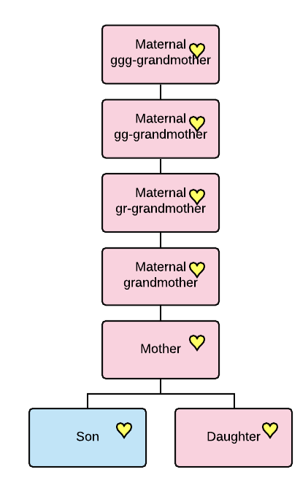
For example, the mitochondrial DNA MRCA of you and your sibling is your mother.

For your mother and her first cousin, the mitochondrial MRCA is their grandmother on the same side, assuming they both descend from a different daughter. Both daughters carry their mother’s undiluted mitochondrial DNA.

A common complaint about mitochondrial DNA is that “it’s not genealogically useful because the haplogroups are so old” – which is absolutely untrue.

Let’s unravel this a bit more.

The MRCA of a GROUP of people is the first common ancestor of EVERY person in the group with each other.

So, if you’re looking at your tree, the MRCA of you, your sibling, and your mother’s 1C in the example above is also your mother’s grandmother, because your mother’s grandmother is the first person in your tree that ALL of the people in the comparison group descend from.

Taking this even further back in time, your mother’s GGG-grandmother is the MRCA for these five people bolded, and maybe a lot more descendants, too.

At that distance in your tree, you may or may not know the name of the GGG-grandmother and you probably don’t know all of her descendants either.

Eventually, you will hit a genealogical brick wall, but the descendants of that unknown “grandmother” will still match. You have NOT hit a genetic brick wall.

A haplogroup name is assigned to the woman who had a mutation that forms a new haplogroup branch, and she is the MRCA of every person in that haplogroup and all descendant haplogroups.

However, and this is important, the MRCA of any two people, or a group of people may very well be downstream, in your tree, of that haplogroup mother.

As you can clearly see from our example, there are four different MRCAs, depending on who you are comparing with each other.

  • Mom – MRCA of you and your sibling
  • Grandmother – MRCA of you, your sibling, your mom and your mom’s 1C
  • GGG-Grandmother – MRCA of all five bolded descendants
  • Haplogroup formation – MRCA of ALL tested descendants, and all downstream haplogroups, many of whom are not pictured

Many of the testers may, and probably do, form haplotype clusters beneath this haplogroup.

When you are seeking a common ancestor, you really don’t care when everyone in that haplogroup was related, what you seek is the common ancestor between you and another person, or group of people.

If the haplogroup is formed more recently in time, it may define a specific lineage, and in that case, you will care because that haplogroup equates to a woman you can identify genealogically. For example, let’s say that one of Catherine LeJeune’s children formed a specific haplogroup. That would be important because it would be easy to assign testers with that haplogroup to their appropriate lineage. That may well be the case for the two people in haplogroup U6a7a1a2, but lack of a more recent haplogroup for the other testers does not hinder our analysis or reduce mitochondrial DNA’s benefits.

That said, the more people who test, the more possibilities for downstream haplogroup formation. Currently, haplogroup U6a7a1a has 34 unnamed lineages, just waiting for more testers.

Haplogroup ages are useful in a number of ways, but haplogroup usefulness is IN NO WAY DEPRICATED BY THEIR AGE. The haplogroup age is when every single person in that haplogroup shares a common ancestor. That might be useful to know, but it’s not a barrier to genealogy. Unfortunately, hearing that persistent myth causes people to become discouraged, give up and not even bother to test, which is clearly self-defeating behavior. You’ll never know what you don’t know, and you won’t know if you don’t test. That’s my mantra!

The LeJeune sisters provide a clear example.

OK, now on to Discover.

mtDNA Discover

Next, we are going to click through from the mtDNA Results and Tools area on your personal page to Discover Haplogroup Reports. These reports are chapters in your own personal book, handed down from your ancestors.

Discover is also a freely available public tool, but you’ll receive additional and personalized information by clicking through when you are signed into your page at FamilyTreeDNA. Only a subset is available publicly.

mtDNA Discover was released with the new Mitotree and provides fresh information weekly.

Think of Discover as a set of a dozen reports just for your results, with one more, Globetrekker, an interactive haplogroup map, coming soon.

Resources:

When you click through to Discover from your results, Discover defaults to your haplogroup. In this case, that’s U6a7a1a for the LeJeune sisters.

Let’s begin with the first report, Haplogroup Story.

Haplogroup Story

The Haplogroup Story is a landing page that summarizes information about your ancestor’s haplogroup relevant to understanding your ancestor’s history. Please take the time to actually READ the Discover reports, including the information buttons, not just skim them.

Think of Discover as your own personalized book about your ancestors – so you don’t want to miss a word.

You’ll see facts on the left, each one with a little “i” button. Click there or mouse over for more information about how that fact was determined.

When we’re talking about haplogroup U6a7a1a, it sounds impersonal, but we’re really talking about an actual person whose name, in this case, we will never know. We can determine the ancestor of some haplogroups that formed within a genealogical timeframe. The LeJeune ancestor in question is the person in whose generation the final mutation in a long string of mutations created the final “a” in haplogroup U6a7a1a.

Think of these as a long line of breadcrumbs. By following them backwards in time and determining when and where those breadcrumbs were dropped, meaning when and where the mutation occurred, we begin to understand the history of our ancestor – where she was, when, and which cultures and events shaped her life.

U6a7a1a was formed, meaning this ancestor was born, about 50 CE, so about 1950 years ago. This means that the ancestor of ANY ONE PERSON with this haplogroup could have lived anytime between the year 50 CE and the year of their mother’s birth.

This is VERY important, because there is an incredible amount of  misunderstanding about haplogroup ages and what they mean to you.

The year 50 CE is the year that the common ancestor of EVERY PERSON in the haplogroup was born, NOT the year that the common ancestor of any two or more people was born.

By way of illustration, the LeJeune sisters were born in about 1624 and 1633, respectively, not 50 CE, and their most recent common ancestor (MRCA) is their mother, who would have been born between about 1590 and 1608, based on their birth years.

For reference, I’ve created this genealogical tree from individuals who took the mitochondrial DNA test and have identified their mitochondrial lineage on the LeJeune mother’s profile at Wikitree

You can see that both Edmee and Catherine have mitochondrial DNA testers through multiple daughters. I’ve color coded the MRCA individuals within each group, and of course their mother is the MRCA between any two people who each descend from Edmee and Catherine.

Mitochondrial DNA matches to the LeJeune sisters’ descendants could be related to each other anywhere from the current generation (parent/child) to when the haplogroup formed, about 50 CE.

You can easily see that all of these testers, even compared with their most distant relatives in the group, share a common ancestor born between 1590 and about 1608. Other people when compared within the group share MCRAs born about 1717 (blue), 1778 (peach), 1752 (green), 1684 (pink), 1658 (mustard), and 1633 (red).

Soooooo…a haplogroup born in 50 CE does NOT mean that you won’t be able to find any genealogical connection because your common ancestor with another tester was born more than 1900 years ago. It means that the common ancestor of EVERYONE who is a member of haplogroup U6a7a1a (and downstream haplogroups) was born about 50 CE.

The parent haplogroup of U6a7a1a is haplogroup U6a7a1, which was born about 1450 BCE, or about 3450 years ago.

In the graphic, I’ve shown other unknown genealogical lineages from U6a7a1 and also downstream haplogroups.

Haplogroup U6a7a1 is the MRCA, or most recent common ancestor of haplogroup U6a7a1a, and anyone who descends from haplogroup U6a7a1 or any of the 23 downstream lineages from U6a7a1, including 5 descendant haplogroups and 18 unnamed lineages.

The LeJeune haplogroup, U6a7a1a, has 35 descendant lineages. One downstream haplogroup has already been identified – U6a7a1a2 – which means two or more people share at least one common, stable, mutation, in addition to the mutations that form U6a7a1a. Thirty-four other lineages are as yet unnamed.

The fact that there are 34 unnamed lineages means that people with one or more private variants, or unique mutations, are candidates for a new branch to form when someone else tests and matches them, including those variants.

You’re a candidate for a new haplogroup in the future if no one else matches your haplotype cluster number, or, potentially, as the tree splits and branches upstream.

When a second person in a lineage tests, those two people will not only share a common haplotype cluster F#, they will share a new haplogroup too if their common mutation is not excluded because it’s unstable and therefore unreliable.

There are 127 members of haplogroup U6a7a1a today, and their EKAs are noted as being from France, Canada, the US, and other countries that we’ll view on other pages.

Haplogroup U6a7a1a has been assigned two Discover badges:

  • Imperial Age – “an age noted for the formation and global impact of expansive empires in many parts of the world.” In other words, colonization, which is certainly true of the French who battled with the English to colonize New England, Acadia, and New France.
  • mtFull Confirmed (for testers only)

Additionally, the LeJeune sisters have one Rare Notable Connection, and three Rare Ancient Connections, all of which may shed light on their history.

Takeaways from the Haplogroup Story

  • The Haplogroup Story provides an overview of the haplogroup
  • You can easily see how many testers fall into this haplogroup and where they have indicated as the origin of their matrilineal line.
  • The haplogroup may have several new haplogroup seeds – 34 in this case – the number of unnamed lineages
  • You can share this or other Discover pages with others by using the “share page” link in the upper right-hand corner.
  • Don’t be discouraged by the age of the haplogroup, whether it’s recent or older.

Next, let’s look at Country Frequency.

Country Frequency

Country Frequency shows the locations where testers in haplogroup U6a7a1a indicate that their EKA, or earliest known matrilineal ancestor, is found. The Country Frequency information is NOT limited to just your matches, but all testers in haplogroup U6a7a1a, some of whom may not be on your match list. Remember, only people with 3 mutations difference, or fewer, are on your match list.

Haplogroup distribution around the world is very informative as to where your ancestors came from.

There are two tabs under Country Frequency, and I’d like to start with the second one – Table View.

Table View displays all of the user-provided country locations. Note that the Haplogroup Frequency is the percentage of total testers in which this haplogroup is found in this particular country. These frequencies are almost always quite small and are location-based, NOT haplogroup based.

There are now 40,000 haplogroups, and in haplogroup U, the LeJeune sisters are 6 branches down the tree with U6a7a1a.

In total, 127 testers are members of haplogroup U6a7a1a, and 42 of those claim that their ancestor is from France, which comprises 1% of the people who have taken the full sequence mitochondrial DNA test whose ancestor is from that location.

Let’s do the math so you can see how this is calculated and why it’s typically so small. For our example, let’s say that 8000 people in the database have said their matrilineal ancestor is from France. Of the 127 haplogroup U6a7a1a members, 42 say their ancestor is from France. Divide 42 by 8,000, which is 0.00525, and round to the nearest percentage – which is 1%.

The best aspect of this page is that you can see a nice summary of the locations where people indicate that their earliest known U6a7a1a ancestor was found.

Please note that the last entry, “Unknown Origins,” is the bucket that everyone who doesn’t provide a location falls into. That row is not a total but includes everyone who didn’t provide location information.

These location results make sense for the LeJeune sisters – maybe except for Ireland and Belgium. Some people don’t understand the directions, meaning that a matrilineal ancestor or direct maternal ancestor is NOT your literal “oldest” ancestor on your mother’s side of the tree who lived to be 105, but your mother-to-mother-to-mother-to-mother ancestor, so check to see if these people with unusual locations are in your match list and view their tree or reach out to them.

We don’t know why the person who selected Native American made that choice, but I’d bet it has to do with confusion about the “other” LeJeune female, Jeanne LeJeune dit Briard. Based on Catherine and her sister, Edmee LeJeune’s haplogroup through more than 50 testers, U6a7a1a, Native is incorrect.

Of course, that tester wouldn’t have known that if they completed their EKA information before they tested. Perhaps they entered information based on the stories they had heard, or flawed genealogy, and didn’t think to go back and correct it when their results were ready, indicating that Native was mistaken.

On the “Map View” tab, the locations are shown using a heat map, where the highest percentages are the darkest. Here, both France and Canada are the darkest because that’s the most common selection for this haplogroup with 1% each, while the rest of the countries registered with less <1%.

These colors are comparative to each other, meaning that there is no hard and fast line in the sand that says some percentage or greater is always red.

To summarize these two tables, because this is important:

  • The Table View shows you how many people selected a specific country for their ancestor’s location, but the frequency is almost always very low because it’s based on the total number of testers in the entire database, comprised of all haplogroups, with ancestors from that country.
  • The Map View shows you a heat map for how frequently a particular location was selected, as compared to other locations, for this haplogroup.

To view the difference between adjacent haplogroups, I always compare at least one haplogroup upstream. In this case, that’s the parent haplogroup, U6a7a1.

The Parent Haplogroup

If you look at haplogroup U6a7a1, just one haplogroup upstream, you’ll see that for Mauritania, the total number of U6a7a1 descendants tested is only “1”, but the haplogroup frequency in Mauritania is 10% which means that there are only 10 people who have been tested in the database altogether from Mauritania – and one person is haplogroup U6a7a1.

However, due to substantial under-sampling of the Mauritania population, the frequency for Mauritania, 10%, is higher than any other location.

Also, remember, these are user-reported ancestor locations, and we have no idea if or how these people determined that their ancestor is actually from Mauritania.

Please only enter actual known locations. For example, we don’t want haplogroup U6a7a1 members to look at this informatoin, then add Mauritania as their location because now they “know” that their ancestor is from Mauritania.

On the Map View, Mauritania is dark red because the percentage is so high – never mind that there are only 10 testers who report matrilineal ancestors from there, and only one was U6a7a1.

This map illustrates one reason why taking the full sequence test is important. Viewing partial haplogroups can be deceiving.

Catherine and Edmee LeJeune’s matrilineal descendants who only tested at the HVR1 or HVR1+HVR2 level receive a predicted haplogroup of U6a, born about 21,000 years ago. That’s because the full 16,569 locations of the mitochondria need to be tested in order to obtain a full haplogroup, as opposed to about 500 locations in the HVR1 and HVR1/2, each, respectively.

U6a – The Result for HVR1/HVR2-Only Testers

So, let’s look at what haplogroup U6a reveals, given that it’s what early LeJeune descendants who ordered the lower-level tests will see.

In the Table View for U6a, below, you see that the top 5 counties listed by haplogroup frequency are five North African countries.

A total of 801 people are assigned to haplogroup U6a, meaning the majority, 757, report their ancestors to be from someplace else. If two people from the Western Sahara (Sahrawi) comprise 67% of the people who tested, we know there are only three people who have tested and selected that location for their ancestors.

If you didn’t understand how the display works, you’d look at this report and see that the “top 5” countries are North African, and it would be easy to interpret this to mean that’s where Catherine and Edmee’s ancestors are from. That’s exactly how some people have interpreted their results.

Scrolling on down the Table View, 50 testers report France, and 10 report the US, respectively, with France showing a Haplogroup Frequency of 1% and the US <1%.

The balance of U6a testers’ ancestors are from a total of 57 other countries, plus another 366 who did not select a location. Not to mention that U6a was born 21,000 years ago, and a lot has happened between then and the 1620/1630s when Catherine and Edmee were born to a French mother.

The real “problem” of course is that haplogroup U6a is only a partial haplogroup.

The U6a map shows the highest frequency based on the number of testers per country, which is why it’s dark red, but the Table View reports that the actual number of U6a testers reporting any specific country. France has 50. Next is the US, also with 50, which often means people are brick-walled here. You can view the U6a table for yourself, here.

Why is this relevant for Catherine and Edmee LeJeune? It’s very easy to misinterpret the map, and for anyone viewing U6a results instead of U6a7a1a results, it’s potentially genealogically misleading.

Use Country Frequency with discretion and a full understanding of what you’re viewing, especially for partial haplogroups from HVR1/HVR2 results or autosomal results from any vendor.

If someone tells you that the LeJeune sisters are from someplace other than France, ask where they found the information. If they mention Africa, Morocco or Portugal, you’ll know precisely where they derived the information.

This information is also available on your Maternal Line Ancestry page, under “See More,” just beneath the Matches tab. Haplogroup Origins and Ancestral Origins present the same information in a different format.

Discover is a significant improvement over those reports, but you’ll still need to read carefully, understand the message, and digest the information.

Takeaways from Country Frequency

  • Evaluate the results carefully and be sure to understand how the reports work.
  • Use complete, not partial haplogroups when possible.
  • The Haplogroup Frequency is the number of people assigned to this haplogroup divided by the entire number of people in the database who report that country location for their matrilineal ancestor. It is NOT the percentage of people in ONLY haplogroup U6a7a1a from a specific country.
  • Table view shows the number of testers with this haplogroup, with the percentage calculated per the number of people who have tested in that country location.
  • The Map shows the highest frequency based on the number of testers per country.
  • Use the map in conjunction with the haplogroup age to better understand the context of the message.

Globetrekker, which has not yet been released, will help by tracking your ancestors’ paths from their genesis in Africa to where you initially find that lineage.

Before we move on to the Mitotree, let’s take a minute to understand genetic trees.

About Genetic Trees

The Mitotree is a genetic tree, also called a phylogenetic tree, that generally correlates relatively closely with a genealogical tree. The more testers in a particular haplogroup, the more accurate the tree.

FamilyTreeDNA provides this disclaimer information about the genetic tree. The Mitotree you see is a nice and neat published tree. The process of building the tree is somewhat like making sausage – messy. In this case, the more ingredients, the better the result.

The more people that test, the more genetic information is available to build and expand the tree, and the more accurate it becomes.

The recent Mitotree releases have moved the haplogroup “dates” for the LeJeune sisters from about 21,000 years ago for HVR1/HVR2 U6a testers to 50 CE for full sequence testers, and this may well be refined in future tree releases.

Mutations

Mutations and how to interpret them can be tricky – and this short section is meant to be general, not specific.

Sometimes mutations occur, then reverse themselves, forming a “back mutation”, which is usually counted as a branch defining a new haplogroup. If a back mutation happens repeatedly in the same haplogroup, like a drunken sailor staggering back and forth, that mutation is then omitted from haplogroup branch formation, but is still counted as a mismatch between two testers.

A heteroplasmy is the presence of two or more distinct results for a specific location in different mitochondria in our bodies. Heteroplasmy readings often “come and go” in results for different family members, because they are found at varying threshold levels in different family members, causing mismatches. Heteroplasmies are currently counted only if any person has 20% or greater of two different nucleotides. So, if you have a 19% heteroplasmy read for a particular location, and your sister has 21%, you will “not” have a heteroplasmic condition reported, but she will, and the location will be reported as a mismatch.

If you have a heteroplasmy and another family member does not, or vice versa, it’s counted as as a “mismatch,” meaning you and that family member will find yourselves in different haplotype clusters. Hetroplasmies do not presently define new tree branches. I wrote about heteroplasmies, here.

Takeaways from the Genetic Tree Disclaimer

  • DNA is fluid, mutations happen, and all mutations are not created equal.
  • Thankfully, you really don’t need to understand the nitty-gritty underpinnings of this because the scientists at FamilyTreeDNA have translated your results into reports and features that take all of this into consideration.
  • Testing more people helps refine the tree, which fills in the genetic blanks, refining the dates, and expanding branches of the tree.

Resources:

Ok, now let’s look at the Time Tree

Time Tree

The Time Tree displays your haplogroup on the Mitotree timeline. In other words, it shows us how old the haplogroup is in relation to other haplogroups, and testers.

The Time Tree displays the country locations of the ancestors of testers who are members of that and descendant or nearby haplogroups. You can view the haplogroup U6a7a1a Time Tree, here, and follow along if you wish. Of course, keep in mind that the tree is a living, evolving entity and will change and evolve over time as updated tree versions are released.

Mousing over the little black profile image, which is the person in whom this haplogroup was born, pops up information about the haplogroup. Additionally, you’ll see black bars with a hashed line between them. This is the range of the haplogroup formation date. Additional details about the range can be found on the Scientific Details tab, which we’ll visit shortly.

On your Matches tab, remember that each match has both a haplogroup and a haplogroup cluster F# listed.

On the Time Tree, individual testers are shown at right, with their selected country of origin. In this case, you’ll see the person who selected “Native American” at the top, followed by France, Canada, the US, and other flags.

Haplogroup U6a7a1a includes several haplotype clusters, designated by the rounded red brackets. In this view, we can see several people who have haplotype cluster matches. Everyone has a haplotype assignment, but a haplotype cluster is not formed until two people match exactly.

In the Time Tree view, above, you can see two clusters with two members each, and the top of a third cluster at the bottom.

In case you’re wondering why some of the globes are offset a bit, they positionally reflect the birth era of the tester, rounded to the closest 25 years, if the birth year is provided under Account Settings. If not, the current tester position defaults to 1950.

Scrolling down to the next portion of the window shows that the third cluster is VERY large. Inside the cluster, we see Belgium, Canada, and France, but we aren’t even halfway through the cluster yet.

Continuing to scroll, we see the cluster number, F7753329, in the middle of the cluster, along with the French flag, two from Ireland, four from the US, and the beginning of the large unknown group.

In this fourth screenshot, at the bottom of the display, we see the balance of haplotype cluster #F7753329, along with eight more people who are not members of that haplotype cluster, nor any other haplotype cluster.

Finally, at the bottom, we find haplogroup U6a7a1a2, a descendant haplogroup of U6a7a1a. Are they descendants of the LeJeune sisters?

Looking back at our tester’s match list, the two people who belong to the new haplogroup U6a7a1a2 haven’t provided any genealogical information. No EKA or tree, unfortunately. The haplogroup formation date is estimated as about 1483, but the range extends from about 1244-1679 at the 95th percentile. In other words, these two people could be descendants of:

  • Either Catherine or Edmee LeJeune, but not both, since all of their descendants would be in U6a7a1a2.
  • An unknown sister to Catherine and Edmee.
  • A descendant line of an ancestor upstream of Catherine and Edmee.

Takeaways from the Time Tree

  • The visualization of the matches and haplotype clusters illustrates that the majority of the haplogroup members are in the same haplogroup cluster.
  • Given that two women, sisters, are involved, we can infer that all of the mutations in this haplotype cluster were common to their mother as well.
  • Haplotype cluster #F7753329 includes 19 testers from Catherine and 17 from Edmee.
  • Downstream haplogroup U6a7a1a2 was born in a daughter of haplogroup U6a7a1a, as early as 1244 or as late as 1679. Genealogy information from the two testers could potentially tell us who the mutation arose in, and when.
  • As more haplogroup U6a7a1a2 testers provide information, the better the information about the haplogroup will become, and the formation date can be further refined.

Smaller haplotype clusters have a story to tell too, but for those, we’ll move to the Match Time Tree.

Match Time Tree

The Match Time Tree is one of my favorite reports and displays your matches on the Time Tree. This feature is only available for testers, and you must be signed in to view your Match Time Tree.

By selecting “Share Mode”, the system obfuscates first names and photos so you can share without revealing the identity of your matches. I wrote about using “Share Mode” here. I have further blurred surnames for this article.

The Match Time Tree incorporates the tree view, with time, the names of your matches PLUS their EKA name and country, assuming they have entered that information. This is one of the reasons why the EKA information is so important.

This display is slightly different than the Time Tree, because it’s one of the features you only receive if you’ve taken the mtFull test and click through to Discover from your account.

The Time Tree view is the same for everyone, but the Match Time Tree is customized for each tester.

Your result is shown first, along with your haplotype cluster if you are a member of one.

You can easily see the names of the EKAs below the obfuscated testers’ names.

While we immediately know that descendants of both Catherine and Edmee are found in the large cluster #F7753329, we don’t yet know which ancestors are included in other haplotype clusters.

Haplogroup U6a7a1a includes two smaller haplotype clusters with 2 people each.

We know a few things about each of these clusters:

  • The people in each cluster have mutations that separate them from everyone else except the other person in their cluster
  • The results are identical matches to the other person in the cluster, including less reliable locations such as 309 and 315
  • There are other locations that are excluded from haplogroup formation, but are included in matching, unlike 309 and 315.
  • Given that they match only each other exactly, AND they did not form a new haplogroup, we know that their common unique mutation that causes them to match only each other exactly is unreliable or unstable, regardless of whether it’s 309, 315, a heteroplasmy, or another marker on the list of filtered or excluded variants.

Only the tester can see their own mutations. By inference, they know the mutations of the people in their haplotype cluster, because they match exactly.

If you’re a member of a cluster and you’re seeking to determine your common ancestor, you’ll want to analyze each cluster. I’ve provided two examples, below, one each for the red and purple clusters.

Red Haplotype Cluster #F3714849

Only one person in the red cluster has included their EKA, and the tree of the second person only reaches to three generations. Tracking that line backwards was not straightforward due to the 1755 expulsion of the Acadians from Nova Scotia.

The second person listed their EKA as Edmee LeJeune, but they have a private tree at MyHeritage, so their matches can’t see anything. I wonder if they realize that their matches can’t view their tree.

We are left to wonder if both people descend from Edmee LeJeune, and more specifically, a common ancestor more recently – or if the unstable mutation that they share with each other is simply happenstance.

E-mailing these testers would be a good idea.

Purple Haplotype Cluster #F2149611

Evaluating the purple cluster reveals that the common ancestor is Catherine LeJeune. The question is twofold – how are these two people related downstream from Catherine, and how unstable is their common mutation or mutations.

Fortunately, both people have nice trees that track all the way back to Catherine.

Unfortunately, their MRCA is Francoise, the daughter of Catherine. I say unfortunately, because two additional testers also descend from Francoise, and they don’t have the haplotype cluster mutation. This tells us that the cluster mutation is unreliable and probably not genealogically relevant because it occurred in two of Francoise’s children’s lines independently, but not all four.

In other words, that specific mutation just happened to occur in those two people.

This is exactly why some mutations are not relied upon for haplogroup definition.

Takeaways from the Match Time Tree

  • The time tree is a wonderful visualization tool that shows all of your matches, their EKAs and countries, if provided, in haplotype clusters, on the Time Tree. This makes it easy to see how closely people are related and groups them together.
  • On your match page, you can easily click through to view your matches’ trees.
  • You can use both haplotype clusters (sometimes reliable) and downstream haplogroups (reliable) to identify and define lineages on your family tree. For example, if a third person matches the two in haplogroup U6a7a1a2, the child haplogroup of U6a7a1a, and you could determine the common ancestor of any two of the three, you have a good idea of the genealogical placement of the third person as well.
  • You know that if people form a haplotype cluster, but not a new haplogroup, that their common haplotype cluster-defining mutation is less reliable and may not be genealogically relevant.
  • On the other hand, those less reliable mutations may not be reliable enough for haplogroup definition, but may be relevant to your genealogy and could possibly define lineage splits. Notice all my weasel words like “may,” “may not” and “possibly.” Also, remember our purple cluster example where we know that the mutation in question probably formed independently and is simply chance.
  • I can’t unravel the ancestors of the red cluster – and if I were one of those two people, especially if I didn’t know who my ancestor was, I’d care a lot that the other person didn’t provide a useful tree. Don’t forget that you can always reach out via email, offer to collaborate, and ask nicely for information.
  • We need EKAs, so please encourage your matches to enter their EKA, upload a tree or link to a MyHeritage tree, and enter a Wikitree ID in their FamilyTreeDNA profile, all of which help to identify common ancestors.

Resources:

Classic Tree

FamilyTreeDNA invented the Time Tree and Match Time Tree to display your results in a genealogically friendly way, but there is important information to be gleaned from other tree formats as well.

The Classic Tree presents the Mitotree, haplogroup and haplotype information in the more traditional format of viewing phylogenetic trees, combining their beneficial features. There’s a lot packed in here.

In this default view, all of the Display Options are enabled. We are viewing the LeJeune haplogroup, U6a7a1a, with additional information that lots of people miss.

The countries identified as the location of testers’ earliest known ancestors (EKA) are shown.

Listed just beneath the haplogroup name, five people are members of this haplogroup and are NOT in a haplotype cluster with anyone else, meaning they have unique mutations. When someone else tests and matches them, depending on their mutation(s), a new haplogroup may be formed. If they match exactly, then at least a new haplotype cluster will be formed.

Portions of three haplotype clusters are shown in this screenshot, designated by the F numbers in the little boxes.

Additional information is available by mousing over the images to the right of the haplogroup name.

Mousing over the badge explains the era in which the haplogroup was born. Rapid expansion was taking place, meaning that people were moving into new areas.

Mousing over the date explains that the scientists behind the Mitotree are 95% certain about the date range of the birth of this haplogroup, rounded to 50 CE. Remember, your common ancestor with ALL haplogroup members reaches back to this approximate date, but your common ancestor with any one, or a group, of testers is sometime between the haplogroup formation date, 50 CE, and the present day.

Mousing over the year shows the confidence level, and the date range at that level. These dates will probably be refined somewhat in the future.

If haplogroup members have private variants, it’s likely or at least possible that a new branch will split from this one as more people test

Mousing over the star displays the confidence level of the structure of this portion of the Mitotree based on what could be either confusing or conflicting mutations in the tree. For haplogroup U6a7a1a, there’s no question about the topology, because it has a 10 of 10 confidence rating. In other words, this branch is very stable and not going to fall off the tree.

Every haplogroup is defined by at least one mutation that is absent in upstream branches of the tree. Mutations are called variants, because they define how this sample, or branch, varies from the rest of the branches in the Mitotree.

These two mutations, A2672G and T11929C, are the haplogroup-defining mutations for U6a7a1a. Everyone in haplogroup U6a7a1a will have these two mutations in addition to all of the mutations that define directly upstream haplogroups (with extremely rare exceptions). Haplogroup-defining mutations are additive.

There may be more haplogroup-defining mutations than are displayed, so click on the little paper icons to copy to your clipboard.

You can view upstream haplogroups and downstream haplogroups, if there are any, by following the back arrows to upstream haplogroups, and lines to downstream haplogroups.

For example, I clicked on the arrow beside haplogroup U6a7a1a to view its parent haplogroup, U6a7a1, and a second time to view its parent, haplogroup U6a7a. If I click on the back arrow for U6a7a, I’ll continue to climb up the tree.

Beneath U6a7a, you can see the haplogroup branches, U6a7a1a and U6a7a2.

Beneath U6a7a1, you’ll notice:

  • People who don’t share haplotype clusters with anyone
  • Three haplotype clusters
  • Five descendant haplogroups from U6a7a1, including the LeJeune sister’s haplogroup U6a7a1a.

To expand any haplogroup, just click on the “+”.

You may see icons that are unfamiliar. Mouse over the image or click on the “Show Legend” slider at upper right to reveal the decoder ring, I mean, legend.

You can read more about the symbols and how haplogroups are named, here, and see more about types of mutations in the Scientific Details section.

Takeaways from the Classic Tree

  • The Classic Tree provides a quick summary that includes important aspects of a haplogroup, including when it was formed, which mutations caused it’s formation, and each branch’s confidence level.
  • It’s easy to back your way up the tree to see where your ancestor’s founding haplogroups were located, which speaks to your ancestor’s history. Patterns, paths, and consistency are the key.
  • Ancient DNA locations in your tree can provide a very specific location where a haplogroup was found at a given point in time, but that doesn’t necessarily mean that’s where the haplogroup was born, or that they are your ancestor. We will get to that shortly.
  • You can share this page with others using the “Share Page” function at the top right.

Ancestral Path

The Ancestral Path is a stepping-stone chart where you can view essential information about each haplogroup in one row, including:

  • Age and era
  • Number of years between haplogroups
  • Number of subclades
  • Number of modern-day testers who belong to this haplogroup
  • Number of Ancient Connections that belong to this haplogroup, including all downstream haplogroups

This “at a glance” history of your haplogroup is the “at a glance” history of your ancestors.

The number in the column titled “Immediate Descendants”, which is the number of descendant haplogroups, tells a story.

If you see a large, or “larger” number there, that indicates that several “child” haplogroups have been identified. Translated, this means that nothing universally terrible has occurred to wipe most of the line out, like a volcano erupting, or a famine or plague that would constitute a constraining bottleneck event. Your ancestors’ children survived and apparently thrived, creating many descendant downstream haplogroups, known as an expansion event.

If you see a smaller number, such as rows 5, 7, 8, 9, and 13, each of which have only two surviving branches, yours and another, several branches probably didn’t survive to the present day. This may reflect a bottleneck where only a few people survived or the lines became extinct over time, having no descendants today. Either that, or the right people haven’t yet tested. Perhaps they are living in a particularly undersampled region of the world, a tiny village someplace, or there aren’t many left.

The two most recent haplogroups have the most subclades, indicating that your ancestors were successfully reproducing in the not-too-distant past. Mutations occurred because they randomly do, creating new haplogroups, and several haplogroup members have tested today. Hopefully, genealogy can connect us further.

The next column, “Tested Modern Descendants,” tallies the total number of testers as it rolls up the tree. So, each haplogroup includes the testers in its downstream (child) haplogroups. The 127 people in haplogroup U6a7a1a include the two people in haplogroup U6a7a1a2, and the 226 people in haplogroup U6a7a1 include the 127 people in haplogroup U6a7a1a.

Looking at other types of trees and resources for each haplogroup can suggest where our ancestors were at that time, perhaps correlating with world or regional history that pertains to the lives of those ancestors.

In our case, the LeJeune sisters’ ancestors did well between 3450 years ago through the formation of U6a7a1a, about 1950 years ago. 3500 years ago, in Europe, settlements were being fortified, leadership was emerging as complex social patterns formed, and trade networks developed that spanned the continent and beyond.

Between 20,000 and 3,450 years ago, not so much. This correlates to the time when early European farmers were moving from Anatolia, bringing agriculture to Europe en masse. However, they were not the first people in Europe. Early modern humans arrived and lived in small groups about 50,000 years ago.

And they very nearly didn’t survive. Many lines perished.

Takeaways from the Ancestral Path

  • The Ancestral Path shows the stepping stones back to Mitochondrial Eve, dropping hints along the way where expansions occurred, meaning that your ancestors were particularly successful, or conversely, where a bottleneck occurred and the lineage was in jeopardy of extinction.
  • In some cases, where a lot of time has passed between haplogroups, such as 8,000 years between U and U6, we’re seeing the effect of lineages dying out. However, with each new tester, there’s the possibility of a previously undiscovered branch split being discovered. That’s precisely what happened with haplogroup L7.

Migration Map

The Discover Migration Map shows the path that your ancestor took out of Africa, and where your base ancestral haplogroup was formed.

Mousing over the little red circle displays the haplogroup, and the area where it originated. Based on this location where U6 was found some 31,000 years ago, we would expect to find U6 and subgroups scattered across North Africa, the Levant, and of course, parts of Eurasia and Europe.

It’s interesting that, based on what we know using multiple tools, it appears that haplogroup U initially crossed between the Horn of Africa and the Arabian Peninsula, at the present-day Strait of Bab-el-Mandeb. Today, that crossing is about 15 nautical miles, but the sea level was much lower during earlier times in history, including the last glacial maximum. Humans would have seen land across the water, and could potentially have swum, drifted, or perhaps used early boats.

Over the next 10,000+ years, haplogroup U trekked across the Arabian peninsula into what is present-day Iran, probably moving slowly, generation by generation, then turning back westward, likely in a small group of hunter-gatherers, crossing the Nile Delta into North Africa, present-day Egypt.

They probably fished along the Nile. Food would have been plentiful along rivers and the sea.

It’s exciting to know that the ancestors of the LeJeune sisters lived right here, perhaps for millennia.

There’s more, however.

The Migration Map shows the location of the genetically closest Ancient DNA results to your haplogroup, obtained from archaeological excavations. This mapped information essentially anchors haplogroup branches in locations in both space and time.

Ancient DNA samples are represented by tiny brown trowels. Clicking on each trowel provides summary information about the associated sample(s) in that location.

Takeaways from the Migration Map

  • Scientists have estimated the location where your base haplogroup originated. For the LeJeune sisters, that’s haplogroup U6 in North Africa along the Mediterranean Sea.
  • The trowels show the locations of the genetically closest archaeological samples, aka Ancient Connections, in the FamilyTreeDNA data base.
  • These Ancient Connections displayed on the map may change. New samples are added regularly, so your older samples, except for the oldest two, which remain in place for each tester, will roll off your list when genetically closer Ancient Connections become available.
  • There are no Ancient Connections for the LeJeune sisters in France today, but keep in mind that Europe is closely connected. Today’s French border is only about 25 miles as the crow flies from Goyet, Belgium. France, sea to sea, is only about 500 miles across, and at its closest two points, less than 250 miles.
  • Samples found at these locations span a large timeframe.

There’s a LOT more information to be found in the Ancient Connections.

Ancient Connections

Ancient Connections is one of my favorite Discover features. This information would never have been available, nor synthesized into a usable format, prior to the introduction of Mitotree and mtDNA Discover. Ancient Connections unite archaeology with genealogy.

  • The first thing I need to say about Ancient Connections is that it’s unlikely that these individuals are YOUR direct ancestors. Unlikely does not mean impossible, but several factors, such as location and timeframe need to be considered.
  • What is certain is that, based on their mitochondrial haplogroup, you SHARE a common ancestor at some point in time.
  • Ancient samples can be degraded, with missing genetic location coverage. That means that not every mutation or variant may be able to be read.
  • Different labs maintain different quality criteria, and location alignments may vary, at least somewhat, lab to lab. While this is always true, it’s particularly relevant when comparing ancient DNA results which are already degraded.
  • Samples are dated by archaeologists using a variety of methodologies. FamilyTreeDNA relies on the dates and historical eras provided in the academic papers, but those dates may be a range, or contain errors.
  • Obtaining information from ancient DNA samples isn’t as easy or straightforward as testing living people.

However, the resulting information is still VERY useful and incredibly interesting – filling in blanks with data that could never be discerned otherwise.

Many people mistakenly assume that these Ancient Connections are their ancestors, and most of the time, not only is that not the case, it’s also impossible. For example, a woman who lived in 1725 cannot be the ancestor of two sisters who were born in 1624 and 1633, respectively.

When you click on Ancient Connections, you see a maximum of about 30 Ancient Connections. Information about the genetically closest burial is displayed first, with the most distant last on the list.

Please note that the final two are the oldest and will (likely) never change, or “roll off” your list, unless an even older sample is discovered. When new samples become available and are genetically closer, the oldest other samples, other than the oldest two, do roll off to make space for the closer haplogroups and their corresponding samples.

Obviously, you’ll want to read every word about these burials, because nuggets are buried there. I strongly encourage you to read the associated papers, because these publications reveal snippets of the lives of your haplogroup ancestors and their descendants.

The small pedigree at right illustrates the relationship between the ancient sample and the haplogroup of the tester. Three things are listed:

  1. El Agujero 8, the name assigned by the authors of the paper that published the information about this ancient sample
  2. The haplogroup of the LeJeune descendant who tested
  3. The haplogroup of their common ancestor.

If no haplogroup is specifically stated for the ancient sample, the sample is the same haplogroup as the common shared ancestor (MRCA), meaning the tester and the ancient sample share the same haplogroup.

The Time Tree beneath the description shows the tester’s haplogroup, (or the haplogroup being queried), the ancient sample, and their common ancestral haplogroup.

Let’s analyze this first sample, El Agujero 8.

  • The person whose remains were sampled lived about 1375 years ago (I’ve averaged the range), in the Canary Islands, and is part of the Guanche culture.
  • The Guanche are the indigenous people of the Canary Islands, already established there before the arrival of Europeans and the Spanish conquest of the 1400s.
  • The Guanche people are believed to have arrived in the Canaries sometime in the first millennium BCE (2000-3000 years ago) and were related to the Berbers of North Africa.
  • This makes sense if you consider the Migration map and geographic proximity.
  • Haplogroup U6a7a1, the haplogroup of El Agujero 8, is the shared ancestral haplogroup with the LeJeune sisters.
  • That woman, U6a7a1, lived around 1450 BCE, or 3450 years ago, probably someplace in North Africa, the Mediterranean basin, or even in the Nile Delta region, given the correlation between the Canary Islands settlement, the Berbers, and the Migration Map.
  • This does NOT mean that the ancestor of the LeJeune sisters lived in the Canary Islands. It means that a descendant of their MRCA, haplogroup U6a6a1, the shared common ancestor with the LeJeune sisters, lived in the Canary Islands.

Ancient Connections Chart Analysis Methodology

I create an Ancient Connection chart for each haplogroup I’m dealing with. We’re analyzing the LeJeune sisters today, but I track and analyze the haplogroup for every ancestor whose haplogroup I can find, or for whom I can find a descendant to test.

In this chart, YA=years ago and is based on the year 2000. KYA=thousand years ago, so 10 KYA is 10,000 years ago.

Name Person Lived Location & Culture Haplogroup, Date & Age Shared (MRCA) Haplogroup, Date & Age Note
LeJeune Sisters Born 1624 & 1633 French Acadian U6a7a1a,

50 CE,

1950 YA

U6a7a1a,

50 CE,

1950 YA

In Acadia by 1643/44
El Agujero 8 1375 CE Canary Islands, Guanche U6a7a1

1450 BCE, 3450 YA

U6a7a1 1450 BCE, 3450 YA Guanche arrived in Canaries in 1st millennium BCE, related to Berbers
Djebba 20824 6000 BCE Jebba, Bājah, Tunisia, Neolithic U6a3f3’4’5

c 5000 BCE, 7000 YA

U6a1”9

19,000 BCE, 21,000 YA

This archaeology site is on the northernmost point of North Africa
Djebba 20825 5900 BCE Djebba, Bājah, Tunisia, Neolithic U6a1”9

19,000 BCE, 21,000 YA

U6a1”9

19,000 BCE, 21,000 YA

This archaeology site is on the northernmost point of North Africa
Egyptian Mummy 2973 200 BCE Abusir el-Meleq, Giza, Egypt, Ptolemaic Kingdom U6a3h^,

1450 BCE,

3450 YA

U6a1”9

19,000 BCE, 21,000 YA

Nile Delta probably, paper says they share ancestry with near easterners
Egyptian Mummy 2888 100 BCE Abusir el-Meleq, Giza, Egypt, Ptolemaic Kingdom U6a2a’c,

11,000 BCE,

13,000 YA

U6a1”9

19,000 BCE, 21,000 YA

Nile Delta probably, paper says they share ancestry with near easterners
Segorbe Giant (6’3”) 1050 CE Plaza del Almudín, Valencia, Spain, Islamic necropolis burial U6a1a1, 14,000 BCE, 16,000 YA


U6a1”9

19,000 BCE, 21,000 YA

Paper says his genetic makeup is Berber and Islamic Spain, buried in Islamic style on right side facing Mecca.
Sweden Skara 1050 CE Varnhem, Skara, Sweden, Viking Swedish culture U6a1a3a, 7350 BCE, 9350 YA, U6a1”9

19,000 BCE, 21,000 YA

Viking burial


Chapelfield 696 1180 CE Chapelfield, Norwich, England, Ashkenazi Jewish Medieval age U6a1b1b. 400 BCE,

2400 YA


U6a1”9

19,000 BCE, 21,000KYA

Possibly the 1190 antisemitic Norwich massacre
Montana Mina 38 1200 CE Montana Mina, Lanzarote, Spain (Canary Islands), Guanche culture U6a1a1b1 U6a1”9

19,000 BCE, 21,000 YA

Guanche arrived in Canaries in 1st millennium BCE, related to Berbers
Amina 1725 CE Gaillard Center, Charleston, South Carolina, Enslaved African American burials U6a5b’f’g,

9550 BCE, 11,550 YA,

U6a1”9

19,000 BCE, 21,000 YA

Remains of pre-Civil War enslaved Africans unearthed in Charleston, SC
Doukanet el Khoutifa 22577 4400 BCE Doukanet el Khoutifa, Mars, Tunisia, Maghrebi cultural group U6b,

6500 BCE, 8500 YA


U6a’b’d’e, 23,000 BCE, 25,000 YA Late Stone Age, shows some admixture with European Hunter-Gatherers, possibly back and forth from Sicily
Guanche 12 625 CE Tenerife, Spain (Canary Islands), Guanche, Medieval U6b1a1’6’8’9, 1 BCE,

2100 YA

U6a’b’d’e, 23,000 BCE, 25,000 YA Guanche arrived in the Canaries in 1st millennium BCE, related to Berbers
Guanche 14 775 CE Tenerife, Spain (Canary Islands), Guanche, Medieval U6b1a1’6’8’9, 1 BCE,

2100 YA

U6a’b’d’e, 23,000 BCE, 25,000 YA Ditto above
Antocojo 27 875 CE Antocojo, La Gomera, Spain (Canary Islands) U6b1a1’6’8’9, 1 BCE,

2100 YA

U6a’b’d’e, 23,000 BCE, 25,000 YA Ditto above
Guanche 13 900 CE Cave, Tenerife, Spain (Canary Islands), Medieval U6b1a1’6’8’9, 1 BCE,

2100 YA

U6a’b’d’e, 23,000 BCE, 25,000 YA Ditto above
Guanche 1 1090 CE Cave, Tenerife, Spain (Canary Islands), Medieval U6b1a1’6’8’9, 1 BCE,

2100 YA

U6a’b’d’e, 23,000 BCE, 25,000 YA Ditto above
Barranco Majona 30 1325 CE Barranco Majona, La Gomera, Spain (Canary Islands), Guanche late Medieval U6b1a1’6’8’9, 1 BCE,

2100 YA

U6a’b’d’e, 23,000 BCE, 25,000 YA Ditto above
Kostenki 14 36,000 BCE Markina Gora, Kostyonki, Voronezh Oblast, Russia U2,

43,000 BCE, 45,000 YA


U,

43,000 BCE, 45,000 YA

European/Asian steppe earliest hunter-gatherers. Farming didn’t arrive until 10 KYA. Admixture from Asia as well.
Kostenki 12 31,000 BCE Volkovskaya, Voronezh region, Russian Federation. U2c’e,

43,000 BCE, 45,000 YA


U,

43,000 BCE, 45,000 YA

Early hunter-gatherer
Krems 3 29,000 BCE Wachtberg in Krems, Lower Austria, Austria, Gravettian culture U5,

32,000 BCE,

34,000 YA

U,

43,000 BCE, 45,000 YA

Endured the ice age, sophisticated toolmaking, Venus figures, mobile lifestyle, mammoth hunters
Krems Twin 1 28,800 BCE Left bank of the Danube, Krems-Wachtberg, Austria, Gravettian culture U5,

32,000 BCE,

34,000 YA

U,

43,000 BCE, 45,000 YA

Double grave for twins, 1 newborn, one age about 50 days
Krems Twin 2 28,800 BCE Left bank of the Danube, Krems-Wachtberg, Austria, Gravettian culture U5,

32,000 BCE,

34,000 YA

U,

43,000 BCE, 45,000 YA

Ditto above
Vestonice 13 28,900 BCE Pavlovské Hills, South Moravia, Czech Republic, Grevettian culture U8b^,

37,000 BCE, 39,000 YA


U,

43,000 BCE, 45,000 YA

Ice Age Europe, few samples before farming introduced. Believe these Gravettian individuals are from a single founder population before being displaced across a wide European region.
Vestonice 14 28,900 BCE Dolni Vestonice, Brezi, Czech Republic, Gravettian culture U5,

32,000 BCE,

34,000 YA

U,

43,000 BCE, 45,000 YA

Ditto above
Vestonice 16 28,900 BCE Dolni Vestonice, Brezi, Czech Republic, Gravettian culture U5,

32,000 BCE,

34,000 YA

U,

43,000 BCE, 45,000 YA

Ditto above
Grotta delle Mura child 15,100 BCE Grotta delle Mura, Bari, Italy, Paleolithic Italian culture U2”10,

43,000 BCE, 45,000 YA

U,

43,000 BCE, 45,000 YA

This baby, interred in a small shoreline cave, was less than 9 months old and had blue eyes
Goyette Q2 13,100 BCE Troisième Caverne, Goyet, Belgium, Magdaleian culture named after the La Madeleine rock shelter in France U8a,

10,000 BCE,

12,000 YA


U,

43,000 BCE, 45,000 YA

These hunter-gatherer people may have been responsible for the repopulation of Northern Europe. Cave art, such as that at Altamira, in Northern Spain is attributed to the Magdalenian culture.
Villabruna 1 12,000 BCE Villabruna, Italy, Paleolithic culture U5b2b,

9700 BCE,

11,700 YA


U,

43,000 BCE, 45,000 YA

Rock shelter in northern Italy where this man was buried with grave goods typical of a hunter and covered in painted stones with drawings. The walls were painted in red ochre.
Oberkasel 998 12,000 BCE Oberkassel , Bonn, Germany, Western Hunter-Gatherer culture U5b1 U,

43,000 BCE, 45,000 YA

Double burial found in a quarry with 2 domesticated dogs and grave goods. Genis classification was uncertain initially as they were deemed, “close to Neanderthals.”

Creating a chart serves multiple functions.

  1. First, it allows you to track connections methodically. As more become available, older ones fall off the list, but not off your chart.
  2. Second, it allows you to analyze the results more carefully.
  3. Third, it “encourages” you to spend enough time with these ancient humans to understand and absorb information about their lives, travels, and migrations – all of which relate in some way to your ancestors.

When creating this chart, I looked up every shared haplogroup to determine their location and what could be discerned about each one, because their story is the history of the LeJeune sisters, and my history too.

Ok, so I can’t help myself for a minute here. Bear with me while we go on a little Ancient Connections tour. After all, history dovetails with genetics.

How cool is it that the LeJeune sisters’ ancestor, around 20,000 years ago, who lived someplace in the Nile Delta, gave birth to the next 1000 (or so) generations?

Of course, the Great Pyramids weren’t there yet. They were built abotu 4600 years ago.

Those women gave birth to two women about 2200 years ago whose mummified remains were found in the Pyramids at Giza. The associated paper described Egypt in this timeframe as a cultural crossroads which both suffered and benefitted from foreign trade, conquest and immigration from both the Greeks and Romans.

You can read more about burials from this timeframe in The Beautiful Burial in Roman Egypt, here. A crossroads is not exactly what I was expecting, but reading the papers is critically important in understanding the context of the remains. This book is but one of 70 references provided in the paper.

Some burials have already been excavated, and work continues in the expansive pyramid complex.

The Egyptian sun is unforgiving, but Giza eventually gives up her secrets. Will more distant cousins of the LeJeune sisters be discovered as burial chambers continue to be excavated?

We know little about the lives of the women interred at Giza, but the life of another Ancient Connection, Amina, strikes chords much closer to home.

Amina, an enslaved woman, is another descendant of that woman who lived 20,000 years ago. She too is related to the Giza mummies.

Amina was discovered in a previously unknown burial ground in downtown Charleston, SC, that held the remains of enslaved people who had been brought, shackled, from Africa to be sold. Amina’s remains convey her story – that she was kidnapped, forced into the Middle Passage, and miraculously survived. She succumbed around 1725 in Charleston, SC, near the wharf, probably where her prison ship docked.

Charleston was a seaport where more than a quarter million enslaved people disembarked at Gadsden’s Wharf, awaiting their fate on the auction block. The location where Amina’s burial was found is only about 1000 feet from the wharf and is now, appropriately, considered sacred ground. Ohhh, how I’d like to share this information with Amina.

A hundred years earlier, a different ancestor of that women who lived 20,000 years ago gave birth to the mother of the LeJeune sisters, someplace in France.

Moving further back in time, another distant cousin was unearthed at the Kostyonki–Borshchyovo archaeological complex near the Don River in Russia.

Photographed by Andreas Franzkowiak (User:Bullenwächter) – Archäologisches Museum Hamburg und Stadtmuseum Harburg, CC BY-SA 3.0, https://commons.wikimedia.org/w/index.php?curid=58260865

Markina Gora is an incredibly famous location yielding both specimens included here, as well as this famous Venus figurine from the Gravettian culture, dating from about 27,000 years ago.

Bust of Kostenki 14 reconstructed from the burial.

The earliest of these hunter-gatherers in Europe, believed to be a small group of humans, interbred with Neanderthals. Kostenki 14 carried Neanderthal introgression dating back to about 54,000 years ago.

A layer of volcanic ash, thought to be from a volcano near Naples that erupted about 39,000 years ago, is found above the remains, speaking to events that our ancestors survived after this man lived.

I know we’ve traveled far back in history from the LeJeune sisters, but these ancient humans, the MRCA of each upstream haplogroup, are our ancestors, too.

What does all this mean?

At first glance, it’s easy to assume that all of the locations are relevant to our direct ancestors. Not only that, many people assume that all of these people ARE our ancestors. They aren’t.

Creating the Ancient Conenctions Chart should help you gain perspective about how these people are related to you, your ancestors, and each other.

Each individual person is connected to you and your ancestors in various ways – and their stories weave into yours.

Discover provides everyone has a mini-Timeline for each Ancient Connection. It’s easy to see that the tester, who tested in the modern era, since the year 1950, is not descended from El Agujaro 8, who lived in the 1300s and whose common (shared) haplogroup with the tester, U6a7a1, was born between 2100 BCE and 900 BCE, or between 4100 and 2900 years ago. The most probable date is about 3450 years ago.

The Timeline for each ancient sample includes:

  1. Your haplogroup’s mean birth year
  2. Ancient Connection’s birth year
  3. Ancient Connection’s haplogroup mean birth year, if different from the common haplogroup (in the example above, 3 and 4 are the same)
  4. Birth year of your common ancestor (MRCA), which is your common haplogroup

It’s easy to see the relevant information for each sample, but it’s not easy to visualize the trees together, so I’m creating a “rough” tree in Excel to help visualize the “big picture”, meaning all of the Ancient Connections.

How Do I Know Which Ancient Connections Even MIGHT Be My Ancestors and How We Are All Related?

That’s a great question and is exactly why I created this chart in an ancient haplogroup spreadsheet.

Click on any image to enlarge

In this chart, you can see the LeJeune sisters, in red, at the bottom, and their direct line hereditary haplogroups, in purple, descending from haplogroup U at the top.

Branching to the left and right from intersections with their purple hereditary haplogroups are other branches that the LeJeune sisters don’t share directly. However, the ancient remains that carry those haplogroups are “haplocousins” at a distant point in time, with our LeJeune sisters.

There only two burials that carry the same ancestral haplogroup as the LeJeune sisters:

  1. El Agujero 8, haplogroup U6a7a1 who lived in the Canary Islands in the year 1275
  2. Djebba 20825, who lived in Tunisia about 6,100 years ago

Clearly, Djebba, with a common haplogroup that lived about 21,000 years ago cannot be the ancestor of the LeJeune sisters, but they share a common ancestor. If Djebba was an ancestor of the LeJeune sisters, then Djebba would also descend from haplogroup U6a7, born about 20,600 years ago, like the LeJeune sisters do.

A cursory glance might suggest that since the sample, El Agujero 8 lived in the Canary Islands about 1275, haplogroup U6a7a1 was born there. However, if you read the papers associated with all of the samples found in the Canaries, Tunisia, Spain and other locations, you’ll discover that these populations moved back and forth across the Mediterranean. You’ll also discover that the earliest European haplogroup U samples found in Europe are believed to be the founders of haplogroup U in Europe. It’s possible that U6 dispersed into Italy and Spain, regions with significant exchange with North Africa.

It’s extremely unlikely that El Agujero 8, who lived about the year 1275 CE, was the ancestor of the LeJeune sisters, but it’s not entirely impossible. What’s more likely is that they descended from a common population that moved between Spain, the Canaries, and North Africa where other similar burials are found, like Tunisia. We know that Rome largely conquered France during the Gallic Wars (56-50 BCE), so it’s not terribly surprising that we find haplogroup U6a7a1 and descendants scattered throughout Europe, the Iberian peninsula, the Roman empire, and North Africa.

Sometime between the birth of haplogroup U6a7a1, about 3450 years ago, the descendants of that woman found their way both to France before the 1600s and also to the Canaries before 1275.

Takeaways from Ancient Connections

  • I recommend that you read the associated academic papers and publications that provide the Ancient Connections mitochondrial haplogroups. Those publications are chock full of important cultural information.
  • Globetrekker, which won’t be released until some time after the next release of the Mitotree, will help with tracking the path of your ancestors, especially where it’s complex and uncertain.
  • The “haplosisters” and “haplocousins” of the French LeJeune sisters are quite diverse, including Egyptian pyramid burials in Giza, a Muslim necropolis burial in Spain, a Viking in Sweden, indigenous Canary Islanders, a Tunisian site on the Northern-most tip of Africa, a Jewish burial in England, an enslaved woman in South Carolina, the Markina Gora site in Russia, caves in Austria, the Czech Republic, Belgium, Germany and Italy.
  • Ancient Connections are more than just interesting. On another genealogical line, I found a necropolis burial with my ancestor’s haplogroup located about 9 km from where my ancestor is believed to have lived, dating from just a few hundred years earlier.
  • FamilyTreeDNA adds more Ancient Connections weekly.

Resources

Notable Connections

Notable Connections are similar to Ancient Connections, except they are generally based on modern-day or relatively contemporary testers and associated genealogy. Some samples are included in both categories.

Three Notable Connections are included with the public version of Discover, and additional Notable Connections are provided, when available, for testers who click through from their account.

Some Notable Connections may be close enough in time to be useful for genealogy based on their haplogroup, their haplogroup history, and the tester’s history as well.

In this case, the closest two Notable Connections are both included in Ancient Connections, so we know that the rest won’t be closer in time.

The common ancestor, meaning common haplogroup, of Cheddar Man and the rest, reaches all the way back to haplogroup U, born about 45,000 years ago, so these particular Notable Connections can be considered “fun facts.”

However, if the first (closest) notable connection was a famous person who lived in France in the 1600s, and was the same or a close haplogroup, that could be VERY beneficial information.

Takeaways from Notable Connections

  • Mostly, Notable Connections are just for fun – a way to meet your haplocousins.
  • Notable Connections are a nice way to emphasize that we are all connected – it’s only a matter of how far back in time.
  • That said, based on the haplogroup, location and date, you may find Notable Connections that hold hints relevant to your ancestry.

Scientific Details

Scientific Details includes two pages: Age Estimates and Variants.

Scientific Details Age Estimates

Haplogroup ages are calculated using a molecular clock that estimates when the mutation defining a particular haplogroup first arose in a woman.

Since we can’t go back in time, test everyone, and count every single generation between then and now – scientists have to reconstruct the phylogenetic tree.

The more people who test, the more actual samples available to use to construct and refine the Mitotree.

The “mean” is the date calculated as the most likely haplogroup formation date.

The next most likely haplogroup formation range is the 68% band. As you can see, it’s closest to the center.

The 95% and 99% likelihood bands are most distant.

I know that 99% sounds “better” than 68%, but in this case, it isn’t. In fact, it’s just the opposite – 99% takes in the widest range, so it includes nearly all possibile dates, but the center of the range is the location most likely to be accurate.

The full certainty range is the entire 100% range, but is extremely broad. The mean is  the date I normally use, UNLESS WE ARE DEALING WITH CONTEMPORARY DATES.

For example, if the LeJeune sisters’ haplogroup was formed in 1550 CE at the mean, I’d be looking at the entire range. Do their approximate birth years of 1624 and 1633 fall into the 68% range, or the 95% range, and what are the years that define those ranges?

Scientific Details Variants

Next, click on the Variants tab.

To view your haplotype cluster, the F#, and your private variants, slide “Show private variants” at upper right above the black bar to “on.” This feature is only available for testers who sign in and click through to mtDNA Discover from their page.

The Variants tab provides lots of information, beginning with a summary of your:

  • Haplotype cluster F number, which I’ve blurred
  • Private variants, if any
  • End-of-branch haplogroup information

The most granular information is shown first.

Your haplotype cluster number is listed along with any private variants available to form a new haplogroup. In this case, there are no private variants for these haplotype cluster members. Every cluster is different.

Just beneath that, listed individually, are the variants, aka SNPs, aka mutations that identify each haplogroup. The haplogroup with the red square is yours.

Everyone in this haplogroup shares these two mutations: A2672G and T11929C. Because two variants define this haplogroup, it’s possible that one day it will split if future testers have one but not the other variant.

Information in the following columns provides details about each mutation. For example, the first mutation shown for haplogroup U6a7a1a is a transition type SNP mutation in the coding region, meaning it’s only reported in the full sequence test, where the A (Adenine) nucleotide, which is ancestral, mutated to a G (Guanine) nucleotide which is derived. This is essentially before (reference) and after (derived).

If you mouse over the Weight column, you’ll see a brief explanation of how each mutation is ranked. Essentially, rarer mutation types and locations are given more weight than common or less stable mutation types and/or locations.

Mutations with orange and red colors are less stable than green mutations.

Following this list from top to bottom essentially moves you back in time from the most recently born haplogroup, yours, to haplogroup L1”7, the first haplogroup in this line to branch from Mitochondrial Eve, our common ancestor who lived about 143,000 years ago in Africa.

View More

Clicking on the “View More” dropdown exposes additional information about the various types of mutations and Filtered Variants. Filtered Variants, in the current version of the Mitotree, are locations combined with specific mutation types that are excluded from branch formation.

Please note that this list may change from time to time as the tree is updated.

Takeaways from Scientific Details

  • Based on the Age Estimate for haplogroup U6a7a1a, it’s most likely to have formed about the year 29, but could have formed anytime between about 186 BCE and 230 CE. While this range may not be terribly relevant for older haplogroups, ranges are very important for haplogroups formed in a genealogical era.
  • People who are members of this example haplotype cluster do not have any private variants, so they are not candidates to receive a new haplogroup unless the upstream tree structure itself changes, which is always possible.
  • A significant amount of additional scientific information is available on these two tabs.
  • A list of locations currently excluded from haplogroup formation is displayed by clicking on the “View more” dropdown, along with information about various types of mutations. This list will probably change from time to time as the tree is refined.

Compare

Compare is a feature that allows you to compare two haplogroups side by side.

Let’s say we have an additional woman named LeJeune in Acadia, aside from Catherine and Edmee. As it happens, we do, and for a very long time, assumptions were made that these three women were all sisters.

Jeanne LeJeune dit Briard was born about 1659 and died after 1708. She is the daughter of unknown parents, but her father is purported to be Pierre LeJeune born about 1656, but there’s no conclusive evidence about any of that.

Jeanne LeJeune dit Briard married twice, first to Francois Joseph. Their daughter, Catherine Joseph’s marriage record in 1720 lists Jeanne, Catherine’s mother, as “of the Indian Nation.”

Several direct matrilineal descendants of Jeanne LeJeune dit Briard have joined the Acadian AmerIndian DNA Project, revealing her new Mitotree haplogroup as haplogroup A2f1a4+12092, which is Native American.

If Jeanne LeJeune dit Briard born about 1659, and Edmee and Catherine LeJeune, born about 1624 and 1633, respectively, are full or matrilineal half-siblings, their mitochondrial DNA haplogroups would match, or very closely if a new branch had formed in a descendant since they lived.

Let’s use the Compare feature to see if these two haplogroups are even remotely close to each other.

Click on “Compare.”

The first haplogroup is the one you’re searching from, and you’ll choose the one to compare to.

Click on “Search a haplogroup” and either select or type a haplogroup.

The two haplogroups are shown in the little pedigree chart. The origin dates of both haplogroups are shown, with their common shared ancestor (MRCA) positioned at the top. The most recent common, or shared, ancestor between Jeanne LeJeune dit Briard, who was “of the Indian Nation” and Catherine and Edmee LeJeune is haplogroup N+8701, a woman born about 53,000 years ago.

There is absolutely NO QUESTION that these three women DO NOT share the same mother.

Jeanne LeJeune dit Briard is matrilineally Native, and sisters Caterine and Edmee LeJeune are matrilineally European.

Takeaways from Compare

  • The MRCA between Jeanne LeJeune dit Briard and sisters, Edmee and Catherine LeJeune is about 53,000 years ago.
  • Jeanne was clearly not their full or maternal sister.
  • Compare provides an easy way to compare two haplogroups.

Suggested Projects

Projects at FamilyTreeDNA are run by volunteer project administrators. Some projects are publicly viewable, and some are not. Some project results pages are only visible to project members or are completely private, based on settings selected by the administrator.

When testers join projects, they can elect to include or exclude their results from the public project display pages, along with other options.

The “Suggested Projects” report in Discover provides a compilation of projects that others with the haplogroup you’re viewing have joined. Keep in mind that they might NOT have joined due to their mitochondrial DNA. They may have joined because of other genealogical lines.

While these projects aren’t actually “suggested”, per se, for you to join, they may be quite relevant. Viewing projects that other people with this haplogroup have joined can sometimes provide clues about the history of the haplogroup, or their ancestors, and therefore, your ancestors’ journey.

Remember, you (probably) won’t match everyone in your haplogroup on your matches page, or the Match Time Tree, so projects are another avenue to view information about the ancestors and locations of other people in this haplogroup. The projects themselves may provide clues. The haplogroup projects will be relevant to either your haplogroup, or a partial upstream haplogroup.

The haplogroup U6 project includes multiple U6 daughter haplogroups, not just U6a7a1a, and includes testers whose ancestors are from many locations.

The U6 project has labeled one group of 38 members the “Acadian cluster.” Of course, we find many descendants of Catherine and Edmee LeJeune here, along with testers who list their earliest known ancestor (EKA) as a non-Acadian woman from a different location.

The ancestors of Martha Hughes, who lived in Lynn, Massachusetts, and Mary Grant from Bathhurst, New Brunswick may well be descendants of Edmee or Catherine.

Or, perhaps they are a descendant of another person who might be a connection back to France. If you’re the Hughes or Grant tester, you may just have tested your way through a brick wall – and found your way to your LeJeune ancestors. If you’re a LeJeune descendant, you might have found a link through one of those women to France. Clearly, in either case, additional research is warranted.

For descendants of Catherine and Edmee, you’re looking for other testers, probably from France, whose ancestors are unknown or different from Edmee and Catherine. That doesn’t mean their genealogy is accurate, but it does merit investigation.

Check to see if someone with that EKA is on your match list, then check their tree.

For Catherine and Edmee LeJeune, other than Martha and Mary, above, there was only one EKA name of interest – a name of royalty born in 1606. However, research on Marie Bourbon shows that she was not the mother of the LeJeune sisters, so that tester is either incorrect, or confused about what was supposed to be entered in the EKA field – the earliest known direct matrilineal ancestor.

You may also find people in these projects who share your ancestor, but have not upgraded to the full sequence test. They will have a shorter version of the haplogroup – in this case, just U6a. If they are on your match list and their results are important to your research, you can reach out to them and ask if they will upgrade.

If you’re working on an ancestor whose mitochondrial DNA you don’t carry, you can contact the project administrator and ask them to contact that person, offering an upgrade.

Takeaways from Suggested Projects

  • Suggested Projects is a compilation of projects that other people with this haplogroup have joined. Haplogroup-specific projects will be relevant, but others may or may not be.
  • Testers may have joined other projects based on different lineages that are not related to their mitochondrial line.

We’re finished reviewing the 12 Discover reports, but we aren’t finished yet with the LeJeune analysis.

Another wonderful feature offered by FamilyTreeDNA is Advanced Matching, which allows you to search using combinations of tests and criteria. You’ll find Advanced Matching on your dashboard.

Advanced Matching

Advanced Matching, found under “Additional Tests and Tools,” is a matching tool for mitochondrial DNA and other tests that is often overlooked.

You select any combination of tests to view people who match you on ALL of the combined tests or criteria.

Be sure to select “yes” for “show only people I match in all selected tests,” which means BOTH tests. Let’s say you match 10 people on both the mitochondrial DNA and Family Finder tests. By selecting “Yes,” you’ll see only those 10 people. Otherwise you’ll get the list of everyone who matches you on both tests individually. If you have 100 mitochondrial matches, and 2000 autosomal matches, you’ll see all 2100 people – which is not at all what you want. You wanted ONLY the people who match you on both tests – so be sure to select “yes.”

The combination of the FMS, full sequence test, plus Family Finder displays just the people you match on both tests – but keep in mind that it’s certainly possible that you match those people because of different ancestors. This does NOT mean you match on both tests thanks to the LeJeune sisters. You could match another tester because of a different Acadian, or other, ancestor.

This is especially true in endogamous populations, or groups, like the Acadians, with a significant degree of pedigree collapse.

Advanced Matching Tip

You can also select to match within specific projects. This may be especially useful for people who don’t carry the mitochondrial DNA of the LeJeune sisters, but descend from them.

Switching to my own test, I’ve selected Family Finder, and the Acadian AmerIndian Project, which means I’ll see everyone who matches me on the Family Finder test AND is a member of that project.

Given that I’ve already identified the haplogroup of Catherine LeJeune, I can use known haplogroups to filter autosomal matches, especially in focused projects such as the Acadian AmerIndian Project. This helps immensely to identify at least one way you’re related to other testers.

By clicking on the match’s name, I can see their EKA information. By clicking on their trees, I can verify the ancestral line of descent.

Of course, in Acadian genealogy, I’m probably related to these cousins through more than one ancestor, but using Advanced Matching, then sorting by haplogroup is a great way to identify at least one common ancestor!

Takeaways from Advanced Matching

  • Advanced Matching is a wonderful tool, but make sure you’re using it correctly. Click “Yes” to “Show only people I match in all selected tests.” Please note that if you select all three levels of mtDNA test, and you don’t match at the HVR1 level due to a mutation, that person won’t be shown as a match because you don’t match them on all test levels selected. I only select “FMS” and then my second test.
  • You may match someone on either Y-DNA or mitochondrial DNA and the autosomal Family Finder through different ancestral lines.
  • Advanced Matching is a great way to see who you match within a project of specific interest – like the Acadian AmerIndian Project for the LeJeune sisters.
  • You will match people outside of projects, so don’t limit your analysis.

Drum Roll – LeJeune Analysis

It’s finally time to wrap up our analysis.

The original questions we wanted to answer were:

  • Were Edmee and Catherine LeJeune actually sisters?
  • Was their mother Native American?
  • Was the third woman, Jeanne LeJeune dit Briard, also their sister?
  • Are there any other surprises we need to know about?

We now have answers, so let’s review our evidence.

  • Based on the haplogroup of Edmee and Catherine LeJeune both, U6a7a1a, which is clearly NOT of Native American origin, we can conclude that they are NOT Native American through their matrilineal side.
  • Native American haplogroups are subsets of five base haplogroups, and U is not one of them.

There’s other information to be gleaned as well.

  • Based on the haplogroup of Jeanne LeJeune dit Briard, A2f1a4+12092, plus her daughter’s marriage record, we can conclude that (at least) her mother was Native American.
  • Based on Jeanne’s Native American haplogroup alone, we can conclude that she is not the full sister of the Catherine and Edmee LeJeune.
  • Based on Jeanne’s birth date, about 1659, it’s clear that she cannot be the full sibling of Catherine born about 1633, and Edmee LeJeune, born about 1624, and was probably a generation too late to be their paternal half sister. Later lack of dispensations also suggests that they were not half-siblings.
  • Based on the known Acadian history, confirmed by contemporaneous records, we can state conclusively that Edmee LeJeune was born in France and Catherine probably was as well. The first Acadian settlement did not occur until 1632, and the first known families arrived in 1636.
  • Based on the fact that Catherine and Edmee’s haplogroups match, and many of their descendants’ mitochondrial DNA matches exactly, combined with later dispensations, we can conclude that Catherine and Edmee were sisters.
  • We can conclusively determine that Catherine and Edmee were NOT Native on their matrilineal side, and given that they were born in France, their father would have been European as well. However, we cannot determine whether their descendants married someone who was either Native or partially Native.
  • We know that information for partial haplogroup U6a, provided for HVR1 and HVR1+HVR2-only testers is not necessarily relevant for full sequence haplogroup U6a7a1a.
  • The recent Mitotree release has moved the haplogroup “dates” for the LeJeune sisters from about 21,000 years ago for HVR1/HVR2 U6a testers to 50 CE for full sequence testers,. These dates may well be refined in future tree releases.
  • Having multiple testers has provided us with an avenue to garner a massive amount of information about the LeJeune sisters, in spite of the fact that their haplogroup was born about 50 CE.
  • The LeJeune sisters are related to, but not descended from many very interesting Ancient Connections. Using our Ancient Connections spreadsheet, we can rule out all but one Ancient Connection as being a direct ancestor of the LeJeune sisters, but they are all “haplocousins,” and share common ancestors with the sisters.
  • While we cannot rule out the genetically closest Ancient Connection, El Agujero 8, who lived about 1275 CE in the Canary Islands as their direct ancestor, it’s very unlikely. It’s more probable that they share a common ancestor in haplogroup U6a7a1 who lived about 3450 years ago, whose descendants spread both into France by the 1600s and the Canary Islands by the 1200s.

By now, you’re probably thinking to yourself that you know more about my ancestors than your own. The good news is that mitochodnrial DNA testing and mtDNA Discover is available for everyone – so you can learn as much or more about your own ancestors.

Spread Encouragement – Be a Positive Nellie!

Unfortunately, sometimes people are discouraged from mitochondrial DNA testing because they are told that mitochondrial haplogroups are “too old,” and matches “are too distant.” Remember that the MRCA of any two people, or groups of people is sometime between the haplogroup formation date, and the current generation – and that’s the information we seek for genealogy.

Furthermore, it’s those distant matches, beyond the reach of autosomal matching, that we need to break down many brick walls – especially for female ancstors. I offer testing scholarships for ancestors whose mitochondrial DNA is not yet represented. It’s information I can’t obtain any other way, and I’ve broken through many brick walls!

We don’t know what we don’t know, and we’ll never know unless we take the test.

Imagine how much could be gained and how many brick walls would fall if everyone who has tested their autosomal DNA would also take a mitochondrial DNA test.

Which ancestors mitochodrial DNA do you need? The best place to start is with your own, plus your father’s, which gives you both grandmother’s mtDNA and directly up those lines until you hit that brick wall that needs to fall.

Additional Resources

Roberta’s Books:

_____________________________________________________________

Share the Love!

You’re always welcome to forward articles or links to friends and share on social media.

If you haven’t already subscribed (it’s free,) you can receive an e-mail whenever I publish by clicking the “follow” button on the main blog page, here.

You Can Help Keep This Blog Free

I receive a small contribution when you click on some of the links to vendors in my articles. This does NOT increase your price but helps me keep the lights on and this informational blog free for everyone. Please click on the affiliate links in the articles or to the vendors below if you are purchasing products or DNA testing.

Thank you so much.

DNA Purchases and Free Uploads

Genealogy Products and Services

My Books

Genealogy Books

Genealogy Research

FamilyTreeDNA and WikiTree Collaboration – In Two Easy Steps!!

I’m thrilled to see that FamilyTreeDNA and WikiTree have joined genealogical forces!

FamilyTreeDNA  has announced a second option for tree connections for their customers – WikiTree. If you’ve been a blog subscriber for long, you know that I love WikiTree and use it almost daily.

A few months ago, FamilyTreeDNA obsoleted their own family trees and encouraged their customers to migrate their family trees to MyHeritage. Now there’s an additional option for FamilyTreeDNA customers.

This is NOT an either/or decision, because you can easily choose both. You can link to your MyHeritage tree, or you can link to your WikiTree profile, or both. I’m doing both because I want the maximum reach for my testing dollar!

Katy Rowe at FamilyTreeDNA  has done a wonderful job of providing examples of how to use the various WikiTree DNA features, here, in her blog article, so I’m not replowing that field.

I do want to show you how to implement the new WikiTree connection in two easy steps.

But first, let me tell you why I love WikiTree so much, and why you will too.

Why I Love WikiTree

Let me confess – in general, I don’t care for one-world-trees, but WikiTree is the exception because WikiTree has built a platform that incorporates a collaborative community.

I will always maintain my detailed genealogy information in my desktop computer program, and I will also maintain my trees at both Ancestry and MyHeritage, which are subscription sites that facilitate records searching. Both have different strengths and weaknesses, but WikiTree is free, and everyone can participate.

I think of WikiTree as an “ancestor information aggregator” or maybe a “data repository” that’s available to everyone.

People often ask, “How can I preserve my research for future generations?” and WikiTree is certainly an excellent answer.

Here’s the link to my profile at WikiTree so you can take a look.

https://www.wikitree.com/wiki/Estes-2153

Click on any image to enlarge

I’ve made this much of my profile information public, but just so you know, you’re in charge of what information is private and what is not by clicking on the little lock at the top right of your profile page.

You can see that there’s a lot of information available to help with just about everything WikiTree, including privacy selections.

On my profile, you might notice that I’m fairly active.

At right, I’ve entered the DNA tests that I’ve taken, except I need to update this to include both Ancestry and MyHeritage.

WikiTree shows other testers who have tested and may match people related to this ancestor, populating the information up and down the tree appropriately.

WikiTree also populates Y-DNA and mitochondrial DNA information up the tree to the appropriate ancestors. I can’t tell you how much I LOVE THIS!! As you know, I encourage everyone to “collect” the Y-DNA and mtDNA haplogroups of their ancestors because they not only are genealogically relevant, but haplogroups also reach back before surnames where no other tests can reach – and let’s face it, you don’t know what you don’t know.

Here’s the DNA section of my mother’s profile, with my mtDNA test showing for her, because I’m her direct matrilineal descendant and received my mitochondrial DNA from her.

In the autosomal section, you’ll find other people who might share some of her DNA, and where they tested.

Wait! What??? There’s a new person, Helene, that I don’t know. I need to run right over and take a look at Helene’s profile. Because I can just click on these tester’s name to see their tree, I immediately know how they are related to my mom.

My Tree

You can also see my tree easily from my profile by clicking on the “Ancestors” tab.

And you know what, I didn’t have to build the entire thing. I only had to build the part that is unique to me, until I connected with a WikiTree profile that already exists.

Step 1 – Getting Started at WikiTree

WikiTree has provided a series of instructional pages to help you get started, here.

This article tells you very specifically how to begin to set up your profile and find your ancestors.

You can approach this one of two ways:

  • You can search to see if your grandparents or great grandparents are already at WikiTree. Mine were, so all I had to do was add the profiles that don’t already exist down to me.
  • Or, you can upload a 5000-person or less GEDCOM file and use the GEDCOMpare report which shows you which profiles already in WikiTree might be your ancestors.

My recommendation is to try searching for your grandparents and great-grandparents first because you only need to provide information until you connect with a profile that already exists.

And yes, after you get started and “settled in,” you absolutely will want to review the profiles of each ancestor, add sourced information, and make corrections, if needed. If there’s a conflict, the comments serve as a discussion area, there’s a profile manager, and if needed, there are moderators with specialties to help. That’s what WikiTree is all about – jointly beneficial collaboration.

Once you’ve set up your profile at WikiTree, you just provide a link at FamilyTreeDNA to your WikiTree profile. That’s it. Seriously, just this easy.

Step 2 – Entering Your WikiTree ID at FamilyTreeDNA

Sign on to your account at FamilyTreeDNA.

On your personal page, in the upper right-hand corner, click the down arrow, then “Account Settings.”

Then select “Genealogy” and “Family Tree” and scroll to the WikiTree section at the bottom.

You’ll just copy and paste your WikiTree profile ID.

You can find your WikiTree profile ID in two places. The URL is shown at the top of your profile page, or you can click the link button, which copies the link for you. Be sure you’re on the profile of the page you want to enter into the account at FamilyTreeDNA . I manage several accounts, so don’t forget whose profile you’re viewing.

Back at FamilyTreeDNA, just paste your WikiTree profile ID link into that field at the bottom of the page, and click “Save.” That’s it!!

It takes effect immediately, so now your matches can choose to view any tree you have made available at FamilyTreeDNA.

Viewing WikiTree Trees of Your Matches

I’m signing on to my Mom’s account at FamilyTreeDNA, which I manage, to show you how WikiTree availability appears to your matches.

On my Mom’s match with me, if you click on the little tree icon at far right, you’ll see that you can now select from both trees that I have available, MyHeritage and WikiTree.

If you click on WikiTree, you will see my profile page. Just click on the “Ancestors” tab to view my tree!

That’s it.

I’m signing in right now to every FamilyTreeDNA kit that I manage and adding their WikiTree profile link. This is SO EASY, and FamilyTreeDNA says that more collaborative features are on the way!

_____________________________________________________________

Share the Love!

You’re always welcome to forward articles or links to friends and share on social media.

If you haven’t already subscribed (it’s free,) you can receive an e-mail whenever I publish by clicking the “follow” button on the main blog page, here.

You Can Help Keep This Blog Free

I receive a small contribution when you click on some of the links to vendors in my articles. This does NOT increase your price but helps me keep the lights on and this informational blog free for everyone. Please click on the links in the articles or to the vendors below if you are purchasing products or DNA testing.

Thank you so much.

DNA Purchases and Free Uploads

Genealogy Products and Services

My Books

Genealogy Books

Genealogy Research

RootsTech 2025 – The Year of Discover and the New Mitotree

Last week, RootsTech was a whirlwind and full of discoveries – which, ironically, was the 2025 theme.

I always take you along with me and share the RootsTech experience, start to finish, so here’s my 2025 “feet on the ground” report.

I might, just might, have overcommitted myself. I taught the half-day DNA Academy,  three more sessions, plus several other commitments such as book signings, get-togethers, and interviews.

One class, “DNA for Native American Genealogy,” was a live webinar from the floor of the expo hall. You can watch that here for free, if you’re interested.

Unfortunately, none of my other sessions were recorded, but I’ll see what other alternative options may be available to bring those to you.

Additionally, I did two book signings at the GenealogyBank booth, along with two other authors, Drew Smith and Sunny Morton. I’m sorry, I don’t have any pictures. I should have asked someone to take some.

There were long lines and books sold out. Still, you can order either of my books, The Complete Guide to FamilyTreeDNA – Y-DNA, Mitochondrial, Autosomal and X-DNA or DNA for Native American Genealogy, at Genealogical.com. Thank you to GenealogyBank for being so welcoming.

The book signing was particularly fun because people shared their success stories or their hopes of what they want to achieve. I met a couple of new cousins too! Even people waiting in line were helping each other with information about research resources.

I had created my “RootsTech plan” for sessions I wanted to attend, but I was only able to actually attend one of those. Several were happening at the same time as mine, or directly before or after. As a presenter, you arrive early to get set up and make sure everything is working correctly.

Then, after your session, attendees have questions and are interested in your topic, which is a good thing. So essentially, you can’t attend sessions either before or after your session either.

Before I share photos, I’d like to share something else.

It’s About the People

I have never attended RootsTech for the classes, although there are wonderful offerings – and I have enjoyed them immensely.

Having said that, for me, the best part of RootsTech is the people. People I know and love but never get to see – many of whom I met in-person at RootsTech initially. I get to meet my blog followers. I meet with or reconnect with friends and cousins from around the world. I am privileged to talk with people about their challenges and their victories – when they’ve broken through a brick wall using DNA that they could never have otherwise achieved. People collaborating and helping each other. It’s all beautiful.

The reason I started blogging in the first place, and the reason all 1750 articles are free, is because I wanted to help people do just that – confirm ancestors, find ancestors, and connect with their fsmily.

My cousins that I’ve met through genealogy are some of my closest friends and closest family members. Outliving everyone is a mixed blessing but it makes me extremely grateful for my various cousins since all of my siblings and close family, with the exception of the next generation, have transitioned to the land of the ancestors.

So, yea, for me, RootsTech is about connecting and reconnecting with the people.

That’s also why I never get anything done because I’m always talking with someone.

Additionally, this particular RootsTech was a celebration.

Mitotree Release

Just a few days before RootsTech, the Million Mito Team at FamilyTreeDNA released the brand new Mitotree, 5 years in the making, reconstructing the tree of humankind to reflect our combined heritage more accurately.

At RootsTech 2020, I was honored to announce the Million Mito Project, and the new Mitotree initiative was born.

At some point, I will write about the deep, personal significance of the Mitotree for me,  but for now, suffice it to say that there is something profoundly moving about rewriting the tree of humankind and in doing so, giving a voice to our ancestors from long ago. Yes, I know many of them are thousands or even tens of thousands of years old, but had they not survived, we would not be here today. Now we can identify who they are and that they lived.

Million Mito Team, left to right, Goran Runfeldt, Dr. Paul Maier, me, Dr. Miguel Vilar, Bennett Greenspan, John Detsikas

Our amazing Dream Team has given life to our ancestors and said their names once again, even if their name is a mitochondrial DNA haplogroup. Four team members, Goran, Paul, me and Bennett were at RootsTech. Where else can you actually approach and speak with the actual scientists?

When I say RootsTech is about the people, I know that I am related to every single individual at RootsTech, it’s just a matter of how far back in time. So are you.

Just think about the significance of that for a minute.

Every. Single. Person.

The other end of the mitochondrial DNA spectrum is genealogy, of course, and the new Mitotree with it’s haplotype clusters brings mitochondrial DNA results into the genealogical timeframe. In future articles, I’ll be writing about each one of the new tools, what they mean, and how to use them.

Dr. Paul Maier, lead scientist doing most of the hard science behind Mitotree, had the much-deserved honor of introducing the Mitotree to genealogists at RootsTech.

I’m not sure the audience understood they were witnessing history unfold, but they clearly were. We needed a drum roll and some balloons!

This wasn’t like most vendor announcements of a new product or feature – this was a major scientific achievement that led to genealogical benefits.

In celebration, I asked my friend to make double helix zipper pulls so that I could give them to colleagues, friends and cousins that I ran into at RootsTech. It’s my way of celebrating and sharing the joy!

Five years is a very long time to work on a project. The Mitotree is a massive accomplishment. Every customer at FamilyTreeDNA who has taken the full sequence test received their new haplogroup either the week before or during RootsTech, AND, the second updated version of the tree was released too.

While this is truly wonderful, the true highlight is the testimonials – seeing how Mitotree is actually helping people break through their brick walls.

Here’s just one.

Breathless Testimonial

I’m going to try to convey this exactly as it happened.

A lady that I don’t know literally runs up to me in the hallway. This isn’t unusual. She was so excited that what she said was one long breathless sentence, which I’m going to try to reconstruct here, although I’m adding a bit of punctuation. I also can’t remember how many “greats” were attached to the “grandmother,” but you’ll get the idea.

Roberta, Roberta, I’m so excited – I just wanted to let you know – I found my ancestor using mitochondrial DNA. I got my new haplogroup and I had like 47 matches before but now they are clustered together so I could focus…and there were three matches in my cluster…and one of them had an EKA but the other didn’t…so I built out the EKA matches’ tree and guess what??? They were from the same place and then I found that her great-great-grandmother’s sister is my great-great-grandmother but she had her surname so now I have more generations too. OMG I ‘m so excited I could never have broken through this wall without mtDNA because I had no surname. This is THE MOST CONSEQUENTIAL DNA TEST I’VE EVER TAKEN, and I’ve taken them all. Thank you, thank you!

And with that she quickly hugged me and ran off to something she was obviously late for.

I never got to say one word, which was fine, but I stood there with tears in my eyes, thinking to myself, “This – this is what it’s all about.”

It doesn’t get better than this!

I want to hear your stories too. I just scaled my fourth brick wall last night using the new Mitotree and mtDNA Discover features.

RootsTech Week

RootsTech week started early for me – as in leaving the house at 3 AM Sunday. I fly on Sunday because the flights are cheaper and because the pre-conference meetings and events begin on Monday.

We took off into the dawn, jetting our way westward through the azure blue sky.

I have never gotten over the majesty and beauty of the Rocky Mountains.

And then, of course, the Great Salt Lake, for which Salt Lake City is named.

Looking at the Salt Palace across the street from the Marriott hotel. The silver building is the new Hyatt which is attached to the conference center behind the windmills which extends another very long block to the right, out of view. The mountain range is visible in the distance, and the beautiful sunset.

Speaking of the Marriott hotel, several people have asked if it was any better this year, and if I got trapped in the fire exit again, like last year.

No, I didn’t get stuck because I didn’t tempt fate again. It looked just the same though, so I’m presuming nothing has changed. Furthermore, there was no heat in my room, so they gave me a space heater and a pass to the concierge level – which they did not do last year.

That was kind of them, but food ran out, and there was only one poor server in the restaurant. I’m not even going to mention the nauseating thing that happened with my food. Let’s just say I’m not picky, but I will NEVER eat there again, and that makes it particularly difficult because there’s very little close by, especially when you’re exhausted.

I’m hoping that RootsTech will negotiate someplace different for speakers in the future. I’ve stayed in a lot of Marriotts and most of them are just fine. I have never had issues like this with any of them, let alone repeat issues year after year.

The good news is that we’re not there for the hotel, and the fun began on Monday.

Monday

My interviews began on Monday morning with “Mondays with Myrt” at the FamilySearch Library, which you can view here beginning about 16 minutes.

Mondays with Myrt is a RootsTech tradition and Myrt incorporates people present in person and tuning in virtually as well. Left to right, Kirsty Gray from England, John Tracy Cunningham, me and Myrt. Kirsty had a huge breakthrough that she shared with us just a few minutes after it happened.

I met John at the ECGGS Conference last October. He’s one of the few people I know whose 8 great-grandparents were born in the same county. I’m so jealous. Mine were either born in or first generation immigrants from four countries.

Sometimes the broadcast waiting area is just as much fun as the actual broadcast – in part because it’s the first day of RootsTech week and everyone is so excited to see their friends that they haven’t seen in forever. Call is a reunion!

Do Kirsty Gray and I look like we’re about to get into mischief?

Behind me is the first group of folks to be interviewed.

Pat Richley-Erickson, aka Myrt, Cheryl Hudson Passey, Laura Wilkinson Hedgecock, and Jenny Horner Hawran.

This is the livestream room at the FamilySearch Library. The waiting area for the next group is to the right, and the three presently being interviewed are sitting on the left beside Myrt.

For those who know Gordon, aka Mr. Myrt, he’s coordinating interviewees outside the livestream room. His job is herding cats and he’s the nicest cat-herder you’ll ever meet!

Pre-RootsTech Library Research

I love the FamilySearch Library. It feels like coming home to me.

So many passionate genealogists at every level – learning and searching. Lots of volunteer helpers available, too.

Normally, I create a research plan for the library, but I had been so utterly slammed between preparing my several RootsTech sessions and the Mitotree release that I hadn’t really been able to prepare anything.

I did, however, have a group of ancestors in mind that settled in the Oley Valley in Pennsylvania, so I decided to focus on the Berks County books.

I won’t bore you with the details, but among other things, I found confirmation that the Hoch surname is also the same as High and Hoy, which explains some very confusing Y-DNA results. So even though I didn’t get much productive time there, I did find something very useful in the land records.

I also ran into cousins and friends, of course, which is why I didn’t get more actual research done.

I knew Judy Nimer Muhn, at left, was going to be at RootsTech as a speaker, and I knew we connected through Acadian lines, but we never took the time to really piece together that puzzle.

My cousins, Mark and Manny were also coming for RootsTech, and to visit the library, for the first time. Mark, Manny and I visited Nova Scotia together in the summer of 2024, chasing our ancestors.

You know, fate is a funny thing.

We all descend from Acadian, Francois Savoie who was born about 1621 in France, but settled in Acadia, today’s Nova Scotia. Mark, Manny and I knew that we are cousins through Francois, but Judy and I did not. Mark, Manny and I ran into a local historian, Charlie Thibodeau, the Acadian Peasant, last year, outside of Port Royal. It just so happened that he was taking another couple to see the remains of the Savoie homestead deep in the salt marshes at BelleIsle.

We asked if we could join them, and Charlie was kind enough to include us. It was a long, brutally hot, tick-infested hike through the swamp, but oh so worth it!

We also found the well, located between three homesteads.

The year before, Judy had been in the same place in Nova Scotia, found the same man, Charlie, at the BelleIsle Hall Acadian Cultural Centre, and he had taken her to the remains of the same homestead.

And here we all four are in Utah.

What are the chances?

Needless to say, we had a LOT to talk about, and still do. Unfortunately, I wasn’t able to get to Judy’s talk, but Mark and Manny attended.

I ran into Katy Rowe-Schurwanz, the FamilyTreeDNA Product Manager at the library too, and look what she’s wearing – a mitochondrial DNA scarf. How cool is that!

The rest of Tuesday and most of Wednesday morning were spent trying to update my several presentations to reflect newly released information by various vendors and practicing the timing of the presentations. I had another interview, and more people were arriving.

I found time to visit Eva’s Bakery about 3 blocks from the Salt Palace. If you’re ever in Salt Lake City, Eva’s is a must! Lunch is wonderful, and so are their French pastries.

Wednesday is “tech prep” day at RootsTech, along with speaker instructions and then the Speaker Dinner.

Steve Rockwood, President and CEO of FamilySearch always delivers an inspirational message and this year did not disappoint.

If you’ve wondered about RootsTech conference stats, they provided this information. I can’t even imagine trying to coordinate all of this – and that’s not including the vendors, expo hall, technology in the presentation rooms, food, security and so much more.

Last year, in 2024, the final attendance numbers were more than 16,000 people in person and 4 million virtual attendees. I noticed a few days ago that there were more than half a million people participating in Relatives at RootsTech, which is still live until April 12th.

On Wednesday evening, after the Speaker’s Dinner, vendors in the Expo Hall were putting the final touches on their booths and preparing for the thousands of excited genealogists who would descend Thursday morning.

Discover

This year’s RootsTech theme was “discover” and attendees were greeted with this display just inside the door.

Attendees listed their discoveries on Post-its and could either post them on the board or plastic boxes, or on the green tree.

I placed my discovery from the day before at the library on the Rootstech tree.

Some people place their wishes here, kind of like a technology wishing well.

I couldn’t help but think of the new Mitotree, now forever green and growing, so I posted a second discovery, “Mitotree.”

Thursday – Opening Day

For those who don’t know, the Salt Palace Convention Center is two lengthy blocks long, a block wide, and two or three stories high, depending on whether you are in the front or rear portion. In other words, it’s massive and you need a map!

The huge Expo Hall with vendors is located in the center on the first floor and vendors have aisle addresses. The show floor is always very busy, and this year was no exception. One of the things I love is that spontaneous conversations just spring up between people who often find commonalities – common ancestors, common locations, and more. People compliment each other and join others at tables. It’s like a big family gathering of sorts.

I always try to walk the entire Expo Hall, because I really enjoy seeing the vendors and their wares, but this year, I never actually had enough time to traverse all the aisles. I took several pictures as I was passing through and running into people, but not nearly enough. I know I missed a lot, but there just wasn’t enough time and I arrived at RootsTech already tired.

However, the energy of RootsTech is like no place else and just infects you.

It’s like you can’t drink from the genealogy firehose fast enough!

Let’s Take a Walk

Ok, come along on a walk with me.

Left to right, Lianne Kruger, a speaker, and Courtney, in the FamilyTreeDNA booth. I believe they said they are cousins.

Daniel Horowitz, genealogist extraordinaire, in the MyHeritage booth. More about MyHeritage’s announcements shortly.

Geoff Rasmussen in the Legacy Family Tree Webinars booth. For those who don’t know, there’s lots of good material at Legacy, and the freshly recorded webinars are always free for a week.

Several vendors offer booth talks, including MyHeritage. I love their photo tools and use their site in some capacity almost daily.

One of the RootsTech traditions is ribbons. Collect one, collect ‘em all. Liv’s ribbons almost reach the floor. I think she wins!

Selfies are also a RootsTech tradition. Me, here with Jonny Perl of DNAPainter fame. I owe Jonny an apology as he asked me if I had a minute, and I had to say no because I was on the way to one of my own classes. I never got back to his booth to view his new features. Sorry Jonny – don’t take it personally!

Jonny released a new Ancestral tree version titled Places, so take a look here at his blog. I need to go look at my ancestors Places.

You’ll find this new feature under Ancestral Trees, Places. These are my most recent 8 generations. Just think of all those brave souls who climbed on a ship and sailed for the unknown. Check this feature out and have fun.

In a booth talk, Dave Vance, Executive Vice-President and General Manager at FamilyTreeDNA is speaking about the three types of DNA, which are, of course, Y-DNA, mitochondrial and autosomal DNA – all useful for genealogy in different ways.

Dave is explaining how in-common-with matches, also known as shared matches, operate with the chromosome browser. You can use the chromosome browser, shared matches, the new Matrix Tool, and download your match segment information at FamilyTreeDNA, a combination of features not available at any other vendor.

WikiTree, a free a moderated one-world-tree is one of my favorite genealogy tools. One of their best features is that you find your ancestor, and in addition to lots of sources, their Y-DNA, mitochondrial DNA, and those who are related autosomally are listed. Here’s my grandfather, for example.

Several DNA connections are listed. The further back in my tree, the more DNA connections are found, becuase those ancestors have more descendants.

WikiTree volunteers were wandering around taking pictures of “WikiTreers” holding fun signs.

Paul Woodbury, a long time researcher with Legacy Tree Genealogists, who specializes in DNA. I don’t take private clients anymore, and regularly refer people to Legacy Tree.

Me with Janine Cloud taking our annual RootsTech selfie. Janine, the Group Projects Manager at FamilyTreeDNA and I co-administer one of those projects and accidentally discovered a few years ago that we are cousins too. How fun is this!!!

I wanted this shirt, but by the time I got back to the booth, it was too late. I’m going to order it online from Carlisle Creations, in case you want one too. This is so me.

Land records are critically important to genealogists. Rebecca Whitman’s class was about plotting land plats. What she’s holding is a surveyor’s chain. You’ve read about chain carriers? This is what they carried to measure land boundaries – literally metes and bounds. Some of my best discoveries have been thanks to land records.

The only session I actually got to attend was Gilad Japhet’s “What’s New and Exciting at MyHeritage.” For those who don’t know, Gilad is the founder and CEO of MyHeritage and it’s always great to hear about the new features straight from the top executive who is, himself, a seasoned genealogist. That’s why he started MyHeritage in the first place – 22 years ago in his living room.

Gilad had several wonderful announcements, but the one I’m most excited about is their new Cousin Finder. Cousin Finder finds and reveals cousins who are DNA candidates if they have not yet taken a DNA test.

I’ll be writing more about the MyHeritage announcements soon, but you can read their blog about Cousin Finder now, here, and their Roundup here about the rest of their announcements!

My Last Class – Reveal Your Maternal Ancestors & Their Stories

My last class at the end of the final day of RootsTech was “Reveal Your Maternal Ancestors & Their Stories – Solving Mitochondrial DNA Puzzles.”

Had I tried to coordinate this presentation with International Women’s Day, I could never have done it, but fate winked and here I was.

I’m often asked what it’s like from the presenters’ perspective. This is one of the smaller ballrooms. My earlier sessions were in larger rooms, maybe 3 times this size. I took this picture about 15 minutes before the session started as people were beginning to drift in.

The amazing RootsTech techs had me wired up to microphones and had verified that the audio and video equipment was working correctly, so now it was just waiting.

My cousin, John Payne, who co-administers the Speaks surname project with me, came by and took this great picture of the two of us. We’ve made huge inroads connecting the various Speake(s) lines in America, plus finally proving our home village in England, thanks to the Big Y-700 test, followed by church records. All is takes, sometimes, is that one critical match.

As I sat there, waiting to begin the mitochondrial DNA session, I couldn’t help but reflect upon all of the women who came before me and how fortunate I was to have been in the right place at the right time to be a member of the Million Mito team.

These are my direct matrilineal ancestors who give me, and my daughter, pictured at left, their mitochondrial DNA. I felt them with me as I sat there, waiting.

The woman at furthest right, Barbara Drechsel (1848-1930), immigrated to Indiana from Germany as a child with her parents in the 1850s. Before her came thousands of generations of women with no photos, of course, and no names before Barbara Freiberger, another eight generations earlier, born about 1621 in Germany.

Before that, which was before church and other records, prior to the 30 Years War, this lineage came from Scandinavia where some of my exact matches are still found today.

Before beginning, I said a positive affirmation and thanked my ancestors – so very honored to introduce them. I know they were proud of me, a member of the team that opened the door to the distant past. I wouldn’t be here if not for every one of their lives.

In this session, I would discuss, for the first time ever, the new Mitotree and my/our connection to all of humanity some 7000 generations ago, more or less.

The mutations we carry over those generations form an unbroken chain of breadcrumbs, connecting us to mitochondrial Eve who lived about 145,000 years ago. We revealed that breakthrough finding in the Haplogroup L7 paper, published in 2022.

I’m still in absolute awe that we have been able to both reach that far back in time AND, at the same time, make the newest haplogroups and haplotype clusters genealogically relevant. I will write more about that soon, but for now, I wrote about the Mitotree release here and you can find articles by Katy Rowe-Schurwanz here and here.

I’m very excited about my new mitochondrial DNA results for my ancestral lines that I track and have already made headway on several.

I’m not the only one.

Not only was I excited about my results, many other people have had breakthroughs too, including Mark Thompson, one of our genealogy AI experts who also spoke at RootsTech. I particularly love his AI generated image.

If you haven’t yet, check your mitochondrial DNA results.

It’s a Wrap

Another year done, another RootsTech under our belts. Hopefully everyone is over the “conference crud” by now and are busily applying their newfound knowledge.

You can view either live-cast sessions or RootsTech webinars, here.

I saw a meme posted sometime during the conference that coined the term “exhausterwhelmulated,” a combination of exhausted, overwhelmed and overstimulated at the same time.

I added exhilarated and elated to the mix and asked ChatGPT to draw me a picture of someone at a genealogy conference feeling those simultaneous emotions.

ChatGPT titled this request “Genealogy Conference Overload,” which made me laugh.

The first two attempts looked like the person had a headache, which I fully understood, so I asked ChatGPT to make the person look happy to be there.

This person, carrying a coffee like I often do, looks like they have just discovered the great irony that they have chased the wrong ancestor for some 20 years – with “laugh or I’ll cry” mania being their overwhelm “go to” in that minute.

This one made me laugh too!

Yes, indeed, I think every single one of us, especially at RootsTech, has experienced this exact adrenaline-fueled emotion.

We leave with a VERY long to-do list, exhausted but full of anticipation and buoyed by excitement. Filled with so much gratitude for our cousins and fellow genealogists, the speakers, vendors, DNA to solve thorny problems, new tools and records, FamilySearch who sponsors RootsTech itself and their amazing employees, plus the legions of the volunteers who make it all work.

Thank you! Thank you! Thank you!

_____________________________________________________________

Share the Love!

You’re always welcome to forward articles or links to friends and share on social media.

If you haven’t already subscribed (it’s free,) you can receive an e-mail whenever I publish by clicking the “follow” button on the main blog page, here.

You Can Help Keep This Blog Free

I receive a small contribution when you click on some of the links to vendors in my articles. This does NOT increase your price but helps me keep the lights on and this informational blog free for everyone. Please click on the links in the articles or to the vendors below if you are purchasing products or DNA testing.

Thank you so much.

DNA Purchases and Free Uploads

Genealogy Products and Services

My Books

Genealogy Books

Genealogy Research

DNA Academy Webinar Series Released

Great news! Legacy Family Tree Webinars has just released DNA Academy.

DNA Academy is a three-part series designed to introduce the basics of DNA for genetic genealogy and how Y-DNA, X-DNA, mitochondrial and autosomal DNA can be utilized. Each of these different types of DNA serves a different function for genealogists – and reveals different matches and hints for genealogy.

  1. DNA Academy Part 1 introduces genetic genealogy basics, then, Ancestry’s DNA tools – including their new pricing structure for DNA features. Click here to view.
  2. DNA Academy Part 2 covers FamilyTreeDNA’s products. Click here to view the webinar, which includes:
    1. Y-DNA for males which tracks the direct paternal line
    2. Mitochondrial DNA for everyone which tracks your direct maternal line – your mother’s mother’s mother’s lineage
    3. Autosomal DNA which includes matches from all of your ancestral lines and along with X-DNA matching, which has a very distinctive inheritance path.
  3. DNA Academy Part 3 includes MyHeritage, 23andMe, and third-party tools such as DNAPainter and Genetic Affairs. Click here to view.

Legacy Family Tree Webinars has graciously made Part 2, the FamilyTreeDNA class, free through August 22nd for everyone – so be sure to watch now.

After August 22nd, Part 2 will join Part 1 and Part 3 in the webinar library for subscribers with more than 2240 webinars for $49.95 per year.

_____________________________________________________________

Follow DNAexplain on Facebook, here.

Share the Love!

You’re always welcome to forward articles or links to friends and share on social media.

If you haven’t already subscribed (it’s free,) you can receive an e-mail whenever I publish by clicking the “follow” button on the main blog page, here.

You Can Help Keep This Blog Free

I receive a small contribution when you click on some of the links to vendors in my articles. This does NOT increase your price but helps me keep the lights on and this informational blog free for everyone. Please click on the links in the articles or to the vendors below if you are purchasing products or DNA testing.

Thank you so much.

DNA Purchases and Free Uploads

Genealogy Products and Services

My Books

Genealogy Books

Genealogy Research

Announcing: The Complete Guide to FamilyTreeDNA; Y-DNA, Mitochondrial, Autosomal and X-DNA

I’m so very pleased to announce the publication of my new book, The Complete Guide to FamilyTreeDNA – Y-DNA, Mitochondrial, Autosomal and X-DNA.

For the first time, the publisher, Genealogical.com, is making the full-color, searchable e-book version available before the hardcopy print version, here. The e-book version can be read using your favorite e-book reader such as Kindle or iBooks.

Update: The hardcopy version was released at the end of May and is available from the publisher in the US and from Amazon internationally.

This book is about more than how to use the FamilyTreeDNA products and interpreting their genealogical meaning, it’s also a primer on the four different types of DNA used for genealogy and how they work:

  • Autosomal DNA
  • Mitochondrial DNA
  • Y-DNA
  • X-DNA

There’s a LOT here, as shown by the table of contents, below

This book is chocked full of great information in one place. As an added bonus, the DNA glossary is 18 pages long.

I really hope you enjoy my new book, in whatever format you prefer.

_____________________________________________________________

Follow DNAexplain on Facebook, here.

Share the Love!

You’re always welcome to forward articles or links to friends and share on social media.

If you haven’t already subscribed (it’s free,) you can receive an e-mail whenever I publish by clicking the “follow” button on the main blog page, here.

You Can Help Keep This Blog Free

I receive a small contribution when you click on some of the links to vendors in my articles. This does NOT increase your price but helps me keep the lights on and this informational blog free for everyone. Please click on the links in the articles or to the vendors below if you are purchasing products or DNA testing.

Thank you so much.

DNA Purchases and Free Uploads

Genealogy Products and Services

My Books

Genealogy Books

Genealogy Research

RootsTech 2024 – MyHeritage is ON FIRE with 13 Announcements

I’ve got to tell you, MyHeritage has outdone themselves.

I had a hard time just keeping track of their announcements, which totaled 13 – a baker’s dozen.

You can watch the MyHeritage RootsTech keynote by Aaron Godfrey, here.

However, there are a few things not in the video, so let’s take a look at a quick summary of what’s new.

DNA Uploads with Free Advanced Tools Forever Extended Until March 10th

MyHeritage just extended their DNA upload that includes ALL ADVANCED TOOLS FOR FREE, forever, to March 10th so click here now to upload every kit you manage. This is a great deal. Hint – new ethnicity results are coming soon and you’ll be saving $29 on each kit you upload.

20+ Billion Records

MyHeritage has just passed the 20 billion record mark and is continuing to add. That’s billion, with a B. These records are available to customers with a MyHeritage subscription. If you don’t have a subscription, you can try a MyHeritage Subscription with a Free Trial, here.,

Additionally, right now, subscriptions are 50% off, but I don’t know how long that price lasts.

I love my MyHeritage subscription, and if you try it and don’t like yours, you can cancel and be charged nothing during the 14-day trial period.

I particularly like that the local newspaper where my grandparents lived is available on MyHeritage, and no place else. In addition, MyHeritage has integrated with FamilySearch, which is digitizing and indexing records like wildfire. That collaboration has provided me with information from European sources, including archives.

MyHeritage Wiki

MyHeritage has been working on their new Wiki, a community encyclopedia for genealogy and DNA, for almost a year now, although it was only recently released.

Photo courtesy of MyHeritage

I’ve been honored to write several articles for the newly announced MyHeritage Wiki, including the definition of DNA itself:

Take a look at the new Wiki, here.

You can filter in a number of ways, and you can even sign up to be a contributor.

Check out their blog article, here.

AI Record Finder

The AI Record Finder is the world’s first AI chat-based search engine for historical records.

I should probably tell you that, at this point in time, I do use AI, such as ChatGPT, very cautiously, and I’m inherently suspicious because AI tools sometimes hallucinate. It’s a new technology with lots of glitches and unknowns, so let’s see how MyHeritage is using this tool. It should be much more reliable since it’s in a controlled environment. I need to be convinced. 😊

The AI Record Finder is under the Research Menu. Just type your question about your ancestor.

I’m cheating and giving MyHeritage a tough one. I typed, “Please tell me about Solomon Ferwerda, who died in 1768 in Groningen, the Netherlands.”

MyHeritage returned three possibilities in their database, including their affiliated databases. One is a MyHeritage tree and two are records from FamilySearch.

Don’t limit yourself at this point.

I happen to know “my” Solomon is the first person, but I played around a bit before selecting the “right” Solomon. Why? Because there’s a lot that I don’t know about his life. It’s possible that the second and third records are ALSO the right person, so be sure to review everything.

Clicking on the middle or right record for Solomon shows that, indeed, this record from FamilySearch comes from the Dutch Archival Indexes, so it’s not “just someone’s tree.”

We do know the Ferwerda family is from Leeuwarden, but we don’t know when Solomon was born, nor if he was married twice. I only have the name of his second wife and one child, Jan, who was born the year he died.

The two FamilySearch Dutch archive records are from Leeuwarden, so maybe, just maybe, I’ve discovered something new about Solomon. How exciting!

I need to click through and check this out further.

I didn’t expect to like this tool, but so far, I really do. But wait – there’s more.

AI Ancestor Bio

You can click to have MyHeritage generate an AI bio of an ancestor for you.

The bio takes a few minutes to generate and will be available for download in the chat and will also be emailed to you. You can easily share with others. Getting other people interested in genealogy often encourages them to take a DNA test. DNA tests are still on sale for $39, here.

Solomon Ferwerda’s AI bio was completed quickly and arrived in pdf format. We know so little about him, I knew it would be short. I must say, I really enjoyed the “Historical Context” section that discussed the surrounding events that would have affected his life. That’s incredibly important and would have or could have influenced the decisions he made. Maybe the warfare and political unrest caused him to move from Leeuwarden to Groningen for some reason, where he died the year his son was born.

Here’s Solomon’s bio.

Here’s a link to the RootsTech lecture about the MyHeritage AI tools by Ran Snir, the VP of Product.

MyHeritage blog links for AI Record finder are here and here.

You can watch Telling Your Family’s Story with MyHeritage’s AI Features by Janna Helshtein at Legacy Family Tree Webinars, here.

I can’t wait to play with the MyHeritage AI tools more.

Updated Ethnicity Coming Soon

This is going to make a lot of people happy!

MyHeritage is in the process of updating their ethnicity results, increasing their regions from 42 to 80, with significantly optimized granularity in Europe. I initially misunderstood and thought the new results were available now, but they won’t arrive until summer.

I understand from talking to a Jewish friend involved in MyHeritage’s R&D effort that their own results are substantially improved and that they have now been placed in Armenia where their ancestors are from. They are no longer generically “Jewish.”

New Profile Pages with Hints

Daniel Horowitz said that everyone calls Smart Matches and Record Matches hints, so now MyHeritage has updated profile pages and is adding them to the profile page and officially calling them Hints.

You can still find Smart Matches and Record Matches listed separately under Discoveries, but on everyone’s profile, they are called Hints.

On Solomon’s profile page, scroll down to view his journey based on the information you’ve entered or accepted into your tree.

I did not yet add Leeuwarden, because I’m yet positive those records in Leewarden are his, but if I had, Leeuwarden would also be shown on his journey map. I’ll be incorporating these into my 52 Ancestors stories. I love maps! Maybe I can find old maps to include too,

You can read more about the new profiles and hints, here.

Tree Collaboration with FamilyTreeDNA

Aaron Godfrey announced tree collaboration with FamilyTreeDNA who pre-announced this at their conference in November.

I don’t have specific details about how it works, as this won’t happen for a few months yet, but FamilyTreeDNA customers will port their trees to MyHeritage which allows them to take advantage of MyHeritage’s record collections and such. Existing MyHeritage customers will simply connect their FamilyTreeDNA test to their MyHeritage tree.

FamilyTreeDNA has never been a “tree” company, so this means that users will have one less tree to maintain independently, and they can augment their research with records from MyHeritage.

I talked to Katy Rowe-Schurwanz, the Product Manager at FamilyTreeDNA to confirm that this is NOT a DNA transfer. FamilyTreeDNA matches still occur in the FamilyTreeDNA database, just like always, and MyHeritage matches still occur in the MyHeritage database. If you want matching in both databases, you still have to upload to or test at both. Only the trees are integrated, meaning when you click on a tree at  FamilyTreeDNA, you’ll see the tree displayed on MyHeritage.

The great news is that FamilyTreeDNA features such as Family Matching (bucketing) where you link your DNA matches at FamilyTreeDNA to their profile cards so that maternal/paternal bucketing occurs will still work the same way. The only difference will be that your tree will actually reside at MyHeritage and not at FamilyTreeDNA.

You’ll be able to enjoy the best of both worlds.

We will know more in a few months, and I’ll provide more details when I have them.

Invite Another MyHeritage User to View Your DNA Results

Aaron Godfrey said in the keynote that 2FA (two-factor authentication) at MyHeritage will become mandatory later this month, and with it, MyHeritage is adding the feature of being able to invite another MyHeritage user to view your DNA results. This allows people to collaborate more easily, especially if a different person is managing someone else’s DNA test.

Reimagine Multi-Photo Scanner App

This photo-scanning innovation is for your phone and allows you to scan photos and entire photo album pages – automatically separating and improving the photos. Then, of course, you just tag them to the proper person in your tree like any other photo.

Oh, and did I mention that Reimagine is free? I expected to have to pay when I downloaded the app, but I didn’t, probably because I have a full subscription.

Based on this article, Reimagine is not meant for other types of images, like pages of text or albums of clipped newspaper articles. But guess what? I downloaded the app, and it works just fine for those items! Hallelujah. How I wish I had this last week at the FamilySearch Library when I was finding pages in books I wanted to associate with a specific ancestor.

If you have album pages of photos to scan, this is golden and integrates with the profiles of people into your MyHeritage tree.

I really, really like the idea of having the ability to scan in the palm of my hand. That way if someone has a photo, you don’t have to try to take a photo of it. Gone are the days of literally dragging a laptop and scanner around with me when I’m traveling – just in case. Yes, I actually did and now I don’t have to anymore.

I cringe to think how many opportunities were lost to me before the days of laptops – but not now.

Thank you – THANK YOU, MyHeritage. What a great gift!

You can find the QR code to download the app, here.

OldNews is New News

MyHeritage has introduced a new website for old newspapers called OldNews which you can find here.

This addition doubles the number of newspapers previously available on MyHeritage.

Users can also subscribe separately to Old News for about $99/year.

MyHeritage customers use their normal credentials to sign in to either site, but accessing newspapers not previously integrated into MyHeritage will require an OldNews subscription too.

I had to try it. I entered my mother’s name.

Look, my Mom had a tonsillectomy. I never knew that. It was just a couple of months after she graduated from high school.

I didn’t know Mom spent the summer in Philadelphia, either. She was 19 at that time, and I had heard rumblings that she studied with a “prima ballerina” at the School of American Ballet. Guess where that is? Yep, Philly.

My Mom was a professional tap and ballet dancer before she became my Mom.

Understanding that Mom spent the summer of 1942 on the east coast sheds new light on this and a few other photos in Mom’s photo album, which I can now scan.

Ok, I can’t help myself. I have to enhance this photo at MyHeritage.

Much better. Another tiny piece of Mom’s life brought into focus.

I wonder what else is in OldNews that I don’t know about. Hmmmm…

You can read about OldNews here.

New All-Inclusive Omni Subscription

MyHeritage is launching a new Omni all-inclusive subscription plan that includes most of the MyHeritage products and tools, except for Filae, unless I’m missing something. Omni reportedly costs less than half the price if you were to subscribe to all of these individually. I’ve asked for a comparison chart which I don’t have yet, but I’m told will be coming soon.

Here’s what’s included:

Additionally, I asked MyHeritage about whether or not the advanced DNA tools are included with Omni, and they are. So, add advanced DNA tools to that list.

The following information about the Omni Plan is a screenshot from the MyHeritage blog article, here.

I have not been able to determine the price of an Omni subscription. At RootsTech, you were interested in the Omni plan, you submitted a Google form and a day or so later, you received this email.

I suspect MyHeritage needs to talk to you because how much it costs initially depends on your existing subscriptions, and how much time is left on those.

I reached out to MyHeritage and asked when Omni will be available to purchase, and the answer is “soon.” You can’t sign up just yet.

I have never subscribed to Legacy Family Tree Webinars, even though I’m a webinar presenter and have several webinars available there. My gift to myself is going to be Omni when it’s available because I want Legacy Family Tree Webinars, and I’d love a subscription to OldNews. I already have a full subscription to MyHeritage, and I’d probably use Geni more than I do as a casual user if I had the Omni subscription.

Artifact Testing – Maybe

Unfortunately, I was not able to attend CEO Gilad Japhet’s RootsTech session because his session and mine were at exactly the same time.

However, I asked Aaron Godfrey after Gilad’s session what I had missed that was not in Aaron’s keynote, other than Gilad’s wonderful stories.

Aaron and others told me that Gilad stated that he was personally submitting personal artifacts, such as stamps, to a third-party lab once again, to test the waters to see if DNA can now be extracted from artifacts successfully.

MyHeritage tried this a few years ago, ultimately unsuccessfully. Perhaps this time will be different, but I would not hold my breath, truthfully. Degraded DNA has quality issues, not to mention that the DNA extracted might not be the DNA of the person expected.

I would personally love this, but I am also skeptical at this point. Kudos to Gilad for trying again with his own personal items.

MyHeritage Online RootsTech Booth

MyHeritage has provided several educational videos in their online RootsTech booth, at this link. Be sure to take advantage of this free resource.

Whew, I’m finally done! I told you that MyHeritage had been very, very busy, and I wasn’t kidding. I hope I didn’t miss anything.

_____________________________________________________________

Follow DNAexplain on Facebook, here.

Share the Love!

You’re always welcome to forward articles or links to friends and share on social media.

If you haven’t already subscribed (it’s free,) you can receive an e-mail whenever I publish by clicking the “follow” button on the main blog page, here.

You Can Help Keep This Blog Free

I receive a small contribution when you click on some of the links to vendors in my articles. This does NOT increase your price but helps me keep the lights on and this informational blog free for everyone. Please click on the links in the articles or to the vendors below if you are purchasing products or DNA testing.

Thank you so much.

DNA Purchases and Free Uploads

Genealogy Products and Services

My Book

Genealogy Books

Genealogy Research

Stop Risking Your Information: Facebook Games, Public Posts, Friend Lists & Hackers

Are you unwittingly exposing yourself and risking your information on Facebook or other social media platforms?

Bad actors are becoming increasingly problematic on social media. There’s been a HUGE UPTICK recently, and we need to keep ourselves safe. Keeping yourself safe also helps keep your friends safe, and vice versa.

Please read this article and follow these steps. Share with your friends and family too.

Please don’t think you’re immune from this. You’re not. Everyone needs to do a checkup periodically.

Sometimes Facebook changes things, and hackers get more wily and cunning all the time. Bad actors are so deceptive now that you may not realize your choices and/or behavior have exposed your information.

Using lots of examples, here’s what this article will do for you:

  1. Identify and explain new threats and how they work.
  2. Show you how to modify your privacy settings to prevent unauthorized access.
  3. Determine if you’ve inadvertently let the bad guys in – and how to shut that door.
  4. Explain how to stop engaging in risky behavior that you don’t even realize is risky.

Risky behavior on social media is like the flu – people who don’t take proper precautions expose others.

You may think you’re already aware of what’s risky, and what isn’t. Hopefully, that’s true – but when the bad guys change their tactics, we all need to reevaluate accounts, settings, and behaviors.

How Does Exposure Happen

My friends, even friends who should know better, are exposing themselves on Facebook and other social media – and they don’t even realize it.

How?

Lax security settings, Facebook games, innocent-looking questions, and public posts combine to create a toxic slurry of exposure – and you have absolutely no idea that anything is going on beneath the water.

However, it’s absolutely infested with sharks!

Facebook games and questions ARE CRAFTED BY CYBERCRIMINALS.

FULL STOP!!!

You are the target, and your own emotions are the bait.

Yes, I mean you!

I’ve seen almost everyone fall victim to this in one form or another – so you’re not alone. We all learn – hopefully before we have or cause a bad experience.

Did you click on a link you shouldn’t have – before thinking? Have you ever answered any of these seemingly fun questions posted by someone you don’t personally know? Or, someone you DO know whose posting was public? Do you even know if the posting was public?

Here are some examples of bait questions?

  • How far away do you live from where you were born?
  • Name a song that takes you back to high school?
  • Where was your first job?
  • Your cowboy (rock star, stripper, animal, you get the idea) name is your middle name. (Then they show you a fun picture.)
  • Your first car.
  • Thirty random things about me.

If you enter any of that information, you’re doing multiple EXTREMELY RISKY and DANGEROUS THINGS!!!

  • Giving potential answers to security questions to cybercriminals who aggregate your data from many seemingly innocent questions.
  • Posting the results of those ” fun ” picture games gives cybercriminals access to your personal information, friends, and timeline.
  • Giving cybercriminals access to your friend list so they can be targeted too
  • Serving as bait for your friends who see your answers because Facebook shows you what your friends and family members answer.
  • Serving as bait for your friends who see your AI name or cowboy name or whatever “game” you’ve played. Facebook shows people that you’ve played this game, which serves as an endorsement, especially if people trust you.

Best case, you’re attracting attention to yourself as someone who is naïve and vulnerable. These bad actors are manipulating your emotions, which in turn leads to you oversharing.

You may be hacked, your account cloned, or even lost entirely, AND you’ll be responsible for your friends also engaging in risky behavior.

An even worse case scenario is identity theft.

Here’s the best article I know of that shows several examples. IF YOU DO NOTHING ELSE TODAY, READ THIS ARTICLE, PLEASE!!!

I can hear my mother saying to me, “If everyone else jumped off the bridge, would you too?”

This is the bridge, and I’ll show you why.

That Alluringly Dangerous Bridge

Let’s look at a couple of examples. Different scams work in different ways depending on the goal of the bad actor. We will look at a few so you’re aware.

First, they catch your attention and hope you click before you think.

DO NOT CLICK.

First, lots of professional criminals troll ANY PUBLIC ANSWER.

This post and all replies are public. That little globe means the world can see the post and any comments.

Second, if you click to take this seemingly fun test, you give them lots of information about you, and the results, which are always “wonderful”, post to your feed – which provides “positive feedback” to you and lures your friends. Let’s face it; they will never tell someone they are “below average” because who would play their data-gathering game?

How do they post results to your feed? You give them permission when you click to do the “test,” even though you don’t realize you did that.

Here’s another one.

This has nothing to do with AI. It’s all hooey! Don’t be a willing victim.

NameTests

One of the most popular “games” on Facebook is some derivative of Nametests.

Seriously, do you believe some application can tell you anything useful by selecting three colors? And, ask yourself why anyone would create these “games” and purchase Sponsored Facebook ads to do something “free” for everyone. There is no such thing as a free lunch.

If you’re thinking this is just harmless fun – it’s not.

Do yourself a favor.

Type this into Google: “What is nametests on Facebook?”

Read this article, courtesy of Comparitech, an identity theft prevention company to see what you just gave away. Literally, access to everything in your profile. And you did it willingly. They didn’t have to hack your account. They simply tricked you by luring you with something free that looked like fun.

Ok, now that you’ve done it, Nametests and other similar apps have access to your account, so you need to rescind that permission.

You Just Gave Them Access to Your Friends List

I’ll step you through how to remove anything like this at the end of this article. You’ll also want to change your password and possibly enable two-factor authentication (2FA). You’ve just given some scammer the keys to your kingdom – plus your friends’ too.

That’s not the end, either. In fact, it’s just the beginning.

There’s more.

Questions, Challenges, Feel-Good and Outrage Stories

Emotions are powerful. They cause you to want to comment – or click. You throw caution to the wind. Actually, you simply forget about caution altogether. That’s the goal.

What you need to do is put the brakes on and…

STOP!

Some fishing questions may make you want to reminisce and relive the good old days.

Some look like fun. But ask yourself – why does ANYONE care about that?

Some scare you and trick you into clicking before thinking. They create a sense of either tragedy or urgency.

“Look who died.” “I can’t believe he’s gone.” And before you think, you’ve reacted with “OMG” and clicked and literally given away the farm. Not just your Facebook farm, either. Here’s how this works, with a short video from the Indiana State Attorney General.

What does the Attorney General say? “I don’t click on anything.” Me either! If you see these frightening tagged links from a friend, it means that friend’s account has been hacked or cloned. Contact them but do not message or reply to the account that sent this because you’ll be talking directly to the hacker.

Nostalgic or Emotionally Motivational Postings

Some scams are wonderful stories that make you want to share something affirming.

Some make you nostalgic.

Some make you angry or sad.

Have you seen those found dog scams where the individual claims to have found an injured dog, taken it to the vet, are trying to find the owner and need assistance with the vet bills. There’s an entire Facebook group devoted to identifying fake “found dog” posts, here.

These posts are meant to evoke strong emotions that cause you to forget about safety and just react. It’s called motivation, and these criminals are pros.

Then, because you’re a good person, you share with your friends, or maybe they shared with you so that’s even more encouragement to engage.

Sometimes, the posts don’t even ask you anything directly.

This next post had been up for less than one day, and look how many shares and comments it had.

A couple of weeks later, it had more than 4000 likes, 884 comments, and 559 shares. Just think how many comments it actually has now, scattered around the internet on various people’s pages.

It looks so innocuous and safe, but it isn’t.

You’ve just given these people, whoever they are, an approximate age, and you’ve told them you’re vulnerable to this type of trickery. Hackers gather every tidbit they can about you so that you can be targeted on this and other platforms.

Everything on this account is public, which you can tell by the little globe, meaning everyone anywhere can see what you say and what everyone says.

The recent 23andMe data exposure is a good example of how information can be aggregated and used to breach other accounts. Furthermore, with your age and city location, which may well be available on your Facebook profile page, anyone can use standard internet search tools to find an address, a phone, family members’ names, and more. Much more!

Questions Lists

You may see these question lists posted by your friends and asked to be passed on “for fun.”

Just don’t!!! Remember, your friends and (sometimes) their friends can see responses too. You have NO IDEA who is consuming this information.

Many police organizations have warned against this. Here’s an article.

Anytime you see anything that sounds or smells like these types of posts, OR posts that are public, the first thing that should pop into your mind is STOP – in a bright red neon danger sign.

Yes, I’ve used this exact same image three times now, because you need to remember to STOP. Stop and think before doing anything.

I WANT YOU TO THINK ABOUT THIS IMAGE EVERY SINGLE TIME YOU SEE THINGS LIKE THIS ON FACEBOOK!

How does this toxic material spread like wildfire anyway?

Public Posts Paint a Target on You

The most common danger is fully public posts. Hackers take advantage of public posts when unwary people post or reply publicly.

Public posts, identified by the little globe, open the post up for the entire world to see.

It also opens you up to friend requests and comments from anyone, anyplace.

Scammers troll for anything public and scrape the contents into huge databases organized by name. They know that if you’re naive enough to fall for one scam, you might well be naive enough to fall for another. They’re hoping, anyway.

Not all public posts are scams, but replying to public posts makes you a target.

Here’s an example.

My friend, Sam, reposted this link on his page to be helpful and made it public, meaning everyone can see it from any place. Sam has his security set to “require one friend in common” before you can send them a friend request. Clearly, “Shirley” doesn’t have a friend in common with Sam, so “Shirley” can’t send Sam a friend request. So “Shirley” replied with something “nice,” hoping to entice Sam into sending “Shirley” a friend request so they can gain access to Sam’s account info and friend list.

“Shirley,” who is scantily clad, isn’t “Shirley” at all, but someone trying to gain access to as many people and profiles as possible to scam people.

Comments on Public Posts

I have adopted the policy that I DO NOT, EVER comment on or reply to public posts – even if they’re posted by my friends. Here’s why.

One of my friends has a wonderful history page where he makes several public postings daily. Unfailingly, every single person who replies to his post has one of two things happen:

  • If the people who reply or comment (Linda and Douglas here) accept friend requests without a common friend, or if they have a common friend, they get friend requests from scammers (Holman and Amanda here).

If you automatically think you’re safe to accept a friend request if the requester shares a friend with you – think again. Maybe your friend has fallen victim and doesn’t realize it. It can happen to anyone.

  • If the commenter does not accept friend requests unless the requester (scammer) and commenter (i.e., the target) have a common friend, then scammers replies to their posting with a compliment and invitation to friend them.

DO NOT REPLY or add them as a friend, and DO BLOCK these people immediately.

Here are some clues to spot fake accounts:

  • Extremely attractive or enticing photos
  • Single or divorced
  • Professional, military or wealthy-looking if male
  • Sexualized or seductive if female
  • No friends or scads of friends
  • Non-substantive public posts
  • New account
  • Pictures with puppies or animals
  • Things to instill confidence – like references to God

Hackers are so “Helpful”

My friend, Pam, had her Instagram Account “hacked” and announced that to the world in a public post on Facebook. She meant to warn her friends, of course.

Truth be told, Pam had not actually been hacked, as her password would (probably) have been changed if she were truly hacked. This recently happened to another friend and he lost his entire Facebook account, including all photos accumulated over more than a dozen years.

Pam’s password was not changed, because she could sign into her account. Her account was actually cloned, meaning a second account was set up using her profile information that looked exactly like her original profile. Then her friends were messaged from the cloned account with links to click that led to malware. Her friends also received friend requests from the cloned “fake Pam” cloned account.

Unfortunately, cloning is very easy to do. Facebook photos are, by default, public. So the bad actor takes your photo, sets up a second account that “looks like you” and then sends your friends friend requests and malicious links. Your friends accept your friend request, not realizing it’s a fraud.

I wonder how a scammer might have obtained access to Pam’s friends’ profile information to determine whom to target.

Any ideas, anyone?

Let’s see:

  • Maybe public posts.
  • Maybe games
  • Maybe answering “questions”
  • Maybe Pam’s friend doing one of those things and exposing Pam’s information, too
  • Maybe accepting a friend request she shouldn’t have
  • Maybe making “too much” public, including her friends list

Let’s see what happened when Pam publicly informed the world that her Instagram account had been hacked! Just in case you think this might be no big deal.

ALL 64 REPLIES WERE FROM HACKERS!

In fact, it’s possible that the original hacker is one of those who responded, offering to “help.”

Here’s the list of all 64 comments, with my commentary in red. Notice that all 64 arrived within two hours. Many of these profiles may, in fact, be the same bad actor.

She went to work and didn’t notice any of this. However, everyone else in the world had the opportunity to reply to one of these hackers, seeking “help,” and her friends might have been lured.

If you comment, you’re at risk too.

Then, someone with a name that includes the word Cyberspy messaged my friend directly.

Oh yeah, this instills confidence, alright.

Unknown people may directly message (DM) you.

Do not reply.

BLOCK THEM ALL!!!

If someone you know messages you with a link, DO NOT CLICK ON IT. Verify another way that they actually sent you something – meaning that their account has not been cloned or hacked. Regardless, I still don’t click on unsolicited links.

Reporting to Facebook

If you know that your friend’s account has been cloned, report to Facebook by clicking on the little three dots on the cloned profile, then “Find support or report.”

Unfortunately, there’s little to be done about the hacker/scammer replies and postings. Reporting any of these fraudulent accounts to Facebook (Meta) is worse than useless – and Facebook is the only one who can take care of it. I have yet to see them take any of these accounts down.

Block all scammers or shady postings or replies.

Your best bet is to NOT fall for any of this.

Bait

This is supposedly a food page, but if you look at the postings, they are all “bait” of one sort or another.

That bait is for you – you’re what they are hoping to snag.

First of all, this post has nothing to do with food. Several posts are of the “who remembers this” type of nostalgia bait, which is particularly attractive to older people who may be less tech-savvy.

Second, they try to make you feel guilty if you’re a grandparent and DON’T “let the world know.”

Third, they are clearly targeting older people, and if you share or post on this, you’ve given them information. Some people actually said how many grandchildren they have and where they live.

Sometimes, older people are more susceptible to scams because they are more trusting.

Stop and Think!

  • Why would anyone you don’t know be interested in this information about you?
  • Why would you willingly give something this information?

Anyone hear of grandparent call scams? “I’m in trouble. Send money.” Some even go so far as to say they’ve been kidnapped. Here’s what the FCC says about “grandparent scams.”

Scammers who gain access to consumers’ personal information – by mining social media or purchasing data from cyber thieves – can create storylines to prey on the fears of grandparents.

Often the imposter claims to have been in an accident or arrested. The scammer may ask the grandparent “please don’t let mom and dad know,” and may hand the phone over to someone posing as a lawyer seeking immediate payment.

Unfortunately, according to a recent Washington Post article, bad actors can now use artificial intelligence technology “to mimic voices, convincing people, often the elderly, that their loved ones are in distress”.

The article reports that scammers can replicate a voice from just a short audio sample and then use AI tools to hold a conversation in that voice, which “speaks” whatever the imposter types.

I know someone who was targeted this way. They said they could barely understand their granddaughter because she was both crying uncontrollably and hysterical. My friend could make out the word rape. It was terrifying and paralyzing at the same time. Fortunately, her granddaughter happened to walk into the front door as this call was taking place.

What Have You Done?

Are you wondering if you have inadvertently given access to your Facebook page to scammers without realizing it?

You need to check.

Here’s how, step-by-step!

Start by clicking your profile picture, then Settings and Privacy, then Settings, then Apps and Websites – as outlined above and detailed below.

On the left, you’ll see this menu. Scroll towards the bottom.

You can click any image to enlarge.

You’ll see this information at the top, with the following apps that you’ve given access to below.

Click on “remove” to remove unwanted apps. I clicked on “Remove” for Yelp, which displayed additional information. You can remove future access, but you can’t remove any information already shared with the other application.

When you look at an app and see the ability to log in through Facebook, this is actually what you’re doing – sharing a variety of information with that application.

Under “Preferences,” disable the ability to use Facebook to log into third-party apps.

What does signing in through Facebook or Google do? How does it work?

What actually happens when you sign in using Google or Facebook? It’s convenient, but you’re giving away data about yourself that you’re unaware of.

Here’s what LifeLock has to say.

Here’s a list of Facebook privacy settings that you should change now.

Whatever you did in the past can’t be undone, but you can remove the access and prevent anything in the future.

Stop the Thieves – Lock It Down

If you’ve done something risky, you’ll need to take additional precautions.

  • Change your password. Don’t reuse passwords.
  • If your account has been cloned, change your profile photo so your friends know which account is actually yours.
  • Restrict postings to friends only.
  • Check for and disable any applications, including games like Nametest.
  • Consider implementing 2FA. It’s under “How to keep your account secure” in the Privacy Checkup.

What are your settings?

Let’s check and see.

Privacy Checkup

Facebook makes it easy to do a Privacy Checkup.

Just click on your profile photo, then “Settings and Privacy” and “Privacy Checkup.”

I recommend stepping through every one of these topics and adjusting your permissions.

I recommend locking everything down on your profile.

Begin with “Who can see what you share”.

Scroll to the bottom, where you see “Friends and following.”

CRITICAL

To protect your friends list, and disable anyone else from seeing it, select ONLY ME.

Your next selection under “Who can see what you share” selects the default audience for your Facebook posts, Stories, and limits who can see past posts. This is a critical selection because it determines who can view your posts unless you change this setting on individual posts.

Step through each of the “Privacy Checkup” tabs and do the same for People, Pages and Lists you follow.

Next, check “Profile and Tagging” under the Settings and Privacy Menu on the left-hand side.

Step through each of these sections, especially Posts and Stories, and adjust your privacy.

It’s VERY important to prevent others from viewing your friends list which you’ll find under “Profile and Tagging.”

Some people don’t let anyone post on their profile. I currently do let my friends post, or tag me, but I’m also torn about this setting.

Next, select who can see what others post on your profile?

Make sure to check the rest of the information and if it’s displayed.

I don’t provide any information, such as where I live or went to college – nor do I display my phone number. I get enough spam calls the way it is!

See What They See

Check to be sure your account displays only as much as you want.

On the dropdown menu from your profile picture, go to the Privacy Center and Click on “Manage Your Accounts,” then select “How to clean up your profile.”

Click on “View as” to see your account as someone who is not your friend. Ensure everything is locked down, and you’re not providing information to unknown people.

Best Practices for Safety

Two types of actions are necessary to keep your Facebook account and your friends safe. Both are important – some are account settings, and others are behavioral.

Think of this like driving a car. You need safety equipment like brakes – but you must also know when, where, and how to apply them to keep from crashing.

One alone is insufficient. You need both. You also need to stop and think.

  • Lock your account down so that people you don’t know can’t see your information.
  • Lock it down so that others can’t see your friend list, so you’re not inadvertently making your friends targets.
  • Do not accept friend requests from people you don’t know.
  • View everything skeptically.
  • STOP every single time you even think about replying to something. Stop, then think. Is the post public? Who wants to know this information, and why would I give it to them?
  • If it’s public, DON’T REPLY.

Selecting Privacy for Your Posts

You select a default privacy setting for your own posts. You can also override the default and select a different privacy setting for each post if it differs from your default.

Default settings are found in the “Privacy Checkup,” under “Who can see what you share.”

You can change the privacy selection on each post as you create them. You can also change them later.

Facebook used to retain your selection for the next post, but I don’t think they do that anymore. For example, if I lost my mind for some reason and selected “public,” for this post, the default would have been “public” for subsequent posts too.

I tested this, and it appears that’s no longer the case today. That’s a good thing! You can change any individual post, but your selected default remains in effect.

It’s Time for Spring Cleaning

If your friends have their friend list exposed, they are exposing you to hackers who may want to target you. If your friend’s account is cloned, this is exactly how bad actors know to target you next.

It’s time for spring cleaning on your friend list. Let’s take stock and evaluate.

  • Are they your actual friend?
  • Why are they on your friend list?
  • If you’re undecided, check to see if their friend list is exposed. That’s the tie-breaker. If it is, they are exposing you.
  • If someone you know and care about is exposing their friend list, please send them a link to this article.

Let’s Practice

You notice a question on your friend’s feed about the name of your first-grade teacher.

You smile with warm remembrance.

What’s the first thing you’re going to do?

STOP!

THINK!

Public – Look to see if your friend’s posting is public.

If the answer is yes, STOP.

If you answer, you just gave someone information about you that can be combined and aggregated with other information from all of those types of questions you’ve inadvertently answered. Many are security questions and can lead to identity theft.

Games – Next, look to see if it’s one of those games.

If the answer is yes, STOP.

Groups – Next, check to see if the posting is from within a group that you’ve joined. If the the posting is within a restricted group or a non-public Facebook page or group, that may be a more controlled environment, depending on the join criteria and how closely the group is monitored by administrators. I do participate in several closed groups.

Non-public groups are designated by an icon of three people.

Friends Only – If the posting is “friends” only, the two-person icon, the threat is reduced, unless, of course, your friend has inadvertently given access to one of those scam games and, in doing so, has granted access to their entire profile. There’s no way to know. I evaluate the friend and the topic at hand when deciding to reply.

My “go to” response now, on social media, is simply “don’t reply,” unless someone has asked me a direct, non-public, question that makes sense and doesn’t relay any information that even might be useful.

So, if your friend who visited last week asks for a pudding recipe that you made for dessert, and the posting isn’t public, that’s probably just fine.

If your cousin can’t remember your daughter’s middle name and wants it for genealogy, I’m sure that’s fine to answer too, just not in any kind of a public forum. To some degree, Facebook is always public. It’s social media, after all. Message, email or call your cousin with the answer. Don’t post it.

Vigilance as a Way of Life

I know you’re going to hate me for a bit when you see that red STOP as you scroll through your Facebook feed. Right about now, you’re saying, “Roberta, please stop!”

That’s OK. Getting you to see and do that is my entire reason for writing this article. I want it to pop into your mind! I’d rather you be irritated with me than have your account compromised or lost entirely and expose your loved ones in the process. 😊

We must be ever more vigilant as scams and scammers become increasingly sophisticated. Your “scam antennae” should always be up and on high alert.

And yes, I know some of you will tell me that you don’t want to live like that. I understand. Neither do I, but if you want to stay safe – and for your friends and family to remain safe, too – you must be ever-vigilant, alert, and chronically suspicious.

If you see family members acting unsafely on social media, they probably aren’t aware, so please feel free to share this article.

_____________________________________________________________

Follow DNAexplain on Facebook, here.

Share the Love!

You’re always welcome to forward articles or links to friends and share on social media.

If you haven’t already subscribed (it’s free,) you can receive an email whenever I publish by clicking the “follow” button on the main blog page, here.

You Can Help Keep This Blog Free

I receive a small contribution when you click on some of the links to vendors in my articles. This does NOT increase your price but helps me keep the lights on and this informational blog free for everyone. Please click on the links in the articles or to the vendors below if you are purchasing products or DNA testing.

Thank you so much.

DNA Purchases and Free Uploads

Genealogy Products and Services

My Book

Genealogy Books

Genealogy Research

Top Ten RootsTech 2022 DNA Sessions + All DNA Session Links

The official dates of RootsTech 2022 were March 3-5, but the sessions and content in the vendor booths are still available. I’ve compiled a list of the sessions focused on DNA, with web links on the RootsTech YouTube channel

YouTube reports the number of views, so I was able to compile that information as of March 8, 2022.

I do want to explain a couple of things to add context to the numbers.

Most speakers recorded their sessions, but a few offered live sessions which were recorded, then posted later for participants to view. However, there have been glitches in that process. While the sessions were anticipated to be available an hour or so later, that didn’t quite happen, and a couple still aren’t posted. I’m sure the presenters are distressed by this, so be sure to watch those when they are up and running.

The Zoom rooms where participants gathered for the live sessions were restricted to 500 attendees. The YouTube number of views does not include the number of live viewers, so you’ll need to add an additional number, up to 500.

When you see a number before the session name, whether recorded or live, that means that the session is part of a series. RootsTech required speakers to divide longer sessions into a series of shorter sessions no longer than 15-20 minutes each. The goal was for viewers to be able to watch the sessions one after the other, as one class, or separately, and still make sense of the content. Let’s just say this was the most challenging thing I’ve ever done as a presenter.

For recorded series sessions, these are posted as 1, 2 and 3, as you can see below with Diahan Southard’s sessions. However, with my live session series, that didn’t happen. It looks like my sessions are a series, but when you watch them, parts 1, 2 and 3 are recorded and presented as one session. Personally, I’m fine with this, because I think the information makes a lot more sense this way. However, it makes comparisons difficult.

This was only the second year for RootsTech to be virtual and the conference is absolutely HUGE, so live and learn. Next year will be smoother and hopefully, at least partially in-person too.

When I “arrived” to present my live session, “Associating Autosomal DNA Segments With Ancestors,” my lovely moderator, Rhett, told me that they were going to livestream my session to the RootsTech page on Facebook as well because they realized that the 500 Zoom seat limit had been a problem the day before with some popular sessions. I have about 9000 views for that session and more than 7,400 of them are on the RootsTech Facebook page – and that was WITHOUT any advance notice or advertising. I know that the Zoom room was full in addition. I felt kind of strange about including my results in the top ten because I had that advantage, but I didn’t know quite how to otherwise count my session. As it turns out, all sessions with more than 1000 views made it into the top ten so mine would have been there one way or another. A big thank you to everyone who watched!

I hope that the RootsTech team notices that the most viewed session is the one that was NOT constrained by the 500-seat limited AND was live-streamed on Facebook. Seems like this might be a great way to increase session views for everyone next year. Hint, hint!!!

I also want to say a huge thank you to all of the presenters for producing outstanding content. The sessions were challenging to find, plus RootsTech is always hectic, even virtually. So, I know a LOT of people will want to view these informative sessions, now that you know where to look and have more time. Please remember to “like” the session on YouTube as a way of thanking your presenter.

With 140 DNA-focused sessions available, you can watch a new session, and put it to use, every other day for the next year! How fun is that! You can use this article as your own playlist.

Please feel free to share this article with your friends and genealogy groups so everyone can learn more about using DNA for genealogy.

Ok, let’s look at the top 10. Drum roll please…

Top 10 Most Viewed RootsTech Sessions

Session Title Presenter YouTube Link Views
1 1. Associating Autosomal DNA Segments With Ancestors Roberta Estes (live) https://www.youtube.com/watch?v=_IHSCkNnX48


~9000: 1019 + 500 live viewers + 7,400+ Facebook
2 1. What to Do with Your DNA Test Results in 2022 (part 1 of 3) Diahan Southard https://www.youtube.com/watch?v=FENAKAYLXX4 7428
3 Who Is FamilyTreeDNA? FamilyTreeDNA – Bennett Greenspan https://www.youtube.com/watch?v=MHFtwoatJ-A 2946
4 2. What to Do with Your DNA Test Results in 2022 (part 2 of 3) Diahan Southard https://www.youtube.com/watch?v=mIllhtONhlI 2448
5 Latest DNA Painter Releases DNAPainter Jonny Perl (live) https://www.youtube.com/watch?v=iLBThU8l33o 2230 + live viewers
6 DNA Painter Introduction DNAPainter – Jonny Perl https://www.youtube.com/watch?v=Rpe5LMPNmf0 1983
7 3. What to Do with Your DNA Test Results in 2022 (part 3 of 3) Diahan Southard https://www.youtube.com/watch?v=hemY5TuLmGI 1780
8 The Tree of Mankind Age Estimates Paul Maier https://www.youtube.com/watch?v=jjkL8PWAEwk 1638
9 A Sneak Peek at FamilyTreeDNA Coming Attractions FamilyTreeDNA (live) https://www.youtube.com/watch?v=K9sKqNScvnE 1270 + live viewers


10 Extending Time Horizons with DNA Rob Spencer (live) https://www.youtube.com/watch?v=wppXD1Zz2sQ 1037 + live viewers


All DNA-Focused Sessions

I know you’ll find LOTS of goodies here. Which ones are your favorites?

  Session Presenter YouTube Link Views
1 Estimating Relationships by Combining DNA from Multiple Siblings Amy Williams https://www.youtube.com/watch?v=xs1U0ohpKSA 201
2 Overview of HAPI-DNA.org Amy Williams https://www.youtube.com/watch?v=FjNiJgWaBeQ 126
3 How do AncestryDNA® Communities help tell your story? | Ancestry® Ancestry https://www.youtube.com/watch?v=EQNpUxonQO4 183


4 AncestryDNA® 201 Ancestry – Crista Cowan https://www.youtube.com/watch?v=lbqpnXloM5s


494
5 Genealogy in a Minute: Increase Discoveries by Attaching AncestryDNA® Results to Family Tree Ancestry – Crista Cowan https://www.youtube.com/watch?v=iAqwSCO8Pvw 369
6 AncestryDNA® 101: Beginner’s Guide to AncestryDNA® | Ancestry® Ancestry – Lisa Elzey https://www.youtube.com/watch?v=-N2usCR86sY 909
7 Hidden in Plain Sight: Free People of Color in Your Family Tree Cheri Daniels https://www.youtube.com/watch?v=FUOcdhO3uDM 179
8 Finding Relatives to Prevent Hereditary Cancer ConnectMyVariant – Dr. Brian Shirts https://www.youtube.com/watch?v=LpwLGgEp2IE 63
9 Piling on the chromosomes Debbie Kennett https://www.youtube.com/watch?v=e14lMsS3rcY 465
10 Linking Families With Rare Genetic Condition Using Genealogy Deborah Neklason https://www.youtube.com/watch?v=b94lUfeAw9k 43
11 1. What to Do with Your DNA Test Results in 2022 Diahan Southard https://www.youtube.com/watch?v=FENAKAYLXX4 7428
12 1. What to Do with Your DNA Test Results in 2022 Diahan Southard https://www.youtube.com/watch?v=hemY5TuLmGI 1780
13 2. What to Do with Your DNA Test Results in 2022 Diahan Southard https://www.youtube.com/watch?v=mIllhtONhlI 2448
14 DNA Testing For Family History Diahan Southard https://www.youtube.com/watch?v=kCLuOCC924s 84


15 Understanding Your DNA Ethnicity Estimate at 23andMe Diana Elder


https://www.youtube.com/watch?v=xT1OtyvbVHE 66
16 Understanding Your Ethnicity Estimate at FamilyTreeDNA Diana Elder https://www.youtube.com/watch?v=XosjViloVE0 73
17 DNA Monkey Wrenches Katherine Borges https://www.youtube.com/watch?v=Thv79pmII5M 245
18 Advanced Features in your Ancestral Tree and Fan Chart DNAPainter – Jonny Perl https://www.youtube.com/watch?v=4u5Vf13ZoAc 425
19 DNA Painter Introduction DNAPainter – Jonny Perl https://www.youtube.com/watch?v=Rpe5LMPNmf0 1983
20 Getting Segment Data from 23andMe DNA Matches DNAPainter – Jonny Perl https://www.youtube.com/watch?v=8EBRI85P3KQ 134
21 Getting segment data from FamilyTreeDNA DNA matches DNAPainter – Jonny Perl https://www.youtube.com/watch?v=rWnxK86a12U 169
22 Getting segment data from Gedmatch DNA matches DNAPainter – Jonny Perl https://www.youtube.com/watch?v=WF11HEL8Apk 163
23 Getting segment data from Geneanet DNA Matches DNAPainter – Jonny Perl https://www.youtube.com/watch?v=eclj8Ap0uK4 38
24 Getting segment data from MyHeritage DNA matches DNAPainter – Jonny Perl https://www.youtube.com/watch?v=9rGwOtqbg5E 160
25 Inferred Chromosome Mapping: Maximize your DNA Matches DNAPainter – Jonny Perl https://www.youtube.com/watch?v=tzd5arHkv64 688
26 Keeping track of your genetic family tree in a fan chart DNAPainter – Jonny Perl https://www.youtube.com/watch?v=W3Hcno7en94 806


27 Mapping a DNA Match in a Chromosome Map DNAPainter – Jonny Perl https://www.youtube.com/watch?v=A61zQFBWaiY 423
28 Setting up an Ancestral Tree and Fan Chart and Exploring Tree Completeness DNAPainter – Jonny Perl https://www.youtube.com/watch?v=lkJp5Xk1thg 77
29 Using the Shared cM Project Tool to Evaluate DNA Matches DNAPainter – Jonny Perl https://www.youtube.com/watch?v=vxhn9l3Dxg4 763
30 Your First Chromosome Map: Using your DNA Matches to Link Segments to Ancestors DNAPainter – Jonny Perl https://www.youtube.com/watch?v=tzd5arHkv64 688
31 DNA Painter for absolute beginners DNAPainter (Jonny Perl) https://www.youtube.com/watch?v=JwUWW4WHwhk 1196
32 Latest DNA Painter Releases DNAPainter (live) https://www.youtube.com/watch?v=iLBThU8l33o 2230 + live viewers
33 Unraveling your genealogy with DNA segment networks using AutoSegment from Genetic Affairs Evert-Jan Blom https://www.youtube.com/watch?v=rVpsJSqOJZI


162
34 Unraveling your genealogy with genetic networks using AutoCluster Evert-Jan Blom https://www.youtube.com/watch?v=ZTKSz_X7_zs 201


35 Unraveling your genealogy with reconstructed trees using AutoTree & AutoKinship from Genetic Affairs Evert-Jan Blom https://www.youtube.com/watch?v=OmDQoAn9tVw 143
36 Research Like a Pro with DNA – A Genealogist’s Guide to Finding and Confirming Ancestors with DNA Family Locket Genealogists https://www.youtube.com/watch?v=NYpLscJJQyk 183
37 How to Interpret a DNA Network Graph Family Locket Genealogists – Diana Elder https://www.youtube.com/watch?v=i83WRl1uLWY 393
38 Find and Confirm Ancestors with DNA Evidence Family Locket Genealogists – Nicole Dyer https://www.youtube.com/watch?v=DGLpV3aNuZI 144
39 How To Make A DNA Network Graph Family Locket Genealogists – Nicole Dyer https://www.youtube.com/watch?v=MLm_dVK2kAA 201
40 Create A Family Tree With Your DNA Matches-Use Lucidchart To Create A Picture Worth A Thousand Words Family Locket Genealogists – Robin Wirthlin https://www.youtube.com/watch?v=RlRIzcW-JI4 270
41 Charting Companion 7 – DNA Edition Family Tree Maker https://www.youtube.com/watch?v=k2r9rkk22nU 316


42 Family Finder Chromosome Browser: How to Use FamilyTreeDNA https://www.youtube.com/watch?v=w0_tgopBn_o 750


43 FamilyTreeDNA: 22 Years of Breaking Down Brick Walls FamilyTreeDNA https://www.familysearch.org/rootstech/session/familytreedna-22-years-of-breaking-down-brick-walls Not available
44 Review of Autosomal DNA, Y-DNA, & mtDNA FamilyTreeDNA  – Janine Cloud https://www.youtube.com/watch?v=EJoQVKxgaVY 77
45 Who Is FamilyTreeDNA? FamilyTreeDNA – Bennett Greenspan https://www.youtube.com/watch?v=MHFtwoatJ-A 2946
46 Part 1: How to Interpret Y-DNA Results, A Walk Through the Big Y FamilyTreeDNA – Casimir Roman https://www.youtube.com/watch?v=ra1cjGgvhRw 684


47 Part 2: How to Interpret Y-DNA Results, A Walk Through the Big Y FamilyTreeDNA – Casimir Roman https://www.youtube.com/watch?v=CgqcjBD6N8Y


259
48 Big Y-700: A Brief Overview FamilyTreeDNA – Janine Cloud https://www.youtube.com/watch?v=IefUipZcLCQ 96
49 Mitochondrial DNA & The Million Mito Project FamilyTreeDNA – Janine Cloud https://www.youtube.com/watch?v=5Zppv2uAa6I 179
50 Mitochondrial DNA: What is a Heteroplasmy FamilyTreeDNA – Janine Cloud https://www.youtube.com/watch?v=ZeGTyUDKySk 57
51 Y-DNA Big Y: A Lifetime Analysis FamilyTreeDNA – Janine Cloud https://www.youtube.com/watch?v=E6NEU92rpiM 154
52 Y-DNA: How SNPs Are Added to the Y Haplotree FamilyTreeDNA – Janine Cloud https://www.youtube.com/watch?v=CGQaYcroRwY 220
53 Family Finder myOrigins: Beginner’s Guide FamilyTreeDNA – Katy Rowe https://www.youtube.com/watch?v=VrJNpSv8nlA 88
54 Mitochondrial DNA: Matches Map & Results for mtDNA FamilyTreeDNA – Katy Rowe https://www.youtube.com/watch?v=YtA1j01MOvs 190
55 Mitochondrial DNA: mtDNA Mutations Explained FamilyTreeDNA – Katy Rowe https://www.youtube.com/watch?v=awPs0cmZApE 340


56 Y-DNA: Haplotree and SNPs Page Overview FamilyTreeDNA – Katy Rowe https://www.youtube.com/watch?v=FOuVhoMD-hw 432
57 Y-DNA: Understanding the Y-STR Results Page FamilyTreeDNA – Katy Rowe https://www.youtube.com/watch?v=gCeZz1rQplI 148
58 Y-DNA: What Is Genetic Distance? FamilyTreeDNA – Katy Rowe https://www.youtube.com/watch?v=qJ6wY6ILhfg 149
59 DNA Tools: myOrigins 3.0 Explained, Part 1 FamilyTreeDNA – Paul Maier https://www.youtube.com/watch?v=ACgY3F4-w78 74


60 DNA Tools: myOrigins 3.0 Explained, Part 2 FamilyTreeDNA – Paul Maier https://www.youtube.com/watch?v=h7qU36bIFg0 50
61 DNA Tools: myOrigins 3.0 Explained, Part 3 FamilyTreeDNA – Paul Maier https://www.youtube.com/watch?v=SWlGPm8BGyU 36
62 African American Genealogy Research Tips FamilyTreeDNA – Sherman McRae https://www.youtube.com/watch?v=XdbkM58rXIQ 153


63 Connecting With My Ancestors Through Y-DNA FamilyTreeDNA – Sherman McRae https://www.youtube.com/watch?v=xbo1XnLkuQU 200
64 Join The Million Mito Project FamilyTreeDNA (Join link) https://www.familysearch.org/rootstech/session/join-the-million-mito-project link
65 View the World’s Largest mtDNA Haplotree FamilyTreeDNA (Link to mtDNA tree) https://www.familytreedna.com/public/mt-dna-haplotree/L n/a
66 View the World’s Largest Y Haplotree FamilyTreeDNA (Link to Y tree) https://www.familytreedna.com/public/y-dna-haplotree/A link
67 A Sneak Peek at FamilyTreeDNA Coming Attractions FamilyTreeDNA (live) https://www.youtube.com/watch?v=K9sKqNScvnE 1270 + live viewers


68 DNA Upload: How to Transfer Your Autosomal DNA Data FamilyTreeDNA -Katy Rowe https://www.youtube.com/watch?v=CS-rH_HrGlo 303
69 Family Finder myOrigins: How to Compare Origins With Your DNA Matches FamilyTreeDNA -Katy Rowe https://www.youtube.com/watch?v=7mBmWhM4j9Y 145
70 Join Group Projects at FamilyTreeDNA FamilyTreeDNA link to learning center article) https://www.familysearch.org/rootstech/session/join-group-projects-at-familytreedna link


71 Product Demo – Unraveling your genealogy with reconstructed trees using AutoKinship GEDmatch https://www.youtube.com/watch?v=R7_W0FM5U7c 803
72 Towards a Genetic Genealogy Driven Irish Reference Genome Gerard Corcoran https://www.youtube.com/watch?v=6Kx8qeNiVmo 155


73 Discovering Biological Origins in Chile With DNA: Simple Triangulation Gonzalo Alexis Luengo Orellana https://www.youtube.com/watch?v=WcVby54Uigc 40
74 Cousin Lynne: An Adoption Story International Association of Jewish Genealogical Societies https://www.youtube.com/watch?v=AptMcV4_B4o 111
75 Using DNA Testing to Uncover Native Ancestry Janine Cloud https://www.youtube.com/watch?v=edzebJXepMA 205
76 1. Forensic Genetic Genealogy Jarrett Ross https://www.youtube.com/watch?v=0euIDZTmx5g 58
77 Reunited and it Feels so Good Jennifer Mendelsohn https://www.youtube.com/watch?v=X-hxjm7grBE 57


78 Genealogical Research and DNA Testing: The Perfect Companions Kimberly Brown https://www.youtube.com/watch?v=X82jA3xUVXk 80
79 Finding a Jewish Sperm Donor Kitty Munson Cooper https://www.youtube.com/watch?v=iKRjFfNcpug 164
80 Using DNA in South African Genealogy Linda Farrell https://www.youtube.com/watch?v=HXkbBWmORM0 141
81 Using DNA Group Projects In Your Family History Research Mags Gaulden https://www.youtube.com/watch?v=0tX7QDib4Cw 165
82 2. The Expansion of Genealogy Into Forensics Marybeth Sciaretta https://www.youtube.com/watch?v=HcEO-rMe3Xo 35


83 DNA Interest Groups That Keep ’em Coming Back McKell Keeney (live) https://www.youtube.com/watch?v=HFwpmtA_QbE 180 plus live viewers
84 Searching for Close Relatives with Your DNA Results Mckell Keeney (live) https://www.familysearch.org/rootstech/session/searching-for-close-relatives-with-your-dna-results Not yet available
85 Top Ten Reasons To DNA Test For Family History Michelle Leonard https://www.youtube.com/watch?v=1B9hEeu_dic 181
86 Top Tips For Identifying DNA Matches Michelle Leonard https://www.youtube.com/watch?v=-3Oay_btNAI 306
87 Maximising Messages Michelle Patient https://www.youtube.com/watch?v=4TRmn0qzHik 442
88 How to Filter and Sort Your DNA Matches MyHeritage https://www.youtube.com/watch?v=fmIgamFDvc8 88
89 How to Get Started with Your DNA Matches MyHeritage https://www.youtube.com/watch?v=JPOzhTxhU0E 447


90 How to Track DNA Kits in MyHeritage` MyHeritage https://www.youtube.com/watch?v=2W0zBbkBJ5w 28


91 How to Upload Your DNA Data to MyHeritage MyHeritage https://www.youtube.com/watch?v=nJ4RoZOQafY 82
92 How to Use Genetic Groups MyHeritage https://www.youtube.com/watch?v=PtDAUHN-3-4 62
My Story: Hope MyHeritage https://www.youtube.com/watch?v=qjyggKZEXYA 133
93 MyHeritage Keynote, RootsTech 2022 MyHeritage https://www.familysearch.org/rootstech/session/myheritage-keynote-rootstech-2022 Not available
94 Using Labels to Name Your DNA Match List MyHeritage https://www.youtube.com/watch?v=enJjdw1xlsk 139


95 An Introduction to DNA on MyHeritage MyHeritage – Daniel Horowitz https://www.youtube.com/watch?v=1I6LHezMkgc 60
96 Using MyHeritage’s Advanced DNA Tools to Shed Light on Your DNA Matches MyHeritage – Daniel Horowitz https://www.youtube.com/watch?v=Pez46Xw20b4 110
97 You’ve Got DNA Matches! Now What? MyHeritage – Daniel Horowitz https://www.youtube.com/watch?v=gl3UVksA-2E 260
98 My Story: Lizzie and Ayla MyHeritage – Elizbeth Shaltz https://www.youtube.com/watch?v=NQv6C8G39Kw 147
99 My Story: Fernando and Iwen MyHeritage – Fernando Hermansson https://www.youtube.com/watch?v=98-AR0M7fFE 165


100 Using the Autocluster and the Chromosome Browser to Explore Your DNA Matches MyHeritage – Gal Zruhen https://www.youtube.com/watch?v=a7aQbfP7lWU 115


101 My Story : Kara Ashby Utah Wedding MyHeritage – Kara Ashby https://www.youtube.com/watch?v=Qbr_gg1sDRo 200
102 When Harry Met Dotty – using DNA to break down brick walls Nick David Barratt https://www.youtube.com/watch?v=8SdnLuwWpJs 679
103 How to Add a DNA Match to Airtable Nicole Dyer https://www.youtube.com/watch?v=oKxizWIOKC0 161
104 How to Download DNA Match Lists with DNAGedcom Client Nicole Dyer https://www.youtube.com/watch?v=t9zTWnwl98E 124
105 How to Know if a Matching DNA Segment is Maternal or Paternal Nicole Dyer https://www.youtube.com/watch?v=-zd5iat7pmg 161
106 DNA Basics Part I Centimorgans and Family Relationships Origins International, Inc. dba Origins Genealogy https://www.youtube.com/watch?v=SI1yUdnSpHA 372
107 DNA Basics Part II Clustering and Connecting Your DNA Matches Origins International, Inc. dba Origins Genealogy https://www.youtube.com/watch?v=ECs4a1hwGcs 333
108 DNA Basics Part III Charting Your DNA Matches to Get Answers Origins International, Inc. dba Origins Genealogy https://www.youtube.com/watch?v=qzybjN0JBGY 270
109 2. Using Cluster Auto Painter Patricia Coleman https://www.youtube.com/watch?v=-nfLixwxKN4 691
110 3. Using Online Irish Records Patricia Coleman https://www.youtube.com/watch?v=mZsB0l4z4os 802
111 Exploring Different Types of Clusters Patricia Coleman https://www.youtube.com/watch?v=eEZBFPC8aL4 972


112 The Million Mito Project: Growing the Family Tree of Womankind Paul Maier https://www.youtube.com/watch?v=cpctoeKb0Kw 541
113 The Tree of Mankind Age Estimates Paul Maier https://www.youtube.com/watch?v=jjkL8PWAEwk 1638
114 Y-DNA and Mitochondrial DNA Testing Plans Paul Woodbury https://www.youtube.com/watch?v=akymSm0QKaY 168
115 Finding Biological Family Price Genealogy https://www.youtube.com/watch?v=4xh-r3hZ6Hw 137
116 What Y-DNA Testing Can Do for You Richard Hill https://www.youtube.com/watch?v=a094YhIY4HU 191
117 Extending Time Horizons with DNA Rob Spencer (live) https://www.youtube.com/watch?v=wppXD1Zz2sQ 1037 + live viewers
118 DNA for Native American Ancestry by Roberta Estes Roberta Estes https://www.youtube.com/watch?v=EbNyXCFfp4M 212
119 1. Associating Autosomal DNA Segments With Ancestors Roberta Estes (live) https://www.youtube.com/watch?v=_IHSCkNnX48


~9000: 1019 + 500 live viewers + 7,400+ Facebook
120 1. What Can I Do With Ancestral DNA Segments? Roberta Estes (live) https://www.youtube.com/watch?v=Suv3l4iZYAQ 325 plus live viewers


121 Native American DNA – Ancient and Contemporary Maps Roberta Estes (live) https://www.youtube.com/watch?v=dFTl2vXUz_0 212 plus 483 live viewers


122 How Can DNA Enhance My Family History Research? Robin Wirthlin https://www.youtube.com/watch?v=f3KKW-U2P6w 102
123 How to Analyze a DNA Match Robin Wirthlin https://www.youtube.com/watch?v=LTL8NbpROwM 367
124 1. Jewish Ethnicity & DNA: History, Migration, Genetics Schelly Talalay Dardashti https://www.youtube.com/watch?v=AIJyphGEZTA 82


125 2. Jewish Ethnicity & DNA: History, Migration, Genetics Schelly Talalay Dardashti https://www.youtube.com/watch?v=VM3MCYM0hkI 72
126 Ask us about DNA Talking Family History (live) https://www.youtube.com/watch?v=kv_RfR6OPpU 96 plus live viewers
127 1. An Introduction to Visual Phasing Tanner Blair Tolman https://www.youtube.com/watch?v=WNhErW5UVKU


183
128 2. An Introduction to Visual Phasing Tanner Blair Tolman https://www.youtube.com/watch?v=CRpQ8EVOShI 110


129 Common Problems When Doing Visual Phasing Tanner Blair Tolman https://www.youtube.com/watch?v=hzFxtBS5a8Y 68
130 Cross Visual Phasing to Go Back Another Generation Tanner Blair Tolman https://www.youtube.com/watch?v=MrrMqhfiwbs 64
131 DNA Basics Tanner Blair Tolman https://www.youtube.com/watch?v=OCMUz-kXNZc 155
132 DNA Painter and Visual Phasing Tanner Blair Tolman https://www.youtube.com/watch?v=2-eh1L4wOmQ 155
133 DNA Painter Part 2: Chromosome Mapping Tanner Blair Tolman https://www.youtube.com/watch?v=zgOJDRG7hJc 172
134 DNA Painter Part 3: The Inferred Segment Generator Tanner Blair Tolman https://www.youtube.com/watch?v=96ai8nM4lzo


100
135 DNA Painter Part 4: The Distinct Segment Generator Tanner Blair Tolman https://www.youtube.com/watch?v=Pu-WIEQ_8vc 83
136 DNA Painter Part 5: Ancestral Trees Tanner Blair Tolman https://www.youtube.com/watch?v=dkYDeFLduKA 73
137 Understanding Your DNA Ethnicity Results Tanner Blair Tolman https://www.youtube.com/watch?v=4tAd8jK6Bgw 518
138 What’s New at GEDmatch Tim Janzen https://www.youtube.com/watch?v=AjA59BG_cF4


515
139 What Does it Mean to Have Neanderthal Ancestry? Ugo Perego https://www.youtube.com/watch?v=DshCKDW07so 190
140 Big Y-700 Your DNA Guide https://www.youtube.com/watch?v=rIFC69qswiA 143
141 Next Steps with Your DNA Your DNA Guide – Diahan Southard (live) https://www.familysearch.org/rootstech/session/next-steps-with-your-dna Not yet available

Additions:

142  Adventures of an Amateur Genetic Genealogist – Geoff Nelson https://www.familysearch.org/rootstech/session/adventures-of-an-amateur-genetic-genealogist     291 views

____________________________________________________________

Sign Up Now – It’s Free!

If you enjoyed this article, subscribe to DNAeXplain for free, to automatically receive new articles by email each week.

Here’s the link. Just look for the little grey “follow” button on the right-hand side on your computer screen below the black title bar, enter your e-mail address, and you’re good to go!

In case you were wondering, I never have nor ever will share or use your e-mail outside of the intended purpose.

_____________________________________________________________

Follow DNAexplain on Facebook, here or follow me on Twitter, here.

Share the Love!

You’re always welcome to forward articles or links to friends and share on social media.

If you haven’t already subscribed (it’s free,) you can receive an email whenever I publish by clicking the “follow” button on the main blog page, here.

You Can Help Keep This Blog Free

I receive a small contribution when you click on some of the links to vendors in my articles. This does NOT increase the price you pay but helps me to keep the lights on and this informational blog free for everyone. Please click on the links in the articles or to the vendors below if you are purchasing products or DNA testing.

Thank you so much.

DNA Purchases and Free Uploads

Genealogy Products and Services

My Book

Genealogy Books

Genealogy Research

AutoKinship at GEDmatch by Genetic Affairs

Genetic Affairs has created a new version of AutoKinship at GEDmatch. The new AutoKinship report adds new features, allows for more kits to be included in the analysis, and integrates multiple reports together:

  • AutoCluster – the autoclusters we all know and love
  • AutoSegment – clusters based on segments
  • AutoTree – reconstructed tree based on GEDCOM files of you and your matches, even if you don’t have a tree
  • AutoKinship – the original AutoKinship report provided genetic trees. The new AutoKinship report includes AutoTree, combines both, and adds features called AutoKinship Tree. (Trust me on this one – you’ll see in a minute!)
  • Matches
    • Common Ancestors with your ancestors
    • Common Ancestors between matches, even if they don’t match your tree
    • Common Locations

Maybe the best news is that some reports provide automatic triangulation because, at GEDmatch, it’s possible to not only see how you match multiple people, but also if those people match each other on that same segment. Of course, triangulation requires three-way matching in addition to the identification of common ancestors which is part of what AutoKinship provides, in multiple ways.

Let’s step through the included reports and features one at a time, using my clusters as an example.

Order Your Report

As a Tier 1 GEDmatch customer, sign in, select AutoKinship and order your report.

Note that there are now two clustering settings, the default setting and one that will provide more dense clusters. The last setting is the default setting for AutoKinship, since it has been shown to produce better AutoKinship results.

You can also select the number of kits to consider. Since this tool is free with a GEDmatch Tier 1 subscription, you can start small and rerun if you wish, as often as you wish.

Currently, a maximum of 500 matches can be included, but that will be increased to 1000 in the future. Your top 500 matches will be included that fall within the cM matching parameters specified.

I’m leaving this at the maximum 400 cM threshold, so every match below that is included. I generally leave this default threshold because otherwise my closest matches will be in a huge number of clusters which may cause processing issues.

For a special use case where you will want to increase the cM threshold, see the Special Use Cases section near the end of this article.

You can select a low number of matches, like 25 or 50 which is particularly useful if you want to examine the closest matches of a kit without a tree.

Keep in mind that there is currently a maximum processing time of 10 minutes allowed per report. This means that if you have large clusters, which are the last ones processed, you may not have AutoKinship results for those clusters.

This also means that if you select a high cM threshold and include all 500 allowable matches, you will receive the report but the AutoKinship results may not be complete.

When finished, your report will be delivered to you as a download link with an attached zipped file which you will need to save someplace where you can find it.

Unzip

If you’re a PC user, you’ll need to unzip or extract the files before you can use the files. You’ll see the zipper on the file.

If you don’t extract the contents, you can click on the file to open which will display a list of the files, so it looks like the files are extracted, but they aren’t.

You can see that the file is still zipped.

You can click on the html file which will display the AutoCluster correctly too, but when you click on any other link within that file, you’ll receive this error message if the file is still zipped.

If this happens to you, it means the file is still zipped. Close the files you have open, right click on the yellow zipped file folder and “extract all.”

Then click on the HTML link again and everything should work.

Ok, on to the fun part – the tools.

Tools

I’ve written about most of these tools individually before, except for the new combinations of course. I’ve put all of the Genetic Affairs Tools, Instructions and Resources in one article that you can find here.

I recommend that you take a look to be sure you’re using each tool to its greatest advantage.

AutoCluster

Click on the html file and watch your AutoCluster fly into place. I always, always love this part.

The first thing I noticed about my AutoCluster at GEDmatch is that it’s HUGE! I have a total of 144 clusters and that’s just amazing!

Information about the cluster file, including the number of matches, maximum and minimum cM used for the report, and minimum cluster size appears beneath your cluster chart.

22 people met the criteria but didn’t have other matches that did, so they are listed for my review, but not included in the cluster chart.

At first glance, the clusters look small, but don’t despair, they really aren’t.

My clusters only look small because the tool was VERY successful, and I have many matches in my clusters. The chart has to be scaled to be able to display on a computer monitor.

New Layout

Genetic Affairs has introduced a new layout for the various included tools.

Each section opens to provide a brief description of the tool and what is occurring. This new tool includes four previous tools plus a new one, AutoCluster Tree, as follows:

AutoCluster

AutoCluster first organizes your DNA matches into shared match clusters that likely represent branches of your family. Everyone in a cluster will likely be on the same ancestral line, although the MRCA between any of the matches and between you and any match may vary. The generational level of the clusters may vary as well. One may be your paternal grandmother’s branch, another may be your paternal grandfather’s father’s branch.

AutoSegment

AutoSegment organizes your matches based on triangulating segments. AutoSegment employs the positional information of segments (chromosome and start and stop position) to identify overlapping segments in order to link DNA matches. In addition, triangulated data is used to collaborate these links. Using the user defined minimum overlap of a DNA segment we perform a clustering of overlapping DNA segments to identify segment clusters. The overlap is calculated in centimorgans using human genetic recombination maps. Another aspect of overlapping segments is the fact that some regions of our genome seem to have more matches as compared to the other regions. These so-called pile-up areas can influence the clustering. The removal of known pile-up regions based on the paper of Li et al 2014 is optional and is not performed for this analysis However, a pileup report is provided that allows you to examine your genome for pileup regions.

AutoTree

By comparing the tree of the tested person and the trees from the members of a certain cluster, we can identify ancestors that are common amongst those trees. First, we collect the surnames that are present in the trees and create a network using the similarity between surnames. Next, we perform a clustering on this network to identify clusters of similar surnames. A similar clustering is performed based on a network using the first names of members of each surname cluster. Our last clustering uses the birth and death years of members of a cluster to find similar persons. As a consequence, initially large clusters (based on the surnames) are divided up into smaller clusters using the first name and birth/death year clustering.

AutoKinship

AutoKinship automatically predicts family trees based on the amount of DNA your DNA matches share with you and each other. Note that AutoKinship does not require any known genealogical trees from your DNA matches. Instead, AutoKinship looks at the predicted relationships between your DNA matches, and calculates many different paths you could all be related to each other. The probabilities used by this AutoKinship analysis are based on simulated data for GEDmatch matches and are kindly provided by Brit Nicholson (methodology described here). Based on the shared cM data between shared matches, we create different trees based on the putative relationships. We then use the probabilities to test every scenario which are then ranked.

AutoKinship Tree

Predicted trees from the AutoTree analysis are based on genealogical trees shared by the DNA matches and, if available, shared by the tested person. The relationships between DNA matches based on their common ancestors as provided AutoTree are used to perform an AutoKinship analysis and are overlayed on the predicted AutoKinship tree.

AutoKinship Tree is New

AutoKinship Tree is the new feature that combines the features of both AutoTree and AutoKinship. You receive:

  • Common ancestors between you and your matches
  • Trees of people who don’t share your common ancestors but share ancestors with each other
  • Combined with relationship predictions and
  • A segment analysis

Of course, the relative success of the tree tools depends upon how many people have uploaded GEDCOM files.

Big hint, if you haven’t uploaded your family tree, do so now. If you are an adoptee or searching for a parent and don’t know who your ancestors are, AutoKinship Tree does its best without your tree information, and you will still benefit from the trees of others combined with predicted relationships based on DNA.

It’s easier to show you than to tell you, so let’s step through my results one section at a time.

I’m going to be using cluster 5 which has 32 members and cluster 136 which has 8 members. Ironically, cluster 136 is a much more useful cluster, with 8 good matches, than cluster 5 which includes 32 people.

Results of the AutoKinship Analyses

As you scroll down your results, you’ll see a grid beneath the Explanation area.

It’s easy to see which cluster received results for each tool. My cluster 5 has results in each category, along with surnames. (Notice that you can search for surnames which displays only the clusters that contain that surname.)

I can click on each icon to see what’s there waiting for me.

Additionally, you can click at the top on the blue middle “here” for an overview of all common ancestors. Who can resist that, right?

Click on the ancestor’s name or the tree link to view more information.

You can also view common locations too by clicking on the blue “here” at far right. A location, all by itself, is a HUGE hint.

Clicking on the tree link shows you the tree of the tester with ancestors at that location. I had several others from North Carolina, generally, and other locations specifically. Let’s take a look at a few examples.

Common Ancestor Clusters

Click on the first blue link to view all common ancestors.

Common Ancestor Clusters summarize all of the clusters by ancestor. In other words, if any of your matches have ancestors in common in their tree, they are listed here.

These clusters include NOT just the people who share ancestors in a tree with you, but who also share known ancestors with each other BUT NOT YOU. That may be incredibly important when you are trying to identify your ancestors – as in brick walls. Your ancestors may be their ancestors too, or your common segments might lead to your common ancestors if you complete their tree.

There are other important hints too.

In my case, above, Jacob Lentz is my known ancestor.

However, Sarah Barron is not my ancestor, nor is John Vincent Dodson. They are the descendants of my Dodson ancestor though. I recognized that surname and those people. In other instances, recognizing a common geography may be your clue for figuring out how you connect.

In the cluster column at left, you can see the cluster number in which these people are found.

Common Locations Table

Clicking on the second link provides a Common Location Table

Some locations are general, like a state, and others are town, county or even village names. Whatever people have included in their GEDCOM files that can be connected.

Looking at this first entry, I recognize some of the ancestral surnames of Karen’s ancestors. The fact that we are found in the same cluster and share DNA indicates a common ancestor someplace.

Check for this same person in additional locations, then, look at their tree.

Ok, back to the AutoKinship Analysis Table and Cluster 136.

Cluster 136

I’m going to use Cluster 136 as an example because this cluster has generated great reports using all of the tools, indicated by the icon under each column heading. Some clusters won’t have enough information for everything so the tools generate as much as possible.

Scrolling down to Cluster 136 in the AutoCluster Information report, just beneath the list of clusters, I can see my 8 matches in that cluster.

Of course, I can click on the links for specific information, or contact them via email. At the end of this article in the “Tell Me Everything” section, I’ll provide a way to retrieve as much information as possible about any one match. For now, let’s move to the AutoTree.

Cluster 136 AutoTree

Clicking on the icon under AutoTree shows me how two of the matches in this cluster are related to each other and myself.

Note that the centimorgan badges listed refer to the number of cM that I share with each of these people, not how much they share with each other.

Click on any of the people to see additional information.

When I click on J Lentz m F Moselman, a popup box shows me how this couple is related to me and my matches.

Of course, you can also view the Y DNA or mitochondrial DNA haplogroups if the testers have provided that information when they set up their GEDmatch profile information.

Just click on the little icons.

If the testers have not provided that information, you can always check at FamilyTreeDNA or 23andMe, if they have tested at either of those vendors, to view their haplogroup information.

Today, GEDmatch kit numbers are assigned randomly, but in the early days, before Genesis, the leading letter of A meant AncestryDNA, F or T for FamilyTreeDNA, M for 23andMe and H for MyHeritage. If the kit number is something else, perform a one-to-one or a one-to-many report which will display the source of their DNA file.

The small number, 136 in this case, beside the cM number indicates the cluster or clusters that these people are members of. Some people are members of multiple clusters

Let’s see what’s next.

Cluster 136 Common Ancestors

Clicking on the Ancestors icon provides a report that shows all of the Ancestor Clusters in cluster 136.

The difference between this ancestor chart and the larger chart is that this only shows ancestors for cluster 136, while the larger chart shows ancestors for the entire AutoCluster report.

Cluster 136 Locations

All of the locations shown are included in trees of people who cluster together in cluster 136. Of course, this does NOT mean that these locations are all relevant to cluster 136. However, finding my own tree listed might provide an important clue.

Using the location tool, I discover 5 separate location clusters. This location cluster includes me with each tester’s ancestors who are found in Montgomery County, Ohio.

The difference between this chart for cluster 136 only and the larger location chart is that every location in this chart is relevant for people who all cluster together meaning we all share some ancestral line.

Viewing the trees of other people in the cluster may suggest ancestors or locations that are essential for breaking down brick walls.

Cluster 136 AutoKinship

Clicking on the anchor in the AutoKinship column provides a genetically reconstructed tree based on how closely each of the people match me, and each other. Clearly, in order to be able to provide this prediction, information about how your matches also match each other, or don’t, is required.

Again, the cM amount shown is the cM match with me, not with each other. However, if you click on a match, a popup will be shown that shows the shared cM between that person and the other matches as well as the relationship prediction between them in this tree

So, Bill matches David with a total of 354.3 cM and they are positioned as first cousins once removed in this tree. The probability of the match being a 1C1R (first cousin once removed) is 64.9%, meaning of course that other relationships are possible.

Note that Bill and David ALSO share a segment with me in autosegment cluster 185, on chromosome 3.

It’s important to note that while 136 is the autocluster number, meaning that colored block on the report, WITHIN clusters, autosegment clusters are formed and numbered. 

Each autosegment cluster receives its own number and the numbers are for the entire report. You will have more autosegment clusters than autoclusters, because at least some of the colorful autoclusters will contain more than one segment cluster.

Remember, autoclusters are those colorful boxes of matches that fly into place. Autosegment clusters are the matching triangulated clusters on chromosomes and they are represented by the blue bars, shown below.

AutoCluster 136 contains 5 different autosegment clusters, but Bill is only included in one of those autosegment clusters.

You’ll notice that there are some people, like Robin at the bottom, who do match some other people in the cluster, but either not enough people, or not enough overlapping DNA to be included as an autocluster member.

The small colored chromosomes with numbers, boxed in red, indicate the chromosome on which this person matches me.

If you click on that chromosome icon, you’ll see a popup detailing everyone who matches me on that segment.

Note that in some cases a member of a segment cluster, like Robin, did not make it in the AutoCluster cluster. You can spot these occurrences by scrolling down and looking at the cluster column which will then be empty for that particular match.

Reconstructed AutoKinship Trees in Most Likely Order

Scrolling down the page, next we see that we have multiple possible trees to view. We are shown the most likely tree first.

Tree likelihood is constructed based on the combined probability of my matching cM to an individual plus their likely relationship to each other based on the amount of DNA they share with each other as well.

In my case, all of the first 8 trees are equally as likely to be accurate, based on autosomal genetic relationships only. The ninth tree is only very slightly less likely to be accurate.

The X chromosome is not utilized separately in this analysis, nor are Y or mitochondrial DNA haplogroups if provided.

DNA Relationship Matrix

Continuing to scroll down, we next see the DNA matrix that shows relationships for cluster 5 in a grid format. Click on “Download Relationship Matrix” to view in a spreadsheet.

Keep scrolling for the next view which is the Individual Segment Cluster Information

Individual Segment Cluster Information

Remember that we are still focused on only one cluster – in this case, cluster 136. Each cluster contains people who all match at least some subset of other people in the cluster. Some people will match each other and the tested person on the same chromosome segment, and some won’t. What we generally see within clusters are “subclusters” of people who match each other on different chromosomes and segments. Also, some matches from cluster 136 might match other people but those matches might not be a member of cluster 136.

In autocluster 136, I have 14 DNA segments that converge into 5 segment clusters with my matches. Here’s segment cluster 185 that consists of two people in addition to me. Note that for individuals to be included in these segment clusters at GEDmatch, they must triangulate with people in the same segment cluster.

From left to right, we see the following information:

  • AutoCluster number 136, shown below

  • Segment cluster 185. This is a segment cluster within autocluster 136.

  • Segment cluster 185 occurs on chromosome 3, between the designated start and stop locations.
  • The segment representation shows the overlapping portions of the two matches, to me. You can easily see that they overlap almost exactly with each other as well.
  • The SNP count is shown, followed by the name and cM count.

Cluster 136 AutoKinship Tree

The AutoKinship Tree column is different from the AutoKinship column in one fundamental way. The new AutoKinship Tree feature combines the genealogical AutoTree and the genetic AutoKinship output together in one report.

You can see that the “prior” genealogical tree information that one of my matches also descends from Jacob Lentz (and wife, if you click further) has now been included. The matches without trees have been reconstructed around the known genealogy based on how they match me and each other.

I was already aware of how I’m related to Bill, David, *C and *R, but I don’t know how I am related to these other people. Based on their kit identifier, I can go to the vendor where they tested and utilize tools there, and I can check to see if they have uploaded their DNA files elsewhere to discover additional records information or critical matches. Now at least I know where in the tree to search.

Cluster 136 AutoSegment

Clicking on AutoSegment provides you with segment information. Each cluster is painted on your chromosomes.

By hovering over the darkly colored segments, which are segment clusters, you can view who you match, although to view multiple matches, continue scrolling.

In the next section, you’ll see the two segment clusters contained wholly within cluster 136.

Following that is the same information for segment clusters partially linked to cluster 136, but not contained wholly within 136.

Bonus – Tell Me Everything – Individual Match Clusters

We’ve focused specifically on the AutoKinship tools, but if you’re interested in “everything” about one specific match, you can approach things from that perspective too. I often look at a cluster, then focus on individuals, beginning with those I can identify which focuses my search.

If you click on any person in your match list, you’ll receive a report focusing on that person in your autocluster.

Let’s use cousin Bill as an example. I know how he’s related to me.

You can choose to display your chosen cluster by:

  • Cluster
  • Number of shared matches
  • Shared cM with the tester
  • Name

I would suggest experimenting with all of the options and see which one displays information that is most useful to the question you’re trying to answer.

Beneath the cluster for Bill, you’ll see the relevant information about the cluster itself. Bill has cluster matches on two different chromosomes.

The AutoCluster Cluster member Information report shows you how much DNA each cluster member shares with the tested person, which is me, and with each other cluster member. It’s easy to see at a glance who Bill is most closely related to by the number of cMs shared.

Only one of Bill’s chromosomes, #3, is included in clusters, but this tells me immediately that this/these segments on chromosome 3 triangulate between me, Bill, and at least one other person.

Segments shown in orange (chromosome 22) match me, but are not included in a cluster.

Special Use Cases – Unknown People

For adoptees and people trying to figure out how they are related to closer relatives, especially those without a tree, this new combined AutoKinship tool is wonderful.

400 cM is the upper default limit when running the report, meaning that close family members will not be included because they would be included in many clusters. However, you can make a different selection. If you’re trying to determine how several closely related people intersect, select a high threshold to include everyone.

Select a lower number of matches, like 25 or 50.

In this example, ‘no limit” was selected as the upper total match threshold and 25 closest matches.

AutoKinship then constructs a genetic tree and tells you which trees are possible and most likely. If some people do have trees, that common ancestor information would be included as well.

Note that when matches occur over the 400 cM threshold, there will be too many common chromosome matches so the chromosome numbers are omitted. Just check the other reports.

This tool would have helped a great deal with a recent close match who didn’t know how they are related to my family.

You can see this methodology in action and judge its accuracy by reconstructing your own family, assuming some of your known family members have uploaded to GEDmatch. Try it out.

It’s a Lot!

I know there’s a lot here to absorb, but take your time and refer back to this article as needed.

This flexible new tool combines DNA matching, genealogy trees, genetic trees, locations, autoclusters, a chromosome browser, and triangulation. It took me a few passes and working with different clusters to understand and absorb the information that is being provided.

For people who don’t know who their parents or close relatives are, these tools are amazing. Not only can they determine who they are related to, and who is related to each other, but with the use of trees, they can view common ancestors which provides possible ancestors for them too.

For people painting their triangulated segments at DNAPainter, AutoKinship provides triangulation groups that can be automatically painted using the Cluster Auto Painter, here, plus helps to identify that common ancestor. You can read more about DNAPainter, here.

For people seeking to break down brick walls, AutoKinship Tree provides assistance by providing tree matching between your matches for common ancestors NOT IN YOUR TREE, but that ARE in theirs. Your brick walls are clearly not (yet) identified in your tree, although that’s our fervent hope, right?

Even if your matches’ trees don’t go far enough back, as a genealogist, you can extend those trees further to hopefully reveal a previously unknown common ancestor.

The Best Things You Can Do

Aside from DNA testing, the three best things you can do to help yourself, and your clusters are:

  • Upload your GEDCOM file, complete with locations, so you have readily available trees. Ask your matches to do so as well. Trees help you and others too.
  • Encourage people you match at Ancestry who provides no chromosome segment information or chromosome browser to upload a copy of their DNA files and tree.
  • Test your family members and cousins, and encourage them to upload their DNA and their trees. Offer to assist them. You can find step-by-step download/upload instructions here.

Have fun!

______________________________________________________________

Sign Up Now – It’s Free!

If you enjoyed this article, subscribe to DNAeXplain for free to automatically receive new articles by email each week.

Here’s the link. Just look for the little grey “follow” button on the right-hand side on your computer screen below the black title bar, enter your e-mail address, and you’re good to go!

In case you were wondering, I never have nor ever will share or use your e-mail outside of the intended purpose.

Share the Love

You can always forward these articles to friends or share by posting links on social media. Who do you know that might be interested?

_____________________________________________________________

Follow DNAexplain on Facebook, here or follow me on Twitter, here.

Share the Love!

You’re always welcome to forward articles or links to friends and share on social media.

If you haven’t already subscribed (it’s free,) you can receive an email whenever I publish by clicking the “follow” button on the main blog page, here.

You Can Help Keep This Blog Free

I receive a small contribution when you click on some of the links to vendors in my articles. This does NOT increase the price you pay but helps me to keep the lights on and this informational blog free for everyone. Please click on the links in the articles or to the vendors below if you are purchasing products or DNA testing.

Thank you so much.

DNA Purchases and Free Uploads

Genealogy Products and Services

My Book

Genealogy Books

Genealogy Research