MyHeritage Releases LiveMemory™ & Knocks it Clean Out of the Ballpark

You’re going to need a full box of Kleenex. Seriously.

Let me set the scene for you.

Daniel Horowitz with MyHeritage asked if he could set up a Zoom call with me. Not only do I always enjoy Daniel’s company, but he generally has something quite interesting to discuss. This time certainly didn’t disappoint.

Daniel revealed that MyHeritage was releasing something new, LiveMemory animated photos, and I thought to myself, “Well, that’s nice,” but I wasn’t terribly excited. Not at first. I changed my mind shortly.

Daniel popped a photo of my Mom onto the screen, one that I’ve used in my articles and uploaded to my MyHeritage account. In case you’re wondering, I’ve given  MyHeritage blanket permission to access my account for new features and other things like this.

However, I was NOT PREPARED for what followed.

“Would you like to see,” Daniel asked?

“Of course,” I replied

I need to explain something. My mother was a professional ballet and tap dancer in the 1940s. I’ve written about her career previously. Mom had retired by the time I was born, and I’ve never seen my mother dance.

Not until today.

I never expected this.

Nor my reaction.

Tears streamed uncontrollably down my face, and I couldn’t even speak – not a single word. I tried not to flat-out ugly cry. I think Daniel might have shed a tear or two too.

What an incredibly emotional experience. Especially since it was so unexpected. It felt kind of like running into my Mom on the street one more time, which, of course, can’t happen in real life.

Mom has been visiting with our ancestors for 18 years now, and there’s not a day that goes by when I don’t think of her and miss her.

I never realized until I saw her dance that I had never seen her dance. This amazing 5-second video required an entire handful (or two) of tissues and brought her back to me in a way I had never imagined possible.

Yes, it’s AI. No, it isn’t perfect, but it’s her, “alive” again.

Please note that you may need to view these in full screen mode (on this blog) so that heads aren’t cut off in what you’re viewing. They aren’t in the LiveMemory videos or when sharing on social media.

Here’s an animated video of Mom riding a tricycle as a child, looking back at me through time.

Of course, I couldn’t have known Mom then, but I’d recognize that smile anyplace.

This video shows Mom with her dance partner and roommate, Mary Tan Hai, outside the Edgewater Beach Hotel in Chicago on a blustery day.

One of my favorite photos of me and Mom wearing matching dresses and holding hands. As you can see, the photo is grainy, but I still love it. What would LiveMemory do? (Please view in full screen mode.)

Now, we are walking in the neighborhood where I grew up and smiling.

I need more Kleenex!

Oh, to be able to do that just one more time. Even for just a minute.

Thank you, MyHeritage, for this incredibly moving experience! You sure know how to impart joy in a way no black-and-white record, or photo, ever could!

LiveMemory – Now It’s Your Turn

Here’s how this works! Please read all the way through before doing anything.

  • MyHeritage is releasing this beta version of their new LiveMemory feature only in English-speaking countries. Other locations will be added soon. No, I don’t have more details.
  • Initally, and for the near future, LiveMemory will only be available on the MyHeritage mobile app, so not on your computer.
  • MyHeritage is working to put LiveMemory on their website, but an ETA is not known. I wouldn’t count on waiting if you want to try this new feature.
  • Download a new version of the MyHeritage app from either the Apple or Google store by clicking this link and scanning the QR code on your phone.
  • Animations are 5 seconds, no more and no less. No, you can’t combine photos or add audio in this app.
  • The video includes a watermark that says it was generated with AI.
  • You can animate “a few” photos for free, so choose wisely. No, I don’t know how many “a few” are, but when you hit the limit, you’ll be prompted to purchase either one of two types of subscriptions.
  • The Omni Subscription is the deluxe “everything subscription” and includes the ability to animate 30 photos per year using LiveMemory. I like Omni because it includes all of the My Heritage genealogy tools – unlimited trees, historical records, photos, DNA tools, OldNews, Legacy Tree Webinars, Geni Pro Access, all research data in all collections – everything MyHeritage offers under one umbrella. I have the Omni subscription and use it every day.
  • The Photo Subscription is an add-on subscription for any other type of subscription, other than Omni, or if you want photo features only, such as the ability to scan, repair, or colorize. The Photo Subscription costs $49 per year and includes the ability to animate 20 photos per year using LiveMemory.
  • LiveMemory videos will not be posted to your MyHeritage account. A link is sent to you via email when the video is ready, generally within a few minutes. You can download the videos, and I strongly suggest that you do so you can share them with family members.

Special Omni Subscription Price

I reached out to MyHeritage and asked for an Omni special subscription rate for my followers. They have graciously provided a 50% discount on an Omni Subscription, but you have to click here to receive the discount. This is by far the best value I’ve ever seen or been able to offer for the Omni plan.

Which photos are you going to animate?

Holiday Strategy

Folks in the US will be gathering for Thanksgiving within a few days. Select a few photos, animate, and surprise everyone on your laptop or even connect to a TV screen. You might want to record their reactions to seeing a favorite family photo come alive.

I have some photos of family gatherings in which almost everyone is now visiting with our ancestors. I’ll use LiveMemory to animate some of those, with an entire box of Kleenex available to share with those of us here.

If any of your family members haven’t yet taken a DNA test, now’s a great time for that, too, because MyHeritage’s Black Friday DNA sale price is $33 through November 24th. Click here for the $33 DNA test deal.

Your family members, meaning siblings, aunts, uncles, and cousins, carry some of the DNA of your ancestors that you don’t – which is just as useful to your genealogy as your own DNA.

And all of this just in time for the holidays!

_____________________________________________________________

Follow DNAexplain on Facebook, here.

Share the Love!

You’re always welcome to forward articles or links to friends and share on social media.

If you haven’t already subscribed (it’s free,) you can receive an e-mail whenever I publish by clicking the “follow” button on the main blog page, here.

You Can Help Keep This Blog Free

I receive a small contribution when you click on some of the links to vendors in my articles. This does NOT increase your price but helps me keep the lights on and this informational blog free for everyone. Please click on the links in the articles or to the vendors below if you are purchasing products or DNA testing.

Thank you so much.

DNA Purchases and Free Uploads

Genealogy Products and Services

My Books

Genealogy Books

Genealogy Research

MyHeritage: Upload Your DNA and Receive All DNA Tools Free, Forever

From now through October 6th, you can upload your DNA file from Ancestry, FamilyTreeDNA’s Family Finder, or 23andMe and receive all of the MyHeritage DNA tools for free, forever.

Normally, the unlock for advanced tools costs $29.

This limited-time offer ONLY pertains to new uploads, not files already uploaded to MyHeritage. This is better than a sale, it’s free.

MyHeritage has a garden of great features, but three exceptional reasons to upload your DNA file now are:

  • More European matches – they have the best European database
  • Great way to leverage your 23andMe DNA files, given what’s going on over there
  • Their genealogy tools, aside from DNA

Everyone receives DNA matching for free at MyHeritage, but if you upload your DNA file this week, the advanced features are free too:

  • Ethnicity Estimates including Genetic Groups
  • Chromosome browser with triangulation
  • AutoClusters
  • Theories of Family Relativity

AutoClusters and Theories of Family Relativity are my personal favorites. I utilize a very easy 4-step process.

Step 1 – I use Theories of Family Relativity to see potential trees of how another match and I might be related.

Step 2 – I use AutoClusters to determine who else might fall into that same relationship group.

Step 3 –  I use triangulation, that little purple button, below, to see if the people in the AutoCluster share a common segment of DNA. Of course, I can then compare them and others from the autocluster in the chromosome browser.

Click to enlarge any image

Step 4 – I follow that with Shared DNA Matches to view an estimate of how one of my matches is related to another DNA match.

The Shared Matches feature displays the estimate of how they are related to me, on the left, and how they are related to my match, on the right, along with how much DNA is shared. By the way, this isn’t new – it’s been there all along.

Using these combined tools, I can connect lots of dots together and not wander around aimlessly in my matches.

Upload Your Tree, Too

To reap the maximum benefit, be sure to upload your tree for free, too.

MyHeritage uses trees to connect you with others in Theories of Family Relativity who share common ancestors, and also to provide information in the DNA match summary, above, provided for every match.

Without trees, MyHeritage can’t provide important information such as Ancestral Surnames and Ancestral Places, plus maps. Clicking on “Review DNA Match” shows hints, maps, and a whole lot more.

OK, it’s time to get started.

Upload Instructions

I wrote articles about how to download files from all vendors.

Click here to upload your DNA file to MyHeritage.

I hope you make lots of new discoveries!

_____________________________________________________________

Follow DNAexplain on Facebook, here.

Share the Love!

You’re always welcome to forward articles or links to friends and share on social media.

If you haven’t already subscribed (it’s free,) you can receive an e-mail whenever I publish by clicking the “follow” button on the main blog page, here.

You Can Help Keep This Blog Free

I receive a small contribution when you click on some of the links to vendors in my articles. This does NOT increase your price but helps me keep the lights on and this informational blog free for everyone. Please click on the links in the articles or to the vendors below if you are purchasing products or DNA testing.

Thank you so much.

DNA Purchases and Free Uploads

Genealogy Products and Services

My Books

Genealogy Books

Genealogy Research

Ask the Experts with MyHeritage on Facebook Live

I’m inviting you to join me and my colleagues, Janna Helshtein and Diahan Southard, this Tuesday, September 17, for an “Ask the Experts” session with MyHeritage on Facebook Live. You probably recognize their names and know that all three of us specialize in genetic genealogy education and solving those thorny problems.

The live session takes place at 2 PM EST, but you’ll be able to watch the video on the MyHeritage Facebook page later. I’ll update this article with that link when they post it after the live session.

You can also convert the live time to your local time, here.

Do you have a burning DNA question? You can ask your question in advance, here.

Keep in mind that we don’t work for MyHeritage, so we won’t have “inside answers” to company-specific questions, but we do have decades of wide-ranging how-to experience between us!

You can read more about the live session in the MyHeritage blog article, here.

We are all looking forward to seeing you on Tuesday. Hope you can join us.

_____________________________________________________________

Follow DNAexplain on Facebook, here.

You Can Help Keep This Blog Free

I receive a small contribution when you click on some of the links to vendors in my articles. This does NOT increase your price but helps me keep the lights on and this informational blog free for everyone. Please click on the links in the articles or to the vendors below if you are purchasing products or DNA testing.

Thank you so much.

DNA Purchases and Free Uploads

Genealogy Products and Services

My Books

Genealogy Books

Genealogy Research

Six Ways to Figure Out How We’re Related

In my latest Webinar, Six Ways to Figure Out How We’re Related, I discuss the various tools from Ancestry, FamilyTreeDNA, MyHeritage, and 23andMe – plus clusters from Genetic Affairs and the amazing DNAPainter.

This webinar lives in the Legacy Family Tree Webinar library, but as part of the “webtember” lineup, you can view it for free through the end of September.

It’s always exciting to discover a new match at one of the DNA testing companies, which, of course, begs the question of how you’re related.

So, what are the six ways to figure out how you’re related, and how do you use them?

Come along for a step-by-step guide!

Shared Matches

We begin with how each vendor handles shared matches, what that feature is called, where to find the information, and how to interpret what they are telling you.

23andMe goes a step further and creates a genetic tree, of sorts, although that functionality has changed since their breach last October.

Bucketing and Sides

Two vendors go a step further and provide unique tools to divide your matches maternally and paternally.

FamilyTreeDNA buckets your matches maternally and paternally (or both) based on matches you link to their profile cards in your tree. FamilyTreeDNA then uses your linked matches to triangulate with other matches and assign your matches accordingly, providing a maternal and paternal match list. Bucketing, also known as Family Matching, is one of my favorite tools.

Note that linking matches at FamilyTreeDNA requires that you have transferred your tree to MyHeritage. I wrote about that and provided instructions here and here, and produced a complimentary webinar, too.

Ancestry also divides your matches by parent, but they use a different technique based on their Sideview technology and either ethnicity or shared matches.

Surnames and Locations

Surnames and locations, either separately or together, provide HUGE hints!

MyHeritage provides a nice summary for each of your matches that includes ancestral surnames, a map of locations in common, and “Smart Matches” which shows you people in common in both of your trees. There are several ways to use these tools.

FamilyTreeDNA also provides a list of surnames. You can view either the surnames in common with a match, or all of their ancestral surnames, with locations if provided. The tester enters these surnames, and we review how to complete that step.

Ancestry also provides shared surnames, with clickable links to the number of people in your matches tree with that surname, plus common locations.

X-DNA

X-DNA is probably the most underutilized DNA matching tool. While each of the vendors actually test the X chromosome, only one, FamilyTreeDNA, provides X-matching. You can obtain X-matching results by uploading your DNA file to FamilyTreeDNA. I’ve provided upload/download instructions for all companies, here.

X-DNA has a very unique inheritance pattern because males only inherit an X chromosome from their mother which limits the number of potential common ancestors for any two testers. In other words, X-DNA matching does half your work for you!

Clustering Technology – AutoClusters, the Matrix and DNAPainter

In the past few years, match clustering has become a very useful tool. Clustering shows which of your matches match you and each other.

Genetic Affairs offers several flavors of these clusters, and both MyHeritage and GEDmatch have incorporated Genetic Affairs clusters into their product offerings.

If you haven’t used AutoClusters yet, by all means, try them out.

FamilyTreeDNA offers the Matrix, a slightly different version of clustering. You can select 10 people from your match list to see if they also match each other. Shared matches don’t automatically mean triangulation between you and those two people, or even that all three people descend from the same line. However, if the people are bucketed to your same side (parent) and they share common segments with you in the chromosome browser, they triangulate.

You’ll want to paint those matches to DNAPainter to determine which ancestor you share, especially if they haven’t provided a tree.

DNAPainter provides your chromosomes as the “canvas” upon which to paint your matches in order to correlate segments with ancestors and identify common ancestral lines with mystery matches.

Three vendors, FamilyTreeDNA, MyHeritage, and GEDmatch provide segment information with matches for you to paint. I illustrate how I walk segments back in time, identifying our most distant common ancestor possible.

Theories of Family Relativity and ThruLines

Both MyHeritage and Ancestry provide a combination of DNA matching and tree triangulation, where they search the trees of your DNA matches to find common ancestors with you – although their implementation is different.

MyHeritage’s Theories of Family Relativity provides varying theories about common ancestors for you and a specific match using both trees and historical documents. You can review the various pathways and confirm or reject theories. I love this tool.

Ancestry’s Thrulines functions a bit differently, showing you all of your matches that descend from a common ancestor in all your matches’ trees. Sometimes, the trees are incorrect, but Theories of Family Relativity and ThruLines should still be used as hints.

I showed how ThruLines helped me discover what happened to one of my ancestor’s grandchildren who was lost to the family at his mother’s death – and to all of us since. Not anymore.

Bonus – Y-DNA and Mitochondrial DNA at FamilyTreeDNA

Only FamilyTreeDNA offers both Y-DNA and Mitochondrial DNA testing and matching. All of the tools above pertain to autosomal DNA testing, which is named Family Finder at FamilyTreeDNA. Illustrated by the green arrow below, autosomal DNA testing measures and compares the DNA you inherited from each ancestral line, but that’s not the only game in town.

Y-DNA, in blue, for males, tracks the direct paternal line, which is the surname line in Western cultures. Mitochondrial DNA, in red, is passed from mothers to all of their children. Therefore, everyone can test, revealing matches and information about their mother’s direct matrilineal lineage.

Y-DNA testing includes the amazing Discover tool with a baker’s dozen different reports, including ancient DNA. Mitochondrial DNA will soon have its own MitoDiscover after the rollout of the new Mitotree.

Both tests include “Matches Maps” to help you determine how you are related to your matches, as well as where your ancestors came from before the advent of surnames.

The Advanced Matching feature allows you to select multiple tests to see if your matches match you on combined types of tests.

Tune In

Now that you know what we cover in the webinar, please tune in to see how to use these awesome tools. Be sure to fish in all four “ponds” plus GEDmatch, where you may find people who didn’t test at a company that provides a chromosome browser or matching segment information.

Tools provided by the DNA testing vendors facilitate multiple ways to determine how we match and which ancestor(s) we have in common.

You can watch the webinar, here.

Additionally, subscribers to Legacy Family Tree Webinars have access to the 25-page syllabus with even more information!

A Legacy Family Tree Webinar subscription normally costs $49.95 per year, but through the end of September, there’s a coupon code good for 20% off. Just click here, then enter webtember24 at the checkout.

Enjoy!

_____________________________________________________________

Follow DNAexplain on Facebook, here.

Share the Love!

You’re always welcome to forward articles or links to friends and share on social media.

If you haven’t already subscribed (it’s free,) you can receive an e-mail whenever I publish by clicking the “follow” button on the main blog page, here.

You Can Help Keep This Blog Free

I receive a small contribution when you click on some of the links to vendors in my articles. This does NOT increase your price but helps me keep the lights on and this informational blog free for everyone. Please click on the links in the articles or to the vendors below if you are purchasing products or DNA testing.

Thank you so much.

DNA Purchases and Free Uploads

Genealogy Products and Services

My Books

Genealogy Books

Genealogy Research

DNA Academy Webinar Series Released

Great news! Legacy Family Tree Webinars has just released DNA Academy.

DNA Academy is a three-part series designed to introduce the basics of DNA for genetic genealogy and how Y-DNA, X-DNA, mitochondrial and autosomal DNA can be utilized. Each of these different types of DNA serves a different function for genealogists – and reveals different matches and hints for genealogy.

  1. DNA Academy Part 1 introduces genetic genealogy basics, then, Ancestry’s DNA tools – including their new pricing structure for DNA features. Click here to view.
  2. DNA Academy Part 2 covers FamilyTreeDNA’s products. Click here to view the webinar, which includes:
    1. Y-DNA for males which tracks the direct paternal line
    2. Mitochondrial DNA for everyone which tracks your direct maternal line – your mother’s mother’s mother’s lineage
    3. Autosomal DNA which includes matches from all of your ancestral lines and along with X-DNA matching, which has a very distinctive inheritance path.
  3. DNA Academy Part 3 includes MyHeritage, 23andMe, and third-party tools such as DNAPainter and Genetic Affairs. Click here to view.

Legacy Family Tree Webinars has graciously made Part 2, the FamilyTreeDNA class, free through August 22nd for everyone – so be sure to watch now.

After August 22nd, Part 2 will join Part 1 and Part 3 in the webinar library for subscribers with more than 2240 webinars for $49.95 per year.

_____________________________________________________________

Follow DNAexplain on Facebook, here.

Share the Love!

You’re always welcome to forward articles or links to friends and share on social media.

If you haven’t already subscribed (it’s free,) you can receive an e-mail whenever I publish by clicking the “follow” button on the main blog page, here.

You Can Help Keep This Blog Free

I receive a small contribution when you click on some of the links to vendors in my articles. This does NOT increase your price but helps me keep the lights on and this informational blog free for everyone. Please click on the links in the articles or to the vendors below if you are purchasing products or DNA testing.

Thank you so much.

DNA Purchases and Free Uploads

Genealogy Products and Services

My Books

Genealogy Books

Genealogy Research

Update and Webinar – FamilyTreeDNA & MyHeritage Tree Integration

A few days ago, I published an article titled FamilyTreeDNA Tree Integration with MyHeritage – Step by Step Instructions, and now there is a companion webinar available, here, courtesy of Legacy Family Tree Webinars.

In addition to topics covered in the earlier article, in the webinar, also titled FamilyTreeDNA Tree Integration with MyHeritage, I’ve added additional problem-solving information, clarified several items, created a decision-aid chart, and updated information.

This tree transition, only a week old, has been amazingly smooth. Nothing is perfect out the gate, and this integration is no different. For most people, this process runs quickly and seamlessly.

Updates and Clarifications

A few people may have noticed a glitch or two during the first few days. The balance of the known bugs are expected to be resolved by early next week.

  • If your transfer got “stuck” and never completed, or completed with an empty tree, try again early next week.
  • At FamilyTreeDNA, Family Matching took a day or two to kick in again, but the backlog has cleared and it’s working as expected after matches are linked on your tree at MyHeritage.

Additional items that are being resolved or have been clarified:

  • All trees transferred to MyHeritage will receive the 90-day gift of being able to expand the tree beyond 250 people without restriction or cost. This includes trees transferred to existing MyHeritage accounts that do not currently have a subscription. Those accounts are currently incorrectly restricting users to 250 people. MyHeritage will have this fixed in the next few days and the fix will be applied retroactively to anyone who transferred a tree to an existing MyHeritage account that does not have a subscription.
  • You can no longer start a new tree on the FamilyTreeDNA platform. New trees will be started on the MyHeritage platform. This also means that if you delete your tree at FamilyTreeDNA, you cannot upload a new one to FamilyTreeDNA before transferring to MyHeritage.
  • MyHeritage will return tree information periodically to FamilyTreeDNA for research purposes for trees originating at FamilyTreeDNA:
  • MyHeritage will NOT return tree information to FamilyTreeDNA from the trees of anyone linking their FamilyTreeDNA account to an existing MyHeritage tree. There is no consent or opt-in option.
    • While an initial consent box was not displayed on the transfer page, there was a consent option in the tree preferences section at MyHeritage. This was a bug, and MyHeritage will have it removed shortly.
    • Anyone who linked their FamilyTreeDNA account to their existing MyHeritage tree with the understanding that their tree data would be provided to FamilyTreeDNA should disconnect their account at FamilyTreeDNA from MyHeritage and relink it to their transferred FamilyTreeDNA tree. Instructions are in both the blog article and the webinar.

Decision Aid

The included and downloadable webinar syllabus includes a Decision Aid in chart and list format to help you sort through your various tree options and which would be best for you, including combinations of features such as:

  • Tree size
  • Subscription
  • 90-day tree expansion gift
  • Retention of linked matches
  • Data returned to FamilyTreeDNA

Enjoy the webinar, here, and your new tree functionality, no matter which option you choose, at MyHeritage

PS – Upload Your DNA Too

Transferring your tree has absolutely nothing to do with uploading your DNA, but this might be a good time to upload your DNA file to MyHeritage if you haven’t done so already.

Having your DNA results at both companies assures that you receive the most matches possible. Both uploading and matching are free.

I’ve written step-by-step upload-download instructions for major companies, here, and specifically both FamilyTreeDNA and MyHeritage, below:

_____________________________________________________________

Follow DNAexplain on Facebook, here.

Share the Love!

You’re always welcome to forward articles or links to friends and share on social media.

If you haven’t already subscribed (it’s free,) you can receive an e-mail whenever I publish by clicking the “follow” button on the main blog page, here.

You Can Help Keep This Blog Free

I receive a small contribution when you click on some of the links to vendors in my articles. This does NOT increase your price but helps me keep the lights on and this informational blog free for everyone. Please click on the links in the articles or to the vendors below if you are purchasing products or DNA testing.

Thank you so much.

DNA Purchases and Free Uploads

Genealogy Products and Services

My Books

Genealogy Books

Genealogy Research

FamilyTreeDNA Tree Integration with MyHeritage – Step by Step Instructions

Great news! FamilyTreeDNA has partnered with MyHeritage for tree integration. The purpose is to obsolete the FamilyTreeDNA tree and integrate it as a tree that resides on MyHeritage for FamilyTreeDNA customers.

MyHeritage’s tree-building software is much more robust and functional than the FamilyTreeDNA trees, which makes sense because MyHeritage is a “tree” company. No one maintains their primary tree at FamilyTreeDNA, and FamilyTreeDNA never intended their tree to be a “research tree.” The tree at FamilyTreeDNA has always served three primary purposes:

  • So you can view your matches trees and vice versa.
  • So that you can link your known relatives to enable Family Matching (bucketing), an awesome feature that deposits your matches in either maternal or paternal buckets based on triangulated segments.
  • To provide resources for internal feature development, such as information for MyOrigins.

How Does This Integration Affect Me?

Let me explain what this new integration means in bulleted format. Then, we will review the specifics, and I’ll walk you through each step.

  • You can/should/need to transfer your tree from FamilyTreeDNA to MyHeritage.
  • You can no longer start a new tree on the FamilyTreeDNA platform. New trees will be started on the MyHeritage platform. This also means that if you delete your tree at FamilyTreeDNA, you cannot upload a new one to FamilyTreeDNA before transferring to MyHeritage.
  • As of September 9, 2024, all trees at FamilyTreeDNA will become read-only, meaning that your matches can see your tree, and you can see theirs if they have not migrated to MyHeritage, but you can no longer modify or add to the tree at FamilyTreeDNA.
  • After you transfer your tree, or link to a tree at MyHeritage, your matches at FamilyTreeDNA will simply see your tree on the MyHeritage platform when they click on your tree icon.
  • Trees that have not migrated to MyHeritage are being left in place in read-only format so that the “legacy” trees of people who may have passed away or don’t transfer their trees will not be lost to their matches.
  • If you don’t transfer your tree to MyHeritage by September 9th, you’ll still be able to transfer it later (for free) – you just won’t be able to modify it at FamilyTreeDNA as their tree-building function is being retired.
  • After you have completed transferring your tree to MyHeritage, your tree is no longer available at FamilyTreeDNA. After the transfer, your tree is on the MyHeritage platform.
  • ONLY your tree is transferred/uploaded to MyHeritage, NOT your DNA or DNA matches.
  • Hopefully, you’ve already linked your Y-DNA, mitochondrial DNA, and autosomal matches to their place on your tree at FamilyTreeDNA. If so, those matches will be automatically relinked for you at MyHeritage.
  • After you transfer your tree, you can link new matches at FamilyTreeDNA to your tree residing on the MyHeritage platform. Linking is actually MUCH easier now.
  • If you ALREADY have a tree at MyHeritage, you can select to link your FamilyTreeDNA test kit to “yourself” on that tree. Momentarily, I will discuss why you might want to transfer your FTDNA tree anyway.
  • If you DO NOT have a tree at MyHeritage already, you can transfer your tree for free, no matter how large, from FamilyTreeDNA. You will be able to add to that tree for free for 90 days. After that, if you want to add to a tree with more than 250 people in the tree, you will need a MyHeritage data/records subscription.
  • You will immediately receive MyHeritage‘s tree benefits for the people in the tree that you transfer from FamilyTreeDNA.
  • You can also start a tree at MyHeritage. New trees with 250 or fewer people do not require a subscription to MyHeritage.
  • This tree integration between FamilyTreeDNA and MyHeritage does NOT in any way intermix your DNA results or matches at FamilyTreeDNA with DNA results or matches at MyHeritage.
  • The ONLY “joining” is that FamilyTreeDNA now uses MyHeritage trees instead of their own tree. In other words, your FamilyTreeDNA tree is HOSTED by MyHeritage, or you can use an existing MyHeritage tree.

Beginning the Transfer Process

Now, when you sign on to your FamilyTreeDNA account, you’ll see the following popup.

You will also see this blue banner at the top of your signin page at FamilyTreeDNA.

Click on “Learn More” to continue.

You may notice the “Get started now” button in several locations in the educational verbiage.

MyHeritage offers a lot of features and conveniences for building and maintaining trees that FamilyTreeDNA did not, such as:

  • A tree Consistency Checker
  • Smart Matches to people in other trees with the same ancestors
  • Record Matches from their 20 billion historical records that include newspapers and out-of-print books
  • Various tree views, such as a fan chart and timeline
  • Maps
  • Wonderful photo tools to repair and enhance your family photos
  • The ability to add marriage and other life events with dates
  • The ability to have the same ancestor in your tree multiple times in various lines, including double cousins
  • Non-case-sensitive searches
  • Relationship of each person in the tree to the home individual

At the bottom of the information page, you can view frequently asked questions.

Transferring Your Tree is Easy.

After clicking “Get started now” from any of the places it appears, you’ll see information about connecting with MyHeritage during the tree transfer process.

This page grants FamilyTreeDNA permission to share this specific information with MyHeritage.

There are actually two steps.

  1. Connecting your FamilyTreeDNA account to MyHeritage, which occurs by signing on to or creating a new account at MyHeritage through your FamilyTreeDNA account.
  2. Transferring your tree from FamilyTreeDNA to MyHeritage.

MyHeritage User

If you are an existing MyHeritage user and already have an account, you’ll be prompted to sign in to MyHeritage at this point.

You will then be sent a verification code to be sure it’s actually you trying to sign in.

After completing this step, if you are already a MyHeritage user, you’ll see your tree choice options.

New MyHeritage User

If you are NOT yet a MyHeritage user, you’ll be prompted to set up a free account and then you’ll continue with the account link and tree transfer.

Tree Selection

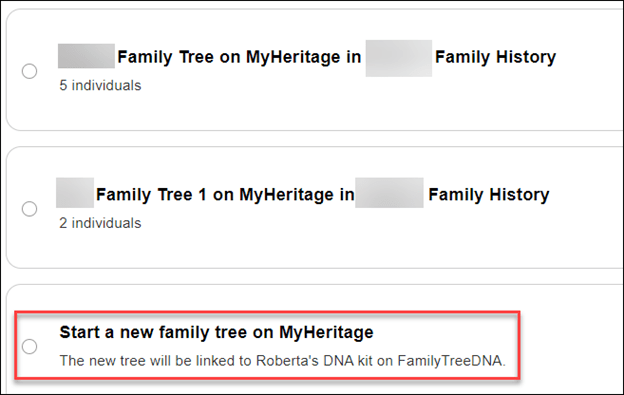
After signing in, you’ll see a menu of trees that you can link your FamilyTreeDNA account to.

Please DO NOT make a selection yet. Read through the rest of these instructions first.

As soon as I signed into my MyHeritage account after linking my FamilyTreeDNA account to MyHeritage, I saw a list of possible trees that I can link my account to. The top tree is the tree that I’m in the process of transferring from FamilyTreeDNA.

Below that tree, if I have other trees at MyHeritage or I’ve been given access to other trees at MyHeritage, I can link to “me” in those trees instead of using a transferred tree from FamilyTreeDNA. I would suggest only linking to a tree that you own and control, not one you’ve been invited to view.

Linking Means Two Different Things

Not to be confusing, but we are talking about linking in two contexts:

  1. Linking your FamilyTreeDNA account to a tree at MyHeritage.
  2. Linking matches to their profile card in your tree at FamilyTreeDNA to enable Family Matching (bucketing). You’ll perform the same match-linking process in your new tree at MyHeritage.

To ensure linked matches at FamilyTreeDNA link correctly at MyHeritage, count and record the names of your linked matches at FamilyTreeDNA.

Click on the “Tree” tab at the top of your personal page at FamilyTreeDNA. At left, select “Link Matches” which displays matches that you’ve already linked and matches available to link. at least not without undoing and reversing everything.

It’s essential to do two things at this point because after you select and link to a tree at MyHeritage, you will no longer be able to view your old tree at FamilyTreeDNA, at least not without undoing and reversing the entire process.

  • Count and make a list of your linked matches so that you know who is linked and can verify those people automatically relinked correctly after your tree moved to MyHeritage.
  • Assure that the names of the people who are linked are SPELLED EXACTLY THE SAME in the tree you’re going to link to at MyHeritage, including any prefixes such as “Mr.”, shown above. This is one of the reasons I suggest transferring your tree from FamilyTreeDNA and using that tree at MyHeritage, even if you already have a tree at MyHeritage.

Linking Your FamilyTreeDNA Account to a Tree at MyHeritage

If your FamilyTreeDNA tree consists of more than 8 or 10 people, your tree will be listed at the top and you will be given the option to transfer. If you have a small tree, it will not transfer and the tree will not be shown as an option.

The tree shown at the top of the list is the tree that you will transfer from FamilyTreeDNA to MyHeritage.

Checking this box selects the tree to transfer to MyHeritage which begins after scrolling to the bottom and pressing “Continue.”

If your tree is very small, or you don’t have a tree and want to begin one at MyHeritage, scroll to the very bottom of the trees available on your MyHeritage account if you have access to more than one tree. You’ll see the option to start a new tree at MyHeritage.

Consent is Critical

In either of the two scenarios above, transferring a tree or starting a new tree, you’ll see a consent notification below the tree options.

I’m not sure you can see this clearly in this screen shot, so I’ll transcribe it below.

I consent for MyHeritage to share my updated family tree information With FamilyTreeDNA from time to time, and I understand and consent that, upon sharing, such information will be subject to the FamilyTreeDNA privacy policy and terms of service, independently of MyHeritage.

It’s critically important for you to CONSENT to this transfer of information back to FamilyTreeDNA. This allows FamilyTreeDNA to use your tree data to improve their products and services for you – the same way they’ve always utilized customer information. For example, where your ancestors are from is critically important to improving MyOrigins and other geographically related tools.

If you transfer a tree, the consent box is already checked, but if you start a new tree after arriving through the FamilyTreeDNA platform, the consent is there, but it’s unchecked – so you have to check it.

I very strongly encourage you to transfer an existing tree or start a new one if you don’t have one, because that’s the ONLY WAY your tree information can benefit your results at FamilyTreeDNA.

Now for the bad news – if you link your FamilyTreeDNA account to an existing tree at MyHeritage, there is no option to consent for MyHeritage to send your tree information back to FamilyTreeDNA.

I really hope this policy is revised. It isn’t fair that FamilyTreeDNA can’t receive information from the trees of its customers, nor is it fair to their customers. Hopefully, this is just an oversight and will be remedied shortly.

If You Link to an Existing Tree at MyHeritage

If you link to an already existing tree at MyHeritage, you do NOT see a option to consent for your information to be provided periodically to FamilyTreeDNA.

There’s literally nothing below the trees where the consent verbiage is found with other options.

In my case, I’m an active user at MyHeritage, always growing my tree, so I was going to link my FTDNA account to myself in my tree at MyHeritage.

That is, until I discovered that MyHeritage DOES NOT PROVIDE THE CONSENT OPTION.

So, instead, I’ve transferred my existing tree to MyHeritage. This option has no disadvantages.

You can transfer any size tree to MyHeritage from FamilyTreeDNA, no matter how large. After initiating a transfer, you will receive a message that MyHeritage will email you when the transfer is complete.

My tree was finished transferring by the time I got something to drink and came back to my desk.

If you’re already a MyHeritage customer, you can have any number of trees of any size and there’s no additional cost to add to or modify trees if you’re a subscriber.

If you’re not a subscriber, you can still transfer a tree of any size from FamilyTreeDNA, but after 90 days, you will need a MyHeritage subscription if you want to add to that tree if it has more than 250 people.

For FamilyTreeDNA purposes, I’ll use the tree that I transferred from FamilyTreeDNA and keep my FamilyTreeDNA test linked to “me” in that tree and my cousins linked to “them” in that tree.

The best aspect of transferring your current tree from FamilyTreeDNA is that your linked relatives all stay linked automatically!

Of course, I’ll continue to use my MyHeritage tree for genealogy research and for my MyHeritage DNA kits.

I love my MyHeritage subscription. Transferring my FamilyTreeDNA tree and using my MyHeritage tree for genealogy research gets me the best of both worlds.

Your FamilyTreeDNA Tree at MyHeritage

After my tree transferred to MyHeritage, I clicked on the “View Tree” link in the email to verify that the tree had transferred accurately.

Indeed, all 634 people were transferred – but the tree was assigned a strange name. I need to change that.

If you want to change the tree name on MyHeritage, and trust me, I do – just navigate to “Family Tree,” then “Manage family trees,” then select that tree, then click on “Edit tree settings at far right.

Change the name to whatever you want. It’s crucial to rename it immediately if you are going to transfer multiple trees so you don’t forget which is which. Pay attention to the rest of the settings below the tree name to be sure you don’t accidentally select something you don’t want, then save the new name.

Modifying Tree Privacy, Functions and Sharing

You can change your mind about sharing with FamilyTreeDNA in either direction – meaning either enabling or disabling sharing – by clicking on “My Privacy” in the dropdown by your name at MyHeritage.

Then click on “Content.”

This is probably a good time to make sure you have enabled everything you want.

Next, you’ll see a list of every tree that you own on your MyHeritage site.

In this example, three trees are shown. The first tree is my regular MyHeritage Estes Family Tree. This is NOT a transferred FamilyTreeDNA tree, and no account from FamilyTreeDNA is linked to it.

There’s somewhat of a glitch going on here that I want to make you aware of.

As you can see, the option to “Allow sharing of my updated family tree information with FamilyTreeDNA” is available to check. In fact, I checked it. But it’s not valid and is misleading because it causes people to believe they can link to an existing tree at MyHeritage and share data back with FamilyTreeDNA, which is not the case.

If you click on the little “i” for information, you’ll see the above text that clearly says this setting “is only relevant for family trees that originated from FamilyTreeDNA and that you chose to transfer to MyHeritage to have the family tree linked to your FamilyTreeDNA account.”

Unfortunately, this option appearing here is causing people to simply link their FamilyTreeDNA account to their MyHeritage tree, believing that they will be sharing back with FamilyTreeDNA.

I really encourage MyHeritage to allow this data exchange because I think it would encourage people to maintain one tree at MyHeritage. This approach would benefit everyone and is not confusing.

On the second tree, which is also NOT a transferred tree, there is no option for sharing. This is not consistent with the first tree and causes confusion.

The third tree is my transferred tree. It does have the sharing option selected. This is a valid selection for this tree.

This is also a good time to review the features for each tree and make sure you have enabled or disabled the ones you want.

Back at FamilyTreeDNA

You can verify that you transferred your tree by checking your FamilyTreeDNA account. If you click on your tree, you’ll see a notification that you moved your tree.

Ok, now that the tree is moved, how do I know who’s linked?

How Do I Know Who’s Linked?

I can’t tell by looking at my FamilyTreeDNA tree on MyHeritage who is linked and who isn’t.

However, it’s easier than EVER at FamilyTreeDNA.

Just open your match list.

Prior to transferring my tree to MyHeritage, I had linked 15 people to their profile card on my tree at FamilyTreeDNA. Those 15 people triangulated with enough other matches to allow FamilyTreeDNA to bucket a total of 3601 paternal matches and 1602 maternal matches.

Before I transferred my tree, I made a list of all the people who were linked.

Now, you can see under each match whether they are linked on your tree at MyHeritage and, if so, the relationship you’ve chosen for them.

My parents are both linked.

However, my Ancestry V4 test that I’ve uploaded as my twin for illustration purposes for my blog is not linked, so let’s link it.

Just click on “Link on Family Tree” where you’ll be prompted to sign in to MyHeritage. I have a secure password keeper, so for me, signing in happens immediately when I click on the link.

Look what happened next, automatically.

My matches name at FamilyTreeDNA populated the search bar, and since my tree at MyHeritage is the same tree I transferred from FamilyTreeDNA, the names automatically match. Easy peasy.

If you’re using a different tree, meaning one you did NOT transfer from FamilyTreeDNA to MyHeritage, you’ll need to enter either the accurate spelling of the person’s name you want to link to or a name generic enough that MyHeritage can find a group to offer you.

For example, Estes returned 23 results and I can browse through them to select the tester at FamilyTreeDNA. Alternatively, I can add the tester’s name to the MyHeritage tree I’m using as my FamilyTreeDNA tree.

Troubleshooting Section

If You Stop After Linking Your Account but Before Selecting the Tree

I got distracted by something during this process – after I had linked my FamilyTreeDNA account and signed into MyHeritage, but BEFORE I had linked my tree.

I received this email.

Don’t be confused by this email.

  • If you don’t link to a tree at MyHeritage, you will still receive matches at FamilyTreeDNA.
  • Nothing you do or don’t do in terms of transferring or linking to a tree at MyHeritage affects your ability to receive DNA matches at FamilyTreeDNA.
  • If you don’t transfer your tree or link to one at MyHeritage, you won’t be able to link new matches at FamilyTreeDNA to their profile in your tree, and you won’t receive new bucketed Family Matches.

Clicking on “Link Family Tree” in the email returns me to where I left off at MyHeritage. I then linked my FamilyTreeDNA account to the tree that I transferred from FamilyTreeDNA.

Account Settings

After signing on to FamilyTreeDNA, you may close the popup to transfer your tree and then not be able to figure out how to transfer your tree.

Another place where you can initiate transferring your tree is through Account Settings on your FamilyTreeDNA page, which is found under the gear by your name in the upper right-hand corner of your personal page.

More importantly, though, if you somehow make a mistake or get confused, this is where you go in your FamilyTreeDNA account to:

  • Link to a home person in your tree
  • Unlink your account from MyHeritage and start over
  • Once your tree is transferred, you cannot automatically “untransfer” your tree, although you can sever the link via a disconnect, delete that tree at MyHeritage or update your privacy settings
  • Disconnecting from MyHeritage restores your tree at FamilyTreeDNA

I clicked on “Link to Home Person.”

The four closest people are shown in the tree I had selected. If none of these are the person you seek as your home person in a tree, type the name of the person you want to link in the search box. If you’re linking a relative’s kit that you maintain for them, you’ll probably need to type their name if you’re linking them to an existing tree.

Or, if you selected the wrong tree, you can disconnect from your MyHeritage account altogether, start over, and select a different tree.

Unfortunately, you’re not going to recognize that name of the tree (unless you changed it), so you’ll have to click to view the tree if you don’t remember which one you selected.

By clicking on the results you wish, you can either view the tree or select that person to link to as the primary person in your tree.

Summary & More Resources

I know this has been a lot for one article. I’ve been testing for several days and have tried to help you better understand so that you don’t say later, “I sure wish I had known that…”

I’m incredibly grateful that FamilyTreeDNA and MyHeritage have made this process seamless, even maintaining our linked relationships with our matches.

To summarize what you need to do:

I recommend using your FamilyTreeDNA tree at MyHeritage for FamilyTreeDNA purposes because:

  • The names are all spelled correctly, and your linked matches won’t be broken
  • Consent for MyHeritage to allow FamilyTreeDNA to periodically receive updated information from your transferred FamilyTreeDNA tree

Additional Resources

  1. FamilyTreeDNA wrote an article about the new features, here.
  2. FamilyTreeDNA provides a FAQ here, including information for Group Projects and Group Administrators.
  3. MyHeritage wrote an article, here.

Now, transfer your tree and go enjoy the new tree features at MyHeritage!

_________________________________________________________

Share the Love!

You’re always welcome to forward articles or links to friends and share on social media.

If you haven’t already subscribed (it’s free,) you can receive an e-mail whenever I publish by clicking the “follow” button on the main blog page, here.

You Can Help Keep This Blog Free

I receive a small contribution when you click on some of the links to vendors in my articles. This does NOT increase your price but helps me keep the lights on and this informational blog free for everyone. Please click on the links in the articles or to the vendors below if you are purchasing products or DNA testing.

Thank you so much.

DNA Purchases and Free Uploads

Genealogy Products and Services

My Books

Genealogy Books

Genealogy Research

Genealogy Proof Series: Surname Searching

This is the third article in the Genealogy Proof series, in addition to the introduction.

In the article titled Gathering Location Resources, we focused on locations where you know your ancestor lived – but what if you’re looking for books or information about a particular family or surname?

Maybe you’d like to know if an article or book has been written about that family, either generally or maybe a branch more specifically. Many early books are no longer in print.

Maybe you can find information about your family in resources not typically checked by genealogists.

Of course, there are lots of resources, but I’m including several here that you can use and might otherwise miss. Feel free to add more in the comments.

Recording Your Findings

Don’t forget to record your search results and which resources you used on the spreadsheet we created in the Extracting and Recording Data article.

If you find that the information in the book or resource is too long for the text field in your spreadsheet, record and index the item anyway. Then, transcribe or copy/paste the entire text version in one of two places, but don’t forget to note in your spreadsheet where you put it.

  • Your genealogy software under that person’s name
  • A Word document under that person’s name

When I write my 52 Ancestors articles, everything I know about that person is gathered into a Word document and then organized and arranged into a cohesive story. The pieces have been gathered over the years in various locations and I have to be able to find them to be able to use them.

Book List

I have also created a list of books that I own.

This list needs to be updated because I moved and I would like to more accurately detail the locations of books I still have. It’s nice to know what you already have and where to find it. Tell me I’m not the only person who has purchased the same book twice!

Ok, now for surname resources where you just might find your ancestor!

Cyndi’s List

Cyndi’s list has a HUGE number of resources generally, but it also includes a surname category.

Under each letter of the alphabet, available resources are listed.

Be sure to check out everything for your surnames of interest.

BookFinder

At Bookfinder.com, you can enter a name in the title field.

That query produced a significant list. Remember that this list changes often, based on availability.

I now have another book on the way!

Higginson Book Company

The Higginson Book Company has long been known for carrying heritage books – both by location and for genealogy.

You can search by surname or any keyword.

Higginson reprints copies of original books out of print in addition to maps and a few other things. Note that sometimes you can find the text version of copyright-free books free at other locations.

State Archives

Check the website of every state’s archive where your ancestors lived.

If in doubt about what might be available, call the State Archives and ask a librarian. You might not believe what’s there.

In Tennesee, for example, there’s an index of Supreme Court cases that can be searched for the entire state, or by county, or year.

Cases that appear in the Supreme Court Index will not be recorded in the county records, because the case was appealed from there to the Supreme Court. It’s worth noting that the Hancock County, Tennessee courthouse burned (twice), so the Supreme Court records in the archives reflect lawsuits that we don’t even know existed today.

In many cases, local courts no longer retain case packets, if they ever did. They often only have the names of plaintiffs and defendants in an index book – not even an outcome. However, the county clerks faithfully copied the case packets when the case was appealed and sent to the Supreme Court, where this valuable information resides today – including depositions and receipts.

I’m entering the surname of every ancestor that was found in Hancock County. Sometimes, I search for their in-laws and neighbors too, just in case my ancestor is mentioned.

Look – paydirt! In an estate dispute – you know there are relationships explained and maybe also the source of the dispute.

When utilizing archives, be sure to search the archives of parent-states and parent-counties, meaning states and counties your state/county was formed from. The same goes for descendant states/counties formed from your state/county.

But wait, there are more resources.

Librarians

In addition to resources shown at the Tennessee Archives website, you can also click to chat with a librarian.

Librarians are an encyclopedia of knowledge.

Thanks to a librarian, I recently discovered that the Michigan State Archives holds an obscure collection – prison newspapers published by the inmates over the years, reaching back into the 1800s and early 1900s. It’s not evident from the collection information, but a call to the archives and a lovely discussion with a research librarian revealed that those publications have recently been scanned and OCR indexed, which makes it possible to search by surname or topic.

I love librarians. They have saved my bacon so many times over the years, as have volunteers at local museums, and historical and genealogy societies.

Chronicling America

Chronicling American is provided by the Library of Congress. This link is for the newspaper collection which spans 1756-1963, but there are also other collections

In the photo collection, you can search generally or very specifically.

I had always wondered why my grandparents chose to move to a tiny out-of-the-way farming community outside very rural Fowler, Indiana. I found my answer in the Library of Congress. My grandfather’s cousin, who lived up the road in Tennessee, had moved to Indiana, was running a farm for an absentee owner and needed assistance.

The rest, as they say, is history.

FamilySearch

FamilySearch has an extremely robust and easy-to-use search functionality.

Select “Search,” then “Books.”

I entered the word “Estes” under the Books search and found this:

Notice that full text results are available, which means that either the book is out from under copyright, or they have obtained permission to image. It’s also worth noting that this is one of the books available for print-on-demand from Higginson Books.

Another option, the “Images” search, searches for information by historical location.

Searching “Genealogies” and “Family Trees” is obvious.

I find the “Catalog” search particularly productive.

You can filter your Catalog search in any number of ways, but, as luck would have it, the very first entry is where my Estes family lived.

Oh, look, it’s my lucky day…

If a desired book or article isn’t available for viewing, start a list and look to see if it’s available through your local Family History Center or check elsewhere.

FamilySearch New Full Text Search

I just love this new full text feature that automatically transcribes and indexes entire handwritten collections, such as the will or deed books in a particular county.

On the search page, scroll down until you see the FamilySearch Labs image and click on “View Experiments.”

Click on “Go to Experiment”

I detailed how to use FamilySearch full-text search in this article, but I want to remind you here that you can search by surname.

One of my huge brick walls is identifying the parents of James Lee Claxton (Clarkson/Clarkston) 1775-1815.

All of our Y-DNA matches are spelled Claxton and are found in North Carolina, but that group of Claxton researchers and my line are both stuck at about the same time in history. It’s very likely that the common ancestor of both groups came from Virginia, but where? And who?

I’m searching for Claxton with the hope that there is some mention of a Claxton we don’t already know about – or something connecting my ancestor to Lee County, VA in about 1795.

There are thousands of entries in this database, but I can filter to restrict my search to Virginia.

Remember that FamilySearch is adding to the collection of books and records that are digitized and indexed daily, so if you don’t find what you’re looking for today, check back often.

Google

A general Google search for “Estes genealogy” produced a list. I’m not showing their generative AI result here, because it’s half right and half wrong. It’s fine to use AI for hints, but verify absolutely everything. AI is not ready to be relied on and may never be.

Here is a list of Estes resources from Google.

Always beware of internet links. “Fly” over them first. If the link address even looks questionable, just don’t click.

That said, there are a HUGE number of legitimate resources here.

Google Books

Google books can help you locate books that may not be found elsewhere.

Some are available as an eBook at Google Books, but if not, you can use these as leads to search elsewhere, including AbeBooks and sometimes, Amazon. I usually use Bookfinder after finding a book I’m interested in through Google, because they include other sites such as AbeBooks, Amazon and many more. Bookfinder is an aggregator, not a reseller.

You can also request to “Find in a library,” which might be useful if your local library participates in interlibrary loans, although often heritage books are not eligible for loan.

Internet Archive

I love the Internet Archive, the same company that provides the Wayback Machine, which also allows you to search by surname. The two sites provide different results, so be sure to try both.

You’ll find all kinds of information at the Internet Archive.

Under eBooks and Texts, I often enter “<surname> genealogy” so that their metadata will use both terms to narrow the search. Metadata is data about data, and in this case, it means which keywords they used to index these entries.

Many records aren’t relevant, but some assuredly are.

You can also narrow the results by many features – including the Allen County Public Library which has one of the largest genealogy holdings in the US.

Keep in mind that I’ve selected only items with text, meaning that I can read or download for free. There are certainly other items available that aren’t free.

I sometimes struggle with their search feature, so I often just search at Google using the term “Estes books at internet archive.”

Allen County Public Library

At the Allen County Public Library website, you want to search in the research collection

Please note that you can filter your results in many ways.

One of the wonderful features is that they actively collect newsletters. Estes Trails has been published for decades.

These newsletters are in their physical holdings, but if you know they exist, you can track them down in other ways. In this case, the publisher’s name is included in the full display.

Many newsletters are no longer published, so, fortunately, there’s another way to obtain an article.

PERSI

PERSI, an index for periodicals, such as Estes Trails, above, is also hosted by the Allen County Public Library.

At PERSI, you can search by surname

I searched for Estes, and look what I received. I absolutely must read these Civil War letters.

This is a GOLDMINE. No, Aaron Estes isn’t my ancestor, but again, he’s related, and I just have to read these.

Scroll to the very bottom to order the items.

WikiTree

WikiTree is one of my favorite resources. You can enter your ancestor’s name, or a surname.

WikiTree is a collaborative tree where different individuals add information and sources to the profiles of ancestors. They have a small army of helpful volunteers that are willing to help too.

As with all shared resources, some information can be incorrect. Treat all trees as information to be verified and sources to be checked.

One of the great things about WikiTree is that individuals who descend from ancestors in a specific way can connect themselves and their Y-DNA or mitochondrial DNA test information.

Descendants who have taken an autosomal test can list the testing company and information. While testing companies use the DNA of the tester to connect to other testers – it’s up to those two people to determine their common ancestor.

WikiTree works the other way and is ancestor-driven, meaning that you see who descends from the ancestor, and you can go to the testing company indicated to see if you’re an autosomal DNA match.

Furthermore, if you’re working on your genetic tree, you’ll want the Y-DNA and mitochondrial DNA information for each of your ancestors. If other testers have entered the information, you can find it here. Please enter yours as well.

Be sure to check the sources for each ancestor. There may be information and resources not found elsewhere. Add sources if you can. Collaboration is a good thing, and a rising tide lifts all ships.

Newspapers

After you’ve wrung out the more traditional records, such as deeds and wills and census schedules, you’ll want to turn to newspapers. Not all local newspapers have been scanned, OCRed, and indexed yet, and some quality is better than others.

Licensing and processing old newspapers is ongoing, so just because the location where your ancestor lived doesn’t have an indexed newspaper available today doesn’t mean they won’t soon.

Newspaper articles put meat on the bones of our ancestors as they reveal their everyday lives. Who visited whom after church for Sunday dinner, who hit someone’s cow, who had company from out of town, who was having a family reunion, who moved and to where, who caught a big fish, who went on vacation, who was “visited by the stork,” and much more. Some make you say “awww,” and some are downright juicy and scandalous!

News about neighboring counties and even neighboring states can be found in locations where you may not have thought to look for your ancestor.

Virginia Chronicle

The Virginia Chronicle is a historic newspaper collection curated by the Library of Virginia that produces amazing results.

What? A murder? You know, I just HAVE to go down this rabbit hole and read these stories.

Ok, so, here’s the skinny for those who are curious.

Theodore Estes was dating Miss Loving, the daughter of a judge who shot and murdered Theodore. As it turns out, Theodore’s father was the sheriff, so this story is particularly rich and full of intrigue.

It seems that Miss Loving, the judge’s daughter, drank whiskey, and one thing allegedly led to another, which Theodore, his family, and friends denied. However, the young woman’s father didn’t believe them and sought revenge. Some reports said that she only drank “one swig” of whiskey, and nothing happened. Others said that the whiskey was drugged, and “something” did happen. A third group said she asked for the whiskey and drank a whole lot more than a swig. Theodore took her home (to her house) in his buggy, to her parents, but clearly intoxicated.

It gets even more complex because it appears the families were related. I had to draw a chart to get this straight.

Theodore’s brother had married the Judge’s wife’s sister. I’m telling you, this trial was a humdinger. Whoo boy! Eventually, the charges against the judge were changed to something less severe than murder. This high-profile case was covered by several regional newspapers like the latest soap opera.

As I read through these articles, I noticed that some Estes family members had arrived from Danville, VA, which is in close proximity to where my Estes family was from. So, while this is not my ancestor, it involves my ancestor’s descendants.

Ok, enough of this rabbit hole, but you get the drift. You may never get anything resembling chores done ever again!

The National Genealogical Society membership now provides access to NewspaperArchive as a benefit of membership. As far as I’m concerned, this alone makes the membership worthwhile.

NewspaperArchive offers a notification service for subscribers, or did when I subscribed separately, so you’ll receive an email when the name of a saved search is found in a newly indexed newspaper.

I keep discovering previously unknown things!

Ancestry owns Newspapers.com for accessing newspapers and Fold3 for military records. I discussed the nuances of using Newspapers.com at Ancestry in this article. You’ll need to search in the Historical Newspapers Collection at Ancestry and/or in Newspapers.com. Ancestry is reimaging the newspapers and using AI to create associations between people – for example family members mentioned in a wedding announcement. The results will not all be found in one place. The newspaper itself will be found at Newspapers.com but the associated family grouping will be found at Ancestry itself in their collections.

You can now reference the Birth Index, Marriage Index and Auctions of Enslaved People and Bounties on Freedom Seekers Index, here. The larger Newspapers and Publications category can be found here, and the Historical Newspapers Collection can be found here.

MyHeritage includes a large newspaper collection for their subscribers, much of which is unique and not found elsewhere.

This collection is where I found hundreds of items about my mother’s family in rural Northern Indiana. I found previously unknown photos of my grandfather, and that he attended the “Normal School” to become a teacher. He never taught, instead going to work for the railroad, moving away, and meeting the woman who would become my grandmother.

MyHeritage actually has newspapers in two places. This search is on the MyHeritage site itself, available with a subscription. MyHeritage has a second, independent site too – OldNews.

OldNews is big news!

At RootsTech 2024, MyHeritage announced a separate subscription site called OldNews, which essentially doubles the number of newspapers that they’ve digitized and made available. Take a look!

I found information about my mother, such as when she had her tonsils removed, when and where she danced in plays as a child, and the amount of my grandparents’ estate. Newspapers reported things back then that would be considered privacy violations today. Check OldNews to see what’s there for you.

Colonial Williamsburg has made the earliest Newspapers in the colonies available, here. Some are through a subscription site, and others aren’t. It was through these old newspapers years ago that I discovered the name of my ancestor’s indentured servant who ran away. Now, DNA seems to point to a potential relationship. There are no records other than that “runaway” notice to connect these people together, anyplace.

Check Cyndi’s list for more Newspaper services

MyHeritage Surnames

MyHeritage offers many ways to search, but you can start by entering the name of your ancestor or even just a surname.

I could have simply entered the surname, but I entered James Lee Claxton.

I can filter by any of the collections, at left.

I check them all, but I particularly like the Books and Publications, and the Newspapers category. You just never know what you’ll find, and many of the books are digitized and free.

You can also just enter a surname. I entered “Estes.”

I checked every one of these categories and, among other things, found some fascinating historic maps.

I love my MyHeritage subscription. If you don’t have one, you can try one free for 14 days.

Ancestry Message Boards

Ancestry discontinued the RootsWeb-hosted websites, WorldConnect Trees, and RootsWeb mailing lists last year, but the message boards are still functional.

After signing in to Ancestry, scroll down until you see Tools and Resources in the right margin.

Click on “Message boards.”

These boards reach back at least 20 years and many of the original posters are deceased now. I know that I often posted information as I found it while traveling.

There’s an advanced search function, too.

I was shocked to discover that you can still initiate a thread, but I’m not at all sure that other people on that board are notified today. I had no idea these boards even still existed.

Another feature that’s helpful at Ancestry is the Card Catalog, one of their Special Record Collections.

You can enter a surname in either the Title or Keyword box.

Of course, you’ll get different results, but both are certainly worth checking.

Genealogy.com

GenForum was the message board for Genealogy.com. Ancestry purchased it years ago, and while you can no longer post messages, you can still search for messages that were previously posted, here.

American Ancestors

American Ancestors holds a large database that includes periodicals such as the New England Historical and Genealogical Register and the Virginia Genealogist, which you can search by name, here.

Additionally, they have a number of immigration and naturalization records not available elsewhere.

HathiTrust

HathiTrust has indexed millions of documents, including many governmental records and publications.

Select any publication or narrow by categories. Then you can search within the text and also view the text on the relevant pages.

DNA Projects

FamilyTreeDNA offers surname projects, along with geographic, haplogroup, lineage, and regional DNA projects.

You can find surname projects in one of two ways.

The first way is to Google “Estes DNA Project.”

You’ll see two links, either of which will take you to the project.

I administer this project and welcome everyone who has an Estes ancestor, regardless of whether their surname is Estes or something else.

By clicking on “DNA Results,” you’ll see multiple options.

Clicking on the “Classic Chart” shows groupings of males who have taken the Y-DNA test, along with additional information, including their Earliest Known Ancestor (EKA) and, in the final column at right, their haplogroup.

If you take a DNA test and match other people, you can contact them to collaborate through matches on your personal page. Not everyone can test for every ancestor – and women can’t test for Y-DNA lineages (because they don’t have a Y chromosome,) so we depend on being able to check for our ancestors in Y-DNA projects.

If your ancestral line is shown, you can use the confirmed haplogroup (green) in the free Discover tool, here, to learn more about your ancestor’s heritage.

Here’s the “Haplogroup Story” tab for R-BY490 that represents a number of Estes lineages. There are 11 other tabs in the left sidebar just waiting for you to read about your ancestry.

Note that “Suggested Projects” is one tab. The suggestions are based on projects other men with this haplogroup have joined.

Y-DNA information through Discover, and soon, mitochondrial DNA information through MitoDiscover, is the ONLY place you can find this kind of information. Be sure to check out all of the tabs at left, including Ancient Connections.

If you click on the Group Time Tree, you’ll see a different view of the results of the project members who have taken the advanced Big Y-700 test.

By selecting the relevant groups, you can see the surname of the testers, their earliest known ancestor (if known and entered), at right, along with the haplogroup genetic tree at left.

The genetic tree shown at left confirms the genealogy of these testers, at least as far as the genetic tree is able to distinguish. I wrote about the Estes Group Time Tree, here, as an example,

If you are a male and have not taken the Big Y-700 test, please do. It unlocks your history in a way nothing else can.

A second way to find DNA projects that might be relevant to your surname is to navigate to the very bottom of the FamilyTreeDNA main page in the footer.

Click on “Group Projects.”

You can enter any surname and see the projects in which the project administrator listed Estes (or your surname of choice) as a surname that might be interested in their project.

If you’re a customer and signed on to your account at FamilyTreeDNA, you can find this same information at the top of your personal page under “Group Projects.” You can also join projects from there.

Social Media

I often overlook Facebook or other social media as a surname resource, but it is.

Today, many, if not most, genealogy and historical societies have pages, and so do many genealogists with an interest in a particular surname line.

Searching for “Estes” on Facebook shows several individual people, PLUS, two groups that might be very interesting.

Once you’re a member of a group, you can search within the group for a keyword.

This search gave me everything with either Moses or Estes, so I narrowed it by just using “Moses” or just searching for “Halifax” which is the county in Virginia where Moses Estes lived.

Facebook, especially groups with a genealogical focus, is a wonderful way to find men for Y-DNA testing.

I often ask if someone has already DNA tested, and if so, where.

If they have already tested at Ancestry, or 23andMe, but not at MyHeritage or FamilyTreeDNA, they can upload to both companies for free. Matching is free after uploading, and so are other basic tools. Advanced tools require an inexpensive unlock, which costs far less than retesting. The unlock at FamilyTreeDNA for advanced tools costs $19, and it’s $29 at MyHeritage.

Next Topic – The Proof Table

Our next topic in this series will be the Genealogy Proof Table.

What is a Proof Table, how do you construct one, and why?

We will assemble a Genealogy Proof Table for one of my lines as an example. You’ll need one for every ancestral lineage.

After that, we have four more articles in this series.

  • Genealogy Proof Standard
  • DNA
  • Leveling up
  • Writing it Up

_____________________________________________________________

Follow DNAexplain on Facebook, here.

Share the Love!

You’re always welcome to forward articles or links to friends and share on social media.

If you haven’t already subscribed (it’s free,) you can receive an e-mail whenever I publish by clicking the “follow” button on the main blog page, here.

You Can Help Keep This Blog Free

I receive a small contribution when you click on some of the links to vendors in my articles. This does NOT increase your price but helps me keep the lights on and this informational blog free for everyone. Please click on the links in the articles or to the vendors below if you are purchasing products or DNA testing.

Thank you so much.

DNA Purchases and Free Uploads

Genealogy Products and Services

My Books

Genealogy Books

Genealogy Research

Genealogy Proof Series: Gathering Location Resources

This is the first article in the Genealogy Proof Series.

Most genealogists, even if they don’t realize they are genealogists yet, begin by creating a small tree of their known ancestors. Most people know who their grandparents are, and by asking a few questions, can probably complete another generation or two.

If your parents were born in 1950, your grandparents would have been born about 1920, and your great-grandparents may have been born around 1890. You probably have concrete facts about your parents. Their birthdates, birth location, marriage location, and so forth. They probably have the same information about their parents. However, with each generation reaching back in time, the information becomes less precise and less reliable. Memories fail people, and the information they were provided may not have been accurate in the first place.

For example, my mother told me what she knew about her maternal grandfather, which wasn’t much. He died when my grandmother was 20, several years before my mother was born.

As the information becomes thinner, the need for additional information and confirmation of facts becomes crucial. Furthermore, when utilizing new resources, you may discover information not previously known about close generations. One of the best resources for that is old newspapers.

Our ancestors are more than birth and death dates. I like to piece their life together, complete with historical events, both national and local, and how they influenced and affected their lives.

This first article explains how I gather and utilize location resources for each ancestor.

Before we start, let’s talk for a minute about where we are going and how this series will be organized.

The Genealogy Proof Series Roadmap

It’s difficult to put the steps in a specific order because often, I get very distracted and go right down a rabbit hole.

In other words, I’ll be working on gathering resources for a specific county, but then I find a listing for what I think is my ancestor, and before you know it, I’m off on the chase. I really, really try NOT to do that because it’s actually very distracting to the process as a whole.

It’s also difficult for me to select an order to write these articles. For example, do I write about Leveling Up, determining what you need for each ancestor, first or last?

I’ve chosen to write about that topic last because I want to step through how to gather and use the resources before we get distracted by what you need to do with individuals in your tree. It’s way too easy to go after that bright, shiny object:)

Gathering and Organizing Location Resources: This article is about how to find location resources for the area where your ancestor(s) lived. I suggest starting at the beginning, meaning your closest ancestors. You know where your parents and grandparents lived, so start there.

If you think there’s nothing there that matters because you know everything about your family – I guarantee you surprises are waiting. They may surprise you, touch your heart, or even shock you, and they are just waiting to be discovered. But before you can logically extract everything to do with your family and surname, you need a comprehensive list of what is available for your county and region.

You’ll also need to keep a record of what you looked for in that county, and when, because you may very well need to go back and access those records again in the future.

Recording Your Data: After you have a list of what’s available for your specific counties, in the next article, we’re going to talk about extracting information and recording it in a spreadsheet. If you don’t like spreadsheets, you can do the same thing in a table. But it’s critical that you record it someplace.

You’ll also index and transcribe it as you go so you can reasonably retrieve it. This is why I utilize spreadsheets – they are made for filtering and sorting.

Surname Searching: You’ve found location resources, but where do you find surname resources? For example, what about books written about the Estes surname, or internet resources? Some will be in books or webpages about the location, but certainly not everything.

How do you find additional resources?

Proof Table: Now that you HAVE data about all the people in a region or regions where your ancestors lived, how do you prove that the Moses Estes or George Estes in Halifax County, Virginia is YOUR Moses or George Estes? What about men with the same name? What if there is no definitive proof in ONE document?

We will discuss the Genealogy Proof Standard and create a proof table for every single generation because you need proof for every single generation.

Including DNA.

(If you’re beginning to think you might dislike me by the time this series is finished – I fully understand. If it helps any, some days I’m tired and mad at myself.)

DNA: How and when can you use DNA as part of your proof argument? What about the different types of DNA? When are they useful? Are they conclusive? How do they bolster or refute other evidence?

Can you resolve conflicts between DNA and a paper trail, and if so, how?

Leveling Up: Leveling up is a methodology of determining where you are in the process of evaluating EVERY PIECE OF EVIDENCE available about each ancestor.

You don’t know what you don’t know.

For those of us who have been working on genealogy for a long time, it’s easy not to think about using new resources when they become available. For example, the 1940 and 1950 census, new full-text AI from FamilySearch, and new newspaper resources like OldNews.

What do you need to do yet for each ancestor to bring them to current?

Writing It Up: Now that you HAVE this information assembled, what will you do with it? I fervently hope you’re going to write or record it for posterity. I’ve chosen the 52 Ancestors series that I’ve been writing weekly for several years, but there are other ways, too. Genealogy is about resurrecting and honoring the lives of our ancestors. The more factual information you can saturate the airwaves and internet with, the less “bad information” can take hold. Genealogy is a team sport.

Gathering and Organizing Location Resources

This article is focused on gathering and organizing resources for where your ancestor lived, NOT on retrieving the records in those resources for your ancestor and their surname. The next article will cover retrieving and recording the data using a consistent methodology.

If you’ve followed my blog for some time, you’ll know that I’m a spreadsheet person, but I also use MSWord documents to organize and utilize resources from time to time, especially if the text is long. I have one Word document for every ancestor.

I’m going to use a chart as an example, understanding that you will create your own resource-tracking tool that you’re most comfortable with.

The first consideration is that you probably have at least three ancestors in any specific location. By that, I mean at least two parents and one child. You may have significantly more ancestors and family members from that location.

Conversely, those same ancestors may have moved from location to location – even state to state or cross-country, so you may have multiple locations for the same ancestor(s).

In my family, I have clusters of ancestors in the same county. For example, my early Estes line, along with their wives’ lines including Combs, Younger and Moore, resided in Halifax County, Virginia for about 4 generations or more than 50 years. The first generation, Moses Estes (1711-1787) who moved to Halifax County by 1771 came from someplace else, and the last generation, John R. Estes (1787-1885), moved to Claiborne County, TN about 1820, not long after his marriage.

I searched Halifax County records for at least four surnames and multiple generations.

This means I needed to compile the various resources for Halifax County across a significant amount of time.

Resources for Resources

There are multiple places to find available resources for a specific county and state.

We will use these to complete our own research list by county. In the next article, we’ll be checking each one of these resources for surnames.

FamilySearch Wiki

The first thing I do when beginning to compile resources is check the FamilySearch wiki.

Googling “Halifax County, Virginia FamilySearch wiki” brings up a lovely compilation of resources.

You’ll find general information by category, followed by very specific information and multiple resources for each category.

Click on any image to enlarge

Also note that the county website link is given, along with the county formation history further down the page. Don’t neglect to check each county’s individual resources and parent county, if relevant.

If you’ve checked the wiki, or any resource list before, check back often because things change.

I enter each of the resources into a spreadsheet for that county. This is NOT the same thing as making a list of information discovered for an individual ancestor or surname. We’ll get to that later.

Don’t limit yourself to just the years that you know your ancestor was living in that county because records pertaining to that family may exist before your ancestor arrived and long after they left. Other family members may have preceded them, while lawsuits, deeds, and other records may refer to them decades after they left or died.

Here’s the beginning of a list for Halifax County,

Resource State County Link Year Range Surnames Findings
Virginia Bible Records Virginia Halifax http://usgwarchives.net/va/halifax.htm Estes, Younger, Combs, Moore One was donated by the Tune family.
Halifax Biographies Virginia Halifax http://usgwarchives.net/va/halifax.htm Estes, Younger, Combs, Moore
1782 tax list Virginia Halifax http://usgwarchives.net/va/halifax.htm, http://files.usgwarchives.net/va/halifax/census/1782/1782tax.txt 1782 Estes, Younger, Combs, Moore 5 Estes, 1 Combs, 2 Younger 6 Moore
Slave Draft for Defense of Richmond Virginia Halifax http://usgwarchives.net/va/halifax.htm

http://files.usgwarchives.net/va/halifax/court/1862slavedraft.txt

1862 Estes, Younger, Combs, Moore 2 Younger, 2 Moore

I enter the county and state in two fields, so it’s sortable. If I’m checking multiple counties using the same resource, I enter the resource twice, one for each county and the surnames in that county that I searched for.

For example, this link for Virginia Bible records takes you to a link for Halifax County Bible records on the USGenWeb site. I listed the surnames I checked for. I also noted the Tune donation because I know from prior research that the Tune home is on the old Marcus Younger land and the families intermarried. When you search any county for another surname, be sure to add it to the list so you don’t have to wonder later if you checked for that surname.

For county histories and biographies, check to see if they are available digitally. In the next article, you’ll want to search for and record all instances of your surname, even if it’s NOT your ancestor, because of the FAN club, Friends and Neighbors (thank you ,Elizabeth Shown Mills). Those people may or will help you identify which ancestors are yours. Not to mention fleshing out their lives.

Tax lists are often used to replace or supplement the census. You should be able to determine if the lists are recorded in procession order or alphabetical order. Clearly, procession order is much more relevant because it shows who lives nearby or are neighbors. This may help you identify specific individuals, especially when there are multiple people with the same name. In the case of John Estes in Halifax County, Virginia, the tax list placed “my” John by his father, George, which was a huge clue. Eventually, on a tax list that was stuffed in the back of a deed book in the Clerk’s Office, I found another tax list with the note, “S. G.” by my John’s name, and another note on the “other” John that lived in the north end of the county. “S.G.” meant son of George, as that designation had been used and spelled out for other people elsewhere in the same tax list. I’ve never been so grateful to the taxman in my life!

The Slave Draft for the Defense of Richmond is a fascinating document transcribed by a volunteer from the court minute book.

From Minute Book 20 page 169 Halifax County, Va

At a Court Held for Halifax County on Monday the 4th day of April 1862. Present Beverly Sydnor, Howell Chastain, John M. Craddock, William Moorewell, James Kent, Henry C. Logan, James Richardson, E. A. Coleman, Archer A. Farmer

The court in consideration of the Draft from the Governor of the Commonwealth for laborers on the Public Defense near Richmond do order and direct that the Sheriff of this County do proceed for ___ to require the following named persons to deliver to him the said Sheriff at News Ferry Depot, Boston Depot, Clover Depot and as may be convenient to the parties on ___ the day of ___ at such see hours as he may designate the Slaves between the ages of eighteen and fifty five years directed to be furnished by each person in the said following list and proceed with them to the City of Richmond and deliver them to the Agent of the Confederate Government and take receipt for the Slaves furnished by each person.

Then, by district, the name of the owner, and the number of enslaved persons sent.

This information may provide insight into who enslaved others at that time, which may provide insight into families that were slaveholders historically. Additionally, it may provide important hints and clues for African American researchers who seek their family and may have adopted the surname of their former enslaver after the war.

Also, please note that these records may not be entirely accurate. For example, there’s a list of ministers who performed marriages, and my Rev. William Moore is not listed, but I actually have the list of his marriages, returns made in his own handwriting obtained in the courthouse in Halifax County.

If you remember, I found my way to GenWeb through the FamilySearch Wiki. When I finish listing the GenWeb resources, I need to return to the FamilySearch wiki to list any further resources.

You may find lists of out-of-print books for land and property records and other record types. I sometimes find out-of-print books for sale at www.bookfinder.com.

If you own the book, note that it’s in your own library.

To locate books, check the WorldCat entry, but also check both the FamilySearch Catalog by county, the Fort Wayne Public Library and other book resources as well.

Surnames

While the goal of this exercise is to document and record location resources, if you stumble across surname resources, certainly don’t ignore them and think you’ll find them later – you might not.

I suggest starting either a second spreadsheet, or new tab on this spreadsheet for each surname.

I maintain a separate spreadsheet for each location and one for each surname or group of surnames on the same migration path. For example, my Combs, Estes, Moore, and Younger families are migrating from the Virginia Colony into the new frontiers, so I track them together from Amelia and Prince Edward Counties, where they are first found through Halifax County.

Ok, back to searching for our county resources.

FamilySearch Catalog

To search the FamilySearch Catalog by county, sign in and then click on Search, Catalog, and Place.

I was given the choice of British Colonial America or the United States. I’ll check both to be sure I have all available resources.

Selecting “Land and Property,” one of the items displayed is the Antrim Parish Vestry book. By clicking on that entry, you can see that it’s available in the FamilySearch Library in Salt Lake City. Maybe it’s available elsewhere too. I’ll check in a bit.

I build research lists from these resources routinely.

The entry for deed books shows that some are available online only at either the FamilySearch Library or a Family History Center (camera with key), which may be located near you. Other images are available online with no location requirement, indicated by the camera without a key, just by clicking.

These may or may not be indexed, and an index may be available elsewhere or by using the new FamilySearch Labs AI full text transcription tool. AI is not available for all records yet.

FamilySearch Labs

Next, try FamilySearch labs for additional assistance. I wrote about this new AI full text transcription tool, here.

You’ll see two features which may help you.

Using the “Find Help with AI Search” feature, type in what you’re searching for. I find the Full Text Search” to be much more helpful.

Click on “Go to Experiment.”

Typing “Halifax County, VA” into the search box returns resources from unexpected places. For example, county histories from elsewhere that reference Halifax County, or a Divorce degree, or a deed book from another county.

These are unexpected gold mines that you’d never find otherwise.

Note that this search is literally an exact match, so Halifax County, VA, is NOT the same as Halifax County, Virginia.

However, adding a surname to the location narrows the results substantially.

While normal deed and other books are indexed by the grantor and grantee, the FamilySearch full text search reveals EVERY instance of that name, including when referenced in another document. This feature is an absolute game-changer!

I can hardly wait to revisit my earlier work to see what’s new, but that’s part of the Level Up process.

It’s important to note that FamilySearch is adding new types of records to the AI collection almost daily, so check back often. Not everything uses the full-text transcription feature today, and while it’s quite accurate, it’s not 100%, so read carefully for yourself.

FamilySearch Book Search

You can also search for books by location or surname.

Allen County Public Library

The Allen County Public Library in Fort Wayne, Indiana is one of the largest genealogy libraries in the US. You can search their site for locations, keywords, or surnames, here.

While these resources are generally not available online at this library, they alert you that they exist, and you may be able to find them elsewhere.

The one HUGE exception is the one-of-a-kind PERSI index.

PERSI

The PERSI, or Periodical Source Index is maintained by the Allen County Public Library as well, here.

You can search by location.

Click on a category that displays the results.

At the bottom of each page, you can open a form to request a copy of the article.

Ancestry.com Card Catalog

At Ancestry.com, you can search their Card Catalog by title or location.

Be sure to try different spellings and abbreviations, like VA for Virginia, or remove the word county, etc.

The results display a list of records for Halifax County in their collection.

You can click on the link to this book to search by surname or keyword.

These local histories are wonderful tools for fleshing out your ancestor’s stories because they tell us what was happening in their community during different time periods that would have affected and influenced their lives.

For example, in one of these histories, I discovered that one of the Revolutionary War generals and his troops marched right down the road in front of my ancestor’s home. It’s no wonder that he “contributed” brandy, food, and fodder for their horses.

Newspaper Sites

At Newspapers.com, you can see which papers were available and when.

You can also add a surname or first and last name.

Unless there’s a story about someone’s ancestors, there’s no point in looking for people who lived there in the 1700s and early 1800s. These are the publication dates, so an earlier ancestor could have been included in a 25 or 50-year history column in the local paper.

This same technique works with other genealogy Newspaper sites, too, including MyHeritage with a subscription and separately, their new OldNews site which contains newspapers not included in the MyHeritage subscription.

Also check out the Library of Congress digitized newspaper collection, here.

Newspaper Archive is available with an NGS membership, here.

Fulton County (not limited to Fulton County) and GenealogyBank are two additional newspaper resources.

MyHeritage

At MyHeritage, you can search by location or Newspapers as well.

MyHeritage has one book about Halifax County.

By clicking on the book, you can add additional search criteria.

Estes is mentioned 16 times in this book.

Library of Congress

Don’t forget about the Library of Congress, which has its own Historical Newspapers section, here.

You can also search by county or surname in the search box at the top. The images are all copyright-free.

State Archives

Don’t forget about your state archives.

Most have wonderful search capabilities and specific collections.

For example, the Library of Virginia has been indexing individual county chancery records dating back to the county’s formation. Chancery suits are where you find all the juicy stuff because people are asking for remediation and explaining why.

The index is here, and you can search by a combination of county and surname.

There are 59 records in Halifax County fitting this description, mentioning Estes in any capacity, reaching back as far as 1795.

Don’t neglect later cases because many times later cases tend to be lawsuits filed about much earlier estates and property divisions. They also tend to provide relationships in their narrative.

You’ll also notice that often, the plaintiff and defendant aren’t Estes, but they are clearly mentioned somewhere in that case, perhaps in a deposition.

Clicking on “View Details” displays the entire case file.

The resources at each state library are different and vast, so take a look and check back for new offerings and features.

Google is Your Friend

Google can turn up amazing resources, but it can also lead to some unsafe sites, so be careful and don’t just click without thinking.

Google “Halifax County Virginia genealogy society.” You’ll receive eight results that may have databases, members, or donated materials, but these resources may not be complete. For example, I wrote and donated a Moore genealogy to the local museum, which doubled as a genealogy society, and that “book” isn’t listed anywhere in any resource list.

You’ll often find multiple groups focused on the county of interest. These groups will likely have dedicated and interested volunteers and other researchers.

RootsWeb

Ancestry shut down the RootsWeb mailing lists, but they are still out there even though you can no longer add information.

If you Google “Halifax County, Virginia Rootsweb,” you’ll be shown several pages and entries, some of which may or may not be useful to you.

One link provides a list of the 1860 slaveholders compared to the 1870 African Americans on the census. This could be extremely useful!

Google Books

Another underutilized tool is Google books, found here.

Some of these resources you’ll not find elsewhere.

Also, check out the other Google features, such as Images, Maps, and more, which may lead you to other resources.

I love old maps where sometimes you’ll find old stream names, landmarks, or even settlers’ homes with their name.

Project Gutenberg

Project Gutenberg is an initiative found at the Internet Archive to digitize out-of-copyright books for public consumption.

You can read more here.

Genealogical.com and American Ancestors

Don’t forget about book publishers that specialize in genealogy books like Genealogical.com and American Ancestors. Both are searchable, offer both hardcopy and e-books, and American Ancestors sells used books too.

Facebook

Last but not least, Facebook has many groups, including county-focused genealogy groups.

Sign in to Facebook and then use the Facebook search for the county you want.

Some groups maintain a list of resources.

Be sure to check both “Files” and “Features,” then use the Facebook search function to search for your surname(s) or other relevant locations or keywords in the Discussions.

In Summary

As you step through this process, it’s easiest if you include links to the various sites so that you can extract names in the next step. Links make it easy to return in the future and quickly review to see if anything has been added.

Even if you don’t find anything relevant at the site, be sure to NOTE THAT. That way, you never have to wonder and replow that same infertile ground. For example, if you determine that none of your four surnames are in a book written in 1937, they will never be in that book. If you don’t record that you looked, you’ll be left to wonder a few years from now and you’ll find yourself looking again.

However, a new book about that county might be written in the future, so it’s important to continue to look for new resources.

It’s also important to know that you searched for Estes, Moore, Younger, and Combs in Halifax County because you might, someday in the future, need to search for a new surname, like Hart. This way, you know what you did and did not search for in the past.

Why might you need to search for a new surname? Brick walls fall. Sometimes, the FAN Club turns out to be an important key to unlocking relationships that may extend back in time to earlier locations. People did not live or move in a vacuum.

I’ve made every one of these mistakes and nothing makes me unhappier than having to look something up, AGAIN, because I failed to record what I did.

The same advice holds for hard-copy books in research libraries. If nothing else, I take a picture of the front or inside cover and the index so I know what to record and that nothing was found. I wish I had done that from the beginning. Live and learn.

The biggest lie I’ve ever told myself is, “Of course I’ll remember that!”

Your Turn

It’s your turn now. Happy hunting!

Our next articles in this series will discuss how to record data from these resources so that it is both useful and findable again.

_____________________________________________________________

Follow DNAexplain on Facebook, here.

Share the Love!

You’re always welcome to forward articles or links to friends and share on social media.

If you haven’t already subscribed (it’s free,) you can receive an e-mail whenever I publish by clicking the “follow” button on the main blog page, here.

You Can Help Keep This Blog Free

I receive a small contribution when you click on some of the links to vendors in my articles. This does NOT increase your price but helps me keep the lights on and this informational blog free for everyone. Please click on the links in the articles or to the vendors below if you are purchasing products or DNA testing.

Thank you so much.

DNA Purchases and Free Uploads

Genealogy Products and Services

My Books

Genealogy Books

Genealogy Research

Why Don’t Our Y-DNA Haplogroups Match?

I’ve been asked this question several times recently, and the answer is resoundingly, “it depends.” There are several reasons why Y-DNA haplogroups might not match and most of them aren’t “bad.”

How Haplogroups Work

Haplogroups are the 79,000+ branches of the Y-DNA phylogenetic tree which you can view here, along with countries where those haplogroups are found. You can think of haplogroups as genetic clans of either closely or distantly related men. Major haplogroup branches have unique letters assigned. Downstream or younger haplogroups are designated by a letter-number sequence that is always preceded by the main haplogroup letter.

Image courtesy FamilyTreeDNA

Major haplogroups were formed tens of thousands of years ago, with more recent haplogroups added as they’ve been discovered. Haplogroups are discovered and added every day thanks to the Big Y-700 test. You can read more about that process, here.

As you look at the pie chart above, you’ll notice that haplogroup R represents about half the men who have tested and has several major subbranches. Every haplogroup R man belongs to all of the branches above his own that lead back to the root of haplogroup R.

Using haplogroup R, which is R-M207, its identifying SNP, as an example, it immediately splits into two branches: R-M173, which has 37,000+ more branches, and R-M479, which has 313 branches. My Estes men fall into a haplogroup several steps beneath R-M173, but they are still members of haplogroups R-M173 and R-M207, even though their descendant haplogroup is R-BY490, which was formed by a mutation that occurred 20,000 years later.

Haplogroup R-M173, then, in turn, leads back to Y-Adam, the first man to have lived and has descendants today.

As we approach the question of why haplogroups of two men might differ, we will review tools to use and how to interpret your findings to reach the appropriate answer for your situation.

What is Your Goal?

You may be looking for a very specific answer, or this may be a more general question.

  • If you’re evaluating closely related men who have different haplogroup assignments, not matching can be very disconcerting. Breathe. There are several perfectly legitimate reasons why they may not match, and we have easy, free analysis tools.
  • If you’re looking at your Y-DNA match list at FamilyTreeDNA, you may or may not match other men closely, but you do “match” at some level if they are on your match list. You may see several different haplogroups in your match list. How closely you match those men is a different question.
  • If you’re looking at autosomal results at FamilyTreeDNA, you may see haplogroups listed for males. You may or may not “match” the haplogroup of men with the same surname. What does this mean, and why don’t you match? Your autosomal match may have nothing to do with your paternal line, or it may be because of your paternal line.

We will cover all of these scenarios.

Where Did You Both Test?

  • Are you comparing apples and apples?
  • Did you both test at the same company?
  • Did you both take the same type or level of test?

These factors all make a difference.

Which Test Did You Take?

There are four types of tests that will provide males with some level of Y-DNA haplogroup.

Autosomal Tests – Some companies include a few Y-DNA location probes in their autosomal test, meaning that they test a few haplogroup-specific Y-DNA locations. LivingDNA, 23andMe, and FamilyTreeDNA’s Family Finder test provide a mid-level Y-DNA haplogroup to customers. The haplogroup that can be determined from these tests depends on a variety of factors, including the vendor, the probes they selected for their chip, the test version, and if that location is successfully read in the test.

Note that FamilyTreeDNA supports autosomal uploads from MyHeritage and Ancestry who do not provide Y-DNA haplogroups to customers, but who do test some Y-DNA locations. Therefore you can upload your autosomal test from those companies to FamilyTreeDNA for free and receive at least a cursory Y-DNA haplogroup.

FamilyTreeDNA is currently processing all of its Family Finder tests, followed by tests uploaded from other vendors, to provide all genetic male testers with a Y-DNA haplogroup at some level. Different vendors and test versions test different Y-DNA SNPs, so your mileage may vary. Y-DNA haplogroups are a free benefit at FamilyTreeDNA.

STR Tests – At FamilyTreeDNA, you can purchase both Y-37 and Y-111 STR (short tandem repeat) Y-DNA tests that provide matching at the number of locations you purchased, plus a predicted haplogroup based on those results. These haplogroup predictions are accurate but are often relatively far back in time.

If you match someone on STR tests, your match may be very recent or before the advent of surnames. For a more specific haplogroup, you need to purchase the Big Y-700 test, which provides at least 700 STR match locations but, more importantly, sequences the entire gold-standard region of the Y-chromosome for the most precise haplogroup and matching possible.

  • When viewing matches of two men who ONLY took STR tests, STR marker matches are more important for genealogy than haplogroups because the haplogroups were formed thousands of years ago.
  • When viewing matches on the Big Y-700 test, haplogroup matching is much more specific and reliable than STR matches because the mutations (SNPs – single nucleotide polymorphisms) that form haplogroups are much more stable than STRs which mutate unpredictably, including back mutations.

SNP Confirmation Tests – Historically, FamilyTreeDNA customers could purchase individual SNPs to confirm a haplogroup, or SNP packs or bundles to do the same for a group of SNPs. With the advent of both the Family Finder haplogroup assignments, and the Big Y-700, these individual tests are no longer necessary or advantageous and are being discontinued.

Big Y-700 Test – At FamilyTreeDNA, the Big Y-700 test provides the most granular and specific haplogroup possible, most often well within a genealogical timeframe. You may be able to tell, based on previously undiscovered mutations, that two people are brothers or father and son, or, depending on who else has tested and when mutations formed, testers may match further back in time. Here’s an example of using the results from multiple testers in the Estes DNA Surname Project.

You can also match men who took the Big Y-500 test which is less specific than the Big Y-700. In the now-obsolete Big Y-500 test, a smaller portion of the Y chromosome was sequenced and testers only received about 500 STR locations. The Big Y-700 test has been enriched to provide a wider range of more specific information. Men who originally took the Big Y-500, then upgraded to the Big Y-700, will very probably have a new haplogroup assignment based on the expanded coverage and increased resolution of the Big Y-700 test. The Big Y-700 ferrets out lineages that the Big Y-500 simply could not, and continues to provide additional value as more men test, which facilitates the formation of new haplogroups.

What Do You Mean by Match?

Matching doesn’t mean you have to have the exact same haplogroup. A perfectly valid match can have a different haplogroup because one haplogroup is more specific or refined than the other. Matching exactly as a result of a predicted STR haplogroup is much less useful than matching closely on a much more recent Big Y-700 haplogroup.

Not all haplogroups are created equal.

I know this is a bit confusing, so let’s look at real-life examples to clarify.

STR to STR or Autosomal to Autosomal Haplogroup Match

Two males might match exactly on a mid-range Family Finder autosomal haplogroup or on a STR-predicted haplogroup like R-M269, which is about 6350 years old.

This haplogroup “match,” even though it might be exact, does not confirm a close match and really only serves to eliminate some other haplogroups and confirm that a closer match is possible. For example, R-M269 men don’t match someone in haplogroup J or E. You may or may not share a surname. You may or may not still “match” if you both upgrade to the Big Y-700.

In this case, a father/son pair would match exactly, as would two men with different surnames whose common ancestor lived 6000 years ago.

Note that if you’re comparing autosomal-derived haplogroups across different vendor platforms, or even different DNA testing chip versions on the same platform, you may see two different haplogroups. Different vendors test different locations. Please note that second cousins and closer will always match on autosomal DNA, but relationships further back than that may not. Y-DNA very reliably reaches far beyond the capabilities of autosomal DNA due to the fact that it is never mixed with the DNA of the other parent – so it never divides or is watered down in time. When comparing two autosomally-generated haplogroups of men who are supposed to be closely related, always check their autosomal match results too.

Use the free Discover Tool to find various categories of information about any haplogroup, including its age. Take a look at R-M269 here.

Using Discover to Compare Haplogroups

You can always use the Discover tool to compare two haplogroups.

Go to Discover (or click through if you’re signed on to your FamilyTreeDNA Y-DNA page), then enter the first haplogroup you’d like to compare.

Click search to view information about that haplogroup.

On the menu bar, at left, click on Compare.

Add the second haplogroup.

I’m selecting E-M35, a completely different branch of the phylogenetic tree.

R-M269 was formed about 6350 years ago, while E-M35 was formed about 25,000 years ago. Their common ancestor was formed about 65,000 years ago. Clearly, these two paternal lineages are not related in anything close to a genealogical timeframe.

These two men would never match on an STR test, but could easily match on an autosomal test on any line OTHER than their direct paternal line.

Now let’s compare two haplogroups that are more closely related.

Haplogroup R-M222 is very common in Ireland, so let’s see how closely related it is to R-M269 which is very common in western Europe.

We see that R-M222 descends from R-M269, so there is no “other haplogroup” involved.

R-M222 was formed about 2100 years ago, around 4250 years after R-M269 was formed.

There are 17 steps between R-M222 and R-M269.

The bottom block shows the lineage from R-M269 back to Y-Adam.

How cool is this??!!

Big Y-700 to Autosomal or STR Haplogroup Comparison

Joe took the Big Y-700 test and discovered that he’s haplogroup R-BY177080.

Joe noticed that his son, who had initially taken an STR test, had been assigned haplogroup R-M269. Then, his son took a Family Finder test and his haplogroup changed to R-FGC8601.

Joe was confused about why he and his son’s haplogroups didn’t match.

First, let’s check Family Finder to confirm the parent/child relationship. Joe’s son is clearly his son.

So why doesn’t Joe’s son’s haplogroup match Joe’s haplogroup? And why did Joe’s son’s haplogroup change?

Joe’s son had not taken a Big Y-700 DNA test, so Joe’s son’s R-M269 haplogroup was initially predicted from his STR test.

Joe’s son’s updated haplogroup, R-FGC8601 was generated by the Family Finder test. Think of this as a bonus. If you’re a male and haven’t yet, you’ll soon receive an email telling you that you’ve received a Family Finder Y-DNA haplogroup. It’s your lucky day!

Family Finder haplogroups always replace STR predicted haplogroups since they are always more specific than predicted STR haplogroups. Big Y-700 haplogroups always replace STR-generated haplogroup predictions and Family Finder haplogroups because they are the most specific.

Let’s compare these results using Discover.

Joe’s son’s original predicted haplogroup was R-M269.

Discover Compare shows us that Joe’s Big Y-700 Haplogroup, R-BY177080, is a descendant of R-M269.

So, they actually do “match,” just several branches further up the tree

Joe’s son’s more precise Family Finder haplogroup was assigned as R-FGC8601.

Discover Compare shows us that Joe’s Big Y-700 haplogroup also descends from R-FGC8601.

You can see that the haplogroup generated by Family Finder is more precise by about 4700 years and improves that comparison.

R-M269 was formed about 6350 years ago, but R-FGC8601 was formed about 1700 years ago.

Joe’s Big Y-700 haplogroup, R-BY177080 was formed about the year 1900, improving the family haplogroup by another 1600 years or so.

Joe’s son’s Family Finder haplogroup moved down the haplotree 21 branches and 4650 years, for free! If Joe’s son were to upgrade to the Big Y-700, they might very well be assigned a new haplogroup that, for the time being, only they share.

Of course, Family Finder doesn’t provide Y-DNA matching so you still need the Y-DNA tests for that important aspect of genealogy.

Big Y to Big Y Comparison

In our next example, a group of men, including a father and son or other very close relative may take the Big Y-700 test and have different haplogroups. If you’re saying, “Whoa Nelly,” hear me out.

George took a Big Y-700 test and discovered that he is haplogroup R-FGC43597. His son and grandsons tested, and they are haplogroup R-FTC50269. What happened? Shouldn’t they all match George?

On George’s Big Y-700 block tree, you can see that a mutation, R-FTC50269, occurred between George and his son. George doesn’t have it, but his son does.

A haplogroup isn’t “named” until there are two men with the same mutation in the same lineage. Therefore, when George’s son initially tested, he would have been assigned to the same haplogroup as George, R-FGC43697, but with one extra variant, or mutation.

Of course, that extra mutation was passed from George’s son to both of his grandsons, so when the first grandson tested, the new haplogroup, R-FTC50269 was assigned as a result of that mutation. Now, George has one haplogroup and his son and grandsons have a different haplogroup, one branch downstream.

Using Discover to check the haplogroup ages and path, we find that indeed, these haplogroups are only one step apart.

Checking Family Finder results can always verify that the match is close or as close as you expected.

Haplogroup Assignments

Haplogroup assignments range from good to better to best.

Good Better Best
STR predicted Yes – but further back in time
SNP Packs (now obsolete) Between good and better
Family Finder autosomal Yes – generally midrange between STR predicted and the Big Y-700
Big Y-500 (need to upgrade) Usually between better and best
Big Y-700 The best – usually within a genealogically relevant timeframe unless your DNA is rare

Where Are You?

Older haplogroups, such as the STR-predicted haplogroups are useful for:

  • Eliminating some potential matches
  • Identifying where that haplogroup originated at that specific point in time. In other words, where your ancestor lived when that haplogroup was born.

If your Y-DNA matches another Y-DNA tester at FamilyTreeDNA, your haplogroups will fall someplace on the same haplogroup branch, although they may be thousands of years apart. STR-predicted haplogroups are “older,” meaning they range in age from about 6500 years to tens of thousands of years ago. They can tell you where the haplogroup originated at that time.

Autosomal haplogroups will be newer, or more recent, than STR-predicted haplogroups, but still (sometimes significantly) older than the Big Y-700 haplogroups..

FamilyTreeDNA provides Y-DNA haplogroups for free for every biological male who either takes the FamilyTreeDNA Family Finder test or uploads an autosomal result from either Ancestry or MyHeritage. Soon, 23andMe uploads will be resumed as well. This means that you will be able to view other men with a similar surname in your Family Finder results and:

  • Rule them out as a paternal line match.
  • Check your STR matches if they have taken a Y-DNA test
  • Check your Big Y-700 test for matches if both men have taken a Big Y test.
  • Encourage your matches to take a Big Y-700 test so you can see how closely you match on your paternal line.
  • Use the Discover Compare and other tools to reveal more information.

Family Finder haplogroups are relatively new, so currently, all new Family Finder testers are receiving haplogroups. Older Family Finder tests are being processed and will be followed by autosomal tests uploaded from other vendors. Haplogroups from autosomal tests are confirmed and will be newer, or more recent, than STR-predicted haplogroups.

The only test that can bring your haplogroup to current, meaning the most refined, recent, personal haplogroup, is the Big Y-700 test. Without taking the Big Y-700 test, you’ll forever be stuck with an older, less informative haplogroup branch. The Big Y-700 allows us to reliably sort families into lineages based on branching mutations.

The Big Y-700 haplogroup is:

  • The most detailed and granular possible.
  • Determined by sequencing the Y chromosome.
  • A test of discovery that continues to provide additional value as more men test and new haplogroups are formed.

Big Y-700 haplogroups generally fall into a genealogically useful timeframe and can be very recent.

The Discover tool and Time Tree provide a wealth of information about your ancestors, including locations, migration paths, ancient DNA, and more.

You Don’t Know What You Don’t Know

Now that you understand how to compare and interpret haplogroup matches, what additional information can you learn?

I always encourage Y-DNA matches to upgrade to the Big Y-700. Why? You don’t know what you don’t know. The article, Bennett Greenspan: Meet My Extended Family & Discover Extraordinary Deep Heritage illustrates the benefits of the Big Y-700 for all matches. Upgrading 12-marker matches is exactly how he made his big breakthrough.

The Big Y-700 test answers many questions beyond simply matching by using Discover and the Group Time Tree.

  • Where were your ancestors?
  • Who do you match, and who were their ancestors?
  • Genetically and genealogically, how do your surname matches fit together?
  • Where were your matches’ ancestors, and when?
  • Which ancient DNA results do you match, and where were they located?
  • What is the history of locations where your ancestors were found along their journey?
  • How closely or distantly are you related to other Big Y-700 matches?
  • Can your matches’ information break down your paternal line brick wall, or at least move it back a few generations?

Where are your Y-DNA results along the spectrum of useful haplogroup information? Do you or your matches need to upgrade? Click here to upgrade or order a Big Y-700 test.

______________________________________________________________

Sign Up Now – It’s Free!

If you appreciate this article, subscribe to DNAeXplain for free, to automatically receive new articles by e-mail each week.

Here’s the link. Look for the black “follow” button on the right side of your computer screen below the black title bar, enter your e-mail address, and you’re good to go!

In case you were wondering, I never have nor ever will share or use your e-mail outside of the intended purpose.

_____________________________________________________________

Follow DNAexplain on Facebook, here.

Share the Love!

You’re always welcome to forward articles or links to friends and share on social media.

If you haven’t already subscribed (it’s free,) you can receive an e-mail whenever I publish by clicking the “follow” button on the main blog page, here.

You Can Help Keep This Blog Free

I receive a small contribution when you click on some of the links to vendors in my articles. This does NOT increase your price but helps me keep the lights on and this informational blog free for everyone. Please click on the links in the articles or to the vendors below if you are purchasing products or DNA testing.

Thank you so much.

DNA Purchases and Free Uploads

Genealogy Products and Services

My Book

Genealogy Books

Genealogy Research