AutoKinship by Genetic Affairs Builds Family Trees from Your Matches at FamilyTreeDNA, and More

Genetic Affairs released a new AutoKinship tool designed for FamilyTreeDNA’s autosomal Family Finder matches, which also incorporates information from other sources. I must have fallen asleep at the wheel, because AutoKinship has been available for more than six months now.

I’ve been testing this tool with my matches, and it’s an immense help to those of us trying to untangle complicated family relationships using DNA evidence. I don’t know about you, but I have a long list of brick well where I could use help!

How to Use This Guide

This article is long and there are many steps involved – but it’s well worth it at the end.

My suggestion for using this article effectively is to read it through, at least once, to see what you’re going to be doing, and why.

Then, after you get things set up at Genetic Affairs, and any files you want to include, come back and use this article as a step-by-step guide to navigate these new tools.

Here’s the bottom line. The Genetic Affairs tools use matches, along with shared and bucketed matches at FamilyTreeDNA, plus their archived trees, in addition to external GEDCOM files and other information that you can provide in order to create customized, focused clusters and potential family trees for your clustered matches.

These tools combine DNA matching with internal and external trees for the composite best of both types of information.

So grab your favorite drink and let’s get started.

FamilyTreeDNA

AutoKinship works in conjunction with FamilyTreeDNA’s tools, such as Shared Matching, the Matrix tool, and Family Matching, also known as bucketing, which assigns parental sides to your matches using linked matches.

Linked matches are your matches whose relationship to you is known. If you haven’t already, link them to their profile card on your tree by clicking on “Link on Family Tree.” This allows FamilyTreeDNA, by using triangulation, to “bucket” your matches either maternally or paternally – meaning if they are related to you on your maternal side, paternal side, or both.

In my cousin Patricia’s case, the little pink icon by her profile picture shows that she has been bucketed maternally. That occurred when I linked my mother’s DNA to my tree because Patricia matches us both, plus other linked maternal cousins, on the same segments. For bucketing to occur, you don’t have to do anything except link known relatives to their proper place in your tree. FamilyTreeDNA does the rest by assigning your matches either maternally or paternally if they match on common segments.

Upload DNA Files to FamilyTreeDNA from Other Vendors

If you have not taken the Family Finder test at FamilyTreeDNA or uploaded your DNA file from 23andMe (Dec 2010 to present), Ancestry (May 2012 to present), or MyHeritage (March 2019 to May 7, 2025) to FamilyTreeDNA, you should do so now to take advantage of their tools, plus AutoKinship at Genetic Affairs.

What is AutoKinship and Why is it Different?

AutoKinship takes traditional clustering and kicks it up several notches. Instead of just showing you which matches cluster together, it actually attempts to build family trees based on the shared DNA amounts between your matches.

AutoKinship looks at how much DNA your matches share with you, and with each other, and uses that information to predict their relationships. Then AutoKinship builds potential family trees showing how everyone might connect. Additionally, you get to provide input in the process.

The timing couldn’t be better, especially since FamilyTreeDNA recently launched their updated Matrix tool, showing how your matches are related to each other. I wrote about that, here.

Two Steps

There are two primary steps in the AutoKinship process that build on each other. However, within these steps, there are many stepping-stones, so I’ve documented each one.

We’re going to use these tools, one at a time, in order.

I suggest that you join the Genetic Affairs User Group on Facebook for additional support and information.

Using AutoKinship with FamilyTreeDNA

The AutoKinship functionality for FamilyTreeDNA provides an automated approach using both AutoCluster and AutoKinship, together, then AutoLineage, where you can refine the information in a number of ways.

🔹 Step 1: Automated AutoKinship via Genetic Affairs

The first step involves running the AutoKinship tool directly from the Genetic Affairs members’ site. This process is fully automated:

  • It starts with the FamilyTreeDNA AutoCluster option, which groups DNA matches into shared clusters based on their connections to each other.
  • AutoKinship is then automatically launched on each cluster, adding the DNA tester and generating relationship hypotheses among the group.
  • Several family tree models are produced, showing how the matches and the tester could be connected based on shared DNA and cluster structure.

This step is ideal for getting quick insights into how groups of matches may relate.

🔹 Step 2: Refined Clustering & Relationship Analysis Using AutoLineage

After the automated run, downloadable files for AutoLineage are generated. These files allow you to re-import the match, shared matches, and tree data into the AutoLineage web application for further analysis.

This second step offers greater control and customization:

  • You can redo the clustering, optionally tweaking parameters to fine-tune how matches are grouped.
  • You can redo the common ancestor analysis, optionally tweaking parameters to fine-tune the discovery of MRCAs
  • The AutoKinship tool within AutoLineage becomes available again, this time with additional functionality:
    • Define known relationships between matches, such as parent-child or cousin relationships
    • Define generational information, for instance, if you know certain matches are not on the same generational level
    • Integrate MRCA (Most Recent Common Ancestor) data from reconstructed trees, e.g., from the Find Common Ancestors module.

This enhanced phase is especially useful for integrating genealogical trees for targeted clusters.

By combining both steps, automated clustering with AutoKinship, and manual refinement with known or tree-derived relationships using AutoLineage – you can leverage your FamilyTreeDNA data for in-depth relationship exploration.

Let’s Take AutoKinship for a Spin

As always, I’ll walk you through this process step by step, using my own DNA results as an example.

Getting Started

First things first – you’ll need to be a member of Genetic Affairs, so sign up for their free membership, here. Genetic Affairs’ customers purchase “credits” to spend on various features and reports, but you receive 200 free to start.

The automated AutoKinship analysis available on the Genetic Affairs website can be run using credits from the free tier – perfect for exploring the tool without any commitment. This allows users to generate relationship trees for FamilyTreeDNA clusters right away.

To access the more advanced features in the AutoLineage desktop application—including refined clustering, manual relationship input, and integration of MRCA data from reconstructed trees – you’ll need an active subscription.

To get started, sign in to the Genetic Affairs member site, here.

Let’s walk through the process step by step.

We’ll begin by registering a FamilyTreeDNA profile at Genetic Affairs. Click on Register a new website to get started.

FamilyTreeDNA account passwords are not stored at Genetic Affairs.
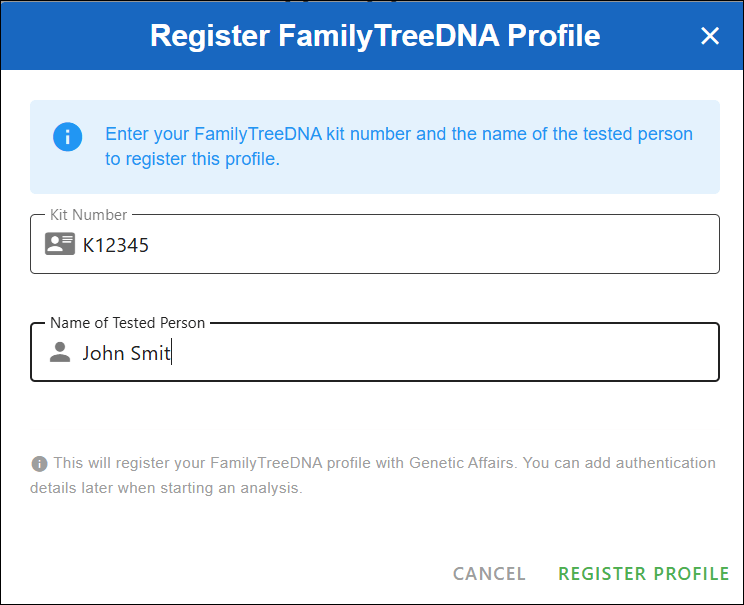
After clicking “Register profile,” you’ll see a message asking you to double-check the credentials for the kit you’re about to use. This is also a good time to log in to your FamilyTreeDNA account directly to make sure there are no pending actions — such as enabling two-factor authentication or accepting updated terms of service.

Once you click “I understand, continue,” you’ll see a list of all registered FamilyTreeDNA profiles at Genetic Affairs.
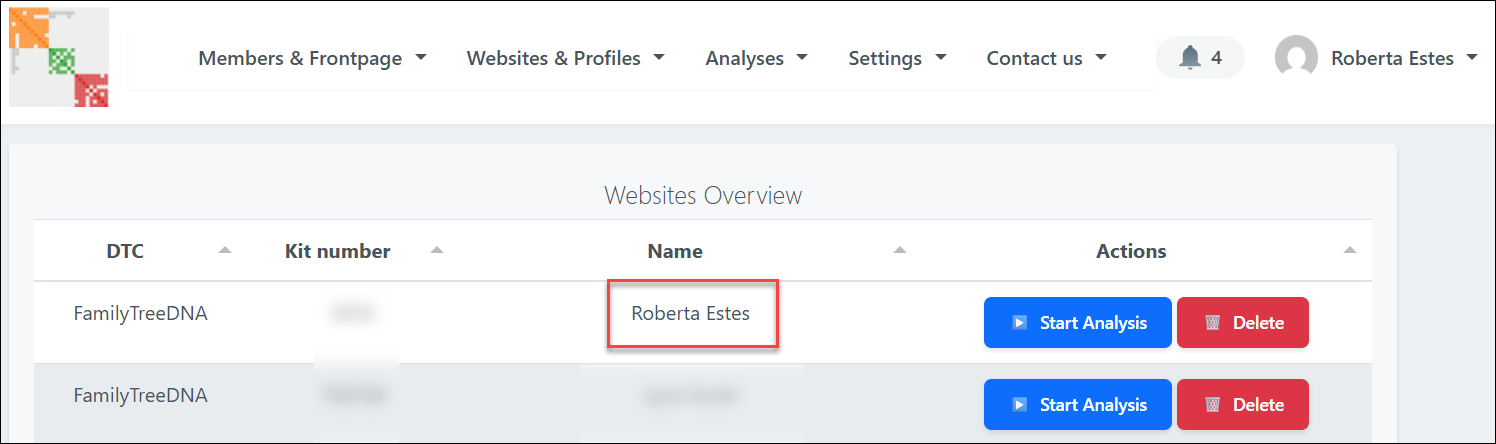
Locate the kit you want to analyze and click the blue “Start analysis” button.
This opens a guided wizard that walks you through each step of the setup.

First, select AutoKinship and click “Next.”

You’ll then be asked to define several thresholds:

  • Minimum and maximum shared cM
  • Minimum size of the largest segment
  • Minimum cluster size

A quick word of caution here: selecting a very low minimum cM value may actually reduce the number of usable matches. That’s because the system must download shared match data until it either reaches that threshold, or a preset timer expires, which can limit how much data is downloaded. When in doubt, start conservatively. You can always rerun the analysis later and change the parameters. Unfortunately, there’s no way to simoly “get everything” in one run which is, of course, what everyone would do.

Click “Next” to continue.
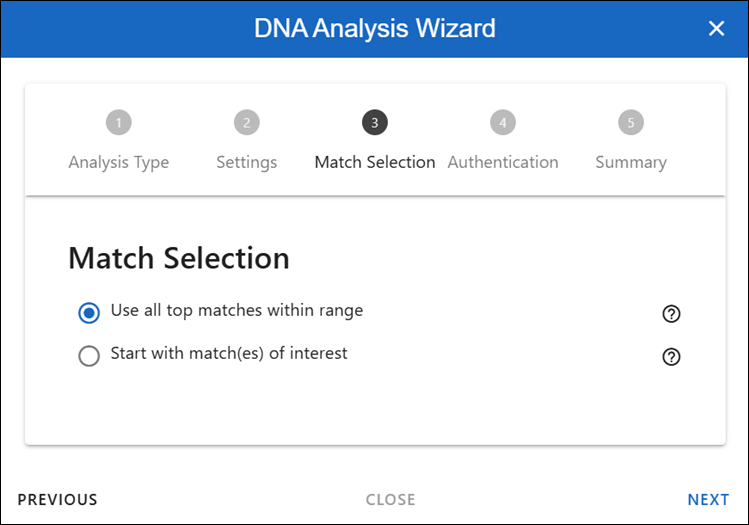
This section determines which matches will be included in the analysis.
For your first run, I recommend using the top matches within the selected range. This provides a strong foundation and usually produces the clearest results.

Later, once you’re more familiar with the output, you may want to experiment by analyzing only the shared matches of a specific person or group. For now, keep it simple and click “Next.”

Here, you’ll enter your FamilyTreeDNA password (twice) so the system can retrieve the required data.

If you use two-factor authentication, you can enter the 2FA code here, as well. To do that, log in to your FamilyTreeDNA account, retrieve the code from your email, and paste it into the wizard.

Then click “Next.”

You’ll now see a summary of all the settings you’ve chosen. Take a moment to review everything. When you’re ready, click Perform analysis” in the bottom right corner.

At this point, the Genetic Affairs servers take over and begin processing your data.

The Results Arrive

When your report is ready, you’ll receive an email with a download link. You can also access it through the notification panel in the top right corner of the Genetic Affairs site.
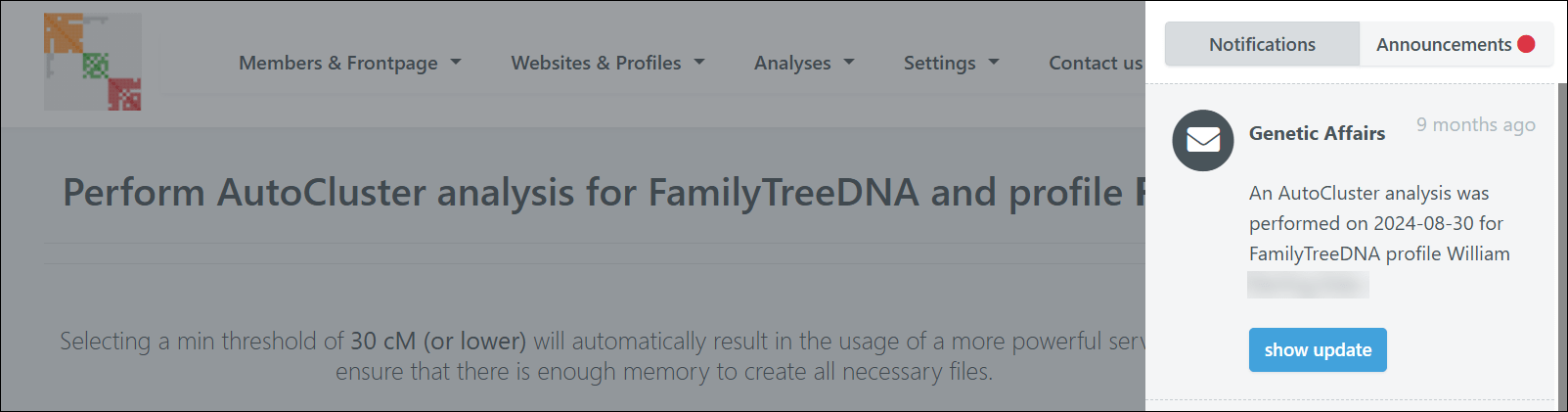
Downloading the report will result in a zipped file. Save it in a location on your computer where you can find it.

Critical Step

This step is critical and will save you a great deal of frustration: If you’re using a PC, you MUST extract or unzip the files before you can properly use them. I can’t tell you how many people skip this step and then wonder why they’re receiving error messages. Ask me how I know!

This is your zipped file.

If you try to open the HTML file while it’s still zipped, it might appear to work at first, but when you click on any links within the file, you’ll receive an error.

If this happens to you, close everything, right-click on that yellow zipped folder, select “extract all,” and then try again.

Now you’re set up, so on to the fun part – viewing the results.

Exploring Your Results

Once you have everything properly extracted and open the HTML file, you’ll watch your AutoCluster literally fly into place on your screen. I love this part. It’s like watching my family fly into place. I wish the actual genealogy research was this easy.

The new Genetic Affairs reports include significantly more information than previous versions.

You can change what’s displayed using the dropdown menu.

By default, you’ll see the shared cM amounts between your matches, but you can change this to show paternal or maternal information if you’ve identified those lineages by linking your matches.

In my case, my maternal line has fewer matches because my mother’s ancestry includes both recent Dutch and German immigrants, so the majority of my high cM matches are US-centric on my father’s side. My father’s ancestors have been in this country since colonial times, and a lot of testers in the US are looking back to the old country for their origins.

Therefore, in my first several clusters, I see squares with the symbol P, indicating they are paternal matches – designated as such through linked family matches, aka bucketing.

You can see the faint Ps inside the orange cells.

Here’s a close-up so you can see the “P” for paternal. If you haven’t linked your matches, you won’t have bucketed matches. Your Genetic Affairs results don’t require bucketing – it’s just a really beneficial feature.

You can change your AutoCluster settings in several ways. I tend to start with the defaults and then modify from there.

Genetic Affairs functions based on the amount of server time a particular tool takes, so it’s not possible to just “run everything,” or trust me, I would.

The Common Ancestor Magic

In your report, scroll down several sections, and you’ll find Common Ancestors – my favorite feature.

This section shows you the common ancestors that have been identified between your matches’ trees.

Looking at the Common Ancestors cluster report, you can click on three things for each cluster:

  • FamilyTreeDNA Trees of Cluster #
  • Common Ancestors of Cluster #
  • Common Locations of Cluster #

Let’s examine the reconstructed trees based on the common ancestor analysis. The first cluster shows some of my close DNA matches that are descendants of my Vannoy line.

You can see that there are six testers, in addition to me, who descend from Joel Vannoy.

Next, scroll down to the AutoKinship section of your report.

The AutoKinship Analysis

The real treasure lies in the AutoKinship analysis, which is presented in a small table on the main HTML page. When you click on the AutoKinship results for any cluster, you’ll see reconstructed trees based on the shared DNA amounts between matches, meaning between you and each of them, and between each other.

You can see that I have 10 reports available based on the cluster numbers indicated.

I clicked on Cluster 1, which shows some of my close DNA matches who are Vannoy line descendants. This includes testers both with and without trees.

Since the AutoKinship algorithm doesn’t have access to age information, it sometimes struggles with generational differences – but the relationship predictions are still remarkably useful.

Alternative trees are also provided, giving you multiple hypotheses to investigate.

Some matches may not be integrated because of incompatible relationships.

The Next Step with AutoLineage – Adding Genealogical Trees to the Mix

We’ve seen AutoTree and AutoKinship. The new upgraded AutoLineage adds genealogical tree information to genetic information by allowing the user to:

  • Import other trees
  • Integrate most recent common ancestors (MRCAs) in AutoKinship trees
  • Set known relationships
  • Provide generational information.

AutoLineage, Genetic Affairs’ online clustering and tree-building tool, has been around for several years but was recently upgraded to create trees based on shared DNA and incorporate genealogical evidence.

This is where the proverbial rubber meets the road.

Setting Up AutoLineage

Return to the home page at Genetic Affairs and select AutoLineage.

If you’re new to this tool, you’ll see a simplified workflow on the start page that walks you through the process.

First, create a profile representing the DNA test taker – in my case, that’s me.

After creating the profile, you’ll be redirected to the landing page of the profile. From there, you can register DNA tests linked to the profile. From the home page, you can see the different profiles.

You’ll register a new FamilyTreeDNA test specifically for each user whose kit you manage and who took a test.

FamilyTreeDNA is the only DNA testing company for which Genetic Affairs runs automated analyses on their site.

Additionally, you can:

Importing the Data

After registering a FamilyTreeDNA test, you are redirected to the overview of this DNA page, where matches are imported.

Click on “Import matches” and select the CSV file from Genetic Affairs. Here’s where that AutoKinship report we generated earlier comes in handy. The unzipped report contains match and shared match information that we can import directly into AutoLineage.
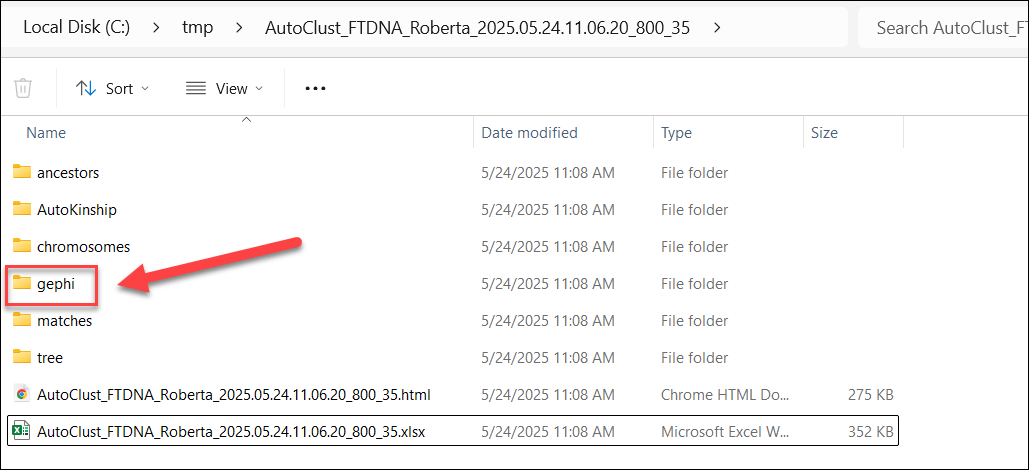
Navigate to the gephi folder in your report and select the nodes.csv file to import your matches.

After importing the matches, a short dialog shows how many matches were imported.

After closing the dialog box, the DNA matches pane is opened.

You’ll see your DNA matches that were downloaded.

Next, import the shared match information from the edges.csv file in the same gephi folder.
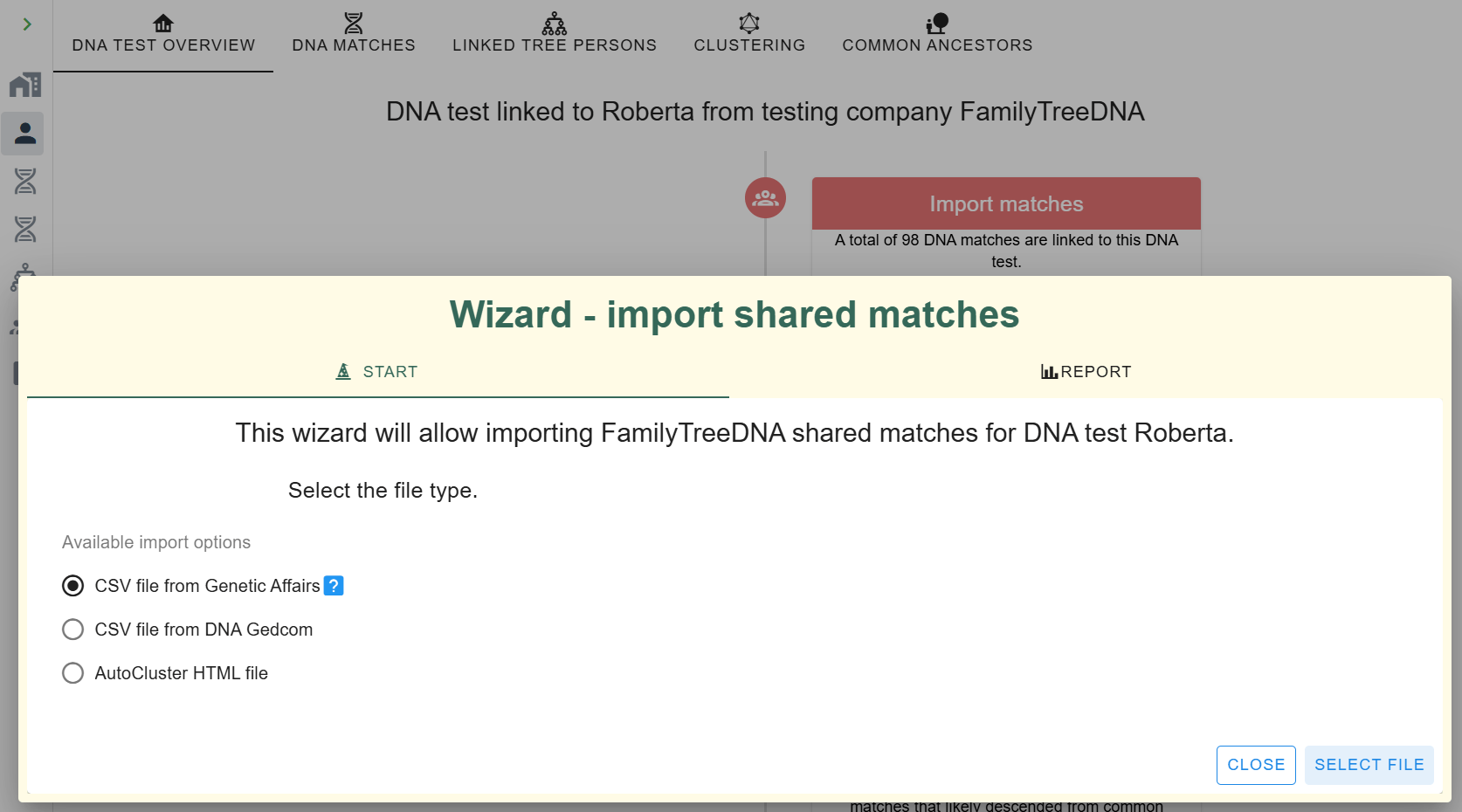
Once both data sets are imported, you’ll see that the ICW (In Common With) column has populated, showing how many shared matches are available for each DNA match.

Clustering in AutoLineage

Now, with the shared match data loaded, you can perform your own clustering analysis.

The wizard allows you to set parameters for which matches to include based on:

  • The amount of shared cMs
  • Weighted or unweighted clustering
  • How much DNA is shared between shared matches

You can also define the cluster characteristics, from sparse to very dense clusters.

Last, you can select the coloring scheme. After setting the parameters, click on “Start Clustering,” at bottom right.

After clustering is finished, the clustering chart is displayed. It looks fairly similar to the ones obtained automatically from Genetic Affairs, but with some differences.

The first thing I noticed is that the large orange cluster 1 in the automated clustering is now mostly represented by the purple cluster 4.

Let’s zoom in on this cluster. By looking more closely at the numbers contained in each cluster, you can already make an estimated guess about the richness in relationship information for cluster members. This cluster has lots of close relationships. Clusters whose matches only share a small amount of DNA with each other are not the best candidates for an AutoKinship analysis because they most likely share a distant common ancestor. Unless, of course, it’s a distant ancestor you’re searching for. (Hello brick wall.)

Adding and Importing Tree Information

Now that we have the new clusters, we could continue to directly run the tree reconstruction on these clusters using the shared DNA information, but let’s wait  since we want to include the tree information as well to guide this process.

To use common ancestors, we need to import the available trees that are linked to the DNA matches. Luckily, just like (shared) match information, the tree information is provided with the automated analysis as well. Let’s import the data.
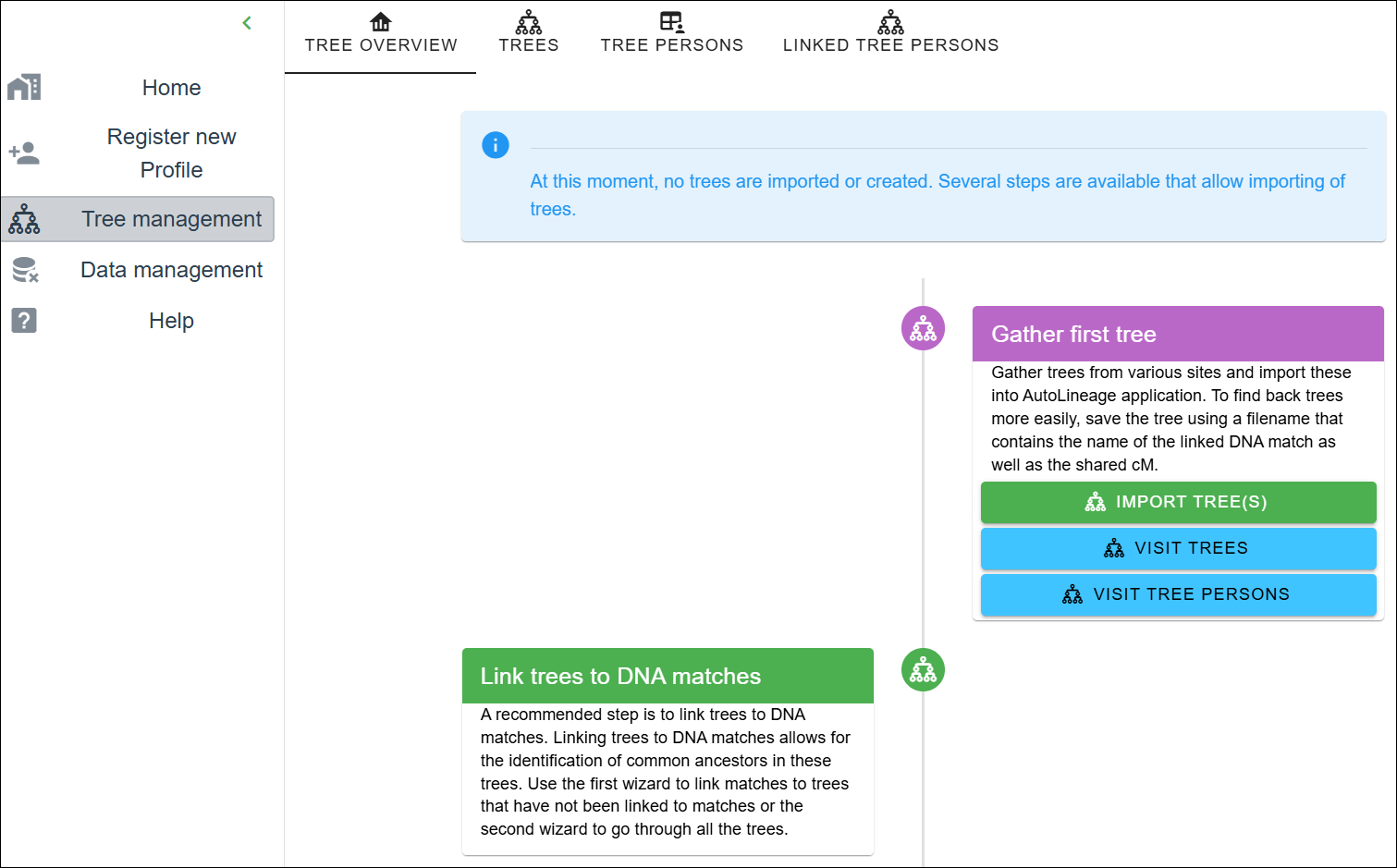
First, navigate to the tree management page. As you can see, no trees have been created or imported. Let’s start the wizard by clicking on the “Import Trees” button.

An “Import tree” wizard pops up, providing different ways to import tree information. It’s also possible to import GEDCOM files or tree data from other resources, but for now, I’m only using the archived trees at FamilyTreeDNA.
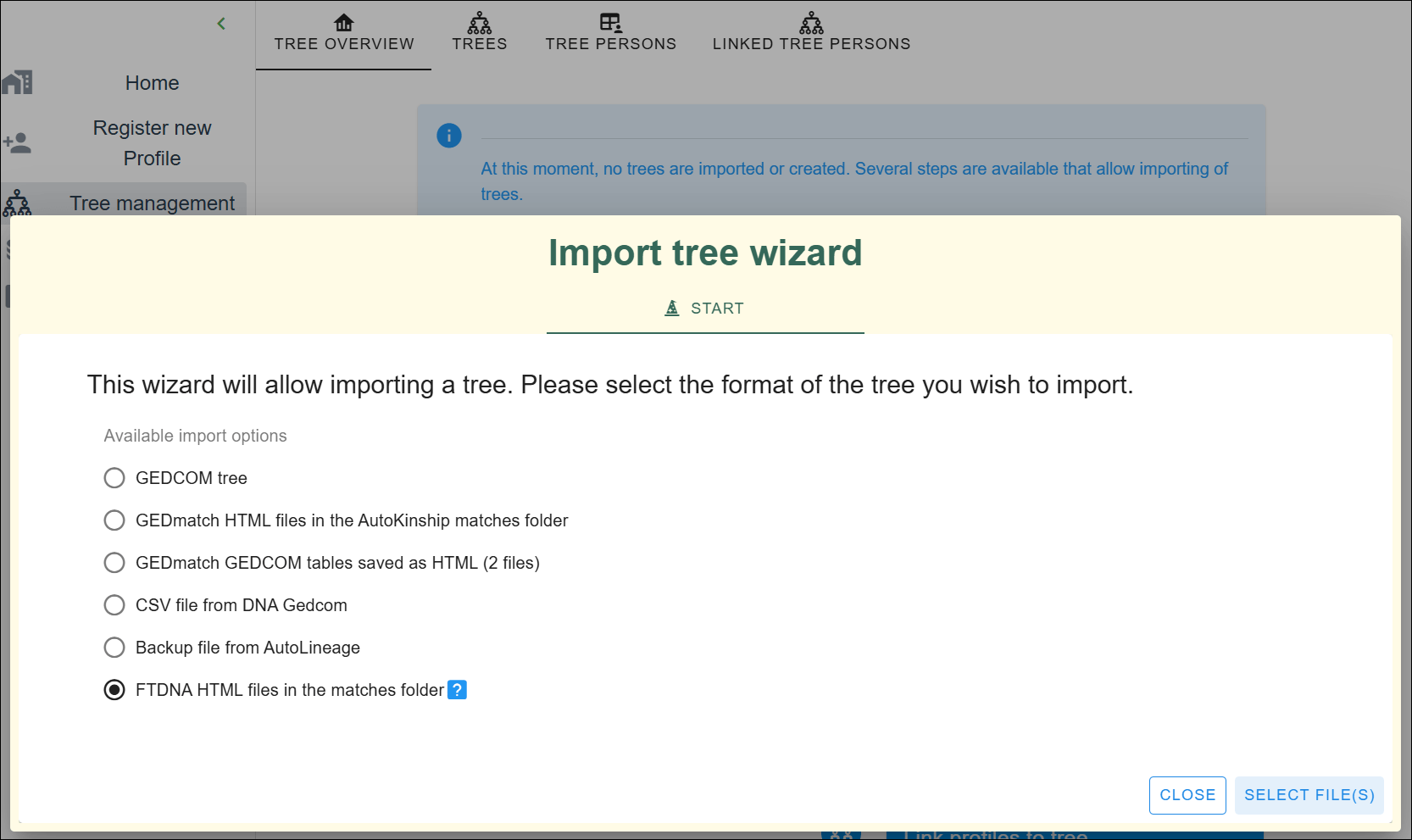
Click on the last option and select the files.

Navigate to the matches folder and select the HTML files contained in the folder.

Each file represents a DNA match report, some of which have a tree associated with them.

After importing the trees, they are automatically associated with the concerned DNA matches (using the unique identifier present in each file name). The tree overview page shows which tree is linked to a profile or DNA test, and the amount of DNA shared with the linked DNA match.
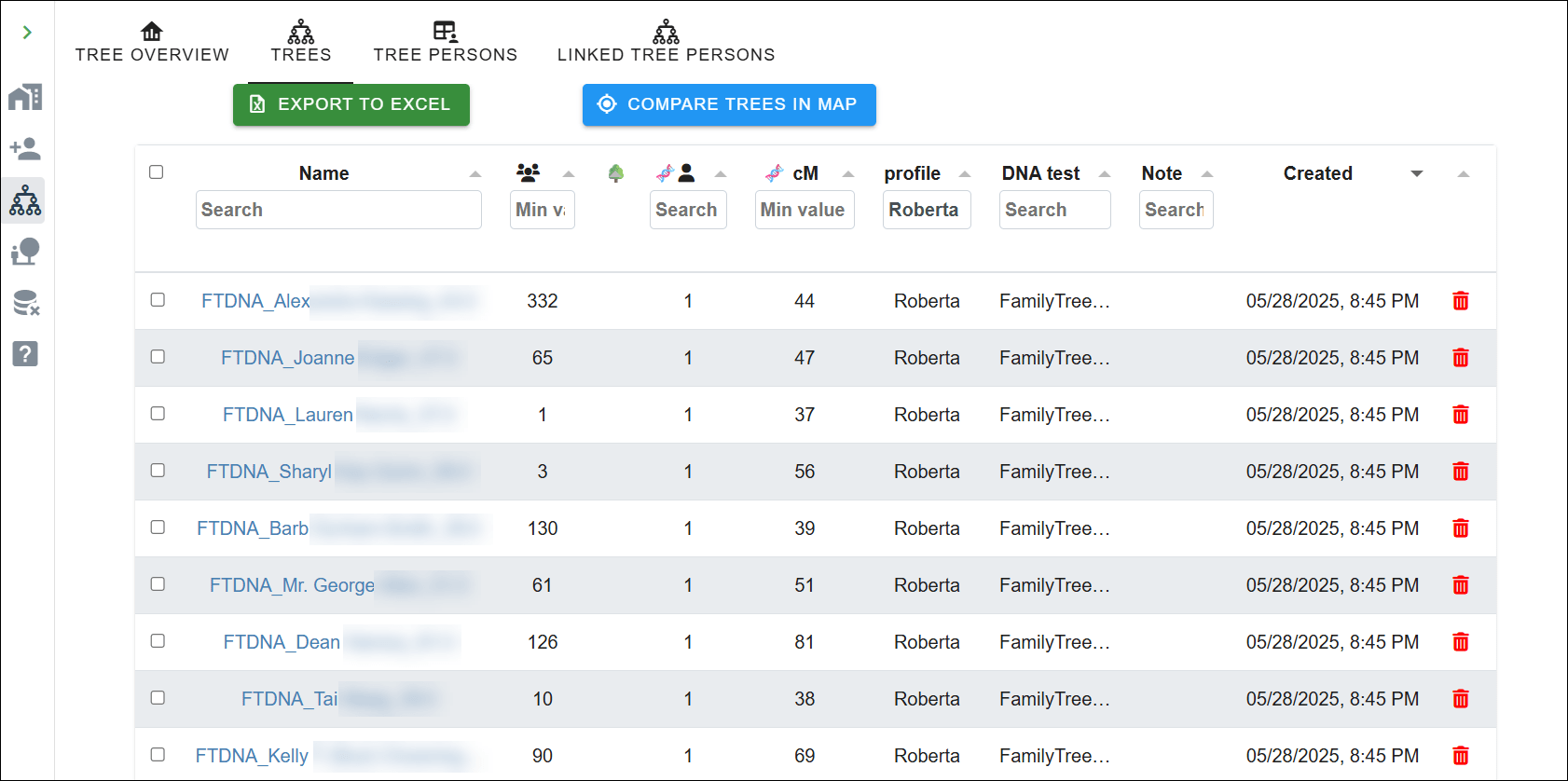
If you have created trees for your matches based on your own research (like quick and dirty trees), now is the time to import these using the “Import Tree” wizard again. This is a wonderful feature, because it means you’re not entirely dependant on your match having uploaded a tree themselves.

If you don’t import trees from GEDCOMs, you don’t need the linking wizard.

Click on the “Import Tree” wizard and select the GEDCOM option.

Now that we have imported additional trees, we need to associate them with DNA matches.
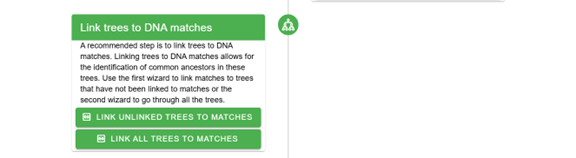
You can use a wizard to link the unlinked trees to the DNA matches, or link them from each DNA match. The wizard will try to guestimate, based on the content of the tree file name, which DNA match could be associated with the tree. Change the search criteria if it does not provide the correct results.

TIP: Save the GEDCOM files with the name of the linked DNA match as well the shared cM, which speeds up the importing process

Don’t forget to import your own tree. I imported my GEDCOM file from my computer genealogy software and associated it with my profile so it’s included in the common ancestor identification. You can easily upload your GEDCOM from your computer software, or download your tree from either Ancestry or MyHeritage to upload here.

Visit the profile, and select the tree pane. The tree pane only shows a single individual and allows you to add ancestors to it manually. To associate that individual with an existing tree, click on “Link to Existing Tree”.

A wizard will be displayed, which shows all available trees on the left side. Sort by clicking on the “Created” column to display the most recent trees.

Next, you need to select the root person.

I selected my tree.

Next, the right side of the wizard fills with the people in the selected tree. Select the root person, which is me, and click on “Save” in the lower right corner.

Finding Common Ancestors

Now that we have associated a tree with the profile and imported trees for the FamilyTreeDNA matches, it’s time to locate some common ancestors. Fingers crossed!

Go back to the profile and select the profile overview. Scroll down to the “Find common ancestors” section and click on the “Find common ancestors” button.

The “common ancestors” wizard shows trees that are associated with this profile in the table on the left and provides information about the different steps on the right. You can change the settings to make the search more restrictive or more relaxed.

After running the common ancestor identification, a dialog shows the number of trees and tree persons that were used, and the number of common ancestors that were identified.

After the analysis runs, you’ll be able to view all reconstructed trees or filter them based on common ancestors, trees, or linked DNA matches.

Common ancestors, not surprisingly, often align closely with what the automated analysis discovered.

All six testers are now shown descending from our common ancestor, in the approximate location where they will fit in our common tree.

But we aren’t quite finished yet.

The Final AutoKinship Analysis

Finally, we’ve arrived. The earlier steps were necessary to pave the way.

We have the common ancestors and clusters, and it’s time to go back to the clusters to begin the reconstruction of trees using trees combined with DNA.

Click on the profile and go to the clustering results pane. Select the 1x view, which will show the clustering chart.

Now select the matches pane that shows the different matches that are contained in each cluster. Scroll down until you reach your cluster of interest, which is four for me.

After clicking on any cluster, you’ll be redirected to a cluster view with only the information for that particular cluster.
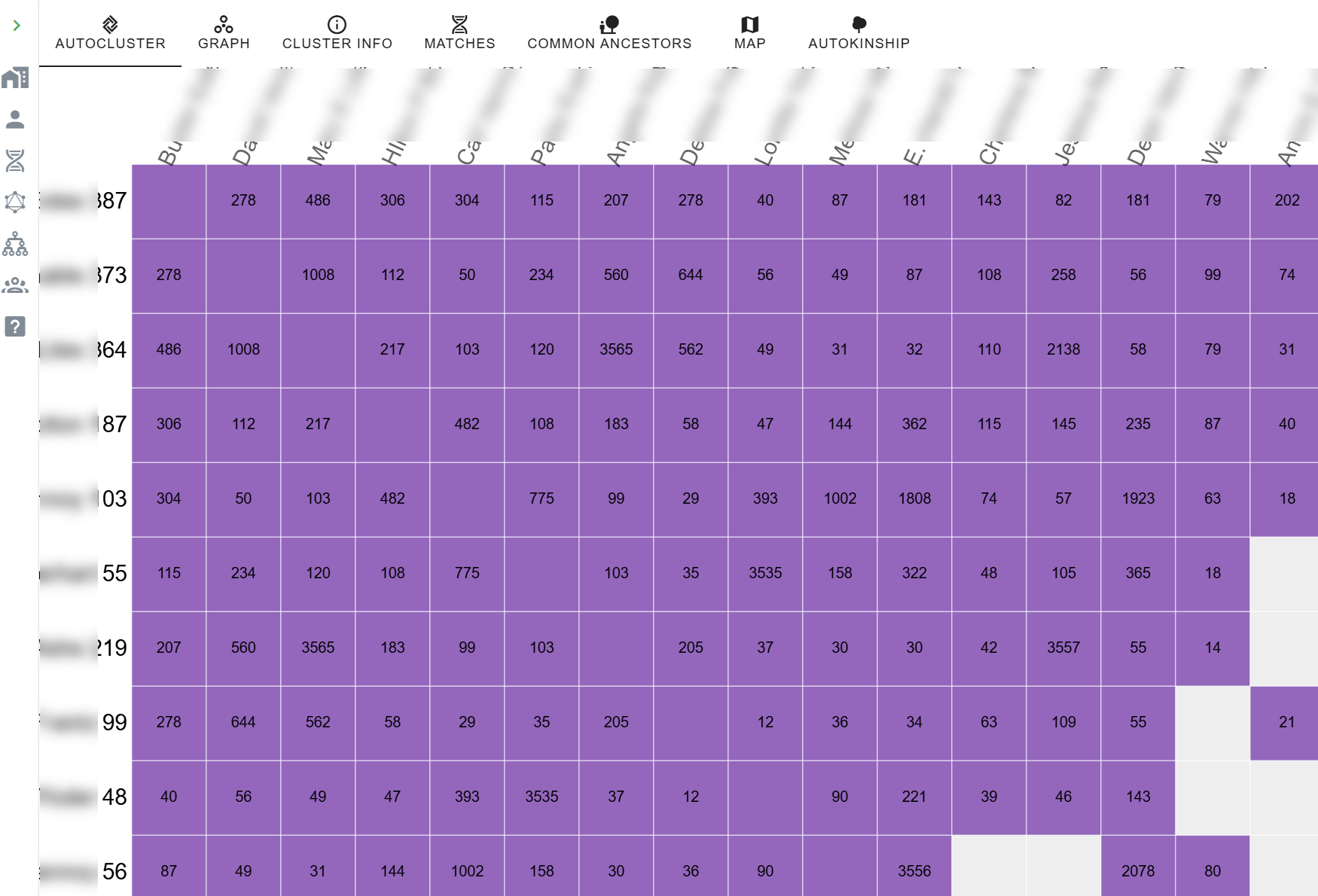
Let’s view purple cluster 4, which looks fairly dense, with only a couple of empty cells, indicating that these shared matches with white cells did not share (enough) DNA with each other to be included in the cluster. Now select the matches pane in the dashboard at the top of this cluster, which displays the matches linked to this specific cluster. As you can see, a button is now available that allows us to run the AutoKinship analysis. Click on the button.

Single cluster matches are displayed.

Now back to the wizard.

The wizard provides several important parameters:

  • Maximum number of generations between DNA matches
  • Number of trees to analyze in each iteration
  • Final number of trees to keep
  • Whether to include known relationships and/or MRCA (Most Recent Common Ancestor) relationships

In this example, MRCA relationships were found because we performed the common ancestor identification that resulted in common ancestors between the matches of this cluster.

If you know specific relationships between matches, you can set those manually. Sometimes you might not know the exact relationship, but if you can estimate that a match is one or more generations older or younger than yourself, you can set that too.

In addition to setting the relationship between the test taker (indicated in green in the table) and the DNA matches, it’s also possible to set the relationship between shared matches, if known.

The Hybrid Results

After the analysis has finished, an overview of the identified trees is presented.

The final result is a blended tree where DNA evidence fills in the blanks for matches who haven’t uploaded trees, or you haven’t provided a tree, and known genealogy supports the structure where it exists. This hybrid approach gives us the best of both worlds – the precision of documented genealogy combined with the discovery power of DNA analysis.

I particularly like this approach, because when I identify how a DNA match is related to me from any vendor, I enter their lineage in my desktop genealogy software. Therefore, using that GEDCOM file is the most complete source of my identified relatives.

Testers 1-6 were shown using the regular AutoTree, without the integrated tree, but an additional 11 matches were placed for consideration using all available tools.

I was using this as an experiment because I know how most people in this cluster are related, and those are all placed accurately. There is one person, located on the branch between 1 and 5, who I had no idea how they fit into this puzzle. Now, at least I know where to look.

I can’t imagine trying to do all of this manually.

Why This Matters

For those of us dealing with unknown parent or grandparent situations, poorly documented lines, non-existent trees, or just plain stubborn brick walls, this combination of tools is nothing short of amazing. You can now explore relationship hypotheses even when traditional documentation is scarce.

The reconstructed trees show how common ancestor information provides the template, while the AutoLineage tool fills gaps using shared DNA information. The updated AutoLineage is the genealogical assistant that never gets tired and can deal with relationship possibilities much more effectively than traditional hand-based methods.

In Summary

If you haven’t explored Genetic Affairs recently, give it a look. The integration between AutoKinship and AutoLineage represents a significant step forward in DNA analysis.

While AutoKinship offers valuable insights on its own, its full potential is truly unlocked when you export the data into AutoLineage. The combination creates a comprehensive analysis that was previously impossible.

For researchers dealing with complex family relationships or challenging genealogical puzzles, this hybrid approach that combines matches at FamilyTreeDNA with DNA evidence and genealogical trees could be the key to breaking through stubborn brick walls that nothing else has budged.

Last but not least, I suggest reading Dr. Patricia Coleman’s blog articles about these tools and her methodologies here and here. Patricia works extensively with these tools, and I often recommend her for private autosomal research consultations. Patricia’s 2026 RootsTech Session, DNA Case Study: Finding an 1877 Birth Father with Genetic Affairs, BanyanDNA, and No Birth Record, details her work solving a long-standing problem for my cousin in the Speaks family.

_____________________________________________________________

Share the Love!

You’re always welcome to forward articles or links to friends and share on social media.

Subscribe!

If you haven’t already subscribed, it’s free. You’ll receive an e-mail whenever I publish by clicking the “follow” button at the top of the main blog page, here.

Help Keep This Blog Free

I receive a small commission when you click a vendor link in my articles and purchase that item. This does NOT increase your price but helps me keep the lights on and this informational blog free for everyone. Please click on the affiliate links in the articles or to the vendors below if you are purchasing products or DNA testing.

Thank you so much.

DNA Purchases and Free Uploads

Genealogy Products and Services

My Books

Genealogy Books

Genealogy Research

2025 Genetic Genealogy Retrospective: Wow – What a Year!

2025 has been quite a year in genetic genealogy. Genetic genealogy, per se, really isn’t a separate “thing” anymore. DNA testing is now an integral part of genealogy, with the potential to answer questions that nothing else can!

The 76 articles I wrote in 2025 fall into multiple categories and focus on different topics based on what was happening in the industry.

From my perspective, here are the most notable announcements and trends in genetic genealogy, and genealogy more broadly.

#1 for 2025 – Mitochondrial DNA: The Million Mito Project Released the New Mitotree, Updates, and mtDNA Discover

The biggest genealogy news items this year, both industry-wide and genealogy-changing are definitely the release of the new Mitotree, plus two tree updates. But that’s not all.

In addition, full sequence mitochondrial DNA testers received new Mitotree haplogroups, if appropriate, and everyone received a haplotype – a new feature. Along with Mitotree, FamilyTreeDNA introduced mtDNA Discover which provides 13 individual reports based on your haplogroup and matches.

It’s no wonder that mitochondrial DNA articles led the pack with the most views based on the eleven articles about that topic. If you haven’t yet tested your mitochondrial DNA at FamilyTreeDNA, there’s no better time! You never know what you’re going to discover and the more testers, the more matches for everyone.

You don’t know what you don’t know, and you’ll never know if you don’t test. Remember, mitochondrial DNA is for both males and females and tests your mother’s direct matrilineal line (mother to mother to mother, etc.) – reaching beyond known surnames.  Click here to order or upgrade.

#2 – MyHeritage Low Pass Whole Genome Sequence Test Charges into the Future

Another big hitter is the new MyHeritage low-pass whole genome test (WGS) test. It’s new and innovative, but we haven’t seen comparative results yet.

My results from the new low-pass whole genome test just came back, and I haven’t had the opportunity to review them yet, as compared to the earlier tests. That said, I do have roughly the same number of matches, but I need to determine if they are the same matches, and how well they track. I’ll be working on that review soon.

The new whole genome test may be more about future proofing and preparedness than additional current benefit – but we will see. I definately wanted to take the whole genome test so I can receive and benefit from whatever new is coming down the pike.

MyHeritage allows you to maintain multiple DNA tests on your account, so the new whole genome won’t “replace” your older or uploaded test. That way, you can easily compare the results of the whole genome against any DNA test that you curently have at MyHeritage.

Click here to order the new test.

#3 – 23andMe Experiences Problems

On a less positive note, but still quite newsworthy is the bankruptcy of 23andMe and subsequent repurchase of 23andMe by the original founder after setting up a new nonprofit. I have real mixed feelings about this topic. However, 23andMe was really never about genealogy, and now, matching segment information is no longer available. Those searching for unknown parents or family may want to test there if they are unsuccessful elsewhere.

Best Genealogy Tool

The FamilySearch full text search continues to have a HUGE impact for genealogists. This tool is not one-and-done, but provides increasing amounts of rich information as more records are added to the “fully scanned” collection. If you haven’t tried it, please do. It’s a game-changer and continues to improve.

A Cautionary Word About AI – Artificial Intelligence

AI is such a hot topic right now that I feel it needs to be included.

The FamilySearch full text search uses a form of AI. However, you’ll quickly notice that it can’t read everything, gets words and names wrong, and if you actually need to fully depend on it for accuracy, you cannot. (That said, it’s still an amazing tool, and I’m not picking on FamilySearch.)

Aside from FamilySearch, AI in its current form is both wonderful and terrible. I’ll be writing about AI in the new year, but for now, don’t ever rely on AI for anything that you can’t verity. It’s your assistant, not an expert, no matter how insistent it is. Never trust and always verify.

This is ESPECIALLY TRUE WHEN RELATED TO GENETICS and genetic related topics. I can’t even begin to tell you how very wrong it has been, and how much people fall in love with inaccurate results. No, just no – at least for now.

You need to know your AI tool, your skill set, your understanding of AI broadly, the tool’s limitations, and yours, and that’s all before verifying the actual AI results. If you want to educate yourself, and everyone should, treat yourself to anything, anyplace by either Mark Thompson or Steve Little, the dynamic AI duo. They offer YouTube videos and classes in a wide variety of places – but keep in mind that AI tools and technology literally change every few weeks.

AI is, indeed, a specialty all unto itself, much like genetic genealogy. And right now, it’s not soup yet, but it is cooking.

Tried and True Genetic Genealogy Staples – DNAPrint and Genetic Affairs

I haven’t written about either one this year, but I use both DNAPainter and Genetic Affairs regularly.

I consistently paint segments from matches at both MyHeritage, FamilyTreeDNA, and GEDmatch that are newly identified to an ancestor or ancestral couple at DNAPainter.

Unfortunately, neither Ancestry nor 23andMe provide matching cM location information for your matches (chromosome browser), but you may find some people who have tested at those companies at both FamilyTreeDNA and GEDmatch if they have uploaded to either of those vendors. Both vendors provide segment information and a Chromosome Browser, enabling you to paint that information to DNAPainter when you can identify your common ancestor.

MyHeritage also provides a Chromosome Browser, but unfortunately, no longer accepts uploads from any other vendor. You can paint segments from MyHeritage, but no longer upload DNA files to MyHeritage.

Thanks to DNAPainter, I have 90% of my segments identified to specific ancestors – which is actually rather remarkable given that my mother’s grandfather was a Dutch immigrant, and her great-grandparents on her other side were German immigrants, meaning we don’t have many matches on either of those lines.

Genetic Affairs continues to develop new, advanced clustering tools, one of which I’ll be reviewing soon.

Major Vendor Releases

Aside from what’s listed above, most of the major vendors released new features.

MyHeritage released a VERY COOL new tool called Cousin Finder that finds your relatives in the MyHeritage database, whether they match you on a DNA test, or not. They may not have even taken a DNA test. Cousin Finder identifies your common ancestor and shows your relationships. It’s a wonderful way to initiate communications, discuss your common ancestors, and ask about DNA testing.

Of my 378 Cousin Finder matches, only 23 (about 6%) are on my DNA match list, so that leaves 355 people to message, several of whom represent Y-DNA and mtDNA lines I don’t have. You can bet I’ll be offering testing scholarships.

Additionally, MyHeritage released a new ethnicity version.

FamilyTreeDNA, in addition to the new Mitotree, Discover, and associated features, released a new match matrix so you can see if and how selected matches are related to each other in a grid format. In other words, you can create your own cluster.

A new built-in “Share” feature blurs private information to make sharing easier both on the website and in Discover.

Discover improvements include thousands of new Y-DNA and mtDNA tree branches, plus thousands of new Ancient DNA samples. Discover is evergreen, so once you’ve taken that Big Y-700 test or the mitochondrial DNA test, your learning never stops as more content is added.

Tree integration with WikiTree is super-easy and means you don’t have to choose between trees. You can choose to retain your archived tree at FamilyTreeDNA, or move your tree to MyHeritage, PLUS link yourself to your family at WikiTree.

Ancestry released match clustering and a new beta pedigree view of ThruLines, but that’s back in the shop for more work. I’d expect to see it rereleased in 2026.

Conferences

RootsTech is the granddaddy of genealogy conferences, and it’s always fun to attend and write about the experience. Many vendors release new tools or products during the conference.

The ECGGC (East Coast Genetic Genealogy Conference), held in the fall, is the only conference that focuses entirely on genetic genealogy, new tools, how to use existing tools, and more. The 2025 conference was virtual and provided a great deal of focused content. Attendees particularly appreciate the deep dive in a particular topic presented in DNA Academy.

I’ll be at RootsTech in 2026, will write about that soon, and hope to see you there.

Concepts, Techniques and Plain Old Genealogy

In the past, my Concepts series and genealogy “how to” articles have been very popular, so, in 2025, I penned a half-dozen articles focusing on frequently asked questions about relationships and DNA.

For example, how does one go about finding DNA testing candidates? The number of options may surprise you and includes both Cousin Finder and Relatives at RootsTech.

By testing ONE PERSON for either Y-DNA or mitochondrial DNA that represents an ancestor, you actually receive information about that entire lineage of ancestors. So, on my Estes line, by locating an Estes male from my line to test, I received relevant information for every Estes male in my line, back to and beyond the progenitor.

Eventually, we hit a brick wall in every line, and those tools are the perfect way to break through those brick walls.

Other articles discuss things like how to use Discover’s Ancient Connections, and the difference between half and full relationships, both in your tree and genetically. Plus, what does a cousin “once removed” mean anyway? And why do I care?

Another question I receive is how far back, based on the shared amount of DNA, should I look in my matches’ trees for our common ancestor? In other words, how many generations back should I click? That article was fun and produced some unexpected results.

Memorial Articles

Because we are part of a community, I write memorial articles when one of our friends passes on. This year, sadly, Schelly Talalay Dardashti, well-known Jewish genealogist, and another very close friend joined the ancestors, so I’ve recognized the best in both of their lives which constitutes their legacy.

Be the Storyteller

Last, but not least, I wrote about my ancestors in the “52 Ancestors” series, which launched several years ago with Amy Johnson Crow’s challenge to write about one ancestor per week. She hosts this every year, and you can join (free) now.

I’m now on ancestor #467, so yes, it’s addictive, but it’s also AMAZING how many wonderful cousins I’ve met who have information that I did not. Not only that, but after publishing about an ancestor, I’ve discovered that I’m related to people I’ve known for years. We were SOOOooo excited!

I’ve been writing about the lives of my ancestors for several years now, and the articles include attempts to identify Y-DNA and mtDNA testers for each ancestor, where appropriate. There’s so much to learn that can’t be revealed any other way.

Plus, people seem to like the “mystery” and “short story” aspect, and I salt each story with the history of the region and relevant historical events of the timeframe. You might find your ancestors here too, or other helpful information.

Find a way to share about your ancestors!

Do You Have Suggestions for 2026 Topics?

Do you have suggestions or requests for article topics in 2026? If so, please comment on this article and let me know.

Check Out the 2025 List

Here’s the list of the 2025 articles. Did you miss something fun? Enjoy!

  Title Category Date Link
1 Welcome to 2025 – Opportunities and New Genetic Genealogy Articles Welcome, general 1-2-2025 https://dna-explained.com/2025/01/02/welcome-to-2025-opportunities-and-new-genetic-genealogy-articles/
2 Anne Doucet (1713-1791), Oceans, Rivers, and Perseverance – 52 Ancestors #438 52 Ancestors 1-4-2025 https://dna-explained.com/2025/01/04/anne-doucet-1713-1791-oceans-rivers-and-perseverance-52-ancestors-438/
3 Register for RootsTech 2025 Now RootsTech 1-16-2025 https://dna-explained.com/2025/01/16/register-for-rootstech-2025-now/
4 What IS the McNeil Family History, by George Franklin McNeil – 52 Ancestors #439 52 Ancestors 1-19-2025 https://dna-explained.com/2025/01/20/what-is-the-mcneil-family-history-by-george-franklin-mcneil-52-ancestors-439/
5 Jean Garceau dit Tranchemontagne (c1785-1711), Soldier from Saint Marseault – 52 Ancestors #440 52 Ancestors 1-29-2025 https://dna-explained.com/2025/01/29/jean-garceau-dit-tranchemontagne-c1785-1711-soldier-from-saint-marseault-52-ancestors-440/
6 Memories Resurface When the Old Family Home Gets a Facelift Genealogy 2-3-2025 https://dna-explained.com/2025/02/03/memories-resurface-when-the-old-family-home-gets-a-facelift/
7 MyHeritage Introduces Ethnicity v2.5 MyHeritage 2-6-2025 https://dna-explained.com/2025/02/06/myheritage-introduces-ethnicity-v2-5/
8 Relatives at RootsTech Reveals Cousins and Provides DNA Candidates RootsTech, techniques 2-8-2025 https://dna-explained.com/2025/02/08/relatives-at-rootstech-reveals-cousins-and-provides-dna-candidates/
9 FamilyTreeDNA’s New Matrix Shows How Your Matches Are Related to Each Other FamilyTreeDNA 2-12-2025 https://dna-explained.com/2025/02/12/familytreednas-new-matrix-shows-how-your-matches-are-related-to-each-other/
10 René Doucet (c1680-c1731), Lifetime of Incessant Upheaval – 52 Ancestors #441 52 Ancestors 2-15-2024 https://dna-explained.com/2025/02/16/rene-doucet-c1680-c1731-lifetime-of-incessant-upheaval-52-ancestors-441/
11 Lineages Versus Ancestors – How to Find and Leverage Yours Techniques 2-23-2025 https://dna-explained.com/2025/02/23/lineages-versus-ancestors-how-to-find-and-leverage-yours/
12 Mitotree is Born Mitochondrial DNA 2-25-2025 https://dna-explained.com/2025/02/25/mitotree-is-born/
13 RootsTech 2025 – The Year of Discover and the New Mitotree RootsTech, Mitochondrial DNA 3-14-2025 https://dna-explained.com/2025/03/15/rootstech-2025-the-year-of-discover-and-the-new-mitotree/
14 Pierre Doucet (c1621-1713), Walking History Book Lived to Nearly 100 – 52 Ancestors #442 3-16-2025 https://dna-explained.com/2025/03/16/pierre-doucet-c1621-1713-walking-history-book-lived-to-nearly-!100-52-ancestors-442/
15 Welcome to the New FamilyTreeDNA mtDNA Group Mitochondrial DNA 3-17-2025 https://dna-explained.com/2025/03/17/welcome-to-the-new-familytreedna-mtdna-group/
16 23andMe Files for Bankruptcy – What You Need to Know! 23andMe 3-24-2025 https://dna-explained.com/2025/03/25/23andme-files-for-bankruptcy-what-you-need-to-know/
17 New “Share” Features at FamilyTreeDNA Blur Match Information and Make Sharing Easy FamilyTreeDNA 4-1-2025 https://dna-explained.com/2025/04/01/new-share-features-at-familytreedna-blur-match-information-and-make-sharing-easy/
18 The Chauvet Cave: Trip Back in Time with Prehistoric European Humans – Are We Related? History, DNA 4-6-2025 https://dna-explained.com/2025/04/06/the-chauvet-cave-trip-back-in-time-with-prehistoric-european-humans-are-we-related/
19 DNA for Native American Genealogy Webinar & Companion Book Native American 4-8-2025 https://dna-explained.com/2025/04/08/dna-for-native-american-genealogy-webinar-companion-book/
20 Marie Levron (c1686-1727), Tragedy from Cradle to Grave – 52 Ancestors #443 52 Ancestors 4-14-2025 https://dna-explained.com/2025/04/14/marie-levron-c1686-1727-tragedy-from-cradle-to-grave-52-ancestors-443/
21 Mitochondrial DNA: What is a Haplotype Cluster and How Do I Find and Use Mine Mitochondrial DNA 4-14-2025 https://dna-explained.com/2025/04/14/mitochondrial-dna-what-is-a-haplotype-cluster-and-how-do-i-find-and-use-mine/
22 New Mitotree Haplogroups and How to Utilize Them for Genealogy Mitochondrial DNA 4-23-2025 https://dna-explained.com/2025/04/23/new-mitotree-haplogroups-and-how-to-utilize-them-for-genealogy/
23 Sir Francois Levron dit Nantois(c1651-1714), and Acadia’s Pirate – 52 Ancestors #444 52 Ancestors 4-26-2025 https://dna-explained.com/2025/04/27/sir-francois-levron-dit-nantois-c1651-1714-and-acadias-pirate-52-ancestors-444/
24 Catherine Savoie (c1661-c1722/25), Whispered Threads Weave a Tapestry of Life – 52 Ancestors #445 52 Ancestors 5-4-2025 https://dna-explained.com/2025/05/04/catherine-savoie-c1661-c1722-5-whispered-threads-weave-a-tapestry-of-life-52-ancestors-445/
25 Discover’s Ancient Connections – How Are You Related? Discover, Ancient DNA 5-8-2025 https://dna-explained.com/2025/05/08/discovers-ancient-connections-how-are-you-related/
26 Mother’s Day and Legacies 52 Ancestors, Genealogy 5-10-2025 https://dna-explained.com/2025/05/11/mothers-day-and-legacies/
27 The Mystery of the Blue Fugates and Smiths: A Study in Blue Genes and Pedigree Collapse Genetics, Genealogy 5-18-1015 https://dna-explained.com/2025/05/19/the-mystery-of-the-blue-fugates-and-smiths-a-study-in-blue-genes-and-pedigree-collapse/
28 Regeneron Wins Bid for Bankrupt 23andMe – Wedding Planned 23andMe 5-19-2023 https://dna-explained.com/2025/05/19/regeneron-wins-bid-for-bankrupt-23andme-wedding-planned/
29 Francois Savoie’s Homestead Rediscovered – 52 Ancestors #446 52 Ancestors 5-24-2025 https://dna-explained.com/2025/05/24/francois-savoies-homestead-rediscovered-52-ancestors-446/
30 Memorial Day – Some Gave All Memorial 5-25-2025 https://dna-explained.com/2025/05/25/memorial-day-some-gave-all/
31 Mitotree Webinar – What It Is, How We Did It, and What Mitotree Means to You Mitochondrial DNA 6-4-2025 https://dna-explained.com/2025/06/04/mitotree-webinar-what-it-is-how-we-did-it-and-what-mitotree-means-to-you/
32 Catherine LeJeune (c1633-1671/1686), Meet Your Grandchildren – 52 Ancestors #447 52 Ancestors 6-7-2025 https://dna-explained.com/2025/06/07/catherine-lejeune-c1633-1671-1686-meet-your-grandchildren-52-ancestors-447/
33 Mitotree Q&A for Everyone Mitochondrial DNA 6-11-2025 https://dna-explained.com/2025/06/11/mitotree-qa-for-everyone/
34 Father’s Day: Bravery and Love 52 Ancestors, Genealogy 6-14-2025 https://dna-explained.com/2025/06/14/fathers-day-bravery-and-love/
35 Francoise Bourgeois (c1659-1693/1697), High Drama in Beaubassin and Terror at Port Royal – 52 Ancestors #448 52 Ancestors 6-16-2025 https://dna-explained.com/2025/06/16/francoise-bourgeois-c1659-1693-97-high-drama-in-beaubassin-and-terror-at-port-royal-52-ancestors-448/
36 Requesting Suggestions for RootsTech 2026 Topics RootsTech 6-18-2025 https://dna-explained.com/2025/06/18/requesting-suggestions-for-rootstech-2026-topics/
37 FamilyTreeDNA and WikiTree Collaboration – In Two Easy Steps!! FamilyTreeDNA, WikiTree 6-25-2025 https://dna-explained.com/2025/06/25/familytreedna-and-wikitree-collaboration-in-two-easy-steps/
38 Jacques Bourgeois (c1620-c1700), Surgeon of Port Royal – 52 Ancestors #449 52 Ancestors 7-1-2025 https://dna-explained.com/2025/07/01/jacques-bourgeois-c1620-c1700-surgeon-of-port-royal-52-ancestors-449/
39 TTAM, a Nonprofit Formed by 23andMe’s Founder Now Plans to Buy 23andMe 23andMe 7-1-2025 https://dna-explained.com/2025/07/01/ttam-a-nonprofit-formed-by-23andmes-founder-now-plans-to-buy-23andme/
40 Jacques Bourgeois: Complex Acadian, Founder of Beaubassin – 52 Ancestors #450 52 Ancestors 7-6-2025 https://dna-explained.com/2025/07/06/jacques-bourgeois-complex-acadian-founder-of-beaubassin-52-ancestors-450/
41 How to Use Ancestry’s New Match Clusters and What They Mean Ancestry 7-10-2025 https://dna-explained.com/2025/07/10/how-to-use-ancestrys-new-match-clusters-and-what-they-mean/
42 Walk with Your Ancestors: Peace, Light and Healing in an Abandoned Medieval Village History 7-21-2025 https://dna-explained.com/2025/07/21/walk-with-your-ancestors-peace-light-and-healing-in-an-abandoned-medieval-village/
43 Jeanne Trahan (c1629-c1699), Life in Chinon, La Heve, Port Royal, and Beaubassin – 52 Ancestors #451 52 Ancestors 8-2-2025 https://dna-explained.com/2025/07/28/jeanne-trahan-c1629-c1699-life-in-chinon-la-heve-port-royal-and-beaubassin-52-ancestors-451/
44 Wherefore Art Thou, Oh Ancestor – New Generation Tree Chart Suggests Where to Look in Your Matches’ Trees Techniques, Genetics, Genealogy 8-2-2025 https://dna-explained.com/2025/08/02/wherefore-art-thou-oh-ancestor-new-generation-tree-chart-suggests-where-to-look-in-your-matches-trees/
45 Guillaume Trahan (c1601-1625), More Than Meets the Eye – 52 Ancestors #452 52 Ancestors 8-13-2025 https://dna-explained.com/2025/08/13/guillaume-trahan-c1601-c1684-more-than-meets-the-eye-52-ancestor-452/ 
46 The East Coast Genetic Genealogy Conference – ECGGC – Register Now for the Best of the Best ECGGC Conference 8-14-2025 https://dna-explained.com/2025/08/14/the-east-coast-genetic-genealogy-conference-ecggc-register-now-for-the-best-of-the-best/
47 Schelly Talalay Dardashti – May Her Memory Be a Blessing Memorial 8-17-2025 https://dna-explained.com/2025/08/17/schelly-talalay-dardashti-may-her-memory-be-a-blessing/
48 Francoise Corbineau (c1609-c1665), Bride in Chinon, Founder of Acadia – 52 Ancestors #453 52 Ancestors 8-25-2025 https://dna-explained.com/2025/08/23/francoise-corbineau-c1609-c1665-bride-in-chinon-founder-of-acadia-52-ancestors-453/
49 Nicolas Trahan (c1570->1632), Life in the Heart of French Wine Country – 52 Ancestors #454 52 Ancestors 8-31-2015 https://dna-explained.com/2025/08/31/nicolas-trahan-c1570-1632-life-in-the-heart-of-french-wine-country-52-ancestors-454/
50 Mitochondrial DNA A-Z: A Step-by-Step Guide to Matches, Mitotree, and mtDNA Discover Mitochondrial DNA, Discover, Genealogy, Techniques 10-2-2025 https://dna-explained.com/2025/09/02/mitochondrial-dna-a-z-a-step-by-step-guide-to-matches-mitotree-and-mtdna-discover/
51 Renée Desloges (c1570-1627/1632), Fragments of Life in Montreuil-Bellay – 52 Ancestors #454 (this is actually 455) 52 Ancestors 9-6-2025 https://dna-explained.com/2025/09/06/renee-desloges-c1570-1627-1632-fragments-of-life-in-montreuil-bellay-52-ancestors-454/
52 Best Mitochondrial DNA Presentation EVER – You’re Invited to DNA Academy!! Mitochondrial DNA 9-9-2025 https://dna-explained.com/2025/09/09/best-mitochondrial-dna-presentation-ever-youre-invited-to-dna-academy/
53 Unfillable Shoes Memorial – Douglas Rhodenbaugh 9-14-2025 https://dna-explained.com/2025/09/14/unfillable-shoes/
54 Concepts: What Does a Cousin “Once Removed” Mean? Concepts, Genealogy 9-24-2025 https://dna-explained.com/2025/09/24/concepts-what-does-a-cousin-once-removed-mean/
55 Daniel Vannoy (1752-after 1820), “Lived in the Boundary of the Cherokee Indians” – Say What??? 52 Ancestors 9-29-2025 https://dna-explained.com/2025/09/29/daniel-vannoy-1752-after-1820-lived-in-the-boundary-of-the-cherokee-indians-say-what/
56 Daniel Vannoy and the Strange Case of the Two Sarahs – 52 Ancestors #457 52 Ancestors 10-5-2025 https://dna-explained.com/2025/10/06/daniel-vannoy-and-the-strange-case-of-the-two-sarahs-52-ancestors-457/
57 Cousin Finder – MyHeritage’s Innovative New Tool Finds Your Relatives MyHeritage 10-9-2025 https://dna-explained.com/2025/10/09/cousin-finder-myheritages-innovative-new-tool-finds-your-relatives/
58 Sarah Hickerson Vannoy (c1761 – after 1826), Threw More than Shade – 52 Ancestors #458 52 Ancestors https://dna-explained.com/2025/10/13/sarah-hickerson-vannoy-c1761-after-1826-threw-more-than-shade-52-ancestors-458/
59 MyHeritage Introduces a Low-Pass Whole Genome Autosomal DNA Test & Why It Matters MyHeritage 10-14-2025 https://dna-explained.com/2025/10/14/myheritage-introduces-a-low-pass-whole-genome-autosomal-dna-test-why-it-matters/
60 Henriette Pelletret (c1640 – before 1694), Life Death in the Shadow of the Fort – 52 Ancestors #459 52 Ancestors 10-21-2025 https://dna-explained.com/2025/10/21/henriette-pelletret-c1640-before-1694-life-and-death-in-the-shadow-of-the-fort-52-ancestor-459/
61 Cheat Sheet: Mitochondrial Matches, Haplotype Clusters, and Haplogroups Mitochondrial DNA 10-22-2025 https://dna-explained.com/2025/10/22/cheat-sheet-mitochondrial-matches-haplotype-clusters-and-haplogroups/
62 Simon Pelletret (1610-1642/1645): A Walk Through Port Royal – 52 Ancestors #460 52 Ancestors 10-27-2025 https://dna-explained.com/2025/10/27/simon-pelletret-c1610-1642-1645-a-walk-through-port-royal-52-ancestors-460/
63 Perrine Bourg (c1626-1693/1698): Phoenix Rising from the Ashes – 52 Ancestors #461 52 Ancestors 11-2-2025 https://dna-explained.com/2025/11/02/perrine-bourg-c1626-1693-1698-phoenix-rising-from-the-ashes-52-ancestors-461/
64 Concepts: What is a Half Relationships, Life Half First Cousins, Anyway? Concepts, Genealogy 11-4-2025 https://dna-explained.com/2025/11/04/concepts-what-is-a-half-relationship-like-half-first-cousins-anyway/
65 Marie Broussard (1686-after 1752), Life Across the River from Port Royal – 52 Ancestors #462 52 Ancestors 11-10-2025 https://dna-explained.com/2025/11/10/marie-broussard-1686-after-1752-life-across-the-river-from-port-royal-52-ancestors-462/
66 Francois Broussard (1653-1716), Intractable Acadian – 52 Ancestors #463 52 Ancestors 11-22-2025 https://dna-explained.com/2025/11/22/francois-broussard-1653-1716-intractable-acadian-52-ancestors-463/
67 Mitotree Sprouts 12,773 New Branches and Includes Ancient DNA Mitochondrial DNA 11-24-2025 https://dna-explained.com/2025/11/24/mitotree-sprouts-12773-new-branches-and-includes-ancient-dna/
68 Catherine Richard (c1663 – after 1714), Mother of Beausoleil, Acadian Freedom Fighters – 52 Ancestors #464 52 Ancestors 11-29-2025 https://dna-explained.com/2025/11/29/catherine-richard-c1663-after-1714-mother-of-beausoleil-acadian-freedom-fighters-52-ancestors-464/
69 Ancestry’s ThruLines Has a New Pedigree View Ancestry 12-2-2025 https://dna-explained.com/2025/12/03/ancestrys-thrulines-has-a-new-pedigree-view/
70 Ancestry Reverts ThruLines to the Original View Ancestry 12-6-2025 https://dna-explained.com/2025/12/06/ancestry-reverts-thrulines-to-the-original-view/
71 Michel Richard (c1630-1686/1689), Carefree Acadian – 52 Ancestors #465 52 Ancestors 12-7-2025 https://dna-explained.com/2025/12/08/michel-richard-dit-sansoucy-c1630-1686-1689-carefree-acadian-52-ancestors-465/ 
72 Mitochondrial DNA: How Do I Know if I’m a Candidate to Receive a New Haplogroup? Mitochondrial DNA 12-9-2025 https://dna-explained.com/2025/12/09/mitochondrial-dna-how-do-i-know-if-im-a-candidate-to-receive-a-new-haplogroup/
73 Heavens Ablaze: the 1833 Leonid Meteor Storm and Your Ancestors History, Genealogy 12-15-2025 https://dna-explained.com/2025/12/15/heavens-ablaze-the-1833-leonid-meteor-storm-and-your-ancestors/
74 Madelaine Blanchard (c1643 – 1678/1683), Gone Too Soon – 52 Ancestors #466 52 Ancestors 12-20-2025 https://dna-explained.com/2025/12/20/madelaine-blanchard-c1643-1678-1683-gone-too-soon-52-ancestors-466/
75 Soar Inspiration 12-24-2025 https://dna-explained.com/2025/12/24/soar/

_____________________________________________________________

Share the Love!

You’re always welcome to forward articles or links to friends and share on social media.

Subscribe!

If you haven’t already subscribed, it’s free. You’ll receive an e-mail whenever I publish by clicking the “follow” button at the top of the main blog page, here.

Help Keep This Blog Free

I receive a small commission when you click a vendor link in my articles and purchase that item. This does NOT increase your price but helps me keep the lights on and this informational blog free for everyone. Please click on the affiliate links in the articles or to the vendors below if you are purchasing products or DNA testing.

Thank you so much.

DNA Purchases and Free Uploads

Genealogy Products and Services

My Books

Genealogy Books

Genealogy Research

RootsTech 2025 – The Year of Discover and the New Mitotree

Last week, RootsTech was a whirlwind and full of discoveries – which, ironically, was the 2025 theme.

I always take you along with me and share the RootsTech experience, start to finish, so here’s my 2025 “feet on the ground” report.

I might, just might, have overcommitted myself. I taught the half-day DNA Academy,  three more sessions, plus several other commitments such as book signings, get-togethers, and interviews.

One class, “DNA for Native American Genealogy,” was a live webinar from the floor of the expo hall. You can watch that here for free, if you’re interested.

Unfortunately, none of my other sessions were recorded, but I’ll see what other alternative options may be available to bring those to you.

Additionally, I did two book signings at the GenealogyBank booth, along with two other authors, Drew Smith and Sunny Morton. I’m sorry, I don’t have any pictures. I should have asked someone to take some.

There were long lines and books sold out. Still, you can order either of my books, The Complete Guide to FamilyTreeDNA – Y-DNA, Mitochondrial, Autosomal and X-DNA or DNA for Native American Genealogy, at Genealogical.com. Thank you to GenealogyBank for being so welcoming.

The book signing was particularly fun because people shared their success stories or their hopes of what they want to achieve. I met a couple of new cousins too! Even people waiting in line were helping each other with information about research resources.

I had created my “RootsTech plan” for sessions I wanted to attend, but I was only able to actually attend one of those. Several were happening at the same time as mine, or directly before or after. As a presenter, you arrive early to get set up and make sure everything is working correctly.

Then, after your session, attendees have questions and are interested in your topic, which is a good thing. So essentially, you can’t attend sessions either before or after your session either.

Before I share photos, I’d like to share something else.

It’s About the People

I have never attended RootsTech for the classes, although there are wonderful offerings – and I have enjoyed them immensely.

Having said that, for me, the best part of RootsTech is the people. People I know and love but never get to see – many of whom I met in-person at RootsTech initially. I get to meet my blog followers. I meet with or reconnect with friends and cousins from around the world. I am privileged to talk with people about their challenges and their victories – when they’ve broken through a brick wall using DNA that they could never have otherwise achieved. People collaborating and helping each other. It’s all beautiful.

The reason I started blogging in the first place, and the reason all 1750 articles are free, is because I wanted to help people do just that – confirm ancestors, find ancestors, and connect with their fsmily.

My cousins that I’ve met through genealogy are some of my closest friends and closest family members. Outliving everyone is a mixed blessing but it makes me extremely grateful for my various cousins since all of my siblings and close family, with the exception of the next generation, have transitioned to the land of the ancestors.

So, yea, for me, RootsTech is about connecting and reconnecting with the people.

That’s also why I never get anything done because I’m always talking with someone.

Additionally, this particular RootsTech was a celebration.

Mitotree Release

Just a few days before RootsTech, the Million Mito Team at FamilyTreeDNA released the brand new Mitotree, 5 years in the making, reconstructing the tree of humankind to reflect our combined heritage more accurately.

At RootsTech 2020, I was honored to announce the Million Mito Project, and the new Mitotree initiative was born.

At some point, I will write about the deep, personal significance of the Mitotree for me,  but for now, suffice it to say that there is something profoundly moving about rewriting the tree of humankind and in doing so, giving a voice to our ancestors from long ago. Yes, I know many of them are thousands or even tens of thousands of years old, but had they not survived, we would not be here today. Now we can identify who they are and that they lived.

Million Mito Team, left to right, Goran Runfeldt, Dr. Paul Maier, me, Dr. Miguel Vilar, Bennett Greenspan, John Detsikas

Our amazing Dream Team has given life to our ancestors and said their names once again, even if their name is a mitochondrial DNA haplogroup. Four team members, Goran, Paul, me and Bennett were at RootsTech. Where else can you actually approach and speak with the actual scientists?

When I say RootsTech is about the people, I know that I am related to every single individual at RootsTech, it’s just a matter of how far back in time. So are you.

Just think about the significance of that for a minute.

Every. Single. Person.

The other end of the mitochondrial DNA spectrum is genealogy, of course, and the new Mitotree with it’s haplotype clusters brings mitochondrial DNA results into the genealogical timeframe. In future articles, I’ll be writing about each one of the new tools, what they mean, and how to use them.

Dr. Paul Maier, lead scientist doing most of the hard science behind Mitotree, had the much-deserved honor of introducing the Mitotree to genealogists at RootsTech.

I’m not sure the audience understood they were witnessing history unfold, but they clearly were. We needed a drum roll and some balloons!

This wasn’t like most vendor announcements of a new product or feature – this was a major scientific achievement that led to genealogical benefits.

In celebration, I asked my friend to make double helix zipper pulls so that I could give them to colleagues, friends and cousins that I ran into at RootsTech. It’s my way of celebrating and sharing the joy!

Five years is a very long time to work on a project. The Mitotree is a massive accomplishment. Every customer at FamilyTreeDNA who has taken the full sequence test received their new haplogroup either the week before or during RootsTech, AND, the second updated version of the tree was released too.

While this is truly wonderful, the true highlight is the testimonials – seeing how Mitotree is actually helping people break through their brick walls.

Here’s just one.

Breathless Testimonial

I’m going to try to convey this exactly as it happened.

A lady that I don’t know literally runs up to me in the hallway. This isn’t unusual. She was so excited that what she said was one long breathless sentence, which I’m going to try to reconstruct here, although I’m adding a bit of punctuation. I also can’t remember how many “greats” were attached to the “grandmother,” but you’ll get the idea.

Roberta, Roberta, I’m so excited – I just wanted to let you know – I found my ancestor using mitochondrial DNA. I got my new haplogroup and I had like 47 matches before but now they are clustered together so I could focus…and there were three matches in my cluster…and one of them had an EKA but the other didn’t…so I built out the EKA matches’ tree and guess what??? They were from the same place and then I found that her great-great-grandmother’s sister is my great-great-grandmother but she had her surname so now I have more generations too. OMG I ‘m so excited I could never have broken through this wall without mtDNA because I had no surname. This is THE MOST CONSEQUENTIAL DNA TEST I’VE EVER TAKEN, and I’ve taken them all. Thank you, thank you!

And with that she quickly hugged me and ran off to something she was obviously late for.

I never got to say one word, which was fine, but I stood there with tears in my eyes, thinking to myself, “This – this is what it’s all about.”

It doesn’t get better than this!

I want to hear your stories too. I just scaled my fourth brick wall last night using the new Mitotree and mtDNA Discover features.

RootsTech Week

RootsTech week started early for me – as in leaving the house at 3 AM Sunday. I fly on Sunday because the flights are cheaper and because the pre-conference meetings and events begin on Monday.

We took off into the dawn, jetting our way westward through the azure blue sky.

I have never gotten over the majesty and beauty of the Rocky Mountains.

And then, of course, the Great Salt Lake, for which Salt Lake City is named.

Looking at the Salt Palace across the street from the Marriott hotel. The silver building is the new Hyatt which is attached to the conference center behind the windmills which extends another very long block to the right, out of view. The mountain range is visible in the distance, and the beautiful sunset.

Speaking of the Marriott hotel, several people have asked if it was any better this year, and if I got trapped in the fire exit again, like last year.

No, I didn’t get stuck because I didn’t tempt fate again. It looked just the same though, so I’m presuming nothing has changed. Furthermore, there was no heat in my room, so they gave me a space heater and a pass to the concierge level – which they did not do last year.

That was kind of them, but food ran out, and there was only one poor server in the restaurant. I’m not even going to mention the nauseating thing that happened with my food. Let’s just say I’m not picky, but I will NEVER eat there again, and that makes it particularly difficult because there’s very little close by, especially when you’re exhausted.

I’m hoping that RootsTech will negotiate someplace different for speakers in the future. I’ve stayed in a lot of Marriotts and most of them are just fine. I have never had issues like this with any of them, let alone repeat issues year after year.

The good news is that we’re not there for the hotel, and the fun began on Monday.

Monday

My interviews began on Monday morning with “Mondays with Myrt” at the FamilySearch Library, which you can view here beginning about 16 minutes.

Mondays with Myrt is a RootsTech tradition and Myrt incorporates people present in person and tuning in virtually as well. Left to right, Kirsty Gray from England, John Tracy Cunningham, me and Myrt. Kirsty had a huge breakthrough that she shared with us just a few minutes after it happened.

I met John at the ECGGS Conference last October. He’s one of the few people I know whose 8 great-grandparents were born in the same county. I’m so jealous. Mine were either born in or first generation immigrants from four countries.

Sometimes the broadcast waiting area is just as much fun as the actual broadcast – in part because it’s the first day of RootsTech week and everyone is so excited to see their friends that they haven’t seen in forever. Call is a reunion!

Do Kirsty Gray and I look like we’re about to get into mischief?

Behind me is the first group of folks to be interviewed.

Pat Richley-Erickson, aka Myrt, Cheryl Hudson Passey, Laura Wilkinson Hedgecock, and Jenny Horner Hawran.

This is the livestream room at the FamilySearch Library. The waiting area for the next group is to the right, and the three presently being interviewed are sitting on the left beside Myrt.

For those who know Gordon, aka Mr. Myrt, he’s coordinating interviewees outside the livestream room. His job is herding cats and he’s the nicest cat-herder you’ll ever meet!

Pre-RootsTech Library Research

I love the FamilySearch Library. It feels like coming home to me.

So many passionate genealogists at every level – learning and searching. Lots of volunteer helpers available, too.

Normally, I create a research plan for the library, but I had been so utterly slammed between preparing my several RootsTech sessions and the Mitotree release that I hadn’t really been able to prepare anything.

I did, however, have a group of ancestors in mind that settled in the Oley Valley in Pennsylvania, so I decided to focus on the Berks County books.

I won’t bore you with the details, but among other things, I found confirmation that the Hoch surname is also the same as High and Hoy, which explains some very confusing Y-DNA results. So even though I didn’t get much productive time there, I did find something very useful in the land records.

I also ran into cousins and friends, of course, which is why I didn’t get more actual research done.

I knew Judy Nimer Muhn, at left, was going to be at RootsTech as a speaker, and I knew we connected through Acadian lines, but we never took the time to really piece together that puzzle.

My cousins, Mark and Manny were also coming for RootsTech, and to visit the library, for the first time. Mark, Manny and I visited Nova Scotia together in the summer of 2024, chasing our ancestors.

You know, fate is a funny thing.

We all descend from Acadian, Francois Savoie who was born about 1621 in France, but settled in Acadia, today’s Nova Scotia. Mark, Manny and I knew that we are cousins through Francois, but Judy and I did not. Mark, Manny and I ran into a local historian, Charlie Thibodeau, the Acadian Peasant, last year, outside of Port Royal. It just so happened that he was taking another couple to see the remains of the Savoie homestead deep in the salt marshes at BelleIsle.

We asked if we could join them, and Charlie was kind enough to include us. It was a long, brutally hot, tick-infested hike through the swamp, but oh so worth it!

We also found the well, located between three homesteads.

The year before, Judy had been in the same place in Nova Scotia, found the same man, Charlie, at the BelleIsle Hall Acadian Cultural Centre, and he had taken her to the remains of the same homestead.

And here we all four are in Utah.

What are the chances?

Needless to say, we had a LOT to talk about, and still do. Unfortunately, I wasn’t able to get to Judy’s talk, but Mark and Manny attended.

I ran into Katy Rowe-Schurwanz, the FamilyTreeDNA Product Manager at the library too, and look what she’s wearing – a mitochondrial DNA scarf. How cool is that!

The rest of Tuesday and most of Wednesday morning were spent trying to update my several presentations to reflect newly released information by various vendors and practicing the timing of the presentations. I had another interview, and more people were arriving.

I found time to visit Eva’s Bakery about 3 blocks from the Salt Palace. If you’re ever in Salt Lake City, Eva’s is a must! Lunch is wonderful, and so are their French pastries.

Wednesday is “tech prep” day at RootsTech, along with speaker instructions and then the Speaker Dinner.

Steve Rockwood, President and CEO of FamilySearch always delivers an inspirational message and this year did not disappoint.

If you’ve wondered about RootsTech conference stats, they provided this information. I can’t even imagine trying to coordinate all of this – and that’s not including the vendors, expo hall, technology in the presentation rooms, food, security and so much more.

Last year, in 2024, the final attendance numbers were more than 16,000 people in person and 4 million virtual attendees. I noticed a few days ago that there were more than half a million people participating in Relatives at RootsTech, which is still live until April 12th.

On Wednesday evening, after the Speaker’s Dinner, vendors in the Expo Hall were putting the final touches on their booths and preparing for the thousands of excited genealogists who would descend Thursday morning.

Discover

This year’s RootsTech theme was “discover” and attendees were greeted with this display just inside the door.

Attendees listed their discoveries on Post-its and could either post them on the board or plastic boxes, or on the green tree.

I placed my discovery from the day before at the library on the Rootstech tree.

Some people place their wishes here, kind of like a technology wishing well.

I couldn’t help but think of the new Mitotree, now forever green and growing, so I posted a second discovery, “Mitotree.”

Thursday – Opening Day

For those who don’t know, the Salt Palace Convention Center is two lengthy blocks long, a block wide, and two or three stories high, depending on whether you are in the front or rear portion. In other words, it’s massive and you need a map!

The huge Expo Hall with vendors is located in the center on the first floor and vendors have aisle addresses. The show floor is always very busy, and this year was no exception. One of the things I love is that spontaneous conversations just spring up between people who often find commonalities – common ancestors, common locations, and more. People compliment each other and join others at tables. It’s like a big family gathering of sorts.

I always try to walk the entire Expo Hall, because I really enjoy seeing the vendors and their wares, but this year, I never actually had enough time to traverse all the aisles. I took several pictures as I was passing through and running into people, but not nearly enough. I know I missed a lot, but there just wasn’t enough time and I arrived at RootsTech already tired.

However, the energy of RootsTech is like no place else and just infects you.

It’s like you can’t drink from the genealogy firehose fast enough!

Let’s Take a Walk

Ok, come along on a walk with me.

Left to right, Lianne Kruger, a speaker, and Courtney, in the FamilyTreeDNA booth. I believe they said they are cousins.

Daniel Horowitz, genealogist extraordinaire, in the MyHeritage booth. More about MyHeritage’s announcements shortly.

Geoff Rasmussen in the Legacy Family Tree Webinars booth. For those who don’t know, there’s lots of good material at Legacy, and the freshly recorded webinars are always free for a week.

Several vendors offer booth talks, including MyHeritage. I love their photo tools and use their site in some capacity almost daily.

One of the RootsTech traditions is ribbons. Collect one, collect ‘em all. Liv’s ribbons almost reach the floor. I think she wins!

Selfies are also a RootsTech tradition. Me, here with Jonny Perl of DNAPainter fame. I owe Jonny an apology as he asked me if I had a minute, and I had to say no because I was on the way to one of my own classes. I never got back to his booth to view his new features. Sorry Jonny – don’t take it personally!

Jonny released a new Ancestral tree version titled Places, so take a look here at his blog. I need to go look at my ancestors Places.

You’ll find this new feature under Ancestral Trees, Places. These are my most recent 8 generations. Just think of all those brave souls who climbed on a ship and sailed for the unknown. Check this feature out and have fun.

In a booth talk, Dave Vance, Executive Vice-President and General Manager at FamilyTreeDNA is speaking about the three types of DNA, which are, of course, Y-DNA, mitochondrial and autosomal DNA – all useful for genealogy in different ways.

Dave is explaining how in-common-with matches, also known as shared matches, operate with the chromosome browser. You can use the chromosome browser, shared matches, the new Matrix Tool, and download your match segment information at FamilyTreeDNA, a combination of features not available at any other vendor.

WikiTree, a free a moderated one-world-tree is one of my favorite genealogy tools. One of their best features is that you find your ancestor, and in addition to lots of sources, their Y-DNA, mitochondrial DNA, and those who are related autosomally are listed. Here’s my grandfather, for example.

Several DNA connections are listed. The further back in my tree, the more DNA connections are found, becuase those ancestors have more descendants.

WikiTree volunteers were wandering around taking pictures of “WikiTreers” holding fun signs.

Paul Woodbury, a long time researcher with Legacy Tree Genealogists, who specializes in DNA. I don’t take private clients anymore, and regularly refer people to Legacy Tree.

Me with Janine Cloud taking our annual RootsTech selfie. Janine, the Group Projects Manager at FamilyTreeDNA and I co-administer one of those projects and accidentally discovered a few years ago that we are cousins too. How fun is this!!!

I wanted this shirt, but by the time I got back to the booth, it was too late. I’m going to order it online from Carlisle Creations, in case you want one too. This is so me.

Land records are critically important to genealogists. Rebecca Whitman’s class was about plotting land plats. What she’s holding is a surveyor’s chain. You’ve read about chain carriers? This is what they carried to measure land boundaries – literally metes and bounds. Some of my best discoveries have been thanks to land records.

The only session I actually got to attend was Gilad Japhet’s “What’s New and Exciting at MyHeritage.” For those who don’t know, Gilad is the founder and CEO of MyHeritage and it’s always great to hear about the new features straight from the top executive who is, himself, a seasoned genealogist. That’s why he started MyHeritage in the first place – 22 years ago in his living room.

Gilad had several wonderful announcements, but the one I’m most excited about is their new Cousin Finder. Cousin Finder finds and reveals cousins who are DNA candidates if they have not yet taken a DNA test.

I’ll be writing more about the MyHeritage announcements soon, but you can read their blog about Cousin Finder now, here, and their Roundup here about the rest of their announcements!

My Last Class – Reveal Your Maternal Ancestors & Their Stories

My last class at the end of the final day of RootsTech was “Reveal Your Maternal Ancestors & Their Stories – Solving Mitochondrial DNA Puzzles.”

Had I tried to coordinate this presentation with International Women’s Day, I could never have done it, but fate winked and here I was.

I’m often asked what it’s like from the presenters’ perspective. This is one of the smaller ballrooms. My earlier sessions were in larger rooms, maybe 3 times this size. I took this picture about 15 minutes before the session started as people were beginning to drift in.

The amazing RootsTech techs had me wired up to microphones and had verified that the audio and video equipment was working correctly, so now it was just waiting.

My cousin, John Payne, who co-administers the Speaks surname project with me, came by and took this great picture of the two of us. We’ve made huge inroads connecting the various Speake(s) lines in America, plus finally proving our home village in England, thanks to the Big Y-700 test, followed by church records. All is takes, sometimes, is that one critical match.

As I sat there, waiting to begin the mitochondrial DNA session, I couldn’t help but reflect upon all of the women who came before me and how fortunate I was to have been in the right place at the right time to be a member of the Million Mito team.

These are my direct matrilineal ancestors who give me, and my daughter, pictured at left, their mitochondrial DNA. I felt them with me as I sat there, waiting.

The woman at furthest right, Barbara Drechsel (1848-1930), immigrated to Indiana from Germany as a child with her parents in the 1850s. Before her came thousands of generations of women with no photos, of course, and no names before Barbara Freiberger, another eight generations earlier, born about 1621 in Germany.

Before that, which was before church and other records, prior to the 30 Years War, this lineage came from Scandinavia where some of my exact matches are still found today.

Before beginning, I said a positive affirmation and thanked my ancestors – so very honored to introduce them. I know they were proud of me, a member of the team that opened the door to the distant past. I wouldn’t be here if not for every one of their lives.

In this session, I would discuss, for the first time ever, the new Mitotree and my/our connection to all of humanity some 7000 generations ago, more or less.

The mutations we carry over those generations form an unbroken chain of breadcrumbs, connecting us to mitochondrial Eve who lived about 145,000 years ago. We revealed that breakthrough finding in the Haplogroup L7 paper, published in 2022.

I’m still in absolute awe that we have been able to both reach that far back in time AND, at the same time, make the newest haplogroups and haplotype clusters genealogically relevant. I will write more about that soon, but for now, I wrote about the Mitotree release here and you can find articles by Katy Rowe-Schurwanz here and here.

I’m very excited about my new mitochondrial DNA results for my ancestral lines that I track and have already made headway on several.

I’m not the only one.

Not only was I excited about my results, many other people have had breakthroughs too, including Mark Thompson, one of our genealogy AI experts who also spoke at RootsTech. I particularly love his AI generated image.

If you haven’t yet, check your mitochondrial DNA results.

It’s a Wrap

Another year done, another RootsTech under our belts. Hopefully everyone is over the “conference crud” by now and are busily applying their newfound knowledge.

You can view either live-cast sessions or RootsTech webinars, here.

I saw a meme posted sometime during the conference that coined the term “exhausterwhelmulated,” a combination of exhausted, overwhelmed and overstimulated at the same time.

I added exhilarated and elated to the mix and asked ChatGPT to draw me a picture of someone at a genealogy conference feeling those simultaneous emotions.

ChatGPT titled this request “Genealogy Conference Overload,” which made me laugh.

The first two attempts looked like the person had a headache, which I fully understood, so I asked ChatGPT to make the person look happy to be there.

This person, carrying a coffee like I often do, looks like they have just discovered the great irony that they have chased the wrong ancestor for some 20 years – with “laugh or I’ll cry” mania being their overwhelm “go to” in that minute.

This one made me laugh too!

Yes, indeed, I think every single one of us, especially at RootsTech, has experienced this exact adrenaline-fueled emotion.

We leave with a VERY long to-do list, exhausted but full of anticipation and buoyed by excitement. Filled with so much gratitude for our cousins and fellow genealogists, the speakers, vendors, DNA to solve thorny problems, new tools and records, FamilySearch who sponsors RootsTech itself and their amazing employees, plus the legions of the volunteers who make it all work.

Thank you! Thank you! Thank you!

_____________________________________________________________

Share the Love!

You’re always welcome to forward articles or links to friends and share on social media.

If you haven’t already subscribed (it’s free,) you can receive an e-mail whenever I publish by clicking the “follow” button on the main blog page, here.

You Can Help Keep This Blog Free

I receive a small contribution when you click on some of the links to vendors in my articles. This does NOT increase your price but helps me keep the lights on and this informational blog free for everyone. Please click on the links in the articles or to the vendors below if you are purchasing products or DNA testing.

Thank you so much.

DNA Purchases and Free Uploads

Genealogy Products and Services

My Books

Genealogy Books

Genealogy Research

FamilyTreeDNA’s New Matrix Shows How Your Matches Are Related to Each Other

Click on any image to enlarge

FamilyTreeDNA’s new reworked Matrix includes relationships, in other words, how your matches are related to each other. But there’s more. It also includes the number of shared segments and the number of cMs shared between your matches.

You can then push those matches through to the chromosome browser to see exactly which segments overlap between you and your matches.

This is a game-changer!!

Why Are These Features Important?

For genealogists, knowing how your matches are related to each other, or not, is a HUGE clue about your common ancestor. Clusters of people who match each other are an important road sign directing you to a specific ancestor who contributed the same DNA segment or segments to all of you.

FamilyTreeDNA just released several VERY cool updates for their Matrix comparison tool. Plus, you get to select a group of 10 people to compare.

The purpose of the Matrix tool is to select Family Finder autosomal matches who are then displayed in a grid matrix for comparison, showing if and how those matches match each other.

Specifically:

  • Do your matches match each other?
  • What is their estimated relationship to each other?
  • How many segments of DNA do they share with each other?
  • How many cMs (centiMorgans) of DNA do they share with each other?

You can then push 7 matches through to the chromosome browser to see if they match on any of the same segments.

Automated Triangulation

If you are comparing bucketed (maternal or paternal) matches, or matches known to belong to the same side of your tree, the shared segments are automatically triangulated.

How cool is this?!!!

Keep in mind, though, that you may be related to someone through multiple ancestors, and they could be from both parent’s sides, so pay attention to the ancestral segment history.

Remember, every segment has its own unique history.

Let’s step through the new Matrix features and see how they work.

Select the Matrix

Navigate to the Matrix tool under “See More” under Autosomal DNA Results and Tools.

Under “Select Matches” you can select “All Matches” to choose from all of your matches, or you can select a grouping of matches to be displayed in the menu, below.

These groupings are shortcuts for you so you don’t have to pick everyone individually. You can also search for a name.

Click on the individuals you want to compare in the Matrix. The people you’ve selected from the group, at left, will appear in the box, at right. That’s who will be compared to each other.

Next, select which type of data will be compared.

I’m selecting “Close Relatives” for this example and “Relationship range.” First, I added my mother so I could see who matches with her.

Then I added the rest of the people I want to compare. In this case, I’ve added my closest matches, even though they are from both sides of my tree.

Relationship Range

I’ve selected “Relationship range,” which will show me how my matches estimated relationships to each other.

Based on the identity of these matches, and how they match each other, I can now determine their ancestral connection.

If I didn’t know who was related maternally and paternally, this grid would remove all doubt became I’m comparing to one of my parents.

If you don’t have a parent, adding close, known relatives on one or both sides will help immensely.

Be sure to make notes about what you’ve discovered on your matches page, and paint to DNAPainter if that’s how you’re tracking your segments to ancestors.

Number of Segments Shared

Now, I’ve selected “Number of segments shared” to compare the same group of people.

You can see the number of shared segments between Mom’s matches. Donald and Cheryl are full siblings.

The display shows how these people match Mom, and each other.

Melissa is Mom’s paternal second cousin. I was able to piece this together with the help of how she matches Mom and Mom’s known paternal first cousins, Cheryl and Donald.

Total cMs Shared

Next, I’m selecting “Total cMs shared” for comparison.

Looking at the number of shared cMs, even if I didn’t know that Donald and Cheryl were full siblings, I would now.

You can also push these through to the chromosome browser. I’ll illustrate in a minute.

Bucketed or Parental Side Matching

My favorite groupings for the new Matrix are the bucketed, meaning parental or maternal “side” matching.”

When your matches are already bucketed, thanks to having linked known matches to their profile card in your tree, the system does a lot of the “side” work for you behind the scenes.

When you select “Maternal, “Paternal” or “Paternal and Maternal” matches, the people who have been bucket to either side, or those related to you on both sides, are listed in the selection box.

I’m selecting 7 of my maternal bucketed matches because I’m going to push them through to the chromosome browser for additional evaluation. I’m not including my mother because I already know these people are related to both me and her, because they are bucketed maternally.

They’re compared in the various matrix configurations.

From the Shared cM comparison table, I can easily click to display matches in the chromosome browser.

If you’re comparing more than 7 people, you’ll need to reduce it to 7. I excluded my Mom because I already know she matches all of them.

Click on the Compare Chromosome Browser at the bottom for the 7 people selected.

I know that cousin Charles descends from Mom’s paternal Lentz line, and has no other connection, so I know that these other cousins who also match me on that same segment are also from Mom’s Lentz line.

I can also tell that the shared segments on chromosome 1 are from Mom’s maternal Lore line.

Shown here are the common ancestors in Mom’s pedigree chart. They are 4 and 5 generations back in time for me.

Look how easy that was!

I love this new Matrix tool.

Triangulation

Because three or more people, including me, match on the same segments, this means they also triangulate.

In the example above, we have two distinct triangulation groups. I’m only showing chromosomes 1-3 for illustration purposes, but there are also more triangulation groups on the other chromosomes. If I add other people, new triangulation groups will form!

Of course, these are my maternal bucketed matches, so I’m safe to reach that conclusion. If my father’s matches were also loaded here, I would have to check the matrix and see if these people also matched each other before I could determine that they triangulate.

Check Your Matches and Upload

Be sure to upload any tests to FamilyTreeDNA that you manage at other vendors, and encourage your cousins to upload too.

This combination of features is unique to FamilyTreeDNA. The more relatives you have available to match, especially when you already know the common ancestor, the better. Be sure to link your matches to their placard in your tree so that FamilyTreeDNA can do the bucketing for you.

Even if you don’t link people, you can still benefit greatly from the new matrix tool by just having your DNA available for matching. The matrix will help you sort out matches and identify who is related to whom, and how.

Take a look! What are you discovering?

_____________________________________________________________

Share the Love!

You’re always welcome to forward articles or links to friends and share on social media.

If you haven’t already subscribed (it’s free,) you can receive an e-mail whenever I publish by clicking the “follow” button on the main blog page, here.

You Can Help Keep This Blog Free

I receive a small contribution when you click on some of the links to vendors in my articles. This does NOT increase your price but helps me keep the lights on and this informational blog free for everyone. Please click on the links in the articles or to the vendors below if you are purchasing products or DNA testing.

Thank you so much.

DNA Purchases and Free Uploads

Genealogy Products and Services

My Books

Genealogy Books

Genealogy Research

Six Ways to Figure Out How We’re Related

In my latest Webinar, Six Ways to Figure Out How We’re Related, I discuss the various tools from Ancestry, FamilyTreeDNA, MyHeritage, and 23andMe – plus clusters from Genetic Affairs and the amazing DNAPainter.

This webinar lives in the Legacy Family Tree Webinar library, but as part of the “webtember” lineup, you can view it for free through the end of September.

It’s always exciting to discover a new match at one of the DNA testing companies, which, of course, begs the question of how you’re related.

So, what are the six ways to figure out how you’re related, and how do you use them?

Come along for a step-by-step guide!

Shared Matches

We begin with how each vendor handles shared matches, what that feature is called, where to find the information, and how to interpret what they are telling you.

23andMe goes a step further and creates a genetic tree, of sorts, although that functionality has changed since their breach last October.

Bucketing and Sides

Two vendors go a step further and provide unique tools to divide your matches maternally and paternally.

FamilyTreeDNA buckets your matches maternally and paternally (or both) based on matches you link to their profile cards in your tree. FamilyTreeDNA then uses your linked matches to triangulate with other matches and assign your matches accordingly, providing a maternal and paternal match list. Bucketing, also known as Family Matching, is one of my favorite tools.

Note that linking matches at FamilyTreeDNA requires that you have transferred your tree to MyHeritage. I wrote about that and provided instructions here and here, and produced a complimentary webinar, too.

Ancestry also divides your matches by parent, but they use a different technique based on their Sideview technology and either ethnicity or shared matches.

Surnames and Locations

Surnames and locations, either separately or together, provide HUGE hints!

MyHeritage provides a nice summary for each of your matches that includes ancestral surnames, a map of locations in common, and “Smart Matches” which shows you people in common in both of your trees. There are several ways to use these tools.

FamilyTreeDNA also provides a list of surnames. You can view either the surnames in common with a match, or all of their ancestral surnames, with locations if provided. The tester enters these surnames, and we review how to complete that step.

Ancestry also provides shared surnames, with clickable links to the number of people in your matches tree with that surname, plus common locations.

X-DNA

X-DNA is probably the most underutilized DNA matching tool. While each of the vendors actually test the X chromosome, only one, FamilyTreeDNA, provides X-matching. You can obtain X-matching results by uploading your DNA file to FamilyTreeDNA. I’ve provided upload/download instructions for all companies, here.

X-DNA has a very unique inheritance pattern because males only inherit an X chromosome from their mother which limits the number of potential common ancestors for any two testers. In other words, X-DNA matching does half your work for you!

Clustering Technology – AutoClusters, the Matrix and DNAPainter

In the past few years, match clustering has become a very useful tool. Clustering shows which of your matches match you and each other.

Genetic Affairs offers several flavors of these clusters, and both MyHeritage and GEDmatch have incorporated Genetic Affairs clusters into their product offerings.

If you haven’t used AutoClusters yet, by all means, try them out.

FamilyTreeDNA offers the Matrix, a slightly different version of clustering. You can select 10 people from your match list to see if they also match each other. Shared matches don’t automatically mean triangulation between you and those two people, or even that all three people descend from the same line. However, if the people are bucketed to your same side (parent) and they share common segments with you in the chromosome browser, they triangulate.

You’ll want to paint those matches to DNAPainter to determine which ancestor you share, especially if they haven’t provided a tree.

DNAPainter provides your chromosomes as the “canvas” upon which to paint your matches in order to correlate segments with ancestors and identify common ancestral lines with mystery matches.

Three vendors, FamilyTreeDNA, MyHeritage, and GEDmatch provide segment information with matches for you to paint. I illustrate how I walk segments back in time, identifying our most distant common ancestor possible.

Theories of Family Relativity and ThruLines

Both MyHeritage and Ancestry provide a combination of DNA matching and tree triangulation, where they search the trees of your DNA matches to find common ancestors with you – although their implementation is different.

MyHeritage’s Theories of Family Relativity provides varying theories about common ancestors for you and a specific match using both trees and historical documents. You can review the various pathways and confirm or reject theories. I love this tool.

Ancestry’s Thrulines functions a bit differently, showing you all of your matches that descend from a common ancestor in all your matches’ trees. Sometimes, the trees are incorrect, but Theories of Family Relativity and ThruLines should still be used as hints.

I showed how ThruLines helped me discover what happened to one of my ancestor’s grandchildren who was lost to the family at his mother’s death – and to all of us since. Not anymore.

Bonus – Y-DNA and Mitochondrial DNA at FamilyTreeDNA

Only FamilyTreeDNA offers both Y-DNA and Mitochondrial DNA testing and matching. All of the tools above pertain to autosomal DNA testing, which is named Family Finder at FamilyTreeDNA. Illustrated by the green arrow below, autosomal DNA testing measures and compares the DNA you inherited from each ancestral line, but that’s not the only game in town.

Y-DNA, in blue, for males, tracks the direct paternal line, which is the surname line in Western cultures. Mitochondrial DNA, in red, is passed from mothers to all of their children. Therefore, everyone can test, revealing matches and information about their mother’s direct matrilineal lineage.

Y-DNA testing includes the amazing Discover tool with a baker’s dozen different reports, including ancient DNA. Mitochondrial DNA will soon have its own MitoDiscover after the rollout of the new Mitotree.

Both tests include “Matches Maps” to help you determine how you are related to your matches, as well as where your ancestors came from before the advent of surnames.

The Advanced Matching feature allows you to select multiple tests to see if your matches match you on combined types of tests.

Tune In

Now that you know what we cover in the webinar, please tune in to see how to use these awesome tools. Be sure to fish in all four “ponds” plus GEDmatch, where you may find people who didn’t test at a company that provides a chromosome browser or matching segment information.

Tools provided by the DNA testing vendors facilitate multiple ways to determine how we match and which ancestor(s) we have in common.

You can watch the webinar, here.

Additionally, subscribers to Legacy Family Tree Webinars have access to the 25-page syllabus with even more information!

A Legacy Family Tree Webinar subscription normally costs $49.95 per year, but through the end of September, there’s a coupon code good for 20% off. Just click here, then enter webtember24 at the checkout.

Enjoy!

_____________________________________________________________

Follow DNAexplain on Facebook, here.

Share the Love!

You’re always welcome to forward articles or links to friends and share on social media.

If you haven’t already subscribed (it’s free,) you can receive an e-mail whenever I publish by clicking the “follow” button on the main blog page, here.

You Can Help Keep This Blog Free

I receive a small contribution when you click on some of the links to vendors in my articles. This does NOT increase your price but helps me keep the lights on and this informational blog free for everyone. Please click on the links in the articles or to the vendors below if you are purchasing products or DNA testing.

Thank you so much.

DNA Purchases and Free Uploads

Genealogy Products and Services

My Books

Genealogy Books

Genealogy Research

DNA Academy Webinar Series Released

Great news! Legacy Family Tree Webinars has just released DNA Academy.

DNA Academy is a three-part series designed to introduce the basics of DNA for genetic genealogy and how Y-DNA, X-DNA, mitochondrial and autosomal DNA can be utilized. Each of these different types of DNA serves a different function for genealogists – and reveals different matches and hints for genealogy.

  1. DNA Academy Part 1 introduces genetic genealogy basics, then, Ancestry’s DNA tools – including their new pricing structure for DNA features. Click here to view.
  2. DNA Academy Part 2 covers FamilyTreeDNA’s products. Click here to view the webinar, which includes:
    1. Y-DNA for males which tracks the direct paternal line
    2. Mitochondrial DNA for everyone which tracks your direct maternal line – your mother’s mother’s mother’s lineage
    3. Autosomal DNA which includes matches from all of your ancestral lines and along with X-DNA matching, which has a very distinctive inheritance path.
  3. DNA Academy Part 3 includes MyHeritage, 23andMe, and third-party tools such as DNAPainter and Genetic Affairs. Click here to view.

Legacy Family Tree Webinars has graciously made Part 2, the FamilyTreeDNA class, free through August 22nd for everyone – so be sure to watch now.

After August 22nd, Part 2 will join Part 1 and Part 3 in the webinar library for subscribers with more than 2240 webinars for $49.95 per year.

_____________________________________________________________

Follow DNAexplain on Facebook, here.

Share the Love!

You’re always welcome to forward articles or links to friends and share on social media.

If you haven’t already subscribed (it’s free,) you can receive an e-mail whenever I publish by clicking the “follow” button on the main blog page, here.

You Can Help Keep This Blog Free

I receive a small contribution when you click on some of the links to vendors in my articles. This does NOT increase your price but helps me keep the lights on and this informational blog free for everyone. Please click on the links in the articles or to the vendors below if you are purchasing products or DNA testing.

Thank you so much.

DNA Purchases and Free Uploads

Genealogy Products and Services

My Books

Genealogy Books

Genealogy Research

Great News – Both e-Pub and Print Version of “The Complete Guide to FamilyTreeDNA” Now Available Worldwide  

  • Anyone, anyplace, can order the full-color, searchable, e-pub version of The Complete Guide to FamilyTreeDNA – Y-DNA, Mitochondrial, Autosomal and X-DNA from the publisher, Genealogical.com, here.
  • Customers within the US can order the black and white print book from the publisher, here.
  • Customers outside the US can order the print book from their country’s Amazon website. The publisher does not ship print books outside the US due to customs, shipping costs, and associated delays. They arranged to have the book printed by an international printer so that it can be shipped directly to Amazon for order fulfillment without international customers incurring additional expenses and delays. If you ordered the book previously from Amazon and a long delivery time was projected, that should be resolved now and your book should be arriving soon.

Comprehensive

This book is truly comprehensive and includes:

  • 247 pages
  • More than 267 images
  • 288 footnotes
  • 12 charts
  • 68 tips
  • Plus, an 18-page glossary

To view the table of contents, click here. To order, click here.

Thank you, everyone, for your patience and your support.

_____________________________________________________________

Follow DNAexplain on Facebook, here.

Share the Love!

You’re always welcome to forward articles or links to friends and share on social media.

If you haven’t already subscribed (it’s free,) you can receive an e-mail whenever I publish by clicking the “follow” button on the main blog page, here.

You Can Help Keep This Blog Free

I receive a small contribution when you click on some of the links to vendors in my articles. This does NOT increase your price but helps me keep the lights on and this informational blog free for everyone. Please click on the links in the articles or to the vendors below if you are purchasing products or DNA testing.

Thank you so much.

DNA Purchases and Free Uploads

Genealogy Products and Services

My Books

Genealogy Books

Genealogy Research

Complete Guide to FamilyTreeDNA Released in Hardcopy

Just what many of you have been waiting for! The hardcopy print version of the Complete Guide to FamilyTreeDNA has just been released.

As shown in the table of contents below, The Complete Guide to FamilyTreeDNA contains lots of logically organized information! It includes basic education about genetic genealogy and how it works, instructions on using the FamilyTreeDNA tests and tools, plus an extensive glossary.

Enjoy!

_____________________________________________________________

Follow DNAexplain on Facebook, here.

Share the Love!

You’re always welcome to forward articles or links to friends and share on social media.

If you haven’t already subscribed (it’s free,) you can receive an e-mail whenever I publish by clicking the “follow” button on the main blog page, here.

You Can Help Keep This Blog Free

I receive a small contribution when you click on some of the links to vendors in my articles. This does NOT increase your price but helps me keep the lights on and this informational blog free for everyone. Please click on the links in the articles or to the vendors below if you are purchasing products or DNA testing.

Thank you so much.

DNA Purchases and Free Uploads

Genealogy Products and Services

My Books

Genealogy Books

Genealogy Research

Announcing: The Complete Guide to FamilyTreeDNA; Y-DNA, Mitochondrial, Autosomal and X-DNA

I’m so very pleased to announce the publication of my new book, The Complete Guide to FamilyTreeDNA – Y-DNA, Mitochondrial, Autosomal and X-DNA.

For the first time, the publisher, Genealogical.com, is making the full-color, searchable e-book version available before the hardcopy print version, here. The e-book version can be read using your favorite e-book reader such as Kindle or iBooks.

Update: The hardcopy version was released at the end of May and is available from the publisher in the US and from Amazon internationally.

This book is about more than how to use the FamilyTreeDNA products and interpreting their genealogical meaning, it’s also a primer on the four different types of DNA used for genealogy and how they work:

  • Autosomal DNA
  • Mitochondrial DNA
  • Y-DNA
  • X-DNA

There’s a LOT here, as shown by the table of contents, below

This book is chocked full of great information in one place. As an added bonus, the DNA glossary is 18 pages long.

I really hope you enjoy my new book, in whatever format you prefer.

_____________________________________________________________

Follow DNAexplain on Facebook, here.

Share the Love!

You’re always welcome to forward articles or links to friends and share on social media.

If you haven’t already subscribed (it’s free,) you can receive an e-mail whenever I publish by clicking the “follow” button on the main blog page, here.

You Can Help Keep This Blog Free

I receive a small contribution when you click on some of the links to vendors in my articles. This does NOT increase your price but helps me keep the lights on and this informational blog free for everyone. Please click on the links in the articles or to the vendors below if you are purchasing products or DNA testing.

Thank you so much.

DNA Purchases and Free Uploads

Genealogy Products and Services

My Books

Genealogy Books

Genealogy Research

RootsTech 2024 – MyHeritage is ON FIRE with 13 Announcements

I’ve got to tell you, MyHeritage has outdone themselves.

I had a hard time just keeping track of their announcements, which totaled 13 – a baker’s dozen.

You can watch the MyHeritage RootsTech keynote by Aaron Godfrey, here.

However, there are a few things not in the video, so let’s take a look at a quick summary of what’s new.

DNA Uploads with Free Advanced Tools Forever Extended Until March 10th

MyHeritage just extended their DNA upload that includes ALL ADVANCED TOOLS FOR FREE, forever, to March 10th so click here now to upload every kit you manage. This is a great deal. Hint – new ethnicity results are coming soon and you’ll be saving $29 on each kit you upload.

20+ Billion Records

MyHeritage has just passed the 20 billion record mark and is continuing to add. That’s billion, with a B. These records are available to customers with a MyHeritage subscription. If you don’t have a subscription, you can try a MyHeritage Subscription with a Free Trial, here.,

Additionally, right now, subscriptions are 50% off, but I don’t know how long that price lasts.

I love my MyHeritage subscription, and if you try it and don’t like yours, you can cancel and be charged nothing during the 14-day trial period.

I particularly like that the local newspaper where my grandparents lived is available on MyHeritage, and no place else. In addition, MyHeritage has integrated with FamilySearch, which is digitizing and indexing records like wildfire. That collaboration has provided me with information from European sources, including archives.

MyHeritage Wiki

MyHeritage has been working on their new Wiki, a community encyclopedia for genealogy and DNA, for almost a year now, although it was only recently released.

Photo courtesy of MyHeritage

I’ve been honored to write several articles for the newly announced MyHeritage Wiki, including the definition of DNA itself:

Take a look at the new Wiki, here.

You can filter in a number of ways, and you can even sign up to be a contributor.

Check out their blog article, here.

AI Record Finder

The AI Record Finder is the world’s first AI chat-based search engine for historical records.

I should probably tell you that, at this point in time, I do use AI, such as ChatGPT, very cautiously, and I’m inherently suspicious because AI tools sometimes hallucinate. It’s a new technology with lots of glitches and unknowns, so let’s see how MyHeritage is using this tool. It should be much more reliable since it’s in a controlled environment. I need to be convinced. 😊

The AI Record Finder is under the Research Menu. Just type your question about your ancestor.

I’m cheating and giving MyHeritage a tough one. I typed, “Please tell me about Solomon Ferwerda, who died in 1768 in Groningen, the Netherlands.”

MyHeritage returned three possibilities in their database, including their affiliated databases. One is a MyHeritage tree and two are records from FamilySearch.

Don’t limit yourself at this point.

I happen to know “my” Solomon is the first person, but I played around a bit before selecting the “right” Solomon. Why? Because there’s a lot that I don’t know about his life. It’s possible that the second and third records are ALSO the right person, so be sure to review everything.

Clicking on the middle or right record for Solomon shows that, indeed, this record from FamilySearch comes from the Dutch Archival Indexes, so it’s not “just someone’s tree.”

We do know the Ferwerda family is from Leeuwarden, but we don’t know when Solomon was born, nor if he was married twice. I only have the name of his second wife and one child, Jan, who was born the year he died.

The two FamilySearch Dutch archive records are from Leeuwarden, so maybe, just maybe, I’ve discovered something new about Solomon. How exciting!

I need to click through and check this out further.

I didn’t expect to like this tool, but so far, I really do. But wait – there’s more.

AI Ancestor Bio

You can click to have MyHeritage generate an AI bio of an ancestor for you.

The bio takes a few minutes to generate and will be available for download in the chat and will also be emailed to you. You can easily share with others. Getting other people interested in genealogy often encourages them to take a DNA test. DNA tests are still on sale for $39, here.

Solomon Ferwerda’s AI bio was completed quickly and arrived in pdf format. We know so little about him, I knew it would be short. I must say, I really enjoyed the “Historical Context” section that discussed the surrounding events that would have affected his life. That’s incredibly important and would have or could have influenced the decisions he made. Maybe the warfare and political unrest caused him to move from Leeuwarden to Groningen for some reason, where he died the year his son was born.

Here’s Solomon’s bio.

Here’s a link to the RootsTech lecture about the MyHeritage AI tools by Ran Snir, the VP of Product.

MyHeritage blog links for AI Record finder are here and here.

You can watch Telling Your Family’s Story with MyHeritage’s AI Features by Janna Helshtein at Legacy Family Tree Webinars, here.

I can’t wait to play with the MyHeritage AI tools more.

Updated Ethnicity Coming Soon

This is going to make a lot of people happy!

MyHeritage is in the process of updating their ethnicity results, increasing their regions from 42 to 80, with significantly optimized granularity in Europe. I initially misunderstood and thought the new results were available now, but they won’t arrive until summer.

I understand from talking to a Jewish friend involved in MyHeritage’s R&D effort that their own results are substantially improved and that they have now been placed in Armenia where their ancestors are from. They are no longer generically “Jewish.”

New Profile Pages with Hints

Daniel Horowitz said that everyone calls Smart Matches and Record Matches hints, so now MyHeritage has updated profile pages and is adding them to the profile page and officially calling them Hints.

You can still find Smart Matches and Record Matches listed separately under Discoveries, but on everyone’s profile, they are called Hints.

On Solomon’s profile page, scroll down to view his journey based on the information you’ve entered or accepted into your tree.

I did not yet add Leeuwarden, because I’m yet positive those records in Leewarden are his, but if I had, Leeuwarden would also be shown on his journey map. I’ll be incorporating these into my 52 Ancestors stories. I love maps! Maybe I can find old maps to include too,

You can read more about the new profiles and hints, here.

Tree Collaboration with FamilyTreeDNA

Aaron Godfrey announced tree collaboration with FamilyTreeDNA who pre-announced this at their conference in November.

I don’t have specific details about how it works, as this won’t happen for a few months yet, but FamilyTreeDNA customers will port their trees to MyHeritage which allows them to take advantage of MyHeritage’s record collections and such. Existing MyHeritage customers will simply connect their FamilyTreeDNA test to their MyHeritage tree.

FamilyTreeDNA has never been a “tree” company, so this means that users will have one less tree to maintain independently, and they can augment their research with records from MyHeritage.

I talked to Katy Rowe-Schurwanz, the Product Manager at FamilyTreeDNA to confirm that this is NOT a DNA transfer. FamilyTreeDNA matches still occur in the FamilyTreeDNA database, just like always, and MyHeritage matches still occur in the MyHeritage database. If you want matching in both databases, you still have to upload to or test at both. Only the trees are integrated, meaning when you click on a tree at  FamilyTreeDNA, you’ll see the tree displayed on MyHeritage.

The great news is that FamilyTreeDNA features such as Family Matching (bucketing) where you link your DNA matches at FamilyTreeDNA to their profile cards so that maternal/paternal bucketing occurs will still work the same way. The only difference will be that your tree will actually reside at MyHeritage and not at FamilyTreeDNA.

You’ll be able to enjoy the best of both worlds.

We will know more in a few months, and I’ll provide more details when I have them.

Invite Another MyHeritage User to View Your DNA Results

Aaron Godfrey said in the keynote that 2FA (two-factor authentication) at MyHeritage will become mandatory later this month, and with it, MyHeritage is adding the feature of being able to invite another MyHeritage user to view your DNA results. This allows people to collaborate more easily, especially if a different person is managing someone else’s DNA test.

Reimagine Multi-Photo Scanner App

This photo-scanning innovation is for your phone and allows you to scan photos and entire photo album pages – automatically separating and improving the photos. Then, of course, you just tag them to the proper person in your tree like any other photo.

Oh, and did I mention that Reimagine is free? I expected to have to pay when I downloaded the app, but I didn’t, probably because I have a full subscription.

Based on this article, Reimagine is not meant for other types of images, like pages of text or albums of clipped newspaper articles. But guess what? I downloaded the app, and it works just fine for those items! Hallelujah. How I wish I had this last week at the FamilySearch Library when I was finding pages in books I wanted to associate with a specific ancestor.

If you have album pages of photos to scan, this is golden and integrates with the profiles of people into your MyHeritage tree.

I really, really like the idea of having the ability to scan in the palm of my hand. That way if someone has a photo, you don’t have to try to take a photo of it. Gone are the days of literally dragging a laptop and scanner around with me when I’m traveling – just in case. Yes, I actually did and now I don’t have to anymore.

I cringe to think how many opportunities were lost to me before the days of laptops – but not now.

Thank you – THANK YOU, MyHeritage. What a great gift!

You can find the QR code to download the app, here.

OldNews is New News

MyHeritage has introduced a new website for old newspapers called OldNews which you can find here.

This addition doubles the number of newspapers previously available on MyHeritage.

Users can also subscribe separately to Old News for about $99/year.

MyHeritage customers use their normal credentials to sign in to either site, but accessing newspapers not previously integrated into MyHeritage will require an OldNews subscription too.

I had to try it. I entered my mother’s name.

Look, my Mom had a tonsillectomy. I never knew that. It was just a couple of months after she graduated from high school.

I didn’t know Mom spent the summer in Philadelphia, either. She was 19 at that time, and I had heard rumblings that she studied with a “prima ballerina” at the School of American Ballet. Guess where that is? Yep, Philly.

My Mom was a professional tap and ballet dancer before she became my Mom.

Understanding that Mom spent the summer of 1942 on the east coast sheds new light on this and a few other photos in Mom’s photo album, which I can now scan.

Ok, I can’t help myself. I have to enhance this photo at MyHeritage.

Much better. Another tiny piece of Mom’s life brought into focus.

I wonder what else is in OldNews that I don’t know about. Hmmmm…

You can read about OldNews here.

New All-Inclusive Omni Subscription

MyHeritage is launching a new Omni all-inclusive subscription plan that includes most of the MyHeritage products and tools, except for Filae, unless I’m missing something. Omni reportedly costs less than half the price if you were to subscribe to all of these individually. I’ve asked for a comparison chart which I don’t have yet, but I’m told will be coming soon.

Here’s what’s included:

Additionally, I asked MyHeritage about whether or not the advanced DNA tools are included with Omni, and they are. So, add advanced DNA tools to that list.

The following information about the Omni Plan is a screenshot from the MyHeritage blog article, here.

I have not been able to determine the price of an Omni subscription. At RootsTech, you were interested in the Omni plan, you submitted a Google form and a day or so later, you received this email.

I suspect MyHeritage needs to talk to you because how much it costs initially depends on your existing subscriptions, and how much time is left on those.

I reached out to MyHeritage and asked when Omni will be available to purchase, and the answer is “soon.” You can’t sign up just yet.

I have never subscribed to Legacy Family Tree Webinars, even though I’m a webinar presenter and have several webinars available there. My gift to myself is going to be Omni when it’s available because I want Legacy Family Tree Webinars, and I’d love a subscription to OldNews. I already have a full subscription to MyHeritage, and I’d probably use Geni more than I do as a casual user if I had the Omni subscription.

Artifact Testing – Maybe

Unfortunately, I was not able to attend CEO Gilad Japhet’s RootsTech session because his session and mine were at exactly the same time.

However, I asked Aaron Godfrey after Gilad’s session what I had missed that was not in Aaron’s keynote, other than Gilad’s wonderful stories.

Aaron and others told me that Gilad stated that he was personally submitting personal artifacts, such as stamps, to a third-party lab once again, to test the waters to see if DNA can now be extracted from artifacts successfully.

MyHeritage tried this a few years ago, ultimately unsuccessfully. Perhaps this time will be different, but I would not hold my breath, truthfully. Degraded DNA has quality issues, not to mention that the DNA extracted might not be the DNA of the person expected.

I would personally love this, but I am also skeptical at this point. Kudos to Gilad for trying again with his own personal items.

MyHeritage Online RootsTech Booth

MyHeritage has provided several educational videos in their online RootsTech booth, at this link. Be sure to take advantage of this free resource.

Whew, I’m finally done! I told you that MyHeritage had been very, very busy, and I wasn’t kidding. I hope I didn’t miss anything.

_____________________________________________________________

Follow DNAexplain on Facebook, here.

Share the Love!

You’re always welcome to forward articles or links to friends and share on social media.

If you haven’t already subscribed (it’s free,) you can receive an e-mail whenever I publish by clicking the “follow” button on the main blog page, here.

You Can Help Keep This Blog Free

I receive a small contribution when you click on some of the links to vendors in my articles. This does NOT increase your price but helps me keep the lights on and this informational blog free for everyone. Please click on the links in the articles or to the vendors below if you are purchasing products or DNA testing.

Thank you so much.

DNA Purchases and Free Uploads

Genealogy Products and Services

My Book

Genealogy Books

Genealogy Research