Sixteen Unique Trees at FamilyTreeDNA: How and When to Use Each

I love all the various trees at FamilyTreeDNA – and I’m not referring just to traditional genealogy trees with people, names, and dates. I’m talking about phylogenetic or haplogroup trees – the ones you use to understand your Y-DNA and mitochondrial DNA haplogroups, origins – and more. These trees tell you ABOUT your ancestors, those people in the more traditional genealogy tree, and the combination of both is powerful.

This article introduces the various trees available at FamilyTreeDNA, when and where you’ll find them, and what they can do for you.

Haplogroup Trees

Phylogenetic, or haplogroup trees, provide a genetic path from you, or the tester, today, back in time to Y-Line Adam, or Mitochondrial Eve – the first two humans who lived AND have descendants today.

Let’s start by explaining about Y-DNA and mitochondrial DNA (mtDNA), their inheritance path, and what they mean to you.

Y-DNA

Only men have a Y-chromosome, so only biological males can test their Y-DNA.

Y-Line Adam, Y-DNA haplogroup A-PR2921, lived about 232,000 BCE, or 234,000 years ago.

Is it possible that one day someone will test whose results push that date back somewhat? Yes, of course, as we are always learning, and many testers split branches.

Today, all 711,000+ modern descendants who have tested carry the mutation named A-PR2921 as their oldest SNP (single nucleotide polymorphism), or haplogroup-defining mutation in their Y-DNA. That’s because we all descend from that one man.

If you’re a male, Y-DNA testing tells you about your direct paternal line by matching with other men who have also taken a Y-DNA test, and by revealing valuable information from before the adoption of surnames. There’s no other way to reach that far back in time.

If you’re a female, you can recruit males in your family to test.

The Big Y-700 test provides the deepest-reaching and most refined Y-DNA test available, which is essential for both genealogy and tree-building.

Mitochondrial DNA

All people have mitochondrial DNA, inherited from their mother directly through her matrilineal line – meaning her mother, her mother, her mother, and so forth – directly up your tree through all mothers.

Everyone inherits their mitochondrial DNA (mtDNA) from their mother, but only females pass it on. Both males and females in the current generation, meaning you, can (and should) test their mitochondrial DNA.

Mitochondrial Eve, mitochondrial DNA haplogroup L, lived about 141,000 BCE, or about 143,000 years ago. All 315,000 testers descend from this one woman.

Like with Y-Line Adam, one day the results of future testers may push this date further back in time. A full sequence mitochondrial DNA test, mtFull, is necessary to test all 16,569 mitochondrial locations.

Test Types

FamilyTreeDNA has been in business for more than 25 years. Technology has advanced dramatically during that time. While they continue to offer new tests and products, they strive to maintain value for their original testers.

Even though some early testers may have joined their ancestors, matching with their test results is still beneficial to us.

Present-day DNA testers can still derive value by matching the earlier, lower-level, lower-resolution tests. Not as much value as if the original tester had taken a higher-level test, but those tests may not have been available at that time.

Matches, surnames, genealogy, locations, and haplogroups provide us with valuable information. The more people who test, the larger the pool becomes, and the better our chances of discovering something that refines our understanding of our ancestors – and identifies who they are.

Before we look at the trees available, let’s take a look at where haplogroups come from. Differet level tests assign different levels of haplogroups, based on how much is tested.

Let’s answer two common questions:

  1. Where can you find your haplogroup, and what does it mean?
  2. How can haplogroups be different for people who descend from the same ancestor?

Where Do Haplogroups Come From?

Since the beginning, FamilyTreeDNA has always provided their customers with haplogroup information. Haplogroups are very genealogically useful today, but initially, 25 years ago, they were only able to provide essentially continental-level origin information for your particular line. That too was useful, and helped to identify and eliminate common lineages – just not as ueful as today.

Science and testing have both come a long way. Present-day testers still match with people who only tested at a lower level. You never know what you might find at that level – a match to someone who has not taken the current tests, but is still very relevant because they share your ancestor. In fact, they may be the only tester who does.

For Y-DNA testers, you’ll notice several match categories that reflect different testing levels – along with the number of matches at each level. At one time, you could purchase each one of these tests individually, then later upgrade to higher-level tests. Today, only the 37 and 111 marker tests, and the Big Y-700, which scans the entire gold-standard region of the Y chromosome, are available. Higher level tests include the lower-level tests.

Click any image to enlarge

Different types of tests provide either a predicted or a confirmed haplogroup which shows on your match list.

Without getting all sciency on you – the 12-111 marker tests test targeted STRs, or short tandem repeats, which can’t be used for haplogroup assignment and confirmation. They can and are used to compare to other testers for matching because the number of repeats, or stutters, are inherited on the Y chromosome. The Big Y test scans the Y chromosome for SNPs, single nucleotide polymorphisms, which are stable mutations that define haplogroups. I wrote about this in the article, STRs vs SNPs, Multiple DNA Personalities.

Some haplogroups are much further down the tree, or more current, than others. Your most current haplogroup, only available with the Big Y-700 test, is the best because it brings you the closest to current in time, often placing you within family branches. The Big Y-700 scans about 23 million locations on the Y chromosome, revealing both known and unknown mutations, not just a few markers, making it the most refined and relevant test genealogically.

Each higher-level test includes the lower-level tests. You can see what tests your matches have taken by looking beneath their names on your match list. In this case, these Estes men who match my cousin have taken the Family Finder (or uploaded an autosomal transfer), and taken the mtFull test. One match initially took the Big Y-500 but has since upgraded to the Big Y-700, and the other originally tested at the 111 marker level, and has since upgraded as well.

The Big Y-700 includes all lower-level tests, such as the Big Y-500 (now obsolete), the 111, 67, 37, 25, and 12 marker STR tests. You still match with people who only tested at those levels, plus everyone else who ordered a more refined test.

The haplogroup you receive is more or less refined, based on the test level you take.

Y-DNA Test Type Haplogroup Provided Relevance Upgradable
Y-DNA STR 12-111 marker tests (only 37 and 111 are available today – the rest are obsolete) Predicted based on STRs – very reliable at the level predicted Predicted (not confirmed) haplogroup that was generally formed a couple thousand years ago, or earlier Yes, if enough quality DNA remains. Only 37, 111, and the Big Y-700 tests are available today. Recommend the upgrade to Big Y-700.
Individual SNP test (now obsolete) Confirms a predicted haplogroup or tests a single SNP to confirm a closer haplogroup Relevant at the level tested – either positive or negative result was reported Individual SNP tests have now been replaced by Big Y-700, which covers all individual SNPs that were available to test, plus much more.
Big Y-500 test (now obsolete) Confirmed haplogroup within range of that test’s ability, replaced by much more granular Big Y-700 Big Y-700 is more refined and moves the tester towards more current haplogroups, so more genealogically significant Yes, upgrade to Big Y-700 if enough DNA remains, or tester can re-swab
Big Y-700 – scans the entire gold-standard region of the Y chromosome – approximately 23 million base pairs Top-of-the-line SNP-confirmed test, most granular and refined. Scans for known and previously unknown mutations. Extremely accurate. Generally advances the tester into a genealogical timeframe, and often divides testers into multiple lineages descended from a known common ancestor No more advanced test is available.
Family Finder autosomal test or transfer Confirmed to mid-range level if possible. Not all transfer files have Y-DNA or mtDNA SNPs so you get what you get. Useful in autosomal matching for locating people you may be related to you with that surname. Ask the match if they are willing to take a Y-DNA test, if relevant, or sponsor a testing scholarship for them.

Family Finder haplogroups are relatively new at FamilyTreeDNA. Each chip level that FamilyTreeDNA has used for testing over the years, and the chips that other vendors have used, contain different SNPs (or none at all on the Ancestry test) that can be measured for some level of haplogroup. Other vendors generally don’t quality-control for either Y-DNA or mtDNA SNPs because they don’t use them. This is a “you get what you get” freebie.

That said, most Family Finder haplogroups are closer in time, or “better” than the predicted R-M269, the most common haplogroup in Europe, often reported with STR testing.

Not everyone with a transfer kit receives a haplogroup. Due to quality and reliability issues, you cannot see haplogroups on your autosomal match list for those who only have a haplogroup through an autosomal transfer.

Using our male Estes testers as an example, we find the following haplogroup results at the various testing levels:

Haplogroup Haplogroup Formation Date Ancestor or Haplogroup Formation Location Haplogroup Source
R-M269 4450 BCE (6450 years ago) Between Ukraine and Kazakhstan, north of the Black and Caspian Seas Predicted from 12-111 STR marker tests
R-BY487 700 CE (1300 years ago) UK, Scotland/England Family Finder DNA SNP Confirmed
R-BY482 1550 CE Robert Eastye b 1555 Ringwould, Kent, England Big Y-700
R-BY490 1700 CE Silvester Eastye b 1596 Kent, England Big Y-700
R-ZS3700 1750 CE Moses Estes 1711 VA Big Y-700
R-BY154784 1850 CE Joseph Estes b c 1790 VA or TN Big Y-700

All of these are valid and accurate haplogroups – some are just closer in time and much more useful than others. All of these men have R-M269, because it is a parent haplogroup of all of those downstream haplogroups. The Big-Y tested men beginning with R-BY482 don’t share the haplogroups below them, because they don’t have those mutations that are downstream on the tree. However, the men at the bottom with R-BY154784 have all of the SNPs above them.

Note that all haplogroup formation dates are ranges. I’m showing the midpoint here.

When upgrading, if the original tester is deceased, select the highest-level test available, as there may not be enough DNA to run more than one test. When I offer scholarships now, I always just offer the Big Y-700 test to avoid future issues.

If the tester you need is no longer available, consider the possibility that other people, family members perhaps, might be available to test to represent this same line.

Next, let’s look at mitochondrial test levels and haplogroups.

Mitochondrial DNA Test Type Haplogroup Provided Relevance Upgradable
HVR1 & HVR2 tests (no longer available) Predicted based on around 1000 markers – very reliable at the level predicted Predicted haplogroup, not confirmed, generally formed a couple thousand years ago or earlier Yes, if enough quality DNA remains. Only the mtFull test is available today.
mtFull, full sequence test Tests all 16,569 SNP locations in the entire mitochondria. Most granular and refined. Extremely accurate. Often brings tester into genealogical timeframe, especially with the new Mitotree. Divides testers into multiple haplotype lineages, sometimes descended from known common ancestor. No upgrade needed to receive new Mitotree and mtDNA Discover benefits.
Family Finder autosomal test or transfer Coming soon. Will be the same criteria and caveats as Y-DNA SNPs. May be able to find a similar or upstream haplogroup that might point to a common ancestor. Ask autosomal match if they are willing to take a mtFull test, if relevant, or sponsor a scholarship for them.

Ok, now that we understand more about haplogroups, how they are determined, and where yours came from, let’s look at all of the trees at FamilyTreeDNA.

Trees Within Your Y-DNA and Mitochondrial DNA Account

Let’s start with trees found within your personal account, so sign in.

Each tree has a different purpose and unique benefits.

Tree #1 – Your Matches Genealogy Trees

Each of your matches may have provided links to genealogical trees. They may show trees in multiple places too; at MyHeritage, an archived tree at FamilyTreeDNA, and a WikiTree link. I makes notes about their trees in the comments field, and I also keep a spreadsheet to look for commonalities.

Tree #2 – Haplogroups and SNPs for Y-DNA Testers

Next, for Y-DNA testers, click on the Y-DNA Results and Tools.

You’ll see the Haplotree & SNPs tile on the dashboard.

The Haplotree and SNPs link takes you to a phylogenetic tree that defaults to your haplogroup, where you can view:

  • Variants – SNP mutations that define your haplogroup
  • Surnames with this haplogroup – so long as there are multiple public testers
  • Countries – self-reported for earliest known ancestors (EKA)
  • Recommended Projects – haplogroup projects only – others such as surname projects are found in Discover under Suggested Projects

Tree #3 – The Block Tree for Big Y Testers

People who have taken the Big Y-700 test have a separate section that includes tools for the Big-Y test that aren’t relevant for the 12-111 STR marker tests.

Big Y testers will see the Block Tree tile on their dashboard.

The block tree is an alternative way of displaying matches on a phylogenetic tree. While the Discover Time Tree is viewed left to right, this tree is displayed top to bottom, with each mutation being represented by one grey bar on the scale at left. Each mutation corresponds to approximately 100 years, which is a rough average for the frequency of Y-chromosomal mutations.

People with 30 mutations or fewer are shown as matches, with the goal of reaching back about 1500 years.

Each large block shows the mutation for which the haplogroup is named, such as R-BY482, at the top. The mutations, known as variants, shown below that haplogroup name, are found in the results of each person in that haplogroup, but in the future, people without those mutations, or with additional mutations, will form a new branching haplogroup.

The green “Private Variants” at the bottom of the branches display the average number of mutations of people within that group awaiting another tester to have the same mutations, so a new branch can be formed. I view Private Mutations as “haplogroups in waiting.”

Discover

In addition to the haplogroup trees shown in your account at FamilyTreeDNA, there are several additional trees in Discover for both Y-DNA and mitochondrial DNA. Discover, updated weekly, is a suite of tools for both Y-DNA and mitochondrial DNA that, cumulatively, provides a book about your haplogroup results.

Discover comes in two flavors:

  • The publicly available free version with limited functionality
  • Your private version with expanded functionality available from within your account

You can access Discover, here if you’d like to follow along.

Discover is a publicly available free tool introduced in the fall of 2023 that provides more than a dozen reports, enabling a deeper understanding of all haplogroups.

Just select Y-DNA or mtDNA and enter your haplogroup of choice.

Think of these menu choices, in the sidebar, as chapters in your personal book. Every chapter has something interesting to tell you. Please read them – don’t just scan.

In addition to the free version, if you have taken a Big-Y or mitochondrial DNA full sequence test at FamilyTreeDNA, you’ll have additional information available.

For mitochondrial DNA results, just click on the pink Discover tile.

For Y-DNA results, click on the blue Discover tile.

Within Discover, you’ll find three distinct trees.

Trees #4 and #5 – Y-DNA and Mitochondrial DNA Time Trees

The Time Tree shows your Y-DNA or mitochondrial DNA haplogroup displayed on a timeline, along with:

  • A self-reported ancestral country indicator for every person’s DNA in that haplogroup
  • Haplotype groupings indicating exact matches between everyone in that haplotype.

A haplotype is a grouping of people whose DNA matches exactly, including unstable or hypervariable locations too unreliable to use for haplogroup formation. However, those mutations may be relevant for genealogical matching.

I wrote about haplogroups and haplotypes here and here.

Tree #6 and #7 – Y-DNA and Mitochondrial DNA Class Tree View

The Classic Tree is available for both Y-DNA and mitochondrial DNA.

On the Classic Mitotree View, you can display and filter the tree, including haplotypes, in seven ways, as shown in the dropdown “Display Options.”

Tree #8 and #9 – Y-DNA and Mitochondrial DNA Tree Branch Comparison

Have you ever seen two haplogroups and wondered how closely they are related? Compare provides that answer.

Here, I’m comparing my haplogroup to that of a family member. Everyone is related, but how long ago are we related on our matrilineal lines?

Haplogroup J1c2f compared with haplogroup V216a shows that our common ancestor lived a VERY long time ago – about 55,000 years in the past, someplace in the fertile crescent.

For either Y-DNA or mitochondrial DNA, you can compare two haplogroups. This provides specific information about those two branches of the tree, and where they intersect. To view more about the common ancestor, just pop R+10398 into Discover and learn more about when and where that ancestor lived.

Trees #10 and #11 – Match Time Trees

Match Time Trees are one of the most useful Discover features.

In addition to the Time Trees and Classic Trees provided for everyone in Discover, test takers will also have a Match Time Tree that shows all of your matches, organized genetically.

For mtFull testers, your matches are organized by haplotype cluster. People in your haplotype cluster are your exact matches.

I have over 100 full sequence matches, so I’m only showing the first few in this screenshot. In addition to the match’s name, their EKA (earliest known ancestor) is shown, if provided.

On the Y-DNA Match Time Tree, links are provided to genealogical trees of the tester, which could be an archived FamilyTreeDNA tree, a MyHeritage tree, WikiTree, or some combination.

You can actually see your matches’ WikiTree tree on your Match Time Tree by enabling another feature.

Trees #12 and #13 – WikiTree Tree Integration

While you’re still on the Match Time Tree page for either Y-DNA or mitochondrial DNA, click on Display Options, above the Time Tree, and enable WikiTree Connections. Unfortunately, the default for this great feature is “off.”

I’ve enabled “Share Mode” at the top to obfuscate the names of the testers, and I’ve adjusted the vertical spacing so you can see more in my examples. You’ll notice the grey lines with dots inside circles. I think of these as beads or maybe knots on a rope, but they actually represent a line of ancestors.

Each tester with one of those grey dot bars has connected themselves to their ancestors at WikiTree, a public one-world tree. Living people are not shown, hence the dash marks to the immediate left of the tester’s name.

By mousing over any of the dots, aka ancestors, you can view information about this ancestor of this Estes tester at WikiTree. Ancestors appear in genealogical order in their relevant place on the Time Tree. How cool is that!!!

WikiTree, like any tree, public or private, can have errors. Always verify any tree using original source documents.

As far as I’m concerned, the Match Time Tree is one of the very best features of both Y-DNA and mitochondrial DNA testing and matching. There are so many options to select from, so take some time to look around.

Your Personal Version of Discover is Best

Y-DNA Discover and mtDNA Discover can both be useful for any level of haplogroup, but the best results are obtained when clicking through from the tester’s FamilyTreeDNA account. Big Y and full sequence mitochondrial DNA customers receive additional information, not available in the free, public version of Discover, including

  • The Match Time Tree
    • Including WikiTree integration
  • Globetrekker (Y-DNA, mtDNA coming eventually)
  • Up to 30 Ancient Connections, as compared to 3 in the free version
  • Up to 30 Notable Connections, as compared to 3 in the free version

Tree #14 – Group Time Trees

I absolutely love Group Time Trees. They are similar to Match Time Trees, but unlike Match Time Trees, are publicly viewable for Group Projects if the volunteer project administrators have enabled this feature for the project.

There are two ways to access Group Time Trees – through publicly accessible Discover or directly through any project.

In Discover, select Group Project in the dropdown.

Then type the name of the surname project you’re seeking. You’ll be presented with a menu if the surname you’ve entered is found in multiple projects, or administrators have listed it as “of interest” in their project.

I clicked on the Estes project.

Viewing the Estes DNA Project, under DNA Results, you can see the various options.

Selecting Y-DNA Results Overview displays the project results by administrator-defined group. The teal groups all descend through Abraham Estes through various sons.

However, by clicking the Group Time Tree instead, you can view all these testers and their results in a Match Time Tree format, arranged genetically.

Clicking on the Group Time Tree link takes you to the Group Time Tree for this project. A menu is displayed at left, based on how the administrator has grouped the project.

I’ve selected several groups that I know descend from the original Estes ancestor from Kent, England. Testers who have joined the Estes project and granted permission for their results to be displayed publicly are automatically grouped genetically, at right, with their surname and EKA (earliest known ancestor), assuming they have entered that information.

Earliest Known Ancestors (EKA)

You’ve probably noticed that earliest known ancestors, along with their locations, are used in many places.

Please enter both your direct paternal (father, father, to father’s line) and direct matrilineal (mother, mother, to mother’s line) earliest known ancestors, along with their locations. I wrote about how to do that in “Earliest Known Ancestors” at FamilyTreeDNA in 3 Easy Steps, here.

Trees #15 and #16 – Public Trees

In addition to trees within testers’ accounts, Discover trees, Group Time Trees, and WikiTree tree integration, FamilyTreeDNA provides two additional public trees.

FamilyTreeDNA made the Y-DNA and mitochondrial DNA haplogroup trees freely available years ago, at the bottom of their main company public page – without signing in.

These trees are still actively maintained today and are free for everyone to use.

To find these trees, scroll all the way to the very bottom of the page, in the footer, to the Community section. Yes, I know, it’s a bit like a scavenger hunt!

You can select to view either the Y-DNA or mtDNA tree. I love this tree, because it shows how many SNP-confirmed people have been tested. That number does not include the thousands of academic and public samples that may be utilized to help define haplogroups, and that you’ll sometimes see in your Ancient and Notable Connections.

So, if you receive a new haplogroup, but you don’t see a new match on your list or on the Block Tree, it’s probably because you match a high-quality academic sample.

The trees display from the root, meaning the oldest haplogroup is shown at the top. In the Y-DNA tree, above, haplogroup A-PR2921 is “Y-Adam”.

You can select any haplogroup on the bar across the top, search by country, or select a specific branch name to view.

The tree itself is viewable by country, as shown above, or by variant, meaning the haplogroup-defining mutations, shown below.

Additionally, for the Y-DNA tree, you can choose to display by surname, so long as there are two or more testers with that identically spelled surname who share this haplogroup and who have given permission for public display.

Please note that these people are all SNP-tested and confirmed at the level reported, but they are NOT all Big-Y testers.

This feature alone can be genealogy-changing because they may be surnames associated with your ancestors in records, or they may just be neighbors. Or maybe you thought they were “just neighbors,” but they are actually related.

At one time, customers could order an individual SNP test for R-M269 to confirm their predicted haplogroup. That test is no longer available, but anyone who took that test to confirm R-M269 and never tested or received results (like Family Finder) at a more granular level will be reported at R-M269. Note that 687 is the number of distinct surnames shown, not the total number of testers.

The three “hamburger dots” on the right side provide options for a user-reported Country Report based on the location of their earliest known ancestor, and a Surname Report. The surname report for R-M269 shows a total of 2448 testers who share those 687 surnames.

It’s a Whole Forest

Who knew there were 16 unique trees available at FamilyTreeDNA!

Each tree has a unique purpose and provides information not available elsewhere.

Take a look and see what kind of information is waiting for you – and don’t forget to check back often.

_____________________________________________________________

Share the Love!

You’re always welcome to forward articles or links to friends and share on social media.

Subscribe!

If you haven’t already subscribed, it’s free. You’ll receive an e-mail whenever I publish by clicking the “follow” button at the top of the main blog page, here.

Help Keep This Blog Free

I receive a small commission when you click a vendor link in my articles and purchase that item. This does NOT increase your price but helps me keep the lights on and this informational blog free for everyone. Please click on the affiliate links in the articles or to the vendors below if you are purchasing products or DNA testing.

Thank you so much.

DNA Purchases and Free Uploads

Genealogy Products and Services

My Books

Genealogy Books

Genealogy Research

The New FamilyTreeDNA NGS Family Finder Test

Click on any image to enlarge

Recently, in a press release, FamilyTreeDNA announced a new version of their Family Finder autosomal test that increases coverage from about .02% to about 9% of the human genome. Increasing coverage to this level using precision genomics holds great promise for the future.

Everyone who has purchased a Family Finder test since the beginning of March is automatically tested using the new technology – and it doesn’t cost any more than the earlier test.

As shown in this slide presented by Dave Vance, Senior VP and General Manager at FamilyTreeDNA, the new test covers 400 times more DNA locations than the industry-standard microarray chip-based test.

The typical vendor microarray autosomal DNA test covers somewhere between 400,000 and 750,000 locations.

Utilizing this new technology is an investment in the future.

You Don’t Know What You Don’t Know

To quote Dave:

Two numbers I want you to remember.

0.02 is the percent of your whole genome reported by standard autosomal tests today. All of your ancestry estimates, shared segments, and autosomal matches come from that small fraction.

9 is the percent of your genome that our new Family Finder test reports at high quality coverage. Starting right now — that’s over 400 times more data, from the very same test.

And the real point isn’t the number. It’s what that data makes possible. This gives us the foundation to unlock deeper, more meaningful insights — not just today, but for years to come. And when it becomes possible to go even further, I want FamilyTreeDNA to lead the way.

But what does that 9% mean for your genealogy research?

It means fewer unexplained matches, a clearer understanding of how people are related, and more confidence in the conclusions you draw from your autosomal DNA. Moving from connections to explanations, and from data to answers.

And until we can start rolling out those deeper insights, for now you’ll still get the same trusted Family Finder experience you’re used to — but you’ll also have the benefit of data that’s ready to unlock even more as new insights become possible.

In fact, you can watch Dave for yourself, at RootsTech, on the mainstage, here, having the unenviable position of following the Irish-step-dancing Gardiner Brothers. Yea, Dave, I didn’t get that gene either!

What makes NGS sequencing so special?

Sequencing Types

NGS is the abbreviation for Next Generation Sequencing, also called massive parallel sequencing. Rather than using individual probes, NGS is a high-throughput technology that simultaneously sequences millions of DNA fragments while still allowing targeting of specific regions.

Dave wrote about the differences between different types of sequencing, here.

All vendors select or target locations in the human genome that are most relevant for their product set, purpose or goals.

The older microarray sequencing machines have been in use for many years. They use probes to read specific targeted addresses, one by one, identifying which of four nucleotides is present at each location on your two copies of each chromosome.

The four nucleotides, adenine (A), thymine (T), cytosine (C), and guanine (G) are the building blocks of DNA, and you receive one from each parent at every location on chromosomes 1-22. Chromosome 23, the sex selection chromosome is a little bit different due to X-DNA and Y-DNA, but the locations are still read the same way using NGS technology.

The results of DNA testing are essentially a downloadable output file with the following information for each read:

  • The RSID SNP cluster ID chromosome
  • The chromosome number
  • The position (think street address) on the chromosome
  • The results, which are the abbreviations for the nucleotide found on the first and second strands of your DNA at that location

In autosomal DNA testing, positions on strands cannot inherently be identified as maternal or paternal without additional techniques such as parental comparison or phasing.

This data file is not meant for you to analyze, but for computers to compare to other DNA testers. Needless to say, the power of the data lies in the information it holds, such as ethnicity, haplogroup-identifying mutations, and matching with other testers.

The output files must be compatible with each other, or the vendors must make accommodations for any incompatibility.

Regardless of the sequencing type, currently, all genetic genealogy vendors’ download files use this same pattern.

The difference between the files and file types from each vendor is:

  • The technology used for the test
  • How much DNA is tested
  • How many rows of data are provided in the download file
  • The quality of the results

Sequencing Type Differences

Let’s put this in terms that we all understand.

With microarray sequencing, a utility worker is sent to each address to read the two nucleotides.

With both NGS and whole-genome sequencing, many addresses are read at the same time. Think of a fleet of drones flying over a neighborhood and reading what is written on the rooftops of each house address.

The difference between the type of NGS sequencing utilized by FamilyTreeDNA, and whole-genome sequencing is threefold:

  1. NGS targets specific addresses and neighborhoods in a controlled manner, because we know they are useful and are specifically interested in the data at those locations. In other words, it omits oceans, deserts, and other places that we know aren’t useful for genealogy.
  2. Whole-genome sequencing covers the majority of the genome, even though more than 90% of the genome is identical in all humans. In other words, the fleet of whole-genome sequencing drones flies over everything, including oceans and deserts, reading and storing everything.
  3. The number of times the drones fly over each address.

For example, a low-pass whole-genome test would fly over the entire world (your genome), scanning it once or twice, but there will be cloud cover and weather in some locations. Typically, you want at least two complete reads from each address to compare to ensure a minimum level of quality. The missed areas need to be estimated with tools like imputation to fill in the blanks.

The breadth of DNA covered is known as “coverage”, or “pass coverage”. So, whole-genome testing covers all or most of the genome, including more than 90% that is not genealogically relevant because it’s identical in all humans.

With NGS sequencing, you specify which locations or neighborhoods you want the drones to read, and you instruct them to fly over just those regions, say, 5 or 10 times. Even if there’s weather or another issue, chances are that at least some of those passes will be able to read both nucleotides.

How many times a particular location, or base, is read is known as “read depth” or “sequencing depth”. The greater the depth, the higher the quality and accuracy of the targeted locations, which means less imputation or “fixing” is needed.

Within the industry, confidence to coverage correlation is about 93% confidence of accuracy for both alleles at a given location at a depth of 5X, which rises to about 99% accuracy at a depth of 10X.

Using our examples, whole-genome sequencing covers about 98% of the genome, at a depth specified by the vendor. Low-pass whole-genome testing is typically performed at a depth of 2X, meaning each location is scanned twice.

NGS combines the best aspects of both “drone style” and “targeted” reads, providing the highest accuracy for the areas that are most important for genetic genealogy at an affordable price, while also targeting enough of the human genome to allow for new discoveries that may be important to either population genetics for ethnicity identification, or to identify your own family lineage mutations.

Yes, you can get both high coverage and very deep reads. That’s called medical-grade whole-genome sequencing, where your entire genome is sequenced to a depth of at least 30X, but it’s both expensive and not useful for genealogy. None of the genealogy vendors are prepared to, or need to, process the massive amount of data generated by a medical-grade whole-genome test, so there is no benefit to taking that type of test for genealogical purposes.

Why is NGS Sequencing Important?

FamilyTreeDNA has moved from the 700,000+ SNPs previously read on their microarray chip, to more than 280 million base pairs. So, from about .02% to about 9% of the 3.1 billion base pairs of the human genome.

Technology has improved to the point where NGS sequencing is no more expensive than microarray sequencing and provides substantially more results.

In other words, there’s no reason NOT to implement this technology now. The new Family Finder test is fully compatible with their earlier Family Finder tests, so everything is painless.

Plus, NGS allows FamilyTreeDNA to target specific locations that benefit their customers, such as both Y-DNA and mitochondrial DNA SNPs. Of course, you’ll still need to take the Big Y-700 or the full sequence mitochondrial DNA (mtDNA) test for full results and matching – but males will receive a confirmed Y-DNA mid-level haplogroup now, with midrange mtDNA haplogroups coming in the future for Family Finder testers. This is a feature that other vendors don’t target or provide at the same level.

I’m very hopeful that these foundation haplogroups will serve as an “appetizer” and will encourage more people to take both the Big Y-700 (males only) and the mtFull test (for everyone), as applicable, to receive those types of specific matches and learn more about their ancestors.

Speaking of the future, how do you future-proof your DNA?

Future-Proofing Your DNA

If you’ve already tested, should you purchase a new Family Finder test for yourself now?

No.

I know you didn’t expect that answer, but here’s why.

Everyone who purchases a Family Finder test, which uses NGS technology, receives the same matching and features as the legacy test.

FamilyTreeDNA doesn’t yet know the benefits and discoveries that will eventually be available, and they won’t know until after they have results of customers to work with.

Having said that, you will definitely want to future-proof your DNA and the results of anyone whose results you count on to help sort through your own.

So, let’s make a plan!

Assuring Future Compatibility

Plan 1 – Test Your Relatives:

Your closest relatives are your best assets. They help you determine how you match others, who you share ancestors with, and the identities of those ancestors. You absolutely need to test the following relatives if they are available:

  • Parents
  • Grandparents
  • Siblings, both full and half – test all of them if both parents aren’t available for testing.
  • If your sibling(s) are deceased or not available, their children carry half of their DNA, but not the same half, so test everyone available. You don’t need to test your siblings’ children if that sibling is available to test.
  • Aunts and uncles, or their descendants if they are not available
  • Great-aunts and uncles, or their descendants if they are not available
  • First and second cousins

Plan 2 – Person Has Never Tested:

Plan 3 – Already Tested at FamilyTreeDNA:

  • If they or you have already taken a Family Finder test at FamilyTreeDNA, an upgrade offer will be forthcoming soon. You don’t need to do anything now.
  • If the person is critical for your research, elderly, or there is some other reason for concern, the tester or kit manager can contact FamilyTreeDNA customer support now and inquire whether or not there is an unopened vial of DNA.
  • To assure that there is enough DNA left for the future, or that the DNA sample is not too old, you can request that a “C/D vial” set be sent to you/them just in case. Be sure the current address is valid.
  • This is also a good time to be sure that your/their Beneficiary Information and/or Kit Manager information is current as well. You’ll find both under Account Settings beside the name in the upper right corner of the page.

Plan 4 – Uploaded From Another Vendor:

  • If you uploaded your DNA file to FamilyTreeDNA from another vendor instead of testing there, hold your horses for now. You’ll clearly have to swab, because when you do an upload, only the data file is uploaded. No DNA is actually transferred or uploaded. I’m not sure what process will be put in place for transfer/uploaded testers, but FamilyTreeDNA will let you know when something is available.

What NOT to Do

I contacted FamilyTreeDNA and this is what they ask customers NOT to do:

  1. Don’t request that your current test be deleted so you can order a new one. This removes everything – linkages, trees, family matching, permissions, project membership, other tests, and notes. Not just for you, but for your matches who have done work on their match with you as well.
  2. Don’t order a second kit, which causes “twins” in the system. I don’t have inside knowledge, but I’ll bet there will be special upgrade pricing if you just wait a bit!

I’m Excited

I don’t know what the future holds, but I’m hoping for:

  • More granular ethnicity (we always want that, right?)
  • More confident matching
  • Improved relationship identification
  • Additional tools to identify descendants of specific ancestors
  • Tools to identify missing ancestors

As a contract member of the R&D team, I’ll let you know when my NGS results are back and how they compare to my matches on the current chip. You know I’m building that spreadsheet already!!

_____________________________________________________________

Share the Love!

You’re always welcome to forward articles or links to friends and share on social media.

Subscribe!

If you haven’t already subscribed, it’s free. You’ll receive an e-mail whenever I publish by clicking the “follow” button at the top of the main blog page, here.

Help Keep This Blog Free

I receive a small commission when you click a vendor link in my articles and purchase that item. This does NOT increase your price but helps me keep the lights on and this informational blog free for everyone. Please click on the affiliate links in the articles or to the vendors below if you are purchasing products or DNA testing.

Thank you so much.

DNA Purchases and Free Uploads

Genealogy Products and Services

My Books

Genealogy Books

Genealogy Research

Understanding X-DNA Inheritance Video

I recorded the video, Understanding X-DNA Inheritance, for the FamilyTreeDNA  RootsTech booth to help you understand what X-DNA is, how it’s inherited, and why it’s uniquely useful.

FamilyTreeDNA is the only genetic genealogy company to include X-DNA matching with your autosomal test results, and it’s free.

X-DNA is a powerful tool with a unique inheritance path for males and females that can help confirm or eliminate genealogical relationships within your Family Finder results.

You can watch the video for free on the RootsTech website, here, or on YouTube, here. It’s short, just 17 minutes, but packed full of good information.

Unfortunately, X-DNA is often confused with mitochondrial DNA, but it’s not at all the same. I wrote about the difference in the article X Matching and Mitochondrial DNA is Not the Same Thing.

You can also read more in the article, X Chromosome Master Class, here.

Take a look and see how X-DNA matching can give your genealogy a boost if you take a Family Finder test or transfer a DNA file to FamilyTreeDNA from another vendor.

Enjoy!

_____________________________________________________________


Share the Love!

You’re always welcome to forward articles or links to friends and share on social media.

Subscribe!

If you haven’t already subscribed, it’s free. You’ll receive an e-mail whenever I publish by clicking the “follow” button at the top of the main blog page, here.

Help Keep This Blog Free

I receive a small commission when you click a vendor link in my articles and purchase that item. This does NOT increase your price but helps me keep the lights on and this informational blog free for everyone. Please click on the affiliate links in the articles or to the vendors below if you are purchasing products or DNA testing.

Thank you so much.

DNA Purchases and Free Uploads

Genealogy Products and Services

My Books

Genealogy Books

Genealogy Research

RootsTech 2026 – The Wind Beneath Our Wings

I started writing this article on Sunday evening, the day after RootsTech ended, and I’m basking in the afterglow. Also, my back and feet may never forgive me.

As a tongue-in-cheek comment, I think someone coined the word “exhausterwhelmulated” and defined it as being exhausted, overwhelmed, and overstimulated all at once. Yep, that’s me.

However, I need to add another couple of words to this – gratitude and joy.

Gratitude and Joy

I’m going to try to express this without sounding too sappy.

Do you recall the joy you used to feel when you spotted a relative you loved dearly but didn’t get to see often? Think of the unbridled joy as you piled out of your parents’ car and spotted your grandmother coming out of the door because she saw the car pull up. You ran as fast as your little legs could carry you directly into her arms, and got hugged so tightly it nearly squeezed the breath out of you.

I don’t know what the word for that would be, but it’s similar to how RootsTech feels.

Let me explain. Continue reading

RootsTech 2026 Schedule: Online and In-Person Sessions Plus Book Signing – You’re Invited!

RootsTech is right around the corner.

Like always, there’s so much energy swirling around RootsTech, whether you’re attending in person or virtually. I can hardly wait!

If you’re attending RootsTech in Salt Lake City, I hope we have the opportunity to connect. Please be sure to say hello.

I have a few DNAeXplain badge ribbons left, so be sure to ask me for one. When they are gone, they’re gone and will soon become a RootsTech collector’s item!.

Register

Be sure to register for the free online conference, here, if you aren’t attending in Salt Lake City. All of the in-person only sessions have a syllabus available, and many speakers include their slides. So be sure to check everything out, even sessions that are in-person only.

Join Relatives at RootsTech

Oh, and while you’re at it, sign up for Relatives at RootsTech, here, and see which of your cousins are attending either virtually or in-person. I’ve written several articles about how I utilize Relatives at RootsTech, here.

Roberta’s Schedule

Here’s my presentation, appearance and book-signing schedule.

“Monday’s with Myrt”, hosted by Pat Richley-Erickson (Myrt), a RootsTech tradition, is always broadcast from the FamilySearch Library in SLC on the Monday before RootsTech. Myrt live-streams interviews and discussions with lots of people you know. 

I’ll be discussing something completely out of the ordinary for me – with surprise visuals! Here’s the link. Come join us for the fun!

Thursday is a VERY Busy Day With Four Sessions

This recorded session is available for everyone at this link, beginning when RootsTech opens and throughout the conference. This session is sponsored by FamilyTreeDNA, which makes sense because they are the only vendor that offers X-DNA matching.

Show Floor

Two of my events will take place in booths on the show floor. The book-signing in in the GenealogyBank booth, at far right, and the MyHeritage session is right inside the main entrance where you can’t miss it!

You can purchase my books during the signing while supplies last. If you’ve previously purchased a book and would like it signed, you can bring the book, of course, or I will have some bookplates with me that I will gladly sign for you.

  • Thursday, March 5 – 2 PM Mountain Time (SLC), MyHeritage booth #900, Everything I Love About MyHeritage

Ok, so this session might not include quite EVERYTHING I love about MyHeritage. I’m going to begin in an unexpected place with an underutilized tool, Cousin Finder, and work my way through using the rest of the MyHeritage DNA (and supporting) tools successfully. Two fun case studies in my own family with an unexpected twist that every genealogist dreams about. MyHeritage makes it easy to jump the pond!

Mitochondrial DNA to Z is in-person only, so not recorded or livestreamed. Here’s the link which includes my slides. (You’re welcome!).

Friday Holds Two Great Sessions – Including One That’s Livestreamed

Y-DNA to Z is in-person only, so not recorded or livestreamed. Here’s the link which includes my slides. (You’re welcome!).

Mapping Maternal Connections, sponsored by FamilyTreeDNA, is available both in person and online. As a contract member of the R&D team, and as a genetic genealogist, I’m really excited to share the latest updates with you, as well as how I’m using the new MitoTree, matching and Discover to solve long-standing mysteries. Here’s the link, which includes a syllabus.

Just so you know, recordings of online sessions will be available after the event, so if you miss it, come back to view later.

_____________________________________________________________

Share the Love!

You’re always welcome to forward articles or links to friends and share on social media.

Subscribe!

If you haven’t already subscribed, it’s free. You’ll receive an e-mail whenever I publish by clicking the “follow” button at the top of the main blog page, here.

Help Keep This Blog Free

I receive a small commission when you click a vendor link in my articles and purchase that item. This does NOT increase your price but helps me keep the lights on and this informational blog free for everyone. Please click on the affiliate links in the articles or to the vendors below if you are purchasing products or DNA testing.

Thank you so much.

DNA Purchases and Free Uploads

Genealogy Products and Services

My Books

Genealogy Books

Genealogy Research

AutoKinship by Genetic Affairs Builds Family Trees from Your Matches at FamilyTreeDNA, and More

Genetic Affairs released a new AutoKinship tool designed for FamilyTreeDNA’s autosomal Family Finder matches, which also incorporates information from other sources. I must have fallen asleep at the wheel, because AutoKinship has been available for more than six months now.

I’ve been testing this tool with my matches, and it’s an immense help to those of us trying to untangle complicated family relationships using DNA evidence. I don’t know about you, but I have a long list of brick well where I could use help!

How to Use This Guide

This article is long and there are many steps involved – but it’s well worth it at the end.

My suggestion for using this article effectively is to read it through, at least once, to see what you’re going to be doing, and why.

Then, after you get things set up at Genetic Affairs, and any files you want to include, come back and use this article as a step-by-step guide to navigate these new tools.

Here’s the bottom line. The Genetic Affairs tools use matches, along with shared and bucketed matches at FamilyTreeDNA, plus their archived trees, in addition to external GEDCOM files and other information that you can provide in order to create customized, focused clusters and potential family trees for your clustered matches.

These tools combine DNA matching with internal and external trees for the composite best of both types of information.

So grab your favorite drink and let’s get started.

FamilyTreeDNA

AutoKinship works in conjunction with FamilyTreeDNA’s tools, such as Shared Matching, the Matrix tool, and Family Matching, also known as bucketing, which assigns parental sides to your matches using linked matches.

Linked matches are your matches whose relationship to you is known. If you haven’t already, link them to their profile card on your tree by clicking on “Link on Family Tree.” This allows FamilyTreeDNA, by using triangulation, to “bucket” your matches either maternally or paternally – meaning if they are related to you on your maternal side, paternal side, or both.

In my cousin Patricia’s case, the little pink icon by her profile picture shows that she has been bucketed maternally. That occurred when I linked my mother’s DNA to my tree because Patricia matches us both, plus other linked maternal cousins, on the same segments. For bucketing to occur, you don’t have to do anything except link known relatives to their proper place in your tree. FamilyTreeDNA does the rest by assigning your matches either maternally or paternally if they match on common segments.

Upload DNA Files to FamilyTreeDNA from Other Vendors

If you have not taken the Family Finder test at FamilyTreeDNA or uploaded your DNA file from 23andMe (Dec 2010 to present), Ancestry (May 2012 to present), or MyHeritage (March 2019 to May 7, 2025) to FamilyTreeDNA, you should do so now to take advantage of their tools, plus AutoKinship at Genetic Affairs.

What is AutoKinship and Why is it Different?

AutoKinship takes traditional clustering and kicks it up several notches. Instead of just showing you which matches cluster together, it actually attempts to build family trees based on the shared DNA amounts between your matches.

AutoKinship looks at how much DNA your matches share with you, and with each other, and uses that information to predict their relationships. Then AutoKinship builds potential family trees showing how everyone might connect. Additionally, you get to provide input in the process.

The timing couldn’t be better, especially since FamilyTreeDNA recently launched their updated Matrix tool, showing how your matches are related to each other. I wrote about that, here.

Two Steps

There are two primary steps in the AutoKinship process that build on each other. However, within these steps, there are many stepping-stones, so I’ve documented each one.

We’re going to use these tools, one at a time, in order.

I suggest that you join the Genetic Affairs User Group on Facebook for additional support and information.

Using AutoKinship with FamilyTreeDNA

The AutoKinship functionality for FamilyTreeDNA provides an automated approach using both AutoCluster and AutoKinship, together, then AutoLineage, where you can refine the information in a number of ways.

🔹 Step 1: Automated AutoKinship via Genetic Affairs

The first step involves running the AutoKinship tool directly from the Genetic Affairs members’ site. This process is fully automated:

  • It starts with the FamilyTreeDNA AutoCluster option, which groups DNA matches into shared clusters based on their connections to each other.
  • AutoKinship is then automatically launched on each cluster, adding the DNA tester and generating relationship hypotheses among the group.
  • Several family tree models are produced, showing how the matches and the tester could be connected based on shared DNA and cluster structure.

This step is ideal for getting quick insights into how groups of matches may relate.

🔹 Step 2: Refined Clustering & Relationship Analysis Using AutoLineage

After the automated run, downloadable files for AutoLineage are generated. These files allow you to re-import the match, shared matches, and tree data into the AutoLineage web application for further analysis.

This second step offers greater control and customization:

  • You can redo the clustering, optionally tweaking parameters to fine-tune how matches are grouped.
  • You can redo the common ancestor analysis, optionally tweaking parameters to fine-tune the discovery of MRCAs
  • The AutoKinship tool within AutoLineage becomes available again, this time with additional functionality:
    • Define known relationships between matches, such as parent-child or cousin relationships
    • Define generational information, for instance, if you know certain matches are not on the same generational level
    • Integrate MRCA (Most Recent Common Ancestor) data from reconstructed trees, e.g., from the Find Common Ancestors module.

This enhanced phase is especially useful for integrating genealogical trees for targeted clusters.

By combining both steps, automated clustering with AutoKinship, and manual refinement with known or tree-derived relationships using AutoLineage – you can leverage your FamilyTreeDNA data for in-depth relationship exploration.

Let’s Take AutoKinship for a Spin

As always, I’ll walk you through this process step by step, using my own DNA results as an example.

Getting Started

First things first – you’ll need to be a member of Genetic Affairs, so sign up for their free membership, here. Genetic Affairs’ customers purchase “credits” to spend on various features and reports, but you receive 200 free to start.

The automated AutoKinship analysis available on the Genetic Affairs website can be run using credits from the free tier – perfect for exploring the tool without any commitment. This allows users to generate relationship trees for FamilyTreeDNA clusters right away.

To access the more advanced features in the AutoLineage desktop application—including refined clustering, manual relationship input, and integration of MRCA data from reconstructed trees – you’ll need an active subscription.

To get started, sign in to the Genetic Affairs member site, here.

Let’s walk through the process step by step.

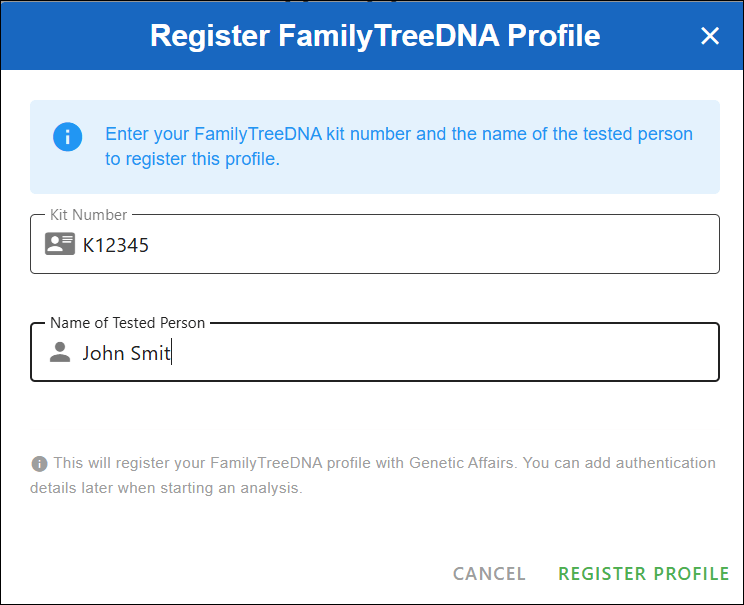
We’ll begin by registering a FamilyTreeDNA profile at Genetic Affairs. Click on Register a new website to get started.

FamilyTreeDNA account passwords are not stored at Genetic Affairs.

After clicking “Register profile,” you’ll see a message asking you to double-check the credentials for the kit you’re about to use. This is also a good time to log in to your FamilyTreeDNA account directly to make sure there are no pending actions — such as enabling two-factor authentication or accepting updated terms of service.

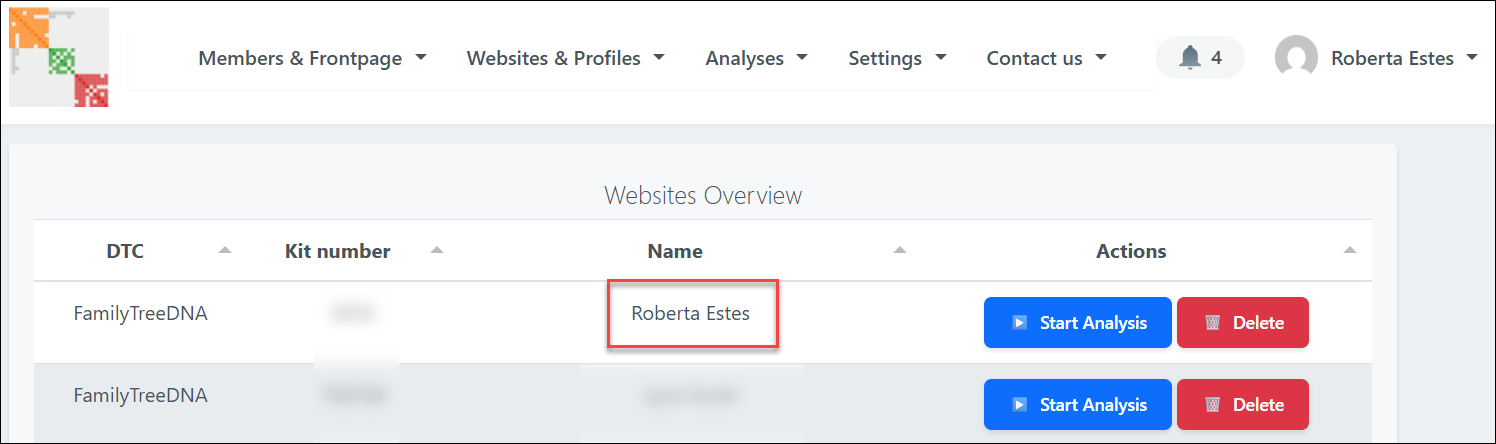
Once you click “I understand, continue,” you’ll see a list of all registered FamilyTreeDNA profiles at Genetic Affairs.

Locate the kit you want to analyze and click the blue “Start analysis” button.
This opens a guided wizard that walks you through each step of the setup.

First, select AutoKinship and click “Next.”

You’ll then be asked to define several thresholds:

  • Minimum and maximum shared cM
  • Minimum size of the largest segment
  • Minimum cluster size

A quick word of caution here: selecting a very low minimum cM value may actually reduce the number of usable matches. That’s because the system must download shared match data until it either reaches that threshold, or a preset timer expires, which can limit how much data is downloaded. When in doubt, start conservatively. You can always rerun the analysis later and change the parameters. Unfortunately, there’s no way to simoly “get everything” in one run which is, of course, what everyone would do.

Click “Next” to continue.

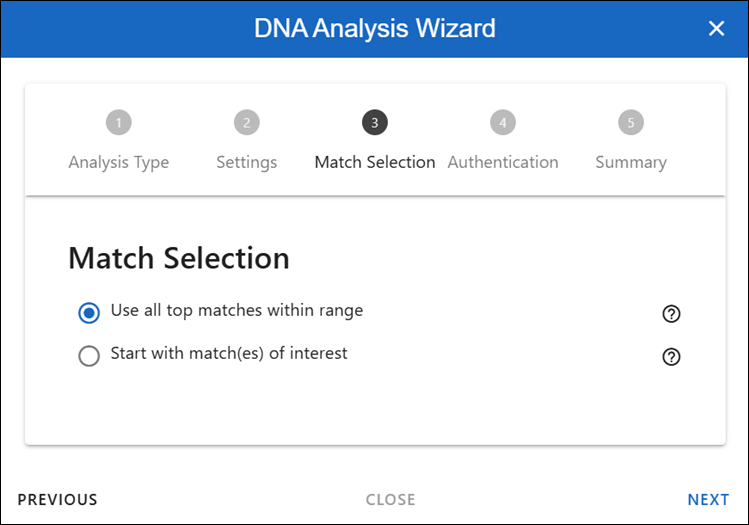
This section determines which matches will be included in the analysis.
For your first run, I recommend using the top matches within the selected range. This provides a strong foundation and usually produces the clearest results.

Later, once you’re more familiar with the output, you may want to experiment by analyzing only the shared matches of a specific person or group. For now, keep it simple and click “Next.”

Here, you’ll enter your FamilyTreeDNA password (twice) so the system can retrieve the required data.

If you use two-factor authentication, you can enter the 2FA code here, as well. To do that, log in to your FamilyTreeDNA account, retrieve the code from your email, and paste it into the wizard.

Then click “Next.”

You’ll now see a summary of all the settings you’ve chosen. Take a moment to review everything. When you’re ready, click Perform analysis” in the bottom right corner.

At this point, the Genetic Affairs servers take over and begin processing your data.

The Results Arrive

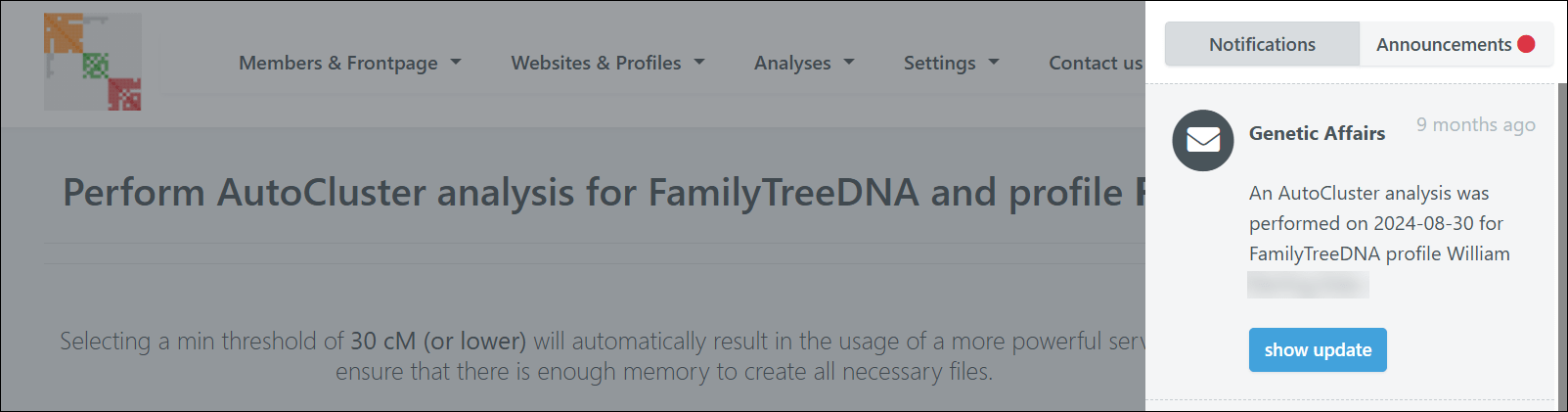
When your report is ready, you’ll receive an email with a download link. You can also access it through the notification panel in the top right corner of the Genetic Affairs site.

Downloading the report will result in a zipped file. Save it in a location on your computer where you can find it.

Critical Step

This step is critical and will save you a great deal of frustration: If you’re using a PC, you MUST extract or unzip the files before you can properly use them. I can’t tell you how many people skip this step and then wonder why they’re receiving error messages. Ask me how I know!

This is your zipped file.

If you try to open the HTML file while it’s still zipped, it might appear to work at first, but when you click on any links within the file, you’ll receive an error.

If this happens to you, close everything, right-click on that yellow zipped folder, select “extract all,” and then try again.

Now you’re set up, so on to the fun part – viewing the results.

Exploring Your Results

Once you have everything properly extracted and open the HTML file, you’ll watch your AutoCluster literally fly into place on your screen. I love this part. It’s like watching my family fly into place. I wish the actual genealogy research was this easy.

The new Genetic Affairs reports include significantly more information than previous versions.

You can change what’s displayed using the dropdown menu.

By default, you’ll see the shared cM amounts between your matches, but you can change this to show paternal or maternal information if you’ve identified those lineages by linking your matches.

In my case, my maternal line has fewer matches because my mother’s ancestry includes both recent Dutch and German immigrants, so the majority of my high cM matches are US-centric on my father’s side. My father’s ancestors have been in this country since colonial times, and a lot of testers in the US are looking back to the old country for their origins.

Therefore, in my first several clusters, I see squares with the symbol P, indicating they are paternal matches – designated as such through linked family matches, aka bucketing.

You can see the faint Ps inside the orange cells.

Here’s a close-up so you can see the “P” for paternal. If you haven’t linked your matches, you won’t have bucketed matches. Your Genetic Affairs results don’t require bucketing – it’s just a really beneficial feature.

You can change your AutoCluster settings in several ways. I tend to start with the defaults and then modify from there.

Genetic Affairs functions based on the amount of server time a particular tool takes, so it’s not possible to just “run everything,” or trust me, I would.

The Common Ancestor Magic

In your report, scroll down several sections, and you’ll find Common Ancestors – my favorite feature.

This section shows you the common ancestors that have been identified between your matches’ trees.

Looking at the Common Ancestors cluster report, you can click on three things for each cluster:

  • FamilyTreeDNA Trees of Cluster #
  • Common Ancestors of Cluster #
  • Common Locations of Cluster #

Let’s examine the reconstructed trees based on the common ancestor analysis. The first cluster shows some of my close DNA matches that are descendants of my Vannoy line.

You can see that there are six testers, in addition to me, who descend from Joel Vannoy.

Next, scroll down to the AutoKinship section of your report.

The AutoKinship Analysis

The real treasure lies in the AutoKinship analysis, which is presented in a small table on the main HTML page. When you click on the AutoKinship results for any cluster, you’ll see reconstructed trees based on the shared DNA amounts between matches, meaning between you and each of them, and between each other.

You can see that I have 10 reports available based on the cluster numbers indicated.

I clicked on Cluster 1, which shows some of my close DNA matches who are Vannoy line descendants. This includes testers both with and without trees.

Since the AutoKinship algorithm doesn’t have access to age information, it sometimes struggles with generational differences – but the relationship predictions are still remarkably useful.

Alternative trees are also provided, giving you multiple hypotheses to investigate.

Some matches may not be integrated because of incompatible relationships.

The Next Step with AutoLineage – Adding Genealogical Trees to the Mix

We’ve seen AutoTree and AutoKinship. The new upgraded AutoLineage adds genealogical tree information to genetic information by allowing the user to:

  • Import other trees
  • Integrate most recent common ancestors (MRCAs) in AutoKinship trees
  • Set known relationships
  • Provide generational information.

AutoLineage, Genetic Affairs’ online clustering and tree-building tool, has been around for several years but was recently upgraded to create trees based on shared DNA and incorporate genealogical evidence.

This is where the proverbial rubber meets the road.

Setting Up AutoLineage

Return to the home page at Genetic Affairs and select AutoLineage.

If you’re new to this tool, you’ll see a simplified workflow on the start page that walks you through the process.

First, create a profile representing the DNA test taker – in my case, that’s me.

After creating the profile, you’ll be redirected to the landing page of the profile. From there, you can register DNA tests linked to the profile. From the home page, you can see the different profiles.

You’ll register a new FamilyTreeDNA test specifically for each user whose kit you manage and who took a test.

FamilyTreeDNA is the only DNA testing company for which Genetic Affairs runs automated analyses on their site.

Additionally, you can:

Importing the Data

After registering a FamilyTreeDNA test, you are redirected to the overview of this DNA page, where matches are imported.

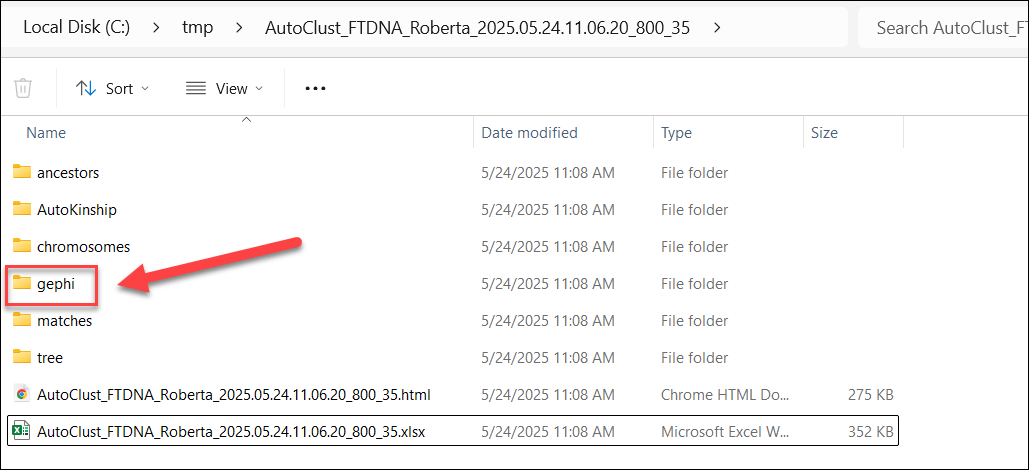
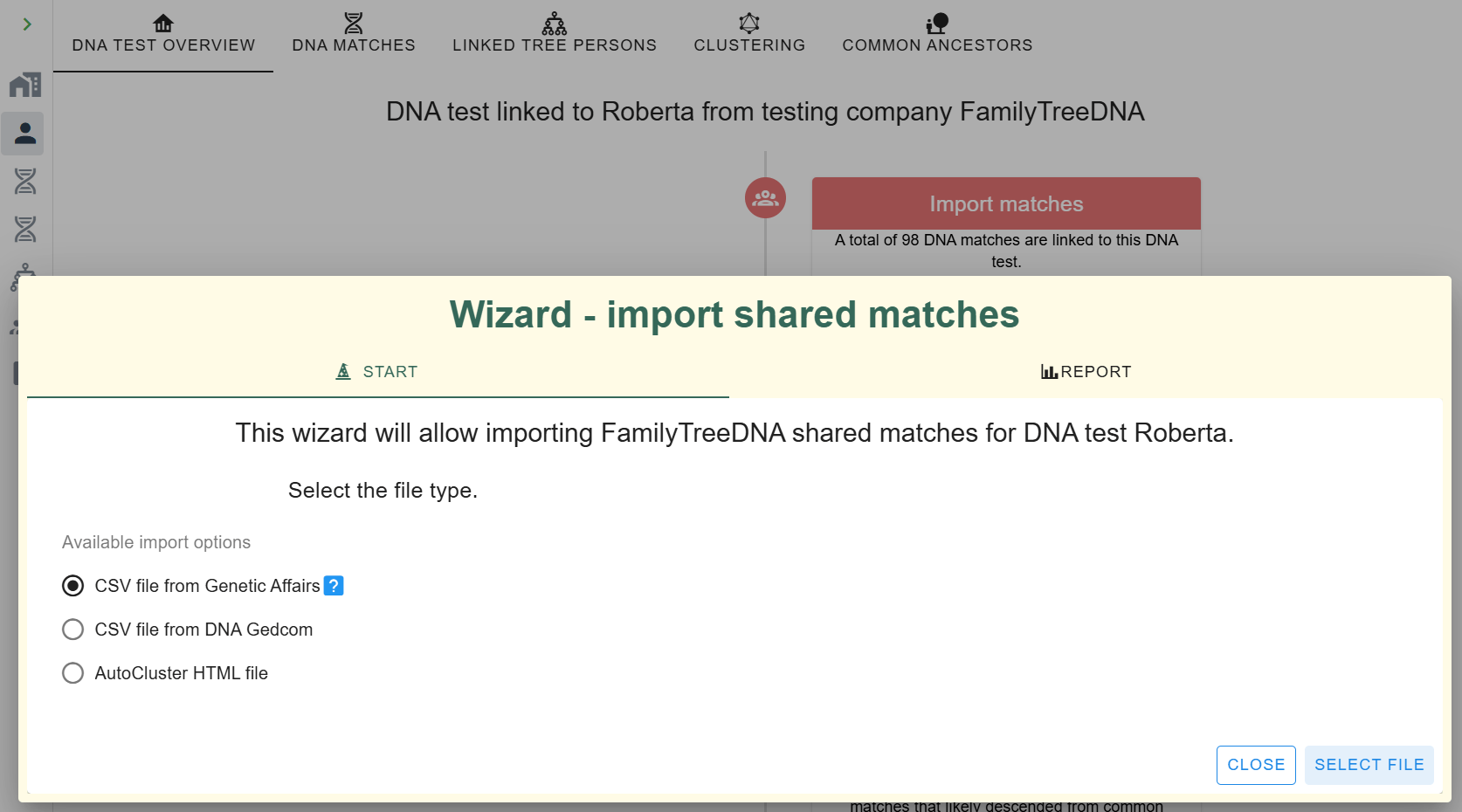
Click on “Import matches” and select the CSV file from Genetic Affairs. Here’s where that AutoKinship report we generated earlier comes in handy. The unzipped report contains match and shared match information that we can import directly into AutoLineage.

Navigate to the gephi folder in your report and select the nodes.csv file to import your matches.

After importing the matches, a short dialog shows how many matches were imported.

After closing the dialog box, the DNA matches pane is opened.

You’ll see your DNA matches that were downloaded.

Next, import the shared match information from the edges.csv file in the same gephi folder.

Once both data sets are imported, you’ll see that the ICW (In Common With) column has populated, showing how many shared matches are available for each DNA match.

Clustering in AutoLineage

Now, with the shared match data loaded, you can perform your own clustering analysis.

The wizard allows you to set parameters for which matches to include based on:

  • The amount of shared cMs
  • Weighted or unweighted clustering
  • How much DNA is shared between shared matches

You can also define the cluster characteristics, from sparse to very dense clusters.

Last, you can select the coloring scheme. After setting the parameters, click on “Start Clustering,” at bottom right.

After clustering is finished, the clustering chart is displayed. It looks fairly similar to the ones obtained automatically from Genetic Affairs, but with some differences.

The first thing I noticed is that the large orange cluster 1 in the automated clustering is now mostly represented by the purple cluster 4.

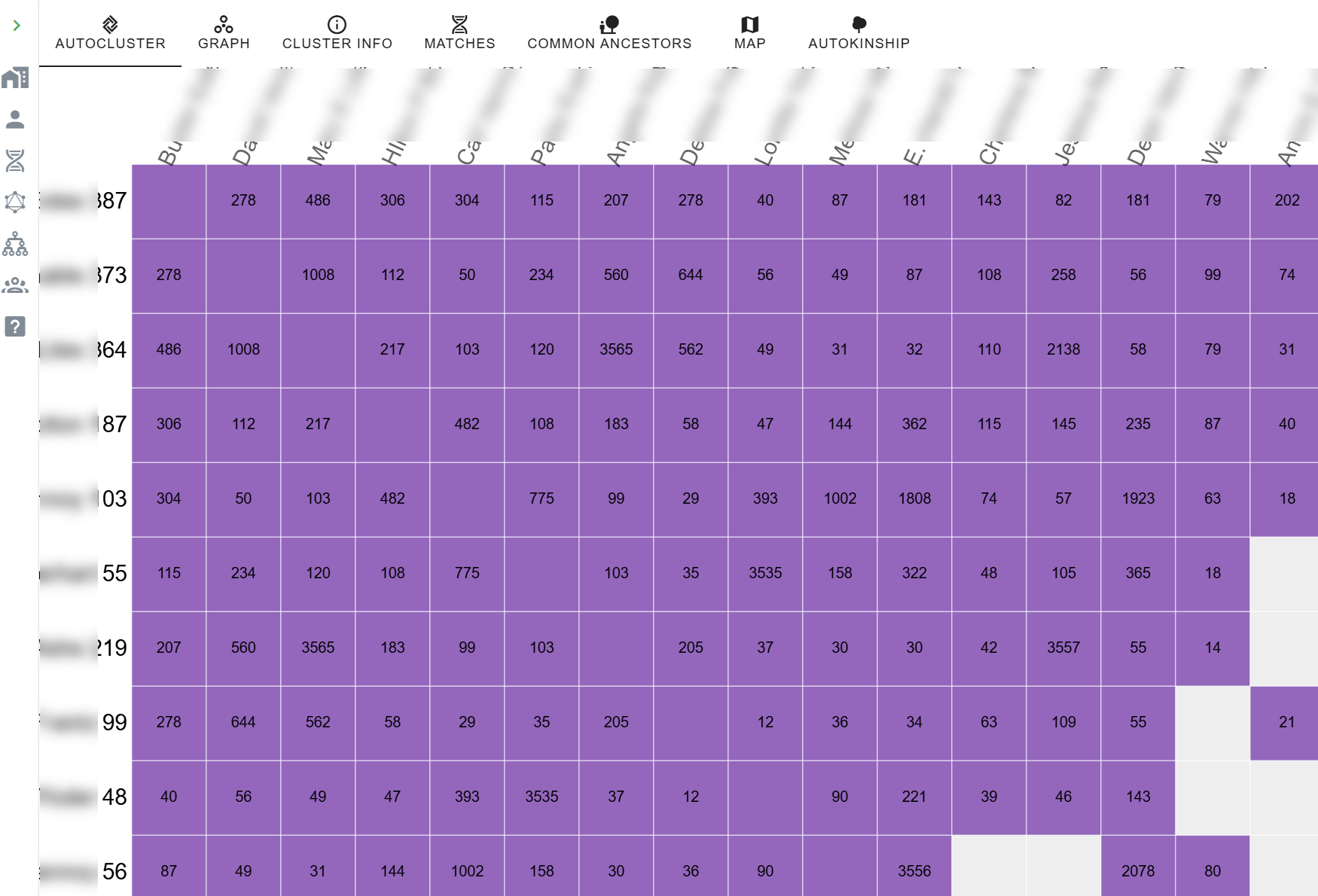
Let’s zoom in on this cluster. By looking more closely at the numbers contained in each cluster, you can already make an estimated guess about the richness in relationship information for cluster members. This cluster has lots of close relationships. Clusters whose matches only share a small amount of DNA with each other are not the best candidates for an AutoKinship analysis because they most likely share a distant common ancestor. Unless, of course, it’s a distant ancestor you’re searching for. (Hello brick wall.)

Adding and Importing Tree Information

Now that we have the new clusters, we could continue to directly run the tree reconstruction on these clusters using the shared DNA information, but let’s wait  since we want to include the tree information as well to guide this process.

To use common ancestors, we need to import the available trees that are linked to the DNA matches. Luckily, just like (shared) match information, the tree information is provided with the automated analysis as well. Let’s import the data.

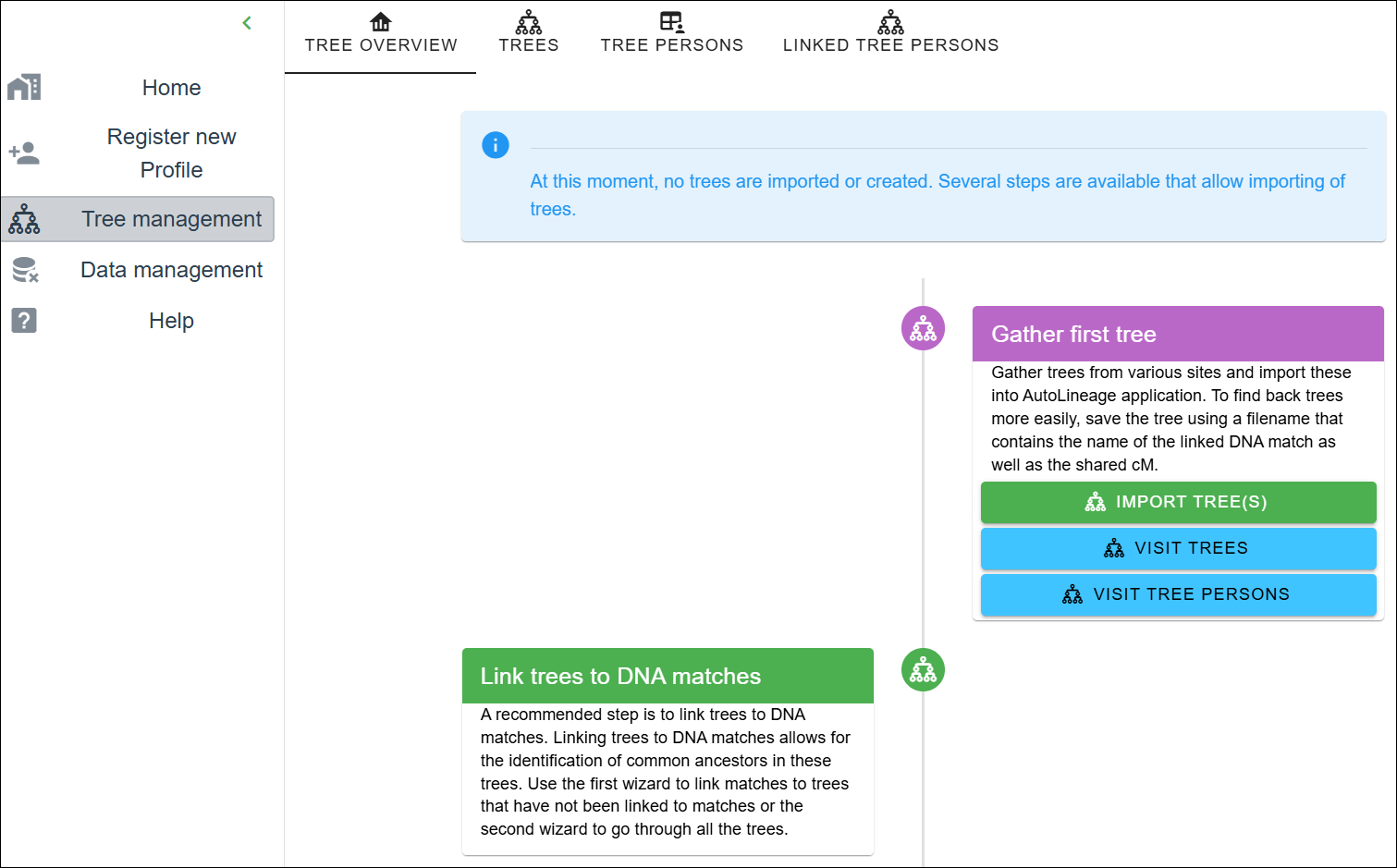
First, navigate to the tree management page. As you can see, no trees have been created or imported. Let’s start the wizard by clicking on the “Import Trees” button.

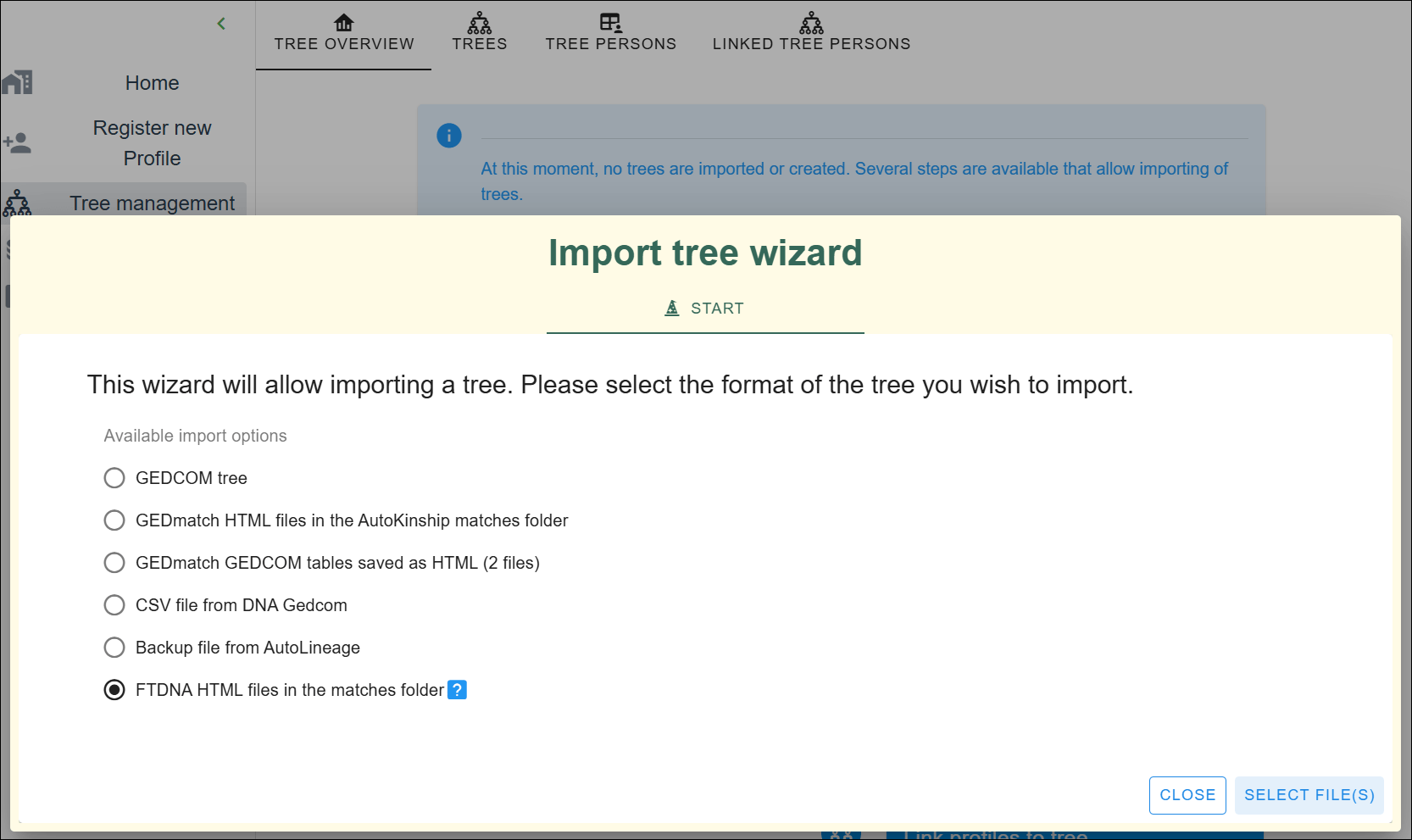
An “Import tree” wizard pops up, providing different ways to import tree information. It’s also possible to import GEDCOM files or tree data from other resources, but for now, I’m only using the archived trees at FamilyTreeDNA.

Click on the last option and select the files.

Navigate to the matches folder and select the HTML files contained in the folder.

Each file represents a DNA match report, some of which have a tree associated with them.

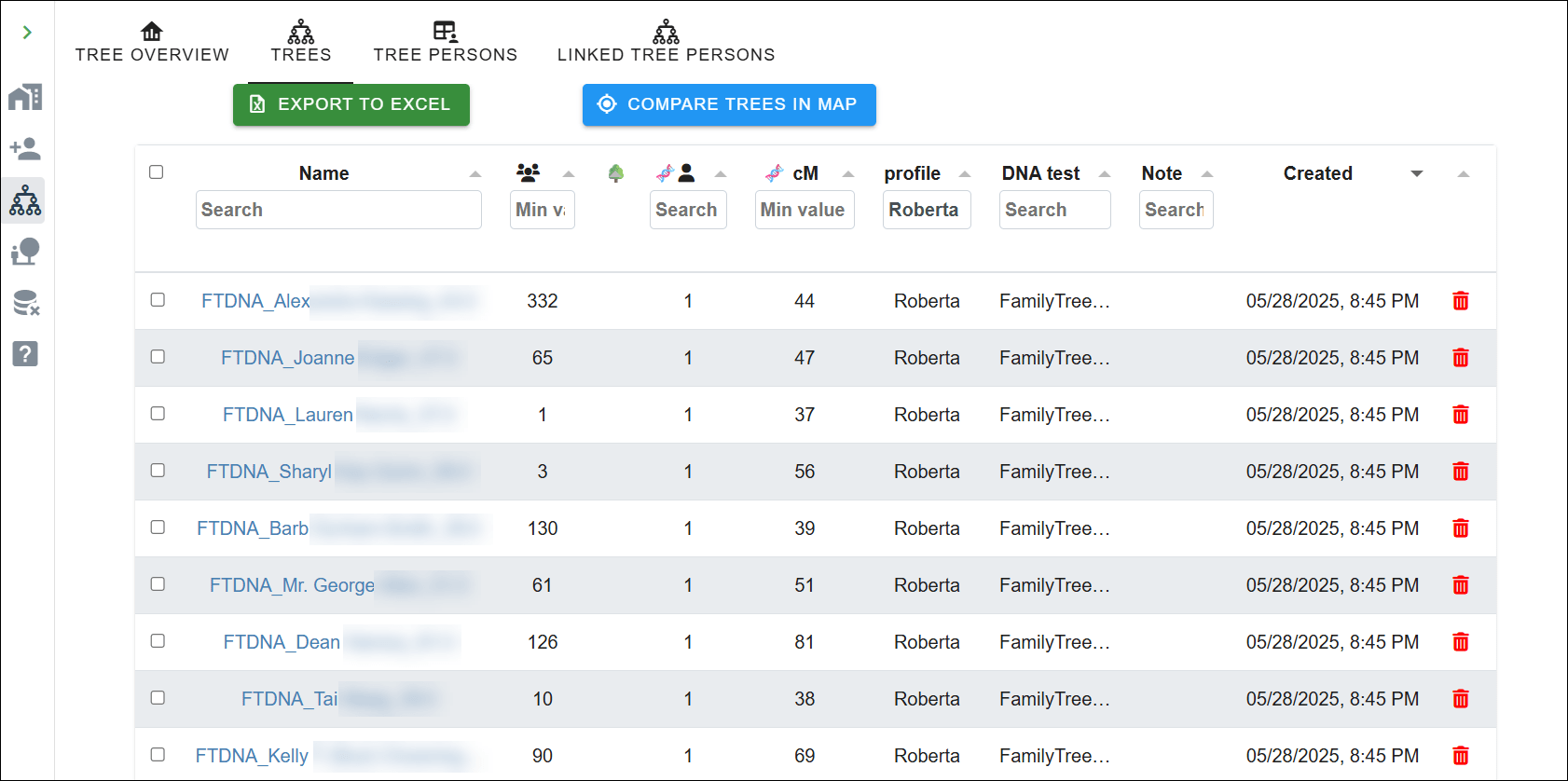
After importing the trees, they are automatically associated with the concerned DNA matches (using the unique identifier present in each file name). The tree overview page shows which tree is linked to a profile or DNA test, and the amount of DNA shared with the linked DNA match.

If you have created trees for your matches based on your own research (like quick and dirty trees), now is the time to import these using the “Import Tree” wizard again. This is a wonderful feature, because it means you’re not entirely dependant on your match having uploaded a tree themselves.

If you don’t import trees from GEDCOMs, you don’t need the linking wizard.

Click on the “Import Tree” wizard and select the GEDCOM option.

Now that we have imported additional trees, we need to associate them with DNA matches.

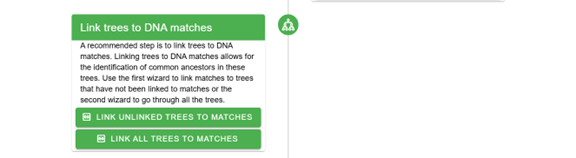
You can use a wizard to link the unlinked trees to the DNA matches, or link them from each DNA match. The wizard will try to guestimate, based on the content of the tree file name, which DNA match could be associated with the tree. Change the search criteria if it does not provide the correct results.

TIP: Save the GEDCOM files with the name of the linked DNA match as well the shared cM, which speeds up the importing process

Don’t forget to import your own tree. I imported my GEDCOM file from my computer genealogy software and associated it with my profile so it’s included in the common ancestor identification. You can easily upload your GEDCOM from your computer software, or download your tree from either Ancestry or MyHeritage to upload here.

Visit the profile, and select the tree pane. The tree pane only shows a single individual and allows you to add ancestors to it manually. To associate that individual with an existing tree, click on “Link to Existing Tree”.

A wizard will be displayed, which shows all available trees on the left side. Sort by clicking on the “Created” column to display the most recent trees.

Next, you need to select the root person.

I selected my tree.

Next, the right side of the wizard fills with the people in the selected tree. Select the root person, which is me, and click on “Save” in the lower right corner.

Finding Common Ancestors

Now that we have associated a tree with the profile and imported trees for the FamilyTreeDNA matches, it’s time to locate some common ancestors. Fingers crossed!

Go back to the profile and select the profile overview. Scroll down to the “Find common ancestors” section and click on the “Find common ancestors” button.

The “common ancestors” wizard shows trees that are associated with this profile in the table on the left and provides information about the different steps on the right. You can change the settings to make the search more restrictive or more relaxed.

After running the common ancestor identification, a dialog shows the number of trees and tree persons that were used, and the number of common ancestors that were identified.

After the analysis runs, you’ll be able to view all reconstructed trees or filter them based on common ancestors, trees, or linked DNA matches.

Common ancestors, not surprisingly, often align closely with what the automated analysis discovered.

All six testers are now shown descending from our common ancestor, in the approximate location where they will fit in our common tree.

But we aren’t quite finished yet.

The Final AutoKinship Analysis

Finally, we’ve arrived. The earlier steps were necessary to pave the way.

We have the common ancestors and clusters, and it’s time to go back to the clusters to begin the reconstruction of trees using trees combined with DNA.

Click on the profile and go to the clustering results pane. Select the 1x view, which will show the clustering chart.

Now select the matches pane that shows the different matches that are contained in each cluster. Scroll down until you reach your cluster of interest, which is four for me.

After clicking on any cluster, you’ll be redirected to a cluster view with only the information for that particular cluster.

Let’s view purple cluster 4, which looks fairly dense, with only a couple of empty cells, indicating that these shared matches with white cells did not share (enough) DNA with each other to be included in the cluster. Now select the matches pane in the dashboard at the top of this cluster, which displays the matches linked to this specific cluster. As you can see, a button is now available that allows us to run the AutoKinship analysis. Click on the button.

Single cluster matches are displayed.

Now back to the wizard.

The wizard provides several important parameters:

  • Maximum number of generations between DNA matches
  • Number of trees to analyze in each iteration
  • Final number of trees to keep
  • Whether to include known relationships and/or MRCA (Most Recent Common Ancestor) relationships

In this example, MRCA relationships were found because we performed the common ancestor identification that resulted in common ancestors between the matches of this cluster.

If you know specific relationships between matches, you can set those manually. Sometimes you might not know the exact relationship, but if you can estimate that a match is one or more generations older or younger than yourself, you can set that too.

In addition to setting the relationship between the test taker (indicated in green in the table) and the DNA matches, it’s also possible to set the relationship between shared matches, if known.

The Hybrid Results

After the analysis has finished, an overview of the identified trees is presented.

The final result is a blended tree where DNA evidence fills in the blanks for matches who haven’t uploaded trees, or you haven’t provided a tree, and known genealogy supports the structure where it exists. This hybrid approach gives us the best of both worlds – the precision of documented genealogy combined with the discovery power of DNA analysis.

I particularly like this approach, because when I identify how a DNA match is related to me from any vendor, I enter their lineage in my desktop genealogy software. Therefore, using that GEDCOM file is the most complete source of my identified relatives.

Testers 1-6 were shown using the regular AutoTree, without the integrated tree, but an additional 11 matches were placed for consideration using all available tools.

I was using this as an experiment because I know how most people in this cluster are related, and those are all placed accurately. There is one person, located on the branch between 1 and 5, who I had no idea how they fit into this puzzle. Now, at least I know where to look.

I can’t imagine trying to do all of this manually.

Why This Matters

For those of us dealing with unknown parent or grandparent situations, poorly documented lines, non-existent trees, or just plain stubborn brick walls, this combination of tools is nothing short of amazing. You can now explore relationship hypotheses even when traditional documentation is scarce.

The reconstructed trees show how common ancestor information provides the template, while the AutoLineage tool fills gaps using shared DNA information. The updated AutoLineage is the genealogical assistant that never gets tired and can deal with relationship possibilities much more effectively than traditional hand-based methods.

In Summary

If you haven’t explored Genetic Affairs recently, give it a look. The integration between AutoKinship and AutoLineage represents a significant step forward in DNA analysis.

While AutoKinship offers valuable insights on its own, its full potential is truly unlocked when you export the data into AutoLineage. The combination creates a comprehensive analysis that was previously impossible.

For researchers dealing with complex family relationships or challenging genealogical puzzles, this hybrid approach that combines matches at FamilyTreeDNA with DNA evidence and genealogical trees could be the key to breaking through stubborn brick walls that nothing else has budged.

Last but not least, I suggest reading Dr. Patricia Coleman’s blog articles about these tools and her methodologies here and here. Patricia works extensively with these tools, and I often recommend her for private autosomal research consultations. Patricia’s 2026 RootsTech Session, DNA Case Study: Finding an 1877 Birth Father with Genetic Affairs, BanyanDNA, and No Birth Record, details her work solving a long-standing problem for my cousin in the Speaks family.
_____________________________________________________________

Share the Love!

You’re always welcome to forward articles or links to friends and share on social media.

Subscribe!

If you haven’t already subscribed, it’s free. You’ll receive an e-mail whenever I publish by clicking the “follow” button at the top of the main blog page, here.

Help Keep This Blog Free

I receive a small commission when you click a vendor link in my articles and purchase that item. This does NOT increase your price but helps me keep the lights on and this informational blog free for everyone. Please click on the affiliate links in the articles or to the vendors below if you are purchasing products or DNA testing.

Thank you so much.

DNA Purchases and Free Uploads

Genealogy Products and Services

My Books

Genealogy Books

Genealogy Research

A Forest of Fathers: FamilyTreeDNA’s Y-DNA Tree Tops 100,000 Branches

Congratulations to FamilyTreeDNA and all of their customers who contributed to this absolutely monumental milestone. The Y-DNA tree has now reached 100,000 branches.

Chart courtest of FamilyTreeDNA

I knew they were getting close because the official January numbers were 99,777.

Congratulations to the entire team, but especially to Michael Sager, Senior Phylogeneticist, who has been the chief architect of the tree “forever.” This is definitely his baby.

Here’s Michael in 2020 at RootsTech discussing the Y-DNA tree construction methodology.

The Y-DNA tree is built using the results of 698,000 individual Y-DNA testers, plus thousands of both academic and ancient results.

These 100,000 tree branches are built from 857,000 variants, known as SNP mutations. Think of those as a huge 857,000-piece puzzle that Michael Sager has spent the past decade assembling into the Y-DNA tree of mankind, reaching all the way back to Y-DNA Adam.

In the tree today, haplogroup A-PR2021, named for variant or SNP (single nucleotide polymorphism) PR2921, is Y-DNA Adam, who lived in Africa about 234,000 years ago.

Click on any image to enlarge

FamilyTreeDNA has made their entire Y-DNA tree public and free, and that’s in addition to the baker’s dozen reports available through Discover for each haplogroup.

Let’s take a look!

The Public Y-DNA Tree by Country

You can view the public Y-DNA tree, here, and can select to view the tree by:

  • Variants (mutations) that define each haplogroup
  • Country
  • Surname

For example, here is the oldest, or top portion of the tree, using “by Country,” the first of three options.

Notice two things at far right:

  • There may be a “+” when there are too many countries to display
  • The 3 dots

Clicking on the three dots provides you with the option for a “Country Report” or “Surname Report” for that specific haplogroup.

The Country Report shows the number of haplogroup members from each country. Remember that countries are self-reported by the testers. The country should be the location where the tester’s earliest known paternal ancestor (EKA) was living or from.

You can see how many people are members of this specific branch, and in the next column, how many people are members of this branch plus all “son” or downstream branches. One column excludes new haplogroup letters (when a different base haplogroup is formed), and the other includes all downstream haplogroups, even if the beginning branch letter changes. The final “Distribution” column shows the percentage of people in that haplogroup who originated from each country.

In this case, 43% are from the US, which probably means that they are brick-walled here, given that the only people originally “from” the United States were Native Americans who fall into specific subclades of haplogroups C and Q.

If you’d like more information about A-V148, or any other haplogroup, you can go to Discover and enter a haplogroup name. I always check the Ancient Connections because archaeological remains anchor haplogroups in a particular place at a particular time. We’ll cover more about Discover in a minute.

The Public Y-DNA Tree by Variant

This haplotree view “by Variant” shows the variants, or SNP mutations, that identify each haplogroup.

You can see that Haplogroup A-PR2921, the granddaddy of the tree, is based on only one mutation, PR2921, which is also the haplogroup name. This means two things:

  • Every haplogroup beneath this branch on the tree also has the mutation, PR2921, which is how we know it’s the “original” founding mutation
  • This haplogroup cannot be split further, because there are no additional variants

For example, look at the branch, A-L1090, the first “child haplogroup” of A-PR2921. A-L1090 has the 26 mutations displayed, plus more, for a total of 695.

This means that as more men test, there are literally more than 695 opportunities for various men to match on a unique subset of those mutations, plus new mutations never discovered before, forming new haplogroups.

Some lines have died out over time, and others may be quite rare. This is the perfect example of why it’s important for every male to take the Big Y test, aside from genealogy.

Looking on down the tree to the next haplogroup “generation,” we can see that haplogroup A-V148 has 21 descendant haplogroups, but its sibling subclade, A-V168 has 99,967 – essentially the rest of the tree.

The Public Y-DNA Tree by Surname

Viewing the tree “by Surname” can be very useful. Surnames are shown beside their haplogroup if there are two or more individuals:

  • With the same spelling of the surname who are assigned to this haplogroup
  • Who are members of a public DNA Group Project
  • Who have given permission for their information to be displayed publicly within the project

You can see that haplogroup A-V148 has one surname showing – Goddard.

Haplogroup A-M31 shows four: Bass, Johnson, Evans and Cruise.

Clicking on the three dots shows the Surname Report.

This report reveals that there are seven men with the Goddard surname and no other surnames are currently lissted for this haplogroup.

You might be a member of this haplogroup even if your surname isn’t Goddard. Surnames were only adopted in the past few hundred years, and many have changed during that time for a wide variety of reasons, including spelling variations. Not everyone who is in the matching database has joined a project, so they may show up on your match list, but not be visible here.

Since we know that several Goddard men are in some project, how do we figure out which project or projects they have joined?

Discover’s Suggested Projects

Go to Discover and enter the haplogroup. Click the big orange “Search” button, which will display the Haplogroup Story page for that haplogroup.  .

From the Discover menu at left, select “Suggested Projects”.

For haplogroup A-V148, 10 projects are listed based on which projects members of this haplogroup have joined or on project administrator settings. Those projects alone may provide ancestral hints. Many people, if not most, join multiple projects, such as haplogroup projects, surname projects, and geographic or ethnic projects.

You can click through to any of the projects listed for any haplogroup to take a look. I use my browser search function to search for specific surnames on project pages.

You may find that someone who descends from your ancestor has tested and is waiting for you to match them – plus other genealogical hints as well.

Is Your Surname in the Database?

How can you tell whether your surname is in the database? That’s a great question!

In the public tree, there’s a “Search by Surname” feature. I searched for Estes, and discovered that Estes appears on 8 different branches of haplogroup R. Next, I need to click on haplogroup R, which is directly beneath the search box.

This doesn’t mean there are only 8 men who have tested, but that they are found on 8 different tree branches.

Remember that men who obtain a Family Finder haplogroup are also included on the free Public Tree, so I’ll probably find some Estes men on higher branches of the tree than they would appear if they had taken a Big Y-700 DNA test. Hopefully, they will upgrade, which will help them and all Estes descendants by piecing together our Estes lineages.

Sure enough, using my browser search to search for “Estes”, I discovered the name included with 500 other surnames in haplogroup R-L21, in R-DF49, in R-1690, and then the goldmine – four haplogroups that have ONLY the surname Estes listed.

These are our Estes twigs on the haplotree’s branches, and define four lines that begin with Silvester Estes born in 1522 in Kent, England. These haplogroups are how we proved where our line originated, and how we place testers who are uncertain about their genealogy on their correct tree branches today.

Don’t forget about both the surname and country reports available to the right when searching by surname in the Public Tree. You can also navigate to Discover to learn more about any of these haplogroups in which your surname appears.

Iff you’re an Estes male, you may or may not land in one of these haplogroups. You might even be a member of a different lineage altogether. The only way you’ll know is to take the Big Y-700 test, or minimally, the introductory 37 and 111 marker tests to view your matches. These entry-level tests provide a predicted haplogroup based on STR markers, but you’ll only be placed in your proper place in the tree with the definitive Big Y-700 test. I wrote about the difference between STRs and SNPs here.

Obviously, Y-DNA is only applicable to biologically male testers who have a Y chromosome, and you’ll only see surnames on the tree if multiple people with that exact surname have tested and joined projects, but there’s one more place to look if you want to see how many people with your surname have tested at FamilyTreeDNA.

Group Projects Search

In the footer of every FamilyTreeDNA page, under Community, you’ll find “Group Projects.” No, I don’t know why they buried this tool here, because I find it very useful, and you’ll never find it if you don’t know where to look. But now you do!

Enter the surname you are seeking and click “Search.”

You’ll see at the bottom of the search results page that 391 people whose surname is spelled exactly “Estes” have taken a DNA test at FamilyTreeDNA.

Clearly, some will be males, and others female, and they may have:

  • Taken the autosomal Family Finder test
  • Uploaded an autosomal test from another vendor
  • Taken the mitochondrial DNA direct matrilineal test (your mother’s mother’s mother’s direct line through all females)
  • Taken a Y-DNA test (males only) for the direct patrilineal (surname) line

Lots of people in the database will be descended from Estes ancestors, but won’t carry the surname. This search is an invaluable resource for genealogists seeking their ancestors’ surnames and lineages. Check it out by entering the surnames of your four grandparents and see what’s there!

I use this search tool, combined with projects to find actual testers who represent my ancestral lines and their haplogroups. Then I search the public tree and use Discover to learn about my ancestors. Which brings me back to why this milestone is so important.

Congratulations on a HUGE Milestone for Mankind

The trip to 100,000 haplotree branches was a long and sometimes challenging road. What an amazing accomplishment! Today, the tree is growing at warp speed, but it began with “horses and buggies” in 2003.

  • In 2003, the YCC Consortium published a paper defining the structure of the Y-DNA tree which, then, consisted of 153 branches based only on 243 SNPs. That’s all that had been discovered in academia at the time. But citizen science was coming into its own and many more haplogroup discoveries would soon follow, thanks to our testing pioneers.
  • In 2006, ISOGG committed to developing and maintaining a public, manually curated haplotree based on SNPs discovered at different labs. The ISOGG tree was published annually, with the final version released in July 2020.
  • In 2006, there were about 250 branches on the Y-DNA tree and SNP discoveries were rare events. Today, with the Big Y-700, new SNP discoveries occur at the rate of several hundred per week, thanks to the testing public.
  • In 2010, the YCC consortium released its final tree that included only 440 branches.
  • In 2013, FamilyTreeDNA introduced the Big Y test, which used the newer NGS (next generation sequencing) scanning technique instead of targeting specific locations on the Y-chromosome. The Big Y-700 test scans millions of locations in the gold standard region of the Y chromosome. It reads known Y-DNA SNP locations for haplogroup placement, but also identifies mutations not previously discovered that are often lineage-specific. That’s the key to identifying new haplogroups. Haplogroups are literally named after their SNP.
  • 2018 was a banner year. There were 17,966 branches on the tree.
  • By 2018, the haplotree was benefiting from what was termed a “SNP tsunami,” which rapidly expanded the tree. In June, 2018, FamilyTreeDNA named their 100,000th SNP. That too was a huge milestone, which I wrote about, here. Not every SNP discovered becomes its own haplogroup, of course, but they all must be placed appropriately on the tree.
  • In September of 2018, FamilyTreeDNA introduced their Public Tree.
  • That avalanche of SNP discovery meant that the volunteer-maintained ISOGG tree was struggling mightily to keep up with the onslaught, publishing one final tree in 2020. The landscape had changed. A yearly, independent tree that compiled information from multiple sources was no longer necessary. Haplogroup and SNP discoveries were being made almost exclusively at FamilyTreeDNA, who publishes and maintains their Y-DNA tree organically as SNPs are discovered and added to the tree.
  • In December 2021, the FamilyTreeDNA Y-DNA haplotree reached 50,000 branches. I wrote about that milestone, here.
  • In just over four years, that has doubled at a rate of about about 1000 new branches per month. That’s mind-boggling!
  • On February 5, 2026, the haplotree reached 100,000 branches! I checked earlier today (Feb. 6th) and there are already 39 more haplogroups. No moss growing under their feet. They’ve reached for the treetops and gone beyond!

Reaching 100,000 branches on the Y-DNA tree is an absolutely amazing achievement, both scientifically and genealogically. Perhaps best of all, reconstructing the lineage and paths of our ancestors is the only way we can reach indefinitely back in time. Beyond surnames and far beyond what autosomal DNA can touch.

Based on that, we can add genetic anthropology to the fields that have benefited immensely from the achievements of the tree. Conversely, genetic anthropology has contributed to the construction of the tree with the sequencing of ancient DNA results, allowing thousands of ancient samples to be incorporated.

Every contemporary haplogroup descends from Y-DNA Adam. Given that Adam lived at least 234,000 years ago, that represents about 9,360 direct-line ancestors (at 25 years per generation) for each one of us. At 20 years per generation, we have 11,700. Wouldn’t Y-line Adam be utterly dumbstruck to learn that he has 8 billion descendants, of which slightly more than half are males who still carry his defining haplogroup mutation, A-PR2021!

Thanks to the FamilyTreeDNA public Y-DNA tree and searches, plus the amazing Discover tools, we can now peel back the curtain of time on both recent and distant ancestors by walking our haplogroups back one at a time until we meet our earliest ancestor of all – Adam

Want to Meet Adam? Here’s How You Can Participate

You can participate in building the Y-DNA tree of humankind and meet Adam by taking a Big Y-700 DNA test, which you can order here. If you’re a female, you can sponsor a Y-DNA test for a male relative, such as a father, uncle, or brother who represents one of your surname lines. But don’t stop with your own paternal line – reach out and make those same discoveries for all of your ancestral lines! Your ancestors are waiting to meet you!!

_____________________________________________________________

Share the Love!

You’re always welcome to forward articles or links to friends and share on social media.

Subscribe!

If you haven’t already subscribed, it’s free. You’ll receive an e-mail whenever I publish by clicking the “follow” button at the top of the main blog page, here.

Help Keep This Blog Free

I receive a small commission when you click a vendor link in my articles and purchase that item. This does NOT increase your price but helps me keep the lights on and this informational blog free for everyone. Please click on the affiliate links in the articles or to the vendors below if you are purchasing products or DNA testing.

Thank you so much.

DNA Purchases and Free Uploads

Genealogy Products and Services

My Books

Genealogy Books

Genealogy Research

Getting Ready for RootsTech 2026

RootsTech, March 5-7, 2026, will be here before you know it. Behind the scenes, people are scurrying around like crazy!

Let’s take a peek!

You’d Think January Would Be Quiet…

January seems like it would be a quiet, “down” time, after the holidays, but for many of us, it’s not. It would seem like the holidays would be a time to relax and catch up, but I always get further behind and face a ton of emails in January. (I’m still very behind with those.)

No small part of my January issue is self-imposed, though not all of it.

Let me explain.

  • I’ve always strived for one industry or technical blog article each week. Something about a tool, a product, a how-to article, industry news, something useful and educational. I can’t write an article without using and understanding the tools, so these articles take a substantial amount of time to prepare.
  • I also strive for one “52 Ancestors” article each week, typically published on the weekend. While these articles reconstruct the lives of my ancestors, they include a great deal of genealogy research, instructional content, and a substantial amount of history that affected the lives of anyone who lived in that location or during that time. While the topic is my ancestor, these articles are useful far beyond my own genealogy.

As an aside, many people read these articles as a short-story series. Working on each article draws me close to each ancestor individually. I literally walk through their life beside them – joys, sorrows, deaths, where they lived, what was happening around them – birth to burial.

  • Of course, then there’s “everything else.” Other articles, interviews, my contractual work, collaborating with others, and of course, some smidgen of personal time.

January is Different

But the reason January is different, on steroids, is threefold:

  • It’s the month that speakers begin planning and preparing for sessions they will be giving during the rest of the year.
  • For US business owners, it’s when we begin gathering the information for business taxes, which are due March 15th, a week after RootsTech, which means that we have to get the information to our preparer long before RootsTech. I’m not exaggerating to say this is one of my LEAST favorite activities ever.
  • However, the third challenge is RootsTech itself.

RootsTech 2026

RootsTech, held March 5-7 this year in Salt Lake City, is the granddaddy of all genealogy conferences. I’m fortunate to be able to attend and present – and I’m grateful for that opportunity. But there’s a huge amount of prep, and while some of it happens in December, most of it falls in January.

I’m often asked about what it takes to create a presentation, or put more bluntly, “Why does it take so long? All you have to do is throw together a few Powerpoints.” So, here’s the backstory.

I can’t speak for other presenters, but every 45-minute presentation that I create takes about a week.

If you’re stunned, every one of my slides includes images and often graphics that I create. The slide content needs to be balanced, readable, and not distracting form the point I’m trying to make. It needs to flow smoothly from the prior slide, and to the next one.

It goes without saying that I have to verify everything, sometimes with a vendor, sometimes making sure features still work the way I think they do, or did, the logic is accurate, and that any math maths.

Many screenshots used for articles and presentations need to be blurred, and I need to be sure I don’t accidentally compromise someone’s privacy.

It seems there are 1000 little things. Ok, so maybe only 100!

Syllabus: Oh, you want a syllabus too? Well, that’s another document which often has to be formatted in a specific way, and must be between x and y pages long. Some requirements for different conferences are very specific, down to the font.

The presentation must “fit” into its allocated time, say, generally 45 or 50 minutes, without me talking at 150 MPH with the audience feeling rushed, and provide enough information to be both useful and entertaining. This means that presenters must practice, refine, practice. You get the drift.

Additionally, when working in a tech field, like DNA, vendors change things, often, and you need to review your presentation just before the conference to be sure the screenshots and information are still current. Speakers watch every announcement between presentation creation and the conference with an eye to changes. I swear, it never fails that the night before, I’m always trying to update my presentation because a vendor updated their website. One time it was literally at the podium. That was way too close for comfort.

RootsTech must manage and coordinate hundreds of presenters, their presentations and syllabi, lots of technology, and massive logistics. In order to do so:

  • Pre-recorded sessions are due to RootsTech at the end of December.
  • For other speakers, copies of their PowerPoint presentations and syllabi are due by January 25th so RootsTech can review, check for any issues, and make any last-minute changes. (Hint – you may not see another blog article for the next 10 days.)

All things considered, RootsTech does a great job, but last-minute schedule changes do occur, so be sure to check your planned schedule closer to and daily during RootsTech.

My 2026 RootsTech Sessions

Pre-Recorded Session:

  • X-DNA Basics for Genealogists, a recorded session that will be available in the FamilyTreeDNA virtual booth, which means that everyone will be able to watch. The great news is that the vendor booths and their contents will be visible in the Expo Hall, both in person and virtually, entirely free. You don’t need to register to attend RootsTech to view the vendor booths, but there’s no reason not to, because online registration is free.

Live-Streamed Session:

  • I’ll be presenting Mapping Maternal Connections: Where Science Meets Genealogy on the Updated mtDNA Tree of Humankind for FamilyTreeDNA as a member of the R&D team that developed the new Mitotree. This will be a fun session that explains why mitochondrial DNA matters, covers the latest update, and how the new Mitotree, along with Discover, provides genealogists with new tools to break through brick walls.

The date and time for this session have not yet been confirmed, so check the schedule moving forward.

You must register for RootsTech Online to access live-streamed sessions remotely. They are added to the RootsTech on-demand library for later viewing.

In-Person Sessions

I’m fortunate to have two in-person sessions this year. Neither are being live-streamed or recorded, so I hope to see you in person.

  • Mitochondrial DNA to Z: My Results Are Back, Now What? Everyone is excited when their DNA test results are back, but what do you do next? How do you use them most effectively? What do those numbers means and why are they important? If these questions sound familiar, this is just the class for you. We will take results, step-by-step through all of the reports and tools and help you interpret what they mean and how to use them for genealogy using a case study.

This session is currently scheduled on March 5th, at 4:30 PM, Mountain Time. Please see the Schedule Warning section below.

  • Y-DNA to Z: My Results Are Back, Now What? Would you like to understand how to use your Y-DNA results for genealogy? What do those numbers mean and why are they important? This is just the class for you. We will take Y-DNA results, including the Big Y-700, step-by-step through all of the reports and tools and help you interpret what they mean and how to use them for genealogy. We’ll close with “next steps”, so you have a plan to understand your own Y-DNA message, PLUS how to create a genetic tree to reveal the messages from your other ancestors too. Females don’t have a Y chromosome, but we have fathers, brothers and male family members to test.

This session is currently scheduled on March 6th, at 3 PM, Mountain Time. Please see the Schedule Warning below.

Schedule Warning!!

When viewing sessions on the RootsTech website, the date and time displayed on your computer is the date and time that the event occurs USING YOUR LOCAL TIME!! The RootsTech website uses the time on your computer and adjusts the RootsTech session time displayed to your local time.

That’s fine if you’re attending online, but it’s NOT fine if you’re trying to plan an in-person schedule around travel time and other commitments.

For example, here’s the time displayed for my Y-DNA session. You can see that it says 5 PM, which is GMT-5, and that’s the time where I live, not in Salt Lake City which, during RootsTech, is GMT-7.

This session is NOT available virtually, so anyone who wants to attend will need to do so in person in Salt Lake City. However, the local time, in Salt Lake City, that this session will be taking place is 3 PM, not 5 PM.

In prior years, when I’ve scheduled these sessions in my phone, I wound up having to go back and change the time of every session after arriving in SLC – so that just adds to the confusion. Check your phone after arriving to be sure your sessions are shown in their correct time slot.

One more possible glitch this year is that Salt Lake City time changes at 2 AM on the day following RootsTech. Be sure to factor this time difference into your schedule if you’re planning to fly on Sunday, March 8, the day after RootsTech.

Bottom line – when planning your RootsTech events, be sure to calculate the local time and not your system time, unless you’ll be attending virtually. Also, be sure to check your schedule often in case either schedule or room changes have been made.

Register

Be sure to register for RootsTech. Online is free, and in-person only costs $129 for a 3-day pass, which is a great value for everything that’s offered.

When you register for RootsTech, you’ll be able to use their complimentary conference schedule planning feature which is infinitely helpful. If you’re planning to attend any session, adding it to your RootsTech calendar helps RootsTech with room size planning – getting the right speakers in the right rooms to properly accommodate the audience size.

If you have more questions, here’s the RootsTech FAQ.

Personal Note

On a personal note, RootsTech isn’t just a conference, it’s a clan gathering, a homecoming for genealogists where we meet and mingle with other genealogists. Where we find cousins, both new and old. It’s a place to bask in the genealogy glow with our peeps and discuss historical events, new technology, old maps and common ancestors. It’s a reunion, a place of excited greetings and infinite hugs.

Me with Mags Gaulden in 2018

I know this sounds sappy, but it’s absolutely true. It’s the only place many of us see each other. We have a great deal of fun and cherish every minute!

Come make some priceless memories.

I hope to see you there!

_____________________________________________________________

Share the Love!

You’re always welcome to forward articles or links to friends and share on social media.

Subscribe!

If you haven’t already subscribed, it’s free. You’ll receive an e-mail whenever I publish by clicking the “follow” button at the top of the main blog page, here.

Help Keep This Blog Free

I receive a small commission when you click a vendor link in my articles and purchase that item. This does NOT increase your price but helps me keep the lights on and this informational blog free for everyone. Please click on the affiliate links in the articles or to the vendors below if you are purchasing products or DNA testing.

Thank you so much.

DNA Purchases and Free Uploads

Genealogy Products and Services

My Books

Genealogy Books

Genealogy Research

2025 Genetic Genealogy Retrospective: Wow – What a Year!

2025 has been quite a year in genetic genealogy. Genetic genealogy, per se, really isn’t a separate “thing” anymore. DNA testing is now an integral part of genealogy, with the potential to answer questions that nothing else can!

The 76 articles I wrote in 2025 fall into multiple categories and focus on different topics based on what was happening in the industry.

From my perspective, here are the most notable announcements and trends in genetic genealogy, and genealogy more broadly.

#1 for 2025 – Mitochondrial DNA: The Million Mito Project Released the New Mitotree, Updates, and mtDNA Discover

The biggest genealogy news items this year, both industry-wide and genealogy-changing are definitely the release of the new Mitotree, plus two tree updates. But that’s not all.

In addition, full sequence mitochondrial DNA testers received new Mitotree haplogroups, if appropriate, and everyone received a haplotype – a new feature. Along with Mitotree, FamilyTreeDNA introduced mtDNA Discover which provides 13 individual reports based on your haplogroup and matches.

It’s no wonder that mitochondrial DNA articles led the pack with the most views based on the eleven articles about that topic. If you haven’t yet tested your mitochondrial DNA at FamilyTreeDNA, there’s no better time! You never know what you’re going to discover and the more testers, the more matches for everyone.

You don’t know what you don’t know, and you’ll never know if you don’t test. Remember, mitochondrial DNA is for both males and females and tests your mother’s direct matrilineal line (mother to mother to mother, etc.) – reaching beyond known surnames.  Click here to order or upgrade.

#2 – MyHeritage Low Pass Whole Genome Sequence Test Charges into the Future

Another big hitter is the new MyHeritage low-pass whole genome test (WGS) test. It’s new and innovative, but we haven’t seen comparative results yet.

My results from the new low-pass whole genome test just came back, and I haven’t had the opportunity to review them yet, as compared to the earlier tests. That said, I do have roughly the same number of matches, but I need to determine if they are the same matches, and how well they track. I’ll be working on that review soon.

The new whole genome test may be more about future proofing and preparedness than additional current benefit – but we will see. I definately wanted to take the whole genome test so I can receive and benefit from whatever new is coming down the pike.

MyHeritage allows you to maintain multiple DNA tests on your account, so the new whole genome won’t “replace” your older or uploaded test. That way, you can easily compare the results of the whole genome against any DNA test that you curently have at MyHeritage.

Click here to order the new test.

#3 – 23andMe Experiences Problems

On a less positive note, but still quite newsworthy is the bankruptcy of 23andMe and subsequent repurchase of 23andMe by the original founder after setting up a new nonprofit. I have real mixed feelings about this topic. However, 23andMe was really never about genealogy, and now, matching segment information is no longer available. Those searching for unknown parents or family may want to test there if they are unsuccessful elsewhere.

Best Genealogy Tool

The FamilySearch full text search continues to have a HUGE impact for genealogists. This tool is not one-and-done, but provides increasing amounts of rich information as more records are added to the “fully scanned” collection. If you haven’t tried it, please do. It’s a game-changer and continues to improve.

A Cautionary Word About AI – Artificial Intelligence

AI is such a hot topic right now that I feel it needs to be included.

The FamilySearch full text search uses a form of AI. However, you’ll quickly notice that it can’t read everything, gets words and names wrong, and if you actually need to fully depend on it for accuracy, you cannot. (That said, it’s still an amazing tool, and I’m not picking on FamilySearch.)

Aside from FamilySearch, AI in its current form is both wonderful and terrible. I’ll be writing about AI in the new year, but for now, don’t ever rely on AI for anything that you can’t verity. It’s your assistant, not an expert, no matter how insistent it is. Never trust and always verify.

This is ESPECIALLY TRUE WHEN RELATED TO GENETICS and genetic related topics. I can’t even begin to tell you how very wrong it has been, and how much people fall in love with inaccurate results. No, just no – at least for now.

You need to know your AI tool, your skill set, your understanding of AI broadly, the tool’s limitations, and yours, and that’s all before verifying the actual AI results. If you want to educate yourself, and everyone should, treat yourself to anything, anyplace by either Mark Thompson or Steve Little, the dynamic AI duo. They offer YouTube videos and classes in a wide variety of places – but keep in mind that AI tools and technology literally change every few weeks.

AI is, indeed, a specialty all unto itself, much like genetic genealogy. And right now, it’s not soup yet, but it is cooking.

Tried and True Genetic Genealogy Staples – DNAPrint and Genetic Affairs

I haven’t written about either one this year, but I use both DNAPainter and Genetic Affairs regularly.

I consistently paint segments from matches at both MyHeritage, FamilyTreeDNA, and GEDmatch that are newly identified to an ancestor or ancestral couple at DNAPainter.

Unfortunately, neither Ancestry nor 23andMe provide matching cM location information for your matches (chromosome browser), but you may find some people who have tested at those companies at both FamilyTreeDNA and GEDmatch if they have uploaded to either of those vendors. Both vendors provide segment information and a Chromosome Browser, enabling you to paint that information to DNAPainter when you can identify your common ancestor.

MyHeritage also provides a Chromosome Browser, but unfortunately, no longer accepts uploads from any other vendor. You can paint segments from MyHeritage, but no longer upload DNA files to MyHeritage.

Thanks to DNAPainter, I have 90% of my segments identified to specific ancestors – which is actually rather remarkable given that my mother’s grandfather was a Dutch immigrant, and her great-grandparents on her other side were German immigrants, meaning we don’t have many matches on either of those lines.

Genetic Affairs continues to develop new, advanced clustering tools, one of which I’ll be reviewing soon.

Major Vendor Releases

Aside from what’s listed above, most of the major vendors released new features.

MyHeritage released a VERY COOL new tool called Cousin Finder that finds your relatives in the MyHeritage database, whether they match you on a DNA test, or not. They may not have even taken a DNA test. Cousin Finder identifies your common ancestor and shows your relationships. It’s a wonderful way to initiate communications, discuss your common ancestors, and ask about DNA testing.

Of my 378 Cousin Finder matches, only 23 (about 6%) are on my DNA match list, so that leaves 355 people to message, several of whom represent Y-DNA and mtDNA lines I don’t have. You can bet I’ll be offering testing scholarships.

Additionally, MyHeritage released a new ethnicity version.

FamilyTreeDNA, in addition to the new Mitotree, Discover, and associated features, released a new match matrix so you can see if and how selected matches are related to each other in a grid format. In other words, you can create your own cluster.

A new built-in “Share” feature blurs private information to make sharing easier both on the website and in Discover.

Discover improvements include thousands of new Y-DNA and mtDNA tree branches, plus thousands of new Ancient DNA samples. Discover is evergreen, so once you’ve taken that Big Y-700 test or the mitochondrial DNA test, your learning never stops as more content is added.

Tree integration with WikiTree is super-easy and means you don’t have to choose between trees. You can choose to retain your archived tree at FamilyTreeDNA, or move your tree to MyHeritage, PLUS link yourself to your family at WikiTree.

Ancestry released match clustering and a new beta pedigree view of ThruLines, but that’s back in the shop for more work. I’d expect to see it rereleased in 2026.

Conferences

RootsTech is the granddaddy of genealogy conferences, and it’s always fun to attend and write about the experience. Many vendors release new tools or products during the conference.

The ECGGC (East Coast Genetic Genealogy Conference), held in the fall, is the only conference that focuses entirely on genetic genealogy, new tools, how to use existing tools, and more. The 2025 conference was virtual and provided a great deal of focused content. Attendees particularly appreciate the deep dive in a particular topic presented in DNA Academy.

I’ll be at RootsTech in 2026, will write about that soon, and hope to see you there.

Concepts, Techniques and Plain Old Genealogy

In the past, my Concepts series and genealogy “how to” articles have been very popular, so, in 2025, I penned a half-dozen articles focusing on frequently asked questions about relationships and DNA.

For example, how does one go about finding DNA testing candidates? The number of options may surprise you and includes both Cousin Finder and Relatives at RootsTech.

By testing ONE PERSON for either Y-DNA or mitochondrial DNA that represents an ancestor, you actually receive information about that entire lineage of ancestors. So, on my Estes line, by locating an Estes male from my line to test, I received relevant information for every Estes male in my line, back to and beyond the progenitor.

Eventually, we hit a brick wall in every line, and those tools are the perfect way to break through those brick walls.

Other articles discuss things like how to use Discover’s Ancient Connections, and the difference between half and full relationships, both in your tree and genetically. Plus, what does a cousin “once removed” mean anyway? And why do I care?

Another question I receive is how far back, based on the shared amount of DNA, should I look in my matches’ trees for our common ancestor? In other words, how many generations back should I click? That article was fun and produced some unexpected results.

Memorial Articles

Because we are part of a community, I write memorial articles when one of our friends passes on. This year, sadly, Schelly Talalay Dardashti, well-known Jewish genealogist, and another very close friend joined the ancestors, so I’ve recognized the best in both of their lives which constitutes their legacy.

Be the Storyteller

Last, but not least, I wrote about my ancestors in the “52 Ancestors” series, which launched several years ago with Amy Johnson Crow’s challenge to write about one ancestor per week. She hosts this every year, and you can join (free) now.

I’m now on ancestor #467, so yes, it’s addictive, but it’s also AMAZING how many wonderful cousins I’ve met who have information that I did not. Not only that, but after publishing about an ancestor, I’ve discovered that I’m related to people I’ve known for years. We were SOOOooo excited!

I’ve been writing about the lives of my ancestors for several years now, and the articles include attempts to identify Y-DNA and mtDNA testers for each ancestor, where appropriate. There’s so much to learn that can’t be revealed any other way.

Plus, people seem to like the “mystery” and “short story” aspect, and I salt each story with the history of the region and relevant historical events of the timeframe. You might find your ancestors here too, or other helpful information.

Find a way to share about your ancestors!

Do You Have Suggestions for 2026 Topics?

Do you have suggestions or requests for article topics in 2026? If so, please comment on this article and let me know.

Check Out the 2025 List

Here’s the list of the 2025 articles. Did you miss something fun? Enjoy!

  Title Category Date Link
1 Welcome to 2025 – Opportunities and New Genetic Genealogy Articles Welcome, general 1-2-2025 https://dna-explained.com/2025/01/02/welcome-to-2025-opportunities-and-new-genetic-genealogy-articles/
2 Anne Doucet (1713-1791), Oceans, Rivers, and Perseverance – 52 Ancestors #438 52 Ancestors 1-4-2025 https://dna-explained.com/2025/01/04/anne-doucet-1713-1791-oceans-rivers-and-perseverance-52-ancestors-438/
3 Register for RootsTech 2025 Now RootsTech 1-16-2025 https://dna-explained.com/2025/01/16/register-for-rootstech-2025-now/
4 What IS the McNeil Family History, by George Franklin McNeil – 52 Ancestors #439 52 Ancestors 1-19-2025 https://dna-explained.com/2025/01/20/what-is-the-mcneil-family-history-by-george-franklin-mcneil-52-ancestors-439/
5 Jean Garceau dit Tranchemontagne (c1785-1711), Soldier from Saint Marseault – 52 Ancestors #440 52 Ancestors 1-29-2025 https://dna-explained.com/2025/01/29/jean-garceau-dit-tranchemontagne-c1785-1711-soldier-from-saint-marseault-52-ancestors-440/
6 Memories Resurface When the Old Family Home Gets a Facelift Genealogy 2-3-2025 https://dna-explained.com/2025/02/03/memories-resurface-when-the-old-family-home-gets-a-facelift/
7 MyHeritage Introduces Ethnicity v2.5 MyHeritage 2-6-2025 https://dna-explained.com/2025/02/06/myheritage-introduces-ethnicity-v2-5/
8 Relatives at RootsTech Reveals Cousins and Provides DNA Candidates RootsTech, techniques 2-8-2025 https://dna-explained.com/2025/02/08/relatives-at-rootstech-reveals-cousins-and-provides-dna-candidates/
9 FamilyTreeDNA’s New Matrix Shows How Your Matches Are Related to Each Other FamilyTreeDNA 2-12-2025 https://dna-explained.com/2025/02/12/familytreednas-new-matrix-shows-how-your-matches-are-related-to-each-other/
10 René Doucet (c1680-c1731), Lifetime of Incessant Upheaval – 52 Ancestors #441 52 Ancestors 2-15-2024 https://dna-explained.com/2025/02/16/rene-doucet-c1680-c1731-lifetime-of-incessant-upheaval-52-ancestors-441/
11 Lineages Versus Ancestors – How to Find and Leverage Yours Techniques 2-23-2025 https://dna-explained.com/2025/02/23/lineages-versus-ancestors-how-to-find-and-leverage-yours/
12 Mitotree is Born Mitochondrial DNA 2-25-2025 https://dna-explained.com/2025/02/25/mitotree-is-born/
13 RootsTech 2025 – The Year of Discover and the New Mitotree RootsTech, Mitochondrial DNA 3-14-2025 https://dna-explained.com/2025/03/15/rootstech-2025-the-year-of-discover-and-the-new-mitotree/
14 Pierre Doucet (c1621-1713), Walking History Book Lived to Nearly 100 – 52 Ancestors #442 3-16-2025 https://dna-explained.com/2025/03/16/pierre-doucet-c1621-1713-walking-history-book-lived-to-nearly-!100-52-ancestors-442/
15 Welcome to the New FamilyTreeDNA mtDNA Group Mitochondrial DNA 3-17-2025 https://dna-explained.com/2025/03/17/welcome-to-the-new-familytreedna-mtdna-group/
16 23andMe Files for Bankruptcy – What You Need to Know! 23andMe 3-24-2025 https://dna-explained.com/2025/03/25/23andme-files-for-bankruptcy-what-you-need-to-know/
17 New “Share” Features at FamilyTreeDNA Blur Match Information and Make Sharing Easy FamilyTreeDNA 4-1-2025 https://dna-explained.com/2025/04/01/new-share-features-at-familytreedna-blur-match-information-and-make-sharing-easy/
18 The Chauvet Cave: Trip Back in Time with Prehistoric European Humans – Are We Related? History, DNA 4-6-2025 https://dna-explained.com/2025/04/06/the-chauvet-cave-trip-back-in-time-with-prehistoric-european-humans-are-we-related/
19 DNA for Native American Genealogy Webinar & Companion Book Native American 4-8-2025 https://dna-explained.com/2025/04/08/dna-for-native-american-genealogy-webinar-companion-book/
20 Marie Levron (c1686-1727), Tragedy from Cradle to Grave – 52 Ancestors #443 52 Ancestors 4-14-2025 https://dna-explained.com/2025/04/14/marie-levron-c1686-1727-tragedy-from-cradle-to-grave-52-ancestors-443/
21 Mitochondrial DNA: What is a Haplotype Cluster and How Do I Find and Use Mine Mitochondrial DNA 4-14-2025 https://dna-explained.com/2025/04/14/mitochondrial-dna-what-is-a-haplotype-cluster-and-how-do-i-find-and-use-mine/
22 New Mitotree Haplogroups and How to Utilize Them for Genealogy Mitochondrial DNA 4-23-2025 https://dna-explained.com/2025/04/23/new-mitotree-haplogroups-and-how-to-utilize-them-for-genealogy/
23 Sir Francois Levron dit Nantois(c1651-1714), and Acadia’s Pirate – 52 Ancestors #444 52 Ancestors 4-26-2025 https://dna-explained.com/2025/04/27/sir-francois-levron-dit-nantois-c1651-1714-and-acadias-pirate-52-ancestors-444/
24 Catherine Savoie (c1661-c1722/25), Whispered Threads Weave a Tapestry of Life – 52 Ancestors #445 52 Ancestors 5-4-2025 https://dna-explained.com/2025/05/04/catherine-savoie-c1661-c1722-5-whispered-threads-weave-a-tapestry-of-life-52-ancestors-445/
25 Discover’s Ancient Connections – How Are You Related? Discover, Ancient DNA 5-8-2025 https://dna-explained.com/2025/05/08/discovers-ancient-connections-how-are-you-related/
26 Mother’s Day and Legacies 52 Ancestors, Genealogy 5-10-2025 https://dna-explained.com/2025/05/11/mothers-day-and-legacies/
27 The Mystery of the Blue Fugates and Smiths: A Study in Blue Genes and Pedigree Collapse Genetics, Genealogy 5-18-1015 https://dna-explained.com/2025/05/19/the-mystery-of-the-blue-fugates-and-smiths-a-study-in-blue-genes-and-pedigree-collapse/
28 Regeneron Wins Bid for Bankrupt 23andMe – Wedding Planned 23andMe 5-19-2023 https://dna-explained.com/2025/05/19/regeneron-wins-bid-for-bankrupt-23andme-wedding-planned/
29 Francois Savoie’s Homestead Rediscovered – 52 Ancestors #446 52 Ancestors 5-24-2025 https://dna-explained.com/2025/05/24/francois-savoies-homestead-rediscovered-52-ancestors-446/
30 Memorial Day – Some Gave All Memorial 5-25-2025 https://dna-explained.com/2025/05/25/memorial-day-some-gave-all/
31 Mitotree Webinar – What It Is, How We Did It, and What Mitotree Means to You Mitochondrial DNA 6-4-2025 https://dna-explained.com/2025/06/04/mitotree-webinar-what-it-is-how-we-did-it-and-what-mitotree-means-to-you/
32 Catherine LeJeune (c1633-1671/1686), Meet Your Grandchildren – 52 Ancestors #447 52 Ancestors 6-7-2025 https://dna-explained.com/2025/06/07/catherine-lejeune-c1633-1671-1686-meet-your-grandchildren-52-ancestors-447/
33 Mitotree Q&A for Everyone Mitochondrial DNA 6-11-2025 https://dna-explained.com/2025/06/11/mitotree-qa-for-everyone/
34 Father’s Day: Bravery and Love 52 Ancestors, Genealogy 6-14-2025 https://dna-explained.com/2025/06/14/fathers-day-bravery-and-love/
35 Francoise Bourgeois (c1659-1693/1697), High Drama in Beaubassin and Terror at Port Royal – 52 Ancestors #448 52 Ancestors 6-16-2025 https://dna-explained.com/2025/06/16/francoise-bourgeois-c1659-1693-97-high-drama-in-beaubassin-and-terror-at-port-royal-52-ancestors-448/
36 Requesting Suggestions for RootsTech 2026 Topics RootsTech 6-18-2025 https://dna-explained.com/2025/06/18/requesting-suggestions-for-rootstech-2026-topics/
37 FamilyTreeDNA and WikiTree Collaboration – In Two Easy Steps!! FamilyTreeDNA, WikiTree 6-25-2025 https://dna-explained.com/2025/06/25/familytreedna-and-wikitree-collaboration-in-two-easy-steps/
38 Jacques Bourgeois (c1620-c1700), Surgeon of Port Royal – 52 Ancestors #449 52 Ancestors 7-1-2025 https://dna-explained.com/2025/07/01/jacques-bourgeois-c1620-c1700-surgeon-of-port-royal-52-ancestors-449/
39 TTAM, a Nonprofit Formed by 23andMe’s Founder Now Plans to Buy 23andMe 23andMe 7-1-2025 https://dna-explained.com/2025/07/01/ttam-a-nonprofit-formed-by-23andmes-founder-now-plans-to-buy-23andme/
40 Jacques Bourgeois: Complex Acadian, Founder of Beaubassin – 52 Ancestors #450 52 Ancestors 7-6-2025 https://dna-explained.com/2025/07/06/jacques-bourgeois-complex-acadian-founder-of-beaubassin-52-ancestors-450/
41 How to Use Ancestry’s New Match Clusters and What They Mean Ancestry 7-10-2025 https://dna-explained.com/2025/07/10/how-to-use-ancestrys-new-match-clusters-and-what-they-mean/
42 Walk with Your Ancestors: Peace, Light and Healing in an Abandoned Medieval Village History 7-21-2025 https://dna-explained.com/2025/07/21/walk-with-your-ancestors-peace-light-and-healing-in-an-abandoned-medieval-village/
43 Jeanne Trahan (c1629-c1699), Life in Chinon, La Heve, Port Royal, and Beaubassin – 52 Ancestors #451 52 Ancestors 8-2-2025 https://dna-explained.com/2025/07/28/jeanne-trahan-c1629-c1699-life-in-chinon-la-heve-port-royal-and-beaubassin-52-ancestors-451/
44 Wherefore Art Thou, Oh Ancestor – New Generation Tree Chart Suggests Where to Look in Your Matches’ Trees Techniques, Genetics, Genealogy 8-2-2025 https://dna-explained.com/2025/08/02/wherefore-art-thou-oh-ancestor-new-generation-tree-chart-suggests-where-to-look-in-your-matches-trees/
45 Guillaume Trahan (c1601-1625), More Than Meets the Eye – 52 Ancestors #452 52 Ancestors 8-13-2025 https://dna-explained.com/2025/08/13/guillaume-trahan-c1601-c1684-more-than-meets-the-eye-52-ancestor-452/ 
46 The East Coast Genetic Genealogy Conference – ECGGC – Register Now for the Best of the Best ECGGC Conference 8-14-2025 https://dna-explained.com/2025/08/14/the-east-coast-genetic-genealogy-conference-ecggc-register-now-for-the-best-of-the-best/
47 Schelly Talalay Dardashti – May Her Memory Be a Blessing Memorial 8-17-2025 https://dna-explained.com/2025/08/17/schelly-talalay-dardashti-may-her-memory-be-a-blessing/
48 Francoise Corbineau (c1609-c1665), Bride in Chinon, Founder of Acadia – 52 Ancestors #453 52 Ancestors 8-25-2025 https://dna-explained.com/2025/08/23/francoise-corbineau-c1609-c1665-bride-in-chinon-founder-of-acadia-52-ancestors-453/
49 Nicolas Trahan (c1570->1632), Life in the Heart of French Wine Country – 52 Ancestors #454 52 Ancestors 8-31-2015 https://dna-explained.com/2025/08/31/nicolas-trahan-c1570-1632-life-in-the-heart-of-french-wine-country-52-ancestors-454/
50 Mitochondrial DNA A-Z: A Step-by-Step Guide to Matches, Mitotree, and mtDNA Discover Mitochondrial DNA, Discover, Genealogy, Techniques 10-2-2025 https://dna-explained.com/2025/09/02/mitochondrial-dna-a-z-a-step-by-step-guide-to-matches-mitotree-and-mtdna-discover/
51 Renée Desloges (c1570-1627/1632), Fragments of Life in Montreuil-Bellay – 52 Ancestors #454 (this is actually 455) 52 Ancestors 9-6-2025 https://dna-explained.com/2025/09/06/renee-desloges-c1570-1627-1632-fragments-of-life-in-montreuil-bellay-52-ancestors-454/
52 Best Mitochondrial DNA Presentation EVER – You’re Invited to DNA Academy!! Mitochondrial DNA 9-9-2025 https://dna-explained.com/2025/09/09/best-mitochondrial-dna-presentation-ever-youre-invited-to-dna-academy/
53 Unfillable Shoes Memorial – Douglas Rhodenbaugh 9-14-2025 https://dna-explained.com/2025/09/14/unfillable-shoes/
54 Concepts: What Does a Cousin “Once Removed” Mean? Concepts, Genealogy 9-24-2025 https://dna-explained.com/2025/09/24/concepts-what-does-a-cousin-once-removed-mean/
55 Daniel Vannoy (1752-after 1820), “Lived in the Boundary of the Cherokee Indians” – Say What??? 52 Ancestors 9-29-2025 https://dna-explained.com/2025/09/29/daniel-vannoy-1752-after-1820-lived-in-the-boundary-of-the-cherokee-indians-say-what/
56 Daniel Vannoy and the Strange Case of the Two Sarahs – 52 Ancestors #457 52 Ancestors 10-5-2025 https://dna-explained.com/2025/10/06/daniel-vannoy-and-the-strange-case-of-the-two-sarahs-52-ancestors-457/
57 Cousin Finder – MyHeritage’s Innovative New Tool Finds Your Relatives MyHeritage 10-9-2025 https://dna-explained.com/2025/10/09/cousin-finder-myheritages-innovative-new-tool-finds-your-relatives/
58 Sarah Hickerson Vannoy (c1761 – after 1826), Threw More than Shade – 52 Ancestors #458 52 Ancestors https://dna-explained.com/2025/10/13/sarah-hickerson-vannoy-c1761-after-1826-threw-more-than-shade-52-ancestors-458/
59 MyHeritage Introduces a Low-Pass Whole Genome Autosomal DNA Test & Why It Matters MyHeritage 10-14-2025 https://dna-explained.com/2025/10/14/myheritage-introduces-a-low-pass-whole-genome-autosomal-dna-test-why-it-matters/
60 Henriette Pelletret (c1640 – before 1694), Life Death in the Shadow of the Fort – 52 Ancestors #459 52 Ancestors 10-21-2025 https://dna-explained.com/2025/10/21/henriette-pelletret-c1640-before-1694-life-and-death-in-the-shadow-of-the-fort-52-ancestor-459/
61 Cheat Sheet: Mitochondrial Matches, Haplotype Clusters, and Haplogroups Mitochondrial DNA 10-22-2025 https://dna-explained.com/2025/10/22/cheat-sheet-mitochondrial-matches-haplotype-clusters-and-haplogroups/
62 Simon Pelletret (1610-1642/1645): A Walk Through Port Royal – 52 Ancestors #460 52 Ancestors 10-27-2025 https://dna-explained.com/2025/10/27/simon-pelletret-c1610-1642-1645-a-walk-through-port-royal-52-ancestors-460/
63 Perrine Bourg (c1626-1693/1698): Phoenix Rising from the Ashes – 52 Ancestors #461 52 Ancestors 11-2-2025 https://dna-explained.com/2025/11/02/perrine-bourg-c1626-1693-1698-phoenix-rising-from-the-ashes-52-ancestors-461/
64 Concepts: What is a Half Relationships, Life Half First Cousins, Anyway? Concepts, Genealogy 11-4-2025 https://dna-explained.com/2025/11/04/concepts-what-is-a-half-relationship-like-half-first-cousins-anyway/
65 Marie Broussard (1686-after 1752), Life Across the River from Port Royal – 52 Ancestors #462 52 Ancestors 11-10-2025 https://dna-explained.com/2025/11/10/marie-broussard-1686-after-1752-life-across-the-river-from-port-royal-52-ancestors-462/
66 Francois Broussard (1653-1716), Intractable Acadian – 52 Ancestors #463 52 Ancestors 11-22-2025 https://dna-explained.com/2025/11/22/francois-broussard-1653-1716-intractable-acadian-52-ancestors-463/
67 Mitotree Sprouts 12,773 New Branches and Includes Ancient DNA Mitochondrial DNA 11-24-2025 https://dna-explained.com/2025/11/24/mitotree-sprouts-12773-new-branches-and-includes-ancient-dna/
68 Catherine Richard (c1663 – after 1714), Mother of Beausoleil, Acadian Freedom Fighters – 52 Ancestors #464 52 Ancestors 11-29-2025 https://dna-explained.com/2025/11/29/catherine-richard-c1663-after-1714-mother-of-beausoleil-acadian-freedom-fighters-52-ancestors-464/
69 Ancestry’s ThruLines Has a New Pedigree View Ancestry 12-2-2025 https://dna-explained.com/2025/12/03/ancestrys-thrulines-has-a-new-pedigree-view/
70 Ancestry Reverts ThruLines to the Original View Ancestry 12-6-2025 https://dna-explained.com/2025/12/06/ancestry-reverts-thrulines-to-the-original-view/
71 Michel Richard (c1630-1686/1689), Carefree Acadian – 52 Ancestors #465 52 Ancestors 12-7-2025 https://dna-explained.com/2025/12/08/michel-richard-dit-sansoucy-c1630-1686-1689-carefree-acadian-52-ancestors-465/ 
72 Mitochondrial DNA: How Do I Know if I’m a Candidate to Receive a New Haplogroup? Mitochondrial DNA 12-9-2025 https://dna-explained.com/2025/12/09/mitochondrial-dna-how-do-i-know-if-im-a-candidate-to-receive-a-new-haplogroup/
73 Heavens Ablaze: the 1833 Leonid Meteor Storm and Your Ancestors History, Genealogy 12-15-2025 https://dna-explained.com/2025/12/15/heavens-ablaze-the-1833-leonid-meteor-storm-and-your-ancestors/
74 Madelaine Blanchard (c1643 – 1678/1683), Gone Too Soon – 52 Ancestors #466 52 Ancestors 12-20-2025 https://dna-explained.com/2025/12/20/madelaine-blanchard-c1643-1678-1683-gone-too-soon-52-ancestors-466/
75 Soar Inspiration 12-24-2025 https://dna-explained.com/2025/12/24/soar/

_____________________________________________________________

Share the Love!

You’re always welcome to forward articles or links to friends and share on social media.

Subscribe!

If you haven’t already subscribed, it’s free. You’ll receive an e-mail whenever I publish by clicking the “follow” button at the top of the main blog page, here.

Help Keep This Blog Free

I receive a small commission when you click a vendor link in my articles and purchase that item. This does NOT increase your price but helps me keep the lights on and this informational blog free for everyone. Please click on the affiliate links in the articles or to the vendors below if you are purchasing products or DNA testing.

Thank you so much.

DNA Purchases and Free Uploads

Genealogy Products and Services

My Books

Genealogy Books

Genealogy Research

Cheat Sheet: Mitochondrial Matches, Haplotype Clusters, and Haplogroups

One of the questions I often receive about mitochondrial DNA matching at FamilyTreeDNA is which mutations are included, which are excluded, from what type of matching, and why.

There are three types of matching for full sequence (mtFull) testers.

  1. Match page matching
  2. Haplotype matching
  3. Haplogroup-only matching

Each match type is different and provides something unique and beneficial.

People who have not upgraded to the mtFull, full sequence test, meaning they have only taken the older HVR1 or HVR1+HVR2 level test, don’t have full haplogroups, because only about 1000 of the 16,569 locations were tested with the earlier partial tests. You can easily upgrade to receive your full sequence results.

Navigate Using Your Dashboard

Aftersigning in to your account, you access the following information from your dashboard:

  • Your matches
  • Information about your matches, as maps showing where their earliest known ancestor (EKA) lived
  • mtDNA Discover

Match Types and Discover

Click to enlarge any image

Two types of matches show on your matches page, and one type is displayed only on Discover.

Match types are:

  1. Matches on your mtDNA Matches page under Genetic Distance – which means you match with less than three mutations difference, shown as a, “1 step”, “2 step” or “3 step” mutation. Locations 309 and 315 are EXCLUDED from the mismatch calculation because they are very unreliable and mutate often.
  2. Haplotype matching and clusters – Your haplotype is your exact DNA sequence and is assigned an F number. If you match someone whose F number is checked (in blue), it means you are an exact match with them and everyone in the same Haplotype Cluster, INCLUDING locations 309 and 315. Exact haplotype matches always show on your Matches page. If you have any mismatch, including 309 and 315, you will NOT share the same haplotype. A haplotype match is indicated by a little check mark beside the F number of your match, which means you and anyone else with that same haplotype number form a haplotype cluster.
  3. Haplogroup-only matching – which means you don’t match on your Matches page, because you have more than three mutations difference, but you do match at the haplogroup level, which you can see on Discover.

Since people who form a haplotype cluster match exactly on all markers, INCLUDING 309 and 315, you cannot be a haplotype cluster match with someone you don’t match exactly under Genetic Distance on your Matches page. You will always share the same haplogroup, too.

Now let’s look at the variations you might encounter.

Genetic Distance = Exact Match, But Different Haplotype Cluster

You can match someone exactly under Genetic Distance on your matches page, since that calculation excludes locations 309 and 315, but have a different haplotype because you don’t match that person on either 309 or 315, or both.

In this example, the tester and their match don’t share a haplotype, so the box isn’t checked. If the box was checked, it would indicate that their haplotypes match exactly, including 309 and 315. The box isn’t checked, so they aren’t a member of the same haplotype cluster.

In some cases, locations 309 and 315 can be genealogically useful, and in others, they are not. It’s up to you to do the genealogical research work and make that determination.

A Match, But Different a Haplotype and Haplogroup

You may match someone in a different haplogroup with less than three mutations difference, meaning a Genetic Distance of three steps or less. Even though you are members of a different, but closely related haplogroup, they are still shown on your match list because you share less than three mutations difference.

You and your match may share an identifiable common ancestor if at least one of the haplogroups formed more recently in time.

Discounting locations 309 and 315, this match has a Genetic Distance of “1 step”, meaning that there is one mutation difference, and that mutation forms the new haplogroup of J1c2f3. Their legacy haplogroup, before Mitotree, was J1c2f, the same as mine.

You may think that a different haplogroup means a match far different in time, but that’s not necessarily true.

In this example, it’s easy to see that people who are members of three different haplogroups trace back to the same common ancestor a few generations earlier. So even though these testers have different haplogroups, it doesn’t necessarily mean that their common ancestors are far back in time. Don’t summarily dismiss different but closely related haplogroup matches.

The same goes for haplotypes and haplotype clusters, so don’t ignore matches with different haplotypes that may be very genealogically useful.

Haplogroup-Only Matches

You won’t see haplogroup-only matches on your Match list if you mismatch on more than three locations. You’ll only see them in mtDNA Discover.

While three mismatches probably indicates a match before the adoption of surnames, that’s not necessarily the case, especially if the tester(s) have a heteroplasmy. I wrote about heteroplasmies, here.

Haplogroup-only matches can still be quite useful because all haplogroup members share a common ancestor at a specific point in time. Every haplogroup member shares common ancestors between the haplogroup’s formation date and the present-day testers. The most recent common ancestor (MRCA) with any one person or group of people can be anytime between the haplogroup formation date and your own generation.

Remember that the haplogroup name, such as J1c2f or V216a2, was a real living person. We just don’t know her name, and in many cases, never will. She’s still contributing valuable information about our ancestors, though, and perhaps about traceable genealogy..

You CAN see haplogroup-only matches on Discover. If you are a member of a Haplotype Cluster, you’ll match everyone in that cluster. However, on your Matches page, you may not match everyone else that shares your haplogroup.

As you can see on the Time Tree, above, there are two people in haplogroup V216a2 that are not members of haplotype cluster F9712482.

How do you know if you match everyone in your haplogroup, or if there are some people in your haplogroup that you don’t match?

The easiest way is to compare the Time Tree, which shows everyone in your haplogroup, and nearby haplogroups, to your Match Time Tree, above, which displays only the people you match overlayed onto the Time Tree with their name and their earliest known ancestor, if they entered that information.

As you can see, this tester is a member of the haplotype cluster F9712482 and matches one other person who is a member of haplogroup V216a1. They don’t match the second V216a2 person shown on the Time Tree, but who is missing here on the Match Time Tree when compared to the Time Tree.

How might this information be useful? For starters, your haplogroup-only match may include a country location of interest. Suppose there are several people that you don’t match. Their combined location information may be very useful for you when determining the history of your ancestral haplogroup and where your ancestors may have come from.

In my case, in haplogroup J1c2f, my oldest known ancestor is found in the church records in Wirbenz, Germany, marrying in 1647, but nearly all of my matches, including haplogroup-only matches, are from Scandinavia – Norway and Sweden primarily, with a few scattered elsewhere, which was a HUGE surprise to me. I expected Germany, but that’s not the history of my ancestors prior to 1647.

History beyond written records is invaluable history – and only available to us through non-recombinant DNA, such as Y-DNA (for males only) and mitochondrial DNA for everyone. Both maintain their direct line back through history because neither are ever combined with the DNA of the other parent, so they are never divided like autosomal DNA during recombination.

Cheat Sheet

I’ve created this handy dandy cheat sheet as a memory aid to recall which kinds of mutations are included in what type of matching, and why.

Memory Aid

  • Haplotype Clusters are your closest match buddies – exactly – clustered together. However, genealogically, you might be equally as close to people with other haplotypes. Remember that mutations 309 and 315 are jokers and may throw a monkey-wrench into matching!
  • Matches on your matches page are “serious,” because they ignore those jokers. No 309 and 315 jokers allowed here.
  • Haplogroup-Only Matches can still provide important hints. You need to “Discover” them in mtDNA Discover

To See More

To step through your results using all of the mitochondrial DNA tools, including Discover reports, please refer to my article, Mitochondrial DNA A-Z: A Step-by-Step Guide to Matches, Mitotree and mtDNA Discover.

Thanks for coming to my TED talk😊

_____________________________________________________________

Share the Love!

You’re always welcome to forward articles or links to friends and share on social media.

If you haven’t already subscribed (it’s free,) you can receive an e-mail whenever I publish by clicking the “follow” button on the main blog page, here.

You Can Help Keep This Blog Free

I receive a small contribution when you click on some of the links to vendors in my articles. This does NOT increase your price but helps me keep the lights on and this informational blog free for everyone. Please click on the affiliate links in the articles or to the vendors below if you are purchasing products or DNA testing.

Thank you so much.

DNA Purchases and Free Uploads

Genealogy Products and Services

My Books

Genealogy Books

Genealogy Research