Six Ways to Figure Out How We’re Related

In my latest Webinar, Six Ways to Figure Out How We’re Related, I discuss the various tools from Ancestry, FamilyTreeDNA, MyHeritage, and 23andMe – plus clusters from Genetic Affairs and the amazing DNAPainter.

This webinar lives in the Legacy Family Tree Webinar library, but as part of the “webtember” lineup, you can view it for free through the end of September.

It’s always exciting to discover a new match at one of the DNA testing companies, which, of course, begs the question of how you’re related.

So, what are the six ways to figure out how you’re related, and how do you use them?

Come along for a step-by-step guide!

Shared Matches

We begin with how each vendor handles shared matches, what that feature is called, where to find the information, and how to interpret what they are telling you.

23andMe goes a step further and creates a genetic tree, of sorts, although that functionality has changed since their breach last October.

Bucketing and Sides

Two vendors go a step further and provide unique tools to divide your matches maternally and paternally.

FamilyTreeDNA buckets your matches maternally and paternally (or both) based on matches you link to their profile cards in your tree. FamilyTreeDNA then uses your linked matches to triangulate with other matches and assign your matches accordingly, providing a maternal and paternal match list. Bucketing, also known as Family Matching, is one of my favorite tools.

Note that linking matches at FamilyTreeDNA requires that you have transferred your tree to MyHeritage. I wrote about that and provided instructions here and here, and produced a complimentary webinar, too.

Ancestry also divides your matches by parent, but they use a different technique based on their Sideview technology and either ethnicity or shared matches.

Surnames and Locations

Surnames and locations, either separately or together, provide HUGE hints!

MyHeritage provides a nice summary for each of your matches that includes ancestral surnames, a map of locations in common, and “Smart Matches” which shows you people in common in both of your trees. There are several ways to use these tools.

FamilyTreeDNA also provides a list of surnames. You can view either the surnames in common with a match, or all of their ancestral surnames, with locations if provided. The tester enters these surnames, and we review how to complete that step.

Ancestry also provides shared surnames, with clickable links to the number of people in your matches tree with that surname, plus common locations.

X-DNA

X-DNA is probably the most underutilized DNA matching tool. While each of the vendors actually test the X chromosome, only one, FamilyTreeDNA, provides X-matching. You can obtain X-matching results by uploading your DNA file to FamilyTreeDNA. I’ve provided upload/download instructions for all companies, here.

X-DNA has a very unique inheritance pattern because males only inherit an X chromosome from their mother which limits the number of potential common ancestors for any two testers. In other words, X-DNA matching does half your work for you!

Clustering Technology – AutoClusters, the Matrix and DNAPainter

In the past few years, match clustering has become a very useful tool. Clustering shows which of your matches match you and each other.

Genetic Affairs offers several flavors of these clusters, and both MyHeritage and GEDmatch have incorporated Genetic Affairs clusters into their product offerings.

If you haven’t used AutoClusters yet, by all means, try them out.

FamilyTreeDNA offers the Matrix, a slightly different version of clustering. You can select 10 people from your match list to see if they also match each other. Shared matches don’t automatically mean triangulation between you and those two people, or even that all three people descend from the same line. However, if the people are bucketed to your same side (parent) and they share common segments with you in the chromosome browser, they triangulate.

You’ll want to paint those matches to DNAPainter to determine which ancestor you share, especially if they haven’t provided a tree.

DNAPainter provides your chromosomes as the “canvas” upon which to paint your matches in order to correlate segments with ancestors and identify common ancestral lines with mystery matches.

Three vendors, FamilyTreeDNA, MyHeritage, and GEDmatch provide segment information with matches for you to paint. I illustrate how I walk segments back in time, identifying our most distant common ancestor possible.

Theories of Family Relativity and ThruLines

Both MyHeritage and Ancestry provide a combination of DNA matching and tree triangulation, where they search the trees of your DNA matches to find common ancestors with you – although their implementation is different.

MyHeritage’s Theories of Family Relativity provides varying theories about common ancestors for you and a specific match using both trees and historical documents. You can review the various pathways and confirm or reject theories. I love this tool.

Ancestry’s Thrulines functions a bit differently, showing you all of your matches that descend from a common ancestor in all your matches’ trees. Sometimes, the trees are incorrect, but Theories of Family Relativity and ThruLines should still be used as hints.

I showed how ThruLines helped me discover what happened to one of my ancestor’s grandchildren who was lost to the family at his mother’s death – and to all of us since. Not anymore.

Bonus – Y-DNA and Mitochondrial DNA at FamilyTreeDNA

Only FamilyTreeDNA offers both Y-DNA and Mitochondrial DNA testing and matching. All of the tools above pertain to autosomal DNA testing, which is named Family Finder at FamilyTreeDNA. Illustrated by the green arrow below, autosomal DNA testing measures and compares the DNA you inherited from each ancestral line, but that’s not the only game in town.

Y-DNA, in blue, for males, tracks the direct paternal line, which is the surname line in Western cultures. Mitochondrial DNA, in red, is passed from mothers to all of their children. Therefore, everyone can test, revealing matches and information about their mother’s direct matrilineal lineage.

Y-DNA testing includes the amazing Discover tool with a baker’s dozen different reports, including ancient DNA. Mitochondrial DNA will soon have its own MitoDiscover after the rollout of the new Mitotree.

Both tests include “Matches Maps” to help you determine how you are related to your matches, as well as where your ancestors came from before the advent of surnames.

The Advanced Matching feature allows you to select multiple tests to see if your matches match you on combined types of tests.

Tune In

Now that you know what we cover in the webinar, please tune in to see how to use these awesome tools. Be sure to fish in all four “ponds” plus GEDmatch, where you may find people who didn’t test at a company that provides a chromosome browser or matching segment information.

Tools provided by the DNA testing vendors facilitate multiple ways to determine how we match and which ancestor(s) we have in common.

You can watch the webinar, here.

Additionally, subscribers to Legacy Family Tree Webinars have access to the 25-page syllabus with even more information!

A Legacy Family Tree Webinar subscription normally costs $49.95 per year, but through the end of September, there’s a coupon code good for 20% off. Just click here, then enter webtember24 at the checkout.

Enjoy!

_____________________________________________________________

Follow DNAexplain on Facebook, here.

Share the Love!

You’re always welcome to forward articles or links to friends and share on social media.

If you haven’t already subscribed (it’s free,) you can receive an e-mail whenever I publish by clicking the “follow” button on the main blog page, here.

You Can Help Keep This Blog Free

I receive a small contribution when you click on some of the links to vendors in my articles. This does NOT increase your price but helps me keep the lights on and this informational blog free for everyone. Please click on the links in the articles or to the vendors below if you are purchasing products or DNA testing.

Thank you so much.

DNA Purchases and Free Uploads

Genealogy Products and Services

My Books

Genealogy Books

Genealogy Research

FamilyTreeDNA Match Download Files are Back!

Such great news!

FamilyTreeDNA has resumed their match file downloads, making FamilyTreeDNA the ONLY major company that provides this important feature. You can now download a file of all of your matches and for autosomal DNA, where they match you on your chromosomes, a critical function for genealogists.

During the aftermath of the 23andMe data breach, at FamilyTreeDNA, you could still view each match individually and up to 7 selected matches together in the chromosome browser, but you could not download your entire match list.

Now, once again, you can!

How To Download Your Matches

To download either your full match list, or a filtered match list, sign on to your account and select matches.

Family Finder Autosomal Matches

Click on any image to enlarge

The Family Finder download option is located at the top of your match list, at far right.

You can download, or export, a CSV file of all of your matches or a select group of filtered matches.

I downloaded all of my matches and then immediately began catching up.

On my PC, I located the file under “downloads” in a file named with my kit number and date.

There’s a LOT of great information here, but let me point out perhaps the most important genealogical feature.

The Matching Bucket Column

The Matching Bucket column isn’t just an “estimate” or best guess of which parental side an individual is related to you on; it’s confirmed through triangulation.

When you link known relatives to their profile card in your tree, FamilyTreeDNA identifies triangulated segments and uses that information to assign matches either maternally, paternally, or both, depending on the matching segments found.

Additional columns reported are:

  • Full, first, middle, and last names or each match
  • Match Date
  • Relationship Range (based on estimates)
  • Shared DNA (in cMs)
  • Linked Relationship, based on where you linked the match in your tree
  • Ancestral Surnames, as entered in by your match
  • Y-DNA haplogroup for males, either Y-DNA tested directly or mid-range level haplogroup based on a Family Finder test
  • mtDNA Haplogroup
  • Notes that you’ve made on this match
  • Matching Bucket – maternal, paternal, or both
  • X-Match amount in cMs. Remember that X-matching is only shown if the person ALSO matches you on one of the other chromosomes as well. The interpretation of X-matching is somewhat different than other autosomal DNA due to a unique inheritance pattern, which means it can be very important. I discussed that in the article, X Chromosome Master Class and also in my book. FamilyTreeDNA is the only vendor that provides X-matching.
  • Autosomal Transfer – yes or no.

This information and these features, combined with shared matches, means that you can assign most of your autosomal matches either maternally or paternally, and often attribute descent from a particular ancestor or couple.

Download the Match Segment File

Additionally, you’ll need to download the match segment file from a separate location.

Under “Autosomal DNA Results and Tools,” click on “Chromosome Browser.

The chromosome browser will display showing all of your matches. Instead of selecting someone to compare, instead, click on “Download All Segments.”

On a PC, the resulting file can be found in downloads.

This file holds the results on every chromosome of each match. Many people will match you on multiple chromosome locations, so will be listed more than once.

I then sort, either by name, or by chromosome and location, depending on my goal.

This segment match file and the match information file should be used together to garner as much information as possible about each match and how you are related.

Y-DNA

The Y-DNA match list is available, too, and can be found at the right of the STR marker headings.

The Big-Y match download option is also to the right of the Big-Y matches tab.

Mitochondrial DNA

Mitochondrial DNA matches are also available but in a slightly different location than the Family Finder and Y-DNA.

The mitochondrial DNA match list download is found at the bottom of your match list, in the right corner.

Caution About Privacy

I want to remind everyone about privacy. You should never, ever, send your match list to someone else unless you know them well and are collaborating with them directly. For example, let’s say you’ve asked your sibling or cousin to test, and they have agreed. Sharing under this limited circumstance would be reasonable.

Unfortunately, we have encountered some “researchers” that are targeting specific groups of people and asking them to provide the names and contact information of their matches – in this case – specifically mitochondrial DNA of a particular ethnic group. After receiving your match list, they contact your matches, telling them they are working with someone they match, and then ask for their match list, too – building a genetic pyramid scheme.

Please DO NOT comply with a request of this type. Do NOT provide your sign-in credentials to anyone like this either. Both of these actions risk your security and your matches’ privacy since your matches have only given permission for their matches to see their information – not anyone else. Additionally, this violates FamilyTreeDNA’s Terms and Conditions.

If someone requests this type of information from you, please immediately report it directly to FamilyTreeDNA.

Additional Benefits of Autosomal Match Download Data

The primary benefit of the autosomal match download is being able to see who matches you on which side of your tree, then perform additional research to determine your common ancestor(s).

You can also discover information about various ancestors via both Y-DNA and mitochondrial DNA of your matches who inherited that type of DNA from your common ancestors. I wrote about the four types of DNA that genealogists can use in the article, 4 Kinds of DNA for Genetic Genealogy. 

Be sure to check surname projects for your Y-DNA matches along with all of your ancestral surnames, here, to locate testers who descend from those ancestors.

There are additional benefits, too.

You’ll now be able to paint your chromosomes at DNAPainter again using various import features. The most useful import might be the Maternal and Paternal bucketed matches which helps you determine which matches descend from which ancestors. You can find more information in the article, DNAPainter Instructions and Resources, here.

You can also utilize your downloaded file at Genetic Affairs for various types of clusters. You can read more information in the article, Genetic Affairs Instructions and Resources, here.

So download your matches once again, and enjoy! What gems are waiting to be discovered?

_____________________________________________________________

Follow DNAexplain on Facebook, here.

Share the Love!

You’re always welcome to forward articles or links to friends and share on social media.

If you haven’t already subscribed (it’s free,) you can receive an e-mail whenever I publish by clicking the “follow” button on the main blog page, here.

You Can Help Keep This Blog Free

I receive a small contribution when you click on some of the links to vendors in my articles. This does NOT increase your price but helps me keep the lights on and this informational blog free for everyone. Please click on the links in the articles or to the vendors below if you are purchasing products or DNA testing.

Thank you so much.

DNA Purchases and Free Uploads

Genealogy Products and Services

My Books

Genealogy Books

Genealogy Research

DNA Academy Webinar Series Released

Great news! Legacy Family Tree Webinars has just released DNA Academy.

DNA Academy is a three-part series designed to introduce the basics of DNA for genetic genealogy and how Y-DNA, X-DNA, mitochondrial and autosomal DNA can be utilized. Each of these different types of DNA serves a different function for genealogists – and reveals different matches and hints for genealogy.

  1. DNA Academy Part 1 introduces genetic genealogy basics, then, Ancestry’s DNA tools – including their new pricing structure for DNA features. Click here to view.
  2. DNA Academy Part 2 covers FamilyTreeDNA’s products. Click here to view the webinar, which includes:
    1. Y-DNA for males which tracks the direct paternal line
    2. Mitochondrial DNA for everyone which tracks your direct maternal line – your mother’s mother’s mother’s lineage
    3. Autosomal DNA which includes matches from all of your ancestral lines and along with X-DNA matching, which has a very distinctive inheritance path.
  3. DNA Academy Part 3 includes MyHeritage, 23andMe, and third-party tools such as DNAPainter and Genetic Affairs. Click here to view.

Legacy Family Tree Webinars has graciously made Part 2, the FamilyTreeDNA class, free through August 22nd for everyone – so be sure to watch now.

After August 22nd, Part 2 will join Part 1 and Part 3 in the webinar library for subscribers with more than 2240 webinars for $49.95 per year.

_____________________________________________________________

Follow DNAexplain on Facebook, here.

Share the Love!

You’re always welcome to forward articles or links to friends and share on social media.

If you haven’t already subscribed (it’s free,) you can receive an e-mail whenever I publish by clicking the “follow” button on the main blog page, here.

You Can Help Keep This Blog Free

I receive a small contribution when you click on some of the links to vendors in my articles. This does NOT increase your price but helps me keep the lights on and this informational blog free for everyone. Please click on the links in the articles or to the vendors below if you are purchasing products or DNA testing.

Thank you so much.

DNA Purchases and Free Uploads

Genealogy Products and Services

My Books

Genealogy Books

Genealogy Research

Y-DNA Highways of History: Fleshing Out Your Ancestors Using Discover Case Studies – Webinar Free for 7 Days!!

I’m so very pleased to announce with Legacy Family Tree Webinars, that we are offering a special midsummer surprise webinar – and it’s FREE through August 1st, here.

Thank you, Legacy Family Tree Webinars, for making this webinar free!

We are using FamilyTreeDNA’s free Discover tool to reveal our ancestors’ past and their path through history.

This webinar features fun ”how-to” case studies. Who doesn’t love a good story – especially ones that you can put to use in your own genealogy right away?

We begin with an overview.

  • What are reasonable testing goals for Y-DNA?
  • Why do we want to take Y-DNA tests anyway?
  • What can we discover when we test, and when we encourage our cousins to test?
  • Where and how do we find those cousins?

If you ladies are thinking, I WISH I had a Y chromosome to test, cheer up, because one of the topics I cover is how to find relevant family members, even distant members, who can test for your male ancestral lines.

History Revealed

Genealogists always want every piece of available information. Y-DNA testing does just that and reaches beyond the barrier of surnames. In fact, it reaches beyond the possibility of genealogical research with only one test.

There’s so much to learn.

Who were my ancestors, and where did they come from? How are they related to other people, including ancient burials and notable people who lived more recently?

I’m sharing several case studies from my own genealogy. Come join me on my journey.

  • I discovered that my ancestor is related to a burial along the old Roman Road in France. He lived there before the Romans arrived. What does that mean to me today, and how can I find out?
  • I’ll also share with you how I solved an adoption case within a generation with JUST Y-DNA, and then how I used autosomal DNA matches to augment and refine that information.
  • In another case, we learned something VERY interesting and quite unexpected, revealing either a secret or information that was never passed to contemporary family researchers. Y-DNA testing is the only way this would EVER have been revealed.
  • Another ancestor appears to have been a retired Roman soldier in England. How did I figure this out? I’ll show you.
  • My Jewish friend famously said “My ancestors are in my soul. I can’t get them out of my mind.” Can you relate? The Big Y-700 test proved that his ancestors settled in Spain and exactly when they migrated to Eastern Europe using a very unconventional approach that you can utilize too.
  • Another tester discovered that he and a famous lineage match. You’ll probably recognize this historical person and you might even be related yourself. Their ancestors are found in the baptismal records of the same church in England, but their common ancestor reaches back to the people buried beneath the Saxon tombstones outside.

How did we discover all of this???

Big Y-700 testing at FamilyTreeDNA, combined with the Discover tool, sprinkled from time to time with some old-fashioned genealogy.

Once you engage in Y-DNA testing, you’ll have fascinating success stories of your own to share too.

Collect the Full Set

There’s so much to be learned about our ancestors.

I “collect” Y-DNA haplogroups from testers in each of my ancestral lines to reveal their history that has been obscured by time – and to assure my recent genealogy is accurate.

Every one of these haplogroups on my family tree, such as R-ZS3700, looks like just letters and numbers, but they aren’t. They are the keys that easily unlock that ancestor’s paternal family story, previously hidden behind history’s misty curtains. Now, they’ve been revealed! You can do exactly the same thing!

All you need to do is enter your Y-DNA haplogroup into Discover or just click through directly from your results page at FamilyTreeDNA.

Which ancestors are waiting for you?

Please enjoy this webinar. Don’t forget it’s only free for a week, so check it out now.

There’s More

Take a look at the other webinars I’ve recorded for Legacy Family Tree Webinars. (Hint – there are more coming very soon!!)

You can always access this and any of more than 2200 webinars in the library by subscribing to Legacy Family Tree Webinars, here.

_____________________________________________________________

Follow DNAexplain on Facebook, here.

Share the Love!

You’re always welcome to forward articles or links to friends and share on social media.

If you haven’t already subscribed (it’s free,) you can receive an e-mail whenever I publish by clicking the “follow” button on the main blog page, here.

You Can Help Keep This Blog Free

I receive a small contribution when you click on some of the links to vendors in my articles. This does NOT increase your price but helps me keep the lights on and this informational blog free for everyone. Please click on the links in the articles or to the vendors below if you are purchasing products or DNA testing.

Thank you so much.

DNA Purchases and Free Uploads

Genealogy Products and Services

My Books

Genealogy Books

Genealogy Research

FamilyTreeDNA Tree Integration with MyHeritage – Step by Step Instructions

Great news! FamilyTreeDNA has partnered with MyHeritage for tree integration. The purpose is to obsolete the FamilyTreeDNA tree and integrate it as a tree that resides on MyHeritage for FamilyTreeDNA customers.

MyHeritage’s tree-building software is much more robust and functional than the FamilyTreeDNA trees, which makes sense because MyHeritage is a “tree” company. No one maintains their primary tree at FamilyTreeDNA, and FamilyTreeDNA never intended their tree to be a “research tree.” The tree at FamilyTreeDNA has always served three primary purposes:

  • So you can view your matches trees and vice versa.
  • So that you can link your known relatives to enable Family Matching (bucketing), an awesome feature that deposits your matches in either maternal or paternal buckets based on triangulated segments.
  • To provide resources for internal feature development, such as information for MyOrigins.

How Does This Integration Affect Me?

Let me explain what this new integration means in bulleted format. Then, we will review the specifics, and I’ll walk you through each step.

  • You can/should/need to transfer your tree from FamilyTreeDNA to MyHeritage.
  • You can no longer start a new tree on the FamilyTreeDNA platform. New trees will be started on the MyHeritage platform. This also means that if you delete your tree at FamilyTreeDNA, you cannot upload a new one to FamilyTreeDNA before transferring to MyHeritage.
  • As of September 9, 2024, all trees at FamilyTreeDNA will become read-only, meaning that your matches can see your tree, and you can see theirs if they have not migrated to MyHeritage, but you can no longer modify or add to the tree at FamilyTreeDNA.
  • After you transfer your tree, or link to a tree at MyHeritage, your matches at FamilyTreeDNA will simply see your tree on the MyHeritage platform when they click on your tree icon.
  • Trees that have not migrated to MyHeritage are being left in place in read-only format so that the “legacy” trees of people who may have passed away or don’t transfer their trees will not be lost to their matches.
  • If you don’t transfer your tree to MyHeritage by September 9th, you’ll still be able to transfer it later (for free) – you just won’t be able to modify it at FamilyTreeDNA as their tree-building function is being retired.
  • After you have completed transferring your tree to MyHeritage, your tree is no longer available at FamilyTreeDNA. After the transfer, your tree is on the MyHeritage platform.
  • ONLY your tree is transferred/uploaded to MyHeritage, NOT your DNA or DNA matches.
  • Hopefully, you’ve already linked your Y-DNA, mitochondrial DNA, and autosomal matches to their place on your tree at FamilyTreeDNA. If so, those matches will be automatically relinked for you at MyHeritage.
  • After you transfer your tree, you can link new matches at FamilyTreeDNA to your tree residing on the MyHeritage platform. Linking is actually MUCH easier now.
  • If you ALREADY have a tree at MyHeritage, you can select to link your FamilyTreeDNA test kit to “yourself” on that tree. Momentarily, I will discuss why you might want to transfer your FTDNA tree anyway.
  • If you DO NOT have a tree at MyHeritage already, you can transfer your tree for free, no matter how large, from FamilyTreeDNA. You will be able to add to that tree for free for 90 days. After that, if you want to add to a tree with more than 250 people in the tree, you will need a MyHeritage data/records subscription.
  • You will immediately receive MyHeritage‘s tree benefits for the people in the tree that you transfer from FamilyTreeDNA.
  • You can also start a tree at MyHeritage. New trees with 250 or fewer people do not require a subscription to MyHeritage.
  • This tree integration between FamilyTreeDNA and MyHeritage does NOT in any way intermix your DNA results or matches at FamilyTreeDNA with DNA results or matches at MyHeritage.
  • The ONLY “joining” is that FamilyTreeDNA now uses MyHeritage trees instead of their own tree. In other words, your FamilyTreeDNA tree is HOSTED by MyHeritage, or you can use an existing MyHeritage tree.

Beginning the Transfer Process

Now, when you sign on to your FamilyTreeDNA account, you’ll see the following popup.

You will also see this blue banner at the top of your signin page at FamilyTreeDNA.

Click on “Learn More” to continue.

You may notice the “Get started now” button in several locations in the educational verbiage.

MyHeritage offers a lot of features and conveniences for building and maintaining trees that FamilyTreeDNA did not, such as:

  • A tree Consistency Checker
  • Smart Matches to people in other trees with the same ancestors
  • Record Matches from their 20 billion historical records that include newspapers and out-of-print books
  • Various tree views, such as a fan chart and timeline
  • Maps
  • Wonderful photo tools to repair and enhance your family photos
  • The ability to add marriage and other life events with dates
  • The ability to have the same ancestor in your tree multiple times in various lines, including double cousins
  • Non-case-sensitive searches
  • Relationship of each person in the tree to the home individual

At the bottom of the information page, you can view frequently asked questions.

Transferring Your Tree is Easy.

After clicking “Get started now” from any of the places it appears, you’ll see information about connecting with MyHeritage during the tree transfer process.

This page grants FamilyTreeDNA permission to share this specific information with MyHeritage.

There are actually two steps.

  1. Connecting your FamilyTreeDNA account to MyHeritage, which occurs by signing on to or creating a new account at MyHeritage through your FamilyTreeDNA account.
  2. Transferring your tree from FamilyTreeDNA to MyHeritage.

MyHeritage User

If you are an existing MyHeritage user and already have an account, you’ll be prompted to sign in to MyHeritage at this point.

You will then be sent a verification code to be sure it’s actually you trying to sign in.

After completing this step, if you are already a MyHeritage user, you’ll see your tree choice options.

New MyHeritage User

If you are NOT yet a MyHeritage user, you’ll be prompted to set up a free account and then you’ll continue with the account link and tree transfer.

Tree Selection

After signing in, you’ll see a menu of trees that you can link your FamilyTreeDNA account to.

Please DO NOT make a selection yet. Read through the rest of these instructions first.

As soon as I signed into my MyHeritage account after linking my FamilyTreeDNA account to MyHeritage, I saw a list of possible trees that I can link my account to. The top tree is the tree that I’m in the process of transferring from FamilyTreeDNA.

Below that tree, if I have other trees at MyHeritage or I’ve been given access to other trees at MyHeritage, I can link to “me” in those trees instead of using a transferred tree from FamilyTreeDNA. I would suggest only linking to a tree that you own and control, not one you’ve been invited to view.

Linking Means Two Different Things

Not to be confusing, but we are talking about linking in two contexts:

  1. Linking your FamilyTreeDNA account to a tree at MyHeritage.
  2. Linking matches to their profile card in your tree at FamilyTreeDNA to enable Family Matching (bucketing). You’ll perform the same match-linking process in your new tree at MyHeritage.

To ensure linked matches at FamilyTreeDNA link correctly at MyHeritage, count and record the names of your linked matches at FamilyTreeDNA.

Click on the “Tree” tab at the top of your personal page at FamilyTreeDNA. At left, select “Link Matches” which displays matches that you’ve already linked and matches available to link. at least not without undoing and reversing everything.

It’s essential to do two things at this point because after you select and link to a tree at MyHeritage, you will no longer be able to view your old tree at FamilyTreeDNA, at least not without undoing and reversing the entire process.

  • Count and make a list of your linked matches so that you know who is linked and can verify those people automatically relinked correctly after your tree moved to MyHeritage.
  • Assure that the names of the people who are linked are SPELLED EXACTLY THE SAME in the tree you’re going to link to at MyHeritage, including any prefixes such as “Mr.”, shown above. This is one of the reasons I suggest transferring your tree from FamilyTreeDNA and using that tree at MyHeritage, even if you already have a tree at MyHeritage.

Linking Your FamilyTreeDNA Account to a Tree at MyHeritage

If your FamilyTreeDNA tree consists of more than 8 or 10 people, your tree will be listed at the top and you will be given the option to transfer. If you have a small tree, it will not transfer and the tree will not be shown as an option.

The tree shown at the top of the list is the tree that you will transfer from FamilyTreeDNA to MyHeritage.

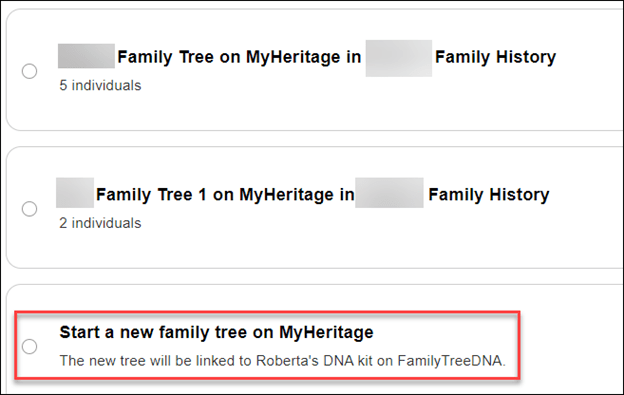
Checking this box selects the tree to transfer to MyHeritage which begins after scrolling to the bottom and pressing “Continue.”

If your tree is very small, or you don’t have a tree and want to begin one at MyHeritage, scroll to the very bottom of the trees available on your MyHeritage account if you have access to more than one tree. You’ll see the option to start a new tree at MyHeritage.

Consent is Critical

In either of the two scenarios above, transferring a tree or starting a new tree, you’ll see a consent notification below the tree options.

I’m not sure you can see this clearly in this screen shot, so I’ll transcribe it below.

I consent for MyHeritage to share my updated family tree information With FamilyTreeDNA from time to time, and I understand and consent that, upon sharing, such information will be subject to the FamilyTreeDNA privacy policy and terms of service, independently of MyHeritage.

It’s critically important for you to CONSENT to this transfer of information back to FamilyTreeDNA. This allows FamilyTreeDNA to use your tree data to improve their products and services for you – the same way they’ve always utilized customer information. For example, where your ancestors are from is critically important to improving MyOrigins and other geographically related tools.

If you transfer a tree, the consent box is already checked, but if you start a new tree after arriving through the FamilyTreeDNA platform, the consent is there, but it’s unchecked – so you have to check it.

I very strongly encourage you to transfer an existing tree or start a new one if you don’t have one, because that’s the ONLY WAY your tree information can benefit your results at FamilyTreeDNA.

Now for the bad news – if you link your FamilyTreeDNA account to an existing tree at MyHeritage, there is no option to consent for MyHeritage to send your tree information back to FamilyTreeDNA.

I really hope this policy is revised. It isn’t fair that FamilyTreeDNA can’t receive information from the trees of its customers, nor is it fair to their customers. Hopefully, this is just an oversight and will be remedied shortly.

If You Link to an Existing Tree at MyHeritage

If you link to an already existing tree at MyHeritage, you do NOT see a option to consent for your information to be provided periodically to FamilyTreeDNA.

There’s literally nothing below the trees where the consent verbiage is found with other options.

In my case, I’m an active user at MyHeritage, always growing my tree, so I was going to link my FTDNA account to myself in my tree at MyHeritage.

That is, until I discovered that MyHeritage DOES NOT PROVIDE THE CONSENT OPTION.

So, instead, I’ve transferred my existing tree to MyHeritage. This option has no disadvantages.

You can transfer any size tree to MyHeritage from FamilyTreeDNA, no matter how large. After initiating a transfer, you will receive a message that MyHeritage will email you when the transfer is complete.

My tree was finished transferring by the time I got something to drink and came back to my desk.

If you’re already a MyHeritage customer, you can have any number of trees of any size and there’s no additional cost to add to or modify trees if you’re a subscriber.

If you’re not a subscriber, you can still transfer a tree of any size from FamilyTreeDNA, but after 90 days, you will need a MyHeritage subscription if you want to add to that tree if it has more than 250 people.

For FamilyTreeDNA purposes, I’ll use the tree that I transferred from FamilyTreeDNA and keep my FamilyTreeDNA test linked to “me” in that tree and my cousins linked to “them” in that tree.

The best aspect of transferring your current tree from FamilyTreeDNA is that your linked relatives all stay linked automatically!

Of course, I’ll continue to use my MyHeritage tree for genealogy research and for my MyHeritage DNA kits.

I love my MyHeritage subscription. Transferring my FamilyTreeDNA tree and using my MyHeritage tree for genealogy research gets me the best of both worlds.

Your FamilyTreeDNA Tree at MyHeritage

After my tree transferred to MyHeritage, I clicked on the “View Tree” link in the email to verify that the tree had transferred accurately.

Indeed, all 634 people were transferred – but the tree was assigned a strange name. I need to change that.

If you want to change the tree name on MyHeritage, and trust me, I do – just navigate to “Family Tree,” then “Manage family trees,” then select that tree, then click on “Edit tree settings at far right.

Change the name to whatever you want. It’s crucial to rename it immediately if you are going to transfer multiple trees so you don’t forget which is which. Pay attention to the rest of the settings below the tree name to be sure you don’t accidentally select something you don’t want, then save the new name.

Modifying Tree Privacy, Functions and Sharing

You can change your mind about sharing with FamilyTreeDNA in either direction – meaning either enabling or disabling sharing – by clicking on “My Privacy” in the dropdown by your name at MyHeritage.

Then click on “Content.”

This is probably a good time to make sure you have enabled everything you want.

Next, you’ll see a list of every tree that you own on your MyHeritage site.

In this example, three trees are shown. The first tree is my regular MyHeritage Estes Family Tree. This is NOT a transferred FamilyTreeDNA tree, and no account from FamilyTreeDNA is linked to it.

There’s somewhat of a glitch going on here that I want to make you aware of.

As you can see, the option to “Allow sharing of my updated family tree information with FamilyTreeDNA” is available to check. In fact, I checked it. But it’s not valid and is misleading because it causes people to believe they can link to an existing tree at MyHeritage and share data back with FamilyTreeDNA, which is not the case.

If you click on the little “i” for information, you’ll see the above text that clearly says this setting “is only relevant for family trees that originated from FamilyTreeDNA and that you chose to transfer to MyHeritage to have the family tree linked to your FamilyTreeDNA account.”

Unfortunately, this option appearing here is causing people to simply link their FamilyTreeDNA account to their MyHeritage tree, believing that they will be sharing back with FamilyTreeDNA.

I really encourage MyHeritage to allow this data exchange because I think it would encourage people to maintain one tree at MyHeritage. This approach would benefit everyone and is not confusing.

On the second tree, which is also NOT a transferred tree, there is no option for sharing. This is not consistent with the first tree and causes confusion.

The third tree is my transferred tree. It does have the sharing option selected. This is a valid selection for this tree.

This is also a good time to review the features for each tree and make sure you have enabled or disabled the ones you want.

Back at FamilyTreeDNA

You can verify that you transferred your tree by checking your FamilyTreeDNA account. If you click on your tree, you’ll see a notification that you moved your tree.

Ok, now that the tree is moved, how do I know who’s linked?

How Do I Know Who’s Linked?

I can’t tell by looking at my FamilyTreeDNA tree on MyHeritage who is linked and who isn’t.

However, it’s easier than EVER at FamilyTreeDNA.

Just open your match list.

Prior to transferring my tree to MyHeritage, I had linked 15 people to their profile card on my tree at FamilyTreeDNA. Those 15 people triangulated with enough other matches to allow FamilyTreeDNA to bucket a total of 3601 paternal matches and 1602 maternal matches.

Before I transferred my tree, I made a list of all the people who were linked.

Now, you can see under each match whether they are linked on your tree at MyHeritage and, if so, the relationship you’ve chosen for them.

My parents are both linked.

However, my Ancestry V4 test that I’ve uploaded as my twin for illustration purposes for my blog is not linked, so let’s link it.

Just click on “Link on Family Tree” where you’ll be prompted to sign in to MyHeritage. I have a secure password keeper, so for me, signing in happens immediately when I click on the link.

Look what happened next, automatically.

My matches name at FamilyTreeDNA populated the search bar, and since my tree at MyHeritage is the same tree I transferred from FamilyTreeDNA, the names automatically match. Easy peasy.

If you’re using a different tree, meaning one you did NOT transfer from FamilyTreeDNA to MyHeritage, you’ll need to enter either the accurate spelling of the person’s name you want to link to or a name generic enough that MyHeritage can find a group to offer you.

For example, Estes returned 23 results and I can browse through them to select the tester at FamilyTreeDNA. Alternatively, I can add the tester’s name to the MyHeritage tree I’m using as my FamilyTreeDNA tree.

Troubleshooting Section

If You Stop After Linking Your Account but Before Selecting the Tree

I got distracted by something during this process – after I had linked my FamilyTreeDNA account and signed into MyHeritage, but BEFORE I had linked my tree.

I received this email.

Don’t be confused by this email.

  • If you don’t link to a tree at MyHeritage, you will still receive matches at FamilyTreeDNA.
  • Nothing you do or don’t do in terms of transferring or linking to a tree at MyHeritage affects your ability to receive DNA matches at FamilyTreeDNA.
  • If you don’t transfer your tree or link to one at MyHeritage, you won’t be able to link new matches at FamilyTreeDNA to their profile in your tree, and you won’t receive new bucketed Family Matches.

Clicking on “Link Family Tree” in the email returns me to where I left off at MyHeritage. I then linked my FamilyTreeDNA account to the tree that I transferred from FamilyTreeDNA.

Account Settings

After signing on to FamilyTreeDNA, you may close the popup to transfer your tree and then not be able to figure out how to transfer your tree.

Another place where you can initiate transferring your tree is through Account Settings on your FamilyTreeDNA page, which is found under the gear by your name in the upper right-hand corner of your personal page.

More importantly, though, if you somehow make a mistake or get confused, this is where you go in your FamilyTreeDNA account to:

  • Link to a home person in your tree
  • Unlink your account from MyHeritage and start over
  • Once your tree is transferred, you cannot automatically “untransfer” your tree, although you can sever the link via a disconnect, delete that tree at MyHeritage or update your privacy settings
  • Disconnecting from MyHeritage restores your tree at FamilyTreeDNA

I clicked on “Link to Home Person.”

The four closest people are shown in the tree I had selected. If none of these are the person you seek as your home person in a tree, type the name of the person you want to link in the search box. If you’re linking a relative’s kit that you maintain for them, you’ll probably need to type their name if you’re linking them to an existing tree.

Or, if you selected the wrong tree, you can disconnect from your MyHeritage account altogether, start over, and select a different tree.

Unfortunately, you’re not going to recognize that name of the tree (unless you changed it), so you’ll have to click to view the tree if you don’t remember which one you selected.

By clicking on the results you wish, you can either view the tree or select that person to link to as the primary person in your tree.

Summary & More Resources

I know this has been a lot for one article. I’ve been testing for several days and have tried to help you better understand so that you don’t say later, “I sure wish I had known that…”

I’m incredibly grateful that FamilyTreeDNA and MyHeritage have made this process seamless, even maintaining our linked relationships with our matches.

To summarize what you need to do:

I recommend using your FamilyTreeDNA tree at MyHeritage for FamilyTreeDNA purposes because:

  • The names are all spelled correctly, and your linked matches won’t be broken
  • Consent for MyHeritage to allow FamilyTreeDNA to periodically receive updated information from your transferred FamilyTreeDNA tree

Additional Resources

  1. FamilyTreeDNA wrote an article about the new features, here.
  2. FamilyTreeDNA provides a FAQ here, including information for Group Projects and Group Administrators.
  3. MyHeritage wrote an article, here.

Now, transfer your tree and go enjoy the new tree features at MyHeritage!

_________________________________________________________

Share the Love!

You’re always welcome to forward articles or links to friends and share on social media.

If you haven’t already subscribed (it’s free,) you can receive an e-mail whenever I publish by clicking the “follow” button on the main blog page, here.

You Can Help Keep This Blog Free

I receive a small contribution when you click on some of the links to vendors in my articles. This does NOT increase your price but helps me keep the lights on and this informational blog free for everyone. Please click on the links in the articles or to the vendors below if you are purchasing products or DNA testing.

Thank you so much.

DNA Purchases and Free Uploads

Genealogy Products and Services

My Books

Genealogy Books

Genealogy Research

The Big Y-700 Test Marries Science to Genealogy

Recently, one of my long-time friends and project co-administrators asked me a simple question.

  • What do the FamilyTreeDNA Big Y-700 test and the Time Tree tell us when we have genealogy trees provided by testers?
  • What does the Discover Time Tree tell us that’s different, and how do we reconcile the Time Tree and genealogy?

Those are great questions.

Sometimes, I get so buried in the details of genetic genealogy that I neglect the obvious, so I’m writing this article for my co-admin and anyone else with the same questions.

Time Tree Versus Genealogy Question

Of course, as a genealogist, my first answer would be that we always need to be cautious about user-provided trees. Even when the genealogy is accurate, that’s no guarantee there wasn’t a biological disruption that caused the genetic line not to be the same as the surname line.

Almost every lineage has examples of people whose genealogy was “off” or misattributed paternity occurred someplace upstream, meaning that someone carries the surname but does not descend from that biological lineage.

However, relative to DNA projects, the Big Y-700 tests provide one very important feature that STR testing does not and cannot do.

The Big Y-700 test creates a genetic tree, in conjunction with other testers, which provides scientifically calculated dates when branches of the genetic tree were formed.

The genetic tree should align, at least closely, with testers’ genealogical trees.

In other words, if their genealogy is accurate, testers “should” fit in (or at least near) the appropriate places on the branches of the genetic tree.

Furthermore, for people trying to sort out their actual branch in the tree, the Big Y-700 test is MUCH MORE reliable than the earlier STR (short tandem repeat) tests that are prone to random and back mutations. At one time, STR tests were all that was available, but now,  SNPs have been added to our arsenal. SNPs (single nucleotide polymorphisms) are extremely stable and reliable mutations.

I’m getting ready to record a new Y-DNA webinar, and I’m giving you a sneak peek of a couple of my slides here. I’ll publish an announcement when the webinar is available.

STRs Versus SNPs

Historic Y-DNA testing tested only a limited number of STR locations. That test reported the number of repeats at a specific genetic location on the Y chromosome. Today, the 37, 67, and 111 marker STR tests are still available to purchase.

What are the major differences between the two types of tests, and why would someone purchase one over the other?

If you purchase one of the STR tests, you purchase testing at a specific number of locations, such as 37, 67, and 111. The Big Y-700 test includes at least 700 STR locations, but the specificity of the Big Y-700 SNP testing replaces most of the STR test results in terms of lineage definition.

SNP mutations, when discovered in more than one man in a particular haplogroup lineage, are then named as haplogroups. That mutation is then found in each directly descended male in that line.

STR – 37, 67, 111 Big Y-700 (STRs & SNPs)
Tests A limited number of repeat STR markers – Big Y guarantees 700+ NGS scan targets ~ 25 million locations
Focus Comparatively short genealogy timeframe All-inclusive – recent genealogy plus older to ancient
Includes Can upgrade to Big Y-700 Includes STR tests, separate matching, Globetrekker, Discover, and more
Tree Genealogy, customer provided Genetic Tree – Group Time Tree coordinates with genealogy if provided
Tools STR tools STR tools plus SNP tools & robust Discover
Haplogroup Estimated based on STR values Confirmed to the most granular level possible – evergreen
Useful When Exclusion testing, less costly, entry-level Discover provides lineage, ancient DNA, TMRCA, and more
Matching STRs only STR plus Big Y – both can be useful
Trees Customer provided genealogy Time Tree, Group Time Tree, Block Tree, Classic Tree + 1 more soon

Put simply, the STR tests are now entry-level. Once you see what the Big Y-700 provides, you’ll absolutely want to upgrade to that test. Most of the time, if I know I’m testing someone from the correct line, I just purchase the Big Y-700 out the gate. If I’m not sure I’m testing the correct lineage, I’ll purchase the STR test first to make sure they match the correct lineage before upgrading to the Big Y-700.

Discover

The Discover tool was introduced to provide additional information to Big Y testers and others seeking haplogroup information. STR results can only predict a relatively high-level haplogroup, usually a few thousand years ago, while the Big Y-700 provides testers with an extremely granular haplogroup – usually decades to a few hundred years ago. Often, living men that span 2 or 3 descendant generations (grandfather, father, sons) discover that they have their own haplogroup branch on the tree of mankind!

However, if no one else from your line has tested in hundreds of years, Discover can only work with available information.

Let’s take a quick look at the Estes Group Time Tree.

Estes Project Group Time Trees

Group projects have Group Time Trees. You can view the Estes surname project, here. You can find a project for any surname by either googling “<surname> DNA Project” or scrolling to the VERY bottom of the FamilyTreeDNA main page.

If you’re signed into FamilyTreeDNA, you can also find projects in the top banner.

Once you’re on the project page, you’ll see an option for DNA Results (assuming the administrators have not made the project entirely private.)

Click on the DNA Results link and select Y-DNA.

Next, you’ll see “Group Time Tree.”

Group Time Tree Display

What appears next depends on how the project administrators have grouped the project participants.

I’ve grouped the Estes project by genealogical line, with the exception of a couple of people who carry the Estes surname but have experienced an adoption or other unknown parental event in their Estes lineage.

In some cases, there are simply two same-name lineages that were never from the same biological line. Unfortunately, occasionally they settle in the same place, making the genealogy difficult. Even worse, until Y-DNA testing came along, there was often no way to know they were two different families.

This situation is actually where the Big Y-700 test shines.


The Group Time Tree shows the genetic tree scientifically constructed from the SNP results of the Big Y-test results of the testers, at left. At right you’ll see the surnames of the testers along with their Earliest Known Ancestor (EKA) if they have entered that information.

Initially, you don’t even realize you’re actually looking at two types of information merged together. This display allows testers to see the genetic branching tree structure, at left, which is reflective of their actual genealogy, at right.

You can see that the birth year of Sylvester Estes, entered by a tester with haplogroup R-BY482, is 1622. Please note, there’s a typo. Sylvester was born in 1522, NOT 1622. This is a perfect example of what I meant by tree information sometimes being inaccurate and it’s very important when trying to correlate the genetic tree and the user-provided genealogy.

We discovered that R-BY482 (red profile above, at left) is an Estes “signature” haplogroup for the Estes line originating in Deal, England, with three other haplogroups that formed in descendant generations. We know this because every descendant from this line has this mutation.

R-BY490 was formed between Sylvester’s son Robert Estes, born about 1555, and his son, born about 1600, also named Sylvester. We know this because all of the descendants of Sylvester (born circa 1600) carry this mutation, but Robert’s son, Robert, born in 1603, does not.

The genealogy portion of the Group Time Tree, above, doesn’t reveal that information because testers either don’t know their genealogy that far back or perhaps listed an earlier known ancestor, such as Nicholas, born in 1495.

Click to enlarge

I created a spreadsheet tracking the Big Y-700 testers of the descendants of Nicholas Estes, along with their descendant haplogroups.

We know that Robert, born in 1555, carries R-BY490 because both of his sons, Abraham and Richard, inherited that mutation, seen with green arrows.

However, this calls into question the associated genealogy because if Robert, born in 1603, descended from Robert, born in 1555, he too would have the mutation R-BY490 since Robert’s other two sons do. Note that the user-provided birth year typo of 1622 which should be 1522 is a century off – enough to be within the genetic band haplogroup birth band – but impossible for the genealogy table.

There is one other possibility: kit 166011, the descendant of Robert born in 1603, could have taken the earlier Big Y-500 test and never upgraded to the more powerful Big Y-700. That’s too much detail for this article, but the discrepancy between the genetic tree and the genealogy tree alerts us that additional research is warranted. The genealogy submitted for tester 166011 confirms that, indeed, 1622 is a typo.

There are no other descendants of known sons of Nicholas or Sylvester born in 1522 to test, but perhaps another will surface one day.

You can see that the more testers in any particular line, the more granularity we can achieve.

The Genetic Tree

How close is the genetic tree to the genealogical tree that has been confirmed?

We know that Sylvester was born in 1522, and his father Nicholas in about 1496. The scientifically calculated creation date of R-BY482 is 1493, just 3 years before the birth of Nicholas. Based on this, there’s a good chance that this mutation occurred between Nicholas’s unknown father and him, or perhaps between Nicholas and Sylvester.

You can view the scientific details of any haplogroup in Discover.

Discover’s BY-482 scientific details page shows its creation date range.

Marriage

You can see that the scientifically created tree and the genealogy information are both important.

In fact, the combination of both allowed us to identify the correct branch of a Wilbur man who matches Estes men but doesn’t know where he fits in the tree.

His haplogroup placed him definitively on the more recent R-BY154784 branch, and his autosomal results then confirmed his specific path of descent because he matches descendants of three generations of Estes men’s wives, showing that his branch descends from Joseph Estes and his wife Ritty Lee, through son Chism, on down to our tester. In this case, autosomal DNA results provided a boost-assist to the genealogy, which helped identify the generation that the Y-DNA haplogroup R-BY154784 actually formed.

This also informs us that Joseph Estes, born in 1780, carried haplogroup R-BY154784 because both of his sons have it. If Joseph hadn’t had that mutation, then both of his sons couldn’t have inherited it.

Therefore, the mutation that formed haplogroup R-BY154784 had to occur between Moses, born in 1711, and John, born in 1732. We know that because Moses’s other son’s descendants do not have that haplogroup.

The more descendants of any ancestor that test, the more specific and accurate the descendant haplogroup formation dates will be.

The marriage of genetic trees and genealogy is powerful indeed.

More Information

For those seeking more information, 70 pages of my new book, The Complete Guide to FamilyTreeDNA – Y-DNA, Mitochondrial, Autosomal and X-DNA is devoted to Y-DNA results.

_____________________________________________________________

Follow DNAexplain on Facebook, here.

Share the Love!

You’re always welcome to forward articles or links to friends and share on social media.

If you haven’t already subscribed (it’s free,) you can receive an e-mail whenever I publish by clicking the “follow” button on the main blog page, here.

You Can Help Keep This Blog Free

I receive a small contribution when you click on some of the links to vendors in my articles. This does NOT increase your price but helps me keep the lights on and this informational blog free for everyone. Please click on the links in the articles or to the vendors below if you are purchasing products or DNA testing.

Thank you so much.

DNA Purchases and Free Uploads

Genealogy Products and Services

My Books

Genealogy Books

Genealogy Research

Genealogy Proof Series: Surname Searching

This is the third article in the Genealogy Proof series, in addition to the introduction.

In the article titled Gathering Location Resources, we focused on locations where you know your ancestor lived – but what if you’re looking for books or information about a particular family or surname?

Maybe you’d like to know if an article or book has been written about that family, either generally or maybe a branch more specifically. Many early books are no longer in print.

Maybe you can find information about your family in resources not typically checked by genealogists.

Of course, there are lots of resources, but I’m including several here that you can use and might otherwise miss. Feel free to add more in the comments.

Recording Your Findings

Don’t forget to record your search results and which resources you used on the spreadsheet we created in the Extracting and Recording Data article.

If you find that the information in the book or resource is too long for the text field in your spreadsheet, record and index the item anyway. Then, transcribe or copy/paste the entire text version in one of two places, but don’t forget to note in your spreadsheet where you put it.

  • Your genealogy software under that person’s name
  • A Word document under that person’s name

When I write my 52 Ancestors articles, everything I know about that person is gathered into a Word document and then organized and arranged into a cohesive story. The pieces have been gathered over the years in various locations and I have to be able to find them to be able to use them.

Book List

I have also created a list of books that I own.

This list needs to be updated because I moved and I would like to more accurately detail the locations of books I still have. It’s nice to know what you already have and where to find it. Tell me I’m not the only person who has purchased the same book twice!

Ok, now for surname resources where you just might find your ancestor!

Cyndi’s List

Cyndi’s list has a HUGE number of resources generally, but it also includes a surname category.

Under each letter of the alphabet, available resources are listed.

Be sure to check out everything for your surnames of interest.

BookFinder

At Bookfinder.com, you can enter a name in the title field.

That query produced a significant list. Remember that this list changes often, based on availability.

I now have another book on the way!

Higginson Book Company

The Higginson Book Company has long been known for carrying heritage books – both by location and for genealogy.

You can search by surname or any keyword.

Higginson reprints copies of original books out of print in addition to maps and a few other things. Note that sometimes you can find the text version of copyright-free books free at other locations.

State Archives

Check the website of every state’s archive where your ancestors lived.

If in doubt about what might be available, call the State Archives and ask a librarian. You might not believe what’s there.

In Tennesee, for example, there’s an index of Supreme Court cases that can be searched for the entire state, or by county, or year.

Cases that appear in the Supreme Court Index will not be recorded in the county records, because the case was appealed from there to the Supreme Court. It’s worth noting that the Hancock County, Tennessee courthouse burned (twice), so the Supreme Court records in the archives reflect lawsuits that we don’t even know existed today.

In many cases, local courts no longer retain case packets, if they ever did. They often only have the names of plaintiffs and defendants in an index book – not even an outcome. However, the county clerks faithfully copied the case packets when the case was appealed and sent to the Supreme Court, where this valuable information resides today – including depositions and receipts.

I’m entering the surname of every ancestor that was found in Hancock County. Sometimes, I search for their in-laws and neighbors too, just in case my ancestor is mentioned.

Look – paydirt! In an estate dispute – you know there are relationships explained and maybe also the source of the dispute.

When utilizing archives, be sure to search the archives of parent-states and parent-counties, meaning states and counties your state/county was formed from. The same goes for descendant states/counties formed from your state/county.

But wait, there are more resources.

Librarians

In addition to resources shown at the Tennessee Archives website, you can also click to chat with a librarian.

Librarians are an encyclopedia of knowledge.

Thanks to a librarian, I recently discovered that the Michigan State Archives holds an obscure collection – prison newspapers published by the inmates over the years, reaching back into the 1800s and early 1900s. It’s not evident from the collection information, but a call to the archives and a lovely discussion with a research librarian revealed that those publications have recently been scanned and OCR indexed, which makes it possible to search by surname or topic.

I love librarians. They have saved my bacon so many times over the years, as have volunteers at local museums, and historical and genealogy societies.

Chronicling America

Chronicling American is provided by the Library of Congress. This link is for the newspaper collection which spans 1756-1963, but there are also other collections

In the photo collection, you can search generally or very specifically.

I had always wondered why my grandparents chose to move to a tiny out-of-the-way farming community outside very rural Fowler, Indiana. I found my answer in the Library of Congress. My grandfather’s cousin, who lived up the road in Tennessee, had moved to Indiana, was running a farm for an absentee owner and needed assistance.

The rest, as they say, is history.

FamilySearch

FamilySearch has an extremely robust and easy-to-use search functionality.

Select “Search,” then “Books.”

I entered the word “Estes” under the Books search and found this:

Notice that full text results are available, which means that either the book is out from under copyright, or they have obtained permission to image. It’s also worth noting that this is one of the books available for print-on-demand from Higginson Books.

Another option, the “Images” search, searches for information by historical location.

Searching “Genealogies” and “Family Trees” is obvious.

I find the “Catalog” search particularly productive.

You can filter your Catalog search in any number of ways, but, as luck would have it, the very first entry is where my Estes family lived.

Oh, look, it’s my lucky day…

If a desired book or article isn’t available for viewing, start a list and look to see if it’s available through your local Family History Center or check elsewhere.

FamilySearch New Full Text Search

I just love this new full text feature that automatically transcribes and indexes entire handwritten collections, such as the will or deed books in a particular county.

On the search page, scroll down until you see the FamilySearch Labs image and click on “View Experiments.”

Click on “Go to Experiment”

I detailed how to use FamilySearch full-text search in this article, but I want to remind you here that you can search by surname.

One of my huge brick walls is identifying the parents of James Lee Claxton (Clarkson/Clarkston) 1775-1815.

All of our Y-DNA matches are spelled Claxton and are found in North Carolina, but that group of Claxton researchers and my line are both stuck at about the same time in history. It’s very likely that the common ancestor of both groups came from Virginia, but where? And who?

I’m searching for Claxton with the hope that there is some mention of a Claxton we don’t already know about – or something connecting my ancestor to Lee County, VA in about 1795.

There are thousands of entries in this database, but I can filter to restrict my search to Virginia.

Remember that FamilySearch is adding to the collection of books and records that are digitized and indexed daily, so if you don’t find what you’re looking for today, check back often.

Google

A general Google search for “Estes genealogy” produced a list. I’m not showing their generative AI result here, because it’s half right and half wrong. It’s fine to use AI for hints, but verify absolutely everything. AI is not ready to be relied on and may never be.

Here is a list of Estes resources from Google.

Always beware of internet links. “Fly” over them first. If the link address even looks questionable, just don’t click.

That said, there are a HUGE number of legitimate resources here.

Google Books

Google books can help you locate books that may not be found elsewhere.

Some are available as an eBook at Google Books, but if not, you can use these as leads to search elsewhere, including AbeBooks and sometimes, Amazon. I usually use Bookfinder after finding a book I’m interested in through Google, because they include other sites such as AbeBooks, Amazon and many more. Bookfinder is an aggregator, not a reseller.

You can also request to “Find in a library,” which might be useful if your local library participates in interlibrary loans, although often heritage books are not eligible for loan.

Internet Archive

I love the Internet Archive, the same company that provides the Wayback Machine, which also allows you to search by surname. The two sites provide different results, so be sure to try both.

You’ll find all kinds of information at the Internet Archive.

Under eBooks and Texts, I often enter “<surname> genealogy” so that their metadata will use both terms to narrow the search. Metadata is data about data, and in this case, it means which keywords they used to index these entries.

Many records aren’t relevant, but some assuredly are.

You can also narrow the results by many features – including the Allen County Public Library which has one of the largest genealogy holdings in the US.

Keep in mind that I’ve selected only items with text, meaning that I can read or download for free. There are certainly other items available that aren’t free.

I sometimes struggle with their search feature, so I often just search at Google using the term “Estes books at internet archive.”

Allen County Public Library

At the Allen County Public Library website, you want to search in the research collection

Please note that you can filter your results in many ways.

One of the wonderful features is that they actively collect newsletters. Estes Trails has been published for decades.

These newsletters are in their physical holdings, but if you know they exist, you can track them down in other ways. In this case, the publisher’s name is included in the full display.

Many newsletters are no longer published, so, fortunately, there’s another way to obtain an article.

PERSI

PERSI, an index for periodicals, such as Estes Trails, above, is also hosted by the Allen County Public Library.

At PERSI, you can search by surname

I searched for Estes, and look what I received. I absolutely must read these Civil War letters.

This is a GOLDMINE. No, Aaron Estes isn’t my ancestor, but again, he’s related, and I just have to read these.

Scroll to the very bottom to order the items.

WikiTree

WikiTree is one of my favorite resources. You can enter your ancestor’s name, or a surname.

WikiTree is a collaborative tree where different individuals add information and sources to the profiles of ancestors. They have a small army of helpful volunteers that are willing to help too.

As with all shared resources, some information can be incorrect. Treat all trees as information to be verified and sources to be checked.

One of the great things about WikiTree is that individuals who descend from ancestors in a specific way can connect themselves and their Y-DNA or mitochondrial DNA test information.

Descendants who have taken an autosomal test can list the testing company and information. While testing companies use the DNA of the tester to connect to other testers – it’s up to those two people to determine their common ancestor.

WikiTree works the other way and is ancestor-driven, meaning that you see who descends from the ancestor, and you can go to the testing company indicated to see if you’re an autosomal DNA match.

Furthermore, if you’re working on your genetic tree, you’ll want the Y-DNA and mitochondrial DNA information for each of your ancestors. If other testers have entered the information, you can find it here. Please enter yours as well.

Be sure to check the sources for each ancestor. There may be information and resources not found elsewhere. Add sources if you can. Collaboration is a good thing, and a rising tide lifts all ships.

Newspapers

After you’ve wrung out the more traditional records, such as deeds and wills and census schedules, you’ll want to turn to newspapers. Not all local newspapers have been scanned, OCRed, and indexed yet, and some quality is better than others.

Licensing and processing old newspapers is ongoing, so just because the location where your ancestor lived doesn’t have an indexed newspaper available today doesn’t mean they won’t soon.

Newspaper articles put meat on the bones of our ancestors as they reveal their everyday lives. Who visited whom after church for Sunday dinner, who hit someone’s cow, who had company from out of town, who was having a family reunion, who moved and to where, who caught a big fish, who went on vacation, who was “visited by the stork,” and much more. Some make you say “awww,” and some are downright juicy and scandalous!

News about neighboring counties and even neighboring states can be found in locations where you may not have thought to look for your ancestor.

Virginia Chronicle

The Virginia Chronicle is a historic newspaper collection curated by the Library of Virginia that produces amazing results.

What? A murder? You know, I just HAVE to go down this rabbit hole and read these stories.

Ok, so, here’s the skinny for those who are curious.

Theodore Estes was dating Miss Loving, the daughter of a judge who shot and murdered Theodore. As it turns out, Theodore’s father was the sheriff, so this story is particularly rich and full of intrigue.

It seems that Miss Loving, the judge’s daughter, drank whiskey, and one thing allegedly led to another, which Theodore, his family, and friends denied. However, the young woman’s father didn’t believe them and sought revenge. Some reports said that she only drank “one swig” of whiskey, and nothing happened. Others said that the whiskey was drugged, and “something” did happen. A third group said she asked for the whiskey and drank a whole lot more than a swig. Theodore took her home (to her house) in his buggy, to her parents, but clearly intoxicated.

It gets even more complex because it appears the families were related. I had to draw a chart to get this straight.

Theodore’s brother had married the Judge’s wife’s sister. I’m telling you, this trial was a humdinger. Whoo boy! Eventually, the charges against the judge were changed to something less severe than murder. This high-profile case was covered by several regional newspapers like the latest soap opera.

As I read through these articles, I noticed that some Estes family members had arrived from Danville, VA, which is in close proximity to where my Estes family was from. So, while this is not my ancestor, it involves my ancestor’s descendants.

Ok, enough of this rabbit hole, but you get the drift. You may never get anything resembling chores done ever again!

The National Genealogical Society membership now provides access to NewspaperArchive as a benefit of membership. As far as I’m concerned, this alone makes the membership worthwhile.

NewspaperArchive offers a notification service for subscribers, or did when I subscribed separately, so you’ll receive an email when the name of a saved search is found in a newly indexed newspaper.

I keep discovering previously unknown things!

Ancestry owns Newspapers.com for accessing newspapers and Fold3 for military records. I discussed the nuances of using Newspapers.com at Ancestry in this article. You’ll need to search in the Historical Newspapers Collection at Ancestry and/or in Newspapers.com. Ancestry is reimaging the newspapers and using AI to create associations between people – for example family members mentioned in a wedding announcement. The results will not all be found in one place. The newspaper itself will be found at Newspapers.com but the associated family grouping will be found at Ancestry itself in their collections.

You can now reference the Birth Index, Marriage Index and Auctions of Enslaved People and Bounties on Freedom Seekers Index, here. The larger Newspapers and Publications category can be found here, and the Historical Newspapers Collection can be found here.

MyHeritage includes a large newspaper collection for their subscribers, much of which is unique and not found elsewhere.

This collection is where I found hundreds of items about my mother’s family in rural Northern Indiana. I found previously unknown photos of my grandfather, and that he attended the “Normal School” to become a teacher. He never taught, instead going to work for the railroad, moving away, and meeting the woman who would become my grandmother.

MyHeritage actually has newspapers in two places. This search is on the MyHeritage site itself, available with a subscription. MyHeritage has a second, independent site too – OldNews.

OldNews is big news!

At RootsTech 2024, MyHeritage announced a separate subscription site called OldNews, which essentially doubles the number of newspapers that they’ve digitized and made available. Take a look!

I found information about my mother, such as when she had her tonsils removed, when and where she danced in plays as a child, and the amount of my grandparents’ estate. Newspapers reported things back then that would be considered privacy violations today. Check OldNews to see what’s there for you.

Colonial Williamsburg has made the earliest Newspapers in the colonies available, here. Some are through a subscription site, and others aren’t. It was through these old newspapers years ago that I discovered the name of my ancestor’s indentured servant who ran away. Now, DNA seems to point to a potential relationship. There are no records other than that “runaway” notice to connect these people together, anyplace.

Check Cyndi’s list for more Newspaper services

MyHeritage Surnames

MyHeritage offers many ways to search, but you can start by entering the name of your ancestor or even just a surname.

I could have simply entered the surname, but I entered James Lee Claxton.

I can filter by any of the collections, at left.

I check them all, but I particularly like the Books and Publications, and the Newspapers category. You just never know what you’ll find, and many of the books are digitized and free.

You can also just enter a surname. I entered “Estes.”

I checked every one of these categories and, among other things, found some fascinating historic maps.

I love my MyHeritage subscription. If you don’t have one, you can try one free for 14 days.

Ancestry Message Boards

Ancestry discontinued the RootsWeb-hosted websites, WorldConnect Trees, and RootsWeb mailing lists last year, but the message boards are still functional.

After signing in to Ancestry, scroll down until you see Tools and Resources in the right margin.

Click on “Message boards.”

These boards reach back at least 20 years and many of the original posters are deceased now. I know that I often posted information as I found it while traveling.

There’s an advanced search function, too.

I was shocked to discover that you can still initiate a thread, but I’m not at all sure that other people on that board are notified today. I had no idea these boards even still existed.

Another feature that’s helpful at Ancestry is the Card Catalog, one of their Special Record Collections.

You can enter a surname in either the Title or Keyword box.

Of course, you’ll get different results, but both are certainly worth checking.

Genealogy.com

GenForum was the message board for Genealogy.com. Ancestry purchased it years ago, and while you can no longer post messages, you can still search for messages that were previously posted, here.

American Ancestors

American Ancestors holds a large database that includes periodicals such as the New England Historical and Genealogical Register and the Virginia Genealogist, which you can search by name, here.

Additionally, they have a number of immigration and naturalization records not available elsewhere.

HathiTrust

HathiTrust has indexed millions of documents, including many governmental records and publications.

Select any publication or narrow by categories. Then you can search within the text and also view the text on the relevant pages.

DNA Projects

FamilyTreeDNA offers surname projects, along with geographic, haplogroup, lineage, and regional DNA projects.

You can find surname projects in one of two ways.

The first way is to Google “Estes DNA Project.”

You’ll see two links, either of which will take you to the project.

I administer this project and welcome everyone who has an Estes ancestor, regardless of whether their surname is Estes or something else.

By clicking on “DNA Results,” you’ll see multiple options.

Clicking on the “Classic Chart” shows groupings of males who have taken the Y-DNA test, along with additional information, including their Earliest Known Ancestor (EKA) and, in the final column at right, their haplogroup.

If you take a DNA test and match other people, you can contact them to collaborate through matches on your personal page. Not everyone can test for every ancestor – and women can’t test for Y-DNA lineages (because they don’t have a Y chromosome,) so we depend on being able to check for our ancestors in Y-DNA projects.

If your ancestral line is shown, you can use the confirmed haplogroup (green) in the free Discover tool, here, to learn more about your ancestor’s heritage.

Here’s the “Haplogroup Story” tab for R-BY490 that represents a number of Estes lineages. There are 11 other tabs in the left sidebar just waiting for you to read about your ancestry.

Note that “Suggested Projects” is one tab. The suggestions are based on projects other men with this haplogroup have joined.

Y-DNA information through Discover, and soon, mitochondrial DNA information through MitoDiscover, is the ONLY place you can find this kind of information. Be sure to check out all of the tabs at left, including Ancient Connections.

If you click on the Group Time Tree, you’ll see a different view of the results of the project members who have taken the advanced Big Y-700 test.

By selecting the relevant groups, you can see the surname of the testers, their earliest known ancestor (if known and entered), at right, along with the haplogroup genetic tree at left.

The genetic tree shown at left confirms the genealogy of these testers, at least as far as the genetic tree is able to distinguish. I wrote about the Estes Group Time Tree, here, as an example,

If you are a male and have not taken the Big Y-700 test, please do. It unlocks your history in a way nothing else can.

A second way to find DNA projects that might be relevant to your surname is to navigate to the very bottom of the FamilyTreeDNA main page in the footer.

Click on “Group Projects.”

You can enter any surname and see the projects in which the project administrator listed Estes (or your surname of choice) as a surname that might be interested in their project.

If you’re a customer and signed on to your account at FamilyTreeDNA, you can find this same information at the top of your personal page under “Group Projects.” You can also join projects from there.

Social Media

I often overlook Facebook or other social media as a surname resource, but it is.

Today, many, if not most, genealogy and historical societies have pages, and so do many genealogists with an interest in a particular surname line.

Searching for “Estes” on Facebook shows several individual people, PLUS, two groups that might be very interesting.

Once you’re a member of a group, you can search within the group for a keyword.

This search gave me everything with either Moses or Estes, so I narrowed it by just using “Moses” or just searching for “Halifax” which is the county in Virginia where Moses Estes lived.

Facebook, especially groups with a genealogical focus, is a wonderful way to find men for Y-DNA testing.

I often ask if someone has already DNA tested, and if so, where.

If they have already tested at Ancestry, or 23andMe, but not at MyHeritage or FamilyTreeDNA, they can upload to both companies for free. Matching is free after uploading, and so are other basic tools. Advanced tools require an inexpensive unlock, which costs far less than retesting. The unlock at FamilyTreeDNA for advanced tools costs $19, and it’s $29 at MyHeritage.

Next Topic – The Proof Table

Our next topic in this series will be the Genealogy Proof Table.

What is a Proof Table, how do you construct one, and why?

We will assemble a Genealogy Proof Table for one of my lines as an example. You’ll need one for every ancestral lineage.

After that, we have four more articles in this series.

  • Genealogy Proof Standard
  • DNA
  • Leveling up
  • Writing it Up

_____________________________________________________________

Follow DNAexplain on Facebook, here.

Share the Love!

You’re always welcome to forward articles or links to friends and share on social media.

If you haven’t already subscribed (it’s free,) you can receive an e-mail whenever I publish by clicking the “follow” button on the main blog page, here.

You Can Help Keep This Blog Free

I receive a small contribution when you click on some of the links to vendors in my articles. This does NOT increase your price but helps me keep the lights on and this informational blog free for everyone. Please click on the links in the articles or to the vendors below if you are purchasing products or DNA testing.

Thank you so much.

DNA Purchases and Free Uploads

Genealogy Products and Services

My Books

Genealogy Books

Genealogy Research

Great News – Both e-Pub and Print Version of “The Complete Guide to FamilyTreeDNA” Now Available Worldwide  

  • Anyone, anyplace, can order the full-color, searchable, e-pub version of The Complete Guide to FamilyTreeDNA – Y-DNA, Mitochondrial, Autosomal and X-DNA from the publisher, Genealogical.com, here.
  • Customers within the US can order the black and white print book from the publisher, here.
  • Customers outside the US can order the print book from their country’s Amazon website. The publisher does not ship print books outside the US due to customs, shipping costs, and associated delays. They arranged to have the book printed by an international printer so that it can be shipped directly to Amazon for order fulfillment without international customers incurring additional expenses and delays. If you ordered the book previously from Amazon and a long delivery time was projected, that should be resolved now and your book should be arriving soon.

Comprehensive

This book is truly comprehensive and includes:

  • 247 pages
  • More than 267 images
  • 288 footnotes
  • 12 charts
  • 68 tips
  • Plus, an 18-page glossary

To view the table of contents, click here. To order, click here.

Thank you, everyone, for your patience and your support.

_____________________________________________________________

Follow DNAexplain on Facebook, here.

Share the Love!

You’re always welcome to forward articles or links to friends and share on social media.

If you haven’t already subscribed (it’s free,) you can receive an e-mail whenever I publish by clicking the “follow” button on the main blog page, here.

You Can Help Keep This Blog Free

I receive a small contribution when you click on some of the links to vendors in my articles. This does NOT increase your price but helps me keep the lights on and this informational blog free for everyone. Please click on the links in the articles or to the vendors below if you are purchasing products or DNA testing.

Thank you so much.

DNA Purchases and Free Uploads

Genealogy Products and Services

My Books

Genealogy Books

Genealogy Research

Complete Guide to FamilyTreeDNA Released in Hardcopy

Just what many of you have been waiting for! The hardcopy print version of the Complete Guide to FamilyTreeDNA has just been released.

As shown in the table of contents below, The Complete Guide to FamilyTreeDNA contains lots of logically organized information! It includes basic education about genetic genealogy and how it works, instructions on using the FamilyTreeDNA tests and tools, plus an extensive glossary.

Enjoy!

_____________________________________________________________

Follow DNAexplain on Facebook, here.

Share the Love!

You’re always welcome to forward articles or links to friends and share on social media.

If you haven’t already subscribed (it’s free,) you can receive an e-mail whenever I publish by clicking the “follow” button on the main blog page, here.

You Can Help Keep This Blog Free

I receive a small contribution when you click on some of the links to vendors in my articles. This does NOT increase your price but helps me keep the lights on and this informational blog free for everyone. Please click on the links in the articles or to the vendors below if you are purchasing products or DNA testing.

Thank you so much.

DNA Purchases and Free Uploads

Genealogy Products and Services

My Books

Genealogy Books

Genealogy Research

Announcing: The Complete Guide to FamilyTreeDNA; Y-DNA, Mitochondrial, Autosomal and X-DNA

I’m so very pleased to announce the publication of my new book, The Complete Guide to FamilyTreeDNA – Y-DNA, Mitochondrial, Autosomal and X-DNA.

For the first time, the publisher, Genealogical.com, is making the full-color, searchable e-book version available before the hardcopy print version, here. The e-book version can be read using your favorite e-book reader such as Kindle or iBooks.

Update: The hardcopy version was released at the end of May and is available from the publisher in the US and from Amazon internationally.

This book is about more than how to use the FamilyTreeDNA products and interpreting their genealogical meaning, it’s also a primer on the four different types of DNA used for genealogy and how they work:

  • Autosomal DNA
  • Mitochondrial DNA
  • Y-DNA
  • X-DNA

There’s a LOT here, as shown by the table of contents, below

This book is chocked full of great information in one place. As an added bonus, the DNA glossary is 18 pages long.

I really hope you enjoy my new book, in whatever format you prefer.

_____________________________________________________________

Follow DNAexplain on Facebook, here.

Share the Love!

You’re always welcome to forward articles or links to friends and share on social media.

If you haven’t already subscribed (it’s free,) you can receive an e-mail whenever I publish by clicking the “follow” button on the main blog page, here.

You Can Help Keep This Blog Free

I receive a small contribution when you click on some of the links to vendors in my articles. This does NOT increase your price but helps me keep the lights on and this informational blog free for everyone. Please click on the links in the articles or to the vendors below if you are purchasing products or DNA testing.

Thank you so much.

DNA Purchases and Free Uploads

Genealogy Products and Services

My Books

Genealogy Books

Genealogy Research