DNAPainter: Painting “Bucketed” Family Tree DNA Maternal and Paternal Family Finder Matches in One Fell Swoop

DNAPainter has done it again, providing genealogists with a wonderful tool that facilitates separating your matches into maternal and paternal categories so that they can be painted on the proper chromosome – in one fell swoop no less.

Of course, the entire purpose of painting your chromosomes is to identify segments that descend from specific ancestors in order to push those lines back further in time genealogically. Identifying segments, confirming and breaking down brick walls is the name of the game.

DNA Painter New Import Tool

The new DNAPainter tool relies on Family Tree DNA’s Phased Family Matching which assigns your matches to maternal and paternal buckets. On your match list, at the top, you’ll see the following which indicates how many matches you have in total and how many people are assigned to each bucket.

DNAPainter FF import.png

Note that these are individual matches, not total matching segments – that number would be higher.

In order for Family Tree DNA to create bucketed matches for you, you’ll need to:

  • Either create a tree or upload a GEDCOM file
  • Attach your DNA kit to “you” in your tree
  • Attach all 4th cousins and closer with whom you match to their proper location on your tree

Yes, it appears that Family Tree DNA is now using 4th cousins, not just third cousins and closer, which provides for additional bucketed matches.

How reliable is bucketing?

Quite. Occasionally one of two issues arise which becomes evident if you actually compare the matches’ segments to the parent with whom they are bucketed:

  • One or more of your matches’ segments do match you and your parent, but additionally, one or more segments match you, but not your parent
  • The X chromosome is particularly susceptible to this issue, especially with lower cM matches
  • Occasionally, a match that is large enough to be bucketed isn’t, likely because no known, linked cousin shares that segment

Getting Started

Get started by creating or uploading your tree at Family Tree DNA.

DNAPainter mytree.png

After uploading your GEDCOM file or creating your tree at Family Tree DNA, click on the “matches” icon at the top of the tree to link yourself and your relatives to their proper places on your tree. Your matches will show in the box below the helix icon.

DNAPainter FF matches.png

I created an example “twin” for myself to use for teaching purposes by uploading a file from Ancestry, so I’m going to attach that person to my tree as my “Evil Twin.” (Under normal circumstances, I do not recommend uploading duplicate files of anyone.)

DNAPainter FF matches link.png

Just drag and drop the person on your match list on top of their place on the tree.

DNAPainter Ff sister.png

Here I am as my sister, Example Adoptee.

I’ve wished for a very, very long time that there was a way to obtain a list of segment matches sorted by maternal and paternal bucket without having to perform spreadsheet gymnastics, and now there is, at DNAPainter.

DNAPainter does the heavy-lifting so you don’t have to.

What Does DNAPainter Do with Bucketed Matches?

When you are finished uploading two files at DNAPainter, you’ll have:

  • Maternal groups of triangulated matches
  • Paternal groups of triangulated matches
  • Matches that could not be assigned based on the bucketing. Some (but not all) of these matches will be identical by chance – typically roughly 15-20% of your match list. You can read about identical by chance, here.

I’ll walk you through the painting process step by step.

First, you need to be sure your relatives are connected to your tree at Family Tree DNA so that you have matches assigned to your maternal and paternal buckets. The more relatives you connect, per the instructions in the previous section, the more matching people will be able to be placed into maternal or paternal buckets.

Painting Bucketed Matches at DNAPainter

I wrote basic articles about how to use DNAPainter here. If you’re unfamiliar with how to use DNAPainter or it’s new to you, now would be a good time to read those articles. This next section assumes that you’re using DNAPainter. If not, go ahead, register, and set up a profile. One profile is free for everyone, but multiple profiles require a subscription.

First, make a duplicate of the profile that you’re working with. This DNAPainter upload tool is in beta.

DNAPainter duplicate profile.png

Since I’m teaching and experimenting, I am using a fresh, new profile for this experiment. If it works successfully, I’ll duplicate my working profile, just in case something goes wrong or doesn’t generate the results I expect, and repeat these steps there.

Second, at Family Tree DNA, Download a fresh copy of your complete matching segment file. This “Download Segments” link is found at the top right of the chromosome browser page.

DNAPainter ff download segments.png

Third, download your matches at the bottom left of the actual matches page. This file hold information about your matches, such as which ones are bucketed, but no segment information. That’s in the other file.

DNAPainter csv.png

Name both of these files something you can easily identify and that tells them apart. I called the first one “Segments” in front of the file name and the second one “Matches” in front of the file name.

Fourth, at DNAPainter, you’ll need to import your entire downloaded segment file that you just downloaded from Family Tree DNA. I exclude segments under 7cM because they are about 50% identical by chance.

DNAPainter import instructions

click to enlarge

Select the segment file you just named and click on import.

DNAPainter both.png

At this point, your chromosomes at DNAPainter will look like this, assuming you’re using a new profile with nothing else painted.

Let’s expand chromosome 1 and see what it looks like.

DNAPainter chr 1 both.png

Note that all segments are painted over both chromosomes, meaning both the maternal and paternal copies of chromosome 1, partially shown above, because at this point, DNAPainter can’t tell which people match on the maternal and which people match on the paternal sides. The second “matches” file from Family Tree DNA has not yet been imported into DNAPainter, which tells DNAPainter which matches are on the maternal and which are on the paternal chromosomes.

If you’re not working with a new profile, then you’ll also see the segments you’ve already painted. DNAPainter attempts to NOT paint segments that appear to have previously been painted.

Fifth, at DNAPainter, click on the “Import mat/pat info from ftDNA” link on the left which will provide you with a page to import the matches file information. This is the file that has maternal and paternal sides specified for bucketed matches. DNAPainter needs both the segment file, which you already imported, and the matches file.

DNAPainter import bucket

click to enlarge

After the second import, the “matches” file, my matches are magically redistributed onto their appropriate chromosomes based on the maternal and paternal bucketing information.

I love this tool!

At this point, you will have three groups of matches, assuming you have people assigned to your maternal and paternal buckets.

  • A “Shared” group for people who are related to both of your parents, or who aren’t designated as a bucketed match to either parent
  • Maternal group (pink chromosome)
  • Paternal group (blue chromosome)

It’s Soup!!!

I’m so excited. Now my matches are divided into maternal and paternal chromosome groups.

DNAPainter import complete.png

Just so you know, I changed the colors of my legend at DNAPainter using “edit group,” because all three groups were shades of pink after the import and I wanted to be able to see the difference clearly.

DNAPainter legend.png

Your Painted Chromosomes

Let’s take a look at what we have.

DNAPainter both, mat, pat.png

There’s still pink showing, meaning undetermined, which gets painted over both the maternal and paternal chromosomes, but there’s also a lot of magenta (maternal) and blue (paternal) showing now too as a result of bucketing.

Let’s look at chromosome 1.

DNAPainter chr 1 all.png

This detail, which is actually a summary, shows that the bucketed maternal (magenta) and paternal (blue) matches have actually covered most of the chromosome. There are still a few areas without coverage, but not many.

For a genealogist, this is beautiful!!!

How many matches were painted?

DNAPainter paternal total.png

DNAPainter maternal total.png

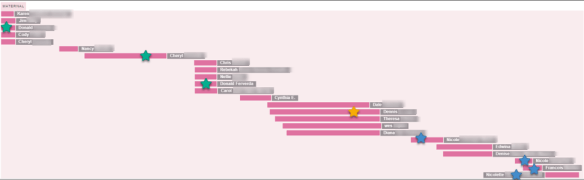
Expanding chromosome 1, and scrolling to the maternal portion, I can now see that I have several painted maternal segments, and almost the entire chromosome is covered.

Here’s the exciting part!
DNAPainter ch1 1 mat expanded.png

I starred the relatives I know, on the painting, above and on the pedigree chart, below. The green group descends through Hiram Ferverda and Eva Miller, the yellow group through Antoine Lore and Rachel Hill. The blue group is Acadian, upstream of Antoine Lore.

DNAPainter maternal pedigree.png

Those ancestors are shown by star color on my pedigree chart.

I can now focus on the genealogies of the other unstarred people to see if their genealogy can push those segments back further in time to older ancestors.

On my Dad’s side, the first part of chromosome 1 is equally as exciting.

DNAPainter chr 1 pat expanded.png

The yellow star only pushed this triangulated group back only to my grandparents, but the green star is from a cousin descended from my great-grandparents. The red star matches are even more exciting, because my common ancestor with Lawson is my brick wall – Marcus Younger and his wife, Susanna, surname unknown, parents of Mary Younger.

DNAPainter paternal pedigree.png

I need to really focus hard on this cluster of 12 people because THEIR common ancestors in their trees may well provide the key I need to push back another generation – through the brick wall. That is, after all, the goal of genetic genealogy.

Woohoooo!

Manual Spreadsheet Compare

Because I decided to torture myself one mid-winter day, and night, I wanted to see how much difference there is between the bucketed matches that I just painted and actual matches that I’ve identified by downloading my parents’ segment match files and mine and comparing them manually against each other. I removed any matches in my file that were not matches to my parent, in addition to me, then painted the rest.

I’ll import the resulting manual spreadsheet into the same experimental DNAPainter profile so we can view matches that were NOT painted previously. DNAPainter does not paint matches previously painted, if it can tell the difference. Since both of these files are from downloads, without the name of the matches being in any way modified, DNAPainter should be able to recognize everyone and only paint new segment matches.

Please note here that the PERSON unquestionably belongs bucketed to the parental side in question, but not all SEGMENTS necessarily match you and your parent. Some will not, and those are the segments that I removed from my spreadsheet.

DNAPainter manual spreadsheet example.png

Here’s a made-up example where I’ve combined my matches and my mother’s matches in one spreadsheet in order to facilitate this comparison. I colored my Mom’s matches green so they are easy to see when comparing to my own, then sorting by the match name.

Person 1 matches me and Mom both, at 10 cM on chromosome 1. Person 1 is assigned to my maternal side due to the matches above 9 cM, the lowest threshold at Family Tree DNA for bucketing.

In this example, we can see that Person 1 matches me and Mom (colored green), both, on the segment on chromosome 1. That match, bracketed by red, is a valid, phased, match and should be painted.

However, Person 1 also matches me, but NOT Mom on chromosome 2. Because Person 1 is bucketed to mother, this segment on chromosome 2 will also be painted to my maternal chromosome 2 using the DNAPainter import. The only way to sort this out is to do the comparison manually.

The same holds true for the X match shown. The two segments shown in red should NOT be painted, but they will be unless you are willing to compare you and your parents’ matches manually, you will just have to evaluate segments individually when you see that you’re working in a cluster where matches have been assigned through the mass import tool.

If you choose to compare the spreadsheets manually to assure that you’re not painting segments like the red ones above, DNAPainter provides instructions for you to create your own mass upload template, which is what I did after removing any segment matches of people that were not “in common” between me and mother on the same chromosomal segment, like the red ones, above.

Please note that if you delete the erroneous segments and later reimport your bucketed matches, they will appear again. I’m more inclined to leave them, making a note.

I did not do a manual comparison of my father’s side of the tree after discovering just how little difference was found on my mother’s side, and how much effort was involved in the manual comparison.

Creating a Mass Upload Template and File
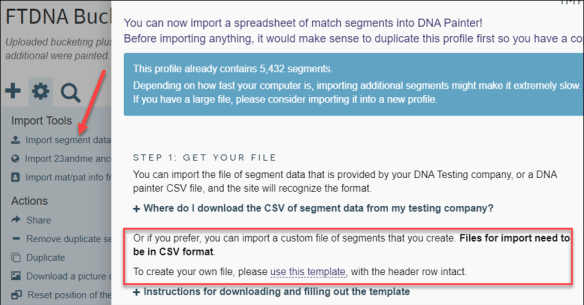
DNAPainter custom mass upload.png

The instructions for creating your own mass upload file are provided by DNAPainter – please follow them exactly.

In my case, after doing the manual spreadsheet compare with my mother, only a total of 18 new segments were imported that were not previously identified by bucketing.

Three of those segments were over 15cM, but the rest were smaller. I expected there would be more. Family Tree DNA is clearly doing a great job with maternal and paternal bucketing assignments, but they can’t do it without known relatives that have also tested and are linked to your tree. The very small discrepancy is likely due to matches with cousins that I have not been able to link on my tree.

The great news is that because DNAPainter recognizes already-painted segments, I can repeat this anytime and just paint the new segments, without worrying about duplicates.

  • The information above pertains to segments that should have been painted, but weren’t.
  • The information below pertains to segments that were painted, but should not have been.

I did not keep track of how many segments I deleted that would have erroneously been painted. There were certainly more than 18, but not an overwhelming number. Enough though to let me know to be careful and confirm the segment match individually before using any of the mass uploaded matches for hypothesis or conclusions.

Given that this experiment went well, I created a copy of my “real” profile in order to do the same import and see what discoveries are waiting!

Before and After

Before I did the imports into my “real” file (after making a copy, of course,) I had painted 82% of my DNA using 1700 segments. Of course, each one of those segments in my original profile is identified with an ancestor, even if they aren’t very far back in time.

Although I didn’t paint matches in common with my mother before this mass import, each of my matches in common with my mother are in common with one or the other of my maternal grandparents – and by using other known matches I can likely push the identity of those segments further back in time.

Status Percent Segments Painted
Before mass Phased Family Match bucketed import 82 1700
After mass Phased Family Match bucketed import 88 7123
After additional manual matches with my mother added 88 7141

While I did receive 18 additional matching segments by utilizing the manually intensive spreadsheet matching and removal process, I did not receive enough more matches to justify the hours and hours of work. I won’t be doing that anymore with Family Tree DNA files since they have so graciously provided bucketing and DNAPainter can leverage that functionality.

Those hours will be much better spent focusing on unraveling the ancestors whose stories are told in clusters of triangulated matches.

I Love The Import Tool, But It’s Not Perfect

Keep in mind that the X chromosome needs a match of approximately twice the size of a regular chromosome to be as reliable. In other words, a 14 cM threshold for the X chromosome is roughly equivalent to a 7 cM match for any other chromosome. Said another way, a 7 cM match on the X is about equal to a 3.5 cM match on any other chromosome.

X matches are not created equal.

The SNP density on the X chromosome is about half that of the other chromosomes, making it virtually impossible to use the same matching criteria. I don’t encourage using matches of less than 500 SNPs unless you know you’re in a triangulated group and WITH at least a few larger, proven matches on that segment of the X chromosome.

Having said that, X matches, due to their unique inheritance path can persist for many generations and be extremely useful. You can read about working with the X chromosome here and here.

I noticed when I was comparing segments in the manual spreadsheet that I had to remove many X matches with people who had identical matches on other chromosomes with me and my mother. In other words, just because they matched my mother and me exactly on one chromosome, that phasing did not, by default, extend to matching on other segments.

I checked my manually curated file and discovered that I had a total of seven X matches that should have been, and were, painted because they matched me and Mom both.

DNAPainter X spreadsheet example.png

However, there were many that didn’t match me and Mom both, matching only me, that were painted because that person was bucketed (assigned) to my maternal side because a different segment phased to mother correctly.

On the X chromosome, here’s what happened.

DNAPainter maternal X.png

You can see that a lot more than 7 bright red matches were painted – 26 more to be exact. That’s because if an individual is bucketed on your maternal or paternal side, it’s presumed that all of the matching segments come from the same ancestor and are legitimate, meaning identical by descent and not by chance. They aren’t. Every single segment has an inheritance path and story of its own – and just because one segment triangulates does NOT mean that other segments that match that person will triangulate as well.

The X chromosome is the worst case scenario of course, because these 7 cM segments are actually as reliable as roughly 3.5 cM segments on any other chromosome, which is to say that more than 50% of them will be incorrect. However, some will be accurate and those will match me and mother both. 21% of the X matches to people who phased and triangulated on other chromosomes were accurate – 79% were not. Thankfully, we have phasing, bucketing and tools like this to be able to tell the difference so we can utilize the 21% that are accurate. No one wants to throw the baby out with the bath water, nor do we want to chase after phantoms.

Keep in mind that Phased Family Matching, like any other tool, is just that, a tool and needs some level of critical analysis.

Every Segment Has Its Own Story

We know that every single DNA segment has an independent inheritance path and story of its own. (Yes, I’ve said that several time now because it’s critically important so that you don’t wind up barking up the wrong tree, literally, pardon the pun.)

In the graphic above of my painted X chromosome matches, only the six matches with green stars are on the hand-curated match list. One had already been painted previously. The balance of the bright red matches were a part of the mass import and need to be deleted. Additionally, one of the accurate matches did not upload for some reason, so I’ll add that one manually.

I suggest that you go ahead and paint your bucketed segments, but understand that you may have a red herring or two in your crop of painted segment matches.

As you begin to work with these clusters of matches, check your matching segments with your parents (or other family members who were used in bucketing) and make sure that all the segments that have been painted by bulk upload actually match on all of the same segments.

If you have a parent that tested, there is no need to see if you and your match match other relatives on that same side. If your match does not match you and your parent on some significant overlapping portion of that same segment, the match is invalid. DNA does not “skip generations.”

If you don’t have a parent that has tested, your known relatives are your salvation, and the key to bucketed matches.

The great news is that you can easily see that a bulk match was painted from the coloring of the batch import. As you discover the relevant genealogy and confirm that all segments actually match your parent (or another family member, if you don’t have parents to test,) move the matching person to the appropriately colored ancestral group.

I further recommend that you hand curate the X chromosome using a spreadsheet. The nature of the X makes depending on phased matching too risky, especially with a tool like DNAPainter that can’t differentiate between a legitimate and non-legitimate match. The X chromosome matches are extraordinarily valuable because they can be useful in ways that other chromosomes can’t be due to the X’s unique inheritance path.

What About You?

If you don’t have your DNA at Family Tree DNA and you have tested elsewhere, you can transfer your DNA file for free, allowing you to see your matches and use many of the Family Tree DNA tools. However, to access the chromosome browser, which you’ll need for DNA painting, you’ll need to purchase the unlock for $19, but that’s still a lot less than retesting.

Here are transfer instructions for transferring your DNA file from 23andMe, Ancestry or MyHeritage.

If you have not purchased a Family Finder test at Family Tree DNA and don’t have a DNA file to transfer, you can order a test here.

_____________________________________________________________

Disclosure

I receive a small contribution when you click on some of the links to vendors in my articles. This does NOT increase the price you pay but helps me to keep the lights on and this informational blog free for everyone. Please click on the links in the articles or to the vendors below if you are purchasing products or DNA testing.

Thank you so much.

DNA Purchases and Free Transfers

Genealogy Products and Services

Genealogy Research

Fun DNA Stuff

  • Celebrate DNA – customized DNA themed t-shirts, bags and other items

Genetic Affairs Reconstructs Trees from Genetic Clusters – Even Without Your Tree or Common Ancestors

Since Genetic Affairs launched in 2018, they’ve added a LOT of new functionality. I initially wrote about their clustering functionality here.

Genetic Affairs AutoClustering, SuperClusters and brand-new AutoTree tree reconstruction are to-die-for features for traditional genealogists. For adoptees or people seeking unknown parentage, they are the best thing since sliced bread, automating tasks previously peformed manually over labor-filled hours, days and months.

Why Genetic Affairs?

Genetic Affairs works with matches from three vendors; Ancestry, FamilyTreeDNA’s Family Finder test and 23andMe.

MyHeritage has integrated a version of Genetic Affairs directly into their product offering on the MyHeritage website so every MyHeritage DNA customer receives clustering functionality, free, through MyHeritage, but not tree reconstruction.

GedMatch has also implemented an autocluster version for Tier 1 users, but GedMatch’s version only works at GedMatch, of course, and does not include the new tree reconstruction feature.

This article pertains to the functionality of the features available directly through Genetic Affairs, including:

  • Clustering your matches visually to identify ancestral lines of people that match you and each other
  • Reports by cluster including common surnames and locations
  • Analysis of trees within each cluster to identify common ancestors
  • Partially reconstructs trees with your known ancestors for each cluster
  • Partially reconstructs trees between your matches even if you don’t have a tree or don’t share the common ancestor

Genetic Affairs provides visualization for linked DNA matches along with critically important clues to help you figure out just how you are related to these people, and these clusters of interrelated people. The Genetic Affairs user manual can be found here.

Analysis

Each time you run Genetic Affairs is called an analysis. Each analysis scans your kit at the selected vendor(s) for all current matches. A few minutes later, you receive a zip file via e-mail with two or three files depending on your selections at Genetic Affairs and the tree availabilty of the vendor:

  • Autocluster file including the visual clusters plus additional information
  • Excel spreadsheet of cluster members and relevant information such as common ancestors and common locations
  • Tree file containing reconstructed trees (23andMe does not support trees, so no trees are available for 23andMe clusters)

Let’s look at each feature. Grab a cup of coffee and head for the computer.

Selecting Analysis Options

I encourage you to experiment. Selecting a wider range of cM (centimorgans) results in a larger file, but may also mean that the analysis times out.

For this report, I’m utilizing my matches at FamilyTreeDNA and selected a cM range of 50 minimum and 250 maximum. I wanted a minimum cluster size of 2 people, meaning 2 in addition to me. This resulted in 249 total matches that met that criteria and 20 people who met the cM criteria but did not have another person with whom to cluster.

I tried a second analysis using 20 cM – 300 cM resulting in a much larger file with 499 people in the cluster group. Currently, 499 is the maximum that will be processed.

Genetic Affairs profiles.png

On the Genetic Affairs Profiles page, I can view all of the profiles I manage. Users can schedule updates where Genetic Affairs automatically scans for matches and produces reports.

Genetic Affairs my profiles

Click to enlarge

By clicking on the Autoscan button, you can schedule automated recurring scans with e-mail notification.

Genetic Affairs autoscan

Click to enlarge

You can scan daily, weekly, monthly or never – whatever interval you select.

You can select both the minimum level of DNA match and the minimum cM. The lowest you can select is 9cM.

You can view any e-mails that have been sent to you by Genetic Affairs. The green envelope means that there’s something in your e-mail box. This answers the question about whether the report was completed and sent. If the report has been sent, but is not in your e-mail, check your spam filter.

Starting the Scan

Back on the Genetic Affairs profiles page, you can initiate an autocluster by clicking on the AutoCluster button where you’ll see the options based on which vendor you’ve selected.

Genetic Affairs autocluster.png

For example, at Ancestry, you can include only people in a particular group or only starred matches.

Genetic Affairs Ancestry autocluster

Click to enlarge

23andMe includes surname enrichment and triangulated groups options.

Genetic Affairs 23andme autocluster.png

FamilyTreeDNA and Ancestry both include the “AutoTree – identify common ancestors from trees” option. It’s very important that you click this box if you select the “Default AutoCluster” option – or you won’t get the reconstructed trees.

Genetic Affairs default autocluster.png

Of course, you can always run the analysis again.

Genetic Affairs autotree.png

If you click on the “AutoTree AutoCluster” function, the AutoTree box is already checked for you.

Genetic Affairs autotree autocluster.png

Rule Based AutoCluster

The “Rule based AutoCluster” is a dream-come-true for people seeking unknown parents or ancestors in a relatively recent timeframe.

Genetic Affairs Rule Based Autocluster.png

The “Rule based AutoCluster” provides you with options that allow you to do three things:

  • NOT – Exclude your matches with someone else. For example, your mother has tested. You can use the NOT rule to exclude anyone you might match through your mother’s side, providing you with clusters from your father’s side.
  • AND – Combine your results with someone else’s. If you have identified a half-sibling, you can view only clusters of only people who match you AND your half sibling.
  • OR – Combined rules. You can request a cluster of everyone in clusters with person A but not in a cluster with person B. In this case, if you match a number of half siblings, you can include all of their matches, except people who match them through their “other” parent, if that parent has tested.

Genetic Affairs has provided some graphics and examples here, but you may have to be a member of the site to access this page because the options are customized for you. So I’ll include the non-customized information, below. You can click these to open in a separate window and enlarge.

Genetic Affairs rule based 1.pngGenetic Affairs rule based 2.png

The “Rule based AutoCluster” explanations provided by Genetic Affairs.

Genetic Affairs rule based 3.png

Read the details of how these tools work. They are powerful, so don’t assume you understand without reading carefully.

Now let’s cluster!

Clustering Your Matches

Genetic Affairs autocluster order.png

At Genetic Affairs, if you initiate clustering by clicking on the AutoCluster button, you’ll need to put a checkmark in the AutoTree function box. If you began by clicking the AutoTree button, the box is automatically checked for you.

A few minutes later, you’ll receive an email with a zipped file. Save this file to someplace on your computer where you can find it, and open the zipped file by clicking.

Genetic Affairs zip file.png

You’ll see the files, above.

Click on the chrome AutoCluster HTML file which will display in your browser.

The first thing you will see is your visual autocluster. It’s so much fun to watch your matches “fly” into place!

Each of the people in this cluster are somehow related to the other people in the custer who have cells of the same color. The people with grey cells are included in two clusters – meaning the one to the right and the one above, both.

Genetic Affairs cluster.png

The names of the matches are listed to the left and above the display.

The legend is to the right.

Genetic Affairs cluster legend.png

I have a total of 41 clusters.

Scrolling down the page, each cluster has additional information, and each column is searchable or selectable, including comments I’ve entered at the vendor.

Genetic Affairs autocluster info

Click to enlarge

Just by looking at these first 3 matches, I know immediately which side of the family and which ancestors are involved with this cluster. I can look at my notes, to the right, which indicate whether I’ve identified our common ancestor. I paint identified matches at DNAPainter which I’ve entered into the notes field at the vendor.

If I’m signed in to my account at the vendor, I can click on my match’s tree link, above, and take a look. Keep in mind that these people can be related to you, and each other, through multiple ancestors.

Genetic Affairs autocluster members.png

You can hover over any person in the grid, above, to view additional information. For each person whose square is grey, indicating membership in (at least) two clusters, you can hover over the grey square and view the members of both clusters. In this case, I’m hovered over the grey square of Brooke and E.H and the black box shows me who is in both people’s clusters.

Note that while a match could be related to you through several ancestors, and hence be in more than 2 clusters, because of the grid nature of clustering, a match can only be displayed in a maximum of 2 different clusters.

Looking at the auto-generated table below, I see the common surnames in cluster 1. Keep in mind that many of these people maybe related to each other through a spouse that you aren’t. Your ancestor’s brother’s children, for example, are also related to each other through your ancestor’s brother’s wife.

Genetic Affairs surnames.png

I know that Vannoy is the common line, but Upton isn’t my ancestor – at least not that I know of. However, a surname with 20 people in a cluster needs to be investigated and evaluated. Do I have any missing wives in this line? Here’s a really great place to start digging.

In this case, it turns out that one of my ancestor’s children married an Upton, and several of his descendants have tested.

Let’s see what other tools we have.

The Ancestor Spreadsheet

Opening the spreadsheet file, I see several rows and columns.

Genetic Affairs common ancestor

Click to enlarge

The common ancestor between the people in the rows is listed at left. The green cells are from my tree.

Two example ancestors are shown above, Mary McDowell and William Harrell, who just happen to have been married to each other.

Scrolling on down, I see rows without green cells.

Genetic Affairs ancestors

Click to enlarge

These people share a common ancestor in their trees, an ancestor that isn’t in my tree. Presumably this is an ancestor I don’t share with them – or one I haven’t identified.

For example, “Bev” and “van” share William Grubb. “Vicki” and “Mark” share Martha Helen Smith. I don’t share either of these ancestors, but Martha Smith married Alvis Winster Bolton, the son of my ancestor – so I know why Martha Helen Smith appears as a common person in the trees of my matches, but not me.

Further down in the same cluster, I notice that one match shares multiple lines in our trees. Therefore, our DNA match could be on either line, or some segments from one line and some from the other.

Scrolling to the bottom of each cluster’s sheet, common locations are provided.

Genetic Affairs locations

Click to enlarge

While the designation of “Tennessee” isn’t terribly exciting, scrolling further down provides a list by county, and that IS exciting, especially if you’re chasing a brick wall. Sometimes a group of ancestors in a location where you’re seeking a female’s family is very suggestive especially when combined with ancestral names and surnames.

Let’s move on to the third group of files, Trees.

The Tree File

Click on the tree file and you’ll see the following.

Genetic Affairs tree file.png

Reconstructed Trees

For each cluster where trees can be reconstructed, you’ll see two files for cluster 1:

  • Ancestors 1
  • Tree 1

Opening the file labeled Ancestors 1, I see the following information for the first ancestor, meaning a common ancestor between the two people listed below that ancestor. You can click to enlarge these images.

Genetic Affairs ancestors by cluster.png

Opening the corresponding Tree 1 file, I see that Genetic Affairs has reconstructed the tree between me and the other testers as best it can based on the provided trees.

Genetic Affairs reconstructed trees.png

Looking at the tree for cluster 3, below, I see this line in cluster 1, above, has been extended because Sarah, the pink match and me all share a common ancestor, Elizabeth Shepherd.

Genetic Affairs reconstructed tree 2.png

Looking at another cluster, below, while I don’t share an ancestor in a tree, three people that I match at a relatively high level do.

Genetic Affairs reconstructed tree no common ancestor.png

As you can see, their common ancestor is Anne Adelaide Chiasson. This is my Acadian line, so our common ancestor or ancestors must be someplace on up that tree, or the result of an undocumented adoption, or a missing ancestor in our trees.

Constructing the trees of your matches to each other, even when you don’t have a common ancestor in your tree, is the best feature of all.

Clustering plus tree reconstruction, especially in combination with the other clues, is the key to breaking through those unyielding  brick walls.

Super AutoClusters

Just as I was getting ready to publish this article, Genetic Affairs released a new feature called Super AutoCluster.

I absolutely love this, because it combines your clusters from multiple vendors – today Ancestry, who does not provide segment information, along with Family Tree DNA, who  provides invaluable segment information.

This combination can be extremely powerful.

To begin a Super AutoCluster, click on that option under an AncestryDNA kit that also has a kit at Family Tree DNA. Both kits need to have a profile at Genetic Affairs.

Genetic Affairs supercluster.png

Next, you’ll see the screen confirming the kits to use. The combined autocluster tool is limited to a total of 500 matches, or 250 at each account. However, that’s more than enough to make some great progress.

Press “Perform Analysis.”

Drum roll please…

Voila, your combined cluster.

Genetic Affairs supercluster cluster

Click to enlarge

In this example, you can see the large peach and purple Ancestry clusters. The green red, brown and pink smaller clusters are Family Tree DNA clusters. The Family Tree DNA clusters have tiny little Fs in their cells. If you click the above graphic to enlarge, you can see the Fs.

However, the grey cells that intersect the two clusters, meaning an Ancestry and a Family Tree DNA cluster, are found in both of those clusters, connecting the clusters for you logically.

If you look closely at the cells labeled here with “common names,” you’ll see “N” in the cells indicating a common names for you to check out within that cluster.

The “Common Ancestors” box shows the people who connect to both clusters.

There are also a number of people that span the green and red Family Tree DNA clusters too.

Genetic Affairs then proceeds to combine the clustered DNA matches and trees for you from both vendors.

Genetic Affairs supercluster tree

Click to enlarge

In addition to the cluster graph and spreadsheet information that now includes combined information, you’ll see a much larger clustered tree.

And again, the best part is that even if you don’t know how you connect to people through trees, their tree and ancestors will be connected, even if you’re absent. You’ll be present in the genetic cluster itself, so you can work the combined tree cluster to see where you might fit in that branch of the family. Because trust me, you do fit – somehow, someplace.

Cost

Genetic Affairs uses a “credit” payment system. Your first 200 credits are free so you can learn. These may last you for weeks or months, depending on how often you run the clusters. If you manage multiple kits, you’ll use credits more quickly, but it’s worth every last dollar. Genetic Affairs is very inexpensive. I manage multiple accounts and I spend around $5 per month. You can read about Genetic Affairs’ payment plans and see sample calculations here.

My recommendation is simply to dive in and use your free credits. By the way, I’m gifting myself with a “credit purchase” for Christmas😊

Genetic Affairs is a wonderful genealogy gift idea for serious genealogists, adoptees or people seeking unknown parents or ancestors in recent generations.

Have You Tested or Transferred With All 4 Vendors?

If you haven’t yet tested at or transferred to each of the main 4 vendors, clustering, reconstructed trees and SuperClusters is yet another reason to do so. Additionally, every close relative’s DNA holds hints that yours doesn’t, so be sure to test them too.

You can purchase kits, below, or read about how to transfer your DNA to vendors who accept uploads – FamilyTreeDNA, MyHeritage and GedMatch, all for free, here.

Enjoy!

______________________________________________________________

Disclosure

I receive a small contribution when you click on some of the links to vendors in my articles. This does NOT increase the price you pay but helps me to keep the lights on and this informational blog free for everyone. Please click on the links in the articles or to the vendors below if you are purchasing products or DNA testing.

Thank you so much.

DNA Purchases and Free Transfers

Genealogy Services

Genealogy Research

AutoClustering by Genetic Affairs

The company Genetic Affairs launched a few weeks ago with an offer to regularly visit your vendor accounts at Family Tree DNA, Ancestry and 23andMe, and compile a spreadsheet of your matches, download it, and send it to you in an e-mail. They then update your match list at regular intervals of your choosing.

I didn’t take advantage of this, mostly because Ancestry doesn’t provide me with segment information and while 23andMe and Family Tree DNA both do, I maintain a master spreadsheet that the new matches wouldn’t integrate with. Granted, I could sort by match date and add only the new ones to my master spreadsheet, but it was never a priority. That was yesterday.

AutoClustering

That changed this week. Genetic Affairs introduced a new AutoClustering tool that provides users with clustered matches. I’m salivating and couldn’t get signed up quickly enough.

Please note that I’ve cropped the names for this article – the Genetic Affairs display shows you the entire name.

In short, each tiny square node represents a three-way match, between you and both of the people in the intersection of the grid. This does NOT mean they are triangulated, but it does mean there’s a really good chance they would triangulate. Think of this as the Family Tree DNA matrix on steroids and automated.

This tool allows me by using my mother’s test as well to actually triangulate my matches. If they are on my mother’s side of the tree, match me and mother both, and are in the match matrix, they must triangulate on my mother’s side of my tree if they both match me on the same segment.

With this information, I can check the chromosome browser, comparing my chromosomes to those other two individuals in the matrix to see if we share a common segment – or I can simply sort the spreadsheet provided with the AutoCluster results. Suddenly that delivery service is extremely convenient!

No, this service is not free, but it’s quite reasonable. I’m going to step through the process. Note that at times, the website seemed to be unresponsive especially when moving from one step to another. Refreshing the page remedied the problem.

Account Setup

Go to www.geneticaffairs.com. Click on Register to set up your account, which is very easy.

After registering, move to step 2, “Add website.”

Add websites where you have accounts. All of your own profiles plus the other people’s that you manage at both Ancestry and 23andMe are included when you register that site in your profile.

You’ll need your signon information and password for each site.

At Family Tree DNA, you’ll need to add a new website for each account since every account has its own kit number and password.

I added my own account and my mother’s account since mother’s DNA is every bit as relevant to my genealogy as my own, AND, I only received half of her DNA which means she will have many matches that I don’t.

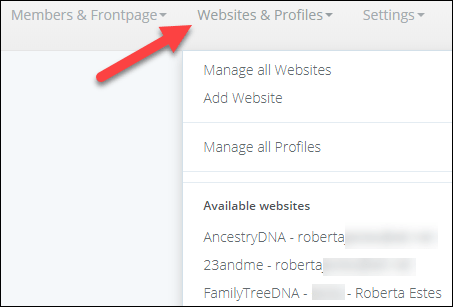
When you’re finished adding accounts, click on “Websites and Profiles” at the top to open the website tab of your choosing and click on the blue circular arrows AutoCluster link. You are telling the system to go out and gather your matches from the vendor and then cluster your matches together, generating an AutoCluster graphic file.

There are several more advanced options, but I’m going to run initially with Approach A, the default level. This will exclude my closest matches. Your closest matches will fall into multiple cluster groups, and the software is not set up to accommodate that – so they will wind up as a grey nonclustered square. That’s not all bad, but you’ll want to experiment to see which parameters are best for you.

If you have half-siblings, you may want to work with alternate settings because that half-sibling is important in terms of phasing your matches to maternal or paternal sides.

Asking me if “I’m sure” always causes me to really sit back and think about what I’ve done. Like, do I want to delete my account. In this case, it’s “overworry” because the system is just asking if you want to spend 25 credits, which is less than a dollar and probably less than a quarter. Right now, you’re using your free initial credits anyway.

The first time you set up an account, Genetic Affairs signs in to your account to assure that your login information is accurate.

I selected my profile and my mother’s profile at Family Tree DNA, plus one profile each at 23andMe and Ancestry. I have two profiles at both 23andMe (V3 and V4) and Ancestry (V1 and V2).

When making my selections, I wasn’t clear about the meaning of “minimum DNA match” initially, but it means fourth cousin and closer, NOT fourth and more distant.

My recommendation until you get the hang of things is to use the first default option, at least initially, then experiment.

Welcome

While I was busy ordering AutoClusters, Genetic Affairs was sending me a welcome e-mail.

Hello Roberta Estes,

Thank you for joining Genetic Affairs! We hope you will enjoy our services.

We have a manual available as well as a frequently asked questions section that both provide background information how to use our website.

You currently have 200 credits which can be supplemented using single payments and/or monthly subscriptions. Check out our prices page for more information concerning our rates.

Please let us know if anything is unclear, we can be reached using the contact form.

The great news is that everyone begins with 200 free credits which may last you for quite some time.  Or not. Consider them introductory crack from your new pusher.

Options

Genetic affairs will sign on your account at either Ancestry, 23andMe or Family Tree DNA, or all 3, periodically and provide you with match information about your new matches at each website. You select the interval when you configure your account. After each update, you can order a new AutoCluster if you wish.

Each update, and each AutoCluster request has a cost in points, sold as credits, associated with the service.

To purchase credits after you use your initial 200, you will need to enter your credit card information in the Settings Page, which is found in the dropdown (down arrow) right beside your profile photo.

You can select from and enroll in several plans.

Prices which varies by how often you want updates to be performed and for how many accounts. To see the various service offerings and cost, click here.

Here’s an example calculation for weekly updates:

This is exactly what I need, so it looks like this service will cost me $2.16 per month, plus any Autoclustering which is 25 credits each time I AutoCluster. Therefore, I’ll add another 100 credits for a total of $3.16 per month.

It looks like the $5 per month package will do for me. But don’t worry about that right now, because you’re enjoying your free crack, um, er, credits.

Ok, the e-mail with my results has just arrived after the longest 10 minutes on earth, so let’s take a look!

The Results E-mail

In a few minutes (or longer) after you order, an e-mail with the autoclustering results will arrive. Check your spam filter. Some of my e-mails were there, and some reports simply had to be reordered. One report never arrived after being ordered 3 times.

The e-mail when it arrives states the following:

Hello Roberta Estes,

For profile Roberta Estes: An AutoCluster analysis has been performed (access it through the attached HTML file).

As requested, cM thresholds of 250 cM and 50 cM were used. A total number of 176 matches were identified that were used for a AutoCluster analysis. There should be two CSV files attached to this email and if enough matches can be clustered, an additional HTML file. The first CSV file contains all matches that were identified. The second CSV file contains a spreadsheet version of the AutoCluster analysis. The HTML file will contain a visual representation of the AutoCluster analysis if enough matches were present for the clustering analysis. Please note that some files might be displayed incorrectly when directly opened from this email. Instead, save them to your local drive and open the files from there.

Attached I found 3 files:

  • Matches list
  • Autocluster grid csv file
  • Autocluster html file that shows the cluster itself

The Match Spreadsheet

The first thing that will arrive in your e-mail is a spreadsheet of your matches for the account you configured and ordered an AutoCluster for.

In the e-mail, your top 20 matches are listed, which initially confused me, because I wondered if that means they are not in the spreadsheet. They are.

At 23andMe, I initially selected 5th cousins and closer, which was the most distant match option provided. I had a total of 1233 matches.

23andMe caps your account at 2000 (unless you have communicated with people who are further than 2000 away, in which case they remain on your list), but you can’t modify the Genetic Affairs profile to include any people more distant than 5th cousins

Note that the 23andMe download shows you information about your match, but NOT the actual matching segment information☹

At Ancestry, I selected 4th cousin and closer and I received a total of 2698 matches. I could select “distant cousin” which would result in additional matches being downloaded and a different autoclustering diagram. I may experiment with this with my V2 account and compare them side by side.

This Ancestry information provides an important clue for me, because the matches I work with are generally only my Shared Ancestor Hints matches. If the Viewed field equals false, this tells  me immediately that I didn’t have a shared ancestor hint – but now because of the clustering, I know where they might fit.

At Family Tree DNA, I selected 4th cousin, but I could have selected 5th cousins. I have a total of 1500 matches.

This report does include the segment information (Yay!) and my only wish here would be to merge the two downloads available at Family Tree DNA, meaning the segment information and the match information. I’d like to know which of these are assigned to maternal or paternal buckets, or both.

AutoClustering

The Autocluster csv file is interesting in that it shows who matches whom. It’s the raw data used to construct the colored grid.

My matches are numbered in their column. For example, person M.B. is person 1. Every person that matches person 1 is noted at left with a 1 in that column.  Look at the second person under the Name column, C. W., who matches person 1 (M.B.), 2 (C.W.), 3 (T.F.), 4 (purple) and 5 (A.D.).

All of these people are in the same cluster, number 3, which you’ll see below.

The AutoCluster Graph

Finally, we get to the meat of the matter, the cluster graph.

Caveat – I experienced a significant amount of difficulty with both my account and my graph. If your graph does not display correctly, save the file to your system and click to open the file from your hard drive. Try Edge or Internet explorer if Chrome doesn’t work correctly. If it still doesn’t display accurately, notify GeneticAffairs at info@geneticaffairs.com. Consider this software release late alpha or early beta. Personally, I’m just grateful for the tool.

When you first open the html file, you’ll be able to see your matches “fly” into place. That’s pretty cool. Actually, that’s a metaphor for what I want all of my genealogy to do.

This grid shows the people who match me and each other as well, so a trio – although this does NOT mean the three of us match on the same segment.

The first person is Debbie, a known cousin on my father’s side. She and all of the other 12 people match me and each other as well and are shown in the orange cluster at the top left.

I know that my common ancestor couple with Debbie is Lazarus Estes and Elizabeth Vannoy, so it’s very likely that all of these same people share the same ancestral line, although perhaps not the same ancestral couple. For example, they could descend from anyone upstream of Lazarus and Elizabeth. Some may have known ancestors on either the Estes or Vannoy side, which will help determine who the actual oldest common ancestors are.

You’ll notice people in grey squares that aren’t in the cluster, but match me and Debbie both. This means that they would fall into two different clusters and the software can’t accommodate that. You may find your closest relatives in this grey never-never-land. Don’t ignore the grey squares because they are important too.

The second green cluster is also on my father’s side and represents the Vannoy line. My common ancestor with several matches is Joel Vannoy and Phoebe Crumley.

Working my way through each cluster, I can discern which common ancestor I match by recognizing my cousins or people who I’ve already shared genealogy with.

The third red cluster is on my mother’s side and I know that it’s my Jacob Lentz and Fredericka Ruhle line. I can verify this by looking at my mother’s AutoCluster file to see if the same people appear in her cluster.

You can also view this grid by name, # of shared matches and the # of shared cMs with the tester. Those displays are nice but not nearly as informative at the AutoClusters.

Scroll for More Match Information

Be sure to scroll down below the grid (yes, there is something below the grid!) and read the text where you’re provided a list of people who qualify to be included in the clusters, but don’t match anyone else at the criteria selection level you chose – so they aren’t included in the grid. This too is informative.  For example, my cousin Christine is there which tells me that our mutual line may not be represented by a cluster. This isn’t surprising, since our common ancestor immigrated in the 1850s – so not a lot of descendants today.

You’re also provided with AutoCluster match information, including whether or not your match has a tree. I do have notes on my matches at Family Tree DNA for several of these people, but unfortunately, the file download did not pick those notes up.

However, the fact that these matches are displayed “by cluster” is invaluable.

You can bet your socks that I’m clicking on the “tree” hotlink and signing on to FTDNA right now to see if any of these people have recognizable ancestors (or surnames) of either Elizabeth Vannoy or Lazarus Estes, or upstream. Some DO! Glory be!

Better yet, their DNA may descend from one of my dead-ends in this line, so I’ll be carefully recording any genealogical information that I can obtain to either confirm the known ancestors or break through those stubborn walls.

Dead ends would become evident by multiple people in the cluster sharing a different ancestor than one you’re already familiar with. Look carefully for patterns. Could this be the key to solving the mystery of who the mother of Nancy Ann Moore is? Or several other brick walls that I’d love to fall, just in time for Christmas. Who doesn’t have brick walls?

By signing on to Family Tree DNA and looking carefully at the trees and surnames of the people in each group, I was able to quickly identify the common line and assign an ancestor to most of the matching groups.

This also means I’ll now be able to make notes on these matches at Family Tree DNA paint these in DNAPainter! (I’ve written several articles about using DNAPainter which you can read by entering DNAPainter into the search box on this blog.)

Mom’s Acadian Cluster

Endogamy is always tough and this tool isn’t any different. Lots of grey squares which mean people would fit into multiple clusters. That’s the hallmark of endogamy.

My Mom’s largest clustered group is Acadian, which is endogamous, and her orange cluster has a very interesting subgroup structure.

If you look, the larger loosely connected orange group extends quite some way down the page, but within that group, there seems to be a large, almost solid orange group in the lower right. I’m betting that almost solid group to the right lower part of the orange region represents a particular ancestral line within the endogamous Acadian grouping.

Also of interest, my Mom’s green cluster is the same as my red Jacob Lentz/Frederica Ruhle cluster group, with many of the same individuals. This confirms that these people match me and that other person on Mom’s side, so whoever in this group matches me and any other person on the same segment is triangulated to my Mom’s side of my genealogy.

You can also use this information in conjunction with your parental bucketing at Family Tree DNA.

In Summary

I’m still learning about this tool, it’s limitations and possibilities. The software is new and not bug-free, but the developer is working to get things straightened out. I don’t think he expected such a deluge of desperate genealogists right away and we’ve probably swamped his servers and his inbox.

I haven’t yet experimented with changing the parameters to see who is included and who isn’t in various runs. I’ll be doing that over the next several days, and I’ll be applying the confirmed ancestral segments I discover in DNAPainter!

This is going to be a lot of fun. I may not surface again until 2019😊

______________________________________________________________

Disclosure

I receive a small contribution when you click on some (but not all) of the links to vendors in my articles. This does NOT increase the price you pay but helps me to keep the lights on and this informational blog free for everyone. Please click on the links in the articles or to the vendors below if you are purchasing products or DNA testing.

Thank you so much.

DNA Purchases and Free Transfers

Genealogy Services

Genealogy Research