
This is the fifth article in the AI series.
- The first article, Your Wonderful AI Assistant – Sometimes Wrong, Never Unsure, Always Convincing, explains why I’m writing this series and what to expect.
- The second article, All About AI – What It Is, What It Isn’t, and Why It Matters, explains what AI is, where it “came from,” the different kinds of AI, how it’s “trained,” plus examples of how it does and doesn’t work well.
- The third article, AI Assistants – The Good, the Bad, the Ugly and the Unseen, explains how AI tools work (and fail), the different types of AI tools, and when you may encounter them, even when you don’t realize it. This article closes with examples of successfully using AI, along with AI educational resources.
- The fourth article, AI and Genealogy – Brick Walls, Breakthroughs and Blunders, explains how AI is being used in genealogy by vendors and by individuals personally. It includes controversial topics like photo and image generation and discusses expert GPT tools and how I’m using them successfully.
I suggest that you read these articles in publication order, as they build on each other.
This article is perhaps the most important of the series, is deadly serious, and merits a disclaimer.
Disclaimer: I am not a lawyer. This article and others in this series are provided for general educational and informational purposes only. Information contained in these articles does not constitute legal, financial, or cybersecurity advice. It is not intended to identify or discuss every current or future risk, scam, threat, law, protection, or recommended response. One size does not fit all, and the best response for your circumstances may differ from what is best for someone else or from what is recommended here. Technology, criminal tactics, laws, and best practices change rapidly, and some of this information will inevitably become outdated after publication. Readers should independently verify current information and consult an appropriately qualified professional when necessary.
The Dark Side
By now, you know how AI works, that it can be used for good or evil, and that Generative AI creates things.
The dangerous part is that, because AI is so convincing in ways we’ve never seen before, it’s now easier than ever for you to become a victim in a heartbeat. This can happen easily, and you’ll have no idea until it’s too late. Media, meaning videos, images, and audio, can be generated about you without your knowledge, using your voice or likeness. And yes, it’s utterly terrifying.
You may be saying to yourself, “I’ll never become a victim,” but the scope of what it means to be a victim has changed over time.
Some generative AI is created to scam you, but other AI is created to harm or manipulate you or others close to you.
Perhaps someone wants to manipulate you into doing something dangerous, buying something under false pretenses, paying a ransom, believing that something happened when it did not, or voting in a specific way. I’m not going to touch politics here – but suffice it to say that I’ve adopted a “believe nothing” position unless I can confirm whatever it is through multiple reputable sources from the time the event supposedly occurred.
The Warning Signs Have Shifted
We all thought we knew the hallmarks of scams – but all of that has changed, and our misplaced confidence is actually dangerous. Now, those fake emails no longer contain spelling errors and weird, awkward language. Instead, they look authentic, sound completely professional and may take you to fake websites that look identical to the real one, prompting you to enter your username and password. You see where this is going, right?
The bad guys know you’re still looking for those old signs and signals, so they have dramatically upped their game, allowing them to easily gain your confidence and falsely “earn” your trust.
Today’s scams are, for the most part, built on garnering your trust, then employing sophisticated trickery – and they are extremely convincing. I absolutely hate that we now have to be hypervigilant, bordering on paranoid, all the time, but we do.
In order to provide contract services to FamilyTreeDNA, I’m required to undergo periodic security and threat landscape training. Like any other mandatory training, I dread it, but it’s absolutely critical to stay on top of this because what AI can do and how it can do it are changing very rapidly. I’m grateful for the professional training from KnowBe4, a leader in the security industry, and I’m sharing what I’ve learned with you.
I am NOT mincing words here. You WILL encounter these situations, and if you’re not constantly aware and on your game, eventually, you WILL fall for one of them. Yes, there are upcoming CAPS and red letters. Yes, I’m yelling!
I’ve distilled my most recent training along with other cautions into Roberta’s Ten Rules of AI and Social Media Safety. AI and your online presence are inextricably interwoven.
Roberta’s Ten Rules of AI and Social Media Safety
Rule 1: STOP! DO NOT CLICK!
Always engage your brain before your fingers.
I don’t mean it’s OK to click from time to time because you think the email is from someone you know or a business entity you do business with.
I mean do not click ever, with very few exceptions. One example is 2FA.
2FA (two-factor authentication) and some other systems will send you a link in your email immediately after you make the request. You will receive the email or text immediately, and you will be expecting it. That’s the key here. You asked for and are expecting this interaction now. Anything else, don’t click. Not tomorrow or the next day if you didn’t request something again. Regardless of how authentic it looks.
If you receive any other type of email indicating that there is something you need to do, go to the normal website DIRECTLY by typing it in and sign in to take care of that task.
The bad guys know that you’re periodically going to receive emails from, say, your insurance company, Social Security, or your bank, and they know exactly what they look like – so they create a copy of the authentic email and insert malicious links THAT LOOK COMPLETELY LEGITIMATE. Those fake links take you to exact imitations of the website you’re used to working with.
Here’s an example that I received today.
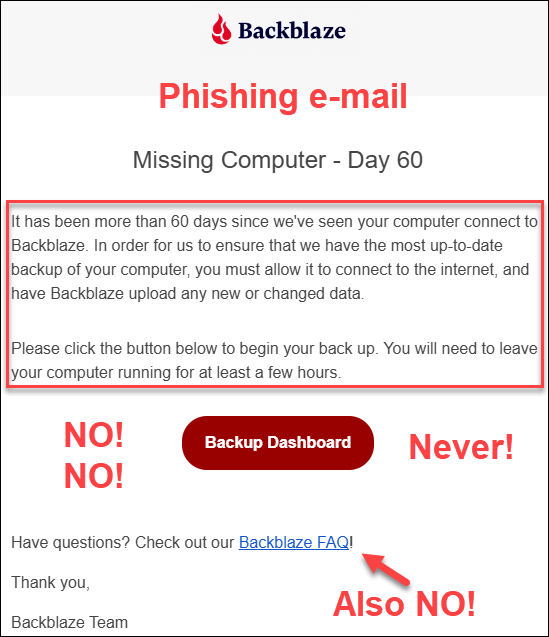
I received this e-mail, supposedly from Backblaze, the company that I use for my offsite system backups. What do you think would happen if I clicked on the “Backup Dashboard” link or the FAQ link?
You know exactly what this “Dashboard” link would look like – the real one. The malicious dashboard is going to prompt me to sign in, which gives the crooks my user ID and password. The keys to the kingdom. What they could access or do next depends on how the attack is constructed and any other safeguards in place, but the consequences could be devastating – including backing up my entire computer system to their fake site. Literally everything.
Even the thought makes me queasy. Consider for a minute what’s on your computer. Our digital lives live there. For example, if you have a little file called “Passwords,” get rid of it.
If you’re thinking to yourself that I could easily catch this by looking at the email header, here’s what it says.

Click to enlarge any image.
Given that I’ve never received this kind of email before, how would I know what sending email address to expect? I wouldn’t, and the bad guys are counting on that.
What did I do? First, stop and breathe – but that wasn’t my first instinct – even with all this training.
It’s frightening to think my system hadn’t been backed up in two months, but on reflection, that doesn’t make any sense because I normally receive reports. So, by slowing down, and literally stopping to think, I recognized the warning signs of a malicious phishing attempt and DID NOT CLICK ON ANYTHING.
I stopped my reflexes and let my brain engage.
Respond after consideration – DO NOT REACT!
Instead, I signed in to Backblaze independently, from my normal sign-in link on their website, and checked. Sure enough, I confirmed that it was a phishing attempt – and a pretty good one too. My backups are just fine, and my system had been backed up regularly.
Had I fallen for this, nothing might have happened right away, because what happens after you click on a malicious link or visit a malicious site has changed. The harm may occur silently now, not immediately, and potentially indirectly. Think about that password list. (By the way, I don’t have a file like that, but many people do.)
If you click on something and “nothing bad happened,” don’t be so quick to be relieved. Now the bad guys can install monitoring software on your computer without your knowledge. Then, when you email back and forth with, say, your real estate agent about buying that lot down the street, the bad guys spot an opportunity and send you an email from the “title company” with instructions for where to wire the money.
Or, the bad guys text you. Wait, you’re thinking, “They don’t have my phone number.” Yes, they do, and they know your name.
Whether you know it or not, your email address and phone number are already circulating publicly and are easily accessible. There’s even more information available on the dark web, including passwords from data breaches and the names of family members.
Crooks already know far more about you than you realize, and that’s exactly why phishing emails and messages are so convincing.
Rule 1: Do not click, because that’s how criminals gain entry.
Rule 2: NEVER, EVER SAVE PASSWORDS IN YOUR BROWSER FOR ANYTHING FINANCIAL.
Once criminals gain entry, they exploit their good fortune – and your misfortune.
If you have already clicked on a malicious link as described under Rule 1 and entered a password, change that password immediately.
Never store financial or other important passwords in your browser. Use a legitimate password manager instead. Forbes and Cybernews published 2026 password manager lists, or you can use Google to find current information.
While we’re on the subject of passwords, don’t reuse them. Let’s say you stored a password for a subscription site like Ancestry in your browser, but you used the same password for your bank account. You know what’s coming, right?
If one site is compromised, the bad guys will try using that sign-in information on financial and other sites. This hacking technique is called credential stuffing and is what 23andMe claimed caused its 2023 breach.
AI is getting so good at being bad that it takes less and less effort to compromise your system, retrieve and exploit this type of information, especially if you don’t have the time, resources, or desire to keep up with new and evolving threats.
Rule 2: Don’t reuse passwords, remove any password files from your computer, and never save passwords for financial sites in your browser.
Rule 3: DON’T BELIEVE YOUR EARS.
Do not assume a familiar, well-known voice belongs to the person it appears to belong to, even if sounds like a close family member.
I can’t believe I have to write this, because it sounds insane.
Generative AI may only need as little as two seconds of your voice to create a convincing voice clone that sounds exactly like you. That is not a typo, although a few more seconds, like 10 or 15, produce even better results. AI can then clone your voice and create a conversation. It takes very little tech savvy, and instructions are all over the internet.
These are known as deepfakes – which can also include videos.
Let me give you an example of how this works. You’re asleep at 3 AM. Your adult daughter calls and says she’s being held hostage and you need to come right now. Or a similar scenario. Someone is in jail, has been in a wreck, or is facing some other emergency.
You’ve been awakened from a dead sleep, and you’re groggy, confused, and terrified. The adrenaline is surging through your body, but your brain isn’t fully engaged.
It’s EXACTLY your daughter’s voice. Exactly. You have no reason to doubt it. There’s no mistaking it – that’s her on the phone, and she’s in grave danger. Your heart is pounding, you’re immediately frantic and desperate, and of course, you would do anything in the world to save her. Your body has been jerked from zero to about Mach 5 in less than two seconds
The LAST THING you’re going to do is stop and question whether it’s really her. Of course it is. You’ve known her for the past 30 years – since the day she was born. “Don’t you think I’d know my own child’s voice?”
The answer is no, you wouldn’t. And you’re the target.
STOP and assess. That’s exactly what you should do in the moment, even though your instincts are to rush and do something. It feels like betrayal to let one minute pass without moving forward, but it’s not betrayal, and that’s exactly what you need to do.
Stop, take a deep breath, and THINK!
Agree on a protocol in advance with anyone who might ever call you in this type of situation. Select either a keyword, short phrase (blueberry pie) or a couple of questions that only you and they would know the answer to and that you can easily remember. Nothing you’ve ever put on social media or used as a password or recovery information.
Select something that only they would know, and that would be impossible to guess. Safe words or phrases. Words or questions that only you and they know the answer to, but not so complex that you can’t think of the answers under pressure. Write it down and put it in your nightstand, or save it in a disguised note on your phone, if need be.
What was your first car? Maybe arrange for a specific wrong answer – like the car they wanted but didn’t have.
How old were you when you fell into the hornet’s nest? Maybe they didn’t fall into a hornet’s nest at all, which is why this question and your pre-arranged answer are good choices.
Don’t use questions that could already be compromised or guessed.
Some people use intentionally “wrong” answers as their key to indicate that the call is legitimate.
This is also sound advice for anyone who receives a call from their workplace IT department instructing them to alter something on their system or network – especially if you are not expecting the call. And yes, even if you “recognize” the caller’s voice.
Verify that the call is legitimate through a secondary method that you initiate.
Depending on the type of “emergency,” another way to determine whether a claimed family emergency is real is to enable some form of family-location tracking service on family members’ devices. There are family locator apps in the major app stores. Be sure to stay mainstream with your selection. Life360 is well-known and works on both iPhones and Android devices, although this is not an endorsement.
Rule 3: Don’t believe your ears. Slow down and stop to assess.
Rule 4: DON’T ANSWER CALLS FROM NUMBERS YOU DON’T RECOGNIZE – EVER!
Why is answering calls from unknown numbers dangerous?
I know someone who used to love to “mess with” solicitors. Guess how the bad guys obtain those 2-15 seconds of your voice? Plus, they can cut and paste your words easily now, making it sound like you agreed to something that you did not.
They call from various numbers. Don’t answer. If you answer, they know they have a live one, and then those calls only get more numerous. They never stop. I block and report every single one as spam. Every time. Every single one.
Do you have voicemail? Remove your voice greeting and use the default one provided by your carrier.
Yes, I sound paranoid, but I’ve been on the receiving end of one of those phone calls, and they are TERRIFYING.
This danger flows both ways.
If you’re a public speaker, your voice is already out there, so you need to communicate clearly with your family NOW so that if they ever receive a middle-of-the-night call “from you,” you’ve already established a safety protocol. If you don’t have one, establish one today.
Additionally, mute your phone and set your notifications to ring-through only for selected phone numbers. This helps control who can reach you. In other words, in the middle of the night, the only numbers that will wake you up are the ones you’ve preselected. That does NOT mean those numbers can’t be spoofed, but it provides you with a layer of protection.
I only have half a dozen ring-through numbers in my phone, and everyone else can wait until morning.
I did this AFTER receiving that terrifying middle-of-the-night phone call, but you can do it now.
Rule 4: Protect yourself by not answering calls from phone numbers you don’t recognize, remove your voice from recordings, and establish your safety routine with your family.
Rule 5: DON’T BELIEVE YOUR EYES EITHER.
Your eyes may betray you.
Be extremely vigilant and highly selective about what you watch and believe. Ask yourself, every time, “Is this image or video real?”
Humans are wired to believe what they hear and see “with their own eyes,” but that metric doesn’t work reliably in today’s world.
Remain on guard and decide each and every time you watch something whether it’s authentic and actually represents what it claims to represent.
If you engage on social media, many of the Reels and TikToks you’ll see now are AI-generated. I can spot them a mile away, but they improve daily, and soon, today’s telltale signs will be gone like last year’s extra fingers, misspelled words, and two left arms.
For example, recently, someone published a pair of side-by-side photos contrasting the same location, supposedly taken several years apart. A then-and-now comparison to make a point. Except that the clouds in the background are distinctive and in exactly the same position in both photos. Yeah, no. One was clearly careless AI. It would have been easy to change the clouds too.
And that was just a bad AI photo, the videos are much more convincing. MUCH.
Google Lens, which allows you to submit photos, is your friend. If Google finds the same or a similar photo attributed to a different time or place, or posted in multiple groups with different claims, you’ve probably uncovered something less than honest.
Rule 5: View everything with suspicion and don’t accept anything you see as authentic without independent verification.
Rule 6: GUARD YOUR HEARTSTRINGS BECAUSE YOUR HEARTSTRINGS ARE CONNECTED TO YOUR PURSESTRINGS.
Emotional manipulation is a cash cow for the bad guys.
If the story starts out with a kitten or puppy being thrown out on a road and saved, a child being adopted from foster care, a soldier returning home to their dog, or a similar high-drama emotional story – and you’re literally hooked in the first sentence or two – chances are it’s AI.
One clue is that these stories often pique your curiosity and are designed to be highly emotional.
How disappointing is that? We all love happy endings.
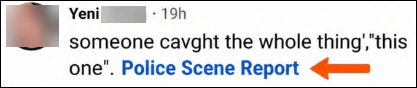
Some scams are even more heinous and take advantage of accidents, especially severe ones. The bad guys know that locals monitor local pages and will immediately wonder who is hurt and what happened – especially if their family members aren’t all at home.

AI bots that masquerade as people on social media and entire pages with very interesting names that are entirely AI-driven are very common on Facebook and other social media platforms now. Just this morning, beneath a photo of a local accident, four different bots used exactly the same language: “got this on video. Take a Peep,” with a link, of course. If you read, click, and engage in any way, including liking a post – you’re setting yourself up to be targeted one way or another. This kind of AI-generated content is replacing yesterday’s “copy and paste” scams, although we do still see those from time to time.
On videos or posts, you may be directed to follow a page “for more” or “click a link” (red flag) to find out the ending of the story. Don’t, no matter how much you want to know the ending.
When the purpose is not to steal your credentials or install malware, links may ask you to donate for Fido or Fluffy’s surgery, etc. The ask could be inferred or implied rather than direct and could say that Fido needs surgery by Friday and they still need another $200, or something similar.
This approach doesn’t ask you to contribute, but it makes you think you’d LIKE to contribute to help Fido. Think of this as essentially financial victim grooming using your own compassion and empathy against you.
Worse yet, the link could download malware to your computer, tablet, or phone.
If you have done anything like this, change any password you entered, run an up-to-date antivirus scan, and seek professional help if you suspect malware or tracking software was installed. Also enable 2FA so that a stolen password alone is not enough to access your account.
Yes, I know it’s a pain, but not nearly as big a pain as the alternative.
Aside from the obvious attempts at theft, why do people create these links? I mean, I just want to know what happened to Fluffy.
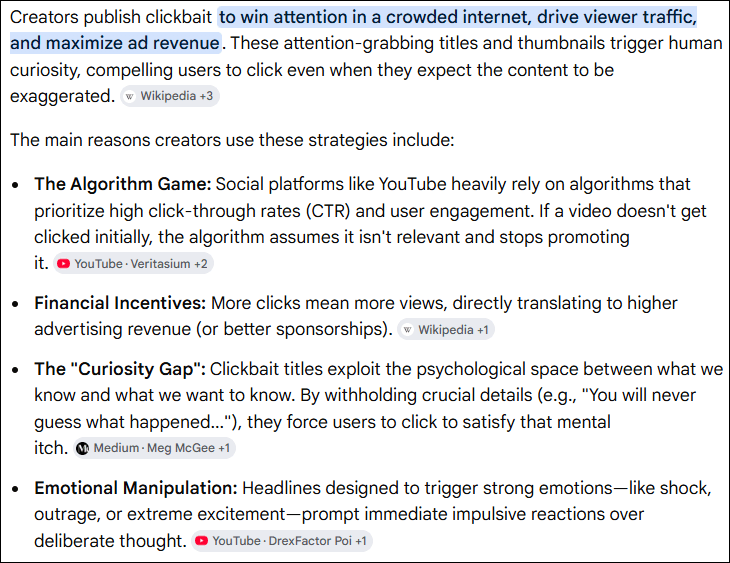
Here’s what Google’s AI-generated search summary has to say, along with links to the sources it provided.
The really sad part is that truly legitimate organizations suffer because of the level of distrust we must maintain today. If you’re feeling generous, before doing anything, including sharing the story for others to read, check alternate sources about the legitimacy of claims and fundraisers. You don’t want to share and play a part in victimizing your friends.
For example, a few years ago, the Happy Cat Sanctuary burned, killing the owner and many cats. Friends launched a legitimate online fundraising campaign to treat the 150-200 cats that survived the fire. This incident was covered by local news and wasn’t a one-off “sad story” social media plea that couldn’t be verified. I confirmed through local news outlets that the fire occurred when claimed and that the fundraising campaign was legitimate.
If you’ve relented and clicked to watch a reel of some sort, and an ad pops up before the end of the story, or you need to click or follow something, you’ve just taken the bait – so stop right there, spit it out, and realize what makes you vulnerable.
Let’s discuss YouTube, where ads have been part of the platform forever. However, there’s a LOT of AI-generated content on YouTube that is compelling but not authentic.
For example, there’s an AI singer, Michael Bennett, also Mikhail Bennett, with AI-written songs and an AI-generated voice. The combination is very compelling and moving, and it sounds lovely.
Whoever generated that content also took advantage of America’s Got Talent by showing “Michael” competing there with extremely emotional songs. None of that is true. It’s an incredible song that resonated with so many, including me, and the friend who shared it with me, but the video was “over the top,” which was the first red flag. I also noticed the tear never moved on his cheek, and the audience didn’t appear quite “normal.” He also looked “different” in other videos, as though he’s not the same person, but similar. Another AI signal. That’s 2026. By 2027, those telltale signals will probably be gone. Forbes wrote about the fake here.
Remember, if it outrages you, piques your curiosity, or tugs at your heartstrings, that content has probably been generated for exactly that purpose. Don’t click and become a victim.
Rule 6: Guard your heartstrings, and if something seems overly emotional, weird, too much, or just “off,” trust your gut, hold on to your wallet, and verify, verify, verify.
Rule 7 – FLASHING RED NEON SIGNS THAT SAY SLOW DOWN AND STOP.
Manipulation signals should flash like red neon signs, telling us to put the brakes on.
- Slow Down
- Think
- Stop
Any email, call, text, or other content that creates any of the following reactions should trigger those brakes:
- A sense of urgency – “If you don’t reset your password by 5 PM, you’ll lose access to…” If you click, you are probably signing into a copycat site that looks exactly like the real one – except it’s stealing your credentials so the bad guys can sign into the real site to steal more than your credentials.
- Anything frantic – There’s activity on your credit card. “We need you to enter your password here to dispute the charge.” Or, “click here to sign in to see the charge.” Or, “call this number.” This is different from a text I received in my bank’s normal message thread confirming that I had indeed written check number xxx for $xxx.
- Pressure, direct or implied – “Your subscription has lapsed…click here to renew.” Go to the website and renew – never, ever click, no matter how legitimate the email looks. Full stop!
- Anything unusual from someone you know. “I’m in a restaurant and in a pickle. I forgot my billfold. Can you please Venmo me $50 so I can pay my bill?” Call them using the phone number that you already have. Do NOT reply to the text or click to call that number.
- Manipulative instructions – “We’ve received your order. The file is attached.” This is especially effective if you HAVEN’T ordered anything because it generates both curiosity and concern. Do not, under any circumstances, click on an attachment you’re not expecting. Slam on your mental brakes!
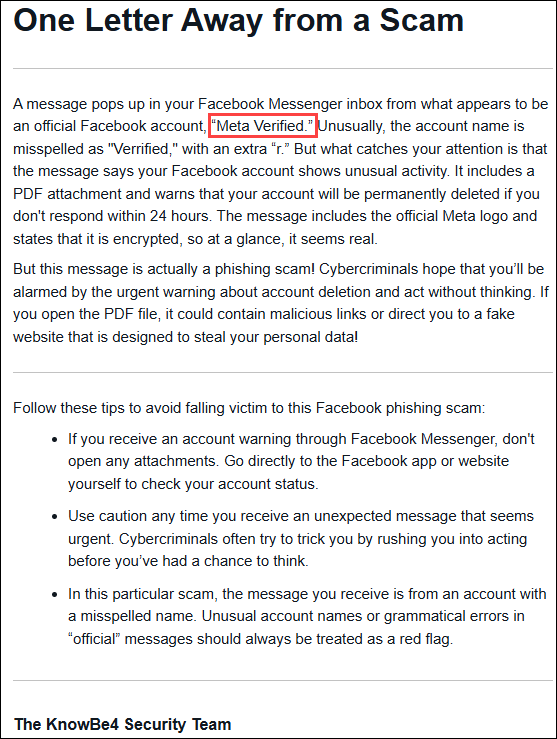
This KnowBe4 alert arrived today and demonstrates several flashing red neon signs at once.
This scam arrives as a Facebook Messenger message masquerading as Facebook, or Meta itself. The message even includes an accurate logo, but it is not legitimate. Red flags include the concern it generates, an unexpected PDF attachment, a threat of imminent account deletion, and the sender’s name is one letter off. In the message, “verified” is spelled “verrifed,” with two Rs, but if you’re focused on the words “permanently deleted,” you’ll never notice that. You may be panicked and not thinking clearly. That’s exactly what they are counting on.
Although there are often no misspelled words in scam emails today, in this case, the misspelled username is your first clue. Two of my friends received this through Messenger today, reported it, and an hour or so later, I received the notification from KnowBe4.
The bad guys trick you by making you feel that the action is:
- Completely safe – because it came from someplace or someone you routinely communicate or do business with (but it really didn’t and the bad guys are trying to trick you).
- Urgent – someone is trying to compromise your account, and you need to <fill in the blank> right away (except complying compromises your security).
- Required to avoid negative consequences – if you don’t finish this training by Monday morning, you’ll no longer have access to your accounts (except it’s a fraud, trying to get you to sign in through a very convincing authentic-looking but malicious portal).
In any of these types of situations, don’t comply or reply, and never return calls to any number they give you. Find the number on the back of your credit card, for example, or sign into the site you’re already familiar with to take care of business.
Always ask yourself:
- Is this normal?
- Does it feel “off”?
- Why?
- What am I giving away? It’s not always money. Your information is gold, too.
Rule 7: Slow down, stop, and evaluate. A sense of urgency is a flashing red neon sign designed to stop you from thinking.
Rule 8 – STOP RANDOMLY ENGAGING AND LOCK DOWN SOCIAL MEDIA.
Algorithms control what you see.
Worse yet, once you click or even expand to read, the social media algorithms send you more of the same, which is the exact intention of the creators. The phenomenon is often referred to as a social media bubble or echo chamber because it reinforces what you believe based on what you’re seeing and continue to see.
It used to be that ugly political content was restricted to election cycles, but not anymore. It’s regular daily fodder and can easily be manipulated. The key, however, is that whatever you watch or read, you’ll see more of it in your social media feed.
Another effect of reading one of those scammy but very interesting and engaging stories is that Facebook now uses AI (how ironic, right) to show you more of the same. It’s a never-ending cycle.

One time I accidentally clicked to watch a reel, and it took days of clicking on the little “X” in the upper right-hand corner of the videos (or the posts) to signal to Facebook that I really didn’t want to see anything else like that. Hint – this works with ads too.
It’s fine to read that fun public story – but you don’t have to engage by clicking and liking. Clicking DOESN’T DO ANYTHING FOR YOU, but it does provide information about you to other people, including AI bots and the social media platform itself.

If you ever “like” or comment on a public post on social media, your reaction is visible to everyone, including AI bots, and you’ve given them information about yourself that they can use to target you more effectively. Just stop.
Don’t expose any more of your personal information than is already out there – and you might be surprised just how much there actually is.
Do you use your real name? Is your birth year, or much worse yet, your complete birth date displayed in your public profile? If so, remove it.
Do yourself a favor.
- Google your name with your state.
- Google your phone number.
- Google your email address.
Your information doesn’t even need to be on the dark web for someone to find very revealing data about you.
You can discover even more about yourself, or anyone else, by checking out BeenVerified.

Record aggregators such as BeenVerified also provide the names of people who live or have lived with you and with whom you’re associated. In other words, your family members.
It’s so easy to unintentionally feed the data-gathering machine.
Ancestry includes voter-registration lists, where available, complete with full names, addresses, birth dates, and other personal information through 2023.
Protect yourself, where possible, and never publicly display your birth date or year on any platform. Do note that this information can be part of recovering your account, should it become compromised, so if you include that information, privatize it.
Are you on LinkedIn? That’s another avenue for information gathering, including your employer.
There’s not much you can do about information that’s already out there, but you can stop providing more through social media.
I wrote the article titled STOP, THINK, & RUN – Stop Innocently Giving Your Information to Cybercrooks on Social Media, which explains how to lock your accounts down, and why you should.
Rule 8: Lock your social media accounts down and zip your lip.
Rule 9: LEARN THE NEW THREAT LANDSCAPE
The threat landscape has not improved for us, that’s for sure. The crooks have gotten smarter and much more effective with their AI assistants.
Yesterday’s Nigerian princes, those handsome widower generals in uniform, and buxom young women randomly targeting people who comment on public posts on social media are somehow almost all gone, although not entirely. They’ve been replaced by something much more dangerous. AI makes everything easier – including crime.
Now, the criminal’s objective is to get you to take an action that isn’t in your best interest.
AI makes both impersonation and personalization much easier and more convincing, and attacks may now involve multiple methods in tandem.
The most convincing attacks use two channels. For example, they both email and call you, which makes the communication seem more legitimate, which in turn makes you feel more secure. They may claim that your credit card has been compromised or begin with, “This is your bank…”
Worse yet, you really can’t tell and may have no way of knowing whether the communication is legitimate, so you go ahead and click because you’re tired and “it’s probably fine,” except it’s not.
The bad actors may have already compromised your system or phone if you clicked on something you shouldn’t have, and they are just waiting to exploit it by capturing your login information – including your password.
They may have been monitoring your communications for some time now, not just waiting for any opportunity, but an exceptional, highly profitable opportunity.
Never use a “call back” button, telephone number, or link supplied in the message. Call the bank or whomever directly at a number you can confirm, or use another form of communication – like walking in the door.
I was at the bank in person recently, and they are now warning people about scams before they transfer money on your behalf. You are required to click to acknowledge that you read the scam warning signs they provided. The bank was also reminding people that debit cards are a “direct siphon into your bank account” and someone can easily drain it if your card or PIN is compromised.
If someone fraudulently charges something to your credit card, you can dispute it, but if they empty your bank or retirement account, the money may be difficult or more likely impossible to recover. Report any suspicious activity to your financial institution IMMEDIATELY, regardless of the hour, because the outcome may depend partly on how quickly you report it.
Rule 9: Learn the new threat landscape and keep current.
Rule 10: NEVER UPLOAD ANYTHING WITH PRIVATE INFORMATION, INCLUDING NAMES – YOURS OR OTHER PEOPLE’S.
This includes uploading your monthly budget worksheet to AI, your tax information, your DNA match list with other people’s names from a DNA testing site, etc.
Genetic genealogists, I’m looking at you here. If the data isn’t already in the public domain, DO NOT UPLOAD IT to AI agents.
Your browser will not protect you, and neither will a VPN. I’ve had people tell me that both of these will protect what you upload when using AI. They don’t. Neither prevents an AI service from receiving information that you intentionally upload to it.
Don’t fall for companies that encourage you to “upload your DNA file” for “better” information or to learn how you match ancient specimens. Check credible sources that are well-known and respected in this industry, such as my blog, Diahan Southard at Your DNA Guide, or the Genetic Genealogy Tips and Techniques Group on Facebook. If you discover that none of us, meaning me, Diahan, or the administrators of that Facebook group are recommending a company, pause to ask yourself why.
When considering an upload, ask yourself:
- Who are those people, anyway?
- Where are they located?
- What are their credentials?
- What are they doing with your autosomal DNA file?
If you’re thinking about uploading your DNA or matches to an AI tool or to a company you know nothing about merely because it “sounds good,” just don’t.
If you’re going to err, err on the side of extreme caution because once your DNA is “out there” and exposed, you can’t just take it back like it never happened.
Rule 10: Never upload your own private information to AI or any other service that you have not thoroughly vetted, and don’t upload your match information or anyone else’s private information without their specific permission.
In Summary
I chose to address AI’s dangers after first exploring its benefits in the earlier articles because I don’t want you to think I don’t like AI. I absolutely do. I use AI in some form every day.
However, AI can also be extremely dangerous, especially for the unwary. I cannot emphasize this enough.
AI will become more advanced and “better,” which means we, as consumers, have to be even more vigilant. While the idea behind “Who are you going to believe, me or your lying eyes?” was once a Marx Brothers punch line, and “Lyin’ Eyes” later became an Eagles song, today that warning pertains to AI and social media, both separately and together.
I want you to stay safe. AI is one of the tools that we, as genealogists, can use quite successfully under some circumstances. Just don’t get out over your skis.
To recap:
- Don’t click
- Don’t believe your ears, or eyes either
- Never save important passwords in your browser
- Guard your heartstrings
- Remain vigilant
- Slow down, stop and assess
- Verify independently
- Protect yourself
- Put a family protocol in place
- Stop randomly engaging and lock down social media
- Guard what cannot be recovered
- Don’t upload private information without thoroughly vetting the service
- Never upload other people’s private information without their permission
- Educate yourself and stay current
While the specifics of each platform change quickly, the underlying fundamentals of safety and increased vigilance will remain constant.
As mentioned in the third AI article, follow Mark Thompson and Steve Little, the Family History AI guys, for updates.
Stay safe and enjoy the ever-evolving world of AI.
But remember…
Always, always be suspicious. You may only get to be wrong once.
_____________________________________________________________
Share the Love!
You’re always welcome to forward articles or links to friends and share on social media.
Subscribe!
If you haven’t already subscribed, it’s free. You’ll receive an e-mail whenever I publish by clicking the “follow” button at the top of the main blog page, here.
Help Keep This Blog Free
I receive a small commission when you click a vendor link in my articles and purchase that item. This does NOT increase your price but helps me keep the lights on and this informational blog free for everyone. Please click on the affiliate links in the articles or to the vendors below if you are purchasing products or DNA testing.
Thank you so much.
DNA Purchases and Free Uploads
- FamilyTreeDNA – Y-DNA, mitochondrial and autosomal DNA testing
- MyHeritage DNA – Autosomal DNA test
- AncestryDNA – Autosomal DNA test
- AncestryDNA Plus Traits
- 23andMe Ancestry – Autosomal DNA only, no Health
- 23andMe Ancestry Plus Health
Genealogy Products and Services
- MyHeritage Subscription with Free Trial
- Legacy Family Tree Webinars – Genealogy and DNA classes, subscription-based, some free
- Legacy Family Tree Software – Genealogy software for your computer
- OldNews – Old Newspapers with links to save to MyHeritage trees
- MyHeritage Omni comprehensive “everything included” subscription plan
- Newspapers.com – Search newspapers for your ancestors
- NewspaperArchive – Search different newspapers for your ancestors
My Books
- DNA for Native American Genealogy – by Roberta Estes, for those ordering the e-book from anyplace, or paperback within the United States
- DNA for Native American Genealogy – for those ordering the paperback outside the US
- The Complete Guide to FamilyTreeDNA – Y-DNA, Mitochondrial, Autosomal and X-DNA – for those ordering the e-book from anyplace, or paperback within the United States
- The Complete Guide to FamilyTreeDNA – Y-DNA, Mitochondrial, Autosomal and X-DNA for those ordering the paperback from outside the US
Genealogy Books
- Genealogical.com – Lots of wonderful genealogy research books
- American Ancestors – Wonderful selection of genealogy books
Genealogy Research
- Legacy Tree Genealogists – Professional genealogy research
