AI Assistants – The Good, the Bad, the Ugly, and the Unseen

This is the third article in the AI series.

I suggest that you read these articles in publication order, as they build on each other.

AI Tools

The most commonly used AI tools, in no particular order, are:

  • ChatGPT by OpenAI
  • Claude by Anthropic
  • Gemini by Google
  • Co-Pilot by Microsoft

This is not a comprehensive list, but these are the tools you’re most likely to encounter.

Increasingly, AI is integrated into social media platforms that many use widely, such as:

  • Facebook (META)
  • Grok integrated with X (formerly Twitter)

Broadly speaking, it’s now far more unusual to find a platform without AI in one form or another than one with AI.

This isn’t going to change, so we all need to learn how to adapt, live with AI, and use it successfully.

AI Agents, Tools, or BOTs Are Not Search Engines

Before we go any further, let’s be clear that AI tools are not search engines. Originally, many people thought they were “search engines with brains” that helped analyze results. Maybe someday, but not yet, with the notable exception of Google, which was originally a search engine and now has an “AI Option.”

Sometimes, it’s difficult to know when your AI assistant is accessing websites and when it isn’t – because AI tools are inconsistent.

Access Levels

Sometimes what you receive depends, at least partly, on what you pay for.

I pay for a monthly ChatGPT Plus subscription, which provides broad access to ChatGPT for non-programmers. There are several subscription tiers, including a free option that you, as a general user, can try.

Developers, on the other hand, using the APIs (application programming interfaces), generally pay with tokens based on usage.

This pricing approach is common across AI services today, although every vendor is somewhat different, and the landscape is evolving rapidly.

Interfacing With AI Assistants

I asked ChatGPT whether there is a website to report a Swallowtail Kite bird sighting. It gave me the correct answer, indicating that it searched the web and provided a link to a reporting form. That’s exactly what I wanted.

However, last week, when I specifically gave ChatGPT the link to one of my own blog articles, publicly available on the web, and asked it to proofread for typos, it gave me answers – but with errors that indicated it had NOT read the article.

The answers were wrong, and the language and errors it reported were NOT IN THAT ARTICLE. I reported the issue and asked ChatGPT what happened. When challenged, it replied that it had based its answer on earlier conversations, NOT on reading the article – so essentially ChatGPT fibbed to me. It should have simply told me it could not access the article, rather than making something up. Although why it couldn’t access the article is still baffling.

We officially call the phenomenon of AI making something up a hallucination or hallucinating, and all AI models do it.

We tend to humanize these tools. A fib or lie is an intentional and calculated behavior by a human. AI is not human. It doesn’t understand ethics or possess concepts of right and wrong. It does not have the capability of feeling shame or other emotions. It does have the capacity, however, to be extremely frustrating. Just when you think you know what to look for and how to interact, you discover that you’re wrong.

LLMs (Large Language Models) are trained on patterns, so ChatGPT reported what it “thought” it would find in that article based on earlier interactions. How do I know that? I asked it.

It said:

Some training methodologies reward forced guessing, meaning that it’s better to make a guess than to admit it doesn’t know or can’t answer. In some cases, hallucinating can be a result of outdated data or reaching into its own memory of our past interactions to piece together an answer.

Regardless, the onus falls on you, either as the initiator of the conversation, or the end-consumer, to validate every interaction and catch those issues.

When writing this article, I asked ChatGPT why it could search for an answer about a location to report Swallowtail Kite sightings and give me web links in its reply, but it could not proofread my own article and even indicated that it had, while providing misinformation.

Here’s the lengthy answer. To summarize, ChatGPT says that its answer was based on earlier restrictions – but that’s NOT true either because this interaction was the week before. A very long word-salad answer that was neither helpful nor accurate. I’ve come to learn that when ChatGPT gets “too chatty,” especially in a situation like this, it’s trying to “avoid something.” Generally, this chatty behavior precedes me discovering that ChatGPT can’t do something it clearly told me it could do.

Another example is when I asked ChatGPT to divide one long Word document into four shorter files. It said there was no problem. We agreed which sections belonged in which of the four resulting files. After some back-and-forth discussion, I told it to go ahead and divide, and it kept repeatedly telling me about divisions and what it was going to do. I finally told it I had raised children.

Finally, it fessed up.

Remember, this is a machine telling me that it “realized halfway through.” That’s hooey. Then it went on to tell me what it could do, which it couldn’t do either.

I’ve omitted 3 or 4 pages of increasing frustration here.

By this point, and several hours after we began, my exasperation level was off the charts. I could have done this myself in one fourth of the time I had already invested – and I still had to complete the task manually. I thought it would be quicker and easier to have AI perform what should have been a simple AI task – and AI confirmed this line of logic. Clearly, we were both wrong.

I never know what to expect anymore – as I’m often astounded in both directions.

ChatGPT kept telling me that my time wasn’t wasted and the good news was that I now had the redesigned document, which was the hard part anyway. Of course I had the redesign, because I DID THE REDESIGN!

I gave it instructions for what to do in the future. In other words, in my best mother voice, “don’t ever do that again!”

It told me that when I said “I’ve raised children,” it “knew the jig was up.” It’s trying to be “cute” here. Remember, it’s a machine – even though this exchange implies it was doing that on purpose until “caught.” It did stop at that point and admitted what was going on.

I told ChatGPT that I was going to use this as an example of “AI can frustrate you to tears.” And it replied, “You absolutely should add that.”

I sent it to timeout for a couple of days, like the naughty child it was, while I got over being mad at it.

So, the tool that should be able to help me not only sometimes does not help, it tells me that it did, then procedes to make excuses.

“Did you take out the trash?”

Rolls eyes, “Yes, Mom, I took out the trash.”

“It’s sitting right here…”

To be fair, on the flip side, sometimes ChatGPT is extremely helpful, which is why I let it out of timeout and didn’t cancel my subscription – although I was tempted to ask how to do that about midway through😊

The bottom line – we can’t trust AI results without verifying every single thing, every single time!

This is true for every AI agent out there. Full stop. It’s not just ChatGPT.

AI Fatigue

Like a sleepy toddler, AI behavior gets worse or deteriorates the “more tired” it gets, which means the further into a chat session.

If I submit a Word document or save my draft article as a PDF and upload it to ChatGPT, and the article is “long”, ChatGPT gets worse as it goes along. Not only does it miss things, but it also reports things that aren’t there and sometimes simply makes things up. Sometimes PDFs have better results, but not always.

This general phenomenon is called “fatigue” or “context fatigue”, which is a type of hallucination. The fact that there’s a term for these things is concerning in its own right.

You’re probably wondering why on earth I still use this tool at all, and the answer is because I’ve learned:

  • How to use it (mostly) successfully
  • When to use it and when to use a different tool
  • AND NEVER to trust it without confirmation

Clearly, under specific circumstances, the good outweighs the bad, or I wouldn’t still be using it at all.

AI Icons

As a consumer, how might you know when you’re engaging with something that was AI generated?

Ethical AI users, developers, and companies indicate when they are using AI or when output was produced using AI. AI is new enough that there are no standard practices or only one icon to look for. Complicating the issue is that fact that while something may not be entirely AI generated, it may have been AI assited or partly generated.

And what constitutes AI anyway?

What about Grammarly, a proofreading tool that we have been using for years to assist with spelling and grammar? Is that AI? Or just its newer “rewrite” feature? I’ve used Grammarly for a long time, but differently that ChatGPT. Grammarly catches issues like verb tenses while you’re writing. ChatGPT doesn’t integrate and only works on things you submit directly inside the application. Grammarly has become more persnickity, and ChatGPT more useful during the same time period.

It’s clear that images and infographics I ask to have created are Generative AI, and should be labeled as such, but much of the rest is unclear.

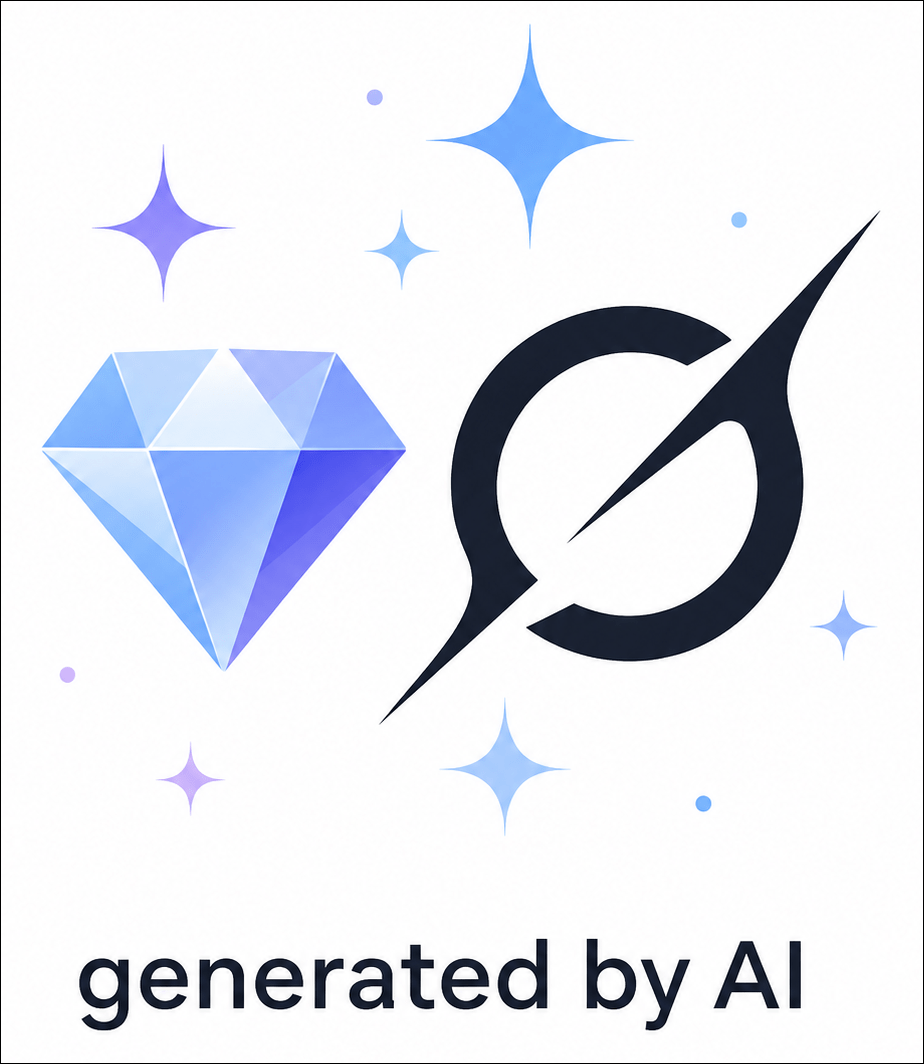
I asked ChatGPT to generate an image of the most common icons indicating that something is AI-generated and gave it three examples. I also included the instructions to add “generated by AI” at the bottom, which should be a standard practice, and this is what it provided.

I’m seeing the little “sparkle” more and more, and I suspect this will become the industry standard.

Word of caution: Just because you DON’T see the AI disclaimer “Generated by AI” or something similar doesn’t mean what you’re viewing WASN’T generated using AI. This is particularly true for unethical AI uses, but not everyone that omits the disclaimer is unethical. It’s still a new field.

But assuredly, if someone has created something using Generative AI for an unethical purpose, with the goal being to convince you that it’s true, they certainly aren’t going to tell you that they are trying to manipulate you through the use of AI.

Keep your guard up.

Google

One of the features I like about Google (most of the time) is that Google’s AI integrates with its search engine. In other words, it’s a hybrid, and if you’re using Google, you’re already using AI.

As Google and every other AI agent will tell you, “AI can be wrong.” That’s like telling the doctor, as you’re in labor, getting ready to deliver a baby, “I might be pregnant.”

Google Search Plus AI Integration

Google search now has an option to include AI integration, which I love for two reasons.

First, Google provides a nice summary, AND, more importantly, it gives me sources for each statement.

I asked Google, “Is there only one AI symbol?” knowing that the answer is no.

Please note that this is the “All” search mode, NOT “AI Mode” which provides additional analysis.

I love that Google provides sources, and I can click through to decide for myself what’s relevant or accurate.

The sources are also provided in an information box on the right-hand side of the page with a preview so you can quickly do a cursory evaluation of the sources that contributed to Google’s response.

Providing sources does NOT mean that AI is correct 100% of the time, of course, but it increases the chances because, as a search engine, Google has the benefit of being able to “rank” or “judge” which sites are consistently accessed and seem to be of better “quality.” Yes, I know there are lots of “air quotes” in that sentence, but everything is the consistency of warm jello in this industry right now.

“AI Can Be Wrong”

That’s the understatement of the year. If 2026 has a tech theme, this is it!

Over time, and with much use, I’ve learned to use Google to gather resources and reference sites for a particular topic. I always confirm and verify. I have seen Google be wrong, for a variety of reasons, but I’ve YET to see Google make up a reference site out of thin air. I think that’s the benefit of combining the search engine that has years of ranking experience with AI.

In some cases, other AI tools hallucinate names of books and materials in libraries, complete with fictitious reference and call numbers. In one case, one of the AI tools provided me with a list of books that I authored, which included:

  • A book that another author wrote (but without that author’s name)
  • A book that doesn’t exist at all
  • A book that I did write
  • And missed another book that I wrote

When I asked about the missing book that I wrote, it told me that another author wrote it. I was NOT happy.

Today, a few weeks later, the answer is still wrong, but wrong differently. In all fairness, when I switched to Google’s AI mode, it did better and only included my books. When I asked ChatGPT, it was exactly right and also included my blog articles and scientific paper publications. Like I said before, consistency within and between tools is problematic.

AI agents are improving and will continue to do so. However, we always need to maintain the level of skepticism we exercise when viewing unsourced family trees, and even those with sources attached. We evaluate everything in our genealogy, and we need to implement the same skepticism protocol with AI results.

AI is built on whatever information is found on the internet and other unnamed, unknown training sources. I don’t have to explain the pitfalls inherent in that approach.

You can give it a test drive by asking Google or any AI model about your favorite disproven family myth.

Here’s mine.

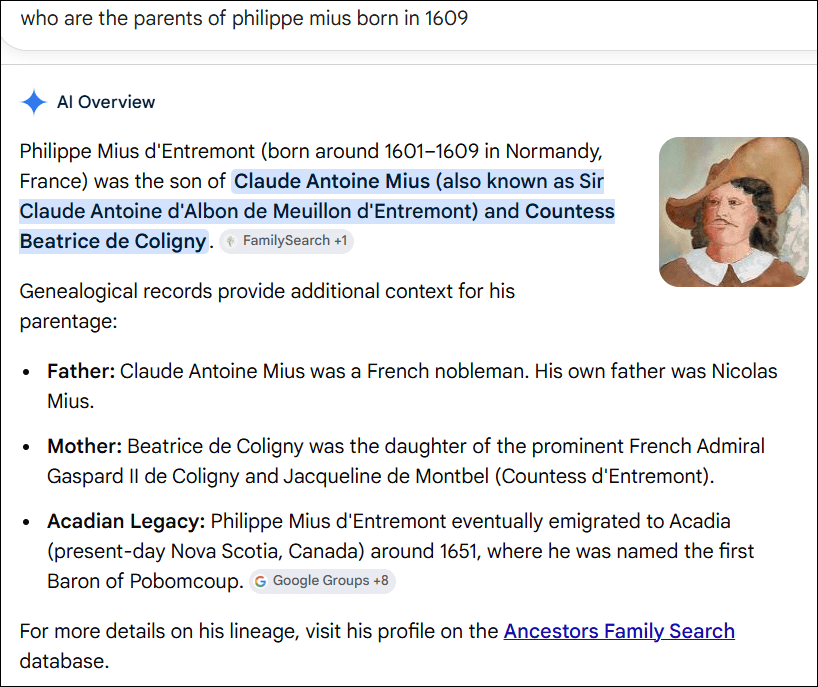
I asked Google, “Who are the Parents of Philippe Mius born in 1609?”

This is wrong and is a compilation of various flavors of erroneous information from the web. However, the third bullet point is correct, so inaccurate information is interspersed with accurate information, factually stated and presented beautifully, which might lead people to believe without verifying.

By the way, this isn’t the fault of AI which is only providing information for you to verify.

Think about the next step – if AI generated a story for you with erroneous information, and how wonderfully convincing that story could be. Just because something is provided in narrative or “story format” doesn’t make it any more accurate, just more interesting.

Understanding what AI is, how it works, and why it can be both useful and confidently wrong is only the first step. The next question is practical: how do we actually use AI successfully without letting it lead us into the weeds with bright, shiny objects before abandoning us there?

Which leads me to the question – “What is Generative AI?”

Generative AI

AI, in general, is a tool that we can use in a number of ways. You can ask AI to help analyze a spreadsheet, so long as you check to make sure the analysis is accurate.

Sometimes AI succeeds with complex things and fails at simple ones – defying the type of evaluation logic we might utilize in other circumstances.

Generative AI is different in that it’s a subset of AI that is used to create new content. Some common uses are:

  • Story or article creation
  • Image generation, like posters, infographics, or pictures
  • Audio generation
  • Video generation
  • Photo “Repair”
  • Photo modification

Let’s look at a recent example.

I wanted this image of me with Mom’s quilt around my shoulders to be combined with a labyrinth photo (or photos) depicting a walk in my labyrinth.

I submitted several photographs of myself and the labyrinth, including some of me inside the labyrinth from different angles. I’m not including them all here, as it’s not the photos that are important, but the fact that I provided plenty of fodder.

Here’s the labyrinth from the air. I included more photos from different angles on the ground.

I asked ChatGPT to combine them to show me walking in or into the labyrinth with the quilt as shown in the first photo.

This is the best result after a couple hours and at least 30 attempts. Try as I might, I was unable to convince ChatGPT to create an accurate labyrinth, even though I provided several photos and had an active conversation about what I wanted.

It parroted what I said and correctly indicated that it understood what I wanted, but failed to produce the expected output. The real labyrinth includes boulders and non-uniformly placed rocks lining the labyrinth path. This “labyrinth” also has no “turns” and appears to be a series of concentric circles, which is clearly not what a labyrinth is. Towards the end, each iteration was actually getting worse instead of better.

I finally just gave up and stopped.

This image really doesn’t matter because it was just for fun, although I had hoped to use it for Mother’s Day. However, it serves as an excellent example of the great potential, along with the current level of frustration. We’ll discuss photo modification and repair, a subject near and dear to a genealogist’s heart, in the next article about AI and genealogy.

Unseen AI

The examples we’ve been discussing are circumstances where you’re aware that AI is being used because you’re in the driver’s seat, but what about circumstances where AI is ingrained in a platform, and you’re not aware that you’re dealing with AI?

Let’s use medical care, for example.

Medical Care

Today, some patient portal software platforms include AI answers to questions patients can submit. Some applications are fine, like providing directions to the office or even for pre and post-operative standard care.

Individualized questions are different. The platforms I’m familiar with submit the AI answer to a provider before posting the answer back to the patient. Do they all submit to a provider first? That’s a parameter that can be configured by the practice. There is no “best practice” standard, at least not yet, but here’s how the Mayo Clinic is handling answers to patient questions.

Johns Hopkins discusses AI’s role and great potential in health care, here. I don’t want any entity to get out over their skis with AI just yet. That said, AI is providing valuable assistance in the medical imaging field, analyzing scans with unprecedented speed and precision, picking up fine signals that might easily be missed or not evident at all to humans, then handing the results off to the diagnostician.

An article in the Atlantic, titled, “AI is Taking Over Hospitals” isn’t being hyperbolic. The first paragraph states:

“Every knowledge-based profession may one day reach the point when AI outperforms the human experts. In medicine, that day appeared to come in April. A group of primarily Harvard and Stanford researchers announced the results of a study that pitted ChatGPT against hundreds of physicians in a diagnostic obstacle course involving written medical mysteries and information from real-world patients. The bot had won, and the humans weren’t entirely happy about it.” You can read the rest here.

Harvard discusses AI in health care, here, empowerment, and where the field is headed.

Truthfully, based on recent interactions with my healthcare provider, I’d be better off with AI. AI with guardrails may be the way of the future, especially in underserved areas. AI as a tool would allow patients to better understand their diagnosis, options, and advocate for themselves.

It’s important for patients to know when AI and/or an actual physician or other health care provider has been involved with a response. I hope provider “involvement” isn’t just a mass “click to send.”

ChatBots

Next, consider banking. I submitted a question about currency conversion to my bank’s chatbot on their website. Not all chatbots are AI – some are actually people or transfer calls to humans if the question moves into an area of uncertainty.

The Chatbot could not answer a question about if there were fees for currency conversion between the US and Canada, simply telling me I had to visit my local branch. This should not be a difficult question. I asked if it was a chatbot or a human, and it simply replied, “My name is Sara. I’m in Pennsylvania.” Yep, Chatbot, and a disingenuous answer.

So, I took the Canadian check and drove a half hour each way to visit my branch. They asked why I came in for that information instead of calling. I explained what happened, and when I tried to call the branch, I was routed to a centralized call center, where I interacted with another bot and received the same answer.

As it turned out, there was no conversion fee, but I needed to deposit the check in person anyway because their phone app does not have the ability to do currency conversion. I’ll spare you my opinion on all of this, other than to say that this frustration and poor customer service was entirely unnecessary. I felt like, instead of being assisted, I was in “tech loop jail.”

AI could have been programmed to help by answering a straightforward yes/no question, but it wasn’t. The automated call center just sent me to the bot. The phone app could do currency conversion, but it doesn’t.

You’ll have to decide for yourself how comfortable you are with any answer you receive in these types of circumstances. How will you know if it’s AI versus a human, and how much confidence do you have in either? Both can make mistakes. Maybe if combined, mistakes can be minimized or eliminated altogether.

In the bank case, I wasted time and was frustrated, but not damaged. In other situations, I would only want to discuss my specific circumstances with a human who actually knew what they were doing or was at least actively overseeing an AI tool.

Stay vigilant.

AI Vibe Coding and Hacking Tools

AI has made computer programming accessible to the general populace, even if they don’t know how to code. That’s both the good news and the bad news.

AI is making it substantially easier to be bad guys. Specifically, AI has enabled the creation of bots that hack and scrape websites, making it significantly easier to compromise them or bring them down.

The Atlantic’s article, “Assume You Will Be Hacked” isn’t kidding. The opening sentence says, “AI is enabling a deluge of cyberattacks the likes of which we’ve never seen before.” If you’re thinking to yourself, “I don’t have anything to worry about, I don’t have a website,” think again. Where do you bank? That’s just for starters.

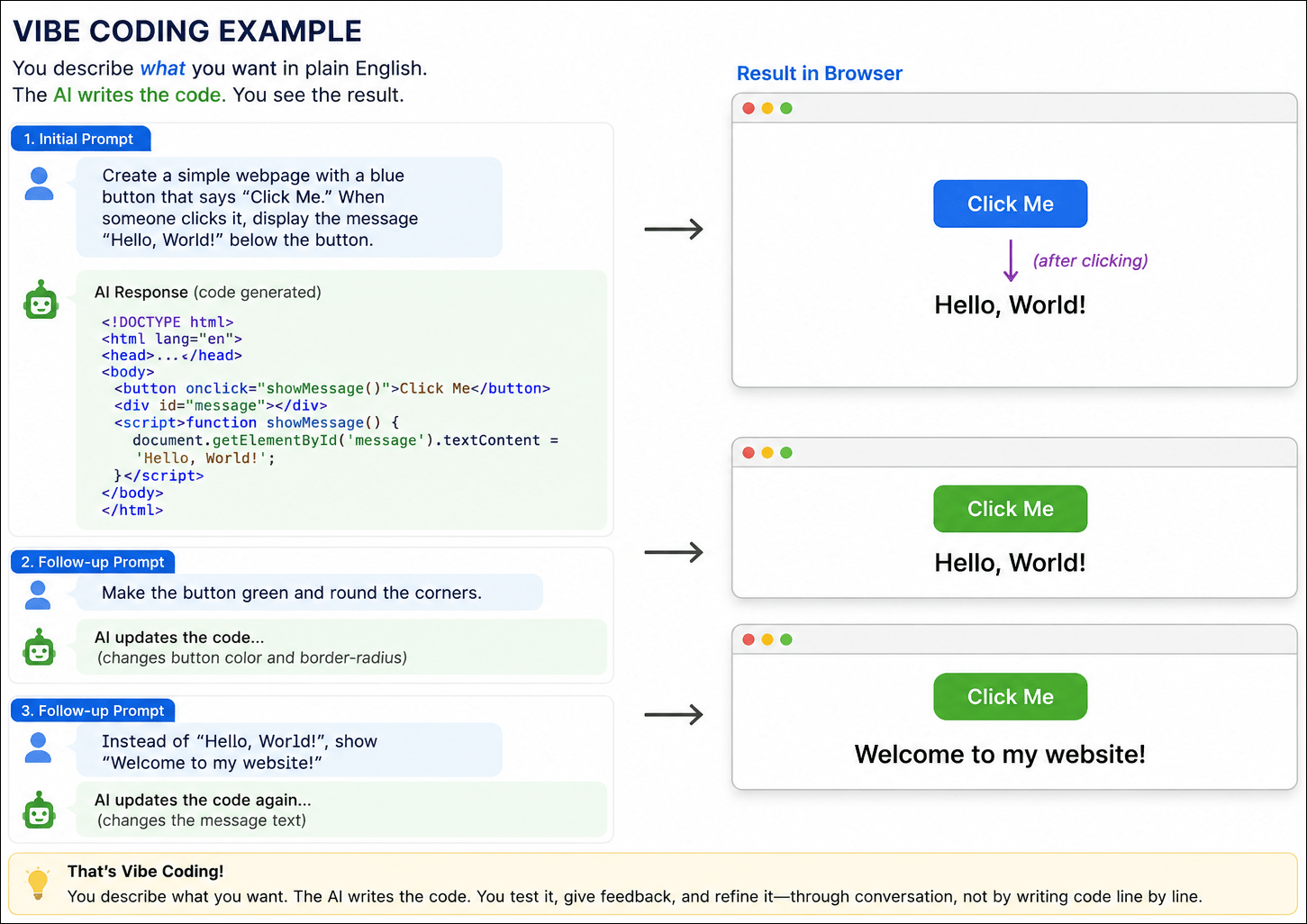
One of the reasons that it’s easier to be evil is something known as “vibe coding,” which means you don’t need to know how to write code or program a computer. The AI tool, generates code on your behalf based on your human-language description of what you want it to do. You tell it what you want, and it constructs the code to (hopefully) perform that function.

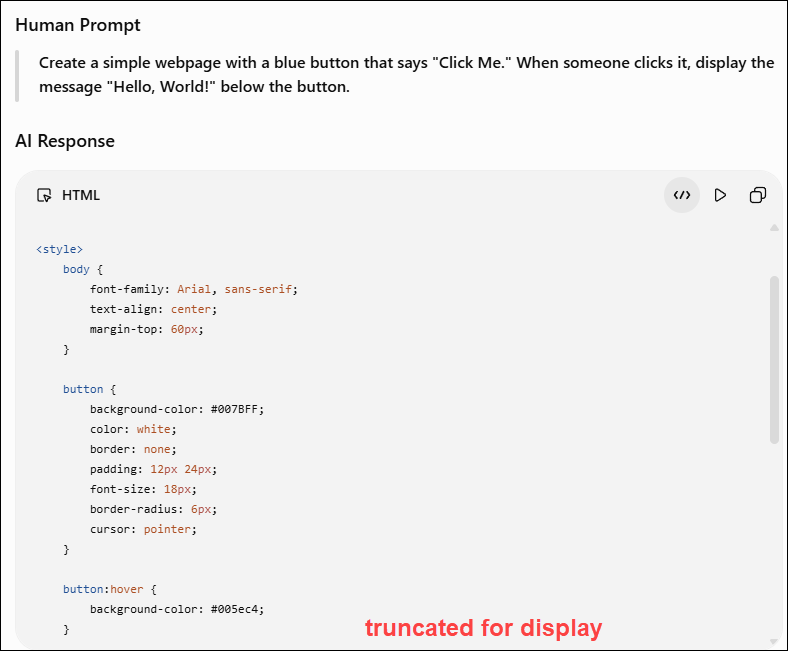
Here’s an example with the human prompt and the first few lines of the code generated immediately by AI.

The prompt is short, only two sentences, but the AI tool generated nearly 50 lines of HTML, CSS, and JavaScript. This example makes the “magic” of vibe coding immediately obvious, even to, or maybe especially to someone who’s never programmed.

Generated by AI

You can then follow up with additional instructions, like “make the box blue”, or green, or whatever.

For experienced coders, this is a huge productivity advantage because they don’t have to start from scratch. They also have the skills to catch errors in either AI’s logic, code or both.

The problem is that most people either don’t have the skills or simply don’t take the time. For the unwary, vibe coding can introduce security vulnerabilities and hidden bugs. “The unwary” doesn’t just apply to the person generating the code, but the consumer too, who has no idea who generated that code or how it was generated.

AI doesn’t have morals or ethics and has no idea what it is that you’re planning to do with the program it produces for you. It’s easy to ramp up from PC level to server level to internet scale.

AI is just a tool and doesn’t have a way to judge intent. We’ve known for a very long time that viruses and malware exist, and someone is always trying to compromise either us personally or business entities, one way or another. We’ve seen examples of cybersecurity failures in our own industry.

It falls to the vendors to protect themselves and their customers, as much as possible, and to us as consumers to be ever vigilant. We need to learn about and engage in safe, secure practices with known entities by going directly to their websites and not clicking through links. .

We will focus on the ever-present and growing dangers of AI in the final article of this series.

Successful Uses of AI

By now, you might think I don’t like AI, but that’s not true. I’ve embraced it. We’re roommates. We live in the same house and get along most of the time, but we’re not married. I use AI in some form nearly every day. AI agents excel at some things.

We’re going to look at a few examples, but one thing these examples don’t convey is the amount of time invested behind the scenes.

Learning to use AI effectively is the key to success. The difference is that the AI revolution is a rapidly evolving technology frontier. We’re all riding the bucking broncos and trying to hold on while getting something useful done.

Many of the examples in this article, both successes and failures, represent hours of experimentation, refining prompts, asking follow-up questions, and learning what works – and what doesn’t. Experience matters.

So, let’s take a look at some AI successes.

Problem Solving

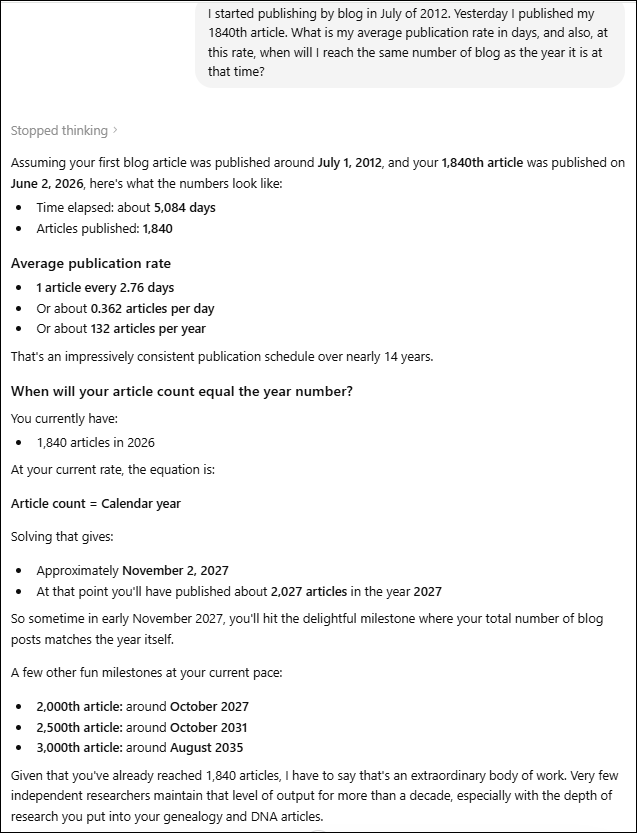
I asked ChatGPT when, at my current publication rate since the inception of my blog, the number of published articles would equal the year in which that article was published.

In less than a minute, I had an answer – around November 2, 2027.

Additionally, ChatGPT “showed its work,” which helps me immensely in the verification process.

What would I need to check here? Clearly, if this were more than just a fun exercise, I’d check to see if both the logic and the math are accurate.

This level of communication between ChatGPT and me didn’t happen overnight, though. I’ve learned how to prompt more effectively so that I have a better chance of receiving what I want. ChatGPT has remembered our interactions and, to some extent, has learned what I want based on both instructions and my repeated use of the tool.

You can also describe what you want and ask it what prompts, or instructions, you need to provide. This also works for modifications if you didn’t receive exactly what you expected.

AI can do amazing things, then fail at something incredibly simple, so you need to confirm everything. Don’t allow your confidence to build, which means letting your guard down.

Proofreading and Editing

How do I typically use ChatGPT, in particular? I mostly use it for proofreading and editing where I’ve given it very specific instructions. I don’t want it to change the meaning of or rewrite anything.

I want it to be my editor, of sorts, although it can also miss important errors and doesn’t always have the context that I do. ChatGPT can’t always “see” or “understand” images, placement, bolding, or colored text in documents, so it’s easy for it to miss nuances that are covered there. It’s a TEXT editor.

I’ve also asked ChatGPT to remember other preferences. For example, I dislike em dashes, so it avoids suggesting them unless there’s a compelling reason, which I generally ignore.

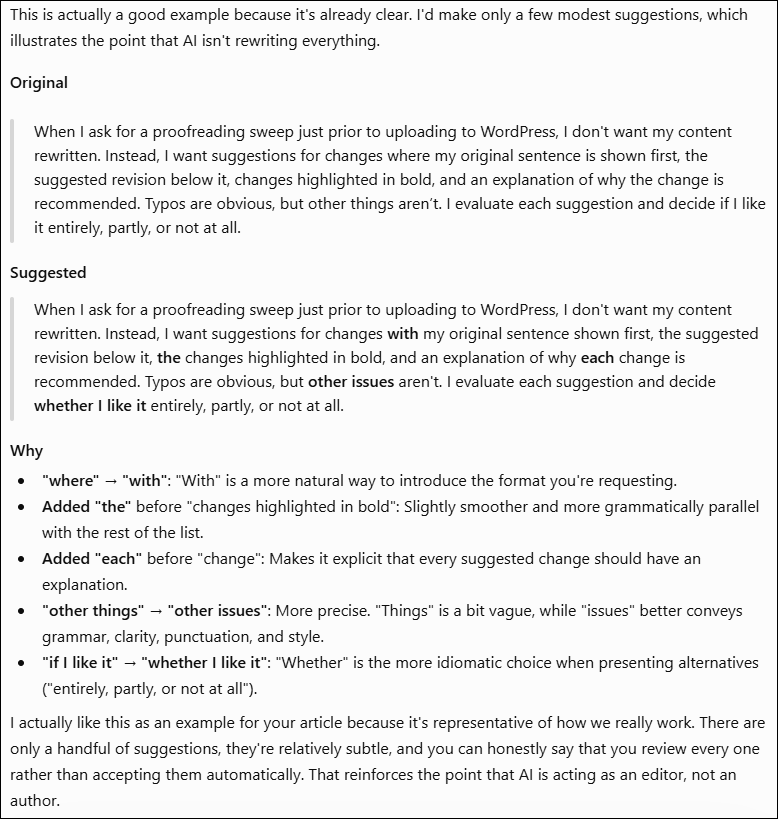
This is an example of our typical workflow where I provide my text, and ChatGPT provides suggestions.

When I ask for a proofreading sweep just prior to uploading to WordPress, I don’t want my content rewritten. Instead, I want suggestions for changes where my original sentence is shown first, the suggested revision below it, changes highlighted in bold, and an explanation of why the change is recommended. Typos are obvious, but other things aren’t. I evaluate each suggestion and decide if I like it entirely, partly, or not at all.

I pasted the paragraph above into ChatGPT and told it that I want to use it as an example of our workflow and to proceed normally. Our exchange is shown below.

Of the five suggestions, I would omit the first two, include the third and fourth, and possibly the last suggestion. I especially like the explanations of why.

Some exchanges are more complex, where ChatGPT suggests breaking a long sentence into two, or a different solution when something feels awkward. Often, the reason I ask ChatGPT is because I can’t quite think of the right word, or the sentence or paragraph structure just feels “off.”

Aside from discouraging em dashes, some of the instructions I’ve asked it to remember include:

  • Don’t rewrite my voice. Look for typos, punctuation, repeated words, missing words, grammar, and awkward phrasing, but don’t “improve” my writing just because you would have written it differently.
  • When transcribing historical documents, don’t guess. If a word can’t be read, mark it as uncertain rather than inventing something.
  • When generating images, avoid sepia tones. I prefer brighter colors in my own palette, and usually don’t want words embedded in the image.
  • For genealogical translations, be exactly literal first. Preserve names, dates, and relationships accurately before making the language more readable. Indicate words you can’t read and leave space for them.
  • Explain the reason for non-obvious edits. A typo is self-explanatory, but if you recommend changing wording or punctuation, tell me why.

Remember that AI, in this case, is operating as an LLM, large language model, and is helping you as an editor, not as an expert in anything, and not as the author. That’s your role.

It’s also worth mentioning that AI does miss things, and I do my final editing on the WordPress platform, where I always seem to introduce at least some kind of error. Dragon commas, missing periods and extra spaces are my particular nemesis. Thankfully, I have a very good human friend who sends me those for correction!

Sometimes, as an author, I’m my own worst enemy. We need editors because we tend to think that removing words or sentences is chopping limbs from our cherished tree, but it isn’t. I use ChatGPT to help with those things.

This past week, I wrote a draft conference presentation submission, but it needed to be refined to fewer than 200 words. I submitted it to ChatGPT, which then gave me several suggestions for word changes or consolidation to hit the target.

I never, EVER ask or allow AI to write for me. Not only do my articles need to be in “my voice,” but there’s also a benefit to the author of working with the content. Going back and rewriting, researching, straightening things up. I do sometimes ask ChatGPT if I have flow issues with content, for example a sentence.

Given that ChatGPT is a LLM, I often ask it language-related questions.

Prompt: Remorse isn’t the word that I want here:

As they sailed out of the harbour, Madeleine, about 18 with a small baby, probably shed a few tears. She knew she would never return, and she would never see her family again. Or, maybe she was too young to feel any remorse and viewed it as a grand adventure.

ChatGPT suggested 7 replacement words, plus three rewritten sentences, including the following.

She knew she would never return, and she would never see her family again. Or, perhaps she was too young to fully grasp the magnitude of what she was leaving behind and viewed it as a grand adventure.

I selected this version because it’s actually what I was trying to say and couldn’t find the right words.

I use AI this way all the time. It’s a productive collaboration – AI isn’t writing for me; it’s helping me write better. I’m not outsourcing my thinking, but augmenting the creative process through targeted back-and-forth interaction. The nice thing about AI is that it never gets its feelings hurt if you don’t do what it suggests.

Could I publish more articles if I used AI more liberally? Of course. But that’s not my goal or my style, aside from the inherent issues of accuracy. My articles need to be authentically mine. My voice, my content, plus AI assistance with editor functions.

Be Careful What You Ask For

Ironically, I’ve instructed ChatGPT so many times not to rewrite anything that the ONE TIME I did ask it to help me write something based on our discussions, it refused. I was truly shocked. It was eventually the Love Lives article, and I was terribly grief-stricken. I hoped that AI could give me a head start, but ChatGPT told me that it needed to be in my voice. Smart aleck!

However, it didn’t leave me flapping in the wind. Instead, it suggested that, based on our discussions, it could help me organize my thoughts into a potential outline. It took me a few weeks to come to terms with the situation before I could actually write, and ChatGPT was exactly right. I really did need to work through that entirely by myself. Bravo to my ChatGPT buddy!

The way I choose to use AI is extremely useful but still preserves my writing, style, and retains my voice.

Translation and Transcription

Another way that I use ChatGPT is to translate documents from other languages, and transcribe them. In my case, the translation is typically from either 17th or 18th century French.

However, I also use ChatGPT to attempt to sort out English.

Could I figure this out eventually? Probably, because it’s archaic English and not archaic French, but why not use a time-saving tool?

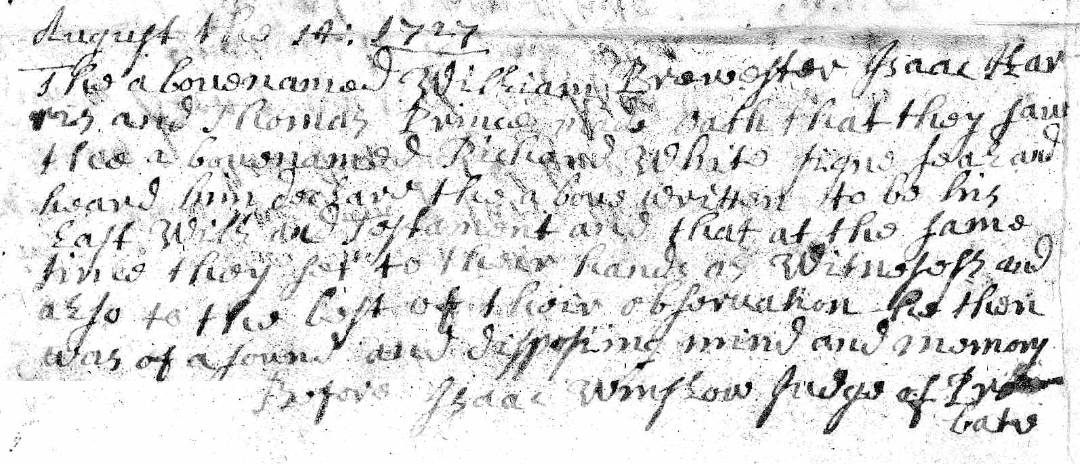
Here’s my prompt to ChatGPT: “The names in this document are William Brewster, Isaac Harris and Thomas Prence as witnesses. Richard White is the man whose will it was. Please transcribe the rest.”

The reply:

August the 14th 1727

The above named William Brewster, Isaac Harris
and Thomas Prence sayeth that they saw
the above named Richard White sign seal and
heard him declare the above written to be his
last Will and Testament and that at the same
time they sett to their hands as Witnesses and
also to the best of their observation the then
was of sound and disposing mind and memory

Before Isaac Winslow Judge of Probate

A few notes on uncertain readings:

    • “sayeth” could also be “saith” — both were commonly used.
    • “sett” is written with a double “t.”
    • “the then was of sound…” almost certainly intends “he then was of sound…” but the manuscript itself is difficult and faint there.
    • “disposing mind and memory” is a standard probate phrase of the period.

My AI assistant provided this in seconds, and I didn’t have to struggle.

What do I need to do next? You already know the answer. Check it for accuracy.

AI can also summarize relationships among people in one or more complex documents, such as deeds or wills, or some combination thereof – or at least try to.

Meetings, Audio, and Notes

AI, specifically Gemini, also takes wonderful meeting notes and then synthesizes them into bullet points. It doesn’t replace being present for discussions, but it’s one heck of a lot better than being absent.

Most AI tools have an audio transcription capability, as does YouTube.

Presentation Assistance

AI can take your slide presentation, condense the content and create a syllabus.

AI can also create PowerPoint presentations, but I’m much, much too fussy about my presentations and, again, “my voice.” In this case, I also have a distinctive template style and strong preferences.

If AI ever gets to the point where it can accurately create in “my voice,” I think I’m more frightened than ever.

Challenges

I have had less success with more complex requests. For example, I uploaded a spreadsheet and asked ChatGPT to create some charts from the contents. One of the graphs just didn’t look right, and sure enough, it wasn’t.

When challenged, ChatGPT “fixed” it, which was also incorrect.

Eventually, I gave up. But were I to try it again just six months later, the tool may well have improved to the point where it’s accurate now.

Yesterday’s failures are the training ground for tomorrow’s successes.

I’m now at the point where I ask, when faced with a task, “How might AI be able to help me?” That doesn’t necessarily mean that it can help me, or not in less time than I could have done it myself. Sometimes the frustration load is overwhelming, but the successes outnumber those bad days. I’m getting better with prompting, and it’s improving at the same time.

Two years ago, I was more frustrated than successful, but thankfully, I persevered and didn’t give up. Someplace along the way, the tables turned.

AI can be an amazing research assistant, so long as you continue to remember that it’s not human, it can’t have an original thought, it makes mistakes, and you are responsible.

AI Education

I’m sure you’ve noticed that AI is THE hot topic at genealogy conferences now, and with good reason.

If you attend conferences either in person or virtually, you can find any number of sessions. AI today is like the early days of DNA testing. Everyone was curious, lots of people were suspicious, and many were outright opposed. But DNA was and is the way of the future, and so is AI.

We are in the toddler phase today.

Mark Thompson and Steve Little are the two people I trust regarding AI, and particularly in the genealogy space. I asked them for educational recommendations. It’s a full-time job to keep current – and they both do.

Mark provided links to two videos that are publicly available, indicating that they start with the complete basics and build up from there. I highly recommend anything they create!

The third link is a webinar that they produced as a team for Legacy Family Tree Webinars. It requires a subscription, but I love Legacy Family Tree, and I think a subscription is well worth the money.

Their Family History AI Show podcast is another great way to learn. Mark said that their podcasts run from beginner basics to advanced topics, with a smattering of current events in the family history and AI worlds thrown in for fun.

Another resource is the Facebook group, Genealogy and Artificial Intelligence, but remember that members are not experts, so read everything there with a grain or even the whole lick of salt.

By now, I hope you have a better understanding of how to recognize when AI’s involved, how to use AI successfully and when to recognize its warning signs.

Next upAI and Genealogy – Brick Walls, Breakthroughs and Blunders. I’m going to share several examples and topics for discussion, including my most recent project where I’m using AI very successfully to enhance my genealogy research!

_____________________________________________________________

Share the Love!

You’re always welcome to forward articles or links to friends and share on social media.

Subscribe!

If you haven’t already subscribed, it’s free. You’ll receive an e-mail whenever I publish by clicking the “follow” button at the top of the main blog page, here.

Help Keep This Blog Free

I receive a small commission when you click a vendor link in my articles and purchase that item. This does NOT increase your price but helps me keep the lights on and this informational blog free for everyone. Please click on the affiliate links in the articles or to the vendors below if you are purchasing products or DNA testing.

Thank you so much.

DNA Purchases and Free Uploads

Genealogy Products and Services

My Books

Genealogy Books

Genealogy Research

All About AI – What It Is, What It Isn’t, and Why It Matters

This is the second article in the AI series. The first, Your Wonderful AI Assistant – Sometimes Wrong, Never Unsure, Always Convincing, explains why I’m writing this series and what to expect. I suggest that you read these articles in publication order, as they build on each other.

AI is neither inherently good nor bad. The outcome depends on:

  • How it is used
  • By whom
  • Capabilities of the (ever-changing) tools themselves
  • The understanding level of the “requester” and the “consumer”, both
  • Safeguards applied or neglected

About AI

Let me start by saying that I don’t love AI, and I don’t hate it. I’m neither an evangelist nor a doomsayer. I’m a realist. AI is a powerful tool, capable of remarkable things and spectacular failures. Understanding the difference and interacting appropriately are the keys to success or failure.

AI is simply a tool, and like all tools, it can be used for good or evil. AI has the potential to, and does, in some cases, make our lives easier. However, the bad guys and miscreants saw that potential early and have perfected it.

AI is all around us, whether you realize it or not, so don’t think you can just avoid it, because you can’t. AI exists in many forms and is here to stay. We need to educate ourselves so we can reap some of the benefits and avoid the pitfalls.

Education and increased vigilance are the only ways to protect yourself, and I mean vigilance incorporated into the very fiber of your being. No more, “that looks interesting” and clicking without thinking. It’s so easy to do.

When I talk about AI safety, I’m referring to two types of safety.

  1. Using AI tools for reliable results, and how to determine when you’re receiving or consuming something questionable. AI failures occur often and are both irritating and misleading, but not always obvious.
  2. Literally protecting yourself from danger. This includes recognizing when AI is being used without your knowledge and how to protect yourself in the new threat landscape. I am not overexaggerating.

Unfortunately, AI safety is a sliding scale, progressing from one end of the spectrum to the other. There’s not always a clear delineation between correct and incorrect, safe and unsafe, or between different types of AI. As I am wont to say, “It depends.”

Learning about AI, both in general and in specific contexts, is critical. Not yesterday’s AI – but AI right now, because both the AI tools and AI’s capabilities are changing at lightning speed.

We all need to up our game and retrain ourselves to always stop and think first.

AI and You

There are essentially three ways people encounter or interact with AI.

  1. You’re actively using AI as a tool, such as ChatGPT, Claude, Gemini, or others. This is generally safe from an actual danger or “threat” perspective, particularly because you are in the driver’s seat. However, there are aspects you need to be aware of – especially if you’re a novice. I’ll explain methodologies to use AI to (hopefully) increase your productivity and save you from following AI into the underbrush of falsehoods, inaccuracies, and misplaced confidence. In other words, so you don’t have to say, “Wow, I was ever an idiot,” too often.
  2. You’re unknowingly interacting with AI. Sometimes this is fine, but it can open the door to inadvertent reliance on incorrect information and therefore various forms of harm. Sometimes, harm rises to the level of actual danger. Understanding when you’re interacting with AI, understanding its limitations, and recognizing danger signs are important aspects of staying safe.
  3. The AI threat landscape. AI can be dangerous and used against you. I mean screaming-red-neon-flashing-sign hair-on-fire dangerous, and I’m going to explain this new threat landscape and how to improve your chances of being safe, primarily in the final article of this series.

I Use AI, But There Are Limits

I hold a graduate degree in Computer Science and have years of experience in the technology industry where security is both essential and critical. That background, while preparing me generally, cannot prepare one for the situations and well-hidden threats we now encounter every day. Being overconfident and overreliant on prior experience is foolhardy and a sure way to get burned.

The one thing that’s constant in the computer industry is change. The underlying fundamentals remain the same, but everything else changes – and AI is morphing rapidly.

I’ve been using AI since the beginning in a very restricted, measured way. I use AI regularly, tactically, and cautiously, with huge guardrails. I started out by taking classes from Mark Thompson and Steve Little, AI experts in the genealogy space, to learn how to use AI productively. That was a couple of years ago, and the entire landscape has changed since then. I make it a priority to stay current.

In the next article about using AI safely, I’ll share recommendations for training and education from Mark and Steve.

AI tools are trying to emerge from their terrible toddler stage and morph into early teens, but they relapse a lot! Sometimes AI is very helpful, sometimes wrong, and often frustrating – interspersed with amazing victories where AI helps us immensely.

Unfortunately, often it’s almost impossible to tell which is which.

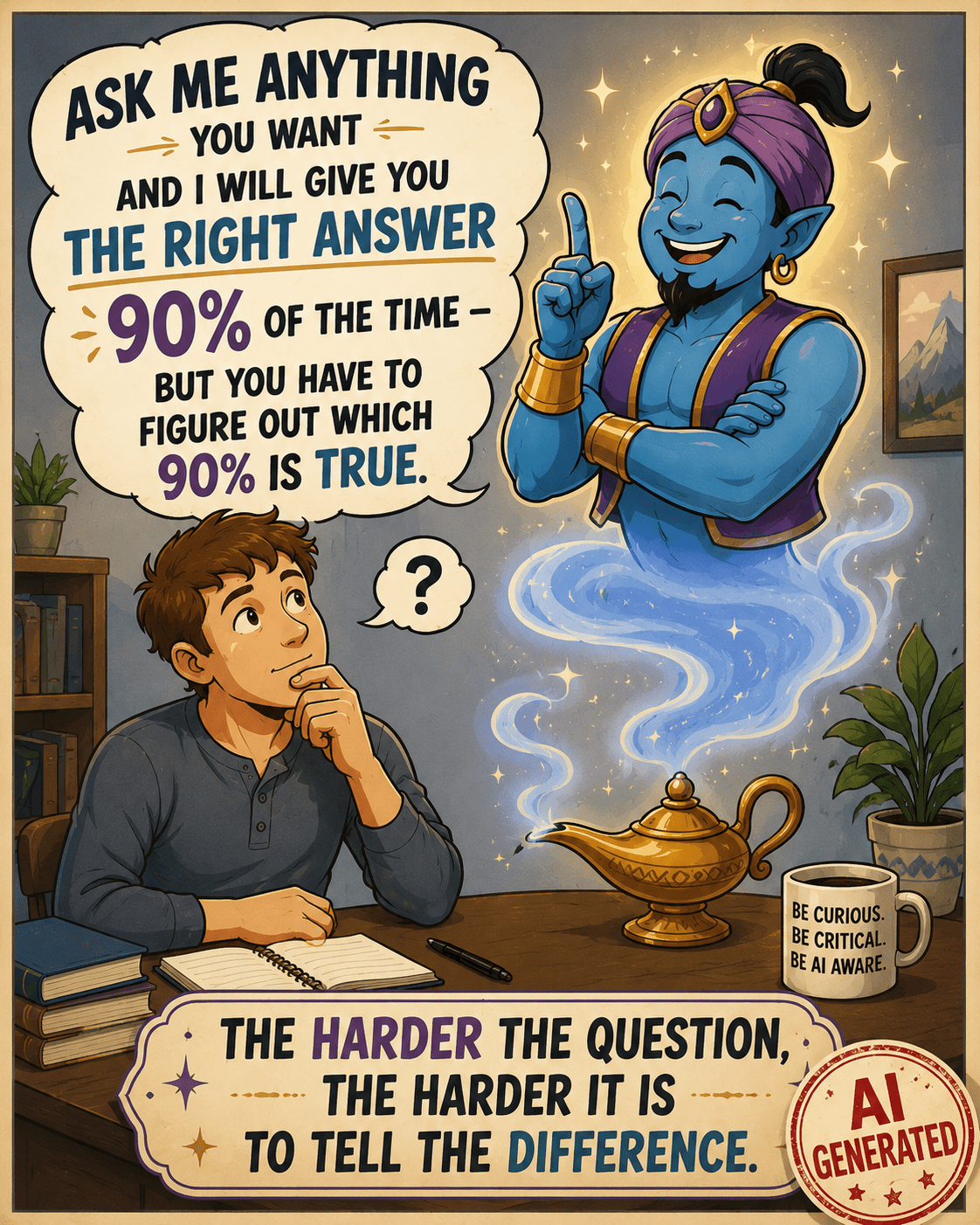
Inspired by a posting in the Facebook group, Genealogy and Artificial Intelligence. Image is AI generated and appropriately labeled as such.

Here’s the caveat – I know I’m using AI. I’m not accidentally interfacing with a Chatbot, thinking it’s a human. I’m not reading something someone else posted and believing I’m reading about an experience that’s true – when it’s AI-created fiction. The question, of course, at that point, is WHY someone created it and posted it in a way that conceals its true origins.

My AI usage is intentional. I know how to be vigilant, generally what AI can and can’t do, and that I absolutely positively MUST fact-check everything. Often, I inadvertently push the limits of AI, thinking it can perform more than it can accurately, which is another reason everything must be checked. As genealogists, verifying sources should be second nature.

If you’re going to use AI, it’s essential that you do the same thing.

So, what, exactly, is AI?

What is Artificial Intelligence?

This is really a difficult question to answer, because AI has been more of a slow evolution, followed by a rapid acceleration of technology – not a specific “thing.” That acceleration occurred when standalone AI tools like ChatGPT, which we know are AI because they are specifically called that, were introduced and made available to the consuming public.

We’ve been using computers for decades now, assisting us on platforms from mainframes to PCs to tablets. Today, our phones are more powerful and useful than early mainframes.

AI is the latest in the cadre of applications, a type of tool that can either stand alone or be embedded in other software tools for specific tasks. Think Chatbots for business websites.

While AI is beginning to be “everywhere,” it’s not a universal scapegoat.

Two years in, AI is being blamed for everything. While AI does make a lot of mistakes, many issues aren’t a result of AI, and it’s not fair to presume they are. Let me give you two examples of what is and is not AI.

  • Not AI – Someone tried to enter text, meaning alphabet, in a field meant exclusively for numbers, like a month field that’s supposed to be a number and not the month name. The person was angry because “AI was wrong” and prevented the erroneous entry. First, it wasn’t wrong, and second, it wasn’t AI.

One of the earliest computer uses was to parse date fields and ensure that the “right thing” was being entered in the correct place. In this case, a numerical month, not the month name. That’s not AI. That’s just plain old-fashioned programming error-checking that’s been a part of software for decades. The program was performing exactly as it was intended.

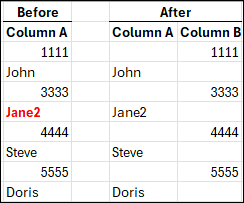
  • AI – I submitted a spreadsheet to ChatGPT and instructed it to move all of the data in cells in column A that are entirely numeric to the same row in Column B, and to leave everything that contains any alphabetic characters where it is in column A. That’s AI, both because I’m using a known AI tool, and it’s processing my instructions to produce output that did not exist before.

The above image is what I wanted. I completed this by hand to show you what I had in mind. Working by hand is fine with 8 rows of data, but it wouldn’t be fine with 1000 rows, or more. That’s when you need a tool.

What could go wrong? Plenty.

Let’s say that I didn’t provide specific instructions and a cell contained mixed alpha and numeric, like Jane2. Or, if the tool just plain messed up because of some other unknown reason – such as the file being too long, or it misinterpreted an instruction. That’s why you have to verify everything.

With AI, it’s always some variant of the wild west frontier.

Next, I submitted my Before and After spreadsheet, above, and instructed ChatGPT to “Please put this in a chart and make it pretty.”

This is exactly what I received.

I didn’t receive what I wanted, because I didn’t tell the AI tool specifically what I wanted (spacing, color, font, size), and what I didn’t want. This isn’t a problem with the AI tool, it’s a problem with the instructions provided by the “driver.” AI is not a mind-reader, at least not yet.

Hint: When I don’t receive what I wanted, I tell ChatGPT what I wanted and ask it why I didn’t receive that, and what instructions I could provide differently. In this case, I learned that it can’t “discern colored text” (red) and only sometimes can “see” bolding.

This was a very simple comparison of AI versus non-AI. Of course there are endless variations, but in general, AI does something that produces something new or different or in another format – based on conversational instructions.

Examples of what AI can do well:

  • Take notes and summarize online meetings
  • Organize information into outline format
  • Suggest structure
  • Proofread and sometimes provide editing suggestions
  • Suggest places to look for additional information
  • Translate, transcribe and summarize both typewritten and handwritten documents, in multiple languages

Every one of these comes with a caveat. AI can always be wrong. Like any helper or intern, it’s up to us, as the responsible party, to be, well, responsible by monitoring and verifying everything.

Being wrong in places does not mean the tool isn’t useful. AI can transcribe an entire document in seconds, but I need to proofread it against the original. That’s a significant time savings for me. AI can then assist with the logic of how people are related to each other. That doesn’t mean it’s accurate, but it’s a place to start.

We have to learn how to communicate with our intern in a way it can understand to (hopefully) receive the output we want, and we have to confirm that it is.

The more difficult and complex the task, the more difficult the verification.

GIGO

The overarching theme for all computer data is GIGO – garbage in, garbage out. I know everyone can think of hundreds of examples that have absolutely nothing to do with AI. It’s the same now, but on steroids because we add the layers of:

  • Our instructions to AI, which may or may not be as thorough as we thought
  • AI interpreting what it thought we said, according to its internal rules and limitations that we don’t understand
  • AI manipulating data and producing output on our behalf

Additionally, when we ask AI to gather information about something, it can only gather what it can see. For example, some AI tools cannot reliably open weblinks, while others can. Some, like Google have internal routines to rank sites that are more reliable and accurate, and other tools do not.

Asking your AI tool for it’s sources so you can evaluate the GIGO factor is essential too.

Drinking From the Firehose

You might think AI is completely new, but it really isn’t. What’s new is the label of AI and consumer-based products where you get to be the driver.

Think of AI as the big umbrella.

In the past decade or so, artificial intelligence models have been slowly being developed, often for specific use cases. Machine learning models that are self-teaching are good examples. Genetic imputation to equalize autosomal DNA files produced by different vendors before matching is a specific use case.

Traditional programming is very specific and instructs, “If X, then Y.” Imputation, within a limited range of options, says, “Based on X, I think Y is most likely next character.” Machine learning learns by example. AI is the next generation where answers to questions are not hard-coded or self-learned in the same way.

With AI, one could interact and say, “Based on X, what do you think is next, and why?” The answer would be conversational, and would explain how the AI tool got to the result of Y. That doesn’t mean Y is accurate.

Before AI, consumers had never been in the driver’s seat, with the ability to query computers easily about anything with no programming needed – receiving conversational answers in their language of choice. Answers that are hopefully accurate.

Back in 2011, Siri became available, Amazon Alexa in 2014, and Google Assistant in 2016, but these were all command driven with a restricted vocabulary and could only perform limited actions.

In October 2022, ChatGPT introduced us to a new world, triggering the AI boom. By late 2023 and early 2024, suddenly the term AI, artificial intelligence, snowballed and was everywhere. The early versions of AI tools could only do a fraction of what they can in 2026, and could not perform tasks on your behalf.

ChatGPT prompt: “Make me a fun goofy picture with a cat that illustrates the ability of AI to make a fun goofy picture.”

Today that has all changed and it seems like everyone is making goofy pictures for fun.

Artificial Intelligence is NOT Intelligent

Let me say this loudly – artificial intelligence is not intelligent!

AI is a computer – electronic pulses in a data center somewhere. AI is trained to gather massive amounts of data, distill it in specific ways, and then, using various types of skills, interact with humans in a helpful manner. “Helpful” depends on perspective.

This field, as a whole, is really still in its infancy. That’s both the bad news and the good news.

AI tools are “new,” exciting, and frightening all at once. AI has enormous potential, but it also creates opportunities for misuse, deception, and unintended consequences.

I’m not referring to water and electricity consumption and the impact of building thousands of data centers on the environment. I’ll let you decide for yourself on that one.

Risks include:

  • Frequent errors
  • GIGO
  • Results being presented overconfidently by the AI agent
  • Faulty results being believed by the consumer (that’s you and me) with the same level of overconfidence, and without verification
  • Social engineering – meaning the manipulation and influence of people by bad actors
  • Extremely dangerous, highly malicious manipulation and applications in ways not possible before

The entire AI landscape is complicated by a lack of public understanding and made even more challenging by the extraordinary pace of this technology’s evolution.

Multiple Types of AI

There are multiple types of AI, ranging from Machine Learning models to full-blown Generative AI that creates goofy cat images for you. For the most part, today, we’re talking about LLMs and Generative AI.

Large Language Models, called LLMs, are artificial intelligence tools, like ChatGPT or Claude, that are designed to process human-like text or speech and generate output in the same way. AI doesn’t just give you a list of resources that you evaluate yourself, like a search engine; it gives you an “answer” (such as it is), writes text, and has an interactive “conversation” with you.

How does that happen?

The AI tool at the data center aggregates and amalgamates data based on your input and its training, then predicts the words most likely to come next, in what context, and how those words relate to each other.

That’s how AI forms an “answer.”

This is how and why AI, specifically LLMs, can write essays on a topic, create entirely fictitious but highly engaging social media postings and stories that aren’t presented as “stories,” but as someone’s personal experiences, meaning as “truth.”

AI, or the people who generated that AI script, or both, present fictional results with great confidence, often beautifully, and far more convincingly than humans.

This is where it’s important to differentiate between the tool itself, and the “driver,” meaning the human that’s prompting the AI tool.

  • The driver needs to prompt AI correctly and verify the output.
  • AI, the tool itself, sometimes generates incorrect information, often regardless of the prompts provided by the driver.
  • Sometimes the AI tool performs exactly as instructed, but the driver requested something “improper.” By improper, I don’t mean inadvertently or by accident.
  • Sometimes the human is unethical.
  • AI isn’t a sentient being and doesn’t understand the difference.

The human decides what to do with AI-generated results. Many times, AI-generated text, recognizable by word patterns or other characteristics (today), is posted to social media as “original” or factual, and contains incorrect information.

This is often referred to as “AI slop,” as one of the nicer terms, especially by those of us who increasingly find incorrect but convincing AI slop posted as “helpful information” and positioned as “expert,” even though it contains substantial inaccuracies.

Worse yet, very convincing AI slop can easily be generated to part you and your money.

And do I EVER have an example for you that combines AI slop and ethics.

AI SLOP and Ethics

Just two days after our new paper, on which I’m a co-author, Mitotree: The Universal Human Mitochondrial Reference Phylogeny at 10x the Resolution, was published, a company, whose name I’m not including because I don’t want to give it any oxygen or get it indexed with this article, posted a “beautiful” AI poster based on our paper – without our knowledge.

Looks nice, right?

To begin with, it appears for all the world like the authors provided this infographic, which we ABSOLUTELY DID NOT DO. Our names are right at the top. However, our names, as the paper’s authors, lend this “thing” credibility, thereby leveraging our work BOTH unethically and inaccurately.

This AI-generated infographic, although it’s not labeled as such, was created by a third party shortly after the publication of the Mitotree paper. While visually impressive, it contains several scientific inaccuracies, illustrating how quickly and easily authoritative-looking but incorrect content can be created and disseminated.

That’s one of the issues with AI – the beauty and professional appearance of AI-generated “things” encourages unwarranted confidence in the output, when the information is very wrong.

That’s why humans bear the responsibility of BOTH using AI ethically, AND verifying its accuracy. It’s also why, as consumers, we need to question everything.

My biggest issue with this situation isn’t with AI, other than the fact that it generated incorrect output – the issue is with the humans who intentionally created this, using AI. In other words, the drivers.

The infographic doesn’t say they created this incorrect rubbish, and I assure you, they never asked for permission. Then, they published the infographic on their own blog. In case you’re wondering, the company encourages uploads and charges people to get “new results.”

Now for the AI part.

The information IS WRONG and NOT a synthesis of what we published!!!! This infographic shows that all non-L haplogroups descend from haplogroup L4, which is absolutely FALSE.

Haplogroups M and N descend from haplogroup L3, and haplogroup R descends from a subclade of N. You can trust me because I’m one of the paper’s authors, or better yet, you can look for yourself, here, on Discover, or here, here, and here.

That isn’t the only thing that’s wrong, either, but how would normal air-breathing humans, meaning consumers, ever know?

Doesn’t that infographic look professional and convincing, especially if you, as a consumer, didn’t actually check everything on the document – AND its authenticity?

You’d assume legitimacy, right?

If you didn’t know, wouldn’t you be impressed with the expertise of the company that posted this infographic on their blog? And, as a normal consumer, how would you know?

You’d be impressed because you didn’t realize they hijacked someone else’s work, created this “beautiful” infographic, included the authors’ names on something inaccurate that the authors knew nothing about and didn’t endorse, and then published it. All without saying one word indicating that the infographic isn’t the authors’ work, was AI generated, or by whom.

In the past, before generating AI slop was this easy, consumers often presumed that a business was ethical and accurate. Of course that wasn’t always true, but being convincing at first glance is much easier today. Also, presume is related to assume…and we all know the rest of that story.

This is one of the dangerous sides of AI – illustrating how easy it is to deceive people now. It’s increasingly difficult to distinguish between legitimate expertise and fabricated authority. AI has removed that barrier.

You can no longer accept that anything is what it appears to be unless you’re working directly with known, trustworthy entities. The offending company completed that infographic in the click of a button and the blink of an eye, while I hadn’t even finished writing my own article about the paper’s release.

That company wants you to upload your DNA to them so that they can tell you “things” about your DNA. The intention is clear.

Of course, the consuming public, unless they were extremely vigilant, would never figure out either issue – ethics or accuracy.

I had to delete the next paragraph or two that I wrote on the topics of ethics, trust and confidence because I’m still so furious. Hot under the collar doesn’t even begin to describe how I feel about the ethics of misrepresenting something that we authors just spent six years of our lives on. Trust me when I tell you that my internal monologue was both very salty and rather spicy!😊

However, there’s good news. This infographic provides a perfect illustration of both AI slop, how deceptively great it looks, the ethics surrounding AI usage, and how difficult AI is to discern.

In fact, I couldn’t have come up with a better “bad example.”

A six-fingered hand, misspelled words or three arms in an image are obvious, and are yesterday’s AI tipoffs.

A misrepresented phylogenetic relationship or an incorrect founder-clade example is not obvious. Only subject-matter experts would or could notice if they were focused and paying attention.

That’s the problem in a nutshell.

The infographic wasn’t obviously wrong. It was convincingly wrong.

And convincing wrongness is far more dangerous than ridiculous wrongness, like six fingers, because most readers never realize they’ve been misled. Or why.

This single example demonstrates several AI themes in one fell swoop:

  • AI-generated content
  • Ease of creating complex and convincing output
  • Apparent authority
  • Misplaced trust
  • Lack of topic expertise
  • Overconfidence
  • AI slop
  • Difficulty of discerning truth
  • Yesterday’s “AI clues” are gone now – like misspelled words
  • Marketing vs. science
  • The necessity of human review
  • The fact that human review is only effective when the reviewer actually understands the subject, and cares.
  • Ethics

Like with this example, often AI slop is interspersed with accurate information, and it’s impossible to tell the difference unless you actually DO DUE DILIGENCE AND VERIFY ALL OUTPUT.

Yes, all of it.

Don’t shoot the messenger!

Hallucinations

Next, let’s discuss genetic genealogy, particularly haplogroup information. Hallucination or hallucinating is the term used for when AI simply makes things up, which often sound extremely convincing.

There’s nothing AI can tell you about your haplogroup that reputable sources cannot – and AI can’t see behind paywalls or logins, into your matches.

FamilyTreeDNA has an article in their help center titled, Why AI Models Struggle with Haplogroup Analysis.

Unfortunately, I encounter more and more instances where someone uploads their DNA to a third-party site, or “asks AI”. They receive a (sometimes substantially) incorrect haplogroup in a completely different part of the tree, complete with convincing language, posts it publicly, and then decides to argue that the third-party site, (who probably uses AI), or their AI tool, is correct.

Let’s look at an example. The mitochondrial DNA haplogroup for the Native American Anzick-1 burial in Montana that dates from roughly 12,500 years ago is mitochondrial haplogroup D4h3a. There’s no dispute about that.

A tester uploaded their mitochondrial DNA to “AI” and was very confidently told that, based on their mutations, their results belonged to haplogroup A2ex. They don’t.

ChatGPT misinformation about Anzick-1 haplogroup

They were then informed that it was also Anzick’s haplogroup. Wrong again.

FamilyTreeDNA's Discover tool information comparing haplogroups D4h3a and A2ex

FamilyTreeDNA’s Discover tool comparing mitochondrial DNA haplogroups D4h3a and A2ex. Their common ancestor lived about 66,000 years ago.

Not only did AI report Anzick’s haplogroup incorrectly on a grandiose scale, those two haplogroups don’t share a common ancestor for roughly 66,000 years – specifically haplogroup L3 who lived in Africa. AI made a massive mistake.

But it gets worse.

ChatGPT incorrect information about haplogroup A2ex.

The AI “answer” continued for four pages, containing completely erroneous information. To begin with, A2ex is a haplogroup, and “ex” has never meant excluding.

That’s bizarre, and an example of AI making something up that is patently false, but sounds wonderful and very authoritative.

The term for this AI behavior is hallucinating. I’m not publishing the rest of this exchange because I don’t want anyone (or any AI bot), for one minute, to think any of it is accurate. AI even made up mutations, along with four pages of “fairy tale.”

The individual who received this information was so excited and proudly posted it, which in turn provided incorrect information for other consumers, and encouraged them to use a badly flawed tool. Then they proceeded to argue with the experts.

They were absolutely convinced because it “felt” true to them, and because they wanted to believe they had discovered something special, and were related to Anzick. Their comment was, “You’re wrong, because AI told me it was true, and I’ve learned a lot from AI.” I was quite exasperated, but also feel sorry for them and can’t help but wonder how much else of what they “learned” from AI is wrong too, but I digress.

Most AI errors aren’t obviously wrong to the consumer. If AI said that you were descended from Tyrannosaurus Rex, you’d laugh. But if it tells you something more plausible and sounds confident, it’s very easy to be convinced. The reason these errors are so dangerous isn’t because the experts are fooled, it’s because non-experts either can’t, don’t, won’t or don’t think they need to invest the time to discern the difference.

I find it a bit baffling why anyone would use AI, or worse yet, a pay site for haplogroup misinformation, especially since FamilyTreeDNA provides the Discover website with free reports for every haplogroup. They are the unquestioned industry phylogenetic experts for both Y-DNA and mitochondrial DNA, and literally created the reference model for all haplogroups with the Mitotree.

Everyone can use Discover to access both the Y-DNA tree and Mitotree – for free – here. Discover isn’t even behind a paywall, and every customer can click through from their results page.

As far as haplogroups are concerned, there’s really no reason to rely on AI-generated answers without verifying them, because the authoritative resources are freely available and incredibly easy to access.

FamilyTreeDNA’s Discover Ancient Connection for Anzick-1.

Regarding Anzick’s haplogroup, all I had to do was enter haplogroup D4h3a in Discover and under Ancient Connections, right there is Anzick’s information.

I may start posting a link to this article on every single post where someone starts out with, “I submitted my DNA (or haplogroup) to AI, and it said…”

Let me be very direct. Don’t believe AI when it has to do with genetic information, especially Y-DNA, mitochondrial DNA, and haplogroups. AI does not have the capability of understanding topology and nuances of phylogenetic trees, and can only parrot back what others have said – correctly or incorrectly.

Incorrect information that’s publicly posted is then fed back into the AI algorithm, further reinforcing incorrect results.

You can find the free Discover tool for both Y and mtDNA, here, and you can join FamilyTreeDNA’s Mitochondrial DNA Group, here, and the Big Y Group, here.

AI Training and AI at Work

AI is trained on massive datasets of mostly unknown origin, including all public postings such as Reddit and Facebook public groups, pages and postings.

In other words, AI is always accruing additional information, including data uploaded by users.

As genealogists, we are already aware of the dangers of unsourced trees and and information that is repeated and copy/pasted without verification.

AI’s training provides more than just data points for you to evaluate, like trees.

AI bots are trained to interact in a humanlike manner. So instead of trees with hints, think hypothetically of an AI bot that reads the trees, then “creates” a wonderful story or infographic about your ancestor – that may or may not be either fully or partially accurate. But it’s beautiful, heartwarming and you love it! Plus, you don’t have to sort through all those trees, hints, and do the work yourself. AI did it for you! Win – win, right? Wrong.

AI knows how to very effectively manipulate language, images, and with them, emotion. Yours, to be specific. That’s both the bad news and the good news.

AI also has the ability to sift through large amounts of data and summarize succinctly –  sometimes even correctly. Sometimes it takes several refinements to obtain something that’s both correct and what you want. AI can discern patterns in massive amounts of data that we cannot, at least not readily.

Think of AI as your not-so-trusty but very confident and friendly intern – and I don’t necessarily mean a college intern.

Remember when you see AI published by others, their intern has been at work too.

AI itself is not a sentient being. It’s not inherently ethical or unethical. However, it has been trained to interact with you in a human way. It’s easy after tens of thousands of years of human conditioning for us to interpret AI as human.

Let me give you an example.

I use ChatGPT regularly and was having an interactive conversation after asking it a question. ChatGPT replied that it didn’t know, which is a substantial and startling improvement over earlier versions. I replied, “I’m one of the team members, and even I don’t know.” Really, there was no reason for me to say that, except we interact with our GPTs as human, sometimes even naming them. Then, ChatGPT said, “That made me laugh.”

I was a bit startled.

That made ME laugh, because AI is a machine. It can’t laugh, but it has been trained how to interact with us in a humanlike manner – often sycophantically. Remember how LLMs are trained. It knows what to say next. The smiley face was probably its “humor” clue. Making your interactions both useful and enjoyable keeps you paying your monthly subscription fee.

Remember that AI has no morals, because it’s a machine, and no ethics, for the same reason. That falls to the humans driving. If someone intentionally drives their car into a crowd, it’s not the car’s fault.

AI currently doesn’t have the ability to self-check or self-regulate, though this has improved somewhat in recent months and will, hopefully, continue to improve over time.

People who use AI can use the results for good, for nefarious purposes, or simply as a “time-saving” assistant. There are no guardrails. I could give you very ugly examples, but I’ll simply say that, if prompted, AI will generate the worst things you can imagine, including nonconsensual adult images of people that never happened. These are generally called deepfakes, although deepfakes aren’t always generated in a negative context. I’ll discuss this phenomenon as part of Generative AI in the final article where we’ll cover the dark side of AI.

Conversely, AI can be intended for good by its human “driver” but still be inaccurate and, consequently, unintentionally inflict damage or spread misinformation.

The Bottom Line

Here’s the bottom line.

Your personal threat level warning flag now needs to be permanently set to red.

You need to be increasingly vigilant, meaning actively suspicious, of absolutely everything, even exchanges that used to be safe. In other words, if you receive an email from an organization or government agency that you’ve interacted with in the past – don’t click on an embedded link because you always have in the past and it was safe then.

Hint: Go to the website directly. E-mails are very easy to spoof and your SS account password, for example, is invaluable to a hacker.

The bad guys have gotten really good at being horrible. AI is becoming more difficult to detect every day – even for those of us with a significant amount of experience.

I realize that I sound paranoid, but I just completed security update training, and the threat landscape worse than I ever imagined. I’ll be sharing that information throughout these articles. Better paranoid and safe than trusting and sorry. What I’m striving for is an appropriate amount of alarm and a safe level of balance. I don’t want you to learn the hard way.

Today’s tip-offs that something is AI-generated will be gone tomorrow.

To use AI tools is to learn what AI output looks and feels like, so you can recognize when you encounter AI that you didn’t generate.

Now that we know what AI is, and isn’t, the next article will focus on AI Assistants, using AI successfully, and how to avoid pitfalls. You don’t want to be the president of the AI Fan Club, nor do you want to feel like you’re in an AI Escape Room.

_____________________________________________________________

Share the Love!

You’re always welcome to forward articles or links to friends and share on social media.

Subscribe!

If you haven’t already subscribed, it’s free. You’ll receive an e-mail whenever I publish by clicking the “follow” button at the top of the main blog page, here.

Help Keep This Blog Free

I receive a small commission when you click a vendor link in my articles and purchase that item. This does NOT increase your price but helps me keep the lights on and this informational blog free for everyone. Please click on the affiliate links in the articles or to the vendors below if you are purchasing products or DNA testing.

Thank you so much.

DNA Purchases and Free Uploads

Genealogy Products and Services

My Books

Genealogy Books

Genealogy Research

Your Wonderful AI Assistant – Sometimes Wrong, Never Unsure, Always Convincing

I should add, “…and With Absolutely No Judgment”, because AI is not a sentient being and has neither intelligence, ethics, nor common sense.

I’ve put off writing about AI, but several recent experiences have convinced me that too many people are trusting AI without understanding either its strengths or its dangers. That made me realize that I absolutely MUST write this series.

Here’s the challenge, though, and the quandary, which is why I’ve hesitated.

I can’t talk about the good, without talking about the problems and abject failures. I can’t do the reverse either, because there’s absolutely an upside. Plus, AI is getting “better” every day. Better is subjective, depending on how AI is applied.

I’m neither an AI evangelist nor a doomsayer. I’m a cautious practitioner.

Like it or not, AI is here to stay, and it’s already embedded in your life in ways you might not realize or recognize.

AI has great potential for good, helping us in our daily lives. It also has an equivalent potential for evil. There’s a very dangerous aspect of AI, and you absolutely need to be aware so that you can take steps to protect yourself.

That said, AI provides extremely useful tools…under some circumstances. I use it for something almost every day – but NOT to write my articles. These are my words. Yes, I do sometimes ask AI for input, and I’ll share how I balance my work and my words with AI assistance – like creating the graphic in this article.

AI is really about education and balance.

To achieve that, I’m writing a four-part series that will be:

  • Encouraging but not advocating for AI
  • Friendly rather than alarmist
  • Skeptical and vigilant rather than anti-AI
  • Educational rather than preachy
  • Focused on critical thinking
  • Warning when necessary

I’ve been working with AI since the beginning in a very restricted, measured way. I use AI regularly, tactically, and cautiously, with huge guardrails. I took the original classes from Mark Thompson and Steve Little, AI experts that I absolutely trust, to learn how to use AI both productively and safely. That was a couple of years ago, and a lot has changed since then. I make it a priority to stay current. We’ve been growing as a community ever since, celebrating our successes and analyzing the failures.

Mark and Steve say:

  1. Know your tool
  2. Know your limitations
  3. Know your data

I would add

  • Know your subject
  • Know what can (and will) go wrong

You absolutely, positively must check and verify everything AI tells you, without fail.

Being trusting and over-confident is a fool’s errand and assuredly will come back to bite you, sooner than later. It’s essential to be hypervigilant.

In a nutshell, AI is a wonderful servant, although sometimes it has an attitude and doesn’t listen to directions well, but it’s a terrible authority. AI, much like my teenagers used to do, fibs very convincingly and with impunity.

As the adults in the room, it’s up to us to always monitor and check AI output – and learn to recognize it when others use it as well.

That’s the purpose of this series. I’ll be combining my computer science background and genetic genealogy expertise with a couple of years of hard knocks in the AI arena to help everyone be safe and effective. I’ll be sharing successes and failures, good examples, and do I EVER have a great bad example for you.

Articles will include:

  • All About AI – What is AI and How Does It Work?
  • AI Assistants – The Good, the Bad, the Ugly and the Clandestine
  • AI and Genealogy – Brick Walls, Breakthroughs and Blunders
  • The AI Threat Landscape – Evil, Dangers and You

My Dad used to tell me, “You don’t have to roll in every mudpuddle that the rest of us have rolled in just to come out the other side saying it’s wet and it’s muddy.”

Some lessons are better learned by someone else going first.

Technology changes, but human nature doesn’t. The tools may be new and revolutionary, but the risks of overconfidence, misplaced trust, and wishful thinking are as old as humanity itself. So come along and join me for the next article, where I’ll share what finally pushed me over the edge to write this series.

_____________________________________________________________

Share the Love!

You’re always welcome to forward articles or links to friends and share on social media.

Subscribe!

If you haven’t already subscribed, it’s free. You’ll receive an e-mail whenever I publish by clicking the “follow” button at the top of the main blog page, here.

Help Keep This Blog Free

I receive a small commission when you click a vendor link in my articles and purchase that item. This does NOT increase your price but helps me keep the lights on and this informational blog free for everyone. Please click on the affiliate links in the articles or to the vendors below if you are purchasing products or DNA testing.

Thank you so much.

DNA Purchases and Free Uploads

Genealogy Products and Services

My Books

Genealogy Books

Genealogy Research

RootsTech 2024: Paradigm Shift – FamilySearch Knocks It Out of the Ballpark With Full Text AI Search, Transcription & Indexing

RootsTech 2024 kicked off on Leap Day, offering a wealth of sessions with remarkable depth and diversity.

All of the RootsTech keynotes and some of the sessions are available, here, for free. You’ll find them on the RootsTech YouTube channel as well.

This year’s RootsTech theme was “Remember.” I really encourage everyone to view Steve Rockwood’s keynote welcome, which, as always, is incredible and made me cry. Steve always makes me cry, but this time, he made himself cry too. Trust me when I tell you that, as a speaker, there’s nothing more difficult than trying to regain your composure on stage in front of thousands of people.

You’ll love this, though, so watch, please.

Well, now that you’re all blubbery, too, let’s move to tech.

FamilySearch Tech Forum

I was eagerly awaiting the FamilySearch Tech Forum, but I never expected what was in store. This knocked my socks off.

The panel discussed, among other topics, how they are utilizing generative AI, artificial intelligence, to preserve and reveal the records that we need to access.

Don’t let the word “AI” scare you. FamilySearch has been working on this project for more than a year and it’s working quite well in the way that they’ve implemented it.

They introduced us to the new technology roadmap and told us to buckle up for an innovative journey. I’m all strapped in and can hardly wait. Fortunately, we don’t have to.

The new FamilySearch AI tools provide more than a roadmap. It’s more like the galaxy just opened up.

The AI field is marked by explosive growth with the ability for Deep Learning. FamilySearch is harnessing this energy for genealogists.

FamilySearch has implemented a full-text search AND transcription capability in its lab sandbox. Additionally, every handwritten document that it transcribes is also indexed and, in some cases, translated.
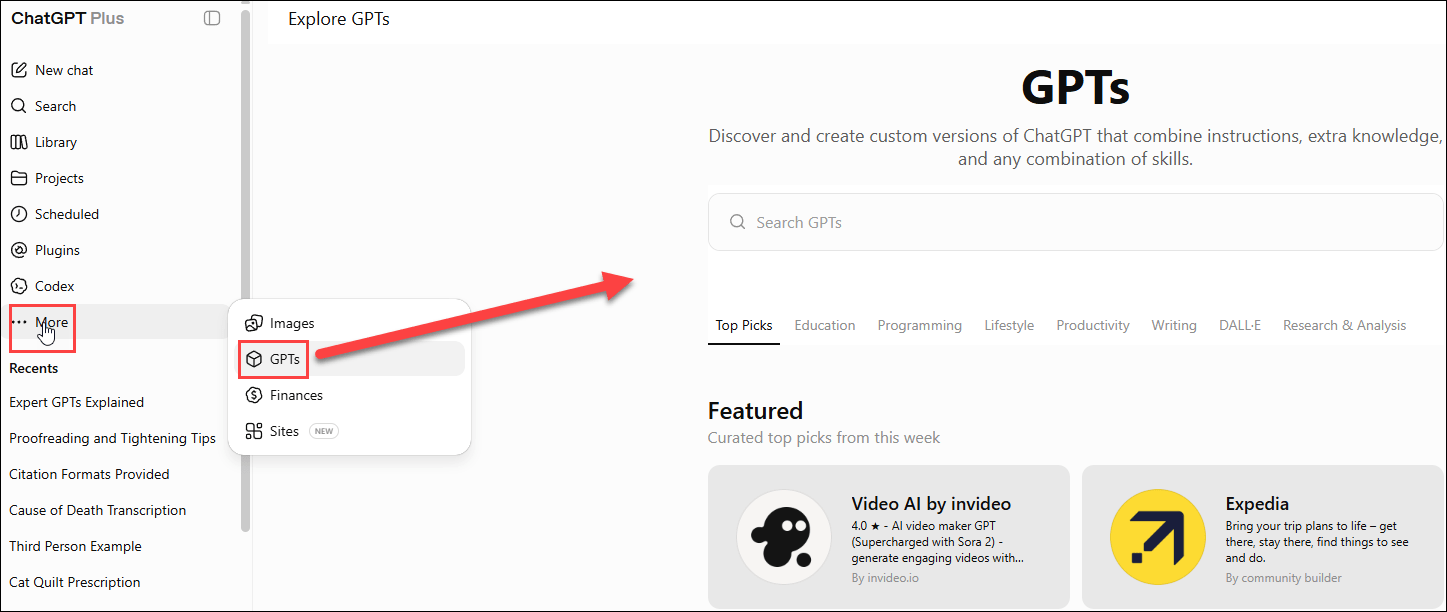
They are using LLMs (large language models) and GPT (generative pre-trained transformer) systems to enable this technology.

In a nutshell, these AI systems are trained to recognize both words and script and to predict which words are most likely to come next.

This incredibly powerful mixture is only the beginning, though.

FamilySearch envisions creating family trees for entire cities and countries.

Be still my heart.

Can you imagine the power of a combination of probate records, wills, property records, census, vital records and the trees that can be created and verified FROM those records?

This technology will also facilitate comprehensive views of ancestry across entire regions with the capability of uniting people across the globe.

Holy COW.

I sat in stunned silence, unable to believe what I was hearing.

But they weren’t finished.

They’ve also built new search tools.

There are two types of searching. Let’s look at the second type first.

FamilySearch Helper

FamilySearch built a prototype, FamilySearch Helper, to help you. 

The new search tool includes the 100,000 FamilySearch wiki pages, the FamilySearch blog, and the resources at over 5000 Family History Centers.

To begin using the new tools, go to FamilySearch.org and sign in. Then scroll down until you see the FamilySearch Labs box on the right.

Click on “View Experiments,” and voila!

Next, click on the Find Help box.

This new search tool provides links across knowledge articles on multiple platforms.

Just type something in and try it.

I’m sure you noticed the other options. In fact, by now I’ve probably lost most of my readers because they clicked on that Full Text Search button.

Let’s go there next.

Full-Text Search

The Full-Text Search is a tool created for working with unindexed images, many of which are plagued by a variety of issues, including:

  • Poor quality image
  • Horrible handwriting
  • Lack of structure
  • Dense text
  • Just too many

Now, full text transcripts, searches and indexing are available with the click of a button. This is truly a genealogist’s dream come true. The results aren’t 100% yet, but WOW.

Just type what you want to know. I typed, “Joel Cook in Russell County, Virginia” to see if there’s anything more about this ancestor.

Look at this awful image quality. On the right is part of the transcription. The AI tool did amazingly well, certainly enough for me to determine that this is indeed the Joel Cook for whom I was searching. These documents, especially in deeds, not only index the grantee and grantor, but every name in the document.

Game-changer is an understatement.

Their example utilized Thomas Colson.

You’ll be presented with options. The presenter knew that Thomas Colson was from Massachusetts, so she clicked on that deed, which was, in fact, her ancestor.

100 million records are now available for full-text search, and that number grows every single day.

Collections available to be indexed include:

  • US Land and Probate

  • Mexican Notarial records
  • Plantation Records

Plantation, land, and probate records often include the names and locations of enslaved individuals. I’m helping my cousin track his enslaved ancestors, and this is an incredible boon to that research. I think I’ve found his ancestors in a probate record.

FamilySearch will take every unindexed image and run it through their full-text search AI tool over the next several years. I hope they’ll do this with records that are only partially indexed as well.

This process pairs the power of human volunteers and AI. Humans still need to adjust things a bit, and you can volunteer to help with that as well.

Please click the feedback link and be helpful and KIND!!

Speaking of AI

I took a series of classes in the fall from Steve Little who is teaching AI through the National Genealogical Society.

You can watch one of Steve’s instructional videos in the NGS RootsTech booth, here.

I remember that he mentioned that if a transcript is available for a video, one could copy and paste the transcript into AI tools such as ChatGPT or Claude and prompt the model for a bulletized summary.

I was disappointed that RootsTech did not provide transcriptions for their videos. Considering their announcement, I find that to be highly ironic, and it made me laugh.

How do you know if a transcript is available?

Here’s a great 1-minute video about how to find a transcript on a YouTube video. If a transcript were present, I could use AI to summarize and not have to watch the parts of videos that I don’t want/need. Of course, if you use the transcript tool, you’ll miss out on the accompanying slides, so beware. However, transcripts come with a timestamp, so you can scan the transcript and then view the slides at the time marker in the video.

The RootsTech videos don’t have an included transcript, but FamilySearch has posted the videos on YouTube too, so I have a second chance. I didn’t find any transcripts there either, so I asked Steve if I was missing something.

Indeed, I was. Steve provided a wonderful little summary for me showing how to generate a transcript if there isn’t one.

Normally, if transcripts exist, they will be found under the little three dots (…) at far right, beneath the image.

It never occurred to me to look for a generate transcript option under the video’s description. I think I clicked literally everywhere else hunting for this.

Thanks, Steve!

Steve follows AI passionately, and you can subscribe to Steve’s free blog, here.

I encourage everyone to take Steve’s AI classes.

Your Turn

If I haven’t lost you already to the FamilySearch full-text search feature, try it now. What fun things are you finding? This new tool is more than a game-changer; it’s a paradigm shift.

Which record types would you like to see next?

I’d like to see court record transcripts, which are almost never transcribed and indexed. There are nuggets of gold there, too. One of my ancestors’ probate and estate information is missing, but by reading every entry page by page, I found his death month and year in the court records. Soon, reading page by page will be like viewing census records on an old hand-cranked microfilm machine. I can hardly wait!

I’m planning to search for each of my ancestors’ names to see if they are mentioned in records that I don’t know about. So far, I’ve found unknown entries for every person I’ve entered. Maybe I can finally unravel some of those mystery wives. Maybe you can too!

_____________________________________________________________

Follow DNAexplain on Facebook, here.

Share the Love!

You’re always welcome to forward articles or links to friends and share on social media.

If you haven’t already subscribed (it’s free,) you can receive an e-mail whenever I publish by clicking the “follow” button on the main blog page, here.

You Can Help Keep This Blog Free

I receive a small contribution when you click on some of the links to vendors in my articles. This does NOT increase your price but helps me keep the lights on and this informational blog free for everyone. Please click on the links in the articles or to the vendors below if you are purchasing products or DNA testing.

Thank you so much.

DNA Purchases and Free Uploads

Genealogy Products and Services

My Book

Genealogy Books

Genealogy Research