Mitochondrial DNA: Part 4 – Techniques for Doubling Your Useful Matches

This article is Part 4 of a series about mitochondrial DNA. I suggest you read these earlier articles in order before reading this one:

This article builds on the information presented in parts 1, 2 and 3.

Hellooooo – Is Anyone Home?

One of the most common complaints about ALL DNA matches is the lack of responses. When using Y DNA, which follows the paternal line directly, passed from father to son, hopefully along with the surname, you can often discern hints from your matches’ surnames.

Not so with mitochondrial DNA because the surname changes with each generation when the female marries. In fact, I often hear people say, “but I don’t recognize those names.” You won’t unless the match is from very recent generations and you know who the daughters married to the present generation.

Therefore, genealogists really depend on information from other genealogists when working with mitochondrial DNA.

Recently, I experimented at Family Tree DNA  to see what I could do to improve the information available. Family Tree DNA is the only vendor that provides full sequence testing combined with matching.

This exercise is focused on mitochondrial DNA matches, but you can use the same techniques for Y DNA as well. These are easy step-by-step instructions!

Let’s get started and see what you can do. You’ll be surprised. I was!

Your Personal Page at Family Tree DNA
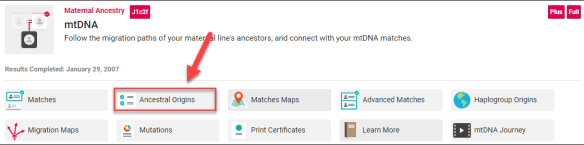
Mitochondrial matches.png

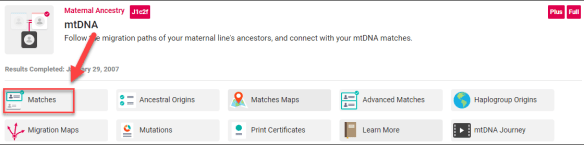
On your personal page, under mtDNA, click on Matches.

Matches

You’ll be viewing your match list of the people who match you at some level.

You’ll see several fields on your match list that you’ll want to use. Many of the bullet points in this article refer to the fields boxed in red or red arrows.

mitochondrial matches

You can click this image to enlarge.

Let’s review why each piece of information is important.

  • Be sure you’re using viewing your matches for the HVR1, HVR2 and Coding region in the red box at the top. Those are your most relevant matches. That’s not to say that you shouldn’t also view your HVR1+HVR2 matches, and your HVR1 matches, because you literally never know what might be there. However, start with the HVR1+HVR2+Coding Region.
  • Focus on your Genetic Distance of 0 matches. Those are exact matches, meaning you have no mutations that don’t match each other. A genetic distance of 1 means that you have one mutation that doesn’t match each other. You can read about Genetic Distance here.
  • Be sure you’re looking at the match results for the entire data base or the project you want to be viewing. For example, if I’m a member of the Acadian AmerIndian project and have Acadian ancestry on my direct matrilineal line, knowing who I match within that project may be extremely beneficial, especially if I need to narrow my results to known Acadian families.
  • Look at the earliest known ancestor (EKA) information. Don’t just let your eyes gloss over it, really look at it. There may be secrets hidden here that are critical for solving your puzzle. The mother of Lydia Brown was discovered by a cousin recently after I had (embarrassingly) ignored an EKA in plain sight for years. You can read about that discovery here.
  • Click on the little blue pedigree icon on your match to view trees that go hand in hand with the earliest known ancestor (EKA) information. Some people provide more information in either the EKA or the tree, so be sure to look at both for hints.

mitochondrial tree

  • If your match’s pedigree icon is grey, they haven’t uploaded their tree. You can always drop them an email explaining how useful trees are and ask them if they will upload theirs.

Utilizing Other Resources

Many people don’t have both trees and an EKA at Family Tree DNA. Don’t hesitate to check Ancestry, MyHeritage or FamilySearch trees with the earliest known ancestor information your match provides if they don’t have a tree, or even if they do to expand their tree. We think nothing of building out trees for autosomal matches – do the same for your matches’ mitochondrial lines.

Finding additional information about someone’s ancestor is also a great ice-breaker for an email conversation. I mean, what genealogist doesn’t want information about their ancestors?

For example, if you match me and I’ve only listed my earliest known ancestor as Ellenore “Nora” Kirsch, you can go to Ancestry and search for her name where you will find several trees, including mine that includes several more generations. Most genealogists don’t limit themselves to one resource, testing company or tree repository.

mitochondrial ancestry tree

WikiTree includes a descendants link for each ancestor that provides a list of people who have DNA tested, including mtDNA. Here’s an example for my ancestor, Curtis B. Lore.

mitochondrial wiki tree

Unfortunately, no one from that line has tested their mitochondrial DNA, but looking at the descendants may provide me with some candidates that descend from his sisters through all females to the current generation, which can be male.

You can do that same type of thing at Geni if you have a tree by viewing that ancestor and clicking on “view a list of living people.”

mitochondrial Geni

While trees at FamilySearch, Ancestry and MyHeritage don’t tell you which lines could be tested for mitochondrial DNA, it’s not difficult to discern. Mitochondrial DNA is passed on by females to the current generation where males can test too – because they received their mitochondrial DNA from their mother.

Family Tree DNA Matches Profiles

Your matches’ profiles are a little used resource as many people don’t realize that additional information may be provided there. You can click on your match’s name to show their profile card.

mitochondrial profile

Be sure to check their “about me” section where I typed “test” as well as their email address which may give you a clue about where the match lives based on the extension. For example, .de is Germany and .se is Sweden.

You can also google their email address which may lead to old Rootsweb listings among other useful genealogical information.

Matches Map

Mitochondrial matches maps.png

Next, click on your Matches Map. Your match may have entered a geographical location for their earliest known ancestor. Beware of male names because sometimes people don’t realize the system isn’t literally asking for the earliest known ancestor of ANY line or the oldest ancestor on their mother’s side. The system is asking for the most distant known ancestor on the matrilineal line. A male name entered in this field invalidates the data, of course.

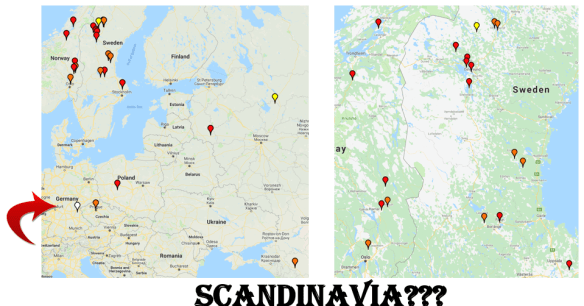
My Matches Map is incredibly interesting, especially since my EKA (earliest known ancestor) is from Germany in 1655.
mitochondrial Scandinavia

The white pin shows the location of my ancestor in Germany. The red pins are exact matches, orange are genetic distance of 1, yellow of 2 and so forth.

Note that the majority of my matches are in Scandinavia.

The first question you should be asking is if I’m positive of my genealogical research – and I am. I have proofs for every single generation. The question of paternity is not relevant to mitochondrial DNA, since the identity of the mother is readily apparent, especially in small villages of a few hundred people where babies are baptized by clergy who knows the families well.

Adoptions might be another matter of course, but adoptions as we know them have only taken place in the past hundred years or so. Generally, the child was still baptized with the parents’ names given before the 1900s. Who raised the child was another matter entirely.

Important Note: Your matches map location does NOT feed from your tree. You must go to the Matches Map page and enter that information at the bottom of that page. Otherwise your matches map location won’t show when viewed by your matches, and if they don’t do the same, theirs won’t show on your map.

mitochondrial ancestor location

Email

I KNOW nobody really wants to do this, but you may just have to email as a last resort. The little letter icon on your match’s profile sends an email, or you can find their email in their profile as well.

DON’T email an entire group of people at once as that’s perceived as spam and is unlikely to receive a response from anyone.

Compose a friendly email with a title something like “Mitochondrial DNA Match at Family Tree DNA to Susan Smith.” Many people manage several kits and if you provide identifying information in the title, you’re more likely to receive a response

I always provide my matches with some information too, instead of just asking for theirs.

Advanced Matching

Mitochondrial advanced matches

Click on the advanced matching link on your personal page.

The Advanced Matches tool allows you to compare multiple types of tests. When looking at your match list, notice if your matches have also taken a Family Finder (FF) test. If so, then the advanced matching tool will show you who matches you on multiple types of tests, assuming you’ve taken the Family Finder test as well or transferred autosomal results to Family Tree DNA.

For example, Advanced Matches will show you who matches you on BOTH the mtDNA and the Family Finder tests. This is an important tool to help determine how closely you might be related to someone who matches you on a mitochondrial DNA test – although here is no guarantee that your autosomal match is through the same ancestor as your mitochondrial DNA match.

mitochondrial advanced matches filter

On the advanced matching page, select the tests you want to view, together, meaning you only want to see results for people who match you on BOTH TESTS. In this case, I’ve selected the full mitochondrial sequence (FMS) and the Family Finder, requested to show only people I match on both tests, and for the entire database. I could select a specific project that I’ve joined if I want to narrow the matches.

Note that if you don’t click the “yes” button you’ll see everyone you match on both tests INDIVIDUALLY, not together. So if you match 50 people on mtDNA and 1000 on Family Finder, you would show 1050 people, not the people who match you on BOTH tests, which is what you want. You might match a few or none on both tests.

Note that if you select “all mtDNA” that means you must match the person on the HVR1, HVR2 and coding region, all 3. That may not be at all what you want either. I select each one separately and run the report. So first, FMS and Family Finder, then HVR2 and Family Finder, etc.

When you’ve made your selection, click on the red button to run the report.

Family Finder Surnames

Another hint you might overlook is Family Finder surnames.

mitochondrial family finder surnames

Go to your Family Finder match list and enter the surname of your matches EKA in the search box to see if you match anyone with that same ancestor. Of course, if it’s Smith or Jones, I’m sorry.

mitochondrial family finder surname results

Entering Kirsch in my Family Finder match list resulting in discovering a match that has Kirsh from Germany in their surname list, but no tree. Using the ICW (in common with) tool, I can then look to see if they match known cousins from the Kirsch line in common with me.

Putting Information to Work

OK, now we’ve talked about what to do, so let’s apply this knowledge.

Your challenge is to go to your Full Sequence match page in the lower right hand corner and download your match list into a spreadsheet by clicking the CSV button.

mitochondrial csv

Column headings when downloaded will be:

  • Genetic Distance
  • Full Name
  • First Name
  • Middle Name
  • Last Name
  • Email
  • Earliest Known Ancestor
  • mtDNA Haplogroup
  • Match Date

I added the following columns:

  • Country
  • Location (meaning within the country)
  • Ancestral Surname
  • Year (meaning their ancestor’s birth/death year)
  • Map (meaning do they have an entry on the matches map)
  • Tree (do they have a tree)
  • Profile (did I check their profile and what did it say)
  • Comment (anything I can add)

This spreadsheet is now a useful tool.

Our goal is to expand this information in a meaningful way.

Data Mining Steps

Here are the steps in checklist format that you’ll complete for each match to fill in additional information on your spreadsheet.

  • EKA (earliest known ancestor)
  • Matches Map
  • Tree
  • Profile
  • Advanced matching
  • Family Finder surname list
  • Email, as a last resort
  • Ancestry, MyHeritage, FamilySearch, WikiTree, Geni to search for information about their EKA

Doubling My Match Information

I began with 32 full sequence matches. Of those, 13 had an entry on the Matches Map and another 6 had something in the EKA field, but not on the Matches Map.

32 matches Map Additional EKA Nothing Useful
Begin 13 on Matches Map 6 but not mapped 13
End 29 remapped on Google 5 improved info 3

When I finished this exercise, only 3 people had no usable information (white rows), 29 could be mapped, and of the original 13 (red rows), 5 had improved information (yellow cells.)

mitochondrial spreadsheet

Please note that I have removed the names of my matches for privacy reasons, but they appear as a column on my original spreadsheet instead of the Person number.

Google Maps

I remapped my matches from the spreadsheet using free Google Maps.

mitochondrial Google maps

Purple is my ancestor. Red are the original Matches Map ancestors of my matches. Green are the new people that I can map as a result of the information gleaned.

The Scandinavian clustering is even more mystifying and stronger than ever.

Add History

Of course, there’s a story here to be told, but what is that story? My family records are found in Germany in 1655, and before that, there are no records, at least not where my ancestors were living.

Clearly, from this map and also from comparing the mutations of my matches that answered my emails, it’s evident that the migration path was from Scandinavia to Germany and not vice-versa.

How did my ancestor get from Scandinavia to Germany?

When and why?

Looking at German history, there’s a huge hint – the Thirty Years’ War which occurred from 1618-1648. During that war, much of Germany was entirely depopulated, especially the Palatinate.

Looking at where my ancestor was found in 1655 (purple pin), and looking at the Swedish troop movements, we see what may be a correlation.

mitochondrial Swedish troop movements

In the first few generations of church records, there were several illegitimate births and the mother was referred to as a servant woman.

It’s possible that my Scandinavian ancestor came along with the Swedish army and she was somehow left behind or captured.

The Challenge!

Now, it’s your turn. Using this article as a guideline, what can you find? Let me know in a comment. If you utilize additional resources I haven’t found, please mention those too!

What’s Next?

Please join me for the next article in this series, Mitochondrial DNA: Part 5 – Joining Projects.

______________________________________________________________

Disclosure

I receive a small contribution when you click on the link to one of the vendors in my articles. This does NOT increase the price you pay but helps me to keep the lights on and this informational blog free for everyone. Please click on the links in the articles or to the vendors below if you are purchasing products or DNA testing.

Thank you so much.

DNA Purchases and Free Transfers

Genealogy Services

Genealogy Research

Reminder: Ancestry’s DNA Circles Will Vanish July 1 – Act Now to Preserve

Ancestry circle example

This is reminder that Ancestry is permanently removing DNA Circles from customer accounts on July 1st. If you have not recorded the information held in your Circles and New Ancestor Discoveries, if you had any, do that NOW.

There is a misconception that ThruLines, introduced earlier in 2019, is the same thing as Circles, just in a different format. That is NOT accurate. ThruLines is a different tool and provides some of the same information as Circles (and NADs), but not all and the part that’s missing isn’t available elsewhere.

Circles provide you with information about people who match you that share a common ancestor, but they ALSO show you who else has tested and matches the people you match, but not you. That’s valuable information for numerous reasons. It verifies multiple children of that ancestor genetically and provides you with a genetic network to validate the ancestral connection for all of those people.

ThruLines only shows you who you match in the context of an ancestral family, not who else has tested that you don’t match.

In the article, Archive Ancestry DNA Circles and New Ancestor Discoveries Now, I walk you through how to save your information step by step.

If you haven’t preserved your information, do so now before it’s too late.

______________________________________________________________

Disclosure

I receive a small contribution when you click on the link to one of the vendors in my articles. This does NOT increase the price you pay but helps me to keep the lights on and this informational blog free for everyone. Please click on the links in the articles or to the vendors below if you are purchasing products or DNA testing.

Thank you so much.

DNA Purchases and Free Transfers

Genealogy Services

Genealogy Research

Exciting New Y DNA Haplogroup D Discoveries!

Haplogroup D is a very old branch of Y-DNA that has remained rather mysterious. It has been uncertain where haplogroup D was born – in Africa, Asia or elsewhere – and when. It’s always fascinating when new research sheds light on the early history of humanity – discovered through people living and testing today.

In the current issue of Genetics, the article A Rare Deep-Rooting African Y-chromosomal Haplogroup and its Implications for the Expansion of Modern Humans Out of Africa by Haber et al appeared.

Their abstract:

Present-day humans outside Africa descend mainly from a single expansion out ∼50,000-70,000 years ago, but many details of this expansion remain unclear, including the history of the male-specific Y chromosome at this time. Here, we re-investigate a rare deep-rooting African Y-chromosomal lineage by sequencing the whole genomes of three Nigerian men described in 2003 as carrying haplogroup DE* Y-chromosomes, and analyzing them in the context of a calibrated worldwide Y-chromosomal phylogeny. We confirm that these three chromosomes do represent a deep-rooting DE lineage, branching close to the DE bifurcation, but place them on the D branch as an outgroup to all other known D chromosomes, and designate the new lineage D0. We consider three models for the expansion of Y lineages out of Africa ∼50,000-100,000 years ago, incorporating migration back to Africa where necessary to explain present-day Y-lineage distributions. Considering both the Y-chromosomal phylogenetic structure incorporating the D0 lineage, and published evidence for modern humans outside Africa, the most favored model involves an origin of the DE lineage within Africa with D0 and E remaining there, and migration out of the three lineages (C, D and FT) that now form the vast majority of non-African Y chromosomes. The exit took place 50,300-81,000 years ago (latest date for FT lineage expansion outside Africa – earliest date for the D/D0 lineage split inside Africa), and most likely 50,300-59,400 years ago (considering Neanderthal admixture).

Haplogroup DE was and is very rare. Because of its rarity, and that it had initially been reported in one man from Guinea-Bissau in West Africa and two Tibetans, it was unclear where DE originated, or when.

This new paper sequenced three men from Africa and five from Tibet.

D Splits

The result of the paper is that the authors confirm that the DE lineage split consists of three branches:

  • E which is “mainly African” which we’ve known for a long time
  • D0 which is exclusively African with the 3 Nigerian samples being within 2500 years of each other
  • D which is exclusively non-African

To calibrate the branch length between any two samples when calculating split times, the authors multiplied the number of derived variants (mutations) found in the first sample but absent from the record, meaning previously unknown.

In supplementary table S2, they recalculate the splits between the various haplogroups. I found the table confusing to read, so I reached out to Goran Runfeldt who heads the scientific research team at Family Tree DNA to make this simpler.
I knew from previous discussions with the team that they had split the haplogroup D line internally to reflect a new branch at the time they named D-FT75 and subsequently D-FT76, and they were waiting for verification from multiple tests before splitting the line further.

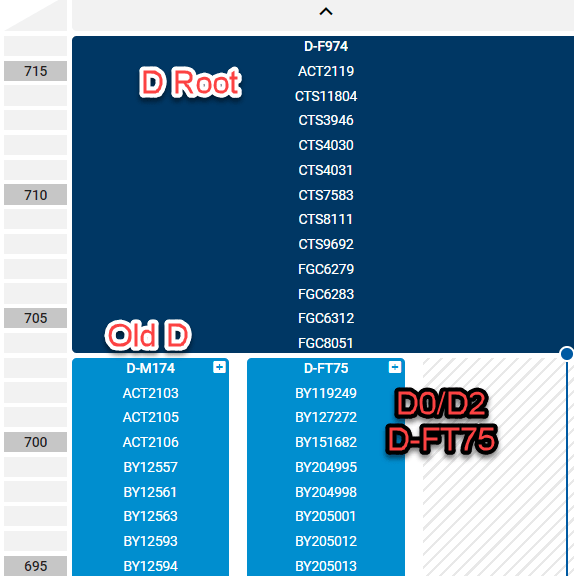
Haplogroup D root and split

On the Family Tree DNA block tree, above, you can see the D split between D-F974 which is the main haplogroup D root (navy blue) which then splits into D-M174 which is the old line referred to as Haplogroup D, and the new D0/D2/D-FT75 lineage, both in lighter blue. You can see the public tree, here.

Goran explained that Family Tree DNA has actually found multiple lineages in what the authors call D0, which ISOGG calls D2 and Family Tree DNA refers to by the defining SNP as D-FT75.

If you’re like me, looking at this information in pedigree format is easier to comprehend.

I asked Goran and Big Y haplotree guru, Michael Sager if they could create something easy to understand. You can see them working together in this photo. Thanks guys!

Goran Runfeldt and Michael Sager

The Haplogroup D Tree

Note that the following graphic is NOT TO TIME SCALE. Currently tested, unplaced and and pending samples are at the bottom.

Haplogroup D Family Tree DNA diagram

In the chart above, haplogroups in red at the top are the base haplogroups, not refined by the paper. Green is the already known upper structure of haplogroup D. Tan is the haplogroup D structure being refined by Family Tree DNA. The blue group is the Nigerian structure from the paper.

Divergence times as quoted in the paper are noted. For example, the time between the split between CT and BT, according to the paper, is approximately 101.1 thousand years ago. (kya means thousands of years ago)

How the D-FT75 Branch was Discovered

At the end of 2018, Family Tree DNA published the first SNPs from the new haplogroup D lineage to the ISOGG SNP index. During 2019, additional SNPs have been added, including the new haplogroup D lines of D-FT75 and D-FT76.

I asked Michael Sager how he made that discovery.

When a customer purchases an STR test, if Family Tree DNA cannot reliably predict a haplogroup, they will run a backbone test, at no additional charge to the customer, to test enough SNPs to at least call a base level haplogroup, such as R-M269.

In this case, Family Tree DNA ran a backbone test on a customer’s Y DNA and the result came back as something Michael had never seen before – haplogroup CT, but no subgroup. As you’ve already noticed, haplogroup CT is far up the tree and Michael needed more information.

Michael said that he knew the only possible options were:

  • CT* – where star means there is no subgroup. An individual with no CT subgroup has never been found, to date
  • A lineage that breaks CT into a further haplogroup
  • Haplogroup DE*
  • A lineage that breaks haplogroup DE into further branches
  • A lineage that breaks haplogroup D into further branches
  • A lineage that breaks haplogroup E into further branches

After the backbone results were returned, Family Tree DNA contacted the customer and asked permission to run a Big Y test. The result was the discovery and naming of D-FT75 and D-FT76 which split D, twice, into new subgroups.

Further testing has verified the haplogroup D-FT76 finding in another Saudi Arabian male. Two additional haplogroup D males have results pending – one from Syria and one from another part of the world.

We now know that indeed the new branch of D, D0/D2/D-F75 has been found outside Africa, specifically in Saudi Arabia. It’s possible that there are more than two distinct lineages. We’ll know more as pending results come back from the lab.

However, what can be added is that according to the paper, the age of haplogroup D to the Nigerian samples is 71,400 years. The Family Tree DNA calculations based on the total number of 702 SNPs at 100 years per SNP suggest that the age is 70,200, which is very close to the 71,400 age in the paper. Additionally, because of the haplogroup FT75 and FT76 split, we can estimate the age of the divergence of those two lines with 261 SNPs between them at between 26,000 and 26,500 years, using these two calculation methods.

To quote Michael Sager, it’s “pretty neat to find a 20,000+-year-old NEW branch off of a 70,000+-year-old NEW branch.” I’d certainly agree!

Family Tree DNA would also like to place the Nigerian samples precisely on the tree.

In the supplemental data, the paper provided a list of the HG19 SNPs that are positive, including the positions for both D-FT75 and D-FT76, but did not list the SNPs that were negative. In order for Family Tree DNA to assign the Nigerian samples from the paper precisely to a branch, they need the BAM file because they need to see positive, negative and no-call SNPs. Family Tree DNA would also need to convert the results from build HG19, used by the authors, to current HG38.

What About You?

If you’re a male and have taken a Y STR test, meaning the 12, 25, 37, 67 or 111 marker test and you do not have a predicted haplogroup, please contact support at Family Tree DNA.

The best thing you can do, if you haven’t Y DNA tested, is to actually take a Y DNA test at Family Tree DNA. You can start out with the STR marker test which provides you with STR marker results, matching to other males and a haplogroup prediction.

Many individuals also purchase the Big Y-700 test which provides a very granular haplogroup – the most detailed possible, matching and at least 700 STR marker results – in addition to revealing never before discovered SNPs. Without the Big Y test, D-FT75 and D-FT76 and most of the 150,000 Y SNPs would not yet be discovered. This is the only test that can make new discoveries like this.

To summarize, you can be a part of scientific discovery if you’re a male (only males have Y chromosomes) by either:

  • Testing your Y DNA by taking a 37, 67 or 111 marker test
  • Ordering or upgrading to the Big Y-700 test

You can click here to order or upgrade.

______________________________________________________________

Disclosure

I receive a small contribution when you click on the link to one of the vendors in my articles. This does NOT increase the price you pay but helps me to keep the lights on and this informational blog free for everyone. Please click on the links in the articles or to the vendors below if you are purchasing products or DNA testing.

Thank you so much.

DNA Purchases and Free Transfers

Genealogy Services

Genealogy Research

Exploring Family Trees Website, Including Average DNA Percent Inheritance by Ancestor

Sometimes you just have to do something just because it’s fun.

That’s the website learnforeverlearn at this link, a free tool created by B. F. Lyon visualizations that allows you to view your family tree or pedigree chart in very novel ways.

Here’s what greets you.

learnforever splash

The “About This” link at the very top of the page shows the following:

learnforever about

In case you’re wondering, your Gedcom file never leaves your PC, so you don’t need to worry about security.

Getting Started

First, you’ll be prompted to upload a Gedcom file, a file generated by either your genealogy software like RootsMagic or a site like Ancestry. If you have a tree at Ancestry, you can download it into a Gedcom file format and save on your computer.

My own personal Gedcom file from my PC software was too large, so I downloaded a smaller file that I use on Ancestry. I’ve entered all of my ancestors at Ancestry through 12 generations, if known, and some of their children. I use my Ancestry file to focus on direct line ancestors and DNA matches, not as my primary tree.

The first thing you see after uploading your Gedcom file is that your pedigree chart is displayed in one tree. If you want to see examples before uploading your own, click here, or view mine below. You can click to see a larger image.

learnforever ancestors

What fun! If you’ve experienced pedigree collapse where you are descended from the same ancestral line multiple times, you’ll see that in this large pedigree map. I don’t have pedigree collapse, but you take a look at fun examples under “Sample Trees.”

If you want to see more detail, just scroll your mouse wheel for larger or smaller. If you get yourself lost, simply reset pan/zoom or reset to the root person.

You can’t “hurt” this application because you reload your file every time you want to use it, so you can always just start over.

Your options are at the top, but by mousing over anything on the page, you can generally learn a lot more. Every time I use this tool, I notice something I didn’t see previously.

learnforever toolbar

Let’s take a look at what you can do.

Who’s Who

I currently have 793 individuals in my tree. By clicking on the “Current Tree Details” at the top of the page, you can see the list of who is included.

learnforever tree detail

This is an easy way to see if you have any issues in your file. I quickly discovered that I have two people with typos in their birth dates because the years have 3 digits. How did that happen?

Validation Check

You can also run a data validation check.

learnforever data validation

What a valuable tool!

Hmmm, looks like I need to do some cleanup. Ahem!!

The X Chromosome

At the top right, you can click on “Highlight X DNA Contributions” which creates a view of the people who contributed or are candidates to contribute segments of their X chromosome to the home person. Remember that you can change the home (root) person to someone else in your tree, like maybe one of your parents, for example.

The X is important because it has unique inheritance properties that can be very helpful that I wrote about here.

learnforever x contributions

I moused over the various people and discovered that when you “land” on someone, you can view their information. In this case, my great-grandmother who, on average, contributed 12.5% of her DNA to me and 25% of her X chromosome.

learnforever ancestor contribution

I can then view Evaline’s ancestor or descendant tree, or a straight path to the root, which is me, by clicking the blue buttons.

learnforever ancestor tree

Years

learnforever years

By scrolling your mouse up and down between people, you can see a horizontal black “line” that shows you a year. By following the line, you can see who in your tree was living during that year.

learnforever living years

Gosh this is fun!

History

By mousing over the green year bar at far right, you can see what was going on historically at that time, as well as in your own family.

learnforever history

I love this tool!

Locations

Under the options tab, at upper left, by toggling the flag icon, you can then view your tree by birth location.

learnforever options

I love this view.

learnforever flags

You can view the migration progression by just looking at your tree.

Scroll on down the options tab for more display possibilities.

Possible Immigrants

learnforever possible immigrants

Ancestor Information

learnforever statistics

In my case, the “number of children” information isn’t accurate because I have not fleshed out the families at Ancestry. I was only working primarily with my direct ancestors.

Unique Birthplaces

learnforever birthplaces

I’ve combined unique birthplaces with potential immigrants.

Ancestor Cone

learnforever ancestor cone

By mousing, you can see how many ancestors you had at a particular time and the total world population.

learnforever ancestors vs world population

Wow. In 1615, I had 16,384 ancestors? I need to get busy! I am never going to be finished!

Just when you think you can’t have any more fun…

You can read more about this tool and ways to use it in an article written by the author here.

Thank You

I don’t know B. F. Lyon who created this cool free website, but under the options tab, I found this:

Want more options/features? Let me know at bradflyon@gmail.com

Please drop Brad a note to say thank you or offer suggestions!

______________________________________________________________

Disclosure

I receive a small contribution when you click on some (but not all) of the links to vendors in my articles. This does NOT increase the price you pay but helps me to keep the lights on and this informational blog free for everyone. Please click on the links in the articles or to the vendors below if you are purchasing products or DNA testing.

Thank you so much.

DNA Purchases and Free Transfers

Genealogy Services

Genealogy Research

Mitochondrial DNA: Part 3 – Haplogroups Unraveled

This is the third article in a series about mitochondrial DNA.

The first two articles are:

This third article focuses on haplogroups. They look so simple – a few letters and numbers – but haplogroups are a lot more sophisticated than they appear and are infinitely interesting!

What can you figure out about yours and what secrets will it reveal? Let’s find out!

What is a Haplogroup?

A haplogroup is a designation that you can think of as your genetic clan reaching far back in time.

My mitochondrial haplogroup is J1c2f, and I’ll be using this as an example throughout these articles.

The description of a haplogroup is the same for both Y and mitochondrial DNA, but the designations and processes of assigning haplogroups are different, so the balance of this article only refers to mitochondrial DNA haplogroups.

Where Did I Come From?

Every haplogroup has its own specific history.

Mitochondrial migration maps.png

Looking at my DNA Migration Map at Family Tree DNA, I can see the path that haplogroup J took out of Africa.

mitochondrial migration map j.png

This map is interactive on your personal page, so you can view your or any other haplogroup highlighted on the map.

mitochondrial frequency map J.png

On the frequency tab of the Migration Map, you can view the frequency of your haplogroup in any specific location.

Mitochondrial personal page mutations

On my Mutations tab, I’m provided with this information:

The mitochondrial haplogroup J contains several sub-lineages. The original haplogroup J originated in the Near East approximately 50,000 years ago. Within Europe, sub-lineages of haplogroup J have distinct and interesting distributions. Haplogroup J1 is found distributed throughout Europe, from Britain to Iberia and along the Mediterranean coast. This widespread distribution strongly suggests that haplogroup J1 was part of the Neolithic spread of agriculture into Europe from the Near East beginning approximately 10,000 years ago.

Stepping-Stones back in Time

The haplogroup designation itself is a stepping-stone back in time.

Looking at my full haplogroup, J1c2f, we see 5 letters or numbers.

The first letter, J, is my base haplogroup, and each letter or digit after that will be another step forward in time from the “mother” haplogroup J.

Therefore, 1 is a major branch of haplogroup J, c is a smaller branch sprouting off of J1, 2 is a branch off of J1c, and f is the last leaf, at least for now.

Ages

In the supplementary data for the article, A “Copernican” Reassessment of the Human Mitochondrial DNA Tree from its Root, by Doron M Behar et al, published in the Journal of Human Genetics on April 6, 2012, he provides age estimates for the various haplogroups and subhaplogroups identified at that time.

My haplogroup breakdown is shown below.

Haplogroup

Time Estimate (Years) SD (standard deviation in years)
J 34,258.3 4886.2
J1 26,935.1 5272.9
J1c 13,072.3 1919.3
J1c2 9762.5 2010.7
J1c2f 1926.7

3128.6

  • Time estimate means how long ago this haplogroup was “born,” meaning when that haplogroup’s defining mutation(s) occurred.
  • SD, standard deviation, can be read as the range on either side of the time estimate, with the time estimate being the “most likely.” Based on this, the effective range for the birth of haplogroup J is 29,372.1 – 39,144.5. In some of the most current haplogroups, like J1c2f, the lowest age range is a negative number, which obviously can’t happen. This sometimes occurs with statistical estimates.

The first question you’re going to ask is how can these age estimates be so precise? The answer is that these are statistical calculations – because we can’t travel back in time.

What Came Before J?

Clearly J is not Mitochondrial Eve, so what came before J?

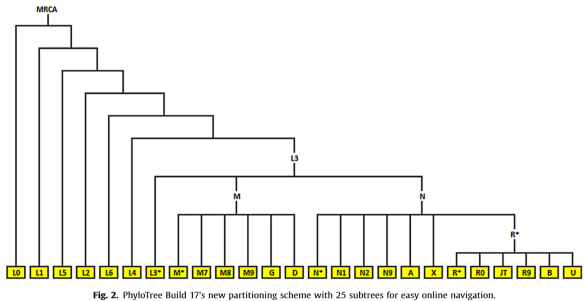
In the paper announcing the latest version (Build 17) of the Phylotree by van Oven, meaning the haplotree for mitochondrial DNA, this pedigree style tree was drawn to show the backbone plus 25 subtrees.

mitochondrial Build 17 tree.png

Haplogroup J descended from JT, fourth from right on the bottom right.

The MRCA, most recent common ancestor at the root of the tree would be the RSRS (Reconstructed Sapiens Reference Sequence), known colloquially as Mitochondrial Eve.

Branches and Names

Haplogroups were named in the order they were discovered, using the alphabet, A-Z (except O). Branches are indicated by subsequent numbers and letters. Build 17 of the phylogenetic tree includes 5437 branches, increasing from 4809 in build 16.

Occasionally branches are sawed off and reconnected elsewhere, which sometimes plays havoc with the logical naming structure because they are renamed completely on the new branch. This happened when haplogroup A4 was retired in Build 17 and is now repositioned on the tree as haplogroup A1. I wrote about this in the article, Family Tree DNA’s Mitochondrial Haplotree.

It’s easier to see the branching tree structure if you look at the public mitochondrial haplotree on the Family Tree DNA website. Scroll to the very bottom of the main Family Tree DNA page, here, and click on mtDNA haplotree.

Mitochondrial mtDNA haplotree.png

You can search for your haplogroup name and track your ancestral haplogroups back in time.

mitochondrial J1c2f search.png

J1c2f is shown below on the tree, with haplogroup J at the top.

mitochondrial J1c2f tree

Click to enlarge

Where in the World?

Whether you’ve tested at Family Tree DNA or not, you can view this tree and you can see the location of the earliest known ancestor of people who have tested, agreed to sharing and have been assigned to your haplogroup.

You can mouse over the little flag icons or click on the 3 dots to the right for a country report.

mitochondrial country.png

The country report details the distribution of  the earliest known ancestors where people on that branch, and those with further subbranches are found.

mitochondrial country report J1c2f

You can click to enlarge the image.

J1c2f is the lowest leaf on this branch of the tree, for now, so there is no difference in the columns.

However, if we look at the country report for haplogroup J1c2, the immediate upstream haplogroup above J1c2f, you can see the differences in the columns showing people who are members of haplogroup J1c2 and also downstream branches.

Mitochondrial country report J1c2

Click to enlarge the image.

I wrote more about how to use the new public tree here.

Haplogroup Assignment Process

There’s a LOT of confusion about haplogroup assignments, and how they are generated.

First, the official mitochondrial tree is the Phylotree, here. Assigning new haplogroups isn’t cut and dried, nor is it automated today. The Phylotree has been the defacto location for multiple entities to combine their information, uploading academic samples to GenBank, a repository utilized by Phylotree for all researchers to use in the classification efforts. You can read more about GenBank here. Prior to Phylotree, each interested entity was creating their own names and the result was chaotic confusion.

Individuals who test at Family Tree DNA can contribute their results, a process I’ll cover in a future article.

The major criteria for haplogroup assignments are:

  • Three non-familial sequences that match exactly. Family mutations are considered “private mutations” at this time.
  • Avoidance of regions that are likely to be unstable (such as 309, 315 and others,) preferably using coding region locations which are less likely to mutate.
  • Evaluating whether transitions, transversions and reversions are irrelevant events to haplogroup assignment, or whether they are actually a new branch. I covered transitions, transversions and reversions here.

Periodically, the Phylotree is updated. The current version is Build 17, which I wrote about here.

The Good, the Bad and the Ugly

While change and scientific progress is a good thing, it also creates havoc for the vendors.

For each vendor to update your haplogroup, they have to redo their classification algorithm behind the scenes, of course, then rerun their entire customer database against the new criteria. That’s a huge undertaking.

In IT terms, haplogroups are calculated and stored one time for each person, not calculated every time you access your information. Therefore, to change that data, a recalculation program has to be run against millions of accounts, the information stored again and updating any other fields or graphics that require updating as a result. This is no trivial feat and is one reason why some vendors skip Phylotree builds.

When you’re looking at haplogroups at different vendors, it’s important to find the information on your pages there that identify which build they are using.

Vendors who only test a few locations in order to assign a base or partial haplogroup may find themselves in a pickle. For example, if a new Phylotree build is released that now specifies a mutation at a location that the vendor hasn’t tested, how can they upgrade to the new build version? They can’t, or at least not completely accurately.

This is why full sequence testing is critically important.

Haplogroup Defining Mutations

Build 17 example

Using the Build 17 table published by Family Tree DNA that identifies the mutations required to assign an individual to a specific haplogroup or subhaplogroup, you can determine why you were assigned to a specific haplogroup and subgroups.

Mutations in Different Haplogroups are Not Equal

What you can’t do is to take mutations out of haplogroup context for matching.

Let’s say that someone in haplogroup H and haplogroup J both have a mutation at location G228A.

mitochondrial mutation comparison.png

That does NOT mean these two people match each other genealogically. It means that the two different branches of the mitochondrial tree, haplogroup J and haplogroup H individually developed the same mutation, by chance, over time. In other words, parallel, disconnected mutations.

It may mean that both individuals simply happen to have the same personal mutations, or, it could mean that eventually these values could become haplogroup defining for a new branch in one or the other haplogroup.

How Common Are Parallel Mutations?

From the Build 17 paper again, this table shows us the top recurrent mutations after excluding insertions, deletions and location 16519. We see that 197 different branches of the tree have mutation T152C. My branch is one of those 197.

Mitochondrial build 17 mutation frequency.png

I think you can see, with location T152C being found in 197 different branches of the Pylotree why the only meaningful match between two people is within specific haplogroup subclades.

Within a haplogroup, this means that two people match on T152C PLUS all of the upstream haplogroup defining markers. Outside of a haplogroup, it’s just a chance parallel mutation in both lines.

Therefore, if another person in haplogroup J1c2f and I match a mutated value at the same location, that could be a very informative piece of genealogical information.

Partial and Full Haplogroups

Some vendors, such as 23andMe and LivingDNA provide customers with partial haplogroups as a part of their autosomal offering.

Family Tree DNA (full haplogroup) 23andMe LivingDNA
J1c2f J1c2 J1c

23andMe and LivingDNA provide partial haplogroups because they are not testing all of the 16,569 locations of the mitochondrial DNA. They are using scan technology on a chip that also processes autosomal DNA, so the haplogroup assignment is basically an “extra” for the consumer. Each chip location they use for mitochondrial (or Y) DNA testing for haplogroups is one less location that can be used for autosomal testing.

Therefore, these companies utilize what is known as target testing. In essence, they test for the main mutations that allow them to classify people into major haplogroups. For example, you can see that LivingDNA tests the mutations through the J1c level, but not to J1c2, and 23andMe tests to J1c2 but not J1c2f. If they tested further, my haplogroup designation would be J1c2f, not J1c or J1c2.

For full sequence testing, complete haplogroup designation and matching, I need to test at Family Tree DNA. They are the only vendor that provides the complete package.

Matching

mitochondrial matches link.png

Family Tree DNA provides matching of customer results. Consumers can purchase the mtPlus product, which tests only the HVR1/HVR2 portion of the mitochondria, or the mtFull product which tests the entire mitochondria. I recommend the mtFull.

In addition to haplogroup information, customers receive a list of people who match them on their mitochondrial sequence.

mitochondrial matches result

Click to enlarge

Matches with genealogical information allow customers to make discoveries such as this location information, provided by Lucille, above:

mitochondrial villages map.png

Lucille’s earliest known ancestor, according to her tree, is found just 12.6 km, or 7.8 miles from the tiny German village where my ancestor was found in the late 1600s.

Of course, matching isn’t provided in the 23andMe and LivingDNA databases, so we can’t tell who we do and don’t match genealogically, but haplogroups alone are not entirely useless and can provide great clues.

Haplogroups Alone

Haplogroups alone can be utilized to include or eliminate people for further scrutiny to identify descendancy on a particular line.

Mitochondrial advanced matches.png

For example, at Family Tree DNA, I can utilize the advanced matching tool to determine whether I match anyone on both the Family Finder autosomal test AND on any of the mitochondrial DNA tests.

mitochondrial advanced matches

Click to enlarge

My match on both tests, Ms. Martha, above, has not tested at the full sequence level, so she won’t be shown as a match there. It’s possible that were she to upgrade that we would also match at the full sequence level. It’s also possible that we wouldn’t. Even an exact mitochondrial match doesn’t indicate THAT’s the line you’re related on autosomally, but it does not eliminate that line and may provide useful clues.

If my German match, Lucille and I had matched autosomally AND on the full sequence mitochondrial test, plus our ancestors lived 7 miles apart – those pieces of evidence would be huge clues about the autosomal match in addition to our mitochondrial match.

Alas, Lucille and I don’t match autosomally, but keep in mind that there are many generations between Lucille and me. If we had matched autosomally, it would have been a wonderful surprise, but we’d be expected not to match given that our common ancestor probably lived sometime in the 1600s or 1700s.

If I’m utilizing 23andMe and notice that someone’s haplogroup is not J1c2, the same as mine, then that precludes our common ancestral line from being our direct matrilineal line.

At GedMatch, people enter their haplogroup (or not) by hand, so they enter their haplogroup at the time they upload to GedMatch. It’s possible that their haplogroup assignment may have changed since that time, either because of a refined test or because of a Build number update. Be aware of the history of your haplogroup. In other words, if your haplogroup name changed (like A4 to A1), it’s possible that someone at GedMatch is utilizing the older name and might be a match to you on that line even though the haplogroup looks different. Know the history of your haplogroup.

Perhaps the best use of haplogroups alone is in conjunction with autosomal testing to eliminate candidates.

For example, looking at my match with Stacy at 23andMe, I see that her haplogroup is H1c, so I know that I can eliminate that specific line as our possible connection.

mitochondrial haplogroup compare.png

At Family Tree DNA, I can click on any Family Finder match’s profile to view their haplogroup or use the Advanced matching tool to see my combined Family Finder+mtDNA matches at once.

Mitochondrial match profile.png

Haplogroups and Ethnicity

My favorite use of haplogroups is for their identification of the history of the ancestral line. Yes, in essence a line by line ethnicity test.

Using either your own personal results at Family Tree DNA, or their public haplotree, you can trace the history of your haplogroup. In essence, this is an ethnicity test for each specific line – and you don’t have to try to figure out which line your specific ancestry came from. It’s recorded in the mitochondrial DNA of each person. I’ve created a DNA pedigree chart to record all my ancestors Y and mitochondrial DNA haplogroups.

Ancestor DNA Pedigree Chart

Using Powerpoint, I created this DNA pedigree chart of my ancestors and their Y and mitochondrial DNA.

Roberta's DNA Pedigree Chart 2019

You can see my own mitochondrial DNA path to the right, in red circles, and my father’s Y DNA path at left, in blue boxes. In addition to Y DNA, all men have mitochondrial DNA inherited from their mother. So you can see my grandfather, William George Estes inherited his mitochondrial DNA from his mother Elizabeth Vannoy, who inherited it from Phoebe Crumley whose haplogroup is J1c2c.

This exercise disproved the rumor that Elizabeth Vannoy was Native American, at least on that line, based on her haplogroup. You can view known Native American haplogroups here.

So Elizabeth Vannoy and her mother, Phoebe Crumley, and I share a common ancestor back in J1c2 times, before the split of J1c2c and J1c2f from J1c2, so roughly 2,000 years ago, give or take a millennia.

Haplogroup Origins

My own haplogroup J is European. That’s where my earliest ancestor is found, and it’s also where the migration map shows that haplogroup J lived.

Mitochondrial haplogroup origins.png

The information provided on my Haplogroup Origins page shows the location of my matches by haplogroup by location. I’m only showing my full sequence matches below.

Generally, the fewer locations tested, at the HVR1 or HVR1+HVR2 levels, the matches tend to be less specific, meaning that they may reach thousands of years back in time. On the other hand, some of those HVR1/HVR2 matches may be very relevant, but it’s unlikely that you’ll know unless you have a rare value in the HVR1/HVR2 region meaning few matches, or both people upgrade to the full sequence test.

mitochondrial haplogroup origins results

Click to enlarge image

You can see by the information above that most of my exact matches are distributed between Sweden and Norway, which is a very specific indicator of Scandinavian heritage ON THIS LINE alone.

By contacting and working with my matches of a genetic distance of 1, 2 and 3, I determined, based on the mutations, that the “root” of this group originated in Scandinavia and my branch traveled to Germany.

This is more specific than any ethnicity test would ever hope to be and reaches back to the mid-1600s. Better yet, I can make this same discovery for every line where I can find an individual to test – effectively rolling back the curtain of time.

Ancestral Origins

Mitochondrial ancestral origins.png

Haplogroup Origins can be augmented by the Ancestral Origins tab which provides you with the ancestral location of your matches’ most distant known ancestor.

mitochondrial ancestral origins results

Click to enlarge

Again, exact matches are going to be much more relevant to you, barring exceptions like heteroplasmies (covered here), than more distant matches.

New Haplogroup Discoveries

You might wonder, when looking at your results if there are opportunities for new haplogroup subgroups. In my case, there are a group of 33 individuals who match exactly and that include many common mutations in addition to the 11 locations in my results that are currently indicated as haplogroup identifying, indicated in red below.

mitochondrial haplogroup defining mutations J1c2f

Click to enlarge image

My haplogroup defining mutation at A10398G! is a reversion, meaning that it has mutated back to the ancestral value, so we don’t see it above, because now it’s “normal” again. We just have to trust the ancestral branching tree to understand that upstream, this mutation occurred, then occurred a second time back to the normal or ancestral value.

The two extra mutations that everyone in this group has may be enough to qualify for a new haplogroup, call it “1” for purposes of discussion – so it could be named J1c2f1, hypothetically. However, there may be other sub-haplogroups between f and 1, so it’s not just a matter of tacking on a new leaf. It’s a matter of evaluating the entire tree structure with enough testers to find as many sub-branches as possible.

Attempting to assign or reassign branches based on a few tests and without a full examination of many tests in that particular branching haplotree structure would only guarantee a great deal of confusion as the new branch names would have to be constantly changed to accommodate new branching tree structures upstream.

This is exactly why I encourage people to upload their results to GenBank. I’ll step through that process in our last article.

What’s Next?

My next article in this series, in a couple weeks, will be Mitochondrial DNA: Part 4 – Techniques for Doubling Your Useful Matches. I more than doubled mine. There’s a lot more available than meets the eye at first glance if you’re willing to do a bit of digging.

But hey, we’re genealogists – and digging is what we live for!

______________________________________________________________

Disclosure

I receive a small contribution when you click on some (but not all) of the links to vendors in my articles. This does NOT increase the price you pay but helps me to keep the lights on and this informational blog free for everyone. Please click on the links in the articles or to the vendors below if you are purchasing products or DNA testing.

Thank you so much.

DNA Purchases and Free Transfers

Genealogy Services

Genealogy Research

Genographic Project Prepares to Shut Down Consumer Data Base

Today, on the National Geographic Society’s Genographic Project page, we find this announcement:

Genographic end

This is a sad day indeed.

  • Effective May 31, 2019, you can no longer purchase Genographic kits.
  • If you currently have an unsubmitted kit, you may still be able to submit it for processing. See this link for more information about your specific kit.
  • The Genographic website will be taken down December. 31, 2020. Your results will be available for viewing until then, but not after that date.
  • Data will be maintained internally by the Genographic project for scientific analysis, but will not be otherwise available to consumers. Miguel Vilar with the Genographic Project assures me that the underlying scientific research will continue.

Please Transfer Your DNA Results

The original Genographic project had two primary goals. The first being to obtain your own results, and the second being to participate in research.

If you are one of the 997,222 people in 140 countries around the world who tested, you may be able to transfer your results.

Depending on which version of the Genographic test you’ve taken, you can still preserve at least some of the benefit, for yourself and to scientific research.

Family Tree DNA Genographic transfer

Note that only Y and mitochondrial DNA results can be transferred, because that’s all that was tested. How much information can be transferred is a function of which level test you initially took, meaning the version 1 or version 2 test.

According to the Family Tree DNA Learning Center, people who transfer their results also qualify for a $39 Family Finder kit, which is the lowest price I’ve ever seen anyplace for an autosomal DNA test.

  • If you tested within the US in November 2016 or after, you tested on the Helix platform and your results cannot be transferred to Family Tree DNA.

If you have already tested your Y (males only) and mitochondrial DNA at Family Tree DNA, there is no need to transfer Genographic data. Family Tree DNA information will be more complete.

Salvage as Much as Possible

As a National Geographic Society Genographic Project Affiliate Researcher and long-time supporter, I’m utterly heartsick to see this day.

Please transfer what you can to salvage as much as possible. We already lost the Sorenson data base, Ancestry’s Y and mitochondrial DNA data base along with YSearch and MitoSearch. How much Y and mitochondrial DNA information, critical to genealogists and the history of humanity, has been lost forever?

Let’s not lose the Genographic Project information too. Please salvage as much as possible by transferring – and spread the word.

Please feel free to repost or preprint this article.

______________________________________________________________

Disclosure

I receive a small contribution when you click on some (but not all) of the links to vendors in my articles. This does NOT increase the price you pay but helps me to keep the lights on and this informational blog free for everyone. Please click on the links in the articles or to the vendors below if you are purchasing products or DNA testing.

Thank you so much.

DNA Purchases and Free Transfers

Genealogy Services

Genealogy Research

Mitochondrial DNA: Part 2 – What Do Those Numbers Mean?

This is the second part in a series about mitochondrial DNA. The first article can be found here:

When people receive their results, generally the first thing they look at is matches, and the second thing is the actual results, found under the Mutations tab.

Mitochondrial personal page mutations.png

We’re going to leave working with matches until after we discuss what the numbers on the Mutations page actually mean.

Fair warning – if you’re not interested in the “science stuff,” then this article probably isn’t for you. We’re going to talk about the different kinds of mutations and how they affect your results and matching. I promise to make the science fun and understandable.

However, it’s only fair to tell you that you don’t need to understand the nitty-gritty to make use of your results in some capacity. We will be covering how to use every tab on your mitochondrial DNA page, above, in future articles – but you may want to arm yourself with this information so you understand why tools, and matching, work the way they do. All matches and mismatches are not created equal!

The next article in the series will be “Mitochondrial DNA: Part 3 – Haplogroups Unraveled” in which we’ll discuss how haplogroups are assigned, the differences between vendors, and how haplogroup results can be utilized for genealogy.

If you have your full sequence mitochondrial results from Family Tree DNA, it would be a good idea to sign on now, or to print out your results page so you can refer to your results while reading this article.

Results

I’m using my own results in these examples.

When you click on the “Results” icon on your personal page, above, this is what you’ll see.

Mitochondrial mutations

You can click to enlarge this image.

After you read the information about your haplogroup origin, your eyes will drift down to the numbers below, where they will stop, panic spreading throughout your body.

Never fear – your decoder ring is right here.

Where Did Those Numbers Come From?

The numbers you are seeing are the locations in your mitochondrial DNA where a mutation has occurred. Mutations, in this sense, are not bad things, so don’t let that word frighten you. In fact, mutations are what enables genetic genealogy to work.

Most of the 16,569 locations never change. Only the locations that have experienced a mutation are shown. Locations not listed have not experienced a mutation.

The number shown is the location, or address, in the mitochondrial DNA where a mutation has occurred.

However, there is more than one way to view your results.

Two Tabs – rCRS and RSRS

Mitochondrial RSRS

Click to enlarge this image.

You’ll notice that there are two tabs at the top of the page. RSRS values are showing initially.

rCRS and RSRS are abbreviations for “revised Cambridge Reference Sequence” and “Reconstructed Sapiens Reference Sequence.”

The CRS, Cambridge Reference Sequence was the reference model invented in 1981, at Cambridge University, when the first full sequencing of mitochondrial DNA was completed. Everyone has been compared to that anonymous individual ever since.

The problem is that the reference individual was a member of haplogroup H, not a haplogroup further back in time, closer to Mitochondrial Eve. Mitochondrial Eve was not the first woman to live, but the first woman to have a line of continuous descendants to present. You can read more about the concept of Mitochondrial Eve, here and about rCRS/RSRS here.

Using a haplogroup H person for a reference is kind of like comparing everyone to the middle of a book – the part that came later is no problem, but how do you correctly classify the changes that preceded the mutations that produced haplogroup H?

Think of mitochondrial DNA as a kind of biological timeline.

Mitochondrial Eve to rCRS.png

In this concept example, you can see that Mitochondrial Eve lived long ago and mutations, Xs, that formed haplogroups accrued until haplogroup H was born, and additional mutations continued to accrue over thousands of years.

Mitochondrial Eve to H and J.png

Haplogroup J, a different haplogroup, was born from one of mitochondrial Eve’s descendants with a string of their own mutations.

The exact same process occurred with every other haplogroup.

You can see a bare-bones tree in the image below, with H and J under different branches of R, at the bottom.

Mitochondrial bare bones tree.png

Using the rCRS model, the descendants of haplogroup J born today are being compared to the rCRS reference person who is a descendant of haplogroup H.

In reality, everyone should be being compared directly to Mitochondrial Eve, or at least someone much closer to the root of the mitochondrial phylotree than haplogroup H. However, when the CRS and then the revised CRS (rCRS) was created, scientists didn’t know as much as they do today.

In 2012, Dr. Doron Behar et al rewrote the mitochondrial DNA phylotree in the paper A “Copernican” Reassessment of the Human Mitochondrial DNA Tree from its Root by discerning what mitochondrial Eve’s DNA looked like by tracking the mutations backwards in time.

Then, the scientists redrew the tree and compared everyone to Mitochondrial Eve at the base of the tree. The RSRS view shows those mutations, which is why I have more mutations in the RSRS model than in the rCRS model where I’m compared with the haplogroup H person who is closer in time than Mitochondrial Eve. In other words, mutations that were considered “normal” for haplogroup J because haplogroup H carried them, are not considered mutations by both haplogroup J and H because they are both being compared to Mitochondrial Eve.

Today, some papers and individuals utilize the CRS version, and others utilize the RSRS version. People don’t adapt very well or quickly to change. Complicating this further, the older papers, published before 2012, would continue to reference rCRS values, so maintaining the rCRS in addition to the RSRS seemed prudent.

You can see the actual mtDNA haplotree here and I wrote about how to use it here.

Let’s look at the differences in the displays and why each is useful.

The Cambridge Reference Sequence

My rCRS results look a little different than the RSRS results.

Mitochondrial RSRS

Click to enlarge this image.

I have more mutations showing on the RSRS page, above, than in the rCRS page below, including only the information above the second row of black headers.

Mitochondrial rCRS page

Click to enlarge.

That’s because my RSRS results are being compared to Mitochondrial Eve, much further back in time. Compared to Mitochondrial Eve, I have a lot more mutations than I have being compared to a haplogroup H individual.

Let’s look at the most common example. Do you see my mutation at location 16519C?

Mitochondrial 16519.png

In essence, the rCRS person carried this mutation, which meant that it became “normal” and anyone who didn’t have the mutation shows with a mutation at this location.

Therefore, today, you’re very likely to have a mutation at location 16519C in the rCRS model.

In the RSRS results below, you can see that 16519C is missing from the HVR1 differences.

Mitochondrial DNA RSRS mutations.png

You can see that the other two mutations at locations 16069 and 16126 are still present, but so are several others not present in the rCRS model. This means that the mutations at locations 16129, 16187, 16189, 16223, 16230, 16278 and 16311 are all present in the rCRS model as “normal” so they weren’t reported in my results as mutations.

However, when compared to Mitochondrial Eve, the CRS individual AND me would both be reported with these mutations, because we are both being compared to Mitochondrial Eve.

Another difference is that at the bottom of the rCRS page you can see a list of mutations and their normal CRS value, along with your result.

Mitochondrial HVR1 rCRS mutations.png

For location 16069, the normal CRS value is C and your value is T.

Why don’t we have this handy chart for the RSRS?

We don’t need it, because the value of 16069C in the RSRS model is written with the normal letter preceding the location, and the mutated value after.

Mitochondrial nucleotides.png

You might have noticed that you see 4 different letters scattered through your results. Why is that?

Letters

The letters stand for the nucleotide bases that comprise DNA, as follows:

  • T – Thymine
  • A – Adenine
  • C – Cytosine
  • G – Guanine

Looking at location 16069, above, we see that C is the normal value and T is the mutated value.

Let’s look at different kinds of mutations.

Transitions, Transversions and Reversions

DNA is normally paired in a particular way, Ts with As and Cs with Gs. You can read more about how that works here.

Sometimes the T-As and C-Gs flip positions, so T-C, for example. These are known as transitions. A mutation with a capital letter at the end of the location is a transition.

For example, C14352T indicates that the normal value in this location is C, but it has mutated to T. This is a transition and T will be capitalized. The first letter is always capitalized.

If you notice that one of your trailing letters in your RSRS results is a small letter instead of a capital, that means the mutation is a transversion instead of a transition. For example, C14352a.

Mitochondrial DNA transitions and transversions.png

You can read more about transitions and transversions here and here.

When looking at your RSRS results, your letter before the allele number is the normal state and the trailing noncapital letter is the transversion. With C14352a, C is the normal state, but the mutation caused the change to a, which is a small letter to indicate that it is a transversion.

Original Value

Typical Transition Pairing (large trailing letter)

Unusual Transversion Pairing (small trailing letter)

T

C a or g

A

G

c or t

C

T

a or g

G A

c or t

An exclamation mark (!) at the end of a labeled position denotes a reversion to the ancestral or original state. This means that the location used to have a mutation, but it has reverted back to the “normal” state. Why does this matter? Because DNA is a timeline and you need to know the mutation history to fully understand the timeline.

The number of exclamation marks stands for the number of sequential reversions in the given position from the RSRS (e.g., C152T, T152C!, and C152T!!).

Mitochondrial DNA reversions.png

This means that the original nucleotide at that location was C, it changed to T, then back to C, then back to T again, indicated by the double reversion-!!. Yes, a double reversion is very, very rare.

Insertions

Mitochondrial DNA insertions.png

Many people have mutations that appear with a decimal point. I have an insertion at location 315. The decimal point indicates that an insertion has occurred, and in this case, an extra nucleotide, a C, was inserted. Think of this as DNA cutting in line between two people with assigned parking spaces – locations 315 and 316. There’s no room for the cutter, so it’s labeled 315.1 plus the letter for the nucleotide that was inserted.

Sometimes you will see another insertion at the same location which would be noted at 315.2C or 315.2A if a different nucleotide was inserted.

Complex insertions are shown as 315.XC which means that there was an insertion of multiple nucleotides, C, in this case, of unknown length. So the number of Cs would be more than 1, but the number was not measurable so the unknown “X” was used.

Some locations, such as 309 and 315 are so unstable, mutating so often, that they are not included in matching.

Deletions

Deletions occur when a piece of DNA is forever removed. Once deleted, DNA cannot regenerate at that position.

A deletion is indicated by either a “d” or a “-“ such as 522d or 522-.

Deletions at locations 522 and 523 are so common that they aren’t utilized in matching either.

Extra and Missing Mutations

On the RSRS tab, you’ll notice extra and missing mutations. These are mutations that vary from those normally found in people who carry your haplogroup. Missing and extra mutations are your own personal DNA filter that allow you to have genealogically meaningful matches.

Mitochondrial DNA extra and missing mutations.png

Extra mutations are mutations that you have, but most people in your haplogroup don’t.

Missing mutations are mutations that most people have, and you don’t.

Heteroplasmies

A heteroplasmy is quite interesting because it’s really a mutation in progress.

What this means is that you have two versions of the DNA sequence showing in your mitochondrial DNA at that location. At a specific location, you show both of two separate nucleotides. Amounts detected of a second nucleotide over 20% are considered a heteroplasmy. Amounts below 20% are ignored. Generally, within a few generations, the mutation will resolve in one direction or the other – although I have seen some heteroplasmies that seem to be persistent for several generations.

Heteroplasmies are indicated in your results by a different letter at the end of the location, so for example, C16069Y where the Y would indicate that a heteroplasmy had been detected.

The letter after the location has a specific meaning; in this case, Y means that both a C and a T were found, per the chart below.

Mitochondrial DNA heteroplasmy.png

Heteroplasmy Matching

Technically, using the example of C16069Y, where Y tells us that both C and T was found, this location should match against anyone carrying the following values:

  • C (original value)
  • T (mutated value)
  • Y (letter indicating a heteroplasmy)

However, currently at Family Tree DNA, the heteroplasmy only counts as a match to the Y (specific heteroplasmy indicator) and the CRS value or C, but not the mutated value of T.

Genetic Distance

The difference in matching locations is called the genetic distance. I wrote about genetic distance in the article, Concepts – Genetic Distance which has lots of examples.

When you have unusual results, they can produce unexpected consequences. For example, if a heteroplasmy is found in the HVR 1 or 2 region, and a woman’s child doesn’t have a heteroplasmy, but does have the mutated value – the two individuals, mother and child, won’t be shown as a match at the HVR1/2 level because only exact matches are shown as matches at that level.

That can be pretty disconcerting.

If you notice something unusual in your results, and you match someone exactly, you know that they have the same anomaly. If you don’t match the person exactly, you might want to ask them if they have the same unusual result.

If you expect to match someone, and don’t, it doesn’t hurt to begin discussions by asking about their haplogroup. While they might be hesitant to share their exact results values with you, sharing their haplogroup shouldn’t be problematic. If you don’t share at least the same base haplogroup, you don’t need to talk further. You’re not related in a genealogically relevant timeframe on your matrilineal line.

If you do share the same haplogroup, then additional discussion is probably warranted about your differences in results. I generally ask about the unusual “extra and missing” mutations, beginning with “how many do you have?” and discussing from there.

Summary

I know there’s a lot to grasp here. Many people don’t really want to learn the details any more than I want to change my car’s oil.

For more information, you can call, e-mail or e-chat with the support department at Family Tree DNA which is free.

Next Article – Haplogroups

Your haplogroup, which we’ll discuss in the next article, can eliminate people as being related to you in the past hundreds to thousands of years, but you need the information held in all of your 16,569 locations to perform granular genealogical matching and to obtain all of the available information. In order to obtain all 16,569 locations, you need to order the mtFull Sequence test at Family Tree DNA.

______________________________________________________________

Disclosure

I receive a small contribution when you click on some (but not all) of the links to vendors in my articles. This does NOT increase the price you pay but helps me to keep the lights on and this informational blog free for everyone. Please click on the links in the articles or to the vendors below if you are purchasing products or DNA testing.

Thank you so much.

DNA Purchases and Free Transfers

Genealogy Services

Genealogy Research

Mitochondrial DNA: Part 1 – Overview

This is Part 1 of a series about mitochondrial DNA, abbreviated as mtDNA, and how to use it successfully for genealogy.

What is Mitochondrial DNA and Why Do I Care?

Mitochondrial DNA.jpg

Mitochondrial DNA is different from nuclear, or autosomal, DNA. Nuclear DNA resides within the nucleus of a cell, while mitochondrial DNA resides outside the nucleus.

Mitochondrial DNA nucleus.png

Every cell has thousands of mitochondria while it only has one nucleus.

Mitochondrial DNA is a circular ring with 16,569 base pair locations. The biological purpose of mitochondria is to power the organism, converting chemical energy into a form that the cells can utilize.

Mitochondrial DNA is also different from autosomal DNA in how it is passed to offspring.

Inheritance Path

Mitochondrial DNA is unique because all people, males and females, inherit their mitochondrial DNA from their mothers, but only females pass it on to their children.

Y and mtDNA inheritance

The chart above illustrates which individuals in your tree inherit their mitochondrial DNA from whom.

Mitochondrial DNA inheritance.png

The daughter and son both inherit their mitochondrial DNA from their mother, who inherits hers from her mother, and so forth – on up the direct matrilineal line. You can read about the difference between matrilineal and maternal lines, here. In essence, maternal can be referring to anyone on your mother’s side of your tree, while matrilineal is your mother’s mother’s mother’s line ad infinitum.

However, every person in this tree carries mitochondrial DNA of specific ancestors.

Mitochondrial DNA inheritance 2.png

The red arrows show the inheritance path of mitochondrial DNA for individuals whose contributors are also in the tree.

The father of the children inherited his mitochondrial DNA from his magenta mother’s matrilineal line.

His father inherited his mitochondrial DNA from his lavender mother’s line.

The maternal grandfather in dark blue inherited his mitochondrial DNA from his red mother’s line.

Mitochondrial DNA inheritance 3.png

The gold arrows show that the contributors of these individuals are not shown on this tree, but they all inherited their mitochondrial DNA from their matrilineal lines as well.

When discussing mitochondrial DNA, we generally think in terms of ourselves, but the application of mitochondrial DNA to genealogy is as far reaching as all of our ancestors.

Each line has its own unique story for us to harvest – assuming we can find an appropriate candidate for testing or find someone who has already tested.

Why Mitochondrial DNA Works

Mitochondrial DNA is inherited from our matrilineal line directly, with no genetic contribution from any males. This inheritance path allows us to use mitochondrial DNA for matching to others reaching back generations as well as providing a way to view beyond the line-in-the-sand of surnames.

In other words, because mitochondrial DNA is not mixed with DNA from the fathers, it’s very nearly identical to our matrilineal ancestors’ mitochondrial DNA many generations ago.

In fact, by tracing a series of mutations, we can track our ancestor over time from mitochondrial Eve, born in Africa tens of thousands of years ago to where we are today.

Mutations Happen

If mutations never occurred, the mitochondrial DNA of all people would be identical and therefore not useful for us to use for genealogy or to peer back in time beyond the advent of surnames.

Mutations do occur, just not on any schedule. This means that it’s difficult to predict how long ago we shared a common ancestor with someone else based solely on mitochondrial DNA mutations.

There might be a mutation between us and our mother, or there might be no mutations for hundreds or even, potentially, thousands of years.

Part of the success of matching genealogically with mitochondrial DNA testing has to do with the regions tested.

Testing fewer locations results in matches that are much less relevant.

The Regions

Mitochondrial DNA is divided into 4 regions used for genealogy.

  • HVR1 – Hypervariable Region 1 – locations 16021-16569 (548 total locations)
  • HVR2 – Hypervariable Region 2 – locations 1-437 (437 locations)
  • HVR3 – Hypervariable Region 3 – locations 438-576 (138 locations)
  • Coding Region – the balance of the mitochondria (15,445 locations)

If you think of mitochondrial DNA as a clock face, the hypervariable regions span the time from approximately 11-1. The Coding Region is the balance.

Mitochondrial DNA loop.png

Family Tree DNA bundles the HVR3 region with the HVR2 region in their results. They test the entire D Loop, meaning a total of 1124 locations in their mtPlus product.

Matching at the HVR1 or HVR1 plus HVR2/3 levels alone can reach back thousands of years in time. I strongly encourage testers to test at the higher full sequence level with the mtFull product, allowing much more granular matching.

The HVR1, 2 and 3 regions are exactly as their name suggests – hypervariable – meaning that they mutate faster than the coding region.

The mtFull or full sequence test tests the entire mitochondria – all 16,569 locations.

Genealogists need a full sequence test in order to do two things:

  • Match with other testers reliably
  • Obtain a full haplogroup which acts as a periscope in time, allowing us to look much further back in time than autosomal and on one specific line. There’s no confusion as to which line the results came from with mitochondrial DNA.

If you’ve only taken the mtPlus test, don’t worry, you can sign on here and upgrade at any time to the mtFull.

Medical Information

The coding region carries most of the potentially medically relevant locations. Medical data is not provided in the results of the testing – only genealogically relevant information.

Family Tree DNA does provide for HVR1 and HVR2/3 results to be shown in projects that testers join, if testers so choose. Coding region results are never shared anyplace unless individual testers share them individually with each other.

I’m personally not concerned about this, but mitochondrial DNA testing has been occurring for 20+ years now and it was uncertain at that early date what medical information might be discovered in the coding region, so the decision to not share was made by Family Tree DNA at that time and remains in effect today.

Today, Family Tree DNA is the only vendor to test your full sequence mitochondrial DNA and provide matching. Therefore, all examples in this series utilize results and tools at Family Tree DNA.

So, what can people see of your actual results?

What Matches See

Mitochondrial DNA match view

You can click this image to enlarge.

People whom you match can see that you do match, but they can’t see any differences or mutations. They see the name you’ve entered, your earliest known ancestor and can send e-mail to you. Aside from that, they can’t see your results or mutations unless you’ve joined a project.

Within projects, participant names are never listed publicly. In other words, your matches can’t tell that it’s you unless they recognize your earliest known ancestor on the project list and you are the only person with that ancestor.

Don’t worry though, because only your HVR1 and HVR2 region results are listed in projects, as shown in the next section.

Benefits of Joining Projects

The great news is that even if you’ve just ordered your test and are waiting for results, you can research and join projects now.

Projects at Family Tree DNA provide testers with access to volunteer administrators to help as well as clustering users in projects that are meaningful to their research.

Mitochondrial DNA hap A project.png

The haplogroup A project is shown above with maternal earliest known ancestor (EKA) names as provided by testers.

Another important project feature is the project map function, allowing testers in a specific haplogroup to view the locations of the earliest known ancestors of other members of the same haplogroup – whether they match each other or not. Your ancestors traveled with theirs and descended from a common ancestor. Cool, huh!

Mitochondrial DNA hap A10 map.png

For example, here’s the haplogroup A10 cluster around Montreal. What’s the story associated with that distribution? Whatever it is, it’s probably important genealogically.

Mitochondrial DNA hap A5a1a1 map.png

Here’s haplogroup A5a1a1 in Japan.

Do you have clusters? You can see if you join relevant projects.

Another type of project to join is a geographical or interest group.

The Acadian AmerIndian Project welcomes descendants who have tested the Y, autosomal and/or mitochondrial DNA of the various Acadian families which includes French and English settlers along with First Nations indigenous ancestors.

Mitochondrial DNA Acadian Amerindian project.png

The map shows the distribution of the haplogroup A2f1a ancestors of various Acadian testers.

Mitochondrial DNA Acadian hap A2f1a map.png

Projects such as the Acadian AmerIndian Project facilitate genealogists discovering the haplogroup and information about their direct line ancestor without testing.

For example, if Anne Marie Rimbault, shown above, is my ancestor, by viewing and hopefully joining this project, I can harvest this information about my ancestor. I can’t personally test for her mitochondrial DNA myself, but thankfully, others who do descend matrilineally from Anne Marie have been generous enough to test and share.

Furthermore, I’ve contacted the tester through the project and gained a great cousin with LOTS of information.

Just think how useful mitochondrial DNA would be to genealogists if everyone tested!

Finding Projects to Join

I encourage all testers to join appropriate haplogroup projects. There may be more than one. For mitochondrial haplogroup J, there is only one project, but for those who carry haplogroup H, there is a haplogroup H project and many additional subgroup projects.

I also encourage you to browse the selections and join other interest projects. For example, there are projects such as Cumberland Gap which is regional, the American Indian project for people researching Native ancestry, in addition to your relevant haplogroup project(s).

When deciding which projects to join, don’t neglect your mitochondrial DNA. Your selection may be a huge benefit to someone else as well as to your own research.

How to Join Projects

Sign on to your personal page at Family Tree DNA and click on myProjects at the top, then on “Join A Project.”

mitochondrial dna project join.png

Next, you’ll see a list of projects in which your surname appears. These may or may not be relevant for you.

Mitochondrial project list

You can click to enlarge this image.

You can search by surname.

Mitochondrial project search.png

More importantly, you can browse in any number of sections.

Mitochondrial project browse.png

For mitochondrial DNA, I would suggest specifically mtDNA haplogroups, of course, along with mtDNA Geographical Projects, Dual Geographical Projects, and mtDNA lineage projects.

Surname projects are more challenging for mitochondrial DNA since the surname changes every generation.

When you find a project of interest, click to read the description written by the volunteer administrators to see if it’s a good fit for you, then click through to join.

Next Article in the Series

Of course, you’re probably wondering what all of those numbers in your results and shown in projects mean. The next article in about a week will address exactly that question.

Reference Articles

These articles may be of interest.

Mitochondrial DNA is often confused with X DNA, and they are not at all the same.

Mitochondrial DNA can quickly confirm or put to rest that Native American ancestor family story.

A great example of using mitochondrial DNA to break through a brick wall that would never have fallen otherwise!

If you haven’t yet tested, your can order your mtFull Sequence test today!

______________________________________________________________

Disclosure

I receive a small contribution when you click on some (but not all) of the links to vendors in my articles. This does NOT increase the price you pay but helps me to keep the lights on and this informational blog free for everyone. Please click on the links in the articles or to the vendors below if you are purchasing products or DNA testing.

Thank you so much.

DNA Purchases and Free Transfers

Genealogy Services

Genealogy Research


Mother’s Day, Mitochondrial DNA and New Series

Mother's Day 2019 sale

What better way to celebrate Mother’s Day than by testing your (or your Mom’s) mitochondrial DNA?

Everyone, males and females both receive their mitochondrial DNA from their mothers, but only females pass it on to both genders of their children.

yline mtdna

This means that your mitochondrial DNA tracks your direct matrilineal line, shown above with the red circles. This is your mother’s mother’s mother’s line – back in time until you run out of mothers that you can identify.

However, your DNA doesn’t stop there and provides you with the story of your ancestors before they have names and are present in your tree.

In other words, mitochondrial DNA can peer behind that veil of time into history plus match you to current people.

Mitochondrial DNA can also break down brick walls. Here’s just one example.

But I Don’t Understand Mitochondrial DNA…

I’m at a genealogy conference this week, as I write this article, and people have mentioned that they don’t understand mitochondrial DNA, how it works, or how to use it.

So, drum roll….I’ll be writing a short series, as follows:

  • Decoding Mitochondrial DNA – how it works, why it works, and what those numbers mean
  • Using Mitochondrial DNA for Genealogy – how to utilize the various tools on your Family Tree DNA personal page
  • Breaking Down Brick Walls with Mitochondrial DNA – taking mitochondrial DNA one step further

So, here’s the deal.

Mitochondrial DNA is on sale at Family Tree DNA for Mother’s Day. They are the only DNA testing company to offer the full sequence test and matching which is the combination you need for genealogy.

If you’ve tested elsewhere and obtained your haplogroup – that’s not enough. You need the mtFull, full sequence test.

A haplogroup test tests a few mitochondrial locations – just enough to assign a base haplogroup.

The mtPlus test at Family Tree DNA is the “toe in the water test” and tests about 2000 locations – enough for basic matching plus a basic haplogroup assignment.

The mtFull test tests all 16,569 locations in the mitochondria. This is the test needed for genealogical matching and for your full haplogroup assignment.

Sale

The Family Tree DNA Mother’s Day sale is in effect now offering 25% off of the mitochondrial DNA, autosomal Family Finder and bundled tests through May 13th.

Mother's Day 2019 sale prices

If you haven’t purchased a mitochondrial DNA test, click here to purchase the mtFull sequence test.

If you have taken the mtPlus test, click here to sign on to your account and upgrade to the mtFull.

I suggest ordering the autosomal Family Finder if you haven’t taken that test or transferred your raw data file to Family Tree DNA from elsewhere.

Using the Family Tree DNA advanced matching tool to compare Family Finder in conjunction with the mtDNA test matches is one of the steps in utilizing the mitochondrial DNA test for genealogy. I strongly suggest that you have the results of both tests available.

Fortunately, Family Tree DNA is offering a bundled package savings for both tests for $198, normally $278. The regular price of the mtFull alone is $199 – so in essence the Family Finder is free when you buy the bundle. That’s a GREAT DEAL!

Be Ready for the Series

I’ll begin the series of articles soon – so by the time your results are ready, you’ll have a roadmap available.

We’re going to have a lot of fun. Who knows what you might discover!

PS – Don’t forget to test your Dad too, or his siblings if he’s not available to test – because you didn’t receive your Dad’s mitochondrial DNA and it holds genealogical secrets of his mother’s line!

______________________________________________________________

Disclosure

I receive a small contribution when you click on some (but not all) of the links to vendors in my articles. This does NOT increase the price you pay but helps me to keep the lights on and this informational blog free for everyone. Please click on the links in the articles or to the vendors below if you are purchasing products or DNA testing.

Thank you so much.

DNA Purchases and Free Transfers

Genealogy Services

Genealogy Research

Concepts – Endogamy and DNA Segments

Members of endogamous populations intermarry for generations, creating many segments that match, especially at small centiMorgan levels. These matching segments occur because they are members of the same population – not because they are genealogically related in a recent or genealogical time-frame.

Said another way, endogamous people are all related to each other in some way because they descend from a small original population whose descendants continued to intermarry without introducing people outside of the community into the genetic line. In other words, the DNA segments of the original population simply keep getting passed around, because there are no new segments being introduced.

If you only have 10 segments at a specific genetic location to begin with, in the original population – then the descendants of those original people can only have some combination of the DNA of those original people until another person is introduced into the mix.

Examples of endogamous populations are Ashkenazi Jews, Native Americans, Acadians, Mennonite, Amish and so forth.

If you have some family lines from an endogamous population, you’ll match with many members of that group. If you are fully endogamous, you will have significantly more matches than people from non-endogamous groups.

I suggest that you read my article, Concepts: The Faces of Endogamy to set the stage for this article.

In this article, I want to provide you with a visual example of what endogamy looks like in a chromosome browser. It doesn’t matter which vendor you use so long as you can drop the cM count to 1, so I’m using FamilyTreeDNA for this example.

I’ve used three people as examples:

  • Non-endogamous European
  • Ashkenazi Jewish
  • Native American (Sioux)

For all testers, I selected their closest match above 200 cM total plus the following 4 for a total of 5 people to compare in the chromosome browser. I have only shown chromosomes 1-8 because I’m trying to convey the concept, not exact details of each chromosome, and 8 chromosomes fit into one screen shot.

If you’re not familiar with the terminology, you can read about cM, centiMorgans, in the article “Concepts – CentiMorgans, SNPs, and Pickin’Crab.”

Let’s take a look at our 3 examples, one at a time.

Non-Endogamous European Individual

The tester is non-endogamous. Four of the 5 individuals are known family members, although none were target tested by the tester.

Endogamy non-endogamous.png

The tester’s matches at 1 cM are shown below:

Endogamy non-endogamous 1cM.png

Note that the grey hashed regions are regions not reported, so no one matches there.

Below, the same 5 matches shown at 7 cM where roughly half of the matches will be identical by chance. Identical by descent segments include identical by population. You can read about the various types of “identical by” segments in the article, “Concepts – Identical by…Descent, State, Population and Chance”.

Endogamy non-endogamous 7cM.png

Ashkenazi Jewish Individual

The tester, along with both of their parents have tested. None of the matches are known or identified relatives.

Endogamy Jewish.png

Even though none of these individuals can be identified, two are related on both sides, maternal and paternal, of the person who tested.

In the chromosome browser, at 1cM, we see the following:

Endogamy Jewish 1cM.png

At 7cM, the following:

Endogamy 7cM.png

Native American Individual

The tester is 15/16 Native from the Sioux tribe. It’s unlikely that their matches are entirely Native, meaning they are not entirely endogamous. None of the matches are known or identified family members.

Endogamy Native.png

At 1 cM shown below:

Endogamy Native 1cM.png

At 7 cM, below:

Endogamy Native 7cM.png

Side by Side

I’ve placed the three 1 cM charts side by side with the non-endogamous to the left, the Jewish in the center and the Native, at right.

endogamy side by side.png

It’s easy to see that the Jewish tester has more 1 cM segments than the non-endogamous tester, and the Native tester more than both of the others.

Summary Comparison Chart

The chart below shows the difference in total number of segments, number of segments between 1 and 6.99 cM, and number of segments at 7 cM or larger. I downloaded these results into a spreadsheet and counted the rows.

Total Segments Total segments at 1 – 6.99 cM Total at 7 or > cM % 7 or >
Non-Endogamous 98 70 28 29
Jewish 168 139 29 17
Native American 310 295 15 5

You’ll note that the non-endogamous individual only has 58% of the number of total segments compared to the Jewish individual, and 32% compared to the Native American individual. The Jewish individual has 54% of the number of segments that the Native person has.

I was initially surprised by the magnitude of this difference, but after thinking about it, I realized that the Native people have been endogamous for a lot longer in the Americas than the Ashkenazi Jewish people in Europe. At least 12,000 years compared to roughly 2000 years, or approximately (at least) 6 times longer. Furthermore, the Native people in the Americans were entirely isolated until the 1400s, with no possibility of outside admixture. Isolation lasted even longer in the tribes that were not coastal, such as the Sioux in the Dakotas.

Note that the Jewish person and non-endogamous person have almost as many 7cM segments as each other, but the Native person has roughly half as many when compared to the other two. That means that because I made my selection starting point based on total cM, and the Native person has a LOT more 1-6.99 cM segments than the others, at that level, there are fewer strong segment matches for the Native individual.

The Native person’s percentage of 7 cM or greater segments is a much smaller percentage of the total segments.

As a percentage, the 7 or greater cM segments are 29% of the non-endogamous person’s total, 17% of the Jewish person’s, but only 5% of the Native person’s total.

Endogamy not only makes a difference when comparing results, but the specific endogamous population along with their history, how heavily endogamous they are, and how long they have been endogamous appears to factor heavily into the comparison as well.