RootsTech 2026 – The Wind Beneath Our Wings

I started writing this article on Sunday evening, the day after RootsTech ended, and I’m basking in the afterglow. Also, my back and feet may never forgive me.

As a tongue-in-cheek comment, I think someone coined the word “exhausterwhelmulated” and defined it as being exhausted, overwhelmed, and overstimulated all at once. Yep, that’s me.

However, I need to add another couple of words to this – gratitude and joy.

Gratitude and Joy

I’m going to try to express this without sounding too sappy.

Do you recall the joy you used to feel when you spotted a relative you loved dearly but didn’t get to see often? Think of the unbridled joy as you piled out of your parents’ car and spotted your grandmother coming out of the door because she saw the car pull up. You ran as fast as your little legs could carry you directly into her arms, and got hugged so tightly it nearly squeezed the breath out of you.

I don’t know what the word for that would be, but it’s similar to how RootsTech feels.

Let me explain. Continue reading

MyHeritage Releases LiveMemory™ & Knocks it Clean Out of the Ballpark

You’re going to need a full box of Kleenex. Seriously.

Let me set the scene for you.

Daniel Horowitz with MyHeritage asked if he could set up a Zoom call with me. Not only do I always enjoy Daniel’s company, but he generally has something quite interesting to discuss. This time certainly didn’t disappoint.

Daniel revealed that MyHeritage was releasing something new, LiveMemory animated photos, and I thought to myself, “Well, that’s nice,” but I wasn’t terribly excited. Not at first. I changed my mind shortly.

Daniel popped a photo of my Mom onto the screen, one that I’ve used in my articles and uploaded to my MyHeritage account. In case you’re wondering, I’ve given  MyHeritage blanket permission to access my account for new features and other things like this.

However, I was NOT PREPARED for what followed.

“Would you like to see,” Daniel asked?

“Of course,” I replied

I need to explain something. My mother was a professional ballet and tap dancer in the 1940s. I’ve written about her career previously. Mom had retired by the time I was born, and I’ve never seen my mother dance.

Not until today.

I never expected this.

Nor my reaction.

Tears streamed uncontrollably down my face, and I couldn’t even speak – not a single word. I tried not to flat-out ugly cry. I think Daniel might have shed a tear or two too.

What an incredibly emotional experience. Especially since it was so unexpected. It felt kind of like running into my Mom on the street one more time, which, of course, can’t happen in real life.

Mom has been visiting with our ancestors for 18 years now, and there’s not a day that goes by when I don’t think of her and miss her.

I never realized until I saw her dance that I had never seen her dance. This amazing 5-second video required an entire handful (or two) of tissues and brought her back to me in a way I had never imagined possible.

Yes, it’s AI. No, it isn’t perfect, but it’s her, “alive” again.

Please note that you may need to view these in full screen mode (on this blog) so that heads aren’t cut off in what you’re viewing. They aren’t in the LiveMemory videos or when sharing on social media.

Here’s an animated video of Mom riding a tricycle as a child, looking back at me through time.

Of course, I couldn’t have known Mom then, but I’d recognize that smile anyplace.

This video shows Mom with her dance partner and roommate, Mary Tan Hai, outside the Edgewater Beach Hotel in Chicago on a blustery day.

One of my favorite photos of me and Mom wearing matching dresses and holding hands. As you can see, the photo is grainy, but I still love it. What would LiveMemory do? (Please view in full screen mode.)

Now, we are walking in the neighborhood where I grew up and smiling.

I need more Kleenex!

Oh, to be able to do that just one more time. Even for just a minute.

Thank you, MyHeritage, for this incredibly moving experience! You sure know how to impart joy in a way no black-and-white record, or photo, ever could!

LiveMemory – Now It’s Your Turn

Here’s how this works! Please read all the way through before doing anything.

  • MyHeritage is releasing this beta version of their new LiveMemory feature only in English-speaking countries. Other locations will be added soon. No, I don’t have more details.
  • Initally, and for the near future, LiveMemory will only be available on the MyHeritage mobile app, so not on your computer.
  • MyHeritage is working to put LiveMemory on their website, but an ETA is not known. I wouldn’t count on waiting if you want to try this new feature.
  • Download a new version of the MyHeritage app from either the Apple or Google store by clicking this link and scanning the QR code on your phone.
  • Animations are 5 seconds, no more and no less. No, you can’t combine photos or add audio in this app.
  • The video includes a watermark that says it was generated with AI.
  • You can animate “a few” photos for free, so choose wisely. No, I don’t know how many “a few” are, but when you hit the limit, you’ll be prompted to purchase either one of two types of subscriptions.
  • The Omni Subscription is the deluxe “everything subscription” and includes the ability to animate 30 photos per year using LiveMemory. I like Omni because it includes all of the My Heritage genealogy tools – unlimited trees, historical records, photos, DNA tools, OldNews, Legacy Tree Webinars, Geni Pro Access, all research data in all collections – everything MyHeritage offers under one umbrella. I have the Omni subscription and use it every day.
  • The Photo Subscription is an add-on subscription for any other type of subscription, other than Omni, or if you want photo features only, such as the ability to scan, repair, or colorize. The Photo Subscription costs $49 per year and includes the ability to animate 20 photos per year using LiveMemory.
  • LiveMemory videos will not be posted to your MyHeritage account. A link is sent to you via email when the video is ready, generally within a few minutes. You can download the videos, and I strongly suggest that you do so you can share them with family members.

Special Omni Subscription Price

I reached out to MyHeritage and asked for an Omni special subscription rate for my followers. They have graciously provided a 50% discount on an Omni Subscription, but you have to click here to receive the discount. This is by far the best value I’ve ever seen or been able to offer for the Omni plan.

Which photos are you going to animate?

Holiday Strategy

Folks in the US will be gathering for Thanksgiving within a few days. Select a few photos, animate, and surprise everyone on your laptop or even connect to a TV screen. You might want to record their reactions to seeing a favorite family photo come alive.

I have some photos of family gatherings in which almost everyone is now visiting with our ancestors. I’ll use LiveMemory to animate some of those, with an entire box of Kleenex available to share with those of us here.

If any of your family members haven’t yet taken a DNA test, now’s a great time for that, too, because MyHeritage’s Black Friday DNA sale price is $33 through November 24th. Click here for the $33 DNA test deal.

Your family members, meaning siblings, aunts, uncles, and cousins, carry some of the DNA of your ancestors that you don’t – which is just as useful to your genealogy as your own DNA.

And all of this just in time for the holidays!

_____________________________________________________________

Follow DNAexplain on Facebook, here.

Share the Love!

You’re always welcome to forward articles or links to friends and share on social media.

If you haven’t already subscribed (it’s free,) you can receive an e-mail whenever I publish by clicking the “follow” button on the main blog page, here.

You Can Help Keep This Blog Free

I receive a small contribution when you click on some of the links to vendors in my articles. This does NOT increase your price but helps me keep the lights on and this informational blog free for everyone. Please click on the links in the articles or to the vendors below if you are purchasing products or DNA testing.

Thank you so much.

DNA Purchases and Free Uploads

Genealogy Products and Services

My Books

Genealogy Books

Genealogy Research

RootsTech 2024 – MyHeritage is ON FIRE with 13 Announcements

I’ve got to tell you, MyHeritage has outdone themselves.

I had a hard time just keeping track of their announcements, which totaled 13 – a baker’s dozen.

You can watch the MyHeritage RootsTech keynote by Aaron Godfrey, here.

However, there are a few things not in the video, so let’s take a look at a quick summary of what’s new.

DNA Uploads with Free Advanced Tools Forever Extended Until March 10th

MyHeritage just extended their DNA upload that includes ALL ADVANCED TOOLS FOR FREE, forever, to March 10th so click here now to upload every kit you manage. This is a great deal. Hint – new ethnicity results are coming soon and you’ll be saving $29 on each kit you upload.

20+ Billion Records

MyHeritage has just passed the 20 billion record mark and is continuing to add. That’s billion, with a B. These records are available to customers with a MyHeritage subscription. If you don’t have a subscription, you can try a MyHeritage Subscription with a Free Trial, here.,

Additionally, right now, subscriptions are 50% off, but I don’t know how long that price lasts.

I love my MyHeritage subscription, and if you try it and don’t like yours, you can cancel and be charged nothing during the 14-day trial period.

I particularly like that the local newspaper where my grandparents lived is available on MyHeritage, and no place else. In addition, MyHeritage has integrated with FamilySearch, which is digitizing and indexing records like wildfire. That collaboration has provided me with information from European sources, including archives.

MyHeritage Wiki

MyHeritage has been working on their new Wiki, a community encyclopedia for genealogy and DNA, for almost a year now, although it was only recently released.

Photo courtesy of MyHeritage

I’ve been honored to write several articles for the newly announced MyHeritage Wiki, including the definition of DNA itself:

Take a look at the new Wiki, here.

You can filter in a number of ways, and you can even sign up to be a contributor.

Check out their blog article, here.

AI Record Finder

The AI Record Finder is the world’s first AI chat-based search engine for historical records.

I should probably tell you that, at this point in time, I do use AI, such as ChatGPT, very cautiously, and I’m inherently suspicious because AI tools sometimes hallucinate. It’s a new technology with lots of glitches and unknowns, so let’s see how MyHeritage is using this tool. It should be much more reliable since it’s in a controlled environment. I need to be convinced. 😊

The AI Record Finder is under the Research Menu. Just type your question about your ancestor.

I’m cheating and giving MyHeritage a tough one. I typed, “Please tell me about Solomon Ferwerda, who died in 1768 in Groningen, the Netherlands.”

MyHeritage returned three possibilities in their database, including their affiliated databases. One is a MyHeritage tree and two are records from FamilySearch.

Don’t limit yourself at this point.

I happen to know “my” Solomon is the first person, but I played around a bit before selecting the “right” Solomon. Why? Because there’s a lot that I don’t know about his life. It’s possible that the second and third records are ALSO the right person, so be sure to review everything.

Clicking on the middle or right record for Solomon shows that, indeed, this record from FamilySearch comes from the Dutch Archival Indexes, so it’s not “just someone’s tree.”

We do know the Ferwerda family is from Leeuwarden, but we don’t know when Solomon was born, nor if he was married twice. I only have the name of his second wife and one child, Jan, who was born the year he died.

The two FamilySearch Dutch archive records are from Leeuwarden, so maybe, just maybe, I’ve discovered something new about Solomon. How exciting!

I need to click through and check this out further.

I didn’t expect to like this tool, but so far, I really do. But wait – there’s more.

AI Ancestor Bio

You can click to have MyHeritage generate an AI bio of an ancestor for you.

The bio takes a few minutes to generate and will be available for download in the chat and will also be emailed to you. You can easily share with others. Getting other people interested in genealogy often encourages them to take a DNA test. DNA tests are still on sale for $39, here.

Solomon Ferwerda’s AI bio was completed quickly and arrived in pdf format. We know so little about him, I knew it would be short. I must say, I really enjoyed the “Historical Context” section that discussed the surrounding events that would have affected his life. That’s incredibly important and would have or could have influenced the decisions he made. Maybe the warfare and political unrest caused him to move from Leeuwarden to Groningen for some reason, where he died the year his son was born.

Here’s Solomon’s bio.

Here’s a link to the RootsTech lecture about the MyHeritage AI tools by Ran Snir, the VP of Product.

MyHeritage blog links for AI Record finder are here and here.

You can watch Telling Your Family’s Story with MyHeritage’s AI Features by Janna Helshtein at Legacy Family Tree Webinars, here.

I can’t wait to play with the MyHeritage AI tools more.

Updated Ethnicity Coming Soon

This is going to make a lot of people happy!

MyHeritage is in the process of updating their ethnicity results, increasing their regions from 42 to 80, with significantly optimized granularity in Europe. I initially misunderstood and thought the new results were available now, but they won’t arrive until summer.

I understand from talking to a Jewish friend involved in MyHeritage’s R&D effort that their own results are substantially improved and that they have now been placed in Armenia where their ancestors are from. They are no longer generically “Jewish.”

New Profile Pages with Hints

Daniel Horowitz said that everyone calls Smart Matches and Record Matches hints, so now MyHeritage has updated profile pages and is adding them to the profile page and officially calling them Hints.

You can still find Smart Matches and Record Matches listed separately under Discoveries, but on everyone’s profile, they are called Hints.

On Solomon’s profile page, scroll down to view his journey based on the information you’ve entered or accepted into your tree.

I did not yet add Leeuwarden, because I’m yet positive those records in Leewarden are his, but if I had, Leeuwarden would also be shown on his journey map. I’ll be incorporating these into my 52 Ancestors stories. I love maps! Maybe I can find old maps to include too,

You can read more about the new profiles and hints, here.

Tree Collaboration with FamilyTreeDNA

Aaron Godfrey announced tree collaboration with FamilyTreeDNA who pre-announced this at their conference in November.

I don’t have specific details about how it works, as this won’t happen for a few months yet, but FamilyTreeDNA customers will port their trees to MyHeritage which allows them to take advantage of MyHeritage’s record collections and such. Existing MyHeritage customers will simply connect their FamilyTreeDNA test to their MyHeritage tree.

FamilyTreeDNA has never been a “tree” company, so this means that users will have one less tree to maintain independently, and they can augment their research with records from MyHeritage.

I talked to Katy Rowe-Schurwanz, the Product Manager at FamilyTreeDNA to confirm that this is NOT a DNA transfer. FamilyTreeDNA matches still occur in the FamilyTreeDNA database, just like always, and MyHeritage matches still occur in the MyHeritage database. If you want matching in both databases, you still have to upload to or test at both. Only the trees are integrated, meaning when you click on a tree at  FamilyTreeDNA, you’ll see the tree displayed on MyHeritage.

The great news is that FamilyTreeDNA features such as Family Matching (bucketing) where you link your DNA matches at FamilyTreeDNA to their profile cards so that maternal/paternal bucketing occurs will still work the same way. The only difference will be that your tree will actually reside at MyHeritage and not at FamilyTreeDNA.

You’ll be able to enjoy the best of both worlds.

We will know more in a few months, and I’ll provide more details when I have them.

Invite Another MyHeritage User to View Your DNA Results

Aaron Godfrey said in the keynote that 2FA (two-factor authentication) at MyHeritage will become mandatory later this month, and with it, MyHeritage is adding the feature of being able to invite another MyHeritage user to view your DNA results. This allows people to collaborate more easily, especially if a different person is managing someone else’s DNA test.

Reimagine Multi-Photo Scanner App

This photo-scanning innovation is for your phone and allows you to scan photos and entire photo album pages – automatically separating and improving the photos. Then, of course, you just tag them to the proper person in your tree like any other photo.

Oh, and did I mention that Reimagine is free? I expected to have to pay when I downloaded the app, but I didn’t, probably because I have a full subscription.

Based on this article, Reimagine is not meant for other types of images, like pages of text or albums of clipped newspaper articles. But guess what? I downloaded the app, and it works just fine for those items! Hallelujah. How I wish I had this last week at the FamilySearch Library when I was finding pages in books I wanted to associate with a specific ancestor.

If you have album pages of photos to scan, this is golden and integrates with the profiles of people into your MyHeritage tree.

I really, really like the idea of having the ability to scan in the palm of my hand. That way if someone has a photo, you don’t have to try to take a photo of it. Gone are the days of literally dragging a laptop and scanner around with me when I’m traveling – just in case. Yes, I actually did and now I don’t have to anymore.

I cringe to think how many opportunities were lost to me before the days of laptops – but not now.

Thank you – THANK YOU, MyHeritage. What a great gift!

You can find the QR code to download the app, here.

OldNews is New News

MyHeritage has introduced a new website for old newspapers called OldNews which you can find here.

This addition doubles the number of newspapers previously available on MyHeritage.

Users can also subscribe separately to Old News for about $99/year.

MyHeritage customers use their normal credentials to sign in to either site, but accessing newspapers not previously integrated into MyHeritage will require an OldNews subscription too.

I had to try it. I entered my mother’s name.

Look, my Mom had a tonsillectomy. I never knew that. It was just a couple of months after she graduated from high school.

I didn’t know Mom spent the summer in Philadelphia, either. She was 19 at that time, and I had heard rumblings that she studied with a “prima ballerina” at the School of American Ballet. Guess where that is? Yep, Philly.

My Mom was a professional tap and ballet dancer before she became my Mom.

Understanding that Mom spent the summer of 1942 on the east coast sheds new light on this and a few other photos in Mom’s photo album, which I can now scan.

Ok, I can’t help myself. I have to enhance this photo at MyHeritage.

Much better. Another tiny piece of Mom’s life brought into focus.

I wonder what else is in OldNews that I don’t know about. Hmmmm…

You can read about OldNews here.

New All-Inclusive Omni Subscription

MyHeritage is launching a new Omni all-inclusive subscription plan that includes most of the MyHeritage products and tools, except for Filae, unless I’m missing something. Omni reportedly costs less than half the price if you were to subscribe to all of these individually. I’ve asked for a comparison chart which I don’t have yet, but I’m told will be coming soon.

Here’s what’s included:

Additionally, I asked MyHeritage about whether or not the advanced DNA tools are included with Omni, and they are. So, add advanced DNA tools to that list.

The following information about the Omni Plan is a screenshot from the MyHeritage blog article, here.

I have not been able to determine the price of an Omni subscription. At RootsTech, you were interested in the Omni plan, you submitted a Google form and a day or so later, you received this email.

I suspect MyHeritage needs to talk to you because how much it costs initially depends on your existing subscriptions, and how much time is left on those.

I reached out to MyHeritage and asked when Omni will be available to purchase, and the answer is “soon.” You can’t sign up just yet.

I have never subscribed to Legacy Family Tree Webinars, even though I’m a webinar presenter and have several webinars available there. My gift to myself is going to be Omni when it’s available because I want Legacy Family Tree Webinars, and I’d love a subscription to OldNews. I already have a full subscription to MyHeritage, and I’d probably use Geni more than I do as a casual user if I had the Omni subscription.

Artifact Testing – Maybe

Unfortunately, I was not able to attend CEO Gilad Japhet’s RootsTech session because his session and mine were at exactly the same time.

However, I asked Aaron Godfrey after Gilad’s session what I had missed that was not in Aaron’s keynote, other than Gilad’s wonderful stories.

Aaron and others told me that Gilad stated that he was personally submitting personal artifacts, such as stamps, to a third-party lab once again, to test the waters to see if DNA can now be extracted from artifacts successfully.

MyHeritage tried this a few years ago, ultimately unsuccessfully. Perhaps this time will be different, but I would not hold my breath, truthfully. Degraded DNA has quality issues, not to mention that the DNA extracted might not be the DNA of the person expected.

I would personally love this, but I am also skeptical at this point. Kudos to Gilad for trying again with his own personal items.

MyHeritage Online RootsTech Booth

MyHeritage has provided several educational videos in their online RootsTech booth, at this link. Be sure to take advantage of this free resource.

Whew, I’m finally done! I told you that MyHeritage had been very, very busy, and I wasn’t kidding. I hope I didn’t miss anything.

_____________________________________________________________

Follow DNAexplain on Facebook, here.

Share the Love!

You’re always welcome to forward articles or links to friends and share on social media.

If you haven’t already subscribed (it’s free,) you can receive an e-mail whenever I publish by clicking the “follow” button on the main blog page, here.

You Can Help Keep This Blog Free

I receive a small contribution when you click on some of the links to vendors in my articles. This does NOT increase your price but helps me keep the lights on and this informational blog free for everyone. Please click on the links in the articles or to the vendors below if you are purchasing products or DNA testing.

Thank you so much.

DNA Purchases and Free Uploads

Genealogy Products and Services

My Book

Genealogy Books

Genealogy Research

MyHeritage + Mixtiles: Creating an Ancestor Wall

When MyHeritage introduced Mixtiles, I kind of yawned. I’m sorry, but that’s the truth. I’m not yawning anymore.

Mixtiles are photos printed on lightweight tiles that hang on your wall without nails.

Where did my skepticism come from?

  • I have no more wall space.
  • I already have photos hung.
  • I already have photos waiting to be hung that I’ve never gotten around to hanging.

When a new product emerges in this market space, in part because I write about emerging developments, and in part because I just love this community, I feel some obligation to work with new things. How else can I write about them for you if I don’t try them myself?

I’m getting ready to write an article about holiday gifts and I thought maybe I’d include Mixtiles in that article.

Scratch that.

Mixtiles deserves its own article, so here we are! Prepare to have fun. (And no, if anyone is wondering, this is not an affiliate linked product. It’s just that I love it!)

Not Yawning Anymore

So, what happened?

After pondering a bit, I realized that Mixtiles have several benefits:

  • I DON’T have printed copies of many photos that people have sent me electronically over the years and printing them would be a pain.
  • The photos I do have are mostly in black and white and often fuzzy. At MyHeritage, you can both enhance and colorize photos, separately, for free if you are a subscriber. I wrote about photo enhancement, here. If you’re not a subscriber, you can enhance/colorize a few for free and you can try a 14-day free trial subscription, here.
  • Mixtiles are all the same size, 8 by 8 inches, so it’s easy to coordinate a snazzy display.
  • Mixtiles are lightweight and adhere to the wall without nails, which is why I have an entire stack of pictures that aren’t hung already.
  • Mixtiles are less expensive than printing and framing photos – $11 each before any discounts – and there’s almost always a discount.
  • You can order Mixtiles from home and don’t have to go frame-shopping or anyplace else for that matter.
  • You can have them shipped anyplace and even include a gift note. Hello holiday shopping!!!

I realized that many of the photos I’ve received over the years are snapshot size and grainy, and I’d never frame them. I knew that MyHeritage plus Mixtiles would improve the photos, and print them, and I could have a wonderful Ancestor Wall in the stairway – something I’ve always wanted.

I had a coupon to order half a dozen. I’m embarrassed to tell you how many I ordered (28). When you place an order, you receive a welcome discount. I’ve ordered three times and the first time, the discount was about half off and the second time, 35%. The more you purchase at once, the less they cost each. I ordered three times and each time the discount was slightly less. I should have planned better – and now you can.

However, Mixtiles are only $11 to begin with (and shipping is free) so it’s easy to see another photo on your computer and think, “Oh, I’d like to add that one too.” Which is exactly how I wound up ordering 28.

Design

I decided that I wanted to colorize my photos. I realize not everyone wants to do this, and that’s fine. To me, color in their faces, even if not perfect, brings my ancestors to life. Even the first photos of me are black and white although I remember the colors of that plaid dress in the photo taken when I was about 5 at one of the department stores.

Using Powerpoint, I experimented with layouts. You probably don’t need to do this, but I did so I could share with you.

I uploaded any photos not already enhanced and colorized to MyHeritage and did both easy processes. I tagged the photos to the correct person so they are attached to my tree. Then, I substituted the enhanced/colorized photos in the layout for you to see.

Drum roll please…

What a difference enhancement and colorization made.

These are the photos that I submitted to Mixtiles, with the exception of the black and white one of my paternal grandfather in the lower right-hand corner. Mixtiles said that the original photo I wanted to use wasn’t of sufficient quality and might be blurry, so I substituted a different one.

I never saw my paternal grandparents in person – so these photos are as close as I’ll ever get.

Working with these pictures brought back such memories, in part because when possible, I selected photos of my ancestors that included me as a young child. Of course, I was too young to remember the ones with my father and grandmother.

I do remember “helping” my Mom make those matching dresses and wearing them oh so proudly. I doubt I was much help in that process, but for a 4 or 5-year-old, it was so much fun. That was my first sewing project. Until I saw this picture again, I never really realized those matching dresses all those years ago were the seed for my love of quilting today.

I have only one photo of me with my father and only a couple with my maternal grandmother. They both died when I was young and photos were rarely taken at that time. I am so pleased to be able to include them in my Ancestor Wall that I’ll be building along the stairway during the holidays.

How Does Mixtiles Work?

Here’s a short video about how you can order your Mixtiles through MyHeritage along with a blog article.

One important thing to note is that the higher scan quality of your photo, the better the end product. I was the lucky recipient of many of the photos I have today, electronically, so I can’t rescan them.

You will be provided with the opportunity to adjust and crop your photos once selected and the amount of “zooming in” that you can do is dependent on the size and quality of the photo.

You can see that the photos I selected are not the views of these photos that I ended up using after adjustment, zooming, and cropping. In one case, the photo at left, I couldn’t enlarge enough to focus in on just my grandfather, so I selected a different photo for his spot on the wall.

OK, truth be told, I ordered a Mixtile of this family photo too, after shifting it down so no one’s head is cut off – but I found a different photo to represent my grandfather in the primary layout.

I had a glitch with one photo and accidentally included it twice, in two separate orders. I noticed the problem immediately when I received the second order confirmation. Mixtiles resolved the situation immediately via email, offering to either refund the money for the one tile or to give me a free coupon code for one tile.

I’m still going to publish a gift ideas article in a few days – but today – I took a walk down memory lane and gave myself a gift – thanks to the team at MyHeritage and Mixtiles!

_____________________________________________________________

Disclosure

I receive a small contribution when you click on some of the links to vendors in my articles. This does NOT increase the price you pay but helps me to keep the lights on and this informational blog free for everyone. Please click on the links in the articles or to the vendors below if you are purchasing products or DNA testing.

Thank you so much.

DNA Purchases and Free Transfers

Genealogy Products and Services

Genealogy Research

Books

MyHeritage New Photo Enhancer – Seeing Family Faces for the First Time

MyHeritage has introduced a wonderful new photo enhancement tool.

A few months ago, MyHeritage introduced their photo colorization tool. I uploaded many photos and colorized old black and white family photos. I wrote about that here and colorized several photos of Mom and her amazing dance partner, here.

I knew that improvements were underway, but the newly released MyHeritage Photo Enhancer, which works in conjunction with, or separately from the colorizer, is absolutely wonderful.

The new Photo Enhancer brings blurry, grainy or fuzzy photos into focus. It works amazingly well on old photos, especially groups, that were taken in black and white although it works on color pictures too. For black and white, colorizing the result makes them literally come to life in an unimaginable, breathtaking way.

And of course, there’s a story…my grandfather was a photographer, that is, when he wasn’t bootlegging. Yea, a moonshining photographer – and not one picture of his mother-in-law. There’s a joke in there someplace.

My Grandfather

I never knew my father’s side of the family. My parents were divorced and my father died when I was a child. His father, my grandfather, William George Estes, known as Will, lived to be almost 99 and died when I was in high school.

My grandfather lived in another state, 800+ miles away, and wasn’t the most upstanding of citizens. He, apparently, was not interested one iota in me. I never met him and didn’t even realize he had been alive during my lifetime until some years after his death.

Retrospectively, that’s probably for the best, considering I would likely, as a rebellious teen, have been easily influenced by a bootlegging grandpa. Maybe influenced isn’t the correct word. I would have welcomed Grandpa with open arms, wanting to sample each of his wares that he had spent decades perfecting. I would have volunteered to be the taste tester. That combined with the “less than stellar” aspect of his character is probably exactly why my mother never mentioned him.

Some of the stories I’ve heard about him since since would curl your toenails.

All that said, after I began researching my genealogy, I was intensely curious about the side of my family that I never knew. I found and made contact with my father’s sisters – the elderly, eccentric crazy aunts.

Photographer 

Will married my grandmother in 1892 at the ripe old age of 19 and drifted from job to job for years. Not long after the wedding, rumored to have taken place on horseback in the road at the county line, since he was from Claiborne County and she was from neighboring Hancock County, the young couple left Tennessee for Springdale, Arkansas.

Had he stayed in Claiborne County, Will would have farmed. There was little else to be done. He would have built a cabin in Estes Holler and tried to eek a living out of some rocky area not already being cultivated. Opportunity beckoned elsewhere.

In Arkansas, my grandmother, Ollie, ran a boarding house and according to her, Will fished all day and drank, generally at the same time, and was pretty much good for nothing.

A few years and four babies later, Ollie grew tired of his shiftlessness and aversion to work, and the couple, now with two living children headed back for Tennessee. He promised to do better back home, and at least she would have her family nearby.

I don’t know exactly when Will bought his first camera, but I can get some idea by when he began to take photographs of his parents, Lazarus Estes and Elizabeth Vannoy.

color Lazarus black and white

In the photo where they look the youngest, I’d say they are about 50, which would date the photo to about 1898 or so. You can see that Will used a backdrop, because you can see the field stones in the building to the right.

I had colorized this photo before.

color lazarus

Now, I’ve enhanced it too.

Estes, Lazarus Enhanced.png

This resolution is remarkable. Just look at this.

Now, for the closeup.

Estes, Lazarus close

Aren’t these just amazing? I have no idea what the caterpillar-looking “growth” is beneath Lazarus’s nose – perhaps a flaw in the more than century old photo. I don’t have the original.

Estes, Elizabeth Vannoy close.png

The census tells us that Will and Ollie had returned to Claiborne County, Tennessee by 1900. Will reported when the census-taker came around that he was a farmer and that he had been out of work for 6 months. Given that the census was taken in June, that meant he had been out of work for the entire year. The couple lived next to Lazarus, who was also a farmer, but hadn’t been out of work at all. Hmmm….maybe Will was fishing again.

It was about this time that Will bought a camera. Maybe Lazarus bought it for him, purchasing the “high-falutin’” camera on one of his trips to Knoxville as a way to encourage his son to do something – anything.

Will would travel around the countryside attending various family reunions and taking pictures with his black camera, perched on a tripod, with a black cloth that covered Will’s his head and the top of the camera. People still remembered him riding a horse with that camera in the saddle bags when I first began interviewing the older people in the 1970s and 1980s.

Will would join people’s family reunions and take pictures all weekend. Most reunions weren’t just a day, but lasted for several, complete with great food and plenty of liquor.

Will would then develop the photos and go back to visit for another weekend where the family would gather to purchase or order photos. More food and liquor.

He loved this setup. Seeing another opportunity, soon, he was taking along some of his home-brewed liquor to sell too.

Ollie, as you might imagine, was left home tending to the children – and none too happy with Will.

Then, one Saturday night, tragedy struck.

Their cabin burned, claiming the life of their son, Robert. Neither parent was at home. The oldest child, Estel, age 12 or 13, had been left in charge and tried to get Robbie out of the cabin, but he hid under the bed, where he died. Estel was able to get the rest of the children out of the house.

Estes Ollie and kids 1907 colorized and enhanced

Photo both enhanced and colorized using the MyHeritage photo tools.

We don’t know exactly when Robbie died, but we know, based on Estel’s age at the time, what Aunt Margaret said about the event, her age in this photo, and Robbie’s absence, that the fire occurred before April, 1907.

This is not the picture of a happy family. This is a picture of grief.

Uncle George eventually planted a willow, also now gone, on the bank of the creek where their cabin stood – a silent marker to Robbie. His grave in the family cemetery, long since lost, is probably marked with a field stone.

Willow in Claiborne cabin location.jpg

Ollie and Will were never the same after Robbie’s death, although they did remain married for a few more years.

The Man Behind the Camera 

Because Will was the person behind the camera, we have very few photos of him. Not only just during this time, but for the duration of his life.

None of the photos of Will are either large or clear. I was lucky to obtain any at all.

After their divorce, his children by Ollie didn’t see much of their father, so photos were altogether quite scarce. The few I have of him in later years were contributed by other family members.

MyHeritage

The earliest photo that includes my grandfather is from about 1910 when Will would have been about 37 years old. My aunt told me the camera had been fitted with a timer or remote release so he could be in photos too.

Estes 1910 family

I uploaded this photo to MyHeritage, without much hope. It’s small, at least somewhat blurry and has lots of people.

Estes 1910 family enhanced.png

Here, the photo has been both colorized and enhanced. Better than I expected.

But what I saw next took my breath away.

Estes William George 1910 close

That’s my grandfather.

I have never seen this man.

And he’s staring right at me with soul-piercing eyes – across a divide of 110 years.

I presumed Will looked similar to my father, and while he does, he also looks different. (Yes, the DNA has been verified – no NPEs in this line.)

Will’s draft registration tells us that he was medium height and build and had brown eyes and black hair.

That looks accurate.

He’s not clean shaven. I didn’t realize that in the other photo. He’s also not balding – perhaps a nod to our Native American ancestors who generally don’t bald.

About this time, Will and Ollie moved to Fowler, Indiana as tenant farmers. A year or two later, family was visiting, so another picture.
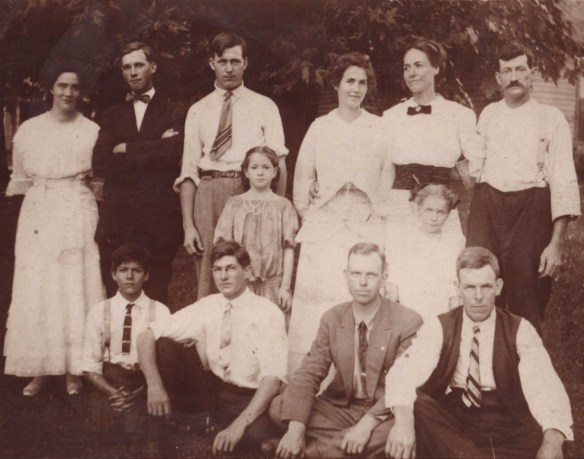
Estes 1913 Fowler cropped

Next, colorized and enhanced.

Estes 1913 enhanced.png

And now for my grandfather again.

Estes 1913 Will close

Was Will trying to grow a beard, and couldn’t? This one looks a bit scruffy. Is that his beard below his ear on the left-hand side of this picture?

Shortly after this photo was taken, Will and Ollie divorced. Ollie moved to Chicago, and Will went back south, settling in Harlan County, KY – bloody Harlan – moonshine capital of Appalachia.

There are no more photos of Will until more than 20 years later, in the 1930s or 1940s.

Estes, Will and Cornie.jpg

Will and his sister, Cornie Estes Epperson.

Estes, Will and Cornie enhanced

And again, his closeup.

Estes Will 1940 close.png

Hmm, his beard – you can see it’s thin and scruffy here too. I wonder if he couldn’t grow a beard – another hallmark of Native American heritage.

It’s one thing to see photos of my grandfather where he’s a small grey entity in a black and white photo, and another to see him literally in living color, just as if I were looking at him in person today.

And do I ever, ever have questions for this man. So many questions.

Next, I’d like MyHeritage to implement Photo Speaker where the ancestors answer questions😊

It’s Your Turn

Surely you must already be thinking about your photos that can potentially be enhanced. There’s nothing to lose by trying. It’s free.

If you already uploaded photos to be colorized, you can simply sign in to your account, click on “My photos” under the “Family tree” tab, select a photo and click on the Enhance “magic wand” icon. There’s more, too.

Let’s walk through this step by step.

Enhancing Photos – Step-by-Step

First, scan your photos at the highest resolution possible.

Click here and you’ll see the following image:

Estes MyHeritage enhance

You can either drag and drop a photo onto that page, or upload your photos by clicking on the little orange “Upload photo” link. If you don’t have an account already, you’ll be asked to create a free one.

There are additional benefits to having an account and working with your photos at MyHeritage. I’ll show you momentarily.

I have only one photo of me with my Dad. My fingers are crossed that this will work. We’re going to find out together.

Me and Dad

I dragged this photo of me and my Dad, plus an unknown child at bottom left and dropped it into the frame. The Enhancer got busy and in a few seconds – which seemed like the longest minute ever – the photo was ready.

Here’s the enhanced “after” photo.

Drum roll….

Estes me dad enhanced.png

You’re being shown the composite view, but you can click on the various people to see their faces.

Estes Dad 1956 enhanced

I think my Dad has my grandpa’s hairline – what do you think?

Estes 1956 me enhanced.jpg

And here’s me as a baby.

Next, I’m going to click on colorize.

Estes 1956 dad me colorized

What does Dad look like now?

Estes 1956 dad colorized.jpg

Dad’s hair was salt and pepper grey by this point, and I suspect the last photo of my grandfather where his hair looks lighter means that his was grey too.

Estes 1956 me colorized

I look for this baby’s face in my face today, and I look for me in my father’s face too.

Estes go to photos.png

You can download your enhanced photos, but they are automatically saved for you at MyHeritage.

There’s MORE!

Next, click on “Go to my photos,” or you can simply click on My photos” under the Family Tree tab, below.

Estes my photos

You can do everything you need to do with photos from this tab.

If you’ve just set up your account, import your GEDCOM file of your tree to give yourself a head start.

You’ll want your family members to be in your tree, because now you’re going to tag and link the photos to the correct people.

On your My photos page, you’ll see all of the photos you’ve uploaded whether you’ve colorized or enhanced them or not. Both versions are here, before and after.

If you have photos you uploaded prior to these features being available, you can easily colorize them and enhance them by simply clicking on the photo. You can tell which have been colorized or enhanced by the icons displayed over the photos

Estes photo gallery.png

The first two photos have the magic enhancement wand button and the colorize button displayed, so those photos have had both treatments. The third photo, at right, has only been enhanced. You always see the original photo displayed on your page initially.

To tag people in photos, click on the photo, which will expand to a screen, shown below.

Estes tag

You’ll notice that you can type a comment and also that you can tag photos. If you fly your mouse over the faces of the people, you’ll be able to tag them with their name, if they are in your tree.

Estes dad tag
I clicked in the frame to start tagging, began typing the person’s name, and the system showed me candidates. William Sterling Estes is the only person in the database with that name, so I’m selecting him.

I tagged myself too. At right, the photo information is updated.

Estes two tags

Now, when I see this photo and fly over the people, the tag box shows me the identity of that person.

Estes tag box.png

By clicking on the little dots to the right of the name of the person you’ve tagged, you can visit their profile page, among other things.

Estes profile page.png

The photo you tagged is automatically saved to their profile page.

Estes dad profile page

When you look at your tree, you’ll see that it’s now “decorated” with the ancestors you’ve tagged, and you likely have different kinds of hints waiting for you.

Estes tree with photos.png

You’ll notice informational icons for each person in your tree.

Estes smart matches

  • The green icon indicates Smart Matches to other people’s trees which may include additional photos, if they’ve uploaded photos to their trees too.
  • The brown sheet-of-paper icon indicates historical record matches, such as census, books and other records.

MyHeritage allows a complimentary 250 person tree for free, but you’ll want to add more people or better yet, upload your GEDCOM file. You’ll also want to take advantage of Smart Matches, super searches, hints, DNA tools and record matches that are benefits of a subscription.

I’m so grateful for the integration between the various MyHeritage tools – and I especially love seeing the faces of my ancestors.

Thank you, thank you, thank you MyHeritage!

_____________________________________________________________

Disclosure

I receive a small contribution when you click on some of the links to vendors in my articles. This does NOT increase the price you pay but helps me to keep the lights on and this informational blog free for everyone. Please click on the links in the articles or to the vendors below if you are purchasing products or DNA testing.

Thank you so much.

DNA Purchases and Free Transfers

Genealogy Products and Services

Genealogy Research