Genealogy Tree Replacement – Should I or Shouldn’t I?

Eventually, every serious genealogist faces the question of tree replacement at vendors – whether they should do it at all, and if so, how to proceed safely.

I’ve started to write this article a couple of times now, but I hesitate to publish articles when I haven’t tried all the different scenarios.

In this case, I haven’t, but I’m sharing what I DO know and why I’ve made the choice I have so that you can do your own research on the rest. Keep in mind that software changes from time to time, so information that you find online about this topic may be stale and it’s always best to confirm with the vendor in question before making a major change.

I use RootsMagic on my computer for my master tree, but I also have trees at Ancestry, MyHeritage, and Family Tree DNA so that I can derive the maximum benefit from those DNA/research platforms. This, of course, leads to the challenge of keeping multiple trees up to date – and the inevitable question of replacing trees.

Why Might You Want to Replace a Tree?

Let’s say you uploaded a tree from your genealogy software on your computer years ago to the various sites and now you’ve made a lot of changes.

Or, let’s say you didn’t want to upload your entire tree originally, so you created an abbreviated tree at the various sites.

Initially, that’s what I did, creating a direct line ancestors-only tree to upload. I had incorporated lots of non-documented information into my tree on my computer over the past many decades and I certainly didn’t want to share information online without verifying. I don’t want to be “THAT” person who spreads bad information, even unintentionally.

Now, let’s say you’ve continued your research and you want to share more than the original tree you uploaded or created at a vendor. You don’t want to update individual trees in 3 or 4 places though.

Or, let’s say that while you originally included an ancestors-only tree, now you want to add children and extend to current so that ThruLines at Ancestry, Theories of Family Relativity at MyHeritage and Phased Family Matching at Family Tree DNA can work more effectively. I uploaded my original “ancestors only” trees before those products were introduced.

What are the effects of deleting an existing tree and uploading a new tree at the various vendors? Should you or shouldn’t you?

Deleting Trees – BAD IDEA

First, if you ARE going to replace your tree, DON’T delete your existing tree first.

Deleting a tree breaks all of the links you’ve established – both to records, connected DNA kits, and some DNA tools. Any notes or groupings will be gone as well. Let’s look at each vendor individually.

Please keep in mind that there may be additional issues that I’m not aware of because I have not personally deleted my primary tree at any vendor.

Ancestry – If you delete an existing tree, your ThruLines will be gone and will likely regenerate differently with a new tree. Of course, that may be part of why you want to upload a new tree. Any documents you’ve saved to people in your existing tree will be gone and the links to those documents as well.

You can, of course, download the documents to your computer one by one. Downloading your tree does NOT download associated documents from Ancestry. Conversely, uploading trees doesn’t either, no matter where you upload it.

You can sync some desktop genealogy software applications with Ancestry. Both RootsMagic and Family Tree Maker synchronize your tree on your desktop with your Ancestry tree. Some software is better suited in synchronizing “both directions” than others. Syncing issues in user groups are quite prevalent.

Warning: I do not sync. If you’re going to try syncing between the two sources, I would recommend experimenting on a tree that is NOT your primary tree either at Ancestry or on your desktop, and reading extensively before attempting. Check user groups for the software in question to see what issues are being encountered. Also, be sure you have a current backup and check that synchronizing worked correctly before proceeding further.

If you delete your tree at Ancestry and upload a new tree, you will need to reconnect your DNA test or tests that you manage under the DNA tab, then the settings gear at right.

You’ll then need to redo any work such as TreeTags, notes, comments or saving records that you’ve already performed.

In essence, you’re uploading a blank slate.

MyHeritage – If you delete an existing tree, your Theories of Family Relativity. any Smart Matches, notes or records will be deleted along with any photos that you’ve linked. Furthermore, your DNA kits associated with people in your tree will lose their names when they become disconnected.

MyHeritage provides free software called Family Tree Builder for your desktop that does synchronize your tree with MyHeritage, including records.

MyHeritage has also collaborated with members of the Church of Jesus Christ of Latter-day Saints (LDS) to import a portion of their tree from FamilySearch into MyHeritage, and keep the trees synchronized.

Caveat: I have not used the Family Tree Builder software or the LDS sync feature.

If you delete your tree and upload a new tree, you’ll need to reconnect your DNA and that of any kits you manage to your tree. In order NOT to lose the names on your kits, do that in reverse order, meaning upload the new tree, reassign the DNA kit to the proper person on the new tree before deleting the old tree.  Beware of same name people when making this assignment.

You can reassign kits under the DNA tab, “Manage DNA kits,” then the three dots at right of the kit you want to reassign.

MyHeritage runs the Theories of Family Relativity (TOFR) algorithm periodically, every few months. You won’t get new TOFR until they run the software again. If you delete your tree, be prepared to wait on TOFR and redo everything you’ve currently done to anyone in your tree.

Just like with Ancestry, you’re uploading a blank slate.

Family Tree DNA – If you delete your tree, links to any DNA tests that you have connected to the appropriate people in your tree will be broken. Assigning family members to their proper place in your tree is required for Family Matching to function.

Family Matching utilizes the DNA of relatives you’ve linked in your tree by comparing in common segment matches between you, them, and other people to identify shared matches as maternal or paternal.

If you delete your tree and upload a new tree, you will need to reconnect your family members under the myTree tab at the top of your page. You can connect matches for the Family Finder autosomal test, Y DNA, and mitochondrial – whichever tests you’ve taken. If you only have a few matches that you’ve linked, relinking is no problem. If you have a lot, it’s more time-consuming.

Beware: Uploading very large trees is problematic due to file size and/or bandwidth. Call support before attempting.

My recommendation would be to include direct line ancestors, their spouses, descendants of those ancestors with spouses, but not unrelated (to you) spouses trees. In other words, your sister-in-law’s family isn’t relevant to your genetic genealogy.

23andMe – 23andMe does not support trees in the traditional sense, so uploading is not possible. You can, however, link to a current public tree that you’ve created elsewhere which can be viewed by your matches. To enter a tree link, look under the settings option (gear), then under “Edit enhanced profile.”

click to enlarge

When providing a link, be sure the tree you link to is public, not private.

Alternatives

At both Ancestry and MyHeritage, which are the two vendors who offer genealogical records and the ability to save records to people in your tree, you can upload multiple trees to the same account, presuming you have a current subscription.

If you don’t have the option to sync through your desktop software, or aren’t comfortable doing so, you can upload a more robust tree, but keep in mind that any records you save to the new tree will be lost if you delete that one in the future too.

If you’re going to upload a new tree, upload the new tree BEFORE deleting the old tree.

Connect any records person by person before deleting the old tree. That way, you don’t have to search for those records all over again.

I would let the old tree sit idle for some time so that you know you’ve retrieved everything. There’s no rush to delete the old tree.

Of course, a third methodology is to maintain multiple trees. That’s actually what I do. Here’s why.

My Methodology

I use the third alternative that certainly isn’t ideal, but I maintain four separate trees. I hear you cringing, but it really isn’t as awful as it sounds – and it’s infinitely better than redoing everything because I’m an active researcher and have thousands of connected records.

  • One tree lives on my computer where I update information and add new people, including speculative – although they are clearly noted as such. I also include massive notes – in some cases much longer than notes fields at vendors typically allow. I download documents to a folder on my computer with that person’s name from all subscription sites. I also write my 52 Ancestor’s articles using documentation from all sites that I compile in one place on my system. I also back up my system religiously, meaning every night, automatically.
  • One tree lives at Ancestry where I add links to my 52 Ancestor stories, save documents found at Ancestry and extend lines as I work on them. I don’t add extensive side branches. I have included all of my direct ancestors for at least 10 generations, or as far back as I can document, along with their children and grandchildren to enable Thrulines and green leaf hints.
  • One tree lives at MyHeritage where I upload and link many photos because I can easily enhance and colorize them and see my ancestors more clearly. I link ancestors in my tree to my published ancestor stories, save documents and use the same approach with the MyHeritage tree that I do with Ancestry, including extending families for my ancestors to enable the formation of Theories of Family Relatively. I methodically work all of my DNA matches and AutoClusters, recording my findings in comments.
  • One tree lives at Family Tree DNA where I include all of my direct line ancestors to about 10 generations. I extend each ancestral branch to include each DNA match as I identify our common ancestor and how my match fits into my tree. At Family Tree DNA, linking each match to the proper place in their tree enables additional people to be assigned as maternal or paternal which is their methodology of triangulation.

Summary – To Replace or Not to Replace?

Yes, I’m painfully aware that maintaining 4 trees is a pain in the patoot, but each vendor, except for 23andMe of course, provides important features that are sacrificed with the deletion and replacement of trees. The more you take advantage of the vendor’s features, the more difficult it is to redo your work.

The only tree I would consider replacing would be the one at Family Tree DNA because there are no genealogy records attached. Genealogy research records are not a business they’re in.

The only useful portion at FamilyTreeDNA is the ancestral line and the branches that descend to other testers and I simply add those branches manually as needed.

Having said that, I would never replace any tree, anyplace, with my “master tree” that lives on my computer system.

If you are considering replacing your tree, particularly at either Ancestry or MyHeritage, I strongly suggest that you contact support at the vendor in question to discuss the ramifications BEFORE you take that step.

Once done, there is no “undo” button, so be sure that you really want to make that decision and proceed in well-thought-out, measured, “no regret” steps.

_____________________________________________________________

Disclosure

I receive a small contribution when you click on some of the links to vendors in my articles. This does NOT increase the price you pay but helps me to keep the lights on and this informational blog free for everyone. Please click on the links in the articles or to the vendors below if you are purchasing products or DNA testing.

Thank you so much.

DNA Purchases and Free Transfers

Genealogy Products and Services

Genealogy Research

Books

Introducing DNA Tidbits – DNA Tidbit #1: Triangulation

I know this winter is going to be difficult, but don’t lose heart. I have a plan.

Covid is already spiking and many families have already canceled holiday plans. This situation, combined with the seasonal darkness and cold will make things even more difficult for people in the northern hemisphere. I’ve been trying to think of some way to help make things better, to lift our collective spirits – and I’ve come up with an idea.

Drum roll please…

Today, I’m introducing the first of what will be weekly “DNA Tidbits” – fun genealogy+DNA tasks that might, just might, reveal buried treasure.

You know, tidbits, as in those wonderful tiny little nuggets of luscious goodness that tide you over until you can eat the whole thing, whatever your “thing” is. No, wait…eat the whole thing – that’s not what I meant to say:) Tidbits are about pacing ourselves, right??!!

DNA Tidbits will be enjoyable to do together because we can share our findings. They will range from introductory to a little more complex so everyone can play, and learn.

We will be jumping around between different vendors and third-party tools, so this might be a good time to be sure you’re in the 4 major databases, FamilyTreeDNA, MyHeritage, Ancestry, and 23andMe, either by testing or by transfer, where possible.

Here’s a step-by-step article about how to transfer results to both FamilyTreeDNA and MyHeritage, which are the only two testing vendors that accept transfers:

DNA Tidbits

DNA tidbits will be different from my regular articles in that they aren’t going to be detailed educational lessons on HOW to do specific things. That’s already handled in lots of articles on my blog that are keyword searchable.

Keyword Searchable

For example, if you want to read about triangulation, what it is, and how to use triangulation at the various vendors, use the search box on the blog and type in “triangulation.”

click to enlarge

You’ll find educational and instructional articles along with other articles where I’ve mentioned triangulation, plus lots of examples.

DNA Tidbit #1 – Triangulation

A DNA Tidbit challenge will read something like this:

Challenge: Go to each of the three testing vendors, FamilyTreeDNA, MyHeritage, and 23andMe who provide triangulation, plus GedMatch. View your 5 highest matches that triangulate. Triangulation, of course, means that three people – you, a match plus someone else (not a direct relative meaning not parents or siblings) all match each other on the same segment.

Can you tell how the person or people you triangulate with match? Through which ancestral line? You might be able to discern this by viewing each triangulated match to see:

  • Who else they match in common with you. If they triangulate with you and your first cousin who you already know, that’s a huge hint as to the ancestral line.
  • Who else they match on that same segment.
  • Ancestors share by you and those matches. Look at their surnames, trees, and other tools to see if you can identify common ancestors.

How can or does this help your genealogy?

Have you painted those segments at DNAPainter? That’s yet another way to achieve triangulation.

Triangulation Instructions

When I’ve written articles about how to perform the various tasks referenced in a DNA Tidbit, I’ll include links to instructions.

Why is Ancestry missing from this list?

Because Ancestry doesn’t have a chromosome browser or triangulation, which is why checking at GedMatch is important. At least some Ancestry customers will upload their DNA files to GedMatch and not elsewhere.

Community

During these next few months when we won’t be able to see members of our own families, our genealogy community will be more important than ever. Be sure to post a comment sharing your outcome for each week’s Tidbit. Did you find something unexpected?

Trust me, you’ll inspire others and we all need positive inspiration right now!

This triangulation exercise is DNA Tidbit #1.

I’ll go first with a couple of examples to help you along the way. This is probably more detailed than future Tidbits because Tidbits are designed to be quick for you and me, both. Can’t do everything? That’s OK, do something.

There are no tidbit or chocolate police!

DNA Tidbit #1 – Triangulation Results

Family Tree DNA – My top 5 triangulated autosomal matches are people assigned to one parent or the other. That’s how triangulation occurs at Family Tree DNA. I’ve skipped the people whose relationships I’ve already identified, which I track by notes, and selected my top 5 that I haven’t previously identified. Their note icon is grey meaning nothing recorded there.

click to enlarge

Unfortunately, Christopher has uploaded no tree. He is, however, assigned to my paternal side with a sizeable piece of matching DNA across multiple segments.

Looking at who we match in common, I can discern immediately that we connect through my great-grandparents, Lazarus Estes and Elizabeth Vannoy because we match people who descend from both of those lines upstream of that couple.

Christopher and I match on three significant segments.

  • The first segment also matches a cousin who descends through Lazarus and Elizabeth.
  • The second segment matches a cousin who descends from the Campbell/Dodson line which is Lazarus Estes’s mother’s line.
  • The third segment matches a cousin who also descends through the Campbell line so this segment can be attributed to Elizabeth Campbell of the Elizabeth Campbell/Lazarus Dodson marriage. That means, in generational order, this segment descends to me through my father, his father William George Estes, his father Lazarus Estes, his mother Rutha Dodson, and her mother Elizabeth Campbell and her parents John Campbell and Jenny Dobkins.

Next, I viewed these matches in the chromosome browser of course, and in the matrix tool.

I made a note on the match at FamilyTreeDNA and painted these segments at DNA Painter, noting how I identified the segments.

Unfortunately, none of my top 5 triangulated matches had trees that were productive in terms of identifying a common ancestor.

Have you gotten this far? Good job. Eat a strawberry or chocolate tidbit.

MyHeritage – I chose Jason from my match list, the first person with whom I did not have a note indicating I’ve already worked with the match.

I reviewed the DNA match to see if Jason and I share triangulated segments with other people, indicated by the purple icon on my shared matches with Jason.

click to enlarge

Jason and I triangulate with my cousin Buster, which tells me that we share a common ancestor from either the Lazarus Estes or Elizabeth Vannoy lines, my paternal grandfather’s parents They are my most recent common ancestors with Buster.

However, as I scan on down the list of shared matches that Jason and I triangulate with, I see several people from my paternal grandmother’s side who do not share ancestors with my paternal grandfather’s side. My grandparents were not related to each other.

This indicates that Jason and I are related through two different lines that lived in the same area and intermarried.

I might need two pieces of chocolate for this one!

I need to send Jason a message. He doesn’t have a tree, but I bet he knows at least some of his genealogy since this connection seems to be within the past few generations based on the amount of DNA we share.

23andMe is more difficult because you can’t quickly see which matches have notes. Notes only appear after you’ve clicked on the match, and then at the very bottom of that page after scrolling to the end. Instead, I use the stars to indicate that I’ve worked with the match.

I click on the star to turn it yellow after I’ve analyzed a match, in addition to making notes.

My first match at 23andMe with no yellow star is RA.

Checking who I match in common with RA, I can see that 23andMe has assigned RA to my father’s side of my genetic tree, as a descendant of Lazarus Estes and Elizabeth Vannoy. Keep in mind that this tree is not uploaded, but genetically created by 23andMe with the customer adding the appropriate names of their ancestors in their proper position. This relationship tree can be incorrect, but it’s certainly a useful tool.

click to enlarge

Clicking “Find Relatives in Common” on my match page with RA, I see that RA and I do share DNA, meaning triangulate, with several relatives on my list. That’s what “Shared” means in this context at 23andMe – shared same segment.

Unfortunately, RA has not entered any additional information such as a tree link, family surnames, or locations.

I’ll message RA for more information as soon as I finish my next bite of chocolate.

GEDmatch is a bit different because your match list is not pre-generated, meaning there is no stored match list so no ability to create and save notes for matches.

At GEDmatch, I did a One-to-Many comparison which allowed me to view my match list.

In the far right column, you can see the testing company and test version. A=Ancestry, F=FTDNA, and M=23andMe along with the version when it says the results were migrated to the current platform. Otherwise, you’ll see the name of the testing company your match uploaded from more recently.

I selected an Ancestry match since I’ll match the people from MyHeritage and FamilyTreeDNA at their respective sites that already have triangulation capability. I will match close matches at 23andMe, but 23andMe caps matches at 1500 (unless you’re on the V5 chip WITH a subscription), so some matches may be here that aren’t there.

Ancestry testers are my best bet for finding new triangulated matches at GEDmatch because Ancestry doesn’t support triangulation on their own platform.

Based on my match’s name, I think the first person on this match list that I can’t identify is the same match, Christopher, that I was working with at Family Tree DNA. He uploaded 4 different files to GEDmatch, including an Ancestry file. This tells me he might have a nice tree at Ancestry since he’s obviously interested enough in genealogy to test multiple places😊

I went back to the main GEDmatch menu and selected Triangulation from the Tier 1 (paid subscription) options. Triangulation selects your closest matches and indeed, Christopher was among the triangulated groups with other people I recognize, providing immediate hints as to how we are related.

Next, I’m going to run over to Ancestry to see if indeed, I can find Christopher and view his tree there.

Unfortunately, I can’t find Christopher at Ancestry by the name he used elsewhere, although I do see a good candidate using initials but who has a private tree☹

Time for another chocolate!

Fortunately, I have Christopher’s email from GEDmatch and FamilyTreeDNA, so I can send him a friendly email introducing myself and asking about his genealogy.

DNA Tidbit #1 – Summary

Surprisingly, with reviewing just 5 triangulated matches at each vendor, I found a LOT to work with and discovered the ancestral lines through which several people are related to me, even if I can’t isolate exactly which ancestor. I painted each of those matches at DNAPainter. I’m currently sitting at 90% of my segments painted, which means they are identified with a specific ancestral line. Every identified match gets me closer to 100%.

I’m left with the distinct impression that after I find genealogical connections with these closest matches, that the leftover matches that triangulate will be the ones to break down brick walls.

Those will be the matches I really need to concentrate on, because somehow these people DO all match each other too, and the common ancestor they share between themselves may be the clue I desperately need. You know, the key to those people waiting just behind that brick wall of burned records and no last names.

Making that discovery will, indeed, be cause to celebrate with more than tidbits!!!

_____________________________________________________________

Disclosure

I receive a small contribution when you click on some of the links to vendors in my articles. This does NOT increase the price you pay but helps me to keep the lights on and this informational blog free for everyone. Please click on the links in the articles or to the vendors below if you are purchasing products or DNA testing.

Thank you so much.

DNA Purchases and Free Transfers

Genealogy Products and Services

Genealogy Research

Books

Holiday DNA Sales Have Started Early

Wow – the sales started early this year! I understand that Black Friday has morphed into the month of November. I’m good with that!

I’m not really surprised because many people are spending more time at home and let’s face it, genealogy is a great at-home activity. I’m glad the sales are starting earlier and running longer because it encourages more people to become engaged.

Genealogy can even help you produce holiday gifts for others in a myriad of ways. Not just purchasing DNA kits for yourself and family members but creating stories or giving them a book you’ve created with photos of grandma and grandpa’s life, perchance.

Of course, DNA is a HUGE part of genealogy. Even if you’re not going to be able to see Uncle Joe this Thanksgiving, you can certainly have a fun Zoom session and document him swabbing or spitting for his DNA test! Make memories, one way or another

Let’s see what the vendors are offering. Then, be sure to read to the end for a surprise.

FamilyTreeDNA – Early Bird Holiday Sale

click to enlarge

FamilyTreeDNA has more products to offer than any of the other vendors with autosomal, Y DNA and mitochondrial DNA tests, each offering something unique.

Y DNA focuses only on your direct patrilineal (surname) line if you are a male. Mitochondrial DNA follows your matrilineal (mother’s mother’s mother’s) line for both sexes. The Family Finder autosomal test traces all ancestral lines. You can read a quick article about these different tests and how they work in this article:

The Family Finder test uses matches to known family members like parents, aunts, uncles and cousins to assign other matches who match both you and your family member to either maternal or paternal sides of your tree.

You can also use Genetic Affairs AutoCluster, AutoTree and AutoPedigree tools at FamilyTreeDNA to get even more mileage out of your DNA tests.

If you were an early tester with Y and mitochondrial DNA, you can upgrade now to a more robust test to receive more granular results.

click to enlarge

Have you noticed the ancient DNA articles I’ve been writing recently?

Your most refined haplogroup revealed only in the Big Y-700 or mitochondrial mtFull Sequence test allows you to compare your haplogroup with ancient samples most effectively. I promise you, there will be more articles upcoming! These are just pure joy, connecting back in time.

The FamilyTreeDNA sale ends November 24th. Please click here to order or upgrade.

MyHeritage

MyHeritageDNA includes lots of features that other vendors don’t have, such as integrated AutoClusters and Theories of Family Relativity (TOFR) which connects you and your matches through a network of common records and trees. TOFR is surprisingly accurate, either pointing the way to or identifying common ancestors.

I wrote about how to use these and other included tools to unravel your genealogy in this recent article, with a free companion webinar:

Additionally, MyHeritage has a strong focus in Europe that includes lots of European testers – perfect for people whose ancestors are emigrants from another country.

MyHeritageDNA is on sale now for $49, a $30 savings, plus free shipping if you purchase two or more kits. Please click here to order.

This sale ends November 25th.

Ancestry

Best known for their large database, AncestryDNA offers ThruLines which takes advantage of their database size to suggest common ancestors for you and your matches based on multiple trees. I wrote about ThruLines in this article:

The AncestryDNA test is on sale now for $59, a $40 savings, with free US shipping. Please click here to order.

Sale ends November 23rd.

23andMe

23andMe is best known in the genealogy community for the accuracy of their Ancestry Composition, known as ethnicity results, which they paint on your chromosomes.

23andMe also creates a “genetic tree” between you and your closest matches based on who does and who does not match each other, and how they match each other. I wrote about genetic trees and subsequently, how they solved one mystery in these two articles.

While the genetic tree technology isn’t perfected yet, it’s certainly the direction of the future and can provide insight into how you and others are related and where to look for them in your actual genealogy tree.

The 23andMe Ancestry only test is available for a 10% reduction in price at $88.95. Please click here to order.

Of course, 23andMe also offers a health product that includes the ancestry product.

The 23andMe Health + Ancestry test is available for $99, a saving of 50%. Please click here to order.

These sale prices end November 26th.

Surprise!!!

I have an early holiday gift for you too.

Beginning later this week, I’m publishing the first article in a new interactive series aptly named…drum roll…“DNA Tidbits.”

Indeed, there is fruit-of-the-vine to be harvested and that’s exactly what we are going to do – in small steps! Tidbits.

Just like everything else on this blog, it’s completely free of course and we are going to have lots of FUN!

Let me give you a hint – you’ll probably want to have test results at all of these companies because the Tidbits will be bouncing around a bit – so if you need to buy something, please click on the links below.

Thank you and I can’t wait to get started!

_____________________________________________________________

Disclosure

I receive a small contribution when you click on some of the links to vendors in my articles. This does NOT increase the price you pay but helps me to keep the lights on and this informational blog free for everyone. Please click on the links in the articles or to the vendors below if you are purchasing products or DNA testing.

Thank you so much.

DNA Purchases and Free Transfers

Genealogy Products and Services

Genealogy Research

Books

Utilizing MyHeritage AutoClusters to Analyze your DNA Matches

AutoClusters are so much fun and can provide tons of information. I’m going to step through how to analyze your cluster matches easily and productively in conjunction with the MyHeritage tools, but first, a little light housekeeping.

First, please note that this article was presented as a webinar for MyHeritage as part of the MyHeritageDNA Facebook LIVE series. You can watch it anytime, free, at the permanent link, here, courtesy of MyHeritage and me. However, everyone learns differently, and some people do better with written instructions. You can follow the step-by-step instructions in this article.

Second, AutoClusters are a built-in advanced DNA tool at MyHeritage for customers who either:

I would encourage the subscription because many of the MyHeritage tools function best with a large tree. While MyHeritage does offer free trees of up to 250 people, to take full advantage of your DNA test plus tools, you’ll want a larger tree. Subscription features and pricing can be found here and you can try a free trial subscription here.

Third, if you’d like to transfer your DNA file from another vendor, I wrote step-by-step instructions, here.

Fourth, MyHeritage is having a $49 Halloween DNA sale, here, with free shipping if you purchase 2 kits.

And last, Genetic Affairs, the author of AutoClusters, provides additional functionality on their own website for use with FamilyTreeDNA and 23andMe. Customers at Genetic Affairs cannot access MyHeritage data from the Genetic Affairs website since MyHeritage contracts with Genetic Affairs to provide AutoClusters directly to MyHeritage customers at no additional charge. I only mention this because the functionality described in this article and in the companion webinar discusses the functionality by using a combination of AutoClusters and the unique tools available only at MyHeritage.

Ok, housekeeping complete – on to AutoClusters!

Get yourself a cup of coffee or tea. We’re taking a deep dive here, beginning to end, but keep in mind that you don’t have to do everything that’s possible initially, or ever. It’s OK to take baby steps. Just know that AutoClusters can be a superpower to breaking down brick walls. Not only that, AutoClusters are simply FUN!

Let’s start with a basic question.

What is an AutoCluster and Why Do I Care?

An AutoCluster is an artful bouquet of hints, arranged by family group in a puzzle format.

AutoCluster technology, a form of genetic networks, is a way to display your matches who match you and who also match each other in a meaningful, colored-coded group. Each group, or cluster, shares a common ancestral line, somehow. That “how” discovery, or better stated, “which ancestor” discovery is up to you – but clusters provide huge hints!

We’re genealogists, right – we live for hints. Let’s take a look at how this works.

I would suggest reading through this article the first time, then working through the steps as you read it a second time with your own AutoCluster. Don’t worry, I’ll show you how to request one.

This example of my own AutoCluster report, which I’ll be using throughout this article, shows three different clusters.

Everyone within a cluster matches you, but not everyone matches each other. Each cluster is represented by colored cells, each of which represent the intersection of two people who match each other. In the third yellow cluster, everyone matches each other except for two people who don’t match each other.

Grey cells fall into both of the two clusters they are between. For example, the grey cells to the right of the red cluster in the red box match people in both the first red and second tan cluster.

What this means is that once you’ve identified the genesis of each cluster, you know that people who are grey members of both clusters descend from both lines which could represent the two people in an ancestor couple. In my tree, my maternal great-grandfather Joseph Bolton married Margaret Claxton/Clarkson, and I expect the grey people descend from this couple or from both lines individually. One way or another, they match people from both clusters.

The grey people are an additional hint – so don’t neglect them. In fact, some of these grey squares can be even more important that people within clusters because they span two clusters.

Ok, so how do I generate an AutoCluster at MyHeritage?

Requesting an AutoCluster

You’ll find the AutoCluster featured under the DNA menu, under DNA Tools.

Click “Explore.”

If you manage multiple kits, be sure to select the right kit for the right person.

In my case, I have a transfer kit, then I tested at MyHeritage for the health product, so I have two kits. A MyHeritage kit shows with the MH prefix, while a transfer kit shows a different prefix.

The matches and AutoClusters are slightly different between the two kits because the tests are run on different DNA chips.

click to enlarge

After selecting the correct kit, just click on the purple “Generate” button. Note that if your parents have tested, generating an AutoCluster for one or both of them will help you immensely with your own AutoCluster. If both of your parents have tested, you may want to work only with their AutoCluster reports, and not your own. They will have people in their clusters that you don’t because you didn’t inherit that particular piece of DNA from your parents.

Next, you’ll see a message informing you that your AutoCluster is being generated and will be sent to the email registered to your account.

Queue up Jeopardy countdown thinking music

Just a few minutes later, my AutoCluster arrived in my email box. (Note – check your spam folder.)

If you request multiple AutoClusters for different tests or accounts at the same time, take care not to mix them up. Voice of experience here…

You’ll receive 3 items in zip file. I save my files to my computer.

  • Readme file
  • HTML (with the colored circle)
  • Spreadsheet which is a different format of the html file

I don’t know how well the HTML file and the spreadsheet will display on non-computer devices, although I know the HTML file does display on an iPad. I generally work from my computer.

The HTML File

Just click on the HTML file to display your AutoClusters. You’ll get to enjoy seeing them “flying into place,” assembling into clusters. I told you these were fun!

You can play around a bit with options, but “cluster” is the default view and the only one we’re covering in this article.

Each colored cluster is a group of interrelated matches.

I have a total of 18 clusters.

Scroll towards the bottom to view the parameters used to generate the clusters.

click to enlarge

These parameters are not adjustable and have been optimized by MyHeritage to perform well for all customers, including testers with significant endogamy, such as people with Jewish heritage. At the system-generated threshold, I have 100 qualifying matches. Note that the system optimizes the thresholds individually for each person, and your thresholds might be slightly different than mine.

  • Min threshold 40 cM (often this level of match is in the 5C or more distant range)
  • Max threshold 350 cM (closer than 350 would probably be 1C or closer)
  • Shared DNA match minimum threshold 15 cM (overlap of matching DNA)

You’re probably wondering – where are the highest matches such as parents, siblings, uncles, aunts, etc.?

Close family members would be in many clusters. Placing one person into more than two clusters is simply not technically possible due to the constraints of a two-dimensional grid medium, so close family matches are excluded from clusters as to not be confusing. You can still use close family members in shared matching. In fact, they are extremely useful and we will discuss that shortly.

Fly your cursor over the cluster to view the cluster members and their match status to each other. In the grid, each person who matches another has a colored cell. In this example, my cursor is pointing to the cell where “cro” matches Bonnie. Names are obscured for privacy.

Scroll on down below the cluster box to view additional information about each member of the cluster. Many people don’t realize there’s more because they are excited about viewing their clusters and miss this important information about the cluster members beneath the grid.

click to enlarge

Your notes are critically important and you can search by notes. When I identify how someone is related to me, or even clues, I record that information in the notes. I SHOULD have recorded “TOFR” for the matches who have Theories of Family Relativity, and I have gone back and done that now. We’ll talk about TOFRs in a minute.

You may be able to identify the common line or ancestral couple based on the matches alone. Note that these matches may not all be from the same generation. For example, I have some matches in this group who descend from various Claxton ancestors, spanning at least 4 generations. That commonality is how I know the cluster is “Claxton/Clarkson” and not from one of their wives – at least to the most distant generation where I’m stuck.

Matches can span many generations in a “line” and probably involve multiple DNA segments, especially in larger clusters.

Click on “Tree” to view the tree of your match.

Click on “Name” to review their DNA match with you.

Note that your match may match you on more than one line and possibly on both parents’ sides. Inclusion in this cluster simply tells you they match on this line and does not eliminate any other lines.

Now, let’s begin our cluster analysis and drill down.

Select the Best Match

I always begin my analysis with what I think is the “best” match in a cluster.

  • Best could be the largest tree.
  • Best could be the largest match.
  • Best could be the largest number of ICW (in common with) cluster matches.
  • Best is any match with a TOFR (Theory of Family Relativity)

I make notes for all TOFR matches, after verifying, of course, indicating the common ancestors. I also note “TOFR” so I know, when looking at clusters, why I assigned that specific ancestor. When you have a TOFR, MyHeritage has already done the heavy lifting for you.

I note matches’ inclusion in a cluster to remind me to check those clustered matches first. When a match is in a cluster, AutoCluster has done the heavy lifting for you.

The key to success is to utilize multiple tools, together.

Like what?

The Success Triumvirate

Successfully identifying clusters, ancestors and how each person matches you is accomplished through a combination of three primary tools. I call this the “Success Triumvirate” because the three are quite interwoven.

We are going to use all three of these tools, together, so let’s talk about them individually briefly.

Theories of Family Relativity (TOFR)

TOFRs are super hints – theories about which common ancestors your matches share with you.

I wrote about Theories of Family Relativity complete with step-by-step instructions:

TOFRs connect you to your DNA matches by identifying a potential ancestor through a succession of trees and documents from different sources. You can do a number of things to help TOFRs, (and yourself), along.

  • TOFR formation requires a tree, so create one at MyHeritage, using their free TreeBuilder on your computer, or upload a tree that you’ve already created elsewhere.
  • TOFR does best if you complete the tree through grandchildren of each ancestor, at least, if possible, for each generation. Think of each person as a hand reaching out to latch on to the same person in another person’s tree. The more hands, the better your odds of success.
  • Include birth/death date and location, or as much as you know.
  • Accept Smart Matches where appropriate.
  • Make notes. Notes keep you from retracing your own steps.

click to enlarge

A TOFR connection as offered by MyHeritage may not be exactly accurate, but the common ancestor may be accurately identified anyway. For example, in the above TOFR, Margaret Claxton did not marry William Luke Monday, her sister did. The TOFR isn’t exactly correct, but the common ancestors are easily identified. I can take it from this point – no problem.

Always check to see if multiple TOFR paths exist because important hints may be hidden in those links. Think of yourself as a sleuth😊

Let’s take a look at one cousin in this Claxton cluster, Bonnie. What can we learn, and how? Let’s review Bonnie’s DNA match to me.

Reviewing Bonnie’s DNA Match

Clicking on “Review DNA Match” with Bonnie shows me a host of information divided into sections, beginning with a TOFR.

Bonnie Has a TOFR – Hot Diggity!

The first thing we see is that Bonnie does have a TOFR with the tester (me), so we can identify a potential common ancestor.

click to enlarge

Not only that, but Bonnie has a fairly robust tree of 4043 people, so she must be interested in genealogy at some level.

click to enlarge

Not only that, but there are two separate potential “paths” that connect me and Bonnie at a potential common ancestor. One may be more accurate than the other. Be sure to check all paths.

I can click on the little green dots that bridge trees by connecting what the system believes to be the same ancestor to view and evaluate that information.

click to enlarge

Clicking on this green dot would display the match criteria from both trees.

In this case, the weighted match was 76%. The information for Margaret herself was mostly the same, but her husband(s) and children were different due to the inaccuracy of showing her married to her brother-in-law.

Evaluate all TOFRs, links, trees and hints for accuracy. They aren’t gospel.

Another great source of hints is Smart Matches. You may, and probably will, have Smart Matches with people’s trees who are not DNA matches to you. Smart Matches are not necessarily connected to DNA matches specifically, but they do help TOFR form accurately.

Bonnie Has Smart Matches!

MyHeritage generates Smart Matches WITHOUT factoring in genetic matching. Smart Matches occur when enough common factors exist between a person in your tree and a person in another tree whether you are a DNA match with that person or not.

If you have Smart Matches with a DNA match, they will be listed when you review your DNA match with that person.

click to enlarge

To determine whether or not this Smart Match could be relevant to your DNA autocluster, be sure to notice whether this is a direct ancestor of both people. To be relevant to DNA, the Smart Match must be for a direct ancestor or at least lead to a direct ancestor.

Next, click “Review Smart Match.”

click to enlarge

The first thing you’re going to see is “Confirm Match,” and as a genealogist, that stopped me dead in my tracks.

That’s skull-and-crossbones frightening. I don’t know what “confirm match” means or does? Does it mean that all of their information will automatically be copied to my tree if I click that button? I certainly DON’T WANT THAT!!!

I may not want the “Improved Info” either. That information may not actually be improved. What do I do?

For a long time, I did nothing because I didn’t want to mess something up – but doing nothing isn’t the right answer either – because confirming Smart Matches helps TOFRs for everyone.

I wish MyHeritage provided a bit more information here, because “Confirm Match” doesn’t import any information into your tree automatically. You have the opportunity to review everything first.

There are two questions at this point you need to ask and answer independently:

  1. Is this the same person?
  2. If so, do I want any of this data to be imported to my tree?

If it IS the same person, go ahead and confirm – you’ll get to review each new or “improved” item at that point.

If it’s NOT the same person, scroll to the bottom of the page and reject the match.

In this example, Nicholas Speak is the same person, so I’ve clicked on “Confirm Match” which then allows me to review each piece of information that is different, individually. If I want to import that information into my tree, I click on the little arrow to bring the information into my tree, replacing mine. If I do nothing, no information is copied to my tree. It’s that simple. If I make a mistake, I can always edit my own information.

click to enlarge

Bonnie Has Shared Ancestral Surnames!

Another hint for DNA matches is “Shared Ancestral Surnames.” If you can’t figure out how you are related, take a look at these. Of course, Smith is extremely common, but groups of shared surnames are a huge hint, especially if you also have shared locations.

click to enlarge

You may discover more than one line that connects you to this tester – which sometimes makes things a little more complicated! That’s when location can become a life-saver.

Bonnie Has Shared Ancestral Places!

Shared ancestral places can be very useful, even if you can’t identify common surnames, especially in cases where surnames may not be useful. Unknown parent events and adoptions have always occurred, and a specific location may go a long way in terms of identifying the ancestors of both parties that may be related.

Purple pins with numbers mean you BOTH have ancestors from that location. Bonnie and I share 65 ancestors from one place. I definitely need to evaluate that location!

click to enlarge

Clicking on Tennessee shows the pins in that location. Clicking on a specific pin displays the ancestors from that location.

Note that the purple “65” pin location revealed this common ancestor whose surname is spelled differently in our trees. This surname transitioned back and forth, so there I no “right” or “wrong” way to spell it. However, a different spelling may keep the person from being recognized as the same individual by computer software.

Now, let’s review Bonnie’s shared DNA match information.

Bonnie’s Shared DNA Matches

We know that each of the people in the first cluster match the tester, me, and all but 3 (yellow stars) of the people who match me in the first cluster also match Bonnie

However, don’t think for one minute that there are only 8 people who match me and Bonnie both. There are only 8 who match us both AND are included in the cluster. These are judged to be out “best” common matches.

Looking at my DNA match with Bonnie, I see that there are 162 total shared matches.

The balance, other than the 8 in the cluster, did not meet all of the match threshold ranges to be included in the cluster. In other words, shared matches not in the cluster were either less than 40 cM or more than 350 cM, or the shared piece of the matching segment was less than 15 cM. In other words, the matches in the cluster are the strongest shared matches, other than close relatives, but they certainly aren’t the only shared matches.

I match Bonnie on two segments, one on chromosome 13 and one on chromosome 16.

Just because someone matches me and Bonnie, both, doesn’t necessarily mean the match is on the same segment. For example, they could match me on chromosome 10 and Bonnie on chromosome 1, while Bonnie and I match each other on chromosomes 13 and 16.

However, there’s certainly a good chance that someone matches us both on the same segment(s).

Reviewing the cluster matches between me and Bonnie, we discover the following information regarding these two specific segments on chromosome 13 and 16, only.

Shared Match with Bonnie Triangulation Chromosome & Location
Sharon Yes Chr 16 only
Renee Yes Chr 16 only
Wilma Yes Chr 16 only
John Yes Chr 16 only
Celeste Yes Chr 16 only
Shirley No Neither
Carolyn Yes Chr 16 only
Ray No Neither

Six people match me and Bonnie both on chromosome 16, none match me and Bonnie both on chromosome 13, so that means that both Shirley and Ray match both of us on a completely different chromosome segment.

Now, of course, the question becomes if those 6 people match Bonnie and me on the same or at least an overlapping portion of chromosome 16.

Triangulation

Triangulation, which I wrote about here, occurs when the tester matches two or more people on the same reasonably sized segment of DNA, and they also match each other on that same segment. The “matching each other” part is important, because it verifies the match is from the same side, Mom or Dad, and from a common ancestor, not identical by chance (IBC).

I wrote about identical by chance here, but in essence, IBC means that a piece of your Mom’s DNA and a piece of your Dad’s DNA accidentally combined in you to look like a match with someone else, but it’s a false positive. You do technically “match” that other person, but it’s because of chance recombination, not because you share DNA from a common ancestor on one side of your family or the other.

The matching to other known family members on that segment is the clue to eliminating IBC matches from comparisons. Each of your valid matches will match one of your parents, or the other. If your match doesn’t also match one or the other parent, it’s not a valid match.

This is known as parental phasing and is why it’s extremely important to have both or one of your parents test, if possible.

If the tester’s parents have tested, each of your cluster matches will match to one parent or the other in addition to the people in the cluster.

Bonnie Has Triangulated Matches!

At MyHeritage, when you review shared matches, you can see if your match triangulates with you by the presence of a little purple triangulate icon.

click to enlarge

Looking at my shared match list with Bonnie, I see Wilma has a purple icon, indicating triangulation between Wilma, Bonnie and me. Woohooo!

Clicking on the purple triangulate icon shows me the common triangulated segment(s).

In this case, Bonnie, Wilma and I only triangulate on one segment, on chromosome 16. Do the other cluster members also triangulate with Bonnie, Wilma and me on this segment? The ones who have a triangulation icon should since I’ve already determined that they only match me on chromosome 16 in common with Bonnie. Let’s see.

click to enlarge

I added the other people in the match cluster to see who else triangulates on any portion of chromosome 16. Just type the names from the cluster into the DNA match name box below the profile cards in the chromosome browser to add each person to the view.

Only the triangulated portion for all people compared is bracketed. That’s so important to remember. In the example above, all people match me and each other on the bracketed portion of chromosome 16.

In this example, two of the people compared do NOT triangulate on this segment, so no bracket is drawn. This might lead you to think that the three people whose DNA matches the tester on the same segment don’t also match each other – but you can’t assume.

If you remove the two people not matching on the segment from the chromosome browser, the other three now show the triangulation bracket.

Triangulated segments provide evidence that a specific segment descends from a common ancestor. The challenge, of course, is to identify the ancestors who contributed that segment generationally through time.

I wrote about triangulation at MyHeritage in the article Triangulation in Action at MyHeritage.

Downloads

You can only compare a maximum of 7 people at a time in the chromosome browser, but you can download your entire match list in a spreadsheet and work from there. I do that often.

There are three different downloads that provide different information and serve a different purpose.

Chromosome Browser Match Download

Scroll down to the bottom of the chromosome browser page to download the matching segments (to you) of the people shown on the browser at that time.

You can download the segments for the current matches showing in the chromosome browser by clicking on advanced options on that page.

Click on “Download shared DNA info.”

This download will happen immediately to your system. I use this technique when chromosome painting matches identified to a particular ancestor at DNAPainter. I also note for each match when I’ve painted their matching segments so I don’t waste time doing it twice.

The second and third download options are found on your DNA Match page.

Export Full Match List and Shared DNA Segments

By moving to your main DNA match page, you can download:

  • Your DNA match list which downloads information about each of your matches
  • Your matching DNA segments for all matches

By clicking on the three dots, you will see the two download/export options. Those two files hold different information.

The “entire DNA matches list” provides information ABOUT your matches, such as:

  • Name
  • Age
  • Country
  • Contact link
  • DNA manager
  • Status (new)
  • Estimated relationship
  • Total cMs
  • Percent shared DNA
  • Number of shared segments
  • Largest segment
  • Link to review DNA match
  • Has tree (yes/no)
  • Number of people in tree
  • Tree manager
  • Contract tree link
  • Number of smart matches
  • Shared ancestral surnames
  • All ancestral surnames
  • Notes

This is important, and I use this file a lot because it provides all of the information in one place and I don’t have to click on each match to evaluate. Plus, I can search and sort to my heart’s content.

Option two, the entire “shared segment DNA info” match list will show all matches, including maternal, paternal and IBC. It’s up to you to figure out which are which, but we have lots of tools and hints.

Your shared segment spreadsheet provides information about the shared DNA, only.

Let’s start by looking at Bonnie again.

Bonnie and Chromosome 16 on the Spreadsheet

Here are my two segment matches with Bonnie in the spreadsheet.

The MyHeritage tools, combined, provide you with the ability to sort your matches meaningfully into genealogically relevant clusters and identify ancestors. I’m going to utilize that information with the downloaded spreadsheet segment information.

Let’s take a look at that matching segment with Bonnie on chromosome 16.

In the shared DNA segment spreadsheet, I filtered for chromosome 16, sorted in lowest to highest order (end location, then start) and looked for matches that fall between these two locations.

In reference to the match with Bonnie, look for any match between 79914629 and 87713399.

I am showing only a partial list below. The actual number of matches to be on this segment of chromosome 16 is about three times as large as this graphic.

After downloading the spreadsheet, I added a Triangulation Group column and a comments column, at right.

click to enlarge

I’ve colored the cluster members yellow who match on chromosome 16 to Bonnie AND me in the cluster.

People who match me on chromosome 16 and are NOT in the cluster fall into one of the following categories:

  • Also match to me and Bonnie, but outside of the cluster threshold. You can see that there are a lot of matches below 40 cM, which immediately eliminates them from the cluster.
  • Match me and Bonnie, but on an overlapping piece of DNA not large enough to be included in a cluster – in other words, the overlap of the three people is less than 15 cM..
  • Match to me, but not Bonnie which means that either they are a match from the other parent’s side, or identical by chance.

Discerning which category each match falls into requires looking at each match and evaluating individually.

You can look at each spreadsheet row, individually, below, if you wish, but what I’d like for you to do is to focus on the groups that I created as I analyzed each match on the segment of chromosome 16 where I match Bonnie.

click to enlarge

  • Green row is Bonnie, our baseline person whose match is why I’m analyzing this particular segment.
  • Bright yellow shows the 6 AutoCluster triangulated chromosome 16 cluster members.
  • Lighter yellow rows are also matches and triangulations on the same segment with me and Bonnie, but not included in the AutoCluster
  • Pink indicates matches on Mom’s side on this same chromosome segment. Mom is in the database, so this is easy to discern.
  • Grey is IBC (darker) or likely IBC (lighter) meaning they don’t match either parent’s side entirely.
  • Bright red is a breakthrough!

You’ll notice that the “best” matches, meaning the ones in the cluster, are clustered together on the spreadsheet too.

The second group of matches, below, begins to have more IBC and matches to Mom’s side. A third group, which I’m not including here, is almost entirely Mom’s side.

click to enlarge

When I finished analyzing the matches on this segment of chromosome 16 from the AutoCluster, I had:

  • Bonnie (green) + 6 Claxton matches (bright yellow) reflecting the first cluster triangulation with Bonnie and me
  • 93 total people that matched me on some portion of chromosome 16 that I match in common with Bonnie. However, on this spreadsheet, matches to me on this segment include some matches who will not match Bonnie.
  • People not matching me and Bonnie both on this segment will include both matches on Mom’s side (pink), and IBC (grey).
  • A breakthrough (bright red) identifying this segment as Claxton, as opposed to Sarah Cook’s, James Claxton’s wife, which means that I can focus on other people with trees with common ancestors who match on that segment on Dad’s side. Someplace in those trees is the information that will someday identify James Claxton’s parents/ancestors.
  • Identified 28 (light yellow) paternal matches through this segment assigned to Claxton that match me and Bonnie, both.
  • Identified 30 (pink) Mom segments, some of which are Acadian and some of which are German. On Mom’s side, two different portions of chromosome 16 recombined from two different ancestors and I can tell where that dividing line occurs by using visual phasing and triangulation at DNAPainter.
  • Identified 26 (grey) IBC segments which are false positive (or likely false positive) matches and should be disregarded.
  • Made notes on each of those matches at MyHeritage.
  • Painted each valid segment at DNAPainter.

About That BreakThrough…

Why is this breakthrough important, and what does it tell me?

Bonnie is descended from the same Claxton line as I am, meaning she is a proven descendant of James Lee Claxton born about 1775 and his wife, Sarah Cook through their son, Fairwick/Fairwix Claxton. We don’t know where James Claxton was born, but likely in either VA or NC. He first appeared on the tax list in Russell County, VA, with no other Claxton males, not long before he married Sarah in 1799.

Bonnie and I match Jim on that same segment.

Jim’s ancestor was Solomon Claxton, born in 1801 in NC. In other words, Jim does NOT share James Claxton as a common ancestor. This means that Jim and Bonnie and I share DNA from a common Claxton ancestor. That segment of chromosome 16 cannot be from the Cook side, because Jim does not descend from the James Claxton/Sarah Cook line.

Therefore, other people who triangulate on that segment, who don’t show trees with Claxton ancestors, and have matching trees to each other will one day hold the key to our common ancestors who contributed that segment to all of us on chromosome 16.

That means I need to take the time to evaluate every one of their trees looking for their common ancestors with each other. It’s likely that common ancestor could be mine as well, or lead to mine.

Just One!!!

Remember, all of the discoveries above were made from analyzing just one chromosome segment match from the Bonnie row in the first AutoCluster. Just one!

Autoclusters intentionally only utilize your “best” non-close family member matches. This allows you to see the genetic relationships between multiple people, even without trees.

You then use the trees, TOFR, surnames, locations, Smart Matches, shared matches, triangulation, and previous research to identify the ancestral connection.

Just scanning this AutoCluster report, I can immediately discern that people share matches between groups of clusters. For example, clusters 1, 2, and 4 share members – for starters. That tells me that these clusters are related to each other. In fact, that’s exactly correct as shown after analysis when I was able to assign each cluster to either an ancestor or ancestral couple.

I discovered a HUGE amount of information researching just one common segment with one match, including a breakthrough which may, one day, if not today, lead to the identification of James Claxton’s parents.

Just think how much more there is left to discover! I need to review the match to Bonnie on chromosome 13 and the other 99 people in my AutoCluster, utilizing the same tools and techniques.

I can hardly wait to get started!

Clusters are Genetic Super-Powers

Clusters are your super-power matches. Take full advantage of them.

  • Every cluster tells a story.
  • If you can identify the common ancestors with one or two people, and it’s the same line, you’ve probably identified the genetic “cluster.”
  • Every match tells a story.
  • You may triangulate on multiple segments with different people.
  • Every individual segment tells a story
  • Each segment stands alone, meaning one segment can descend from the mother of the couple, and another segment from the father. Don’t assume that each shared segment descends from the same ancestor.
  • Don’t assume that if you match one person on two segments, that they both necessarily descend from the same line or couple. It’s possible that you are related on another, known or unknown, line.
  • Every segment match has an individual genealogical history that can lead to different ancestors, meaning that the genetic line is the same, but the ancestors may be different. You may match one person who descends from the son of another match, for example.
  • Each triangulated segment descended from common ancestors who contributed that segment to all triangulation group members.
  • The history of brick walls is held in unidentified matches to segments.

An example is worth 1000 words.

Walking Back In Time

Based on multiple triangulated matches to various people, the triangulated segment on chromosome 16 belongs to the following ancestors:

Generation Ancestor Via Match to…
1 Dad Assigned to Dad’s side via triangulated matches to known relatives
2 Ollie Bolton Culley, Stacey
3 Margaret Clarkson Fred, John
4 Samuel Claxton Wilma
5 Fairwick Claxton Joy, Eugene, Billy, I.B., Bonnie
6 James Claxton, Sarah Cook Brent, Delilah
7 Unknown Claxton parents Jim (NC), Kelsey (TN)

As you can see, based on the genealogy of my matches, I’ve walked the segment on chromosome 16 back in time 7 generations.

How do I get to generation 8?

Clusters are Genetic Super-Powers

Now I need to search the trees of matches on this same segment, but without identified common ancestors to me, looking for common lineages in their trees with each other.

This Claxton segment descended from some unknown ancestor(s) upstream of James Claxton. The key to the identity of those ancestors is held in their DNA segments and matches.

What I’m looking for are common ancestors of those chromosome 16 matches to each other. For example, if James Claxton’s father was named John Claxton and his mother was Jane Doe, finding several people with trees connecting to the Doe family would be especially relevant. Those are the more deeply hidden clues.

I need to do the exact same thing, following the same process, with each segment of every cluster match!

The solution to brick walls is held in unidentified matches to triangulated segments which point the way – like invisible “this way” arrows through that door from our ancestors.

AutoClusters are the genetic superpower!

_____________________________________________________________

Disclosure

I receive a small contribution when you click on some of the links to vendors in my articles. This does NOT increase the price you pay but helps me to keep the lights on and this informational blog free for everyone. Please click on the links in the articles or to the vendors below if you are purchasing products or DNA testing.

Thank you so much.

DNA Purchases and Free Transfers

Genealogy Products and Services

Genealogy Research

Join Me For “How to Use AutoClusters to Analyze Your DNA Matches,” Live and Free

Please accept this invitation to join me this Wednesday, October 21, at 2 PM EST, for the MyHeritage Facebook LIVE event, “How to Use AutoClusters to Analyze Your DNA Matches,” presented by yours truly! Please note that if you can’t join us for the live presentation, it will be available to view later. I’ll post a link when it becomes available – after the live session.

The live webinar is free, courtesy of MyHeritage, and me.

You can read about this event and other free October seminars in the MyHeritage blog article, here.

To view the session, simply click on the MyHeritage Facebook page, at this link, near that time and the session will appear as a posting. I can’t give you the link in advance because until the live session is occurring, there isn’t a link to post.

We will be covering how to use the AutoCluster feature that’s included for all MyHeritage DNA users, incorporating cluster information with other MyHeritage DNA tools such as Theories of Family Relativity, Smart Matches, Ancestral Surnames, Shared Matches, Locations and Triangulation to solve genealogical puzzles.

I even made a discovery when creating this workshop and I’ll share how that happened and why it’s important.

You have surprises waiting for you too. AutoCluster opens doors and breaks down brick walls.

It’s Not Too Late!

If you haven’t DNA tested at MyHeritage, you can purchase a test, here.

However, if you’ve already tested elsewhere, it’s much quicker and less expensive to upload your DNA file for free, here, and pay the $29 unlock fee to access the advanced tools, including AutoCluster. Step-by-step transfer instructions for all vendors are found, here.

Instead of paying the $29 unlock fee, you can subscribe to the MyHeritage genealogy research package and that will gain you access to the advanced DNA tools as well. You can sign up for a trial subscription for free, here.

See you on Wednesday!!!

_____________________________________________________________

Disclosure

I receive a small contribution when you click on some of the links to vendors in my articles. This does NOT increase the price you pay but helps me to keep the lights on and this informational blog free for everyone. Please click on the links in the articles or to the vendors below if you are purchasing products or DNA testing.

Thank you so much.

DNA Purchases and Free Transfers

Genealogy Products and Services

Genealogy Research

Quick Tip – Trees, Death Dates and Unintentionally “Private” Ancestors

I manage trees for a number of DNA tests for my relatives at various vendors. DNA and trees work hand-in-hand to identify common ancestors, providing hints to direct you along that path.

If you don’t have a tree at the sites that support trees, meaning FamilyTreeDNA, Ancestry and MyHeritage, please either create one or upload a GEDCOM file from your genealogy software. Many of the features provided by those vendors depend on both your DNA results and the tree you’re linked to. While 23andMe does not support trees, you can include a link to a tree in another site under “settings,” then “enhanced profile” – so do that.

In many cases, especially for Y and mitochondrial DNA at Family Tree DNA, I only enter the relevant line for the tests taken. That way, anyone who matches my cousin can check their tree and easily view the relevant line for the test.

Often, especially if the person tested at my request, I’m the one who has done the genealogy and I don’t research the wives or collateral lines that are not relevant to the test that was taken. I don’t want to do a lot of maintenance work to export only a small branch from my desktop software, so I create each tree by hand from scratch.

Of course, if they have taken a Family Finder test, I upload a more robust tree for them that includes as much of their various lines as I know.

Uploading or creating trees helps us and other genealogists break through their brick walls too.

Ned Matched John – But Encountered a “Privacy” Roadblock

Recently, another Estes tester, we’ll call him Ned, matched the Y DNA of my cousin, John, and emailed me, saying that John’s entire tree was private. I told him that I had not made John’s tree private, so Ned sent me a screenshot.

click to enlarge

There’s no dispute – while the tree itself isn’t private, every single person in the tree is.

What could be causing this? In other words, how do I fix it? That’s not AT ALL what I intended.

Let’s Check the Privacy Settings

The first thing to do, of course, is to check the settings – so I signed in to John’s account.

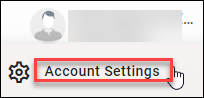
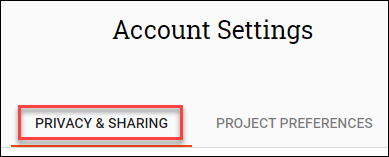
I checked the privacy settings, located under Account Settings just below the user name of the kit, after you sign in.

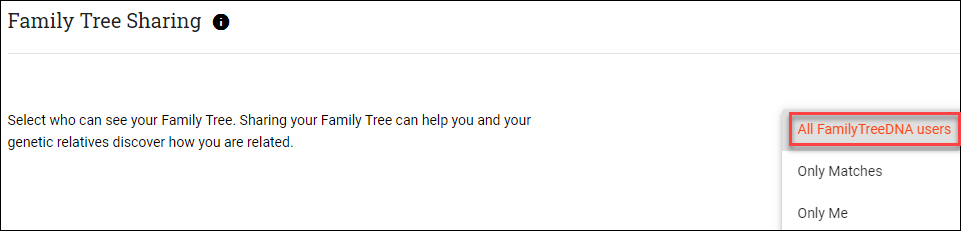
According to the Privacy and Sharing settings, John’s tree is not private.

click to enlarge

That seemed odd, so I checked John’s tree myself. It looks fine to me, so I wonder what might be wrong?

click to enlarge

Nothing is showing as private from John’s perspective from within his account.

I decided to send Ned a direct sharing link to see if that made any difference.

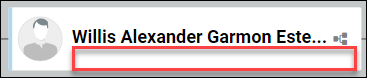
The link I shared with Ned made no difference, but reading the information in the red box did! Yay for documentation!

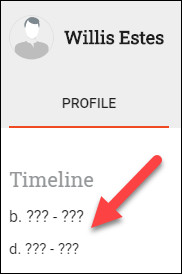
I had not filled in the birth or death dates of the people in question or marked them as deceased. Yes, I know – my bad.

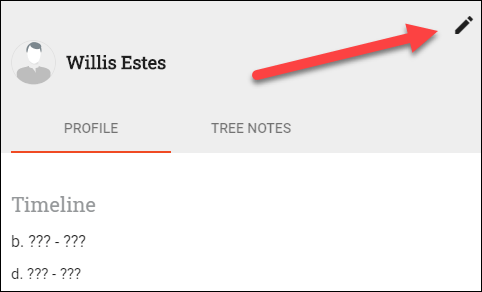
I clicked on the profile and then “View Profile” to verify.

Sure enough – no dates. To edit the profile, click on the pencil.

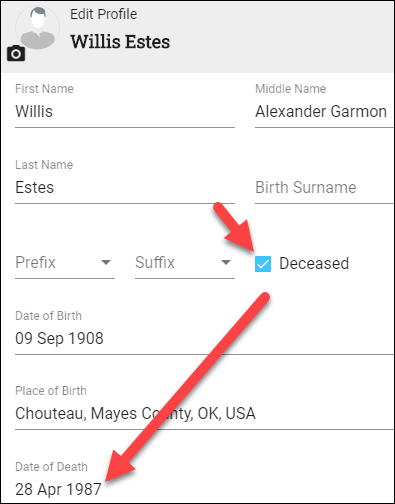
In order to cause the death date and death location fields to display, you must check the “Deceased” box which then turns blue.

Even if you don’t know the death date or location, marking the person as deceased allows their information to be displayed, such as their name, and NOT to be marked as private.

If you do NOT click the deceased box, the person’s profile WILL be marked “private” and will not be shown to anyone except you, the tester, if you sign in. You’ll have no idea that it isn’t showing to other people when you had intended to share all along.

click to enlarge

I marked each person as deceased and added death dates and locations while I was working on the tree.

Did that take care of the problem?

Let’s take a look from Ned’s perspective.

click to enlarge

Sure did.

In order for people to display, you need to kill them off, again😊

Tree Privacy

Every vendor has a combination of features that control tree privacy and security. You will be able to mark the entire tree private or shareable. You may be able to make it searchable, or not, depending on the vendor.

No vendor will display known living people to others – but the calculations they use to determine who may be living, unless you specifically mark them as deceased, will vary.

Be sure to check all of those factors, and find a way to view the tree from someone else’s perspective to check and be sure it’s functioning the way you expect.

I would never have known that all of John’s ancestors were private if Ned hadn’t contacted me.

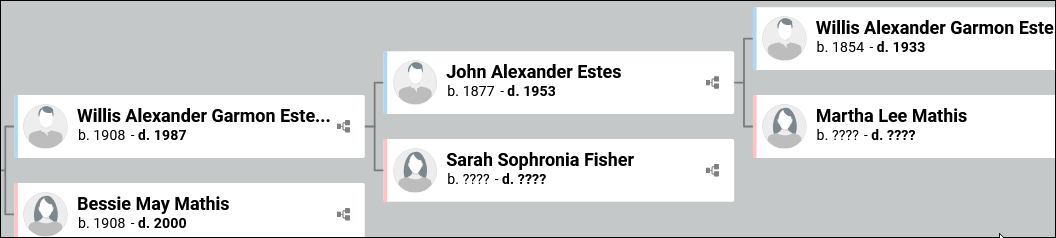
At Family Tree DNA, if you view your own tree and you notice that neither dates nor question marks appear in the date field on the pedigree page – that means you have not marked these people as deceased – so no information for them will show to anyone else.

If you see any dates or question marks beneath the names of people on your tree – then that individual’s profile will show and is not private, unless you have marked the entire tree as private.

Check your trees to see if you have an unknown issue. Those valuable trees provide critical information to your matches. They may not contact you to ask why your tree is private – in fact – most won’t. They assume it’s a choice you meant to make.

Be sure you’re not unintentionally driving cousins away. You never know who’s going to have that crucial piece of information or photo, and you want all of your cousin-bait to function as intended!

_____________________________________________________________

Disclosure

I receive a small contribution when you click on some of the links to vendors in my articles. This does NOT increase the price you pay but helps me to keep the lights on and this informational blog free for everyone. Please click on the links in the articles or to the vendors below if you are purchasing products or DNA testing.

Thank you so much.

DNA Purchases and Free Transfers

Genealogy Products and Services

Genealogy Research

MyHeritage Updates Theories of Family Relativity – Who is Waiting for You?

I always love to receive e-mails from Daniel Horowitz, Genealogy Expert at MyHeritage, because I know there is always something good waiting for me.

Today, it was the announcement that MyHeritage has refreshed the Theories of Family Relativity database again. The last time was mid-May.

If you recall, Theories of Family Relativity (TOFR) provide you with theories, aka, hints, as to how you and other people whose DNA you match may be related to each other – through which common ancestor.

According to Daniel:

Since the last update, the number of theories on MyHeritage has grown by 64%, from 20,330,031 to 33,373,070! The number of MyHeritage users who now have at least one Theory of Family Relativity™ for their DNA Matches has increased by 28%.

MyHeritage reruns the connections periodically and updates customer results.

By signing on to your account and clicking on “View Theories,” you can view only the matches that have an associated theory.

I have a total of 67 theories, 5 of which are new.

In my case, I create a note for each match, so I can scroll down my match list and easily identify which people have new TOFR

click to enlarge

You can see in the screenshot that my match, David, has a note, indicated by the purple icon, but Sarah does not. She also has a “New” indication for the TOFR which will remain for 30 days.

I’m excited. I can’t guess based on the 13 people in her tree how we might be connected, which is a little game I like to play, so I’m going to have to click on “View Theory” to make that discovery.

click to enlarge

Aha – William Crumley through daughter Mary who married William Testerman. I’m glad to see this, and I suspect this new connection may be due to the fact that I optimized my trees to enable TOFR to make connections by adding all of the children and grandchildren of my ancestors, with their spouses. This facilitates the “spanning trees” connections, indicated by the red arrows above, where Mary Brown “Polly” Crumley 1803-1881 connects in another tree with Mary Brown 1803-1881 and then further down that tree, James Harold Mitchell 1899-1961 connects with James Harold Mitchell born 1899-deceased. In other words, the theory is that these are the same people and those connections allow us to “cross and connect trees” and walk down them like a genealogical ladder.

Now, of course, I need to verify the connection both genetically and genealogically as well as reach out to my new cousin.

Sarah only has 13 people in her tree. She might be a new researcher. I’d like to provide her with my articles about our common ancestor, assuming the connection verifies. There were multiple William Crumleys and there is a lot of misinformation out there, waiting for unsuspecting genealogists. Maybe my articles will help her avoid the sand traps I landed in and who knows what information she might have to share. Like, if there is a graveyard on her Testerman ancestor’s property – which might be where William is buried. You never know and hope springs eternal!

If you already have DNA results at MyHeritage, sign in, and see if you have new Theories of Family Relativity.

If you don’t have DNA results there, you can transfer from elsewhere for free by clicking here and then either try a trial MyHeritage subscription, here or unlock the advanced features that include TOFR for $29. Or you can order a DNA test from MyHeritage, here.

We don’t know in advance when MyHeritage is going to refresh the database for new TOFR connections, so it’s important to be in the database when that happens.

If you’d like to know more about Theories of Family Relativity, I wrote about how to work with them here, here, and here.

Have fun!!!

_____________________________________________________________

Disclosure

I receive a small contribution when you click on some of the links to vendors in my articles. This does NOT increase the price you pay but helps me to keep the lights on and this informational blog free for everyone. Please click on the links in the articles or to the vendors below if you are purchasing products or DNA testing.

Thank you so much.

DNA Purchases and Free Transfers

Genealogy Products and Services

Genealogy Research

Ancestry Releases Updated Ethnicity Estimates – Hope You Still Have Your Kilt!

Ancestry has been rolling out their new DNA ethnicity results over the past couple of weeks. By now, pretty much all customers have updated results.

When you sign on and click on your DNA tab, you’ll see a message at the top that tells you whether you have new results or they are coming soon.

I wrote about how ethnicity results are calculated in the article, Ethnicity Testing – A Conundrum. You might want to take a minute and read the article because it applies to methods generally and is not specific to any one vendor.

Ethnicity analysis is quite accurate at the continental level, plus Jewish, but less so within continents like Europe. Your results will vary from vendor to vendor and from update to update with the same vendor over time.

To be very clear, your DNA doesn’t change – and neither does your genealogy, obviously – but the evaluation methods used by various vendors change as more people test, reference populations grow, and the vendors improve their algorithms.

Of course, “improve” is subjective. Changes that “improve” one person’s results have the exact opposite effect on other people.

The Eye of the Beholder

Every time vendors release new population or ethnicity results, everyone runs to check. Then – queue up either “they finally got it right” or teeth gnashing! 😊

Everyone hopes for “better” results – but expectations vary widely and how people determine what “better” means to them is quite subjective.

So yes, the accuracy of the results is truly in the eye of the beholder and often related to how much genealogy they’ve actually done. Surprises in your genealogy can equal surprises in your ethnicity too.

Quantitative Analysis

First, let’s be very clear – you do NOT inherit exactly half of the DNA of each of your distant ancestors in each generation. So you might have NO DNA of an ancestor several generations back in time and multiple segments contributed by another ancestor in the same generation. I wrote about how inheritance actually works in the article, Concepts: Inheritance.

Obviously, if you don’t carry a specific ancestor’s DNA, you also don’t carry any genetic markers for any portion of their ethnic heritage either.

Measuring

The best you can do in terms of ancestral ethnicity percentage expectations is to methodically analyze your tree for the geographic and ethnic heritage of your ancestors.

I explained how I calculated realistic ethnicity estimate percentages in the article, Concepts – Calculating Ethnicity Percentages.

In summary, I made a spreadsheet of my 64 great-great-great-great-great-grandparents, each of which, if the DNA was divided in exactly half and passed to the next generation, would contribute 1.56% of my DNA.

Vendors can typically measure geographically-associated DNA less than 1%. At some point, however, the segments are simply too small to reliably identify and associate with a geographic location or population.

Over time, how different vendors refer to and label different parts of the world both vary and change.

Region Names and Ancestral Assignment

I created a spreadsheet where I track both my “expected” DNA based on my genealogy and the amount of reported DNA from that region by each vendor. As I added vendor results, I sometimes had to add categories since their categories aren’t exactly the same as mine. You’ll observe this in the following sections.

You might notice the “inferred” category. I wrote about this in the Calculating Ethnicity Percentages article, but the inferred locations stem from situations like an unknown wife of a man who is living in England or Germany. We can probably infer that they are from that same country.

In the US, an earlier era spouse’s ethnicity might be inferred from marrying a Scot’s-Irish person, living in a Scots-Irish community or being a member of a Scots-Irish church, for example. Chances are very high that a Scots-Irish man’s wife is also from the “British Isles” someplace.

When creating my spreadsheet, I was intentionally conservative in my genealogical estimates.

Ancestry Update in General

Are there any trends or themes in this most recent Ancestry update? As a matter of fact, yes.

Everybody’s Scottish it seems. I hope you didn’t trade your kilt in for that liederhosen a few years ago, because it looks like you just might need that kilt again.

In fact, Ancestry wrote a blog article about why so many people now have Scotland as an ethnicity location, or have a higher percentage if they already showed Scotland before. I had to laugh, because let me summarize the net-net of the Ancestry article for you, the British Isles is “all mixed up,” meaning highly admixed of course. That’s pretty much the definition of my genealogy!

Another theme is that many testers have Scandinavian origins again.

Back in 2012, Ancestry had a “Scandinavian problem,” and pretty much everyone was Scandinavian in that release, even if they had nary a drop of Scandinavian ancestry. And no, not every person has an unknown paternity event and if they did, the Scandinavians cannot possibly be responsible for all of them. The Viking prowess was remarkable, but not THAT remarkable.

Eight years later, Scandinavian is back.

So, how did Ancestry do on my percentages?

Well, I’m Not Scottish…

In the greatest of ironies, I now show no Scottish at all. My calculations show 5.46%, and it’s probably higher because I descend from Scots-Irish that I can’t place in a location.

I guess I need to turn in my Campbell tartan along with a few others.

I do, however, have Norway back again, but no Scandinavian genealogy.

This chart shows all of the Ancestry updates over time, including this latest, plus a range column for this update.

In addition to the 2020 percentage numbers, I’ve included the ranges shown by Ancestry in the far right column for the 2020 update.

Ranges

When viewing your own results, be sure to click on the right arrow for a population to view the range.

You’ll be able to view the range and additional information.

In this case, Ancestry is confident that I have at least 35% DNA from England & Northwest Europe, and perhaps as much as 41%.

You’ll note that my range for the questionable Scandinavia is 0-5. The only two ethnicities that have ranges that do not include zero are England & Northwestern Europe and Germanic Europe.

My Opinion

I know that I have Native American heritage and that it’s reflected in my ethnicity – or should be.

23andMe results, below, shows me the chromosome locations of Native American segments, and when I track those segments back in time, they track to the ancestors in the Acadian population known to have married Native American partners as reflected in church records. Those ancestors were proven as Native through Y and mitochondrial DNA of their descendants which you can view in the Acadian AmerIndian DNA Project, here.

I wrote about using ethnicity segments identified at 23andMe with DNAPainter to triangulate ancestors in the article, Native American and Minority Ancestors Identified Using DNAPainter Plus Ethnicity Segments.

For me personally, including my Native heritage in my ethnicity results is important. I can’t “do” anything much with that at Ancestry, other than view my match’s shared ethnicity. Since my Native heritage doesn’t show at Ancestry, I can’t use it at all genetically.

Why is this important? Looking at a match on my Acadian line and seeing that we share at least some Native heritage MIGHT, just MIGHT be a hint about a common ancestor. Of course, that’s just a clue, because we might both be native from different sources. If my Native ethnicity is missing at Ancestry, I can’t do that. It’s worth noting that in 2017, Ancestry did report my Native heritage and other vendors do as well.

23andMe provides detailed, downloadable, segment information that translates into useful genealogical information. FamilyTreeDNA has announced that they will be providing ethnicity segment information as well after their new myOrigins release.

The Big 4

How do the Big 4 vendors stack up relative to my genealogy and ethnicity?

And for Native American heritage?

I took the liberty of highlighting which vendor is the closest to my estimated genealogy percentages, but want to remind you that these percentages will only be exactly accurate if the DNA is passed exactly in half in each generation, which doesn’t happen. Therefore, my genealogy is an educated estimate as well. Still, the results shouldn’t be WAY off.

An appropriate sanity check would be that my genealogy analysis and the DNA ethnicity results are relatively close. Many people think they are a lot more of something because those are the family stories they heard – but when they do the analysis, they realize that they might expect a different mixture. For example, my aunt told me that my paternal grandmother’s Appalachian family line was German and Jewish – and they are neither. However, German and Jewish lived in my head for a long time and that was what I initially expected to find.

What’s Next?

Both MyHeritage and Family Tree DNA are slated to release new versions of their population genetics tools – so you’ll be seeing new estimates from both vendors “soon.” Both announced at RootsTech they would deliver new results later in the year, and while I don’t have a release date for either vendor – keep in mind that both FamilyTreeDNA and MyHeritage have brought new labs online from scratch in record time in a humanitarian effort to fight Covid. This critically important work has assuredly interrupted their development schedules. You can read about that here and here.

Kudos to both vendors. Ethnicity can wait.

_____________________________________________________________

Disclosure

I receive a small contribution when you click on some of the links to vendors in my articles. This does NOT increase the price you pay but helps me to keep the lights on and this informational blog free for everyone. Please click on the links in the articles or to the vendors below if you are purchasing products or DNA testing.

Thank you so much.

DNA Purchases and Free Transfers

Genealogy Products and Services

Genealogy Research

Deleting DNA Results or Closing Your Account Does NOT Automatically = Destroying Your Original DNA Sample

First and foremost, I want to state unequivocally that I am NOT advocating closing your account at any of the testing vendor sites. That’s not the purpose of this article. In fact, I encourage everyone to use each tool to extract every drop of information possible.

The purpose is to educate and inform you that IF you close your account and/or delete your DNA RESULTS from your account, even if the vendor in question says that the action is irreversible and you will need to resubmit a new sample and purchase a new test if you change your mind, that does NOT necessarily mean that your physical DNA sample itself will be destroyed unless you take separate action to request sample destruction. It also does not automatically reverse any previously-granted research permissions.

Many people presume that if they delete their results and/or close their account, that automatically means that their original spit or swab sample is destroyed – and that’s not necessarily true.

First, we need to understand the difference between:

  • A DNA sample
  • A DNA raw data results file, also referred to as a download file
  • DNA matches or a match file

The Difference Between a DNA Sample, Results and Download Files, and Matches

There are three distinct parts of the DNA testing process that people often confuse. It’s important to understand these distinct pieces because you interact with them differently and vendors do as well. In other words, deleting your DNA results file, or closing your account does not necessarily mean that your original sample is destroyed unless you request (and confirm) that separately.

DNA Sample – The DNA sample itself is the swab or vial of spit that you submit to the vendor for processing. That sample is sent to a lab where DNA is extracted and processed on a specific DNA chip that produces a file with roughly 700,000 locations for autosomal tests.

After your DNA results are processed and the vendor knows that they do not need to rerun your sample, how or if your DNA sample is stored, and where, is a function of each specific vendor and their policies.

One vendor, Family Tree DNA archives your DNA sample vials for 25 years as a free benefit so that you (or your heirs should you pass away) can order additional products or upgrades. FamilyTreeDNA offers various levels of Y DNA and mitochondrial DNA testing along with autosomal (Family Finder) results – so there are several upgrade avenues.

This short article, 4 Kinds of DNA for Genetic Genealogy, explains the difference between various kinds of DNA tests.

It’s less obvious why a vendor who does not offer genealogical DNA products other than autosomal testing would retain a customer’s actual DNA sample. The other three vendors, while they don’t currently offer additional genealogy DNA products, do offer health upgrades and purchase options. They may be retaining samples so that their customers could potentially upgrade and they would have a sample on-hand to rerun, if necessary.

Both MyHeritage and 23andMe offer a combined ancestry/genealogy plus health product initially, or customers can purchase the health add-on later. FamilyTreeDNA offers a high-end comprehensive Exome health product for existing customers, the Tovana Genome Report, but it’s a different test altogether and requires a fresh DNA sample. (Update – this information is no longer valid in 2021. Both Ancestry and FamilyTreeDNA have discontinued their health products.)

Furthermore, both Ancestry and 23andMe either conduct health/medical research internally and/or participate in research partnerships with outside entities and may be hoping that their customers will opt-in to research.

Regardless of the underlying reason why, keep in mind that your actual sample is likely being archived someplace, assuming there is any left after processing, unless you request that your sample be destroyed.

Refer to each vendor’s Terms and Conditions, their Privacy Policy along with any other linked documents to gain insight into how each vendor operates. Furthermore, one of those documents will provide instructions for how to request the destruction of your actual DNA sample, should you choose to do so.

All vendors change the contents of their Terms and Conditions along with other legal documents from time to time, so be sure to refer to the current version.

The DNA sample itself is NOT the same thing as the output from the processing, which is the DNA raw data results file.

DNA Raw Data Results File – The DNA results file contains only a small fraction of the three billion locations found in the human genome. Autosomal DNA tests include only about 700,000 (plus or minus) selected locations produced by the chip the vendor is utilizing. The output of the laboratory process is referred to as a raw data file or the DNA results file. People sometimes refer to this as the download file as well, because it’s the file you can download from each vendor.

The results in a raw data file look like this:

When you download and transfer your file from one vendor to another, the raw data file is what you are transferring. You can find instructions for downloading your data file from each vendor, here.

  • The DNA raw data or download file is NOT your actual DNA, which is what is extracted from the liquid in the vial.
  • The raw data or download file is NOT a list of your matches, which may or may not be a separate file available for downloading, depending on the vendor.

The raw data file only contains letters representing your two genotyped nucleotides (T, A, C or G) for the rsid (accession #) for each genetic address or position tested. Each genetic address contains two SNPs, or single nucleotide polymorphisms. You don’t need to understand the details, just that one nucleotide at that address is received from your mother and one from your father.

The example above shows my first 4 locations in my raw data file. You can see that I received an A from both parents at the first two locations, and a G from both parents and the second two locations.

Match File

The values in your DNA results file are compared to other people in the vendor’s database. If enough contiguous locations match, typically more than 500 matching SNPs, plus additional cM (centiMorgan) threshold match criteria, shown below, you are determined to be a match with that other person. You will each be placed on the other person’s match list, and the vendor will then provide additional processing based on the signature features they offer to their clients.

Of the four main vendors, three, Family Tree DNA, MyHeritage and 23andMe allow customers to download a match file in spreadsheet format that provides additional information about each match. Ancestry, unfortunately, does not.

You cannot upload your match file to other vendors – only your raw data file gets uploaded which the vendor then processes in the same way they would if you had tested at their company.

If someone on your match list wants to be included in the database at another vendor, they will either need to test at that vendor or transfer their file to that vendor. Every vendor has people in their database that the other vendors don’t have, so it behooves all genealogists to be in each of the four databases either by testing directly or uploading their raw data files as a transfer.

Of the four main vendors, FamilyTreeDNA and MyHeritage both accept transfers from other vendors and provide free matching, but 23andMe and Ancestry do not. Note that both FamilyTreeDNA and MyHeritage do charge for advanced features, $19 and $29, respectively, but in both cases, it’s significantly less than the cost of a test.

Deleting Results and Closing Accounts

Again, I am NOT advocating that anyone should close accounts at any vendor. In fact, I would discourage DNA deletion. Some people delete their DNA or close their accounts when other options would better serve their purposes. However, if you decide to do so, you need to be aware of the following:

  • If you have a genealogical tree/records research account at Ancestry or MyHeritage, you can delete your DNA results but maintain your genealogy research account, if you desire. You will lose the benefits of having a DNA test at that vendor if you delete your DNA test.
  • At those two vendors, if you delete your DNA, that does not automatically affect the genealogy side of your account except for combined features like ThruLines at Ancestry and Theories of Family Relativity at MyHeritage.
  • If you DOWNLOAD your DNA file, that does NOT delete the file at the original testing vendor unless you do so separately. Downloading only means that you download a copy of the file. Your original raw data results file is still at the vendor, UNLESS YOU CHOOSE TO DELETE YOUR RESULTS. Do not delete your results file unless you want to lose your matches and no longer participate in DNA testing or DNA-related features at that vendor.
  • If you are planning to delete your DNA results at a particular vendor, download a raw data file first, and verify that the file works correctly by uploading the file to one of the vendors that accepts transfers. Save the raw data file permanently on your computer. This preserves at least some of your testing investment and allows you to utilize your DNA results file elsewhere.
  • If you delete your DNA results at any of the major vendors, you cannot restore the results file at that vendor without repurchasing and resubmitting a new DNA test. For vendors who accept transfers, you could potentially re-upload your file as a transfer, but you would need to pay for advanced features.
  • If you delete your DNA results at vendors who do NOT offer additional genealogical research services, meaning at 23andMe and Family Tree DNA, there is no reason to maintain an account at that vendor.

If you delete your results or close your account at any vendor, it DOES mean that:

  • The DNA result you’ve deleted along with corresponding matches and other features are permanently gone. You cannot change your mind. Delete=permanent.
  • At FamilyTreeDNA, you can delete one kind of DNA test without deleting all types of DNA tests for a particular individual. For example, you could delete a Y DNA result but not delete mitochondrial or the autosomal Family Finder test.
  • You will have to pay to retest should you change your mind.

If you delete your results or close the DNA portion of your account, it DOES NOT necessarily mean that:

  • Your DNA sample is destroyed.
  • You’ve revoked any permissions previously given for participation in research.

You will need to perform both of these tasks separately and independently of deleting your DNA file at a vendor and/or closing your account.

Every Vendor is Different

The process of requesting sample destruction and revoking research permissions is different at each vendor, with or without closing your account.

Every vendor’s terms and conditions are separate and different. Some vendors may automatically close your account if you request sample destruction, and others won’t. Some may automatically delete your sample if you close your account, but I know for certain that’s not uniformly true.

Terms and conditions, as well as standard procedures, change over time as well.

I’m not telling you which vendors operate in which ways, because this article will someday be dated and vendor policies change. I don’t want to take the chance of leading someone astray in the future.

Therefore, if you wish to have your sample destroyed and/or revoke any research permissions previously granted, I strongly suggest that you call the vendor’s customer support and convey specifically what you want, and why. The vendor may offer alternatives to achieve what you desire without deleting your sample and account.

To delete your sample and/or account, you may need to provide your request in writing.

Request verification in writing that your sample has been destroyed and that any previously granted research authority/permission has been rescinded.

Research Permission

Please note that you can rescind previously granted research permission WITHOUT affecting your account in any other way. However, the reverse is not true – deleting your sample and closing your account does not automatically rescind previously-granted research permission.

You can only rescind permission for future research, not research already underway or completed that includes your DNA and corresponding answers to research questions.

Extra Steps

I hope you will continue to enjoy the results of your DNA tests for years to come. New features and benefits are added regularly, as are new matches – any one of which has the potential to break down that pesky brick wall. Equally as important, at least to me, is the legacy I’m leaving with my combined tree, DNA, and research work for future generations.

However, what’s right for me may not be right for you. If you make a different decision, be sure that you fully understand the different parts of DNA testing along with the various options and steps you may need to take to achieve your goal.

_____________________________________________________________

Disclosure

I receive a small contribution when you click on some of the links to vendors in my articles. This does NOT increase the price you pay but helps me to keep the lights on and this informational blog free for everyone. Please click on the links in the articles or to the vendors below if you are purchasing products or DNA testing.

Thank you so much.

DNA Purchases and Free Transfers

Genealogy Products and Services

Genealogy Research

Search Techniques for Y and Mitochondrial DNA Test Candidates

I utilize DNA matches in various ways, some of which are a little unusual. In many cases, I mine autosomal DNA matches to search for people whose Y and mitochondrial DNA can provide descendants, including me and them, with additional insights into our common ancestors.

Y and mitochondrial DNA connects testers to their ancestors in ways that autosomal cannot. It’s a different type of DNA, not combined with the DNA of the other parent, so it’s not diluted and halved in each generation like autosomal DNA. Y and mitochondrial lines each descend from only one ancestral line, rich in historical information, with the ability to reach far back in time along with the ability to connect testers recently.

You First

The very first thing you can do to further your own research is to test yourself in three ways:

  • Autosomal DNA – Test at all 4 primary testing vendors, meaning FamilyTreeDNA, MyHeritage, Ancestry and 23andMe. The reason for testing at (or transferring to) multiple vendors is because they each have a unique focus and tools. Perhaps more importantly, they each have different people in their databases. Each testing company has benefits. FamilyTreeDNA has people who tested as long as 20 years ago and are no longer available for testing. MyHeritage has many European testers and you’ll find matches there that you won’t find elsewhere if your ancestors came from Europe. Ancestry has the largest database, but fewer advanced tools.
  • Full Sequence Mitochondrial DNA Available at FamilyTreeDNA, this test allows focus solely on your matrilineal line, meaning your mother’s mother’s mother’s line directly without confusion introduced by DNA from other lines.
  • Y DNA – For males only, also available at FamilyTreeDNA, provides focus on the direct patrilineal, or surname, line.

Obviously, if you haven’t upgraded your own Y and mitochondrial DNA tests to the highest level possible, the first thing you can do is to test or upgrade to the highest level where you receive the most refined amount of information.

(There’s a sale at FamilyTreeDNA right now, lasting until August 31, 2020, so it’s a great time to upgrade or order Y and mitochondrial. Check it out here.)

Different Kinds of DNA Serve Different Genealogical Purposes

Let’s look, briefly at how the various types of DNA tests benefit genealogy. Autosomal tests that you and family members can take will help you find other family members to test for specific Y and mitochondrial DNA lines.

Remember that you can test family members in addition to yourself, so if you’re a female, you may want to recruit your father or an uncle or brother to represent your patrilineal line DNA. If you’d like to read a brief article about the different types of DNA and their benefits, 4 Kinds of DNA for Genetic Genealogy is a good resource.

Y and Mito Pedigree.png

In this image, you can see that if you’re a male you can test for both your Y (blue-square) and mitochondrial DNA (red-circle) ancestral lines. If you’re a female, you can test only your mitochondrial DNA because females don’t have a Y chromosome. Both males and females, of course, can test (green) autosomal DNA which reveals a different type of connection to all of your ancestral lines, but with autosomal, you have to figure out which people match you on which lines.

Y and mitochondrial DNA provides you with a different type of information about laser-focused specific lines that you can’t obtain through autosomal testing, and reaches back in time far beyond the curtain when surnames were adopted.

personal pedigree

You personally can only test for the red-circle mitochondrial DNA line, and perhaps the blue-square Y DNA line if you’re a male. Unless you find family members to test for the Y and mitochondrial DNA of your ancestors, you’re leaving valuable information unresearched. That means all those colored boxes and squares that aren’t blue or red.

I’ve solved MANY brick walls using both Y and mitochondrial DNA, often in conjunction with autosomal.

Let’s take a look at each type of DNA testing a little more in-depth, so that you understand how each one works and why they are important to genealogy.

The Specifics

Y DNA – Y DNA descends through the direct male paternal line and is inherited by men only. You match against other Y DNA testers, hopefully finding surname links.

The Big Y test and upgrade at FamilyTreeDNA provides testers with all 111 traditional STR markers, plus another 589+ STRs available only in the Big Y test, plus a scan of the balance of the rest of the Y chromosome that is useful for genealogy. SNP results are increasingly being used for genealogy, in addition to STRs.

SNPs group men into genetic lineages and STRs help with defining and refining the closest generations when matching to each other. Often, the benefits of these two tests overlap, which is why I recommend that males test to the Big Y-700 level which provides 700+ STR markers plus all SNPs with mutations that define ancestral lineages.

Y DNA haplogroups, derived from SNPs, reveal the geographic part of the world where the lineage originated, such as Europe, the Americas, Asia and Africa, as well as a migration path across the continents based on where SNPs are and were historically found. Ancient DNA samples are being added to the database.

If you or a family member took an earlier Y DNA test, you can upgrade to the Big Y-700 today which provides you with matching for both the STR markers and separately, SNP markers, along with other genealogical tools.

You can order or upgrade your Y DNA here. Don’t forget family members accounts you may control. They may agree to have their kit upgraded too.

To upgrade, sign in to your account, and click on your desired upgrade level under Y DNA testing.

ymt y upgrade.png

Then click on upgrades.

ymt upgrade.png

I wrote about Y DNA in these recent articles:

I have more Y DNA articles planned for the future.

You can search for additional articles by going to the main page of this blog and enter “Y DNA” into the search box for additional articles already published.

Many features such as the matches maps, haplogroup origins and ancestral origins pages are the same for Y DNA results as mitochondrial DNA results. You can view mitochondrial articles here.

Mitochondrial DNA (mtDNA) – Mitochondrail DNA descends through the direct matrilineal line to both sexes of children. Everyone has mitochondrial DNA and it is inherited matrilineally by you from your mother, from her mother, from her mother, etc.

The FMS or full mitochondrial sequence DNA test tests the entire mitochondria that provides information about your direct matrilineal line. Family Tree DNA provides matching, which can sometimes lead to genealogical breakthroughs such as when I identified Lydia Brown, the mother of my Phoebe Crumley and then a couple years later, her mother, Phoebe Cole – via mitochondrial DNA. Those discoveries led us to her mother, Mary Mercy Kent, via genealogy records. All we needed was to punch our way through that initial brick wall – and mitochondrial DNA was our battering ram.

Additionally, you’ll receive a full haplogroup designation which allows you to look back in time before the advent of surnames and identifies the location where your ancestral line came from. For those seeking confirmation of Native American heritage, Y and mitochondrial DNA provides unquestionable proof and doesn’t wash out in time as autosomal DNA does.

Mitochondrial DNA includes haplogroups, matching and other genealogical tools.

You can order or upgrade you or a family member’s mitochondrial DNA here.

To upgrade, sign in to your account, and click on the desired upgrade level.

ymt mt upgrade

Then click on Upgrade if you’re upgrading or Add On if you’re ordering a new product for yourself.

ymt add ons upgrades.png

I wrote several mitochondrial DNA articles and compiled them into a summary article for your convenience.

Autosomal DNA – With autosomal DNA testing, you test once and there’s not an upgrade unless the vendor changes DNA testing platforms, which is rare. Each of the four vendors compares your DNA with all other people who’ve taken that test, or transferred from other companies. They match you with descendants from all of your ancestral lines. While the Y and mtDNA tests look back deeply in time as well as recently on one specific line, the autosomal tests are broad but not deep, spanning all ancestral lines, but limited to approximately 10 generations.

Each autosomal vendor has unique benefits and focus as well as shortcomings. I’ve listed the major points for each vendor relative to searching for Y and mitochondrial
DNA testing candidates. It’s important to understand the advantages of each vendor because it will help you understand the testers you are most likely to find in each database and may help focus your search.

FamilyTreeDNA’s Family Finder

  • Because FamilyTreeDNA archives customer’s DNA for 25 years, many people who tested Y or mitochondrial DNA 20 years ago and are now deceased upgraded to autosomal tests when they became available, or have been upgraded by family members since. These early testers often reach back another generation or so into the past to people born a century ago.
  • Advanced autosomal matching integrates with Y and mitochondrial DNA along with surname and other projects
  • Phased Family Matching provides the ability to link family members that match you to your tree which allows Family Tree DNA to group matches as paternal or maternal by utilizing matching segments to the same side of your family
  • Genetic Affairs, a third-party tool available for testers, builds common trees by reading the trees of your matches and comparing their trees with your own to identify common ancestors.
  • Genetic Affairs builds trees and pedigrees of your matches by searching for common ancestors in your MATCHES trees, even if you have no tree or don’t share those ancestors in your tree. This functionality includes Y and mitochondrial DNA if you have tested. This facilitates discovery of common ancestors of the people who you match, which may well lead you to ancestral discoveries as well.
  • Genetic Affairs offers clustering of your shared matches.
  • DNA file transfers are accepted from other vendors, free, with a $19 one time fee to unlock advanced tools.
  • Family Tree DNA has tested people worldwide, with a few location exceptions, since inception in the year 2000.
  • No direct triangulation, but Phased Family Matching provides maternal and paternal side triangulation when matches can be grouped into maternal and paternal sides.
  • Matches and segment match information are available for download.
  • The great thing about the advanced matching tool at Family Tree DNA is that it facilitates searching for people who match you on different kinds of tests, so it helps determine the potential closeness or distance of Y and mitochondrial relationships.

MyHeritage

Ancestry

  • Ancestry has the largest database, but did not begin testing until 2012 and did not test widely outside of the US/UK for some time. They now sell tests in 34 countries. Their testers are primarily focused in the US, Canada, England, Scotland, Ireland, and diaspora, with some overlap into Europe.
  • Ancestry offers ThruLines, a tool that connects testers whose DNA matches with common ancestors in their trees.
  • Ancestry does not provide a chromosome browser, a tool provided by the other three primary testing companies, nor do they provide triangulation or matching segment location information necessary to confirm that you match on the same segment with other people.
  • Ancestry has issued cease and desist orders to third party tools that perform functions such as clustering, autotrees, autopedigrees or downloading of matches. Ancestry does not provide these types of features for their users.
  • Ancestry does not accept transfers, so if you want to be in Ancestry’s database, you must test with Ancestry.
  • No Y or mitochondrial DNA testing available.
  • Match list is not available for download.

23andMe

  • The primary focus of 23andMe has always been health testing, so many people who test at 23andMe are not interested in genealogy.
  • 23andMe tests are sold in about 50 countries, but not worldwide.
  • 23andMe provides a chromosome browser, triangulation, segment information and a beta genetically constructed tree for close matches.
  • 23andMe does NOT support a genealogical tree either uploaded or created on their site, making tree comparisons impossible.
  • Genetic Affairs AutoCluster works at 23andMe, but AutoTree and AutoPedigree do not because 23andMe does not support trees.
  • 23andMe does make match files available for downloading.
  • No Y or mitochondrial DNA full testing or matching, but basic haplogroups are provided.
  • 23andMe caps matches at 2000, less any matches that have opted out of matching. My matches currently number 1770.
  • 23andMe does not accept transfers from other vendors, so if you want to be in their database, you must test with 23andMe.

Reaching Out to Find Testers

Unfortunately, we only carry the mitochondrial DNA of our mother and only men carry the Y DNA of their father. That means if we want to obtain that DNA information about our other family lines, we have to find people who descend appropriately from the ancestor in question and test that person.

I’ll share with you how I search for people who descend from each ancestor. After finding that person, I explain the situation, why the different kinds of tests are important, and offer a testing scholarship for the Y or mtDNA test at Family Tree DNA if they have not already taken that test. If they’ve tested their autosomal DNA elsewhere. I also explain that they can transfer their autosomal DNA file for free too and will receive new matches.

Here’s an article with links to upload/download instructions for each testing company. Feel free to share.

Each DNA testing company has different features, but you can use all of the companies to find people descended in the appropriate way from each ancestor. It’s easier if you know how to utilize each vendor’s tools to optimize your chances of success. I’m going to step you through the search process with hints and tips for each vendor.

Finding Y DNA and Mitochondrial DNA Candidates at FamilyTreeDNA

Because FamilyTreeDNA tests for both Y and mitochondrial DNA and has for 20 years, you stand a better chance of finding a candidate there who may have already tested, so that’s where I always begin.

Y DNA

Let’s say, for example, that I need to find a male descendant of my Ferverda line in order to ask them to test for Y DNA. The person can be descended from either a close relative, if I know of one, or a more distant relative that I don’t know, but need to find through searching other ways.

Search for Surnames and Projects at Family Tree DNA

First, search the FamilyTreeDNA website for your goal surname among existing testers, and then the appropriate surname project to see if your line has already tested.

ymt ferverda

On the main page, here, scroll down to until you see the prompt, above, and enter the surname. Be sure to consider alternate spellings too.

ymt ferverda search.png

In this case, I see that there is a Ferverda surname project with 18 people, and scrolling on down, that 4 people with this specific surname have tested.

ymt results.png

However, searching for an alternate spelling, the way it’s spelled in the Netherlands, I find that another 10 people have tested.

ymt ferwerda

Of course, some may be females, but they probably know males by that surname.

First, I’m going to check the Ferverda DNA project to see if a Ferverda male from my line has tested, and if so, to what level.

Click on the project link in the search results to see the DNA Project.

ymt admin.png

Note two things. First, the administrator’s name, as you may need this later. If you click on their name, their email address is displayed.

Second, click on DNA Results and select Y DNA if you’re presented with a choice. If the project has a public facing page, and most do, you’ll see something like the following information.

ymt project

Hey look, it’s my lucky day, given that both of these men descend from my ancestor. I happen to know that they have both taken the Big Y test, because I’m the project administrator, but you won’t know that. One way to get an idea is if they have less than the full 111 markers showing, they probably haven’t taken the Big Y, because a 111 upgrade is included in the Big Y test today.

You have three options at this point to contact one of these men:

  • See if the people are on your own autosomal DNA match list, or the match lists of kits from that family that you manage. If so, you can view their email address and contact them. If you haven’t yet tested autosomally, meaning the Family Finder test, at Family Tree DNA, you can transfer autosomal tests from elsewhere, for free, which means you will be viewing matches within hours or a couple days. Otherwise, you can order a Family Finder test, of course.
  • If the person with the Ferverda or Ferwerda surname is not on your Family Finder match list, reach out to the project administrator with a note to the person you want to contact and ask the administrator to forward your email to the project member.
  • If the administrator doesn’t answer, contact Family Tree DNA support and make the same request.

Checking Family Finder, one of those people is on my match list and I’m pretty sure it’s the right person, because when I click on his profile, not only does the haplogroup match the DNA project, but so does the ancestor.

ymt ferverda profile.png

Searching Family Finder

If there isn’t a DNA project match you can identify as your direct line ancestor, you can search your Family Finder matches for the surname to find a male with that surname. If your match has a tree, see if your ancestor or ancestral line is showing, then note whether they have taken a Y DNA test. They may have taken a Y test, but have not joined a project or not entered any “earliest known ancestor.” You can see which tests they’ve taken by looking at the little tabs above their profile on their tree, or on their profile card.

ymt ferverda tree

click to enlarge

Regardless, you’re now in touch with a potential contact.

Don’t dismiss females with that surname, or people who show that surname in their ancestral surname list. Women with the surname you’re looking for may have husbands, fathers, brothers or uncles who descend from the line you are seeking.

ymt search field.png

Utilize Genetic Affairs

My ace in the hole at FamilyTreeDNA is the Genetic Affairs AutoTree and AutoPedigree function.

Genetic Affairs is a third-party tool that you can use to assist with analysis of your matches at FamilyTreeDNA.

ymt genetic affairs

click to enlarge

At Genetic Affairs, selecting AutoTree generates trees where common ancestors of you and your matches, or your matches to each other, are displayed.

Your goal is to identify people descended from a common ancestor either directly paternally through all males for Y DNA or through all females to the current generation, which can be males, for mitochondrial DNA.

This article provides step-by-step instructions for the Genetic Affairs AutoTree and AutoPedigree functions.

Mitochondrial DNA

Mitochondrial DNA lineages are a bit more challenging because the surname changes every generation and DNA projects are unlikely to help.

The AutoTree/AutoPedigree report through Genetic Affairs serves the same purpose for mitochondrial DNA – building trees that intersect with a common ancestor. I generally drop the “minimum size of the largest DNA segment shared with the match” to 7 cM for this report. My goal running this report for this purpose isn’t to analyze autosomal DNA, but to find testing candidates based on how my matches descend from a specific ancestor, so I want to include as many matches as possible.

Family Finder Can Refine Y and mtDNA Information

In some cases, a Family Finder test can refine a potential relationship between two people who match on either Y DNA or mitochondrial. Additionally, you may want to encourage, or gift, specific matches with an upgrade to see if they continue to match you at higher testing levels.

Let’s say that two men match closely on a Y DNA test, but you’d like to know how far back the common ancestor lived.

ymt y matches.png

In this instance, you can see that the second match has taken a BIg Y and a Family Finder test, but the exact match (genetic distance of 0) has not. If the first individual cannot provide much genealogy, having them take a Family Finder test would help at least rule out a relationship through second cousins and would give you at least some idea how far back in time your common ancestor may have lived. If you do match on Family Finder, you receive an estimate of your relationship and can check the match level possibilities using the DNAPainter Shared cM Tool. If they upgrade to the Big Y-700 test, you may be able to differentiate your line from theirs, or confirm when and where a split occurred – or that there is no split.

This same autosomal testing scenario works for mitochondrial DNA.

For people who have taken both tests, Family Finder plus either Y or mitochondrial DNA, the Advanced Matching menu allows you to select combinations of tests and projects to query.

ymt advanced

click to enlarge

Finding Y and Mitochondrial DNA Candidates at MyHeritage

MyHeritage provides a wonderful tool called Theories of Family Relativity (TOFR) which finds common ancestors between you and your DNA matches, even if the ancestor is not in both trees, so long as a path exists between the two testers’ trees using other trees or research documents, such as census records. Of course, you’ll need to verify accuracy.

ymt tofr.png

At MyHeritage, select DNA Matches, then “Has Theory of Family Relativity.”

ymt mh ferverda

click to enlarge

You can see that I have 65 matches with a Theory of Family Relativity. Additionally, I can then search by surname.

ymt mh ferverda tree.png

click to enlarge

If I am looking for a Ferverda Y DNA candidate, I’ve found one thanks to this TOFR.

If you don’t find a tree where your match descends from your ancestor in the desired way, you can also widen the search by de-selecting Theories of Family Relativity and instead selecting SmartMatchs or shared surname combined with the name of your ancestor. There are many search and filter combinations available.

Let’s look at a mitochondrial DNA example where I’m searching for a descendant of Elizabeth Speaks who married Samuel Clarkson/Claxton.

ymt smartmatches

click to enlarge

In this case, I have one SmartMatch, which means that someone by the name of Elizabeth Speaks is found in my matches tree. I need to look to see if it’s the RIGHT Elizabeth Speaks and if my match descends through all females to the current generation. If so, I’ve found my mitochondrial DNA candidate and I can leave them a message.

You can also view SmartMatches (without a DNA match) from your own tree.

I can go to that person in my tree, click on their profile, and see how many SmartMatches I have. Clicking on 13 SmartMatches allows me to view those matches and I can click through to the connected trees.

ymt mt speaks.png

I can also click on “research this person” to discover more.

If you’re still not successful, don’t give up quite yet, because you can search in the records for trees that shows the person whom you seek. A SmartMatch is only created if the system thinks it’s the same person in both trees. Computers are far from perfect.

ymt mh trees

click to enlarge

Narrow the search as much as possible to make it easier to find the right individual, and then view the trees for descent in the proper manner.

Another wonderful tool at MyHeritage is the Genetic Affairs AutoCluster tool, built-in for MyHeritage users.

ymt mh cluster.png

The above cluster shows that one person carries the surname of Elizabeth’s husband. Viewing the accompanying spreadsheet for the AutoCluster run reveals that indeed, I’ve already identified a couple of matches as descendants of the desired ancestral couple. The spreadsheet shows links to their trees, my notes and more.

ymt cluster ss

Clusters show you where to look. Without the cluster, I had only identified two people as descendants of this ancestral couple. I found several more candidates to evaluate and two mitochondrial candidates are found in this cluster.

Finding Y and Mitochondrial DNA Candidates at 23andMe

23andMe is a little more tricky because they don’t support either uploaded or created user trees which makes finding descendants of a particular ancestor quite challenging.

However, 23andMe attempts to create a tree of your closer relatives genetically. which you can find under “DNA Relatives,” under the Ancestry tab, then “Family Tree” at the top.

I’ve added the names of my ancestors when I can figure out who the match is. Please note that this “created tree” is seldom exactly accurate, but there are often enough hints that you’ll be able to piece together at least some of the rest.

Here’s part of my “created” tree at 23andMe. I’m at far right.

ymt23 tree.png

click to enlarge

If you’re a genealogist, your eyes are going to glaze over about now, because the “people” aren’t in the correct locations – with maternal and paternal sides of the tree swapped. Also, please note, the locations in which they place people are estimates AND 23andMe does NOT take into account or provide for half-relationships.

That said, you can still obtain candidates for Y and mitochondrial DNA testing.

In this case, I’m searching for a mitochondrial DNA candidate for Evaline Miller, my grandfather’s mother or a Y DNA candidate for the Ferverda line.

I can tell by the surname of the male match, Ferverda, that he probably descends through a son, making him a Y DNA candidate.

Both Cheryl and Laura are possible mitochondrial DNA candidates for Evaline Miller, based on this tree, depending of course on how they actually do descend.

I can contact all of my matches, but in the event that they don’t answer, I’m not entirely out of luck. If I can determine EXACTLY how the match descends, and they descend appropriately for mitochondrial DNA, I can view the match to see at least a partial haplogroup. Since 23andMe only uses relatively close matches when constructing your tree, I’m relatively likely to recognize the names of the testers and may have them in my genealogy program.

By clicking on the Ferverda male, I can see that his Y haplogroup is I-Z58. That’s not nearly as refined as the Y DNA information at Family Tree DNA, but it’s something if I have nothing else and he doesn’t answer my query that would include the offer of a Y DNA test at Family Tree DNA.

ymt 23 hap

You can search at 23andMe by surname, but unless your match has entered their ancestral surnames and you recognize surnames that fit together, without a tree, unless your match answers your query, it’s very difficult to determine how you connect.

ymt 23 search.png

You can also view “Relatives in Common,” hoping to recognize someone you know as a common match.

ymt relatives in common

Please note that 23andMe does allow testers to enter a link to a tree, but few do.

ymt tree link.png

It’s worth checking, and be sure to enter your own tree link location.

Finding Y and Mitochondrial DNA Candidates at Ancestry

Ancestry’s ThruLines provides an excellent tool to find both Y and mitochondrial DNA participants.

Ancestry organizes their ThruLines by ancestor.

ymt thrulines

click to enlarge

Select your desired Ancestor, someone whose DNA you seek. Clearly, Y DNA candidates are very easy because you simply choose any male ancestor in the correct line with the surname and look for a male match with the appropriate surname.

In this case, I’m selecting Martha Ruth Dodson, because I need her mitochondrial DNA.

ymt dodson.png

By clicking on her “card” I then see my matches assigned to her ThruLine.

Ymt ancestry thruline

Obviously, for mitochondrial DNA, I’m looking for someone descended through all females, so Martha’s daughter, Elizabeth Estes’s son Robert won’t work, but her daughter, Louisa Vannoy, at left is the perfect candidate. Thankfully, my cousin whom I match, at bottom left is descended through all females to the current generation, which can be male or female, so is a mitochondrial DNA candidate.

Finding Y and Mitochondrial DNA Candidates in Trees in General

I’ve utilized the combination of trees and DNA matches at FamilyTreeDNA through Genetic Affairs, Ancestry and MyHeritage, but you can also simply search for people who descend from the same ancestor based on their tree alone at the vendors who support trees as part of genealogical records. This includes both Ancestry and MyHeritage but also sites like Geneanet which is becoming increasingly popular, especially in Europe. (I have not worked extensively with Geneanet yet but plan to take it for a test drive soon.)

My reason for utilizing DNA matches+trees first is that the person has already been introduced to the concept that DNA can help with genealogy, and has obviously embraced DNA testing at least once. Not only that, with the assist of a Theory of Family Relativity, ThruLine or genetic Affairs automation tools, it’s much easier to find appropriate candidates.

Finding Y and Mitochondrial DNA Candidates at WikiTree

If you reach beyond DNA testing companies, WikiTree provides a valuable feature which allows people to specify that they descend from a particular ancestor, and if they have DNA tested, how they descend – including Y DNA, mitochondrial DNA and autosomal.

Here’s an example on the profile of John Y. Estes at WikiTree, one of my Estes ancestors.

ymt wiki.png

If someone descends appropriately for either Y or mitochondrial DNA line, and has taken that test, their information is listed.

In this case, there are two Y DNA testers and two autosomal, but no mitochondrial DNA which would have descended from John’s mother, of course.

You can click on the little green arrow icon to see how any DNA tested person descends from the ancestor whose profile you are accessing.

ymt wiki compare

Of course, the same surname for males is a good indication that the man in question is descended from that paternal line, but check to be sure, because some males took their mother’s surname for various reasons.

Here’s my line-of-descent from John Y. Estes. I can click on anyone else whose DNA information is listed as well to see how they descend from John. If they descend from John through all females, then they obviously descend from his wife though all females too which means they are a mitochondrial DNA candidate for her.

ymt wiki relationship.png

click to enlarge

Clicking on autosomal testers may reveal someone appropriately descended from the ancestor in question.

You can then click on any ancestor shown to view their profile, and any DNA tested descendants.

By clicking on name of the descendant whose DNA test you are interested in, you’ll be able to view their profile. Look for the Collaboration section where you can send them a private message that will be delivered by email from WikiTree.

ymt collaborate

Finding Y and Mitochondrial DNA Candidates at GedMatch

One final avenue to find Y and mitochondrial DNA candidates is through GedMatch, It’s probably the least useful option, though, because the major vendors all have some sort of tree function, except for 23andMe, and for some reason, many people have not uploaded GEDCOM files (trees) to GEDmatch.

Therefore, if you can find someone on GedMatch that tested elsewhere perhaps, such as LivingDNA who also provides a base haplogroup, or 23andMe, and they uploaded a GEDCOM file (tree) to GedMatch, you can utilize the GEDmatch “Find common ancestors” automated tree-matching functionality.

gedmatch mrca matches

click to enlarge

GEDmatch produces a list of your matches with common ancestors in their trees, allowing you to select the appropriate ancestor or lineage.

I wrote step-by-step instructions in the article, GEDmatch Introduces Automated Tree Matching.

Additionally, GEDmatch includes the Genetic Affairs AutoCluster tool in their Tier1 subscription offering,

ymt gedmatch.png

Gedmatch users who know their Y and mitochondrial haplogroup can enter that information in their profile and it will be reflected on the autosomal match list.

ymt gedmatch hap

Summary Chart

In summary, each testing vendor has a different focus and unique tools that can be used to search for Y and mitochondrial DNA candidates. Additionally, two other resources, WikiTree and GEDmatch, although not DNA testing vendors, can lead to discovering Y and mtDNA candidates as well.

I’ve created a quick-reference chart.

  Family Tree DNA MyHeritage Ancestry 23andMe Wikitree GEDmatch
Y DNA Test Yes No No No, partial haplogroup provided No test, listed by ancestor No, user entered
mtDNA Test Yes No No No, partial haplogroup provided No test, listed by ancestor No, user entered
DNA Projects Yes No No No Some Some
Strengths other than mentioned categories 20 year worldwide customer base, phased family matching European focus, SmartMatches, wide variety of filters Largest autosomal database Genetic tree beta DNA by ancestor May include users not found elsewhere who tested outside the major companies
Drawbacks No direct triangulation or tree matching No Genetic Affairs AutoTree or AutoPedigree Can’t download matches, no triangulation, clusters, AutoTree, or AutoPedigree No trees, 2000 match limit “One tree” may be incorrect Few trees, no AutoTree or AutoPedigree
Clustering Genetic Affairs Included in advanced tools No, prohibited Genetic Affairs N/A Included in Tier1
Genetic Affairs AutoTree & AutoPedigree Yes No No No, no tree support N/A No
Tree matching between users No, through Genetic Affairs Theories of Family Relativity ThruLines No Not directly MRCA common ancestors in Tier1

Now it’s your turn. Which Y and mitochondrial DNA lines can you find today?

Happy Hunting!

_____________________________________________________________

Disclosure

I receive a small contribution when you click on some of the links to vendors in my articles. This does NOT increase the price you pay but helps me to keep the lights on and this informational blog free for everyone. Please click on the links in the articles or to the vendors below if you are purchasing products or DNA testing.

Thank you so much.

DNA Purchases and Free Transfers

Genealogy Products and Services

Genealogy Research