MyHeritage has been busy – making two major announcements this week.
European Retail Market Penetration
I was very encouraged a few days ago when I received an email from MyHeritage stating that they have partnered with British Retailer WHSmith to sell their tests in retail stores in Europe. The new in-store products will be called the MyHeritage Family History Discovery Kit which will bundle the DNA test with a 3 month subscription of the Complete MyHeritage plan which combines Premium Plus, Data Subscription including historical records and DNA integration.
MyHeritage has not yet released the price, but I expect it will be competitive. I’m very grateful for the MyHeritage push into Europe and look forward to new European matches. My mother carries a very high percentage of both German and Dutch and matches from those countries have been slim. Retail marketing and an in-store presence may signal the end of that problem – at least I hope so.
The great news is that MyHeritage DNA matching supports filtering DNA matches by location.
MyHeritage Accepts Illumina GSA Chip Transfers
I’ve written before about the Illumina GSA chip and compatibility issues between the that chip and existing data produced on the other Illumina chips, including the chip utilized by both MyHeritage and Family Tree DNA. However, MyHeritage also just announced that they are accepting GSA file transfers, which means that people who have tested at the following vendors can now transfer their raw autosomal data results to MyHeritage for free.
23andMe began utilizing the Illumina GSA V5 chip in August 2017, so if you have tested since that time, you haven’t been able, until now, to upload to MyHeritage.
LivingDNA launched with the Illumina GSA chip, so if you have ever tested at LivingDNA, you haven’t been able to upload your raw data files. Now you can!
The good news is that the upload to MyHeritage, along with the MyHeritage DNA tools are free until December 1st, and will remain free for those who upload before that date. After that, MyHeritage will begin charging a fee or subscription for advanced features such as ethnicity estimates, the chromosome browser and other features. The $$ amount will be announced closer to December.
Of course, you can also upload results from Family Tree DNA, Ancestry and earlier versions of the 23andMe test.
I receive a small contribution when you click on some of the links to vendors in my articles. This does NOT increase the price you pay but helps me to keep the lights on and this informational blog free for everyone. Please click on the links in the articles or to the vendors below if you are purchasing products or DNA testing.
Everyone starts someplace in their genealogy. A lucky few have the opportunity to springboard from another family member who has documented the family carefully. Most of us, me included, began in the simplest of ways – asking family members.
Thank goodness I did that while there were at least a few family members left of older generations. I wish I had begun sooner, but that’s probably the most common lament of genealogists.
The next most common lament, today, would be that we wish we had DNA tested every single person in the older generations. If you haven’t, please do, immediately, while you can – and be sure they are in at least in the Family Tree DNA, Ancestry and MyHeritage databases. I also recommend uploading to GedMatch as well which will catch genealogists that test at 23andMe. Generally, only genealogists upload to GedMatch.
I didn’t start out to be a genealogist. I was simply interested in my family. I didn’t even really grasp what a genealogist was. One day someone said to me, “Oh, so you’re a genealogist,” and I replied, “No, I’m just curious about my family.”
Famous last words.
I didn’t know there was such a thing as a pedigree chart, and my notes for the first few years were on plain paper with little organization other than a page or folder for each person. I then advanced to a green bookkeeping columnar pad to keep track of what was in the folders.
Eventually, some poor soul took pity on me and gave me a pedigree chart. I started filling in what I knew and it would be another decade before I made my first “genealogical” find in the local Family History Center. I refer to that as my first genealogical find because I wasn’t talking to a family member and had begun researching through records. My curiosity had gotten the best of me!
I remember the thrill of that obsession-defining moment well.
It was my first visit to the Center, following a brief introductory session that I had discovered in the local newspaper, and I was filled with trepidation. I didn’t want someone trying to convert me, but I was also very curious. I needn’t have worried. In all the years I visited the local FHC at the Mormon Church, no one ever tried to convert me and I visited regularly, making discovery after discovery.
The first discovery that life-changing evening, the marriage of Lazarus Estes to Elizabeth Vannoy, is what hooked me. We found it in an index, and I was terribly disappointed to discover that I had to order a microfiche and wait until it arrived from some distant location to find out WHEN Lazarus married Elizabeth. Oh, the torture!
But hooked I was, and I anxiously awaited the call from the FHC librarian telling me that my fiche had arrived. I drove to the church in record time!
I had taken my daughter with me on the first trip to the church, just in case I needed a quick “escape.” Kids are always great for “not feeling well” and she was always having stomach aches. Obviously, no escape was needed – except maybe for her.
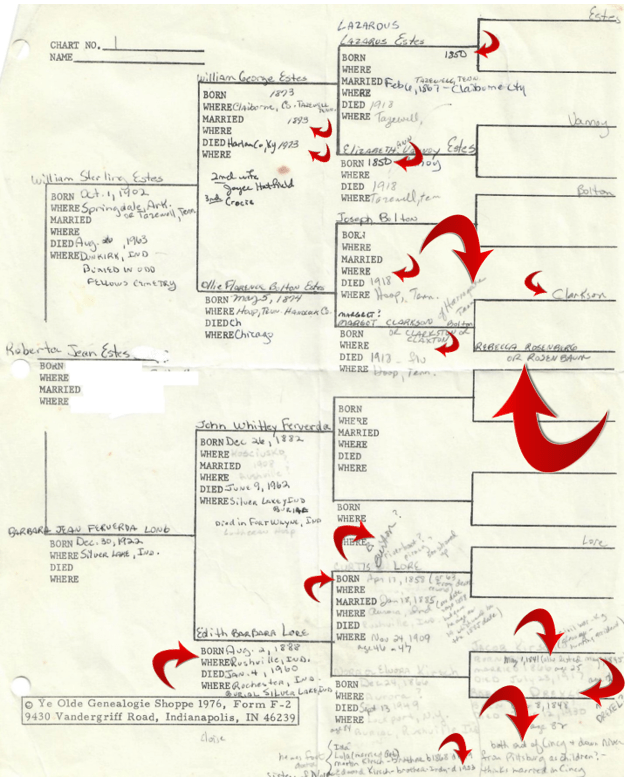
Recently, while going through some papers, I discovered my very first pedigree chart. My first reaction was, “ahhh, how sweet,” which quickly turned to mortification when I realized how much was blank or worse, incorrect.
Let’s just bask in the “oh so sweet” for a moment.
We all start with the information we gather from family. You can see by the different ink and white-out (you do remember, white-out, right?) that I gleefully added to this pedigree as new information was discovered. Some is written in pencil, with question marks. People weren’t sure about some things, but I made notes anyway. Thankfully!
The blank spaces aren’t blank anymore, today, but that information was revealed slowly, like peeling an onion, through records research. I had talked to my mother and my great-aunt on my maternal side, and my father’s sister on my paternal side, and I gathered all that they knew. From that point forward, I had to do the research. It fell to me.
When I looked at this pedigree chart and realized how much was wrong, my initial reaction was horror – BUT – we all have to start with what we have available. If there was ever a textbook example of why verification and documentation is essential – this is it.
Much to my embarrassment, the red arrows point to information that was wrong. I’ve sized the arrows relative to the magnitude of the inaccuracy.
For example, the biggest error is that Rebecca Rosenberg or Rosenbaum was NOT the mother of Margaret Clarkson/Claxton. For the record, Elizabeth Speaks was, but she was related to the Rosenbaums through her father’s sister’s marriage. My aunt had her in the right neighborhood and family, but attributed the wrong person as her mother.
Of course, if I hadn’t figured it out through records, eventually DNA might have revealed the problem. BUT, since the Rosenbaum descendants were related to the Speaks family, autosomal DNA might not have divulged the problem since the Rosenbaums would have matched some Speaks too. However, mitochondrial DNA would have immediately showed a discrepancy because their matrilineal ancestors weren’t the same. Don’t forget to utilize all tools available.
Oh, and based on the Rosenbaum/Rosenburg surname, my aunt informed me that we were Jewish. Also that the Bolton’s were German, and that my great-grandmother Elizabeth Vannoy was Cherokee, all of which were subsequently proven to be incorrect by using historical records plus DNA, but I digress. Point being that I believed my aunt at the time, because surely she knew – and she obviously knew more than I did which was absolutely nothing.
Notice that several of the dates have smaller arrows. Those are off by one or two years, so again, the right ballpark but the wrong information. At least the information for my parents was accurate! (humor)
It’s also interesting that on my mother’s side, much more was known about the female side of the family. But then again, my great-aunt who I was able to interview was my maternal grandmother’s sister.
My Aunt Margaret on my father’s side didn’t grow up in Tennessee and most of what she knew was second hand. For example, she told me that her Bolton grandparents, Joseph and Margot (Margaret) had both died a day or so apart in the 1918 flu epidemic. He died first and the family put him in the barn waiting for her to die the next day so they could bury them in the same coffin. I didn’t know if that was romantic or simply expeditious for the survivors, under the circumstances, especially if many were ill and coffin-makers and grave-diggers were in short supply.
Well, Aunt Margaret was close. Joseph died on February 23, 1920, not during the 1918 flu epidemic. Still, they did both die of pneumonia following the flu, according to their death certificates, which certainly weren’t available to me in the 1970s or 1980s. Joseph’s wife died on March 11, 1920. Of course, there’s no way to know if they were buried at the same funeral, or in the same coffin. Their deaths were separated by more than two weeks.
I’m certainly glad I recorded every tidbit that I did. I’ve returned to my original notes years later and found extremely valuable hints that I had originally forgotten about or didn’t understand the value of the hint initially.
How could I forget something important? It wasn’t important then or we’re human and we do forget.
Every piece of family information needs to be viewed as a hint, not as gospel. As well-meaning as our family members are, and lovely for sharing, they can only provide us with the information they know or have been provided by others. Who’s to say if it has been conveyed or remembered accurately? The most reliable information is first person, but even that is subject to lapses of memory or the softening of time.
Don’t believe it? Just remember how often you forget what you went into the other room for😊
Documenting every piece of information is up to us and seldom does that documentation process and subsequent review not provide some new tidbit or surprise.
I receive a small contribution when you click on some of the links to vendors in my articles. This does NOT increase the price you pay but helps me to keep the lights on and this informational blog free for everyone. Please click on the links in the articles or to the vendors below if you are purchasing products or DNA testing.
I’ve been wanting to celebrate my ancestors’ birthdays for some time now, and I’ve finally figured out exactly how to accomplish this goal in a really fun way.
Being reminded once a year about their birthday and the anniversary of their death reminds me to work on their genealogy, and in particular, genetic genealogy. With more people testing every single day, meaning different people at every vendor, we need to check often with specific ancestors in mind. You never know who’s going to be the person who puts the chink in that brick wall.
With this in mind, I’ve put together a spreadsheet to track what I know about each ancestor. This makes it easy to schedule those dates in my calendar, with a reminder of course, and then to check my spreadsheet to see what information might have been previously missing that might be able to be found today.
It’s like a birthday present for them, but now for me. I am, after all, their heir, along with the rest of their descendants of course! If I’m lucky, I inherited part of their DNA, and if not, their DNA is still relevant to me.
Checking the List
Here’s my spreadsheet checklist for each ancestor:
Birth date
Birth place
Death date
Death place
Spouse
Y DNA haplogroup (if male)
Mitochondrial DNA haplogroup
Autosomal confirmed
Ancestry Circle
New information becomes digitized every year making new information available.
Additionally, some items may change. For example, if a base haplogroup was previous known, a deeper haplogroup might be available a year later if someone has taken a more detailed test or the haplogroup name might have been updated. Yes, that happens too.
I originally had a triangulation column on the spreadsheet too, but I pretty quickly discovered that column was subject to lots of questions about interpretation. Is the actual ancestor triangulated, or the line? I decided that “autosomal confirmed” would suffice to cover whatever I decide constitutes confirmation and a comment column could hold the description. For example, my grandparents are autosomal confirmed because I match (and triangulate) with cousins who are descended from ancestors upstream of my grandparents. If my grandparent wasn’t my grandparent, I wouldn’t be related to those people either. In particular, first cousins.
I also added an “Article Link” column to paste the link to that ancestor’s 52 Ancestors article so I can quickly check or maybe even provide this spreadsheet to a family member.
Click to enlarge
Here’s an example of what the first several entries of my Ancestor Birthday Spreadsheet look like.
Ancestor Birthday Presents for You
In order to remind myself to check on my ancestors’ status, on their birth and death days, I schedule reminders in my phone calendar. Every morning when I wake, I’m greeted by my ancestor – well – at least this much of them.
First, I check at Family Tree DNA for new matches, haplogroups and the presence of my family lines in surname projects.
Then it’s off to Ancestry to see if I have any new green leaf DNA or record hints, to add or update the circle for this particular ancestor, and to see if any of my matches would be a candidate for either Y or mitochondrial DNA testing, assuming they reply to messages and agree to test at Family Tree DNA. I keep a separate spreadsheet of each person that I’ve identified as a match with an identified ancestor. I know it’s extra work, but that spreadsheet is invaluable for determining if the ancestor is autosomal proven and if the match is a candidate for Y or mtDNA testing.
Then I get another cup of coffee and check at MyHeritage for new record matches for that ancestor, along with new DNA SmartMatches.
GedMatch and 23andMe aren’t as easy to check for matches specific to ancestors, but I still check both places to see if I can find matches that I can identify as descending from that ancestor.
While I’m at it, sometimes I run over to FamilySearch to see if there’s anything new over there, although they don’t deal with DNA. They do, however, have many traditional genealogical records. I may add another column to track if I’m waiting for something specific to be digitized – like court minutes, for example. FamilySearch has been on a digitization binge!
As I go along, I add any new discovery to my genealogy software and my Ancestor Birthday Spreadsheet as well.
Last, I paint new segment information from Family Tree DNA, MyHeritage, GedMatch or 23andMe at DNAPainter. My three articles about how I use DNAPainter are here, here and here.
I just love ancestor birthdays.
Any day that I get to find something new is a wonderful day indeed – fleshing out the lives, history and DNA of my ancestors. With this many places to look, there’s seldom a day that goes by that I don’t discover at least something in my ancestor scavenger hunt!
I receive a small contribution when you click on some of the links to vendors in my articles. This does NOT increase the price you pay but helps me to keep the lights on and this informational blog free for everyone. Please click on the links in the articles or to the vendors below if you are purchasing products or DNA testing.
The last time I cried when a politician died was, well, never.
I feel for Senator McCain’s family of course, but my true grief is for the American people who so sorely need his leadership now…as he has slipped away from us.
Today, in Berlin, I stood in front of the American embassy and saw our flag, my flag, the flag John fought for, served for and nearly died for, at half staff as his body lie in state in Washington. Being so far from home, in a foreign country, standing on land that had once been held behind a wall by the Communist Party, I openly wept.
The Brandenburg Gate, standing beside the American Embassy, divided Berlin into communist East and free West and stands as a historical reminder of the grimness of division. Bullet holes are still in evidence on the columns, standing in silent testimony to those who sought to escape to freedom – and failed.
The remnants of the Berlin Wall stand as silent witness to what humanity can never allow to happen again. How did humans ever hate this much? Ever sanction those atrocities?
As the graffiti on the wall asks WHY, I too wonder why, and how this atrocity ever came to pass. Why didn’t someone, many someones, step up and stop this train before it became an avalanche.
I was sorely reminded of why we so desperately need John’s vision to unite. To refuse to hate simply because villianization is easy.
He respected those with whom he had political divisions – as he did President Barack Obama when John was questioned on the campaign trail about then-candidate Obama’s religious affiliation. The easy answer and easy road was never the path John selected by default.
We need what John stood for. His dignity, his statesmanship, his honor and humanity. John McCain was a Maverick alright, standing tall when others failed to do so.
We need heroes to look up to.
We need hope that we as a nation, can heal. John gave us that.
I didn’t always agree with John.
I didn’t always disagree with John.
I always respected John.
A prisoner of war who was willing to lay his life down for America, every single day for many, many years, through unrelenting torture that surely seemed unbearable, through disfigurement, throughout every humiliation he endured.
For you.
For me.
For all Americans, of every color, faith, gender and every combination of all of those.
We are all diminished by John’s passing.
In John’s final statement that would become his legacy beyond the fact that he asked both Republican and Democratic former Presidents to provide eulogies at his funeral, he said this to the American people:
“Do not despair of our present difficulties but believe always in the promise and greatness of America, because nothing is inevitable here. Americans never quit. We never surrender. We never hide from history. We make history.”
Now that John is gone, it’s up to all of us, personally, individually, to make it so.
Rest in Peace John McCain. You already saw Hell in Vietnam and deserve nothing less.
I receive a small contribution when you click on some of the links to vendors in my articles. This does NOT increase the price you pay but helps me to keep the lights on and this informational blog free for everyone. Please click on the links in the articles or to the vendors below if you are purchasing products or DNA testing.
In this Upload-Download Series, we’ll cover each major vendor:
How to download raw data files from the vendor
How to upload raw data files to the vendor
Other mainstream vendors where you can upload this vendor’s files
You can both upload autosomal data files from another vendor to FamilyTreeDNA, and download from FamilyTreeDNA. Please note that downloading a copy of your raw data file from any vendor does not interfere with your matches at that vendor.
If you have already taken the Family Finder test at FamilyTreeDNA‘or already uploaded an autosomal DNA file from another vendor, there’s no need to upload a second file.
However, if you haven’t yet uploaded an autosomal file, now’s the time!
Upload Step 1
On the main Family Tree DNA page, click on “Upload DNA Data,” at the top.
Upload Step 2
Click on “Autosomal DNA.”
Upload Step 3
Complete the form.
If you already have tested Y or mitochondrial DNA at Family Tree DNA, click on “Already have a Family Tree DNA account,” beneath the grey bar so that your uploaded test can be integrated with your existing account which will allow you to use the advanced matching tools.
Sign on to your account, then in the upper right-hand corner of your page, click on “Add Ons and Upgrades” and scroll down to select DNA Transfer Options.
Then click “Transfer Now.”
If you have already taken the Family Finder test at FamilyTreeDNA, there’s no need to upload your autosomal DNA from any other vendor, so you’re all set.
To continue the upload process, you’ll need to tell FamilyTreeDNA which vendor’s file you’re uploading.
Upload Step 4
Select the vendor test that you are going to upload. Uploads accepted include:
23andMe V3, V4 and V5 – tests taken after December 2010
Ancestry V1 and V2 – V2 is the current test as of August 2021
MyHeritage – must have tested after May 7, 2019. Family Tree DNA is the lab that does MyHeritage testing so their transfer/upload process is a little different.
If you select “MyHeritage,” you will be redirected to MyHeritage to log in and select your kit for transfer/upload.
If you select either 23andMe or Ancestry DNA, you will be directed to either drag and drop your data file from that vendor or browse to upload.
Family Tree DNA provides a step-by-step guide, including a video, for accessing your raw data files from those vendors by clicking here.
You will be assigned a Family Tree DNA kit number. After your results are processed, you can sign in to see your matches.
Upload Step 5
The upload to Family Tree DNA is free and so is viewing your matches along with basic tools. However, for additional tools, such as ethnicity and the chromosome browser, you’ll need to purchase the $19 unlock. This is a great value, as compared to retesting at the regular price.
You will be prompted for the “Unlock” purchase if you click on either the Chromosome Browser button, the Ethnicity button or other advanced tools on your dashboard after your results are finished.
Downloading Your DNA File FROM Family Tree DNA
Download – Step 1
To download your raw autosomal DNA file from Family Tree DNA, click on the “See More” link in the Family Finder section on your dashboard. Then, click on “Data Download.”
Alternatively, you can select the “Download Raw Data” option at the top of the page under Results and Tools, then Autosomal DNA.
Download Step 2
Click the arrow to download.
Download Step 3
Save the file in a manner that you’ll recognize. The file name will be something like “37_R_Estes_Chrom_Autoso_20180818.gz”. I append the word FTDNA in front of the 37 so there is no question which vendor’s file this is. The last several digits are the date.
FamilyTreeDNA File Uploads TO Other Vendors
You can upload Family Tree DNA results to other vendors, as follows:
From below to >>>>>>>>>>>
Ancestry Accepts
MyHeritage Accepts
23andMe Accepts
GedMatch Accepts
Family Tree DNA
No
Yes
No
Yes
Neither Ancestry nor 23andMe accept uploads from any vendor.
FamilyTreeDNA Uploads FROM Other Vendors
You can upload files from other vendors to Family Tree DNA, as follows:
*To upload MyHeritage files to Family Tree DNA, you must have tested at MyHeritage after May 7, 2019.
Testing and Upload Strategy
Uploading to Family Tree DNA is always free, and you can view:
Your matches
People you match in-common-with your matches – in other words shared matches
Maternally or paternally assigned (bucketed) matches based on known, tree-linked relatives
In order to view your ethnicity and use advanced tools like the chromosome browser, you’ll need to purchase the $19 unlock.
Remember that while Ancestry and MyHeritage both have records subscriptions to sell you, Family Tree DNA doesn’t. For Tier 1 tools, GedMatch requires a subscription. At Family Tree DNA, you pay a one-time fee to unlock all of their advanced tools. Every company needs to be profitable to stay in business and develop new tools, and each company has a different product pricing model.
My testing/upload recommendations are as follows relative to Family Tree DNA:
I receive a small contribution when you click on some of the links to vendors in my articles. This does NOT increase the price you pay but helps me to keep the lights on and this informational blog free for everyone. Please click on the links in the articles or to the vendors below if you are purchasing products or DNA testing.
Thank you so much.
DNA Purchases and Free Transfers
FamilyTreeDNA – Y, mitochondrial and autosomal DNA testing
I had this nagging match at MyHeritage for some time who had not responded to messages and who didn’t have a tree. When she did reply, she explained that she was adopted, but I had already been working on how she was related.
Initially, I didn’t think too much of the match, especially when she didn’t reply, but after SmartMatching and Triangulation appeared on the scene, this match haunted me just about daily. Who the heck was Dee? We share enough DNA that we might even share a family resemblance.
Recently, when I became focused on my Dad’s life and (ahem) bad-boy mis-adventures once again, I realized that while this clearly isn’t a half-sibling match, my half-sibling would likely be long-deceased. I was born late in my father’s life and he was breaking hearts 40 years earlier – which means he could also have been fathering children. Dee could be my half-sibling’s child or grandchild.
Let’s take a look at this situation and how I used DNAPainter to quickly narrow the possibilities, even with no additional information.
The Problem
Here’s my match to Dee (not her name) at MyHeritage.
Dee matches me at 521 cM on 17 segments.
Taking a quick look at the DNAPainter Shared cM Tool, you can see that Dee falls into the non-dimmed relationship ranges below, with dark grey being the most probable.
The most likely relationships are shown in the table below.
Dee is in her 50s, so she’s clearly not my great aunt or uncle or grandparent.
The Possibilities
Based on who she matches, I know the match is from my father’s side. I have no full siblings and my mother’s DNA is at MyHeritage.
My father could have been begetting children beginning about 1917 or so and could have continued through his death in 1963.
My half sister’s daughter has also tested at MyHeritage, and Dee matches her more distantly than me, so Dee is not an unknown descendant of my half-sister.
Dee could have been a child or grandchild of a half sibling that I’m unaware of – which of course is my burning question.
I checked the in-common-with matches and while they made sense, I needed something much faster than working with multiple trees and matches and attempting to build them out.
Besides, I desperately wanted a quick answer.
DNAPainter to the Rescue
I’ve written three previous articles about utilizing DNAPainter.
I continue to paint matches where I can identify known ancestors. Currently, I’m up to 689 segments identified and painted which is about 62% of my genome.
Surely this investment should pay off now, if I can only figure out how.
I’ve painted hundreds of segments on both my paternal grandmother and grandfather’s sides. If Dee is a half sibling (descendant) to me, she will match both my paternal grandmother’s line and my paternal grandfather’s line. If Dee is related on one of those lines, but not the other, then Dee will match one grandparent’s line, but not the other grandparent’s line.
Dee can’t be descended from a half sibling if she doesn’t match both of my paternal grandparents, meaning William George Estes and Ollie Bolton’s lines.
Painting
The first thing I did was to paint the segments where Dee and I match, assigning a unique color.
After painting, I compared each chromosome individually, looking at the other ancestors painted that overlapped with the bright yellow.
The next step was to look at each chromosome and see which ancestor’s DNA overlaps with Dee’s.
Without fail, every single one of these segments matched with my paternal grandfather’s side, and none matched with my paternal grandmother’s side.
To confirm, I have a cousin, we’ll call him Buzz, whose ancestor was my grandmother’s brother, so Buzz is my second cousin. If Dee is my half sibling’s child or grandchild, Buzz, who also tested at MyHeritage, would be Dee’s second cousin or second cousin once removed. No second cousins have ever been proven NOT to match, so it’s extremely unlikely that Dee is descended through Ollie Bolton.
Is there a very small possibility? Yes, if Dee is actually a second cousin twice removed from Buzz, which is genetically the equivalent of a third cousin. Third cousins only match about 90% of the time.
However, Dee also doesn’t match anyone else on my grandmother’s side, so it’s very unlikely that Dee descends from Ollie Bolton’s parents, Joseph “Dode” Bolton and Margaret Clarkson/Claxton.
Therefore, we’ve just “proven,” as best we can, that Dee does NOT descend from a previously unknown half-sibling.
We’ll just pause for a minute here – I was so hopeful☹
Regroup – Other Possible Relationships
OK, redraw the chart without Ollie. Dee is still very closely related, so what are the other possibilities?
Dee does match people with ancestors from both the lines of Lazarus Estes and Elizabeth Vannoy, so Dee is either an unknown descendant of William George Estes or his parents, given how closely she matches me and other descendants of this family.
Or… as luck would have it, Dee could also be descended from the sister of Lazarus Estes (Elizabeth Estes) who married the bother of Elizabeth Vannoy (William George Vannoy.) Yes, siblings married siblings. Two children of Joel Vannoy and Phoebe Crumley married two children of John Y. Estes and Rutha (or Ruthy) Dodson.
You know, these mysteries can never be simple, can they?
In the chart above, gold represents the people who descend from a combination of a pink and blue couple. Joel Vannoy and Phoebe Crumley are shown twice because there was no easy way to display this couple.
One way or another Dee and I are related through these two couples. Of course, I’m curious as to how, and excited to help Dee learn about her family, but this isn’t going to be an easy solve, because of the potential double descent. Under normal circumstances, meaning NOT doubly related, Dee is most likely my half-great niece, meaning that her unknown grandparent is either a child of William George Estes (my grandfather) or descended from his parents, Lazarus Estes and Elizabeth Vannoy.
However, the doubling of DNA in the William George Vannoy/Elizabeth Estes line would make Dee look a generation closer if she descends from that line, so the genetic equivalent of descending from Lazarus Estes and Elizabeth Vannoy. The only way to solve for this equation would be to see how closely she matches a descendant of Elizabeth Estes and William George Vannoy – and no one from that line is known to have tested today.
For now, my driving question of whether I had discovered an unknown half-sibling has (most probably) been answered between the segment information at MyHeritage combined with the functionality of DNAPainter.
I receive a small contribution when you click on some of the links to vendors in my articles. This does NOT increase the price you pay but helps me to keep the lights on and this informational blog free for everyone. Please click on the links in the articles or to the vendors below if you are purchasing products or DNA testing.
Robert Vernon Estes was born on March 27, 1931 to Lucille Latta and Joseph Harry “Dode” Estes, my father’s brother and best friend.
Robert’s nickname was Bobby. He enrolled in the Army during the Korean conflict and was captured on November 30, 1950. He was held as a prisoner of war and died in Korea on January 31, 1951. The family was not notified.
His nickname was Bobby.
This isn’t the end of Bobby’s story, but the beginning.
Bobby
Bobby is my uncle’s son. His father, Joseph “Dode” Harry Estes born September 13, 1904 in Claiborne Co., Tennessee and died December 9, 1994 in Fairfield, Wayne Co., Illinois.
Bobby has been a “missing” family member for years. His father, Dode, suffered from amnesia, probably from an automobile accident, and became lost to the family who believed he had died. With Dode’s absence, his sons also became lost to the family.
This week, I found Robert Vernon Estes. He is memorialized on FindAGrave, although his remains were never returned and he is not buried on American soil.
Bobby is listed at both Fold3.com and with the American Battle Monuments Commission, but some of that information was incorrect, such as his death date.
United States Korean War Battle Deaths
Name: Robert V Estes
Event Type: Death
Event Date: 30 Nov 1950 (captured on this date, he didn’t die until January 31, 1951)
Event Place: Korea
Gender: Male
Race: Caucasian
Citizenship Status: U.S. Citizen
Casualty Type Note: HOSTILE – Died while captured/interned
Military Service Branch: U S ARMY
Military Component Reserve (USAR, USNR, USAFR, USMCR, USCGR)
Military Rank: Private First Class
Service Number: 16312230
Birth Date: 1931
Residence Place: White (County), Indiana, United States
Source Reference: 7234
Newspapers.com hasn’t indexed the newspapers for Monticello, Indiana where his POW status, or death, would have been reported. MyHertiage hasn’t digitized the yearbook where he went to school either. However, FindAGrave has more, thanks to GraveHunter, including his regiment and division, which made it possible for me to track Bobby further.
Corporal Estes was a member of Headquarters Company, 1st Battalion, 9th Infantry Regiment, 2nd Infantry Division. He was taken Prisoner of War while fighting the enemy in North Korea on November 30, 1950 and died while a prisoner on January 31, 1951. His remains were not recovered. Corporal Estes was awarded the Combat Infantryman’s Badge, the Prisoner of War Medal, the Korean Service Medal, the United Nations Service Medal, the National Defense Service Medal, the Korean Presidential Unit Citation and the Republic of Korea War Service Medal.
Bobby’s remains still have not been recovered or returned for burial, 67 years later.
I can’t help but wonder at the circumstances surrounding his death. Was he wounded as he was captured? Was he captured because he was wounded? Was he wounded or ill and left untreated? Or was it the unthinkable, unspeakable? Was he tortured to death?
The Korean War
The Korean War (1950-1953) began in June 1950 when the North Korean Communist army crossed the 38th parallel and invaded non-Communist South Korea. Armed with Soviet tanks, they quickly overran South Korea, executing every educated person who could, would or might lead a resistance against North Korea. The United States came to South Korea’s aid in a “police action” sanctioned by the United Nations Security Council.
The war lasted a miserable 3 years, with over 55,000 US men killed. The goal was to prevent a third world war. The American troops and people were frustrated with the lack of a decisive victory, unlike with WWI and WWII. Instead a divided Korea was established, with North Korea remaining a hostile dictatorship to this day.
The United States reported that North Korea mistreated prisoners of war. Soldiers were beaten, starved, put to forced labor, marched to death and summarily executed. War crimes were reported by both North and South Korea and document by photos of soldiers with piles of bodies. I can’t even look.
What Happened to Bobby?
From Wikipedia, we can surmise something of what was happening in Korea during the time Bobby was captured under the heading “China Intervenes.”
After consulting with Stalin, on 13 November, Mao appointed Zhou Enlai the overall commander and coordinator of the war effort, with Peng as field commander. On 25 November at the Korean western front, the PVA (Chinese People’s Volunteer Army) 13th Army Group attacked and overran the ROK (Republic of South Korea Army) II Corps at the Battle of the Ch’ongch’on River, and then inflicted heavy losses on the US 2nd Infantry Division on the UN forces’ right flank. The UN Command retreated; the U.S. Eighth Army’s retreat (the longest in US Army history) was made possible because of the Turkish Brigade’s successful, but very costly, rear-guard delaying action near Kunuri that slowed the PVA attack for two days (27–29 November). By 30 November, the PVA 13th Army Group managed to expel the U.S. Eighth Army from northwest Korea.
This is exactly when Bobby was captured, November 30th, so it would make sense that he was involved in the Battle of Ch’ongch’on River which was launched by General McArthur under the “Home by Christmas” offensive to expel the Chinese forces from the Korean peninsula and end the war. Not only did the war not end, no one came home by Christmas and Bobby still isn’t back.
This photo shows soldiers from the US 2nd Infantry Division in action near the Ch’ongch’on River on November 20th. This was Bobby’s unit just 10 days before his capture. For all we know, one of these men could be Bobby.
The terrain was rugged.
Soldiers from the Chinese 39th Corps pursue the US 25th Infantry Division. This wasn’t Bobby’s unit, but the pursuing Chinese probably didn’t look much different anyplace. Men chasing you, shooting guns is universally terrifying.
The Secret Report
A now declassified secret report states that on November 30, 1950, the day Bobby was captured, all records of the S-1 section were lost in the vicinity of Pugwon, Korea due to enemy action. This unit, Bobby’s, was known as the 9th “Manchu” infantry regiment. The secret report details the “defensive and rear-guard delaying action” that took place November 26-30 which followed an attack that had taken place November 12-25.
Extracted from the report:
On November 2nd, the unit was assigned to counterattack and destroy or hold the enemy that had broken through the Republic of Korea (now South Korea) lines and was advancing with no resistance.
On November 8th, the unit made contact with the enemy. On November 10th, tensions mounted and on the 11th, the unit celebrated Armistice Day “in its own special way firing a three-round concentration from all weapons at 1100 hours on appropriate enemy targets.”
The battled ensued until November 25th when the unit began the final push to crush the enemy and drive him across the Xaln River.
On November 25th, the 1st Battalion was attacked by the enemy and by 3 PM the following day, the entire 9th had been forced to withdraw and take up defensive positions across the Chongchon River.
On November 28th, they withdrew to Yongdam-Ni where a new defensive position was established. The 1st Battalion was attempting to withdraw from south of Pugwon.
Just before midnight, they fell under heavy enemy attack that completely cut them off until the early morning hours of November 27th when they fought their way free and reorganized in the vicinity of KuJang-Dong.
Under fire, on the 28th and 29th, the 9th reorganized in the vicinity of Kunu-Ri. As a result of the action from the late hours of the 25th to the 29th, the three battalions of the 9th had sustained over a 50% casualty rate, as a result leaving the 2nd and 3rd with less than 400 men each.
The 2nd was Bobby’s unit.
At approximately 8 PM on the 29th, a verbal order was received to attack and destroy the enemy roadblock on the Kunu-Ri-Sunchon Road. Combining the men left in each of the 2nd and 3rd into a reinforced company of approximately 400 men, the order was received and carried out during the remainder of November 29th and the early morning hours of November 30.
At 3:30 AM, the 2nd followed by the 3rd Battalion moved from the assembly area at Kunu-Ri to vicinity of the roadblock. At 6:30 AM, the 2nd Battalion on the right received enemy fire that increased in strength until 7 AM when enemy fire was coming from all sides. All vehicles withdrew. Although the fire continued for about 2 hours the unit held its position. The 3rd with a platoon of tanks contacted the enemy in the vicinity at approximately 7:15. The 9th advanced about 1000 yards through the roadblock until resistance of the enemy was such that farther progress forward was stopped.
The 9th completed a perimeter defense of the area and elements of the 2nd were allowed to pass through the roadblock. At 1:30 PM, with all available transport, the unit began to run the roadblock and engaged in a running fight while crossing it until 4 PM. However, enemy S/A fire was continuous and heavy along the entire 8 to 10 miles of the roadblock. The 2nd, on order, mounted all available transportation and engaged in a running fight with the enemy until reaching the vicinity of Sunchon at 4 PM. At 5:30 PM the group cleared the roadblock, taking fire on the rear and left flank, arriving in Sunchon area at 8 PM, proceeding to Hwange to set up a perimeter defense and reorganize.
Bobby clearly never made it to Sunchon. The report continues:
The regiment has suffered losses, heavy loses, in both men and equipment with what that undefined something that all great units have, the regiment wasn’t talking about the “downs” but what they would do the next time and hoping that time would be soon.
There was sadness, yes, but with that a grim determination that the enemy would pay, and pay the terrific price for what they had done. Instead of a defeated regiment the “Red” forces had succeeded in making a stronger, greater and inspired regiment of the 9th “Manchu” Infantry Regiment of the 2nd Infantry Division.
Signed, Edwin J. Messinger, Colonel, Infantry Commanding
The map above shows the roadblocks, the route along which Bobby was captured.
The declassified report includes summary documents stating that the regiment’s many losses occurred during November 27-30 “when the Chinese troops attacked our positions in overwhelming numbers. A total of 1766 battle casualties were suffered, 37 killed, 370 wounded and 1359 missing in action.”
On November 30th, the unit had a total of 257 enlisted men, but they don’t say whether that count is before or after the offensive.
The 2nd reported 15 killed, 125 wounded and 191 missing. They had started out with 798 on November 1st, so one way or another, lost 41% of their men. Bobby was one of those 191 missing, many of whom would have become prisoners of war.
The Gauntlet
This horrific battle was later named “The Gauntlet.”
Lieutenant Colonel William Kelleher of the US 1st Battalion, 38th Infantry Regiment described the carnage at the Gauntlet:
“For the next 500 yards the road was temporarily impassable because of the numerous burning vehicles and the pile up of the dead men, coupled with the rush of the wounded from the ditches, struggling to get aboard anything that rolled…either there would be bodies in our way, or we would be almost borne down by wounded men who literally throw themselves upon us…I squeezed [a wounded ROK soldier] into our trailer. But as I put him aboard, other wounded men piled on the trailer in such number that the Jeep couldn’t pull ahead. It was necessary to beat them off.”
A summary written later stated that when the North Korean forces collapsed, the Chinese sent their units to establish the roadblock which would have isolated and surrounded the entire Eighth Army. The 2nd infantry didn’t know the strength of the roadblock and US intelligence mistakenly reported that an alternative escape on the road from Kunu-ri to Anju was also blocked by the Chinese. Therefore, the unit decided to withdraw through the valley and the attack on the roadblock began.
On that fateful morning, four tanks were initially sent down the road, but the Chinese held their fire. The length of the roadblock caught the infantry by surprise, as they were not aware that it has been extended by the Chinese the previous day. The Chinese lured the unit into the trap, and the road was soon filled with bodies and disabled vehicles. The sterility of the official (now declassified) report belies the horror of the men inescapably trapped and abandoned there.
Those who tried to take cover in the ditches were left behind by the convoy rushing south. Air cover provided some protection in the day, but not at night. The Chinese finally blocked the road entirely by destroying parts of the 2nd Infantry Division which immobilized artillery pieces, forcing the abandonment of the rest of the vehicles. The men that could retreated by hiking through the hills, but not everyone was able to escape. The men from the 2nd, trapped in place, continued to fight after the rest had left.
In one of the last acts of the battle, the retreating 23rd infantry fired off its entire stock of 3,206 artillery shells within 20 minutes, shocking the Chinese troops and preventing them from following the regiment. The last stragglers from the 2nd Infantry division, the few left alive, arrived at Sunchon on December 1st.
On this satellite map, you can see Kaechon (Turk) near where the battle started, Sunchon and Anju, a distance of about 25 miles.
By comparing the rivers, I can map the rough location of the roadblocks. However, given the map distances and the fact that the roadblocks were reported to be 8-10 miles long, the roadblock area was probably about a third of the distance between Kaechon and Sunchon.
I believe this this region is the area where Bobby was captured. It’s somehow ironic that today, I’m viewing far more information about where their son was on that fateful day than either of Bobby’s parents were ever able to do in their lifetime. The report wasn’t declassified until after both of Bobby’s parents had died.
By the next day, the Chinese had moved on, but Bobby was in the hands of the North Koreans. The horrific final chapter of Bobby’s inescapable death had begun.
Korean Concentration Camps
Bobby didn’t die for 2 months and 1 day, so he very clearly was in some kind of detainment facility. I discovered this list of Korean POW camps. Based on proximity and the early date, the only camps possible where Bobby was held would have been:
Camp 5, [old] Pyoktong, 1950-52—town name moved after war
According to the Defense POW/MIA Accounting Agency, the original site on the south bank of the Yalu River is believed to hold 550 remains of US servicemen.
The following holding points were in operation at that time as well:
The Valley at Sambakkol, mainly Nov 1950-Jan 1951 (near Pyongyang)
“Death Valley” at Pukchin-Tarigol, mainly Dec 1950-March 1953 (this site is believed to hold the remains of 350 US POWs)
“The Apex” camps at Chunggang-jin, Hanjang-ni, and An-dong, Nov 1950 to Oct 1951
Kanggye, used by POWs from the Chosin Reservoir, Dec 1950 to Mar 1951 (further east)
The official US POW/MIA page states that the majority of the men who died in these sites passed away during the winter of 1950-51 before food could be delivered reliably and shelter was haphazard at best. Temperatures in Korea in December and January range from 15-30 degrees. More than 7800 men were lost and remain unrecovered and about 5300 of those were lost in North Korea. This site shows a map with the locations of the various POW camps annotated.
This chills me to the bone.
Another soldier from Bobby’s unit captured in the same battle was sent to the Pukchin-Tarigol Camp Cluster, shown on the map below, about 30 miles north of Kaechon, where he starved to death on February 16, 1951, just two weeks after Bobby died.
Yet another soldier from the same unit captured at the same time died in the same prison camp four days before Bobby. There’s a reason it was called “Death Valley.” Those two soldiers were not listed on POW lists, were not among the remains returned in 1954 and were declared unrecoverable, but were found in a secondary burial site and returned in 2016 and 2018, respectively. Maybe there’s hope for Bobby yet.
I found the Pyoktong concentration camp location on the map as well, although the Korean War site says the town was moved after the war.
The notorious Pyoktong on the map today was located 60 or 70 miles north of Kaechon. Death Valley would have been closer to where Bobby was captured.
Exorbitant death rates in concentration camps probably account for the 900% (not a typo) discrepancy in the number of POWs that North Korea officially claimed to have held after the war, as compared to their own announcements and known South Korean captives during the war.
The original Pyoktong location is shown in the photo below on the south bank of the Yalu River that divides China and North Korea.
It’s reported that more than 2000 bodies are buried behind this location.
The 55 sets of remains (of over 7700+ still missing) that were recently returned by Korea only included one set with dogtags, and they weren’t Bobby’s. Given that Bobby was a POW for 2 months, they clearly had his tags. It’s unlikely that any of the remains repatriated are his.
Bobby’s Military Awards
I wondered if the awards that Bobby received posthumously might tell us more about his duty. Regardless, he deserves to be fully recognized for each one.
Combat Infantryman Badge – Awarded to infantrymen and special forces soldiers who fought in ground combat after December 6, 1941.
Prisoner of War Medal – Awarded to any person who was taken prisoner or held captive while engaged in an action against an enemy of the United States
Korean Service Medal – Created November 1950 by President Harry Truman for participation in the Korean War.
United Nations Service Medal – An international military decoration established by the United Nations December 12, 1950 in recognition of the multi-national defense forces which participated in the Korean War. The back reads “For service in the defence (sic) of the principles of the charter of the United Nations.”
National Defense Service Medal – Established by President Dwight D. Eisenhower in 1953, the medal is a “blanket campaign medal” awarded to service members who served honorably during a designated time period of which a “national emergency” had been declared during a time of war or conflict. This medal is awarded to men who served in Korea, Vietnam, the Gulf War or the War on Terrorism.
Korean Presidential Unit Citation – Award presented by the government of South Korea to any military unit of outstanding performance in defense of the Republic of Korea. In recognition of allied military service to South Korea during the Korean War, all US military departments were authorized the unit award for that period.
Republic of Korea War Service Medal – Military award of South Korea originally authorized in December of 1950 to honor those who participated in the counter assaults against North Korean aggression in June 1950. In 1951, South Korea authorized the award to “the brave and valiant members of the United Nations Command who have been, and are now, combatting the communist aggressor in Korea.”
Epilogue
Bobby’s mother, Lucille Latta Stockdale died on August 18, 1952 of a stroke at age 45. She only knew that Bobby was missing, not that he had died. Or did she, in her mother’s heart? She must have worried every single hour of single every one of those 625 days between his capture and her death.
As a mother, I can’t even begin to imagine how Lucille suffered. Surely she hoped for the best. And feared the worst. Every minute of every single hour
She probably jumped every time a phone rang or someone knocked at the door. She would have been constantly waiting for a good news call, or, for the dreaded telegram to arrive. Would it be Bobby’s voice on the other end of the line, or the men in military uniform at the door, bearing dreadful news?
It was never either.
Did the constant stress of his captivity lead to her stroke? It certainly didn’t help, that’s for sure.
I wonder when the family was finally notified? I knew that my uncle’s son had been killed in “the war,” but I never knew any details, including which war, when he died, nor even Bobby’s name.
My own father died when I was young, although he kept in touch with his brother as best he could until they were both lost to all of us.
His Namesake
As I processed this heartbreaking sequence of information: the battles, Bobby’s capture, his horrific time spent in Korea including those torturous last two months, his prolonged “absence” that was in fact the stillness of death, his mother’s demise and his father’s subsequent disappearance – the warmth of a revelation suddenly crept across me like sunshine emerging from the clouds after a devastating storm.
I had always known I was named “for” someone, but I had never known who that someone was. I knew positively it wasn’t anyone on my mother’s side. Mother said my father selected my first name and she chose my middle name. She seemed none too happy about that circumstance, but it was years too late when she and I had that discussion. My mother had ongoing issues with my father, but if she had known I was named for Bobby, and the circumstances, she would have told me with pride.
Now, I realize that I was named for Robert Vernon Estes, along with his nickname, Bobby, which my father bestowed upon me as well. I love my nickname, which I spell Bobbi, but I was never the least bit pleased with Roberta. I never understood. That’s all different now.
Robert, I’m busting-at-the-seams proud to be your namesake. I will stand in the stead of your parents until my death, still praying that we can bring you home soon, hoping that the least I can do is stand at your graveside as you are buried. It would be my honor.
Thank you for your service, your name and your ultimate sacrifice.
I receive a small contribution when you click on some of the links to vendors in my articles. This does NOT increase the price you pay but helps me to keep the lights on and this informational blog free for everyone. Please click on the links in the articles or to the vendors below if you are purchasing products or DNA testing.
In this Upload-Download Series, we’ll cover each major vendor:
How to download raw data files from the vendor
How to upload raw data files to the vendor, if possible
Other mainstream vendors where you can upload this vendor’s files
Uploading TO Ancestry
This part is easy with Ancestry because Ancestry doesn’t accept any other vendor’s files. There is no ability to upload TO Ancestry. You have to test with Ancestry if you want DNA results from Ancestry.
Downloading FROM Ancestry
In order to upload your Ancestry autosomal DNA file to another testing vendor, or GedMatch, for either matching or ethnicity, you’ll need to first download the file from Ancestry. This doesn’t in any way affect your DNA matches at Ancestry. You’re only downloading a copy of the raw data file.
Step 1
Sign in to your account at Ancestry and click on the DNA Results Summary link.
Step 2
Click on the Settings gear, at the far upper right-hand corner of the summary page, just beneath your Ancestry user ID.
Step 3
Scroll way to the bottom and click on the link for “Download Raw DNA Data.”
Step 4
Enter your password and click on “I Understand,” after reading of course.
Then click “Confirm.”
Step 5
Ancestry will send an e-mail to the e-mail address where you are registered with Ancestry. Check your inbox for that e-mail.
Waiting…waiting.
Still waiting…
If the e-mail doesn’t arrive shortly, check your spam folder. If you’ve changed e-mail addresses, check to be sure your new one is registered with Ancestry. That’s on the same Settings page. If all else fails, request the e-mail again.
Step 6
Ahhh, it’s finally here.
Click on the green “Confirm Data Download” and do not close the window.
Step 7
Next, click on the green “Download DNA Data.”
You’ll see the following confirmation screen along with the downloaded file at the bottom.
Step 8
At the bottom of the page, above, if you’re on a PC, you’ll see the name of the zipped file.
The file name will be “dna-data-2021-07-31” where the date is the date you downloaded the file. I would suggest adding the word Ancestry to the front when you save the file on your system.
Most vendors want an unopened zip file, so if you want to open your file, first copy it to another name. Otherwise, you’ll have to download again.
That’s it, you’re done!
Ancestry DNA File Uploads to Other Vendors
Ancestry testing falls into two different categories. V1 tests taken before May of 2016 and V2, the current version as of August 2021 which includes tests taken after May 2016. Tests processed during May 2016 could be either version. However, the major vendors accept both files, so the version no longer matters.
The difference between V1 and V2 files is that Ancestry changed the chips they use to test and different DNA positions are tested, resulting in a file of a different format.
Not all vendors accept uploads, but you can upload your Ancestry DNA file, as follows:
From below to >>>>>>>>>>>
Family Tree DNA Accepts **
MyHeritage Accepts***
23andMe Accepts*
GedMatch Accepts
Ancestry V1 and V2
Yes
Yes
No
Yes
*Note that 23andMe in 2018 allowed a one-time upload from Ancestry, but people who uploaded results did not receive matches from 23andMe. You need to test at 23andMe.
**Note that the upload to Family Tree DNA and matching is free, but advanced tools including the chromosome browser and ethnicity require a $19 unlock fee. That fee is less expensive than retesting.
I receive a small contribution when you click on some of the links to vendors in my articles. This does NOT increase the price you pay but helps me to keep the lights on and this informational blog free for everyone. Please click on the links in the articles or to the vendors below if you are purchasing products or DNA testing.
Thank you so much.
DNA Purchases and Free Uploads
FamilyTreeDNA – Y, mitochondrial and autosomal DNA testing
When MyHeritage first began autosomal DNA testing, I transferred my autosomal DNA test to MyHeritage (for free) and purchased a records subscription with little hope that a company out of Israel would have the focus or records to provide anything that an American company wouldn’t already have, or that I, as a decades long genealogist wouldn’t have already uncovered. But genealogists are desperate creatures and we’ll try anything once.
I’m happy to say, I was wrong.
The combination of my DNA and my tree, separately and together has provided a smorgasbord of new information. Of course, I view other people’s trees with the requisite grain of salt, or the entire lick, same as anyplace else. However, the MyHeritage record matches are golden, as are the DNA Smartmatches which combine DNA matches and trees with common ancestors. Just yummy!
The Yearbooks
At Rootstech 2018 when Gilad Japhet, MyHeritage’s CEO announced that they were digitizing yearbooks, I thought that was nice, but I don’t care about my own generation and yearbooks wouldn’t be relevant for my parents and grandparents.
My Mom graduated in 1940 and her parents were born in 1882 and 1888. Did yearbooks even exist as a “thing” back then? Even if they did, my mother’s family was from a small Brethren farming community in northern Indiana and my father’s family from a mountain community in Appalachia. I guarantee you there were no yearbooks in Claiborne County, Tennessee at that time. There were barely schools.
Well, guess what – I was wrong again.
I sure am glad I have that MyHeritage subscription.
Here’s the notification e-mail I received.
When I saw the year, 1966, I almost deleted this e-mail, but I’m so glad I didn’t. It seems that the 1966 Leesburg High School yearbook included historical photos which MyHeritage indexed as well.
Oswego 1900
Yearbooks, it turns out, aren’t just for high schools.
In 1900, the entire school in Oswego, Indiana turned out in front of the building for a photo. My grandfather, John Whitney Ferverda, was among the students and so were several of his siblings.
The Ferverda family was a significant contributor to the Oswego student population that year.
I didn’t know that my grandfather attended school at Oswego. They lived near Leesburg, so I assumed he attended school there. There’s that nasty word again. It appears that that Oswego children were considered Leesburg alumni? How’s that, when my grandfather turned 18 years old in 1900, so clearly graduating that year or the next?
The answer is found in a Fort Wayne, Indiana newspaper article in 1917 stating that:
“The first real commencement exercises of the Leesburg High School were held last week in the Methodist Church. Leesburg adopted the four-year high school last year and not much attention was paid to the graduating class.”
There were only two graduates in 1917, Donald Ferverda, my grandfather’s brother, being the valedictorian.
I’ve researched in the local libraries in the area too, and either they don’t have these yearbooks, or I never thought to look. The great thing about these notifications is that you don’t have to know to look. Plus, I would have NEVER looked in 1966, for anything, in Leesburg. My family was long gone by then.
The family always said they were from Leesburg, probably because “Grandma Ferverda” moved to town in her later years, but the original family farm was actually probably closer to Oswego.
I know, from family members that the Ferverda family lived on the same road as the Old Salem Church of the Brethren, about a mile south of the church. Unfortunately, Google Street view doesn’t follow the length of this road.
In any case, wherever the farm was located on this couple mile stretch, it wasn’t far from Oswego – actually closer than to Leesburg.
But that wasn’t the only surprise.
Yearbooks aren’t just for students.
School Trustee
My grandfather, John Ferverda, married Edith Lore in 1908 and they settled down the road about 20 miles in Silver Lake, Indiana where John was the railroad station master.
My mother graduated from Silver Lake High School in 1940, and beginning in 1946, my grandfather became a trustee. Who knew!
These yearbook photos provide some wonderful mid-life photos of my grandfather – none of which I’ve ever seen before. It looks like the trustees had their pictures taken every year too. My grandfather would have been 64 in 1946 and 68 in 1950, so this gives me a 5 year span of pictures.
The next mystery is why his name is in capital letters when not all of the trustees were.
John Ferverda continued as a trustee through 1950 which included a larger photo page as well.
Of course, this now begs the question of whether there were yearbooks when my mother was attending school in Silver Lake. I doubt it, but I’d surely love to be wrong for the third time. It’s back to MyHeritage to look.
I receive a small contribution when you click on some of the links to vendors in my articles. This does NOT increase the price you pay but helps me to keep the lights on and this informational blog free for everyone. Please click on the links in the articles or to the vendors below if you are purchasing products or DNA testing.
Recently, Family Tree DNA sent two emails about the new Group Project privacy settings and policies that are now in effect. The first email was to project members, and the second was to administrators.
I’m combining information from both in this article, along with step-by-step instructions for what you need to do, whether you’re a project member or a project administrator.
Before GDPR came into force in May 2018, group project administrators had more latitude to help project members by viewing all fields and being able to change some that weren’t deemed critical to privacy. For example, administrators could add the member’s most distant ancestor, help them with a tree or enter the mapped location of their direct maternal or paternal ancestor. Administrators could not change personal things like name, e-mail, contact information or passwords.
With the arrival of GDPR, Family Tree DNA implemented changes in order to achieve compliance which had the unfortunate effect of restricting administrators’ ability drastically. With the pressure of the GDPR deadline past, Family Tree DNA has rethought some of the restrictions and made welcome modifications.
Who is Affected and What Changed?
Anyone who has tested at Family Tree DNA and is a member of any project is affected, even if you may not realize that you are.
Before we go any further, let’s discuss the privacy settings which fall into basically three categories:
very low
medium (normal)
high
In the chart below, we see the names assigned to the levels as of the GDPR rollout, and now. The names have changed.
The May 2018 names were problematic because some project members became confused, thinking that Project Only was giving full access for this project. Additionally, Full access wasn’t full, but did allow some modifications. Therefore, in an effort to minimize confusion, Family Tree DNA has now renamed the access levels. The () are my descriptions.
The GDPR Transition
In May, the pre-GDPR privacy settings for project members were programmatically converted to the new settings, the result being that many project members were converted over with new settings that were much more restrictive than they were previously. I am still hopeful that this issue will be addressed, because the expectation of individuals who joined projects in the 19 years before GDPR was that the administrators had access to work with their results – and always would have. Many of those individuals have been project members for years and have now passed away, eliminating any possibility of the project administrator obtaining even limited (partial view only) access from the member.
For example, with Minimal access, administrators can’t see either members results or trees. With Limited Access, project administrators can’t see the member’s personal profile or privacy selections, but at least can view their tree and results.
Furthermore, anyone who joined a project after May 25th was joined at the minimal level, requiring the new member to change their settings to Limited, providing the administrators a reasonable level of access. Most people didn’t realize that, and therefore the majority of people who have recently joined projects remain at the minimal level.
New Joins No Longer Default to Minimal
When joining a project, new members are currently given the option of assigning an administrator a level – meaning the minimum privacy level is no longer assigned as a default. This is a HUGE improvement.
Due to the transition as well as the “join” policy between May and August leaving many people with Miminum settings, project administrators may want to contact individuals who currently have the Minimum level and ask them to change their settings.
Moving Forward
What matters currently is that you, or kits you manage, may now be at the MOST restrictive level which was originally called “Project Only” after conversion, but has now been renamed as “Minimal Required.”
From my perspective, if a group member does not want the administrators working with their results, they shouldn’t join the project. The purpose and focus of projects is collaboration.
New Settings and Permissions
The chart below, now shown to people when they join projects, summarizes the various abilities that administrators have under Minimal, Limited and Advanced.
With the most restrictive “Minimal Required” setting, administrators cannot see critical items such as a member’s tree or who they match. Minimal Required is extremely restrictive, which means that administrators can’t group the individual within the project appropriately.
With the original GDPR privacy rollout, many people were automatically converted to what is now “Minimal Required” and are unaware that their privacy selection has been downgraded.
Access Now Granted To Individual Administrators
Another change is that members now grant each individual project administrator a specific and different level of access unique to that administrator.
This change is quite beneficial, because you may want to grant one project administrator Advanced access which allows them to change some fields, while granting the rest Limited.
New Administrators
In this latest update, you can now grant all future project administrators an access level too, creating a legacy for future project administrators to have access to your results at the level you select.
After GDPR, new project administrators were only granted “minimal” access to every project member, meaning that in essence, new administrators were entirely hamstrung if every project member didn’t individually change their access for that administrator.
Needless to say, project members who joined projects before GDPR did not expect this would ever happen. Many have died or become disinterested and that meant that their results would forever be unavailable to new administrators.
Granting at least minimal access to future administrators assures that your DNA within a project will never be dead.
Another change last week was that new administrators are now granted Limited access, unless you specifically select either Minimal or Advanced access for new administrators.
Advanced Versus True Full Access
Advanced access is not the same as full access.
If you want an individual, project administrator or otherwise, to truly have full access to your account, you need to personally give them your kit number and password, realizing that allows them to function entirely “as you.” I have done this, because when I die, I want my DNA legacy to live vibrantly into the future.
Beneficiary
Speaking of legacy, please take this opportunity to complete your beneficiary form so that Family Tree DNA knows who to allow access to your account after your death.
Access Levels
Bottom line – you need to check BOTH your “Privacy and Sharing” setting along with “Project Preferences” for each project that you belong to because your settings may be much more restrictive than you think they are.
Privacy and Sharing
The Privacy and Sharing tab allows your results to be shown in the public project.
You MUST OPT IN to project sharing, or your results won’t be included in the public project display.
Most people don’t realize that the default is to NOT SHOW in a project, believing that if they join a project, their results will automatically be anonymously displayed in the public portion of the project. You must opt-in, so be sure that little box at the right side of the Group Project Profile is checked.
Project Preferences
The Project Preferences tab is where you grant project administrator rights.
Let’s look at the various group project preference privacy levels; Minimal, Limited and Advanced, and what they provide.
Minimal Required is the most limited access level. This access level permits the Group Administrator or co-administrator to access project administration tools that allow him or her to view certain results in relation to how you match other project members; however, this access level does not allow the administrator to visit your myFTDNA pages.
The following table lists the Group Administration Pages and the corresponding group member information viewable by administrators assigned the Minimal Required level:
Minimal Required
Group Administration Report Page*
Viewable Information
Profile Information (viewable by Group Administrators, co-administrators, and other project members in multiple locations)
Name
Email
Maternal and Paternal Ancestry
Maternal and Paternal
Country of Origin
(from release form only)
Most distant ancestor and location
Family tree (if public)
Order Summary
Y-STR
Big Y-500
mtDNA
Deep Clade
Family Finder
Geno 2.0
Pending and Received Lab Results
Pending lab results
Completed lab results
Received and Unreceived Kits
Kit status
FF Illumina OmniExpress Matrix
Matrix of in-project members and who they match
FF Illumina OmniExpress Results
Comparison and download of in-project matches and their chromosome information
mtDNA Results Classic
Haplogroup
HVR1/2 mutations
Coding region mutations
(only if authorized)
Y-DNA Genetic Distance
Subgroup
Y-DNA TiP Report
Genetic distance to other project members
Y-DNA Results
Haplogroup
STR marker values
Y-DNA Results Classic
Haplogroup
STR marker values
Y-DNA Results Colorized
Haplogroup
STR marker values
Y-DNA SNP
SNPs
Member Subgrouping
SNPs
Activity Feed
Postings
*These pages are only accessible by Group Administrators and co-administrators unless otherwise noted.
Level: Limited and Advanced
Limitedis the recommended access level. This level of access permits the Group Administrator or co-administrator to visit and view certain information on your myFTDNA pages in order to assist with kit management and to better facilitate project research. Additionally, this access level includes all of the permissions granted with the Minimal Required level.
For more information on the permissions granted with this level, see the below Limited and Advanced Access table.
Advanced access permits the Group Administrator or co-administrator to visit, view, and modify certain information on your myFTDNA pages in order to assist with kit management and better facilitate project research. Additionally, this access level includes all of the permissions granted with the Limited access level.
The Advanced access level is designed to allow an individual administrator to fully manage a project member’s kit and function on their behalf. This includes ordering products and modifying information with the exceptions of the primary email address and project preferences for other Group Projects.
The following table lists your myFTDNA pages and the corresponding limitations and permissions granted to the administrator with the Limited and Advanced access levels.
Note: In addition to the personal information mentioned below, administrators for Group Projects of which you are a member and whom you have assigned Limited or Advanced access and administrators to whom your matches have granted Limited or Advanced access, will be able to view your profile, match information (e.g., Common Matches, Genetic Distances, and Shared Segments) and some Genetic Information (e.g., genetic markers and ethnicity information).
Limited and Advanced
Group Member myFTDNA Page
Limited (Recommended)
(read only)
Advanced
(modify capability)
myFamilyTree
Yes
Yes
Complete Order History
Yes
Yes
Personal Surveys
No
Yes
Products and Upgrades
(Ability to purchase tests or upgrades
for group member)
No
Yes
Family Finder
Family Finder Raw Data Download
No
Yes
Family Finder Matches
Yes
Yes
Download Family Finder Matches
Yes
Yes
Family Finder Linked Relationship
Yes
Yes
Family Finder Chromosome Browser
Yes
Yes
Download Family Finder Chromosome Browser
Yes
Yes
Family Finder myOrigins
Yes
Yes
Family Finder Shared Origins
Yes
Yes
Family Finder ancientOrigins
Yes
Yes
Family Finder Matrix
Yes
Yes
Population Finder Survey
No
Yes
Family Finder Advanced Matches
Yes
Yes
mtDNA
mtDNA Download Matches
Yes
Yes
mtDNA View Matches
Yes
Yes
mtDNA Ancestral Origins
Yes
Yes
mtDNA Matches Maps
Yes
Yes
mtDNA Migration Maps
Yes
Yes
mtDNA Haplogroup Origins
Yes
Yes
mtDNA Print Certificates
No
Yes
mtDNA Download FASTA
No
Yes
mtDNA View Results
Yes
Yes
mtDNA Advanced Matches
Yes
Yes
Y-DNA and Big Y-500
Y-DNA Download Matches
Yes
Yes
Y-DNA View Matches
Yes
Yes
Y-DNA Ancestral Origins
Yes
Yes
Y-DNA Haplotree & SNPs
Yes
Yes
Y-DNA SNPs Download
Yes
Yes
Y-DNA Matches Maps
Yes
Yes
Y-DNA Migration Maps
Yes
Yes
Y-DNA SNP Map
Yes
Yes
Y-DNA Haplogroup Origins
Yes
Yes
Y-DNA Print Certificates
No
Yes
Y-DNA Download Y-STR Results
Yes
Yes
Y-DNA View Y-STR Results
Yes
Yes
Y-DNA Advanced
Yes
Yes
Big Y-500 Results
Yes
Yes
Big Y-500 Matches
Yes
Yes
Big Y-500 BAM File Download
No
Yes
Big Y-500 Download VCF
No
Yes
Y-DNA Advanced Matches
Yes
Yes
Other Results
All FactoidsResults
No
Yes
X-STR
Yes
Yes
Individual Y-STR
Yes
Yes
Individual Autosomal Markers
Yes
Yes
Applications
Partner Applications
No
Yes
Vitagene Wellness
No
No
Account Settings
Contact Information
No
Yes (except primary email)
Change Password
No
Yes (must know the current password to change it)
Beneficiary Information
No
Yes
Earliest Known Ancestors
Yes
Yes
Surnames
Yes
Yes
Privacy & Sharing
Yes
Yes
Project Preferences
Yes
Yes*
Notification Preferences
Yes
Yes
Projects
Join a Project
Yes
Yes
* An administrator granted Advanced access has the ability to modify permissions for administrators in other projects who have Limited or Minimal Required access; however, they cannot grant Advanced access to or remove Advanced access from any other administrator or co-administrator. Additionally, administrators granted Advanced access by a member can, on the member’s behalf, leave other projects with the exception of those having administrators who also have Advanced access.
Checking Your Settings – Step by Step Instructions
Step 1
Sign on to your account at Family Tree DNA and select the orange “Manage Personal Information,” right under your Profile photo, or the location reserved for the photo.
Then click on the Project Preferences tab:
Click on the Edit function which shows you the current level for each administrator in a specific project, allowing you to select a new level, and then allowing you to pre-select a new level for all new future administrators of this project.
I strongly recommend that you pre-select (at least) the Limited Access level.
Then, click on Accept which shows you a summary of your new selections.
Click “Confirm” and you’re all set.
You’ll need to repeat this step to check administrator rights for all projects that you have joined.
Step 2
Next, click on the privacy and sharing tab to opt in to Project Sharing. You only have to do this one time, but if you don’t – your results will NOT BE INCLUDED in any public projects.
Why is that important?
Public project displays encourage people to participate in DNA testing and join projects, especially Y and mitochondrial. If they see several lines tested, they are much more likely to purchase a test to see if they match a line they think might be theirs. Projects serve as advertising which helps all genealogists.
So please, opt in!
Project Administrators
If you’re a Family Tree DNA project administrator, you’ll need to do the following:
Review your Member Information List for members who have the minimal setting AND those who are not publicly sharing their DNA results.
In my Estes project of 327 individuals, 32 converted with Minimal access, including my immediate family members whose kits I manage. I don’t know if this 10% number holds true across all projects, but that’s a nontrivial number of people whose results you can’t access, and who you can’t help.
You’ll need to do the following:
Educate your members about why you need either Limited or Full Access as well as why they want to consider allowing their results to be publicly displayed.
If as an administrator, you’ve elected to prevent your project from publicly displaying, please consider making your project public. Family Tree DNA does not display the results of any individual in a project who does not opt-in to having their results shown publicly – so you don’t have to worry about that.
Using the administrator’s Bulk Email function, send a project e-mail with instructions for how to check and select new Project Preference administrator settings as well as where to find the Project Sharing opt-in. (Feel free to link to this article.)
Follow-up by sending individual e-mails to members who don’t change their settings.
If you have a number of people in your project who are not grouped, you can group people with “Minimal” access into one group, and send a group e-mail to only them. I think that would be easier than e-mailing everyone individually, but as a project administrator, I’m committed to doing whatever needs to be done to preserve the integrity of my projects.
Getting Help
If you run into problems and need help, you can call Family Tree DNA at 713-868-1438 M-F 9-5 CST and select the customer support option or initiate a support request by clicking on help at the very bottom of every page.
If you’re a project administrator and run into problems, don’t forget that Family Tree DNA has a Group Support Department to help administrators. You can call the same number and select the option for groups or e-mail groups@ftdna.com.
I receive a small contribution when you click on some of the links to vendors in my articles. This does NOT increase the price you pay but helps me to keep the lights on and this informational blog free for everyone. Please click on the links in the articles or to the vendors below if you are purchasing products or DNA testing.