Family Tree DNA Step by Step Guide: How to Upload-Download DNA Files

In this Upload-Download Series, we’ll cover each major vendor:

  • How to download raw data files from the vendor
  • How to upload raw data files to the vendor
  • Other mainstream vendors where you can upload this vendor’s files

You can both upload autosomal data files from another vendor to FamilyTreeDNA, and download from FamilyTreeDNA. Please note that downloading a copy of your raw data file from any vendor does not interfere with your matches at that vendor.

Uploading DNA Files TO Family Tree DNA

Please note that the name of FamilyTreeDNA‘s autosomal test is the Family Finder test. FamilyTreeDNA also offers Y DNA (male paternal line only) and mitochondrial DNA (matrilineal line only for both sexes) tests, so the Family Finder name differentiates the autosomal test from those other types of genealogical tests.

If you have already taken the Family Finder test at FamilyTreeDNA‘or already uploaded an autosomal DNA file from another vendor, there’s no need to upload a second file.

However, if you haven’t yet uploaded an autosomal file, now’s the time!

Upload Step 1

On the main Family Tree DNA page, click on “Upload DNA Data,” at the top.

Upload Step 2

Click on  “Autosomal DNA.”

Upload Step 3

Complete the form.

If you already have tested Y or mitochondrial DNA at Family Tree DNA, click on “Already have a Family Tree DNA account,” beneath the grey bar so that your uploaded test can be integrated with your existing account which will allow you to use the advanced matching tools.

Sign on to your account, then in the upper right-hand corner of your page, click on “Add Ons and Upgrades” and scroll down to select DNA Transfer Options.

Then click “Transfer Now.”

If you have already taken the Family Finder test at FamilyTreeDNA, there’s no need to upload your autosomal DNA from any other vendor, so you’re all set.

To continue the upload process, you’ll need to tell FamilyTreeDNA which vendor’s file you’re uploading.

Upload Step 4

Select the vendor test that you are going to upload. Uploads accepted include:

  • 23andMe V3, V4 and V5  – tests taken after December 2010
  • Ancestry V1 and V2 – V2 is the current test as of August 2021
  • MyHeritage – must have tested after May 7, 2019. Family Tree DNA is the lab that does MyHeritage testing so their transfer/upload process is a little different.

If you select “MyHeritage,” you will be redirected to MyHeritage to log in and select your kit for transfer/upload.

If you select either 23andMe or Ancestry DNA, you will be directed to either drag and drop your data file from that vendor or browse to upload.

Family Tree DNA provides a step-by-step guide, including a video, for accessing your raw data files from those vendors by clicking here.

You will be assigned a Family Tree DNA kit number. After your results are processed, you can sign in to see your matches.

Upload Step 5

The upload to Family Tree DNA is free and so is viewing your matches along with basic tools. However, for additional tools, such as ethnicity and the chromosome browser, you’ll need to purchase the $19 unlock. This is a great value, as compared to retesting at the regular price.

You will be prompted for the “Unlock” purchase if you click on either the Chromosome Browser button, the Ethnicity button or other advanced tools on your dashboard after your results are finished.

Downloading Your DNA File FROM Family Tree DNA

Download – Step 1

To download your raw autosomal DNA file from Family Tree DNA, click on the “See More” link in the Family Finder section on your dashboard. Then, click on “Data Download.”

Alternatively, you can select the “Download Raw Data” option at the top of the page under Results and Tools, then Autosomal DNA.

Download Step 2

Click the arrow to download.

Download Step 3

Save the file in a manner that you’ll recognize. The file name will be something like “37_R_Estes_Chrom_Autoso_20180818.gz”. I append the word FTDNA in front of the 37 so there is no question which vendor’s file this is. The last several digits are the date.

FamilyTreeDNA File Uploads TO Other Vendors

You can upload Family Tree DNA results to other vendors, as follows:

From below to >>>>>>>>>>> Ancestry Accepts MyHeritage Accepts 23andMe Accepts GedMatch Accepts
Family Tree DNA No Yes No Yes

Neither Ancestry nor 23andMe accept uploads from any vendor.

FamilyTreeDNA Uploads FROM Other Vendors

You can upload files from other vendors to Family Tree DNA, as follows:

From Ancestry  From MyHeritage  From 23andMe  From Living DNA
Family Tree DNA Accepts Yes Yes* V3, V4, V5 No

*To upload MyHeritage files to Family Tree DNA, you must have tested at MyHeritage after May 7, 2019.

Testing and Upload Strategy

Uploading to Family Tree DNA is always free, and you can view:

  • Your matches
  • People you match in-common-with your matches – in other words shared matches
  • Maternally or paternally assigned (bucketed) matches based on known, tree-linked relatives

In order to view your ethnicity and use advanced tools like the chromosome browser, you’ll need to purchase the $19 unlock.

Remember that while Ancestry and MyHeritage both have records subscriptions to sell you, Family Tree DNA doesn’t. For Tier 1 tools, GedMatch requires a subscription. At Family Tree DNA, you pay a one-time fee to unlock all of their advanced tools. Every company needs to be profitable to stay in business and develop new tools, and each company has a different product pricing model.

My testing/upload recommendations are as follows relative to Family Tree DNA:

I wrote a step-by-step guide about how to download from Ancestry here.

    • If you test at MyHeritage, upload your DNA file to Family Tree DNA for free. You need to have tested at MyHeritage after May 7, 2019.

I wrote a step-by-step guide about how to download your DNA file from and to MyHeritage, here.

I wrote a step-by-step guide about how to download your DNA raw DNA file from 23andMe, here.

Have fun!

Please note that this article was updated in November 2024.

_____________________________________________________________

Disclosure

I receive a small contribution when you click on some of the links to vendors in my articles. This does NOT increase the price you pay but helps me to keep the lights on and this informational blog free for everyone. Please click on the links in the articles or to the vendors below if you are purchasing products or DNA testing.

Thank you so much.

DNA Purchases and Free Transfers

Genealogy Products and Services

Books

Genealogy Research

Ancestry Step by Step Guide: How to Upload-Download DNA Files

In this Upload-Download Series, we’ll cover each major vendor:

  • How to download raw data files from the vendor
  • How to upload raw data files to the vendor, if possible
  • Other mainstream vendors where you can upload this vendor’s files

Uploading TO Ancestry

This part is easy with Ancestry because Ancestry doesn’t accept any other vendor’s files. There is no ability to upload TO Ancestry. You have to test with Ancestry if you want DNA results from Ancestry.

Downloading FROM Ancestry

In order to upload your Ancestry autosomal DNA file to another testing vendor, or GedMatch, for either matching or ethnicity, you’ll need to first download the file from Ancestry. This doesn’t in any way affect your DNA matches at Ancestry. You’re only downloading a copy of the raw data file.

Step 1

Sign in to your account at Ancestry and click on the DNA Results Summary link.

Step 2

Click on the Settings gear, at the far upper right-hand corner of the summary page, just beneath your Ancestry user ID.

Step 3

Scroll way to the bottom and click on the link for “Download Raw DNA Data.”

Step 4

Enter your password and click on “I Understand,” after reading of course.

Then click “Confirm.”

Step 5

Ancestry will send an e-mail to the e-mail address where you are registered with Ancestry. Check your inbox for that e-mail.

Waiting…waiting.

Still waiting…

If the e-mail doesn’t arrive shortly, check your spam folder. If you’ve changed e-mail addresses, check to be sure your new one is registered with Ancestry. That’s on the same Settings page. If all else fails, request the e-mail again.

Step 6

Ahhh, it’s finally here.

Click on the green “Confirm Data Download” and do not close the window.

Step 7

Next, click on the green “Download DNA Data.”

You’ll see the following confirmation screen along with the downloaded file at the bottom.

Step 8

At the bottom of the page, above, if you’re on a PC, you’ll see the name of the zipped file.

The file name will be “dna-data-2021-07-31” where the date is the date you downloaded the file. I would suggest adding the word Ancestry to the front when you save the file on your system.

Most vendors want an unopened zip file, so if you want to open your file, first copy it to another name. Otherwise, you’ll have to download again.

That’s it, you’re done!

Ancestry DNA File Uploads to Other Vendors

Ancestry testing falls into two different categories. V1 tests taken before May of 2016 and V2, the current version as of August 2021 which includes tests taken after May 2016. Tests processed during May 2016 could be either version. However, the major vendors accept both files, so the version no longer matters.

The difference between V1 and V2 files is that Ancestry changed the chips they use to test and different DNA positions are tested, resulting in a file of a different format.

Not all vendors accept uploads, but you can upload your Ancestry DNA file, as follows:

From below to >>>>>>>>>>> Family Tree DNA Accepts ** MyHeritage Accepts*** 23andMe Accepts* GedMatch Accepts
Ancestry V1 and V2 Yes Yes No Yes

*Note that 23andMe in 2018 allowed a one-time upload from Ancestry, but people who uploaded results did not receive matches from 23andMe. You need to test at 23andMe.

**Note that the upload to Family Tree DNA and matching is free, but advanced tools including the chromosome browser and ethnicity require a $19 unlock fee. That fee is less expensive than retesting.

***MyHeritage provides free matching and basic tools. You’ll need either a $29 unlock or a full subscription to utilize all of the MyHeritage advanced DNA and genealogy tools. You can upload your DNA file here, and try the subscription for free, here.

Testing and Upload Strategy

My recommendation, if you test at Ancestry, is to upload your DNA file to MyHeritage, Family Tree DNA, and GedMatch.

I wrote step-by-step upload instructions for:

Have fun!

Please note that this article was updated in August 2021.

_____________________________________________________________

Disclosure

I receive a small contribution when you click on some of the links to vendors in my articles. This does NOT increase the price you pay but helps me to keep the lights on and this informational blog free for everyone. Please click on the links in the articles or to the vendors below if you are purchasing products or DNA testing.

Thank you so much.

DNA Purchases and Free Uploads

Genealogy Products and Services

Books

Genealogy Research

Family Tree DNA Group Project Privacy Levels

Recently, Family Tree DNA sent two emails about the new Group Project privacy settings and policies that are now in effect. The first email was to project members, and the second was to administrators.

I’m combining information from both in this article, along with step-by-step instructions for what you need to do, whether you’re a project member or a project administrator.

Before GDPR came into force in May 2018, group project administrators had more latitude to help project members by viewing all fields and being able to change some that weren’t deemed critical to privacy. For example, administrators could add the member’s most distant ancestor, help them with a tree or enter the mapped location of their direct maternal or paternal ancestor. Administrators could not change personal things like name, e-mail, contact information or passwords.

With the arrival of GDPR, Family Tree DNA implemented changes in order to achieve compliance which had the unfortunate effect of restricting administrators’ ability drastically. With the pressure of the GDPR deadline past, Family Tree DNA has rethought some of the restrictions and made welcome modifications.

Who is Affected and What Changed?

Anyone who has tested at Family Tree DNA and is a member of any project is affected, even if you may not realize that you are.

Before we go any further, let’s discuss the privacy settings which fall into basically three categories:

  • very low
  • medium (normal)
  • high

In the chart below, we see the names assigned to the levels as of the GDPR rollout, and now. The names have changed.

The May 2018 names were problematic because some project members became confused, thinking that Project Only was giving full access for this project. Additionally, Full access wasn’t full, but did allow some modifications. Therefore, in an effort to minimize confusion, Family Tree DNA has now renamed the access levels. The () are my descriptions.

The GDPR Transition

In May, the pre-GDPR privacy settings for project members were programmatically converted to the new settings, the result being that many project members were converted over with new settings that were much more restrictive than they were previously. I am still hopeful that this issue will be addressed, because the expectation of individuals who joined projects in the 19 years before GDPR was that the administrators had access to work with their results – and always would have. Many of those individuals have been project members for years and have now passed away, eliminating any possibility of the project administrator obtaining even limited (partial view only) access from the member.

For example, with Minimal access, administrators can’t see either members results or trees. With Limited Access, project administrators can’t see the member’s personal profile or privacy selections, but at least can view their tree and results.

Furthermore, anyone who joined a project after May 25th was joined at the minimal level, requiring the new member to change their settings to Limited, providing the administrators a reasonable level of access. Most people didn’t realize that, and therefore the majority of people who have recently joined projects remain at the minimal level.

New Joins No Longer Default to Minimal

When joining a project, new members are currently given the option of assigning an administrator a level – meaning the minimum privacy level is no longer assigned as a default. This is a HUGE improvement.

Due to the transition as well as the “join” policy between May and August leaving many people with Miminum settings, project administrators may want to contact individuals who currently have the Minimum level and ask them to change their settings.

Moving Forward

What matters currently is that you, or kits you manage, may now be at the MOST restrictive level which was originally called “Project Only” after conversion, but has now been renamed as “Minimal Required.”

From my perspective, if a group member does not want the administrators working with their results, they shouldn’t join the project. The purpose and focus of projects is collaboration.

New Settings and Permissions

The chart below, now shown to people when they join projects, summarizes the various abilities that administrators have under Minimal, Limited and Advanced.

With the most restrictive “Minimal Required” setting, administrators cannot see critical items such as a member’s tree or who they match. Minimal Required is extremely restrictive, which means that administrators can’t group the individual within the project appropriately.

With the original GDPR privacy rollout, many people were automatically converted to what is now “Minimal Required” and are unaware that their privacy selection has been downgraded.

Access Now Granted To Individual Administrators

Another change is that members now grant each individual project administrator a specific and different level of access unique to that administrator.

This change is quite beneficial, because you may want to grant one project administrator Advanced access which allows them to change some fields, while granting the rest Limited.

New Administrators

In this latest update, you can now grant all future project administrators an access level too, creating a legacy for future project administrators to have access to your results at the level you select.

After GDPR, new project administrators were only granted “minimal” access to every project member, meaning that in essence, new administrators were entirely hamstrung if every project member didn’t individually change their access for that administrator.

Needless to say, project members who joined projects before GDPR did not expect this would ever happen. Many have died or become disinterested and that meant that their results would forever be unavailable to new administrators.

Granting at least minimal access to future administrators assures that your DNA within a project will never be dead.

Another change last week was that new administrators are now granted Limited access, unless you specifically select either Minimal or Advanced access for new administrators.

Advanced Versus True Full Access

Advanced access is not the same as full access.

If you want an individual, project administrator or otherwise, to truly have full access to your account, you need to personally give them your kit number and password, realizing that allows them to function entirely “as you.” I have done this, because when I die, I want my DNA legacy to live vibrantly into the future.

Beneficiary

Speaking of legacy, please take this opportunity to complete your beneficiary form so that Family Tree DNA knows who to allow access to your account after your death.

Access Levels

Bottom line – you need to check BOTH your “Privacy and Sharing” setting along with “Project Preferences” for each project that you belong to because your settings may be much more restrictive than you think they are.

Privacy and Sharing

The Privacy and Sharing tab allows your results to be shown in the public project.

You MUST OPT IN to project sharing, or your results won’t be included in the public project display.

Most people don’t realize that the default is to NOT SHOW in a project, believing that if they join a project, their results will automatically be anonymously displayed in the public portion of the project. You must opt-in, so be sure that little box at the right side of the Group Project Profile is checked.

Project Preferences

The Project Preferences tab is where you grant project administrator rights.

Let’s look at the various group project preference privacy levels; Minimal, Limited and Advanced, and what they provide.

Level: Minimal Required

From the Family Tree DNA Learning Center:

Minimal Required is the most limited access level. This access level permits the Group Administrator or co-administrator to access project administration tools that allow him or her to view certain results in relation to how you match other project members; however, this access level does not allow the administrator to visit your myFTDNA pages.

The following table lists the Group Administration Pages and the corresponding group member information viewable by administrators assigned the Minimal Required level:

Minimal Required
Group Administration Report Page* Viewable Information
Profile Information
(viewable by Group Administrators, co-administrators, and other project members in multiple locations)
  • Name
  • Email
Maternal and Paternal Ancestry
  • Maternal and Paternal
    Country of Origin
    (from release form only)
  • Most distant ancestor and location
  • Family tree (if public)
Order Summary
  • Y-STR
  • Big Y-500
  • mtDNA
  • Deep Clade
  • Family Finder
  • Geno 2.0
Pending and Received Lab Results
  • Pending lab results
  • Completed lab results
Received and Unreceived Kits
  • Kit status
FF Illumina OmniExpress Matrix
  • Matrix of in-project members and who they match
FF Illumina OmniExpress Results
  • Comparison and download of in-project matches and their chromosome information
mtDNA Results Classic
  • Haplogroup
  • HVR1/2 mutations
  • Coding region mutations
    (only if authorized)
Y-DNA Genetic Distance
  • Subgroup
Y-DNA TiP Report
  • Genetic distance to other project members
Y-DNA Results
  • Haplogroup
  • STR marker values
Y-DNA Results Classic
  • Haplogroup
  • STR marker values
Y-DNA Results Colorized
  • Haplogroup
  • STR marker values
Y-DNA SNP
  • SNPs
Member Subgrouping
  • SNPs
Activity Feed
  • Postings

*These pages are only accessible by Group Administrators and co-administrators unless otherwise noted.

Level: Limited and Advanced

Limited is the recommended access level. This level of access permits the Group Administrator or co-administrator to visit and view certain information on your myFTDNA pages in order to assist with kit management and to better facilitate project research. Additionally, this access level includes all of the permissions granted with the Minimal Required level.

For more information on the permissions granted with this level, see the below Limited and Advanced Access table.

Advanced access permits the Group Administrator or co-administrator to visit, view, and modify certain information on your myFTDNA pages in order to assist with kit management and better facilitate project research. Additionally, this access level includes all of the permissions granted with the Limited access level.

The Advanced access level is designed to allow an individual administrator to fully manage a project member’s kit and function on their behalf. This includes ordering products and modifying information with the exceptions of the primary email address and project preferences for other Group Projects.

The following table lists your myFTDNA pages and the corresponding limitations and permissions granted to the administrator with the Limited and Advanced access levels.

Note: In addition to the personal information mentioned below, administrators for Group Projects of which you are a member and whom you have assigned Limited or Advanced access and administrators to whom your matches have granted Limited or Advanced access, will be able to view your profile, match information (e.g., Common Matches, Genetic Distances, and Shared Segments) and some Genetic Information (e.g., genetic markers and ethnicity information).

Limited and Advanced
Group Member myFTDNA Page Limited (Recommended)
(read only)
Advanced
(modify capability)
myFamilyTree Yes Yes
Complete Order History Yes Yes
Personal Surveys No Yes
Products and Upgrades
(Ability to purchase tests or upgrades
for group member)
No Yes
Family Finder
Family Finder Raw Data Download No Yes
Family Finder Matches Yes Yes
Download Family Finder Matches Yes Yes
Family Finder Linked Relationship Yes Yes
Family Finder Chromosome Browser Yes Yes
Download Family Finder Chromosome Browser Yes Yes
Family Finder myOrigins Yes Yes
Family Finder Shared Origins Yes Yes
Family Finder ancientOrigins Yes Yes
Family Finder Matrix Yes Yes
Population Finder Survey No Yes
Family Finder Advanced Matches Yes Yes
mtDNA
mtDNA Download Matches Yes Yes
mtDNA View Matches Yes Yes
mtDNA Ancestral Origins Yes Yes
mtDNA Matches Maps Yes Yes
mtDNA Migration Maps Yes Yes
mtDNA Haplogroup Origins Yes Yes
mtDNA Print Certificates No Yes
mtDNA Download FASTA No Yes
mtDNA View Results Yes Yes
mtDNA Advanced Matches Yes Yes
Y-DNA and Big Y-500
Y-DNA Download Matches Yes Yes
Y-DNA View Matches Yes Yes
Y-DNA Ancestral Origins Yes Yes
Y-DNA Haplotree & SNPs Yes Yes
Y-DNA SNPs Download Yes Yes
Y-DNA Matches Maps Yes Yes
Y-DNA Migration Maps Yes Yes
Y-DNA SNP Map Yes Yes
Y-DNA Haplogroup Origins Yes Yes
Y-DNA Print Certificates No Yes
Y-DNA Download Y-STR Results Yes Yes
Y-DNA View Y-STR Results Yes Yes
Y-DNA Advanced Yes Yes
Big Y-500 Results Yes Yes
Big Y-500 Matches Yes Yes
Big Y-500 BAM File Download No Yes
Big Y-500 Download VCF No Yes
Y-DNA Advanced Matches Yes Yes
Other Results
All Factoids Results No Yes
X-STR Yes Yes
Individual Y-STR Yes Yes
Individual Autosomal Markers Yes Yes
Applications
Partner Applications No Yes
Vitagene Wellness No No
Account Settings
Contact Information No Yes (except primary email)
Change Password No Yes (must know the current password to change it)
Beneficiary Information No Yes
Earliest Known Ancestors Yes Yes
Surnames Yes Yes
Privacy & Sharing Yes Yes
Project Preferences Yes Yes*
Notification Preferences Yes Yes
Projects
Join a Project Yes Yes

* An administrator granted Advanced access has the ability to modify permissions for administrators in other projects who have Limited or Minimal Required access; however, they cannot grant Advanced access to or remove Advanced access from any other administrator or co-administrator. Additionally, administrators granted Advanced access by a member can, on the member’s behalf, leave other projects with the exception of those having administrators who also have Advanced access.

Checking Your Settings – Step by Step Instructions

Step 1

Sign on to your account at Family Tree DNA and select the orange “Manage Personal Information,” right under your Profile photo, or the location reserved for the photo.

Then click on the Project Preferences tab:

Click on the Edit function which shows you the current level for each administrator in a specific project, allowing you to select a new level, and then allowing you to pre-select a new level for all new future administrators of this project.

I strongly recommend that you pre-select (at least) the Limited Access level.

Then, click on Accept which shows you a summary of your new selections.

Click “Confirm” and you’re all set.

You’ll need to repeat this step to check administrator rights for all projects that you have joined.

Step 2

Next, click on the privacy and sharing tab to opt in to Project Sharing. You only have to do this one time, but if you don’t – your results will NOT BE INCLUDED in any public projects.

Why is that important?

Public project displays encourage people to participate in DNA testing and join projects, especially Y and mitochondrial. If they see several lines tested, they are much more likely to purchase a test to see if they match a line they think might be theirs. Projects serve as advertising which helps all genealogists.

So please, opt in!

Project Administrators

If you’re a Family Tree DNA project administrator, you’ll need to do the following:

  • Review your Member Information List for members who have the minimal setting AND those who are not publicly sharing their DNA results.

In my Estes project of 327 individuals, 32 converted with Minimal access, including my immediate family members whose kits I manage. I don’t know if this 10% number holds true across all projects, but that’s a nontrivial number of people whose results you can’t access, and who you can’t help.

You’ll need to do the following:

  • Educate your members about why you need either Limited or Full Access as well as why they want to consider allowing their results to be publicly displayed.
  • If as an administrator, you’ve elected to prevent your project from publicly displaying, please consider making your project public. Family Tree DNA does not display the results of any individual in a project who does not opt-in to having their results shown publicly – so you don’t have to worry about that.
  • Using the administrator’s Bulk Email function, send a project e-mail with instructions for how to check and select new Project Preference administrator settings as well as where to find the Project Sharing opt-in. (Feel free to link to this article.)
  • Follow-up by sending individual e-mails to members who don’t change their settings.
  • If you have a number of people in your project who are not grouped, you can group people with “Minimal” access into one group, and send a group e-mail to only them. I think that would be easier than e-mailing everyone individually, but as a project administrator, I’m committed to doing whatever needs to be done to preserve the integrity of my projects.

Getting Help

  • If you run into problems and need help, you can call Family Tree DNA at 713-868-1438 M-F 9-5 CST and select the customer support option or initiate a support request by clicking on help at the very bottom of every page.
  • If you’re a project administrator and run into problems, don’t forget that Family Tree DNA has a Group Support Department to help administrators. You can call the same number and select the option for groups or e-mail groups@ftdna.com.

______________________________________________________________

Disclosure

I receive a small contribution when you click on some of the links to vendors in my articles. This does NOT increase the price you pay but helps me to keep the lights on and this informational blog free for everyone. Please click on the links in the articles or to the vendors below if you are purchasing products or DNA testing.

Thank you so much.

DNA Purchases and Free Transfers

Genealogy Services

Genealogy Research

Why Different Haplogroup Results?

“Why do vendors give me different haplogroups?”

This questions often comes up when people test with different vendors and receive different haplogroup results for both Y and mitochondrial DNA.

If you need a quick refresher on who carries which types of DNA, read 4 Kinds of DNA for Genetic Genealogy.

You’re the same person, right, so why would you receive different answers from different testing companies, and which answer is actually right?

The answer is pretty straightforward, conceptually – having to do with how vendors test and interpret your DNA.

Different companies test different pieces of your DNA, depending on:

  • The type of chip the company is using for testing
  • The way they have programmed the chip
  • The version of the reference “tree” they are using to assign haplogroups
  • The level they have decided to report

Therefore, their haplogroups reported may vary, and some may be more exact than others. Occasionally, a vendor outside the major testers is simply wrong.

Not All Tests are Created Equal

All haplogroups carry interesting information and can be at least somewhat genealogically useful. For example, haplogroups alone can tell you if your direct line DNA (paternal or matrilineal) is probably European, Asian, African or Native American. Note the word probably. This too may be subject to interpretation.

A basic haplogroup can rule out a genealogical match through a specific branch, but can’t confirm a genealogical match. You need to compare specific DNA locations not provided with haplogroup testing alone for genealogical matching. Plus you’ll need to add genealogical records where possible.

Let’s look at two examples.

Mitochondrial DNA

Your mitochondrial DNA is inherited from your mother’s direct line, on up you tree until you run out of mothers.  So, you, your mother, her mother, her mother…etc.

The red circles show the mitochondrial lineage in the pedigree chart, below.

If your mitochondrial haplogroup is H1a, for example, then your base haplogroup is “H”, the first branch is “1” and the next smaller branch is “a.”

Therefore, if you don’t match at H, your base haplogroup, you aren’t a possible match on that genealogical line. In other words, if you are H1a, or H plus anything, you can’t match on the direct matrilineal line of someone who is J1a, or J plus anything. H and J are different base haplogroups who haven’t shared a common ancestor in tens of thousands of years.

You can, however, potentially be related on any other line – just not on this specific line.

If your haplogroup does match, even exactly, that doesn’t mean you are related in a genealogically relevant timeframe. It means you share an ancestor, but that common ancestor may be back hundreds, thousands or even tens of thousands of years.

The further downstream, the younger the branches.  “H” is the oldest, then “1,” then “a” is the youngest.

Some companies might just test the locations for H, some for H1 and some for H1a.  Of course, there are even more haplogroups, like H1a2a. New, more refined haplogroups are discovered with each new version of the mitochondrial reference tree.

The only company that tests your haplogroup all the way to the end, meaning the most refined test possible to give you your complete haplogroup and all mutations, is Family Tree DNA with their mtFull Sequence test.

A quick comparison of my mitochondrial DNA at the following three vendors shows the following:

23andMe Living DNA Family Tree DNA Full Seqence
J1c2 J1c J1c2f

With Family Tree DNA’s full sequence test, you’ll receive your full haplogroup along with matching to other people who have taken mitochondrial DNA tests. They are the only vendor to offer Y and mitochondrial matching, because they are the only vendor that tests at that level.

Y DNA

Y DNA operates on the same principle. Specific locations called SNPs are tested by companies like 23andMe and Living DNA to provide customers with a branch level haplogroup. You don’t receive matching with these types of tests.

Just like with mitochondrial DNA, a basic branch level test can eliminate a match on the direct paternal (surname) branch but can’t confirm the genealogical match.

If your haplogroup branch is E-M2 and someone else’s is R-M269, you can’t share a common paternal ancestor because your base haplogroups don’t match, meaning E and R.

You can share an ancestor on any other line, just not on the direct Y line.

The blue squares show the Y DNA lineage on the pedigree chart below.

Family Tree DNA predicts your haplogroup for free if you take the 37, 67 or 111 marker Y-DNA STR test, but if you take the Big Y-500, your Y chromosome is completely tested and your haplogroup defined to the most refined level possible (often called your terminal SNP) – including mutations that may exist in only very few people. You also receive matching to other testers (with any Y test) which can be very genealogically relevant, plus bonus Y STR markers with the Y-500.

OK, But Why Do Different Companies Give Me Different Haplogroup Results?

Great question.

For this example, let’s say your haplogroup is H1a2a.

Let’s say that Company 1 uses a chip that they’ve programmed to test to the H1a level of haplogroup H1a2a.

Let’s say that Company 2 uses a chip that they’ve programmed to test to the H1 level of haplogroup H1a2a.

Let’s say that you take the full sequence test with Family Tree DNA and they fully test all 15,659 locations of your mitochondria and determine that you are H1a2a.

Company 1 will report your mitochondrial haplogroup as H1a, Company 2 as H1 and Family Tree DNA as H1a2a.

With mitochondrial DNA, you can at least see some consist pathway in naming practices, meaning H, H1, H1a, etc., so you can tell that you’re on the same branch.

With Y DNA, the only consistent part is the base haplogroup.

With Y DNA, let’s say that Company 1 programs their chip to test for specific SNP  locations, and they return a Y DNA haplogroup of R-L21.

Company 2 programs their chip to test for fewer or different locations and they return a Y DNA haplogroup of R-M269.

You purchase a Big Y-500 test at Family Tree DNA, and they return your haplogroup as R-CTS3386.

All three haplogroups can be correct, as far as they go. It’s just that they don’t test the same distance down the Y chromosome tree.

R-M269, R-L21 and R-CTS3386 are all increasingly smaller branches on the Y haplotree.

Furthermore, for both Y and mitochondrial DNA, there is always a remote possibility that a critical location won’t be able to be read in your DNA sample that might affect your haplogroup.

Obtaining Your Haplogroup

I strongly encourage people to test with and upload to only well-known major companies or organizations. Some companies provide haplogroup information that is simply wrong.

Companies that I am comfortable with relative to haplogroups include:

Neither MyHeritage nor Ancestry provide Y or mitochondrial haplogroups.

The chart below shows the various vendor offerings, including Y and mitochondrial DNA matching.

Company Offerings Matching
Family Tree DNA – Y DNA Y haplogroup is estimated with STR test. Haplogroup provided to most refined level possible with Big Y-500 test. Individual SNP tests also available. Yes
Family Tree DNA – mitochondrial At least base haplogroup provided with mtPlus test, plus more if possible, but full haplogroup plus additional mutations provided with mtFull Sequence test. Yes
Genographic Project (obsolete in 2019) More than base haplogroup for both Y and mitochondrial, but not full haplogroup on either. No
23andMe More than base haplogroup for both Y and mitochondrial, but not full haplogroup on either. No
Living DNA More than base haplogroup for both Y and mitochondrial, but not full haplogroup on either. No

Want More Detail?

If you’d like to read a more detailed answer about how haplogroups are determined, take a look at the article, Haplogroup Comparisons Between Family Tree DNA and 23andMe.

______________________________________________________________

Disclosure

I receive a small contribution when you click on some of the links to vendors in my articles. This does NOT increase the price you pay but helps me to keep the lights on and this informational blog free for everyone. Please click on the links in the articles or to the vendors below if you are purchasing products or DNA testing.

Thank you so much.

DNA Purchases and Free Transfers

Genealogy Services

Genealogy Research

Dateline: Father’s Day – The Unexpected Gift

On Father’s Day, NBC’s Dateline aired a full segment about what happened to one family as a result of DNA testing. And it’s not at all what they expected.

A woman tested her DNA, but the family she found was not the family she was looking for.

“I knew everybody, right???”

“She’s just been waiting for us all these years….”

“A moment 50 years in the making…”

“It was a gaping hole…”

Put another way, by Bennett Greenspan, CEO, Family Tree DNA, “History may get righted.”

“DNA is like a history book written into your cells and only now in the beginning of the 21st century are we learning how to read the book.” – Bennett Greenspan

“It was the middle of the night.  He told her he found me.  I can hear her crying…”

“He couldn’t hardly talk…”

“We watched pain turn into joy.”

Poverty and prejudice is evil. In all of its incantations.

Two families about to become one.

There is absolutely no way on this earth that you can get through this dry-eyed, so just get the box of Kleenex now and click the link to watch the segment.

https://www.nbc.com/dateline/video/fathers-day/3745516

______________________________________________________________

Disclosure

I receive a small contribution when you click on some of the links to vendors in my articles. This does NOT increase the price you pay but helps me to keep the lights on and this informational blog free for everyone. Please click on the links in the articles or to the vendors below if you are purchasing products or DNA testing.

Thank you so much.

DNA Purchases and Free Transfers

Genealogy Services

Genealogy Research

Concepts: Anonymized Versus Pseudonymized Data and Your Genetic Privacy

Until recently, when people (often relatives) expressed concerns about DNA testing, genetic genealogy buffs would explain that the tester could remain anonymous, and that their test could be registered under another name; ours, for example.

This means, of course, that since our relative is testing for OUR genealogy addiction, er…hobby, that we would take care of those pesky inquiries and everything else. Not only would they not be bothered, but their identity would never be known to anyone other than us.

Let’s dissect that statement, because in some cases, it’s still partially true – but in other cases, anonymity in DNA testing is no longer possible.

You certainly CAN put your name on someone else’s kit and manage their account for them. There are a variety of ways to accomplish this, depending on the testing vendor you select.

If the DNA testing is either Y or mitochondrial DNA, it’s extremely UNLIKELY, if not impossible, that their Y or mitochondrial DNA is going to uniquely identify them as an individual.

Y and mitochondrial DNA is extremely useful in identifying someone as having descended from an ancestor, or not, but it (probably) won’t identify the tester’s identity to any matching person – at least not without additional information.

If you need a brush-up on the different kinds of DNA and how they can be used for genealogy, please read 4 Kinds of DNA for Genetic Genealogy.

Y and mitochondrial DNA can be used to rule in or rule out specific descendant relationships. In other words, you can unquestionably tell for sure that you are NOT related through a specific line. Conversely, you can sometimes confirm that you are most likely related to someone you match through the direct Y (patrilineal) line for males, and matrilineal mitochondrial line for both males and females. That match could be very distant in time, meaning many generations – even hundreds or thousands of years ago.

However, autosomal DNA, which tests a subset of all of your DNA for the genealogical goal of matching to cousins and confirming ancestors is another matter entirely. Some of the information you discern from autosomal testing includes how closely you match, which effectively predicts a range of relationships to your match.

These matches are much more recent in time and do not reach back into the distant past. The more closely you are related, the more DNA you share, which means that your DNA is identifying your location in the family tree, regardless of the name you put on the test itself.

Now, let’s look at the difference between anonymization and pseudonymization.

It may seem trivial, but it isn’t.

Anonymization vs Pseudonymization

Recently, as a result of the European Union GDPR (General Data Protection Regulation,) we’ve heard a lot about privacy and pseudonymization, which is not the same as anonymized data.

Anonymized data must be entirely stripped of any identifiable information, making it impossible to derive insights on a discreet individual, even by the person or entity who performed the anonymization. In other words, anonymization cannot be reversed under any circumstances.

Given that the purpose of genetic genealogy conflicts with the concept of anonymization, the term pseudonymization is more properly applied to the situation where someone masks or replaces the name of the tester with the goal of hiding the identity of the person who is actually taking the test.

Pseudonymization under GDPR (Article 4(5)) is defined as “the processing of personal data in such a way that the data can no longer be attributed to a specific data subject without the use of ‘additional information.’”

In reality, pseudonymization is what has been occurring all along, because the tester could always be re-identified by you.

However, and this important, neither anonymization or pseudonymization can be guaranteed to disguise your identity anymore.

Anonymous Isn’t Anonymous Anymore

The situation with autosomal DNA and the expectation of anonymity has changed rather gradually over the past few years, but with tidal wave force recently with the coming-of-age of two related techniques:

  • The increasingly routine identification of biological parents
  • The Buckskin Girl and Golden State Killer cases in which a victim and suspect were identified in April 2018, respectively, by the same methodology used to identify biological parents

Therefore, with autosomal DNA results, meaning the raw data results file ONLY, neither total anonymity or any expectation of pseudonymization is reasonable or possible.

Why?

The reason is very simple.

The size of the data bases of the combined mainstream vendors has reached the point where it’s unusual, at least for US testers, to not have a reasonably close match with a relative that you did not personally test – meaning third cousin or closer. Using a variety of tools, including in-common-with matches and trees, it’s possible to discern or narrow down candidates to be either a biological parent, a crime victim or a suspect.

In essence, the only real difference between genetic genealogy searching, parent searches and victim/suspect searches is motivation. The underlying technique is exactly the same with only a few details that differ based on the goal.

You can read about the process used to identify the Golden State Killer here, and just a few days later, a second case, the Cook/Van Cuylenborg double homicide cold case in Snohomish County, Washington was solved utilizing the following family tree of the suspect whose DNA was utilized and matched the blue and pink cousins.

Provided by the Snohomish County Sheriff

A genealogist discovering those same matches, of course, would be focused on the common ancestors, not contemporary people or generations.

To identify present day individuals, meaning parents, victims or suspects, the researcher identifies the common ancestor and works their way forward in time. The genealogist, on the other hands, is focused on working backwards in time.

All three types of processes, genealogical, parent identification and law enforcement depend on identifying cousins that lead us to common ancestors.

At that point, the only question is whether we continue working backwards (genealogically) or begin working forwards in time from the common ancestors for either parent identification or law enforcement.

Given that the suspect’s or victim’s name or identifying information is not known, their DNA alone, in combination with the DNA of their matches can identify them uniquely (unless they are an identical twin,) or closely enough that targeted testing or non-genetic information will confirm the identification.

Sometimes, people newly testing discover that a parent, sibling or half sibling genetic match is just waiting for them and absolutely no analysis is necessary. You can read about the discovery of the identity of my brother’s biological family here and here.

Therefore, we cannot represent to Uncle Henry, especially when discussing autosomal DNA testing, that he can test and remain anonymous. He can’t. If there is a family secret, known or unknown to Uncle Henry, it’s likely to be exposed utilizing autosomal DNA and may be exposed utilizing either Y or mitochondrial DNA testing.

For the genealogist, this may cause Pavlovian drooling, but Uncle Henry may not be nearly so enthralled.

In Summary

Genealogical methods developed to identify currently living individuals has obsoleted the concept of genetic anonymity. You can see in the pedigree chart example below how the same match, in yellow, can lead to solving any of the three different scenarios we’ve discussed.

Click to enlarge any graphic

If the tester is Uncle Henry, you might discover that his parents weren’t his parents. You also might discover who his real parents were, when your intention was only to confirm your common great-grandparents. So much for that idea.

A match between Henry and a second cousin, in our example above, can also identify someone involved in a law enforcement situation – although today those very few and far between. Testing for law enforcement purposes is prohibited according to the terms and conditions of all 4 major testing vendors; Ancestry, 23andMe, Family Tree DNA and MyHeritage.

Currently law enforcement kits to identify either victims or suspects can be uploaded at GedMatch but only for violent crimes identified as either homicide or sexual assault, per their terms and conditions.

Furthermore, both 23andMe and Ancestry who previously reserved the right to anonymize your genetic information and sell or otherwise utilize that information in aggregated format no longer can do so under the new GDPR legislation without your specific consent. GDPR, while a huge pain in the behind for other reasons has returned the control of the consumer’s DNA to the consumer in these cases.

The loss of anonymity is the inevitable result of this industry maturing. That’s good news for genetic genealogy. It means we now have lots of matches – sometimes more than we can keep up with!

Because of those matches, we know that if we test our DNA, or that of a family member, our DNA plus the common DNA shared with many of our relatives is enough to identify us, or them. That’s not news to genealogists, but it might be to Uncle Henry, so don’t tell him that he can be anonymous anymore.

You can pseudonymize accounts to some extent by masking Uncle Henry’s name or using your name. Managing accounts for the same reasons of convenience that you always did is just fine! We just need to explain the current privacy situation to Uncle Henry when asking permission to test or to upload his raw data file to GedMatch (or anyplace else,) because ultimately, Uncle Henry’s DNA leads to Uncle Henry, no matter whose name is on the account.

______________________________________________________________

Disclosure

I receive a small contribution when you click on some of the links to vendors in my articles. This does NOT increase the price you pay but helps me to keep the lights on and this informational blog free for everyone. Please click on the links in the articles or to the vendors below if you are purchasing products or DNA testing.

Thank you so much.

DNA Purchases and Free Transfers

Genealogy Services

Genealogy Research

Project Groupings and How to Get the Most Out of Projects at Family Tree DNA

Family Tree DNA is the only DNA testing company that offers and supports projects – a structure that allows participants to join groups of common interest with the goal of providing information about their ancestors. Family Tree DNA provides a project structure and even a special administrator support group and hotline at Family Tree DNA to assist project administrators with the over 8000 projects that exist today.

Projects do more than just help the members – they have the potential to help others who descend from these same lines. Not to mention that they are a wonderful recuiting tool.

You can see what projects might be available for a surname of interest at this link by typing the surname or topic (like Indian) into the “Search your Surname” box:

For the past several years, World Families Network has hosted some Family Tree DNA projects utilizing a different format, as well as orphan projects, meaning those with no administrator.

With the recent World Families Network announcement that they are retiring as of May 23th and will no longer be hosting projects, several people have been inspired to adopt orphan projects, literally preserving what exists at World Families Network already in place for that project. That’s great news, but what’s next and how does a project administrator manage a project?

Or maybe you’re on the other side of the fence and you’d like to understand why projects are grouped so differently and how to use, or group, them effectively.

This article is written for surname project administrators, but is a learning tool for anyone interested in surnames. Isn’t that all genealogists?

Projects Are Your Surname Billboard

Project pages are your project’s front door, the marketing department, and a great way to put your best foot forward to recruit new members.

I’ve provided some resources for administrators at the end of this article, but before you start the nitty-gritty of how to group project members, I’d like to provide a few thoughts, observations and recommendations for grouping specific types of projects.

No need to roll through the same mud puddles I’ve already stomped in just to discover that they’re cold, wet and dirty.

Project Types

I administer or co-administer a number of projects at Family Tree DNA, such as:

  • Regional projects, such as the Cumberland Gap Y and mitochondrial DNA
  • Family or special interest projects, such as the American Indian project and the Acadian AmerIndian Ancestry project.
  • Haplogroup projects
  • Surname projects
  • Autosomal projects

How projects are grouped varies by the type of project, combined with the project’s specific goal. Not every project falls neatly into one of these categories, but most do.

Let’s take a look at the differences.

Regional Projects

Regional projects often reflect an interest in a particular region of the world. This includes projects based on geographic regions, like the Cumberland Gap projects, or sometimes countries like the French Heritage Project.

Regional projects sometimes show both Y and mitochondrial DNA results, although this is sometimes problematic. Unless the administrator checks to be sure both the Y and mitochondrial lineages belong in that specific project for every member who joins, the member’s results will be shown in both categories if they have taken both tests. For example, a man’s direct paternal line might be from the Cumberland Gap region, but his mother, or mitochondrial line might be from Italy. Clearly both lines don’t belong in this project.

The administrator can individually disable one display or the other (Y or mt) for each project participant – but that requires that the participant communicate with the administrator and frankly, it’s a huge pain. Been there, tried that, didn’t work.

For that very reason, several years ago, I split the Cumberland Gap project into two projects, one being for Y DNA results and one for mitochondrial results. That way, I can simply disable the entire mitochondrial page display for the Cumberland Gap Y DNA project, and disable the Y page display for the Cumberland Gap Mitochondrial DNA project. No need to do something with each person who joins. The member joins the appropriate project for their heritage – Y or mitochondrial DNA, or maybe both.

Deciding how to group a regional project can be challenging. The French Heritage project groups their Y DNA members and mitochondrial by surname and ancestor.

Please click to expand any image.

In this case, the administrator of the French Heritage project has chosen NOT to include the surname column, but instead created a subgroup banner with the surname included – so the surname column was not necessary unless a member is ungrouped.

The Cumberland Gap literally at the intersection of Virginia, Kentucky and Tennessee, was a waystation on the westward migration and the projects were originally intended to help reassemble families whose ancestors migrated through the mountain ranges to new frontiers. Some stayed and settled, but many left behind a family member of two and then moved on. Truthfully, I’m not sure that this project hasn’t outlived its original purpose with the advances in DNA testing since it was established about 15 years ago.

The Cumberland Gap Mitochondrial project results are “ungrouped,” because based on how Family Tree DNA groups Mitochondrial results, similar results and haplogroups appear together – so mitochondrial projects are in essence self-grouping in most instances.

For mitochondrial DNA, the current surname is largely irrelevant because women’s surnames tend to change with every generation, unlike patrilineal surnames which are relevant to Y DNA results.

The administrators also maintain a separate Yahoo group to exchange genealogical, regional and cultural information.

If you are administering a Y haplogroup only project, disable the mitochondrial page display, and vice versa.

World Families Network didn’t host regional, special interest or haplogroup projects, so these projects aren’t as likely to be orphaned as surname projects.

Special Interest Projects

Special interest projects are focused specifically on one type or group of people. Grouping varies widely depending on the project type. I co-administer both the American Indian project and the Acadian Amerindian Ancestry projects, and they are grouped differently.

The American Indian project is grouped according to haplogroup, since specific haplogroups are known to be Native; subsets of C and Q for Y DNA and subsets of A, B, C, D, X and possibly M for mitochondrial DNA.

Note that we show the surname and the “Paternal Ancestor Name” columns, both, because the surname and the paternal ancestor’s name may not be the same for a variety of reasons.

The Acadian AmerIndian Ancestry project includes both Y and mitochondrial DNA of our Acadian ancestors. Acadians were a mixture of French, a few English soldiers, and Mi’kmaq Indians. The Acadian AmerIndian Y DNA project is grouped both by haplogroup and by surname.

Some surnames, such as Doucet, have both a Native lineage (C-P39) and a European lineage (R-M269), so their separate lineages are shown grouped with their respective haplogroups.

If members were grouped primarily by surname, then both lineages would have been shown adjacent to each other under the Doucet surname.

There is no one right way to group projects.

In this project, as well as others, I sometimes wish we had implemented the “apply to join” methodology, because I suspect that some people (in the ungrouped section) have joined in error.

Some ungrouped people have joined because their lineage is Acadian, but not their direct Y or mitochondrial lines.

The administrators chose to embrace the open join policy, even though it’s more difficult and time-consuming to administer, because we want to be inclusive and help everyone with either Acadian or AmerIndian ancestors from France, Eastern Canada and the Acadian diaspora regions connect with their ancestors. Acadians were admixed in Canada for 150 years, then dispersed to the winds in 1755 when they were forcibly evicted from Nova Scotia, so we find their roughly 2 million descendants in many parts of the world today.

Haplogroup Projects

By comparison, haplogroup projects are easier to group, because their focus is clear. Haplogroup projects, be they Y or mitochondrial are focused on that haplogroup and it’s sub-haplogroups.

The Haplogroup C-P39 project is a relatively small Native American project, so it’s grouped by surname and matching group within that haplogroup.
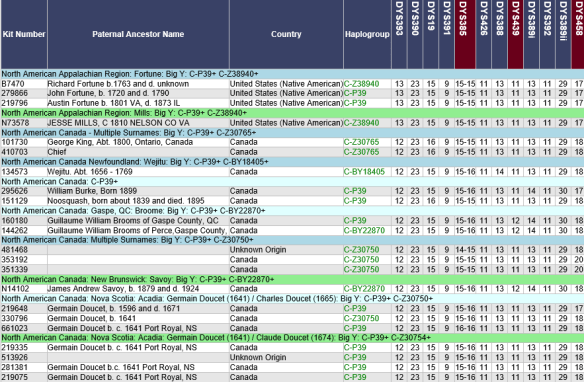
Another popular way to group larger haplogroup projects is by haplogroup subgroups for both Y and mitochondrial DNA. The popular R-L21 and Subclades project where my Estes men are members, but I don’t administer, is grouped in this manner.

One of the great features of all projects at Family Tree DNA is mapping. Based on how the administrator subdivides the project, if they enable project mapping (please do), you can select groups to display to view subgroup clusters.

I just love this feature. You know there’s a story behind this grouping that is relevant to the men who carry this haplogroup.

The A2 mtDNA Haplogroup project is grouped by subgroup. Some administrators go further and group by specific mutations within subgroup as well, hoping they will someday form a new subclade.

Maps provide so much information. In this case, the map of the A2 group, with no A2+ (downstream) subgroups shows a dispersal throughout the Americas, plus one person in Denmark.

Wait, what?

Denmark?

Of course, Denmark immediately raises a plethora of questions including whether the Denmark person has taken the full sequence test or has perhaps misidentified their ancestor’s original location.

Some people don’t understand that the matrilineal line is your direct mother’s mother’s mother’s line on up until you run out of direct line mothers. They hear or understand maternal instead and select their most distant MATERNAL ancestor which may be anyone from their mother’s side of the tree – and someone entirely different than their direct line MATRILINEAL ancestor.

Surname Projects

Surname projects play a different role than the projects mentioned above. Specifically, surname projects not only attract males with that surname who are candidates to test, they also attract anyone who has that surname in their genealogy who is looking to see if someone from their line has tested – because they can’t.

All of us have a lot more surnames that aren’t our direct paternal surname, which only males can test via Y DNA.

In the graphic above, the surname lineage is blue, the mitochondrial is red, and the colorless boxes represent all of our other lines.

Therefore, most people are looking at a surname project to find lineages they can’t directly test for. Surname projects need to make it easy to find and locate lineages based on ancestors and location.

I don’t know how many surname projects exist, as opposed to other project types, but I’d say surname projects outnumber the other types of projects significantly – meaning there is a huge potential to find your surnames and ancestors in those projects.

I love surname projects, because even if you are a female or a male that doesn’t carry that surname today, you can still benefit from the tests of people with that surname.

In the Estes project, which was formed for Y DNA, we also welcome autosomal joiners as long as they have Estes lineage someplace in their tree.

In the project, I group Estes men by lineage from the immigrant Estes ancestor.

In order to do this, I utilized the descendants of Abraham Estes to recreate his haplotype, and I compare everyone to those values, which represent the values that Abraham himself carried.

The good news is that by looking at the matches of each person in the project, you know who does and does not match each other. Family Tree DNA tells you that. They do the hard lifting and you arrange the furniture.

I didn’t know quite what to do with people whose genealogy and surname go back to Abraham Estes, or one of his cousins who all descend from the Deal, England line – but their Y DNA unquestionably doesn’t.

I created a “New Estes Line – Genetically Speaking” category. We can’t say that these people “aren’t Estes” because their mother may have been an Estes and gave her male child her surname, just not her Y DNA (which she doesn’t have,) of course. That was contributed by the father. So the surname is Estes, but the Y DNA doesn’t match any of the Estes descendants of the Deal line. However, these people may match Estes descendants autosomally.

There is also an “Estes Ungrouped” group, because even though their Y DNA is clearly Estes, I can’t connect these men back to a specific line yet either through paper or DNA.

Assigning a member to the “Estes Ungrouped” group is different than leaving them in the default “ungrouped” catchall group provided by Family Tree DNA which is located at the bottom of the page. The default ungrouped group is where everyone lives until the administrator assigns them to a group.

Autosomal Joiners

There’s been recent discussion about why administrators would want to allow people to join Y DNA surname projects who’ve tested autosomally and descend from the surname line, but aren’t males who carry the surname.

I am very much IN FAVOR of allowing autosomal joiners. Some other administrators, not so much. Someone recently said that they don’t understand why anyone who is not a male with the same surname as the project would want to join – what benefit there could possibly be. As a female Estes, I can explain exactly why, in one simple graphic. OK, 3 graphics.

On your personal account myFTDNA tab, there’s an Advanced Setting under “Tools and Apps.” Click there.

Then select the Family Finder test, then “yes” to “Show only people I match in all selected tests,” then select the project. The project selected (Estes in this example) must be one you have joined – that’s why it’s important to allow people from that lineage that don’t carry the Y chromosome to join.
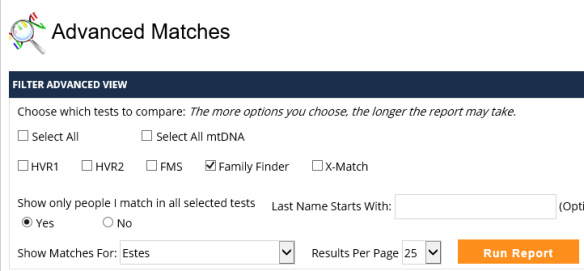
Want to guess how many people I match, meaning Estes males AND all other Estes descendants who have joined the project? Click on the orange “Run Report” to see.

The answer is 23 people, although I’ve truncated the graphic. Some are cousins that I tested, but a dozen aren’t AND there are a few that I’ve never heard of before. Hello cousins! Does anyone have the family Bible or know where it is???

Clearly, I could match some of these people through other lines, BUT, now I know where to start looking. Using the advanced tools like Paternal Phasing (bucketing), the In Common With (ICW) tool and the Matrix, available to everyone, will quickly tell me how I match these people. You can read about how to utilize these tools here.

Project administrators have an even more powerful matrix tool at their disposal.

This is exactly why I’ve elected to welcome autosomal testers into my Y DNA surname projects. The power of DNA is not just in a single set of results, but in collaboration and combined tools.

Autosomal Projects

Autosomal projects, typically referred to as “private family projects” do exist, but you can’t see them when you search by surname because they don’t show up in searches, according to the Family Tree DNA policy.

I hope this policy changes in the near future, allowing the option of searching for autosomal-only projects. Admittedly, autosomal projects are challenging without any results to “show” in a display.

Therefore, in an autosomal project today, in order to group people, you must allow either the Y or mtDNA to “show” because members can’t be grouped otherwise, and even then, they must be grouped on two independent pages – Y and mitochondrial.

The current project structure does not support creating an autosomal group, perhaps by ancestor, and allowing project members’ ancestor from the Estes line to show, for example, given that it’s not the direct Y or mitochondrial DNA line.

For that reason, autosomal projects are private, but I would like for the administrator to be able to select public or private for autosomal projects and to have a separate autosomal tab in the administrator’s toolbox where all members can be grouped according to autosomal lines, independent of and in addition to Y or mitochondrial DNA if relevant.

This would also allow the creation of “ancestor projects,” meaning everyone descended from Robert Eastye (that becomes Eastes and Estes) born 1555 in Deal or Ringwould, Kent, England. Thinking ahead, we could then proceed to recreate his autosomal DNA from project members, just like we recreated Abraham Estes’s Y STR haplotype.

Here’s an example of how autosomal results could be grouped, without showing any additional results information, in projects. I’ll be submitting this as a request to Family Tree DNA!

This autosomal grouping challenge is present as well for Y DNA surname projects that allow autosomal joiners.

Some Grouping Don’ts, With a Dash of Humor

One of the things I do roughly yearly is to peruse the public projects to see if any of my ancestral lines are represented or their haplogroup has been expanded. I recently finished this activity once again, so, here are a few of the frustrations I encountered that are entirely avoidable.

  • Please Don’t Make Projects Private

There is nothing more discouraging than seeing this:

Projects are a wonderful way to recruit new members and if the project is private, you’ve disabled your best recruiting tool.

I’m not feeling warm and fuzzy about this project, and that’s no joke. The first thing this project administrator did was to hang a big “Go Away” sign out for me to see. Ok, I’m going! No need to ask twice!

Individuals select for their results to “show” or “not show” publicly in projects. You don’t have to do this for them. Really.

So please, be inclusive and roll out the red carpet!

  • Please Don’t Group Surname Projects by Haplogroup Only

Please don’t group surname projects by haplogroup, at least not if you have any other choice. Let’s call this the last choice or desperation grouping methodology.

Remember, the most common reason people are looking at the project is to be able to find their ancestors, or ancestral group, which may be predicated on location. No one, but no one, already knows the surname haplogroup or they wouldn’t be searching for their ancestors in this way.

Family Tree DNA automatically groups by marker/color within subgroup, but if you’re trying to see if your ancestor or line is represented in a project, it’s almost impossible to find using the “group by haplogroup” methodology – especially with small subgroups. Y haplogroups can vary in their naming, depending on how deeply people have tested. For example, haplogroup R has thousands of branches. Some administrators group at the highest haplogroup level, and some group by the smallest branch level, which separate groups of men in the same family line – because not everyone has tested to the same level.

Of course, if you really don’t know how these men connect, or don’t have any idea about who descends from which ancestor, haplogrouping at the base haplogroup level (like R or J) may be the best you can do. Family Tree DNA will attempt to automatically group within your haplogroup subgroups.

If this is the case, you might want to attempt to recruit a genealogist with some specialty in this surname as a co-administrator. Hey, maybe someone from within that surname project!

  • Please Don’t Group by Number of Markers Tested

OMG, please no. Just no.

Grouping by number of markers tested makes it impossible to find line marker mutations that should be grouped together. For example, the men with a value of 13 at marker DYS439, above, should be displayed together because that is likely a line marker mutation – signifying descent from a specific descendant line of Charles Dodson in the red rows. However, since participant results are grouped by the number of markers tested, these men are displayed in different groups.

To figure out which ancestral line that value of 13 descends from, you need a subscription to the Physic Friends Network.

  • Please, PLEASE, Don’t Show Only Surnames and not “Paternal Ancestor Name”

How on earth would I ever know if my Luttrell or Littrell line is represented here. And why would an administrator choose to NOT INCLUDE the Paternal Ancestor Column?

This one makes me just want to pull my hair out. Yes, seriously! Going bald.

  • Please, Name the Line

Give the lineage a name or description, not just “Lineage 1.” It helps researchers determine if THAT John Jones is THEIR John Jones and it helps a lot to know who John Jones married, and when, if you know.

For example, for Lineage 1, put as much information as you can discover, or at least enough to unquestionably identify the line. For example, “John Doe born 1612 Sussex, England died 1683 Tukesbury, MA m Jane Smith.”

This helps identify specific lines. This is not Wheel of Fortune for ancestors. Don’t make me guess, because I may guess incorrectly – and there is no need for that when the information is (could be, might be, please let it be) readily available.

Another hint is to use color effectively. Perhaps lines that have different known progenitors but still match genetically having the same surname, meaning the earliest common ancestor has not yet been identified, could be the same color.

Think this through ahead of time and come up with a naming and color scheme that works well for your project circumstances and goals.

Sometimes after you’ve worked with a project for some time, you realize that perhaps things could be organized better. Been there, done that – no t-shirt. Just re-do it.

  • Or Worse Yet…

No surname AND no ancestor AND the lines aren’t named. Yes, really. This project might as well be called “why bother” or “shoot me now.”

You can’t even tell which surname this project might be, let alone identify an ancestral line.

You know that old saying about serving as a bad example? Well, this is it!

  • A Good Example

And because I don’t want to leave on a negative note – a really good example of a surname project.

You can tell that this administrator has spent a significant amount of time working on this project – and also encouraging members to enter their most distant ancestor information which is extremely useful.

Now this project looks inviting and welcoming. And no, in case you were wondering, I do not administer this project, but since imitation is the sincerest form of flattery, I’m going to review my own surname projects with this one in mind.

Great job Hill project administrator(s).

Resources

Maurice Gleeson has produced two wonderful YouTube videos about project administration and in particular, member grouping.

How to Group your Project Members using MPRs (by the way, an MPR is a “marker of potential relatedness,” according to Maurice.

https://www.youtube.com/watch?v=A9JcvbFcgUI

How Y-DNA can help your One Name Study

https://www.youtube.com/watch?v=vOx971zy6LI&t=3s

In addition, Family Tree DNA just updated the Quick Start Guide for administrators which walks you through setting up a project. https://www.familytreedna.com/learn/project-administration/quick-start-guide/.

Now, enjoy Maurice’s videos and create the most friendly welcome mat possible.

______________________________________________________________

Disclosure

I receive a small contribution when you click on some of the links to vendors in my articles. This does NOT increase the price you pay but helps me to keep the lights on and this informational blog free for everyone. Please click on the links in the articles or to the vendors below if you are purchasing products or DNA testing.

Thank you so much.

DNA Purchases and Free Transfers

Genealogy Services

Genealogy Research

World Families Network, Ysearch and Mitosearch Bite the Dust – Thanks So Much GDPR

It’s a sad month.

The core foundation of genetic genealogy is sharing.

GDPR is NOT about sharing easily, and the GDPR hoops are onerous, to be charitable. I wrote about GDPR in the articles GDPR – It’s a Train and It’s a Comin’ and Common Sense and GDPR.

One might say GDPR is at cross purposes with genealogy. It probably wasn’t intended that way, but so far, we’ve lost several resources due to GDPR, and it’s still not here yet.

Add to the death list World Families Network, Ysearch and Mitosearch.

The cost of GDPR compliance, necessary attorney fees along with with the risk of the horrific fines of up to 4 million Euro is just too much for a small business or a non-profit. Additionally, non-EU businesses are required to retain a European Representative company that agrees to absorb some level of the risk for non-compliance. Try finding a company to do that. Not to mention the pain-in-the-butt-factor of the hoops that they would have to jump through if so much as one person complained. Bottom line – not worth it.

Thanks so much GDPR.

World Families Network

Terry Barton, founder of World Families Network, a Y DNA project management company that consists primarily of Terry and his wife, sent an e-mail to the administrators of the projects they host saying that WFN is retiring and shutting down on May 23rd, two days before the GDPR date.

Here’s part of the e-mail to WFN administrators from Terry:

We will delete the project sections of the WorldFamilies site on May 23, 2018, so please copy any information that you wish to save. You may wish to make a copy of your Home, Results, Patriarch, Discussion or other project pages. We can provide an empty excel spread sheet with columns preset to copy/paste your results page on request. For the other pages, you may want to copy/paste your info into a Word document. (Note: we won’t be able to “rescue” you if you miss the deadline, so please don’t wait too long.)

The projects hosted at World Families Network (WFN) will revert to their project pages at Family Tree DNA, so all is not lost, BUT, the information on the Patriarch’s pages as well as some of the information on the actual DNA results pages at WFN does not come directly from Family Tree DNA. Some WFN sites are not fed from the Family Tree DNA project pages at all, so fields like “Earliest Ancestor” at WFN may be blank at Family Tree DNA. That, of course, can be remedied, but won’t happen automatically.

Many of the projects managed by WFN were abandoned, meaning they have no administrator. Some have administrators that preferred the WFN format to the Family Tree DNA format. One of the most popular features was the Patriarchs page where lineages of men with the project surname were listed. This feature was put in place before trees were available at Family Tree DNA – but the Patriarchs format serves as a one-glance resource and can be connected to the kit numbers on the DNA pages.

Please, please, please do two things:

  • Visit the WFN surname links here for projects and scan the projects shown with “project site,” meaning they are WFN hosted, to see if any include your ancestral surnames. If SO, visit that WFN project site by clicking the link and record any information relevant to your family.

  • Consider adopting projects relevant to your surname. Most of these projects will need to be spruced up at Family Tree DNA, meaning they will need to be grouped and the Patriarch’s page will need to be copied onto one of the several available project pages at Family Tree DNA. Many of these projects are small and you can easily preserve information. Terry provides a list of orphaned projects here, but I don’t know if it’s current. I would reach out to Family Tree DNA at groups@familytreedna.com about any project listed as having a project site at WFN. Some projects have an administrator listed, but they are no longer active.

For project administrators considering a private website, be aware per the GDPR requirements that you will constantly have to monitor the privacy settings at Family Tree DNA and assure that you are not displaying information for anyone who has selected, or changed their project setting from public to “project only.” Family Tree DNA automatically removes the project members data from a public display when they change settings or leave projects.

Ysearch and Mitosearch

On May 10th, on their Forum, a Family Tree DNA representative announced that Ysearch and Mitosearch will be shut down by month end. These databases were established in 2003 by Family Tree DNA for free, open sharing.

While this announcement doesn’t state that it’s because of GDPR, that correlation probably isn’t coincidence.

These two data bases have been on life support for some time now. They have been less immediately useful since other testing companies stopped Y and mitochondrial DNA testing, meaning that you could see all of your new matches at Family Tree DNA.

One of their biggest benefits, even for Family Tree DNA customers, was that these were the two databases where everyone could compare actual marker values, not just see if they matched and genetic distance.

Unfortunately, Ysearch and Mitosearch were the only locations left for people who uploaded from those now-defunct databases. Of the 219,410 records in the Ysearch database, 25,521 are from sources other than Family Tree DNA.

Originally, there were four public databases. The other two have been gone for some time, with these being the last two resources to go. This is truly a tragedy for the genetic genealogy community, because unlike the WFN departure where the projects are still available at Family Tree DNA – there is no alternative resource to Ysearch and Mitosearch. Gone is gone – especially for the 25,000+ results archived there from companies that are also gone meaning Relative Genetics, Oxford Ancestors, Ancestry’s now defunct Y DNA, Sorenson and others.

Recently, Family Tree DNA fixed the captcha issue, but the sites are still not fully functional. I tried to retrieve information by searching by surname at Ysearch, and the search failed with an error. I don’t know if the problem now is the actual data base or the fact that the site is overwhelmed by people trying to do exactly what I was trying to do.

As someone in the Family Tree DNA forum thread said:
“GDPR: The gift from Europe that just keeps on giving.”

Thank You

As sad as I am to see both of these resources go, I want to publicly thank Terry and Marilyn Barton for their 14 years of service to the genetic genealogy community and wish them well in their retirement. Hopefully they will have time to solve their own genealogy mysteries now.

I also want to thank Family Tree DNA for establishing both Ysearch and Mitosearch, and maintaining these sites as long as they have. Few companies would have established a platform for their customers to compare results with their competitors’ products which speaks to their early and ongoing commitment to genealogy.

______________________________________________________________

Disclosure

I receive a small contribution when you click on some of the links to vendors in my articles. This does NOT increase the price you pay but helps me to keep the lights on and this informational blog free for everyone. Please click on the links in the articles or to the vendors below if you are purchasing products or DNA testing.

Thank you so much.

DNA Purchases and Free Transfers

Genealogy Services

Genealogy Research

Family Tree DNA’s Y-500 is Free for Big Y Customers

Did you notice something new on your Y DNA results page at Family Tree DNA this week? If not quite yet, you will soon if you have taken the Big Y test. There’s a surprise waiting for you. You can sign in here to take a look.

The first thing you might notice is that the Big Y has been renamed to the Big Y500. However, the results I want you to take a look at aren’t under the Big Y500 tab, but on your regular Y DNA Y-STR Results tab. Click to take a look

In the past, 5 panels of Y DNA STR markers have been available:

  • Panel 1 – 1-12 markers
  • Panel 2 – 13-25 markers
  • Panel 3 – 26-37 markers
  • Panel 4 – 38-67 markers
  • Panel 5 – 68-111 markers

Now, a 6th panel has been added:

  • Panel 6 – 112-550 markers

However, there is a difference between the first 5 panels and the 6th panel.

Why is it Called the Y500?

If there is a total of 550 markers reported, why is this product called the Y500?

That’s a great question with an even greater answer.

Family Tree DNA actually tests for a total of 550 markers. Values for markers between 112 and 550 are provided FOR FREE when you take a Big Y test.

Family Tree DNA guarantees that you will receive at least a total of 500 markers, or they will rerun your Big Y test at no cost to you to obtain enough additional markers to reach 500. (The 500 number assumes that you have all 111 STR markers. If you have not tested all of the STR panels, the number will be lower by the number of STR values you haven’t tested. This means that if you took the Y67, but not the Y111, your 500 guarantee number would be 500-44, where 44 is the number of markers in the Y111 panel that you have not yet ordered.)

The best part?

The markers above 111 are ENTIRELY FREE with a Big Y test – for both existing customers who have already taken that test, and all future customers too. Yes, you read that right. If you took the Big Y previously, you are receiving the markers in panel 6, 112-550 absolutely free.

How does it get better than free?

The Big Y Uses a Different Technology

There is a difference between the first 111 markers and the markers from 112-550, meaning that they are read using different technologies

The results for the first 111 STR markers are produced using a technology that targets these specific areas and is very accurate.

The results for the 112-550 markers is produced using next generation sequencing (NGS) on a different testing platform than the Y-111 results. NGS, utilized for the Big Y, scans the Y chromosome rather than targeting specific locations. This scanning process is repeated several times, with values at specific locations recorded.

Scanning

Using NGS technology, your DNA is scanned multiple times, with the number of scans, such as 25 or 30, referred to as the coverage level. The goal is for multiple/most/all scans to find the same value at the same location consistently. Because of the nature of scanning technology, this sometimes doesn’t happen, for various reasons, including “no-calls” which is when for some reason, the scans simply can’t get a reliable read at that location in your DNA. No calls are typical and occur at low levels in everyone’s scan.

Here’s an example from a Big Y scan viewing the actual results using the Big Y chromosome browser.

The blue bars are forward reads and the green bars are reverse reads. Dark blue and dark green bars indicate high quality scans. Medium blue and green are medium quality scans and faintly colored bars indicate poor quality. If you take a look at where the little black arrow at the top is pointing, you can see that a T is the expected value at that location.

When the expected value as determined in the human reference genome is found at that location, nothing is recorded in that column. However, when a different result is discovered, like A in this case, it’s noted and highlighted with pink. We can see that there are 5 As on forward and reverse strands of high quality, then a low quality read, 6 more high quality reads, followed by two reads that show the expected value (nothing recorded) and then three more high quality A reads.

The goal is to determine what actual value resides at that location, and when that value is determined, it’s referred to as a “call.”

For a “call” to be made, meaning the determination of the actual value in that position, the person or software making the call must take several quality factors into consideration.

In this case, the number of high quality reads indicating the derived (mutation) value of “A” allows this location to be definitively called as “A.” Because several other men previously tested have A at this location, a SNP name has already been assigned to this mutation – in this case, A126 in haplogroup R.

However, if you look to the right and left of the arrow to the next two browser locations that contain mutations, you can see in both cases that there are less than half of the column locations that are marked as pink with derived values (mutations), meaning those not expected when compared to the reference model.

These types of locations which are neither clearly ancestral (reference model) nor derived values are when value judgements come into play in terms of deciding which value, the ancestral or derived, is actually present in the DNA of the person being tested.

Some people will call a SNP with only one mutation reported out of 20 or 30 scans. Some people will call a SNP with 2 scans; some with 5, and so forth. Generally, Family Tree DNA uses a minimum threshold of 5 high quality scans to call a mutation value.

Now, let’s talk about how STR values, meaning results displayed in those locations between 112-550, are found in your Big Y NGS data file. You can read about the difference between SNPs and STRs in the article, STRs vs SNPs, Multiple DNA Personalities.

STRs

Short tandem repeats, known as STR values, are the numbers reported in your STR panels. These are stutters of DNA, kind of like the copy machine got stuck in that one area for a few copies.

For example, in haplogroup R, for this person, the value of 13, meaning 13 repeats of a particular sequence, is found at marker DYS393.

Repeated sequences are in essence inserted in-between SNPs in some DNA regions, and the number of repeats reported in STR marker panels is the number of stutters, or repeats, of a particular repeated sequence.

That sounds simpler than it is, because how to count a sequence isn’t always the same. Let’s look at an example showing 20 consecutive DNA positions.

The actual values are shown in the value row. However, these values can be counted in a number of different ways. I’ve also added a “stray read” at location 13 which causes confusion.

At location 13, we show a value of G which does not fit into the repeat pattern. How do we interpret that, and what do we do with it?

The repeat pattern itself is a matter of where you start counting, and how you count.

I’ve color coded the repeats with blue and yellow. Incomplete repeats are red. The stray G in location 13 is green, because it breaks the repeat sequence.

In example 1, we start counting with T in position 1, and there are clearly 3 repeated groups of TACG before we hit our stray G in position 13, which stops the repeat pattern. However, after the stray G, there is one more full repeat sequence of TACG. Do we ignore the G and count the 4th TACG as part of the group, or do we count only the first 3 complete TACG sequences? The total number of repeats could be counted as either 3 or 4, depending on how we interpret the stray G in location 13.

In example 2, we start counting with the GTAC, because I was simulating a reverse read where we start at the end and work backwards. In this case, we clearly have 2 reads, then our stray G which occurs in the middle of a read. Do we ignore that stray G and call the rest of the blue GTAC surrounding the G as a repeat? That blue repeat group is followed by another yellow group. Do we count it at all, or do we simply stop with the marker count of 2 because the G is in the way and breaks the sequence? This repeat sequence could be counted as either 2, 3 or 4, depending on what you do with the G and the following sequence group, both.

Examples 3 and 4 follow the same concept and have the same questions.

All STR sequences face the issue of where to start reading. Where you begin reading can affect the number of repeat counts you wind up with, even without our stray G in position 13.

STR markers obtained from NGS sequencing face this same challenge, but it’s complicated by the issue of no-reads and the call variance that we saw in the chromosome browser where the same location is sometimes called differently on different scans, meaning we really can’t tell which is the actual value. What do we do with those?

All of this is complicated by the fact that some regions of the Y chromosome simply do not produce valid or reliable information. Different (groups of) people define this unreliable region as starting and ending in different locations. Therefore different people analyzing the same information often arrive at different answers to the same question or use marker locations that others don’t.

I suspect all of this may fall into the category of trivia you never wanted to know, but now you’ll understand why you may find different (sometimes strongly held) opinions of what is “right” when two geeky types are arguing strongly about a particular STR value as your eyes glaze over…

Here’s the bottom line – if you’re using results called by the same vendor, you don’t have to worry about whether you and someone else are being accurately compared. You and everyone else at that vendor will have your results reported using the same technology and calling methodology.

Family Tree DNA has always taken a more conservative approach, because they only want to report to customers what they know to be accurate.

You will not see low confidence values on your reports, nor calls from an unreliable region. Genealogists cannot reach reliable genealogical conclusions using unreliable data.

The Big Y 500

Because of the nature of scanned STR results, Family Tree DNA can’t guarantee that you will have a reliable read at every location. In fact, few people will have values at every location. The technology for the Y-111 markers provides a very high level of accuracy and Family Tree DNA will provide results for every 1-111 location unless you actually have a deletion, meaning no DNA in that location. However, the values of markers 112-550 are taken from the Big Y NGS scan.

Therefore, some Big Y customers will have a few markers above 111 that show a “-“ instead of results, such as FTY945 and FTY1025, shown below. A value of “0” found in markers 1-111 means that there is actually no DNA in that location, and it’s not a read error. No DNA at a specific location is heritable, meaning it can serve as a line-marker mutation, while a “no call” means that the scan couldn’t read that genetic address. No calls cannot be compared to others and should be ignored.

Before someone starts to complain about having markers with “no reads,” remember that Family Tree DNA is providing up to 439 additional markers available FOR FREE to customers who have taken (or will take) the Big Y test.

That’s right, there is no charge for these new markers. You are guaranteed 389 additional markers, but you may actually receive as many as 439, depending on how well your DNA reads. The kits I’ve checked have only been missing a couple of marker values, so these kits received 437 additional markers, far above the guaranteed 389.

Right now, matching is not included for the 112-550 markers. Matching above 111 markers may be challenging because while Family Tree DNA does guarantee that you’ll have at least 389 new marker values, those won’t be the same markers above 111 for everyone. In a worst-case scenario, you could mismatch with someone on as many as 100 markers above 111 panel, simply because both you and the person you are matching against are both missing 50 different markers each, for a total of 100 markers mismatching.

Additionally, not everyone has tested all 111 STR markers, and you will receive your 112-550 values if you have taken the Big Y test regardless of whether or not you’ve tested all 111 STR markers.

Matching

Matching on the first 111 markers is reliable because you will have an accurate value, even if the value is 0. Having no DNA at a specific location is a valid result and can be compared to other testers.

With different markers between 112 and 550 missing for different men, matching becomes very tricky. Specifically, how do we interpret mismatches? How many mismatches to we allow to still be considered a reasonable match?

Matching is an entirely different prospect when integrating the markers between 112 and 550 into the equation with a potential of up to 100 mismatching locations in that range simply from no-reads.

I had presumed that Family Tree DNA would offer matching on these additional markers. Presume is a dangerous word, I know. Matching is not offered right now, and given the complexities, I don’t know if matching as we know it will be the future or not, how reliable it would be, or how Family Tree DNA would compensate for the missing STR information that differs with each person’s test.

Furthermore, I’m not quite sure what they would do with two men who haven’t both tested to the same STR level, meaning panels 1-5, but have taken the Big Y so have values for 112-550.

Big Y Purchases

Here’s the status of Big Y tests, today:

  • New Big Y purchase if you have done no Y DNA testing at all – you will now be able to purchase a Big Y without having to previously purchase any STR markers. The 111 STR markers are now bundled into the Big Y purchase, which makes the Big Y appear more expensive than before when the STR markers had to be purchased separately before you could order a Big Y test. The Big Y plus all 111 STR markers is now $649 during the DNA Day Sale, regularly $799.
  • Already tested through 111 STRs – the Big Y is only $349 on sale right now, and $449 regularly, both significantly discounted from just a few months ago.
  • Existing customers who have taken some level of Y STR test but not the Big Y – will have to upgrade their STR test to the 111 level when ordering the Big Y. Those tests are discounted appropriately, shown in the table below.
  • Existing customers who have not tested their STR markers to 111, but have already taken the Big Y – will receive marker values from 112-550. However, they will only receive the Y STR markers below 112 for panels they have paid for. This means that if you have only tested to 37 markers, you will have results for locations 1-37, not for 38-111, but will have results for locations that read from 112-550. This would be the perfect time to upgrade so that you have a complete marker set.

Right now, Family Tree DNA is having their DNA Day Sale and it’s a great time to purchase a Big Y or to upgrade your STR markers if you don’t have the full 111. The sale pricing shown is valid through April 28th. You can click here to order.

______________________________________________________________

Disclosure

I receive a small contribution when you click on some of the links to vendors in my articles. This does NOT increase the price you pay but helps me to keep the lights on and this informational blog free for everyone. Please click on the links in the articles or to the vendors below if you are purchasing products or DNA testing.

Thank you so much.

DNA Purchases and Free Transfers

Genealogy Services

Genealogy Research


National Siblings Day – Love Them While You Can

Wow – talk about mixed emotions today.

Did you know there was a National Siblings Day?  Well, neither did I.

I woke up this morning to make that discovery which left me with an entire range of emotions.

Fittingly, I received and a special “wave” from my brother Dave whose DNA results confirming his relationship to his biological family were posted at Family Tree DNA overnight.

Yea, he’s the brother that turned out not to be my biological brother – but I don’t know how I could have loved him more. “Blood” made and makes no difference at all. You can read about my journey with Dave and finding his family here, here and here.

Family of heart is every bit as important as family of biology. 

Yes, love them while you can.

Intensely.

Every. Single. Day.

Because we never know when it will be our last opportunity.

To hug them.

To tell them.

To look them in the eye.

To laugh, carefree.

They can be gone in an instant.

The blink of an eye.

I know very personally and I bet you do too. 

Tragic, shocking, numbing loss.

After they move to the other side of the veil, they would want you to remember them joyfully.

Lovingly.

That’s why it’s so very important to love them fully while you can.

Hug them.

At every opportunity.

Someday, it will be those memories that sustain you.

Or them.

In case you’re having a weepy moment, here’s an article to brighten your day and remind you of just what siblingship means! Enjoy the laugh!

PS – Test the autosomal DNA of all of your siblings, now:) DNA results are an everlasting legacy that continues to contribute long after you, or them, can no longer give in quite that same way.

______________________________________________________________

Disclosure

I receive a small contribution when you click on some of the links to vendors in my articles. This does NOT increase the price you pay but helps me to keep the lights on and this informational blog free for everyone. Please click on the links in the articles or to the vendors below if you are purchasing products or DNA testing.

Thank you so much.

DNA Purchases and Free Transfers

Genealogy Services

Genealogy Research