Jean LePrince was born to Jacques Le Prince and Marguerite Hebert around 1692 probably in Minas, based on the 1693 census. He could also have been born in Grand-Pré, which is only about 10 miles from various portions of Minas, also known as Les Mines.

Grand-Pré was settled about 1680, and Les Mines about 1682.
In 1686, Jean’s parents were living in Port Royal, but by 1692, they had relocated. The Heberts were one of the founding families in the Minas basin, which included Grand-Pré and Les Mines.

This map was drawn in 1755, 63 years after Jean was born, but you can see the location of the Riviere Hebere. This may well be where the Hebert family lived, which would include Marguerite, who would have settled among her family.
Sadly, Jean LePrince never knew his father, because his father died sometime after his conception in either 1691 or early 1692, and before the 1693 census where his mother is shown as a widow in Minas. To be clear, there is no differentiation in the census between Grand-Pré and Minas.
Marguerite Hebert, widow of Jacques LePrince, age 40, is recorded with daughter Marguerite, 15, Francois and Jacques, 13-year-old twins, Estienne, 4 and Francoise 1. She is one of two widows living among 52 households, with a total of 307 residents.
Jean was apparently misrecorded as Francoise, unless Jean’s mother was pregnant with him when the census was taken. Two other children’s names or ages were misrecorded as well. This makes me wonder if the person who took the census didn’t actually know the family, or didn’t know them well, and was recording the children’s names from memory – or based on what other people told them. This might suggest that the family didn’t actually live in Grand-Pré where the church was located, because it would have been easy for the census-taker to visit their home there. If they lived more remotely, the temptation to record the family members without visiting would have been greater. Apparently, census-takers haven’t changed much over time.
Jean LePrince Marries
We know for sure that Jean LePrince was the son of Jacque LePrince and Marguerite Hebert because his marriage record to Jeanne Blanchard in Port Royal, on January 30, 1715, tells us as much.

In 1715, Jean’s mother was still living in Mines. Jean, about 23 years old, probably met the widow, Jeanne Blanchard, while trading or visiting relatives in Port Royal.
Jean LePrince did not sign his marriage document, but his wife, Jeanne Blanchard signed with a mark, as did Guillaume Blanchard and Emmanuel Hebert. Guillaume Blanchard , J Dugas and Bernard Godet all signed with signatures as witnesses.

Jeanne Blanchard was the widow of Olivier D’Aigre, Daigre or Daigle, and was about a decade older than Jean LePrince. When they married, she had six children ranging in age from 5 to 14. Olivier Daigle had died in September of 1709, and Jeanne had not remarried.
At his wedding, Jean LePrince became the stepfather to Jeanne’s children, the eldest of whom had been born when Jean was about 9.
Jean and Jeanne had five more children who were baptized by the local priest. .
We know that Jean LePrince stayed in the Port Royal region because he was present for the marriages of his children in 1734, 1738, 1740, 1747 and 1750.

On November 24, 1738, Jean’s son, Honoré Le Prince, age 22, married Isabelle Forest, age 28. Both her father, René Forest, and Jean LePrince signed.

Jean signed again in 1747 when his son, Jean Baptiste LePrince, married Judith Richard.
Jean actually signed for three of his children’s marriages, but did not sign in 1750. However, he is not listed as deceased in Pierre LePrince’s 1750 marriage record in the parish register.
Interestingly, Jean’s three eldest children married children of his neighbors, René Forest and his wife, Francoise Dugas.
Jean’s Land

We know where Jean’s land was located, thanks to a 1733 map.

When I visited Nova Scotia in 2024, I was able to locate at least the general area where Jean LePrince lived and raised his children.

A cemetery is located beside the road today.

The LePrince land is someplace near Button Brook on the south side of the Annapolis Royal River.
It’s difficult to pinpoint an exact location using the old maps. Jean would have farmed his wife’s deceased husband’s land, too.
Acadian homes stood on the high ground, with the saltmarsh dykes draining the land closer to the river.
This land looks deceptively tranquil – and it is today. But it wasn’t back when Jean lived there.
Conflict
Conflict between the English and Acadians was a constant state of affairs, but it worsened in 1720 when the English began to speak of expelling the Acadians because they would not swear their loyalty to the English monarch.
In 1713, the Treaty of Utrecht had ceded Acadia to Britain, and Port Royal officially became Annapolis Royal. The British “encouraged” the Acadians to leave and resettle in territory still controlled by France, but they refused because the English stipulated that they had to leave their land with no compensation and couldn’t take anything with them.
The Acadians stood firm in their resolve.
By 1720, things had cooled a bit. The Acadians had decided they wanted to leave, but the English refused to let them because they had wizely realized they needed the Acadian farmers to feed the English troops stationed at the fort in Port Royal. The English, especially not soldiers, had no idea how to farm salt marshes.
By 1720, the Acadians had decided that neutrality was the best position possible.
The Acadians were characterized as stubborn and recalcitrant, and, in 1721, as insolvent and treacherous.
The demands to sign a loyalty oath to the English monarchy continued, as did the Acadians’ staunch refusal. An earlier oath that they had signed was determined to be too lenient and declared void.
Everyone is angry and frustrated.
Confusion Reigns
There’s a great deal of confusion surrounding Jean’s life, the division and distribution of Jean’s land, and his death. Let’s start with his land.
Thanks to a WikiTree volunteer, Cindy, I was able to obtain an article written by Vincent Prince in 1968 and published in French in 1971, which I had translated. Vincent researched the LePrince/Prince family extensively, gaining access to documents that I certainly don’t have access to, nor have I ever seen discussed elsewhere. He did an incredible amount of work before any of this information was available online. Long before “online” existed.
Thankfully, he shared his work.
Jean’s story, according to Vincent (indented), with slight modifications for readability. Additional comments and research by me and Mark:
In December 1729, Jean’s name appears first in the list of the Acadians of Port-Royal who request permission to sign the oath of allegiance, then a few days later, among these same inhabitants who actually swear the oath in question.
This is the infamous oath where page one bonds the Acadians with a loyalty oath to the English, page two lists the conditions and exceptions desired by the Acadians, and page three contains the signatures and witnesses’ signatures. The English commander only sent pages one and three to England, but the Acadians never knew – so everyone thought they got what they wanted. Relative peace blanketed the valley, at least for a while.
On November 11, 1731, one again notes the name of Jean Prince at the bottom of the document where the citizens of the Annapolis Royal River respond in the negative to the order that had been given to them by the English authorities to have their lands surveyed. (With regard to the oath of allegiance and the refusal to have the lands surveyed, see Placide Gaudet, “Les Prince,” in History and Genealogy of the Acadians, pp. 129, 131, and 133.)
This latter document would alone suffice to demonstrate that Jean Prince was indeed a farmer. But we have several other proofs.
First, tradition holds, according to Monsignor Louis Richard and Lucien Serre, that Jean Prince inherited the land that his father had kept at Port-Royal when he moved to Pisiguit after 1686. Moreover, thanks to a member of the Genealogical Society Canadian-French, Mr. Marcel Dubois, married to a Doucet, I was able, recently, to become acquainted with old papers preserved in the archives of this Doucet family concerning certain transactions carried out by Jean Prince.
Five Contracts
These are five contracts of sale or transfer of lands, of which the originals have been preserved to our days.
-
- In the first contract, dated October 1, 1731, one sees that the couple Jean Prince and Jeanne Blanchard bought from Jean-Baptiste Préjean, at the price of forty livres tournois, a tract of land in the upper of the Annapolis Royal River extending from “the aboiteau that one made to divert the stream of the Lower Meadow situated in the upper of the said river,” as well as the share that Jean-Baptiste Préjean possessed in “a point that is along the large stream of the earthly paradise of the low land.”
This contract provides that Jean Prince, in partnership with others, may build a mill along the river.
Jean-Baptiste Préjean was born in 1692, and married Marie Gaudet in 1716. His father, Jean Préjean would have been about 80 years old in 1731, and died two years later.
When Jean LePrince purchased this land, it was located on the far upper reaches of the river, beyond most family villages. Note that the “Paradis Terrestre”, earthly paradise, on the map below, just to the right of the Bastarche land. Given this description, it’s possible that Jean owned land on both sides of the river, and that this contract actually refers to two different tracts of land.
This land was known for its beauty, hence it’s name, “Paradis Terrestre.”.

Jean LePrince’s land, according to several maps, would have been across the river from the Gaudet Village, present-day Bridgetown, established by Jean Gaudet. Jean LePrince’s grandmother was Marie Gaudet.

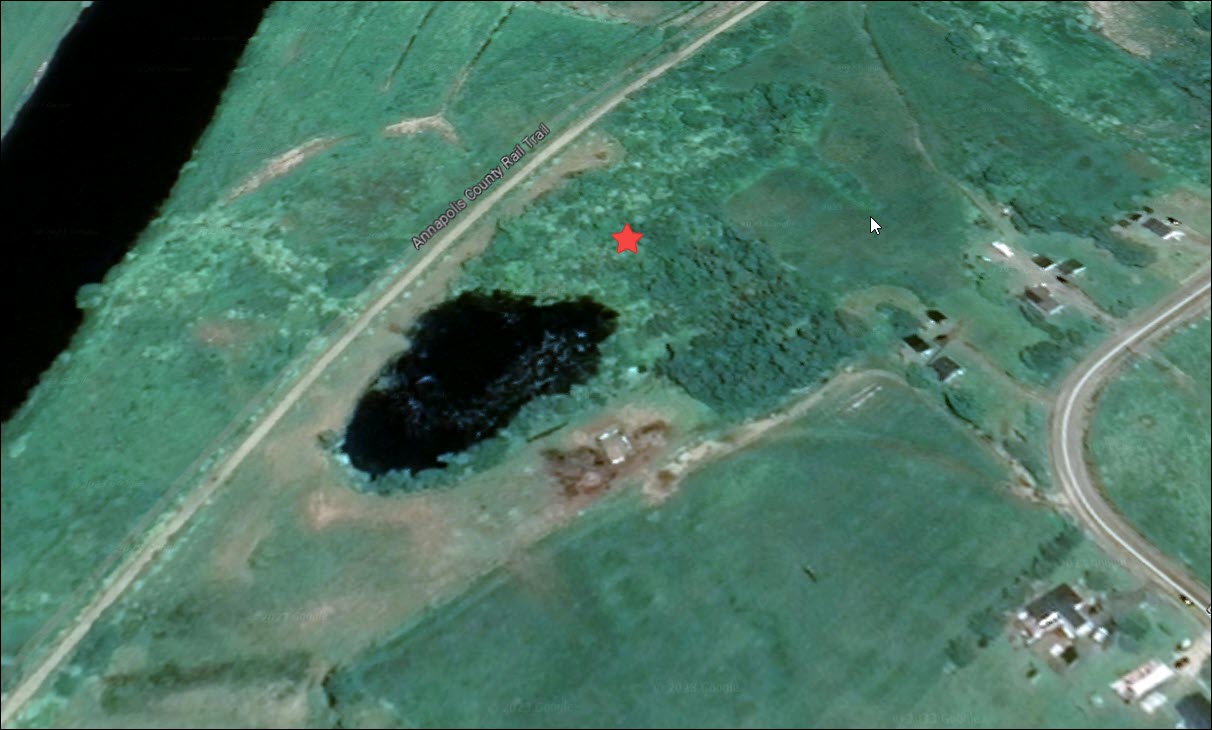
This is most likely the location of Jean’s stream, based on the various descriptions and maps. His house would have been located on the higher ground to one side or the other, or towards the rear.

On the north side of the road, today, the stream meanders to the river, just out of sight here. I wonder if the aboiteau mentioned still exists. Most do, today appearing as a burm or slight rise in the terrain.
In order to be able to build a mill, Jean would have needed a reasonable water source, and this is the only stream on the south side of the river in this area that meets that criteria, although there is another candidate stream located about two miles further east, near the “Paradise” area on the south side of the river.
There is no historical evidence of a mill actually being built that far upstream, but then again, with this family, anything is possible. However, it seems like Jean was plagued with chronic problems.
-
- The second contract is one of sharing or subdivision of the property of Jean Prince between his five children. It is dated April 13, 1742.
Note that this is just 11 years after Jean LePrince, or Prince as it’s written here, acquired the property from Jean-Baptiste Préjean. This is highly unusual. In 1742, Jean’s children would have been ages, 27 (daughter), 25, 23, 21, and 19 (sons). This also doesn’t say if it’s one property, or all of Jean’s property, whatever that might be.
-
- As for the third contract, dated January 19, 1746, it makes a new division or redistribution of these same properties among the four sons of Jean.
This is even more unusual and suggests that either none of his sons had actually “taken possession,” or they were all living on the land and farming it jointly. It also appears to cut Jean’s eldest child, daughter Marie Josephe Le Prince, who had married Jacques Forest in 1734, out of the land distribution. I wonder if this was a result of, or caused, family friction.
-
- The fourth contract, dated July 3, 1752, settles a division of land held in common up to that time with Bernard Pellerin and the two younger sons of Jean Prince.
- Finally, the fifth contract, which is in fact an appendix to the first, constitutes a transfer by Jeanne Blanchard, wife of Jean Prince, of the share that reverted to her of lands acquired by Jean-Baptiste Préjean and Alexandre Pellerin, to her two younger sons, Jean-Baptiste and Pierre, for the price of thirty-three livres, six sols. This appendix bears the date July 3, 1752, the same as the fourth contract.
Bernard and Alexandre Pellerin were brothers, but I find no connection between the Pellerin family and either Jeanne Blanchard, Jean LePrince, Oliver Daigle, or Jean-Baptiste Préjean
Vincent remarks that “a precise study of these contracts would undoubtedly establish quite precisely the place where Jean Prince and his children lived at Port-Royal. The abundance of photocopies of originals would allow volunteers to undertake such a study.” I wonder where that “abundance of photocopies of originals” is located today.
In 1752, if Jean was living, he would have been about 60 years old. The fact that his wife was involved with this distribution suggests that Jean might have been deceased by this date. But then again, that’s what Vincent thought about the 1742 contract, and we know that Jean was alive many years later.
Vincent continues:
Jean Prince had three lawsuits
Jean Prince was therefore truly a farmer. He was probably also quite typical of the average Acadian. It has been said, in fact, of the Acadians that they were very religious and very hardworking; they were also stubborn and quarrelsome. Rameau de Saint-Père has left us this portrait that could flatter them. They did not disdain small lawsuits. Jean Prince had at least three, two of which he certainly lost. (20)
In the first lawsuit, Jean claimed and asserted that he had inherited from the estate of the widow Richard at L’Anse-Contre (uncertain reading of place name; appears to read L’Ancontre or similar), notably [the share] of Pierre Dupuis. Unfortunately for him, the widow Richard had made a will before witnesses, a will that he claimed was contrary and whose authenticity was recognized by the Council of His Majesty at Annapolis Royal, on January 22, 1731.
Pierre Dupuis was married to Jeanne Richard, whose mother was Isabelle Petitpas, who was married to Alexandre Richard. Pierre had died in 1709, and Isabelle died in October 1729, which meant that Pierre’s wife would have been an heir of Isabelle and Alexandre.

Pierre Dupuis owned the land near Centrelea, along the river, a few miles further west of Jean LePrince’s land.
Note that this is only about ten months before Jean acquired the land from Jean-Baptiste Préjean. Perhaps Jean had designs on the Richard land, and when that failed, he bought the Préjean land.
In the second lawsuit, which took place before the same tribunal on January 28, 1732, Jean is accused by Jacques Goupil of having abused his good faith in a land exchange. Goupil maintained that the land Jean Prince had transferred to him in this exchange belonged already to him, Jacques Goupil. The Council of His Majesty referred the matter to arbitration, but unfortunately, the result of this arbitration is not known.
For the third lawsuit, which also took place before this Council of His Majesty, on February 21, 1735, Jean Prince was finally condemned, jointly with Pierre Dupuis and Baptiste Richard, to pay damages caused by the animals of Jean Bastrache to the harvest of Jacques Goupil, because proof was made that these three neighbors had not seen to the maintenance of their common fence.
(20) Nova Scotia Archives, III Original Minutes of His Majesty’s Council at Annapolis Royal, 1720–1739, printed by authority of the Legislative Assembly, Halifax, N.S., McAlpine Publishing Co. Ltd., 1908. Pages 206, 212, 233 and 332-337.

Several of the landowners we’ve been discussing are indicated on this map by MapAnnapolis. Jean Bastarche is Jean LePrince’s neighbor, as is the Richard family.
Jean LePrince’s wife, Jeanne Blanchard, was the widow of Oliver Daigle (D’Aigre, Daigre), who was also the son of an Oliver Daigle. It’s possible that Jean LePrince was farming the Daigle land after their 1715 marriage, until he purchased the Prejean land in 1731. At that point, he would have been farming all of that land.
This also tells us unquestionably that in 1735, these families were sharing or at least owned a common fenceline, so they are clearly neighbors.

Another 1733 map, although dark and difficult to read, includes the names of the family “villages,” along with the individual homes. The Jean LePrince grouping has four houses, which suggests that multiple generations were probably farming that land.
Although I had never heard of Jacques Goupil before this contract, as it turns out, Jacques, whose surname was also spelled Gouzil, married Marie Daigre in 1711, the sister-in-law of Jeanne Blanchard. Marie Daigre and Jacques Goupil/Gouzil had four children, the youngest of whom was born on December 13, 1719 and died 15 days later. Marie also died about this time, because she had no more children and is not found in any further records.
Based upon the lawsuit in 1732, my guess would be that Jacques Goupil actually owned the right to his wife’s share of property, probably the Daigre land – and Jean LePrince attempted to transfer Jacques’ own land to him?
It would appear from all of this, taken together, that Jean LePrince may not have been a particularly upstanding citizen.
Jean’s Transactions Aren’t Normal
Vincent Prince deduced, based on the 1742 contract where Jean’s land is being distributed among his children, that he died shortly thereafter.
Normally, I would agree, but Jean’s transactions and those of his wife are anything but normal for the time and place in which he lived.
Remember that Jeanne Blanchard was a widow, roughly a decade older than Jean LePrince, with land that she had owned with her previous husband, Oliver Daigle, when Jean married her in 1715. She had been widowed for six years, farming on her own, and was clearly a resourceful and capable woman. That doesn’t mean she didn’t welcome a new partner.
Jean hadn’t grown up in Port Royal, so she wouldn’t have known him well.
By 1720, when the widow Richard died, and by 1731 when Jean LePrince is taken to court for attempting to defraud her heirs of her land, Jeanne was 50 and Jean was about 40.
Based on what appears to be two instances of fraudulent or shady land deals, or attempts at fraud anyway, it’s possible that by 1742, in order to protect her children’s future inheritance, Jeanne insisted that Jean divide up his land – if not in actuality, then at least legally.
Vincent indicated that Jean signed that document, and thought, based on the fact that Jean apparently did not sign future documents, that he had died.
However, we know that’s not the case.
Based on everything we know so far, my guess would be that this is the result of a contentious relationship in which Jeanne laid down the law.
We know for a fact that Jean LePrince was alive in 1738, 1740, 1747 because he actually signed the parish register as a witness for his children’s marriages in those years.
Jean After 1747
Jean’s last child married on February 3, 1750, in Port Royal.

Jean did not sign as a witness, but he is also NOT listed as deceased, which would be expected and the norm if he had died.
In February 1750, Jean would be about 58 and was apparently still living.
What happened to him?
Let’s take a look at several possibilities.
Grand-Pré
Did Jean LePrince go to Grand-Pré?
Jean grew up in that area, so it’s reasonable to assume he maintained contact with people there, and might possibly have decided to relocate back to Grand-Pré or Minas.
But did he?
There is a Jean LePrince on the Grand-Pré Expulsion list in 1755.

John Winslow, the British Army officer charged with removing the Acadians from their land compiled a list of Acadian men, their children, and property prior to the Expulsion. His goal was to inventory the people to assure that no one was left behind, not because he was charitable, but because they didn’t want any trouble from Acadians hiding in the woods after the rest were shipped away.
In addition, Winslow listed their assets that would be confiscated in the name of the English King. Those soldiers were probably licking their chops.
Jean LePrince (column 2 entry 296) is shown on the 1755 list of Acadians in the Grand-Pré area compiled by Winslow prior to the removal. Jean is shown in the village of Grand LeBlanc with no sons and no daughters, 2 oxen, 3 cows, 7 young cattle, 7 sheep, 15 hogs and 1 horse.
Grand LeBlanc, as one might imagine, was the location of a group of interrelated LeBlanc families. In Port Royal, the LeBlancs lived across the river from Jean, a couple of miles downstream towards Port Royal, near BelleIsle. Many Acadian families had settled in and near Grand-Pré, as his own parents had done 65 years earlier.

The residents of Grand LeBlanc Village lived along the Upland Ridge, overlooking the church, slightly right of center, where the men were held after the expulsion orders were read to them. You can see the bay, at left, where the terrified Acadians were forced upon horribly crowded ships that sailed for destinations unknown.
This suggests a couple of very different alternatives about the Jean LePrince on Winslow’s list.
- Unmarried men did not begin farming their own land until they married. Therefore, this Jean was not a young, unmarried man.
- He’s not listed with any children, so either he was newly married, or substantially older, and his children had already flown the nest.
Who might this Jean LePrince have been?
Antoine LePrince was the brother of (our) Jean LePrince. He married Anne Trahan, and they had a son named Jean LePrince born in 1725 who married Marie Osite LeBlanc around 1753 in Grand-Pré. We don’t actually know when they married, but given the location where they lived, “Grand LeBlanc,” this would make sense.
I was very hopeful that this Jean LePrince, especially given that he had no children but did have livestock, might actually be “our” Jean. Alas, since this Jean LePrince is found in 1756 in Pennsylvania with one child, and in 1763 with 9 children, he is very clearly a younger man. This Jean LePrince eventually migrated to Quebec with his family and died there in 1781.
While this wasn’t our Jean LePrince, it was his nephew, probably his namesake. Our Jean may well have even stood with him at his baptism in 1725, as his godfather.

This cross marks the Grand-Pré deportation site.
God rest their souls.
Back to Our Jean
So, where does this leave us with our Jean?
We know he was unquestionably alive on February 8, 1747 when he signed for his son, Jean Baptiste, to marry. He is not mentioned as deceased on February 3, 1750, when his son, Pierre, married, but he did not sign the parish register for him.
Was Jean ill? Or absent?
Did he survive to 1755 when all Acadians were forced upon ships to be scattered to the winds?
Did he die before that?

Is he buried either in the old cemetery in the Gaudet village in what is today Bridgetown, or at the Mass House across the river near BelleIsle? It would have been a long way to transport a body for a burial in Port Royal.
Jean’s Reported Death
On February 16, 1762, in Bécancour, Quebec, Jean LePrince, Jean’s namesake son, married Marie Madeleine Bourg.

The parish entry says:
Year 1762, the fifteenth of February, after having published three banns of marriage between Jean LePrince, son of Jean LePrince and of Jeanne Blanchard, deceased of Port-Royal, his father and mother, and Marie Madeleine Bourg, widow of Pierre Richard, daughter of Michel Bourg and of Marie Cormier, her father and mother, also deceased, residents of Beaubassin, after having obtained dispensation for the third degree [of consanguinity], we received their mutual consent of marriage and gave them the nuptial blessing, in the presence of the parents and a large number of other persons, they declared not knowing how to sign.
This entry tells us two things.
- That Jean LePrince is assuredly deceased by February 1762, as is his wife, Jeanne Blanchard.
- It also suggests that they both died in Port Royal, so before the 1755 Expulsion, but that’s not actually what it says.
It’s also possible that Jean-Baptiste, with the confusion surrounding the Expulsion, didn’t know where his parents wound up. This also doesn’t say they died IN Port Royal, it says they were “of” Port Royal, in Acadia, which was true no matter where they died.
Jean LePrince, the son who remarried in 1762, was exiled someplace in 1755, and if either of his parents were living, they were too. They may NOT have been sent to the same place as any of their children. People were simply herded onto ships. For all we know, the family was separated, never to be reunited this side of the grave.
Escape!!!
When searching for information about Jean’s children, something caught my attention.
All four of Jean’s sons, and their families (with the exception of one grandchild), somehow escaped deportation from Port Royal in 1755.
Sometimes people think, because they can’t find their ancestor after deportation that they excaped into the woods, but often, there’s no proof or even a suggestion of that fate.
This situation is different.
- Jean’s eldest child, daughter Marie Josephe LePrince who married Jacques LeForest was exiled to Connecticut with her family. Jacques’s name is found on a 1763 list asking for repatriation to France. Based on what follows, we know that she was separatef from all of her siblings.
- Honore LePrince, Jean’s oldest son, married Isabelle Forest and somehow escaped the English during the roundup at Port Royal in 1755. Honore reportedly died in Canada in 1756 (according to Acadians in Grey), and between 1760 and 1762 according to his daughter’s marriage records where he is listed as deceased in 1762. His widow, Isabelle, proceeded on to Bécancour, across from Trois-Rivieres, where she died in September of 1767.
- Joseph LePrince married Anne Forest, Isabelle’s sister, and they too escaped the expulsion. They were in Quebec City by January of 1758 when their daughter died of smallpox and was buried the following day. Joseph’s wife died as well, and in 1761 he married an Acadian widow, Madeleine LeBlanc, at Ste.-Crois-de-Lothbiniere between Quebec City and Trois-Rivieres. Joseph died in Bécancour in May 1781.
- Jean-Baptiste LePrince, whose 1762 marriage is noted above, was in Quebec City in September 1756 when his four-year-old daughter died. Jean-Baptiste died in Bécancour in March of 1787.
- Pierre LePrince married Felicite Bourgeois and they were in Quebec in 1756 when two of their daughters died. Their seven-month-old baby died in August, and their not-quite-three-year-old daughter died a month later. Pierre died in January 1758. Felicite moved on to Bécancour with their last living child, an older daughter, where she remarried in 1760.
Why were so many people perishing in Quebec in the 1750s? Canada, including Nova Scotia suffered from a terrible smallpox epidemic that spanned man years and claimed many victims.
That just seems so unfair, given what it would have taken to escape the English in Nova Scotia.
What Was Goiing on in Port Royal?
Reading the parish registers from Port Royal (Annapolis Royal) in 1755, there were some early death and burials, but it looks like the registers were no longer maintained by spring. We know that the original expulsion order was given in July, in Grand Pre, so the Acadians in Port Royal certainly had notice that the same fate was certainly going to await them.
Some people might have felt like there had been so many threats and conflicts over the decades with the English that this time would be no different. Things would work out and blow over – except they didn’t.
Maybe Jean’s recalcitrance and the traits that caused him to be somewhat “difficult”, “rough around the edges” and noncomplaint are the same qualities that saved his family.
Given that there’s no burial record for either Jean or his wife at Port Royal, it’s certainly possible that he devised some scheme for evading the British. Maybe it helped that his land was the furthest away from Port Royal, some 15 miles or so upriver, which means they were also the least visible to the English. Perhaps no one noticed him making preparations. It’s also possible thta the Mi’kmaq people assisted the upriver Acadians.
We know for sure that the ship, Pembroke, manned by only six English sailors, and separated from the rest of the deportation ships on December 8th, 1755 by bad weather, was commandeered by the Acadian passengers, sailed up the St. John River, where they encountered problems, then scuttled and burned the ship. After a winter of trials and tribulations, they made their way to Quebec in 1756.
However, based on the reconstruction of the Pembroke’s passenger list, it seems unlikely that the entire LePrince family was on that ship. They were probably together, elsewhere. They may have simply taken refuge in the woods and made their way across land to Quebec. They may have walked to Les Mines and proceeded from there, either by water or on foot. However, considering the number of children, it’s highly doubtful that they walked the entire distance.
It’s also possible that they escaped in the later summer and early fall by boat, abandoning their farms when they saw the proverbial handwriting on the wall.
Maybe all the English found of them was an abandoned homestead.

Were Jean and his family some of the 300 or so Acadian families who escaped with Pierre Melanson upriver and over North Mountain to Aylesford, where many died, then on to the Morden beach site where they spent the winter? Less than one third of the Acadians survived that 40 miles, mid-winter trek, between inadequate shelter and starvation.
In the spring, their Mi’kmaq allies helped the survivors escape to Chignecto, across the bay, on the border of Nova Scotia and New Brunswick, where they were evantually able to escape to Quebec.

Before leaving, the Acadians erected a cross to honor their fallen family members, known as the French Cross, which stood until about 1820. This cross was rebuild on the beach and stands today. I can’t help but wonder if Jean is buried nearby. He was not a young man.
Were the Acadians marking the location of their deceased family members, or praying for mercy and deliverance? Maybe some of each.
We will never know if this was the LePrince family path to Quebec, but given that they were all together, if Jean LePrince and his wife, Jeanne Blanchard were still living – I’d give it 100% odds that they would have chosen to rebel and not comply. I can see Jean, even in his 60s, leading the charge. Compliance was not his strong suit – and that might just have saved his family from the English – but not from the deadly, invisible smallpox.
But wait, there’s one more possibility…
One More Twist
Just when you think Jean LePrince (the father) can’t get any more confusing…he does.
From Vincent once again, in footnote 22:
In a letter he wrote me on September 24, 1966, Bona Arsenault transmitted to me the information, following one of my genealogical investigations, that Patrick Gaillant, of Rimouski, in a recent study on François (uncertain whether this refers to François Prince specifically, but context suggests so), had interested himself in unpublished notes concerning a certain number of Acadian families who had stayed in the region of Nantes, following the Dispersion of 1755.
One of these notes was the death record which reads: “Jean Le Prince, husband of Jacqueline Guérin, deceased at Saint-Servan-de-Saint-Malo, on December 31, 1766, at the age of 73 years and 3 months.” Bona Arsenault intended to give the proof that this Jean Prince, husband of Jeanne Blanchard, would be simply the second husband of Jacqueline Guérin.
Evidently, this Guérin would be from the first Acadian marriage; there is confusion in the text and the identification is uncertain. On the other hand, Jean Prince, husband of Jeanne Blanchard, did not have, it seems, a son named Jean. It is nevertheless possible that Jean-Baptiste, son of Jean-Baptiste, was established at Bécancour, near Nicolet.
Moreover, Jean Prince of Saint-Malo, it must be noted, was a son of the first ancestor. But, then, this first ancestor would have had two wives in the same region and, consequently, a name from one and from the other he would have borne none in any Acadian registry document of the period? … At least this Jean LePrince of Saint-Malo would not truly be of Acadian origin …
That’s a lot to process, so let me dissect it a bit.
Nantes

It’s well known that many of the Acadian families eventually wound up in Nantes, beginning in 1758, and from there, some went on to Saint-Malo.


These murals in Nantes honor their journey.

Nantes is twinned to Martinville, LA., where many Acadians eventually settled.

France welcomed her lost children back home, and attempted to help them establish new lives.
Many of those refugees came from Isle Saint-Jean (Prince Edward Island) following the fall of Louisbourg. Others came from Isle Royale (Cape Breton Island) and some from Grand-Pré who had first landed in Virginia, only to be rejected by that colony, and then held as prisoners-of-war in British seaports. Eventually, they were released and sent on to France as well.
Saint-Malo
In Saint-Malo, more than 1100 Acadian refugees had arrived by 1762, mostly having been released from British port cities. Their numbers continued to grow between then and 1773 when the Acadian families began to move elsewhere.
I wrote about the Acadians in Saint Malo, extensively here.
If Jean made it to Saint-Malo, assuming he was originally exiled from Port Royal and not someplace else, he would have endured the Virginia rejection along with being held prisoner for some time in England.
He was not a young man. This description provided by the priest is critically important.
Jean Le Prince, husband of Jacqueline Guérin, deceased at Saint-Servan-de-Saint-Malo, on December 31, 1766, at the age of 73 years and 3 months.
If this is our Jean, he would have been 63 or so when he boarded that ship at the wharf in Port Royal.
He was at least 66 when he arrived in Nantes and older when he would have arrived in Saint-Malo.

If he did make it to Saint-Malo, a heavily fortified French seaport city, he would have passed into the city through the city gates.
Someplace along the line, if this is our Jean, his wife had died, and he had remarried.
There’s no evidence of the death of Jeanne Blanchard or Jean LePrince’s or a remarriage being recorded in Port Royal. The records do reach into 1755, but records aren’t always complete. Plus, he could have remarried anyplace along the way.
Did a different Jean LePrince live among the Acadian community in Saint-Servan, a small village just a stone’s throw from Saint-Malo? Or is this “our” Jean?

Jean would have been buried in the Chapelle Saint-Saveur de Saint-Malo/Hotel-Dieu Cemetery, a now defunct cemetery built on the site of the chapel of the former hospital. This area was bombed heavily during WWII. The Hotel Chateaubriand was built adjacent the hospital location, where I accidentally stayed during a visit before I had any idea I had family connections there. You can see the city wall to the right.

Looking from the other direction, the hotel and Chateaubriand restaurant is the white building at right, the city wall and towers are to the left, and the hospital was where the cars are parked today. The chapel of the hospital was located where the Chateaubriand restaurant stands.
Is this coincidence even remotely possible?
Bona Arseneau, I think, was arguing that this Jean LePrince who died in Saint-Malo in 1766 wasn’t an Acadian, but was a son of a French man whose son was the first Acadian immigrant (Jacques LePrince.) His logic is difficult to follow, so I turned to Cousin Mark for help.
Cousin Mark’s research skills saved the day once again.

Mark found the original Jean LePrince burial entry, not on the 31st, but a couple of pages back, on December 22nd.
Mark:
When I didn’t find him on the last page for the year, I went back every page until I did. He died “le jour hier” the 21st. Present was his son Jean Le Prince and a Pierre Sertel.
Translation:
Jean Leprince, husband of Jacqueline Guérin, aged seventy-three years and three months, who died yesterday, was buried in the cemetery of this church today, the twenty-third of December 1766, in the presence of Jean Leprince, his son, Pierre Sertel, his nephew, and several others, among whom signed Jean Leprince.
J. M. Navet, priest.
Mark checked to see if he could find a marriage between Jacqueline Guérin and any LePrince in the Filae database. He found 72 marriages for Jacqueline or Jacquette Guérin beginning in 1720, within 200 km of Saint-Malo. None were to a LePrince or anything similar. He also noted that there were a huge number of Jean LePrinces in Filae.
Here’s the problem:
- Jean LePrince did not have a son by the first name of Jean.
- He did have a son named Jean-Baptiste LePrince born about 1721. However, we accounted for him, above, in 1762 in Bécancour where he said both of his parents are deceased. Assuming that Jean in Bécancour actually KNEW that his father was deceased, then this Jean LePrince who died in Saint-Malo in 1766 cannot be our Jean LePrince.
- All of the children of our Jean LePrince were born in Port Royal following his 1715 marriage. There is no “space” where another child might fit. His children were born every two years, based on parish baptism records, through 1723, when his wife was 42.
- I also can’t find any record of a Pierre Sertel, or anything similar, who would be Jean’s nephew.
Where does this leave us?
The chances of two unrelated or distantly Jean LePrince’s being found in the Acadian community in Saint-Malo in 1766 are relatively low, but it’s certainly not zero. We do know that there are other LePrince family members from Acadia who DID wind up in Saint-Malo, but none of them are candidates to be this man.
The age given for Jean LePrince who died on December 31, 1766 is 73 years and 3 months. That subtracts to September 30, 1693. This is uncannily close to the birth of our Jean LePrince who is recorded in the 1693 census by the wrong name, Francoise. That said, Jean could also have been born in 1693, after that child. His mother is listed as a widow in 1693, but she could have been pregnant at the time. We just don’t know.
This would be easier to square if:
- Jean LePrince from Acadia had a son named Jean
- We could find a connection with a nephew named Pierre Sertel
- His wife was not named Jacqueline Guerin
- If there was a marriage record for (our) Jean LePrince and Jacqueline Guerin
- Jean (Jean-Baptiste) LePrince’s marriage record in Bécancour in 1762 hadn’t given his parents’ names correctly and said Jean LePrince was deceased
- There was a death record for Jean’s wife, Jeanne Blanchard, in Port Royal or elsewhere
Regardless of how compelling it is to find a Jean LePrince in Saint-Malo, with other Acadian families, some with the same surname, and born at almost exactly the same time – this does NOT appear to be our Jean. In fact, if the points above are all accurate, this man in Saint-Malo CANNOT be our Jean.
Saint-Malo, in our hunt for Jean LePrince, was a red herring – although if you descend from Jean LePrince’s siblings, you’ll find his sister-in-law along with several nieces and nephews seeking refuge there.
Bless all their hearts.

I found this seashell heart in the sand on the beach in Saint-Malo, which is so representative of our Acadian family members who lived there and the grace of the French people who helped them establish new lives.
When Did Jean LePrince Die?
After all this, we still don’t know when Jean passed away.
We can, however, bracket the years.
- We know for sure that Jean was alive in 1747 because he signed his son’s marriage document in Port Royal.
- He was probably alive in 1750, because he was not marked as deceased in the parish register when his child married.
- He may have been alive in 1752 when his land was being sorted – or perhaps not.
- There was no death/burial record for Jean or his wife in Port Royal prior to the 1755 exile – although clearly records may have been somewhat incomplete. However, it’s less likely that BOTH of them would be omitted.
- Jean LePrince’s son, Jean-Baptiste, who was called Jean LePrince when he remarried in Quebec in 1762 gives his parents’ names, so we know he’s their son. The register says his parents are “of Port Royal” and that they are both deceased.
Jean’s life was contentious and his death, mysterious.
Based on missing death records in Port Royal, I’m inclined to think that Jean died either very close to the actual Expulsion, with a hurried, unrecorded burial, or that he died during or after the Expulsion.
This would validate his son’s 1762 marriage register and explain the other evidence.
- He was dead by 1762.
- He was “of” Port Royal.
- He was not the Jean LePrince in either Grand-Pré nor in Saint-Malo.
I would suggest that a death date of “about 1755”, or broadly between 1750 and 1762 would be accurate.
There has been a lot of information about dates, research and analysis in this article. This is my best effort to prove or disprove various rumors and theories so that future researchers at least know what I found down the ratholes I’ve been inhabiting.
However, I’m left wondering about Jean LePrince, the man.
Redemption
I cannot help but wonder if Jean was, at heart, a troubled man. The shadows surrounding him are dark — yet those very shadows may, in the end, have saved his family.
Three lawsuits and five “unusual” contracts over twenty-one years speak of more than ordinary business. They don’t read like a simple man trying to make his way in the world. They provide evidence of strained relationships within the community, distrust, contention, and carry the unmistakable scent of chronic defiance.
Conflict, it seems, was never far from his door.
Whatever the genesis of his path, whether a result of temperament, circumstance, or a volatile combination of both, turbulence and conflict seem to have been his constant companions.
And yet, herein lies the supreme irony. If Jean survived the Expulsion, it may well have been because of those very same qualities – stubborn resolve, refusal to bend, and unwillingness to comply, probably fueled by righteous anger.
I can see him pounding his fist on the table and hear him shouting, “Hell NO,” in French, of course, when the English demanded loyalty oaths – and eventually, when they demanded everything.
He would rather die than board those ships – and perhaps he did.
Yet the very characteristics that complicated Jean’s life, made it difficult, and rendered peace elusive, may also have been what made him impossible to break. Perhaps, in the end, it was his unrelenting defiance and dogged persistence that saved his family — traits that once caused problems, but facing the horror of the Expulsion, became his redemption.
As the Acadian world unraveled around him and those ships loomed dark and threatening on the horizon, promising disaster, Jean’s unbreakable spirit — call it stubbornness or bravery — was the one thing no one could strip from him.
It was this steely resolve that stepped with his family into the void of the unknown – facing either death or deliverance, together.
____________________________________________________________
Share the Love!
You’re always welcome to forward articles or links to friends and share on social media.
Subscribe!
If you haven’t already subscribed, it’s free. You’ll receive an e-mail whenever I publish by clicking the “follow” button at the top of the main blog page, here.
Help Keep This Blog Free
I receive a small commission when you click a vendor link in my articles and purchase that item. This does NOT increase your price but helps me keep the lights on and this informational blog free for everyone. Please click on the affiliate links in the articles or to the vendors below if you are purchasing products or DNA testing.
Thank you so much.
DNA Purchases and Free Uploads
Genealogy Products and Services
My Books
Genealogy Books
Genealogy Research
Like this:
Like Loading...