
Great news! FamilyTreeDNA has partnered with MyHeritage for tree integration. The purpose is to obsolete the FamilyTreeDNA tree and integrate it as a tree that resides on MyHeritage for FamilyTreeDNA customers.
MyHeritage’s tree-building software is much more robust and functional than the FamilyTreeDNA trees, which makes sense because MyHeritage is a “tree” company. No one maintains their primary tree at FamilyTreeDNA, and FamilyTreeDNA never intended their tree to be a “research tree.” The tree at FamilyTreeDNA has always served three primary purposes:
- So you can view your matches trees and vice versa.
- So that you can link your known relatives to enable Family Matching (bucketing), an awesome feature that deposits your matches in either maternal or paternal buckets based on triangulated segments.
- To provide resources for internal feature development, such as information for MyOrigins.
How Does This Integration Affect Me?
Let me explain what this new integration means in bulleted format. Then, we will review the specifics, and I’ll walk you through each step.
- You can/should/need to transfer your tree from FamilyTreeDNA to MyHeritage.
- You can no longer start a new tree on the FamilyTreeDNA platform. New trees will be started on the MyHeritage platform. This also means that if you delete your tree at FamilyTreeDNA, you cannot upload a new one to FamilyTreeDNA before transferring to MyHeritage.
- As of September 9, 2024, all trees at FamilyTreeDNA will become read-only, meaning that your matches can see your tree, and you can see theirs if they have not migrated to MyHeritage, but you can no longer modify or add to the tree at FamilyTreeDNA.
- After you transfer your tree, or link to a tree at MyHeritage, your matches at FamilyTreeDNA will simply see your tree on the MyHeritage platform when they click on your tree icon.
- Trees that have not migrated to MyHeritage are being left in place in read-only format so that the “legacy” trees of people who may have passed away or don’t transfer their trees will not be lost to their matches.
- If you don’t transfer your tree to MyHeritage by September 9th, you’ll still be able to transfer it later (for free) – you just won’t be able to modify it at FamilyTreeDNA as their tree-building function is being retired.
- After you have completed transferring your tree to MyHeritage, your tree is no longer available at FamilyTreeDNA. After the transfer, your tree is on the MyHeritage platform.
- ONLY your tree is transferred/uploaded to MyHeritage, NOT your DNA or DNA matches.
- Hopefully, you’ve already linked your Y-DNA, mitochondrial DNA, and autosomal matches to their place on your tree at FamilyTreeDNA. If so, those matches will be automatically relinked for you at MyHeritage.
- After you transfer your tree, you can link new matches at FamilyTreeDNA to your tree residing on the MyHeritage platform. Linking is actually MUCH easier now.
- If you ALREADY have a tree at MyHeritage, you can select to link your FamilyTreeDNA test kit to “yourself” on that tree. Momentarily, I will discuss why you might want to transfer your FTDNA tree anyway.
- If you DO NOT have a tree at MyHeritage already, you can transfer your tree for free, no matter how large, from FamilyTreeDNA. You will be able to add to that tree for free for 90 days. After that, if you want to add to a tree with more than 250 people in the tree, you will need a MyHeritage data/records subscription.
- You will immediately receive MyHeritage‘s tree benefits for the people in the tree that you transfer from FamilyTreeDNA.
- You can also start a tree at MyHeritage. New trees with 250 or fewer people do not require a subscription to MyHeritage.
- This tree integration between FamilyTreeDNA and MyHeritage does NOT in any way intermix your DNA results or matches at FamilyTreeDNA with DNA results or matches at MyHeritage.
- The ONLY “joining” is that FamilyTreeDNA now uses MyHeritage trees instead of their own tree. In other words, your FamilyTreeDNA tree is HOSTED by MyHeritage, or you can use an existing MyHeritage tree.
Beginning the Transfer Process
Now, when you sign on to your FamilyTreeDNA account, you’ll see the following popup.

You will also see this blue banner at the top of your signin page at FamilyTreeDNA.

Click on “Learn More” to continue.
 You may notice the “Get started now” button in several locations in the educational verbiage.

MyHeritage offers a lot of features and conveniences for building and maintaining trees that FamilyTreeDNA did not, such as:
- A tree Consistency Checker
- Smart Matches to people in other trees with the same ancestors
- Record Matches from their 20 billion historical records that include newspapers and out-of-print books
- Various tree views, such as a fan chart and timeline
- Maps
- Wonderful photo tools to repair and enhance your family photos
- The ability to add marriage and other life events with dates
- The ability to have the same ancestor in your tree multiple times in various lines, including double cousins
- Non-case-sensitive searches
- Relationship of each person in the tree to the home individual

At the bottom of the information page, you can view frequently asked questions.

Transferring Your Tree is Easy.
After clicking “Get started now” from any of the places it appears, you’ll see information about connecting with MyHeritage during the tree transfer process.

This page grants FamilyTreeDNA permission to share this specific information with MyHeritage.
There are actually two steps.
- Connecting your FamilyTreeDNA account to MyHeritage, which occurs by signing on to or creating a new account at MyHeritage through your FamilyTreeDNA account.
- Transferring your tree from FamilyTreeDNA to MyHeritage.
MyHeritage User
If you are an existing MyHeritage user and already have an account, you’ll be prompted to sign in to MyHeritage at this point.

You will then be sent a verification code to be sure it’s actually you trying to sign in.

After completing this step, if you are already a MyHeritage user, you’ll see your tree choice options.
New MyHeritage User
If you are NOT yet a MyHeritage user, you’ll be prompted to set up a free account and then you’ll continue with the account link and tree transfer.
Tree Selection
After signing in, you’ll see a menu of trees that you can link your FamilyTreeDNA account to.
Please DO NOT make a selection yet. Read through the rest of these instructions first.

As soon as I signed into my MyHeritage account after linking my FamilyTreeDNA account to MyHeritage, I saw a list of possible trees that I can link my account to. The top tree is the tree that I’m in the process of transferring from FamilyTreeDNA.
Below that tree, if I have other trees at MyHeritage or I’ve been given access to other trees at MyHeritage, I can link to “me” in those trees instead of using a transferred tree from FamilyTreeDNA. I would suggest only linking to a tree that you own and control, not one you’ve been invited to view.
Linking Means Two Different Things
Not to be confusing, but we are talking about linking in two contexts:
- Linking your FamilyTreeDNA account to a tree at MyHeritage.
- Linking matches to their profile card in your tree at FamilyTreeDNA to enable Family Matching (bucketing). You’ll perform the same match-linking process in your new tree at MyHeritage.
To ensure linked matches at FamilyTreeDNA link correctly at MyHeritage, count and record the names of your linked matches at FamilyTreeDNA.

Click on the “Tree” tab at the top of your personal page at FamilyTreeDNA. At left, select “Link Matches” which displays matches that you’ve already linked and matches available to link. at least not without undoing and reversing everything.
It’s essential to do two things at this point because after you select and link to a tree at MyHeritage, you will no longer be able to view your old tree at FamilyTreeDNA, at least not without undoing and reversing the entire process.
- Count and make a list of your linked matches so that you know who is linked and can verify those people automatically relinked correctly after your tree moved to MyHeritage.
- Assure that the names of the people who are linked are SPELLED EXACTLY THE SAME in the tree you’re going to link to at MyHeritage, including any prefixes such as “Mr.”, shown above. This is one of the reasons I suggest transferring your tree from FamilyTreeDNA and using that tree at MyHeritage, even if you already have a tree at MyHeritage.
Linking Your FamilyTreeDNA Account to a Tree at MyHeritage
If your FamilyTreeDNA tree consists of more than 8 or 10 people, your tree will be listed at the top and you will be given the option to transfer. If you have a small tree, it will not transfer and the tree will not be shown as an option.
The tree shown at the top of the list is the tree that you will transfer from FamilyTreeDNA to MyHeritage.
Checking this box selects the tree to transfer to MyHeritage which begins after scrolling to the bottom and pressing “Continue.”

If your tree is very small, or you don’t have a tree and want to begin one at MyHeritage, scroll to the very bottom of the trees available on your MyHeritage account if you have access to more than one tree. You’ll see the option to start a new tree at MyHeritage.
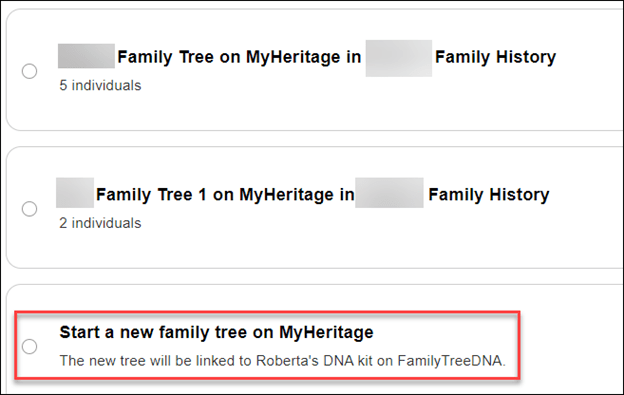
Consent is Critical
In either of the two scenarios above, transferring a tree or starting a new tree, you’ll see a consent notification below the tree options.

I’m not sure you can see this clearly in this screen shot, so I’ll transcribe it below.
I consent for MyHeritage to share my updated family tree information With FamilyTreeDNA from time to time, and I understand and consent that, upon sharing, such information will be subject to the FamilyTreeDNA privacy policy and terms of service, independently of MyHeritage.
It’s critically important for you to CONSENT to this transfer of information back to FamilyTreeDNA. This allows FamilyTreeDNA to use your tree data to improve their products and services for you – the same way they’ve always utilized customer information. For example, where your ancestors are from is critically important to improving MyOrigins and other geographically related tools.
If you transfer a tree, the consent box is already checked, but if you start a new tree after arriving through the FamilyTreeDNA platform, the consent is there, but it’s unchecked – so you have to check it.

I very strongly encourage you to transfer an existing tree or start a new one if you don’t have one, because that’s the ONLY WAY your tree information can benefit your results at FamilyTreeDNA.
Now for the bad news – if you link your FamilyTreeDNA account to an existing tree at MyHeritage, there is no option to consent for MyHeritage to send your tree information back to FamilyTreeDNA.
I really hope this policy is revised. It isn’t fair that FamilyTreeDNA can’t receive information from the trees of its customers, nor is it fair to their customers. Hopefully, this is just an oversight and will be remedied shortly.
If You Link to an Existing Tree at MyHeritage

If you link to an already existing tree at MyHeritage, you do NOT see a option to consent for your information to be provided periodically to FamilyTreeDNA.
There’s literally nothing below the trees where the consent verbiage is found with other options.
In my case, I’m an active user at MyHeritage, always growing my tree, so I was going to link my FTDNA account to myself in my tree at MyHeritage.
That is, until I discovered that MyHeritage DOES NOT PROVIDE THE CONSENT OPTION.
So, instead, I’ve transferred my existing tree to MyHeritage. This option has no disadvantages.

You can transfer any size tree to MyHeritage from FamilyTreeDNA, no matter how large. After initiating a transfer, you will receive a message that MyHeritage will email you when the transfer is complete.
My tree was finished transferring by the time I got something to drink and came back to my desk.

If you’re already a MyHeritage customer, you can have any number of trees of any size and there’s no additional cost to add to or modify trees if you’re a subscriber.
If you’re not a subscriber, you can still transfer a tree of any size from FamilyTreeDNA, but after 90 days, you will need a MyHeritage subscription if you want to add to that tree if it has more than 250 people.
For FamilyTreeDNA purposes, I’ll use the tree that I transferred from FamilyTreeDNA and keep my FamilyTreeDNA test linked to “me” in that tree and my cousins linked to “them” in that tree.
The best aspect of transferring your current tree from FamilyTreeDNA is that your linked relatives all stay linked automatically!
Of course, I’ll continue to use my MyHeritage tree for genealogy research and for my MyHeritage DNA kits.
I love my MyHeritage subscription. Transferring my FamilyTreeDNA tree and using my MyHeritage tree for genealogy research gets me the best of both worlds.
Your FamilyTreeDNA Tree at MyHeritage
After my tree transferred to MyHeritage, I clicked on the “View Tree” link in the email to verify that the tree had transferred accurately.

Indeed, all 634 people were transferred – but the tree was assigned a strange name. I need to change that.

If you want to change the tree name on MyHeritage, and trust me, I do – just navigate to “Family Tree,” then “Manage family trees,” then select that tree, then click on “Edit tree settings at far right.
 Change the name to whatever you want. It’s crucial to rename it immediately if you are going to transfer multiple trees so you don’t forget which is which. Pay attention to the rest of the settings below the tree name to be sure you don’t accidentally select something you don’t want, then save the new name.
Modifying Tree Privacy, Functions and Sharing
You can change your mind about sharing with FamilyTreeDNA in either direction – meaning either enabling or disabling sharing – by clicking on “My Privacy” in the dropdown by your name at MyHeritage.

Then click on “Content.”
This is probably a good time to make sure you have enabled everything you want.

Next, you’ll see a list of every tree that you own on your MyHeritage site.

In this example, three trees are shown. The first tree is my regular MyHeritage Estes Family Tree. This is NOT a transferred FamilyTreeDNA tree, and no account from FamilyTreeDNA is linked to it.
There’s somewhat of a glitch going on here that I want to make you aware of.
As you can see, the option to “Allow sharing of my updated family tree information with FamilyTreeDNA” is available to check. In fact, I checked it. But it’s not valid and is misleading because it causes people to believe they can link to an existing tree at MyHeritage and share data back with FamilyTreeDNA, which is not the case.

If you click on the little “i” for information, you’ll see the above text that clearly says this setting “is only relevant for family trees that originated from FamilyTreeDNA and that you chose to transfer to MyHeritage to have the family tree linked to your FamilyTreeDNA account.”
Unfortunately, this option appearing here is causing people to simply link their FamilyTreeDNA account to their MyHeritage tree, believing that they will be sharing back with FamilyTreeDNA.
I really encourage MyHeritage to allow this data exchange because I think it would encourage people to maintain one tree at MyHeritage. This approach would benefit everyone and is not confusing.
On the second tree, which is also NOT a transferred tree, there is no option for sharing. This is not consistent with the first tree and causes confusion.
The third tree is my transferred tree. It does have the sharing option selected. This is a valid selection for this tree.
This is also a good time to review the features for each tree and make sure you have enabled or disabled the ones you want.
Back at FamilyTreeDNA
You can verify that you transferred your tree by checking your FamilyTreeDNA account. If you click on your tree, you’ll see a notification that you moved your tree.

Ok, now that the tree is moved, how do I know who’s linked?
How Do I Know Who’s Linked?
I can’t tell by looking at my FamilyTreeDNA tree on MyHeritage who is linked and who isn’t.
However, it’s easier than EVER at FamilyTreeDNA.
Just open your match list.

Prior to transferring my tree to MyHeritage, I had linked 15 people to their profile card on my tree at FamilyTreeDNA. Those 15 people triangulated with enough other matches to allow FamilyTreeDNA to bucket a total of 3601 paternal matches and 1602 maternal matches.
Before I transferred my tree, I made a list of all the people who were linked.
Now, you can see under each match whether they are linked on your tree at MyHeritage and, if so, the relationship you’ve chosen for them.
My parents are both linked.
However, my Ancestry V4 test that I’ve uploaded as my twin for illustration purposes for my blog is not linked, so let’s link it.

Just click on “Link on Family Tree” where you’ll be prompted to sign in to MyHeritage. I have a secure password keeper, so for me, signing in happens immediately when I click on the link.

Look what happened next, automatically.
My matches name at FamilyTreeDNA populated the search bar, and since my tree at MyHeritage is the same tree I transferred from FamilyTreeDNA, the names automatically match. Easy peasy.
If you’re using a different tree, meaning one you did NOT transfer from FamilyTreeDNA to MyHeritage, you’ll need to enter either the accurate spelling of the person’s name you want to link to or a name generic enough that MyHeritage can find a group to offer you.

For example, Estes returned 23 results and I can browse through them to select the tester at FamilyTreeDNA. Alternatively, I can add the tester’s name to the MyHeritage tree I’m using as my FamilyTreeDNA tree.
Troubleshooting Section
If You Stop After Linking Your Account but Before Selecting the Tree
I got distracted by something during this process – after I had linked my FamilyTreeDNA account and signed into MyHeritage, but BEFORE I had linked my tree.
I received this email.

Don’t be confused by this email.
- If you don’t link to a tree at MyHeritage, you will still receive matches at FamilyTreeDNA.
- Nothing you do or don’t do in terms of transferring or linking to a tree at MyHeritage affects your ability to receive DNA matches at FamilyTreeDNA.
- If you don’t transfer your tree or link to one at MyHeritage, you won’t be able to link new matches at FamilyTreeDNA to their profile in your tree, and you won’t receive new bucketed Family Matches.
Clicking on “Link Family Tree” in the email returns me to where I left off at MyHeritage. I then linked my FamilyTreeDNA account to the tree that I transferred from FamilyTreeDNA.
Account Settings
After signing on to FamilyTreeDNA, you may close the popup to transfer your tree and then not be able to figure out how to transfer your tree.

Another place where you can initiate transferring your tree is through Account Settings on your FamilyTreeDNA page, which is found under the gear by your name in the upper right-hand corner of your personal page.

More importantly, though, if you somehow make a mistake or get confused, this is where you go in your FamilyTreeDNA account to:
- Link to a home person in your tree
- Unlink your account from MyHeritage and start over
- Once your tree is transferred, you cannot automatically “untransfer” your tree, although you can sever the link via a disconnect, delete that tree at MyHeritage or update your privacy settings
- Disconnecting from MyHeritage restores your tree at FamilyTreeDNA
I clicked on “Link to Home Person.”

The four closest people are shown in the tree I had selected. If none of these are the person you seek as your home person in a tree, type the name of the person you want to link in the search box. If you’re linking a relative’s kit that you maintain for them, you’ll probably need to type their name if you’re linking them to an existing tree.
Or, if you selected the wrong tree, you can disconnect from your MyHeritage account altogether, start over, and select a different tree.
Unfortunately, you’re not going to recognize that name of the tree (unless you changed it), so you’ll have to click to view the tree if you don’t remember which one you selected.

By clicking on the results you wish, you can either view the tree or select that person to link to as the primary person in your tree.

Summary & More Resources
I know this has been a lot for one article. I’ve been testing for several days and have tried to help you better understand so that you don’t say later, “I sure wish I had known that…”
I’m incredibly grateful that FamilyTreeDNA and MyHeritage have made this process seamless, even maintaining our linked relationships with our matches.
To summarize what you need to do:
- Link your FamilyTreeDNA account to MyHeritage
- Transfer your FamilyTreeDNA tree to MyHeritage
- Link to the tree you want to use at MyHeritage and select the home person
- Verify that your linked matches are still linked
I recommend using your FamilyTreeDNA tree at MyHeritage for FamilyTreeDNA purposes because:
- The names are all spelled correctly, and your linked matches won’t be broken
- Consent for MyHeritage to allow FamilyTreeDNA to periodically receive updated information from your transferred FamilyTreeDNA tree
Additional Resources
- FamilyTreeDNA wrote an article about the new features, here.
- FamilyTreeDNA provides a FAQ here, including information for Group Projects and Group Administrators.
- MyHeritage wrote an article, here.
Now, transfer your tree and go enjoy the new tree features at MyHeritage!
_________________________________________________________
Share the Love!
You’re always welcome to forward articles or links to friends and share on social media.
If you haven’t already subscribed (it’s free,) you can receive an e-mail whenever I publish by clicking the “follow” button on the main blog page, here.
You Can Help Keep This Blog Free
I receive a small contribution when you click on some of the links to vendors in my articles. This does NOT increase your price but helps me keep the lights on and this informational blog free for everyone. Please click on the links in the articles or to the vendors below if you are purchasing products or DNA testing.
Thank you so much.
DNA Purchases and Free Uploads
- FamilyTreeDNA – Y, mitochondrial and autosomal DNA testing
- MyHeritage DNA – Autosomal DNA test
- MyHeritage FREE DNA file upload – Upload your DNA file from other vendors free
- AncestryDNA – Autosomal DNA test
- AncestryDNA Plus Traits
- 23andMe Ancestry – Autosomal DNA only, no Health
- 23andMe Ancestry Plus Health
Genealogy Products and Services
- MyHeritage Subscription with Free Trial
- Legacy Family Tree Webinars – Genealogy and DNA classes, subscription-based, some free
- Legacy Family Tree Software – Genealogy software for your computer
- OldNews – Old Newspapers with links to save to MyHeritage trees
- Newspapers.com – Search newspapers for your ancestors
- NewspaperArchive – Search different newspapers for your ancestors
My Books
- DNA for Native American Genealogy – by Roberta Estes, for those ordering the e-book from anyplace, or paperback within the United States
- DNA for Native American Genealogy – for those ordering the paperback outside the US
- The Complete Guide to FamilyTreeDNA – Y-DNA, Mitochondrial, Autosomal and X-DNA
Genealogy Books
- Genealogical.com – Lots of wonderful genealogy research books
- American Ancestors – Wonderful selection of genealogy books
Genealogy Research
- Legacy Tree Genealogists – Professional genealogy research
Share this:

Discover more from DNAeXplained - Genetic Genealogy
Subscribe to get the latest posts sent to your email.
My main reason for not using My Heritage for tree building is my poor vision.
So the integration is not inspiring for me. I wish it was. I would love the merge.
My Heritage uses very muted tones making it harder for some of us to use it for long since we need more contrast and color.
Many retirees build tress as a hobby so I am sure I am not the only one with this concern.
One disadvantage with transferring the FTDNA trees for each kit you manage, instead of linking them all to one MH tree, is that if you later identify a new match to a group of kits that are related, and want to link that new match to the tree(s), you’ll need to build out multiple trees down to that new match. If you have all kits linked to the same MH tree, you only have to add the new match once.
Thank you. I had already messed things up. But…I have a lot of people to link to my main tree. Now I have multiple trees so I can link the various people they were linked to on FtDNA. Howdo I get back to fewer trees on MH?
You can either have more trees and keep the FTDNA ones or less trees and not keep the FTDNA ones. If you don’t keep the FTDNA trees, you’re hurting yourself and FTDNA in the long run.
But if you choose to use a existing tree at Myheritage, you can still consent for Familytreedna to receive updates here: https://www.myheritage.no/FP/site-content-settings.php
I confirmed that this was not possible but I have reached out again. Also your link goes to a page in another language and I can’t read it.
To view that page in English, right click the page and click “Translate to English”. The link however only entices one to start a free MH trial subscription which many people won’t want to do.
Here’s the answer from another commenter. Clicking on your account name and picture on the MyHeritage site gives a dropdown menu that includes ‘My privacy’: https://www.myheritage.com/FP/member-privacy-settings.php
That page will have privacy settings for all the Web Sites (trees) in your MyHeritage account. For whichever tree that has been connected to FTDNA, click on Content below it. Under the settings that control tree visibility and Smart Matching, there is a checkbox labeled ‘Allow sharing of my updated family tree information with FamilyTreeDNA’.
It has the following description: “Sharing of family tree information FamilyTreeDNA is a setting that is only relevant for family trees that originated from FamilyTreeDNA and that you chose to transfer to MyHeritage to have the family tree linked to your FamilyTreeDNA account. When enabled, we will share your updated family tree information on MyHeritage, back with FamilyTreeDNA, from time to time.”
I’ve added a section titled “Modifying Tree Privacy, Functions and Sharing” that addresses your concerns. It is confusing, but the little info block explains that this is not valid for a non-transferred tree. That option shouldn’t be there and it’s not for all trees. Thank you for noticing.
Lots of information. Thank you! Simple question that you may have answered, but I couldn’t find easily in all you listed. After transferring my tree, and not having a MyHeritage subscription, I see that I won’t be able to add to or modify my tree after 90 days, which is not a problem. After 90 days, will my matches still be able to see and explore my tree without a subscription, and will I be able to do the same with theirs? I’m just afraid of a bait and switch that the only way I will be able to see trees of matches is with a MyHeritage subscription.
Yes and yes. You can. No subscription required to view. Only to change or add if over 250!
Hi Roberta
I didn’t read the whole article (missed the red warning), before choosing my existing tree at MyHeritage, instead of transferring my FTDNA tree.
How do I undo and reverse the entire process?
Instructions are in the troubleshooting section. It’s the disconnect.
Roberta, I transferred my brother’s tree to MyHeritage, selected my existing MyHeritage tree. I then did the select the person in that tree and picked him. His tree at FTDNA shows me as the Home Person. I reversed the process and tried again. Same result. It happened with other kits and trees. I’ve informed FTDNA but have not yet heard back. Any thoughts?
Also did you not have to turn off 2 factor verification at FTDNA to make it work?
FTDNA doesn’t have 2FA but MyHeritage does and it worked just fine.
A useful, positive but also misleading article. The FTDNA Blog explained exactly how I could apply the ‘sharing’ consent against my existing MyH tree and I did that quite simply.
I think that you should amend this blog and send out a revised email to your subscribers because you are currently advising people who laready have robust working trees on MyH to set up and maintain a duplicate tree there there when this is completely unnecessary and counterproductive.
That’s not the same sharing. That sharing in the FTDNA blog is to allow an admin at FTDNA to access your tree at MyHeritage.
I confirmed that my statement is accurate but I just sent a screen shot of the part of their blog article that I think is confusing you. I have asked them to verify again.
Here’s the answer from another commenter. Clicking on your account name and picture on the MyHeritage site gives a dropdown menu that includes ‘My privacy’: https://www.myheritage.com/FP/member-privacy-settings.php
That page will have privacy settings for all the Web Sites (trees) in your MyHeritage account. For whichever tree that has been connected to FTDNA, click on Content below it. Under the settings that control tree visibility and Smart Matching, there is a checkbox labeled ‘Allow sharing of my updated family tree information with FamilyTreeDNA’.
It has the following description: “Sharing of family tree information FamilyTreeDNA is a setting that is only relevant for family trees that originated from FamilyTreeDNA and that you chose to transfer to MyHeritage to have the family tree linked to your FamilyTreeDNA account. When enabled, we will share your updated family tree information on MyHeritage, back with FamilyTreeDNA, from time to time.”
I’ve added a section titled “Modifying Tree Privacy, Functions and Sharing” that addresses your concerns. It is confusing, but the little info block explains that this is not valid for a non-transferred tree. That option shouldn’t be there and it’s not for all trees. Thank you for noticing.
I think I found the MyHeritage setting that the consent checkbox controls.
Clicking on your account name and picture on the MyHeritage site gives a dropdown menu that includes ‘My privacy’: https://www.myheritage.com/FP/member-privacy-settings.php
That page will have privacy settings for all the Web Sites (trees) in your MyHeritage account. For whichever tree that has been connected to FTDNA, click on Content below it. Under the settings that control tree visibility and Smart Matching, there is a checkbox labeled ‘Allow sharing of my updated family tree information with FamilyTreeDNA’.
It has the following description: “Sharing of family tree information FamilyTreeDNA is a setting that is only relevant for family trees that originated from FamilyTreeDNA and that you chose to transfer to MyHeritage to have the family tree linked to your FamilyTreeDNA account. When enabled, we will share your updated family tree information on MyHeritage, back with FamilyTreeDNA, from time to time.”
Thank you. That confirms the info I received from FTDNA and what their blog says too.
Thank you for your very, very informative article. I think FTDNA should have already provided instructions at least as informative, instead of marketing blabla. I already have an account on MyHeritage site, and have trimmed it to fit under the 250 profile limit. My FTDNA tree has more people, so I was thinking of the solution to open a new account on MH and transfer the tree and then leave it be. Not going to pay for that tree either, no matter how often MH will call! What I would really appreciate is that FTDNA might develop their cooperation with geni.com (where I am a paying customer) and open the possibility to link cousins from their common world tree. Especially for us Finns geni is already so good a platform, one does not necessarily need private trees. Quality is kept high with common rules and guidance, voluntary curators, discussion groups etc. Also Wikitree.com works much in the same way, but it is sadly too focused on American profiles and practices and does not support Finnish language. Geni already connects to FTDNA kits and gets haplogroups for profiles from them, so this cooperation would be the logical next step. And I would dump that transferred tree immediately.
You don’t need to open a second MyHeritage account. You can have both trees on the same account if you want. It’s totally up to you.
Is there a way to contact the officials at MyHeritage? There are changes I thin they need to make. I once had a paid subscription to MyHeritage but did not renew because I kept getting undesirable messages from MyHeritage. For instance my great grandfather’s obituary is a mistake because it was published two days after he died. For instance they want me to accept a lot of information from someone else’s tree where I see MANY errors just because that tree has one date or place that I have not entered in my tree.
You don’t have to accept any suggestions. Also, I’ve added a section titled “Modifying Tree Privacy, Functions and Sharing” that show several options that you can disable which will address several of your concerns.
Unless I’m mistaken, MyHeritage has never had linked matches. Only FTDNA and Ancestry have linked matches that give you exact matches. i.e. 4th cousin 1 removed.
You are right. The linked matches are only for FTDNA.
I’m not sure what “integrate” means between a FTDNA tree and an existing MH tree. Is the result a single, integrated tree where somehow your FTDNA is melded into a single tree with MH (If so, how do they resolve discrepancies where one tree has Robert and the other Rob’t, for instance.) Or are there are two separate trees under the same account: the MH tree and separate unchanged FTDM tree?
No the trees are not merged. It’s a platform integration where you migrate your FamilyTreeDNA tree to MyHeritage and use that tree there. An alternative is linking your FamilyTreeDNA account to a tree you already have at MyHeritage.
Search your MyHeritage tree for each match and confirm their placement in your tree.
Not going to happen. I won’t spend that much time and effort. This rates right up there with the time I divided my tree at ancestry.com and then tried to merge them back together. Nope. What ever kind of mess my tree is now wherever it is, is what it will be. I won’t be working on it.
Then just transfer your tree and you won’t have to do any of that.
I’ve hit a snag with connecting my tree. Under account settings>Genealogy>Family Tree
is a message saying
Manage your MyHeritage account and tree connection.
Connecting accounts
Your connection is in progress. This may take a few minutes to complete. Once connected, you will be able to select who you are in your tree and link your matches.
This has been connecting for 3 days… I have successfully linked 3 other accounts to my MyHeritage tree. “Restarting the connection” causes the same issue. I have cleared my cache and restarted the browser several times to no avaial.
I have raised a support ticket with FTDNA and am waiting for a reply.
As I understand this, it’s a glitch that’s being worked on so hold tight.
Will the bucketing remain if I don’t transfer my FTDNA tree? I have no plan to link new matches.
Yes, it will.
Yes
Thanks for all the information Roberta.
Will the existing tree on ftdna remain after it’s been transferred? ie the original tree (albeit read only) and the transferred version at MyHeritage?
I hope so as it’s useful for autosomal users.
When you click on the tree link at FamilyTreeDNA for a match now, you’ll automatically see the tree at MyHeritage. The tree at FamilyTreeDNA is still “there” in case you decide to disconnect from MyHeritage.
I manage my separate father’s account and Kit on FTDNA, and have never been able to upload a ged file to create his tree and thus to take full advantage of the tools. Consequently, I have never been able to see the maternal/paternal assignments on his account. It now seems I don’t have an option to create one on FTDNA at all (I had thought perhaps I’d give it one last try and then transfer to MH). If I now go through FTDNA to MH to create a tree for him, I’m hoping that the upload will work. But do I understand correctly, that because the tree didn’t transfer from FTDNA, then it won’t be able to be linked to all the tools/analysis e.g. maternal/paternal bucketing? TY
If you go through the FTDNA platform to create the new tree on MH, you get the option to return data. That example is in the article. Or you can still create a tree at FTDNA and transfer. If you call support they can help you. You don’t need to create a GEDCOM to do the transfer.
I followed the example in the article, and saw a message at the top of the screen that the two accounts were now linked, but after checking the consent and clicking , I was given an overlay error message that there was an error and to try again later. I did do several other times but still got the same error. When trying to cancel out, I then noticed that several blank trees had been created, obviously when I had retried those several times. I deleted the excess, newly generated trees. The number of people in the new tree is zero, as it should be. However, when I click on it takes me to my developed tree rather than my father’s. How do I get the new tree to develop it (I would like to upload his GEDcom)? Thank you
It’s a bug that has been reported to both companies and they are working on it. I’d wait a few days and try again.
I have tried again today, and this has not yet been resolved.
And when I open his FTDNA page, I still get the warning about transferring trees, and the ability to create anew in MH.
Have you heard anything?
Not yet.
Meg. I checked and FamilyTreeDNA asks that you contact support with screenshots of the errors you are receiving.
Roberta, FTDNA’s online contact form does not have a facility for sending screenshots. Is there another method I should be using for sending the information you suggest?
Is there an email address for support?
I believe this is the email. helpdesk@familytreedna.com
I have updated information. You can no longer start a new tree on the FamilyTreeDNA platform. New trees will be started on the MyHeritage platform. This also means that if you delete your tree at FamilyTreeDNA, you cannot upload a new one to FamilyTreeDNA before transferring to MyHeritage.
My family tree on FTDNA is not up to date with my Reunion genealogy program. I want my tree to be up to date before I transfer. I want to update or replace my FTDNA tree with my Reunion tree. Can I do this before I transfer. I have a tree on MyHeritage that is not as complete as FTDNA. What is the best way for me to proceed?
Yes. Update the FTDNA tree and link your matches. Then transfer. Or you can link your matches after you transfer.
I just verified with FamilyTreeDNA that while existing trees can be transferred, all new trees must be started at MyHeritage. Uploading a new tree is considered starting a new tree, so that won’t work anymore. I’m sorry.
Something I’m still confused on. I manage multiple kits on both MH and FTDNA. On MH they’re all on one account/login. On FTDNA each of those is a separate account with a separate login, and as such they have separate trees. You recommend downloading trees from FTDNA to MH for the linking, but does that mean I have to have multiple, duplicate trees on MH going forward?
MH doesn’t allow merging duplicate people but does suggest using “connect/disconnect” to deal with duplicates, though I don’t know if you can do that between trees. Is there going to be a way to keep the FTDNA linking without having to try to maintain five trees (my existing MH tree plus four near-duplicate FTDNA trees)? Thanks!
Yes, that means you’ll have to maintain separate trees , but only two. You can also transfer one tree from FamilyTreeDNA, then link your other FamilyTreeDNA kits to that transferred tree if they are the same family. You would just link each tester to the correct profile card for the home person. You cannot connect between trees at MyHeritage.
Finally got around to doing this (family medical drama ate much of August), and while the first tree went fine I can’t seem to “Link home person on the tree” on any of the other accounts. The “Select the name that represents you” box just has a spinning orange circle that never stops.
I got “Your account was successfully linked” emails for all four accounts, and “Update: Your MyHeritage Tree is Now Complete” for three (the original, 2nd, and 4th trees). But I can’t link a home person for the 2nd/3rd/4th accounts I transferred.
Each of the trees after the first were linked to the first tree. The aforementioned family issues have left me a bit brain-fogged, so hopefully I didn’t make a stupid mistake somewhere along the line.
It’s not you! There are ongoing bugs that have yet to be resolved. Please log this with FamilyTreeDNA.
As of today (Sep. 23) I was finally able to link everyone to themselves in the tree. Hopefully it’s not a glitch and it will work for everyone else now :-).
I manage two accounts that just won’t link, and a couple that just go to the tree in MH and just sit there. Tech support said a week ago they will let me know when it’s fixed. Nothing yet.
Same issue, and I contacted them a week ago with no response. I’ll try again.
I’m having the same problem getting help from Customer Support. I sent them detailed messages with screen shots and attachments showing what I’d done to link my own and my sister’s accounts and to transfer my one FTDNA tree. I also told them I’d received confirmation emails saying “Your account was successfully linked” for both accounts and “Update: Your MyHeritage Tree is Now Complete” for the one transferred tree. I asked them to tell me if I was doing something incorrectly and, if so, what I should do instead. I also asked if my match list at FTDNA should show whether or not a new match that I tried to link to my tree after transferring it had been linked successfully. They only confirmed that a newly linked match would be identified in my FTDNA match list as linked immediately after a successful linking. The two matches that I’ve tried to link have not had their status changed, so obviously something is still wrong–either my own user error (despite carefully following the instructions step by step) or a glitch in the system. I wish I knew which it was, because I hate to waste more time starting over if the problem is with the system and not with me.
F.T.C.
Oy! I did not realize that the “share with FTDNA” selection would not work with linking to existing MyHeritage Family trees (which is what I linked to) but It sounds like (to me) that I can unlink from my existing MyHeritage Family Tree, which should return my tree to FTDNA, and then I can transfer it to MyHeritage as a separate ‘new’ tree to maintain my DNA match linkages and create new ones, is that correct? I do not like having multiple copies of the same tree since it seems to be performing double the work to maintain both trees, not to mention the nightmare of making sure that both trees are consistently synced.
Yes, you can go back to FamilyTreeDNA and unlink from MyHeritage, then start over. Yes, you can transfer your existing FamilyTreeDNA tree. I agree about two trees. I wish that MyHeritage would return the data from FamilyTreeDNA users who connect to their trees so that we don’t need to maintain separate trees.
My parents both have FTDNA tests and trees, and I have an existing large tree and a subscription at MH, but I want to continue to link FTDNA matches to their place in my trees, so I elected to transfer my FTDNA trees to MH, as you recommended, Roberta. However, my existing FTDNA trees are small due to the clumsy and slow tree building interface there, so I elected to delete the old, small trees at FTDNA (after downloading the csv file of all linked matches for each tree), upload more extensive maternal and paternal GEDCOMS from the FTM19 version of my full tree, and then transfer those much larger trees to MH from both of my parents’ accounts.
This worked for my dad’s tree — I now have all his known ancestors and all collateral relatives down five generations from his ancestors. But an hour later, when I went to upload my mother’s newly generated GEDCOM to FTDNA, the interface for doing that was nowhere to be found. Instead I just get prompted to build a new tree at MH. Argghh! She has over 10k people in her Gedcom.
If my hunch is correct, FTDNA changed their interface within the past couple of hours, so if you don’t have a tree there (or just deleted it, as I did!), you can no longer create one, except at MH. And — this is crucial — I see no way to create this new tree by uploading a GEDCOM! Instead, all MH offers in terms of populating the FTDNA-linked tree is the laborious manual addition of all tree details.
So much for the 9/11/24 end date for making FTDNA trees “read only.”
Thanks for all your work on this, Roberta! And please let me know if you think I’ve got this wrong.
I don’t know but given that it’s a weekend, I’d guess that it’s a glitch.
I just verified with FamilyTreeDNA that while existing trees can be transferred, all new trees must be started at MyHeritage. Uploading a new tree is considered starting a new tree, so that won’t work anymore. I’m sorry.
You can no longer start a new tree on the FamilyTreeDNA platform. New trees will be started on the MyHeritage platform. This also means that if you delete your tree at FamilyTreeDNA, you cannot upload a new one to FamilyTreeDNA before transferring to MyHeritage. I have updated the article with this information as well.
Yup, that’s what I feared. I missed being able to use a GEDCOM for my mother’s huuuge (Scottish and Irish) tree by about an hour last Sunday. Too bad FTDNA did not warn me that they were about to disable the creation of trees there when I deleted the small tree I had laboriously built over 10 years.
What would help is if MH could be convinced to enable GEDCOM uploads for the linked FTDNA trees. You can upload a GEDCOM to MH, but cannot then consent to the transfer of info back to FTDNA. I already have a large tree at MH with my mother’s side in it — same problem. I am very angry right now, because even though it was small compared to the GEDCOM I created on Sunday, at least transfering my mother’s FTDNA tree would have saved me hundreds of hours of tree building tedium at MH.
I am trying to unlink my FTDNA tree from MyHeritage, because I did not do something correctly, but can not find how to unlink them, can you help me?
Thanks,
Sherry
It’s in the troubleshooting sectionof this article. You go to your account at FTDNA and then under the Account Settings, then Family Tree, then disconnect the account.
I seem to have landed into a Catch 22 situation. I successfully managed to upload and link most of my FTDNA trees to MyHeritage but I am stuck trying to do the same with my wife’s tree. On the FTDNA end it is allowing me to start the process, but when I login to MyHeritage, I get a message saying that the tree is already linked. FTDNA does not think so however. I have gone back and forward several times to no avail. Any suggestions?
Please report this to FamilyTreeDNA so that they can compile these issues and work with MyHeritage to resolve.
I followed your suggestion and spoke with FTDNA support. They said that they reported my problem to the IT team and they would get back to me when they had an update. That was on 8/3/24 and I am still waiting.
I managed to solve my problem by uploading the 2 FTDNA trees to a different MyHeritage site. It is very strange that the first site worked to upload 10 other trees but would not work for these two. The only difference between the 2 MyHeritage sites was the email used.
I have 7 family kits at FTDNA. I had already uploaded the DNA for each of them to MyHeritage, where they all are under my account, connected to my tree and I manage them. So, if I understand correctly, that has nothing to do with transferring the FTDNA trees to MyHeritage that we are now advised to do. Is that correct?
So, now, again, if I understand correctly, in order to transfer the FTDNA trees to MyHeritage, as you recommend, I’ll have to create a separate free account for each of them at MyHeritage. And upload a separate tree for each of them. Is that correct? Or can they all be tied to one tree?
No, you don’t need separate accounts. You can transfer them all to the same account and that’s what you should do.
Thank you, Roberta.
To add to my previous question, I am a project administrator, and the 7 kits I mentioned are in my project. Is there an easier way for me to do this for all of the kits?
No you need to do it one at a time to assure everything is working and verify your links.
I transferred my husband’s tree successfully. I have been trying dozens of times to transfer my own tree. I get the tree is being transferred message but the tree never shows up. Then I got lots of “Oops something went wrong” messages. Now back to the tree is being transferred and will let you know when it’s done. But I never get an email that the tree is transferred and it isn’t on MyHeritage. There doesn’t seem to be a way for me to resolve this issue and FTDNA has not responded to any of my messages for assistance.
My Heritage heard you, Roberta. They will soon be adding the data consent feature for existing trees linked to FTDNA, according to Katy Rowe-Schurwanz, product manager at FTDNA. She made the announcement on a webinar I watched yesterday from the Dallas Genealogical Society.
Where is the setting at FtDNA to allow Group Admins to view your tree at MyHeritage?
Administrators can view your tree the same way now as before. It doesn’t matter whether it’s on the MyHeritage or FamilyTreeDNA Platform. However, if you want to grant the admin the ability to assist you by transferring and connecting your tree at MyHeritage, you’ll find that under Settings, Project Preferences, then click on the pencil to edit the project to allow an administrator to transfer and connect your tree to MyHeritage. It’s the last column for each administrator titled “Allow MyHeritage Connection.” Please note that this only needs to be done once for each person’s tree, so you either need to do it yourself or you need to work with one admin to assist you. You don’t need to enable an admin in each project because they don’t need to do this to view your tree.
In the section above, “How Do I Know Who’s Linked?” Roberta Estes wrote:
“it’s easier than EVER at FamilyTreeDNA. . . . Just open your match list. . . . Now, you can see under each match whether they are linked on your tree at MyHeritage and, if so, the relationship you’ve chosen for them.”
I transferred my FTDNA tree to MH and got the confirmation email saying it had transferred successfully. When I checked my pre-existing linked matches to confirm that they were linked properly, FTDNA showed that they were, as you described above.
Then (five days ago), I followed the instructions to link another FTDNA match to my transferred tree. To do that, I first built out my transferred tree to include her line of descent from our MRCAC. When I tried to link her from my FTDNA matches list, there was no option to link her to her profile card in the transferred tree. So I unlinked her from both of her parents, deleted her from the tree, then went back to her entry in my FTDNA matches list, chose “Link on Family Tree,” and linked her to her parents by adding her as a new person, which was the only appropriate option available.
I’ve checked my FTDNA matches list repeatedly to see if it now shows her as linked to my transferred tree, but it does not. Is the FTDNA matches list not updated to show newly linked matches or did my attempt to link her fail?
Thank you very, very much for any clarification you can provide. I don’t want to waste time trying to link other matches until I know whether or not the process is working correctly for me.
F.T.C.
I’m sorry, I can’t sort this out by descriptions so I suggest that you contact FamilyTreeDNA. This isn’t the way it’s supposed to be working but I don’t quite know how to unravel this for you.
It was mentioned that you worked with multiple kits and I assume each kit has it’s own tree (as the kits I manage do). I did not see any indication of how you linked the correct uploaded kit to the correct uploaded DNA. In your case it seemed to guess the wright one or maybe it was the only one, for the purpose of this presentation. I have trees and I have DNA kits but I can’t figure out how to link each tree to it’s respective DNA kit. I guess that means there are 3 different types of linking. 🙂
Please contact FamilyTreeDNA support.
Hi Roberta, I also saw your webinar on this topic and it was extrememly helpful. Thankyou very much. Just a quick question. When you say “connect to the home person” do you mean the home person that I designated on my MyHeritage tree or the name of the person on the tree that I connected to the FTDNA kit numer (the tester)?
You need to connect your DNA kit to yourself on the tree at MyHeritage. If you manage any other kit, you need to connect the person whose DNA it is to them in the tree.
Thanks a lot. Unfortunately I did one kit already, incorrectly. Do you have instructions somewhere how to change the person it’s linked to?
Yes, it’s in the article and webinar both. Just go to your settings in FTDNA and unlink the kit and redo it. It’s the gear under your name.
Done! Can’t thank you enough. Also there is already a box you can tick in MH preferences to allow data transfer back to FTDNA if you transfered to your already existing MH tree. I think there is a comment above telling you this has happened …. thanks to your wishes 🙂 Very glad we don’t have to manage lots of seperate trees. Your instructions have been extremely valuable. Thanks a lot.
All of lthe individuals in one of my trees does not transfer from FTDNA to My Heritage. The tree is 25 individuals short. I have disconnected this particular tree twice, and followed the steps to transfer. Each try the numbers are the same.
About the transfer of data back to FTDNA for a transferred tree: how is that useful ?
Will my original (read-only) tree be updated internally in FTDNA with new dates and new people from MyH? (That I can’t see there since the tree is on MyH?)
Maybe it will be a better starting point if I in some future disconnect and transfer to some other place? Or what..?
Among other things, that’s part of how they update ethnicity and attribute countries to Y and myDNA results.
It’s Sunday evening, 8:24 Eastern time. A few minutes ago, I transferred my tree to MyHeritage. (It probably doesn’t make any difference for the purpose of this comment, but I actually began utilizing my already existing and much larger tree on MyHeritage.) After I came back to FTdna, all of my autosomal and Y DNA matches have disappeared. And I don’t mean matches in my tree, I mean the DNA matches to my kit. Suspiciously, my mitochondrial matches are still there – and because I know that Roberta Estes is working really hard on the Mitochondrial project, well, you can see how that looks suspicious! All kidding aside, is this just a website glitch? Or is there some toggle button I’ve accidentally hit?
I think it’s a glitch. Please take some screen shots do you can report it to their support tomorrow in case it resets itself.
Pingback: 2024 Retrospective – Plus New Color Version of Complete Guide to FamilyTreeDNA | DNAeXplained – Genetic Genealogy
I have a free MyHeritage account since it began with a tree just below the max. so that I can edit it. I would like to upload my FamilyTreeDNA tree as a separate tree. If I upload my FamilyTree DNA tree to my MyHeritage account will I then not be able to edit my free trees as the combined trees would be over the maxium? How does integrating the FamilyTreeDNA tree to my MyHeritage free account impact my free tree? Thankyou in advance for your help.
I “think” the 250 limit is per family site. So, aside from that I don’t know. I apologize. Maybe ask MyHeritage.