

23andMe has always been primarily a DNA health company. You can purchase either a DNA for ancestry only kit or a DNA kit that includes both ancestry and health information. Their focus has always been on health, with genealogists providing both revenue and the possibility of genealogists opting-in to 23andMe’s health information data gathering initiative.
23andMe was the first company to offer commercial autosomal tests that included cousin matching, so genealogists flocked to test there in the early days.
Unfortunately, 23andMe didn’t mature to include or support trees which are the hallmark of genealogy.
Beginning in 2016 with Family Tree DNA’s Phased Family Matching and followed in 2019 by Ancestry’s ThruLines and MyHeritage’s Theories of Family Relativity, all major vendors except 23andMe have both tree functionality in terms of support as well as additional tree-based advanced features to assist genealogists.
Recently, 23andMe announced a liaison with FamilySearch, although it’s not a tree but a list of ancestors reaching back 7 generations.
The Family Search Connection
The e-mail I received from 23andMe said the following:
Dear 23andMe Beta Tester,
You’re invited to test our new beta feature! If you have a FamilySearch® Family Tree, you can now upload information about your ancestors to 23andMe and display it to your DNA Relatives and connections.
With this beta feature, it’s now easier for your DNA Relatives to view your family tree information and find shared ancestors. You can also use a new filter to find DNA Relatives who have uploaded their own family tree information.
Learn more about FamilySearch and start exploring.
Sincerely,
The 23andMe Team
23andMe does not share any of your personal information, including your genetic results, with FamilySearch.
FamilySearch International is a wholly owned nonprofit subsidiary of the Church of Jesus Christ of Latter-day Saints. FamilySearch is a registered 2019 trademark of Intellectual Reserve, Inc, and is used under license.
Yes, I am a beta tester, and you can be too.
About FamilySearch
I have used FamilySearch for years, but mostly for records.
Relative to trees, I find it quite confusing in terms of who can and cannot modify ancestor information and what happens to trees that non-church members upload as GEDCOM files.
FamilySearch is really one big shared world tree – meaning that everyone’s information is combined into one large “family.”
I’m not a member of the Church of Jesus Christ of Latter-day Saints, and I’m by no means an expert on how to use their software. Therefore, I don’t understand the inner workings of how (if) accuracy is determined,” who moderates disputes and their qualifications, and how changes are made. Furthermore, multiple questions about this topic have produced inconsistent answers.
It was my original understanding that one could never modify the main shared tree, but through this exercise, I’ve discovered that FamilySearch has made some significant changes and that is (apparently) no longer true.
This is great news, at least I think it is, unless several people wind up in a tug-of-war over a particular ancestor.
For this discussion, we are interested in the FamilySearch shared “big tree” and not in what happens with individual trees.
Ok, now that we’ve defined how FamilySearch works, at least in concept, let’s take a look at how to utilize the FamilySearch tree through 23andMe.
Enable Beta Testing
Sign into your account at 23andMe.


Beside your name at the upper right hand side of your page, you’ll see a down arrow. Click on that arrow or on your name and a list of options, above, will appear.
Click on “Settings.”
Scroll down to preferences where you’ll see Beta Program.


To join the Beta program, which is required for the FamilySearch functionality at this time, click on the magenta “Become a tester” button.
Next, you’ll need to connect your 23andMe profile to your tree, either at FamilySearch or another public tree.
Scroll back up to the “Personal Information” section, and look for the Enhanced Profile section, below.


Click on “Edit enhanced profile.”


Then select “Share a link to your online family tree” and click there. You’ll see the information, below.


At this point you have two options. You can click to add the FamilySearch information which they refer to as a tree, or you can enter a link to another supported tree in the area below. As you can see, that’s what I chose to do. You can also do both.
Supported trees are:
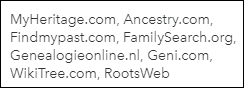

I believe they’ve forgotten to mention Family Tree DNA who also provides a link to share a tree that you might have created or uploaded there.
However, for this exercise, we’re going to click on the “Add FamilySearch” link.
If you already have a FamilySearch account and have constructed a tree at FamilySearch, you’ll click on the blue box to be directed to sign in.


Creating an Account and Building a Tree
If you haven’t built or uploaded a GEDCOM file to FamilySearch, you’ll be directed to build a tree which consists of adding enough people, beginning with you, until FamilySearch can discover someone already in their shared big tree. Your grandparents might be there, for example.
Once FamilySearch recognizes someone that you enter as being already in their tree, and you confirm that it’s the same person, FamilySearch simply adds your line to the existing big shared tree – whether those ancestors further back are right or wrong. That’s the ying and yang of shared trees.
I’m not a huge fan of shared trees, but FamilySearch has implemented a very nice hints system and allows you to make modifications, so even if you’re not thrilled either, don’t write this option off without an evaluation. They are working to make their tools more accommodating and less cast in stone.
Here’s what you see at FamilySearch.


Beneath this page, you’ll be stepped through creating an account.
If You Have an Account
In my case, I have an account and a tree, so I click on the large blue box that says “Add your FamilySearch tree” which takes me to the FamilySearch sign-in page.
After signing in, you’ll see something similar to the following:


Note that if you’ve made corrections or changes at FamilySearch, you can upload a new version of this information by clicking on the blue “upload your new tree” link above the ancestors.
Based on my tree, I’m showing 4 grandparents, 8, great-grandparents, and so forth based on the shared FamilySearch tree, which is not necessarily the same as the GEDCOM file I uploaded. Don’t assume that it is.
Clicking the down arrow displays the various people in that category.
I strongly suggest checking these lineages well before you leave the FamilySearch tree connected to your 23andMe account.
These ancestors are connected in your 23andMe account at this point. Remember, your tree is not your own – but a combination of your twig connected to and interwoven with the larger shared tree which has been built using other users’ trees and input.
Click on the down arrows to display the ancestors gathered from the FamilySearch tree on your behalf.


In my case, the first, second and third generations are pretty much fine, needing only minor tweeking, like birth locations added. The people themselves are accurate.
In the fourth generation, we have some issues that can be easily fixed, like a misspelled name and missing birth and death information.


By clicking on the specific ancestor, you can view that ancestor’s information, but to actually modify that information, you’ll need to sign into your account through the regular FamilySearch page, not the 23andMe interface. We’ll cover how to make FamilySearch modifications after we finish the instructions for how to connect the FamilySearch tree to your 23andMe account.
By scrolling down to the bottom, beneath your ancestors, you’ll notice two options.


You can either remove this list of ancestors from your tree, or go to DNA Relatives at 23andMe. If you don’t remove the list of ancestors, exactly what you saw, above, is what your matches will see too.
After you fix issues with the FamilySearch tree, you will need to reupload by reinitiating this process in your Enhanced Profile, because the link to 23andMe is not live. Changes are not automatically reflected.
If you leave the FamilySearch list at 23andMe, be aware that you can also link to another tree as well. You don’t have to pick one or the other.
My 23andMe Choice
After taking a look at the FamilySearch shared tree, I quickly decided that until I am able to devote some significant time working on the tree at FamilySearch, I’m entering the link to my Ancestry, MyHeritage or Family Tree DNA tree – all 3 of which I control entirely meaning that they are not mixed with or predicated upon anyone else’s trees.
In the FamilySearch tree, I can find and replace incorrect ancestors through the 3th great-grandparents level pretty easily, assuming they stay that way and no one “recorrects” them. There are fewer descendants, so fewer cooks in the kitchen, so to speak. The information is newer in time, and therefore more likely to be accurate.
What I can’t do very well though, is to resolve several issues at the 4th and 5th great-grandparent level in the FamilySearch tree. By resolve, I mean that I’m not going to make changes unless I’m sure of the information I’m entering.
My issues that I really don’t know how to resolve are:
- One speculative couple with no documentation. It could be right, or wrong but I can’t readily tell without more research. I have never seen anything to suggest that the information is accurate and was surprised to see these people connected as parents – but I also can’t prove it wrong because I haven’t worked on the problem.
- A very convoluted mess wherein one ancestral couple, Gideon Farris (Faires) and Sarah McSpadden, is shown with daughter Anne Farris marrying Charles Beckworth Speak. That’s incorrect because although we don’t know Charles’ wife’s name, he was married in Maryland and the Faires family was in Virginia at that time. However, their daughter Sarah Faires did marry Charles Speak’s son, Nicholas Speak. This tree “fix” would not be quick or easy, I’m afraid, as there’s a lot of unraveling to be done.
- An incorrect set of parents. This I could resolve by removing the parents, but I’m hesitant to do so without additional research. At this point, it doesn’t matter, because unless I can fix the issues above, I don’t want this list showing to matches as my ancestors. That’s exactly how misinformation spreads.
- Several speculative wives for multiple ancestors which have been circulating without documentation online for years, including some that have been disproven. Sigh.
- My Dutch lines are a mess. I’m not sure if it’s incorrect information, or someone entirely unfamiliar with the Dutch language and records. In any case, one error leads to wrong parents in the next generation in several places – and yes – I’m sure because I’m working with Yvette Hoitink, a top-notch Dutch genealogist in the Netherlands and I have the original records.
Fixing Issues at FamilySearch
However, I would like to take advantage of the FamilySearch option as soon as I get my ancestors straightened out there, so let’s step through the process of fixing issues. You may become inspired to work on your ancestors at FamilySearch too. You’ll be helping others as well.
You might be asking why you might want to fix FamilySearch if you’re going to link to your own tree.
My personal goal is to, hopefully, leave this earth with my ancestors correctly recorded and connected – be it in my own tree or large public trees.
At FamilySearch, sign in and click on Family Tree.


You’ll see your ancestors, with you as the home person after you’ve set up your account and connected yourself.
I have no idea where the photo of me came from, but I assure you that I’m replacing it! You may find photos of family members at FamilySearch that you didn’t know about.
By clicking on any person’s name, you open their profile and you can then see information items available for you to edit.


For example, here’s my father, with Detail View enabled which shows sources of changes. Hmm, I wonder who Robert Lewis is. Who would be entering my father’s information?
I can click to send Robert a message, or I can click on the Edit box to make changes, or both.
I can scroll on down to view my father’s family information including spouses, children, parents and siblings. I have some work to do here, but at least I can now that FamilySearch has enabled editing.
You can do the same for each ancestor, including replacing one or both parents, or simply removing your ancestor as the child of the couple.
Be sure to read carefully while you’re getting to know the software. It’s easy to make editing mistakes and remove a mother from all the children, for example, instead of just from your ancestor.
Of course, you can always add her back, but slow and careful is always best.
Filter Results by FamilySearch Information
Back at 23andMe, you can filter your DNA Relatives matches by people who have uploaded FamilySearch results.


Look at the bottom of the list of filters on the left side of your matches.


Checking the box shows only people with the FamilySearch connection, but you can see that none of my matches have done this, so my number is a big fat zero.
What you cannot see here is if your matches have linked to other trees or have entered their family surnames which can be quite useful too. I wish we could filter on those features.
Two More Quick Tips!
Whether or not you utilize the FamilySearch connection to 23andMe, please, PLEASE connect some tree to your 23andMe account.
Adding surnames and linking a tree benefits everyone, because 23andMe displays this information when you click on your matches.
Please add your family surnames under the Family Background section of your settings, shown below. No, this does NOT integrate with FamilySearch or any other tree – so you need to do it manually.

23andMe displays both you and your matches locations and surnames side-by-side along with tree links when you click on any match, shown below.


I didn’t recognize my cousin, Patricia’s surnames, nor her name because she only used an initial for a surname, but when I clicked on her Ancestry tree, I immediately recognized our common ancestors, my great-grandparents.
Identifying our common ancestors with matches makes tools like shared matches much more useful.
Shared matches with Patricia show other people who we both match, AND, at 23andMe, if we share a DNA segment in common, indicated by the “yes” below. Assuming those matches are not identical by chance, knowing that someone matches both me and Patricia suggests that we share a common ancestor. In fact, I share 98 relatives in common with Patricia.


The “Yes” under shared DNA means that Patricia and that person and I share some common segment of DNA, inherited from our common ancestor.
Furthermore, by utilizing the chromosome browser, we can confirm that we share the same triangulated segments of DNA with other descendants of that same couple, which further strengthens the connections, adding to the genealogical DNA evidence needed to confirm ancestors.


Wow, look, 4 of these people share a substantial piece of the X chromosome with me and Patricia (burgundy, on top). The X chromosome, has a unique inheritance path. This X match immediately narrows the potential ancestors.


I know that Curtis Lore didn’t receive an X chromosome from his father, because he received a Y chromosome which made him a male, so these people have to be related through Rachel Levina Hill or her ancestors. Rachel’s X chromosome descended from the pink or blue ancestors. Viewing matches’ trees (if they have them) might well indicate which of these ancestors provided Rachel’s, which is that segment of my X chromosome.
What a lucky break and how exciting to know I carry something tangible from these people!
You can’t do this without trees or family information and you can’t do it without a chromosome browser. In this case, 1+1=goldmine. So connect up one way or another and have fun!
______________________________________________________________
Disclosure
I receive a small contribution when you click on some of the links to vendors in my articles. This does NOT increase the price you pay but helps me to keep the lights on and this informational blog free for everyone. Please click on the links in the articles or to the vendors below if you are purchasing products or DNA testing.
Thank you so much.
DNA Purchases and Free Transfers
- Family Tree DNA
- MyHeritage DNA only
- MyHeritage DNA plus Health
- MyHeritage FREE DNA file upload
- AncestryDNA
- 23andMe Ancestry
- 23andMe Ancestry Plus Health
- LivingDNA
Genealogy Services
Genealogy Research
- Legacy Tree Genealogists for genealogy research
