

I manage trees for a number of DNA tests for my relatives at various vendors. DNA and trees work hand-in-hand to identify common ancestors, providing hints to direct you along that path.
If you don’t have a tree at the sites that support trees, meaning FamilyTreeDNA, Ancestry and MyHeritage, please either create one or upload a GEDCOM file from your genealogy software. Many of the features provided by those vendors depend on both your DNA results and the tree you’re linked to. While 23andMe does not support trees, you can include a link to a tree in another site under “settings,” then “enhanced profile” – so do that.
In many cases, especially for Y and mitochondrial DNA at Family Tree DNA, I only enter the relevant line for the tests taken. That way, anyone who matches my cousin can check their tree and easily view the relevant line for the test.
Often, especially if the person tested at my request, I’m the one who has done the genealogy and I don’t research the wives or collateral lines that are not relevant to the test that was taken. I don’t want to do a lot of maintenance work to export only a small branch from my desktop software, so I create each tree by hand from scratch.
Of course, if they have taken a Family Finder test, I upload a more robust tree for them that includes as much of their various lines as I know.
Uploading or creating trees helps us and other genealogists break through their brick walls too.
Ned Matched John – But Encountered a “Privacy” Roadblock
Recently, another Estes tester, we’ll call him Ned, matched the Y DNA of my cousin, John, and emailed me, saying that John’s entire tree was private. I told him that I had not made John’s tree private, so Ned sent me a screenshot.

click to enlarge
There’s no dispute – while the tree itself isn’t private, every single person in the tree is.
What could be causing this? In other words, how do I fix it? That’s not AT ALL what I intended.
Let’s Check the Privacy Settings
The first thing to do, of course, is to check the settings – so I signed in to John’s account.
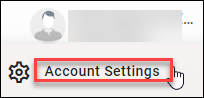
I checked the privacy settings, located under Account Settings just below the user name of the kit, after you sign in.
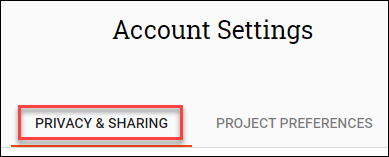
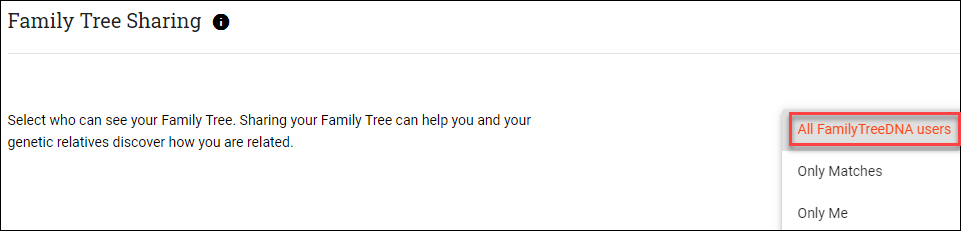
click to enlarge
That seemed odd, so I checked John’s tree myself. It looks fine to me, so I wonder what might be wrong?

click to enlarge
Nothing is showing as private from John’s perspective from within his account.
I decided to send Ned a direct sharing link to see if that made any difference.

The link I shared with Ned made no difference, but reading the information in the red box did! Yay for documentation!
I had not filled in the birth or death dates of the people in question or marked them as deceased. Yes, I know – my bad.
I clicked on the profile and then “View Profile” to verify.
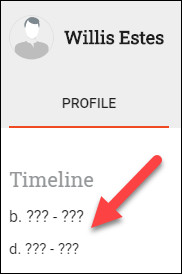
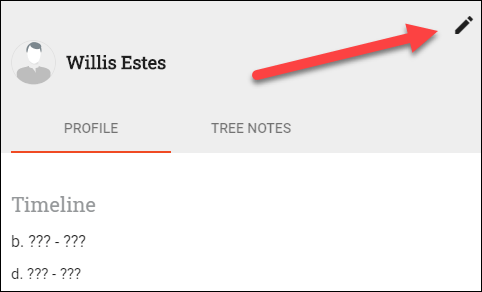
Sure enough – no dates. To edit the profile, click on the pencil.
In order to cause the death date and death location fields to display, you must check the “Deceased” box which then turns blue.
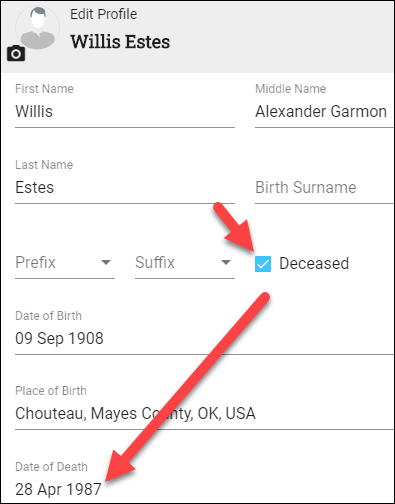
Even if you don’t know the death date or location, marking the person as deceased allows their information to be displayed, such as their name, and NOT to be marked as private.
If you do NOT click the deceased box, the person’s profile WILL be marked “private” and will not be shown to anyone except you, the tester, if you sign in. You’ll have no idea that it isn’t showing to other people when you had intended to share all along.

click to enlarge
I marked each person as deceased and added death dates and locations while I was working on the tree.
Did that take care of the problem?
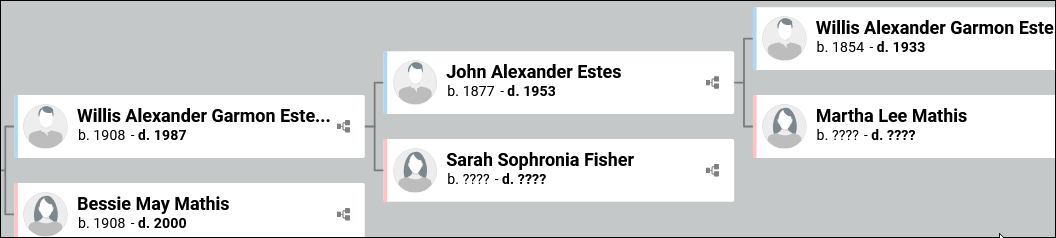
Let’s take a look from Ned’s perspective.
click to enlarge
Sure did.
In order for people to display, you need to kill them off, again😊
Tree Privacy
Every vendor has a combination of features that control tree privacy and security. You will be able to mark the entire tree private or shareable. You may be able to make it searchable, or not, depending on the vendor.
No vendor will display known living people to others – but the calculations they use to determine who may be living, unless you specifically mark them as deceased, will vary.
Be sure to check all of those factors, and find a way to view the tree from someone else’s perspective to check and be sure it’s functioning the way you expect.
I would never have known that all of John’s ancestors were private if Ned hadn’t contacted me.
At Family Tree DNA, if you view your own tree and you notice that neither dates nor question marks appear in the date field on the pedigree page – that means you have not marked these people as deceased – so no information for them will show to anyone else.
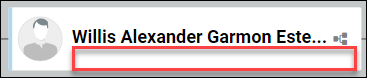
If you see any dates or question marks beneath the names of people on your tree – then that individual’s profile will show and is not private, unless you have marked the entire tree as private.
Check your trees to see if you have an unknown issue. Those valuable trees provide critical information to your matches. They may not contact you to ask why your tree is private – in fact – most won’t. They assume it’s a choice you meant to make.
Be sure you’re not unintentionally driving cousins away. You never know who’s going to have that crucial piece of information or photo, and you want all of your cousin-bait to function as intended!
_____________________________________________________________
Disclosure
I receive a small contribution when you click on some of the links to vendors in my articles. This does NOT increase the price you pay but helps me to keep the lights on and this informational blog free for everyone. Please click on the links in the articles or to the vendors below if you are purchasing products or DNA testing.
Thank you so much.
DNA Purchases and Free Transfers
- FamilyTreeDNA – Y, mitochondrial and autosomal DNA testing
- MyHeritage DNA – ancestry autosomal DNA only, not health
- MyHeritage DNA plus Health
- MyHeritage FREE DNA file upload – transfer your results from other vendors free
- AncestryDNA – autosomal DNA only
- 23andMe Ancestry – autosomal DNA only, no Health
- 23andMe Ancestry Plus Health
- LivingDNA
Genealogy Products and Services
- MyHeritage FREE Tree Builder – genealogy software for your computer
- MyHeritage Subscription with Free Trial
- Legacy Family Tree Webinars – genealogy and DNA classes, subscription-based, some free
- Legacy Family Tree Software – genealogy software for your computer
- Charting Companion – Charts and Reports to use with your genealogy software or FamilySearch
Genealogy Research
- Legacy Tree Genealogists – professional genealogy research
