


Time flies when you’re having fun. Also, apparently when you are blogging.
I started blogging because I manage a number of DNA projects at Family Tree DNA and rather than trying to constantly send group mails to project participants, which generally resulted in my e-mail address being blacklisted as a spammer, it was much, MUCH simpler to simply write “it,” whatever “it” happened to be, once, in a blog, available to my project members and the rest of the genetic genealogy community as well.
Another reason is because I constantly receive the same set of questions, and having a blog article to refer to with the answer is much easier than writing that same answer repeatedly. Plus, you can do the same thing when you receive these same questions.
I started the www.dna-explained.com blog on July 11, 2012 with the hope that I’d be able to write two articles a week. Then I officially decided that maybe one article per week would be a more realistic goal. For those of you who don’t write, that might sound easy. For those of you who do write – you’re wondering if I am out of my mind.
The answer, by the way, is “yes,” and I’m proud of it:) Runs in my family. Probably genetic. Is there a stubborn gene?
The surest way of getting one of my family members to do something is even to suggest that they can’t, or that it’s impossible. Fait accompli!
Had I hit my goal, by now I’d have either just over 150 articles at one per week, or just over 300 at two per week.
I have….drum roll please…..519.
Ok, so I might have gotten a little carried away.
That’s the good news….all that info for you. Now, the bad news is that because there are so many articles, it’s hard for a new person to real all 519 – or even to figure out which ones they should read.
Hmmm…need to do something about this.
There are a couple of answers to this dilemma – ways to effectively and efficiently find just what you’re looking for
Category Searching

Every one of my articles is categorized by search terms. If you’re interested in mitochondrial DNA, for example, you simply enter the term “mitochondrial” in the search box in the upper right hand corner and the blog will return to you any article I’ve tagged with “mitochondrial DNA,” beginning with the most recent.

You can see all the categories I’ve used if you scroll all the way down on the right side of the main blog page, but trust me when I say I tag these articles so they can be found in just about any way someone would be interested.
Key Word Searching
Let’s say you remember that you saw an article about using Big Y DNA results in the Estes family history project. You could search by Big Y, but let’s say you search instead by “Estes.” Estes is not a DNA search category, but the search engine will still find articles with Estes in the title, then articles with Estes in the text.

You can see that this article was also categorized under Big Y, SNP and STR, so it would have shown up if you had searched for any of those terms as well.
Search Tags
Because there is more than one way to organize data, WordPress also provides bloggers with something called Tags. In my case, I use Tags for broader categories of information. For example, my “52 Weeks of Ancestors” is one tag, as is the “autosomalme” series and the “2013 DNA Trip.” These aren’t exactly genetic genealogy terms, but they make sense for information groupings in the context of this blog.
Using This Blog As An Educational Tool
In honor of 500+ articles and nearly three years, I’ve introduced some new tags so that articles can be retrieved in a different way. My goal is to group articles in categories so that they are in essence a group of educational classes.
I’ve grouped articles into the following categories.
- Historical or Obsolete – these are items that were interesting at the time by aren’t really relevant today – except in a historical context. An example would be the announcement of the Genographic 2 project in July of 2012. You may wonder why I didn’t delete these. Looking back, these are somewhat like a genetic genealogy journal.
- General Information – these are generally articles about DNA and genealogy. They don’t presume that you’re actually working with the results.
- Basic Education – this may be basic genealogy or basic DNA fundamentals. These articles provide a foundation for working with your results. Think of it as pre-bootcamp.
- Introductory DNA – these articles do presume you are working with your results. Bootcamp begins here.
- Intermediate DNA – these are a little more difficult and you’ll probably need the basics and introductory understanding to be able to work at this level.
- Advanced DNA – very few articles are advanced. In fact, I try very hard to avoid this, when possible. Mostly, these have to do with advanced autosomal techniques and research.
- Examples – these are examples of using genealogy and DNA together seamlessly. My 52 Ancestors stories fall into this category. Think of these as story problems that include the answers!
- Educational – educational opportunities such as classes, books and videos.
- Entertainment – just for fun, like the Who Do You Think You Are series, some of these have no DNA content.
- Project Administration – articles written for project administrators at Family Tree DNA. Project administrators, of course, will be interested in all of the rest.
I have gone back and tagged every single article with it’s appropriate tag, and going forward, I’ll tag them as I write them so you can find them in their relevant grouping. No, that process wasn’t fun, but when I started this blog, I truly had no idea that anything like groupings would ever be necessary. Let’s just say this blog, as well as genetic genealogy, has taken on an evolutionary life of its own.
In the next several days, I’ll be publishing lists of the articles that fall into the various categories.
So, now, when someone asks for an educational resource, you have another tool to use and another reference.
Cant’s wait? There are two ways to access posts using these tags today.
To find the posts in any tag group, just enter the name of that tag group into the search engine – for example “Educational.” What will be returned are articles using the tag “educational,” plus anything else the search engine thinks falls into that category too.
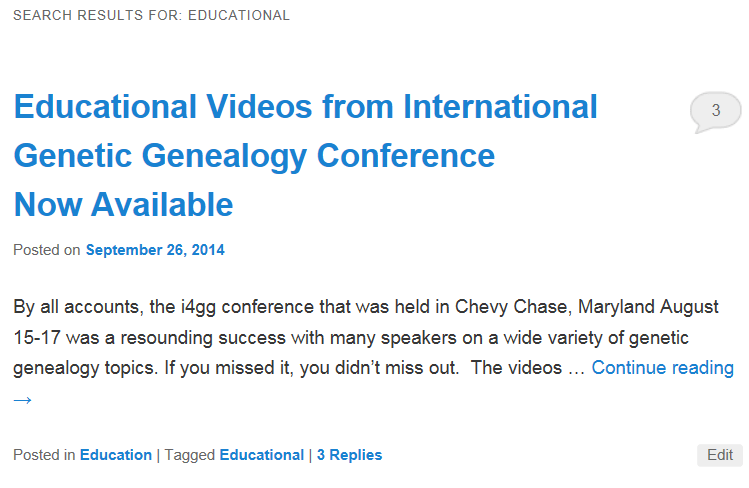
You can also see all of the tag groups by scrolling down the right sidebar on the main blog page, past the categories, to the “tag cloud”. I’m not cracked up about this format, but it’s what this blog theme offers. The most used tags are the largest. Just click on the one you want to see. It’s that easy. 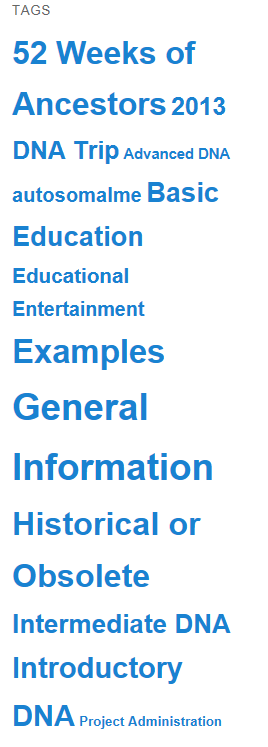
______________________________________________________________
Disclosure
I receive a small contribution when you click on some of the links to vendors in my articles. This does NOT increase the price you pay but helps me to keep the lights on and this informational blog free for everyone. Please click on the links in the articles or to the vendors below if you are purchasing products or DNA testing.
Thank you so much.
DNA Purchases and Free Transfers
- Family Tree DNA
- MyHeritage DNA only
- MyHeritage DNA plus Health
- MyHeritage FREE DNA file upload
- AncestryDNA
- 23andMe Ancestry
- 23andMe Ancestry Plus Health
- LivingDNA
Genealogy Services
Genealogy Research
- Legacy Tree Genealogists for genealogy research

